@intlayer/docs 8.10.1 → 8.11.2
This diff represents the content of publicly available package versions that have been released to one of the supported registries. The information contained in this diff is provided for informational purposes only and reflects changes between package versions as they appear in their respective public registries.
- package/blog/en/i18n_using_next-i18next.md +3 -3
- package/blog/en/i18n_using_next-intl.md +3 -3
- package/blog/en/list_i18n_technologies/frameworks/angular.md +3 -3
- package/blog/en/list_i18n_technologies/frameworks/react-native.md +3 -3
- package/blog/en/list_i18n_technologies/frameworks/react.md +3 -3
- package/blog/en/list_i18n_technologies/frameworks/svelte.md +3 -3
- package/blog/en/list_i18n_technologies/frameworks/vue.md +3 -3
- package/blog/en/next-i18next_vs_next-intl_vs_intlayer.md +3 -3
- package/dist/cjs/common.cjs +3 -1
- package/dist/cjs/common.cjs.map +1 -1
- package/dist/cjs/generated/blog.entry.cjs +0 -1
- package/dist/cjs/generated/blog.entry.cjs.map +1 -1
- package/dist/cjs/generated/docs.entry.cjs +39 -20
- package/dist/cjs/generated/docs.entry.cjs.map +1 -1
- package/dist/cjs/generated/frequentQuestions.entry.cjs +0 -1
- package/dist/cjs/generated/frequentQuestions.entry.cjs.map +1 -1
- package/dist/cjs/generated/legal.entry.cjs +0 -1
- package/dist/cjs/generated/legal.entry.cjs.map +1 -1
- package/dist/esm/common.mjs +3 -1
- package/dist/esm/common.mjs.map +1 -1
- package/dist/esm/generated/docs.entry.mjs +39 -19
- package/dist/esm/generated/docs.entry.mjs.map +1 -1
- package/dist/types/common.d.ts.map +1 -1
- package/dist/types/generated/docs.entry.d.ts +2 -1
- package/dist/types/generated/docs.entry.d.ts.map +1 -1
- package/docs/ar/benchmark/nextjs.md +1 -1
- package/docs/ar/benchmark/solid.md +1 -1
- package/docs/ar/benchmark/svelte.md +1 -1
- package/docs/ar/benchmark/tanstack.md +1 -1
- package/docs/ar/dictionary/markdown.md +165 -7
- package/docs/ar/{intlayer_with_angular.md → intlayer_with_angular_19.md} +8 -7
- package/docs/ar/intlayer_with_angular_21.md +412 -0
- package/docs/bn/intlayer_with_angular_21.md +412 -0
- package/docs/cs/intlayer_with_angular_21.md +412 -0
- package/docs/de/benchmark/nextjs.md +1 -1
- package/docs/de/benchmark/solid.md +1 -1
- package/docs/de/benchmark/svelte.md +1 -1
- package/docs/de/benchmark/tanstack.md +1 -1
- package/docs/de/dictionary/markdown.md +165 -7
- package/docs/de/{intlayer_with_angular.md → intlayer_with_angular_19.md} +8 -7
- package/docs/de/intlayer_with_angular_21.md +412 -0
- package/docs/en/benchmark/nextjs.md +1 -1
- package/docs/en/benchmark/solid.md +1 -1
- package/docs/en/benchmark/svelte.md +1 -1
- package/docs/en/benchmark/tanstack.md +1 -1
- package/docs/en/dictionary/markdown.md +167 -7
- package/docs/en/intlayer_with_adonisjs.md +3 -3
- package/docs/en/intlayer_with_analog.md +3 -3
- package/docs/en/{intlayer_with_angular.md → intlayer_with_angular_19.md} +10 -9
- package/docs/en/intlayer_with_angular_21.md +412 -0
- package/docs/en/intlayer_with_astro.md +3 -3
- package/docs/en/intlayer_with_astro_lit.md +3 -3
- package/docs/en/intlayer_with_astro_preact.md +3 -3
- package/docs/en/intlayer_with_astro_react.md +3 -3
- package/docs/en/intlayer_with_astro_solid.md +3 -3
- package/docs/en/intlayer_with_astro_svelte.md +3 -3
- package/docs/en/intlayer_with_astro_vanilla.md +3 -3
- package/docs/en/intlayer_with_astro_vue.md +3 -3
- package/docs/en/intlayer_with_create_react_app.md +3 -3
- package/docs/en/intlayer_with_express.md +3 -3
- package/docs/en/intlayer_with_fastify.md +3 -3
- package/docs/en/intlayer_with_hono.md +3 -3
- package/docs/en/intlayer_with_lynx+react.md +3 -3
- package/docs/en/intlayer_with_nestjs.md +3 -3
- package/docs/en/intlayer_with_next-i18next.md +3 -3
- package/docs/en/intlayer_with_next-intl.md +3 -3
- package/docs/en/intlayer_with_nextjs_14.md +3 -3
- package/docs/en/intlayer_with_nextjs_15.md +3 -3
- package/docs/en/intlayer_with_nextjs_16.md +3 -3
- package/docs/en/intlayer_with_nextjs_compiler.md +3 -3
- package/docs/en/intlayer_with_nextjs_no_locale_path.md +3 -3
- package/docs/en/intlayer_with_nextjs_page_router.md +3 -3
- package/docs/en/intlayer_with_nuxt.md +3 -3
- package/docs/en/intlayer_with_react_native+expo.md +3 -3
- package/docs/en/intlayer_with_react_router_v7.md +3 -3
- package/docs/en/intlayer_with_react_router_v7_fs_routes.md +3 -3
- package/docs/en/intlayer_with_svelte_kit.md +3 -3
- package/docs/en/intlayer_with_tanstack+solid.md +3 -3
- package/docs/en/intlayer_with_tanstack.md +3 -3
- package/docs/en/intlayer_with_vanilla.md +3 -3
- package/docs/en/intlayer_with_vite+lit.md +3 -3
- package/docs/en/intlayer_with_vite+preact.md +3 -3
- package/docs/en/intlayer_with_vite+react.md +3 -3
- package/docs/en/intlayer_with_vite+react_compiler.md +3 -3
- package/docs/en/intlayer_with_vite+solid.md +3 -3
- package/docs/en/intlayer_with_vite+svelte.md +3 -3
- package/docs/en/intlayer_with_vite+vanilla.md +3 -3
- package/docs/en/intlayer_with_vite+vue.md +3 -3
- package/docs/en-GB/benchmark/nextjs.md +1 -1
- package/docs/en-GB/benchmark/solid.md +1 -1
- package/docs/en-GB/benchmark/svelte.md +1 -1
- package/docs/en-GB/benchmark/tanstack.md +1 -1
- package/docs/en-GB/dictionary/markdown.md +161 -0
- package/docs/en-GB/{intlayer_with_angular.md → intlayer_with_angular_19.md} +8 -7
- package/docs/en-GB/intlayer_with_angular_21.md +412 -0
- package/docs/es/benchmark/nextjs.md +1 -1
- package/docs/es/benchmark/solid.md +1 -1
- package/docs/es/benchmark/svelte.md +1 -1
- package/docs/es/benchmark/tanstack.md +1 -1
- package/docs/es/dictionary/markdown.md +165 -7
- package/docs/es/{intlayer_with_angular.md → intlayer_with_angular_19.md} +8 -7
- package/docs/es/intlayer_with_angular_21.md +412 -0
- package/docs/fr/benchmark/nextjs.md +1 -1
- package/docs/fr/benchmark/solid.md +1 -1
- package/docs/fr/benchmark/svelte.md +1 -1
- package/docs/fr/benchmark/tanstack.md +1 -1
- package/docs/fr/dictionary/markdown.md +165 -7
- package/docs/fr/{intlayer_with_angular.md → intlayer_with_angular_19.md} +8 -7
- package/docs/fr/intlayer_with_angular_21.md +412 -0
- package/docs/hi/benchmark/nextjs.md +1 -1
- package/docs/hi/benchmark/solid.md +1 -1
- package/docs/hi/benchmark/svelte.md +1 -1
- package/docs/hi/benchmark/tanstack.md +1 -1
- package/docs/hi/dictionary/markdown.md +165 -7
- package/docs/hi/{intlayer_with_angular.md → intlayer_with_angular_19.md} +8 -7
- package/docs/hi/intlayer_with_angular_21.md +412 -0
- package/docs/id/benchmark/nextjs.md +1 -1
- package/docs/id/benchmark/solid.md +1 -1
- package/docs/id/benchmark/svelte.md +1 -1
- package/docs/id/benchmark/tanstack.md +1 -1
- package/docs/id/dictionary/markdown.md +165 -7
- package/docs/id/{intlayer_with_angular.md → intlayer_with_angular_19.md} +8 -7
- package/docs/id/intlayer_with_angular_21.md +412 -0
- package/docs/it/benchmark/nextjs.md +1 -1
- package/docs/it/benchmark/solid.md +1 -1
- package/docs/it/benchmark/svelte.md +1 -1
- package/docs/it/benchmark/tanstack.md +1 -1
- package/docs/it/dictionary/markdown.md +165 -7
- package/docs/it/{intlayer_with_angular.md → intlayer_with_angular_19.md} +8 -7
- package/docs/it/intlayer_with_angular_21.md +412 -0
- package/docs/ja/benchmark/nextjs.md +1 -1
- package/docs/ja/benchmark/solid.md +1 -1
- package/docs/ja/benchmark/svelte.md +1 -1
- package/docs/ja/benchmark/tanstack.md +1 -1
- package/docs/ja/{intlayer_with_angular.md → intlayer_with_angular_19.md} +8 -7
- package/docs/ja/intlayer_with_angular_21.md +412 -0
- package/docs/ko/benchmark/nextjs.md +1 -1
- package/docs/ko/benchmark/solid.md +1 -1
- package/docs/ko/benchmark/svelte.md +1 -1
- package/docs/ko/benchmark/tanstack.md +1 -1
- package/docs/ko/dictionary/markdown.md +165 -7
- package/docs/ko/{intlayer_with_angular.md → intlayer_with_angular_19.md} +8 -7
- package/docs/ko/intlayer_with_angular_21.md +412 -0
- package/docs/nl/intlayer_with_angular_21.md +412 -0
- package/docs/pl/benchmark/nextjs.md +1 -1
- package/docs/pl/benchmark/solid.md +1 -1
- package/docs/pl/benchmark/svelte.md +1 -1
- package/docs/pl/benchmark/tanstack.md +1 -1
- package/docs/pl/dictionary/markdown.md +165 -7
- package/docs/pl/{intlayer_with_angular.md → intlayer_with_angular_19.md} +8 -7
- package/docs/pl/intlayer_with_angular_21.md +412 -0
- package/docs/pt/benchmark/nextjs.md +1 -1
- package/docs/pt/benchmark/solid.md +1 -1
- package/docs/pt/benchmark/svelte.md +1 -1
- package/docs/pt/benchmark/tanstack.md +1 -1
- package/docs/pt/dictionary/markdown.md +165 -7
- package/docs/pt/{intlayer_with_angular.md → intlayer_with_angular_19.md} +8 -7
- package/docs/pt/intlayer_with_angular_21.md +412 -0
- package/docs/ru/benchmark/nextjs.md +1 -1
- package/docs/ru/benchmark/solid.md +1 -1
- package/docs/ru/benchmark/svelte.md +1 -1
- package/docs/ru/benchmark/tanstack.md +1 -1
- package/docs/ru/dictionary/markdown.md +161 -0
- package/docs/ru/{intlayer_with_angular.md → intlayer_with_angular_19.md} +8 -7
- package/docs/ru/intlayer_with_angular_21.md +412 -0
- package/docs/tr/benchmark/nextjs.md +1 -1
- package/docs/tr/benchmark/solid.md +1 -1
- package/docs/tr/benchmark/svelte.md +1 -1
- package/docs/tr/benchmark/tanstack.md +1 -1
- package/docs/tr/dictionary/markdown.md +165 -7
- package/docs/tr/{intlayer_with_angular.md → intlayer_with_angular_19.md} +8 -7
- package/docs/tr/intlayer_with_angular_21.md +412 -0
- package/docs/uk/benchmark/nextjs.md +1 -1
- package/docs/uk/benchmark/solid.md +1 -1
- package/docs/uk/benchmark/svelte.md +1 -1
- package/docs/uk/benchmark/tanstack.md +1 -1
- package/docs/uk/dictionary/markdown.md +165 -7
- package/docs/uk/{intlayer_with_angular.md → intlayer_with_angular_19.md} +8 -7
- package/docs/uk/intlayer_with_angular_21.md +412 -0
- package/docs/ur/intlayer_with_angular_21.md +412 -0
- package/docs/vi/benchmark/nextjs.md +1 -1
- package/docs/vi/benchmark/solid.md +1 -1
- package/docs/vi/benchmark/svelte.md +1 -1
- package/docs/vi/benchmark/tanstack.md +1 -1
- package/docs/vi/dictionary/markdown.md +165 -7
- package/docs/vi/{intlayer_with_angular.md → intlayer_with_angular_19.md} +8 -7
- package/docs/vi/intlayer_with_angular_21.md +412 -0
- package/docs/zh/benchmark/nextjs.md +1 -1
- package/docs/zh/benchmark/solid.md +1 -1
- package/docs/zh/benchmark/svelte.md +1 -1
- package/docs/zh/benchmark/tanstack.md +1 -1
- package/docs/zh/dictionary/markdown.md +165 -7
- package/docs/zh/{intlayer_with_angular.md → intlayer_with_angular_19.md} +8 -7
- package/docs/zh/intlayer_with_angular_21.md +412 -0
- package/docs/zh-TW/intlayer_with_angular_21.md +412 -0
- package/package.json +7 -7
- package/src/common.ts +12 -6
- package/src/generated/docs.entry.ts +39 -19
|
@@ -1,7 +1,7 @@
|
|
|
1
1
|
---
|
|
2
2
|
createdAt: 2025-04-18
|
|
3
3
|
updatedAt: 2026-05-06
|
|
4
|
-
title: Angular i18n - So übersetzen Sie eine Angular-App
|
|
4
|
+
title: Angular i18n - So übersetzen Sie eine Angular 19-App (Webpack)
|
|
5
5
|
description: Erfahren Sie, wie Sie Ihre Angular-Website mehrsprachig gestalten. Folgen Sie der Dokumentation zur Internationalisierung (i18n) und Übersetzung.
|
|
6
6
|
keywords:
|
|
7
7
|
- Internationalisierung
|
|
@@ -13,8 +13,9 @@ slugs:
|
|
|
13
13
|
- doc
|
|
14
14
|
- environment
|
|
15
15
|
- angular
|
|
16
|
-
|
|
17
|
-
|
|
16
|
+
- 19
|
|
17
|
+
applicationTemplate: https://github.com/aymericzip/intlayer-angular-19-template
|
|
18
|
+
applicationShowcase: https://intlayer-angular-19-template.vercel.app
|
|
18
19
|
history:
|
|
19
20
|
- version: 8.9.0
|
|
20
21
|
date: 2026-05-04
|
|
@@ -27,7 +28,7 @@ history:
|
|
|
27
28
|
changes: "Verlauf initialisieren"
|
|
28
29
|
---
|
|
29
30
|
|
|
30
|
-
# Übersetzen Sie Ihre Angular-Website mit Intlayer | Internationalisierung (i18n)
|
|
31
|
+
# Übersetzen Sie Ihre Angular 19 (Webpack)-Website mit Intlayer | Internationalisierung (i18n)
|
|
31
32
|
|
|
32
33
|
## Inhaltsverzeichnis
|
|
33
34
|
|
|
@@ -52,7 +53,7 @@ Mit Intlayer können Sie:
|
|
|
52
53
|
<Tab label="Code" value="code">
|
|
53
54
|
|
|
54
55
|
<iframe
|
|
55
|
-
src="https://ide.intlayer.org/aymericzip/intlayer-angular-template?file=intlayer.config.ts"
|
|
56
|
+
src="https://ide.intlayer.org/aymericzip/intlayer-angular-19-template?file=intlayer.config.ts"
|
|
56
57
|
className="m-auto overflow-hidden rounded-lg border-0 max-md:size-full max-md:h-[700px] md:aspect-16/9 md:w-full"
|
|
57
58
|
title="Demo CodeSandbox - So internationalisieren Sie Ihre Anwendung mit Intlayer"
|
|
58
59
|
sandbox="allow-forms allow-modals allow-popups allow-presentation allow-same-origin allow-scripts"
|
|
@@ -63,7 +64,7 @@ Mit Intlayer können Sie:
|
|
|
63
64
|
<Tab label="Demo" value="demo">
|
|
64
65
|
|
|
65
66
|
<iframe
|
|
66
|
-
src="https://intlayer-angular-template.vercel.app"
|
|
67
|
+
src="https://intlayer-angular-19-template.vercel.app"
|
|
67
68
|
className="m-auto overflow-hidden rounded-lg border-0 max-md:size-full max-md:h-[700px] md:aspect-16/9 md:w-full"
|
|
68
69
|
title="Demo - intlayer-angular-template"
|
|
69
70
|
sandbox="allow-forms allow-modals allow-popups allow-presentation allow-same-origin allow-scripts"
|
|
@@ -73,7 +74,7 @@ Mit Intlayer können Sie:
|
|
|
73
74
|
</Tab>
|
|
74
75
|
</Tabs>
|
|
75
76
|
|
|
76
|
-
Siehe [Anwendungsvorlage](https://github.com/aymericzip/intlayer-angular-template) auf GitHub.
|
|
77
|
+
Siehe [Anwendungsvorlage](https://github.com/aymericzip/intlayer-angular-19-template) auf GitHub.
|
|
77
78
|
|
|
78
79
|
### Schritt 1: Abhängigkeiten installieren
|
|
79
80
|
|
|
@@ -0,0 +1,412 @@
|
|
|
1
|
+
---
|
|
2
|
+
createdAt: 2025-04-18
|
|
3
|
+
updatedAt: 2026-05-06
|
|
4
|
+
title: Angular i18n - Wie man eine Angular 21 App (Vite) im Jahr 2026 übersetzt
|
|
5
|
+
description: Erfahren Sie, wie Sie Ihre Angular-Website mehrsprachig machen können. Folgen Sie der Dokumentation, um sie zu internationalisieren (i18n) und zu übersetzen.
|
|
6
|
+
keywords:
|
|
7
|
+
- Internationalisierung
|
|
8
|
+
- Dokumentation
|
|
9
|
+
- Intlayer
|
|
10
|
+
- Angular
|
|
11
|
+
- JavaScript
|
|
12
|
+
slugs:
|
|
13
|
+
- doc
|
|
14
|
+
- environment
|
|
15
|
+
- angular
|
|
16
|
+
applicationTemplate: https://github.com/aymericzip/intlayer-angular-21-template
|
|
17
|
+
applicationShowcase: https://intlayer-angular-21-template.vercel.app/
|
|
18
|
+
history:
|
|
19
|
+
- version: 8.9.0
|
|
20
|
+
date: 2026-05-04
|
|
21
|
+
changes: "Solid useIntlayer API-Nutzung für direkten Eigenschaftszugriff aktualisiert"
|
|
22
|
+
- version: 8.0.0
|
|
23
|
+
date: 2026-01-26
|
|
24
|
+
changes: "Veröffentlichung der stabilen Version"
|
|
25
|
+
- version: 8.0.0
|
|
26
|
+
date: 2025-12-30
|
|
27
|
+
changes: "Init-Befehl hinzugefügt"
|
|
28
|
+
- version: 5.5.10
|
|
29
|
+
date: 2025-06-29
|
|
30
|
+
changes: "Erster Verlauf"
|
|
31
|
+
---
|
|
32
|
+
|
|
33
|
+
# Übersetzen Sie Ihre Angular 21 (Vite) Website mit Intlayer | Internationalisierung (i18n)
|
|
34
|
+
|
|
35
|
+
## Inhaltsverzeichnis
|
|
36
|
+
|
|
37
|
+
<TOC/>
|
|
38
|
+
|
|
39
|
+
## Was ist Intlayer?
|
|
40
|
+
|
|
41
|
+
**Intlayer** ist eine innovative Open-Source-Bibliothek für Internationalisierung (i18n), die entwickelt wurde, um mehrsprachige Unterstützung in modernen Webanwendungen zu vereinfachen.
|
|
42
|
+
|
|
43
|
+
Mit Intlayer können Sie:
|
|
44
|
+
|
|
45
|
+
- **Übersetzungen einfach verwalten**, indem Sie deklarative Wörterbücher auf Komponentenebene verwenden.
|
|
46
|
+
- **Metadaten**, Routen und Inhalte **dynamisch lokalisieren**.
|
|
47
|
+
- **TypeScript-Unterstützung** mit automatisch generierten Typen sicherstellen, was die Autovervollständigung und Fehlererkennung verbessert.
|
|
48
|
+
- **Von erweiterten Funktionen profitieren**, wie dynamischer Spracherkennung und -wechsel.
|
|
49
|
+
|
|
50
|
+
---
|
|
51
|
+
|
|
52
|
+
## Schritt-für-Schritt-Anleitung zur Einrichtung von Intlayer in einer Angular-Anwendung
|
|
53
|
+
|
|
54
|
+
<Tabs defaultTab="code">
|
|
55
|
+
<Tab label="Code" value="code">
|
|
56
|
+
|
|
57
|
+
<iframe
|
|
58
|
+
src="https://ide.intlayer.org/aymericzip/intlayer-angular-21-template?file=intlayer.config.ts"
|
|
59
|
+
className="m-auto overflow-hidden rounded-lg border-0 max-md:size-full max-md:h-[700px] md:aspect-16/9 md:w-full"
|
|
60
|
+
title="Demo CodeSandbox - Wie Sie Ihre Anwendung mit Intlayer internationalisieren"
|
|
61
|
+
sandbox="allow-forms allow-modals allow-popups allow-presentation allow-same-origin allow-scripts"
|
|
62
|
+
loading="lazy"
|
|
63
|
+
/>
|
|
64
|
+
|
|
65
|
+
</Tab>
|
|
66
|
+
<Tab label="Demo" value="demo">
|
|
67
|
+
|
|
68
|
+
<iframe
|
|
69
|
+
src="https://intlayer-angular-21-template.vercel.app/"
|
|
70
|
+
className="m-auto overflow-hidden rounded-lg border-0 max-md:size-full max-md:h-[700px] md:aspect-16/9 md:w-full"
|
|
71
|
+
title="Demo - intlayer-angular-template"
|
|
72
|
+
sandbox="allow-forms allow-modals allow-popups allow-presentation allow-same-origin allow-scripts"
|
|
73
|
+
loading="lazy"
|
|
74
|
+
/>
|
|
75
|
+
|
|
76
|
+
</Tab>
|
|
77
|
+
</Tabs>
|
|
78
|
+
|
|
79
|
+
Siehe [Anwendungsvorlage](https://github.com/aymericzip/intlayer-angular-21-template) auf GitHub.
|
|
80
|
+
|
|
81
|
+
### Schritt 1: Abhängigkeiten installieren
|
|
82
|
+
|
|
83
|
+
Installieren Sie die benötigten Pakete über npm:
|
|
84
|
+
|
|
85
|
+
```bash packageManager="npm"
|
|
86
|
+
npm install intlayer angular-intlayer
|
|
87
|
+
npm install @angular-builders/custom-esbuild --save-dev
|
|
88
|
+
npx intlayer init
|
|
89
|
+
```
|
|
90
|
+
|
|
91
|
+
```bash packageManager="pnpm"
|
|
92
|
+
pnpm add intlayer angular-intlayer
|
|
93
|
+
pnpm add @angular-builders/custom-esbuild --save-dev
|
|
94
|
+
pnpm intlayer init
|
|
95
|
+
```
|
|
96
|
+
|
|
97
|
+
```bash packageManager="yarn"
|
|
98
|
+
yarn add intlayer angular-intlayer
|
|
99
|
+
yarn add @angular-builders/custom-esbuild --save-dev
|
|
100
|
+
yarn intlayer init
|
|
101
|
+
```
|
|
102
|
+
|
|
103
|
+
```bash packageManager="bun"
|
|
104
|
+
bun add intlayer angular-intlayer
|
|
105
|
+
bun add @angular-builders/custom-esbuild --dev
|
|
106
|
+
bun x intlayer init
|
|
107
|
+
```
|
|
108
|
+
|
|
109
|
+
- **intlayer**
|
|
110
|
+
|
|
111
|
+
Das Kernpaket, das Internationalisierungstools für Konfigurationsverwaltung, Übersetzung, [Inhaltsdeklaration](https://github.com/aymericzip/intlayer/blob/main/docs/docs/de/dictionary/content_file.md), Transpilierung und [CLI-Befehle](https://github.com/aymericzip/intlayer/blob/main/docs/docs/de/cli/index.md) bereitstellt.
|
|
112
|
+
|
|
113
|
+
- **angular-intlayer**
|
|
114
|
+
Das Paket, das Intlayer in die Angular-Anwendung integriert. Es stellt Kontextanbieter und Hooks für die Angular-Internationalisierung zur Verfügung.
|
|
115
|
+
|
|
116
|
+
- **@angular-builders/custom-esbuild**
|
|
117
|
+
Erforderlich, um die esbuild-Konfiguration der Angular CLI anzupassen.
|
|
118
|
+
|
|
119
|
+
### Schritt 2: Konfiguration Ihres Projekts
|
|
120
|
+
|
|
121
|
+
Erstellen Sie eine Konfigurationsdatei, um die Sprachen Ihrer Anwendung festzulegen:
|
|
122
|
+
|
|
123
|
+
```typescript fileName="intlayer.config.ts" codeFormat={["typescript", "esm", "commonjs"]}
|
|
124
|
+
import { Locales, type IntlayerConfig } from "intlayer";
|
|
125
|
+
|
|
126
|
+
const config: IntlayerConfig = {
|
|
127
|
+
internationalization: {
|
|
128
|
+
locales: [
|
|
129
|
+
Locales.ENGLISH,
|
|
130
|
+
Locales.FRENCH,
|
|
131
|
+
Locales.SPANISH,
|
|
132
|
+
// Ihre anderen Sprachen
|
|
133
|
+
],
|
|
134
|
+
defaultLocale: Locales.ENGLISH,
|
|
135
|
+
},
|
|
136
|
+
};
|
|
137
|
+
|
|
138
|
+
export default config;
|
|
139
|
+
```
|
|
140
|
+
|
|
141
|
+
> Über diese Konfigurationsdatei können Sie lokalisierte URLs, Middleware-Weiterleitungen, Cookie-Namen, den Ort und die Erweiterung Ihrer Inhaltsdeklarationen einrichten, Intlayer-Logs in der Konsole deaktivieren und vieles mehr. Eine vollständige Liste der verfügbaren Parameter finden Sie in der [Konfigurationsdokumentation](https://github.com/aymericzip/intlayer/blob/main/docs/docs/de/configuration.md).
|
|
142
|
+
|
|
143
|
+
### Schritt 3: Intlayer in Ihre Angular-Konfiguration integrieren
|
|
144
|
+
|
|
145
|
+
Um Intlayer in die Angular CLI zu integrieren, müssen Sie einen benutzerdefinierten Builder verwenden. Diese Anleitung geht davon aus, dass Sie Vite/esbuild verwenden (Standard für Angular 21-Projekte).
|
|
146
|
+
|
|
147
|
+
Ändern Sie zunächst Ihre `angular.json`, um den benutzerdefinierten esbuild-Builder zu verwenden. Aktualisieren Sie die Konfigurationen für `build` und `serve`:
|
|
148
|
+
|
|
149
|
+
```json5 fileName="angular.json"
|
|
150
|
+
{
|
|
151
|
+
"projects": {
|
|
152
|
+
"your-app-name": {
|
|
153
|
+
"architect": {
|
|
154
|
+
"build": {
|
|
155
|
+
"builder": "@angular-builders/custom-esbuild:application", // replace "@angular/build:application"
|
|
156
|
+
"options": {
|
|
157
|
+
"define": {
|
|
158
|
+
"process.env": "{}",
|
|
159
|
+
},
|
|
160
|
+
"plugins": ["./esbuild.plugins.ts"],
|
|
161
|
+
"browser": "src/main.ts",
|
|
162
|
+
// ...
|
|
163
|
+
},
|
|
164
|
+
},
|
|
165
|
+
"serve": {
|
|
166
|
+
"builder": "@angular-builders/custom-esbuild:dev-server", // replace "@angular/build:dev-server"
|
|
167
|
+
"options": {
|
|
168
|
+
"prebundle": {
|
|
169
|
+
"exclude": [
|
|
170
|
+
"intlayer",
|
|
171
|
+
"angular-intlayer",
|
|
172
|
+
"@intlayer/config/built",
|
|
173
|
+
"@intlayer/core"
|
|
174
|
+
]
|
|
175
|
+
},
|
|
176
|
+
},
|
|
177
|
+
},
|
|
178
|
+
},
|
|
179
|
+
},
|
|
180
|
+
}
|
|
181
|
+
```
|
|
182
|
+
|
|
183
|
+
> Stellen Sie sicher, dass Sie `your-app-name` durch den tatsächlichen Namen Ihres Projekts in der `angular.json` ersetzen.
|
|
184
|
+
|
|
185
|
+
Erstellen Sie als Nächstes eine `esbuild.plugins.ts`-Datei im Stammverzeichnis Ihres Projekts:
|
|
186
|
+
|
|
187
|
+
```typescript fileName="esbuild.plugins.ts"
|
|
188
|
+
import { intlayerEsbuildPlugin } from "angular-intlayer/esbuild";
|
|
189
|
+
|
|
190
|
+
export default [intlayerEsbuildPlugin()];
|
|
191
|
+
```
|
|
192
|
+
|
|
193
|
+
> Die Funktion `intlayerEsbuildPlugin` konfiguriert esbuild mit Intlayer. Sie injiziert das Plugin, um Inhaltsdeklarationsdateien zu verarbeiten, und richtet Konfigurationen für optimale Leistung ein.
|
|
194
|
+
|
|
195
|
+
> **NX-Benutzer**: Die Angular-Builder von NX laden Plugin-Dateien über die native ESM-Auflösung von Node und kompilieren TypeScript-Plugin-Dateien nicht direkt. Verwenden Sie stattdessen eine `.mjs`-Datei und aktualisieren Sie die `plugins`-Referenz in `angular.json` entsprechend:
|
|
196
|
+
>
|
|
197
|
+
> ```javascript fileName="esbuild.plugins.mjs"
|
|
198
|
+
> import { intlayerEsbuildPlugin } from "angular-intlayer/esbuild";
|
|
199
|
+
>
|
|
200
|
+
> export default [intlayerEsbuildPlugin()];
|
|
201
|
+
> ```
|
|
202
|
+
>
|
|
203
|
+
> Zeigen Sie dann in `angular.json` auf `"./esbuild.plugins.mjs"` anstelle von `"./esbuild.plugins.ts"`.
|
|
204
|
+
|
|
205
|
+
### Schritt 4: Deklarieren Sie Ihre Inhalte
|
|
206
|
+
|
|
207
|
+
Erstellen und verwalten Sie Ihre Inhaltsdeklarationen, um Übersetzungen zu speichern:
|
|
208
|
+
|
|
209
|
+
```tsx fileName="src/app/app.content.ts" contentDeclarationFormat=["typescript", "esm", "cjs"]
|
|
210
|
+
import { t, type Dictionary } from "intlayer";
|
|
211
|
+
|
|
212
|
+
const appContent = {
|
|
213
|
+
key: "app",
|
|
214
|
+
content: {
|
|
215
|
+
title: t({
|
|
216
|
+
en: "Hello",
|
|
217
|
+
fr: "Bonjour",
|
|
218
|
+
es: "Hola",
|
|
219
|
+
}),
|
|
220
|
+
congratulations: t({
|
|
221
|
+
en: "Congratulations! Your app is running. 🎉",
|
|
222
|
+
fr: "Félicitations! Votre application est en cours d'exécution. 🎉",
|
|
223
|
+
es: "¡Felicidades! Tu aplicación está en ejecución. 🎉",
|
|
224
|
+
}),
|
|
225
|
+
exploreDocs: t({
|
|
226
|
+
en: "Explore the Docs",
|
|
227
|
+
fr: "Explorer les Docs",
|
|
228
|
+
es: "Explorar los Docs",
|
|
229
|
+
}),
|
|
230
|
+
learnWithTutorials: t({
|
|
231
|
+
en: "Learn with Tutorials",
|
|
232
|
+
fr: "Apprendre avec les Tutoriels",
|
|
233
|
+
es: "Aprender con los Tutorios",
|
|
234
|
+
}),
|
|
235
|
+
cliDocs: "CLI Docs",
|
|
236
|
+
angularLanguageService: t({
|
|
237
|
+
en: "Angular Language Service",
|
|
238
|
+
fr: "Service de Langage Angular",
|
|
239
|
+
es: "Servicio de Lenguaje Angular",
|
|
240
|
+
}),
|
|
241
|
+
angularDevTools: "Angular DevTools",
|
|
242
|
+
github: "Github",
|
|
243
|
+
twitter: "Twitter",
|
|
244
|
+
youtube: "Youtube",
|
|
245
|
+
},
|
|
246
|
+
} satisfies Dictionary;
|
|
247
|
+
|
|
248
|
+
export default appContent;
|
|
249
|
+
```
|
|
250
|
+
|
|
251
|
+
> Ihre Inhaltsdeklarationen können überall in Ihrer Anwendung definiert werden, solange sie in das Verzeichnis `contentDir` (standardmäßig `./src`) aufgenommen werden. Sie müssen auch der Dateierweiterung für Inhaltsdeklarationen entsprechen (standardmäßig `.content.{json,ts,tsx,js,jsx,mjs,cjs}`).
|
|
252
|
+
|
|
253
|
+
> Weitere Details finden Sie in der [Dokumentation zur Inhaltsdeklaration](https://github.com/aymericzip/intlayer/blob/main/docs/docs/de/dictionary/content_file.md).
|
|
254
|
+
|
|
255
|
+
### Schritt 5: Nutzen Sie Intlayer in Ihrem Code
|
|
256
|
+
|
|
257
|
+
Um die Internationalisierungsfunktionen von Intlayer in Ihrer gesamten Angular-Anwendung zu nutzen, müssen Sie Intlayer in der Anwendungskonfiguration bereitstellen.
|
|
258
|
+
|
|
259
|
+
```typescript fileName="src/app/app.config.ts"
|
|
260
|
+
import { ApplicationConfig } from "@angular/core";
|
|
261
|
+
import { provideRouter } from "@angular/router";
|
|
262
|
+
import { provideIntlayer } from "angular-intlayer";
|
|
263
|
+
import { routes } from "./app.routes";
|
|
264
|
+
|
|
265
|
+
export const appConfig: ApplicationConfig = {
|
|
266
|
+
providers: [
|
|
267
|
+
provideRouter(routes),
|
|
268
|
+
provideIntlayer(), // Intlayer-Anbieter hier hinzufügen
|
|
269
|
+
],
|
|
270
|
+
};
|
|
271
|
+
```
|
|
272
|
+
|
|
273
|
+
Anschließend können Sie die Funktion `useIntlayer` in einer beliebigen Komponente verwenden.
|
|
274
|
+
|
|
275
|
+
```typescript fileName="src/app/app.component.ts"
|
|
276
|
+
import { Component } from "@angular/core";
|
|
277
|
+
import { RouterOutlet } from "@angular/router";
|
|
278
|
+
import { useIntlayer } from "angular-intlayer";
|
|
279
|
+
|
|
280
|
+
@Component({
|
|
281
|
+
selector: "app-root",
|
|
282
|
+
standalone: true,
|
|
283
|
+
imports: [RouterOutlet],
|
|
284
|
+
templateUrl: "./app.component.html",
|
|
285
|
+
styleUrl: "./app.component.css",
|
|
286
|
+
})
|
|
287
|
+
export class AppComponent {
|
|
288
|
+
content = useIntlayer("app");
|
|
289
|
+
}
|
|
290
|
+
```
|
|
291
|
+
|
|
292
|
+
Und in Ihrem Template:
|
|
293
|
+
|
|
294
|
+
```html fileName="src/app/app.component.html"
|
|
295
|
+
<div class="content">
|
|
296
|
+
<h1>{{ content().title }}</h1>
|
|
297
|
+
<p>{{ content().congratulations }}</p>
|
|
298
|
+
</div>
|
|
299
|
+
```
|
|
300
|
+
|
|
301
|
+
Intlayer-Inhalte werden als `Signal` zurückgegeben, sodass Sie durch Aufrufen des Signals auf die Werte zugreifen: `content().title`.
|
|
302
|
+
|
|
303
|
+
### (Optional) Schritt 6: Sprache des Inhalts ändern
|
|
304
|
+
|
|
305
|
+
Um die Sprache Ihres Inhalts zu ändern, können Sie die Funktion `setLocale` nutzen, die von der Funktion `useLocale` bereitgestellt wird. Damit können Sie die Sprache der Anwendung festlegen und den Inhalt entsprechend aktualisieren.
|
|
306
|
+
|
|
307
|
+
Erstellen Sie eine Komponente, um zwischen den Sprachen zu wechseln:
|
|
308
|
+
|
|
309
|
+
```typescript fileName="src/app/locale-switcher.component.ts"
|
|
310
|
+
import { Component } from "@angular/core";
|
|
311
|
+
import { CommonModule } from "@angular/common";
|
|
312
|
+
import { useLocale } from "angular-intlayer";
|
|
313
|
+
|
|
314
|
+
@Component({
|
|
315
|
+
selector: "app-locale-switcher",
|
|
316
|
+
standalone: true,
|
|
317
|
+
imports: [CommonModule],
|
|
318
|
+
template: `
|
|
319
|
+
<div class="locale-switcher">
|
|
320
|
+
<select
|
|
321
|
+
[value]="locale()"
|
|
322
|
+
(change)="setLocale($any($event.target).value)"
|
|
323
|
+
>
|
|
324
|
+
@for (loc of availableLocales; track loc) {
|
|
325
|
+
<option [value]="loc">{{ loc }}</option>
|
|
326
|
+
}
|
|
327
|
+
</select>
|
|
328
|
+
</div>
|
|
329
|
+
`,
|
|
330
|
+
})
|
|
331
|
+
export class LocaleSwitcherComponent {
|
|
332
|
+
localeCtx = useLocale();
|
|
333
|
+
|
|
334
|
+
locale = this.localeCtx.locale;
|
|
335
|
+
availableLocales = this.localeCtx.availableLocales;
|
|
336
|
+
setLocale = this.localeCtx.setLocale;
|
|
337
|
+
}
|
|
338
|
+
```
|
|
339
|
+
|
|
340
|
+
Nutzen Sie dann diese Komponente in Ihrer `app.component.ts`:
|
|
341
|
+
|
|
342
|
+
```typescript fileName="src/app/app.component.ts"
|
|
343
|
+
import { Component } from "@angular/core";
|
|
344
|
+
import { RouterOutlet } from "@angular/router";
|
|
345
|
+
import { useIntlayer } from "angular-intlayer";
|
|
346
|
+
import { LocaleSwitcherComponent } from "./locale-switcher.component";
|
|
347
|
+
|
|
348
|
+
@Component({
|
|
349
|
+
selector: "app-root",
|
|
350
|
+
standalone: true,
|
|
351
|
+
imports: [RouterOutlet, LocaleSwitcherComponent],
|
|
352
|
+
templateUrl: "./app.component.html",
|
|
353
|
+
styleUrl: "./app.component.css",
|
|
354
|
+
})
|
|
355
|
+
export class AppComponent {
|
|
356
|
+
content = useIntlayer("app");
|
|
357
|
+
}
|
|
358
|
+
```
|
|
359
|
+
|
|
360
|
+
### TypeScript konfigurieren
|
|
361
|
+
|
|
362
|
+
Intlayer verwendet Modulerweiterung (Module Augmentation), um die Vorteile von TypeScript zu nutzen und Ihre Codebasis sicherer zu machen.
|
|
363
|
+
|
|
364
|
+

|
|
365
|
+
|
|
366
|
+

|
|
367
|
+
|
|
368
|
+
Stellen Sie sicher, dass Ihre TypeScript-Konfiguration die automatisch generierten Typen enthält.
|
|
369
|
+
|
|
370
|
+
```json5 fileName="tsconfig.json"
|
|
371
|
+
{
|
|
372
|
+
// ... Ihre vorhandenen TypeScript-Konfigurationen
|
|
373
|
+
"include": [
|
|
374
|
+
// ... Ihre vorhandenen TypeScript-Konfigurationen
|
|
375
|
+
".intlayer/**/*.ts", // Automatisch generierte Typen einschließen
|
|
376
|
+
],
|
|
377
|
+
}
|
|
378
|
+
```
|
|
379
|
+
|
|
380
|
+
### Git-Konfiguration
|
|
381
|
+
|
|
382
|
+
Es wird empfohlen, die von Intlayer generierten Dateien zu ignorieren. Dadurch wird verhindert, dass sie in Ihr Git-Repository übertragen werden.
|
|
383
|
+
|
|
384
|
+
Dazu können Sie die folgenden Anweisungen zu Ihrer `.gitignore`-Datei hinzufügen:
|
|
385
|
+
|
|
386
|
+
```bash
|
|
387
|
+
# Dateien ignorieren, die von Intlayer generiert wurden
|
|
388
|
+
.intlayer
|
|
389
|
+
```
|
|
390
|
+
|
|
391
|
+
### VS Code-Erweiterung
|
|
392
|
+
|
|
393
|
+
Um Ihre Entwicklungserfahrung mit Intlayer zu verbessern, können Sie die offizielle **Intlayer VS Code Extension** installieren.
|
|
394
|
+
|
|
395
|
+
[Aus dem VS Code Marketplace installieren](https://marketplace.visualstudio.com/items?itemName=intlayer.intlayer-vs-code-extension)
|
|
396
|
+
|
|
397
|
+
Diese Erweiterung bietet:
|
|
398
|
+
|
|
399
|
+
- **Autovervollständigung** für Übersetzungsschlüssel.
|
|
400
|
+
- **Echtzeit-Fehlererkennung** für fehlende Übersetzungen.
|
|
401
|
+
- **Inline-Vorschauen** von übersetzten Inhalten.
|
|
402
|
+
- **Schnellaktionen** zur einfachen Erstellung und Aktualisierung von Übersetzungen.
|
|
403
|
+
|
|
404
|
+
Weitere Informationen zur Nutzung der Erweiterung finden Sie in der [Dokumentation der Intlayer VS Code Extension](https://intlayer.org/doc/vs-code-extension).
|
|
405
|
+
|
|
406
|
+
---
|
|
407
|
+
|
|
408
|
+
### Weiter gehen
|
|
409
|
+
|
|
410
|
+
Um noch weiter zu gehen, können Sie den [visuellen Editor](https://github.com/aymericzip/intlayer/blob/main/docs/docs/de/intlayer_visual_editor.md) implementieren oder Ihre Inhalte mithilfe des [CMS](https://github.com/aymericzip/intlayer/blob/main/docs/docs/de/intlayer_CMS.md) auslagern.
|
|
411
|
+
|
|
412
|
+
---
|
|
@@ -165,7 +165,7 @@ I ran the same multilingual app in a real browser for every stack, then wrote do
|
|
|
165
165
|
|
|
166
166
|
GitHub stars are a strong indicator of a project's popularity, community trust, and long-term relevance. While not a direct measure of technical quality, they reflect how many developers find the project useful, follow its progress, and are likely to adopt it. For estimating the value of a project, stars help compare traction across alternatives and provide insights into ecosystem growth.
|
|
167
167
|
|
|
168
|
-
[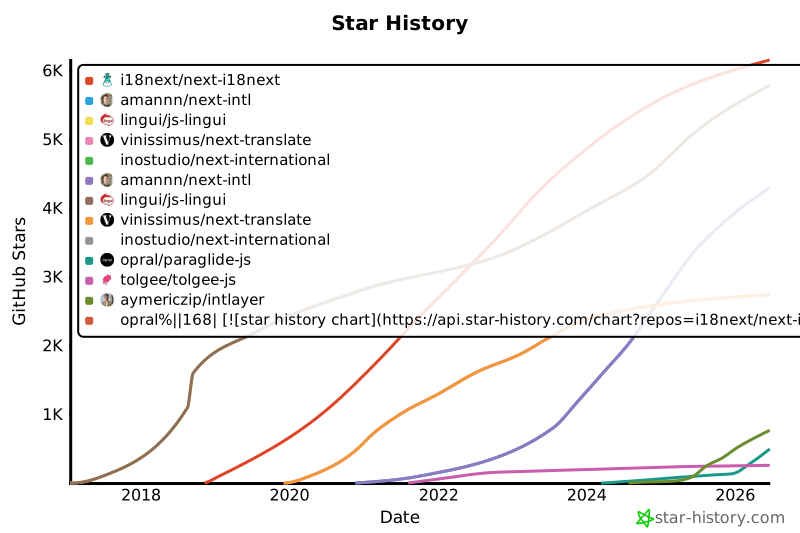](https://www.star-history.com/#i18next/next-i18next&amannn/next-intl&lingui/js-lingui&vinissimus/next-translate&inostudio/next-international&opral/paraglide-js&tolgee/tolgee-js&aymericzip/intlayer)
|
|
169
169
|
|
|
170
170
|
## Results in detail
|
|
171
171
|
|
|
@@ -144,7 +144,7 @@ I ran the same multilingual app in a real browser for every stack, then wrote do
|
|
|
144
144
|
|
|
145
145
|
GitHub stars are a strong indicator of a project's popularity, community trust, and long-term relevance. While not a direct measure of technical quality, they reflect how many developers find the project useful, follow its progress, and are likely to adopt it. For estimating the value of a project, stars help compare traction across alternatives and provide insights into ecosystem growth.
|
|
146
146
|
|
|
147
|
-
[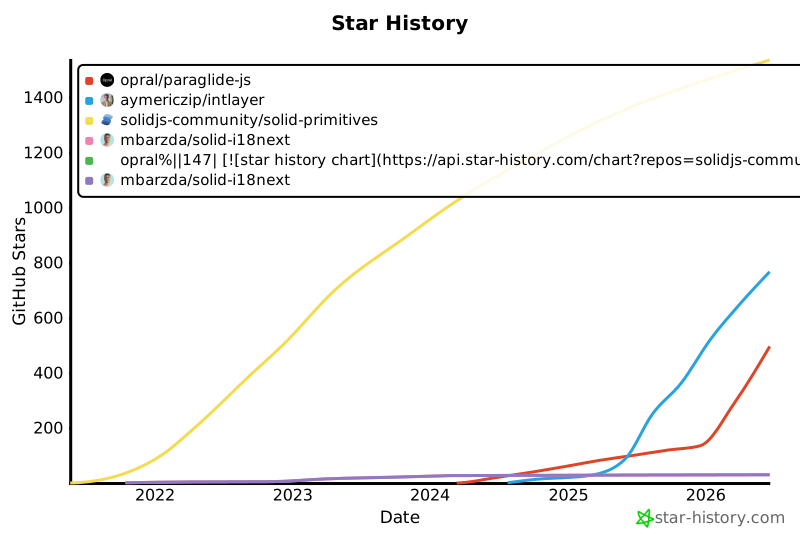](https://www.star-history.com/#solidjs-community/solid-primitives&mbarzda/solid-i18next&opral/paraglide-js&aymericzip/intlayer)
|
|
148
148
|
|
|
149
149
|
## Results in detail
|
|
150
150
|
|
|
@@ -142,7 +142,7 @@ I ran the same multilingual app in a real browser for every stack, then wrote do
|
|
|
142
142
|
|
|
143
143
|
GitHub stars are a strong indicator of a project's popularity, community trust, and long-term relevance. While not a direct measure of technical quality, they reflect how many developers find the project useful, follow its progress, and are likely to adopt it. For estimating the value of a project, stars help compare traction across alternatives and provide insights into ecosystem growth.
|
|
144
144
|
|
|
145
|
-
[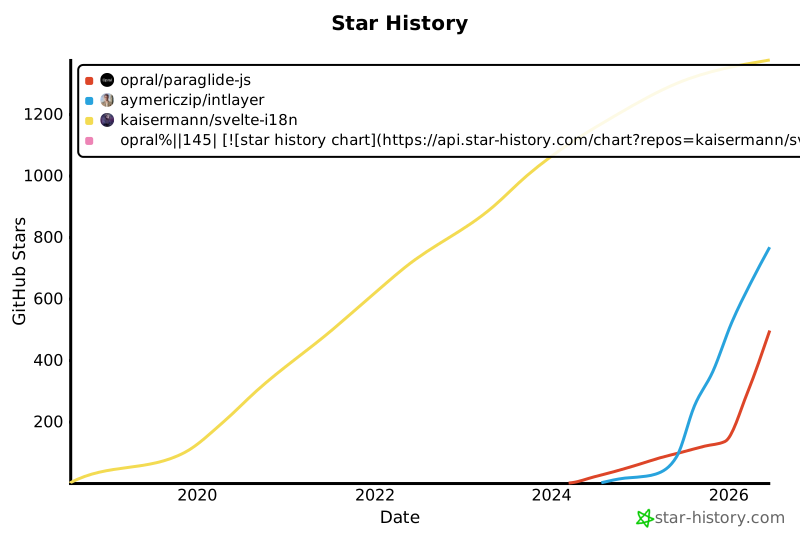](https://www.star-history.com/#kaisermann/svelte-i18n&opral/paraglide-js&aymericzip/intlayer)
|
|
146
146
|
|
|
147
147
|
## Results in detail
|
|
148
148
|
|
|
@@ -150,7 +150,7 @@ I ran the same multilingual app in a real browser for every stack, then wrote do
|
|
|
150
150
|
|
|
151
151
|
GitHub stars are a strong indicator of a project's popularity, community trust, and long-term relevance. While not a direct measure of technical quality, they reflect how many developers find the project useful, follow its progress, and are likely to adopt it. For estimating the value of a project, stars help compare traction across alternatives and provide insights into ecosystem growth.
|
|
152
152
|
|
|
153
|
-
[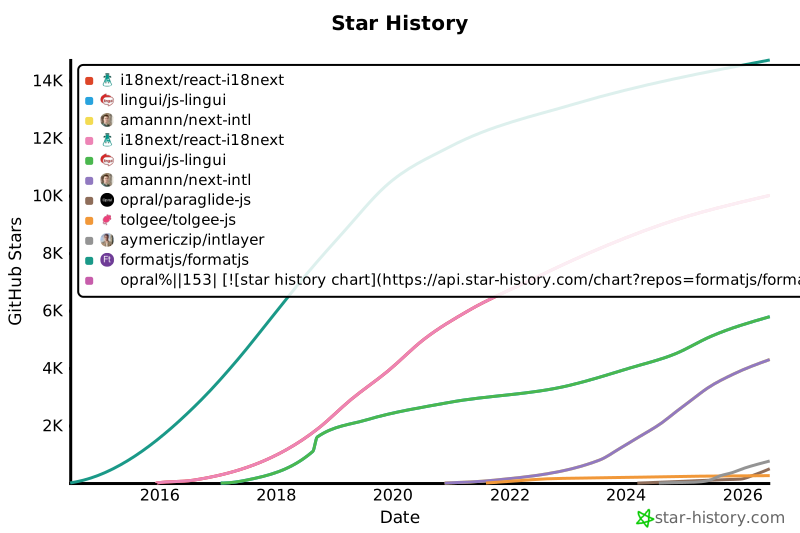](https://www.star-history.com/#formatjs/formatjs&i18next/react-i18next&lingui/js-lingui&amannn/next-intl&opral/paraglide-js&tolgee/tolgee-js&aymericzip/intlayer)
|
|
154
154
|
|
|
155
155
|
## Results in detail
|
|
156
156
|
|