@intlayer/docs 8.10.1 → 8.11.2
This diff represents the content of publicly available package versions that have been released to one of the supported registries. The information contained in this diff is provided for informational purposes only and reflects changes between package versions as they appear in their respective public registries.
- package/blog/en/i18n_using_next-i18next.md +3 -3
- package/blog/en/i18n_using_next-intl.md +3 -3
- package/blog/en/list_i18n_technologies/frameworks/angular.md +3 -3
- package/blog/en/list_i18n_technologies/frameworks/react-native.md +3 -3
- package/blog/en/list_i18n_technologies/frameworks/react.md +3 -3
- package/blog/en/list_i18n_technologies/frameworks/svelte.md +3 -3
- package/blog/en/list_i18n_technologies/frameworks/vue.md +3 -3
- package/blog/en/next-i18next_vs_next-intl_vs_intlayer.md +3 -3
- package/dist/cjs/common.cjs +3 -1
- package/dist/cjs/common.cjs.map +1 -1
- package/dist/cjs/generated/blog.entry.cjs +0 -1
- package/dist/cjs/generated/blog.entry.cjs.map +1 -1
- package/dist/cjs/generated/docs.entry.cjs +39 -20
- package/dist/cjs/generated/docs.entry.cjs.map +1 -1
- package/dist/cjs/generated/frequentQuestions.entry.cjs +0 -1
- package/dist/cjs/generated/frequentQuestions.entry.cjs.map +1 -1
- package/dist/cjs/generated/legal.entry.cjs +0 -1
- package/dist/cjs/generated/legal.entry.cjs.map +1 -1
- package/dist/esm/common.mjs +3 -1
- package/dist/esm/common.mjs.map +1 -1
- package/dist/esm/generated/docs.entry.mjs +39 -19
- package/dist/esm/generated/docs.entry.mjs.map +1 -1
- package/dist/types/common.d.ts.map +1 -1
- package/dist/types/generated/docs.entry.d.ts +2 -1
- package/dist/types/generated/docs.entry.d.ts.map +1 -1
- package/docs/ar/benchmark/nextjs.md +1 -1
- package/docs/ar/benchmark/solid.md +1 -1
- package/docs/ar/benchmark/svelte.md +1 -1
- package/docs/ar/benchmark/tanstack.md +1 -1
- package/docs/ar/dictionary/markdown.md +165 -7
- package/docs/ar/{intlayer_with_angular.md → intlayer_with_angular_19.md} +8 -7
- package/docs/ar/intlayer_with_angular_21.md +412 -0
- package/docs/bn/intlayer_with_angular_21.md +412 -0
- package/docs/cs/intlayer_with_angular_21.md +412 -0
- package/docs/de/benchmark/nextjs.md +1 -1
- package/docs/de/benchmark/solid.md +1 -1
- package/docs/de/benchmark/svelte.md +1 -1
- package/docs/de/benchmark/tanstack.md +1 -1
- package/docs/de/dictionary/markdown.md +165 -7
- package/docs/de/{intlayer_with_angular.md → intlayer_with_angular_19.md} +8 -7
- package/docs/de/intlayer_with_angular_21.md +412 -0
- package/docs/en/benchmark/nextjs.md +1 -1
- package/docs/en/benchmark/solid.md +1 -1
- package/docs/en/benchmark/svelte.md +1 -1
- package/docs/en/benchmark/tanstack.md +1 -1
- package/docs/en/dictionary/markdown.md +167 -7
- package/docs/en/intlayer_with_adonisjs.md +3 -3
- package/docs/en/intlayer_with_analog.md +3 -3
- package/docs/en/{intlayer_with_angular.md → intlayer_with_angular_19.md} +10 -9
- package/docs/en/intlayer_with_angular_21.md +412 -0
- package/docs/en/intlayer_with_astro.md +3 -3
- package/docs/en/intlayer_with_astro_lit.md +3 -3
- package/docs/en/intlayer_with_astro_preact.md +3 -3
- package/docs/en/intlayer_with_astro_react.md +3 -3
- package/docs/en/intlayer_with_astro_solid.md +3 -3
- package/docs/en/intlayer_with_astro_svelte.md +3 -3
- package/docs/en/intlayer_with_astro_vanilla.md +3 -3
- package/docs/en/intlayer_with_astro_vue.md +3 -3
- package/docs/en/intlayer_with_create_react_app.md +3 -3
- package/docs/en/intlayer_with_express.md +3 -3
- package/docs/en/intlayer_with_fastify.md +3 -3
- package/docs/en/intlayer_with_hono.md +3 -3
- package/docs/en/intlayer_with_lynx+react.md +3 -3
- package/docs/en/intlayer_with_nestjs.md +3 -3
- package/docs/en/intlayer_with_next-i18next.md +3 -3
- package/docs/en/intlayer_with_next-intl.md +3 -3
- package/docs/en/intlayer_with_nextjs_14.md +3 -3
- package/docs/en/intlayer_with_nextjs_15.md +3 -3
- package/docs/en/intlayer_with_nextjs_16.md +3 -3
- package/docs/en/intlayer_with_nextjs_compiler.md +3 -3
- package/docs/en/intlayer_with_nextjs_no_locale_path.md +3 -3
- package/docs/en/intlayer_with_nextjs_page_router.md +3 -3
- package/docs/en/intlayer_with_nuxt.md +3 -3
- package/docs/en/intlayer_with_react_native+expo.md +3 -3
- package/docs/en/intlayer_with_react_router_v7.md +3 -3
- package/docs/en/intlayer_with_react_router_v7_fs_routes.md +3 -3
- package/docs/en/intlayer_with_svelte_kit.md +3 -3
- package/docs/en/intlayer_with_tanstack+solid.md +3 -3
- package/docs/en/intlayer_with_tanstack.md +3 -3
- package/docs/en/intlayer_with_vanilla.md +3 -3
- package/docs/en/intlayer_with_vite+lit.md +3 -3
- package/docs/en/intlayer_with_vite+preact.md +3 -3
- package/docs/en/intlayer_with_vite+react.md +3 -3
- package/docs/en/intlayer_with_vite+react_compiler.md +3 -3
- package/docs/en/intlayer_with_vite+solid.md +3 -3
- package/docs/en/intlayer_with_vite+svelte.md +3 -3
- package/docs/en/intlayer_with_vite+vanilla.md +3 -3
- package/docs/en/intlayer_with_vite+vue.md +3 -3
- package/docs/en-GB/benchmark/nextjs.md +1 -1
- package/docs/en-GB/benchmark/solid.md +1 -1
- package/docs/en-GB/benchmark/svelte.md +1 -1
- package/docs/en-GB/benchmark/tanstack.md +1 -1
- package/docs/en-GB/dictionary/markdown.md +161 -0
- package/docs/en-GB/{intlayer_with_angular.md → intlayer_with_angular_19.md} +8 -7
- package/docs/en-GB/intlayer_with_angular_21.md +412 -0
- package/docs/es/benchmark/nextjs.md +1 -1
- package/docs/es/benchmark/solid.md +1 -1
- package/docs/es/benchmark/svelte.md +1 -1
- package/docs/es/benchmark/tanstack.md +1 -1
- package/docs/es/dictionary/markdown.md +165 -7
- package/docs/es/{intlayer_with_angular.md → intlayer_with_angular_19.md} +8 -7
- package/docs/es/intlayer_with_angular_21.md +412 -0
- package/docs/fr/benchmark/nextjs.md +1 -1
- package/docs/fr/benchmark/solid.md +1 -1
- package/docs/fr/benchmark/svelte.md +1 -1
- package/docs/fr/benchmark/tanstack.md +1 -1
- package/docs/fr/dictionary/markdown.md +165 -7
- package/docs/fr/{intlayer_with_angular.md → intlayer_with_angular_19.md} +8 -7
- package/docs/fr/intlayer_with_angular_21.md +412 -0
- package/docs/hi/benchmark/nextjs.md +1 -1
- package/docs/hi/benchmark/solid.md +1 -1
- package/docs/hi/benchmark/svelte.md +1 -1
- package/docs/hi/benchmark/tanstack.md +1 -1
- package/docs/hi/dictionary/markdown.md +165 -7
- package/docs/hi/{intlayer_with_angular.md → intlayer_with_angular_19.md} +8 -7
- package/docs/hi/intlayer_with_angular_21.md +412 -0
- package/docs/id/benchmark/nextjs.md +1 -1
- package/docs/id/benchmark/solid.md +1 -1
- package/docs/id/benchmark/svelte.md +1 -1
- package/docs/id/benchmark/tanstack.md +1 -1
- package/docs/id/dictionary/markdown.md +165 -7
- package/docs/id/{intlayer_with_angular.md → intlayer_with_angular_19.md} +8 -7
- package/docs/id/intlayer_with_angular_21.md +412 -0
- package/docs/it/benchmark/nextjs.md +1 -1
- package/docs/it/benchmark/solid.md +1 -1
- package/docs/it/benchmark/svelte.md +1 -1
- package/docs/it/benchmark/tanstack.md +1 -1
- package/docs/it/dictionary/markdown.md +165 -7
- package/docs/it/{intlayer_with_angular.md → intlayer_with_angular_19.md} +8 -7
- package/docs/it/intlayer_with_angular_21.md +412 -0
- package/docs/ja/benchmark/nextjs.md +1 -1
- package/docs/ja/benchmark/solid.md +1 -1
- package/docs/ja/benchmark/svelte.md +1 -1
- package/docs/ja/benchmark/tanstack.md +1 -1
- package/docs/ja/{intlayer_with_angular.md → intlayer_with_angular_19.md} +8 -7
- package/docs/ja/intlayer_with_angular_21.md +412 -0
- package/docs/ko/benchmark/nextjs.md +1 -1
- package/docs/ko/benchmark/solid.md +1 -1
- package/docs/ko/benchmark/svelte.md +1 -1
- package/docs/ko/benchmark/tanstack.md +1 -1
- package/docs/ko/dictionary/markdown.md +165 -7
- package/docs/ko/{intlayer_with_angular.md → intlayer_with_angular_19.md} +8 -7
- package/docs/ko/intlayer_with_angular_21.md +412 -0
- package/docs/nl/intlayer_with_angular_21.md +412 -0
- package/docs/pl/benchmark/nextjs.md +1 -1
- package/docs/pl/benchmark/solid.md +1 -1
- package/docs/pl/benchmark/svelte.md +1 -1
- package/docs/pl/benchmark/tanstack.md +1 -1
- package/docs/pl/dictionary/markdown.md +165 -7
- package/docs/pl/{intlayer_with_angular.md → intlayer_with_angular_19.md} +8 -7
- package/docs/pl/intlayer_with_angular_21.md +412 -0
- package/docs/pt/benchmark/nextjs.md +1 -1
- package/docs/pt/benchmark/solid.md +1 -1
- package/docs/pt/benchmark/svelte.md +1 -1
- package/docs/pt/benchmark/tanstack.md +1 -1
- package/docs/pt/dictionary/markdown.md +165 -7
- package/docs/pt/{intlayer_with_angular.md → intlayer_with_angular_19.md} +8 -7
- package/docs/pt/intlayer_with_angular_21.md +412 -0
- package/docs/ru/benchmark/nextjs.md +1 -1
- package/docs/ru/benchmark/solid.md +1 -1
- package/docs/ru/benchmark/svelte.md +1 -1
- package/docs/ru/benchmark/tanstack.md +1 -1
- package/docs/ru/dictionary/markdown.md +161 -0
- package/docs/ru/{intlayer_with_angular.md → intlayer_with_angular_19.md} +8 -7
- package/docs/ru/intlayer_with_angular_21.md +412 -0
- package/docs/tr/benchmark/nextjs.md +1 -1
- package/docs/tr/benchmark/solid.md +1 -1
- package/docs/tr/benchmark/svelte.md +1 -1
- package/docs/tr/benchmark/tanstack.md +1 -1
- package/docs/tr/dictionary/markdown.md +165 -7
- package/docs/tr/{intlayer_with_angular.md → intlayer_with_angular_19.md} +8 -7
- package/docs/tr/intlayer_with_angular_21.md +412 -0
- package/docs/uk/benchmark/nextjs.md +1 -1
- package/docs/uk/benchmark/solid.md +1 -1
- package/docs/uk/benchmark/svelte.md +1 -1
- package/docs/uk/benchmark/tanstack.md +1 -1
- package/docs/uk/dictionary/markdown.md +165 -7
- package/docs/uk/{intlayer_with_angular.md → intlayer_with_angular_19.md} +8 -7
- package/docs/uk/intlayer_with_angular_21.md +412 -0
- package/docs/ur/intlayer_with_angular_21.md +412 -0
- package/docs/vi/benchmark/nextjs.md +1 -1
- package/docs/vi/benchmark/solid.md +1 -1
- package/docs/vi/benchmark/svelte.md +1 -1
- package/docs/vi/benchmark/tanstack.md +1 -1
- package/docs/vi/dictionary/markdown.md +165 -7
- package/docs/vi/{intlayer_with_angular.md → intlayer_with_angular_19.md} +8 -7
- package/docs/vi/intlayer_with_angular_21.md +412 -0
- package/docs/zh/benchmark/nextjs.md +1 -1
- package/docs/zh/benchmark/solid.md +1 -1
- package/docs/zh/benchmark/svelte.md +1 -1
- package/docs/zh/benchmark/tanstack.md +1 -1
- package/docs/zh/dictionary/markdown.md +165 -7
- package/docs/zh/{intlayer_with_angular.md → intlayer_with_angular_19.md} +8 -7
- package/docs/zh/intlayer_with_angular_21.md +412 -0
- package/docs/zh-TW/intlayer_with_angular_21.md +412 -0
- package/package.json +7 -7
- package/src/common.ts +12 -6
- package/src/generated/docs.entry.ts +39 -19
|
@@ -17,6 +17,9 @@ slugs:
|
|
|
17
17
|
- content
|
|
18
18
|
- markdown
|
|
19
19
|
history:
|
|
20
|
+
- version: 8.11.0
|
|
21
|
+
date: 2026-05-28
|
|
22
|
+
changes: "Consenti la pre-analisi dell'AST Markdown per SSR / idratazione"
|
|
20
23
|
- version: 8.10.0
|
|
21
24
|
date: 2026-05-19
|
|
22
25
|
changes: "Aggiunto il supporto per i file `.content.md`"
|
|
@@ -66,13 +69,10 @@ Puoi dichiarare i contenuti Markdown usando la funzione `md` o semplicemente com
|
|
|
66
69
|
Esempio di struttura dei file:
|
|
67
70
|
|
|
68
71
|
```text
|
|
69
|
-
content
|
|
70
|
-
├── en
|
|
71
|
-
|
|
72
|
-
|
|
73
|
-
│ └── markdown-file.fr.content.md
|
|
74
|
-
└── es/
|
|
75
|
-
└── markdown-file.es.content.md
|
|
72
|
+
content
|
|
73
|
+
├── markdown-file.en.content.md
|
|
74
|
+
├── markdown-file.fr.content.md
|
|
75
|
+
└── markdown-file.es.content.md
|
|
76
76
|
```
|
|
77
77
|
|
|
78
78
|
Puoi aggiungere nel front-matter qualsiasi proprietà definita nella [Definizione del Dizionario](https://github.com/aymericzip/intlayer/blob/main/docs/docs/it/dictionary/content_file.md)
|
|
@@ -1152,6 +1152,164 @@ export class MyComponent {
|
|
|
1152
1152
|
|
|
1153
1153
|
---
|
|
1154
1154
|
|
|
1155
|
+
## Rendering Lato Server (SSR) e Idratazione
|
|
1156
|
+
|
|
1157
|
+
Rispetto ad altri parser Markdown come remark / rehype, Intlayer Markdown è privo di dipendenze e viene eseguito sia sul client che sul server.
|
|
1158
|
+
|
|
1159
|
+
Tuttavia, Intlayer ottimizza l'analisi per i framework di rendering lato server (SSR) (come Next.js App Router, React Router, Nuxt, SvelteKit, ecc.).
|
|
1160
|
+
|
|
1161
|
+
Invece di inviare stringhe Markdown grezze al client e analizzarle nel browser (il che comporta una penalizzazione delle prestazioni), Intlayer consente di pre-analizzare il Markdown in un albero sintattico astratto (AST) sul server.
|
|
1162
|
+
|
|
1163
|
+
È possibile utilizzare la funzione `parseMarkdown` del pacchetto Intlayer del proprio framework lato server per generare un AST serializzabile (oggetto `ParsedMarkdown`) e passarlo direttamente al frontend. Tutte le utilità di rendering di Intlayer (come `<MarkdownRenderer>`, `useMarkdownRenderer`, ecc.) accettano automaticamente questo oggetto AST e lo renderizzano perfettamente.
|
|
1164
|
+
|
|
1165
|
+
### Esempio in un'Architettura Server/Client
|
|
1166
|
+
|
|
1167
|
+
<Tabs group="framework">
|
|
1168
|
+
<Tab label="React Router" value="react">
|
|
1169
|
+
|
|
1170
|
+
```tsx fileName="server.ts"
|
|
1171
|
+
import { parseMarkdown } from "react-intlayer/markdown";
|
|
1172
|
+
|
|
1173
|
+
// 1. Sul server: Analizza il markdown in un AST serializzabile
|
|
1174
|
+
export const loader = async () => {
|
|
1175
|
+
const markdownString = "## My title \n\nLorem Ipsum";
|
|
1176
|
+
const ast = parseMarkdown(markdownString);
|
|
1177
|
+
|
|
1178
|
+
// Restituisce l'AST come JSON al client
|
|
1179
|
+
return Response.json({ content: ast });
|
|
1180
|
+
};
|
|
1181
|
+
```
|
|
1182
|
+
|
|
1183
|
+
```tsx fileName="client.tsx"
|
|
1184
|
+
import { useLoaderData } from "react-router";
|
|
1185
|
+
import { MarkdownRenderer } from "react-intlayer/markdown";
|
|
1186
|
+
|
|
1187
|
+
// 2. Sul client: Esegue il rendering dell'AST direttamente senza ri-analizzare
|
|
1188
|
+
export default function Page() {
|
|
1189
|
+
const { content } = useLoaderData();
|
|
1190
|
+
|
|
1191
|
+
// Il renderer accetta una stringa grezza o l'AST analizzato
|
|
1192
|
+
return <MarkdownRenderer content={content} />;
|
|
1193
|
+
}
|
|
1194
|
+
```
|
|
1195
|
+
|
|
1196
|
+
</Tab>
|
|
1197
|
+
<Tab label="Next.js" value="nextjs">
|
|
1198
|
+
|
|
1199
|
+
```tsx fileName="app/page.tsx"
|
|
1200
|
+
import { parseMarkdown } from "next-intlayer/markdown";
|
|
1201
|
+
import { MarkdownRenderer } from "next-intlayer/markdown";
|
|
1202
|
+
|
|
1203
|
+
export default async function Page() {
|
|
1204
|
+
// 1. Analizza il markdown in un AST serializzabile sul server
|
|
1205
|
+
const markdownString = "## My title \n\nLorem Ipsum";
|
|
1206
|
+
const ast = parseMarkdown(markdownString);
|
|
1207
|
+
|
|
1208
|
+
// 2. Esegue il rendering dell'AST direttamente
|
|
1209
|
+
// In un Server Component, questo funziona perfettamente e passa l'AST
|
|
1210
|
+
// direttamente ai componenti client sottostanti se necessario.
|
|
1211
|
+
return <MarkdownRenderer content={ast} />;
|
|
1212
|
+
}
|
|
1213
|
+
```
|
|
1214
|
+
|
|
1215
|
+
</Tab>
|
|
1216
|
+
<Tab label="Vue / Nuxt" value="vue">
|
|
1217
|
+
|
|
1218
|
+
```vue fileName="pages/index.vue"
|
|
1219
|
+
<script setup lang="ts">
|
|
1220
|
+
import { parseMarkdown } from "vue-intlayer/markdown";
|
|
1221
|
+
import { MarkdownRenderer } from "vue-intlayer/markdown";
|
|
1222
|
+
|
|
1223
|
+
// 1. Recupera e analizza il markdown in un AST sul server
|
|
1224
|
+
const { data: ast } = await useAsyncData('markdown', () => {
|
|
1225
|
+
const markdownString = "## My title \n\nLorem Ipsum";
|
|
1226
|
+
return parseMarkdown(markdownString);
|
|
1227
|
+
});
|
|
1228
|
+
</script>
|
|
1229
|
+
|
|
1230
|
+
<template>
|
|
1231
|
+
<!-- 2. Sul client: Esegue il rendering dell'AST direttamente senza ri-analizzare -->
|
|
1232
|
+
<MarkdownRenderer :content="ast" />
|
|
1233
|
+
</template>
|
|
1234
|
+
```
|
|
1235
|
+
|
|
1236
|
+
</Tab>
|
|
1237
|
+
<Tab label="SvelteKit" value="svelte">
|
|
1238
|
+
|
|
1239
|
+
```typescript fileName="+page.server.ts"
|
|
1240
|
+
import { parseMarkdown } from "svelte-intlayer/markdown";
|
|
1241
|
+
|
|
1242
|
+
// 1. Sul server: Analizza il markdown in un AST serializzabile
|
|
1243
|
+
export const load = async () => {
|
|
1244
|
+
const markdownString = "## My title \n\nLorem Ipsum";
|
|
1245
|
+
const ast = parseMarkdown(markdownString);
|
|
1246
|
+
|
|
1247
|
+
// Restituisce l'AST al client
|
|
1248
|
+
return { content: ast };
|
|
1249
|
+
};
|
|
1250
|
+
```
|
|
1251
|
+
|
|
1252
|
+
```svelte fileName="+page.svelte"
|
|
1253
|
+
<script lang="ts">
|
|
1254
|
+
import { MarkdownRenderer } from "svelte-intlayer/markdown";
|
|
1255
|
+
export let data;
|
|
1256
|
+
</script>
|
|
1257
|
+
|
|
1258
|
+
<!-- 2. Sul client: Esegue il rendering dell'AST direttamente senza ri-analizzare -->
|
|
1259
|
+
<MarkdownRenderer value={data.content} />
|
|
1260
|
+
```
|
|
1261
|
+
|
|
1262
|
+
</Tab>
|
|
1263
|
+
<Tab label="Angular" value="angular">
|
|
1264
|
+
|
|
1265
|
+
L'SSR di Angular in genere risolve i dati sul server durante il caricamento iniziale e si idrata sul client. È possibile utilizzare i resolver per passare l'AST.
|
|
1266
|
+
|
|
1267
|
+
```typescript fileName="app.resolver.ts"
|
|
1268
|
+
import { Injectable } from "@angular/core";
|
|
1269
|
+
import { Resolve } from "@angular/router";
|
|
1270
|
+
import { parseMarkdown, type ParsedMarkdown } from "angular-intlayer/markdown";
|
|
1271
|
+
|
|
1272
|
+
@Injectable({ providedIn: "root" })
|
|
1273
|
+
export class MarkdownResolver implements Resolve<ParsedMarkdown> {
|
|
1274
|
+
resolve(): ParsedMarkdown {
|
|
1275
|
+
const markdownString = "## My title \n\nLorem Ipsum";
|
|
1276
|
+
// 1. Sul server: Analizza il markdown in un AST serializzabile
|
|
1277
|
+
return parseMarkdown(markdownString);
|
|
1278
|
+
}
|
|
1279
|
+
}
|
|
1280
|
+
```
|
|
1281
|
+
|
|
1282
|
+
```typescript fileName="app.component.ts"
|
|
1283
|
+
import { Component } from "@angular/core";
|
|
1284
|
+
import { ActivatedRoute } from "@angular/router";
|
|
1285
|
+
import { IntlayerMarkdownService, type ParsedMarkdown } from "angular-intlayer/markdown";
|
|
1286
|
+
|
|
1287
|
+
@Component({
|
|
1288
|
+
selector: "app-root",
|
|
1289
|
+
template: `<div [innerHTML]="renderedMarkdown"></div>`,
|
|
1290
|
+
})
|
|
1291
|
+
export class AppComponent {
|
|
1292
|
+
renderedMarkdown: string = "";
|
|
1293
|
+
|
|
1294
|
+
constructor(
|
|
1295
|
+
private route: ActivatedRoute,
|
|
1296
|
+
private markdownService: IntlayerMarkdownService
|
|
1297
|
+
) {
|
|
1298
|
+
// 2. Sul client: Esegue il rendering dell'AST direttamente senza ri-analizzare
|
|
1299
|
+
this.route.data.subscribe((data) => {
|
|
1300
|
+
this.renderedMarkdown = this.markdownService.renderMarkdown(
|
|
1301
|
+
data.markdownAst
|
|
1302
|
+
) as string;
|
|
1303
|
+
});
|
|
1304
|
+
}
|
|
1305
|
+
}
|
|
1306
|
+
```
|
|
1307
|
+
|
|
1308
|
+
</Tab>
|
|
1309
|
+
</Tabs>
|
|
1310
|
+
|
|
1311
|
+
Questo modello garantisce che la logica di analisi del Markdown venga eseguita interamente sul server, riducendo significativamente il tempo di esecuzione lato client e migliorando la velocità di idratazione iniziale.
|
|
1312
|
+
|
|
1155
1313
|
## Riferimento opzioni
|
|
1156
1314
|
|
|
1157
1315
|
Queste opzioni possono essere passate a `MarkdownProvider`, `MarkdownRenderer`, `useMarkdownRenderer` e `renderMarkdown`.
|
|
@@ -1,7 +1,7 @@
|
|
|
1
1
|
---
|
|
2
2
|
createdAt: 2025-04-18
|
|
3
3
|
updatedAt: 2026-05-06
|
|
4
|
-
title: Angular i18n - Come tradurre un'app Angular
|
|
4
|
+
title: Angular i18n - Come tradurre un'app Angular 19 (Webpack)
|
|
5
5
|
description: Scopri come rendere multilingue il tuo sito Angular. Segui la documentazione per l'internazionalizzazione (i18n) e la traduzione.
|
|
6
6
|
keywords:
|
|
7
7
|
- Internazionaliizzazione
|
|
@@ -13,8 +13,9 @@ slugs:
|
|
|
13
13
|
- doc
|
|
14
14
|
- environment
|
|
15
15
|
- angular
|
|
16
|
-
|
|
17
|
-
|
|
16
|
+
- 19
|
|
17
|
+
applicationTemplate: https://github.com/aymericzip/intlayer-angular-19-template
|
|
18
|
+
applicationShowcase: https://intlayer-angular-19-template.vercel.app
|
|
18
19
|
history:
|
|
19
20
|
- version: 8.9.0
|
|
20
21
|
date: 2026-05-04
|
|
@@ -27,7 +28,7 @@ history:
|
|
|
27
28
|
changes: "Inizializza cronologia"
|
|
28
29
|
---
|
|
29
30
|
|
|
30
|
-
# Traduci il tuo sito Angular usando Intlayer | Internazionalizzazione (i18n)
|
|
31
|
+
# Traduci il tuo sito Angular 19 (Webpack) usando Intlayer | Internazionalizzazione (i18n)
|
|
31
32
|
|
|
32
33
|
## Indice
|
|
33
34
|
|
|
@@ -52,7 +53,7 @@ Con Intlayer puoi:
|
|
|
52
53
|
<Tab label="Codice" value="code">
|
|
53
54
|
|
|
54
55
|
<iframe
|
|
55
|
-
src="https://ide.intlayer.org/aymericzip/intlayer-angular-template?file=intlayer.config.ts"
|
|
56
|
+
src="https://ide.intlayer.org/aymericzip/intlayer-angular-19-template?file=intlayer.config.ts"
|
|
56
57
|
className="m-auto overflow-hidden rounded-lg border-0 max-md:size-full max-md:h-[700px] md:aspect-16/9 md:w-full"
|
|
57
58
|
title="Demo CodeSandbox - Come internazionalizzare la tua applicazione usando Intlayer"
|
|
58
59
|
sandbox="allow-forms allow-modals allow-popups allow-presentation allow-same-origin allow-scripts"
|
|
@@ -63,7 +64,7 @@ Con Intlayer puoi:
|
|
|
63
64
|
<Tab label="Demo" value="demo">
|
|
64
65
|
|
|
65
66
|
<iframe
|
|
66
|
-
src="https://intlayer-angular-template.vercel.app"
|
|
67
|
+
src="https://intlayer-angular-19-template.vercel.app"
|
|
67
68
|
className="m-auto overflow-hidden rounded-lg border-0 max-md:size-full max-md:h-[700px] md:aspect-16/9 md:w-full"
|
|
68
69
|
title="Demo - intlayer-angular-template"
|
|
69
70
|
sandbox="allow-forms allow-modals allow-popups allow-presentation allow-same-origin allow-scripts"
|
|
@@ -73,7 +74,7 @@ Con Intlayer puoi:
|
|
|
73
74
|
</Tab>
|
|
74
75
|
</Tabs>
|
|
75
76
|
|
|
76
|
-
Vedi il [Modello di Applicazione](https://github.com/aymericzip/intlayer-angular-template) su GitHub.
|
|
77
|
+
Vedi il [Modello di Applicazione](https://github.com/aymericzip/intlayer-angular-19-template) su GitHub.
|
|
77
78
|
|
|
78
79
|
### Passaggio 1: Installa le dipendenze
|
|
79
80
|
|
|
@@ -0,0 +1,412 @@
|
|
|
1
|
+
---
|
|
2
|
+
createdAt: 2025-04-18
|
|
3
|
+
updatedAt: 2026-05-06
|
|
4
|
+
title: Angular i18n - Come tradurre un'app Angular 21 (Vite) nel 2026
|
|
5
|
+
description: Scopri come rendere multilingue il tuo sito web Angular. Segui la documentazione per internazionalizzarlo (i18n) e tradurlo.
|
|
6
|
+
keywords:
|
|
7
|
+
- Internazionalizzazione
|
|
8
|
+
- Documentazione
|
|
9
|
+
- Intlayer
|
|
10
|
+
- Angular
|
|
11
|
+
- JavaScript
|
|
12
|
+
slugs:
|
|
13
|
+
- doc
|
|
14
|
+
- environment
|
|
15
|
+
- angular
|
|
16
|
+
applicationTemplate: https://github.com/aymericzip/intlayer-angular-21-template
|
|
17
|
+
applicationShowcase: https://intlayer-angular-21-template.vercel.app/
|
|
18
|
+
history:
|
|
19
|
+
- version: 8.9.0
|
|
20
|
+
date: 2026-05-04
|
|
21
|
+
changes: "Aggiornato l'uso dell'API Solid useIntlayer per l'accesso diretto alle proprietà"
|
|
22
|
+
- version: 8.0.0
|
|
23
|
+
date: 2026-01-26
|
|
24
|
+
changes: "Rilascio versione stabile"
|
|
25
|
+
- version: 8.0.0
|
|
26
|
+
date: 2025-12-30
|
|
27
|
+
changes: "Aggiunto comando init"
|
|
28
|
+
- version: 5.5.10
|
|
29
|
+
date: 2025-06-29
|
|
30
|
+
changes: "Storico iniziale"
|
|
31
|
+
---
|
|
32
|
+
|
|
33
|
+
# Traduci il tuo sito Angular 21 (Vite) utilizzando Intlayer | Internazionalizzazione (i18n)
|
|
34
|
+
|
|
35
|
+
## Sommario
|
|
36
|
+
|
|
37
|
+
<TOC/>
|
|
38
|
+
|
|
39
|
+
## Cos'è Intlayer?
|
|
40
|
+
|
|
41
|
+
**Intlayer** è una libreria di internazionalizzazione (i18n) innovativa e open-source progettata per semplificare il supporto multilingue nelle moderne applicazioni web.
|
|
42
|
+
|
|
43
|
+
Con Intlayer, puoi:
|
|
44
|
+
|
|
45
|
+
- **Gestire facilmente le traduzioni** utilizzando dizionari dichiarativi a livello di componente.
|
|
46
|
+
- **Localizzare dinamicamente metadati**, rotte e contenuti.
|
|
47
|
+
- **Garantire il supporto TypeScript** con tipi autogenerati, migliorando l'autocompletamento e il rilevamento degli errori.
|
|
48
|
+
- **Beneficiare di funzionalità avanzate**, come il rilevamento e il cambio dinamico della lingua.
|
|
49
|
+
|
|
50
|
+
---
|
|
51
|
+
|
|
52
|
+
## Guida passo passo per configurare Intlayer in un'applicazione Angular
|
|
53
|
+
|
|
54
|
+
<Tabs defaultTab="code">
|
|
55
|
+
<Tab label="Codice" value="code">
|
|
56
|
+
|
|
57
|
+
<iframe
|
|
58
|
+
src="https://ide.intlayer.org/aymericzip/intlayer-angular-21-template?file=intlayer.config.ts"
|
|
59
|
+
className="m-auto overflow-hidden rounded-lg border-0 max-md:size-full max-md:h-[700px] md:aspect-16/9 md:w-full"
|
|
60
|
+
title="Demo CodeSandbox - Come internazionalizzare la tua applicazione usando Intlayer"
|
|
61
|
+
sandbox="allow-forms allow-modals allow-popups allow-presentation allow-same-origin allow-scripts"
|
|
62
|
+
loading="lazy"
|
|
63
|
+
/>
|
|
64
|
+
|
|
65
|
+
</Tab>
|
|
66
|
+
<Tab label="Demo" value="demo">
|
|
67
|
+
|
|
68
|
+
<iframe
|
|
69
|
+
src="https://intlayer-angular-21-template.vercel.app/"
|
|
70
|
+
className="m-auto overflow-hidden rounded-lg border-0 max-md:size-full max-md:h-[700px] md:aspect-16/9 md:w-full"
|
|
71
|
+
title="Demo - intlayer-angular-template"
|
|
72
|
+
sandbox="allow-forms allow-modals allow-popups allow-presentation allow-same-origin allow-scripts"
|
|
73
|
+
loading="lazy"
|
|
74
|
+
/>
|
|
75
|
+
|
|
76
|
+
</Tab>
|
|
77
|
+
</Tabs>
|
|
78
|
+
|
|
79
|
+
Vedi il [Modello di Applicazione](https://github.com/aymericzip/intlayer-angular-21-template) su GitHub.
|
|
80
|
+
|
|
81
|
+
### Passo 1: Installare le dipendenze
|
|
82
|
+
|
|
83
|
+
Installa i pacchetti necessari utilizzando npm:
|
|
84
|
+
|
|
85
|
+
```bash packageManager="npm"
|
|
86
|
+
npm install intlayer angular-intlayer
|
|
87
|
+
npm install @angular-builders/custom-esbuild --save-dev
|
|
88
|
+
npx intlayer init
|
|
89
|
+
```
|
|
90
|
+
|
|
91
|
+
```bash packageManager="pnpm"
|
|
92
|
+
pnpm add intlayer angular-intlayer
|
|
93
|
+
pnpm add @angular-builders/custom-esbuild --save-dev
|
|
94
|
+
pnpm intlayer init
|
|
95
|
+
```
|
|
96
|
+
|
|
97
|
+
```bash packageManager="yarn"
|
|
98
|
+
yarn add intlayer angular-intlayer
|
|
99
|
+
yarn add @angular-builders/custom-esbuild --save-dev
|
|
100
|
+
yarn intlayer init
|
|
101
|
+
```
|
|
102
|
+
|
|
103
|
+
```bash packageManager="bun"
|
|
104
|
+
bun add intlayer angular-intlayer
|
|
105
|
+
bun add @angular-builders/custom-esbuild --dev
|
|
106
|
+
bun x intlayer init
|
|
107
|
+
```
|
|
108
|
+
|
|
109
|
+
- **intlayer**
|
|
110
|
+
|
|
111
|
+
Il pacchetto base che fornisce gli strumenti di internazionalizzazione per la gestione della configurazione, traduzione, [dichiarazione dei contenuti](https://github.com/aymericzip/intlayer/blob/main/docs/docs/it/dictionary/content_file.md), transpilazione e [comandi CLI](https://github.com/aymericzip/intlayer/blob/main/docs/docs/it/cli/index.md).
|
|
112
|
+
|
|
113
|
+
- **angular-intlayer**
|
|
114
|
+
Il pacchetto che integra Intlayer con l'applicazione Angular. Fornisce fornitori di contesto e hook per l'internazionalizzazione Angular.
|
|
115
|
+
|
|
116
|
+
- **@angular-builders/custom-esbuild**
|
|
117
|
+
Necessario per personalizzare la configurazione esbuild della CLI di Angular.
|
|
118
|
+
|
|
119
|
+
### Passo 2: Configurazione del tuo progetto
|
|
120
|
+
|
|
121
|
+
Crea un file di configurazione per impostare le lingue della tua applicazione:
|
|
122
|
+
|
|
123
|
+
```typescript fileName="intlayer.config.ts" codeFormat={["typescript", "esm", "commonjs"]}
|
|
124
|
+
import { Locales, type IntlayerConfig } from "intlayer";
|
|
125
|
+
|
|
126
|
+
const config: IntlayerConfig = {
|
|
127
|
+
internationalization: {
|
|
128
|
+
locales: [
|
|
129
|
+
Locales.ENGLISH,
|
|
130
|
+
Locales.FRENCH,
|
|
131
|
+
Locales.SPANISH,
|
|
132
|
+
// Le tue altre lingue
|
|
133
|
+
],
|
|
134
|
+
defaultLocale: Locales.ENGLISH,
|
|
135
|
+
},
|
|
136
|
+
};
|
|
137
|
+
|
|
138
|
+
export default config;
|
|
139
|
+
```
|
|
140
|
+
|
|
141
|
+
> Attraverso questo file di configurazione, puoi impostare URL localizzati, reindirizzamento middleware, nomi dei cookie, la posizione e l'estensione delle tue dichiarazioni di contenuto, disabilitare i log di Intlayer nella console e altro ancora. Per un elenco completo dei parametri disponibili, consulta la [documentazione sulla configurazione](https://github.com/aymericzip/intlayer/blob/main/docs/docs/it/configuration.md).
|
|
142
|
+
|
|
143
|
+
### Passo 3: Integrare Intlayer nella tua Configurazione Angular
|
|
144
|
+
|
|
145
|
+
Per integrare Intlayer con la CLI di Angular, devi utilizzare un costruttore (builder) personalizzato. Questa guida presuppone che tu stia utilizzando Vite/esbuild (predefinito per i progetti Angular 21).
|
|
146
|
+
|
|
147
|
+
Per prima cosa, modifica il tuo `angular.json` per utilizzare il costruttore esbuild personalizzato. Aggiorna le configurazioni `build` e `serve`:
|
|
148
|
+
|
|
149
|
+
```json5 fileName="angular.json"
|
|
150
|
+
{
|
|
151
|
+
"projects": {
|
|
152
|
+
"your-app-name": {
|
|
153
|
+
"architect": {
|
|
154
|
+
"build": {
|
|
155
|
+
"builder": "@angular-builders/custom-esbuild:application", // replace "@angular/build:application"
|
|
156
|
+
"options": {
|
|
157
|
+
"define": {
|
|
158
|
+
"process.env": "{}",
|
|
159
|
+
},
|
|
160
|
+
"plugins": ["./esbuild.plugins.ts"],
|
|
161
|
+
"browser": "src/main.ts",
|
|
162
|
+
// ...
|
|
163
|
+
},
|
|
164
|
+
},
|
|
165
|
+
"serve": {
|
|
166
|
+
"builder": "@angular-builders/custom-esbuild:dev-server", // replace "@angular/build:dev-server"
|
|
167
|
+
"options": {
|
|
168
|
+
"prebundle": {
|
|
169
|
+
"exclude": [
|
|
170
|
+
"intlayer",
|
|
171
|
+
"angular-intlayer",
|
|
172
|
+
"@intlayer/config/built",
|
|
173
|
+
"@intlayer/core"
|
|
174
|
+
]
|
|
175
|
+
},
|
|
176
|
+
},
|
|
177
|
+
},
|
|
178
|
+
},
|
|
179
|
+
},
|
|
180
|
+
}
|
|
181
|
+
```
|
|
182
|
+
|
|
183
|
+
> Assicurati di sostituire `your-app-name` con il nome effettivo del tuo progetto in `angular.json`.
|
|
184
|
+
|
|
185
|
+
Successivamente, crea un file `esbuild.plugins.ts` nella directory radice del tuo progetto:
|
|
186
|
+
|
|
187
|
+
```typescript fileName="esbuild.plugins.ts"
|
|
188
|
+
import { intlayerEsbuildPlugin } from "angular-intlayer/esbuild";
|
|
189
|
+
|
|
190
|
+
export default [intlayerEsbuildPlugin()];
|
|
191
|
+
```
|
|
192
|
+
|
|
193
|
+
> La funzione `intlayerEsbuildPlugin` configura esbuild con Intlayer. Inietta il plugin per gestire i file di dichiarazione dei contenuti e imposta le configurazioni per prestazioni ottimali.
|
|
194
|
+
|
|
195
|
+
> **Utenti NX**: I builder Angular di NX caricano i file dei plugin tramite la risoluzione ESM nativa di Node e non compilano i file dei plugin TypeScript al volo. Utilizza invece un file `.mjs` e aggiorna di conseguenza il riferimento `plugins` in `angular.json`:
|
|
196
|
+
>
|
|
197
|
+
> ```javascript fileName="esbuild.plugins.mjs"
|
|
198
|
+
> import { intlayerEsbuildPlugin } from "angular-intlayer/esbuild";
|
|
199
|
+
>
|
|
200
|
+
> export default [intlayerEsbuildPlugin()];
|
|
201
|
+
> ```
|
|
202
|
+
>
|
|
203
|
+
> Quindi in `angular.json` punta a `"./esbuild.plugins.mjs"` invece di `"./esbuild.plugins.ts"`.
|
|
204
|
+
|
|
205
|
+
### Passo 4: Dichiara i tuoi Contenuti
|
|
206
|
+
|
|
207
|
+
Crea e gestisci le tue dichiarazioni di contenuto per memorizzare le traduzioni:
|
|
208
|
+
|
|
209
|
+
```tsx fileName="src/app/app.content.ts" contentDeclarationFormat=["typescript", "esm", "cjs"]
|
|
210
|
+
import { t, type Dictionary } from "intlayer";
|
|
211
|
+
|
|
212
|
+
const appContent = {
|
|
213
|
+
key: "app",
|
|
214
|
+
content: {
|
|
215
|
+
title: t({
|
|
216
|
+
en: "Hello",
|
|
217
|
+
fr: "Bonjour",
|
|
218
|
+
es: "Hola",
|
|
219
|
+
}),
|
|
220
|
+
congratulations: t({
|
|
221
|
+
en: "Congratulations! Your app is running. 🎉",
|
|
222
|
+
fr: "Félicitations! Votre application est en cours d'exécution. 🎉",
|
|
223
|
+
es: "¡Felicidades! Tu aplicación está en ejecución. 🎉",
|
|
224
|
+
}),
|
|
225
|
+
exploreDocs: t({
|
|
226
|
+
en: "Explore the Docs",
|
|
227
|
+
fr: "Explorer les Docs",
|
|
228
|
+
es: "Explorar los Docs",
|
|
229
|
+
}),
|
|
230
|
+
learnWithTutorials: t({
|
|
231
|
+
en: "Learn with Tutorials",
|
|
232
|
+
fr: "Apprendre avec les Tutoriels",
|
|
233
|
+
es: "Aprender con los Tutorios",
|
|
234
|
+
}),
|
|
235
|
+
cliDocs: "CLI Docs",
|
|
236
|
+
angularLanguageService: t({
|
|
237
|
+
en: "Angular Language Service",
|
|
238
|
+
fr: "Service de Langage Angular",
|
|
239
|
+
es: "Servicio de Lenguaje Angular",
|
|
240
|
+
}),
|
|
241
|
+
angularDevTools: "Angular DevTools",
|
|
242
|
+
github: "Github",
|
|
243
|
+
twitter: "Twitter",
|
|
244
|
+
youtube: "Youtube",
|
|
245
|
+
},
|
|
246
|
+
} satisfies Dictionary;
|
|
247
|
+
|
|
248
|
+
export default appContent;
|
|
249
|
+
```
|
|
250
|
+
|
|
251
|
+
> Le tue dichiarazioni di contenuto possono essere definite in qualsiasi punto della tua applicazione purché siano incluse nella directory `contentDir` (per impostazione predefinita, `./src`). E corrispondano all'estensione del file della dichiarazione di contenuto (per impostazione predefinita, `.content.{json,ts,tsx,js,jsx,mjs,cjs}`).
|
|
252
|
+
|
|
253
|
+
> Per ulteriori dettagli, consulta la [documentazione sulla dichiarazione dei contenuti](https://github.com/aymericzip/intlayer/blob/main/docs/docs/it/dictionary/content_file.md).
|
|
254
|
+
|
|
255
|
+
### Passo 5: Utilizza Intlayer nel tuo Codice
|
|
256
|
+
|
|
257
|
+
Per utilizzare le funzionalità di internazionalizzazione di Intlayer in tutta l'applicazione Angular, è necessario fornire Intlayer nella configurazione dell'applicazione.
|
|
258
|
+
|
|
259
|
+
```typescript fileName="src/app/app.config.ts"
|
|
260
|
+
import { ApplicationConfig } from "@angular/core";
|
|
261
|
+
import { provideRouter } from "@angular/router";
|
|
262
|
+
import { provideIntlayer } from "angular-intlayer";
|
|
263
|
+
import { routes } from "./app.routes";
|
|
264
|
+
|
|
265
|
+
export const appConfig: ApplicationConfig = {
|
|
266
|
+
providers: [
|
|
267
|
+
provideRouter(routes),
|
|
268
|
+
provideIntlayer(), // Aggiungi qui il provider Intlayer
|
|
269
|
+
],
|
|
270
|
+
};
|
|
271
|
+
```
|
|
272
|
+
|
|
273
|
+
Quindi, puoi utilizzare la funzione `useIntlayer` all'interno di qualsiasi componente.
|
|
274
|
+
|
|
275
|
+
```typescript fileName="src/app/app.component.ts"
|
|
276
|
+
import { Component } from "@angular/core";
|
|
277
|
+
import { RouterOutlet } from "@angular/router";
|
|
278
|
+
import { useIntlayer } from "angular-intlayer";
|
|
279
|
+
|
|
280
|
+
@Component({
|
|
281
|
+
selector: "app-root",
|
|
282
|
+
standalone: true,
|
|
283
|
+
imports: [RouterOutlet],
|
|
284
|
+
templateUrl: "./app.component.html",
|
|
285
|
+
styleUrl: "./app.component.css",
|
|
286
|
+
})
|
|
287
|
+
export class AppComponent {
|
|
288
|
+
content = useIntlayer("app");
|
|
289
|
+
}
|
|
290
|
+
```
|
|
291
|
+
|
|
292
|
+
E nel tuo template:
|
|
293
|
+
|
|
294
|
+
```html fileName="src/app/app.component.html"
|
|
295
|
+
<div class="content">
|
|
296
|
+
<h1>{{ content().title }}</h1>
|
|
297
|
+
<p>{{ content().congratulations }}</p>
|
|
298
|
+
</div>
|
|
299
|
+
```
|
|
300
|
+
|
|
301
|
+
Il contenuto Intlayer viene restituito come un `Signal`, quindi accedi ai valori chiamando il segnale: `content().title`.
|
|
302
|
+
|
|
303
|
+
### (Opzionale) Passo 6: Cambia la lingua dei tuoi contenuti
|
|
304
|
+
|
|
305
|
+
Per cambiare la lingua dei tuoi contenuti, puoi utilizzare la funzione `setLocale` fornita dalla funzione `useLocale`. Questo ti consente di impostare la lingua dell'applicazione e aggiornare il contenuto di conseguenza.
|
|
306
|
+
|
|
307
|
+
Crea un componente per passare da una lingua all'altra:
|
|
308
|
+
|
|
309
|
+
```typescript fileName="src/app/locale-switcher.component.ts"
|
|
310
|
+
import { Component } from "@angular/core";
|
|
311
|
+
import { CommonModule } from "@angular/common";
|
|
312
|
+
import { useLocale } from "angular-intlayer";
|
|
313
|
+
|
|
314
|
+
@Component({
|
|
315
|
+
selector: "app-locale-switcher",
|
|
316
|
+
standalone: true,
|
|
317
|
+
imports: [CommonModule],
|
|
318
|
+
template: `
|
|
319
|
+
<div class="locale-switcher">
|
|
320
|
+
<select
|
|
321
|
+
[value]="locale()"
|
|
322
|
+
(change)="setLocale($any($event.target).value)"
|
|
323
|
+
>
|
|
324
|
+
@for (loc of availableLocales; track loc) {
|
|
325
|
+
<option [value]="loc">{{ loc }}</option>
|
|
326
|
+
}
|
|
327
|
+
</select>
|
|
328
|
+
</div>
|
|
329
|
+
`,
|
|
330
|
+
})
|
|
331
|
+
export class LocaleSwitcherComponent {
|
|
332
|
+
localeCtx = useLocale();
|
|
333
|
+
|
|
334
|
+
locale = this.localeCtx.locale;
|
|
335
|
+
availableLocales = this.localeCtx.availableLocales;
|
|
336
|
+
setLocale = this.localeCtx.setLocale;
|
|
337
|
+
}
|
|
338
|
+
```
|
|
339
|
+
|
|
340
|
+
Quindi, utilizza questo componente nel tuo `app.component.ts`:
|
|
341
|
+
|
|
342
|
+
```typescript fileName="src/app/app.component.ts"
|
|
343
|
+
import { Component } from "@angular/core";
|
|
344
|
+
import { RouterOutlet } from "@angular/router";
|
|
345
|
+
import { useIntlayer } from "angular-intlayer";
|
|
346
|
+
import { LocaleSwitcherComponent } from "./locale-switcher.component";
|
|
347
|
+
|
|
348
|
+
@Component({
|
|
349
|
+
selector: "app-root",
|
|
350
|
+
standalone: true,
|
|
351
|
+
imports: [RouterOutlet, LocaleSwitcherComponent],
|
|
352
|
+
templateUrl: "./app.component.html",
|
|
353
|
+
styleUrl: "./app.component.css",
|
|
354
|
+
})
|
|
355
|
+
export class AppComponent {
|
|
356
|
+
content = useIntlayer("app");
|
|
357
|
+
}
|
|
358
|
+
```
|
|
359
|
+
|
|
360
|
+
### Configurare TypeScript
|
|
361
|
+
|
|
362
|
+
Intlayer utilizza l'aumento dei moduli per ottenere i vantaggi di TypeScript e rendere la base di codice più solida.
|
|
363
|
+
|
|
364
|
+

|
|
365
|
+
|
|
366
|
+

|
|
367
|
+
|
|
368
|
+
Assicurati che la tua configurazione TypeScript includa i tipi autogenerati.
|
|
369
|
+
|
|
370
|
+
```json5 fileName="tsconfig.json"
|
|
371
|
+
{
|
|
372
|
+
// ... Le tue configurazioni TypeScript esistenti
|
|
373
|
+
"include": [
|
|
374
|
+
// ... Le tue configurazioni TypeScript esistenti
|
|
375
|
+
".intlayer/**/*.ts", // Includi i tipi autogenerati
|
|
376
|
+
],
|
|
377
|
+
}
|
|
378
|
+
```
|
|
379
|
+
|
|
380
|
+
### Configurazione Git
|
|
381
|
+
|
|
382
|
+
Si consiglia di ignorare i file generati da Intlayer. Ciò ti consente di evitare di inserirli nel tuo repository Git.
|
|
383
|
+
|
|
384
|
+
Per farlo, puoi aggiungere le seguenti istruzioni al tuo file `.gitignore`:
|
|
385
|
+
|
|
386
|
+
```bash
|
|
387
|
+
# Ignora i file generati da Intlayer
|
|
388
|
+
.intlayer
|
|
389
|
+
```
|
|
390
|
+
|
|
391
|
+
### Estensione VS Code
|
|
392
|
+
|
|
393
|
+
Per migliorare la tua esperienza di sviluppo con Intlayer, puoi installare l'**Estensione ufficiale Intlayer per VS Code**.
|
|
394
|
+
|
|
395
|
+
[Installa dal Marketplace VS Code](https://marketplace.visualstudio.com/items?itemName=intlayer.intlayer-vs-code-extension)
|
|
396
|
+
|
|
397
|
+
Questa estensione fornisce:
|
|
398
|
+
|
|
399
|
+
- **Autocompletamento** per le chiavi di traduzione.
|
|
400
|
+
- **Rilevamento degli errori in tempo reale** per le traduzioni mancanti.
|
|
401
|
+
- **Anteprime in linea** dei contenuti tradotti.
|
|
402
|
+
- **Azioni rapide** per creare e aggiornare facilmente le traduzioni.
|
|
403
|
+
|
|
404
|
+
Per ulteriori dettagli su come utilizzare l'estensione, consulta la [documentazione dell'Estensione VS Code di Intlayer](https://intlayer.org/doc/vs-code-extension).
|
|
405
|
+
|
|
406
|
+
---
|
|
407
|
+
|
|
408
|
+
### Vai oltre
|
|
409
|
+
|
|
410
|
+
Per andare oltre, puoi implementare l'[editor visivo](https://github.com/aymericzip/intlayer/blob/main/docs/docs/it/intlayer_visual_editor.md) o esternalizzare i tuoi contenuti utilizzando il [CMS](https://github.com/aymericzip/intlayer/blob/main/docs/docs/it/intlayer_CMS.md).
|
|
411
|
+
|
|
412
|
+
---
|
|
@@ -165,7 +165,7 @@ Next.jsのバージョンは`16.2.4`(App Router)を使用しました。
|
|
|
165
165
|
|
|
166
166
|
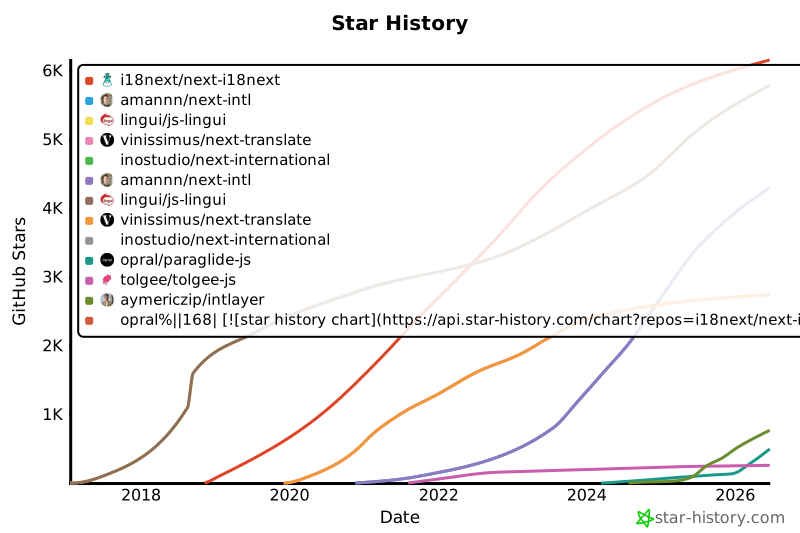
GitHubのスターは、プロジェクトの普及度、コミュニティの信頼、および長期的な関連性を示す強力な指標です。技術的な品質を直接測定するものではありませんが、どれだけの開発者がプロジェクトを有用だと感じ、その進捗をフォローし、採用する可能性があるかを反映しています。プロジェクトの価値を見積もる際、スターは代替案との勢いの比較を助け、エコシステムの成長に関する洞察を提供します。
|
|
167
167
|
|
|
168
|
-
[](https://www.star-history.com/#i18next/next-i18next&amannn/next-intl&lingui/js-lingui&vinissimus/next-translate&inostudio/next-international&opral/paraglide-js&tolgee/tolgee-js&aymericzip/intlayer)
|
|
169
169
|
|
|
170
170
|
## 結果の詳細
|
|
171
171
|
|
|
@@ -122,7 +122,7 @@ i18nリークの問題を素早く特定するために、無料のスキャナ
|
|
|
122
122
|
|
|
123
123
|
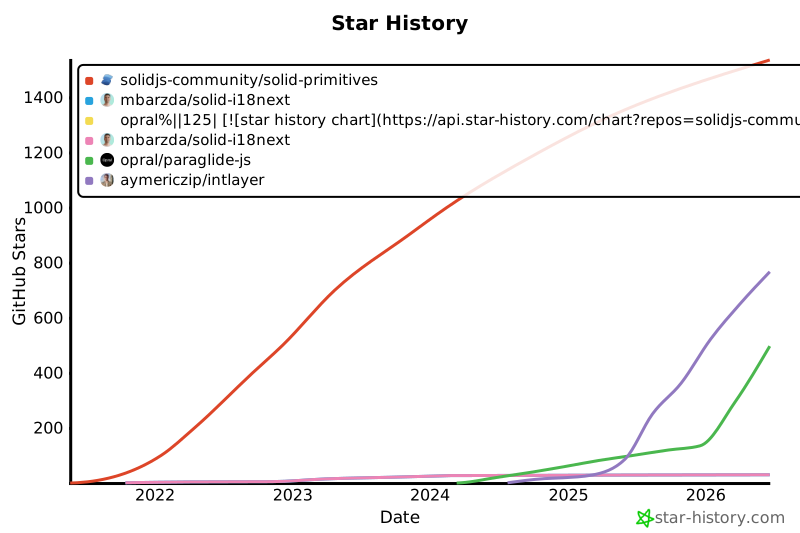
GitHubのスターは、プロジェクトの普及度、コミュニティの信頼、および長期的な関連性を示す強力な指標です。技術的な品質を直接測定するものではありませんが、どれだけの開発者がプロジェクトを有用だと感じ、その進捗をフォローし、採用する可能性があるかを反映しています。プロジェクトの価値を見積もる際、スターは代替案との勢いの比較を助け、エコシステムの成長に関する洞察を提供します。
|
|
124
124
|
|
|
125
|
-
[](https://www.star-history.com/#solidjs-community/solid-primitives&mbarzda/solid-i18next&opral/paraglide-js&aymericzip/intlayer)
|
|
126
126
|
|
|
127
127
|
## 結果の詳細
|
|
128
128
|
|