@intlayer/docs 8.10.1 → 8.11.2
This diff represents the content of publicly available package versions that have been released to one of the supported registries. The information contained in this diff is provided for informational purposes only and reflects changes between package versions as they appear in their respective public registries.
- package/blog/en/i18n_using_next-i18next.md +3 -3
- package/blog/en/i18n_using_next-intl.md +3 -3
- package/blog/en/list_i18n_technologies/frameworks/angular.md +3 -3
- package/blog/en/list_i18n_technologies/frameworks/react-native.md +3 -3
- package/blog/en/list_i18n_technologies/frameworks/react.md +3 -3
- package/blog/en/list_i18n_technologies/frameworks/svelte.md +3 -3
- package/blog/en/list_i18n_technologies/frameworks/vue.md +3 -3
- package/blog/en/next-i18next_vs_next-intl_vs_intlayer.md +3 -3
- package/dist/cjs/common.cjs +3 -1
- package/dist/cjs/common.cjs.map +1 -1
- package/dist/cjs/generated/blog.entry.cjs +0 -1
- package/dist/cjs/generated/blog.entry.cjs.map +1 -1
- package/dist/cjs/generated/docs.entry.cjs +39 -20
- package/dist/cjs/generated/docs.entry.cjs.map +1 -1
- package/dist/cjs/generated/frequentQuestions.entry.cjs +0 -1
- package/dist/cjs/generated/frequentQuestions.entry.cjs.map +1 -1
- package/dist/cjs/generated/legal.entry.cjs +0 -1
- package/dist/cjs/generated/legal.entry.cjs.map +1 -1
- package/dist/esm/common.mjs +3 -1
- package/dist/esm/common.mjs.map +1 -1
- package/dist/esm/generated/docs.entry.mjs +39 -19
- package/dist/esm/generated/docs.entry.mjs.map +1 -1
- package/dist/types/common.d.ts.map +1 -1
- package/dist/types/generated/docs.entry.d.ts +2 -1
- package/dist/types/generated/docs.entry.d.ts.map +1 -1
- package/docs/ar/benchmark/nextjs.md +1 -1
- package/docs/ar/benchmark/solid.md +1 -1
- package/docs/ar/benchmark/svelte.md +1 -1
- package/docs/ar/benchmark/tanstack.md +1 -1
- package/docs/ar/dictionary/markdown.md +165 -7
- package/docs/ar/{intlayer_with_angular.md → intlayer_with_angular_19.md} +8 -7
- package/docs/ar/intlayer_with_angular_21.md +412 -0
- package/docs/bn/intlayer_with_angular_21.md +412 -0
- package/docs/cs/intlayer_with_angular_21.md +412 -0
- package/docs/de/benchmark/nextjs.md +1 -1
- package/docs/de/benchmark/solid.md +1 -1
- package/docs/de/benchmark/svelte.md +1 -1
- package/docs/de/benchmark/tanstack.md +1 -1
- package/docs/de/dictionary/markdown.md +165 -7
- package/docs/de/{intlayer_with_angular.md → intlayer_with_angular_19.md} +8 -7
- package/docs/de/intlayer_with_angular_21.md +412 -0
- package/docs/en/benchmark/nextjs.md +1 -1
- package/docs/en/benchmark/solid.md +1 -1
- package/docs/en/benchmark/svelte.md +1 -1
- package/docs/en/benchmark/tanstack.md +1 -1
- package/docs/en/dictionary/markdown.md +167 -7
- package/docs/en/intlayer_with_adonisjs.md +3 -3
- package/docs/en/intlayer_with_analog.md +3 -3
- package/docs/en/{intlayer_with_angular.md → intlayer_with_angular_19.md} +10 -9
- package/docs/en/intlayer_with_angular_21.md +412 -0
- package/docs/en/intlayer_with_astro.md +3 -3
- package/docs/en/intlayer_with_astro_lit.md +3 -3
- package/docs/en/intlayer_with_astro_preact.md +3 -3
- package/docs/en/intlayer_with_astro_react.md +3 -3
- package/docs/en/intlayer_with_astro_solid.md +3 -3
- package/docs/en/intlayer_with_astro_svelte.md +3 -3
- package/docs/en/intlayer_with_astro_vanilla.md +3 -3
- package/docs/en/intlayer_with_astro_vue.md +3 -3
- package/docs/en/intlayer_with_create_react_app.md +3 -3
- package/docs/en/intlayer_with_express.md +3 -3
- package/docs/en/intlayer_with_fastify.md +3 -3
- package/docs/en/intlayer_with_hono.md +3 -3
- package/docs/en/intlayer_with_lynx+react.md +3 -3
- package/docs/en/intlayer_with_nestjs.md +3 -3
- package/docs/en/intlayer_with_next-i18next.md +3 -3
- package/docs/en/intlayer_with_next-intl.md +3 -3
- package/docs/en/intlayer_with_nextjs_14.md +3 -3
- package/docs/en/intlayer_with_nextjs_15.md +3 -3
- package/docs/en/intlayer_with_nextjs_16.md +3 -3
- package/docs/en/intlayer_with_nextjs_compiler.md +3 -3
- package/docs/en/intlayer_with_nextjs_no_locale_path.md +3 -3
- package/docs/en/intlayer_with_nextjs_page_router.md +3 -3
- package/docs/en/intlayer_with_nuxt.md +3 -3
- package/docs/en/intlayer_with_react_native+expo.md +3 -3
- package/docs/en/intlayer_with_react_router_v7.md +3 -3
- package/docs/en/intlayer_with_react_router_v7_fs_routes.md +3 -3
- package/docs/en/intlayer_with_svelte_kit.md +3 -3
- package/docs/en/intlayer_with_tanstack+solid.md +3 -3
- package/docs/en/intlayer_with_tanstack.md +3 -3
- package/docs/en/intlayer_with_vanilla.md +3 -3
- package/docs/en/intlayer_with_vite+lit.md +3 -3
- package/docs/en/intlayer_with_vite+preact.md +3 -3
- package/docs/en/intlayer_with_vite+react.md +3 -3
- package/docs/en/intlayer_with_vite+react_compiler.md +3 -3
- package/docs/en/intlayer_with_vite+solid.md +3 -3
- package/docs/en/intlayer_with_vite+svelte.md +3 -3
- package/docs/en/intlayer_with_vite+vanilla.md +3 -3
- package/docs/en/intlayer_with_vite+vue.md +3 -3
- package/docs/en-GB/benchmark/nextjs.md +1 -1
- package/docs/en-GB/benchmark/solid.md +1 -1
- package/docs/en-GB/benchmark/svelte.md +1 -1
- package/docs/en-GB/benchmark/tanstack.md +1 -1
- package/docs/en-GB/dictionary/markdown.md +161 -0
- package/docs/en-GB/{intlayer_with_angular.md → intlayer_with_angular_19.md} +8 -7
- package/docs/en-GB/intlayer_with_angular_21.md +412 -0
- package/docs/es/benchmark/nextjs.md +1 -1
- package/docs/es/benchmark/solid.md +1 -1
- package/docs/es/benchmark/svelte.md +1 -1
- package/docs/es/benchmark/tanstack.md +1 -1
- package/docs/es/dictionary/markdown.md +165 -7
- package/docs/es/{intlayer_with_angular.md → intlayer_with_angular_19.md} +8 -7
- package/docs/es/intlayer_with_angular_21.md +412 -0
- package/docs/fr/benchmark/nextjs.md +1 -1
- package/docs/fr/benchmark/solid.md +1 -1
- package/docs/fr/benchmark/svelte.md +1 -1
- package/docs/fr/benchmark/tanstack.md +1 -1
- package/docs/fr/dictionary/markdown.md +165 -7
- package/docs/fr/{intlayer_with_angular.md → intlayer_with_angular_19.md} +8 -7
- package/docs/fr/intlayer_with_angular_21.md +412 -0
- package/docs/hi/benchmark/nextjs.md +1 -1
- package/docs/hi/benchmark/solid.md +1 -1
- package/docs/hi/benchmark/svelte.md +1 -1
- package/docs/hi/benchmark/tanstack.md +1 -1
- package/docs/hi/dictionary/markdown.md +165 -7
- package/docs/hi/{intlayer_with_angular.md → intlayer_with_angular_19.md} +8 -7
- package/docs/hi/intlayer_with_angular_21.md +412 -0
- package/docs/id/benchmark/nextjs.md +1 -1
- package/docs/id/benchmark/solid.md +1 -1
- package/docs/id/benchmark/svelte.md +1 -1
- package/docs/id/benchmark/tanstack.md +1 -1
- package/docs/id/dictionary/markdown.md +165 -7
- package/docs/id/{intlayer_with_angular.md → intlayer_with_angular_19.md} +8 -7
- package/docs/id/intlayer_with_angular_21.md +412 -0
- package/docs/it/benchmark/nextjs.md +1 -1
- package/docs/it/benchmark/solid.md +1 -1
- package/docs/it/benchmark/svelte.md +1 -1
- package/docs/it/benchmark/tanstack.md +1 -1
- package/docs/it/dictionary/markdown.md +165 -7
- package/docs/it/{intlayer_with_angular.md → intlayer_with_angular_19.md} +8 -7
- package/docs/it/intlayer_with_angular_21.md +412 -0
- package/docs/ja/benchmark/nextjs.md +1 -1
- package/docs/ja/benchmark/solid.md +1 -1
- package/docs/ja/benchmark/svelte.md +1 -1
- package/docs/ja/benchmark/tanstack.md +1 -1
- package/docs/ja/{intlayer_with_angular.md → intlayer_with_angular_19.md} +8 -7
- package/docs/ja/intlayer_with_angular_21.md +412 -0
- package/docs/ko/benchmark/nextjs.md +1 -1
- package/docs/ko/benchmark/solid.md +1 -1
- package/docs/ko/benchmark/svelte.md +1 -1
- package/docs/ko/benchmark/tanstack.md +1 -1
- package/docs/ko/dictionary/markdown.md +165 -7
- package/docs/ko/{intlayer_with_angular.md → intlayer_with_angular_19.md} +8 -7
- package/docs/ko/intlayer_with_angular_21.md +412 -0
- package/docs/nl/intlayer_with_angular_21.md +412 -0
- package/docs/pl/benchmark/nextjs.md +1 -1
- package/docs/pl/benchmark/solid.md +1 -1
- package/docs/pl/benchmark/svelte.md +1 -1
- package/docs/pl/benchmark/tanstack.md +1 -1
- package/docs/pl/dictionary/markdown.md +165 -7
- package/docs/pl/{intlayer_with_angular.md → intlayer_with_angular_19.md} +8 -7
- package/docs/pl/intlayer_with_angular_21.md +412 -0
- package/docs/pt/benchmark/nextjs.md +1 -1
- package/docs/pt/benchmark/solid.md +1 -1
- package/docs/pt/benchmark/svelte.md +1 -1
- package/docs/pt/benchmark/tanstack.md +1 -1
- package/docs/pt/dictionary/markdown.md +165 -7
- package/docs/pt/{intlayer_with_angular.md → intlayer_with_angular_19.md} +8 -7
- package/docs/pt/intlayer_with_angular_21.md +412 -0
- package/docs/ru/benchmark/nextjs.md +1 -1
- package/docs/ru/benchmark/solid.md +1 -1
- package/docs/ru/benchmark/svelte.md +1 -1
- package/docs/ru/benchmark/tanstack.md +1 -1
- package/docs/ru/dictionary/markdown.md +161 -0
- package/docs/ru/{intlayer_with_angular.md → intlayer_with_angular_19.md} +8 -7
- package/docs/ru/intlayer_with_angular_21.md +412 -0
- package/docs/tr/benchmark/nextjs.md +1 -1
- package/docs/tr/benchmark/solid.md +1 -1
- package/docs/tr/benchmark/svelte.md +1 -1
- package/docs/tr/benchmark/tanstack.md +1 -1
- package/docs/tr/dictionary/markdown.md +165 -7
- package/docs/tr/{intlayer_with_angular.md → intlayer_with_angular_19.md} +8 -7
- package/docs/tr/intlayer_with_angular_21.md +412 -0
- package/docs/uk/benchmark/nextjs.md +1 -1
- package/docs/uk/benchmark/solid.md +1 -1
- package/docs/uk/benchmark/svelte.md +1 -1
- package/docs/uk/benchmark/tanstack.md +1 -1
- package/docs/uk/dictionary/markdown.md +165 -7
- package/docs/uk/{intlayer_with_angular.md → intlayer_with_angular_19.md} +8 -7
- package/docs/uk/intlayer_with_angular_21.md +412 -0
- package/docs/ur/intlayer_with_angular_21.md +412 -0
- package/docs/vi/benchmark/nextjs.md +1 -1
- package/docs/vi/benchmark/solid.md +1 -1
- package/docs/vi/benchmark/svelte.md +1 -1
- package/docs/vi/benchmark/tanstack.md +1 -1
- package/docs/vi/dictionary/markdown.md +165 -7
- package/docs/vi/{intlayer_with_angular.md → intlayer_with_angular_19.md} +8 -7
- package/docs/vi/intlayer_with_angular_21.md +412 -0
- package/docs/zh/benchmark/nextjs.md +1 -1
- package/docs/zh/benchmark/solid.md +1 -1
- package/docs/zh/benchmark/svelte.md +1 -1
- package/docs/zh/benchmark/tanstack.md +1 -1
- package/docs/zh/dictionary/markdown.md +165 -7
- package/docs/zh/{intlayer_with_angular.md → intlayer_with_angular_19.md} +8 -7
- package/docs/zh/intlayer_with_angular_21.md +412 -0
- package/docs/zh-TW/intlayer_with_angular_21.md +412 -0
- package/package.json +7 -7
- package/src/common.ts +12 -6
- package/src/generated/docs.entry.ts +39 -19
|
@@ -1,7 +1,7 @@
|
|
|
1
1
|
---
|
|
2
2
|
createdAt: 2025-04-18
|
|
3
3
|
updatedAt: 2026-05-06
|
|
4
|
-
title: Angular i18n - Cara menerjemahkan aplikasi Angular di
|
|
4
|
+
title: Angular i18n - Cara menerjemahkan aplikasi Angular 19 (Webpack) di
|
|
5
5
|
description: Temukan cara membuat situs web Angular Anda multibahasa. Ikuti dokumentasi untuk melakukan internasionalisasi (i18n) dan menerjemahkannya.
|
|
6
6
|
keywords:
|
|
7
7
|
- Internasionalisasi
|
|
@@ -13,8 +13,9 @@ slugs:
|
|
|
13
13
|
- doc
|
|
14
14
|
- environment
|
|
15
15
|
- angular
|
|
16
|
-
|
|
17
|
-
|
|
16
|
+
- 19
|
|
17
|
+
applicationTemplate: https://github.com/aymericzip/intlayer-angular-19-template
|
|
18
|
+
applicationShowcase: https://intlayer-angular-19-template.vercel.app
|
|
18
19
|
history:
|
|
19
20
|
- version: 8.9.0
|
|
20
21
|
date: 2026-05-04
|
|
@@ -30,7 +31,7 @@ history:
|
|
|
30
31
|
changes: "Inisialisasi riwayat"
|
|
31
32
|
---
|
|
32
33
|
|
|
33
|
-
# Terjemahkan situs web Angular Anda menggunakan Intlayer | Internasionalisasi (i18n)
|
|
34
|
+
# Terjemahkan situs web Angular 19 (Webpack) Anda menggunakan Intlayer | Internasionalisasi (i18n)
|
|
34
35
|
|
|
35
36
|
## Daftar Isi
|
|
36
37
|
|
|
@@ -55,7 +56,7 @@ Dengan Intlayer, Anda dapat:
|
|
|
55
56
|
<Tab label="Code" value="code">
|
|
56
57
|
|
|
57
58
|
<iframe
|
|
58
|
-
src="https://ide.intlayer.org/aymericzip/intlayer-angular-template?file=intlayer.config.ts"
|
|
59
|
+
src="https://ide.intlayer.org/aymericzip/intlayer-angular-19-template?file=intlayer.config.ts"
|
|
59
60
|
className="m-auto overflow-hidden rounded-lg border-0 max-md:size-full max-md:h-[700px] md:aspect-16/9 md:w-full"
|
|
60
61
|
title="Demo CodeSandbox - How to Internationalize your application using Intlayer"
|
|
61
62
|
sandbox="allow-forms allow-modals allow-popups allow-presentation allow-same-origin allow-scripts"
|
|
@@ -66,7 +67,7 @@ Dengan Intlayer, Anda dapat:
|
|
|
66
67
|
<Tab label="Demo" value="demo">
|
|
67
68
|
|
|
68
69
|
<iframe
|
|
69
|
-
src="https://intlayer-angular-template.vercel.app"
|
|
70
|
+
src="https://intlayer-angular-19-template.vercel.app"
|
|
70
71
|
className="m-auto overflow-hidden rounded-lg border-0 max-md:size-full max-md:h-[700px] md:aspect-16/9 md:w-full"
|
|
71
72
|
title="Demo - intlayer-angular-template"
|
|
72
73
|
sandbox="allow-forms allow-modals allow-popups allow-presentation allow-same-origin allow-scripts"
|
|
@@ -76,7 +77,7 @@ Dengan Intlayer, Anda dapat:
|
|
|
76
77
|
</Tab>
|
|
77
78
|
</Tabs>
|
|
78
79
|
|
|
79
|
-
Lihat [Templat Aplikasi](https://github.com/aymericzip/intlayer-angular-template) di GitHub.
|
|
80
|
+
Lihat [Templat Aplikasi](https://github.com/aymericzip/intlayer-angular-19-template) di GitHub.
|
|
80
81
|
|
|
81
82
|
### Langkah 1: Instal Dependensi
|
|
82
83
|
|
|
@@ -0,0 +1,412 @@
|
|
|
1
|
+
---
|
|
2
|
+
createdAt: 2025-04-18
|
|
3
|
+
updatedAt: 2026-05-06
|
|
4
|
+
title: Angular i18n - Cara menerjemahkan aplikasi Angular 21 (Vite) di 2026
|
|
5
|
+
description: Temukan cara membuat situs web Angular Anda menjadi multibahasa. Ikuti dokumentasi untuk melakukan internasionalisasi (i18n) dan menerjemahkannya.
|
|
6
|
+
keywords:
|
|
7
|
+
- Internasionalisasi
|
|
8
|
+
- Dokumentasi
|
|
9
|
+
- Intlayer
|
|
10
|
+
- Angular
|
|
11
|
+
- JavaScript
|
|
12
|
+
slugs:
|
|
13
|
+
- doc
|
|
14
|
+
- environment
|
|
15
|
+
- angular
|
|
16
|
+
applicationTemplate: https://github.com/aymericzip/intlayer-angular-21-template
|
|
17
|
+
applicationShowcase: https://intlayer-angular-21-template.vercel.app/
|
|
18
|
+
history:
|
|
19
|
+
- version: 8.9.0
|
|
20
|
+
date: 2026-05-04
|
|
21
|
+
changes: "Perbarui penggunaan API Solid useIntlayer untuk akses properti langsung"
|
|
22
|
+
- version: 8.0.0
|
|
23
|
+
date: 2026-01-26
|
|
24
|
+
changes: "Rilis versi stabil"
|
|
25
|
+
- version: 8.0.0
|
|
26
|
+
date: 2025-12-30
|
|
27
|
+
changes: "Tambahkan perintah init"
|
|
28
|
+
- version: 5.5.10
|
|
29
|
+
date: 2025-06-29
|
|
30
|
+
changes: "Riwayat awal"
|
|
31
|
+
---
|
|
32
|
+
|
|
33
|
+
# Terjemahkan situs web Angular 21 (Vite) Anda menggunakan Intlayer | Internasionalisasi (i18n)
|
|
34
|
+
|
|
35
|
+
## Daftar Isi
|
|
36
|
+
|
|
37
|
+
<TOC/>
|
|
38
|
+
|
|
39
|
+
## Apa itu Intlayer?
|
|
40
|
+
|
|
41
|
+
**Intlayer** adalah pustaka internasionalisasi (i18n) inovatif dan sumber terbuka yang dirancang untuk menyederhanakan dukungan multibahasa dalam aplikasi web modern.
|
|
42
|
+
|
|
43
|
+
Dengan Intlayer, Anda dapat:
|
|
44
|
+
|
|
45
|
+
- **Mengelola terjemahan dengan mudah** menggunakan kamus deklaratif pada tingkat komponen.
|
|
46
|
+
- **Melokalkan metadata secara dinamis**, rute, dan konten.
|
|
47
|
+
- **Memastikan dukungan TypeScript** dengan tipe yang dibuat secara otomatis, meningkatkan autocompletion dan deteksi kesalahan.
|
|
48
|
+
- **Mendapatkan manfaat dari fitur lanjutan**, seperti deteksi lokal dan perpindahan dinamis.
|
|
49
|
+
|
|
50
|
+
---
|
|
51
|
+
|
|
52
|
+
## Panduan Langkah demi Langkah untuk Mengatur Intlayer di Aplikasi Angular
|
|
53
|
+
|
|
54
|
+
<Tabs defaultTab="code">
|
|
55
|
+
<Tab label="Kode" value="code">
|
|
56
|
+
|
|
57
|
+
<iframe
|
|
58
|
+
src="https://ide.intlayer.org/aymericzip/intlayer-angular-21-template?file=intlayer.config.ts"
|
|
59
|
+
className="m-auto overflow-hidden rounded-lg border-0 max-md:size-full max-md:h-[700px] md:aspect-16/9 md:w-full"
|
|
60
|
+
title="Demo CodeSandbox - Cara menginternasionalisasikan aplikasi Anda menggunakan Intlayer"
|
|
61
|
+
sandbox="allow-forms allow-modals allow-popups allow-presentation allow-same-origin allow-scripts"
|
|
62
|
+
loading="lazy"
|
|
63
|
+
/>
|
|
64
|
+
|
|
65
|
+
</Tab>
|
|
66
|
+
<Tab label="Demo" value="demo">
|
|
67
|
+
|
|
68
|
+
<iframe
|
|
69
|
+
src="https://intlayer-angular-21-template.vercel.app/"
|
|
70
|
+
className="m-auto overflow-hidden rounded-lg border-0 max-md:size-full max-md:h-[700px] md:aspect-16/9 md:w-full"
|
|
71
|
+
title="Demo - intlayer-angular-template"
|
|
72
|
+
sandbox="allow-forms allow-modals allow-popups allow-presentation allow-same-origin allow-scripts"
|
|
73
|
+
loading="lazy"
|
|
74
|
+
/>
|
|
75
|
+
|
|
76
|
+
</Tab>
|
|
77
|
+
</Tabs>
|
|
78
|
+
|
|
79
|
+
Lihat [Templat Aplikasi](https://github.com/aymericzip/intlayer-angular-21-template) di GitHub.
|
|
80
|
+
|
|
81
|
+
### Langkah 1: Instal Dependensi
|
|
82
|
+
|
|
83
|
+
Instal paket yang diperlukan menggunakan npm:
|
|
84
|
+
|
|
85
|
+
```bash packageManager="npm"
|
|
86
|
+
npm install intlayer angular-intlayer
|
|
87
|
+
npm install @angular-builders/custom-esbuild --save-dev
|
|
88
|
+
npx intlayer init
|
|
89
|
+
```
|
|
90
|
+
|
|
91
|
+
```bash packageManager="pnpm"
|
|
92
|
+
pnpm add intlayer angular-intlayer
|
|
93
|
+
pnpm add @angular-builders/custom-esbuild --save-dev
|
|
94
|
+
pnpm intlayer init
|
|
95
|
+
```
|
|
96
|
+
|
|
97
|
+
```bash packageManager="yarn"
|
|
98
|
+
yarn add intlayer angular-intlayer
|
|
99
|
+
yarn add @angular-builders/custom-esbuild --save-dev
|
|
100
|
+
yarn intlayer init
|
|
101
|
+
```
|
|
102
|
+
|
|
103
|
+
```bash packageManager="bun"
|
|
104
|
+
bun add intlayer angular-intlayer
|
|
105
|
+
bun add @angular-builders/custom-esbuild --dev
|
|
106
|
+
bun x intlayer init
|
|
107
|
+
```
|
|
108
|
+
|
|
109
|
+
- **intlayer**
|
|
110
|
+
|
|
111
|
+
Paket inti yang menyediakan alat internasionalisasi untuk manajemen konfigurasi, terjemahan, [deklarasi konten](https://github.com/aymericzip/intlayer/blob/main/docs/docs/id/dictionary/content_file.md), kompilasi silang, dan [perintah CLI](https://github.com/aymericzip/intlayer/blob/main/docs/docs/id/cli/index.md).
|
|
112
|
+
|
|
113
|
+
- **angular-intlayer**
|
|
114
|
+
Paket yang mengintegrasikan Intlayer dengan aplikasi Angular. Ini menyediakan context providers dan hooks untuk internasionalisasi Angular.
|
|
115
|
+
|
|
116
|
+
- **@angular-builders/custom-esbuild**
|
|
117
|
+
Diperlukan untuk menyesuaikan konfigurasi esbuild dari Angular CLI.
|
|
118
|
+
|
|
119
|
+
### Langkah 2: Konfigurasi proyek Anda
|
|
120
|
+
|
|
121
|
+
Buat file konfigurasi untuk mengonfigurasi bahasa aplikasi Anda:
|
|
122
|
+
|
|
123
|
+
```typescript fileName="intlayer.config.ts" codeFormat={["typescript", "esm", "commonjs"]}
|
|
124
|
+
import { Locales, type IntlayerConfig } from "intlayer";
|
|
125
|
+
|
|
126
|
+
const config: IntlayerConfig = {
|
|
127
|
+
internationalization: {
|
|
128
|
+
locales: [
|
|
129
|
+
Locales.ENGLISH,
|
|
130
|
+
Locales.FRENCH,
|
|
131
|
+
Locales.SPANISH,
|
|
132
|
+
// Bahasa lainnya milik Anda
|
|
133
|
+
],
|
|
134
|
+
defaultLocale: Locales.ENGLISH,
|
|
135
|
+
},
|
|
136
|
+
};
|
|
137
|
+
|
|
138
|
+
export default config;
|
|
139
|
+
```
|
|
140
|
+
|
|
141
|
+
> Melalui file konfigurasi ini, Anda dapat mengatur URL yang dilokalkan, pengalihan middleware, nama cookie, lokasi dan ekstensi deklarasi konten Anda, menonaktifkan log Intlayer di konsol, dan banyak lagi. Untuk daftar lengkap parameter yang tersedia, rujuk ke [dokumentasi konfigurasi](https://github.com/aymericzip/intlayer/blob/main/docs/docs/id/configuration.md).
|
|
142
|
+
|
|
143
|
+
### Langkah 3: Integrasikan Intlayer dalam Konfigurasi Angular Anda
|
|
144
|
+
|
|
145
|
+
Untuk mengintegrasikan Intlayer dengan Angular CLI, Anda perlu menggunakan pembuat (builder) kustom. Panduan ini mengasumsikan Anda menggunakan Vite/esbuild (default untuk proyek Angular 21).
|
|
146
|
+
|
|
147
|
+
Pertama, modifikasi `angular.json` Anda untuk menggunakan pembuat esbuild kustom. Perbarui konfigurasi `build` dan `serve`:
|
|
148
|
+
|
|
149
|
+
```json5 fileName="angular.json"
|
|
150
|
+
{
|
|
151
|
+
"projects": {
|
|
152
|
+
"your-app-name": {
|
|
153
|
+
"architect": {
|
|
154
|
+
"build": {
|
|
155
|
+
"builder": "@angular-builders/custom-esbuild:application", // replace "@angular/build:application"
|
|
156
|
+
"options": {
|
|
157
|
+
"define": {
|
|
158
|
+
"process.env": "{}",
|
|
159
|
+
},
|
|
160
|
+
"plugins": ["./esbuild.plugins.ts"],
|
|
161
|
+
"browser": "src/main.ts",
|
|
162
|
+
// ...
|
|
163
|
+
},
|
|
164
|
+
},
|
|
165
|
+
"serve": {
|
|
166
|
+
"builder": "@angular-builders/custom-esbuild:dev-server", // replace "@angular/build:dev-server"
|
|
167
|
+
"options": {
|
|
168
|
+
"prebundle": {
|
|
169
|
+
"exclude": [
|
|
170
|
+
"intlayer",
|
|
171
|
+
"angular-intlayer",
|
|
172
|
+
"@intlayer/config/built",
|
|
173
|
+
"@intlayer/core"
|
|
174
|
+
]
|
|
175
|
+
},
|
|
176
|
+
},
|
|
177
|
+
},
|
|
178
|
+
},
|
|
179
|
+
},
|
|
180
|
+
}
|
|
181
|
+
```
|
|
182
|
+
|
|
183
|
+
> Pastikan untuk mengganti `your-app-name` dengan nama aktual proyek Anda di `angular.json`.
|
|
184
|
+
|
|
185
|
+
Selanjutnya, buat file `esbuild.plugins.ts` di root proyek Anda:
|
|
186
|
+
|
|
187
|
+
```typescript fileName="esbuild.plugins.ts"
|
|
188
|
+
import { intlayerEsbuildPlugin } from "angular-intlayer/esbuild";
|
|
189
|
+
|
|
190
|
+
export default [intlayerEsbuildPlugin()];
|
|
191
|
+
```
|
|
192
|
+
|
|
193
|
+
> Fungsi `intlayerEsbuildPlugin` mengonfigurasi esbuild dengan Intlayer. Ini memasukkan plugin untuk menangani file deklarasi konten dan mengatur konfigurasi untuk kinerja optimal.
|
|
194
|
+
|
|
195
|
+
> **Pengguna NX**: Pembangun Angular NX memuat file plugin melalui resolusi ESM asli Node dan tidak mengkompilasi file plugin TypeScript secara langsung. Gunakan file `.mjs` sebagai gantinya dan perbarui referensi `plugins` di `angular.json` yang sesuai:
|
|
196
|
+
>
|
|
197
|
+
> ```javascript fileName="esbuild.plugins.mjs"
|
|
198
|
+
> import { intlayerEsbuildPlugin } from "angular-intlayer/esbuild";
|
|
199
|
+
>
|
|
200
|
+
> export default [intlayerEsbuildPlugin()];
|
|
201
|
+
> ```
|
|
202
|
+
>
|
|
203
|
+
> Kemudian di `angular.json` arahkan ke `"./esbuild.plugins.mjs"` alih-alih `"./esbuild.plugins.ts"`.
|
|
204
|
+
|
|
205
|
+
### Langkah 4: Deklarasikan Konten Anda
|
|
206
|
+
|
|
207
|
+
Buat dan kelola deklarasi konten Anda untuk menyimpan terjemahan:
|
|
208
|
+
|
|
209
|
+
```tsx fileName="src/app/app.content.ts" contentDeclarationFormat=["typescript", "esm", "cjs"]
|
|
210
|
+
import { t, type Dictionary } from "intlayer";
|
|
211
|
+
|
|
212
|
+
const appContent = {
|
|
213
|
+
key: "app",
|
|
214
|
+
content: {
|
|
215
|
+
title: t({
|
|
216
|
+
en: "Hello",
|
|
217
|
+
fr: "Bonjour",
|
|
218
|
+
es: "Hola",
|
|
219
|
+
}),
|
|
220
|
+
congratulations: t({
|
|
221
|
+
en: "Congratulations! Your app is running. 🎉",
|
|
222
|
+
fr: "Félicitations! Votre application est en cours d'exécution. 🎉",
|
|
223
|
+
es: "¡Felicidades! Tu aplicación está en ejecución. 🎉",
|
|
224
|
+
}),
|
|
225
|
+
exploreDocs: t({
|
|
226
|
+
en: "Explore the Docs",
|
|
227
|
+
fr: "Explorer les Docs",
|
|
228
|
+
es: "Explorar los Docs",
|
|
229
|
+
}),
|
|
230
|
+
learnWithTutorials: t({
|
|
231
|
+
en: "Learn with Tutorials",
|
|
232
|
+
fr: "Apprendre avec les Tutoriels",
|
|
233
|
+
es: "Aprender con los Tutorios",
|
|
234
|
+
}),
|
|
235
|
+
cliDocs: "CLI Docs",
|
|
236
|
+
angularLanguageService: t({
|
|
237
|
+
en: "Angular Language Service",
|
|
238
|
+
fr: "Service de Langage Angular",
|
|
239
|
+
es: "Servicio de Lenguaje Angular",
|
|
240
|
+
}),
|
|
241
|
+
angularDevTools: "Angular DevTools",
|
|
242
|
+
github: "Github",
|
|
243
|
+
twitter: "Twitter",
|
|
244
|
+
youtube: "Youtube",
|
|
245
|
+
},
|
|
246
|
+
} satisfies Dictionary;
|
|
247
|
+
|
|
248
|
+
export default appContent;
|
|
249
|
+
```
|
|
250
|
+
|
|
251
|
+
> Deklarasi konten Anda dapat ditentukan di mana saja di aplikasi Anda selama mereka disertakan dalam direktori `contentDir` (secara default, `./src`). Dan cocok dengan ekstensi file deklarasi konten (secara default, `.content.{json,ts,tsx,js,jsx,mjs,cjs}`).
|
|
252
|
+
|
|
253
|
+
> Untuk detail lebih lanjut, rujuk ke [dokumentasi deklarasi konten](https://github.com/aymericzip/intlayer/blob/main/docs/docs/id/dictionary/content_file.md).
|
|
254
|
+
|
|
255
|
+
### Langkah 5: Manfaatkan Intlayer dalam Kode Anda
|
|
256
|
+
|
|
257
|
+
Untuk memanfaatkan fitur internasionalisasi Intlayer di seluruh aplikasi Angular Anda, Anda perlu menyediakan Intlayer di konfigurasi aplikasi Anda.
|
|
258
|
+
|
|
259
|
+
```typescript fileName="src/app/app.config.ts"
|
|
260
|
+
import { ApplicationConfig } from "@angular/core";
|
|
261
|
+
import { provideRouter } from "@angular/router";
|
|
262
|
+
import { provideIntlayer } from "angular-intlayer";
|
|
263
|
+
import { routes } from "./app.routes";
|
|
264
|
+
|
|
265
|
+
export const appConfig: ApplicationConfig = {
|
|
266
|
+
providers: [
|
|
267
|
+
provideRouter(routes),
|
|
268
|
+
provideIntlayer(), // Tambahkan penyedia Intlayer di sini
|
|
269
|
+
],
|
|
270
|
+
};
|
|
271
|
+
```
|
|
272
|
+
|
|
273
|
+
Kemudian, Anda dapat menggunakan fungsi `useIntlayer` dalam komponen mana pun.
|
|
274
|
+
|
|
275
|
+
```typescript fileName="src/app/app.component.ts"
|
|
276
|
+
import { Component } from "@angular/core";
|
|
277
|
+
import { RouterOutlet } from "@angular/router";
|
|
278
|
+
import { useIntlayer } from "angular-intlayer";
|
|
279
|
+
|
|
280
|
+
@Component({
|
|
281
|
+
selector: "app-root",
|
|
282
|
+
standalone: true,
|
|
283
|
+
imports: [RouterOutlet],
|
|
284
|
+
templateUrl: "./app.component.html",
|
|
285
|
+
styleUrl: "./app.component.css",
|
|
286
|
+
})
|
|
287
|
+
export class AppComponent {
|
|
288
|
+
content = useIntlayer("app");
|
|
289
|
+
}
|
|
290
|
+
```
|
|
291
|
+
|
|
292
|
+
Dan di template Anda:
|
|
293
|
+
|
|
294
|
+
```html fileName="src/app/app.component.html"
|
|
295
|
+
<div class="content">
|
|
296
|
+
<h1>{{ content().title }}</h1>
|
|
297
|
+
<p>{{ content().congratulations }}</p>
|
|
298
|
+
</div>
|
|
299
|
+
```
|
|
300
|
+
|
|
301
|
+
Konten Intlayer dikembalikan sebagai `Signal`, jadi Anda mengakses nilai-nilainya dengan memanggil sinyal: `content().title`.
|
|
302
|
+
|
|
303
|
+
### (Opsional) Langkah 6: Ubah bahasa konten Anda
|
|
304
|
+
|
|
305
|
+
Untuk mengubah bahasa konten Anda, Anda dapat menggunakan fungsi `setLocale` yang disediakan oleh fungsi `useLocale`. Ini memungkinkan Anda untuk mengatur lokal aplikasi dan memperbarui konten sesuai dengan hal itu.
|
|
306
|
+
|
|
307
|
+
Buat komponen untuk beralih antara bahasa:
|
|
308
|
+
|
|
309
|
+
```typescript fileName="src/app/locale-switcher.component.ts"
|
|
310
|
+
import { Component } from "@angular/core";
|
|
311
|
+
import { CommonModule } from "@angular/common";
|
|
312
|
+
import { useLocale } from "angular-intlayer";
|
|
313
|
+
|
|
314
|
+
@Component({
|
|
315
|
+
selector: "app-locale-switcher",
|
|
316
|
+
standalone: true,
|
|
317
|
+
imports: [CommonModule],
|
|
318
|
+
template: `
|
|
319
|
+
<div class="locale-switcher">
|
|
320
|
+
<select
|
|
321
|
+
[value]="locale()"
|
|
322
|
+
(change)="setLocale($any($event.target).value)"
|
|
323
|
+
>
|
|
324
|
+
@for (loc of availableLocales; track loc) {
|
|
325
|
+
<option [value]="loc">{{ loc }}</option>
|
|
326
|
+
}
|
|
327
|
+
</select>
|
|
328
|
+
</div>
|
|
329
|
+
`,
|
|
330
|
+
})
|
|
331
|
+
export class LocaleSwitcherComponent {
|
|
332
|
+
localeCtx = useLocale();
|
|
333
|
+
|
|
334
|
+
locale = this.localeCtx.locale;
|
|
335
|
+
availableLocales = this.localeCtx.availableLocales;
|
|
336
|
+
setLocale = this.localeCtx.setLocale;
|
|
337
|
+
}
|
|
338
|
+
```
|
|
339
|
+
|
|
340
|
+
Kemudian, gunakan komponen ini di `app.component.ts` Anda:
|
|
341
|
+
|
|
342
|
+
```typescript fileName="src/app/app.component.ts"
|
|
343
|
+
import { Component } from "@angular/core";
|
|
344
|
+
import { RouterOutlet } from "@angular/router";
|
|
345
|
+
import { useIntlayer } from "angular-intlayer";
|
|
346
|
+
import { LocaleSwitcherComponent } from "./locale-switcher.component";
|
|
347
|
+
|
|
348
|
+
@Component({
|
|
349
|
+
selector: "app-root",
|
|
350
|
+
standalone: true,
|
|
351
|
+
imports: [RouterOutlet, LocaleSwitcherComponent],
|
|
352
|
+
templateUrl: "./app.component.html",
|
|
353
|
+
styleUrl: "./app.component.css",
|
|
354
|
+
})
|
|
355
|
+
export class AppComponent {
|
|
356
|
+
content = useIntlayer("app");
|
|
357
|
+
}
|
|
358
|
+
```
|
|
359
|
+
|
|
360
|
+
### Konfigurasi TypeScript
|
|
361
|
+
|
|
362
|
+
Intlayer menggunakan Augmentasi Modul (Module Augmentation) untuk mendapatkan manfaat dari TypeScript dan membuat basis kode Anda lebih kuat.
|
|
363
|
+
|
|
364
|
+

|
|
365
|
+
|
|
366
|
+

|
|
367
|
+
|
|
368
|
+
Pastikan konfigurasi TypeScript Anda menyertakan tipe yang dibuat secara otomatis.
|
|
369
|
+
|
|
370
|
+
```json5 fileName="tsconfig.json"
|
|
371
|
+
{
|
|
372
|
+
// ... Konfigurasi TypeScript Anda yang sudah ada
|
|
373
|
+
"include": [
|
|
374
|
+
// ... Konfigurasi TypeScript Anda yang sudah ada
|
|
375
|
+
".intlayer/**/*.ts", // Menyertakan tipe yang dibuat secara otomatis
|
|
376
|
+
],
|
|
377
|
+
}
|
|
378
|
+
```
|
|
379
|
+
|
|
380
|
+
### Konfigurasi Git
|
|
381
|
+
|
|
382
|
+
Disarankan untuk mengabaikan file yang dihasilkan oleh Intlayer. Ini memungkinkan Anda untuk menghindari komit file tersebut ke repositori Git Anda.
|
|
383
|
+
|
|
384
|
+
Untuk melakukannya, Anda dapat menambahkan instruksi berikut ke file `.gitignore` Anda:
|
|
385
|
+
|
|
386
|
+
```bash
|
|
387
|
+
# Mengabaikan file yang dihasilkan oleh Intlayer
|
|
388
|
+
.intlayer
|
|
389
|
+
```
|
|
390
|
+
|
|
391
|
+
### Ekstensi VS Code
|
|
392
|
+
|
|
393
|
+
Untuk meningkatkan pengalaman pengembangan Anda dengan Intlayer, Anda dapat menginstal **Ekstensi Intlayer VS Code** resmi.
|
|
394
|
+
|
|
395
|
+
[Instal dari VS Code Marketplace](https://marketplace.visualstudio.com/items?itemName=intlayer.intlayer-vs-code-extension)
|
|
396
|
+
|
|
397
|
+
Ekstensi ini menyediakan:
|
|
398
|
+
|
|
399
|
+
- **Autocompletion** untuk kunci terjemahan.
|
|
400
|
+
- **Deteksi kesalahan secara real-time** untuk terjemahan yang hilang.
|
|
401
|
+
- **Pratinjau sebaris** untuk konten yang diterjemahkan.
|
|
402
|
+
- **Tindakan cepat** untuk membuat dan memperbarui terjemahan dengan mudah.
|
|
403
|
+
|
|
404
|
+
Untuk detail lebih lanjut tentang cara menggunakan ekstensi ini, rujuk ke [dokumentasi Ekstensi VS Code Intlayer](https://intlayer.org/doc/vs-code-extension).
|
|
405
|
+
|
|
406
|
+
---
|
|
407
|
+
|
|
408
|
+
### Melangkah Lebih Jauh
|
|
409
|
+
|
|
410
|
+
Untuk melangkah lebih jauh, Anda dapat mengimplementasikan [editor visual](https://github.com/aymericzip/intlayer/blob/main/docs/docs/id/intlayer_visual_editor.md) atau mengeksternalisasi konten Anda menggunakan [CMS](https://github.com/aymericzip/intlayer/blob/main/docs/docs/id/intlayer_CMS.md).
|
|
411
|
+
|
|
412
|
+
---
|
|
@@ -165,7 +165,7 @@ Ho eseguito la stessa applicazione multilingue in un browser reale per ogni stac
|
|
|
165
165
|
|
|
166
166
|
Le stelle di GitHub sono un forte indicatore della popolarità di un progetto, della fiducia della comunità e della pertinenza a lungo termine. Sebbene non siano una misura diretta della qualità tecnica, riflettono quanti sviluppatori trovano il progetto utile, ne seguono i progressi e sono propensi ad adottarlo. Per stimare il valore di un progetto, le stelle aiutano a confrontare la trazione tra le alternative e forniscono approfondimenti sulla crescita dell'ecosistema.
|
|
167
167
|
|
|
168
|
-
[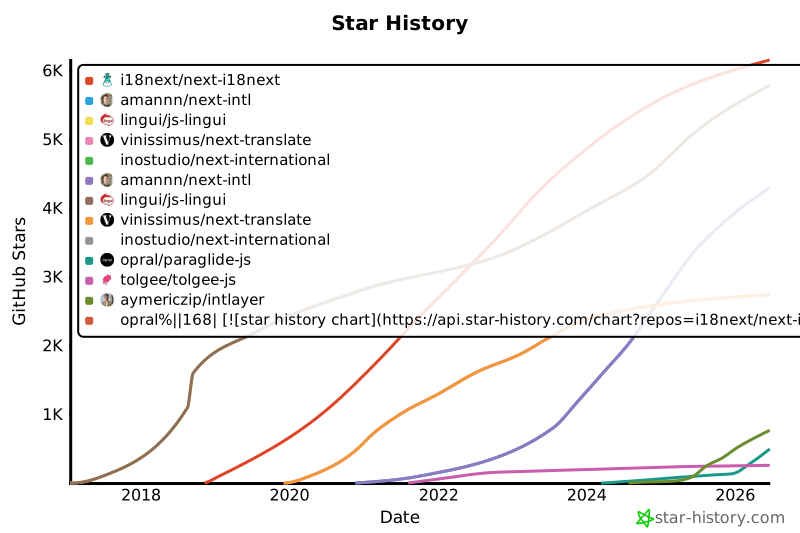](https://www.star-history.com/#i18next/next-i18next&amannn/next-intl&lingui/js-lingui&vinissimus/next-translate&inostudio/next-international&opral/paraglide-js&tolgee/tolgee-js&aymericzip/intlayer)
|
|
169
169
|
|
|
170
170
|
## Risultati nel dettaglio
|
|
171
171
|
|
|
@@ -122,7 +122,7 @@ Abbiamo confrontato **quattro strategie di caricamento**:
|
|
|
122
122
|
|
|
123
123
|
Le stelle di GitHub sono un forte indicatore della popolarità di un progetto, della fiducia della comunità e della pertinenza a lungo termine. Sebbene non siano una misura diretta della qualità tecnica, riflettono quanti sviluppatori trovano il progetto utile, ne seguono i progressi e sono propensi ad adottarlo. Per stimare il valore di un progetto, le stelle aiutano a confrontare la trazione tra le alternative e forniscono approfondimenti sulla crescita dell'ecosistema.
|
|
124
124
|
|
|
125
|
-
[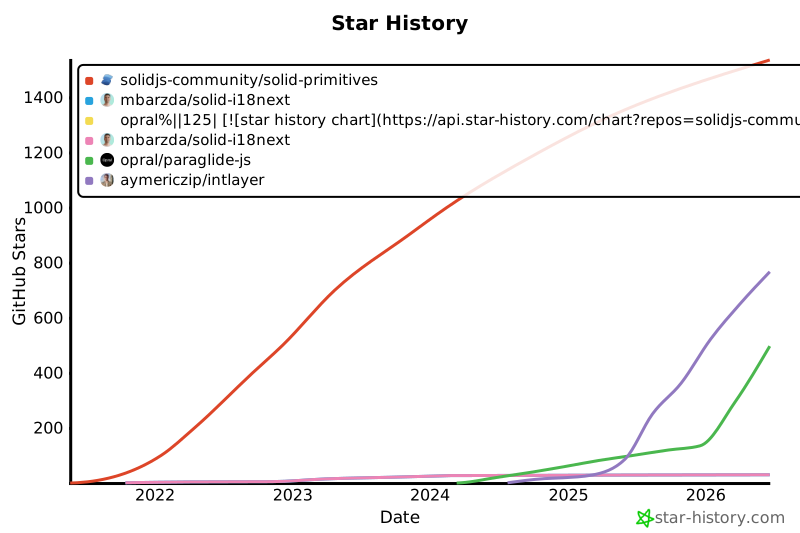](https://www.star-history.com/#solidjs-community/solid-primitives&mbarzda/solid-i18next&opral/paraglide-js&aymericzip/intlayer)
|
|
126
126
|
|
|
127
127
|
## Risultati in dettaglio
|
|
128
128
|
|
|
@@ -120,7 +120,7 @@ Abbiamo confrontato **quattro strategie di caricamento**:
|
|
|
120
120
|
|
|
121
121
|
Le stelle di GitHub sono un forte indicatore della popolarità di un progetto, della fiducia della comunità e della pertinenza a lungo termine. Sebbene non siano una misura diretta della qualità tecnica, riflettono quanti sviluppatori trovano il progetto utile, ne seguono i progressi e sono propensi ad adottarlo. Per stimare il valore di un progetto, le stelle aiutano a confrontare la trazione tra le alternative e forniscono approfondimenti sulla crescita dell'ecosistema.
|
|
122
122
|
|
|
123
|
-
[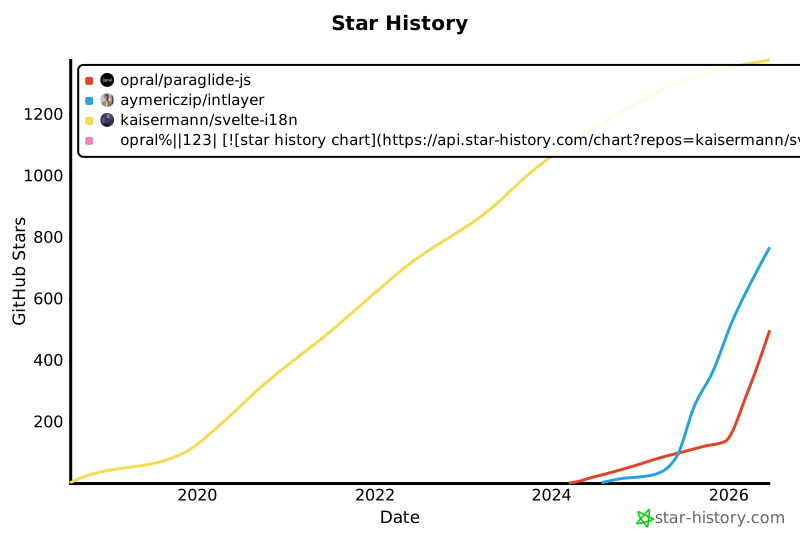](https://www.star-history.com/#kaisermann/svelte-i18n&opral/paraglide-js&aymericzip/intlayer)
|
|
124
124
|
|
|
125
125
|
## Risultati in dettaglio
|
|
126
126
|
|
|
@@ -128,7 +128,7 @@ Abbiamo confrontato **quattro strategie di caricamento**:
|
|
|
128
128
|
|
|
129
129
|
Le stelle di GitHub sono un forte indicatore della popolarità di un progetto, della fiducia della comunità e della pertinenza a lungo termine. Sebbene non siano una misura diretta della qualità tecnica, riflettono quanti sviluppatori trovano il progetto utile, ne seguono i progressi e sono propensi ad adottarlo. Per stimare il valore di un progetto, le stelle aiutano a confrontare la trazione tra le alternative e forniscono approfondimenti sulla crescita dell'ecosistema.
|
|
130
130
|
|
|
131
|
-
[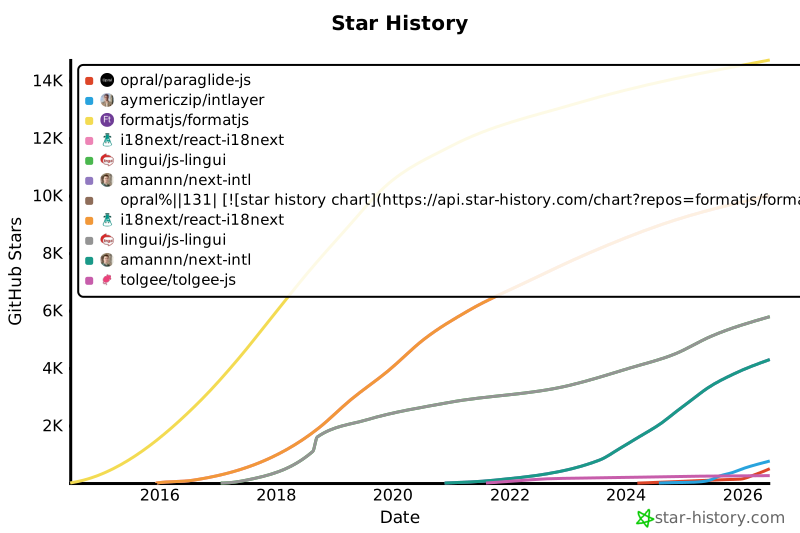](https://www.star-history.com/#formatjs/formatjs&i18next/react-i18next&lingui/js-lingui&amannn/next-intl&opral/paraglide-js&tolgee/tolgee-js&aymericzip/intlayer)
|
|
132
132
|
|
|
133
133
|
## Risultati nel dettaglio
|
|
134
134
|
|