@intlayer/docs 8.10.0 → 8.11.1
This diff represents the content of publicly available package versions that have been released to one of the supported registries. The information contained in this diff is provided for informational purposes only and reflects changes between package versions as they appear in their respective public registries.
- package/dist/cjs/common.cjs +3 -1
- package/dist/cjs/common.cjs.map +1 -1
- package/dist/cjs/generated/docs.entry.cjs +39 -19
- package/dist/cjs/generated/docs.entry.cjs.map +1 -1
- package/dist/esm/common.mjs +3 -1
- package/dist/esm/common.mjs.map +1 -1
- package/dist/esm/generated/docs.entry.mjs +39 -19
- package/dist/esm/generated/docs.entry.mjs.map +1 -1
- package/dist/types/common.d.ts.map +1 -1
- package/dist/types/generated/docs.entry.d.ts +2 -1
- package/dist/types/generated/docs.entry.d.ts.map +1 -1
- package/docs/ar/benchmark/nextjs.md +1 -1
- package/docs/ar/benchmark/solid.md +1 -1
- package/docs/ar/benchmark/svelte.md +1 -1
- package/docs/ar/benchmark/tanstack.md +1 -1
- package/docs/ar/dictionary/markdown.md +340 -14
- package/docs/ar/interest_of_intlayer.md +1 -1
- package/docs/ar/{intlayer_with_angular.md → intlayer_with_angular_19.md} +8 -7
- package/docs/ar/intlayer_with_angular_21.md +412 -0
- package/docs/bn/interest_of_intlayer.md +1 -1
- package/docs/bn/intlayer_with_angular_21.md +412 -0
- package/docs/cs/interest_of_intlayer.md +1 -1
- package/docs/cs/intlayer_with_angular_21.md +412 -0
- package/docs/de/benchmark/nextjs.md +1 -1
- package/docs/de/benchmark/solid.md +1 -1
- package/docs/de/benchmark/svelte.md +1 -1
- package/docs/de/benchmark/tanstack.md +1 -1
- package/docs/de/dictionary/markdown.md +340 -14
- package/docs/de/interest_of_intlayer.md +1 -1
- package/docs/de/{intlayer_with_angular.md → intlayer_with_angular_19.md} +8 -7
- package/docs/de/intlayer_with_angular_21.md +412 -0
- package/docs/en/benchmark/nextjs.md +1 -1
- package/docs/en/benchmark/solid.md +1 -1
- package/docs/en/benchmark/svelte.md +1 -1
- package/docs/en/benchmark/tanstack.md +1 -1
- package/docs/en/dictionary/markdown.md +326 -15
- package/docs/en/interest_of_intlayer.md +1 -1
- package/docs/en/{intlayer_with_angular.md → intlayer_with_angular_19.md} +8 -7
- package/docs/en/intlayer_with_angular_21.md +412 -0
- package/docs/en-GB/benchmark/nextjs.md +1 -1
- package/docs/en-GB/benchmark/solid.md +1 -1
- package/docs/en-GB/benchmark/svelte.md +1 -1
- package/docs/en-GB/benchmark/tanstack.md +1 -1
- package/docs/en-GB/dictionary/markdown.md +336 -7
- package/docs/en-GB/interest_of_intlayer.md +1 -1
- package/docs/en-GB/{intlayer_with_angular.md → intlayer_with_angular_19.md} +8 -7
- package/docs/en-GB/intlayer_with_angular_21.md +412 -0
- package/docs/es/benchmark/nextjs.md +1 -1
- package/docs/es/benchmark/solid.md +1 -1
- package/docs/es/benchmark/svelte.md +1 -1
- package/docs/es/benchmark/tanstack.md +1 -1
- package/docs/es/dictionary/markdown.md +340 -14
- package/docs/es/interest_of_intlayer.md +1 -1
- package/docs/es/{intlayer_with_angular.md → intlayer_with_angular_19.md} +8 -7
- package/docs/es/intlayer_with_angular_21.md +412 -0
- package/docs/fr/benchmark/nextjs.md +1 -1
- package/docs/fr/benchmark/solid.md +1 -1
- package/docs/fr/benchmark/svelte.md +1 -1
- package/docs/fr/benchmark/tanstack.md +1 -1
- package/docs/fr/dictionary/markdown.md +340 -14
- package/docs/fr/interest_of_intlayer.md +1 -1
- package/docs/fr/{intlayer_with_angular.md → intlayer_with_angular_19.md} +8 -7
- package/docs/fr/intlayer_with_angular_21.md +412 -0
- package/docs/hi/benchmark/nextjs.md +1 -1
- package/docs/hi/benchmark/solid.md +1 -1
- package/docs/hi/benchmark/svelte.md +1 -1
- package/docs/hi/benchmark/tanstack.md +1 -1
- package/docs/hi/dictionary/markdown.md +340 -14
- package/docs/hi/interest_of_intlayer.md +1 -1
- package/docs/hi/{intlayer_with_angular.md → intlayer_with_angular_19.md} +8 -7
- package/docs/hi/intlayer_with_angular_21.md +412 -0
- package/docs/id/benchmark/nextjs.md +1 -1
- package/docs/id/benchmark/solid.md +1 -1
- package/docs/id/benchmark/svelte.md +1 -1
- package/docs/id/benchmark/tanstack.md +1 -1
- package/docs/id/dictionary/markdown.md +340 -14
- package/docs/id/interest_of_intlayer.md +1 -1
- package/docs/id/{intlayer_with_angular.md → intlayer_with_angular_19.md} +8 -7
- package/docs/id/intlayer_with_angular_21.md +412 -0
- package/docs/it/benchmark/nextjs.md +1 -1
- package/docs/it/benchmark/solid.md +1 -1
- package/docs/it/benchmark/svelte.md +1 -1
- package/docs/it/benchmark/tanstack.md +1 -1
- package/docs/it/dictionary/markdown.md +340 -14
- package/docs/it/interest_of_intlayer.md +1 -1
- package/docs/it/{intlayer_with_angular.md → intlayer_with_angular_19.md} +8 -7
- package/docs/it/intlayer_with_angular_21.md +412 -0
- package/docs/ja/benchmark/nextjs.md +1 -1
- package/docs/ja/benchmark/solid.md +1 -1
- package/docs/ja/benchmark/svelte.md +1 -1
- package/docs/ja/benchmark/tanstack.md +1 -1
- package/docs/ja/interest_of_intlayer.md +1 -1
- package/docs/ja/{intlayer_with_angular.md → intlayer_with_angular_19.md} +8 -7
- package/docs/ja/intlayer_with_angular_21.md +412 -0
- package/docs/ko/benchmark/nextjs.md +1 -1
- package/docs/ko/benchmark/solid.md +1 -1
- package/docs/ko/benchmark/svelte.md +1 -1
- package/docs/ko/benchmark/tanstack.md +1 -1
- package/docs/ko/dictionary/markdown.md +340 -14
- package/docs/ko/interest_of_intlayer.md +1 -1
- package/docs/ko/{intlayer_with_angular.md → intlayer_with_angular_19.md} +8 -7
- package/docs/ko/intlayer_with_angular_21.md +412 -0
- package/docs/nl/interest_of_intlayer.md +1 -1
- package/docs/nl/intlayer_with_angular_21.md +412 -0
- package/docs/pl/benchmark/nextjs.md +1 -1
- package/docs/pl/benchmark/solid.md +1 -1
- package/docs/pl/benchmark/svelte.md +1 -1
- package/docs/pl/benchmark/tanstack.md +1 -1
- package/docs/pl/dictionary/markdown.md +340 -14
- package/docs/pl/interest_of_intlayer.md +1 -1
- package/docs/pl/{intlayer_with_angular.md → intlayer_with_angular_19.md} +8 -7
- package/docs/pl/intlayer_with_angular_21.md +412 -0
- package/docs/pt/benchmark/nextjs.md +1 -1
- package/docs/pt/benchmark/solid.md +1 -1
- package/docs/pt/benchmark/svelte.md +1 -1
- package/docs/pt/benchmark/tanstack.md +1 -1
- package/docs/pt/dictionary/markdown.md +340 -14
- package/docs/pt/interest_of_intlayer.md +1 -1
- package/docs/pt/{intlayer_with_angular.md → intlayer_with_angular_19.md} +8 -7
- package/docs/pt/intlayer_with_angular_21.md +412 -0
- package/docs/ru/benchmark/nextjs.md +1 -1
- package/docs/ru/benchmark/solid.md +1 -1
- package/docs/ru/benchmark/svelte.md +1 -1
- package/docs/ru/benchmark/tanstack.md +1 -1
- package/docs/ru/dictionary/markdown.md +445 -3
- package/docs/ru/interest_of_intlayer.md +1 -1
- package/docs/ru/{intlayer_with_angular.md → intlayer_with_angular_19.md} +8 -7
- package/docs/ru/intlayer_with_angular_21.md +412 -0
- package/docs/tr/benchmark/nextjs.md +1 -1
- package/docs/tr/benchmark/solid.md +1 -1
- package/docs/tr/benchmark/svelte.md +1 -1
- package/docs/tr/benchmark/tanstack.md +1 -1
- package/docs/tr/dictionary/markdown.md +340 -14
- package/docs/tr/interest_of_intlayer.md +1 -1
- package/docs/tr/{intlayer_with_angular.md → intlayer_with_angular_19.md} +8 -7
- package/docs/tr/intlayer_with_angular_21.md +412 -0
- package/docs/uk/benchmark/nextjs.md +1 -1
- package/docs/uk/benchmark/solid.md +1 -1
- package/docs/uk/benchmark/svelte.md +1 -1
- package/docs/uk/benchmark/tanstack.md +1 -1
- package/docs/uk/dictionary/markdown.md +340 -14
- package/docs/uk/interest_of_intlayer.md +1 -1
- package/docs/uk/{intlayer_with_angular.md → intlayer_with_angular_19.md} +8 -7
- package/docs/uk/intlayer_with_angular_21.md +412 -0
- package/docs/ur/interest_of_intlayer.md +1 -1
- package/docs/ur/intlayer_with_angular_21.md +412 -0
- package/docs/vi/benchmark/nextjs.md +1 -1
- package/docs/vi/benchmark/solid.md +1 -1
- package/docs/vi/benchmark/svelte.md +1 -1
- package/docs/vi/benchmark/tanstack.md +1 -1
- package/docs/vi/dictionary/markdown.md +340 -14
- package/docs/vi/interest_of_intlayer.md +1 -1
- package/docs/vi/{intlayer_with_angular.md → intlayer_with_angular_19.md} +8 -7
- package/docs/vi/intlayer_with_angular_21.md +412 -0
- package/docs/zh/benchmark/nextjs.md +1 -1
- package/docs/zh/benchmark/solid.md +1 -1
- package/docs/zh/benchmark/svelte.md +1 -1
- package/docs/zh/benchmark/tanstack.md +1 -1
- package/docs/zh/dictionary/markdown.md +340 -14
- package/docs/zh/interest_of_intlayer.md +1 -1
- package/docs/zh/{intlayer_with_angular.md → intlayer_with_angular_19.md} +8 -7
- package/docs/zh/intlayer_with_angular_21.md +412 -0
- package/docs/zh-TW/interest_of_intlayer.md +1 -1
- package/docs/zh-TW/intlayer_with_angular_21.md +412 -0
- package/package.json +7 -7
- package/src/common.ts +12 -6
- package/src/generated/docs.entry.ts +39 -19
|
@@ -66,13 +66,10 @@ Puoi dichiarare i contenuti Markdown usando la funzione `md` o semplicemente com
|
|
|
66
66
|
Esempio di struttura dei file:
|
|
67
67
|
|
|
68
68
|
```text
|
|
69
|
-
content
|
|
70
|
-
├── en
|
|
71
|
-
|
|
72
|
-
|
|
73
|
-
│ └── markdown-file.fr.content.md
|
|
74
|
-
└── es/
|
|
75
|
-
└── markdown-file.es.content.md
|
|
69
|
+
content
|
|
70
|
+
├── markdown-file.en.content.md
|
|
71
|
+
├── markdown-file.fr.content.md
|
|
72
|
+
└── markdown-file.es.content.md
|
|
76
73
|
```
|
|
77
74
|
|
|
78
75
|
Puoi aggiungere nel front-matter qualsiasi proprietà definita nella [Definizione del Dizionario](https://github.com/aymericzip/intlayer/blob/main/docs/docs/it/dictionary/content_file.md)
|
|
@@ -130,8 +127,6 @@ Puoi dichiarare i contenuti Markdown usando la funzione `md` o semplicemente com
|
|
|
130
127
|
</Tab>
|
|
131
128
|
</Tabs>
|
|
132
129
|
|
|
133
|
-
---
|
|
134
|
-
|
|
135
130
|
## Rendering del Markdown
|
|
136
131
|
|
|
137
132
|
Intlayer fornisce due modi indipendenti per eseguire il rendering del Markdown:
|
|
@@ -147,7 +142,7 @@ Il rendering del Markdown supporta **MDX** — usa qualsiasi componente JSX/fram
|
|
|
147
142
|
### 1. Rendering Automatico (tramite `useIntlayer`)
|
|
148
143
|
|
|
149
144
|
<Tabs group="framework">
|
|
150
|
-
<Tab label="React
|
|
145
|
+
<Tab label="React" value="react">
|
|
151
146
|
I nodi Markdown possono essere renderizzati direttamente come JSX.
|
|
152
147
|
|
|
153
148
|
```tsx fileName="App.tsx"
|
|
@@ -197,6 +192,57 @@ Il rendering del Markdown supporta **MDX** — usa qualsiasi componente JSX/fram
|
|
|
197
192
|
{myMarkdownContent.metadata.title}
|
|
198
193
|
```
|
|
199
194
|
|
|
195
|
+
</Tab>
|
|
196
|
+
<Tab label="Next.js" value="nextjs">
|
|
197
|
+
I nodi Markdown possono essere renderizzati direttamente come JSX.
|
|
198
|
+
|
|
199
|
+
```tsx fileName="App.tsx"
|
|
200
|
+
import { useIntlayer } from "next-intlayer";
|
|
201
|
+
import { MarkdownProvider } from "next-intlayer/markdown";
|
|
202
|
+
|
|
203
|
+
const AppContent = () => {
|
|
204
|
+
const { myMarkdownContent } = useIntlayer("app");
|
|
205
|
+
|
|
206
|
+
return <div>{myMarkdownContent}</div>;
|
|
207
|
+
};
|
|
208
|
+
|
|
209
|
+
const App = () => (
|
|
210
|
+
<MarkdownProvider
|
|
211
|
+
components={{
|
|
212
|
+
h1: ({ children }) => <h1 style={{ color: "red" }}>{children}</h1>,
|
|
213
|
+
MyButton: (props) => <button {...props} />, // Componente MDX
|
|
214
|
+
}}
|
|
215
|
+
>
|
|
216
|
+
<AppContent />
|
|
217
|
+
</MarkdownProvider>
|
|
218
|
+
);
|
|
219
|
+
```
|
|
220
|
+
|
|
221
|
+
> Se `MarkdownProvider` non è presente, Intlayer eseguirà il rendering del markdown usando il parser da Markdown a JSX predefinito.
|
|
222
|
+
|
|
223
|
+
Puoi anche fornire sovrascritture locali per nodi specifici utilizzando il metodo `.use()`:
|
|
224
|
+
|
|
225
|
+
```tsx
|
|
226
|
+
{myMarkdownContent.use({
|
|
227
|
+
h1: ({ children }) => <h1 style={{ color: "red" }}>{children}</h1>,
|
|
228
|
+
})}
|
|
229
|
+
```
|
|
230
|
+
|
|
231
|
+
Puoi recuperare il Markdown come stringa:
|
|
232
|
+
|
|
233
|
+
```tsx
|
|
234
|
+
{myMarkdownContent.value}
|
|
235
|
+
{String(myMarkdownContent)}
|
|
236
|
+
{myMarkdownContent.toString()}
|
|
237
|
+
```
|
|
238
|
+
|
|
239
|
+
E puoi accedere ai metadati del tuo markdown in questo modo:
|
|
240
|
+
|
|
241
|
+
```tsx
|
|
242
|
+
{myMarkdownContent.metadata}
|
|
243
|
+
{myMarkdownContent.metadata.title}
|
|
244
|
+
```
|
|
245
|
+
|
|
200
246
|
</Tab>
|
|
201
247
|
<Tab label="Vue" value="vue">
|
|
202
248
|
In Vue, il contenuto Markdown può essere renderizzato usando il tag `component` integrato o direttamente come nodo.
|
|
@@ -441,7 +487,7 @@ Il rendering del Markdown supporta **MDX** — usa qualsiasi componente JSX/fram
|
|
|
441
487
|
Queste utility eseguono il rendering **solo di stringhe Markdown pure** e sono indipendenti da `useIntlayer`. Usale quando hai bisogno di renderizzare Markdown da fonti diverse dai tuoi dizionari.
|
|
442
488
|
|
|
443
489
|
<Tabs group="framework">
|
|
444
|
-
<Tab label="React
|
|
490
|
+
<Tab label="React" value="react">
|
|
445
491
|
|
|
446
492
|
#### Componente `<MarkdownRenderer />`
|
|
447
493
|
|
|
@@ -479,6 +525,45 @@ Queste utility eseguono il rendering **solo di stringhe Markdown pure** e sono i
|
|
|
479
525
|
const jsx = renderMarkdown("# Il Mio Titolo", { forceBlock: true });
|
|
480
526
|
```
|
|
481
527
|
|
|
528
|
+
</Tab>
|
|
529
|
+
<Tab label="Next.js" value="nextjs">
|
|
530
|
+
|
|
531
|
+
#### Componente `<MarkdownRenderer />`
|
|
532
|
+
|
|
533
|
+
Esegue il rendering di una stringa Markdown con opzioni specifiche.
|
|
534
|
+
|
|
535
|
+
```tsx
|
|
536
|
+
import { MarkdownRenderer } from "next-intlayer/markdown";
|
|
537
|
+
|
|
538
|
+
<MarkdownRenderer forceBlock={true} tagfilter={true}>
|
|
539
|
+
{"# Il Mio Titolo"}
|
|
540
|
+
</MarkdownRenderer>
|
|
541
|
+
```
|
|
542
|
+
|
|
543
|
+
#### Hook `useMarkdownRenderer()`
|
|
544
|
+
|
|
545
|
+
Ottieni una funzione di rendering preconfigurata.
|
|
546
|
+
|
|
547
|
+
```tsx
|
|
548
|
+
import { useMarkdownRenderer } from "next-intlayer/markdown";
|
|
549
|
+
|
|
550
|
+
const renderMarkdown = useMarkdownRenderer({
|
|
551
|
+
forceBlock: true,
|
|
552
|
+
components: { h1: (props) => <h1 {...props} className="custom" /> }
|
|
553
|
+
});
|
|
554
|
+
|
|
555
|
+
return renderMarkdown("# Il Mio Titolo");
|
|
556
|
+
```
|
|
557
|
+
|
|
558
|
+
#### Utility `renderMarkdown()`
|
|
559
|
+
Utility indipendente per il rendering al di fuori dei componenti.
|
|
560
|
+
|
|
561
|
+
```tsx
|
|
562
|
+
import { renderMarkdown } from "next-intlayer/markdown";
|
|
563
|
+
|
|
564
|
+
const jsx = renderMarkdown("# Il Mio Titolo", { forceBlock: true });
|
|
565
|
+
```
|
|
566
|
+
|
|
482
567
|
</Tab>
|
|
483
568
|
<Tab label="Vue" value="vue">
|
|
484
569
|
|
|
@@ -608,14 +693,12 @@ Queste utility eseguono il rendering **solo di stringhe Markdown pure** e sono i
|
|
|
608
693
|
</Tab>
|
|
609
694
|
</Tabs>
|
|
610
695
|
|
|
611
|
-
---
|
|
612
|
-
|
|
613
696
|
## Configurazione Globale con `MarkdownProvider`
|
|
614
697
|
|
|
615
698
|
Il `MarkdownProvider` (o il suo equivalente nel framework) configura la pipeline di rendering Markdown per l'intera applicazione. Questo si applica sia al rendering automatico di `useIntlayer` che alle utility di supporto. Le opzioni impostate qui sono quelle predefinite — `.use()` le sovrascrive a livello di nodo.
|
|
616
699
|
|
|
617
700
|
<Tabs group="framework">
|
|
618
|
-
<Tab label="React
|
|
701
|
+
<Tab label="React" value="react">
|
|
619
702
|
|
|
620
703
|
```tsx fileName="AppProvider.tsx"
|
|
621
704
|
import { MarkdownProvider } from "react-intlayer/markdown";
|
|
@@ -633,6 +716,7 @@ Il `MarkdownProvider` (o il suo equivalente nel framework) configura la pipeline
|
|
|
633
716
|
);
|
|
634
717
|
```
|
|
635
718
|
|
|
719
|
+
|
|
636
720
|
> MDX è supportato — qualsiasi nome di componente usato all'interno del tuo Markdown (es. `<MyCustomJSXComponent />`) viene risolto tramite la mappa `components`.
|
|
637
721
|
|
|
638
722
|
Puoi anche usare il tuo renderer markdown:
|
|
@@ -655,6 +739,48 @@ Il `MarkdownProvider` (o il suo equivalente nel framework) configura la pipeline
|
|
|
655
739
|
|
|
656
740
|
> Importare dinamicamente il tuo renderer Markdown è un buon modo per ridurre le dimensioni del bundle della tua applicazione.
|
|
657
741
|
|
|
742
|
+
</Tab>
|
|
743
|
+
<Tab label="Next.js" value="nextjs">
|
|
744
|
+
|
|
745
|
+
```tsx fileName="AppProvider.tsx"
|
|
746
|
+
import { MarkdownProvider } from "next-intlayer/markdown";
|
|
747
|
+
|
|
748
|
+
export const AppProvider = ({ children }) => (
|
|
749
|
+
<MarkdownProvider
|
|
750
|
+
components={{
|
|
751
|
+
h1: (props) => <h1 style={{color: 'green'}} {...props} />,
|
|
752
|
+
a: ({ href, ...props }) => <a style={{color: 'red'}} {...props} />,
|
|
753
|
+
MyCustomJSXComponent: (props) => <span style={{color: 'red'}} {...props} />,
|
|
754
|
+
}}
|
|
755
|
+
>
|
|
756
|
+
{children}
|
|
757
|
+
</MarkdownProvider>
|
|
758
|
+
);
|
|
759
|
+
```
|
|
760
|
+
|
|
761
|
+
|
|
762
|
+
> MDX è supportato — qualsiasi nome di componente usato all'interno del tuo Markdown (es. `<MyCustomJSXComponent />`) viene risolto tramite la mappa `components`.
|
|
763
|
+
|
|
764
|
+
Puoi anche usare il tuo renderer markdown:
|
|
765
|
+
|
|
766
|
+
```tsx fileName="AppProvider.tsx"
|
|
767
|
+
import { MarkdownProvider } from "next-intlayer/markdown";
|
|
768
|
+
|
|
769
|
+
export const AppProvider = ({ children }) => (
|
|
770
|
+
<MarkdownProvider
|
|
771
|
+
renderMarkdown={async (md) => {
|
|
772
|
+
// Use dynamic import to reduce the bundle size of your application
|
|
773
|
+
const { renderMarkdown } = await import('next-intlayer/markdown');
|
|
774
|
+
return renderMarkdown(md);
|
|
775
|
+
}}
|
|
776
|
+
>
|
|
777
|
+
{children}
|
|
778
|
+
</MarkdownProvider>
|
|
779
|
+
);
|
|
780
|
+
```
|
|
781
|
+
|
|
782
|
+
> Importare dinamicamente il tuo renderer Markdown è un buon modo per ridurre le dimensioni del bundle della tua applicazione.
|
|
783
|
+
|
|
658
784
|
</Tab>
|
|
659
785
|
<Tab label="Vue" value="vue">
|
|
660
786
|
|
|
@@ -680,6 +806,9 @@ Il `MarkdownProvider` (o il suo equivalente nel framework) configura la pipeline
|
|
|
680
806
|
app.mount("#app");
|
|
681
807
|
```
|
|
682
808
|
|
|
809
|
+
|
|
810
|
+
> MDX è supportato — qualsiasi nome di componente usato all'interno del tuo Markdown (es. `<MyCustomJSXComponent />`) viene risolto tramite la mappa `components`.
|
|
811
|
+
|
|
683
812
|
Puoi anche usare il tuo renderer markdown:
|
|
684
813
|
|
|
685
814
|
```typescript fileName="main.ts"
|
|
@@ -721,6 +850,9 @@ Il `MarkdownProvider` (o il suo equivalente nel framework) configura la pipeline
|
|
|
721
850
|
</MarkdownProvider>
|
|
722
851
|
```
|
|
723
852
|
|
|
853
|
+
|
|
854
|
+
> MDX è supportato — qualsiasi nome di componente usato all'interno del tuo Markdown (es. `<MyCustomJSXComponent />`) viene risolto tramite la mappa `components`.
|
|
855
|
+
|
|
724
856
|
Puoi anche usare il tuo renderer markdown:
|
|
725
857
|
|
|
726
858
|
```svelte fileName="App.svelte"
|
|
@@ -757,6 +889,9 @@ Il `MarkdownProvider` (o il suo equivalente nel framework) configura la pipeline
|
|
|
757
889
|
);
|
|
758
890
|
```
|
|
759
891
|
|
|
892
|
+
|
|
893
|
+
> MDX è supportato — qualsiasi nome di componente usato all'interno del tuo Markdown (es. `<MyCustomJSXComponent />`) viene risolto tramite la mappa `components`.
|
|
894
|
+
|
|
760
895
|
Puoi anche usare il tuo renderer markdown:
|
|
761
896
|
|
|
762
897
|
```tsx fileName="AppProvider.tsx"
|
|
@@ -793,6 +928,9 @@ Il `MarkdownProvider` (o il suo equivalente nel framework) configura la pipeline
|
|
|
793
928
|
);
|
|
794
929
|
```
|
|
795
930
|
|
|
931
|
+
|
|
932
|
+
> MDX è supportato — qualsiasi nome di componente usato all'interno del tuo Markdown (es. `<MyCustomJSXComponent />`) viene risolto tramite la mappa `components`.
|
|
933
|
+
|
|
796
934
|
Puoi anche usare il tuo renderer markdown:
|
|
797
935
|
|
|
798
936
|
```tsx fileName="AppProvider.tsx"
|
|
@@ -836,3 +974,191 @@ Il `MarkdownProvider` (o il suo equivalente nel framework) configura la pipeline
|
|
|
836
974
|
|
|
837
975
|
</Tab>
|
|
838
976
|
</Tabs>
|
|
977
|
+
|
|
978
|
+
## Suspense
|
|
979
|
+
|
|
980
|
+
Il renderer Markdown di Intlayer è caricato dinamicamente. Sebbene ottimizzato, il chunk del parser sottostante è di circa 55 kb. Il caricamento sincrono ritarda il rendering iniziale della pagina e riduce il First Contentful Paint (FCP).
|
|
981
|
+
|
|
982
|
+
Per evitare di bloccare l'interfaccia utente, Intlayer si integra con l'API Suspense di React. Recupera il parser in background e lancia una Promise durante il download.
|
|
983
|
+
|
|
984
|
+
Avvolgi qualsiasi componente che renderizza Intlayer Markdown in un limite `<Suspense>`. Questo visualizza uno stato di fallback localizzato durante il download del chunk, consentendo al resto del DOM di essere renderizzato immediatamente.
|
|
985
|
+
|
|
986
|
+
Avviso: Se non si fornisce un limite `<Suspense>`, React sospenderà a livello di root o bloccherà il rendering dell'intero albero dei componenti fino al completo caricamento del chunk di 55 kb.
|
|
987
|
+
|
|
988
|
+
<Tabs>
|
|
989
|
+
<Tab label="Next.js" value="nextjs">
|
|
990
|
+
|
|
991
|
+
In Next.js App Router, puoi utilizzare React `Suspense` per i componenti client o un file `loading.tsx` per i componenti server.
|
|
992
|
+
|
|
993
|
+
**Componente Client:**
|
|
994
|
+
|
|
995
|
+
```tsx fileName="components/MyComponent.tsx"
|
|
996
|
+
"use client";
|
|
997
|
+
import { useIntlayer } from "next-intlayer";
|
|
998
|
+
import { Suspense } from "react";
|
|
999
|
+
|
|
1000
|
+
const MyComponent = () => {
|
|
1001
|
+
const markdownContent = useIntlayer("my-markdown");
|
|
1002
|
+
|
|
1003
|
+
return (
|
|
1004
|
+
<Suspense fallback={<div>Loading...</div>}>{markdownContent}</Suspense>
|
|
1005
|
+
);
|
|
1006
|
+
};
|
|
1007
|
+
```
|
|
1008
|
+
|
|
1009
|
+
**Componente Server con `loading.tsx`:**
|
|
1010
|
+
|
|
1011
|
+
```tsx fileName="app/loading.tsx"
|
|
1012
|
+
export default function Loading() {
|
|
1013
|
+
return <div>Loading...</div>;
|
|
1014
|
+
}
|
|
1015
|
+
```
|
|
1016
|
+
|
|
1017
|
+
```tsx fileName="app/page.tsx"
|
|
1018
|
+
import { useIntlayer } from "next-intlayer/server";
|
|
1019
|
+
|
|
1020
|
+
const MyPage = () => {
|
|
1021
|
+
const markdownContent = useIntlayer("my-markdown");
|
|
1022
|
+
return <div>{markdownContent}</div>;
|
|
1023
|
+
};
|
|
1024
|
+
|
|
1025
|
+
export default MyPage;
|
|
1026
|
+
```
|
|
1027
|
+
|
|
1028
|
+
</Tab>
|
|
1029
|
+
|
|
1030
|
+
<Tab label="React" value="react">
|
|
1031
|
+
|
|
1032
|
+
```tsx
|
|
1033
|
+
import { useIntlayer } from "react-intlayer";
|
|
1034
|
+
import { Suspense } from "react";
|
|
1035
|
+
|
|
1036
|
+
const MyComponent = () => {
|
|
1037
|
+
const markdownContent = useIntlayer("my-markdown");
|
|
1038
|
+
|
|
1039
|
+
return (
|
|
1040
|
+
<Suspense fallback={<div>Loading...</div>}>{markdownContent}</Suspense>
|
|
1041
|
+
);
|
|
1042
|
+
};
|
|
1043
|
+
```
|
|
1044
|
+
|
|
1045
|
+
</Tab>
|
|
1046
|
+
|
|
1047
|
+
<Tab label="Vue" value="vue">
|
|
1048
|
+
|
|
1049
|
+
Vue ha un componente `<Suspense>` integrato. Avvolgi il componente che renderizza il contenuto Markdown in un limite `<Suspense>`.
|
|
1050
|
+
|
|
1051
|
+
```vue fileName="MyComponent.vue"
|
|
1052
|
+
<script setup>
|
|
1053
|
+
import { useIntlayer } from "vue-intlayer";
|
|
1054
|
+
|
|
1055
|
+
const { markdownContent } = useIntlayer("my-markdown");
|
|
1056
|
+
</script>
|
|
1057
|
+
|
|
1058
|
+
<template>
|
|
1059
|
+
<Suspense>
|
|
1060
|
+
<component :is="markdownContent" />
|
|
1061
|
+
<template #fallback>
|
|
1062
|
+
<div>Loading...</div>
|
|
1063
|
+
</template>
|
|
1064
|
+
</Suspense>
|
|
1065
|
+
</template>
|
|
1066
|
+
```
|
|
1067
|
+
|
|
1068
|
+
</Tab>
|
|
1069
|
+
<Tab label="Svelte" value="svelte">
|
|
1070
|
+
|
|
1071
|
+
Svelte non ha un equivalente dell'API Suspense. Usa un blocco `{#await}` per gestire il rendering asincrono del contenuto Markdown.
|
|
1072
|
+
|
|
1073
|
+
```svelte fileName="MyComponent.svelte"
|
|
1074
|
+
<script lang="ts">
|
|
1075
|
+
import { useIntlayer } from "svelte-intlayer";
|
|
1076
|
+
|
|
1077
|
+
const content = useIntlayer("my-markdown");
|
|
1078
|
+
</script>
|
|
1079
|
+
|
|
1080
|
+
{#await $content.markdownContent}
|
|
1081
|
+
<div>Loading...</div>
|
|
1082
|
+
{:then rendered}
|
|
1083
|
+
{@html rendered}
|
|
1084
|
+
{/await}
|
|
1085
|
+
```
|
|
1086
|
+
|
|
1087
|
+
</Tab>
|
|
1088
|
+
<Tab label="Preact" value="preact">
|
|
1089
|
+
|
|
1090
|
+
Preact supporta l'API Suspense di React tramite `preact/compat`.
|
|
1091
|
+
|
|
1092
|
+
```tsx fileName="MyComponent.tsx"
|
|
1093
|
+
import { useIntlayer } from "preact-intlayer";
|
|
1094
|
+
import { Suspense } from "preact/compat";
|
|
1095
|
+
|
|
1096
|
+
const MyComponent = () => {
|
|
1097
|
+
const markdownContent = useIntlayer("my-markdown");
|
|
1098
|
+
|
|
1099
|
+
return (
|
|
1100
|
+
<Suspense fallback={<div>Loading...</div>}>{markdownContent}</Suspense>
|
|
1101
|
+
);
|
|
1102
|
+
};
|
|
1103
|
+
```
|
|
1104
|
+
|
|
1105
|
+
</Tab>
|
|
1106
|
+
<Tab label="Solid" value="solid">
|
|
1107
|
+
|
|
1108
|
+
Solid ha il suo componente `<Suspense>` da `solid-js`.
|
|
1109
|
+
|
|
1110
|
+
```tsx fileName="MyComponent.tsx"
|
|
1111
|
+
import { useIntlayer } from "solid-intlayer";
|
|
1112
|
+
import { Suspense } from "solid-js";
|
|
1113
|
+
|
|
1114
|
+
const MyComponent = () => {
|
|
1115
|
+
const { markdownContent } = useIntlayer("my-markdown");
|
|
1116
|
+
|
|
1117
|
+
return (
|
|
1118
|
+
<Suspense fallback={<div>Loading...</div>}>{markdownContent}</Suspense>
|
|
1119
|
+
);
|
|
1120
|
+
};
|
|
1121
|
+
```
|
|
1122
|
+
|
|
1123
|
+
</Tab>
|
|
1124
|
+
<Tab label="Angular" value="angular">
|
|
1125
|
+
|
|
1126
|
+
Angular non ha un'API Suspense. Usa le viste differite (`@defer`) per gestire i contenuti Markdown caricati in modo lazy (richiede Angular 17+).
|
|
1127
|
+
|
|
1128
|
+
```typescript fileName="my.component.ts"
|
|
1129
|
+
import { Component } from "@angular/core";
|
|
1130
|
+
import { useIntlayer } from "angular-intlayer";
|
|
1131
|
+
|
|
1132
|
+
@Component({
|
|
1133
|
+
selector: "app-my",
|
|
1134
|
+
template: `
|
|
1135
|
+
@defer {
|
|
1136
|
+
<div [innerHTML]="content().markdownContent"></div>
|
|
1137
|
+
} @loading {
|
|
1138
|
+
<div>Loading...</div>
|
|
1139
|
+
}
|
|
1140
|
+
`,
|
|
1141
|
+
})
|
|
1142
|
+
export class MyComponent {
|
|
1143
|
+
content = useIntlayer("my-markdown");
|
|
1144
|
+
}
|
|
1145
|
+
```
|
|
1146
|
+
|
|
1147
|
+
</Tab>
|
|
1148
|
+
</Tabs>
|
|
1149
|
+
|
|
1150
|
+
---
|
|
1151
|
+
|
|
1152
|
+
## Riferimento opzioni
|
|
1153
|
+
|
|
1154
|
+
Queste opzioni possono essere passate a `MarkdownProvider`, `MarkdownRenderer`, `useMarkdownRenderer` e `renderMarkdown`.
|
|
1155
|
+
|
|
1156
|
+
| Option | Type | Default | Descrizione |
|
|
1157
|
+
| :-------------------- | :---------- | :------ | :--------------------------------------------------------------------------------------------------------- |
|
|
1158
|
+
| `forceBlock` | `boolean` | `false` | Forza l'output a essere avvolto in un elemento a livello di blocco (es. `<div>`). |
|
|
1159
|
+
| `forceInline` | `boolean` | `false` | Forza l'output a essere avvolto in un elemento in linea (es. `<span>`). |
|
|
1160
|
+
| `tagfilter` | `boolean` | `true` | Abilita il GitHub Tag Filter per una maggiore sicurezza rimuovendo i tag HTML pericolosi. |
|
|
1161
|
+
| `preserveFrontmatter` | `boolean` | `false` | Se `true`, il frontmatter all'inizio della stringa Markdown non verrà rimosso. |
|
|
1162
|
+
| `components` | `Overrides` | `{}` | Una mappa di tag HTML per componenti personalizzati (es. `{ h1: MyHeading }`). |
|
|
1163
|
+
| `wrapper` | `Component` | `null` | Un componente personalizzato per avvolgere il Markdown renderizzato. |
|
|
1164
|
+
| `renderMarkdown` | `Function` | `null` | Una funzione di rendering personalizzata per sostituire completamente il compilatore Markdown predefinito. |
|
|
@@ -224,7 +224,7 @@ Questo approccio ti consente di:
|
|
|
224
224
|
|
|
225
225
|
Le stelle di GitHub sono un forte indicatore della popolarità di un progetto, della fiducia della comunità e della pertinenza a lungo termine. Sebbene non siano una misura diretta della qualità tecnica, riflettono quanti sviluppatori trovano il progetto utile, ne seguono i progressi e sono propensi ad adottarlo. Per stimare il valore di un progetto, le stelle aiutano a confrontare la trazione tra le alternative e forniscono approfondimenti sulla crescita dell'ecosistema.
|
|
226
226
|
|
|
227
|
-
[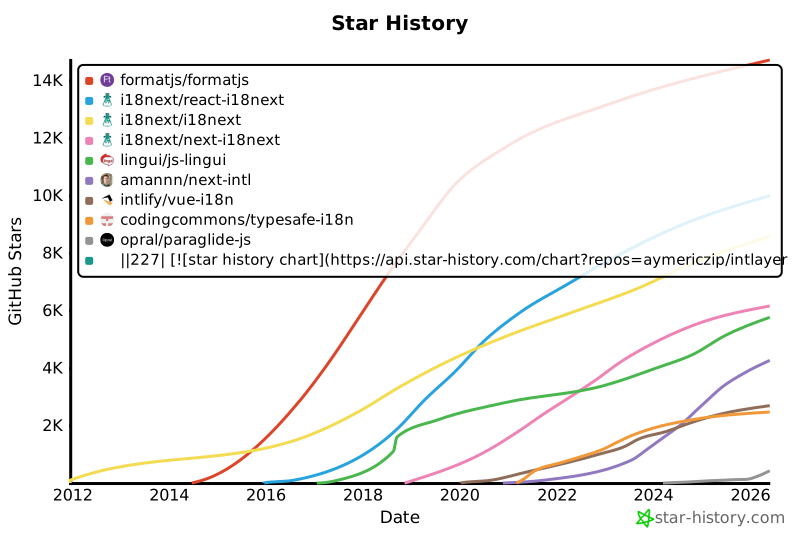](https://www.star-history.com/#aymericzip/intlayer&formatjs/formatjs&i18next/react-i18next&i18next/i18next&i18next/next-i18next&lingui/js-lingui&amannn/next-intl&intlify/vue-i18n&codingcommons/typesafe-i18n&opral/paraglide-js)
|
|
228
228
|
|
|
229
229
|
---
|
|
230
230
|
|
|
@@ -1,7 +1,7 @@
|
|
|
1
1
|
---
|
|
2
2
|
createdAt: 2025-04-18
|
|
3
3
|
updatedAt: 2026-05-06
|
|
4
|
-
title: Angular i18n - Come tradurre un'app Angular
|
|
4
|
+
title: Angular i18n - Come tradurre un'app Angular 19 (Webpack)
|
|
5
5
|
description: Scopri come rendere multilingue il tuo sito Angular. Segui la documentazione per l'internazionalizzazione (i18n) e la traduzione.
|
|
6
6
|
keywords:
|
|
7
7
|
- Internazionaliizzazione
|
|
@@ -13,8 +13,9 @@ slugs:
|
|
|
13
13
|
- doc
|
|
14
14
|
- environment
|
|
15
15
|
- angular
|
|
16
|
-
|
|
17
|
-
|
|
16
|
+
- 19
|
|
17
|
+
applicationTemplate: https://github.com/aymericzip/intlayer-angular-19-template
|
|
18
|
+
applicationShowcase: https://intlayer-angular-19-template.vercel.app
|
|
18
19
|
history:
|
|
19
20
|
- version: 8.9.0
|
|
20
21
|
date: 2026-05-04
|
|
@@ -27,7 +28,7 @@ history:
|
|
|
27
28
|
changes: "Inizializza cronologia"
|
|
28
29
|
---
|
|
29
30
|
|
|
30
|
-
# Traduci il tuo sito Angular usando Intlayer | Internazionalizzazione (i18n)
|
|
31
|
+
# Traduci il tuo sito Angular 19 (Webpack) usando Intlayer | Internazionalizzazione (i18n)
|
|
31
32
|
|
|
32
33
|
## Indice
|
|
33
34
|
|
|
@@ -52,7 +53,7 @@ Con Intlayer puoi:
|
|
|
52
53
|
<Tab label="Codice" value="code">
|
|
53
54
|
|
|
54
55
|
<iframe
|
|
55
|
-
src="https://ide.intlayer.org/aymericzip/intlayer-angular-template?file=intlayer.config.ts"
|
|
56
|
+
src="https://ide.intlayer.org/aymericzip/intlayer-angular-19-template?file=intlayer.config.ts"
|
|
56
57
|
className="m-auto overflow-hidden rounded-lg border-0 max-md:size-full max-md:h-[700px] md:aspect-16/9 md:w-full"
|
|
57
58
|
title="Demo CodeSandbox - Come internazionalizzare la tua applicazione usando Intlayer"
|
|
58
59
|
sandbox="allow-forms allow-modals allow-popups allow-presentation allow-same-origin allow-scripts"
|
|
@@ -63,7 +64,7 @@ Con Intlayer puoi:
|
|
|
63
64
|
<Tab label="Demo" value="demo">
|
|
64
65
|
|
|
65
66
|
<iframe
|
|
66
|
-
src="https://intlayer-angular-template.vercel.app"
|
|
67
|
+
src="https://intlayer-angular-19-template.vercel.app"
|
|
67
68
|
className="m-auto overflow-hidden rounded-lg border-0 max-md:size-full max-md:h-[700px] md:aspect-16/9 md:w-full"
|
|
68
69
|
title="Demo - intlayer-angular-template"
|
|
69
70
|
sandbox="allow-forms allow-modals allow-popups allow-presentation allow-same-origin allow-scripts"
|
|
@@ -73,7 +74,7 @@ Con Intlayer puoi:
|
|
|
73
74
|
</Tab>
|
|
74
75
|
</Tabs>
|
|
75
76
|
|
|
76
|
-
Vedi il [Modello di Applicazione](https://github.com/aymericzip/intlayer-angular-template) su GitHub.
|
|
77
|
+
Vedi il [Modello di Applicazione](https://github.com/aymericzip/intlayer-angular-19-template) su GitHub.
|
|
77
78
|
|
|
78
79
|
### Passaggio 1: Installa le dipendenze
|
|
79
80
|
|