@intlayer/docs 8.10.0 → 8.11.1
This diff represents the content of publicly available package versions that have been released to one of the supported registries. The information contained in this diff is provided for informational purposes only and reflects changes between package versions as they appear in their respective public registries.
- package/dist/cjs/common.cjs +3 -1
- package/dist/cjs/common.cjs.map +1 -1
- package/dist/cjs/generated/docs.entry.cjs +39 -19
- package/dist/cjs/generated/docs.entry.cjs.map +1 -1
- package/dist/esm/common.mjs +3 -1
- package/dist/esm/common.mjs.map +1 -1
- package/dist/esm/generated/docs.entry.mjs +39 -19
- package/dist/esm/generated/docs.entry.mjs.map +1 -1
- package/dist/types/common.d.ts.map +1 -1
- package/dist/types/generated/docs.entry.d.ts +2 -1
- package/dist/types/generated/docs.entry.d.ts.map +1 -1
- package/docs/ar/benchmark/nextjs.md +1 -1
- package/docs/ar/benchmark/solid.md +1 -1
- package/docs/ar/benchmark/svelte.md +1 -1
- package/docs/ar/benchmark/tanstack.md +1 -1
- package/docs/ar/dictionary/markdown.md +340 -14
- package/docs/ar/interest_of_intlayer.md +1 -1
- package/docs/ar/{intlayer_with_angular.md → intlayer_with_angular_19.md} +8 -7
- package/docs/ar/intlayer_with_angular_21.md +412 -0
- package/docs/bn/interest_of_intlayer.md +1 -1
- package/docs/bn/intlayer_with_angular_21.md +412 -0
- package/docs/cs/interest_of_intlayer.md +1 -1
- package/docs/cs/intlayer_with_angular_21.md +412 -0
- package/docs/de/benchmark/nextjs.md +1 -1
- package/docs/de/benchmark/solid.md +1 -1
- package/docs/de/benchmark/svelte.md +1 -1
- package/docs/de/benchmark/tanstack.md +1 -1
- package/docs/de/dictionary/markdown.md +340 -14
- package/docs/de/interest_of_intlayer.md +1 -1
- package/docs/de/{intlayer_with_angular.md → intlayer_with_angular_19.md} +8 -7
- package/docs/de/intlayer_with_angular_21.md +412 -0
- package/docs/en/benchmark/nextjs.md +1 -1
- package/docs/en/benchmark/solid.md +1 -1
- package/docs/en/benchmark/svelte.md +1 -1
- package/docs/en/benchmark/tanstack.md +1 -1
- package/docs/en/dictionary/markdown.md +326 -15
- package/docs/en/interest_of_intlayer.md +1 -1
- package/docs/en/{intlayer_with_angular.md → intlayer_with_angular_19.md} +8 -7
- package/docs/en/intlayer_with_angular_21.md +412 -0
- package/docs/en-GB/benchmark/nextjs.md +1 -1
- package/docs/en-GB/benchmark/solid.md +1 -1
- package/docs/en-GB/benchmark/svelte.md +1 -1
- package/docs/en-GB/benchmark/tanstack.md +1 -1
- package/docs/en-GB/dictionary/markdown.md +336 -7
- package/docs/en-GB/interest_of_intlayer.md +1 -1
- package/docs/en-GB/{intlayer_with_angular.md → intlayer_with_angular_19.md} +8 -7
- package/docs/en-GB/intlayer_with_angular_21.md +412 -0
- package/docs/es/benchmark/nextjs.md +1 -1
- package/docs/es/benchmark/solid.md +1 -1
- package/docs/es/benchmark/svelte.md +1 -1
- package/docs/es/benchmark/tanstack.md +1 -1
- package/docs/es/dictionary/markdown.md +340 -14
- package/docs/es/interest_of_intlayer.md +1 -1
- package/docs/es/{intlayer_with_angular.md → intlayer_with_angular_19.md} +8 -7
- package/docs/es/intlayer_with_angular_21.md +412 -0
- package/docs/fr/benchmark/nextjs.md +1 -1
- package/docs/fr/benchmark/solid.md +1 -1
- package/docs/fr/benchmark/svelte.md +1 -1
- package/docs/fr/benchmark/tanstack.md +1 -1
- package/docs/fr/dictionary/markdown.md +340 -14
- package/docs/fr/interest_of_intlayer.md +1 -1
- package/docs/fr/{intlayer_with_angular.md → intlayer_with_angular_19.md} +8 -7
- package/docs/fr/intlayer_with_angular_21.md +412 -0
- package/docs/hi/benchmark/nextjs.md +1 -1
- package/docs/hi/benchmark/solid.md +1 -1
- package/docs/hi/benchmark/svelte.md +1 -1
- package/docs/hi/benchmark/tanstack.md +1 -1
- package/docs/hi/dictionary/markdown.md +340 -14
- package/docs/hi/interest_of_intlayer.md +1 -1
- package/docs/hi/{intlayer_with_angular.md → intlayer_with_angular_19.md} +8 -7
- package/docs/hi/intlayer_with_angular_21.md +412 -0
- package/docs/id/benchmark/nextjs.md +1 -1
- package/docs/id/benchmark/solid.md +1 -1
- package/docs/id/benchmark/svelte.md +1 -1
- package/docs/id/benchmark/tanstack.md +1 -1
- package/docs/id/dictionary/markdown.md +340 -14
- package/docs/id/interest_of_intlayer.md +1 -1
- package/docs/id/{intlayer_with_angular.md → intlayer_with_angular_19.md} +8 -7
- package/docs/id/intlayer_with_angular_21.md +412 -0
- package/docs/it/benchmark/nextjs.md +1 -1
- package/docs/it/benchmark/solid.md +1 -1
- package/docs/it/benchmark/svelte.md +1 -1
- package/docs/it/benchmark/tanstack.md +1 -1
- package/docs/it/dictionary/markdown.md +340 -14
- package/docs/it/interest_of_intlayer.md +1 -1
- package/docs/it/{intlayer_with_angular.md → intlayer_with_angular_19.md} +8 -7
- package/docs/it/intlayer_with_angular_21.md +412 -0
- package/docs/ja/benchmark/nextjs.md +1 -1
- package/docs/ja/benchmark/solid.md +1 -1
- package/docs/ja/benchmark/svelte.md +1 -1
- package/docs/ja/benchmark/tanstack.md +1 -1
- package/docs/ja/interest_of_intlayer.md +1 -1
- package/docs/ja/{intlayer_with_angular.md → intlayer_with_angular_19.md} +8 -7
- package/docs/ja/intlayer_with_angular_21.md +412 -0
- package/docs/ko/benchmark/nextjs.md +1 -1
- package/docs/ko/benchmark/solid.md +1 -1
- package/docs/ko/benchmark/svelte.md +1 -1
- package/docs/ko/benchmark/tanstack.md +1 -1
- package/docs/ko/dictionary/markdown.md +340 -14
- package/docs/ko/interest_of_intlayer.md +1 -1
- package/docs/ko/{intlayer_with_angular.md → intlayer_with_angular_19.md} +8 -7
- package/docs/ko/intlayer_with_angular_21.md +412 -0
- package/docs/nl/interest_of_intlayer.md +1 -1
- package/docs/nl/intlayer_with_angular_21.md +412 -0
- package/docs/pl/benchmark/nextjs.md +1 -1
- package/docs/pl/benchmark/solid.md +1 -1
- package/docs/pl/benchmark/svelte.md +1 -1
- package/docs/pl/benchmark/tanstack.md +1 -1
- package/docs/pl/dictionary/markdown.md +340 -14
- package/docs/pl/interest_of_intlayer.md +1 -1
- package/docs/pl/{intlayer_with_angular.md → intlayer_with_angular_19.md} +8 -7
- package/docs/pl/intlayer_with_angular_21.md +412 -0
- package/docs/pt/benchmark/nextjs.md +1 -1
- package/docs/pt/benchmark/solid.md +1 -1
- package/docs/pt/benchmark/svelte.md +1 -1
- package/docs/pt/benchmark/tanstack.md +1 -1
- package/docs/pt/dictionary/markdown.md +340 -14
- package/docs/pt/interest_of_intlayer.md +1 -1
- package/docs/pt/{intlayer_with_angular.md → intlayer_with_angular_19.md} +8 -7
- package/docs/pt/intlayer_with_angular_21.md +412 -0
- package/docs/ru/benchmark/nextjs.md +1 -1
- package/docs/ru/benchmark/solid.md +1 -1
- package/docs/ru/benchmark/svelte.md +1 -1
- package/docs/ru/benchmark/tanstack.md +1 -1
- package/docs/ru/dictionary/markdown.md +445 -3
- package/docs/ru/interest_of_intlayer.md +1 -1
- package/docs/ru/{intlayer_with_angular.md → intlayer_with_angular_19.md} +8 -7
- package/docs/ru/intlayer_with_angular_21.md +412 -0
- package/docs/tr/benchmark/nextjs.md +1 -1
- package/docs/tr/benchmark/solid.md +1 -1
- package/docs/tr/benchmark/svelte.md +1 -1
- package/docs/tr/benchmark/tanstack.md +1 -1
- package/docs/tr/dictionary/markdown.md +340 -14
- package/docs/tr/interest_of_intlayer.md +1 -1
- package/docs/tr/{intlayer_with_angular.md → intlayer_with_angular_19.md} +8 -7
- package/docs/tr/intlayer_with_angular_21.md +412 -0
- package/docs/uk/benchmark/nextjs.md +1 -1
- package/docs/uk/benchmark/solid.md +1 -1
- package/docs/uk/benchmark/svelte.md +1 -1
- package/docs/uk/benchmark/tanstack.md +1 -1
- package/docs/uk/dictionary/markdown.md +340 -14
- package/docs/uk/interest_of_intlayer.md +1 -1
- package/docs/uk/{intlayer_with_angular.md → intlayer_with_angular_19.md} +8 -7
- package/docs/uk/intlayer_with_angular_21.md +412 -0
- package/docs/ur/interest_of_intlayer.md +1 -1
- package/docs/ur/intlayer_with_angular_21.md +412 -0
- package/docs/vi/benchmark/nextjs.md +1 -1
- package/docs/vi/benchmark/solid.md +1 -1
- package/docs/vi/benchmark/svelte.md +1 -1
- package/docs/vi/benchmark/tanstack.md +1 -1
- package/docs/vi/dictionary/markdown.md +340 -14
- package/docs/vi/interest_of_intlayer.md +1 -1
- package/docs/vi/{intlayer_with_angular.md → intlayer_with_angular_19.md} +8 -7
- package/docs/vi/intlayer_with_angular_21.md +412 -0
- package/docs/zh/benchmark/nextjs.md +1 -1
- package/docs/zh/benchmark/solid.md +1 -1
- package/docs/zh/benchmark/svelte.md +1 -1
- package/docs/zh/benchmark/tanstack.md +1 -1
- package/docs/zh/dictionary/markdown.md +340 -14
- package/docs/zh/interest_of_intlayer.md +1 -1
- package/docs/zh/{intlayer_with_angular.md → intlayer_with_angular_19.md} +8 -7
- package/docs/zh/intlayer_with_angular_21.md +412 -0
- package/docs/zh-TW/interest_of_intlayer.md +1 -1
- package/docs/zh-TW/intlayer_with_angular_21.md +412 -0
- package/package.json +7 -7
- package/src/common.ts +12 -6
- package/src/generated/docs.entry.ts +39 -19
|
@@ -0,0 +1,412 @@
|
|
|
1
|
+
---
|
|
2
|
+
createdAt: 2025-04-18
|
|
3
|
+
updatedAt: 2026-05-06
|
|
4
|
+
title: Angular i18n - Cómo traducir una aplicación Angular 21 (Vite) en 2026
|
|
5
|
+
description: Descubre cómo hacer que tu sitio web en Angular sea multilingüe. Sigue la documentación para internacionalizarlo (i18n) y traducirlo.
|
|
6
|
+
keywords:
|
|
7
|
+
- Internacionalización
|
|
8
|
+
- Documentación
|
|
9
|
+
- Intlayer
|
|
10
|
+
- Angular
|
|
11
|
+
- JavaScript
|
|
12
|
+
slugs:
|
|
13
|
+
- doc
|
|
14
|
+
- environment
|
|
15
|
+
- angular
|
|
16
|
+
applicationTemplate: https://github.com/aymericzip/intlayer-angular-21-template
|
|
17
|
+
applicationShowcase: https://intlayer-angular-21-template.vercel.app/
|
|
18
|
+
history:
|
|
19
|
+
- version: 8.9.0
|
|
20
|
+
date: 2026-05-04
|
|
21
|
+
changes: "Actualizar el uso de la API useIntlayer de Solid al acceso directo a propiedades"
|
|
22
|
+
- version: 8.0.0
|
|
23
|
+
date: 2026-01-26
|
|
24
|
+
changes: "Lanzamiento de versión estable"
|
|
25
|
+
- version: 8.0.0
|
|
26
|
+
date: 2025-12-30
|
|
27
|
+
changes: "Añadir comando init"
|
|
28
|
+
- version: 5.5.10
|
|
29
|
+
date: 2025-06-29
|
|
30
|
+
changes: "Historial inicial"
|
|
31
|
+
---
|
|
32
|
+
|
|
33
|
+
# Traduce tu sitio Angular 21 (Vite) usando Intlayer | Internacionalización (i18n)
|
|
34
|
+
|
|
35
|
+
## Tabla de Contenidos
|
|
36
|
+
|
|
37
|
+
<TOC/>
|
|
38
|
+
|
|
39
|
+
## ¿Qué es Intlayer?
|
|
40
|
+
|
|
41
|
+
**Intlayer** es una biblioteca innovadora de internacionalización (i18n) de código abierto diseñada para simplificar el soporte multilingüe en aplicaciones web modernas.
|
|
42
|
+
|
|
43
|
+
Con Intlayer, puedes:
|
|
44
|
+
|
|
45
|
+
- **Gestionar fácilmente las traducciones** usando diccionarios declarativos a nivel de componente.
|
|
46
|
+
- **Localizar dinámicamente metadatos**, rutas y contenido.
|
|
47
|
+
- **Garantizar el soporte de TypeScript** con tipos autogenerados, mejorando el autocompletado y la detección de errores.
|
|
48
|
+
- **Beneficiarte de características avanzadas**, como la detección y cambio dinámico de idioma.
|
|
49
|
+
|
|
50
|
+
---
|
|
51
|
+
|
|
52
|
+
## Guía Paso a Paso para Configurar Intlayer en una Aplicación Angular
|
|
53
|
+
|
|
54
|
+
<Tabs defaultTab="code">
|
|
55
|
+
<Tab label="Código" value="code">
|
|
56
|
+
|
|
57
|
+
<iframe
|
|
58
|
+
src="https://ide.intlayer.org/aymericzip/intlayer-angular-21-template?file=intlayer.config.ts"
|
|
59
|
+
className="m-auto overflow-hidden rounded-lg border-0 max-md:size-full max-md:h-[700px] md:aspect-16/9 md:w-full"
|
|
60
|
+
title="Demo CodeSandbox - Cómo Internacionalizar tu aplicación usando Intlayer"
|
|
61
|
+
sandbox="allow-forms allow-modals allow-popups allow-presentation allow-same-origin allow-scripts"
|
|
62
|
+
loading="lazy"
|
|
63
|
+
/>
|
|
64
|
+
|
|
65
|
+
</Tab>
|
|
66
|
+
<Tab label="Demo" value="demo">
|
|
67
|
+
|
|
68
|
+
<iframe
|
|
69
|
+
src="https://intlayer-angular-21-template.vercel.app/"
|
|
70
|
+
className="m-auto overflow-hidden rounded-lg border-0 max-md:size-full max-md:h-[700px] md:aspect-16/9 md:w-full"
|
|
71
|
+
title="Demo - intlayer-angular-template"
|
|
72
|
+
sandbox="allow-forms allow-modals allow-popups allow-presentation allow-same-origin allow-scripts"
|
|
73
|
+
loading="lazy"
|
|
74
|
+
/>
|
|
75
|
+
|
|
76
|
+
</Tab>
|
|
77
|
+
</Tabs>
|
|
78
|
+
|
|
79
|
+
Ver la [Plantilla de Aplicación](https://github.com/aymericzip/intlayer-angular-21-template) en GitHub.
|
|
80
|
+
|
|
81
|
+
### Paso 1: Instalar Dependencias
|
|
82
|
+
|
|
83
|
+
Instala los paquetes necesarios usando npm:
|
|
84
|
+
|
|
85
|
+
```bash packageManager="npm"
|
|
86
|
+
npm install intlayer angular-intlayer
|
|
87
|
+
npm install @angular-builders/custom-esbuild --save-dev
|
|
88
|
+
npx intlayer init
|
|
89
|
+
```
|
|
90
|
+
|
|
91
|
+
```bash packageManager="pnpm"
|
|
92
|
+
pnpm add intlayer angular-intlayer
|
|
93
|
+
pnpm add @angular-builders/custom-esbuild --save-dev
|
|
94
|
+
pnpm intlayer init
|
|
95
|
+
```
|
|
96
|
+
|
|
97
|
+
```bash packageManager="yarn"
|
|
98
|
+
yarn add intlayer angular-intlayer
|
|
99
|
+
yarn add @angular-builders/custom-esbuild --save-dev
|
|
100
|
+
yarn intlayer init
|
|
101
|
+
```
|
|
102
|
+
|
|
103
|
+
```bash packageManager="bun"
|
|
104
|
+
bun add intlayer angular-intlayer
|
|
105
|
+
bun add @angular-builders/custom-esbuild --dev
|
|
106
|
+
bun x intlayer init
|
|
107
|
+
```
|
|
108
|
+
|
|
109
|
+
- **intlayer**
|
|
110
|
+
|
|
111
|
+
El paquete central que proporciona herramientas de internacionalización para la gestión de configuraciones, traducción, [declaración de contenido](https://github.com/aymericzip/intlayer/blob/main/docs/docs/es/dictionary/content_file.md), transpilación y [comandos CLI](https://github.com/aymericzip/intlayer/blob/main/docs/docs/es/cli/index.md).
|
|
112
|
+
|
|
113
|
+
- **angular-intlayer**
|
|
114
|
+
El paquete que integra Intlayer con la aplicación Angular. Proporciona proveedores de contexto y hooks para la internacionalización en Angular.
|
|
115
|
+
|
|
116
|
+
- **@angular-builders/custom-esbuild**
|
|
117
|
+
Requerido para personalizar la configuración esbuild de Angular CLI.
|
|
118
|
+
|
|
119
|
+
### Paso 2: Configuración de tu proyecto
|
|
120
|
+
|
|
121
|
+
Crea un archivo de configuración para establecer los idiomas de tu aplicación:
|
|
122
|
+
|
|
123
|
+
```typescript fileName="intlayer.config.ts" codeFormat={["typescript", "esm", "commonjs"]}
|
|
124
|
+
import { Locales, type IntlayerConfig } from "intlayer";
|
|
125
|
+
|
|
126
|
+
const config: IntlayerConfig = {
|
|
127
|
+
internationalization: {
|
|
128
|
+
locales: [
|
|
129
|
+
Locales.ENGLISH,
|
|
130
|
+
Locales.FRENCH,
|
|
131
|
+
Locales.SPANISH,
|
|
132
|
+
// Tus otros idiomas
|
|
133
|
+
],
|
|
134
|
+
defaultLocale: Locales.ENGLISH,
|
|
135
|
+
},
|
|
136
|
+
};
|
|
137
|
+
|
|
138
|
+
export default config;
|
|
139
|
+
```
|
|
140
|
+
|
|
141
|
+
> A través de este archivo de configuración, puedes establecer URLs localizadas, redirección de middleware, nombres de cookies, la ubicación y extensión de tus declaraciones de contenido, desactivar los logs de Intlayer en la consola y más. Para obtener una lista completa de los parámetros disponibles, consulta la [documentación de configuración](https://github.com/aymericzip/intlayer/blob/main/docs/docs/es/configuration.md).
|
|
142
|
+
|
|
143
|
+
### Paso 3: Integrar Intlayer en tu Configuración Angular
|
|
144
|
+
|
|
145
|
+
Para integrar Intlayer con la CLI de Angular, necesitas usar un constructor (builder) personalizado. Esta guía asume que estás usando Vite/esbuild (por defecto para proyectos Angular 21).
|
|
146
|
+
|
|
147
|
+
Primero, modifica tu `angular.json` para usar el constructor esbuild personalizado. Actualiza las configuraciones `build` y `serve`:
|
|
148
|
+
|
|
149
|
+
```json5 fileName="angular.json"
|
|
150
|
+
{
|
|
151
|
+
"projects": {
|
|
152
|
+
"your-app-name": {
|
|
153
|
+
"architect": {
|
|
154
|
+
"build": {
|
|
155
|
+
"builder": "@angular-builders/custom-esbuild:application", // replace "@angular/build:application"
|
|
156
|
+
"options": {
|
|
157
|
+
"define": {
|
|
158
|
+
"process.env": "{}",
|
|
159
|
+
},
|
|
160
|
+
"plugins": ["./esbuild.plugins.ts"],
|
|
161
|
+
"browser": "src/main.ts",
|
|
162
|
+
// ...
|
|
163
|
+
},
|
|
164
|
+
},
|
|
165
|
+
"serve": {
|
|
166
|
+
"builder": "@angular-builders/custom-esbuild:dev-server", // replace "@angular/build:dev-server"
|
|
167
|
+
"options": {
|
|
168
|
+
"prebundle": {
|
|
169
|
+
"exclude": [
|
|
170
|
+
"intlayer",
|
|
171
|
+
"angular-intlayer",
|
|
172
|
+
"@intlayer/config/built",
|
|
173
|
+
"@intlayer/core"
|
|
174
|
+
]
|
|
175
|
+
},
|
|
176
|
+
},
|
|
177
|
+
},
|
|
178
|
+
},
|
|
179
|
+
},
|
|
180
|
+
}
|
|
181
|
+
```
|
|
182
|
+
|
|
183
|
+
> Asegúrate de reemplazar `your-app-name` con el nombre real de tu proyecto en `angular.json`.
|
|
184
|
+
|
|
185
|
+
Luego, crea un archivo `esbuild.plugins.ts` en la raíz de tu proyecto:
|
|
186
|
+
|
|
187
|
+
```typescript fileName="esbuild.plugins.ts"
|
|
188
|
+
import { intlayerEsbuildPlugin } from "angular-intlayer/esbuild";
|
|
189
|
+
|
|
190
|
+
export default [intlayerEsbuildPlugin()];
|
|
191
|
+
```
|
|
192
|
+
|
|
193
|
+
> La función `intlayerEsbuildPlugin` configura esbuild con Intlayer. Inyecta el plugin para manejar los archivos de declaración de contenido y establece las configuraciones para un rendimiento óptimo.
|
|
194
|
+
|
|
195
|
+
> **Usuarios de NX**: Los constructores de Angular de NX cargan archivos de complementos a través de la resolución ESM nativa de Node y no compilan archivos de complementos de TypeScript sobre la marcha. Use un archivo `.mjs` en su lugar y actualice la referencia de `plugins` en `angular.json` en consecuencia:
|
|
196
|
+
>
|
|
197
|
+
> ```javascript fileName="esbuild.plugins.mjs"
|
|
198
|
+
> import { intlayerEsbuildPlugin } from "angular-intlayer/esbuild";
|
|
199
|
+
>
|
|
200
|
+
> export default [intlayerEsbuildPlugin()];
|
|
201
|
+
> ```
|
|
202
|
+
>
|
|
203
|
+
> Luego, en `angular.json`, apunte a `"./esbuild.plugins.mjs"` en lugar de `"./esbuild.plugins.ts"`.
|
|
204
|
+
|
|
205
|
+
### Paso 4: Declara tu Contenido
|
|
206
|
+
|
|
207
|
+
Crea y gestiona tus declaraciones de contenido para almacenar las traducciones:
|
|
208
|
+
|
|
209
|
+
```tsx fileName="src/app/app.content.ts" contentDeclarationFormat=["typescript", "esm", "cjs"]
|
|
210
|
+
import { t, type Dictionary } from "intlayer";
|
|
211
|
+
|
|
212
|
+
const appContent = {
|
|
213
|
+
key: "app",
|
|
214
|
+
content: {
|
|
215
|
+
title: t({
|
|
216
|
+
en: "Hello",
|
|
217
|
+
fr: "Bonjour",
|
|
218
|
+
es: "Hola",
|
|
219
|
+
}),
|
|
220
|
+
congratulations: t({
|
|
221
|
+
en: "Congratulations! Your app is running. 🎉",
|
|
222
|
+
fr: "Félicitations! Votre application est en cours d'exécution. 🎉",
|
|
223
|
+
es: "¡Felicidades! Tu aplicación está en ejecución. 🎉",
|
|
224
|
+
}),
|
|
225
|
+
exploreDocs: t({
|
|
226
|
+
en: "Explore the Docs",
|
|
227
|
+
fr: "Explorer les Docs",
|
|
228
|
+
es: "Explorar los Docs",
|
|
229
|
+
}),
|
|
230
|
+
learnWithTutorials: t({
|
|
231
|
+
en: "Learn with Tutorials",
|
|
232
|
+
fr: "Apprendre avec les Tutoriels",
|
|
233
|
+
es: "Aprender con los Tutorios",
|
|
234
|
+
}),
|
|
235
|
+
cliDocs: "CLI Docs",
|
|
236
|
+
angularLanguageService: t({
|
|
237
|
+
en: "Angular Language Service",
|
|
238
|
+
fr: "Service de Langage Angular",
|
|
239
|
+
es: "Servicio de Lenguaje Angular",
|
|
240
|
+
}),
|
|
241
|
+
angularDevTools: "Angular DevTools",
|
|
242
|
+
github: "Github",
|
|
243
|
+
twitter: "Twitter",
|
|
244
|
+
youtube: "Youtube",
|
|
245
|
+
},
|
|
246
|
+
} satisfies Dictionary;
|
|
247
|
+
|
|
248
|
+
export default appContent;
|
|
249
|
+
```
|
|
250
|
+
|
|
251
|
+
> Tus declaraciones de contenido pueden definirse en cualquier lugar de tu aplicación siempre que estén incluidas en el directorio `contentDir` (por defecto, `./src`). Y que coincidan con la extensión del archivo de declaración de contenido (por defecto, `.content.{json,ts,tsx,js,jsx,mjs,cjs}`).
|
|
252
|
+
|
|
253
|
+
> Para más detalles, consulta la [documentación de declaración de contenido](https://github.com/aymericzip/intlayer/blob/main/docs/docs/es/dictionary/content_file.md).
|
|
254
|
+
|
|
255
|
+
### Paso 5: Utiliza Intlayer en tu Código
|
|
256
|
+
|
|
257
|
+
Para utilizar las características de internacionalización de Intlayer en toda tu aplicación Angular, necesitas proveer Intlayer en la configuración de tu aplicación.
|
|
258
|
+
|
|
259
|
+
```typescript fileName="src/app/app.config.ts"
|
|
260
|
+
import { ApplicationConfig } from "@angular/core";
|
|
261
|
+
import { provideRouter } from "@angular/router";
|
|
262
|
+
import { provideIntlayer } from "angular-intlayer";
|
|
263
|
+
import { routes } from "./app.routes";
|
|
264
|
+
|
|
265
|
+
export const appConfig: ApplicationConfig = {
|
|
266
|
+
providers: [
|
|
267
|
+
provideRouter(routes),
|
|
268
|
+
provideIntlayer(), // Añade el proveedor de Intlayer aquí
|
|
269
|
+
],
|
|
270
|
+
};
|
|
271
|
+
```
|
|
272
|
+
|
|
273
|
+
Luego, puedes usar la función `useIntlayer` dentro de cualquier componente.
|
|
274
|
+
|
|
275
|
+
```typescript fileName="src/app/app.component.ts"
|
|
276
|
+
import { Component } from "@angular/core";
|
|
277
|
+
import { RouterOutlet } from "@angular/router";
|
|
278
|
+
import { useIntlayer } from "angular-intlayer";
|
|
279
|
+
|
|
280
|
+
@Component({
|
|
281
|
+
selector: "app-root",
|
|
282
|
+
standalone: true,
|
|
283
|
+
imports: [RouterOutlet],
|
|
284
|
+
templateUrl: "./app.component.html",
|
|
285
|
+
styleUrl: "./app.component.css",
|
|
286
|
+
})
|
|
287
|
+
export class AppComponent {
|
|
288
|
+
content = useIntlayer("app");
|
|
289
|
+
}
|
|
290
|
+
```
|
|
291
|
+
|
|
292
|
+
Y en tu plantilla:
|
|
293
|
+
|
|
294
|
+
```html fileName="src/app/app.component.html"
|
|
295
|
+
<div class="content">
|
|
296
|
+
<h1>{{ content().title }}</h1>
|
|
297
|
+
<p>{{ content().congratulations }}</p>
|
|
298
|
+
</div>
|
|
299
|
+
```
|
|
300
|
+
|
|
301
|
+
El contenido de Intlayer se devuelve como una Señal (`Signal`), por lo que accedes a los valores llamando a la señal: `content().title`.
|
|
302
|
+
|
|
303
|
+
### (Opcional) Paso 6: Cambia el idioma de tu contenido
|
|
304
|
+
|
|
305
|
+
Para cambiar el idioma de tu contenido, puedes usar la función `setLocale` proporcionada por la función `useLocale`. Esto te permite establecer el idioma de la aplicación y actualizar el contenido en consecuencia.
|
|
306
|
+
|
|
307
|
+
Crea un componente para cambiar entre idiomas:
|
|
308
|
+
|
|
309
|
+
```typescript fileName="src/app/locale-switcher.component.ts"
|
|
310
|
+
import { Component } from "@angular/core";
|
|
311
|
+
import { CommonModule } from "@angular/common";
|
|
312
|
+
import { useLocale } from "angular-intlayer";
|
|
313
|
+
|
|
314
|
+
@Component({
|
|
315
|
+
selector: "app-locale-switcher",
|
|
316
|
+
standalone: true,
|
|
317
|
+
imports: [CommonModule],
|
|
318
|
+
template: `
|
|
319
|
+
<div class="locale-switcher">
|
|
320
|
+
<select
|
|
321
|
+
[value]="locale()"
|
|
322
|
+
(change)="setLocale($any($event.target).value)"
|
|
323
|
+
>
|
|
324
|
+
@for (loc of availableLocales; track loc) {
|
|
325
|
+
<option [value]="loc">{{ loc }}</option>
|
|
326
|
+
}
|
|
327
|
+
</select>
|
|
328
|
+
</div>
|
|
329
|
+
`,
|
|
330
|
+
})
|
|
331
|
+
export class LocaleSwitcherComponent {
|
|
332
|
+
localeCtx = useLocale();
|
|
333
|
+
|
|
334
|
+
locale = this.localeCtx.locale;
|
|
335
|
+
availableLocales = this.localeCtx.availableLocales;
|
|
336
|
+
setLocale = this.localeCtx.setLocale;
|
|
337
|
+
}
|
|
338
|
+
```
|
|
339
|
+
|
|
340
|
+
Luego, usa este componente en tu `app.component.ts`:
|
|
341
|
+
|
|
342
|
+
```typescript fileName="src/app/app.component.ts"
|
|
343
|
+
import { Component } from "@angular/core";
|
|
344
|
+
import { RouterOutlet } from "@angular/router";
|
|
345
|
+
import { useIntlayer } from "angular-intlayer";
|
|
346
|
+
import { LocaleSwitcherComponent } from "./locale-switcher.component";
|
|
347
|
+
|
|
348
|
+
@Component({
|
|
349
|
+
selector: "app-root",
|
|
350
|
+
standalone: true,
|
|
351
|
+
imports: [RouterOutlet, LocaleSwitcherComponent],
|
|
352
|
+
templateUrl: "./app.component.html",
|
|
353
|
+
styleUrl: "./app.component.css",
|
|
354
|
+
})
|
|
355
|
+
export class AppComponent {
|
|
356
|
+
content = useIntlayer("app");
|
|
357
|
+
}
|
|
358
|
+
```
|
|
359
|
+
|
|
360
|
+
### Configurar TypeScript
|
|
361
|
+
|
|
362
|
+
Intlayer utiliza el aumento de módulos para aprovechar los beneficios de TypeScript y hacer que tu base de código sea más sólida.
|
|
363
|
+
|
|
364
|
+

|
|
365
|
+
|
|
366
|
+

|
|
367
|
+
|
|
368
|
+
Asegúrate de que tu configuración de TypeScript incluya los tipos autogenerados.
|
|
369
|
+
|
|
370
|
+
```json5 fileName="tsconfig.json"
|
|
371
|
+
{
|
|
372
|
+
// ... Tus configuraciones existentes de TypeScript
|
|
373
|
+
"include": [
|
|
374
|
+
// ... Tus configuraciones existentes de TypeScript
|
|
375
|
+
".intlayer/**/*.ts", // Incluir los tipos autogenerados
|
|
376
|
+
],
|
|
377
|
+
}
|
|
378
|
+
```
|
|
379
|
+
|
|
380
|
+
### Configuración Git
|
|
381
|
+
|
|
382
|
+
Se recomienda ignorar los archivos generados por Intlayer. Esto te permite evitar subirlos a tu repositorio de Git.
|
|
383
|
+
|
|
384
|
+
Para hacer esto, puedes añadir las siguientes instrucciones a tu archivo `.gitignore`:
|
|
385
|
+
|
|
386
|
+
```bash
|
|
387
|
+
# Ignorar los archivos generados por Intlayer
|
|
388
|
+
.intlayer
|
|
389
|
+
```
|
|
390
|
+
|
|
391
|
+
### Extensión de VS Code
|
|
392
|
+
|
|
393
|
+
Para mejorar tu experiencia de desarrollo con Intlayer, puedes instalar la **Extensión oficial de Intlayer para VS Code**.
|
|
394
|
+
|
|
395
|
+
[Instalar desde el Marketplace de VS Code](https://marketplace.visualstudio.com/items?itemName=intlayer.intlayer-vs-code-extension)
|
|
396
|
+
|
|
397
|
+
Esta extensión proporciona:
|
|
398
|
+
|
|
399
|
+
- **Autocompletado** para las claves de traducción.
|
|
400
|
+
- **Detección de errores en tiempo real** para traducciones faltantes.
|
|
401
|
+
- **Vistas previas en línea** del contenido traducido.
|
|
402
|
+
- **Acciones rápidas** para crear y actualizar fácilmente las traducciones.
|
|
403
|
+
|
|
404
|
+
Para más detalles sobre cómo usar la extensión, consulta la [documentación de la Extensión de VS Code de Intlayer](https://intlayer.org/doc/vs-code-extension).
|
|
405
|
+
|
|
406
|
+
---
|
|
407
|
+
|
|
408
|
+
### Ir más allá
|
|
409
|
+
|
|
410
|
+
Para ir más allá, puedes implementar el [editor visual](https://github.com/aymericzip/intlayer/blob/main/docs/docs/es/intlayer_visual_editor.md) o externalizar tu contenido usando el [CMS](https://github.com/aymericzip/intlayer/blob/main/docs/docs/es/intlayer_CMS.md).
|
|
411
|
+
|
|
412
|
+
---
|
|
@@ -165,7 +165,7 @@ J'ai fait tourner la même application multilingue dans un navigateur réel pour
|
|
|
165
165
|
|
|
166
166
|
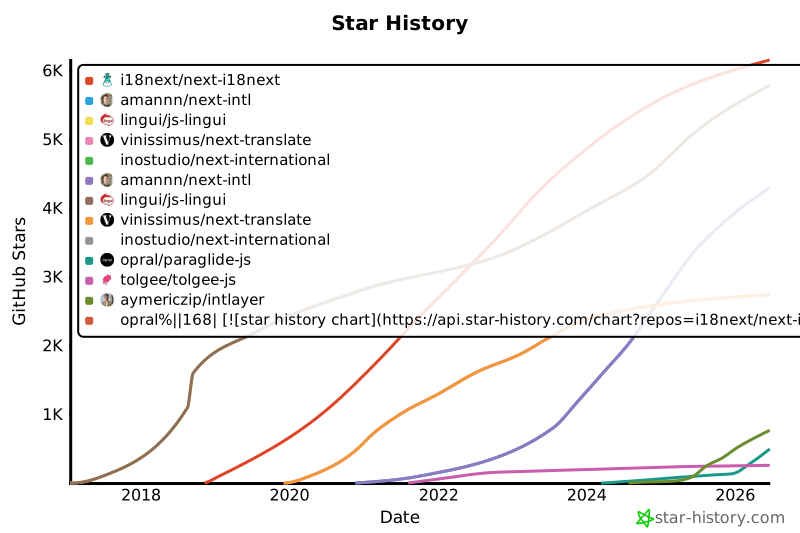
Les étoiles GitHub sont un indicateur fort de la popularité d'un projet, de la confiance de la communauté et de sa pertinence à long terme. Bien qu'elles ne soient pas une mesure directe de la qualité technique, elles reflètent le nombre de développeurs qui trouvent le projet utile, suivent ses progrès et sont susceptibles de l'adopter. Pour estimer la valeur d'un projet, les étoiles aident à comparer l'attraction entre les alternatives et fournissent des informations sur la croissance de l'écosystème.
|
|
167
167
|
|
|
168
|
-
[](https://www.star-history.com/#i18next/next-i18next&amannn/next-intl&lingui/js-lingui&vinissimus/next-translate&inostudio/next-international&opral/paraglide-js&tolgee/tolgee-js&aymericzip/intlayer)
|
|
169
169
|
|
|
170
170
|
## Résultats détaillés
|
|
171
171
|
|
|
@@ -122,7 +122,7 @@ Nous avons comparé **quatre stratégies de chargement** :
|
|
|
122
122
|
|
|
123
123
|
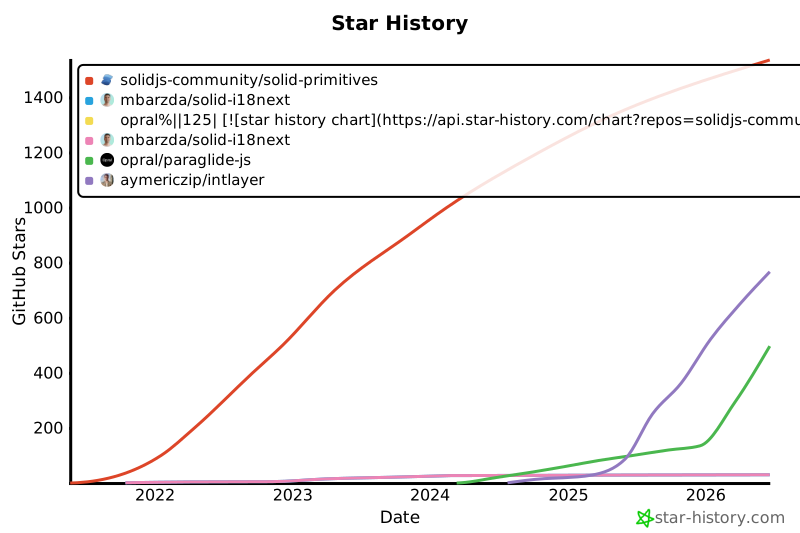
Les étoiles GitHub sont un indicateur fort de la popularité d'un projet, de la confiance de la communauté et de sa pertinence à long terme. Bien qu'elles ne soient pas une mesure directe de la qualité technique, elles reflètent le nombre de développeurs qui trouvent le projet utile, suivent ses progrès et sont susceptibles de l'adopter. Pour estimer la valeur d'un projet, les étoiles aident à comparer l'attraction entre les alternatives et fournissent des informations sur la croissance de l'écosystème.
|
|
124
124
|
|
|
125
|
-
[](https://www.star-history.com/#solidjs-community/solid-primitives&mbarzda/solid-i18next&opral/paraglide-js&aymericzip/intlayer)
|
|
126
126
|
|
|
127
127
|
## Résultats détaillés
|
|
128
128
|
|
|
@@ -120,7 +120,7 @@ Nous avons comparé **quatre stratégies de chargement** :
|
|
|
120
120
|
|
|
121
121
|
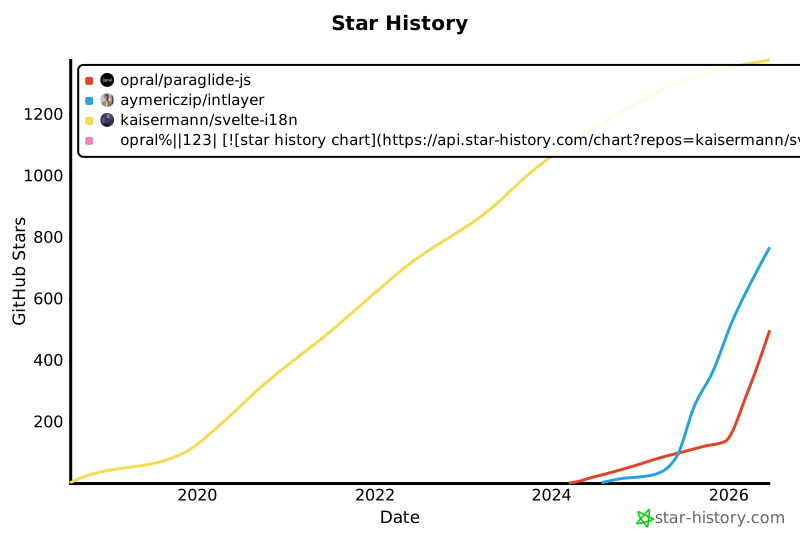
Les étoiles GitHub sont un indicateur fort de la popularité d'un projet, de la confiance de la communauté et de sa pertinence à long terme. Bien qu'elles ne soient pas une mesure directe de la qualité technique, elles reflètent le nombre de développeurs qui trouvent le projet utile, suivent ses progrès et sont susceptibles de l'adopter. Pour estimer la valeur d'un projet, les étoiles aident à comparer l'attraction entre les alternatives et fournissent des informations sur la croissance de l'écosystème.
|
|
122
122
|
|
|
123
|
-
[](https://www.star-history.com/#kaisermann/svelte-i18n&opral/paraglide-js&aymericzip/intlayer)
|
|
124
124
|
|
|
125
125
|
## Résultats détaillés
|
|
126
126
|
|
|
@@ -128,7 +128,7 @@ Nous avons comparé **quatre stratégies de chargement** :
|
|
|
128
128
|
|
|
129
129
|
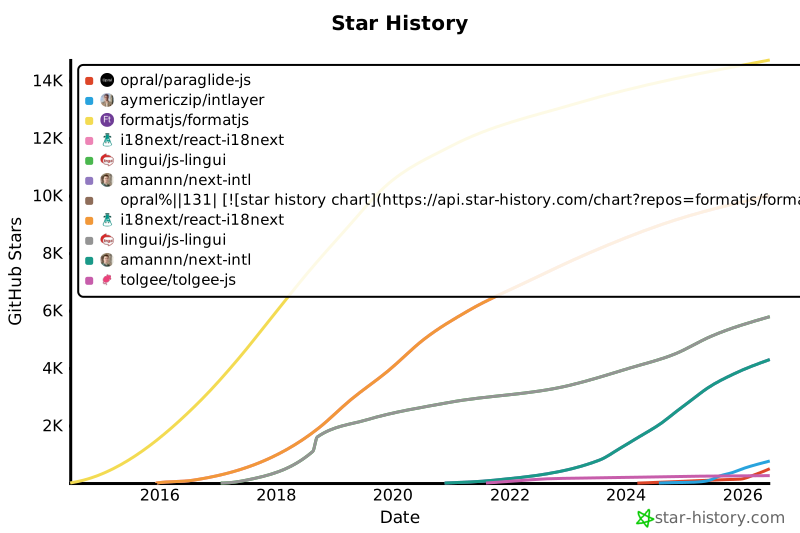
Les étoiles GitHub sont un indicateur fort de la popularité d'un projet, de la confiance de la communauté et de sa pertinence à long terme. Bien qu'elles ne soient pas une mesure directe de la qualité technique, elles reflètent le nombre de développeurs qui trouvent le projet utile, suivent ses progrès et sont susceptibles de l'adopter. Pour estimer la valeur d'un projet, les étoiles aident à comparer l'attraction entre les alternatives et fournissent des informations sur la croissance de l'écosystème.
|
|
130
130
|
|
|
131
|
-
[](https://www.star-history.com/#formatjs/formatjs&i18next/react-i18next&lingui/js-lingui&amannn/next-intl&opral/paraglide-js&tolgee/tolgee-js&aymericzip/intlayer)
|
|
132
132
|
|
|
133
133
|
## Résultats détaillés
|
|
134
134
|
|