@intlayer/docs 8.10.0 → 8.11.1
This diff represents the content of publicly available package versions that have been released to one of the supported registries. The information contained in this diff is provided for informational purposes only and reflects changes between package versions as they appear in their respective public registries.
- package/dist/cjs/common.cjs +3 -1
- package/dist/cjs/common.cjs.map +1 -1
- package/dist/cjs/generated/docs.entry.cjs +39 -19
- package/dist/cjs/generated/docs.entry.cjs.map +1 -1
- package/dist/esm/common.mjs +3 -1
- package/dist/esm/common.mjs.map +1 -1
- package/dist/esm/generated/docs.entry.mjs +39 -19
- package/dist/esm/generated/docs.entry.mjs.map +1 -1
- package/dist/types/common.d.ts.map +1 -1
- package/dist/types/generated/docs.entry.d.ts +2 -1
- package/dist/types/generated/docs.entry.d.ts.map +1 -1
- package/docs/ar/benchmark/nextjs.md +1 -1
- package/docs/ar/benchmark/solid.md +1 -1
- package/docs/ar/benchmark/svelte.md +1 -1
- package/docs/ar/benchmark/tanstack.md +1 -1
- package/docs/ar/dictionary/markdown.md +340 -14
- package/docs/ar/interest_of_intlayer.md +1 -1
- package/docs/ar/{intlayer_with_angular.md → intlayer_with_angular_19.md} +8 -7
- package/docs/ar/intlayer_with_angular_21.md +412 -0
- package/docs/bn/interest_of_intlayer.md +1 -1
- package/docs/bn/intlayer_with_angular_21.md +412 -0
- package/docs/cs/interest_of_intlayer.md +1 -1
- package/docs/cs/intlayer_with_angular_21.md +412 -0
- package/docs/de/benchmark/nextjs.md +1 -1
- package/docs/de/benchmark/solid.md +1 -1
- package/docs/de/benchmark/svelte.md +1 -1
- package/docs/de/benchmark/tanstack.md +1 -1
- package/docs/de/dictionary/markdown.md +340 -14
- package/docs/de/interest_of_intlayer.md +1 -1
- package/docs/de/{intlayer_with_angular.md → intlayer_with_angular_19.md} +8 -7
- package/docs/de/intlayer_with_angular_21.md +412 -0
- package/docs/en/benchmark/nextjs.md +1 -1
- package/docs/en/benchmark/solid.md +1 -1
- package/docs/en/benchmark/svelte.md +1 -1
- package/docs/en/benchmark/tanstack.md +1 -1
- package/docs/en/dictionary/markdown.md +326 -15
- package/docs/en/interest_of_intlayer.md +1 -1
- package/docs/en/{intlayer_with_angular.md → intlayer_with_angular_19.md} +8 -7
- package/docs/en/intlayer_with_angular_21.md +412 -0
- package/docs/en-GB/benchmark/nextjs.md +1 -1
- package/docs/en-GB/benchmark/solid.md +1 -1
- package/docs/en-GB/benchmark/svelte.md +1 -1
- package/docs/en-GB/benchmark/tanstack.md +1 -1
- package/docs/en-GB/dictionary/markdown.md +336 -7
- package/docs/en-GB/interest_of_intlayer.md +1 -1
- package/docs/en-GB/{intlayer_with_angular.md → intlayer_with_angular_19.md} +8 -7
- package/docs/en-GB/intlayer_with_angular_21.md +412 -0
- package/docs/es/benchmark/nextjs.md +1 -1
- package/docs/es/benchmark/solid.md +1 -1
- package/docs/es/benchmark/svelte.md +1 -1
- package/docs/es/benchmark/tanstack.md +1 -1
- package/docs/es/dictionary/markdown.md +340 -14
- package/docs/es/interest_of_intlayer.md +1 -1
- package/docs/es/{intlayer_with_angular.md → intlayer_with_angular_19.md} +8 -7
- package/docs/es/intlayer_with_angular_21.md +412 -0
- package/docs/fr/benchmark/nextjs.md +1 -1
- package/docs/fr/benchmark/solid.md +1 -1
- package/docs/fr/benchmark/svelte.md +1 -1
- package/docs/fr/benchmark/tanstack.md +1 -1
- package/docs/fr/dictionary/markdown.md +340 -14
- package/docs/fr/interest_of_intlayer.md +1 -1
- package/docs/fr/{intlayer_with_angular.md → intlayer_with_angular_19.md} +8 -7
- package/docs/fr/intlayer_with_angular_21.md +412 -0
- package/docs/hi/benchmark/nextjs.md +1 -1
- package/docs/hi/benchmark/solid.md +1 -1
- package/docs/hi/benchmark/svelte.md +1 -1
- package/docs/hi/benchmark/tanstack.md +1 -1
- package/docs/hi/dictionary/markdown.md +340 -14
- package/docs/hi/interest_of_intlayer.md +1 -1
- package/docs/hi/{intlayer_with_angular.md → intlayer_with_angular_19.md} +8 -7
- package/docs/hi/intlayer_with_angular_21.md +412 -0
- package/docs/id/benchmark/nextjs.md +1 -1
- package/docs/id/benchmark/solid.md +1 -1
- package/docs/id/benchmark/svelte.md +1 -1
- package/docs/id/benchmark/tanstack.md +1 -1
- package/docs/id/dictionary/markdown.md +340 -14
- package/docs/id/interest_of_intlayer.md +1 -1
- package/docs/id/{intlayer_with_angular.md → intlayer_with_angular_19.md} +8 -7
- package/docs/id/intlayer_with_angular_21.md +412 -0
- package/docs/it/benchmark/nextjs.md +1 -1
- package/docs/it/benchmark/solid.md +1 -1
- package/docs/it/benchmark/svelte.md +1 -1
- package/docs/it/benchmark/tanstack.md +1 -1
- package/docs/it/dictionary/markdown.md +340 -14
- package/docs/it/interest_of_intlayer.md +1 -1
- package/docs/it/{intlayer_with_angular.md → intlayer_with_angular_19.md} +8 -7
- package/docs/it/intlayer_with_angular_21.md +412 -0
- package/docs/ja/benchmark/nextjs.md +1 -1
- package/docs/ja/benchmark/solid.md +1 -1
- package/docs/ja/benchmark/svelte.md +1 -1
- package/docs/ja/benchmark/tanstack.md +1 -1
- package/docs/ja/interest_of_intlayer.md +1 -1
- package/docs/ja/{intlayer_with_angular.md → intlayer_with_angular_19.md} +8 -7
- package/docs/ja/intlayer_with_angular_21.md +412 -0
- package/docs/ko/benchmark/nextjs.md +1 -1
- package/docs/ko/benchmark/solid.md +1 -1
- package/docs/ko/benchmark/svelte.md +1 -1
- package/docs/ko/benchmark/tanstack.md +1 -1
- package/docs/ko/dictionary/markdown.md +340 -14
- package/docs/ko/interest_of_intlayer.md +1 -1
- package/docs/ko/{intlayer_with_angular.md → intlayer_with_angular_19.md} +8 -7
- package/docs/ko/intlayer_with_angular_21.md +412 -0
- package/docs/nl/interest_of_intlayer.md +1 -1
- package/docs/nl/intlayer_with_angular_21.md +412 -0
- package/docs/pl/benchmark/nextjs.md +1 -1
- package/docs/pl/benchmark/solid.md +1 -1
- package/docs/pl/benchmark/svelte.md +1 -1
- package/docs/pl/benchmark/tanstack.md +1 -1
- package/docs/pl/dictionary/markdown.md +340 -14
- package/docs/pl/interest_of_intlayer.md +1 -1
- package/docs/pl/{intlayer_with_angular.md → intlayer_with_angular_19.md} +8 -7
- package/docs/pl/intlayer_with_angular_21.md +412 -0
- package/docs/pt/benchmark/nextjs.md +1 -1
- package/docs/pt/benchmark/solid.md +1 -1
- package/docs/pt/benchmark/svelte.md +1 -1
- package/docs/pt/benchmark/tanstack.md +1 -1
- package/docs/pt/dictionary/markdown.md +340 -14
- package/docs/pt/interest_of_intlayer.md +1 -1
- package/docs/pt/{intlayer_with_angular.md → intlayer_with_angular_19.md} +8 -7
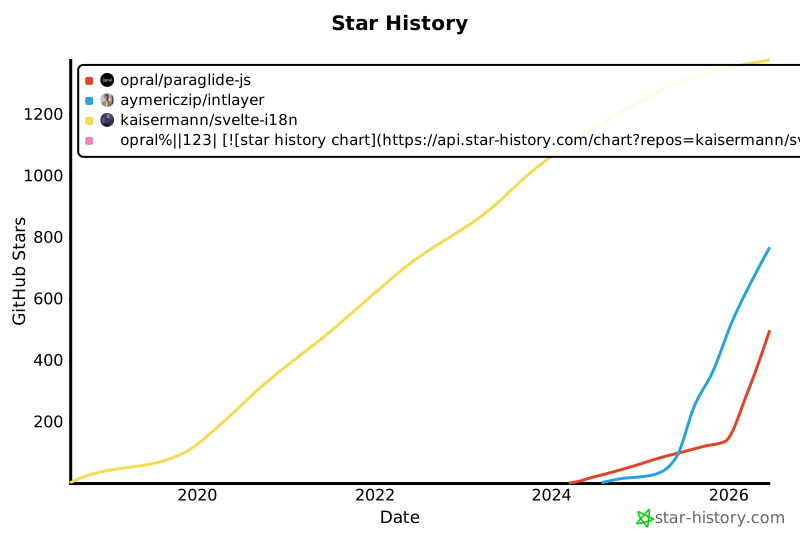
- package/docs/pt/intlayer_with_angular_21.md +412 -0
- package/docs/ru/benchmark/nextjs.md +1 -1
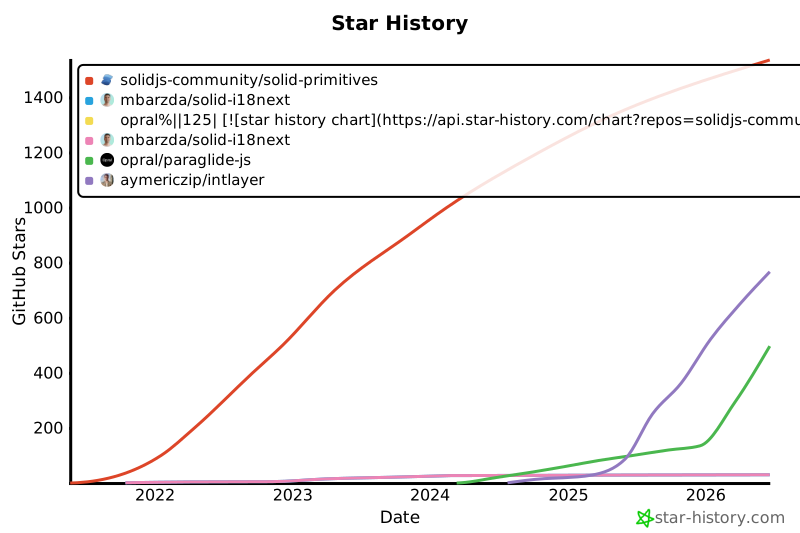
- package/docs/ru/benchmark/solid.md +1 -1
- package/docs/ru/benchmark/svelte.md +1 -1
- package/docs/ru/benchmark/tanstack.md +1 -1
- package/docs/ru/dictionary/markdown.md +445 -3
- package/docs/ru/interest_of_intlayer.md +1 -1
- package/docs/ru/{intlayer_with_angular.md → intlayer_with_angular_19.md} +8 -7
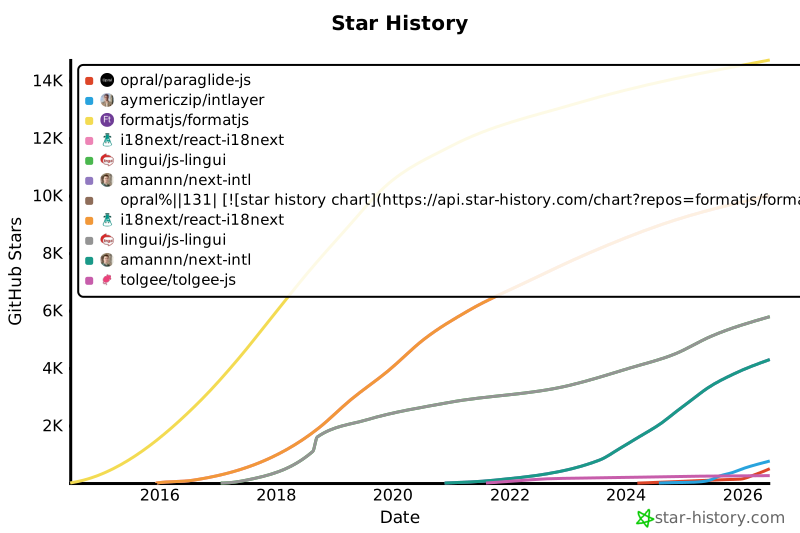
- package/docs/ru/intlayer_with_angular_21.md +412 -0
- package/docs/tr/benchmark/nextjs.md +1 -1
- package/docs/tr/benchmark/solid.md +1 -1
- package/docs/tr/benchmark/svelte.md +1 -1
- package/docs/tr/benchmark/tanstack.md +1 -1
- package/docs/tr/dictionary/markdown.md +340 -14
- package/docs/tr/interest_of_intlayer.md +1 -1
- package/docs/tr/{intlayer_with_angular.md → intlayer_with_angular_19.md} +8 -7
- package/docs/tr/intlayer_with_angular_21.md +412 -0
- package/docs/uk/benchmark/nextjs.md +1 -1
- package/docs/uk/benchmark/solid.md +1 -1
- package/docs/uk/benchmark/svelte.md +1 -1
- package/docs/uk/benchmark/tanstack.md +1 -1
- package/docs/uk/dictionary/markdown.md +340 -14
- package/docs/uk/interest_of_intlayer.md +1 -1
- package/docs/uk/{intlayer_with_angular.md → intlayer_with_angular_19.md} +8 -7
- package/docs/uk/intlayer_with_angular_21.md +412 -0
- package/docs/ur/interest_of_intlayer.md +1 -1
- package/docs/ur/intlayer_with_angular_21.md +412 -0
- package/docs/vi/benchmark/nextjs.md +1 -1
- package/docs/vi/benchmark/solid.md +1 -1
- package/docs/vi/benchmark/svelte.md +1 -1
- package/docs/vi/benchmark/tanstack.md +1 -1
- package/docs/vi/dictionary/markdown.md +340 -14
- package/docs/vi/interest_of_intlayer.md +1 -1
- package/docs/vi/{intlayer_with_angular.md → intlayer_with_angular_19.md} +8 -7
- package/docs/vi/intlayer_with_angular_21.md +412 -0
- package/docs/zh/benchmark/nextjs.md +1 -1
- package/docs/zh/benchmark/solid.md +1 -1
- package/docs/zh/benchmark/svelte.md +1 -1
- package/docs/zh/benchmark/tanstack.md +1 -1
- package/docs/zh/dictionary/markdown.md +340 -14
- package/docs/zh/interest_of_intlayer.md +1 -1
- package/docs/zh/{intlayer_with_angular.md → intlayer_with_angular_19.md} +8 -7
- package/docs/zh/intlayer_with_angular_21.md +412 -0
- package/docs/zh-TW/interest_of_intlayer.md +1 -1
- package/docs/zh-TW/intlayer_with_angular_21.md +412 -0
- package/package.json +7 -7
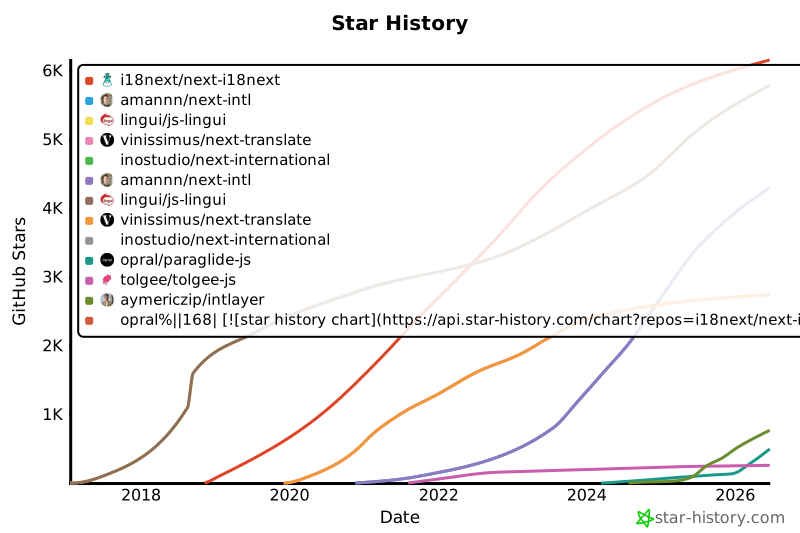
- package/src/common.ts +12 -6
- package/src/generated/docs.entry.ts +39 -19
|
@@ -0,0 +1,412 @@
|
|
|
1
|
+
---
|
|
2
|
+
createdAt: 2025-04-18
|
|
3
|
+
updatedAt: 2026-05-06
|
|
4
|
+
title: Angular i18n - Comment traduire une application Angular 21 (Vite) en 2026
|
|
5
|
+
description: Découvrez comment rendre votre site Web Angular multilingue. Suivez la documentation pour l'internationaliser (i18n) et le traduire.
|
|
6
|
+
keywords:
|
|
7
|
+
- Internationalisation
|
|
8
|
+
- Documentation
|
|
9
|
+
- Intlayer
|
|
10
|
+
- Angular
|
|
11
|
+
- JavaScript
|
|
12
|
+
slugs:
|
|
13
|
+
- doc
|
|
14
|
+
- environment
|
|
15
|
+
- angular
|
|
16
|
+
applicationTemplate: https://github.com/aymericzip/intlayer-angular-21-template
|
|
17
|
+
applicationShowcase: https://intlayer-angular-21-template.vercel.app/
|
|
18
|
+
history:
|
|
19
|
+
- version: 8.9.0
|
|
20
|
+
date: 2026-05-04
|
|
21
|
+
changes: "Mise à jour de l'utilisation de l'API Solid useIntlayer pour l'accès direct aux propriétés"
|
|
22
|
+
- version: 8.0.0
|
|
23
|
+
date: 2026-01-26
|
|
24
|
+
changes: "Sortie de la version stable"
|
|
25
|
+
- version: 8.0.0
|
|
26
|
+
date: 2025-12-30
|
|
27
|
+
changes: "Ajout de la commande init"
|
|
28
|
+
- version: 5.5.10
|
|
29
|
+
date: 2025-06-29
|
|
30
|
+
changes: "Historique initial"
|
|
31
|
+
---
|
|
32
|
+
|
|
33
|
+
# Traduisez votre site Angular 21 (Vite) avec Intlayer | Internationalisation (i18n)
|
|
34
|
+
|
|
35
|
+
## Table des matières
|
|
36
|
+
|
|
37
|
+
<TOC/>
|
|
38
|
+
|
|
39
|
+
## Qu'est-ce qu'Intlayer ?
|
|
40
|
+
|
|
41
|
+
**Intlayer** est une bibliothèque d'internationalisation (i18n) innovante et open-source conçue pour simplifier la prise en charge multilingue dans les applications web modernes.
|
|
42
|
+
|
|
43
|
+
Avec Intlayer, vous pouvez :
|
|
44
|
+
|
|
45
|
+
- **Gérer facilement les traductions** en utilisant des dictionnaires déclaratifs au niveau du composant.
|
|
46
|
+
- **Localiser dynamiquement les métadonnées**, les routes et le contenu.
|
|
47
|
+
- **Garantir le support TypeScript** avec des types autogénérés, améliorant l'autocomplétion et la détection d'erreurs.
|
|
48
|
+
- **Bénéficier de fonctionnalités avancées**, comme la détection et le changement de locale dynamiques.
|
|
49
|
+
|
|
50
|
+
---
|
|
51
|
+
|
|
52
|
+
## Guide étape par étape pour configurer Intlayer dans une application Angular
|
|
53
|
+
|
|
54
|
+
<Tabs defaultTab="code">
|
|
55
|
+
<Tab label="Code" value="code">
|
|
56
|
+
|
|
57
|
+
<iframe
|
|
58
|
+
src="https://ide.intlayer.org/aymericzip/intlayer-angular-21-template?file=intlayer.config.ts"
|
|
59
|
+
className="m-auto overflow-hidden rounded-lg border-0 max-md:size-full max-md:h-[700px] md:aspect-16/9 md:w-full"
|
|
60
|
+
title="Démo CodeSandbox - Comment internationaliser votre application avec Intlayer"
|
|
61
|
+
sandbox="allow-forms allow-modals allow-popups allow-presentation allow-same-origin allow-scripts"
|
|
62
|
+
loading="lazy"
|
|
63
|
+
/>
|
|
64
|
+
|
|
65
|
+
</Tab>
|
|
66
|
+
<Tab label="Démo" value="demo">
|
|
67
|
+
|
|
68
|
+
<iframe
|
|
69
|
+
src="https://intlayer-angular-21-template.vercel.app/"
|
|
70
|
+
className="m-auto overflow-hidden rounded-lg border-0 max-md:size-full max-md:h-[700px] md:aspect-16/9 md:w-full"
|
|
71
|
+
title="Démo - intlayer-angular-template"
|
|
72
|
+
sandbox="allow-forms allow-modals allow-popups allow-presentation allow-same-origin allow-scripts"
|
|
73
|
+
loading="lazy"
|
|
74
|
+
/>
|
|
75
|
+
|
|
76
|
+
</Tab>
|
|
77
|
+
</Tabs>
|
|
78
|
+
|
|
79
|
+
Voir [Modèle d'Application](https://github.com/aymericzip/intlayer-angular-21-template) sur GitHub.
|
|
80
|
+
|
|
81
|
+
### Étape 1 : Installer les dépendances
|
|
82
|
+
|
|
83
|
+
Installez les paquets nécessaires en utilisant npm :
|
|
84
|
+
|
|
85
|
+
```bash packageManager="npm"
|
|
86
|
+
npm install intlayer angular-intlayer
|
|
87
|
+
npm install @angular-builders/custom-esbuild --save-dev
|
|
88
|
+
npx intlayer init
|
|
89
|
+
```
|
|
90
|
+
|
|
91
|
+
```bash packageManager="pnpm"
|
|
92
|
+
pnpm add intlayer angular-intlayer
|
|
93
|
+
pnpm add @angular-builders/custom-esbuild --save-dev
|
|
94
|
+
pnpm intlayer init
|
|
95
|
+
```
|
|
96
|
+
|
|
97
|
+
```bash packageManager="yarn"
|
|
98
|
+
yarn add intlayer angular-intlayer
|
|
99
|
+
yarn add @angular-builders/custom-esbuild --save-dev
|
|
100
|
+
yarn intlayer init
|
|
101
|
+
```
|
|
102
|
+
|
|
103
|
+
```bash packageManager="bun"
|
|
104
|
+
bun add intlayer angular-intlayer
|
|
105
|
+
bun add @angular-builders/custom-esbuild --dev
|
|
106
|
+
bun x intlayer init
|
|
107
|
+
```
|
|
108
|
+
|
|
109
|
+
- **intlayer**
|
|
110
|
+
|
|
111
|
+
Le paquet principal qui fournit les outils d'internationalisation pour la gestion de la configuration, la traduction, la [déclaration de contenu](https://github.com/aymericzip/intlayer/blob/main/docs/docs/fr/dictionary/content_file.md), la transpilation, et les [commandes CLI](https://github.com/aymericzip/intlayer/blob/main/docs/docs/fr/cli/index.md).
|
|
112
|
+
|
|
113
|
+
- **angular-intlayer**
|
|
114
|
+
Le paquet qui intègre Intlayer avec l'application Angular. Il fournit des fournisseurs de contexte et des hooks pour l'internationalisation Angular.
|
|
115
|
+
|
|
116
|
+
- **@angular-builders/custom-esbuild**
|
|
117
|
+
Requis pour personnaliser la configuration esbuild d'Angular CLI.
|
|
118
|
+
|
|
119
|
+
### Étape 2 : Configuration de votre projet
|
|
120
|
+
|
|
121
|
+
Créez un fichier de configuration pour configurer les langues de votre application :
|
|
122
|
+
|
|
123
|
+
```typescript fileName="intlayer.config.ts" codeFormat={["typescript", "esm", "commonjs"]}
|
|
124
|
+
import { Locales, type IntlayerConfig } from "intlayer";
|
|
125
|
+
|
|
126
|
+
const config: IntlayerConfig = {
|
|
127
|
+
internationalization: {
|
|
128
|
+
locales: [
|
|
129
|
+
Locales.ENGLISH,
|
|
130
|
+
Locales.FRENCH,
|
|
131
|
+
Locales.SPANISH,
|
|
132
|
+
// Vos autres langues
|
|
133
|
+
],
|
|
134
|
+
defaultLocale: Locales.ENGLISH,
|
|
135
|
+
},
|
|
136
|
+
};
|
|
137
|
+
|
|
138
|
+
export default config;
|
|
139
|
+
```
|
|
140
|
+
|
|
141
|
+
> Via ce fichier de configuration, vous pouvez configurer les URL localisées, la redirection de middleware, les noms de cookies, l'emplacement et l'extension de vos déclarations de contenu, désactiver les journaux Intlayer dans la console, et plus encore. Pour une liste complète des paramètres disponibles, consultez la [documentation de configuration](https://github.com/aymericzip/intlayer/blob/main/docs/docs/fr/configuration.md).
|
|
142
|
+
|
|
143
|
+
### Étape 3 : Intégrer Intlayer dans votre configuration Angular
|
|
144
|
+
|
|
145
|
+
Pour intégrer Intlayer avec Angular CLI, vous devez utiliser un builder personnalisé. Ce guide suppose que vous utilisez Vite/esbuild (par défaut pour les projets Angular 21).
|
|
146
|
+
|
|
147
|
+
D'abord, modifiez votre `angular.json` pour utiliser le builder esbuild personnalisé. Mettez à jour les configurations `build` et `serve` :
|
|
148
|
+
|
|
149
|
+
```json5 fileName="angular.json"
|
|
150
|
+
{
|
|
151
|
+
"projects": {
|
|
152
|
+
"your-app-name": {
|
|
153
|
+
"architect": {
|
|
154
|
+
"build": {
|
|
155
|
+
"builder": "@angular-builders/custom-esbuild:application", // replace "@angular/build:application"
|
|
156
|
+
"options": {
|
|
157
|
+
"define": {
|
|
158
|
+
"process.env": "{}",
|
|
159
|
+
},
|
|
160
|
+
"plugins": ["./esbuild.plugins.ts"],
|
|
161
|
+
"browser": "src/main.ts",
|
|
162
|
+
// ...
|
|
163
|
+
},
|
|
164
|
+
},
|
|
165
|
+
"serve": {
|
|
166
|
+
"builder": "@angular-builders/custom-esbuild:dev-server", // replace "@angular/build:dev-server"
|
|
167
|
+
"options": {
|
|
168
|
+
"prebundle": {
|
|
169
|
+
"exclude": [
|
|
170
|
+
"intlayer",
|
|
171
|
+
"angular-intlayer",
|
|
172
|
+
"@intlayer/config/built",
|
|
173
|
+
"@intlayer/core"
|
|
174
|
+
]
|
|
175
|
+
},
|
|
176
|
+
},
|
|
177
|
+
},
|
|
178
|
+
},
|
|
179
|
+
},
|
|
180
|
+
}
|
|
181
|
+
```
|
|
182
|
+
|
|
183
|
+
> Assurez-vous de remplacer `your-app-name` par le nom réel de votre projet dans `angular.json`.
|
|
184
|
+
|
|
185
|
+
Ensuite, créez un fichier `esbuild.plugins.ts` à la racine de votre projet :
|
|
186
|
+
|
|
187
|
+
```typescript fileName="esbuild.plugins.ts"
|
|
188
|
+
import { intlayerEsbuildPlugin } from "angular-intlayer/esbuild";
|
|
189
|
+
|
|
190
|
+
export default [intlayerEsbuildPlugin()];
|
|
191
|
+
```
|
|
192
|
+
|
|
193
|
+
> La fonction `intlayerEsbuildPlugin` configure esbuild avec Intlayer. Elle injecte le plugin pour gérer les fichiers de déclaration de contenu et configure les éléments pour des performances optimales.
|
|
194
|
+
|
|
195
|
+
> **Utilisateurs de NX** : Les builders Angular de NX chargent les fichiers de plug-in via la résolution ESM native de Node et ne compilent pas les fichiers de plug-in TypeScript à la volée. Utilisez plutôt un fichier `.mjs` et mettez à jour la référence `plugins` dans `angular.json` en conséquence :
|
|
196
|
+
>
|
|
197
|
+
> ```javascript fileName="esbuild.plugins.mjs"
|
|
198
|
+
> import { intlayerEsbuildPlugin } from "angular-intlayer/esbuild";
|
|
199
|
+
>
|
|
200
|
+
> export default [intlayerEsbuildPlugin()];
|
|
201
|
+
> ```
|
|
202
|
+
>
|
|
203
|
+
> Ensuite, dans `angular.json`, pointez vers `"./esbuild.plugins.mjs"` au lieu de `"./esbuild.plugins.ts"`.
|
|
204
|
+
|
|
205
|
+
### Étape 4 : Déclarez votre contenu
|
|
206
|
+
|
|
207
|
+
Créez et gérez vos déclarations de contenu pour stocker les traductions :
|
|
208
|
+
|
|
209
|
+
```tsx fileName="src/app/app.content.ts" contentDeclarationFormat=["typescript", "esm", "cjs"]
|
|
210
|
+
import { t, type Dictionary } from "intlayer";
|
|
211
|
+
|
|
212
|
+
const appContent = {
|
|
213
|
+
key: "app",
|
|
214
|
+
content: {
|
|
215
|
+
title: t({
|
|
216
|
+
en: "Hello",
|
|
217
|
+
fr: "Bonjour",
|
|
218
|
+
es: "Hola",
|
|
219
|
+
}),
|
|
220
|
+
congratulations: t({
|
|
221
|
+
en: "Congratulations! Your app is running. 🎉",
|
|
222
|
+
fr: "Félicitations! Votre application est en cours d'exécution. 🎉",
|
|
223
|
+
es: "¡Felicidades! Tu aplicación está en ejecución. 🎉",
|
|
224
|
+
}),
|
|
225
|
+
exploreDocs: t({
|
|
226
|
+
en: "Explore the Docs",
|
|
227
|
+
fr: "Explorer les Docs",
|
|
228
|
+
es: "Explorar los Docs",
|
|
229
|
+
}),
|
|
230
|
+
learnWithTutorials: t({
|
|
231
|
+
en: "Learn with Tutorials",
|
|
232
|
+
fr: "Apprendre avec les Tutoriels",
|
|
233
|
+
es: "Aprender con los Tutorios",
|
|
234
|
+
}),
|
|
235
|
+
cliDocs: "CLI Docs",
|
|
236
|
+
angularLanguageService: t({
|
|
237
|
+
en: "Angular Language Service",
|
|
238
|
+
fr: "Service de Langage Angular",
|
|
239
|
+
es: "Servicio de Lenguaje Angular",
|
|
240
|
+
}),
|
|
241
|
+
angularDevTools: "Angular DevTools",
|
|
242
|
+
github: "Github",
|
|
243
|
+
twitter: "Twitter",
|
|
244
|
+
youtube: "Youtube",
|
|
245
|
+
},
|
|
246
|
+
} satisfies Dictionary;
|
|
247
|
+
|
|
248
|
+
export default appContent;
|
|
249
|
+
```
|
|
250
|
+
|
|
251
|
+
> Vos déclarations de contenu peuvent être définies n'importe où dans votre application dès qu'elles sont incluses dans le répertoire `contentDir` (par défaut, `./src`). Et qu'elles correspondent à l'extension de fichier de déclaration de contenu (par défaut, `.content.{json,ts,tsx,js,jsx,mjs,cjs}`).
|
|
252
|
+
|
|
253
|
+
> Pour plus de détails, consultez la [documentation sur les déclarations de contenu](https://github.com/aymericzip/intlayer/blob/main/docs/docs/fr/dictionary/content_file.md).
|
|
254
|
+
|
|
255
|
+
### Étape 5 : Utiliser Intlayer dans votre code
|
|
256
|
+
|
|
257
|
+
Pour utiliser les fonctionnalités d'internationalisation d'Intlayer dans votre application Angular, vous devez fournir Intlayer dans la configuration de votre application.
|
|
258
|
+
|
|
259
|
+
```typescript fileName="src/app/app.config.ts"
|
|
260
|
+
import { ApplicationConfig } from "@angular/core";
|
|
261
|
+
import { provideRouter } from "@angular/router";
|
|
262
|
+
import { provideIntlayer } from "angular-intlayer";
|
|
263
|
+
import { routes } from "./app.routes";
|
|
264
|
+
|
|
265
|
+
export const appConfig: ApplicationConfig = {
|
|
266
|
+
providers: [
|
|
267
|
+
provideRouter(routes),
|
|
268
|
+
provideIntlayer(), // Ajoutez le fournisseur Intlayer ici
|
|
269
|
+
],
|
|
270
|
+
};
|
|
271
|
+
```
|
|
272
|
+
|
|
273
|
+
Ensuite, vous pouvez utiliser la fonction `useIntlayer` dans n'importe quel composant.
|
|
274
|
+
|
|
275
|
+
```typescript fileName="src/app/app.component.ts"
|
|
276
|
+
import { Component } from "@angular/core";
|
|
277
|
+
import { RouterOutlet } from "@angular/router";
|
|
278
|
+
import { useIntlayer } from "angular-intlayer";
|
|
279
|
+
|
|
280
|
+
@Component({
|
|
281
|
+
selector: "app-root",
|
|
282
|
+
standalone: true,
|
|
283
|
+
imports: [RouterOutlet],
|
|
284
|
+
templateUrl: "./app.component.html",
|
|
285
|
+
styleUrl: "./app.component.css",
|
|
286
|
+
})
|
|
287
|
+
export class AppComponent {
|
|
288
|
+
content = useIntlayer("app");
|
|
289
|
+
}
|
|
290
|
+
```
|
|
291
|
+
|
|
292
|
+
Et dans votre modèle :
|
|
293
|
+
|
|
294
|
+
```html fileName="src/app/app.component.html"
|
|
295
|
+
<div class="content">
|
|
296
|
+
<h1>{{ content().title }}</h1>
|
|
297
|
+
<p>{{ content().congratulations }}</p>
|
|
298
|
+
</div>
|
|
299
|
+
```
|
|
300
|
+
|
|
301
|
+
Le contenu Intlayer est retourné sous forme de `Signal`, donc vous accédez aux valeurs en appelant le signal : `content().title`.
|
|
302
|
+
|
|
303
|
+
### (Facultatif) Étape 6 : Changer la langue de votre contenu
|
|
304
|
+
|
|
305
|
+
Pour changer la langue de votre contenu, vous pouvez utiliser la fonction `setLocale` fournie par la fonction `useLocale`. Cela vous permet de définir la langue de l'application et de mettre à jour le contenu en conséquence.
|
|
306
|
+
|
|
307
|
+
Créez un composant pour basculer entre les langues :
|
|
308
|
+
|
|
309
|
+
```typescript fileName="src/app/locale-switcher.component.ts"
|
|
310
|
+
import { Component } from "@angular/core";
|
|
311
|
+
import { CommonModule } from "@angular/common";
|
|
312
|
+
import { useLocale } from "angular-intlayer";
|
|
313
|
+
|
|
314
|
+
@Component({
|
|
315
|
+
selector: "app-locale-switcher",
|
|
316
|
+
standalone: true,
|
|
317
|
+
imports: [CommonModule],
|
|
318
|
+
template: `
|
|
319
|
+
<div class="locale-switcher">
|
|
320
|
+
<select
|
|
321
|
+
[value]="locale()"
|
|
322
|
+
(change)="setLocale($any($event.target).value)"
|
|
323
|
+
>
|
|
324
|
+
@for (loc of availableLocales; track loc) {
|
|
325
|
+
<option [value]="loc">{{ loc }}</option>
|
|
326
|
+
}
|
|
327
|
+
</select>
|
|
328
|
+
</div>
|
|
329
|
+
`,
|
|
330
|
+
})
|
|
331
|
+
export class LocaleSwitcherComponent {
|
|
332
|
+
localeCtx = useLocale();
|
|
333
|
+
|
|
334
|
+
locale = this.localeCtx.locale;
|
|
335
|
+
availableLocales = this.localeCtx.availableLocales;
|
|
336
|
+
setLocale = this.localeCtx.setLocale;
|
|
337
|
+
}
|
|
338
|
+
```
|
|
339
|
+
|
|
340
|
+
Ensuite, utilisez ce composant dans votre `app.component.ts` :
|
|
341
|
+
|
|
342
|
+
```typescript fileName="src/app/app.component.ts"
|
|
343
|
+
import { Component } from "@angular/core";
|
|
344
|
+
import { RouterOutlet } from "@angular/router";
|
|
345
|
+
import { useIntlayer } from "angular-intlayer";
|
|
346
|
+
import { LocaleSwitcherComponent } from "./locale-switcher.component";
|
|
347
|
+
|
|
348
|
+
@Component({
|
|
349
|
+
selector: "app-root",
|
|
350
|
+
standalone: true,
|
|
351
|
+
imports: [RouterOutlet, LocaleSwitcherComponent],
|
|
352
|
+
templateUrl: "./app.component.html",
|
|
353
|
+
styleUrl: "./app.component.css",
|
|
354
|
+
})
|
|
355
|
+
export class AppComponent {
|
|
356
|
+
content = useIntlayer("app");
|
|
357
|
+
}
|
|
358
|
+
```
|
|
359
|
+
|
|
360
|
+
### Configurer TypeScript
|
|
361
|
+
|
|
362
|
+
Intlayer utilise l'augmentation de module pour tirer parti de TypeScript et rendre votre base de code plus robuste.
|
|
363
|
+
|
|
364
|
+

|
|
365
|
+
|
|
366
|
+

|
|
367
|
+
|
|
368
|
+
Assurez-vous que votre configuration TypeScript inclut les types autogénérés.
|
|
369
|
+
|
|
370
|
+
```json5 fileName="tsconfig.json"
|
|
371
|
+
{
|
|
372
|
+
// ... Vos configurations TypeScript existantes
|
|
373
|
+
"include": [
|
|
374
|
+
// ... Vos configurations TypeScript existantes
|
|
375
|
+
".intlayer/**/*.ts", // Inclure les types autogénérés
|
|
376
|
+
],
|
|
377
|
+
}
|
|
378
|
+
```
|
|
379
|
+
|
|
380
|
+
### Configuration Git
|
|
381
|
+
|
|
382
|
+
Il est recommandé d'ignorer les fichiers générés par Intlayer. Cela vous permet d'éviter de les commiter dans votre dépôt Git.
|
|
383
|
+
|
|
384
|
+
Pour ce faire, vous pouvez ajouter les instructions suivantes à votre fichier `.gitignore` :
|
|
385
|
+
|
|
386
|
+
```bash
|
|
387
|
+
# Ignorer les fichiers générés par Intlayer
|
|
388
|
+
.intlayer
|
|
389
|
+
```
|
|
390
|
+
|
|
391
|
+
### Extension VS Code
|
|
392
|
+
|
|
393
|
+
Pour améliorer votre expérience de développement avec Intlayer, vous pouvez installer l'extension officielle **Intlayer VS Code Extension**.
|
|
394
|
+
|
|
395
|
+
[Installer depuis le VS Code Marketplace](https://marketplace.visualstudio.com/items?itemName=intlayer.intlayer-vs-code-extension)
|
|
396
|
+
|
|
397
|
+
Cette extension fournit :
|
|
398
|
+
|
|
399
|
+
- **L'autocomplétion** pour les clés de traduction.
|
|
400
|
+
- **La détection d'erreurs en temps réel** pour les traductions manquantes.
|
|
401
|
+
- **Des aperçus en ligne** du contenu traduit.
|
|
402
|
+
- **Des actions rapides** pour créer et mettre à jour facilement les traductions.
|
|
403
|
+
|
|
404
|
+
Pour plus de détails sur l'utilisation de l'extension, consultez la [documentation de l'extension VS Code Intlayer](https://intlayer.org/doc/vs-code-extension).
|
|
405
|
+
|
|
406
|
+
---
|
|
407
|
+
|
|
408
|
+
### Aller plus loin
|
|
409
|
+
|
|
410
|
+
Pour aller plus loin, vous pouvez implémenter l'[éditeur visuel](https://github.com/aymericzip/intlayer/blob/main/docs/docs/fr/intlayer_visual_editor.md) ou externaliser votre contenu en utilisant le [CMS](https://github.com/aymericzip/intlayer/blob/main/docs/docs/fr/intlayer_CMS.md).
|
|
411
|
+
|
|
412
|
+
---
|
|
@@ -165,7 +165,7 @@ Intlayer इन सभी आयामों में अनुकूलन क
|
|
|
165
165
|
|
|
166
166
|
GitHub सितारे किसी प्रोजेक्ट की लोकप्रियता, सामुदायिक विश्वास और दीर्घकालिक प्रासंगिकता का एक मजबूत संकेतक हैं। हालांकि यह तकनीकी गुणवत्ता का प्रत्यक्ष माप नहीं है, वे दर्शाते हैं कि कितने डेवलपर्स प्रोजेक्ट को उपयोगी पाते हैं, इसकी प्रगति का पालन करते हैं, और इसे अपनाने की संभावना रखते हैं। किसी प्रोजेक्ट के मूल्य का अनुमान लगाने के लिए, सितारे विकल्पों के बीच कर्षण की तुलना करने में मदद करते हैं और पारिस्थितिकी तंत्र के विकास में अंतर्दृष्टि प्रदान करते हैं।
|
|
167
167
|
|
|
168
|
-
[](https://www.star-history.com/#i18next/next-i18next&amannn/next-intl&lingui/js-lingui&vinissimus/next-translate&inostudio/next-international&opral/paraglide-js&tolgee/tolgee-js&aymericzip/intlayer)
|
|
169
169
|
|
|
170
170
|
## परिणाम विस्तार से
|
|
171
171
|
|
|
@@ -122,7 +122,7 @@ i18n लीकेज समस्याओं को तुरंत पहच
|
|
|
122
122
|
|
|
123
123
|
GitHub सितारे किसी प्रोजेक्ट की लोकप्रियता, सामुदायिक विश्वास और दीर्घकालिक प्रासंगिकता का एक मजबूत संकेतक हैं। हालांकि यह तकनीकी गुणवत्ता का प्रत्यक्ष माप नहीं है, वे दर्शाते हैं कि कितने डेवलपर्स प्रोजेक्ट को उपयोगी पाते हैं, इसकी प्रगति का पालन करते हैं, और इसे अपनाने की संभावना रखते हैं। किसी प्रोजेक्ट के मूल्य का अनुमान लगाने के लिए, सितारे विकल्पों के बीच कर्षण की तुलना करने में मदद करते हैं और पारिस्थितिकी तंत्र के विकास में अंतर्दृष्टि प्रदान करते हैं।
|
|
124
124
|
|
|
125
|
-
[](https://www.star-history.com/#solidjs-community/solid-primitives&mbarzda/solid-i18next&opral/paraglide-js&aymericzip/intlayer)
|
|
126
126
|
|
|
127
127
|
## विवरण में परिणाम
|
|
128
128
|
|
|
@@ -120,7 +120,7 @@ i18n लीकेज समस्याओं को तुरंत पहच
|
|
|
120
120
|
|
|
121
121
|
GitHub सितारे किसी प्रोजेक्ट की लोकप्रियता, सामुदायिक विश्वास और दीर्घकालिक प्रासंगिकता का एक मजबूत संकेतक हैं। हालांकि यह तकनीकी गुणवत्ता का प्रत्यक्ष माप नहीं है, वे दर्शाते हैं कि कितने डेवलपर्स प्रोजेक्ट को उपयोगी पाते हैं, इसकी प्रगति का पालन करते हैं, और इसे अपनाने की संभावना रखते हैं। किसी प्रोजेक्ट के मूल्य का अनुमान लगाने के लिए, सितारे विकल्पों के बीच कर्षण की तुलना करने में मदद करते हैं और पारिस्थितिकी तंत्र के विकास में अंतर्दृष्टि प्रदान करते हैं।
|
|
122
122
|
|
|
123
|
-
[](https://www.star-history.com/#kaisermann/svelte-i18n&opral/paraglide-js&aymericzip/intlayer)
|
|
124
124
|
|
|
125
125
|
## विवरण में परिणाम
|
|
126
126
|
|
|
@@ -128,7 +128,7 @@ i18n लीकेज के मुद्दों को तेज़ी से
|
|
|
128
128
|
|
|
129
129
|
GitHub सितारे किसी प्रोजेक्ट की लोकप्रियता, सामुदायिक विश्वास और दीर्घकालिक प्रासंगिकता का एक मजबूत संकेतक हैं। हालांकि यह तकनीकी गुणवत्ता का प्रत्यक्ष माप नहीं है, वे दर्शाते हैं कि कितने डेवलपर्स प्रोजेक्ट को उपयोगी पाते हैं, इसकी प्रगति का पालन करते हैं, और इसे अपनाने की संभावना रखते हैं। किसी प्रोजेक्ट के मूल्य का अनुमान लगाने के लिए, सितारे विकल्पों के बीच कर्षण की तुलना करने में मदद करते हैं और पारिस्थितिकी तंत्र के विकास में अंतर्दृष्टि प्रदान करते हैं।
|
|
130
130
|
|
|
131
|
-
[](https://www.star-history.com/#formatjs/formatjs&i18next/react-i18next&lingui/js-lingui&amannn/next-intl&opral/paraglide-js&tolgee/tolgee-js&aymericzip/intlayer)
|
|
132
132
|
|
|
133
133
|
## परिणाम विस्तार से
|
|
134
134
|
|