@arcgis/core 5.0.0-next.126 → 5.0.0-next.128
This diff represents the content of publicly available package versions that have been released to one of the supported registries. The information contained in this diff is provided for informational purposes only and reflects changes between package versions as they appear in their respective public registries.
- package/Camera.d.ts +1 -1
- package/Ground.d.ts +7 -7
- package/PopupTemplate.d.ts +6 -6
- package/WebScene.d.ts +1 -1
- package/analysis/AreaMeasurementAnalysis.d.ts +1 -1
- package/analysis/DirectLineMeasurementAnalysis.d.ts +1 -1
- package/analysis/LengthDimension.d.ts +4 -4
- package/analysis/ShadowCastAnalysis.d.ts +3 -3
- package/analysis/SliceAnalysis.d.ts +1 -1
- package/analysis/SlicePlane.d.ts +1 -1
- package/assets/esri/core/workers/RemoteClient.js +1 -1
- package/assets/esri/core/workers/chunks/{0a4ebb5dca630a4ab0dd.js → 236f8137ae505c8f0764.js} +1 -1
- package/assets/esri/core/workers/chunks/84905581a3782e95ec34.js +1 -0
- package/assets/esri/core/workers/chunks/{f5f513997cde0ce0f2a2.js → 8eb535b43e1220cf0d75.js} +1 -1
- package/config.js +1 -1
- package/effects/FocusAreas.d.ts +1 -1
- package/form/elements/FieldElement.d.ts +1 -1
- package/form/elements/GroupElement.d.ts +1 -1
- package/form/elements/TextElement.d.ts +1 -1
- package/form/elements/inputs/ComboBoxInput.d.ts +1 -1
- package/form/elements/inputs/RadioButtonsInput.d.ts +1 -1
- package/form/elements/inputs/SwitchInput.d.ts +1 -1
- package/geometry/Mesh.d.ts +7 -7
- package/geometry/operators/alphaShapeOperator.d.ts +1 -1
- package/geometry/operators/areaOperator.d.ts +1 -1
- package/geometry/operators/bufferOperator.d.ts +1 -1
- package/geometry/operators/centroidOperator.d.ts +1 -1
- package/geometry/operators/clipOperator.d.ts +1 -1
- package/geometry/operators/containsOperator.d.ts +1 -1
- package/geometry/operators/convexHullOperator.d.ts +1 -1
- package/geometry/operators/crossesOperator.d.ts +1 -1
- package/geometry/operators/cutOperator.d.ts +1 -1
- package/geometry/operators/densifyOperator.d.ts +1 -1
- package/geometry/operators/differenceOperator.d.ts +1 -1
- package/geometry/operators/disjointOperator.d.ts +1 -1
- package/geometry/operators/distanceOperator.d.ts +1 -1
- package/geometry/operators/generalizeOperator.d.ts +1 -1
- package/geometry/operators/geodesicProximityOperator.d.ts +1 -1
- package/geometry/operators/geodeticDistanceOperator.d.ts +1 -1
- package/geometry/operators/geodeticUtilsOperator.d.ts +2 -2
- package/geometry/operators/graphicBufferOperator.d.ts +1 -1
- package/geometry/operators/intersectionOperator.d.ts +1 -1
- package/geometry/operators/intersectsOperator.d.ts +1 -1
- package/geometry/operators/isNearOperator.d.ts +1 -1
- package/geometry/operators/lengthOperator.d.ts +1 -1
- package/geometry/operators/locateBetweenOperator.d.ts +1 -1
- package/geometry/operators/multiPartToSinglePartOperator.d.ts +1 -1
- package/geometry/operators/offsetOperator.d.ts +5 -5
- package/geometry/operators/overlapsOperator.d.ts +1 -1
- package/geometry/operators/proximityOperator.d.ts +1 -1
- package/geometry/operators/simplifyOGCOperator.d.ts +1 -1
- package/geometry/operators/simplifyOperator.d.ts +1 -1
- package/geometry/operators/support/Transformation.d.ts +6 -6
- package/geometry/operators/symmetricDifferenceOperator.d.ts +1 -1
- package/geometry/operators/touchesOperator.d.ts +1 -1
- package/geometry/operators/unionOperator.d.ts +1 -1
- package/geometry/operators/withinOperator.d.ts +1 -1
- package/geometry/support/MeshMaterialMetallicRoughness.d.ts +1 -1
- package/kernel.js +1 -1
- package/layers/BuildingSceneLayer.d.ts +4 -4
- package/layers/CSVLayer.d.ts +2 -2
- package/layers/CatalogLayer.d.ts +2 -2
- package/layers/ElevationLayer.d.ts +1 -1
- package/layers/FeatureLayer.d.ts +2 -2
- package/layers/GeoJSONLayer.d.ts +2 -2
- package/layers/GeoRSSLayer.d.ts +1 -1
- package/layers/GraphicsLayer.d.ts +2 -2
- package/layers/ImageryLayer.d.ts +3 -3
- package/layers/ImageryTileLayer.d.ts +2 -2
- package/layers/IntegratedMesh3DTilesLayer.d.ts +6 -6
- package/layers/IntegratedMeshLayer.d.ts +7 -7
- package/layers/Layer.d.ts +1 -0
- package/layers/MapImageLayer.d.ts +1 -1
- package/layers/MediaLayer.d.ts +1 -1
- package/layers/OGCFeatureLayer.d.ts +2 -2
- package/layers/PointCloudLayer.d.ts +1 -1
- package/layers/SceneLayer.d.ts +5 -5
- package/layers/StreamLayer.d.ts +2 -2
- package/layers/VectorTileLayer.d.ts +2 -2
- package/layers/VideoLayer.d.ts +1 -1
- package/layers/VoxelLayer.d.ts +8 -8
- package/layers/WFSLayer.d.ts +6 -6
- package/layers/catalog/CatalogFootprintLayer.d.ts +1 -1
- package/layers/mixins/BlendLayer.d.ts +6 -6
- package/layers/pointCloudFilters/PointCloudReturnFilter.d.ts +1 -1
- package/layers/pointCloudFilters/PointCloudValueFilter.d.ts +1 -1
- package/layers/support/DimensionalDefinition.d.ts +2 -2
- package/layers/support/FeatureEffect.d.ts +4 -4
- package/layers/support/FeatureFilter.d.ts +17 -17
- package/layers/support/FeatureReductionBinning.d.ts +1 -1
- package/layers/support/FeatureReductionCluster.d.ts +9 -9
- package/layers/support/LabelClass.d.ts +2 -2
- package/layers/support/RasterFunction.d.ts +1 -1
- package/layers/support/SceneFilter.d.ts +2 -2
- package/layers/support/SceneModification.d.ts +3 -3
- package/package.json +1 -1
- package/popup/content/AttachmentsContent.d.ts +1 -1
- package/popup/content/BarChartMediaInfo.d.ts +1 -1
- package/popup/content/ColumnChartMediaInfo.d.ts +1 -1
- package/popup/content/FieldsContent.d.ts +1 -1
- package/popup/content/ImageMediaInfo.d.ts +1 -1
- package/popup/content/LineChartMediaInfo.d.ts +1 -1
- package/popup/content/MediaContent.d.ts +1 -1
- package/popup/content/PieChartMediaInfo.d.ts +1 -1
- package/popup/content/RelationshipContent.d.ts +1 -1
- package/popup/content/TextContent.d.ts +1 -1
- package/renderers/DotDensityRenderer.d.ts +3 -3
- package/renderers/FlowRenderer.d.ts +6 -6
- package/renderers/HeatmapRenderer.d.ts +3 -3
- package/renderers/PieChartRenderer.d.ts +1 -1
- package/renderers/RasterShadedReliefRenderer.d.ts +1 -1
- package/renderers/Renderer.d.ts +2 -2
- package/renderers/SimpleRenderer.d.ts +1 -1
- package/renderers/VectorFieldRenderer.d.ts +1 -1
- package/renderers/mixins/VisualVariablesMixin.d.ts +8 -8
- package/rest/query/operations/pbfFlatFeatureSet.js +1 -1
- package/rest/query/support/AttachmentInfo.d.ts +1 -1
- package/rest/support/AutoIntervalBinParameters.d.ts +1 -1
- package/rest/support/DateBinParameters.d.ts +1 -1
- package/rest/support/FixedBoundariesBinParameters.d.ts +1 -1
- package/rest/support/FixedIntervalBinParameters.d.ts +1 -1
- package/smartMapping/labels/clusters.d.ts +1 -1
- package/smartMapping/popup/clusters.d.ts +2 -2
- package/smartMapping/popup/templates.d.ts +1 -1
- package/smartMapping/raster/renderers/flow.d.ts +2 -2
- package/smartMapping/renderers/color.d.ts +12 -12
- package/smartMapping/renderers/predominance.d.ts +3 -3
- package/smartMapping/renderers/relationship.d.ts +15 -15
- package/smartMapping/renderers/univariateColorSize.d.ts +4 -4
- package/smartMapping/symbology/color.d.ts +4 -4
- package/smartMapping/symbology/flow.d.ts +2 -2
- package/smartMapping/symbology/types.d.ts +18 -18
- package/support/revision.js +1 -1
- package/symbols/CIMSymbol.d.ts +1 -1
- package/symbols/FillSymbol3DLayer.d.ts +3 -3
- package/symbols/IconSymbol3DLayer.d.ts +1 -1
- package/symbols/LabelSymbol3D.d.ts +2 -2
- package/symbols/LineStyleMarker3D.d.ts +7 -7
- package/symbols/LineSymbol3D.d.ts +2 -2
- package/symbols/LineSymbol3DLayer.d.ts +7 -7
- package/symbols/LineSymbolMarker.d.ts +6 -6
- package/symbols/MarkerSymbol.d.ts +1 -1
- package/symbols/MeshSymbol3D.d.ts +2 -2
- package/symbols/ObjectSymbol3DLayer.d.ts +1 -1
- package/symbols/PathSymbol3DLayer.d.ts +14 -14
- package/symbols/PictureFillSymbol.d.ts +1 -1
- package/symbols/PictureMarkerSymbol.d.ts +1 -1
- package/symbols/PointSymbol3D.d.ts +3 -3
- package/symbols/PolygonSymbol3D.d.ts +7 -7
- package/symbols/SimpleFillSymbol.d.ts +8 -8
- package/symbols/SimpleLineSymbol.d.ts +20 -20
- package/symbols/SimpleMarkerSymbol.d.ts +7 -7
- package/symbols/Symbol3DLayer.d.ts +16 -16
- package/symbols/TextSymbol.d.ts +1 -1
- package/symbols/TextSymbol3DLayer.d.ts +1 -1
- package/symbols/WaterSymbol3DLayer.d.ts +3 -3
- package/symbols/WebStyleSymbol.d.ts +1 -1
- package/symbols/callouts/Callout3D.d.ts +1 -1
- package/symbols/callouts/LineCallout3D.d.ts +3 -3
- package/symbols/cim/cimAnalyzer.js +1 -1
- package/symbols/cim/types.d.ts +23 -23
- package/symbols/edges/Edges3D.d.ts +1 -1
- package/symbols/edges/SolidEdges3D.d.ts +1 -1
- package/symbols/patterns/LineStylePattern3D.d.ts +11 -11
- package/symbols/patterns/StylePattern3D.d.ts +8 -8
- package/symbols/support/ElevationInfo.d.ts +2 -2
- package/symbols/support/IconSymbol3DLayerResource.d.ts +6 -6
- package/symbols/support/ObjectSymbol3DLayerResource.d.ts +7 -7
- package/symbols/support/Symbol3DEmissive.d.ts +23 -13
- package/symbols/support/Symbol3DVerticalOffset.d.ts +2 -2
- package/views/2d/engine/webgl/shaderGraph/techniques/GraphicInstanceStore.js +1 -1
- package/views/2d/engine/webgl/shaderGraph/techniques/animated/AAnimatedPolyShader.js +1 -1
- package/views/2d/engine/webgl/shaderGraph/techniques/animated/AnimatedFillShader.js +1 -1
- package/views/2d/engine/webgl/shaderGraph/techniques/animated/AnimatedPolyMeshWriters.js +1 -1
- package/views/2d/engine/webgl/shaderGraph/techniques/animated/attributes.js +1 -1
- package/views/2d/engine/webgl/shaders/sources/shaderRepository.js +1 -1
- package/views/2d/layers/BaseLayerViewGL2D.d.ts +1 -1
- package/views/2d/layers/features/schema/processor/symbols/ComplexSymbolSchema.js +1 -1
- package/views/2d/types.d.ts +3 -3
- package/views/3d/environment/CloudyWeather.d.ts +1 -1
- package/views/3d/environment/Environment.d.ts +4 -4
- package/views/3d/environment/FoggyWeather.d.ts +1 -1
- package/views/3d/environment/RainyWeather.d.ts +1 -1
- package/views/3d/environment/SnowyWeather.d.ts +1 -1
- package/views/3d/environment/SunLighting.d.ts +1 -1
- package/views/3d/environment/SunnyWeather.d.ts +1 -1
- package/views/3d/environment/VirtualLighting.d.ts +1 -1
- package/views/3d/webgl/RenderNode.d.ts +2 -2
- package/views/3d/webgl.d.ts +1 -1
- package/views/Magnifier.d.ts +3 -3
- package/views/MapView.d.ts +7 -7
- package/views/SceneView.d.ts +34 -37
- package/views/View.d.ts +2 -2
- package/views/interactive/sketch/SketchLabelOptions.d.ts +1 -1
- package/views/interactive/sketch/SketchTooltipOptions.d.ts +1 -1
- package/views/interactive/snapping/SnappingOptions.d.ts +7 -7
- package/views/support/HighlightOptions.d.ts +1 -1
- package/views/support/flow/dataUtils.js +1 -1
- package/views/ui/DefaultUI.d.ts +2 -2
- package/webscene/Environment.d.ts +10 -10
- package/webscene/Glow.d.ts +7 -5
- package/webscene/background/ColorBackground.d.ts +1 -1
- package/widgets/AreaMeasurement2D.d.ts +1 -1
- package/widgets/AreaMeasurement3D.d.ts +2 -2
- package/widgets/Attachments.d.ts +1 -1
- package/widgets/Attribution.d.ts +1 -1
- package/widgets/BasemapGallery.d.ts +1 -1
- package/widgets/BasemapLayerList.d.ts +3 -3
- package/widgets/BasemapToggle.d.ts +1 -1
- package/widgets/Bookmarks/BookmarksVisibleElements.d.ts +1 -1
- package/widgets/Bookmarks.d.ts +2 -2
- package/widgets/BuildingExplorer.d.ts +1 -1
- package/widgets/CatalogLayerList.d.ts +3 -3
- package/widgets/Compass.d.ts +2 -2
- package/widgets/CoordinateConversion.d.ts +1 -1
- package/widgets/Daylight.d.ts +5 -5
- package/widgets/DirectLineMeasurement3D.d.ts +2 -2
- package/widgets/Directions.d.ts +4 -4
- package/widgets/DistanceMeasurement2D.d.ts +1 -1
- package/widgets/Editor/CreateFeaturesWorkflow.d.ts +1 -1
- package/widgets/Editor.d.ts +2 -2
- package/widgets/ElevationProfile/ElevationProfileLineGround.d.ts +1 -1
- package/widgets/ElevationProfile/ElevationProfileLineInput.d.ts +1 -1
- package/widgets/ElevationProfile/ElevationProfileLineView.d.ts +1 -1
- package/widgets/ElevationProfile.d.ts +3 -3
- package/widgets/Expand.d.ts +1 -1
- package/widgets/FeatureForm.d.ts +1 -1
- package/widgets/FeatureTable/ActionColumn.d.ts +1 -1
- package/widgets/FeatureTable/AttachmentsColumn.d.ts +1 -1
- package/widgets/FeatureTable/FeatureTableViewModel.d.ts +3 -3
- package/widgets/FeatureTable/Grid/GroupColumn.d.ts +1 -1
- package/widgets/FeatureTable/RelationshipColumn.d.ts +1 -1
- package/widgets/FeatureTable/VisibleElements.d.ts +1 -1
- package/widgets/FeatureTable.d.ts +9 -9
- package/widgets/FeatureTemplates/FeatureTemplatesViewModel.d.ts +5 -5
- package/widgets/FeatureTemplates.d.ts +8 -8
- package/widgets/Features/FeaturesViewModel.d.ts +2 -2
- package/widgets/Features/FeaturesVisibleElements.d.ts +2 -2
- package/widgets/Features.d.ts +1 -1
- package/widgets/Histogram.d.ts +2 -2
- package/widgets/HistogramRangeSlider.d.ts +1 -1
- package/widgets/Home.d.ts +1 -1
- package/widgets/LayerList.d.ts +4 -4
- package/widgets/Legend.d.ts +8 -8
- package/widgets/LineOfSight.d.ts +1 -1
- package/widgets/Locate.d.ts +2 -2
- package/widgets/Measurement.d.ts +1 -1
- package/widgets/NavigationToggle/NavigationToggleViewModel.d.ts +1 -1
- package/widgets/NavigationToggle.d.ts +3 -3
- package/widgets/OrientedImageryViewer/OrientedImageryViewerViewModel.js +1 -1
- package/widgets/OrientedImageryViewer/adapters/sketch/MeasurementAdapter.js +1 -1
- package/widgets/OrientedImageryViewer/components/ImageLocationViewModel.js +1 -1
- package/widgets/OrientedImageryViewer/imageMeasurementUtils.js +1 -1
- package/widgets/OrientedImageryViewer/navigation/NavigationManager.js +1 -1
- package/widgets/OrientedImageryViewer/navigation/queries.js +1 -1
- package/widgets/OrientedImageryViewer/navigation/utils.js +1 -1
- package/widgets/Popup/PopupVisibleElements.d.ts +2 -2
- package/widgets/Popup.d.ts +5 -5
- package/widgets/Print/CustomTemplate.d.ts +1 -1
- package/widgets/Print/TemplateOptions.d.ts +4 -4
- package/widgets/ScaleRangeSlider.d.ts +1 -1
- package/widgets/Search/SearchViewModel.d.ts +4 -4
- package/widgets/Search.d.ts +5 -5
- package/widgets/ShadowCast.d.ts +3 -3
- package/widgets/Sketch/SketchViewModel.d.ts +39 -39
- package/widgets/Sketch.d.ts +43 -43
- package/widgets/Slice.d.ts +2 -2
- package/widgets/Slider/SliderViewModel.d.ts +2 -2
- package/widgets/Slider.d.ts +9 -9
- package/widgets/Swipe/SwipeViewModel.d.ts +1 -1
- package/widgets/Swipe.d.ts +2 -2
- package/widgets/TableList.d.ts +1 -1
- package/widgets/TimeSlider/TimeSliderViewModel.d.ts +8 -8
- package/widgets/TimeSlider/types.d.ts +1 -1
- package/widgets/TimeSlider.d.ts +11 -11
- package/widgets/Track.d.ts +2 -2
- package/widgets/UtilityNetworkAssociations.d.ts +3 -3
- package/widgets/UtilityNetworkTrace.d.ts +4 -4
- package/widgets/UtilityNetworkValidateTopology.d.ts +1 -1
- package/widgets/ValuePicker.d.ts +5 -5
- package/widgets/VideoPlayer.d.ts +1 -1
- package/widgets/smartMapping/ClassedColorSlider.d.ts +1 -1
- package/widgets/smartMapping/ClassedSizeSlider.d.ts +1 -1
- package/widgets/smartMapping/ColorSizeSlider.d.ts +2 -2
- package/widgets/smartMapping/ColorSlider.d.ts +1 -1
- package/widgets/smartMapping/HeatmapSlider.d.ts +1 -1
- package/widgets/smartMapping/OpacitySlider.d.ts +1 -1
- package/widgets/smartMapping/SizeSlider.d.ts +1 -1
- package/widgets/smartMapping/SmartMappingSliderBase.d.ts +4 -4
- package/widgets/smartMapping/SmartMappingSliderViewModel.d.ts +6 -6
- package/widgets/support/GridControls.d.ts +1 -1
- package/widgets/support/SnappingControls/VisibleElements.d.ts +1 -1
- package/widgets/support/SnappingControls.d.ts +6 -6
- package/assets/esri/core/workers/chunks/e0519f24430fecead87b.js +0 -1
|
@@ -25,7 +25,7 @@ export abstract class BlendLayer {
|
|
|
25
25
|
* layer is displayed over a [firefly world imagery](https://www.arcgis.com/home/item.html?id=a66bfb7dd3b14228bf7ba42b138fe2ea) layer. The `color` blend mode
|
|
26
26
|
* is applied to the vintage shaded relief and the result looks like a new layer.
|
|
27
27
|
*
|
|
28
|
-
* <img src="https://developers.arcgis.com/javascript/latest/assets/
|
|
28
|
+
* <img src="https://developers.arcgis.com/javascript/latest/assets/references/core/layers/blendMode/color-blend.png" alt="color-blend" style="width:800px;"/>
|
|
29
29
|
*
|
|
30
30
|
* > [!WARNING]
|
|
31
31
|
* >
|
|
@@ -83,7 +83,7 @@ export abstract class BlendLayer {
|
|
|
83
83
|
* top and bottom layers more towards the top layer color. Use this blend mode, when you want an effect with more contrast than `multiply` or `darken`.
|
|
84
84
|
*
|
|
85
85
|
* The following screenshots show how the `multiply` blend mode used for creating a physical map of the world that shows both boundaries and elevation.
|
|
86
|
-
* <img src="https://developers.arcgis.com/javascript/latest/assets/
|
|
86
|
+
* <img src="https://developers.arcgis.com/javascript/latest/assets/references/core/layers/blendMode/multiply-blend.png" alt="multiply-blend" style="width:800px;"/>
|
|
87
87
|
*
|
|
88
88
|
* Blend mode | Description |
|
|
89
89
|
* ---------- | ----------- |
|
|
@@ -110,7 +110,7 @@ export abstract class BlendLayer {
|
|
|
110
110
|
*
|
|
111
111
|
* Normal blend mode | Overlay blend mode |
|
|
112
112
|
* ----------------- | ------------------ |
|
|
113
|
-
* <img src="https://developers.arcgis.com/javascript/latest/assets/
|
|
113
|
+
* <img src="https://developers.arcgis.com/javascript/latest/assets/references/core/layers/blendMode/noblendMode.gif" alt="no-blendmode" style="width:400px;"/>|<img src="https://developers.arcgis.com/javascript/latest/assets/references/core/layers/blendMode/overlay-blendMode.gif" alt="overlay-blend" style="width:400px;"/>
|
|
114
114
|
*
|
|
115
115
|
* Blend mode | Description |
|
|
116
116
|
* ---------- | ----------- |
|
|
@@ -128,7 +128,7 @@ export abstract class BlendLayer {
|
|
|
128
128
|
* [world hillshade layer](https://services.arcgisonline.com/arcgis/rest/services/Elevation/World_Hillshade/MapServer) with `luminosity` blend mode.
|
|
129
129
|
* The result is a drastically different looking map which preserves the brightness of the topo layer while adapting the hue and saturation of the hillshade layer.
|
|
130
130
|
*
|
|
131
|
-
* <img src="https://developers.arcgis.com/javascript/latest/assets/
|
|
131
|
+
* <img src="https://developers.arcgis.com/javascript/latest/assets/references/core/layers/blendMode/lumonisity-blend.png" alt="color-blend" style="width:800px;"/>
|
|
132
132
|
*
|
|
133
133
|
* Blend mode | Description |
|
|
134
134
|
* ---------- | ----------- |
|
|
@@ -152,7 +152,7 @@ export abstract class BlendLayer {
|
|
|
152
152
|
* The feature layer contains 2007 county crops data. The right image shows the result of layer blending where `destination-in` blendMode is set on the imagery layer. As you can see, the effect is
|
|
153
153
|
* very different from the original layers. The blended result shows areas of cultivated crops only (where both imagery and feature layers overlap).
|
|
154
154
|
*
|
|
155
|
-
* <img src="https://developers.arcgis.com/javascript/latest/assets/
|
|
155
|
+
* <img src="https://developers.arcgis.com/javascript/latest/assets/references/core/layers/blendMode/destination-in-blend-grouplayer.png" alt="destination-in" style="width:800px;"/>
|
|
156
156
|
*
|
|
157
157
|
* Blend mode | Description |
|
|
158
158
|
* ---------- | ----------- |
|
|
@@ -175,7 +175,7 @@ export abstract class BlendLayer {
|
|
|
175
175
|
* how setting the `invert` blend mode set on a feature layer with a simple renderer turns the [world Hillshade](https://www.arcgis.com/home/item.html?id=1b243539f4514b6ba35e7d995890db1d)
|
|
176
176
|
* into a dark themed basemap in no time.
|
|
177
177
|
*
|
|
178
|
-
* <img src="https://developers.arcgis.com/javascript/latest/assets/
|
|
178
|
+
* <img src="https://developers.arcgis.com/javascript/latest/assets/references/core/layers/blendMode/invert-blendmode.png" alt="color-blend" style="width:800px;"/>
|
|
179
179
|
*
|
|
180
180
|
* Blend mode | Description |
|
|
181
181
|
* ---------- | ----------- |
|
|
@@ -8,7 +8,7 @@ export interface PointCloudReturnFilterProperties extends PointCloudFilterProper
|
|
|
8
8
|
* The return number is stored within each point in the `RETURNS` field. For example, the first return is associated with the highest point
|
|
9
9
|
* in the landscape. In some cases the laser pulse returns only one point representing the ground.
|
|
10
10
|
*
|
|
11
|
-
* 
|
|
12
12
|
*
|
|
13
13
|
* A [PointCloudLayer](https://developers.arcgis.com/javascript/latest/references/core/layers/PointCloudLayer/) can be filtered using a PointCloudReturnFilter based on the information
|
|
14
14
|
* in the `RETURNS` field. Points can be filtered using the values in the [includedReturns](https://developers.arcgis.com/javascript/latest/references/core/layers/pointCloudFilters/PointCloudReturnFilter/#includedReturns).
|
|
@@ -26,7 +26,7 @@ export interface PointCloudValueFilterProperties extends PointCloudFilterPropert
|
|
|
26
26
|
* });
|
|
27
27
|
* ```
|
|
28
28
|
*
|
|
29
|
-
* [](https://developers.arcgis.com/javascript/latest/sample-code/layers-pointcloud-filters/)
|
|
30
30
|
*
|
|
31
31
|
* @since 4.10
|
|
32
32
|
* @see [Sample - Filter points in a PointCloudLayer](https://developers.arcgis.com/javascript/latest/sample-code/layers-pointcloud-filters/)
|
|
@@ -26,7 +26,7 @@ export interface DimensionalDefinitionProperties extends Partial<Pick<Dimensiona
|
|
|
26
26
|
* mosaicRule.multidimensionalDefinition = multidimensionalDefinition;
|
|
27
27
|
* ```
|
|
28
28
|
*
|
|
29
|
-
* [](https://developers.arcgis.com/javascript/latest/sample-code/layers-imagery-pixelvalues/)
|
|
30
30
|
*
|
|
31
31
|
* In contrast, the following image renders sea temperature data from the same service
|
|
32
32
|
* at 5000 meters below the surface within the same time window.
|
|
@@ -44,7 +44,7 @@ export interface DimensionalDefinitionProperties extends Partial<Pick<Dimensiona
|
|
|
44
44
|
* mosaicRule.multidimensionalDefinition = multidimensionalDefinition;
|
|
45
45
|
* ```
|
|
46
46
|
*
|
|
47
|
-
* [](https://developers.arcgis.com/javascript/latest/sample-code/layers-imagery-pixelvalues/)
|
|
48
48
|
*
|
|
49
49
|
* @since 4.0
|
|
50
50
|
* @see [ImageryLayer - working with multidimensional raster data](https://developers.arcgis.com/javascript/latest/references/core/layers/ImageryLayer/#multidimensionaldata)
|
|
@@ -98,7 +98,7 @@ export interface FeatureEffectProperties extends Partial<Pick<FeatureEffect, "ex
|
|
|
98
98
|
* ```
|
|
99
99
|
*
|
|
100
100
|
* <figure>
|
|
101
|
-
* <img src="https://developers.arcgis.com/javascript/latest/assets/
|
|
101
|
+
* <img src="https://developers.arcgis.com/javascript/latest/assets/references/core/layers/effects/water-effects-layer.png" alt="bloom" style="width:800px;"/>
|
|
102
102
|
* <figcaption> The left map shows the original layers without any effects. The right map shows result of the following effects being applied to two layers in the map.
|
|
103
103
|
* </figcaption>
|
|
104
104
|
* </figure>
|
|
@@ -131,7 +131,7 @@ export interface FeatureEffectProperties extends Partial<Pick<FeatureEffect, "ex
|
|
|
131
131
|
* ```
|
|
132
132
|
*
|
|
133
133
|
* <figure>
|
|
134
|
-
* <img src="https://developers.arcgis.com/javascript/latest/assets/
|
|
134
|
+
* <img src="https://developers.arcgis.com/javascript/latest/assets/references/core/layers/effects/bloom-effect-layer.png" alt="bloom" style="width:800px;"/>
|
|
135
135
|
* <figcaption> In the following screenshot, both maps show the bombing missions of the Vietnam War (USA). The left map shows the layer without any effects.
|
|
136
136
|
* The right map shows the layer after the <code>bloom</code> effect is applied.</figcaption>
|
|
137
137
|
* </figure>
|
|
@@ -164,7 +164,7 @@ export interface FeatureEffectProperties extends Partial<Pick<FeatureEffect, "ex
|
|
|
164
164
|
* For a layerView, it could be used to blur out excluded features from the filter so that the included features will stand out clearly.
|
|
165
165
|
*
|
|
166
166
|
* <figure>
|
|
167
|
-
* <img src="https://developers.arcgis.com/javascript/latest/assets/
|
|
167
|
+
* <img src="https://developers.arcgis.com/javascript/latest/assets/references/core/layers/effects/blur-effect-layer.png" alt="bloom" style="width:800px;" alt="Grizzly Bear habitat ranges">
|
|
168
168
|
* <figcaption> These maps show historic (blue) and current (red) Grizzly Bear habitat ranges. The map on the right uses a <code>blur</code> layer effect to indicate uncertainty or fuzziness to the boundaries.</figcaption>
|
|
169
169
|
* </figure>
|
|
170
170
|
*
|
|
@@ -214,7 +214,7 @@ export interface FeatureEffectProperties extends Partial<Pick<FeatureEffect, "ex
|
|
|
214
214
|
* ```
|
|
215
215
|
*
|
|
216
216
|
* <figure>
|
|
217
|
-
* <img src="https://developers.arcgis.com/javascript/latest/assets/
|
|
217
|
+
* <img src="https://developers.arcgis.com/javascript/latest/assets/references/core/layers/effects/drop-shadow-effect-layer.png" alt="drop-shadow" style="width:800px;"/>
|
|
218
218
|
* <figcaption> These maps show areas in Greater London that intersect the boundaries of London boroughs. The right map shows the result of applying a <code>drop-shadow</code> effect to features that
|
|
219
219
|
* intersect boundaries of London boroughs while applying <code>blur</code> and <code>brightness</code> effects to features do not meet from the filter criteria.
|
|
220
220
|
* </figcaption>
|
|
@@ -43,42 +43,42 @@ export interface FeatureFilterProperties extends Partial<Pick<FeatureFilter, "ob
|
|
|
43
43
|
* > spatial relationships `contains`, `intersects` and `disjoint`.
|
|
44
44
|
*
|
|
45
45
|
*
|
|
46
|
-
* 
|
|
47
47
|
*
|
|
48
48
|
* The `contains` spatial relationship returns features in the layer view that are completely contained by the filter [geometry](https://developers.arcgis.com/javascript/latest/references/core/layers/support/FeatureFilter/#geometry).
|
|
49
49
|
*
|
|
50
|
-
* 
|
|
51
51
|
*
|
|
52
52
|
* The `crosses` spatial relationship returns features in the layer view when the interior of a filter [geometry](https://developers.arcgis.com/javascript/latest/references/core/layers/support/FeatureFilter/#geometry) comes into contact with
|
|
53
53
|
* the interior or boundary of features in the layer view. In other words, the geometries share some interior area, but not all interior area.
|
|
54
54
|
*
|
|
55
|
-
* 
|
|
56
56
|
*
|
|
57
57
|
* The `envelope-intersects` spatial relationship returns features in the layer view that intersect the envelope (or extent)
|
|
58
58
|
* of the filter [geometry](https://developers.arcgis.com/javascript/latest/references/core/layers/support/FeatureFilter/#geometry).
|
|
59
59
|
*
|
|
60
|
-
* 
|
|
61
61
|
*
|
|
62
62
|
* The `overlaps` spatial relationship returns features in the layer view that overlap the filter [geometry](https://developers.arcgis.com/javascript/latest/references/core/layers/support/FeatureFilter/#geometry).
|
|
63
63
|
* Only features of the same geometry can be compared.
|
|
64
64
|
*
|
|
65
|
-
* 
|
|
66
66
|
*
|
|
67
67
|
* The `touches` spatial relationship returns features in the layer view that touch the filter [geometry](https://developers.arcgis.com/javascript/latest/references/core/layers/support/FeatureFilter/#geometry).
|
|
68
68
|
* The boundaries of the geometries intersect, but not their interiors.
|
|
69
69
|
*
|
|
70
|
-
* 
|
|
71
71
|
*
|
|
72
72
|
* The `within` spatial relationship returns features in the layer view that completely contain the filter [geometry](https://developers.arcgis.com/javascript/latest/references/core/layers/support/FeatureFilter/#geometry).
|
|
73
73
|
* In other words, the filter geometry is completely `within` the features in the layer view. It is opposite of
|
|
74
74
|
* `contains`.
|
|
75
75
|
*
|
|
76
|
-
* 
|
|
77
77
|
*
|
|
78
78
|
* The `disjoint` spatial relationship returns features in the layer view that do not intersect the filter [geometry](https://developers.arcgis.com/javascript/latest/references/core/layers/support/FeatureFilter/#geometry) in anyway.
|
|
79
79
|
* Opposite of `intersects`.
|
|
80
80
|
*
|
|
81
|
-
* 
|
|
82
82
|
*
|
|
83
83
|
* @default "intersects"
|
|
84
84
|
* @see [Sample - Filter features by geometry](https://developers.arcgis.com/javascript/latest/sample-code/featureeffect-geometry/)
|
|
@@ -155,7 +155,7 @@ export interface FeatureFilterProperties extends Partial<Pick<FeatureFilter, "ob
|
|
|
155
155
|
* units: "miles"
|
|
156
156
|
* });
|
|
157
157
|
* ```
|
|
158
|
-
* 
|
|
159
159
|
*
|
|
160
160
|
* @since 4.22
|
|
161
161
|
* @see [FeatureLayerView.filter](https://developers.arcgis.com/javascript/latest/references/core/views/layers/FeatureLayerView/#filter)
|
|
@@ -225,42 +225,42 @@ export default class FeatureFilter extends JSONSupport {
|
|
|
225
225
|
* > spatial relationships `contains`, `intersects` and `disjoint`.
|
|
226
226
|
*
|
|
227
227
|
*
|
|
228
|
-
* 
|
|
229
229
|
*
|
|
230
230
|
* The `contains` spatial relationship returns features in the layer view that are completely contained by the filter [geometry](https://developers.arcgis.com/javascript/latest/references/core/layers/support/FeatureFilter/#geometry).
|
|
231
231
|
*
|
|
232
|
-
* 
|
|
233
233
|
*
|
|
234
234
|
* The `crosses` spatial relationship returns features in the layer view when the interior of a filter [geometry](https://developers.arcgis.com/javascript/latest/references/core/layers/support/FeatureFilter/#geometry) comes into contact with
|
|
235
235
|
* the interior or boundary of features in the layer view. In other words, the geometries share some interior area, but not all interior area.
|
|
236
236
|
*
|
|
237
|
-
* 
|
|
238
238
|
*
|
|
239
239
|
* The `envelope-intersects` spatial relationship returns features in the layer view that intersect the envelope (or extent)
|
|
240
240
|
* of the filter [geometry](https://developers.arcgis.com/javascript/latest/references/core/layers/support/FeatureFilter/#geometry).
|
|
241
241
|
*
|
|
242
|
-
* 
|
|
243
243
|
*
|
|
244
244
|
* The `overlaps` spatial relationship returns features in the layer view that overlap the filter [geometry](https://developers.arcgis.com/javascript/latest/references/core/layers/support/FeatureFilter/#geometry).
|
|
245
245
|
* Only features of the same geometry can be compared.
|
|
246
246
|
*
|
|
247
|
-
* 
|
|
248
248
|
*
|
|
249
249
|
* The `touches` spatial relationship returns features in the layer view that touch the filter [geometry](https://developers.arcgis.com/javascript/latest/references/core/layers/support/FeatureFilter/#geometry).
|
|
250
250
|
* The boundaries of the geometries intersect, but not their interiors.
|
|
251
251
|
*
|
|
252
|
-
* 
|
|
253
253
|
*
|
|
254
254
|
* The `within` spatial relationship returns features in the layer view that completely contain the filter [geometry](https://developers.arcgis.com/javascript/latest/references/core/layers/support/FeatureFilter/#geometry).
|
|
255
255
|
* In other words, the filter geometry is completely `within` the features in the layer view. It is opposite of
|
|
256
256
|
* `contains`.
|
|
257
257
|
*
|
|
258
|
-
* 
|
|
259
259
|
*
|
|
260
260
|
* The `disjoint` spatial relationship returns features in the layer view that do not intersect the filter [geometry](https://developers.arcgis.com/javascript/latest/references/core/layers/support/FeatureFilter/#geometry) in anyway.
|
|
261
261
|
* Opposite of `intersects`.
|
|
262
262
|
*
|
|
263
|
-
* 
|
|
264
264
|
*
|
|
265
265
|
* @default "intersects"
|
|
266
266
|
* @see [Sample - Filter features by geometry](https://developers.arcgis.com/javascript/latest/sample-code/featureeffect-geometry/)
|
|
@@ -252,7 +252,7 @@ export interface FeatureReductionBinningProperties extends Partial<Pick<FeatureR
|
|
|
252
252
|
*
|
|
253
253
|
* Display all features | Features aggregated to bins
|
|
254
254
|
* ---------------------|-------------------
|
|
255
|
-
* [](https://developers.arcgis.com/javascript/latest/sample-code/featurereduction-binning/) | [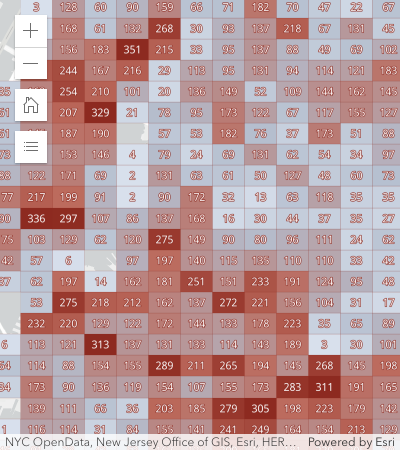](https://developers.arcgis.com/javascript/latest/sample-code/featurereduction-binning/)
|
|
256
256
|
*
|
|
257
257
|
* Binning is typically used to visualize large point layers, but may be used with any geometry type _(since version 4.31)_.
|
|
258
258
|
* In the case of binning polyline or polygon features, the centroid of the line or polygon is used to determine the bin in which it is placed.
|
|
@@ -238,7 +238,7 @@ export interface FeatureReductionClusterProperties extends Partial<Pick<FeatureR
|
|
|
238
238
|
* };
|
|
239
239
|
* ```
|
|
240
240
|
*
|
|
241
|
-
* [](https://developers.arcgis.com/javascript/latest/sample-code/featurereduction-cluster/)
|
|
242
242
|
*
|
|
243
243
|
* ### Clusters by predominant type
|
|
244
244
|
*
|
|
@@ -261,7 +261,7 @@ export interface FeatureReductionClusterProperties extends Partial<Pick<FeatureR
|
|
|
261
261
|
* };
|
|
262
262
|
* ```
|
|
263
263
|
*
|
|
264
|
-
* [](https://developers.arcgis.com/javascript/latest/sample-code/featurereduction-cluster-filter/)
|
|
265
265
|
*
|
|
266
266
|
* ### Clusters with visual variables
|
|
267
267
|
*
|
|
@@ -301,7 +301,7 @@ export interface FeatureReductionClusterProperties extends Partial<Pick<FeatureR
|
|
|
301
301
|
* };
|
|
302
302
|
* ```
|
|
303
303
|
*
|
|
304
|
-
* [](https://developers.arcgis.com/javascript/latest/sample-code/featurereduction-cluster-visualvariables/)
|
|
305
305
|
*
|
|
306
306
|
* @see [clusterPopupTemplateCreator](https://developers.arcgis.com/javascript/latest/references/core/smartMapping/popup/clusters/)
|
|
307
307
|
* @see [Arcade Feature Reduction Popup Profile](https://developers.arcgis.com/javascript/latest/arcade/#feature-reduction-popup)
|
|
@@ -572,7 +572,7 @@ export interface FeatureReductionClusterProperties extends Partial<Pick<FeatureR
|
|
|
572
572
|
*
|
|
573
573
|
* Display all points | Display clustered features
|
|
574
574
|
* ---------------------|-------------------
|
|
575
|
-
* [](https://developers.arcgis.com/javascript/latest/sample-code/featurereduction-cluster/) | [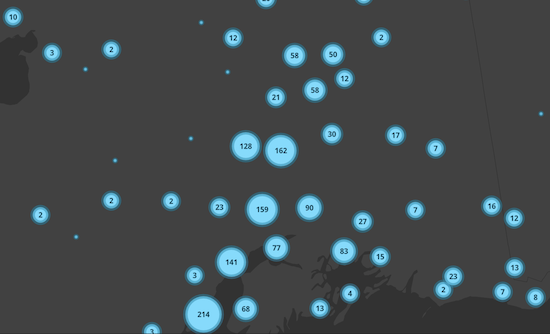](https://developers.arcgis.com/javascript/latest/sample-code/featurereduction-cluster/)
|
|
576
576
|
*
|
|
577
577
|
* ### Visual Variables
|
|
578
578
|
*
|
|
@@ -585,7 +585,7 @@ export interface FeatureReductionClusterProperties extends Partial<Pick<FeatureR
|
|
|
585
585
|
*
|
|
586
586
|
* Display all points | Display clustered features
|
|
587
587
|
* ---------------------|-------------------
|
|
588
|
-
* [](https://developers.arcgis.com/javascript/latest/sample-code/featurereduction-cluster-visualvariables/) | [](https://developers.arcgis.com/javascript/latest/sample-code/featurereduction-cluster-visualvariables/)
|
|
589
589
|
*
|
|
590
590
|
* ### Unique Value Renderer
|
|
591
591
|
*
|
|
@@ -597,7 +597,7 @@ export interface FeatureReductionClusterProperties extends Partial<Pick<FeatureR
|
|
|
597
597
|
*
|
|
598
598
|
* Display all points | Display clustered features
|
|
599
599
|
* ---------------------|-------------------
|
|
600
|
-
* [](https://developers.arcgis.com/javascript/latest/sample-code/featurereduction-cluster-filter/) | [](https://developers.arcgis.com/javascript/latest/sample-code/featurereduction-cluster-filter/)
|
|
601
601
|
*
|
|
602
602
|
* </details>
|
|
603
603
|
*
|
|
@@ -907,7 +907,7 @@ export default class FeatureReductionCluster extends FeatureReductionClusterSupe
|
|
|
907
907
|
* };
|
|
908
908
|
* ```
|
|
909
909
|
*
|
|
910
|
-
* [](https://developers.arcgis.com/javascript/latest/sample-code/featurereduction-cluster/)
|
|
911
911
|
*
|
|
912
912
|
* ### Clusters by predominant type
|
|
913
913
|
*
|
|
@@ -930,7 +930,7 @@ export default class FeatureReductionCluster extends FeatureReductionClusterSupe
|
|
|
930
930
|
* };
|
|
931
931
|
* ```
|
|
932
932
|
*
|
|
933
|
-
* [](https://developers.arcgis.com/javascript/latest/sample-code/featurereduction-cluster-filter/)
|
|
934
934
|
*
|
|
935
935
|
* ### Clusters with visual variables
|
|
936
936
|
*
|
|
@@ -970,7 +970,7 @@ export default class FeatureReductionCluster extends FeatureReductionClusterSupe
|
|
|
970
970
|
* };
|
|
971
971
|
* ```
|
|
972
972
|
*
|
|
973
|
-
* [](https://developers.arcgis.com/javascript/latest/sample-code/featurereduction-cluster-visualvariables/)
|
|
974
974
|
*
|
|
975
975
|
* @see [clusterPopupTemplateCreator](https://developers.arcgis.com/javascript/latest/references/core/smartMapping/popup/clusters/)
|
|
976
976
|
* @see [Arcade Feature Reduction Popup Profile](https://developers.arcgis.com/javascript/latest/arcade/#feature-reduction-popup)
|
|
@@ -173,7 +173,7 @@ export default class LabelClass extends JSONSupport {
|
|
|
173
173
|
*
|
|
174
174
|
* static (default) | none
|
|
175
175
|
* -----------------|------
|
|
176
|
-
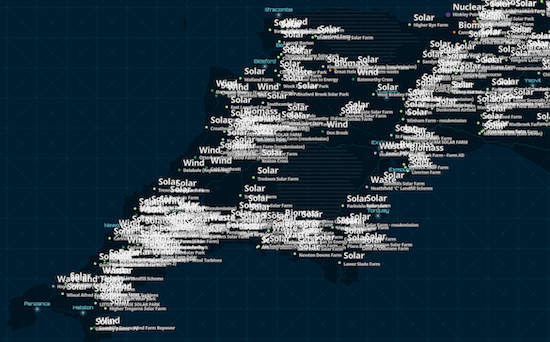
*  | 
|
|
177
177
|
*
|
|
178
178
|
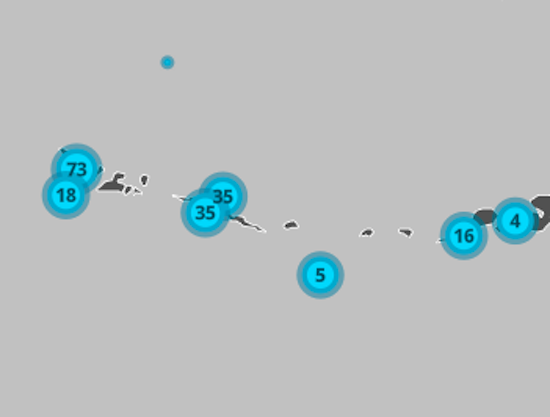
* When labeling clusters (or even sparsely distributed features) with small labels, it may be preferable to allow
|
|
179
179
|
* labels to slightly overlap since the information is still legible and doesn't significantly occlude the visualization.
|
|
@@ -181,7 +181,7 @@ export default class LabelClass extends JSONSupport {
|
|
|
181
181
|
*
|
|
182
182
|
* static (default) | none
|
|
183
183
|
* -----------------|------
|
|
184
|
-
*  | 
|
|
185
185
|
*
|
|
186
186
|
* </details>
|
|
187
187
|
*
|
|
@@ -10,7 +10,7 @@ export interface RasterFunctionProperties extends Partial<Pick<RasterFunction, "
|
|
|
10
10
|
* for a list of functions and their [arguments](https://developers.arcgis.com/javascript/latest/references/core/layers/support/RasterFunction/#functionArguments). The following image shows a landcover ImageryLayer rendered with two chained
|
|
11
11
|
* client-side raster functions used to reclass pixel values (Remap) and assign each pixel a new color (Colormap).
|
|
12
12
|
*
|
|
13
|
-
* [](https://developers.arcgis.com/javascript/latest/sample-code/layers-imagery-rasterfunction/)
|
|
14
14
|
*
|
|
15
15
|
* Chaining raster functions is accomplished by setting the Raster argument in the [functionArguments](https://developers.arcgis.com/javascript/latest/references/core/layers/support/RasterFunction/#functionArguments) property to another
|
|
16
16
|
* defined raster function. See example below on chaining a Remap raster function with a Colormap.
|
|
@@ -55,8 +55,8 @@ export default class SceneFilter extends JSONSupport {
|
|
|
55
55
|
*
|
|
56
56
|
* Illustration | Modification | Description
|
|
57
57
|
* ------|------------|--------
|
|
58
|
-
* <img src="https://developers.arcgis.com/javascript/latest/assets/
|
|
59
|
-
* <img src="https://developers.arcgis.com/javascript/latest/assets/
|
|
58
|
+
* <img src="https://developers.arcgis.com/javascript/latest/assets/references/core/layers/modification-clip.png" alt="filter-type-disjoint" style="width:100px;"/>| <b>disjoint</b> - removes selected area | Remove portions of the scene layer. Use a polygon and don't draw the parts inside that polygon. For example to add another layer which shows a new development for that part of the city.
|
|
59
|
+
* <img src="https://developers.arcgis.com/javascript/latest/assets/references/core/layers/modification-mask.png" alt="filter-type-contains" style="width:100px;"/> | <b>contains</b> - displays only selected area | Define an area of interest. Use a polygon and draw only parts of the scene layer inside that polygon. For example, to show only a portion of a scene layer within the boundaries of a city.
|
|
60
60
|
*
|
|
61
61
|
* @default "disjoint"
|
|
62
62
|
* @see [SceneLayer.filter](https://developers.arcgis.com/javascript/latest/references/core/layers/SceneLayer/#filter)
|
|
@@ -61,9 +61,9 @@ export default class SceneModification extends JSONSupport {
|
|
|
61
61
|
*
|
|
62
62
|
* Illustration | Modification | Description
|
|
63
63
|
* ------|------------|--------
|
|
64
|
-
* <img src="https://developers.arcgis.com/javascript/latest/assets/
|
|
65
|
-
* <img src="https://developers.arcgis.com/javascript/latest/assets/
|
|
66
|
-
* <img src="https://developers.arcgis.com/javascript/latest/assets/
|
|
64
|
+
* <img src="https://developers.arcgis.com/javascript/latest/assets/references/core/layers/modification-clip.png" alt="modification-type-clip" style="width:100px;"/>| <b>clip</b> - removes selected area | Clip-out portions of the integrated mesh to see features below. For example, utility work on gas or water lines in an area. Planners can create a scene in which the integrated mesh is clipped out at a site to expose the water or gas lines below it.
|
|
65
|
+
* <img src="https://developers.arcgis.com/javascript/latest/assets/references/core/layers/modification-mask.png" alt="modification-type-mask" style="width:100px;"/> | <b>mask</b> - displays only selected area | Define an area of interest. Use a polygon and draw only parts of the integrated mesh inside that polygon. For example, if you want to show only a portion of an integrated mesh within the boundaries of a city.
|
|
66
|
+
* <img src="https://developers.arcgis.com/javascript/latest/assets/references/core/layers/modification-replace.png" alt="modification-type-replace" style="width:100px;"/> | <b>replace</b> - flattens selected area |Replace an area of an integrated mesh based on a 3D polygon. For example, to add constructed buildings, flatten the integrated mesh at the footprint of a building so the new building can be visualized. Create different scenarios of the new construction area and share the scenarios as a web scene to discuss with stakeholders. The integrated mesh flattens to the minimum z-vertex of the modification polygon.
|
|
67
67
|
*
|
|
68
68
|
* @default "clip"
|
|
69
69
|
* @see [IntegratedMeshLayer.modifications](https://developers.arcgis.com/javascript/latest/references/core/layers/IntegratedMeshLayer/#modifications)
|
package/package.json
CHANGED
|
@@ -28,7 +28,7 @@ export interface AttachmentsContentProperties extends BaseContentProperties, Par
|
|
|
28
28
|
*
|
|
29
29
|
* | Preview view | List view |
|
|
30
30
|
* | ---- | ---- |
|
|
31
|
-
* | | 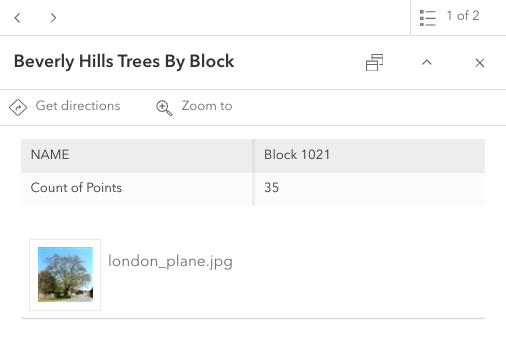 |
|
|
32
32
|
*
|
|
33
33
|
* @since 4.11
|
|
34
34
|
* @see [PopupTemplate](https://developers.arcgis.com/javascript/latest/references/core/PopupTemplate/)
|
|
@@ -6,7 +6,7 @@ export interface BarChartMediaInfoProperties extends ChartMediaInfoProperties {}
|
|
|
6
6
|
/**
|
|
7
7
|
* A `BarChartMediaInfo` is a type of chart media element that represents a bar chart displayed within a popup.
|
|
8
8
|
*
|
|
9
|
-
* 
|
|
10
10
|
*
|
|
11
11
|
* @since 4.11
|
|
12
12
|
* @see [PopupTemplate](https://developers.arcgis.com/javascript/latest/references/core/PopupTemplate/)
|
|
@@ -7,7 +7,7 @@ export interface ColumnChartMediaInfoProperties extends ChartMediaInfoProperties
|
|
|
7
7
|
* A `ColumnChartMediaInfo` is a type of chart media element
|
|
8
8
|
* that represents a column chart displayed within a popup.
|
|
9
9
|
*
|
|
10
|
-
* 
|
|
11
11
|
*
|
|
12
12
|
* @since 4.11
|
|
13
13
|
* @see [PopupTemplate](https://developers.arcgis.com/javascript/latest/references/core/PopupTemplate/)
|
|
@@ -18,7 +18,7 @@ export interface FieldsContentProperties extends BaseContentProperties, Partial<
|
|
|
18
18
|
* it will revert to whatever may be set within the [PopupTemplate.fieldInfos](https://developers.arcgis.com/javascript/latest/references/core/PopupTemplate/#fieldInfos)
|
|
19
19
|
* property.
|
|
20
20
|
*
|
|
21
|
-
* 
|
|
22
22
|
*
|
|
23
23
|
* @since 4.11
|
|
24
24
|
* @see [PopupTemplate](https://developers.arcgis.com/javascript/latest/references/core/PopupTemplate/)
|
|
@@ -11,7 +11,7 @@ export interface ImageMediaInfoProperties extends MediaInfoProperties, Partial<P
|
|
|
11
11
|
/**
|
|
12
12
|
* An `ImageMediaInfo` is a type of media element that represents images to display within a popup.
|
|
13
13
|
*
|
|
14
|
-
* 
|
|
15
15
|
*
|
|
16
16
|
* @since 4.11
|
|
17
17
|
* @see [PopupTemplate](https://developers.arcgis.com/javascript/latest/references/core/PopupTemplate/)
|
|
@@ -7,7 +7,7 @@ export interface LineChartMediaInfoProperties extends ChartMediaInfoProperties {
|
|
|
7
7
|
* A `LineChartMediaInfo` is a type of chart media element
|
|
8
8
|
* that represents a line chart displayed within a popup.
|
|
9
9
|
*
|
|
10
|
-
* 
|
|
11
11
|
*
|
|
12
12
|
* @since 4.11
|
|
13
13
|
* @see [PopupTemplate](https://developers.arcgis.com/javascript/latest/references/core/PopupTemplate/)
|
|
@@ -33,7 +33,7 @@ export type PopupContentMediaInfoUnion = BarChartMediaInfo | ColumnChartMediaInf
|
|
|
33
33
|
* [Binning](https://developers.arcgis.com/javascript/latest/references/core/layers/support/FeatureReductionBinning/) and [clustering](https://developers.arcgis.com/javascript/latest/references/core/layers/support/FeatureReductionCluster/) popup charts are also based on the renderer colors.
|
|
34
34
|
* However, popup charts only respect the colors from the [pie chart](https://developers.arcgis.com/javascript/latest/references/core/renderers/PieChartRenderer/) renderer when clustering is configured.
|
|
35
35
|
*
|
|
36
|
-
* 
|
|
37
37
|
*
|
|
38
38
|
* @since 4.11
|
|
39
39
|
* @see [PopupTemplate](https://developers.arcgis.com/javascript/latest/references/core/PopupTemplate/)
|
|
@@ -6,7 +6,7 @@ export interface PieChartMediaInfoProperties extends ChartMediaInfoProperties {}
|
|
|
6
6
|
/**
|
|
7
7
|
* A `PieChartMediaInfo` is a type of chart media element that represents a pie chart displayed within a popup.
|
|
8
8
|
*
|
|
9
|
-
* 
|
|
10
10
|
*
|
|
11
11
|
* @since 4.11
|
|
12
12
|
* @see [PopupTemplate](https://developers.arcgis.com/javascript/latest/references/core/PopupTemplate/)
|
|
@@ -23,7 +23,7 @@ export interface RelationshipContentProperties extends BaseContentProperties, Pa
|
|
|
23
23
|
*
|
|
24
24
|
* | Origin Feature | Related Destination Feature |
|
|
25
25
|
* | -------------- | ------------- |
|
|
26
|
-
* |  | 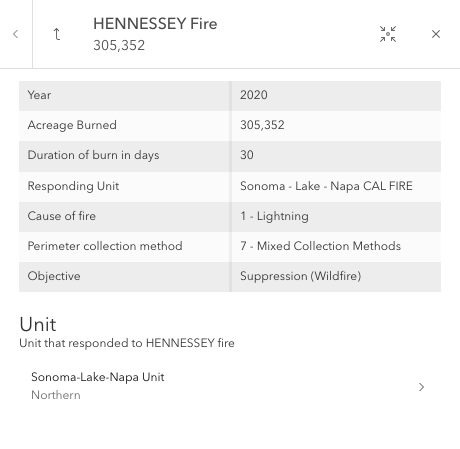 |
|
|
27
27
|
*
|
|
28
28
|
* > [!WARNING]
|
|
29
29
|
* >
|
|
@@ -8,7 +8,7 @@ export interface TextContentProperties extends BaseContentProperties, Partial<Pi
|
|
|
8
8
|
* content. The text may reference values returned from a field attribute or an
|
|
9
9
|
* [Arcade](https://developers.arcgis.com/javascript/latest/arcade/) expression defined in a PopupTemplate's [PopupTemplate.expressionInfos](https://developers.arcgis.com/javascript/latest/references/core/PopupTemplate/#expressionInfos) property.
|
|
10
10
|
*
|
|
11
|
-
* .
|
|
12
12
|
*
|
|
13
13
|
* @since 4.11
|
|
14
14
|
* @see [PopupTemplate](https://developers.arcgis.com/javascript/latest/references/core/PopupTemplate/)
|
|
@@ -123,14 +123,14 @@ export interface DotDensityRendererProperties extends RendererProperties, Visual
|
|
|
123
123
|
* The image below visualizes population by Census tract using dot density. Notice that each
|
|
124
124
|
* dot represents about 100 people.
|
|
125
125
|
*
|
|
126
|
-
* 
|
|
127
127
|
*
|
|
128
128
|
* You can specify multiple [attributes](https://developers.arcgis.com/javascript/latest/references/core/renderers/DotDensityRenderer/#attributes) to visualize subcategories of the data.
|
|
129
129
|
* For example, we can visualize the same layer above, but categorize each dot by race/ethnicity. So each
|
|
130
130
|
* dot of a different color represents 100 people of the respective category (e.g. 1 red dot represents
|
|
131
131
|
* 100 white non-Hispanic) people, each blue dot = 100 African American people, each yellow dot = 100 Hispanic people, etc).
|
|
132
132
|
*
|
|
133
|
-
* [](https://developers.arcgis.com/javascript/latest/sample-code/visualization-dot-density/)
|
|
134
134
|
*
|
|
135
135
|
* This implementation of dot density allows you to linearly scale the dot value based on the [view scale](https://developers.arcgis.com/javascript/latest/references/core/views/MapView/#scale).
|
|
136
136
|
* So as you zoom in and out of the initial view, the relative density of points remains the same across scales.
|
|
@@ -276,7 +276,7 @@ export default class DotDensityRenderer extends DotDensityRendererSuperclass {
|
|
|
276
276
|
*
|
|
277
277
|
* Blend enabled | Blend disabled
|
|
278
278
|
* --------------|---------------
|
|
279
|
-
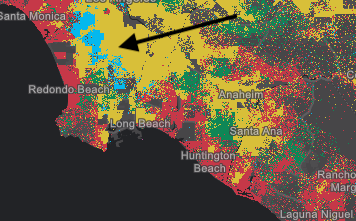
*  | 
|
|
280
280
|
*
|
|
281
281
|
* @default true
|
|
282
282
|
*/
|