@arcgis/core 5.0.0-next.126 → 5.0.0-next.128
This diff represents the content of publicly available package versions that have been released to one of the supported registries. The information contained in this diff is provided for informational purposes only and reflects changes between package versions as they appear in their respective public registries.
- package/Camera.d.ts +1 -1
- package/Ground.d.ts +7 -7
- package/PopupTemplate.d.ts +6 -6
- package/WebScene.d.ts +1 -1
- package/analysis/AreaMeasurementAnalysis.d.ts +1 -1
- package/analysis/DirectLineMeasurementAnalysis.d.ts +1 -1
- package/analysis/LengthDimension.d.ts +4 -4
- package/analysis/ShadowCastAnalysis.d.ts +3 -3
- package/analysis/SliceAnalysis.d.ts +1 -1
- package/analysis/SlicePlane.d.ts +1 -1
- package/assets/esri/core/workers/RemoteClient.js +1 -1
- package/assets/esri/core/workers/chunks/{0a4ebb5dca630a4ab0dd.js → 236f8137ae505c8f0764.js} +1 -1
- package/assets/esri/core/workers/chunks/84905581a3782e95ec34.js +1 -0
- package/assets/esri/core/workers/chunks/{f5f513997cde0ce0f2a2.js → 8eb535b43e1220cf0d75.js} +1 -1
- package/config.js +1 -1
- package/effects/FocusAreas.d.ts +1 -1
- package/form/elements/FieldElement.d.ts +1 -1
- package/form/elements/GroupElement.d.ts +1 -1
- package/form/elements/TextElement.d.ts +1 -1
- package/form/elements/inputs/ComboBoxInput.d.ts +1 -1
- package/form/elements/inputs/RadioButtonsInput.d.ts +1 -1
- package/form/elements/inputs/SwitchInput.d.ts +1 -1
- package/geometry/Mesh.d.ts +7 -7
- package/geometry/operators/alphaShapeOperator.d.ts +1 -1
- package/geometry/operators/areaOperator.d.ts +1 -1
- package/geometry/operators/bufferOperator.d.ts +1 -1
- package/geometry/operators/centroidOperator.d.ts +1 -1
- package/geometry/operators/clipOperator.d.ts +1 -1
- package/geometry/operators/containsOperator.d.ts +1 -1
- package/geometry/operators/convexHullOperator.d.ts +1 -1
- package/geometry/operators/crossesOperator.d.ts +1 -1
- package/geometry/operators/cutOperator.d.ts +1 -1
- package/geometry/operators/densifyOperator.d.ts +1 -1
- package/geometry/operators/differenceOperator.d.ts +1 -1
- package/geometry/operators/disjointOperator.d.ts +1 -1
- package/geometry/operators/distanceOperator.d.ts +1 -1
- package/geometry/operators/generalizeOperator.d.ts +1 -1
- package/geometry/operators/geodesicProximityOperator.d.ts +1 -1
- package/geometry/operators/geodeticDistanceOperator.d.ts +1 -1
- package/geometry/operators/geodeticUtilsOperator.d.ts +2 -2
- package/geometry/operators/graphicBufferOperator.d.ts +1 -1
- package/geometry/operators/intersectionOperator.d.ts +1 -1
- package/geometry/operators/intersectsOperator.d.ts +1 -1
- package/geometry/operators/isNearOperator.d.ts +1 -1
- package/geometry/operators/lengthOperator.d.ts +1 -1
- package/geometry/operators/locateBetweenOperator.d.ts +1 -1
- package/geometry/operators/multiPartToSinglePartOperator.d.ts +1 -1
- package/geometry/operators/offsetOperator.d.ts +5 -5
- package/geometry/operators/overlapsOperator.d.ts +1 -1
- package/geometry/operators/proximityOperator.d.ts +1 -1
- package/geometry/operators/simplifyOGCOperator.d.ts +1 -1
- package/geometry/operators/simplifyOperator.d.ts +1 -1
- package/geometry/operators/support/Transformation.d.ts +6 -6
- package/geometry/operators/symmetricDifferenceOperator.d.ts +1 -1
- package/geometry/operators/touchesOperator.d.ts +1 -1
- package/geometry/operators/unionOperator.d.ts +1 -1
- package/geometry/operators/withinOperator.d.ts +1 -1
- package/geometry/support/MeshMaterialMetallicRoughness.d.ts +1 -1
- package/kernel.js +1 -1
- package/layers/BuildingSceneLayer.d.ts +4 -4
- package/layers/CSVLayer.d.ts +2 -2
- package/layers/CatalogLayer.d.ts +2 -2
- package/layers/ElevationLayer.d.ts +1 -1
- package/layers/FeatureLayer.d.ts +2 -2
- package/layers/GeoJSONLayer.d.ts +2 -2
- package/layers/GeoRSSLayer.d.ts +1 -1
- package/layers/GraphicsLayer.d.ts +2 -2
- package/layers/ImageryLayer.d.ts +3 -3
- package/layers/ImageryTileLayer.d.ts +2 -2
- package/layers/IntegratedMesh3DTilesLayer.d.ts +6 -6
- package/layers/IntegratedMeshLayer.d.ts +7 -7
- package/layers/Layer.d.ts +1 -0
- package/layers/MapImageLayer.d.ts +1 -1
- package/layers/MediaLayer.d.ts +1 -1
- package/layers/OGCFeatureLayer.d.ts +2 -2
- package/layers/PointCloudLayer.d.ts +1 -1
- package/layers/SceneLayer.d.ts +5 -5
- package/layers/StreamLayer.d.ts +2 -2
- package/layers/VectorTileLayer.d.ts +2 -2
- package/layers/VideoLayer.d.ts +1 -1
- package/layers/VoxelLayer.d.ts +8 -8
- package/layers/WFSLayer.d.ts +6 -6
- package/layers/catalog/CatalogFootprintLayer.d.ts +1 -1
- package/layers/mixins/BlendLayer.d.ts +6 -6
- package/layers/pointCloudFilters/PointCloudReturnFilter.d.ts +1 -1
- package/layers/pointCloudFilters/PointCloudValueFilter.d.ts +1 -1
- package/layers/support/DimensionalDefinition.d.ts +2 -2
- package/layers/support/FeatureEffect.d.ts +4 -4
- package/layers/support/FeatureFilter.d.ts +17 -17
- package/layers/support/FeatureReductionBinning.d.ts +1 -1
- package/layers/support/FeatureReductionCluster.d.ts +9 -9
- package/layers/support/LabelClass.d.ts +2 -2
- package/layers/support/RasterFunction.d.ts +1 -1
- package/layers/support/SceneFilter.d.ts +2 -2
- package/layers/support/SceneModification.d.ts +3 -3
- package/package.json +1 -1
- package/popup/content/AttachmentsContent.d.ts +1 -1
- package/popup/content/BarChartMediaInfo.d.ts +1 -1
- package/popup/content/ColumnChartMediaInfo.d.ts +1 -1
- package/popup/content/FieldsContent.d.ts +1 -1
- package/popup/content/ImageMediaInfo.d.ts +1 -1
- package/popup/content/LineChartMediaInfo.d.ts +1 -1
- package/popup/content/MediaContent.d.ts +1 -1
- package/popup/content/PieChartMediaInfo.d.ts +1 -1
- package/popup/content/RelationshipContent.d.ts +1 -1
- package/popup/content/TextContent.d.ts +1 -1
- package/renderers/DotDensityRenderer.d.ts +3 -3
- package/renderers/FlowRenderer.d.ts +6 -6
- package/renderers/HeatmapRenderer.d.ts +3 -3
- package/renderers/PieChartRenderer.d.ts +1 -1
- package/renderers/RasterShadedReliefRenderer.d.ts +1 -1
- package/renderers/Renderer.d.ts +2 -2
- package/renderers/SimpleRenderer.d.ts +1 -1
- package/renderers/VectorFieldRenderer.d.ts +1 -1
- package/renderers/mixins/VisualVariablesMixin.d.ts +8 -8
- package/rest/query/operations/pbfFlatFeatureSet.js +1 -1
- package/rest/query/support/AttachmentInfo.d.ts +1 -1
- package/rest/support/AutoIntervalBinParameters.d.ts +1 -1
- package/rest/support/DateBinParameters.d.ts +1 -1
- package/rest/support/FixedBoundariesBinParameters.d.ts +1 -1
- package/rest/support/FixedIntervalBinParameters.d.ts +1 -1
- package/smartMapping/labels/clusters.d.ts +1 -1
- package/smartMapping/popup/clusters.d.ts +2 -2
- package/smartMapping/popup/templates.d.ts +1 -1
- package/smartMapping/raster/renderers/flow.d.ts +2 -2
- package/smartMapping/renderers/color.d.ts +12 -12
- package/smartMapping/renderers/predominance.d.ts +3 -3
- package/smartMapping/renderers/relationship.d.ts +15 -15
- package/smartMapping/renderers/univariateColorSize.d.ts +4 -4
- package/smartMapping/symbology/color.d.ts +4 -4
- package/smartMapping/symbology/flow.d.ts +2 -2
- package/smartMapping/symbology/types.d.ts +18 -18
- package/support/revision.js +1 -1
- package/symbols/CIMSymbol.d.ts +1 -1
- package/symbols/FillSymbol3DLayer.d.ts +3 -3
- package/symbols/IconSymbol3DLayer.d.ts +1 -1
- package/symbols/LabelSymbol3D.d.ts +2 -2
- package/symbols/LineStyleMarker3D.d.ts +7 -7
- package/symbols/LineSymbol3D.d.ts +2 -2
- package/symbols/LineSymbol3DLayer.d.ts +7 -7
- package/symbols/LineSymbolMarker.d.ts +6 -6
- package/symbols/MarkerSymbol.d.ts +1 -1
- package/symbols/MeshSymbol3D.d.ts +2 -2
- package/symbols/ObjectSymbol3DLayer.d.ts +1 -1
- package/symbols/PathSymbol3DLayer.d.ts +14 -14
- package/symbols/PictureFillSymbol.d.ts +1 -1
- package/symbols/PictureMarkerSymbol.d.ts +1 -1
- package/symbols/PointSymbol3D.d.ts +3 -3
- package/symbols/PolygonSymbol3D.d.ts +7 -7
- package/symbols/SimpleFillSymbol.d.ts +8 -8
- package/symbols/SimpleLineSymbol.d.ts +20 -20
- package/symbols/SimpleMarkerSymbol.d.ts +7 -7
- package/symbols/Symbol3DLayer.d.ts +16 -16
- package/symbols/TextSymbol.d.ts +1 -1
- package/symbols/TextSymbol3DLayer.d.ts +1 -1
- package/symbols/WaterSymbol3DLayer.d.ts +3 -3
- package/symbols/WebStyleSymbol.d.ts +1 -1
- package/symbols/callouts/Callout3D.d.ts +1 -1
- package/symbols/callouts/LineCallout3D.d.ts +3 -3
- package/symbols/cim/cimAnalyzer.js +1 -1
- package/symbols/cim/types.d.ts +23 -23
- package/symbols/edges/Edges3D.d.ts +1 -1
- package/symbols/edges/SolidEdges3D.d.ts +1 -1
- package/symbols/patterns/LineStylePattern3D.d.ts +11 -11
- package/symbols/patterns/StylePattern3D.d.ts +8 -8
- package/symbols/support/ElevationInfo.d.ts +2 -2
- package/symbols/support/IconSymbol3DLayerResource.d.ts +6 -6
- package/symbols/support/ObjectSymbol3DLayerResource.d.ts +7 -7
- package/symbols/support/Symbol3DEmissive.d.ts +23 -13
- package/symbols/support/Symbol3DVerticalOffset.d.ts +2 -2
- package/views/2d/engine/webgl/shaderGraph/techniques/GraphicInstanceStore.js +1 -1
- package/views/2d/engine/webgl/shaderGraph/techniques/animated/AAnimatedPolyShader.js +1 -1
- package/views/2d/engine/webgl/shaderGraph/techniques/animated/AnimatedFillShader.js +1 -1
- package/views/2d/engine/webgl/shaderGraph/techniques/animated/AnimatedPolyMeshWriters.js +1 -1
- package/views/2d/engine/webgl/shaderGraph/techniques/animated/attributes.js +1 -1
- package/views/2d/engine/webgl/shaders/sources/shaderRepository.js +1 -1
- package/views/2d/layers/BaseLayerViewGL2D.d.ts +1 -1
- package/views/2d/layers/features/schema/processor/symbols/ComplexSymbolSchema.js +1 -1
- package/views/2d/types.d.ts +3 -3
- package/views/3d/environment/CloudyWeather.d.ts +1 -1
- package/views/3d/environment/Environment.d.ts +4 -4
- package/views/3d/environment/FoggyWeather.d.ts +1 -1
- package/views/3d/environment/RainyWeather.d.ts +1 -1
- package/views/3d/environment/SnowyWeather.d.ts +1 -1
- package/views/3d/environment/SunLighting.d.ts +1 -1
- package/views/3d/environment/SunnyWeather.d.ts +1 -1
- package/views/3d/environment/VirtualLighting.d.ts +1 -1
- package/views/3d/webgl/RenderNode.d.ts +2 -2
- package/views/3d/webgl.d.ts +1 -1
- package/views/Magnifier.d.ts +3 -3
- package/views/MapView.d.ts +7 -7
- package/views/SceneView.d.ts +34 -37
- package/views/View.d.ts +2 -2
- package/views/interactive/sketch/SketchLabelOptions.d.ts +1 -1
- package/views/interactive/sketch/SketchTooltipOptions.d.ts +1 -1
- package/views/interactive/snapping/SnappingOptions.d.ts +7 -7
- package/views/support/HighlightOptions.d.ts +1 -1
- package/views/support/flow/dataUtils.js +1 -1
- package/views/ui/DefaultUI.d.ts +2 -2
- package/webscene/Environment.d.ts +10 -10
- package/webscene/Glow.d.ts +7 -5
- package/webscene/background/ColorBackground.d.ts +1 -1
- package/widgets/AreaMeasurement2D.d.ts +1 -1
- package/widgets/AreaMeasurement3D.d.ts +2 -2
- package/widgets/Attachments.d.ts +1 -1
- package/widgets/Attribution.d.ts +1 -1
- package/widgets/BasemapGallery.d.ts +1 -1
- package/widgets/BasemapLayerList.d.ts +3 -3
- package/widgets/BasemapToggle.d.ts +1 -1
- package/widgets/Bookmarks/BookmarksVisibleElements.d.ts +1 -1
- package/widgets/Bookmarks.d.ts +2 -2
- package/widgets/BuildingExplorer.d.ts +1 -1
- package/widgets/CatalogLayerList.d.ts +3 -3
- package/widgets/Compass.d.ts +2 -2
- package/widgets/CoordinateConversion.d.ts +1 -1
- package/widgets/Daylight.d.ts +5 -5
- package/widgets/DirectLineMeasurement3D.d.ts +2 -2
- package/widgets/Directions.d.ts +4 -4
- package/widgets/DistanceMeasurement2D.d.ts +1 -1
- package/widgets/Editor/CreateFeaturesWorkflow.d.ts +1 -1
- package/widgets/Editor.d.ts +2 -2
- package/widgets/ElevationProfile/ElevationProfileLineGround.d.ts +1 -1
- package/widgets/ElevationProfile/ElevationProfileLineInput.d.ts +1 -1
- package/widgets/ElevationProfile/ElevationProfileLineView.d.ts +1 -1
- package/widgets/ElevationProfile.d.ts +3 -3
- package/widgets/Expand.d.ts +1 -1
- package/widgets/FeatureForm.d.ts +1 -1
- package/widgets/FeatureTable/ActionColumn.d.ts +1 -1
- package/widgets/FeatureTable/AttachmentsColumn.d.ts +1 -1
- package/widgets/FeatureTable/FeatureTableViewModel.d.ts +3 -3
- package/widgets/FeatureTable/Grid/GroupColumn.d.ts +1 -1
- package/widgets/FeatureTable/RelationshipColumn.d.ts +1 -1
- package/widgets/FeatureTable/VisibleElements.d.ts +1 -1
- package/widgets/FeatureTable.d.ts +9 -9
- package/widgets/FeatureTemplates/FeatureTemplatesViewModel.d.ts +5 -5
- package/widgets/FeatureTemplates.d.ts +8 -8
- package/widgets/Features/FeaturesViewModel.d.ts +2 -2
- package/widgets/Features/FeaturesVisibleElements.d.ts +2 -2
- package/widgets/Features.d.ts +1 -1
- package/widgets/Histogram.d.ts +2 -2
- package/widgets/HistogramRangeSlider.d.ts +1 -1
- package/widgets/Home.d.ts +1 -1
- package/widgets/LayerList.d.ts +4 -4
- package/widgets/Legend.d.ts +8 -8
- package/widgets/LineOfSight.d.ts +1 -1
- package/widgets/Locate.d.ts +2 -2
- package/widgets/Measurement.d.ts +1 -1
- package/widgets/NavigationToggle/NavigationToggleViewModel.d.ts +1 -1
- package/widgets/NavigationToggle.d.ts +3 -3
- package/widgets/OrientedImageryViewer/OrientedImageryViewerViewModel.js +1 -1
- package/widgets/OrientedImageryViewer/adapters/sketch/MeasurementAdapter.js +1 -1
- package/widgets/OrientedImageryViewer/components/ImageLocationViewModel.js +1 -1
- package/widgets/OrientedImageryViewer/imageMeasurementUtils.js +1 -1
- package/widgets/OrientedImageryViewer/navigation/NavigationManager.js +1 -1
- package/widgets/OrientedImageryViewer/navigation/queries.js +1 -1
- package/widgets/OrientedImageryViewer/navigation/utils.js +1 -1
- package/widgets/Popup/PopupVisibleElements.d.ts +2 -2
- package/widgets/Popup.d.ts +5 -5
- package/widgets/Print/CustomTemplate.d.ts +1 -1
- package/widgets/Print/TemplateOptions.d.ts +4 -4
- package/widgets/ScaleRangeSlider.d.ts +1 -1
- package/widgets/Search/SearchViewModel.d.ts +4 -4
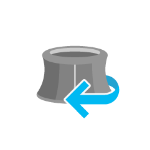
- package/widgets/Search.d.ts +5 -5
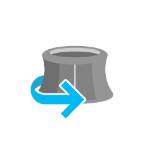
- package/widgets/ShadowCast.d.ts +3 -3
- package/widgets/Sketch/SketchViewModel.d.ts +39 -39
- package/widgets/Sketch.d.ts +43 -43
- package/widgets/Slice.d.ts +2 -2
- package/widgets/Slider/SliderViewModel.d.ts +2 -2
- package/widgets/Slider.d.ts +9 -9
- package/widgets/Swipe/SwipeViewModel.d.ts +1 -1
- package/widgets/Swipe.d.ts +2 -2
- package/widgets/TableList.d.ts +1 -1
- package/widgets/TimeSlider/TimeSliderViewModel.d.ts +8 -8
- package/widgets/TimeSlider/types.d.ts +1 -1
- package/widgets/TimeSlider.d.ts +11 -11
- package/widgets/Track.d.ts +2 -2
- package/widgets/UtilityNetworkAssociations.d.ts +3 -3
- package/widgets/UtilityNetworkTrace.d.ts +4 -4
- package/widgets/UtilityNetworkValidateTopology.d.ts +1 -1
- package/widgets/ValuePicker.d.ts +5 -5
- package/widgets/VideoPlayer.d.ts +1 -1
- package/widgets/smartMapping/ClassedColorSlider.d.ts +1 -1
- package/widgets/smartMapping/ClassedSizeSlider.d.ts +1 -1
- package/widgets/smartMapping/ColorSizeSlider.d.ts +2 -2
- package/widgets/smartMapping/ColorSlider.d.ts +1 -1
- package/widgets/smartMapping/HeatmapSlider.d.ts +1 -1
- package/widgets/smartMapping/OpacitySlider.d.ts +1 -1
- package/widgets/smartMapping/SizeSlider.d.ts +1 -1
- package/widgets/smartMapping/SmartMappingSliderBase.d.ts +4 -4
- package/widgets/smartMapping/SmartMappingSliderViewModel.d.ts +6 -6
- package/widgets/support/GridControls.d.ts +1 -1
- package/widgets/support/SnappingControls/VisibleElements.d.ts +1 -1
- package/widgets/support/SnappingControls.d.ts +6 -6
- package/assets/esri/core/workers/chunks/e0519f24430fecead87b.js +0 -1
|
@@ -5,7 +5,7 @@ export interface RainyWeatherProperties extends Partial<Pick<RainyWeather, "clou
|
|
|
5
5
|
/**
|
|
6
6
|
* The RainyWeather class allows you to change the weather conditions in the scene to rainy weather.
|
|
7
7
|
*
|
|
8
|
-
* 
|
|
9
9
|
*
|
|
10
10
|
* Example:
|
|
11
11
|
* ```js
|
|
@@ -5,7 +5,7 @@ export interface SnowyWeatherProperties extends Partial<Pick<SnowyWeather, "clou
|
|
|
5
5
|
/**
|
|
6
6
|
* The SnowyWeather class allows you to change the weather conditions in the scene to snowy weather.
|
|
7
7
|
*
|
|
8
|
-
* 
|
|
9
9
|
*
|
|
10
10
|
* Example:
|
|
11
11
|
* ```js
|
|
@@ -16,7 +16,7 @@ export interface SunLightingProperties extends WebSceneSunLightingProperties, Pa
|
|
|
16
16
|
/**
|
|
17
17
|
* The SunLighting class allows you to change the lighting in the scene to sunlight. The position of the light is set to the sun's location.
|
|
18
18
|
*
|
|
19
|
-
* 
|
|
20
20
|
*
|
|
21
21
|
* Example:
|
|
22
22
|
* ```js
|
|
@@ -5,7 +5,7 @@ export interface SunnyWeatherProperties extends Partial<Pick<SunnyWeather, "clou
|
|
|
5
5
|
/**
|
|
6
6
|
* The SunnyWeather class allows you to change the weather conditions in the scene to sunny weather.
|
|
7
7
|
*
|
|
8
|
-
* 
|
|
9
9
|
*
|
|
10
10
|
* Example:
|
|
11
11
|
* ```js
|
|
@@ -8,7 +8,7 @@ export interface VirtualLightingProperties extends WebSceneVirtualLightingProper
|
|
|
8
8
|
* The VirtualLighting class allows you to change the lighting in the scene to virtual light. The position of the light
|
|
9
9
|
* follows the camera and has a slight top-right offset in respect to the camera.
|
|
10
10
|
*
|
|
11
|
-
* 
|
|
12
12
|
*
|
|
13
13
|
* Example:
|
|
14
14
|
* ```js
|
|
@@ -112,7 +112,7 @@ export interface RenderNodeProperties extends Partial<Pick<RenderNode, "produces
|
|
|
112
112
|
* <span id="render-node-input-images"></span>
|
|
113
113
|
* | composite-color | composite-color depth attachment | highlights | normals |
|
|
114
114
|
* | --------------- | -------------------------------- | ---------- | ------- |
|
|
115
|
-
* | <img src="https://developers.arcgis.com/javascript/latest/assets/
|
|
115
|
+
* | <img src="https://developers.arcgis.com/javascript/latest/assets/references/core/views/3d/rendernodeCompositeColor.png" style="width:200px;"/> | <img src="https://developers.arcgis.com/javascript/latest/assets/references/core/views/3d/rendernodeCompositeColorDepth.png" style="width:200px;"/> | <img src="https://developers.arcgis.com/javascript/latest/assets/references/core/views/3d/rendernodeHighlight.png" style="width:200px;"/> | <img src="https://developers.arcgis.com/javascript/latest/assets/references/core/views/3d/rendernodeNormals.png" style="width:200px;"/> |
|
|
116
116
|
*
|
|
117
117
|
* If one of the required inputs is not available then this [RenderNode](https://developers.arcgis.com/javascript/latest/references/core/views/3d/webgl/RenderNode/) will be
|
|
118
118
|
* skipped during the frame. For example, a custom [RenderNode](https://developers.arcgis.com/javascript/latest/references/core/views/3d/webgl/RenderNode/) using highlights as
|
|
@@ -151,7 +151,7 @@ export interface RenderNodeProperties extends Partial<Pick<RenderNode, "produces
|
|
|
151
151
|
* drawn as a perfect sphere with a radius of 6378137, so the unit of the coordinate system should be considered
|
|
152
152
|
* meters.
|
|
153
153
|
*
|
|
154
|
-
* 
|
|
155
155
|
*
|
|
156
156
|
* You can use [toRenderCoordinates()](https://developers.arcgis.com/javascript/latest/references/core/views/3d/webgl/#toRenderCoordinates)
|
|
157
157
|
* and [fromRenderCoordinates()](https://developers.arcgis.com/javascript/latest/references/core/views/3d/webgl/#fromRenderCoordinates) to transform to
|
package/views/3d/webgl.d.ts
CHANGED
|
@@ -161,7 +161,7 @@ export function fromRenderCoordinates<T1 extends ArrayLike<number>, T2 extends A
|
|
|
161
161
|
* * Y: Northing
|
|
162
162
|
* * Z: Elevation
|
|
163
163
|
*
|
|
164
|
-
* 
|
|
165
165
|
*
|
|
166
166
|
* When [view.viewingMode](https://developers.arcgis.com/javascript/latest/references/core/views/SceneView/#viewingMode) is `global`, a linear
|
|
167
167
|
* transformation does not take the curvature of the globe or other non-linear projection aspects into account. Thus,
|
package/views/Magnifier.d.ts
CHANGED
|
@@ -8,19 +8,19 @@ export interface MagnifierProperties extends Partial<Pick<Magnifier, "factor" |
|
|
|
8
8
|
* as a magnified image. An instance of this class can be accessed through
|
|
9
9
|
* either [MapView.magnifier](https://developers.arcgis.com/javascript/latest/references/core/views/MapView/#magnifier) or [SceneView.magnifier](https://developers.arcgis.com/javascript/latest/references/core/views/SceneView/#magnifier).
|
|
10
10
|
*
|
|
11
|
-
* 
|
|
12
12
|
*
|
|
13
13
|
* As you can see in the screenshot above, the Magnifier utilizes a default overlay image of a magnifier
|
|
14
14
|
* glass. The overlay image is set using the [overlayUrl](https://developers.arcgis.com/javascript/latest/references/core/views/Magnifier/#overlayUrl) property. You can disable the overlay image by setting the [overlayEnabled](https://developers.arcgis.com/javascript/latest/references/core/views/Magnifier/#overlayEnabled) to `false`. The following
|
|
15
15
|
* demonstrates using a Magnifier without an overlay image.
|
|
16
16
|
*
|
|
17
|
-
* 
|
|
18
18
|
*
|
|
19
19
|
* The Magnifier contains a default mask image, which is set using the [maskUrl](https://developers.arcgis.com/javascript/latest/references/core/views/Magnifier/#maskUrl), and determines the visible area of the magnified image. Be default, the magnified area
|
|
20
20
|
* is in the shape of a circle. The following demonstrates an example of a mask image set in the shape of a square. Note that the `overlayEnabled` was set
|
|
21
21
|
* to `false` in this example as well to hide the overlay image, and only display the magnified area.
|
|
22
22
|
*
|
|
23
|
-
* 
|
|
24
24
|
*
|
|
25
25
|
* @since 4.19
|
|
26
26
|
* @see [MapView.magnifier](https://developers.arcgis.com/javascript/latest/references/core/views/MapView/#magnifier)
|
package/views/MapView.d.ts
CHANGED
|
@@ -247,7 +247,7 @@ export interface MapViewProperties extends View2DProperties {}
|
|
|
247
247
|
* is set to `true` (default). To enable zooming in MapView, `view.constraints.snapToZoom` must be set to `false` (default is `true`).
|
|
248
248
|
* Please see [GamepadInputDevice](https://developers.arcgis.com/javascript/latest/references/core/views/input/gamepad/GamepadInputDevice/) for supported devices.
|
|
249
249
|
*
|
|
250
|
-
* 
|
|
251
251
|
*
|
|
252
252
|
* Gamepad Action | MapView behavior
|
|
253
253
|
* ------|------------
|
|
@@ -258,11 +258,11 @@ export interface MapViewProperties extends View2DProperties {}
|
|
|
258
258
|
*
|
|
259
259
|
* Action Image | SpaceMouse Action | MapView behavior
|
|
260
260
|
* ------|------|------------
|
|
261
|
-
*  | Push (left/right/forward/backward) | Pan the view
|
|
262
|
+
*  | Pull up | Zoom out
|
|
263
|
+
* 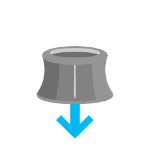 | Push down | Zoom in
|
|
264
|
+
*  | Rotate clockwise | Rotate the view clockwise
|
|
265
|
+
*  | Rotate counterclockwise | Rotate the view counterclockwise
|
|
266
266
|
*
|
|
267
267
|
* To disable gamepad navigation, you can set `view.navigation.gamepad.enabled` to `false`.
|
|
268
268
|
*
|
|
@@ -295,7 +295,7 @@ export interface MapViewProperties extends View2DProperties {}
|
|
|
295
295
|
* to user interaction without delay. The [@click](https://developers.arcgis.com/javascript/latest/references/core/views/MapView/#event-click) event is only triggered after making sure that the
|
|
296
296
|
* user doesn't click a second time (in which case it would trigger a [@double-click](https://developers.arcgis.com/javascript/latest/references/core/views/MapView/#event-double-click) event).
|
|
297
297
|
*
|
|
298
|
-
* 
|
|
299
299
|
*
|
|
300
300
|
* In the case of a double-click, the same event chain is repeated after the first click. However, if the user clicks
|
|
301
301
|
* a second time within a close time range, then the [@click](https://developers.arcgis.com/javascript/latest/references/core/views/MapView/#event-click) event is not emitted anymore, but the
|
package/views/SceneView.d.ts
CHANGED
|
@@ -180,7 +180,7 @@ export interface SceneViewProperties extends ViewProperties, DOMContainerPropert
|
|
|
180
180
|
*
|
|
181
181
|
* The `clippingArea` property only applies to [local](https://developers.arcgis.com/javascript/latest/references/core/views/SceneView/#viewingMode) scenes.
|
|
182
182
|
*
|
|
183
|
-
* 
|
|
184
184
|
*
|
|
185
185
|
* The clippingArea property contains an internal reference which may be modified in the future. To persist or
|
|
186
186
|
* modify the clippingArea, create a clone using [clippingArea.clone()](https://developers.arcgis.com/javascript/latest/references/core/geometry/Extent/#clone).
|
|
@@ -328,8 +328,8 @@ export interface SceneViewProperties extends ViewProperties, DOMContainerPropert
|
|
|
328
328
|
*
|
|
329
329
|
* Value | Example | Description
|
|
330
330
|
* ------|-------|------------
|
|
331
|
-
* global |  | Global scenes allow the entire globe to render in the view, showing the curvature of the earth.
|
|
332
|
+
* local | 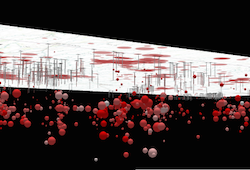 | Local scenes render the earth on a flat surface. They can be constrained to only show a "local" area by setting the [clippingArea](https://developers.arcgis.com/javascript/latest/references/core/views/SceneView/#clippingArea) property. Local scenes also allow for displaying and exploring data that would otherwise be hidden by the surface of the earth.
|
|
333
333
|
*
|
|
334
334
|
* Depending on the viewing mode different [supported coordinate systems](https://developers.arcgis.com/javascript/latest/references/core/views/SceneView/#supported-coordinate-systems) are available.
|
|
335
335
|
*
|
|
@@ -377,7 +377,7 @@ export interface SceneViewProperties extends ViewProperties, DOMContainerPropert
|
|
|
377
377
|
* for [MapView](https://developers.arcgis.com/javascript/latest/references/core/views/MapView/). For a general overview of views,
|
|
378
378
|
* see [View](https://developers.arcgis.com/javascript/latest/references/core/views/View/).
|
|
379
379
|
*
|
|
380
|
-
* 
|
|
381
381
|
*
|
|
382
382
|
* For a map to be visible to the user in the DOM, a SceneView must have both a
|
|
383
383
|
* valid [Map instance](https://developers.arcgis.com/javascript/latest/references/core/views/SceneView/#map) and a [DOM element](https://developers.arcgis.com/javascript/latest/references/core/views/SceneView/#container) with a non-zero
|
|
@@ -502,7 +502,7 @@ export interface SceneViewProperties extends ViewProperties, DOMContainerPropert
|
|
|
502
502
|
* <details>
|
|
503
503
|
* <summary>Read More</summary>
|
|
504
504
|
*
|
|
505
|
-
* 
|
|
506
506
|
*
|
|
507
507
|
* Gamepad Action | SceneView behavior
|
|
508
508
|
* ------|------------
|
|
@@ -513,12 +513,12 @@ export interface SceneViewProperties extends ViewProperties, DOMContainerPropert
|
|
|
513
513
|
*
|
|
514
514
|
* Action Image | SpaceMouse Action | SceneView behavior
|
|
515
515
|
* -------|------|------------
|
|
516
|
-
*  | Push (left/right/forward/backward)| Pan
|
|
517
|
+
*  | Pull up | Ascend
|
|
518
|
+
*  | Push down | Descend
|
|
519
|
+
*  | Rotate clockwise | Rotate the view clockwise
|
|
520
|
+
*  | Rotate counterclockwise | Rotate the view counterclockwise
|
|
521
|
+
*  | Tilt | Tilt the scene
|
|
522
522
|
*
|
|
523
523
|
* To disable gamepad navigation, you can set `view.navigation.gamepad.enabled` to `false`.
|
|
524
524
|
*
|
|
@@ -625,7 +625,7 @@ export interface SceneViewProperties extends ViewProperties, DOMContainerPropert
|
|
|
625
625
|
* <span id="viewing-modes"></span>
|
|
626
626
|
* ## Viewing modes
|
|
627
627
|
*
|
|
628
|
-
* 
|
|
629
629
|
*
|
|
630
630
|
* The SceneView supports two different viewing modes, `global` (left picture above) and `local` (right picture above),
|
|
631
631
|
* specified by the [viewingMode](https://developers.arcgis.com/javascript/latest/references/core/views/SceneView/#viewingMode) property. Global scenes render the
|
|
@@ -722,7 +722,7 @@ export interface SceneViewProperties extends ViewProperties, DOMContainerPropert
|
|
|
722
722
|
* to user interaction without delay. The [@click](https://developers.arcgis.com/javascript/latest/references/core/views/SceneView/#event-click) event is only triggered after making sure that the
|
|
723
723
|
* user doesn't click a second time (in which case it would trigger a [@double-click](https://developers.arcgis.com/javascript/latest/references/core/views/SceneView/#event-double-click) event).
|
|
724
724
|
*
|
|
725
|
-
* 
|
|
726
726
|
*
|
|
727
727
|
* In the case of a double-click, the same event chain is repeated after the first click. However, if the user clicks
|
|
728
728
|
* a second time within a close time range, then the [@click](https://developers.arcgis.com/javascript/latest/references/core/views/SceneView/#event-click) event is not emitted anymore, but the
|
|
@@ -966,7 +966,7 @@ export default class SceneView extends SceneViewSuperclass {
|
|
|
966
966
|
*
|
|
967
967
|
* The `clippingArea` property only applies to [local](https://developers.arcgis.com/javascript/latest/references/core/views/SceneView/#viewingMode) scenes.
|
|
968
968
|
*
|
|
969
|
-
* 
|
|
970
970
|
*
|
|
971
971
|
* The clippingArea property contains an internal reference which may be modified in the future. To persist or
|
|
972
972
|
* modify the clippingArea, create a clone using [clippingArea.clone()](https://developers.arcgis.com/javascript/latest/references/core/geometry/Extent/#clone).
|
|
@@ -1113,41 +1113,38 @@ export default class SceneView extends SceneViewSuperclass {
|
|
|
1113
1113
|
* > [!WARNING]
|
|
1114
1114
|
* >
|
|
1115
1115
|
* > `qualityProfile` is evaluated and set automatically when SceneView loads depending on the detected device,
|
|
1116
|
-
* >
|
|
1117
|
-
* > In most scenarios it is
|
|
1116
|
+
* > to optimize stability and performance across different hardware and browsers.
|
|
1117
|
+
* > In most scenarios it is recommended to not set qualityProfile, but let it be evaluated automatically.
|
|
1118
1118
|
* > `qualityProfile` should only be set when the target devices and their capabilities that the application runs on
|
|
1119
1119
|
* > are clear, and are known to work well with the chosen profile.
|
|
1120
|
-
* > Applications should also consider providing an option to change the quality profile, such that users can select
|
|
1121
|
-
* > profile that works best with their specific devices.
|
|
1120
|
+
* > Applications should also consider providing an option to change the quality profile, such that users can select
|
|
1121
|
+
* > the profile that works best with their specific devices.
|
|
1122
1122
|
*
|
|
1123
|
-
* The
|
|
1124
|
-
* memory limit. The memory limit impacts the [SceneLayer's](https://developers.arcgis.com/javascript/latest/references/core/layers/SceneLayer/) levels of detail and
|
|
1125
|
-
* the number of features that are displayed in a [FeatureLayer](https://developers.arcgis.com/javascript/latest/references/core/layers/FeatureLayer/). Furthermore, low quality
|
|
1126
|
-
* profile impacts visual quality by reducing map resolution, simplifying atmospheric effects and disabling
|
|
1127
|
-
* anti-aliasing (edge smoothing).
|
|
1123
|
+
* The quality profiles have increasingly higher settings for the memory limit and rendering quality.
|
|
1128
1124
|
*
|
|
1129
|
-
* The
|
|
1130
|
-
*
|
|
1131
|
-
*
|
|
1125
|
+
* The memory limit defines the maximum amount of memory which the view is allowed to use. Complex web scenes
|
|
1126
|
+
* with many layers will hit the memory limit. When this happens, the view will reduce the level of detail and the
|
|
1127
|
+
* number of features that are loaded, as well as the rendering resolution of the view and of draped content. This
|
|
1128
|
+
* will make the application less likely crash due to out of memory errors.
|
|
1132
1129
|
*
|
|
1133
|
-
*
|
|
1134
|
-
*
|
|
1135
|
-
*
|
|
1136
|
-
*
|
|
1137
|
-
* quality modes.
|
|
1130
|
+
* The rendering quality settings impacts the level of detail and the maximum number of features that are loaded
|
|
1131
|
+
* by all layers. A higher quality profile also enables more rendering features, providing better visuals.
|
|
1132
|
+
* Furthermor, it increases the resolution of shadows, rasterized content such as icons and text, as well as the
|
|
1133
|
+
* overall rendering resolution on HiDPI displays.
|
|
1138
1134
|
*
|
|
1139
|
-
*
|
|
1140
|
-
*
|
|
1135
|
+
* A higher quality profile improves visual quality and detail, but can have a negative impact on drawing performance
|
|
1136
|
+
* and stability.
|
|
1141
1137
|
*
|
|
1142
1138
|
* SceneView performance depends on the amount of data being displayed, the quality profile and the device type.
|
|
1143
1139
|
* [performanceInfo](https://developers.arcgis.com/javascript/latest/references/core/views/SceneView/#performanceInfo) can be used to inspect the memory consumption and the number
|
|
1144
1140
|
* of features that are displayed for a specific scene. The
|
|
1145
|
-
* [SceneView memory resources](https://developers.arcgis.com/javascript/latest/sample-code/sceneview-memory/)
|
|
1141
|
+
* [SceneView memory resources](https://developers.arcgis.com/javascript/latest/sample-code/sceneview-memory/)
|
|
1142
|
+
* sample shows how this property can be used.
|
|
1146
1143
|
*
|
|
1147
1144
|
* The default value is based on the detected browser:
|
|
1148
1145
|
*
|
|
1149
1146
|
* * `low` for all browsers on iPhones
|
|
1150
|
-
* * `medium` for any other browser
|
|
1147
|
+
* * `medium` for any other browser and device
|
|
1151
1148
|
*
|
|
1152
1149
|
* @example
|
|
1153
1150
|
* let view = new SceneView({
|
|
@@ -1207,8 +1204,8 @@ export default class SceneView extends SceneViewSuperclass {
|
|
|
1207
1204
|
*
|
|
1208
1205
|
* Value | Example | Description
|
|
1209
1206
|
* ------|-------|------------
|
|
1210
|
-
* global |  | Global scenes allow the entire globe to render in the view, showing the curvature of the earth.
|
|
1208
|
+
* local |  | Local scenes render the earth on a flat surface. They can be constrained to only show a "local" area by setting the [clippingArea](https://developers.arcgis.com/javascript/latest/references/core/views/SceneView/#clippingArea) property. Local scenes also allow for displaying and exploring data that would otherwise be hidden by the surface of the earth.
|
|
1212
1209
|
*
|
|
1213
1210
|
* Depending on the viewing mode different [supported coordinate systems](https://developers.arcgis.com/javascript/latest/references/core/views/SceneView/#supported-coordinate-systems) are available.
|
|
1214
1211
|
*
|
package/views/View.d.ts
CHANGED
|
@@ -221,7 +221,7 @@ export type ViewEvents = SceneViewEventTypes;
|
|
|
221
221
|
*
|
|
222
222
|
* | MapView (2D) | SceneView (3D) |
|
|
223
223
|
* |--------------|----------------|
|
|
224
|
-
* | [](https://developers.arcgis.com/javascript/latest/sample-code/intro-mapview/) | [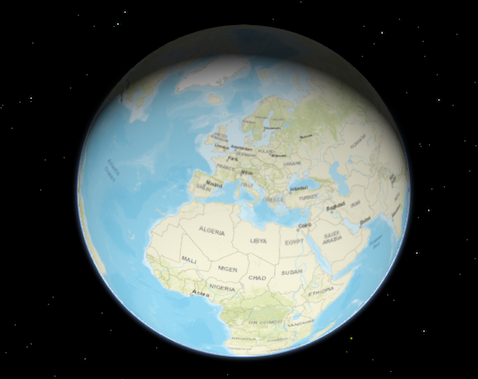](https://developers.arcgis.com/javascript/latest/sample-code/intro-sceneview/) |
|
|
225
225
|
*
|
|
226
226
|
* To associate a view with a map, you must set the [map](https://developers.arcgis.com/javascript/latest/references/core/views/View/#map) property to an instance of [Map](https://developers.arcgis.com/javascript/latest/references/core/Map/).
|
|
227
227
|
*
|
|
@@ -319,7 +319,7 @@ export default abstract class View<TLayerView extends LayerView = LayerView> ext
|
|
|
319
319
|
/**
|
|
320
320
|
* The array of attribution items to be displayed in the view's attribution.
|
|
321
321
|
*
|
|
322
|
-
* 
|
|
323
323
|
*
|
|
324
324
|
* @since 5.0
|
|
325
325
|
*/
|
|
@@ -7,7 +7,7 @@ export interface SketchLabelOptionsProperties extends Partial<Pick<SketchLabelOp
|
|
|
7
7
|
* segment of a graphic while sketching and editing. The labels display each segment's
|
|
8
8
|
* horizontal length and are not shown for non-planar polygons and polylines.
|
|
9
9
|
*
|
|
10
|
-
* [](https://developers.arcgis.com/javascript/latest/sample-code/sketch-3d/)
|
|
11
11
|
*
|
|
12
12
|
* How the segment lengths are computed depends on the view's spatial reference. In geographic coordinate systems (GCS)
|
|
13
13
|
* and in Web Mercator, the lengths are computed geodetically. In projected coordinate systems (PCS),
|
|
@@ -15,7 +15,7 @@ export interface SketchTooltipOptionsProperties extends Partial<Pick<SketchToolt
|
|
|
15
15
|
* To enter the tooltip UI's [input mode](https://developers.arcgis.com/javascript/latest/references/core/views/interactive/sketch/SketchTooltipOptions/#inputEnabled),
|
|
16
16
|
* press the `Tab` key while drawing a new feature, or when editing a point, mesh, or a selected vertex.
|
|
17
17
|
*
|
|
18
|
-
* [](https://developers.arcgis.com/javascript/latest/sample-code/sketch-3d/)
|
|
19
19
|
*
|
|
20
20
|
* #### Available tooltip inputs and constraints
|
|
21
21
|
*
|
|
@@ -19,15 +19,15 @@ export interface SnappingOptionsProperties extends Partial<Pick<SnappingOptions,
|
|
|
19
19
|
* #### Self snapping (Geometry guides)
|
|
20
20
|
* Self snapping is set via the [selfEnabled](https://developers.arcgis.com/javascript/latest/references/core/views/interactive/snapping/SnappingOptions/#selfEnabled) property. This means that while a user is actively creating or updating a feature or graphic, they will see visualizations to help identify perpendicular and parallel lines, in addition to visualizations which aid in snapping to an extension of an existing feature. The following briefly demonstrates what self snapping looks like in a 2D application. Although this is shown for 2D, the same premise applies for 3D as well.
|
|
21
21
|
*
|
|
22
|
-
* 
|
|
23
23
|
* #### Feature snapping
|
|
24
24
|
* Feature snapping is set via the [featureEnabled](https://developers.arcgis.com/javascript/latest/references/core/views/interactive/snapping/SnappingOptions/#featureEnabled) property. It provides the ability to snap vertices of a graphic or feature that is currently being drawn or reshaped to that of an existing feature's vertex, edge, or end point. These existing features belong to layers within the [Map](https://developers.arcgis.com/javascript/latest/references/core/Map/) and must be specified in the [featureSources](https://developers.arcgis.com/javascript/latest/references/core/views/interactive/snapping/SnappingOptions/#featureSources) property. The following two images demonstrate feature snapping in a 2D application. Similar to self snapping, the same premise applies for 3D as well.
|
|
25
25
|
*
|
|
26
|
-
* 
|
|
27
27
|
*
|
|
28
28
|
* The above shows feature snapping to an existing feature's vertex endpoint and edge while creating a new feature. The bottom demonstrates taking an existing feature and reshaping its geometry to snap to another feature's vertex points.
|
|
29
29
|
*
|
|
30
|
-
* 
|
|
31
31
|
*
|
|
32
32
|
* > [!WARNING]
|
|
33
33
|
* >
|
|
@@ -41,10 +41,10 @@ export interface SnappingOptionsProperties extends Partial<Pick<SnappingOptions,
|
|
|
41
41
|
*
|
|
42
42
|
* Name | Details | 3D Example | 2D Example |
|
|
43
43
|
* ---------|---------|----------|:-----------:|
|
|
44
|
-
* Rectangle | Snap lines that are perpendicular to each other | <img alt="Rectangle" src="https://developers.arcgis.com/javascript/latest/assets/
|
|
45
|
-
* Parallel | Snap to all parallel lines | <img alt="Parallel" src="https://developers.arcgis.com/javascript/latest/assets/
|
|
46
|
-
* Extension | Snap to an extension of the current shape | <img alt="Extension" src="https://developers.arcgis.com/javascript/latest/assets/
|
|
47
|
-
* Vertex (as seen when updating geometries)| Snap vertices to an existing vertex | <img alt="Vertex" src="https://developers.arcgis.com/javascript/latest/assets/
|
|
44
|
+
* Rectangle | Snap lines that are perpendicular to each other | <img alt="Rectangle" src="https://developers.arcgis.com/javascript/latest/assets/references/core/widgets/sketch/snapping-rectangle.png" width="268px"> | <img alt="Rectangle-2d" src="https://developers.arcgis.com/javascript/latest/assets/references/core/widgets/sketch/snapping-rectangle-2d.png" width="268px"> |
|
|
45
|
+
* Parallel | Snap to all parallel lines | <img alt="Parallel" src="https://developers.arcgis.com/javascript/latest/assets/references/core/widgets/sketch/snapping-parallel.png" width="268px"> | <img alt="Parallel-2d" src="https://developers.arcgis.com/javascript/latest/assets/references/core/widgets/sketch/snapping-parallel-2.png" width="268px"> |
|
|
46
|
+
* Extension | Snap to an extension of the current shape | <img alt="Extension" src="https://developers.arcgis.com/javascript/latest/assets/references/core/widgets/sketch/snapping-extension.png" width="268px"> | <img alt="Extension-2" src="https://developers.arcgis.com/javascript/latest/assets/references/core/widgets/sketch/snapping-extension-2.png" width="268px"> |
|
|
47
|
+
* Vertex (as seen when updating geometries)| Snap vertices to an existing vertex | <img alt="Vertex" src="https://developers.arcgis.com/javascript/latest/assets/references/core/widgets/sketch/snapping-vertex-3d.png" width="143px"> | <img alt="Vertex-2" src="https://developers.arcgis.com/javascript/latest/assets/references/core/widgets/sketch/snapping-vertex-2.png" width="143px"> |
|
|
48
48
|
*
|
|
49
49
|
* @since 4.19
|
|
50
50
|
* @see [FeatureSnappingLayerSource](https://developers.arcgis.com/javascript/latest/references/core/views/interactive/snapping/FeatureSnappingLayerSource/)
|
|
@@ -180,7 +180,7 @@ export default class HighlightOptions extends Accessor {
|
|
|
180
180
|
* highlights only the difference between the shadow areas, so the overlapping shadow areas aren't highlighted at
|
|
181
181
|
* all. Here is an example of what the shadow highlight looks like with different values:
|
|
182
182
|
*
|
|
183
|
-
* 
|
|
184
184
|
*
|
|
185
185
|
* > [!WARNING]
|
|
186
186
|
* >
|
|
@@ -1,2 +1,2 @@
|
|
|
1
1
|
/* COPYRIGHT Esri - https://js.arcgis.com/5.0/LICENSE.txt */
|
|
2
|
-
import has from"../../../core/has.js";import t from"../../../core/Logger.js";import{moduloPositive as e,deg2rad as r}from"../../../core/mathUtils.js";import o from"../../../core/RandomLCG.js";import{Seconds as n}from"../../../core/time.js";import i from"../../../geometry/Extent.js";import{getInfo as a}from"../../../geometry/support/spatialReferenceUtils.js";const s=()=>t.getLogger("esri.views.support.flow.dataUtils");function l(t,e,r,n,i){if(t.density<=0)return[];const{positions:a}=i,s=[],l=new o,c=1/Math.max(t.lineCollisionWidth,1),d=Math.round(r*c),u=Math.round(n*c),m=new Int32Array(d*u);for(let o=0;o<m.length;o++)m[o]=-1;const p={raster:m,width:d,height:u,resolutionFactor:c},w={},g=t.lineSpacing/Math.sqrt(t.density),y=Math.floor(n/g),x=Math.floor(r/g);for(let o=0;o<y;o++){const t=o*g;for(let e=0;e<x;e++){const r=e*g;w[`${e}-${o}`]={x:r,y:t,positions:[]}}}for(const{x:o,y:h}of a){const t=w[`${Math.floor(o/g)}-${Math.floor(h/g)}`];t&&t.positions.push([o,h])}const M=[];for(const o in w){const t=w[o];if(0===t.positions.length)M.push({x:t.x+g/2,y:t.y+g/2,sort:.66+.33*l.getFloat(),stage:0});else{const[e]=t.positions.splice(0,1);M.push({x:e[0],y:e[1],sort:.33*l.getFloat(),stage:1});for(const[r,o]of t.positions)M.push({x:r,y:o,sort:.33+.33*l.getFloat(),stage:2})}}M.sort((t,e)=>t.sort-e.sort);for(const{x:o,y:v,stage:A}of M){if(s.length>=t.maxNumberOfStreamlines)break;const i=t.onlyForwardTracing?h(1,t,e,o,v,[r,n],s.length,p):f(t,e,o,v,[r,n],s.length,l,p);i.length<2||s.push({stage:A,vertices:i})}return s}function c(t,e){const r=d(e.data,e.width,e.height,t.smoothing);if(t.interpolate){return(t,o)=>{const n=Math.floor(t),i=Math.floor(o);if(n<0||n>=e.width)return[0,0];if(i<0||i>=e.height)return[0,0];const a=t-n,s=o-i,l=n,c=i,h=n<e.width-1?n+1:n,f=i<e.height-1?i+1:i,d=r[2*(c*e.width+l)],u=r[2*(c*e.width+h)],m=r[2*(f*e.width+l)],p=r[2*(f*e.width+h)],w=r[2*(c*e.width+l)+1],g=r[2*(c*e.width+h)+1];return[(d*(1-s)+m*s)*(1-a)+(u*(1-s)+p*s)*a,(w*(1-s)+r[2*(f*e.width+l)+1]*s)*(1-a)+(g*(1-s)+r[2*(f*e.width+h)+1]*s)*a]}}return(t,o)=>{const n=Math.round(t),i=Math.round(o);return n<0||n>=e.width||i<0||i>=e.height?[0,0]:[r[2*(i*e.width+n)],r[2*(i*e.width+n)+1]]}}function h(t,r,o,i,a,s,l,c){const h=[],{raster:f,width:d,height:u,resolutionFactor:m}=c;let p=i,w=a,g=n(0),[y,x]=o(p,w);y*=r.velocityScale,x*=r.velocityScale;const M=Math.sqrt(y*y+x*x);let v,A;h.push({x:p,y:w,time:g,speed:M});for(let k=0;k<r.verticesPerLine;k++){let[i,a]=o(p,w);i*=r.velocityScale,a*=r.velocityScale;const c=Math.sqrt(i*i+a*a);if(c<r.minSpeedThreshold)return h;const y=t*i/c,x=t*a/c;p+=y*r.segmentLength,w+=x*r.segmentLength,r.wrapAround&&(p=e(p,s[0]));const M=t*r.segmentLength/c;if(g=n(g+M),Math.acos(y*v+x*A)>r.maxTurnAngle)return h;if(r.collisions){let t=Math.round(p*m);const o=Math.round(w*m);if(r.wrapAround&&(t=e(t,d)),t<0||t>d-1||o<0||o>u-1)return h;const n=f[o*d+t];if(-1!==n&&n!==l)return h;f[o*d+t]=l}h.push({x:p,y:w,time:g,speed:c}),v=y,A=x}return h}function f(t,e,r,o,n,i,a,s){const l=Math.round((.2+.6*a.getFloat())*t.verticesPerLine),c=t.verticesPerLine-l,f=h(-1,{...t,verticesPerLine:c},e,r,o,n,i,s),d=h(1,{...t,verticesPerLine:l},e,r,o,n,i,s),u=f.reverse();u.splice(-1,1);return u.concat(d)}function d(t,e,r,o){if(0===o)return t;const n=Math.round(3*o),i=new Array(2*n+1);let a=0;for(let c=-n;c<=n;c++){const t=Math.exp(-c*c/(o*o));i[c+n]=t,a+=t}for(let c=-n;c<=n;c++)i[c+n]/=a;const s=new Float32Array(t.length);for(let c=0;c<r;c++)for(let r=0;r<e;r++){let o=0,a=0;for(let s=-n;s<=n;s++){if(r+s<0||r+s>=e)continue;const l=i[s+n];o+=l*t[2*(c*e+(r+s))],a+=l*t[2*(c*e+(r+s))+1]}s[2*(c*e+r)]=o,s[2*(c*e+r)+1]=a}const l=new Float32Array(t.length);for(let c=0;c<e;c++)for(let t=0;t<r;t++){let o=0,a=0;for(let l=-n;l<=n;l++){if(t+l<0||t+l>=r)continue;const h=i[l+n];o+=h*s[2*((t+l)*e+c)],a+=h*s[2*((t+l)*e+c)+1]}l[2*(t*e+c)]=o,l[2*(t*e+c)+1]=a}return l}async function u(t,e,r,o,n,l){const c=performance.now(),h=a(e.spatialReference);if(!h){const i=await m(t,e,r,o,n,l);return has("esri-2d-profiler")&&s().info("I.7","loadImagery, early exit (ms)",Math.round(performance.now()-c)),has("esri-2d-profiler")&&s().info("I.9","Number of parts",1),i}const[f,d]=h.valid,u=d-f,p=Math.ceil(e.width/u),w=e.width/p,g=Math.round(r/p);let y=e.xmin;const x=[],M=performance.now();for(let a=0;a<p;a++){const r=new i({xmin:y,xmax:y+w,ymin:e.ymin,ymax:e.ymax,spatialReference:e.spatialReference});x.push(m(t,r,g,o,n,l)),y+=w}const v=await Promise.all(x);if(has("esri-2d-profiler")&&s().info("I.8","All calls to _fetchPart (ms)",Math.round(performance.now()-M)),has("esri-2d-profiler")&&s().info("I.9","Number of parts",v.length),1===v.length)return has("esri-2d-profiler")&&s().info("I.10","loadImagery, general exit without stitching back (ms)",Math.round(performance.now()-c)),v[0];const A={data:new Float32Array(r*o*2),mask:new Uint8Array(r*o),width:r,height:o};let k=0;for(const i of v){for(let t=0;t<i.height;t++)for(let e=0;e<i.width;e++)k+e>=r||(A.data[2*(t*r+k+e)]=i.data[2*(t*i.width+e)],A.data[2*(t*r+k+e)+1]=i.data[2*(t*i.width+e)+1],A.mask[t*r+k+e]=i.mask[t*i.width+e]);k+=i.width}return has("esri-2d-profiler")&&s().info("I.10","loadImagery, general exit (ms)",Math.round(performance.now()-c)),A}async function m(t,e,r,o,n,i){const a={requestProjectedLocalDirections:!0,signal:i};if(null!=n&&(a.timeExtent=n),"imagery"===t.type){await t.load({signal:i});const n=await t.internalFetchImage(e,r,o,a);if(null==n?.pixelData?.pixelBlock)return{data:new Float32Array(r*o*2),mask:new Uint8Array(r*o),width:r,height:o};return p(t.rasterInfo.dataType,n.pixelData.pixelBlock)}await t.load({signal:i});const s=await t.fetchPixels(e,r,o,a);if(null==s?.pixelBlock)return{data:new Float32Array(r*o*2),mask:new Uint8Array(r*o),width:r,height:o};return p(t.serviceRasterInfo.dataType,s.pixelBlock)}function p(t,e,o=e.width,n=e.height,i=0,a=0){const s=e.pixels,l=o*n,c=2,h=new Float32Array(l*c),f=e.width,d=(t,e)=>t+i+(e+a)*f,u=(t,e)=>t+e*o;let m;if(null!=e.mask)if(o!==e.width||n!==e.height||0!==i||0!==a){m=new Uint8Array(l*c);const t=e.mask;for(let e=0;e<n;++e)for(let r=0;r<o;++r){const o=d(r,e),n=u(r,e);m[c*n]=t[c*o],m[c*n+1]=t[c*o+1]}}else m=e.mask;else m=new Uint8Array(l*c),m.fill(255);if("vector-uv"===t)for(let r=0;r<n;++r)for(let t=0;t<o;++t){const e=d(t,r),o=u(t,r);h[c*o]=s[0][e],h[c*o+1]=-s[1][e]}else if("vector-magdir"===t){const{cos:t,sin:e}=Math;for(let i=0;i<n;++i)for(let n=0;n<o;++n){const o=d(n,i),a=u(n,i),l=s[0][o],f=r(s[1][o]),m=t(f-Math.PI/2),p=e(f-Math.PI/2);h[c*a]=m*l,h[c*a+1]=p*l}}return{data:h,mask:m,width:o,height:n}}export{c as createFlowFieldFromData,u as loadImagery,p as toFlowData,l as traceFlowPaths};
|
|
2
|
+
import has from"../../../core/has.js";import t from"../../../core/Logger.js";import{moduloPositive as e,deg2rad as r}from"../../../core/mathUtils.js";import o from"../../../core/RandomLCG.js";import{Seconds as n}from"../../../core/time.js";import i from"../../../geometry/Extent.js";import{getInfo as a}from"../../../geometry/support/spatialReferenceUtils.js";const s=()=>t.getLogger("esri.views.support.flow.dataUtils");function l(t,e,r,n,i){if(t.density<=0)return[];const{positions:a}=i,s=[],l=new o,c=1/Math.max(t.lineCollisionWidth,1),d=Math.round(r*c),u=Math.round(n*c),m=new Int32Array(d*u);for(let o=0;o<m.length;o++)m[o]=-1;const p={raster:m,width:d,height:u,resolutionFactor:c},w={},g=t.lineSpacing/Math.sqrt(t.density),y=Math.floor(n/g),x=Math.floor(r/g);for(let o=0;o<y;o++){const t=o*g;for(let e=0;e<x;e++){const r=e*g;w[`${e}-${o}`]={x:r,y:t,positions:[]}}}for(const{x:o,y:h}of a){const t=w[`${Math.floor(o/g)}-${Math.floor(h/g)}`];t&&t.positions.push([o,h])}const M=[];for(const o in w){const t=w[o];if(0===t.positions.length)M.push({x:t.x+g/2,y:t.y+g/2,sort:.66+.33*l.getFloat(),stage:0});else{const[e]=t.positions.splice(0,1);M.push({x:e[0],y:e[1],sort:.33*l.getFloat(),stage:1});for(const[r,o]of t.positions)M.push({x:r,y:o,sort:.33+.33*l.getFloat(),stage:2})}}M.sort((t,e)=>t.sort-e.sort);for(const{x:o,y:v,stage:A}of M){if(s.length>=t.maxNumberOfStreamlines)break;const i=t.onlyForwardTracing?h(1,t,e,o,v,[r,n],s.length,p):f(t,e,o,v,[r,n],s.length,l,p);i.length<2||s.push({stage:A,vertices:i})}return s}function c(t,e){const r=d(e.data,e.width,e.height,t.smoothing);if(t.interpolate){return(t,o)=>{const n=Math.floor(t),i=Math.floor(o);if(n<0||n>=e.width)return[0,0];if(i<0||i>=e.height)return[0,0];const a=t-n,s=o-i,l=n,c=i,h=n<e.width-1?n+1:n,f=i<e.height-1?i+1:i,d=r[2*(c*e.width+l)],u=r[2*(c*e.width+h)],m=r[2*(f*e.width+l)],p=r[2*(f*e.width+h)],w=r[2*(c*e.width+l)+1],g=r[2*(c*e.width+h)+1];return[(d*(1-s)+m*s)*(1-a)+(u*(1-s)+p*s)*a,(w*(1-s)+r[2*(f*e.width+l)+1]*s)*(1-a)+(g*(1-s)+r[2*(f*e.width+h)+1]*s)*a]}}return(t,o)=>{const n=Math.round(t),i=Math.round(o);return n<0||n>=e.width||i<0||i>=e.height?[0,0]:[r[2*(i*e.width+n)],r[2*(i*e.width+n)+1]]}}function h(t,r,o,i,a,s,l,c){const h=[],{raster:f,width:d,height:u,resolutionFactor:m}=c;let p=i,w=a,g=n(0),[y,x]=o(p,w);y*=r.velocityScale,x*=r.velocityScale;const M=Math.sqrt(y*y+x*x);let v,A;h.push({x:p,y:w,time:g,speed:M});for(let k=0;k<r.verticesPerLine;k++){let[i,a]=o(p,w);i*=r.velocityScale,a*=r.velocityScale;const c=Math.sqrt(i*i+a*a);if(c<r.minSpeedThreshold)return h;const y=t*i/c,x=t*a/c;p+=y*r.segmentLength,w+=x*r.segmentLength,r.wrapAround&&(p=e(p,s[0]));const M=t*r.segmentLength/c;if(g=n(g+M),Math.acos(y*v+x*A)>r.maxTurnAngle)return h;if(r.collisions){let t=Math.round(p*m);const o=Math.round(w*m);if(r.wrapAround&&(t=e(t,d)),t<0||t>d-1||o<0||o>u-1)return h;const n=f[o*d+t];if(-1!==n&&n!==l)return h;f[o*d+t]=l}h.push({x:p,y:w,time:g,speed:c}),v=y,A=x}return h}function f(t,e,r,o,n,i,a,s){const l=Math.round((.2+.6*a.getFloat())*t.verticesPerLine),c=t.verticesPerLine-l,f=h(-1,{...t,verticesPerLine:c},e,r,o,n,i,s),d=h(1,{...t,verticesPerLine:l},e,r,o,n,i,s),u=f.reverse();u.splice(-1,1);return u.concat(d)}function d(t,e,r,o){if(0===o)return t;const n=Math.round(3*o),i=new Array(2*n+1);let a=0;for(let c=-n;c<=n;c++){const t=Math.exp(-c*c/(o*o));i[c+n]=t,a+=t}for(let c=-n;c<=n;c++)i[c+n]/=a;const s=new Float32Array(t.length);for(let c=0;c<r;c++)for(let r=0;r<e;r++){let o=0,a=0;for(let s=-n;s<=n;s++){if(r+s<0||r+s>=e)continue;const l=i[s+n];o+=l*t[2*(c*e+(r+s))],a+=l*t[2*(c*e+(r+s))+1]}s[2*(c*e+r)]=o,s[2*(c*e+r)+1]=a}const l=new Float32Array(t.length);for(let c=0;c<e;c++)for(let t=0;t<r;t++){let o=0,a=0;for(let l=-n;l<=n;l++){if(t+l<0||t+l>=r)continue;const h=i[l+n];o+=h*s[2*((t+l)*e+c)],a+=h*s[2*((t+l)*e+c)+1]}l[2*(t*e+c)]=o,l[2*(t*e+c)+1]=a}return l}async function u(t,e,r,o,n,l){const c=performance.now(),h=a(e.spatialReference);if(!h){const i=await m(t,e,r,o,n,l);return has("esri-2d-profiler")&&s().info("I.7","loadImagery, early exit (ms)",Math.round(performance.now()-c)),has("esri-2d-profiler")&&s().info("I.9","Number of parts",1),i}const[f,d]=h.valid,u=d-f,p=Math.ceil(e.width/u),w=e.width/p,g=Math.round(r/p);let y=e.xmin;const x=[],M=performance.now();for(let a=0;a<p;a++){const r=new i({xmin:y,xmax:y+w,ymin:e.ymin,ymax:e.ymax,spatialReference:e.spatialReference});x.push(m(t,r,g,o,n,l)),y+=w}const v=await Promise.all(x);if(has("esri-2d-profiler")&&s().info("I.8","All calls to _fetchPart (ms)",Math.round(performance.now()-M)),has("esri-2d-profiler")&&s().info("I.9","Number of parts",v.length),1===v.length)return has("esri-2d-profiler")&&s().info("I.10","loadImagery, general exit without stitching back (ms)",Math.round(performance.now()-c)),v[0];const A={data:new Float32Array(r*o*2),mask:new Uint8Array(r*o),width:r,height:o};let k=0;for(const i of v){for(let t=0;t<i.height;t++)for(let e=0;e<i.width;e++)k+e>=r||(A.data[2*(t*r+k+e)]=i.data[2*(t*i.width+e)],A.data[2*(t*r+k+e)+1]=i.data[2*(t*i.width+e)+1],A.mask[t*r+k+e]=i.mask[t*i.width+e]);k+=i.width}return has("esri-2d-profiler")&&s().info("I.10","loadImagery, general exit (ms)",Math.round(performance.now()-c)),A}async function m(t,e,r,o,n,i){const a={requestProjectedLocalDirections:!0,signal:i,interpolation:"bilinear"};if(null!=n&&(a.timeExtent=n),"imagery"===t.type){await t.load({signal:i});const n=await t.internalFetchImage(e,r,o,a);if(null==n?.pixelData?.pixelBlock)return{data:new Float32Array(r*o*2),mask:new Uint8Array(r*o),width:r,height:o};return p(t.rasterInfo.dataType,n.pixelData.pixelBlock)}await t.load({signal:i});const s=await t.fetchPixels(e,r,o,a);if(null==s?.pixelBlock)return{data:new Float32Array(r*o*2),mask:new Uint8Array(r*o),width:r,height:o};return p(t.serviceRasterInfo.dataType,s.pixelBlock)}function p(t,e,o=e.width,n=e.height,i=0,a=0){const s=e.pixels,l=o*n,c=2,h=new Float32Array(l*c),f=e.width,d=(t,e)=>t+i+(e+a)*f,u=(t,e)=>t+e*o;let m;if(null!=e.mask)if(o!==e.width||n!==e.height||0!==i||0!==a){m=new Uint8Array(l*c);const t=e.mask;for(let e=0;e<n;++e)for(let r=0;r<o;++r){const o=d(r,e),n=u(r,e);m[c*n]=t[c*o],m[c*n+1]=t[c*o+1]}}else m=e.mask;else m=new Uint8Array(l*c),m.fill(255);if("vector-uv"===t)for(let r=0;r<n;++r)for(let t=0;t<o;++t){const e=d(t,r),o=u(t,r);h[c*o]=s[0][e],h[c*o+1]=-s[1][e]}else if("vector-magdir"===t){const{cos:t,sin:e}=Math;for(let i=0;i<n;++i)for(let n=0;n<o;++n){const o=d(n,i),a=u(n,i),l=s[0][o],f=r(s[1][o]),m=t(f-Math.PI/2),p=e(f-Math.PI/2);h[c*a]=m*l,h[c*a+1]=p*l}}return{data:h,mask:m,width:o,height:n}}export{c as createFlowFieldFromData,u as loadImagery,p as toFlowData,l as traceFlowPaths};
|
package/views/ui/DefaultUI.d.ts
CHANGED
|
@@ -19,7 +19,7 @@ export interface DefaultUIProperties extends UIProperties, Partial<Pick<DefaultU
|
|
|
19
19
|
* the upper region are stacked vertically, while widgets in the lower region are stacked horizontally.
|
|
20
20
|
* The available positions are indicated in the image below.
|
|
21
21
|
*
|
|
22
|
-
* 
|
|
23
23
|
*
|
|
24
24
|
* Methods, such as [add()](https://developers.arcgis.com/javascript/latest/references/core/views/ui/DefaultUI/#add) and [move()](https://developers.arcgis.com/javascript/latest/references/core/views/ui/DefaultUI/#move) can be used to place widgets in specific
|
|
25
25
|
* positions of the UI. In the image below, the [Search](https://developers.arcgis.com/javascript/latest/references/core/widgets/Search/) and
|
|
@@ -37,7 +37,7 @@ export interface DefaultUIProperties extends UIProperties, Partial<Pick<DefaultU
|
|
|
37
37
|
* view.ui.add(bmToggleWidget, "bottom-right");
|
|
38
38
|
* ```
|
|
39
39
|
*
|
|
40
|
-
* 
|
|
41
41
|
*
|
|
42
42
|
* If you dive into the doc of the methods [add()](https://developers.arcgis.com/javascript/latest/references/core/views/ui/DefaultUI/#add), [empty()](https://developers.arcgis.com/javascript/latest/references/core/views/ui/DefaultUI/#empty) and [move()](https://developers.arcgis.com/javascript/latest/references/core/views/ui/DefaultUI/#move), you'll notice some of the
|
|
43
43
|
* possible values include "leading" and "trailing". That's because the ArcGIS Maps SDK for JavaScript provides
|
|
@@ -27,11 +27,11 @@ export interface EnvironmentProperties extends Partial<Pick<Environment, "atmosp
|
|
|
27
27
|
*
|
|
28
28
|
* Known Value | Example
|
|
29
29
|
* ------------|---------
|
|
30
|
-
* [SunnyWeather](https://developers.arcgis.com/javascript/latest/references/core/views/3d/environment/SunnyWeather/) |  |  |  |  |  | 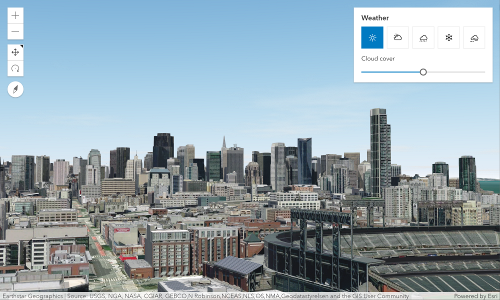
|
|
31
|
+
* [CloudyWeather](https://developers.arcgis.com/javascript/latest/references/core/views/3d/environment/CloudyWeather/) | 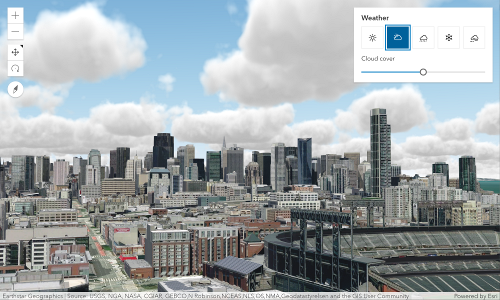
|
|
32
|
+
* [RainyWeather](https://developers.arcgis.com/javascript/latest/references/core/views/3d/environment/RainyWeather/) | 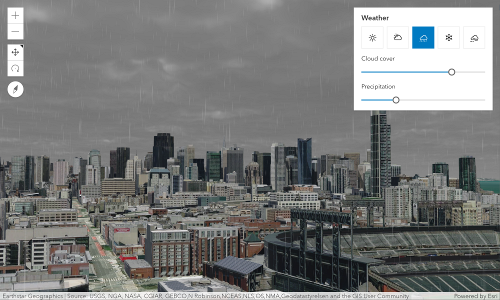
|
|
33
|
+
* [SnowyWeather](https://developers.arcgis.com/javascript/latest/references/core/views/3d/environment/SnowyWeather/) | 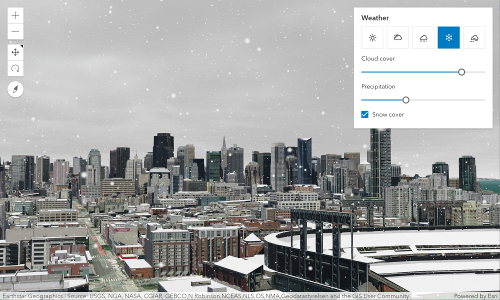
|
|
34
|
+
* [FoggyWeather](https://developers.arcgis.com/javascript/latest/references/core/views/3d/environment/FoggyWeather/) | 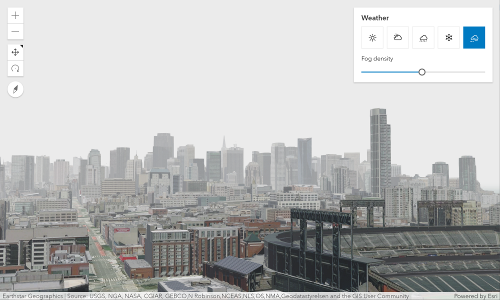
|
|
35
35
|
*
|
|
36
36
|
* @default SunnyWeather
|
|
37
37
|
*/
|
|
@@ -83,11 +83,11 @@ export default class Environment extends JSONSupport {
|
|
|
83
83
|
*
|
|
84
84
|
* Known Value | Example
|
|
85
85
|
* ------------|---------
|
|
86
|
-
* [SunnyWeather](https://developers.arcgis.com/javascript/latest/references/core/views/3d/environment/SunnyWeather/) |  |  |  |  |  | 
|
|
87
|
+
* [CloudyWeather](https://developers.arcgis.com/javascript/latest/references/core/views/3d/environment/CloudyWeather/) | 
|
|
88
|
+
* [RainyWeather](https://developers.arcgis.com/javascript/latest/references/core/views/3d/environment/RainyWeather/) | 
|
|
89
|
+
* [SnowyWeather](https://developers.arcgis.com/javascript/latest/references/core/views/3d/environment/SnowyWeather/) | 
|
|
90
|
+
* [FoggyWeather](https://developers.arcgis.com/javascript/latest/references/core/views/3d/environment/FoggyWeather/) | 
|
|
91
91
|
*
|
|
92
92
|
* @default SunnyWeather
|
|
93
93
|
*/
|
package/webscene/Glow.d.ts
CHANGED
|
@@ -6,14 +6,16 @@ export interface GlowProperties extends Partial<Pick<Glow, "intensity">> {}
|
|
|
6
6
|
/**
|
|
7
7
|
* [Glow](https://developers.arcgis.com/javascript/latest/references/core/webscene/Glow/) accentuates the effects of light emitters for illustrative visualizations, such as highlighting
|
|
8
8
|
* or filtering. When [Glow](https://developers.arcgis.com/javascript/latest/references/core/webscene/Glow/) is `null`, mimic the natural behavior of light scattering in the atmosphere.
|
|
9
|
-
*
|
|
10
9
|
* Without glow, emissive elements display with a bright, natural appearance. Glow enables a stylized look of emissive
|
|
11
|
-
* elements in the scene.
|
|
10
|
+
* elements in the scene.
|
|
11
|
+
*
|
|
12
|
+
* An intensity setting of `0` adds a subtle glow only, while an intensity setting `1` adds
|
|
12
13
|
* an exaggerated glow, helpful for strong emphasis of emissive elements.
|
|
13
14
|
*
|
|
14
|
-
*
|
|
15
|
-
*
|
|
16
|
-
*
|
|
15
|
+
* | 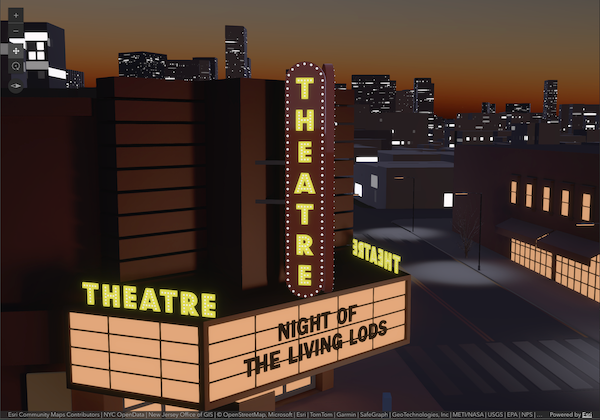|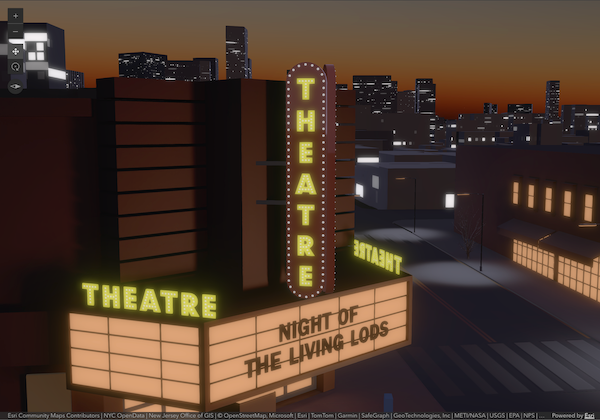|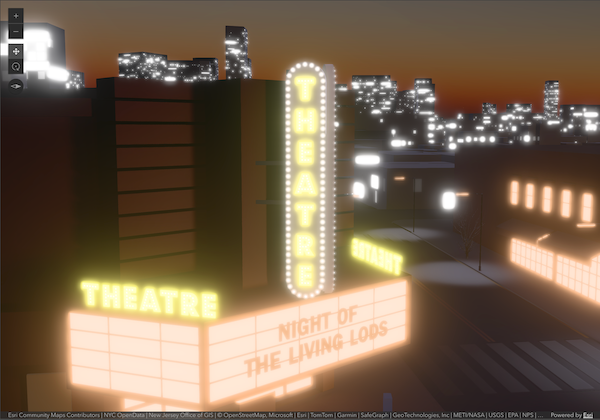|
|
|
16
|
+
* | ---------- | ----------- | ----------- |
|
|
17
|
+
* | `glow: null`|`glow: { intensity: 0 }`|`glow: { intensity: 1 }`|
|
|
18
|
+
* | Without glow, emissive elements display with a bright, natural appearance. | Glow enables a more stylized look of emissive elements across the scene. `intensity:0` adds a subtle glow only. | While `intensity:1` adds an exaggerated glow, helpful for strong emphasis of emissive elements.
|
|
17
19
|
*
|
|
18
20
|
* > [!WARNING]
|
|
19
21
|
* >
|
|
@@ -23,7 +23,7 @@ export interface ColorBackgroundProperties extends BackgroundProperties {
|
|
|
23
23
|
*
|
|
24
24
|
* The default for ColorBackground is a fully opaque, black color. The example below shows how to change this:
|
|
25
25
|
*
|
|
26
|
-
* 
|
|
27
27
|
*
|
|
28
28
|
* ```js
|
|
29
29
|
* const view = new SceneView({
|
|
@@ -87,7 +87,7 @@ export interface AreaMeasurement2DProperties extends WidgetProperties, Partial<P
|
|
|
87
87
|
* * In geographic coordinate systems (GCS) and in Web Mercator, they are computed geodetically.
|
|
88
88
|
* * In projected coordinate systems (PCS), apart from Web Mercator, they are computed in a Euclidean manner (in their respective PCS).
|
|
89
89
|
*
|
|
90
|
-
* [](https://developers.arcgis.com/javascript/latest/sample-code/widgets-measurement-2d/)
|
|
91
91
|
*
|
|
92
92
|
* ### Undo / Redo
|
|
93
93
|
*
|
|
@@ -76,7 +76,7 @@ export interface AreaMeasurement3DProperties extends WidgetProperties, Partial<P
|
|
|
76
76
|
* The AreaMeasurement3D widget calculates and displays the area and perimeter of a polygon.
|
|
77
77
|
* This widget can be used in a [SceneView](https://developers.arcgis.com/javascript/latest/references/core/views/SceneView/) to measure the area and perimeter of a polygon.
|
|
78
78
|
*
|
|
79
|
-
* [](https://developers.arcgis.com/javascript/latest/sample-code/widgets-measurement-3d/)
|
|
80
80
|
*
|
|
81
81
|
* How the area and perimeter are computed depends on the scene's spatial reference and the length of the measured perimeter.
|
|
82
82
|
*
|
|
@@ -95,7 +95,7 @@ export interface AreaMeasurement3DProperties extends WidgetProperties, Partial<P
|
|
|
95
95
|
* 2. If the vertices have varying z-values and they create a **non-planar** surface, the visualization and the
|
|
96
96
|
* measurements show the area and perimeter that are projected to a horizontal plane.
|
|
97
97
|
*
|
|
98
|
-
* 
|
|
99
99
|
*
|
|
100
100
|
* When the widget is active, a horizontal "laser" line is drawn which indicates the height at the current mouse position.
|
|
101
101
|
* This line can help in analyzing the heights of objects relative to each other and the terrain.
|