@arcgis/core 5.0.0-next.126 → 5.0.0-next.128
This diff represents the content of publicly available package versions that have been released to one of the supported registries. The information contained in this diff is provided for informational purposes only and reflects changes between package versions as they appear in their respective public registries.
- package/Camera.d.ts +1 -1
- package/Ground.d.ts +7 -7
- package/PopupTemplate.d.ts +6 -6
- package/WebScene.d.ts +1 -1
- package/analysis/AreaMeasurementAnalysis.d.ts +1 -1
- package/analysis/DirectLineMeasurementAnalysis.d.ts +1 -1
- package/analysis/LengthDimension.d.ts +4 -4
- package/analysis/ShadowCastAnalysis.d.ts +3 -3
- package/analysis/SliceAnalysis.d.ts +1 -1
- package/analysis/SlicePlane.d.ts +1 -1
- package/assets/esri/core/workers/RemoteClient.js +1 -1
- package/assets/esri/core/workers/chunks/{0a4ebb5dca630a4ab0dd.js → 236f8137ae505c8f0764.js} +1 -1
- package/assets/esri/core/workers/chunks/84905581a3782e95ec34.js +1 -0
- package/assets/esri/core/workers/chunks/{f5f513997cde0ce0f2a2.js → 8eb535b43e1220cf0d75.js} +1 -1
- package/config.js +1 -1
- package/effects/FocusAreas.d.ts +1 -1
- package/form/elements/FieldElement.d.ts +1 -1
- package/form/elements/GroupElement.d.ts +1 -1
- package/form/elements/TextElement.d.ts +1 -1
- package/form/elements/inputs/ComboBoxInput.d.ts +1 -1
- package/form/elements/inputs/RadioButtonsInput.d.ts +1 -1
- package/form/elements/inputs/SwitchInput.d.ts +1 -1
- package/geometry/Mesh.d.ts +7 -7
- package/geometry/operators/alphaShapeOperator.d.ts +1 -1
- package/geometry/operators/areaOperator.d.ts +1 -1
- package/geometry/operators/bufferOperator.d.ts +1 -1
- package/geometry/operators/centroidOperator.d.ts +1 -1
- package/geometry/operators/clipOperator.d.ts +1 -1
- package/geometry/operators/containsOperator.d.ts +1 -1
- package/geometry/operators/convexHullOperator.d.ts +1 -1
- package/geometry/operators/crossesOperator.d.ts +1 -1
- package/geometry/operators/cutOperator.d.ts +1 -1
- package/geometry/operators/densifyOperator.d.ts +1 -1
- package/geometry/operators/differenceOperator.d.ts +1 -1
- package/geometry/operators/disjointOperator.d.ts +1 -1
- package/geometry/operators/distanceOperator.d.ts +1 -1
- package/geometry/operators/generalizeOperator.d.ts +1 -1
- package/geometry/operators/geodesicProximityOperator.d.ts +1 -1
- package/geometry/operators/geodeticDistanceOperator.d.ts +1 -1
- package/geometry/operators/geodeticUtilsOperator.d.ts +2 -2
- package/geometry/operators/graphicBufferOperator.d.ts +1 -1
- package/geometry/operators/intersectionOperator.d.ts +1 -1
- package/geometry/operators/intersectsOperator.d.ts +1 -1
- package/geometry/operators/isNearOperator.d.ts +1 -1
- package/geometry/operators/lengthOperator.d.ts +1 -1
- package/geometry/operators/locateBetweenOperator.d.ts +1 -1
- package/geometry/operators/multiPartToSinglePartOperator.d.ts +1 -1
- package/geometry/operators/offsetOperator.d.ts +5 -5
- package/geometry/operators/overlapsOperator.d.ts +1 -1
- package/geometry/operators/proximityOperator.d.ts +1 -1
- package/geometry/operators/simplifyOGCOperator.d.ts +1 -1
- package/geometry/operators/simplifyOperator.d.ts +1 -1
- package/geometry/operators/support/Transformation.d.ts +6 -6
- package/geometry/operators/symmetricDifferenceOperator.d.ts +1 -1
- package/geometry/operators/touchesOperator.d.ts +1 -1
- package/geometry/operators/unionOperator.d.ts +1 -1
- package/geometry/operators/withinOperator.d.ts +1 -1
- package/geometry/support/MeshMaterialMetallicRoughness.d.ts +1 -1
- package/kernel.js +1 -1
- package/layers/BuildingSceneLayer.d.ts +4 -4
- package/layers/CSVLayer.d.ts +2 -2
- package/layers/CatalogLayer.d.ts +2 -2
- package/layers/ElevationLayer.d.ts +1 -1
- package/layers/FeatureLayer.d.ts +2 -2
- package/layers/GeoJSONLayer.d.ts +2 -2
- package/layers/GeoRSSLayer.d.ts +1 -1
- package/layers/GraphicsLayer.d.ts +2 -2
- package/layers/ImageryLayer.d.ts +3 -3
- package/layers/ImageryTileLayer.d.ts +2 -2
- package/layers/IntegratedMesh3DTilesLayer.d.ts +6 -6
- package/layers/IntegratedMeshLayer.d.ts +7 -7
- package/layers/Layer.d.ts +1 -0
- package/layers/MapImageLayer.d.ts +1 -1
- package/layers/MediaLayer.d.ts +1 -1
- package/layers/OGCFeatureLayer.d.ts +2 -2
- package/layers/PointCloudLayer.d.ts +1 -1
- package/layers/SceneLayer.d.ts +5 -5
- package/layers/StreamLayer.d.ts +2 -2
- package/layers/VectorTileLayer.d.ts +2 -2
- package/layers/VideoLayer.d.ts +1 -1
- package/layers/VoxelLayer.d.ts +8 -8
- package/layers/WFSLayer.d.ts +6 -6
- package/layers/catalog/CatalogFootprintLayer.d.ts +1 -1
- package/layers/mixins/BlendLayer.d.ts +6 -6
- package/layers/pointCloudFilters/PointCloudReturnFilter.d.ts +1 -1
- package/layers/pointCloudFilters/PointCloudValueFilter.d.ts +1 -1
- package/layers/support/DimensionalDefinition.d.ts +2 -2
- package/layers/support/FeatureEffect.d.ts +4 -4
- package/layers/support/FeatureFilter.d.ts +17 -17
- package/layers/support/FeatureReductionBinning.d.ts +1 -1
- package/layers/support/FeatureReductionCluster.d.ts +9 -9
- package/layers/support/LabelClass.d.ts +2 -2
- package/layers/support/RasterFunction.d.ts +1 -1
- package/layers/support/SceneFilter.d.ts +2 -2
- package/layers/support/SceneModification.d.ts +3 -3
- package/package.json +1 -1
- package/popup/content/AttachmentsContent.d.ts +1 -1
- package/popup/content/BarChartMediaInfo.d.ts +1 -1
- package/popup/content/ColumnChartMediaInfo.d.ts +1 -1
- package/popup/content/FieldsContent.d.ts +1 -1
- package/popup/content/ImageMediaInfo.d.ts +1 -1
- package/popup/content/LineChartMediaInfo.d.ts +1 -1
- package/popup/content/MediaContent.d.ts +1 -1
- package/popup/content/PieChartMediaInfo.d.ts +1 -1
- package/popup/content/RelationshipContent.d.ts +1 -1
- package/popup/content/TextContent.d.ts +1 -1
- package/renderers/DotDensityRenderer.d.ts +3 -3
- package/renderers/FlowRenderer.d.ts +6 -6
- package/renderers/HeatmapRenderer.d.ts +3 -3
- package/renderers/PieChartRenderer.d.ts +1 -1
- package/renderers/RasterShadedReliefRenderer.d.ts +1 -1
- package/renderers/Renderer.d.ts +2 -2
- package/renderers/SimpleRenderer.d.ts +1 -1
- package/renderers/VectorFieldRenderer.d.ts +1 -1
- package/renderers/mixins/VisualVariablesMixin.d.ts +8 -8
- package/rest/query/operations/pbfFlatFeatureSet.js +1 -1
- package/rest/query/support/AttachmentInfo.d.ts +1 -1
- package/rest/support/AutoIntervalBinParameters.d.ts +1 -1
- package/rest/support/DateBinParameters.d.ts +1 -1
- package/rest/support/FixedBoundariesBinParameters.d.ts +1 -1
- package/rest/support/FixedIntervalBinParameters.d.ts +1 -1
- package/smartMapping/labels/clusters.d.ts +1 -1
- package/smartMapping/popup/clusters.d.ts +2 -2
- package/smartMapping/popup/templates.d.ts +1 -1
- package/smartMapping/raster/renderers/flow.d.ts +2 -2
- package/smartMapping/renderers/color.d.ts +12 -12
- package/smartMapping/renderers/predominance.d.ts +3 -3
- package/smartMapping/renderers/relationship.d.ts +15 -15
- package/smartMapping/renderers/univariateColorSize.d.ts +4 -4
- package/smartMapping/symbology/color.d.ts +4 -4
- package/smartMapping/symbology/flow.d.ts +2 -2
- package/smartMapping/symbology/types.d.ts +18 -18
- package/support/revision.js +1 -1
- package/symbols/CIMSymbol.d.ts +1 -1
- package/symbols/FillSymbol3DLayer.d.ts +3 -3
- package/symbols/IconSymbol3DLayer.d.ts +1 -1
- package/symbols/LabelSymbol3D.d.ts +2 -2
- package/symbols/LineStyleMarker3D.d.ts +7 -7
- package/symbols/LineSymbol3D.d.ts +2 -2
- package/symbols/LineSymbol3DLayer.d.ts +7 -7
- package/symbols/LineSymbolMarker.d.ts +6 -6
- package/symbols/MarkerSymbol.d.ts +1 -1
- package/symbols/MeshSymbol3D.d.ts +2 -2
- package/symbols/ObjectSymbol3DLayer.d.ts +1 -1
- package/symbols/PathSymbol3DLayer.d.ts +14 -14
- package/symbols/PictureFillSymbol.d.ts +1 -1
- package/symbols/PictureMarkerSymbol.d.ts +1 -1
- package/symbols/PointSymbol3D.d.ts +3 -3
- package/symbols/PolygonSymbol3D.d.ts +7 -7
- package/symbols/SimpleFillSymbol.d.ts +8 -8
- package/symbols/SimpleLineSymbol.d.ts +20 -20
- package/symbols/SimpleMarkerSymbol.d.ts +7 -7
- package/symbols/Symbol3DLayer.d.ts +16 -16
- package/symbols/TextSymbol.d.ts +1 -1
- package/symbols/TextSymbol3DLayer.d.ts +1 -1
- package/symbols/WaterSymbol3DLayer.d.ts +3 -3
- package/symbols/WebStyleSymbol.d.ts +1 -1
- package/symbols/callouts/Callout3D.d.ts +1 -1
- package/symbols/callouts/LineCallout3D.d.ts +3 -3
- package/symbols/cim/cimAnalyzer.js +1 -1
- package/symbols/cim/types.d.ts +23 -23
- package/symbols/edges/Edges3D.d.ts +1 -1
- package/symbols/edges/SolidEdges3D.d.ts +1 -1
- package/symbols/patterns/LineStylePattern3D.d.ts +11 -11
- package/symbols/patterns/StylePattern3D.d.ts +8 -8
- package/symbols/support/ElevationInfo.d.ts +2 -2
- package/symbols/support/IconSymbol3DLayerResource.d.ts +6 -6
- package/symbols/support/ObjectSymbol3DLayerResource.d.ts +7 -7
- package/symbols/support/Symbol3DEmissive.d.ts +23 -13
- package/symbols/support/Symbol3DVerticalOffset.d.ts +2 -2
- package/views/2d/engine/webgl/shaderGraph/techniques/GraphicInstanceStore.js +1 -1
- package/views/2d/engine/webgl/shaderGraph/techniques/animated/AAnimatedPolyShader.js +1 -1
- package/views/2d/engine/webgl/shaderGraph/techniques/animated/AnimatedFillShader.js +1 -1
- package/views/2d/engine/webgl/shaderGraph/techniques/animated/AnimatedPolyMeshWriters.js +1 -1
- package/views/2d/engine/webgl/shaderGraph/techniques/animated/attributes.js +1 -1
- package/views/2d/engine/webgl/shaders/sources/shaderRepository.js +1 -1
- package/views/2d/layers/BaseLayerViewGL2D.d.ts +1 -1
- package/views/2d/layers/features/schema/processor/symbols/ComplexSymbolSchema.js +1 -1
- package/views/2d/types.d.ts +3 -3
- package/views/3d/environment/CloudyWeather.d.ts +1 -1
- package/views/3d/environment/Environment.d.ts +4 -4
- package/views/3d/environment/FoggyWeather.d.ts +1 -1
- package/views/3d/environment/RainyWeather.d.ts +1 -1
- package/views/3d/environment/SnowyWeather.d.ts +1 -1
- package/views/3d/environment/SunLighting.d.ts +1 -1
- package/views/3d/environment/SunnyWeather.d.ts +1 -1
- package/views/3d/environment/VirtualLighting.d.ts +1 -1
- package/views/3d/webgl/RenderNode.d.ts +2 -2
- package/views/3d/webgl.d.ts +1 -1
- package/views/Magnifier.d.ts +3 -3
- package/views/MapView.d.ts +7 -7
- package/views/SceneView.d.ts +34 -37
- package/views/View.d.ts +2 -2
- package/views/interactive/sketch/SketchLabelOptions.d.ts +1 -1
- package/views/interactive/sketch/SketchTooltipOptions.d.ts +1 -1
- package/views/interactive/snapping/SnappingOptions.d.ts +7 -7
- package/views/support/HighlightOptions.d.ts +1 -1
- package/views/support/flow/dataUtils.js +1 -1
- package/views/ui/DefaultUI.d.ts +2 -2
- package/webscene/Environment.d.ts +10 -10
- package/webscene/Glow.d.ts +7 -5
- package/webscene/background/ColorBackground.d.ts +1 -1
- package/widgets/AreaMeasurement2D.d.ts +1 -1
- package/widgets/AreaMeasurement3D.d.ts +2 -2
- package/widgets/Attachments.d.ts +1 -1
- package/widgets/Attribution.d.ts +1 -1
- package/widgets/BasemapGallery.d.ts +1 -1
- package/widgets/BasemapLayerList.d.ts +3 -3
- package/widgets/BasemapToggle.d.ts +1 -1
- package/widgets/Bookmarks/BookmarksVisibleElements.d.ts +1 -1
- package/widgets/Bookmarks.d.ts +2 -2
- package/widgets/BuildingExplorer.d.ts +1 -1
- package/widgets/CatalogLayerList.d.ts +3 -3
- package/widgets/Compass.d.ts +2 -2
- package/widgets/CoordinateConversion.d.ts +1 -1
- package/widgets/Daylight.d.ts +5 -5
- package/widgets/DirectLineMeasurement3D.d.ts +2 -2
- package/widgets/Directions.d.ts +4 -4
- package/widgets/DistanceMeasurement2D.d.ts +1 -1
- package/widgets/Editor/CreateFeaturesWorkflow.d.ts +1 -1
- package/widgets/Editor.d.ts +2 -2
- package/widgets/ElevationProfile/ElevationProfileLineGround.d.ts +1 -1
- package/widgets/ElevationProfile/ElevationProfileLineInput.d.ts +1 -1
- package/widgets/ElevationProfile/ElevationProfileLineView.d.ts +1 -1
- package/widgets/ElevationProfile.d.ts +3 -3
- package/widgets/Expand.d.ts +1 -1
- package/widgets/FeatureForm.d.ts +1 -1
- package/widgets/FeatureTable/ActionColumn.d.ts +1 -1
- package/widgets/FeatureTable/AttachmentsColumn.d.ts +1 -1
- package/widgets/FeatureTable/FeatureTableViewModel.d.ts +3 -3
- package/widgets/FeatureTable/Grid/GroupColumn.d.ts +1 -1
- package/widgets/FeatureTable/RelationshipColumn.d.ts +1 -1
- package/widgets/FeatureTable/VisibleElements.d.ts +1 -1
- package/widgets/FeatureTable.d.ts +9 -9
- package/widgets/FeatureTemplates/FeatureTemplatesViewModel.d.ts +5 -5
- package/widgets/FeatureTemplates.d.ts +8 -8
- package/widgets/Features/FeaturesViewModel.d.ts +2 -2
- package/widgets/Features/FeaturesVisibleElements.d.ts +2 -2
- package/widgets/Features.d.ts +1 -1
- package/widgets/Histogram.d.ts +2 -2
- package/widgets/HistogramRangeSlider.d.ts +1 -1
- package/widgets/Home.d.ts +1 -1
- package/widgets/LayerList.d.ts +4 -4
- package/widgets/Legend.d.ts +8 -8
- package/widgets/LineOfSight.d.ts +1 -1
- package/widgets/Locate.d.ts +2 -2
- package/widgets/Measurement.d.ts +1 -1
- package/widgets/NavigationToggle/NavigationToggleViewModel.d.ts +1 -1
- package/widgets/NavigationToggle.d.ts +3 -3
- package/widgets/OrientedImageryViewer/OrientedImageryViewerViewModel.js +1 -1
- package/widgets/OrientedImageryViewer/adapters/sketch/MeasurementAdapter.js +1 -1
- package/widgets/OrientedImageryViewer/components/ImageLocationViewModel.js +1 -1
- package/widgets/OrientedImageryViewer/imageMeasurementUtils.js +1 -1
- package/widgets/OrientedImageryViewer/navigation/NavigationManager.js +1 -1
- package/widgets/OrientedImageryViewer/navigation/queries.js +1 -1
- package/widgets/OrientedImageryViewer/navigation/utils.js +1 -1
- package/widgets/Popup/PopupVisibleElements.d.ts +2 -2
- package/widgets/Popup.d.ts +5 -5
- package/widgets/Print/CustomTemplate.d.ts +1 -1
- package/widgets/Print/TemplateOptions.d.ts +4 -4
- package/widgets/ScaleRangeSlider.d.ts +1 -1
- package/widgets/Search/SearchViewModel.d.ts +4 -4
- package/widgets/Search.d.ts +5 -5
- package/widgets/ShadowCast.d.ts +3 -3
- package/widgets/Sketch/SketchViewModel.d.ts +39 -39
- package/widgets/Sketch.d.ts +43 -43
- package/widgets/Slice.d.ts +2 -2
- package/widgets/Slider/SliderViewModel.d.ts +2 -2
- package/widgets/Slider.d.ts +9 -9
- package/widgets/Swipe/SwipeViewModel.d.ts +1 -1
- package/widgets/Swipe.d.ts +2 -2
- package/widgets/TableList.d.ts +1 -1
- package/widgets/TimeSlider/TimeSliderViewModel.d.ts +8 -8
- package/widgets/TimeSlider/types.d.ts +1 -1
- package/widgets/TimeSlider.d.ts +11 -11
- package/widgets/Track.d.ts +2 -2
- package/widgets/UtilityNetworkAssociations.d.ts +3 -3
- package/widgets/UtilityNetworkTrace.d.ts +4 -4
- package/widgets/UtilityNetworkValidateTopology.d.ts +1 -1
- package/widgets/ValuePicker.d.ts +5 -5
- package/widgets/VideoPlayer.d.ts +1 -1
- package/widgets/smartMapping/ClassedColorSlider.d.ts +1 -1
- package/widgets/smartMapping/ClassedSizeSlider.d.ts +1 -1
- package/widgets/smartMapping/ColorSizeSlider.d.ts +2 -2
- package/widgets/smartMapping/ColorSlider.d.ts +1 -1
- package/widgets/smartMapping/HeatmapSlider.d.ts +1 -1
- package/widgets/smartMapping/OpacitySlider.d.ts +1 -1
- package/widgets/smartMapping/SizeSlider.d.ts +1 -1
- package/widgets/smartMapping/SmartMappingSliderBase.d.ts +4 -4
- package/widgets/smartMapping/SmartMappingSliderViewModel.d.ts +6 -6
- package/widgets/support/GridControls.d.ts +1 -1
- package/widgets/support/SnappingControls/VisibleElements.d.ts +1 -1
- package/widgets/support/SnappingControls.d.ts +6 -6
- package/assets/esri/core/workers/chunks/e0519f24430fecead87b.js +0 -1
package/widgets/Attachments.d.ts
CHANGED
|
@@ -81,7 +81,7 @@ export interface VisibleElements {
|
|
|
81
81
|
* > Editing attachments is currently available using the [Editor](https://developers.arcgis.com/javascript/latest/references/core/widgets/Editor/) widget.
|
|
82
82
|
*
|
|
83
83
|
* The following image displays the various displays of the attachment widget.
|
|
84
|
-
* 
|
|
85
85
|
*
|
|
86
86
|
* @deprecated since version 5.0. Use the [Popup](https://developers.arcgis.com/javascript/latest/references/map-components/components/arcgis-popup/) and [Editor](https://developers.arcgis.com/javascript/latest/references/map-components/components/arcgis-editor/) components to view and edit attachments instead. For information on widget deprecation, read about [Esri's move to web components](https://developers.arcgis.com/javascript/latest/components-transition-plan/).
|
|
87
87
|
* @since 4.15
|
package/widgets/Attribution.d.ts
CHANGED
|
@@ -51,7 +51,7 @@ export interface AttributionProperties extends WidgetProperties, Partial<Pick<At
|
|
|
51
51
|
* [MapView](https://developers.arcgis.com/javascript/latest/references/core/views/MapView/) and [SceneView](https://developers.arcgis.com/javascript/latest/references/core/views/SceneView/) by default.
|
|
52
52
|
* See [DefaultUI](https://developers.arcgis.com/javascript/latest/references/core/views/ui/DefaultUI/) for more details.
|
|
53
53
|
*
|
|
54
|
-
* 
|
|
55
55
|
*
|
|
56
56
|
* > [!WARNING]
|
|
57
57
|
* >
|
|
@@ -77,7 +77,7 @@ export interface BasemapGalleryProperties extends WidgetProperties, Partial<Pick
|
|
|
77
77
|
* layers are removed and replaced with the basemap layers of the associated basemap selected in the gallery. By default,
|
|
78
78
|
* the BasemapGallery widget looks like the following image.
|
|
79
79
|
*
|
|
80
|
-
* 
|
|
81
81
|
*
|
|
82
82
|
* When a [global API key](https://developers.arcgis.com/javascript/latest/references/core/config/#Config-apiKey) is set, the default basemaps displayed in the BasemapGallery
|
|
83
83
|
* widget will default to the basemaps defined by the [Portal.devBasemapGalleryGroupQuery](https://developers.arcgis.com/javascript/latest/references/core/portal/Portal/#devBasemapGalleryGroupQuery) property.
|
|
@@ -160,7 +160,7 @@ export default class BasemapLayerList extends BasemapLayerListSuperclass {
|
|
|
160
160
|
* This list item will only be displayed when catalog layers are loaded in the map and will be displayed as a child of the catalog layer.
|
|
161
161
|
* This property is useful for listening to the [CatalogLayerList.@trigger-action](https://developers.arcgis.com/javascript/latest/references/core/widgets/CatalogLayerList/#event-trigger-action) event and managing selections in catalog layers.
|
|
162
162
|
*
|
|
163
|
-
* 
|
|
164
164
|
*
|
|
165
165
|
* @since 4.30
|
|
166
166
|
* @see [catalogOptions](https://developers.arcgis.com/javascript/latest/references/core/widgets/BasemapLayerList/#catalogOptions)
|
|
@@ -392,8 +392,8 @@ export default class BasemapLayerList extends BasemapLayerListSuperclass {
|
|
|
392
392
|
*
|
|
393
393
|
* | Value | Description | Example |
|
|
394
394
|
* | ----- | ----------- | ------- |
|
|
395
|
-
* | default | Displays view icons on the far side. Icons are hidden except on hover or if they have keyboard focus. See [view-visible](https://developers.arcgis.com/calcite-design-system/icons/?icon=view-visible&library=Calcite%20UI&query=view) and [view-hide](https://developers.arcgis.com/calcite-design-system/icons/?icon=view-hide&library=Calcite%20UI&query=view) calcite icons. |  and [square](https://developers.arcgis.com/calcite-design-system/icons/?icon=square&library=Calcite%20UI&query=square) calcite icons. |  and [view-hide](https://developers.arcgis.com/calcite-design-system/icons/?icon=view-hide&library=Calcite%20UI&query=view) calcite icons. | 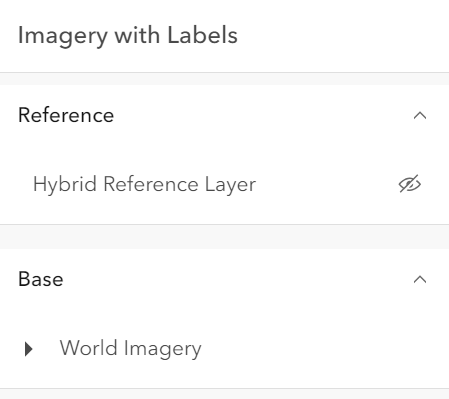 |
|
|
396
|
+
* | checkbox | Displays checkbox icons on the near side. See [check-square-f](https://developers.arcgis.com/calcite-design-system/icons/?icon=check-square-f&library=Calcite%20UI&query=check) and [square](https://developers.arcgis.com/calcite-design-system/icons/?icon=square&library=Calcite%20UI&query=square) calcite icons. | 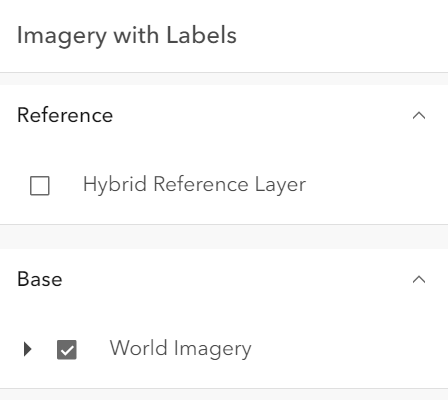 |
|
|
397
397
|
*
|
|
398
398
|
* @default "default"
|
|
399
399
|
* @since 4.29
|
|
@@ -54,7 +54,7 @@ export interface VisibleElements {
|
|
|
54
54
|
* two basemaps. The toggled basemap is set inside the [view's](https://developers.arcgis.com/javascript/latest/references/core/widgets/BasemapToggle/#view)
|
|
55
55
|
* [View.map](https://developers.arcgis.com/javascript/latest/references/core/views/View/#map) object.
|
|
56
56
|
*
|
|
57
|
-
* 
|
|
58
58
|
*
|
|
59
59
|
* Starting with version 4.23, the BasemapToggle widget can have two basemaps with different spatial references.
|
|
60
60
|
* Set the [MapView.spatialReferenceLocked](https://developers.arcgis.com/javascript/latest/references/core/views/MapView/#spatialReferenceLocked) property to `true`
|
|
@@ -7,7 +7,7 @@ export interface BookmarksVisibleElementsProperties extends Partial<Pick<Bookmar
|
|
|
7
7
|
* The visible elements that are displayed within the widget.
|
|
8
8
|
* This provides the ability to turn individual elements of the widget's display on/off.
|
|
9
9
|
*
|
|
10
|
-
* 
|
|
11
11
|
*
|
|
12
12
|
* @since 5.0
|
|
13
13
|
*/
|
package/widgets/Bookmarks.d.ts
CHANGED
|
@@ -139,12 +139,12 @@ export interface BookmarksEvents extends BookmarksViewModelEvents {}
|
|
|
139
139
|
* It displays a list of [bookmarks](https://developers.arcgis.com/javascript/latest/references/core/webmap/Bookmark/),
|
|
140
140
|
* which are typically defined inside the [WebMap.bookmarks](https://developers.arcgis.com/javascript/latest/references/core/WebMap/#bookmarks).
|
|
141
141
|
*
|
|
142
|
-
* 
|
|
143
143
|
*
|
|
144
144
|
* Each bookmark may contain the following properties: `name`, `thumbnail`, `viewpoint` (defines rotation, scale, and target geometry), and `timeExtent`.
|
|
145
145
|
* If the timeExtent is defined on a bookmark, it will be displayed in the bookmark widget as shown in the following image.
|
|
146
146
|
*
|
|
147
|
-
* 
|
|
148
148
|
*
|
|
149
149
|
* When a bookmark with a timeExtent is selected, the [MapView.timeExtent](https://developers.arcgis.com/javascript/latest/references/core/views/MapView/#timeExtent) of the View will be set to the timeExtent of the selected bookmark.
|
|
150
150
|
* To disable time capability in the Bookmarks widget, set [capabilities.time](https://developers.arcgis.com/javascript/latest/references/core/widgets/Bookmarks/BookmarksViewModel/#capabilities) in the BookmarksViewModel to `false`.
|
|
@@ -79,7 +79,7 @@ export interface VisibleElements {
|
|
|
79
79
|
* the Level element, the Construction phases element and the Disciplines are Categories list.
|
|
80
80
|
* The visibility of these elements can be configured using the widget's [visibleElements](https://developers.arcgis.com/javascript/latest/references/core/widgets/BuildingExplorer/#visibleElements).
|
|
81
81
|
*
|
|
82
|
-
* [](https://developers.arcgis.com/javascript/latest/sample-code/building-scene-layer-filter/)
|
|
83
83
|
*
|
|
84
84
|
* The [BuildingSceneLayers](https://developers.arcgis.com/javascript/latest/references/core/layers/BuildingSceneLayer/) to be explored
|
|
85
85
|
* have to be set on the [layers](https://developers.arcgis.com/javascript/latest/references/core/widgets/BuildingExplorer/#layers) property of the widget. When setting multiple layers, the filters set
|
|
@@ -74,7 +74,7 @@ export interface CatalogLayerListEvents extends CatalogLayerListViewModelEvents
|
|
|
74
74
|
* The [ListItem](https://developers.arcgis.com/javascript/latest/references/core/widgets/LayerList/ListItem/) API provides access to each layer's properties, allows
|
|
75
75
|
* the developer to configure actions related to the layer, and allows the developer to add content to the item related to the layer.
|
|
76
76
|
*
|
|
77
|
-
* 
|
|
78
78
|
*
|
|
79
79
|
* @deprecated since version 5.0. Use the [Catalog Layer List](https://developers.arcgis.com/javascript/latest/references/map-components/components/arcgis-catalog-layer-list/) component instead. For information on widget deprecation, read about [Esri's move to web components](https://developers.arcgis.com/javascript/latest/components-transition-plan/).
|
|
80
80
|
* @since 4.30
|
|
@@ -281,8 +281,8 @@ export default class CatalogLayerList extends CatalogLayerListSuperclass {
|
|
|
281
281
|
*
|
|
282
282
|
* | Value | Description | Example |
|
|
283
283
|
* | ----- | ----------- | ------- |
|
|
284
|
-
* | default | Displays view icons on the far side. Icons are hidden except on hover or if they have keyboard focus. See [view-visible](https://developers.arcgis.com/calcite-design-system/icons/?icon=view-visible&library=Calcite%20UI&query=view) and [view-hide](https://developers.arcgis.com/calcite-design-system/icons/?icon=view-hide&library=Calcite%20UI&query=view) calcite icons. |  and [square](https://developers.arcgis.com/calcite-design-system/icons/?icon=square&library=Calcite%20UI&query=square) calcite icons. |  and [view-hide](https://developers.arcgis.com/calcite-design-system/icons/?icon=view-hide&library=Calcite%20UI&query=view) calcite icons. | 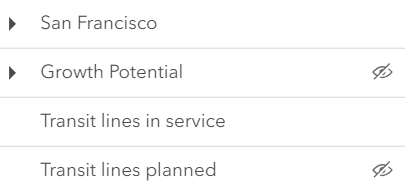 |
|
|
285
|
+
* | checkbox | Displays checkbox icons on the near side. See [check-square-f](https://developers.arcgis.com/calcite-design-system/icons/?icon=check-square-f&library=Calcite%20UI&query=check) and [square](https://developers.arcgis.com/calcite-design-system/icons/?icon=square&library=Calcite%20UI&query=square) calcite icons. | 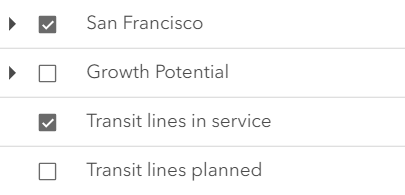 |
|
|
286
286
|
*
|
|
287
287
|
* @default "default"
|
|
288
288
|
* @example catalogLayerList.visibilityAppearance = "checkbox";
|
package/widgets/Compass.d.ts
CHANGED
|
@@ -42,8 +42,8 @@ export interface CompassProperties extends WidgetProperties, Partial<Pick<Compas
|
|
|
42
42
|
* For all other spatial references, the icon will be an arrow. For more information, see the
|
|
43
43
|
* [Reference topic on Spatial references](https://developers.arcgis.com/documentation/spatial-references/).
|
|
44
44
|
*
|
|
45
|
-
* 
|
|
46
|
+
* 
|
|
47
47
|
*
|
|
48
48
|
* You can use the view's [DefaultUI](https://developers.arcgis.com/javascript/latest/references/core/views/ui/DefaultUI/) to add the compass widget
|
|
49
49
|
* to a 2D application via the [MapView.ui](https://developers.arcgis.com/javascript/latest/references/core/views/MapView/#ui) property on the view.
|
|
@@ -108,7 +108,7 @@ export interface VisibleElements {
|
|
|
108
108
|
* as any of several popular coordinate notations. Additionally, the widget provides a way to convert
|
|
109
109
|
* user input coordinates into a [Point](https://developers.arcgis.com/javascript/latest/references/core/geometry/Point/).
|
|
110
110
|
*
|
|
111
|
-
* [](https://developers.arcgis.com/javascript/latest/sample-code/widgets-coordinateconversion/)
|
|
112
112
|
*
|
|
113
113
|
* Several common [formats](https://developers.arcgis.com/javascript/latest/references/core/widgets/CoordinateConversion/support/Format/) are included by default:
|
|
114
114
|
* * XY - Longitude, Latitude (WGS84)
|
package/widgets/Daylight.d.ts
CHANGED
|
@@ -71,7 +71,7 @@ export interface DaylightEvents extends DaylightViewModelEvents {}
|
|
|
71
71
|
* and the stars get updated accordingly, changing the light and the shadows in the scene. This sets the `date` and `directShadowsEnabled` properties of
|
|
72
72
|
* [SceneView.environment.lighting](https://developers.arcgis.com/javascript/latest/references/core/views/SceneView/#environment).
|
|
73
73
|
*
|
|
74
|
-
* [](https://developers.arcgis.com/javascript/latest/sample-code/widgets-daylight/)
|
|
75
75
|
*
|
|
76
76
|
* The daytime slider has an option to select the timezone. When the user makes any adjustments here, a new time
|
|
77
77
|
* in the chosen timezone is calculated and displayed in the slider. The timezone selector can be disabled
|
|
@@ -88,7 +88,7 @@ export interface DaylightEvents extends DaylightViewModelEvents {}
|
|
|
88
88
|
* });
|
|
89
89
|
* ```
|
|
90
90
|
*
|
|
91
|
-
* 
|
|
92
92
|
*
|
|
93
93
|
* There are two play buttons, one corresponds to the daytime slider and it animates the time as
|
|
94
94
|
* it cycles through the minutes of the day. The second button corresponds to the date picker
|
|
@@ -102,7 +102,7 @@ export interface DaylightEvents extends DaylightViewModelEvents {}
|
|
|
102
102
|
* });
|
|
103
103
|
* ```
|
|
104
104
|
*
|
|
105
|
-
* 
|
|
106
106
|
*
|
|
107
107
|
* Except for the daytime slider, all the elements in the daylight widget can be hidden by using the
|
|
108
108
|
* [visibleElements](https://developers.arcgis.com/javascript/latest/references/core/widgets/Daylight/#visibleElements) property:
|
|
@@ -122,11 +122,11 @@ export interface DaylightEvents extends DaylightViewModelEvents {}
|
|
|
122
122
|
*
|
|
123
123
|
* With these settings, the widget looks like this:
|
|
124
124
|
*
|
|
125
|
-
* 
|
|
126
126
|
*
|
|
127
127
|
* Whenever the sun position option is unchecked, the scene applies the **virtual light source** relative to the camera. With this, the widget's time slider and date picker get automatically disabled:
|
|
128
128
|
*
|
|
129
|
-
* 
|
|
130
130
|
*
|
|
131
131
|
* > [!WARNING]
|
|
132
132
|
* >
|
|
@@ -81,7 +81,7 @@ export interface DirectLineMeasurement3DProperties extends WidgetProperties, Par
|
|
|
81
81
|
* This widget can be used in a [SceneView](https://developers.arcgis.com/javascript/latest/references/core/views/SceneView/) to measure the vertical, horizontal,
|
|
82
82
|
* and direct distance between two points.
|
|
83
83
|
*
|
|
84
|
-
* [](https://developers.arcgis.com/javascript/latest/sample-code/widgets-measurement-3d/)
|
|
85
85
|
*
|
|
86
86
|
* How distances are computed depends on the scene's spatial reference.
|
|
87
87
|
*
|
|
@@ -98,7 +98,7 @@ export interface DirectLineMeasurement3DProperties extends WidgetProperties, Par
|
|
|
98
98
|
* the measurement visualization is simplified, and only the horizontal and vertical distances are calculated.
|
|
99
99
|
* The direct distance option becomes unavailable.
|
|
100
100
|
*
|
|
101
|
-
* 
|
|
102
102
|
*
|
|
103
103
|
* When the widget is active, a horizontal "laser" line is drawn which indicates the height at the current mouse position.
|
|
104
104
|
* This line can help in analyzing the heights of objects relative to each other and the terrain.
|
package/widgets/Directions.d.ts
CHANGED
|
@@ -98,7 +98,7 @@ export interface DirectionsProperties extends WidgetProperties, Partial<Pick<Dir
|
|
|
98
98
|
*
|
|
99
99
|
* | Directions with RouteLayer |
|
|
100
100
|
* |------|
|
|
101
|
-
* |  |
|
|
102
102
|
*
|
|
103
103
|
* This routing service requires authentication.
|
|
104
104
|
* If an API key is specified at the app level (see [Config](https://developers.arcgis.com/javascript/latest/references/core/config/#Config-apiKey)) or widget level (see [apiKey](https://developers.arcgis.com/javascript/latest/references/core/widgets/Directions/#apiKey)) then this key will accompany requests to both the routing service and geocoder/reverse-geocoder.
|
|
@@ -106,14 +106,14 @@ export interface DirectionsProperties extends WidgetProperties, Partial<Pick<Dir
|
|
|
106
106
|
*
|
|
107
107
|
* | Pick a location on the map |
|
|
108
108
|
* |------|
|
|
109
|
-
* |  |
|
|
110
110
|
*
|
|
111
111
|
* Locations on the map can be reverse geocoded and used as stops in the route.
|
|
112
112
|
* Click the button with a crosshairs icon to associate a location with a new or existing stop. After clicking the button, click the map once. To cancel this process, press the `escape` key.
|
|
113
113
|
*
|
|
114
114
|
* | Route options | Route options |
|
|
115
115
|
* |------|------|
|
|
116
|
-
* |  | 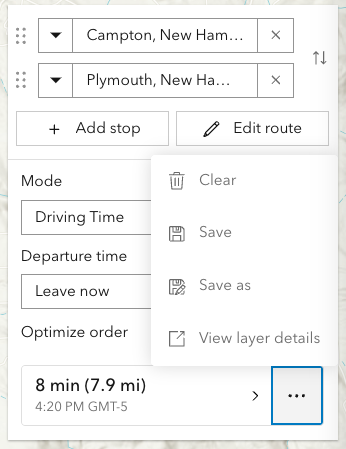 |
|
|
117
117
|
*
|
|
118
118
|
* The resulting driving directions are automatically collapsed and can be optionally saved to a new or existing portal item. This can be achieved programically with [save()](https://developers.arcgis.com/javascript/latest/references/core/widgets/Directions/#save) and [saveAs()](https://developers.arcgis.com/javascript/latest/references/core/widgets/Directions/#saveAs).
|
|
119
119
|
* The `Clear` button calls the [DirectionsViewModel.reset()](https://developers.arcgis.com/javascript/latest/references/core/widgets/Directions/DirectionsViewModel/#reset)
|
|
@@ -121,7 +121,7 @@ export interface DirectionsProperties extends WidgetProperties, Partial<Pick<Dir
|
|
|
121
121
|
*
|
|
122
122
|
* | Editing | Editing |
|
|
123
123
|
* |------|------|
|
|
124
|
-
* |  | 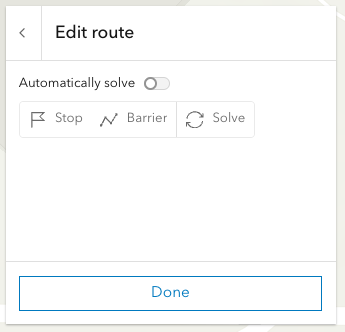 |
|
|
125
125
|
*
|
|
126
126
|
* Selecting the `Edit route` button allows you to add/move/remove stops, add/move/remove/reshape polyline barriers.
|
|
127
127
|
* By default the route will be automatically resolve at the completion of any editing operation. For more complex routes, it may be advantageous to disable auto-solving and solve as and when needed with the dedicated solve button.
|
|
@@ -87,7 +87,7 @@ export interface DistanceMeasurement2DProperties extends WidgetProperties, Parti
|
|
|
87
87
|
* * In geographic coordinate systems (GCS) and in Web Mercator, distances are computed geodetically.
|
|
88
88
|
* * In projected coordinate systems (PCS), apart from Web Mercator, distances are computed in a Euclidean manner (in their respective PCS).
|
|
89
89
|
*
|
|
90
|
-
* [](https://developers.arcgis.com/javascript/latest/sample-code/widgets-measurement-2d/)
|
|
91
91
|
*
|
|
92
92
|
* ### Undo / Redo
|
|
93
93
|
*
|
|
@@ -12,7 +12,7 @@ export interface CreateFeaturesWorkflowProperties extends WorkflowProperties {}
|
|
|
12
12
|
* the [Editor](https://developers.arcgis.com/javascript/latest/references/core/widgets/Editor/) widget. This workflow provides continuous creation of multiple features of the same type at once. After the initial sketch is created, the attribute form will display with the set field elements. These fields can be updated as the user creates new features. This workflow is designed for both individual and multiple feature creation.
|
|
13
13
|
*
|
|
14
14
|
*
|
|
15
|
-
* 
|
|
16
16
|
*
|
|
17
17
|
* > [!WARNING]
|
|
18
18
|
* >
|
package/widgets/Editor.d.ts
CHANGED
|
@@ -138,7 +138,7 @@ export interface EditorEvents extends EditorViewModelEvents {}
|
|
|
138
138
|
* [layerInfos](https://developers.arcgis.com/javascript/latest/references/core/widgets/Editor/#layerInfos) property.
|
|
139
139
|
* This property takes an array of objects which allows configuring the the editing experience for these layers.
|
|
140
140
|
*
|
|
141
|
-
* 
|
|
142
142
|
*
|
|
143
143
|
* Note that the update operations (such as rotate, move, and transform) happen in the map space.
|
|
144
144
|
* This means that, for example in 3D, if a graphic is rotated in a global WGS84 view, its shape and segment lengths change.
|
|
@@ -199,7 +199,7 @@ export interface EditorEvents extends EditorViewModelEvents {}
|
|
|
199
199
|
*
|
|
200
200
|
* See more about the available tooltip inputs and constraints under the [tooltip options](https://developers.arcgis.com/javascript/latest/references/core/views/interactive/sketch/SketchTooltipOptions/) class.
|
|
201
201
|
*
|
|
202
|
-
* 
|
|
203
203
|
*
|
|
204
204
|
* <span id="relationship-editing"></span>
|
|
205
205
|
* ## Relationship editing
|
|
@@ -28,7 +28,7 @@ export interface ElevationProfileLineGroundProperties extends ElevationProfileLi
|
|
|
28
28
|
* Whenever layers are added or removed from the [Ground](https://developers.arcgis.com/javascript/latest/references/core/Ground/) or their visibility changes, the
|
|
29
29
|
* profile line will be updated.
|
|
30
30
|
*
|
|
31
|
-
* 
|
|
32
32
|
*
|
|
33
33
|
* @deprecated since version 5.0. Use the [Elevation Profile component](https://developers.arcgis.com/javascript/latest/references/map-components/components/arcgis-elevation-profile/) or [ElevationProfileLineGround](https://developers.arcgis.com/javascript/latest/references/core/analysis/ElevationProfile/ElevationProfileLineGround/) from [ElevationProfileAnalysis](https://developers.arcgis.com/javascript/latest/references/core/analysis/ElevationProfileAnalysis/) instead. For information on widget deprecation, read about [Esri's move to web components](https://developers.arcgis.com/javascript/latest/components-transition-plan/).
|
|
34
34
|
* @since 4.18
|
|
@@ -31,7 +31,7 @@ export interface ElevationProfileLineInputProperties extends ElevationProfileLin
|
|
|
31
31
|
* ElevationProfileLineInput only when the input feature is a client-side graphic with z values
|
|
32
32
|
* in a [MapView](https://developers.arcgis.com/javascript/latest/references/core/views/MapView/).
|
|
33
33
|
*
|
|
34
|
-
* 
|
|
35
35
|
* _Profile generated from a line feature with z-values. The orange profile is created with a profile line of type input._
|
|
36
36
|
*
|
|
37
37
|
* @deprecated since version 5.0. Use the [Elevation Profile component](https://developers.arcgis.com/javascript/latest/references/map-components/components/arcgis-elevation-profile/) or [ElevationProfileLineInput](https://developers.arcgis.com/javascript/latest/references/core/analysis/ElevationProfile/ElevationProfileLineInput/) from [ElevationProfileAnalysis](https://developers.arcgis.com/javascript/latest/references/core/analysis/ElevationProfileAnalysis/) instead. For information on widget deprecation, read about [Esri's move to web components](https://developers.arcgis.com/javascript/latest/components-transition-plan/).
|
|
@@ -34,7 +34,7 @@ export interface ElevationProfileLineViewProperties extends ElevationProfileLine
|
|
|
34
34
|
*
|
|
35
35
|
* This profile line type is not supported in a [MapView](https://developers.arcgis.com/javascript/latest/references/core/views/MapView/).
|
|
36
36
|
*
|
|
37
|
-
* 
|
|
38
38
|
* _The purple building profile is the result of a profile line of type view._
|
|
39
39
|
*
|
|
40
40
|
* @deprecated since version 5.0. Use the [Elevation Profile component](https://developers.arcgis.com/javascript/latest/references/map-components/components/arcgis-elevation-profile/) or [ElevationProfileLineScene](https://developers.arcgis.com/javascript/latest/references/core/analysis/ElevationProfile/ElevationProfileLineScene/) from [ElevationProfileAnalysis](https://developers.arcgis.com/javascript/latest/references/core/analysis/ElevationProfileAnalysis/) instead. For information on widget deprecation, read about [Esri's move to web components](https://developers.arcgis.com/javascript/latest/components-transition-plan/).
|
|
@@ -106,7 +106,7 @@ export interface ElevationProfileProperties extends WidgetProperties, Partial<Pi
|
|
|
106
106
|
* Alternatively, the widget allows setting an input graphic programmatically at creation or runtime by setting the
|
|
107
107
|
* [input](https://developers.arcgis.com/javascript/latest/references/core/widgets/ElevationProfile/#input) property.
|
|
108
108
|
*
|
|
109
|
-
* [](https://developers.arcgis.com/javascript/latest/sample-code/widgets-elevation-profile/)
|
|
110
110
|
* _ElevationProfile widget used in a city scene, displaying ground and building profiles. See [Sample - ElevationProfile widget](https://developers.arcgis.com/javascript/latest/sample-code/widgets-elevation-profile/)_
|
|
111
111
|
*
|
|
112
112
|
* The widget can visualize multiple profile lines, depending on the environment (2D versus 3D) and elevation source data:
|
|
@@ -144,10 +144,10 @@ export interface ElevationProfileProperties extends WidgetProperties, Partial<Pi
|
|
|
144
144
|
* Scrolling the chart zooms in to a specific part of the profile chart. When zoomed in, click the minus button to reset the zoom.
|
|
145
145
|
* On touch devices, pinch to zoom in and out.
|
|
146
146
|
*
|
|
147
|
-
* 
|
|
148
148
|
* _Drawing a path to get a ground profile._
|
|
149
149
|
*
|
|
150
|
-
* 
|
|
151
151
|
* _Profile generated from a line feature with z-values shows a paraglide track above ground._
|
|
152
152
|
*
|
|
153
153
|
* How distance values are computed depends on the map's spatial reference:
|
package/widgets/Expand.d.ts
CHANGED
|
@@ -230,7 +230,7 @@ export default class Expand extends Widget {
|
|
|
230
230
|
/**
|
|
231
231
|
* A number to display at the corner of the widget to indicate the number of, for example, open issues or unread notices.
|
|
232
232
|
*
|
|
233
|
-
* 
|
|
234
234
|
*
|
|
235
235
|
* @default 0
|
|
236
236
|
*/
|
package/widgets/FeatureForm.d.ts
CHANGED
|
@@ -81,7 +81,7 @@ export interface FeatureFormEvents extends FeatureFormViewModelEvents {}
|
|
|
81
81
|
*
|
|
82
82
|
* This widget is intended to be used with [FeatureLayer.applyEdits()](https://developers.arcgis.com/javascript/latest/references/core/layers/FeatureLayer/#applyEdits) method. This enables an end user to update a feature's attribute on an editable feature layer. The UI to submit and apply any updates should be wired up within the application's code.
|
|
83
83
|
*
|
|
84
|
-
* 
|
|
85
85
|
*
|
|
86
86
|
* > [!WARNING]
|
|
87
87
|
* >
|
|
@@ -22,7 +22,7 @@ export interface ActionColumnProperties extends ColumnProperties, Partial<Pick<A
|
|
|
22
22
|
* is invoked whenever the action is clicked. Actions can be configured to dynamically
|
|
23
23
|
* display based on provided conditions.
|
|
24
24
|
*
|
|
25
|
-
* 
|
|
26
26
|
*
|
|
27
27
|
* [](https://developers.arcgis.com/javascript/latest/sample-code/widgets-featuretable-row-highlights/)
|
|
28
28
|
*
|
|
@@ -23,7 +23,7 @@ export interface AttachmentsColumnProperties extends ColumnProperties, Partial<P
|
|
|
23
23
|
* > This class should be used for observing potential changes. It is designed
|
|
24
24
|
* > primarily to read and not interact directly with the attachment columns.
|
|
25
25
|
*
|
|
26
|
-
* 
|
|
27
27
|
*
|
|
28
28
|
* @since 4.30
|
|
29
29
|
* @see [FeatureTable](https://developers.arcgis.com/javascript/latest/references/core/widgets/FeatureTable/)
|
|
@@ -293,7 +293,7 @@ export default class FeatureTableViewModel extends GridViewModel {
|
|
|
293
293
|
* viewing additional information about a feature. This column is displayed as the
|
|
294
294
|
* last column in the table and is only displayed if this property is set.
|
|
295
295
|
*
|
|
296
|
-
* 
|
|
297
297
|
*
|
|
298
298
|
* @since 4.30
|
|
299
299
|
* @see [Calcite Icon Search](https://developers.arcgis.com/calcite-design-system/icons/)
|
|
@@ -351,7 +351,7 @@ export default class FeatureTableViewModel extends GridViewModel {
|
|
|
351
351
|
/**
|
|
352
352
|
* Indicates whether to display the `Attachments` field in the table. It displays the count of attachments per feature and is only applicable if the feature layer [supports attachments](https://developers.arcgis.com/javascript/latest/references/core/layers/FeatureLayer/#capabilities).
|
|
353
353
|
*
|
|
354
|
-
* 
|
|
355
355
|
*
|
|
356
356
|
* @default false
|
|
357
357
|
* @see [FeatureLayer.capabilities.data.supportsAttachment](https://developers.arcgis.com/javascript/latest/references/core/layers/FeatureLayer/#capabilities)
|
|
@@ -445,7 +445,7 @@ export default class FeatureTableViewModel extends GridViewModel {
|
|
|
445
445
|
* > If the service's field is not editable, it is not possible to override its permissions using any of the options above.
|
|
446
446
|
* > [FieldColumnTemplate.editable](https://developers.arcgis.com/javascript/latest/references/core/widgets/FeatureTable/support/FieldColumnTemplate/#editable) can never override what is set on the layer, field, or table.
|
|
447
447
|
*
|
|
448
|
-
* 
|
|
449
449
|
*
|
|
450
450
|
* @default false
|
|
451
451
|
* @since 4.16
|
|
@@ -11,7 +11,7 @@ export interface GroupColumnProperties extends ColumnProperties {}
|
|
|
11
11
|
* > This class should be used for observing potential changes. Any configuration and changes to the
|
|
12
12
|
* > columns should be handled via the [TableTemplate](https://developers.arcgis.com/javascript/latest/references/core/widgets/FeatureTable/support/TableTemplate/) and the [GroupColumnTemplate](https://developers.arcgis.com/javascript/latest/references/core/widgets/FeatureTable/support/GroupColumnTemplate/) class.
|
|
13
13
|
*
|
|
14
|
-
* 
|
|
15
15
|
*
|
|
16
16
|
* @since 4.24
|
|
17
17
|
* @see [FeatureTable](https://developers.arcgis.com/javascript/latest/references/core/widgets/FeatureTable/)
|
|
@@ -31,7 +31,7 @@ export interface RelationshipColumnProperties extends ColumnProperties, Partial<
|
|
|
31
31
|
* > This class should be used for observing potential changes. It is designed
|
|
32
32
|
* > primarily to read and not interact directly with the relationship columns.
|
|
33
33
|
*
|
|
34
|
-
* 
|
|
35
35
|
*
|
|
36
36
|
* @since 4.30
|
|
37
37
|
* @see [Column](https://developers.arcgis.com/javascript/latest/references/core/widgets/FeatureTable/Grid/Column/)
|
|
@@ -20,7 +20,7 @@ export interface VisibleElementsProperties extends Partial<Pick<VisibleElements,
|
|
|
20
20
|
* The visible elements that are displayed within the widget.
|
|
21
21
|
* This provides the ability to turn individual elements of the widget's display on/off.
|
|
22
22
|
*
|
|
23
|
-
* 
|
|
24
24
|
*
|
|
25
25
|
* @since 5.0
|
|
26
26
|
*/
|
|
@@ -395,7 +395,7 @@ export interface FeatureTableEvents extends FeatureTableViewModelEvents {}
|
|
|
395
395
|
* Once set, interacting with a table row will select and highlight the corresponding feature in the view.
|
|
396
396
|
* Multiple selections within the table are turned on by default. To update this behavior, set the [multipleSelectionEnabled](https://developers.arcgis.com/javascript/latest/references/core/widgets/FeatureTable/#multipleSelectionEnabled) property to `false`.
|
|
397
397
|
*
|
|
398
|
-
* 
|
|
399
399
|
*
|
|
400
400
|
* <details>
|
|
401
401
|
* <summary>Read More</summary>
|
|
@@ -415,7 +415,7 @@ export interface FeatureTableEvents extends FeatureTableViewModelEvents {}
|
|
|
415
415
|
* });
|
|
416
416
|
* });
|
|
417
417
|
* ```
|
|
418
|
-
* 
|
|
419
419
|
*
|
|
420
420
|
* Additionally, selection and highlight behavior can be enhanced using the feature table's [events](https://developers.arcgis.com/javascript/latest/references/core/widgets/FeatureTable/#FeatureTableEvents). These events are designed to listen for cell interaction and include: [@cell-click](https://developers.arcgis.com/javascript/latest/references/core/widgets/FeatureTable/#event-cell-click), [@cell-keydown](https://developers.arcgis.com/javascript/latest/references/core/widgets/FeatureTable/#event-cell-keydown), [@cell-pointerout](https://developers.arcgis.com/javascript/latest/references/core/widgets/FeatureTable/#event-cell-pointerout), and [@cell-pointerover](https://developers.arcgis.com/javascript/latest/references/core/widgets/FeatureTable/#event-cell-pointerover). The latter two events are especially useful for tasks such as highlighting a feature in the view while hovering over a cell, all doing so without requiring the end-user to select the row. For example, these events can be used to display cell information in a tooltip that is attached to the mouse cursor.
|
|
421
421
|
*
|
|
@@ -447,7 +447,7 @@ export interface FeatureTableEvents extends FeatureTableViewModelEvents {}
|
|
|
447
447
|
* ## Editing within the FeatureTable
|
|
448
448
|
* The FeatureTable provides the ability to edit feature attributes within the table. This is accomplished by setting the [editingEnabled](https://developers.arcgis.com/javascript/latest/references/core/widgets/FeatureTable/#editingEnabled) property to `true`. The editing experience is similar to that of a spreadsheet, where end-users can click into a cell to edit its value. The table automatically saves edits to the layer once navigating away from the cell or `Enter` is pressed. Press the `Esc` key to cancel an edit. The FeatureTable also provides the ability to delete selected records. This is done by selecting the rows to delete and clicking the `Delete Selection` menu item. The `Delete Selection` menu item is only available if the [editingEnabled](https://developers.arcgis.com/javascript/latest/references/core/widgets/FeatureTable/#editingEnabled) property is set to `true` and the feature service supports editing.
|
|
449
449
|
*
|
|
450
|
-
* 
|
|
451
451
|
*
|
|
452
452
|
* <details>
|
|
453
453
|
* <summary>Read More</summary>
|
|
@@ -474,11 +474,11 @@ export interface FeatureTableEvents extends FeatureTableViewModelEvents {}
|
|
|
474
474
|
*
|
|
475
475
|
* | Origin table with related records |
|
|
476
476
|
* |---------------------------------- |
|
|
477
|
-
* |  |
|
|
478
478
|
*
|
|
479
479
|
* | Destination table with related records |
|
|
480
480
|
* |-----------------------------------|
|
|
481
|
-
* |  |
|
|
482
482
|
*
|
|
483
483
|
* This is done by setting the [relatedRecordsEnabled](https://developers.arcgis.com/javascript/latest/references/core/widgets/FeatureTable/#relatedRecordsEnabled) property to `true`. When this property is set, the table will contain a field that links to any related records associated with each feature in the table. When clicked, a separate table displays the related records for that feature. The FeatureTable provides the ability to show nested related records, which are related records that contain their own related records. It automatically recognizes if there are any related tables associated a table and, if applicable, displays links to related records for that feature or row. The following example demonstrates how to configure the FeatureTable to display related records:
|
|
484
484
|
*
|
|
@@ -600,7 +600,7 @@ export interface FeatureTableEvents extends FeatureTableViewModelEvents {}
|
|
|
600
600
|
*
|
|
601
601
|
* | Default column menu items | Configured column menu items |
|
|
602
602
|
* |--------|------|
|
|
603
|
-
* |  | 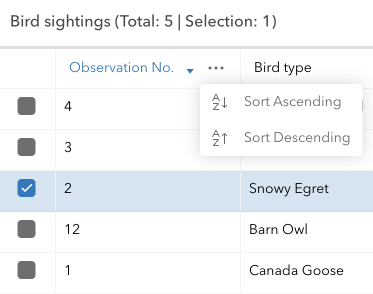) |
|
|
604
604
|
*
|
|
605
605
|
* ```javascript
|
|
606
606
|
* featureTable.menuConfig = {
|
|
@@ -628,7 +628,7 @@ export interface FeatureTableEvents extends FeatureTableViewModelEvents {}
|
|
|
628
628
|
*
|
|
629
629
|
* | Default table menu items | Configured table menu items |
|
|
630
630
|
* |--------|------|
|
|
631
|
-
* |  | 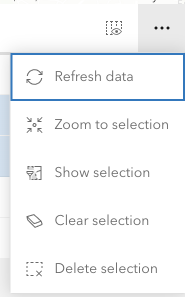) |
|
|
632
632
|
*
|
|
633
633
|
* ```javascript
|
|
634
634
|
* const columnTemplate = new FieldColumnTemplate({
|
|
@@ -699,7 +699,7 @@ export default class FeatureTable extends Widget<FeatureTableProperties> {
|
|
|
699
699
|
* viewing additional information about a feature. This column is displayed as the
|
|
700
700
|
* last column in the table and is only displayed if this property is set.
|
|
701
701
|
*
|
|
702
|
-
* 
|
|
703
703
|
*
|
|
704
704
|
* @since 4.30
|
|
705
705
|
* @see [actionColumn](https://developers.arcgis.com/javascript/latest/references/core/widgets/FeatureTable/#actionColumn)
|
|
@@ -759,7 +759,7 @@ export default class FeatureTable extends Widget<FeatureTableProperties> {
|
|
|
759
759
|
/**
|
|
760
760
|
* Indicates whether to display the `Attachments` field in the table. It displays the count of attachments per feature and is only applicable if the feature layer [supports attachments](https://developers.arcgis.com/javascript/latest/references/core/layers/FeatureLayer/#capabilities).
|
|
761
761
|
*
|
|
762
|
-
* 
|
|
763
763
|
*
|
|
764
764
|
* @default false
|
|
765
765
|
* @see [FeatureLayer.capabilities.data.supportsAttachment](https://developers.arcgis.com/javascript/latest/references/core/layers/FeatureLayer/#capabilities)
|
|
@@ -104,7 +104,7 @@ export default class FeatureTemplatesViewModel extends EventedAccessor {
|
|
|
104
104
|
* an object containing a [name](https://developers.arcgis.com/javascript/latest/references/core/widgets/FeatureTemplates/TemplateItem/#label)
|
|
105
105
|
* property of the [template item](https://developers.arcgis.com/javascript/latest/references/core/widgets/FeatureTemplates/TemplateItem/).
|
|
106
106
|
*
|
|
107
|
-
* 
|
|
108
108
|
*
|
|
109
109
|
* @example
|
|
110
110
|
* // Filter and display templates only if their names contain the word `Street`
|
|
@@ -130,10 +130,10 @@ export default class FeatureTemplatesViewModel extends EventedAccessor {
|
|
|
130
130
|
*
|
|
131
131
|
* Type | Description | Example
|
|
132
132
|
* ----- | ----------- | -------
|
|
133
|
-
* layer | This is the *default* grouping. Groups template items by layers. |  | Custom function that takes an object containing a [FeatureTemplate](https://developers.arcgis.com/javascript/latest/references/core/layers/support/FeatureTemplate/) and [FeatureLayer](https://developers.arcgis.com/javascript/latest/references/core/layers/FeatureLayer/). | 
|
|
134
|
+
* geometry | Groups template items by geometry type. | 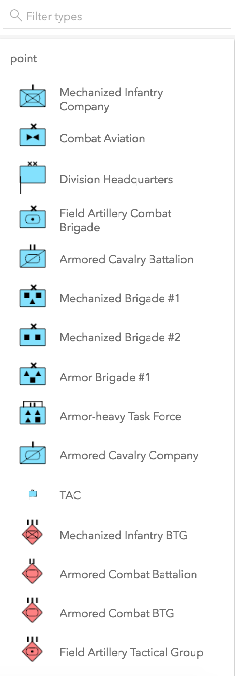
|
|
135
|
+
* none | The widget displays everything in one list with no grouping. | 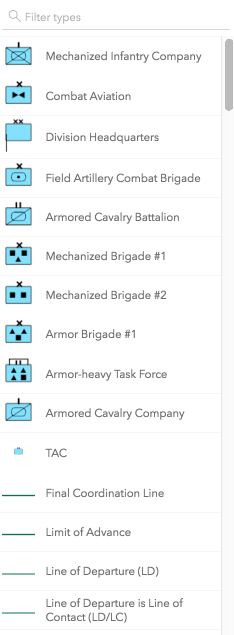
|
|
136
|
+
* [GroupByFunction](https://developers.arcgis.com/javascript/latest/references/core/widgets/FeatureTemplates/types/#GroupByFunction) | Custom function that takes an object containing a [FeatureTemplate](https://developers.arcgis.com/javascript/latest/references/core/layers/support/FeatureTemplate/) and [FeatureLayer](https://developers.arcgis.com/javascript/latest/references/core/layers/FeatureLayer/). | 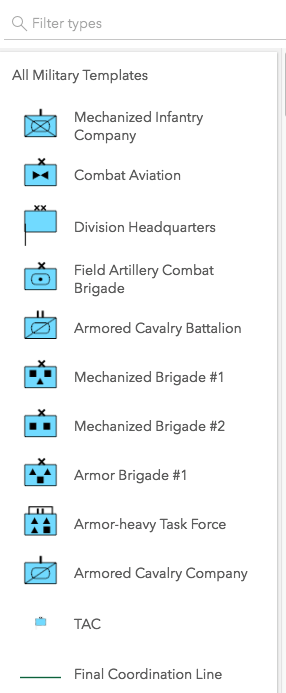
|
|
137
137
|
*
|
|
138
138
|
* @default "layer"
|
|
139
139
|
* @example
|