@alan-ai-hq/agent-manager-linux-arm64 0.1.199 → 0.1.201
This diff represents the content of publicly available package versions that have been released to one of the supported registries. The information contained in this diff is provided for informational purposes only and reflects changes between package versions as they appear in their respective public registries.
- package/alan-agent.cjs +8928 -5241
- package/alan-holder.cjs +5364 -3401
- package/alan-lease.cjs +808 -200
- package/builtin-skills/agent-desktop/SKILL.md +94 -0
- package/builtin-skills/alan-artifact/SKILL.md +128 -0
- package/builtin-skills/alan-artifact/examples/interactive-diagram.md +50 -0
- package/builtin-skills/alan-artifact/examples/prototype.md +53 -0
- package/builtin-skills/alan-artifact/examples/test-report.md +55 -0
- package/builtin-skills/alan-artifact/references/design.md +39 -0
- package/builtin-skills/alan-artifact/references/diagrams.md +20 -0
- package/builtin-skills/alan-deck/SKILL.md +189 -0
- package/builtin-skills/alan-diagrams/SKILL.md +105 -0
- package/builtin-skills/alan-diagrams/references/diagram-catalogue.md +847 -0
- package/builtin-skills/alan-docs/SKILL.md +143 -0
- package/builtin-skills/alan-docs/references/administration/members-and-teams.md +48 -0
- package/builtin-skills/alan-docs/references/administration/org-dashboard.md +19 -0
- package/builtin-skills/alan-docs/references/administration/organisation-settings.md +41 -0
- package/builtin-skills/alan-docs/references/agents-and-sessions/code-context.md +60 -0
- package/builtin-skills/alan-docs/references/agents-and-sessions/coding-agents-and-models.md +78 -0
- package/builtin-skills/alan-docs/references/agents-and-sessions/session-lifecycle.md +62 -0
- package/builtin-skills/alan-docs/references/agents-and-sessions/start-a-session.md +110 -0
- package/builtin-skills/alan-docs/references/automations/automation-runs.md +69 -0
- package/builtin-skills/alan-docs/references/automations/create-an-automation.md +143 -0
- package/builtin-skills/alan-docs/references/automations/overview.md +77 -0
- package/builtin-skills/alan-docs/references/cloud-and-local/cloud-images.md +64 -0
- package/builtin-skills/alan-docs/references/cloud-and-local/cloud-sessions-and-execution.md +89 -0
- package/builtin-skills/alan-docs/references/cloud-and-local/cloud-setup.md +128 -0
- package/builtin-skills/alan-docs/references/cloud-and-local/codex-cli-connector.md +92 -0
- package/builtin-skills/alan-docs/references/cloud-and-local/local-execution.md +213 -0
- package/builtin-skills/alan-docs/references/cloud-and-local/runtime-recovery.md +60 -0
- package/builtin-skills/alan-docs/references/cloud-and-local/sandboxes.md +74 -0
- package/builtin-skills/alan-docs/references/cloud-and-local/troubleshooting-and-faq.md +102 -0
- package/builtin-skills/alan-docs/references/get-started/connect-azure-devops.md +89 -0
- package/builtin-skills/alan-docs/references/get-started/connect-bitbucket.md +86 -0
- package/builtin-skills/alan-docs/references/get-started/connect-github.md +114 -0
- package/builtin-skills/alan-docs/references/get-started/join-a-team.md +114 -0
- package/builtin-skills/alan-docs/references/get-started/product-map.md +96 -0
- package/builtin-skills/alan-docs/references/get-started/quickstart.md +158 -0
- package/builtin-skills/alan-docs/references/get-started/set-up-your-team.md +200 -0
- package/builtin-skills/alan-docs/references/get-started/sign-in.md +104 -0
- package/builtin-skills/alan-docs/references/get-started/welcome.md +39 -0
- package/builtin-skills/alan-docs/references/integrations/connect-microsoft-teams.md +116 -0
- package/builtin-skills/alan-docs/references/integrations/connect-slack.md +164 -0
- package/builtin-skills/alan-docs/references/integrations/import-from-linear.md +172 -0
- package/builtin-skills/alan-docs/references/plans-and-billing/plans-and-limits.md +115 -0
- package/builtin-skills/alan-docs/references/plans-and-billing/usage-and-credits.md +47 -0
- package/builtin-skills/alan-docs/references/reference/documents-and-artifacts.md +52 -0
- package/builtin-skills/alan-docs/references/reference/faq.md +89 -0
- package/builtin-skills/alan-docs/references/reference/feature-catalog.md +89 -0
- package/builtin-skills/alan-docs/references/reference/glossary.md +96 -0
- package/builtin-skills/alan-docs/references/reference/links-and-ids.md +80 -0
- package/builtin-skills/alan-docs/references/reference/roles-and-permissions.md +64 -0
- package/builtin-skills/alan-docs/references/reference/statuses.md +86 -0
- package/builtin-skills/alan-docs/references/reviews-testing-deploys/deployments.md +28 -0
- package/builtin-skills/alan-docs/references/reviews-testing-deploys/pull-requests.md +85 -0
- package/builtin-skills/alan-docs/references/reviews-testing-deploys/review-work.md +55 -0
- package/builtin-skills/alan-docs/references/reviews-testing-deploys/testing-evidence.md +52 -0
- package/builtin-skills/alan-docs/references/skills/plugins-and-mcp.md +24 -0
- package/builtin-skills/alan-docs/references/skills/skills.md +103 -0
- package/builtin-skills/alan-docs/references/tasks/complete-a-task.md +79 -0
- package/builtin-skills/alan-docs/references/tasks/create-a-task.md +67 -0
- package/builtin-skills/alan-docs/references/tasks/subtasks-and-status.md +55 -0
- package/builtin-skills/alan-docs/references/tasks/task-artifacts.md +56 -0
- package/builtin-skills/alan-docs/references/tasks/task-detail.md +65 -0
- package/builtin-skills/alan-docs/references/teams-and-planning/cycles.md +93 -0
- package/builtin-skills/alan-docs/references/teams-and-planning/documents.md +66 -0
- package/builtin-skills/alan-docs/references/teams-and-planning/epics.md +95 -0
- package/builtin-skills/alan-docs/references/teams-and-planning/whiteboard.md +52 -0
- package/builtin-skills/alan-docs/references/troubleshooting/agent-blocked.md +38 -0
- package/builtin-skills/alan-docs/references/troubleshooting/common-problems.md +118 -0
- package/builtin-skills/alan-docs/references/troubleshooting/github-access.md +41 -0
- package/builtin-skills/alan-docs/references/troubleshooting/missing-artifact.md +47 -0
- package/builtin-skills/alan-docs/references/troubleshooting/report-an-issue.md +74 -0
- package/builtin-skills/alan-docs/references/troubleshooting/runtime-unavailable.md +49 -0
- package/builtin-skills/alan-docs/scripts/generate-references.mjs +363 -0
- package/builtin-skills/alan-environment-setup/SKILL.md +368 -0
- package/builtin-skills/alan-environment-setup/references/android.md +118 -0
- package/builtin-skills/alan-environment-setup/references/troubleshooting.md +38 -0
- package/builtin-skills/alan-skill-authoring/SKILL.md +83 -0
- package/builtin-skills/alan-tasks/SKILL.md +195 -0
- package/builtin-skills/alan-test-android/SKILL.md +224 -0
- package/builtin-skills/alan-test-android/scripts/android-up.sh +227 -0
- package/builtin-skills/alan-test-android/scripts/install-launch.sh +38 -0
- package/builtin-skills/alan-test-android/scripts/record.sh +64 -0
- package/builtin-skills/alan-test-android/scripts/ui.py +367 -0
- package/builtin-skills/alan-test-desktop/SKILL.md +107 -0
- package/builtin-skills/alan-test-desktop/references/linux-recording.md +31 -0
- package/builtin-skills/alan-test-feature/SKILL.md +243 -0
- package/builtin-skills/alan-test-mobile/SKILL.md +65 -0
- package/builtin-skills/alan-test-web/SKILL.md +113 -0
- package/builtin-skills/alan-walkthrough/SKILL.md +152 -0
- package/builtin-skills/alan-walkthrough/scripts/mark-changes.js +419 -0
- package/builtin-skills/alan-walkthrough/scripts/publish-capture.mjs +288 -0
- package/builtin-skills/alan-workflows/SKILL.md +235 -0
- package/builtin-skills/manifest.json +19 -0
- package/package.json +3 -2
|
@@ -0,0 +1,95 @@
|
|
|
1
|
+
> Source: [https://docs.tryalan.ai/docs/teams-and-planning/epics](https://docs.tryalan.ai/docs/teams-and-planning/epics)
|
|
2
|
+
|
|
3
|
+
# Epics
|
|
4
|
+
|
|
5
|
+
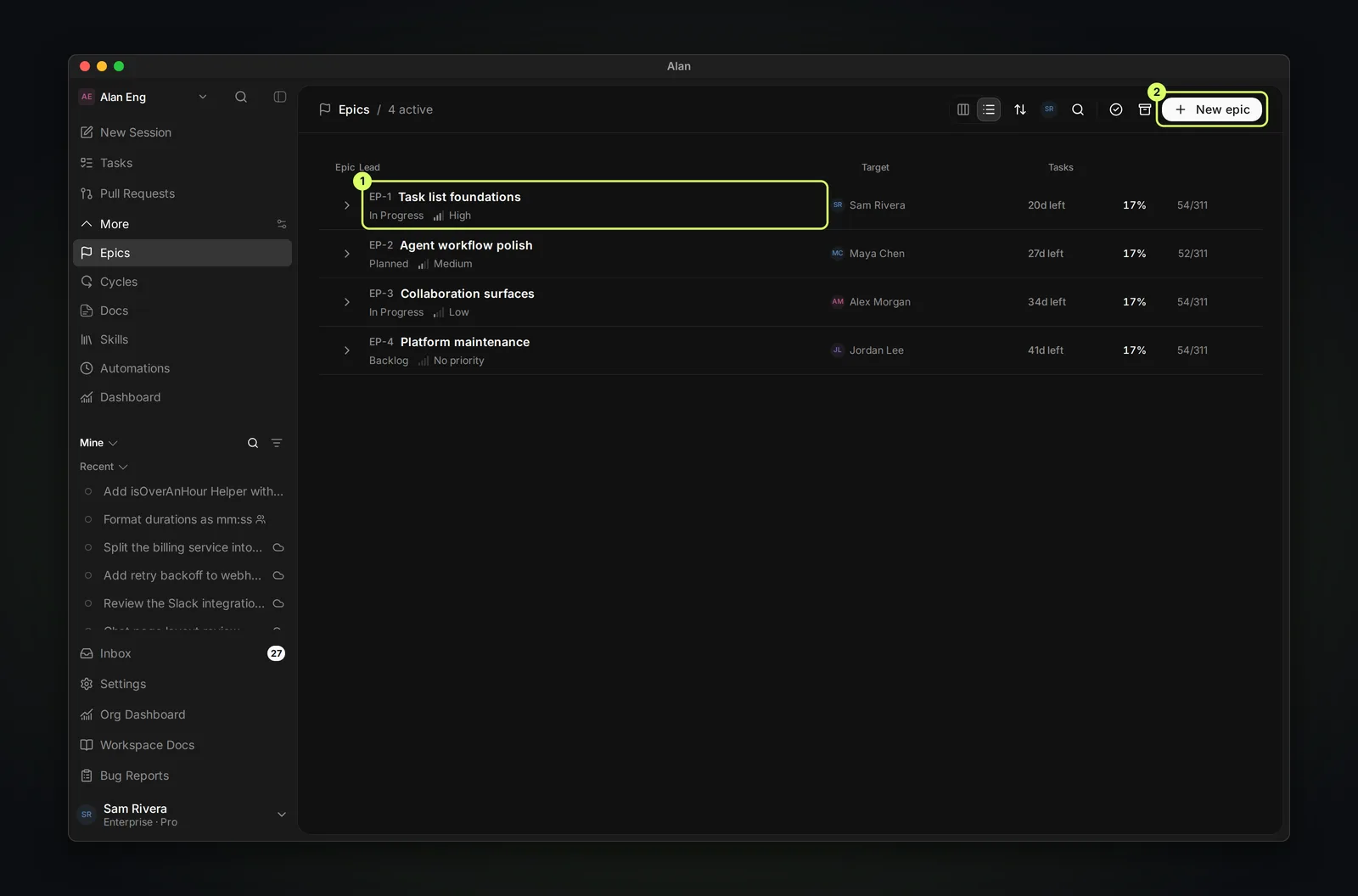
An epic groups tasks that contribute to one goal. Use it when the goal needs several tasks and you want to track their progress together. Each epic has its own status, priority, lead, and target dates.
|
|
6
|
+
|
|
7
|
+
> **Note:** Epics are off for new teams. Any team member can turn them on in **Settings →** your team **→ Epics** with **Enable epics**. Turning them off hides the Epics page but keeps existing epic assignments.
|
|
8
|
+
|
|
9
|
+
|
|
10
|
+
|
|
11
|
+
Video: a tour of epics, cycles, and docs is on [Cycles](cycles.md#see-it-in-action).
|
|
12
|
+
|
|
13
|
+
## Epic or cycle?
|
|
14
|
+
|
|
15
|
+
Both group tasks, but they answer different questions:
|
|
16
|
+
|
|
17
|
+
| | Epic | Cycle |
|
|
18
|
+
|---|---|---|
|
|
19
|
+
| Answers | **What & why** — the outcome | **When** — the execution window |
|
|
20
|
+
| Scope | Outcome-based, open-ended | Time-boxed (e.g. a two-week sprint) |
|
|
21
|
+
| Lifetime | Lives until the outcome ships | Ends on its date |
|
|
22
|
+
|
|
23
|
+
They are independent ways to group tasks. A task can sit in an epic, in a cycle, in **both**, or in neither. The epic says *what larger goal this task serves*; the cycle says *which window you're trying to land it in*.
|
|
24
|
+
|
|
25
|
+
> **Note:** A task can belong to one epic and one cycle at a time. Changing one does not change the other.
|
|
26
|
+
|
|
27
|
+
## What an epic holds
|
|
28
|
+
|
|
29
|
+
Beyond a title and description, every epic has:
|
|
30
|
+
|
|
31
|
+
- **Status**: where the epic is in its lifecycle.
|
|
32
|
+
- **Priority**: for example High, Medium, Low, or No priority.
|
|
33
|
+
- **Lead**: the one person accountable for the outcome.
|
|
34
|
+
- **Target dates**: a start and end date. The Epics list shows the time left, for example **20d left**.
|
|
35
|
+
- **Artifacts**: plans, documents, and other outputs attached to the epic.
|
|
36
|
+
|
|
37
|
+
### Epic statuses
|
|
38
|
+
|
|
39
|
+
Epic statuses are team-specific, like task statuses. Each team starts with:
|
|
40
|
+
|
|
41
|
+
| Group | Default statuses |
|
|
42
|
+
| --- | --- |
|
|
43
|
+
| **Not started** | Backlog (required), Planned |
|
|
44
|
+
| **Active** | In Progress |
|
|
45
|
+
| **Done** | Completed |
|
|
46
|
+
| **Closed** | Canceled |
|
|
47
|
+
|
|
48
|
+
Add, rename, recolor, and reorder statuses in **Settings →** your team **→ Epics → Epic statuses**.
|
|
49
|
+
|
|
50
|
+
## Progress rolls up automatically
|
|
51
|
+
|
|
52
|
+
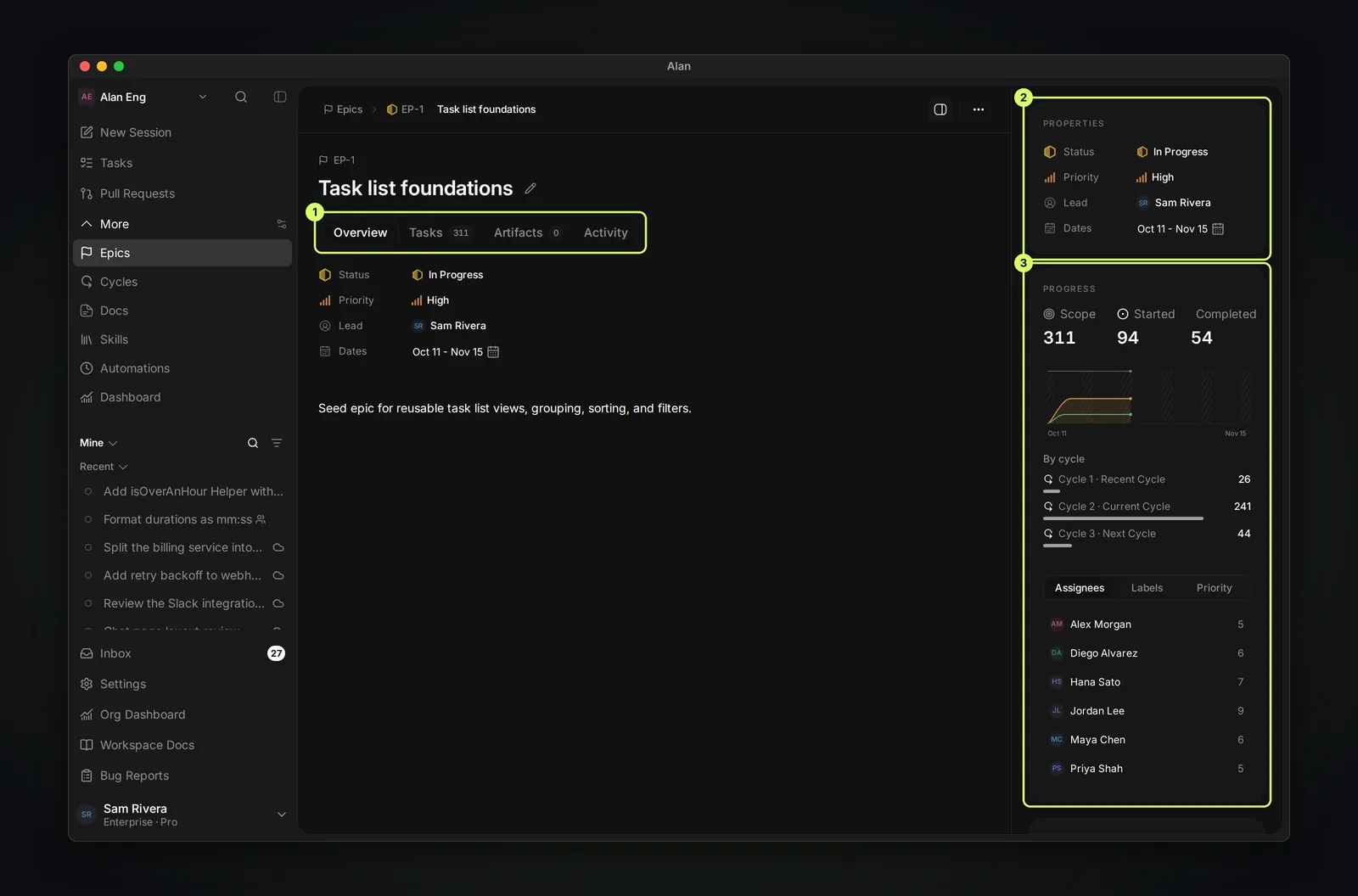
You don't tally tasks by hand. The epic's **Progress** panel counts its tasks for you:
|
|
53
|
+
|
|
54
|
+
- **Scope**, **Started**, and **Completed** counts, with a chart over time.
|
|
55
|
+
- Tasks **by cycle**, so you can see how the epic spreads across execution windows.
|
|
56
|
+
- Breakdowns by **Assignees**, **Labels**, and **Priority**.
|
|
57
|
+
|
|
58
|
+
Update task statuses as work progresses so the epic reflects the current state.
|
|
59
|
+
|
|
60
|
+
## Working inside an epic
|
|
61
|
+
|
|
62
|
+
|
|
63
|
+
|
|
64
|
+
**1. Overview**
|
|
65
|
+
|
|
66
|
+
Properties (status, priority, lead, target dates), the description, and the progress panel.
|
|
67
|
+
|
|
68
|
+
**2. Tasks**
|
|
69
|
+
|
|
70
|
+
Every task in the epic, with a count on the tab. Create tasks here so they're attached from the start.
|
|
71
|
+
|
|
72
|
+
**3. Artifacts**
|
|
73
|
+
|
|
74
|
+
Plans, documents, and other outputs attached to the epic.
|
|
75
|
+
|
|
76
|
+
**4. Activity**
|
|
77
|
+
|
|
78
|
+
Every change to the epic and its tasks, so anyone can catch up without replaying chat.
|
|
79
|
+
|
|
80
|
+
On the Epics page, switch between list and board views, filter by lead, search, show completed epics, and open archived ones.
|
|
81
|
+
|
|
82
|
+
## Create and finish an epic
|
|
83
|
+
|
|
84
|
+
Choose **New epic** on the Epics page. Give it a title that describes the goal, such as **Improve local setup**, then set a lead and target dates. Add the tasks needed to reach that goal from the epic's **Tasks** tab.
|
|
85
|
+
|
|
86
|
+
Use a task for a single fix. Use an epic when several tasks need shared context and progress tracking.
|
|
87
|
+
|
|
88
|
+
Archive an epic when the goal is complete or no longer planned. You can still find it in the archived view.
|
|
89
|
+
|
|
90
|
+
## Next steps
|
|
91
|
+
|
|
92
|
+
- [Cycles](cycles.md) — Time-box the epic's tasks for execution.
|
|
93
|
+
- [Members and teams](../administration/members-and-teams.md) — Who is on the team, their roles, and team settings.
|
|
94
|
+
- [Create a task](../tasks/create-a-task.md) — Attach tasks that deliver the epic.
|
|
95
|
+
- [Product map](../get-started/product-map.md) — How epics fit the wider structure.
|
|
@@ -0,0 +1,52 @@
|
|
|
1
|
+
> Source: [https://docs.tryalan.ai/docs/teams-and-planning/whiteboard](https://docs.tryalan.ai/docs/teams-and-planning/whiteboard)
|
|
2
|
+
|
|
3
|
+
# Whiteboard
|
|
4
|
+
|
|
5
|
+
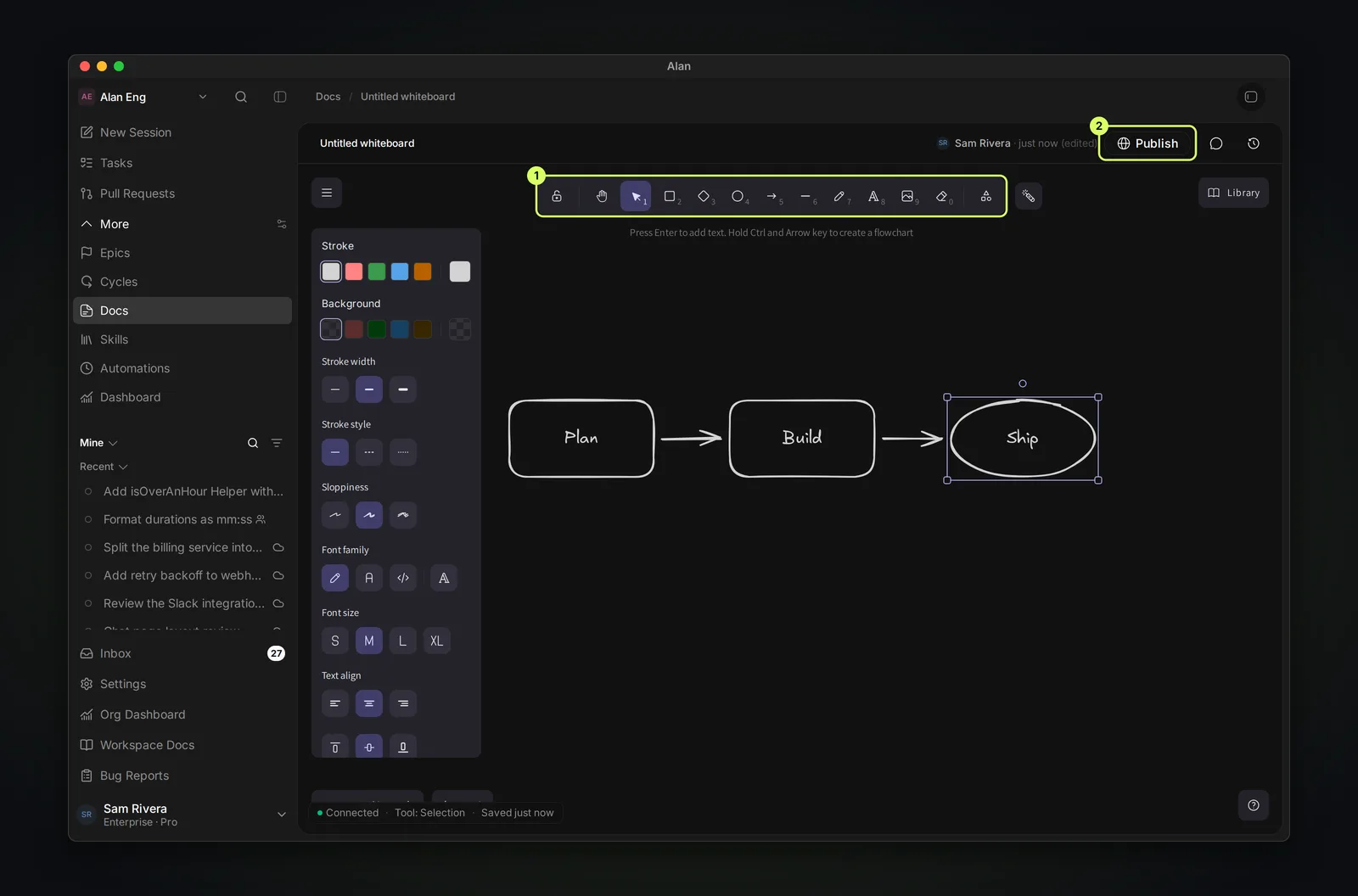
Whiteboards are drawing canvases in the same **Docs** area as documents. Use them for architecture sketches, flows, and quick visual thinking. They show up in the **Whiteboards** filter tab next to your documents.
|
|
6
|
+
|
|
7
|
+
## Create a whiteboard
|
|
8
|
+
|
|
9
|
+
**1. Open Docs**
|
|
10
|
+
|
|
11
|
+
Go to **Docs** in the team sidebar and switch to the **Whiteboards** tab, or stay on **All**.
|
|
12
|
+
|
|
13
|
+
**2. New whiteboard**
|
|
14
|
+
|
|
15
|
+
Choose **Add new → New whiteboard**. It opens titled **Untitled whiteboard**; rename it from the header. While it loads you'll see "Connecting to whiteboard...".
|
|
16
|
+
|
|
17
|
+
## The canvas
|
|
18
|
+
|
|
19
|
+
The whiteboard is a real drawing canvas. You can add:
|
|
20
|
+
|
|
21
|
+
- **Shapes**: rectangle, diamond, ellipse.
|
|
22
|
+
- **Connectors** — lines and arrows.
|
|
23
|
+
- **Text** and **freehand (pen)** drawing.
|
|
24
|
+
- **Images**.
|
|
25
|
+
- Plus selection, eraser, and hand (pan) tools, with more under **More tools**.
|
|
26
|
+
|
|
27
|
+
Whiteboards also have **Comments** and can be published to the web with **Publish**, like documents.
|
|
28
|
+
|
|
29
|
+
|
|
30
|
+
|
|
31
|
+
## Real-time collaboration
|
|
32
|
+
|
|
33
|
+
Whiteboards are collaborative. Everyone editing sees each other's pointers, selections, and avatars live on the canvas. Changes sync in real time.
|
|
34
|
+
|
|
35
|
+
## Version history
|
|
36
|
+
|
|
37
|
+
A whiteboard keeps **Version history** like a document — restore an earlier version from the header.
|
|
38
|
+
|
|
39
|
+
> **Note:** On phones a whiteboard opens **read-only** by design, so you can view but not edit it on a small screen. Edit whiteboards on desktop.
|
|
40
|
+
|
|
41
|
+
## Whiteboard vs document
|
|
42
|
+
|
|
43
|
+
- A **whiteboard** is a canvas — shapes, arrows, and sketches. A **document** is rich text with mentions and comments.
|
|
44
|
+
- Whiteboards don't support sub-pages, `@` mentions, or slash commands.
|
|
45
|
+
- Both live under **Docs**, both are team-standalone (not tied to a task), and both keep version history.
|
|
46
|
+
|
|
47
|
+
## Next steps
|
|
48
|
+
|
|
49
|
+
- [Documents](documents.md) — The text companion to whiteboards, in the same Docs area.
|
|
50
|
+
- [Members and teams](../administration/members-and-teams.md) — Who is on the team, their roles, and team settings.
|
|
51
|
+
- [Documents and artifacts](../reference/documents-and-artifacts.md) — When to use team-standalone pages versus task artifacts.
|
|
52
|
+
- [Product map](../get-started/product-map.md) — Where whiteboards sit in the overall structure.
|
|
@@ -0,0 +1,38 @@
|
|
|
1
|
+
> Source: [https://docs.tryalan.ai/docs/troubleshooting/agent-blocked](https://docs.tryalan.ai/docs/troubleshooting/agent-blocked)
|
|
2
|
+
|
|
3
|
+
# Agent is blocked
|
|
4
|
+
|
|
5
|
+
When an agent stops, Alan says why: in the status line of the turn, in a notice under the transcript, or in a question card. Read that first. Use the matching action below to continue in the same session. If the message asks you to start a new session, follow that instruction.
|
|
6
|
+
|
|
7
|
+
## What Alan shows and what to do
|
|
8
|
+
|
|
9
|
+
| You see | Why | What to do |
|
|
10
|
+
| --- | --- | --- |
|
|
11
|
+
| **Waiting for input** on the turn, and a card marked **Waiting for your answer** | The agent asked a question or needs a decision | Answer in the card. The turn continues. |
|
|
12
|
+
| **Agent stopped · your answer starts a new run** on a question card | The run ended before you answered | Answer anyway; your answer starts a new run with the context. |
|
|
13
|
+
| **Run stopped** | The run was stopped | Choose **Continue** to pick up where it left off, or send a new message. |
|
|
14
|
+
| **The agent stopped before this run finished** | The run ended before it finished | Choose **Continue**. |
|
|
15
|
+
| **Waiting for** *(computer)* **to come online** | The session runs on a computer that is offline. "Your message runs as soon as it reconnects." | Open the Alan desktop app on that computer, or wait. Alan stops waiting after a while and tells you how long is left. |
|
|
16
|
+
| **Sign in to** *(agent)* **on** *(computer)* | The coding agent CLI on that computer is signed out | "Open a terminal on that computer, sign in to the CLI, then send your message again." |
|
|
17
|
+
| **The API key for** *(agent)* **was rejected** | The provider refused the key | "Update it in settings, then send your message again." |
|
|
18
|
+
| *(Agent)* **usage limit reached** | The provider's plan limit is used up | Send again after the reset time shown, or switch to another model in the composer. |
|
|
19
|
+
| **Stopped before it started** | The turn was stopped or failed before the agent began | Send the message again. If it repeats, check the computer; see [Runtime unavailable](runtime-unavailable.md). |
|
|
20
|
+
| **Not sent. The computer was stopped** under your message | The message was cancelled before delivery | Start or wake the computer, then send it again. |
|
|
21
|
+
|
|
22
|
+
Turn states and message states are explained in full in [Session lifecycle](../agents-and-sessions/session-lifecycle.md).
|
|
23
|
+
|
|
24
|
+
## When the agent is stuck on the task, not the tooling
|
|
25
|
+
|
|
26
|
+
Sometimes the run finishes but the agent reports it can't go further: it lacks access to a repository, the instruction is ambiguous, or it is working in the wrong task or repository.
|
|
27
|
+
|
|
28
|
+
1. Read the agent's last message and the task's latest activity or artifact. Look for the specific thing it needs.
|
|
29
|
+
2. Give exactly that: the missing detail, a decision, or access. For repository access, see [GitHub access issues](github-access.md).
|
|
30
|
+
3. Reply in the same session so the agent keeps its context. A bare "try again" rarely helps unless the failure was temporary.
|
|
31
|
+
4. If the task changed direction, start a new session on the task so the transcript stays focused.
|
|
32
|
+
|
|
33
|
+
## Next steps
|
|
34
|
+
|
|
35
|
+
- [Session lifecycle](../agents-and-sessions/session-lifecycle.md) — Every turn and message state.
|
|
36
|
+
- [Runtime unavailable](runtime-unavailable.md) — When the computer or cloud environment is the blocker.
|
|
37
|
+
- [GitHub access issues](github-access.md) — When the blocker is repository access.
|
|
38
|
+
- [Coding agents and models](../agents-and-sessions/coding-agents-and-models.md) — Sign in to agent CLIs and switch models.
|
|
@@ -0,0 +1,118 @@
|
|
|
1
|
+
> Source: [https://docs.tryalan.ai/docs/troubleshooting/common-problems](https://docs.tryalan.ai/docs/troubleshooting/common-problems)
|
|
2
|
+
|
|
3
|
+
# Common problems
|
|
4
|
+
|
|
5
|
+
Find the message or symptom you're seeing, then follow the fix. Match the message or label below to what Alan shows. If nothing here matches, [report a bug](report-an-issue.md).
|
|
6
|
+
|
|
7
|
+
## Installing on Windows
|
|
8
|
+
|
|
9
|
+
**Windows protected your PC**
|
|
10
|
+
|
|
11
|
+
"Microsoft Defender SmartScreen prevented an unrecognized app from starting."
|
|
12
|
+
|
|
13
|
+
SmartScreen shows this for installers it has not seen enough times yet, even when they are signed. The Alan installer is signed by Supatest AI Inc, and the screen confirms it one click in.
|
|
14
|
+
|
|
15
|
+
1. Click **More info**, the small link under the warning text.
|
|
16
|
+
2. Check that **Publisher** reads **Supatest AI Inc**. If it says **Unknown publisher**, stop and download again from [tryalan.ai/download](https://tryalan.ai/download/).
|
|
17
|
+
3. Click **Run anyway**. Setup starts normally.
|
|
18
|
+
|
|
19
|
+
Updates install from inside the app and never show this screen. If **Run anyway** is missing, your device policy blocks it; ask your IT team to allow the publisher Supatest AI Inc.
|
|
20
|
+
|
|
21
|
+
## Alan won't open
|
|
22
|
+
|
|
23
|
+
When Alan can't load your account after sign-in, it shows one of these screens instead of your workspace.
|
|
24
|
+
|
|
25
|
+
| Message | What it means | Fix |
|
|
26
|
+
| --- | --- | --- |
|
|
27
|
+
| **Can't reach** *(server)* | "Alan tried three times and got no response." | Check your internet connection or VPN, then choose **Try again**. |
|
|
28
|
+
| **The sign-in request was blocked** | The server is up, but something on your network stopped the request, usually a VPN, proxy, or security tool. | Try another network or turn the VPN off, then **Try again**. |
|
|
29
|
+
| **Your sign-in has expired** | You were signed out. | Choose **Sign in again**. |
|
|
30
|
+
| **Alan's server had a problem** | "Your account is fine. The server failed to load it, usually for a moment." | Wait a minute, then **Try again**. |
|
|
31
|
+
| **Alan couldn't load your account** | The server refused the request and says why below the title. | Follow the message, or contact support. |
|
|
32
|
+
|
|
33
|
+
Below the buttons, the screen shows a line such as `HTTP 503 · Request 4f2c…`. Where the screen offers **Message support**, choosing it opens a support chat with that line already filled in. Include it in any bug report too.
|
|
34
|
+
|
|
35
|
+
If the app was in the background for a long time you might instead see "Your session expired while the app was in the background. Sign in again to continue." Choose **Sign in again**.
|
|
36
|
+
|
|
37
|
+
## Access and setup
|
|
38
|
+
|
|
39
|
+
**This team isn't available to you**
|
|
40
|
+
|
|
41
|
+
"You may not be a member of it, or it may belong to another organization you're in."
|
|
42
|
+
|
|
43
|
+
- Choose **Go to my teams** and pick a team you belong to.
|
|
44
|
+
- If the team is in another organization, switch with **Switch organisation** in the account menu (your name, bottom left).
|
|
45
|
+
- Otherwise ask a team admin to add you. See [Members and teams](../administration/members-and-teams.md).
|
|
46
|
+
|
|
47
|
+
**Tasks are disabled for this team.**
|
|
48
|
+
|
|
49
|
+
The team has switched tasks off, so the task list and task creation are hidden. Existing tasks are kept, and direct links to them still work.
|
|
50
|
+
|
|
51
|
+
Any team member can turn them back on: **Settings →** your team **→ Tasks**, then switch on **Enable tasks**.
|
|
52
|
+
|
|
53
|
+
**Pull Requests asks you to connect or add a repository**
|
|
54
|
+
|
|
55
|
+
| Message | Fix |
|
|
56
|
+
| --- | --- |
|
|
57
|
+
| **Connect GitHub for this team** | Add a source control connection in **Settings →** your team **→ Integrations**. |
|
|
58
|
+
| **Connect your GitHub account** | Link your own account in **Settings → Account → Connected accounts**. **My PRs** and **For me** need it. |
|
|
59
|
+
| **Add a repository to this team** | Link at least one repository to the team. |
|
|
60
|
+
| **Your GitHub connection expired. Reconnect to continue.** | Choose **Reconnect** on the message. |
|
|
61
|
+
| **Pull request sync failed** | Alan retries on its own. If it keeps failing, check the connection; see [GitHub access issues](github-access.md). |
|
|
62
|
+
|
|
63
|
+
Azure DevOps and Bitbucket show the same messages with their own names.
|
|
64
|
+
|
|
65
|
+
## Sending and running
|
|
66
|
+
|
|
67
|
+
**Choose an execution target before sending.**
|
|
68
|
+
|
|
69
|
+
The session has no computer or cloud environment selected yet. Choose **Choose target** on the notice (or the target menu in the composer) and pick a cloud environment or a computer. **Start** on a task is disabled for the same reason, with "Choose a cloud environment or switch to a computer before starting."
|
|
70
|
+
|
|
71
|
+
"Start a new session to use this task's execution target." means this session was started before the task had a target. Start a new session on the task.
|
|
72
|
+
|
|
73
|
+
**The composer shows a Cloud environment warning**
|
|
74
|
+
|
|
75
|
+
A **Cloud environment** label with a warning icon means "This cloud environment is unavailable. Choose another one from the execution target menu." It may have been archived or deleted. Pick another environment, or a computer, from the target menu. **Cloud unavailable** means Alan couldn't load your environments; reload the page.
|
|
76
|
+
|
|
77
|
+
If cloud is blocked by your plan or budget, the message says so, for example "Your organisation's cloud budget is used up for this month." See [Usage and credits](../plans-and-billing/usage-and-credits.md) for what each limit means and who can add credits.
|
|
78
|
+
|
|
79
|
+
**Not sent. The computer was stopped**
|
|
80
|
+
|
|
81
|
+
Your message didn't reach the agent because its computer stopped. Start or wake the computer, then send the message again. Other states you might see under a message: **Queued. Runs after the current turn** and **Runs next. The agent finished before reading it** both mean it will run without you doing anything. See [Session lifecycle](../agents-and-sessions/session-lifecycle.md#sending-while-the-agent-works).
|
|
82
|
+
|
|
83
|
+
**Waiting for input**
|
|
84
|
+
|
|
85
|
+
The agent asked a question or needs a decision. Answer it in the card marked **Waiting for your answer**; the turn continues from there. See [Agent is blocked](agent-blocked.md).
|
|
86
|
+
|
|
87
|
+
**The computer is asleep, shut down, or not responding**
|
|
88
|
+
|
|
89
|
+
Cloud computers sleep and shut down on their own and keep your files. Send a message or choose **Wake up** or **Start**. For **Unresponsive**, **Disconnected**, **Deleted**, or **Failed**, see [Runtime unavailable](runtime-unavailable.md).
|
|
90
|
+
|
|
91
|
+
**The desktop stays on Waiting for the desktop stream**
|
|
92
|
+
|
|
93
|
+
"Waiting for the desktop stream to become available." usually clears on its own once the computer is ready. If the panel says "The computer is not responding. Use the session recovery controls.", recover the computer first; see [Runtime unavailable](runtime-unavailable.md).
|
|
94
|
+
|
|
95
|
+
## The app looks out of date
|
|
96
|
+
|
|
97
|
+
**Real-time sync unavailable — showing cached data**
|
|
98
|
+
|
|
99
|
+
Alan lost its live connection, so what you see may be stale. Choose **Connect** on the banner. If that fails, choose **Reload app**. This can happen after waking your computer, changing a VPN connection, or switching Wi-Fi networks.
|
|
100
|
+
|
|
101
|
+
**A plan, test report, or other output is missing**
|
|
102
|
+
|
|
103
|
+
It is usually on a different task or session, or it was never saved as an artifact. See [Missing artifact](missing-artifact.md).
|
|
104
|
+
|
|
105
|
+
**A link opens the wrong place or nothing at all**
|
|
106
|
+
|
|
107
|
+
Check you're in the organization and team that own the record. Links include the team, so a link from another team shows **This team isn't available to you**. Open the record from its task or list instead of a pasted link. See [Links and IDs](../reference/links-and-ids.md).
|
|
108
|
+
|
|
109
|
+
## Still stuck
|
|
110
|
+
|
|
111
|
+
Collect the page you were on, what you did, and the exact message (including any `HTTP … · Request …` line), then [report a bug](report-an-issue.md). For cloud environment and computer problems, also see [Cloud and local troubleshooting](../cloud-and-local/troubleshooting-and-faq.md).
|
|
112
|
+
|
|
113
|
+
## Next steps
|
|
114
|
+
|
|
115
|
+
- [Report an issue](report-an-issue.md) — File a bug report with evidence.
|
|
116
|
+
- [Runtime unavailable](runtime-unavailable.md) — A computer or cloud environment isn't working.
|
|
117
|
+
- [GitHub access issues](github-access.md) — Repositories and pull requests are missing.
|
|
118
|
+
- [Agent is blocked](agent-blocked.md) — The agent stopped and needs something from you.
|
|
@@ -0,0 +1,41 @@
|
|
|
1
|
+
> Source: [https://docs.tryalan.ai/docs/troubleshooting/github-access](https://docs.tryalan.ai/docs/troubleshooting/github-access)
|
|
2
|
+
|
|
3
|
+
# GitHub access issues
|
|
4
|
+
|
|
5
|
+
Alan reaches GitHub in two ways, and most access problems come from one of them missing:
|
|
6
|
+
|
|
7
|
+
| Connection | Who sets it up | What it's for |
|
|
8
|
+
| --- | --- | --- |
|
|
9
|
+
| **Source control connection** (the Alan GitHub App) | Any member, in **Settings →** your team **→ Integrations** | Reading repositories, cloning them into cloud sessions, and opening pull requests |
|
|
10
|
+
| **Your GitHub account** | Each member, in **Settings → Account → Connected accounts** | Showing your pull requests and review requests, and putting your name on your actions |
|
|
11
|
+
|
|
12
|
+
Setup for both is in [Connect GitHub](../get-started/connect-github.md).
|
|
13
|
+
|
|
14
|
+
## Match the symptom
|
|
15
|
+
|
|
16
|
+
| Symptom or message | Likely cause | Fix |
|
|
17
|
+
| --- | --- | --- |
|
|
18
|
+
| **Connect GitHub for this team** on Pull Requests | The team has no GitHub connection | Choose **Open repository settings**, then **Add connection** under **Source control**. |
|
|
19
|
+
| **Add a repository to this team** | No repository is linked to the team | Choose **Add a repository**, then **Add repo** in the team's **Repositories** section. |
|
|
20
|
+
| A repository is missing from the list when you add one | The GitHub App installation doesn't include it | Choose **Manage access**, add the repository on GitHub, then **Refresh**. |
|
|
21
|
+
| A pull request on GitHub isn't listed yet | Alan syncs on a schedule, so a new pull request can arrive late | Wait for the next refresh, or select the refresh icon next to the **Live** or **Auto-refresh** label. If it still doesn't appear, check the repository is linked and the app can read it. |
|
|
22
|
+
| **Connect your GitHub account**, or **My PRs** and **For me** are empty | Your personal account isn't linked | Link it in **Settings → Account → Connected accounts**. |
|
|
23
|
+
| **Your GitHub connection expired. Reconnect to continue.** | Your personal GitHub sign-in expired | Choose **Reconnect** on the message. |
|
|
24
|
+
| **Pull request sync failed**, or "Cached results may be stale because the provider sync failed" | Alan couldn't refresh from GitHub | Alan retries on its own. If it continues, use **Check connection** on the connection and reconnect if it fails. |
|
|
25
|
+
| A pull request from a fork can't be read | The fork's owner hasn't installed the app | Push the branch to a repository the app covers, or install the app on the fork's owner. |
|
|
26
|
+
| The agent can't push a branch or open a pull request | The branch exists only locally, or the app or your account lacks write access | Ask the agent to push the branch first. Then check the app has the repository and you have write access on GitHub. |
|
|
27
|
+
|
|
28
|
+
## If access worked before
|
|
29
|
+
|
|
30
|
+
1. Open **Settings →** your team **→ Integrations** and choose **Check connection** on the GitHub connection.
|
|
31
|
+
2. If the check fails, reconnect. If someone removed the app or narrowed its repositories on GitHub, reinstall it or add the repositories back.
|
|
32
|
+
3. Disconnecting a connection stops cloning and pull requests for every team repository that uses it, so reconnect rather than disconnect where you can.
|
|
33
|
+
|
|
34
|
+
> **Warning:** Don't work around missing access by pasting private code into a chat. Fix the connection so the agent reads the repository directly.
|
|
35
|
+
|
|
36
|
+
## Next steps
|
|
37
|
+
|
|
38
|
+
- [Connect GitHub](../get-started/connect-github.md) — The full connection flow.
|
|
39
|
+
- [Pull requests](../reviews-testing-deploys/pull-requests.md) — The Pull Requests page and its tabs.
|
|
40
|
+
- [Connect Azure DevOps](../get-started/connect-azure-devops.md) — Azure Repos and pull requests.
|
|
41
|
+
- [Roles and permissions](../reference/roles-and-permissions.md) — Who can change integrations and repositories.
|
|
@@ -0,0 +1,47 @@
|
|
|
1
|
+
> Source: [https://docs.tryalan.ai/docs/troubleshooting/missing-artifact](https://docs.tryalan.ai/docs/troubleshooting/missing-artifact)
|
|
2
|
+
|
|
3
|
+
# Missing artifact
|
|
4
|
+
|
|
5
|
+
If a plan or report is missing, check its task or session, archived artifacts, and the conversation where it was written.
|
|
6
|
+
|
|
7
|
+
## Find it
|
|
8
|
+
|
|
9
|
+
**1. Open Artifacts on the right task or session**
|
|
10
|
+
|
|
11
|
+
On a task, open **Artifacts** in the right-hand panel. A standalone session (one that isn't part of a task) has its own **Artifacts** panel. Make sure you're in the team and task you expect; an artifact made in another session or task is listed there instead.
|
|
12
|
+
|
|
13
|
+
**2. Check Archived**
|
|
14
|
+
|
|
15
|
+
Archived artifacts are hidden from the main list. Expand **Archived (n)** at the bottom of the panel, then use **…** → **Restore** to bring one back.
|
|
16
|
+
|
|
17
|
+
**3. Look in the conversation**
|
|
18
|
+
|
|
19
|
+
Artifacts an agent creates also appear as a card in the conversation, at the turn that made them. Select the card to open it, then note which task or session it belongs to.
|
|
20
|
+
|
|
21
|
+
**4. Check it was ever an artifact**
|
|
22
|
+
|
|
23
|
+
If the agent wrote it only as a chat message, ask the agent to save it as an artifact.
|
|
24
|
+
|
|
25
|
+
## Recreate it
|
|
26
|
+
|
|
27
|
+
Ask in the same session, so the agent still has the context:
|
|
28
|
+
|
|
29
|
+
```text
|
|
30
|
+
Save the plan you wrote above as a plan artifact on this task.
|
|
31
|
+
```
|
|
32
|
+
|
|
33
|
+
For a test report, ask the agent to create a test report with the evidence it already gathered. You can also create one yourself from **Artifacts** with **New**. Then check it appears in **Artifacts** before moving on.
|
|
34
|
+
|
|
35
|
+
Look for pull request reviews under **Alan Review** on the pull request. Starting a review also creates a document artifact when the pull request has a primary linked task. See [Review work](../reviews-testing-deploys/review-work.md).
|
|
36
|
+
|
|
37
|
+
## Prevent it
|
|
38
|
+
|
|
39
|
+
- Ask for an artifact by type ("a plan artifact", "a test report"), not just a summary in chat.
|
|
40
|
+
- Run sessions from the task they belong to, so their artifacts land on that task.
|
|
41
|
+
|
|
42
|
+
## Next steps
|
|
43
|
+
|
|
44
|
+
- [Task artifacts](../tasks/task-artifacts.md) — Artifact types and where they live.
|
|
45
|
+
- [Testing evidence](../reviews-testing-deploys/testing-evidence.md) — What a test report contains.
|
|
46
|
+
- [Links and IDs](../reference/links-and-ids.md) — How tasks, sessions, and teams are identified.
|
|
47
|
+
- [Common problems](common-problems.md) — Other issues and their fixes.
|
|
@@ -0,0 +1,74 @@
|
|
|
1
|
+
> Source: [https://docs.tryalan.ai/docs/troubleshooting/report-an-issue](https://docs.tryalan.ai/docs/troubleshooting/report-an-issue)
|
|
2
|
+
|
|
3
|
+
# Report an issue
|
|
4
|
+
|
|
5
|
+
If [Common problems](common-problems.md) doesn't cover what you're seeing, report it from Alan. A report goes to the Alan team with your device details attached, and you can follow its status and reply to questions in the app.
|
|
6
|
+
|
|
7
|
+
## Get help
|
|
8
|
+
|
|
9
|
+
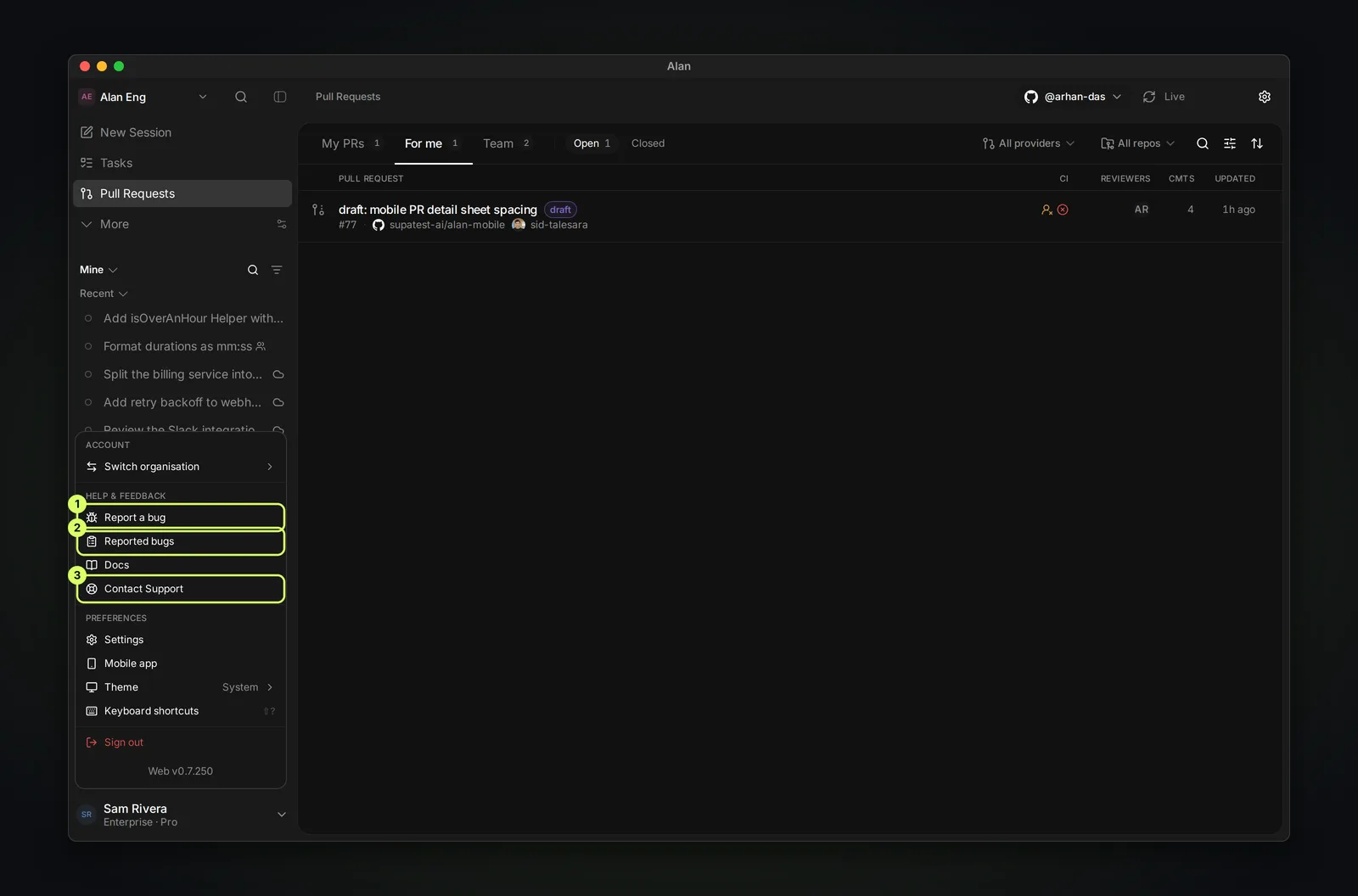
Open the account menu (your name, bottom left). Under **Help & feedback**:
|
|
10
|
+
|
|
11
|
+
|
|
12
|
+
|
|
13
|
+
| Item | What it does |
|
|
14
|
+
| --- | --- |
|
|
15
|
+
| **Report a bug** | Opens a new bug report |
|
|
16
|
+
| **Reported bugs** | Lists the reports you've filed |
|
|
17
|
+
| **Docs** | Opens this documentation |
|
|
18
|
+
| **Contact Support** | Opens a chat with the Alan team |
|
|
19
|
+
|
|
20
|
+
You can also email [support@tryalan.ai](mailto:support@tryalan.ai), including if you can't sign in.
|
|
21
|
+
|
|
22
|
+
## Report a bug
|
|
23
|
+
|
|
24
|
+
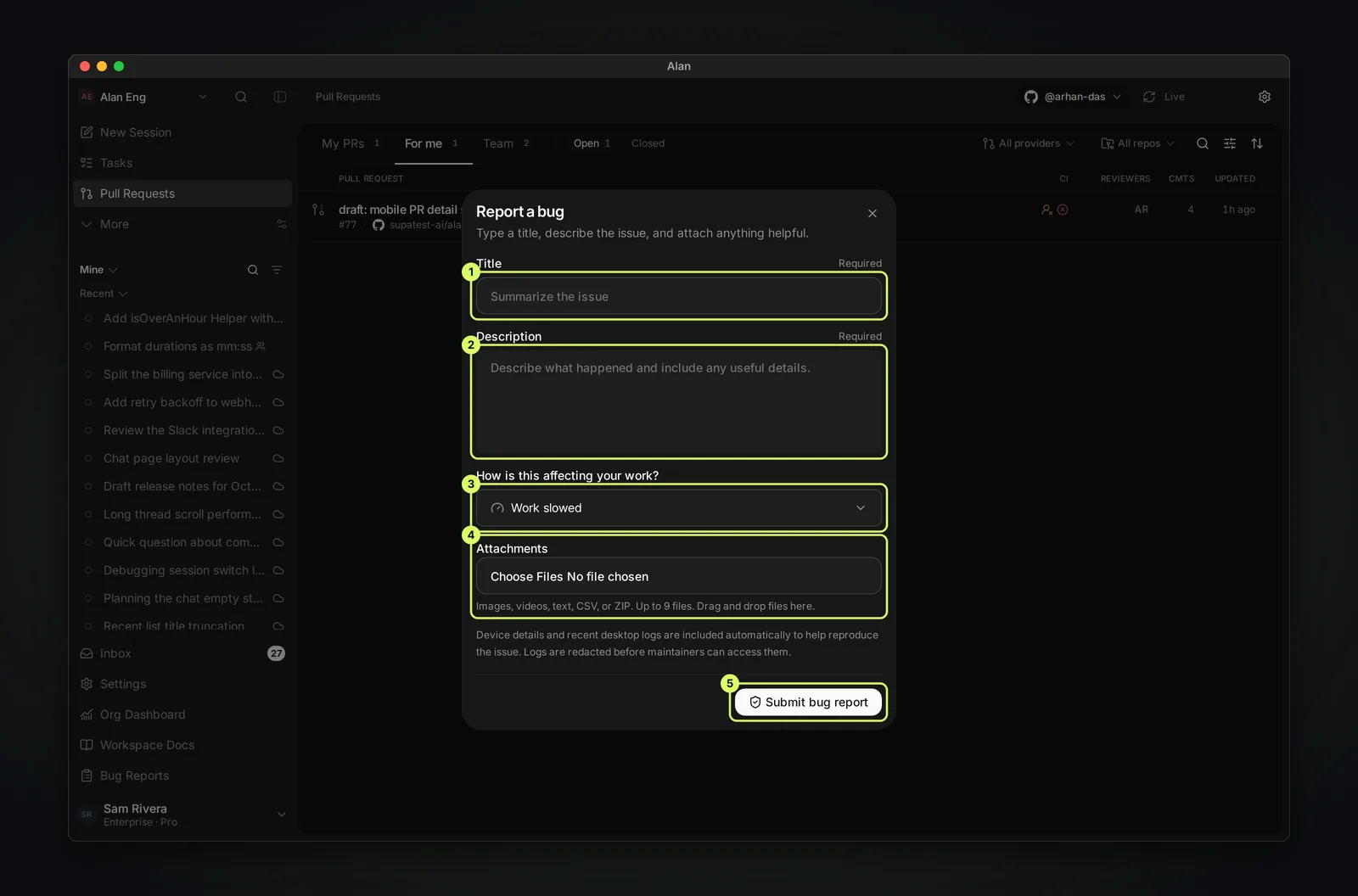
|
|
25
|
+
|
|
26
|
+
**1. Title**
|
|
27
|
+
|
|
28
|
+
Required. A one-line summary, for example "Desktop stays blank after waking a cloud session".
|
|
29
|
+
|
|
30
|
+
**2. Description**
|
|
31
|
+
|
|
32
|
+
Required. What you did, what you expected, and what happened instead. Include the exact message and any `HTTP … · Request …` line.
|
|
33
|
+
|
|
34
|
+
**3. How is this affecting your work?**
|
|
35
|
+
|
|
36
|
+
**Minor**, **Work slowed** (the default), **Some work blocked**, **Work blocked**, or **Work lost**.
|
|
37
|
+
|
|
38
|
+
**4. Attachments**
|
|
39
|
+
|
|
40
|
+
Optional. Images, videos, text, CSV, or ZIP, up to 9 files. Choose them, or drag them onto **Attachments**.
|
|
41
|
+
|
|
42
|
+
**5. Submit**
|
|
43
|
+
|
|
44
|
+
Choose **Submit bug report**. You'll see **Bug report submitted**.
|
|
45
|
+
|
|
46
|
+
Alan includes device details and recent desktop logs automatically. Logs are redacted before maintainers can access them.
|
|
47
|
+
|
|
48
|
+
### Report a problem with a session
|
|
49
|
+
|
|
50
|
+
For a problem in a specific session, use **Report bug** in that session's **…** menu instead. Leave **Include session diagnostics** on to attach session IDs, connection state, and message counts. This excludes chat text, local paths, and raw errors, and uses one attachment slot.
|
|
51
|
+
|
|
52
|
+
## Follow a report
|
|
53
|
+
|
|
54
|
+
Open **Reported bugs**, or **Settings → Account → Bug reports**. Each report shows a reference such as `REP-2026-2CAF7F8C64`, its status, and when it was last updated. Use **Filters** to narrow the list.
|
|
55
|
+
|
|
56
|
+
| Status | Meaning |
|
|
57
|
+
| --- | --- |
|
|
58
|
+
| **Received** | Filed and waiting to be looked at |
|
|
59
|
+
| **Needs information** | The Alan team needs more detail from you |
|
|
60
|
+
| **Investigating** | Someone is looking into it |
|
|
61
|
+
| **Known issue** | Confirmed and tracked, not fixed yet |
|
|
62
|
+
| **Resolved** | Fixed |
|
|
63
|
+
| **Closed** | No further action, for example a duplicate |
|
|
64
|
+
|
|
65
|
+
Open a report to see what you sent and its **Evidence**. Files show **Preparing** until they pass the safety review. Use **Add evidence** to attach more files later.
|
|
66
|
+
|
|
67
|
+
Under **Conversation**, reply in the box ("Add context or answer a question"). Answer here when a report is **Needs information**.
|
|
68
|
+
|
|
69
|
+
## Next steps
|
|
70
|
+
|
|
71
|
+
- [Common problems](common-problems.md) — Fixes for the messages people see most.
|
|
72
|
+
- [Runtime unavailable](runtime-unavailable.md) — A computer or cloud environment isn't working.
|
|
73
|
+
- [Agent is blocked](agent-blocked.md) — The agent stopped and needs something from you.
|
|
74
|
+
- [Session lifecycle](../agents-and-sessions/session-lifecycle.md) — What each session and message state means.
|
|
@@ -0,0 +1,49 @@
|
|
|
1
|
+
> Source: [https://docs.tryalan.ai/docs/troubleshooting/runtime-unavailable](https://docs.tryalan.ai/docs/troubleshooting/runtime-unavailable)
|
|
2
|
+
|
|
3
|
+
# Runtime unavailable
|
|
4
|
+
|
|
5
|
+
Every session runs on an execution target: one of your computers, a team VM, or a cloud computer from the team's cloud environment. When that target isn't available, the agent can't run, but the chat history is kept. Fix the target, then continue in the same session.
|
|
6
|
+
|
|
7
|
+
## First, find the target
|
|
8
|
+
|
|
9
|
+
The session's target shows in the composer and in the session's side panel, for example **Cloud machine · Ready** or a computer that is **Online**. Match its state below.
|
|
10
|
+
|
|
11
|
+
## A cloud computer
|
|
12
|
+
|
|
13
|
+
Cloud computers go to sleep and shut down on their own when idle. Both keep your files.
|
|
14
|
+
|
|
15
|
+
| You see | What to do |
|
|
16
|
+
| --- | --- |
|
|
17
|
+
| **Computer asleep** | Send a message, or choose **Wake up**. |
|
|
18
|
+
| **Computer shut down** | Send a message, or choose **Start**. |
|
|
19
|
+
| **Unresponsive** or **Disconnected** | Choose **Repair session**. If that doesn't help, **Restart computer** (files are kept; running processes end). |
|
|
20
|
+
| **Workspace unavailable** or **Failed** | Read the error, then choose **Repair session**. If setup itself failed, fix the environment's setup; see [Cloud setup](../cloud-and-local/cloud-setup.md). |
|
|
21
|
+
| **Computer deleted** | The workspace is gone; chat history is kept. Choose **Repair session** and follow the recovery prompt. Files that were only on the deleted computer cannot be recovered. |
|
|
22
|
+
|
|
23
|
+
The composer can also show a **Cloud environment** warning: "This cloud environment is unavailable. Choose another one from the execution target menu." Pick another environment or a computer. If cloud is blocked by your plan or budget, the message says so; see [Usage and credits](../plans-and-billing/usage-and-credits.md).
|
|
24
|
+
|
|
25
|
+
Full details: [Sandboxes](../cloud-and-local/sandboxes.md) and [Runtime recovery](../cloud-and-local/runtime-recovery.md).
|
|
26
|
+
|
|
27
|
+
## Your computer or a team VM
|
|
28
|
+
|
|
29
|
+
| You see | What to do |
|
|
30
|
+
| --- | --- |
|
|
31
|
+
| **Waiting for** *(computer)* **to come online** | Open the Alan desktop app on that computer, or start the VM's runtime. Your message runs as soon as it reconnects. |
|
|
32
|
+
| **Offline** | The app or runtime isn't running on that machine. Start it. |
|
|
33
|
+
| **Reconnecting…** | Wait; Alan is restoring the link. |
|
|
34
|
+
| **Needs attention** | Use the action on the machine's row, for example **Reconnect**, **Sign in**, or **Update Alan**. |
|
|
35
|
+
| **Update required** | Run the update command shown, then reconnect. |
|
|
36
|
+
| **Sign in to** *(agent)* **on** *(computer)* | Sign in to the coding agent CLI in a terminal on that machine, then send again. |
|
|
37
|
+
|
|
38
|
+
Machines are listed in **Settings → Account → General → Computers** (desktop app) and team VMs in the team's **Settings → VMs**. See [Local execution](../cloud-and-local/local-execution.md).
|
|
39
|
+
|
|
40
|
+
## Before switching computers
|
|
41
|
+
|
|
42
|
+
A cloud computer and your own computer have separate files. Starting a session on another computer does not copy uncommitted work, so recover the original computer when you can. If you do need to switch, commit and push first, then start the new session on the other target.
|
|
43
|
+
|
|
44
|
+
## Next steps
|
|
45
|
+
|
|
46
|
+
- [Runtime recovery](../cloud-and-local/runtime-recovery.md) — Layer-by-layer recovery for computers and agent runs.
|
|
47
|
+
- [Sandboxes](../cloud-and-local/sandboxes.md) — Cloud computer states and actions.
|
|
48
|
+
- [Local execution](../cloud-and-local/local-execution.md) — Connect and manage your computers and team VMs.
|
|
49
|
+
- [Agent is blocked](agent-blocked.md) — When the computer is fine but the agent stopped.
|