@alan-ai-hq/agent-manager-linux-arm64 0.1.199 → 0.1.201
This diff represents the content of publicly available package versions that have been released to one of the supported registries. The information contained in this diff is provided for informational purposes only and reflects changes between package versions as they appear in their respective public registries.
- package/alan-agent.cjs +8928 -5241
- package/alan-holder.cjs +5364 -3401
- package/alan-lease.cjs +808 -200
- package/builtin-skills/agent-desktop/SKILL.md +94 -0
- package/builtin-skills/alan-artifact/SKILL.md +128 -0
- package/builtin-skills/alan-artifact/examples/interactive-diagram.md +50 -0
- package/builtin-skills/alan-artifact/examples/prototype.md +53 -0
- package/builtin-skills/alan-artifact/examples/test-report.md +55 -0
- package/builtin-skills/alan-artifact/references/design.md +39 -0
- package/builtin-skills/alan-artifact/references/diagrams.md +20 -0
- package/builtin-skills/alan-deck/SKILL.md +189 -0
- package/builtin-skills/alan-diagrams/SKILL.md +105 -0
- package/builtin-skills/alan-diagrams/references/diagram-catalogue.md +847 -0
- package/builtin-skills/alan-docs/SKILL.md +143 -0
- package/builtin-skills/alan-docs/references/administration/members-and-teams.md +48 -0
- package/builtin-skills/alan-docs/references/administration/org-dashboard.md +19 -0
- package/builtin-skills/alan-docs/references/administration/organisation-settings.md +41 -0
- package/builtin-skills/alan-docs/references/agents-and-sessions/code-context.md +60 -0
- package/builtin-skills/alan-docs/references/agents-and-sessions/coding-agents-and-models.md +78 -0
- package/builtin-skills/alan-docs/references/agents-and-sessions/session-lifecycle.md +62 -0
- package/builtin-skills/alan-docs/references/agents-and-sessions/start-a-session.md +110 -0
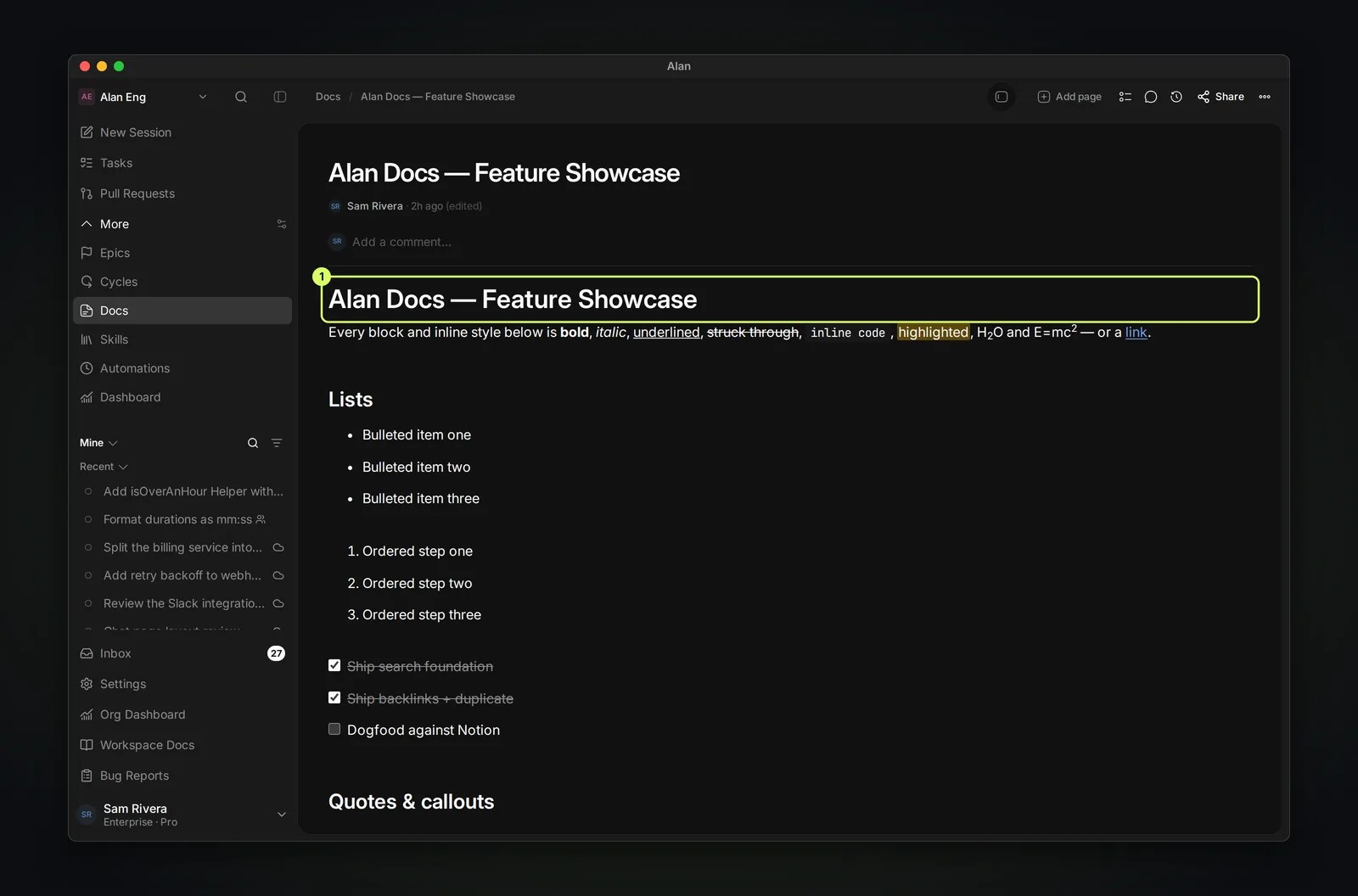
- package/builtin-skills/alan-docs/references/automations/automation-runs.md +69 -0
- package/builtin-skills/alan-docs/references/automations/create-an-automation.md +143 -0
- package/builtin-skills/alan-docs/references/automations/overview.md +77 -0
- package/builtin-skills/alan-docs/references/cloud-and-local/cloud-images.md +64 -0
- package/builtin-skills/alan-docs/references/cloud-and-local/cloud-sessions-and-execution.md +89 -0
- package/builtin-skills/alan-docs/references/cloud-and-local/cloud-setup.md +128 -0
- package/builtin-skills/alan-docs/references/cloud-and-local/codex-cli-connector.md +92 -0
- package/builtin-skills/alan-docs/references/cloud-and-local/local-execution.md +213 -0
- package/builtin-skills/alan-docs/references/cloud-and-local/runtime-recovery.md +60 -0
- package/builtin-skills/alan-docs/references/cloud-and-local/sandboxes.md +74 -0
- package/builtin-skills/alan-docs/references/cloud-and-local/troubleshooting-and-faq.md +102 -0
- package/builtin-skills/alan-docs/references/get-started/connect-azure-devops.md +89 -0
- package/builtin-skills/alan-docs/references/get-started/connect-bitbucket.md +86 -0
- package/builtin-skills/alan-docs/references/get-started/connect-github.md +114 -0
- package/builtin-skills/alan-docs/references/get-started/join-a-team.md +114 -0
- package/builtin-skills/alan-docs/references/get-started/product-map.md +96 -0
- package/builtin-skills/alan-docs/references/get-started/quickstart.md +158 -0
- package/builtin-skills/alan-docs/references/get-started/set-up-your-team.md +200 -0
- package/builtin-skills/alan-docs/references/get-started/sign-in.md +104 -0
- package/builtin-skills/alan-docs/references/get-started/welcome.md +39 -0
- package/builtin-skills/alan-docs/references/integrations/connect-microsoft-teams.md +116 -0
- package/builtin-skills/alan-docs/references/integrations/connect-slack.md +164 -0
- package/builtin-skills/alan-docs/references/integrations/import-from-linear.md +172 -0
- package/builtin-skills/alan-docs/references/plans-and-billing/plans-and-limits.md +115 -0
- package/builtin-skills/alan-docs/references/plans-and-billing/usage-and-credits.md +47 -0
- package/builtin-skills/alan-docs/references/reference/documents-and-artifacts.md +52 -0
- package/builtin-skills/alan-docs/references/reference/faq.md +89 -0
- package/builtin-skills/alan-docs/references/reference/feature-catalog.md +89 -0
- package/builtin-skills/alan-docs/references/reference/glossary.md +96 -0
- package/builtin-skills/alan-docs/references/reference/links-and-ids.md +80 -0
- package/builtin-skills/alan-docs/references/reference/roles-and-permissions.md +64 -0
- package/builtin-skills/alan-docs/references/reference/statuses.md +86 -0
- package/builtin-skills/alan-docs/references/reviews-testing-deploys/deployments.md +28 -0
- package/builtin-skills/alan-docs/references/reviews-testing-deploys/pull-requests.md +85 -0
- package/builtin-skills/alan-docs/references/reviews-testing-deploys/review-work.md +55 -0
- package/builtin-skills/alan-docs/references/reviews-testing-deploys/testing-evidence.md +52 -0
- package/builtin-skills/alan-docs/references/skills/plugins-and-mcp.md +24 -0
- package/builtin-skills/alan-docs/references/skills/skills.md +103 -0
- package/builtin-skills/alan-docs/references/tasks/complete-a-task.md +79 -0
- package/builtin-skills/alan-docs/references/tasks/create-a-task.md +67 -0
- package/builtin-skills/alan-docs/references/tasks/subtasks-and-status.md +55 -0
- package/builtin-skills/alan-docs/references/tasks/task-artifacts.md +56 -0
- package/builtin-skills/alan-docs/references/tasks/task-detail.md +65 -0
- package/builtin-skills/alan-docs/references/teams-and-planning/cycles.md +93 -0
- package/builtin-skills/alan-docs/references/teams-and-planning/documents.md +66 -0
- package/builtin-skills/alan-docs/references/teams-and-planning/epics.md +95 -0
- package/builtin-skills/alan-docs/references/teams-and-planning/whiteboard.md +52 -0
- package/builtin-skills/alan-docs/references/troubleshooting/agent-blocked.md +38 -0
- package/builtin-skills/alan-docs/references/troubleshooting/common-problems.md +118 -0
- package/builtin-skills/alan-docs/references/troubleshooting/github-access.md +41 -0
- package/builtin-skills/alan-docs/references/troubleshooting/missing-artifact.md +47 -0
- package/builtin-skills/alan-docs/references/troubleshooting/report-an-issue.md +74 -0
- package/builtin-skills/alan-docs/references/troubleshooting/runtime-unavailable.md +49 -0
- package/builtin-skills/alan-docs/scripts/generate-references.mjs +363 -0
- package/builtin-skills/alan-environment-setup/SKILL.md +368 -0
- package/builtin-skills/alan-environment-setup/references/android.md +118 -0
- package/builtin-skills/alan-environment-setup/references/troubleshooting.md +38 -0
- package/builtin-skills/alan-skill-authoring/SKILL.md +83 -0
- package/builtin-skills/alan-tasks/SKILL.md +195 -0
- package/builtin-skills/alan-test-android/SKILL.md +224 -0
- package/builtin-skills/alan-test-android/scripts/android-up.sh +227 -0
- package/builtin-skills/alan-test-android/scripts/install-launch.sh +38 -0
- package/builtin-skills/alan-test-android/scripts/record.sh +64 -0
- package/builtin-skills/alan-test-android/scripts/ui.py +367 -0
- package/builtin-skills/alan-test-desktop/SKILL.md +107 -0
- package/builtin-skills/alan-test-desktop/references/linux-recording.md +31 -0
- package/builtin-skills/alan-test-feature/SKILL.md +243 -0
- package/builtin-skills/alan-test-mobile/SKILL.md +65 -0
- package/builtin-skills/alan-test-web/SKILL.md +113 -0
- package/builtin-skills/alan-walkthrough/SKILL.md +152 -0
- package/builtin-skills/alan-walkthrough/scripts/mark-changes.js +419 -0
- package/builtin-skills/alan-walkthrough/scripts/publish-capture.mjs +288 -0
- package/builtin-skills/alan-workflows/SKILL.md +235 -0
- package/builtin-skills/manifest.json +19 -0
- package/package.json +3 -2
|
@@ -0,0 +1,103 @@
|
|
|
1
|
+
> Source: [https://docs.tryalan.ai/docs/skills/skills](https://docs.tryalan.ai/docs/skills/skills)
|
|
2
|
+
|
|
3
|
+
# Skills
|
|
4
|
+
|
|
5
|
+
A **skill** is a packaged set of instructions an agent loads when a job matches it, such as how your team writes release notes or tests a web flow. Use a skill to reuse a procedure across sessions instead of explaining it each time. Its package contains a `SKILL.md` file with the name, description, and instructions, plus any reference files it needs.
|
|
6
|
+
|
|
7
|
+
_Video: https://docs.tryalan.ai/images/screenshots/skills-plugins-walkthrough.mp4_
|
|
8
|
+
|
|
9
|
+
## Use a skill in a session
|
|
10
|
+
|
|
11
|
+
|
|
12
|
+
|
|
13
|
+
_Video: https://docs.tryalan.ai/images/screenshots/skills-use-a-skill.mp4_
|
|
14
|
+
|
|
15
|
+
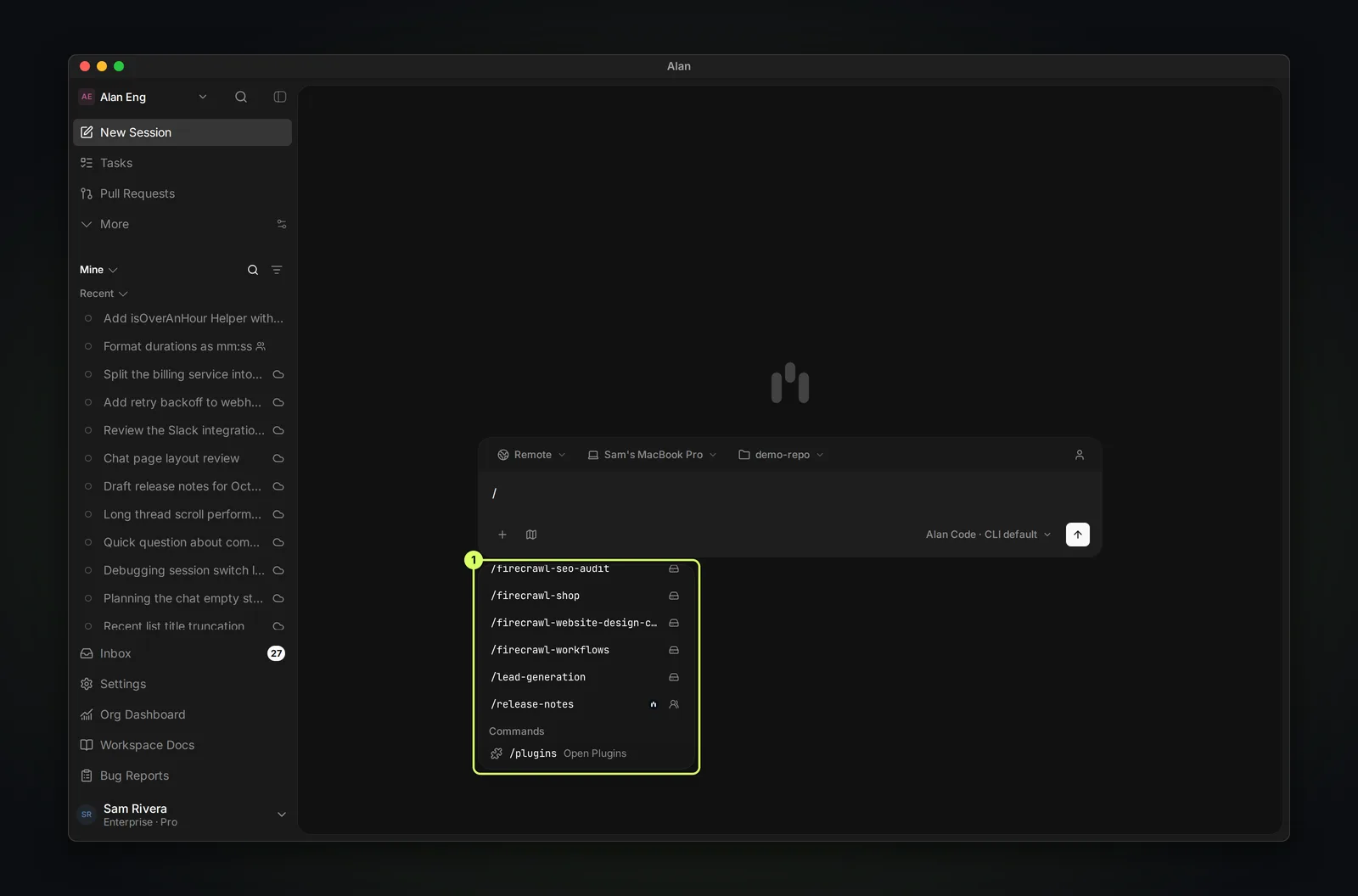
**1. Type / in the composer**
|
|
16
|
+
|
|
17
|
+
The menu lists **Commands** and the skills that can run where this session runs: on the selected computer or in the cloud environment. Keep typing to filter it.
|
|
18
|
+
|
|
19
|
+
**2. Pick a skill**
|
|
20
|
+
|
|
21
|
+
The skill is added to your message as a `/name` chip. You can add up to 8 skills to one message.
|
|
22
|
+
|
|
23
|
+
**3. Describe the job and send**
|
|
24
|
+
|
|
25
|
+
Write what you want done and press **Enter**. The agent loads the skill's instructions and uses them for the job.
|
|
26
|
+
|
|
27
|
+
You don't have to pick a skill: agents also load a matching skill on their own when your request fits its description.
|
|
28
|
+
|
|
29
|
+
Each row in the menu says where the skill comes from:
|
|
30
|
+
|
|
31
|
+
| Label | Meaning |
|
|
32
|
+
| --- | --- |
|
|
33
|
+
| **Synced with Alan** · **Teams: …** | A team skill managed in Alan. |
|
|
34
|
+
| **Synced with Alan** · **Personal** | A skill only you use. |
|
|
35
|
+
| **Synced with Alan** · **Required by Alan** | A built-in skill. It is always on. |
|
|
36
|
+
| **Project** or **On this computer** | A skill found in the project folder or on the computer, not managed in Alan. |
|
|
37
|
+
|
|
38
|
+
A skill marked **Installing** is still being copied to the machine. **Unavailable** means it can't run there. If the menu says **No runnable Skills on this computer**, enable or add a skill first.
|
|
39
|
+
|
|
40
|
+
## Find a skill on Discover
|
|
41
|
+
|
|
42
|
+
|
|
43
|
+
|
|
44
|
+
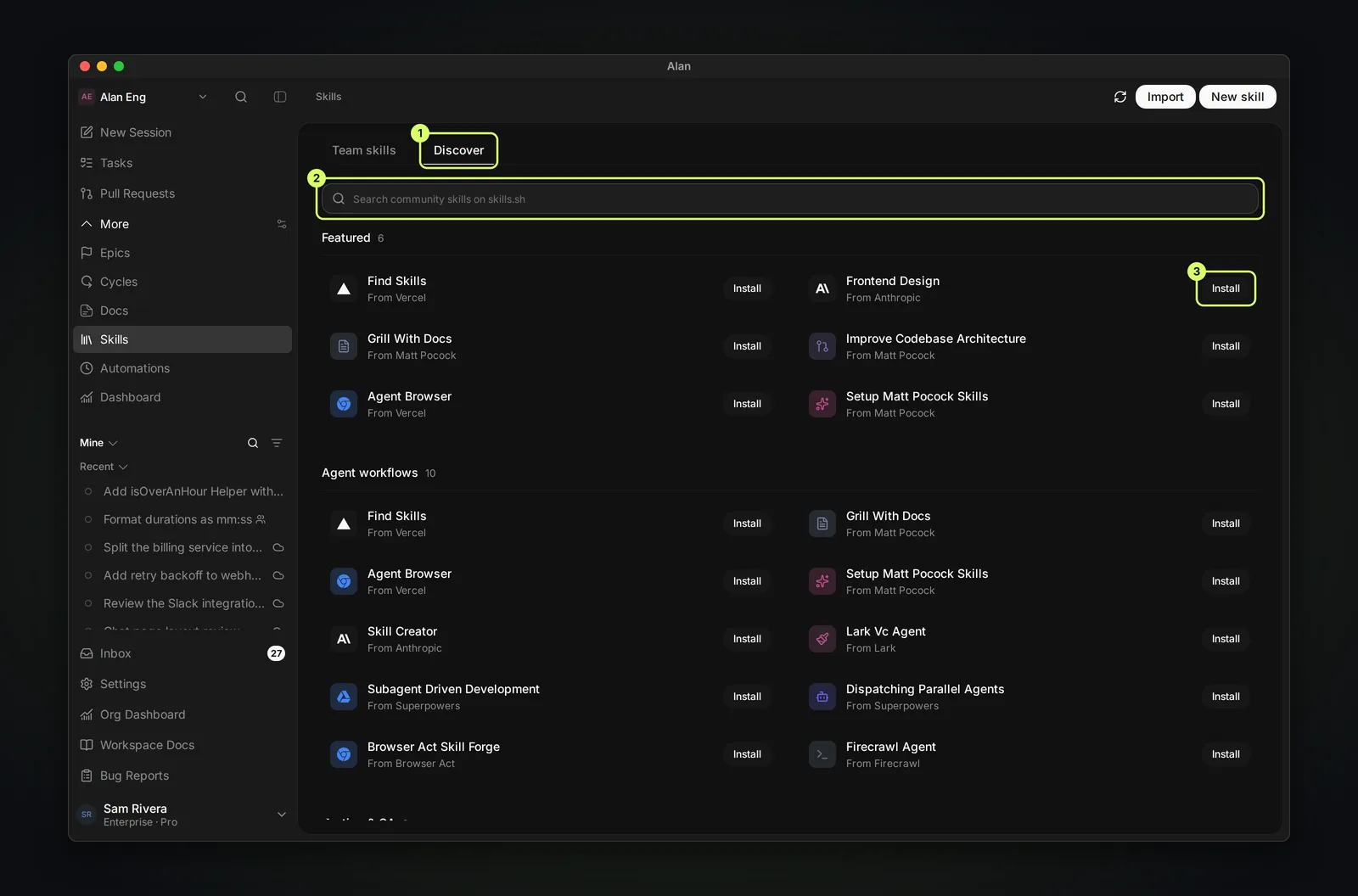
**1. Open Discover**
|
|
45
|
+
|
|
46
|
+
Open **Skills** in the team sidebar (under **More** unless you pinned it) and choose the **Discover** tab.
|
|
47
|
+
|
|
48
|
+
**2. Browse or search**
|
|
49
|
+
|
|
50
|
+
Community skills from [skills.sh](https://skills.sh) are grouped into **Featured** (the most installed) and categories such as **Agent workflows**, **Testing & QA**, and **Design & frontend**. Use **Search community skills on skills.sh** to find one by name.
|
|
51
|
+
|
|
52
|
+
**3. Install it for the team**
|
|
53
|
+
|
|
54
|
+
Choose **Install**. Alan shows the skill's files so you can read them, then choose **Add to team**. The skill is added to **Team skills**, turned on, and the button then reads **Installed**.
|
|
55
|
+
|
|
56
|
+
> **Warning:** Community skills are written by third parties. Read a skill's instructions before you add it, as you would any script an agent will follow.
|
|
57
|
+
|
|
58
|
+
## Create or import a team skill
|
|
59
|
+
|
|
60
|
+
|
|
61
|
+
|
|
62
|
+
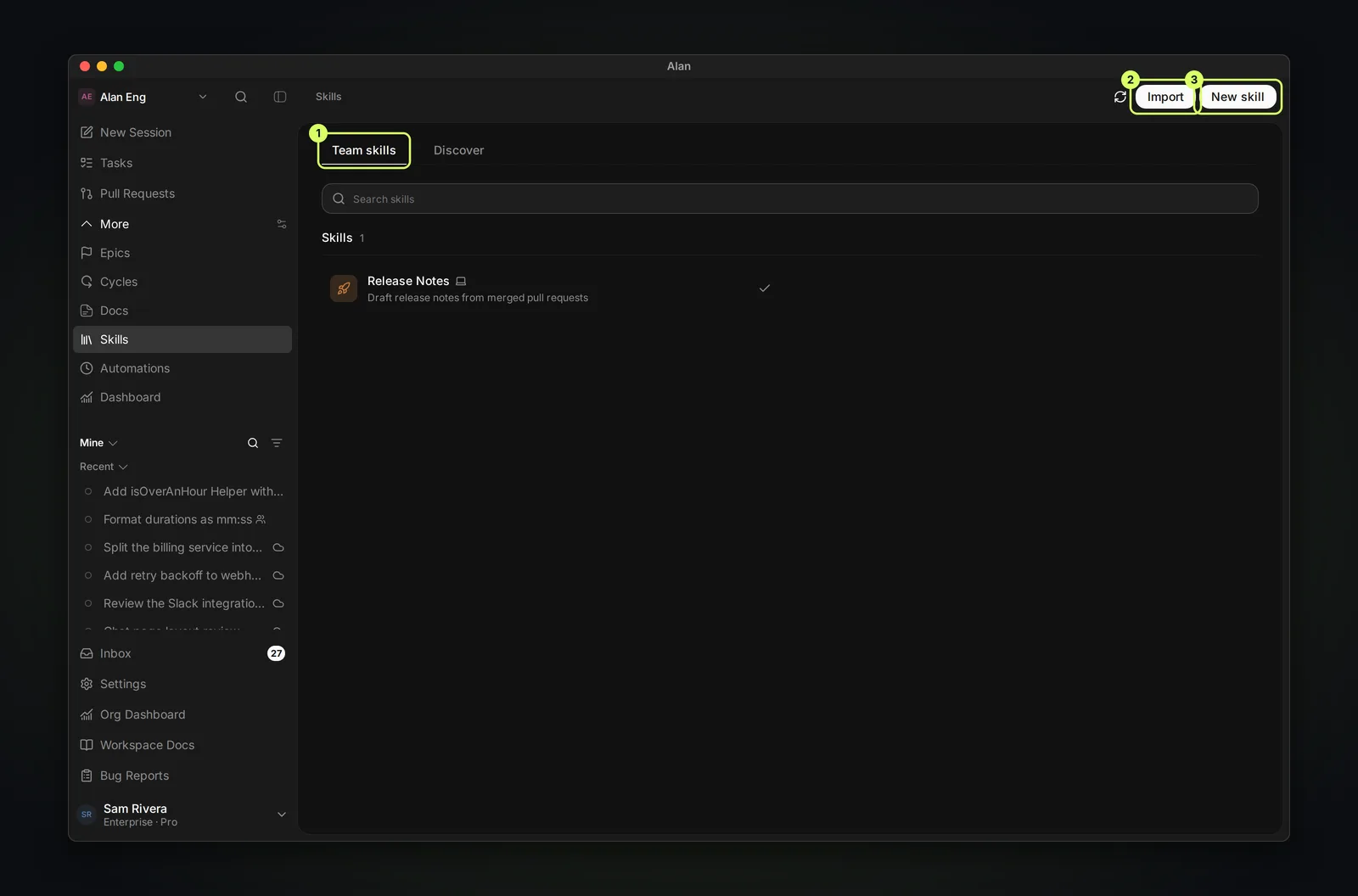
The **Team skills** tab lists the skills your team shares. Add one with **Import**, or with **New skill** and one of its two options:
|
|
63
|
+
|
|
64
|
+
| Option | What happens |
|
|
65
|
+
| --- | --- |
|
|
66
|
+
| **Create with Alan** | Opens a new session with "Create a team skill that " filled in. Finish the sentence and send. Describe the procedure, when to use it, and any checks it must run. |
|
|
67
|
+
| **Create manually** | Opens **Create skill**, a package editor that starts with a `SKILL.md`. Fill in its `name` (lowercase letters, numbers, and single hyphens) and `description`, write the instructions, add files with **Add file** or **Upload asset**, then choose **Create skill**. |
|
|
68
|
+
| **Import** | Opens **Import a skill** with three sources, below. |
|
|
69
|
+
|
|
70
|
+
**Import a skill** offers:
|
|
71
|
+
|
|
72
|
+
- **From this computer**: pick skills already on your machine, then **Add N skills**.
|
|
73
|
+
- **From GitHub**: paste a link to a repository or to a folder inside one (for example `github.com/owner/repo`), choose **Review skill**, then **Add to team**.
|
|
74
|
+
- **From a folder**: point Alan at a folder it doesn't scan yet. This option is only in the desktop app.
|
|
75
|
+
|
|
76
|
+
Skills you add install on every computer and cloud environment you use. After that, Alan manages these installed copies and can overwrite direct local edits. To keep a change, publish it through the skill editor in Alan.
|
|
77
|
+
|
|
78
|
+
## Team and personal skills
|
|
79
|
+
|
|
80
|
+
- **Team skills** are shared with every member of the team and managed on the **Skills** page.
|
|
81
|
+
- **Personal skills** show as **Personal** in the `/` menu and are used only by you.
|
|
82
|
+
- Skills in a project folder or on your computer show as **Project** or **On this computer** until you import them.
|
|
83
|
+
|
|
84
|
+
To use a team skill in another team, open it and choose **Copy … to another team**, pick the teams, and choose **Copy skill**. Each copy starts at version 1 and keeps its own history.
|
|
85
|
+
|
|
86
|
+
> **Note:** All current plans include team skill sharing. If your organization's plan doesn't, the Skills page reads "This organisation plan does not include team skill sharing. Existing skills remain visible for cleanup; personal skills are unaffected."
|
|
87
|
+
|
|
88
|
+
## Edit a skill and its versions
|
|
89
|
+
|
|
90
|
+
Open a skill from **Team skills** to read its files. From there:
|
|
91
|
+
|
|
92
|
+
- **Turn it on or off** with the switch in the header. Skills marked **Required** are built into Alan and can't be turned off or removed.
|
|
93
|
+
- **Edit with Alan** opens a session asking the agent to update the skill. **Create new version manually** opens the package editor; choose **Publish version** to save. Every change is a new version; earlier versions never change.
|
|
94
|
+
- **Version history**: pick a version from the version menu to read it, **Compare with version N** to see what changed, and **Restore as new version** to bring an older one back as the latest.
|
|
95
|
+
- **Copy Markdown** and **Open on GitHub** (for imported skills) are in the same menu.
|
|
96
|
+
- **Remove** retires the skill: new sessions stop using it, and Alan removes its managed copies on the next sync. Your local source folders are never deleted.
|
|
97
|
+
|
|
98
|
+
> **Warning:** Alan purges a removed skill after 30 days. The web app has no control to restore a removed skill.
|
|
99
|
+
|
|
100
|
+
## Next steps
|
|
101
|
+
|
|
102
|
+
- [Plugins and MCP](plugins-and-mcp.md) — Give agents tools and service connections.
|
|
103
|
+
- [Start a session](../agents-and-sessions/start-a-session.md) — Use skills from the composer.
|
|
@@ -0,0 +1,79 @@
|
|
|
1
|
+
> Source: [https://docs.tryalan.ai/docs/tasks/complete-a-task](https://docs.tryalan.ai/docs/tasks/complete-a-task)
|
|
2
|
+
|
|
3
|
+
# Complete a task with an agent
|
|
4
|
+
|
|
5
|
+
This page walks through one task from start to finish. You start an agent session on the task, the agent plans and makes the change, you review the diff and the pull request, and then you move the task to **Done**.
|
|
6
|
+
|
|
7
|
+
**Before you start**
|
|
8
|
+
|
|
9
|
+
- Tasks are turned on and you have a task with a clear brief. See [Create a task](create-a-task.md).
|
|
10
|
+
- To get a pull request, the team needs a GitHub connection and a linked repository. See [Connect GitHub](../get-started/connect-github.md).
|
|
11
|
+
- The task needs an execution target: a cloud environment for the repository, or a computer you connected. See [Cloud sessions and execution](../cloud-and-local/cloud-sessions-and-execution.md).
|
|
12
|
+
|
|
13
|
+
_Video: https://docs.tryalan.ai/images/screenshots/tasks-complete-a-task.mp4_
|
|
14
|
+
|
|
15
|
+
**1. Open the task**
|
|
16
|
+
|
|
17
|
+
A task with no sessions opens on **Start work**. The agent already has the task's title, brief, and properties, so add only what is new. **Starting from this task brief** shows the brief it will work from.
|
|
18
|
+
|
|
19
|
+
**2. Start a session: plan first, or build straight away**
|
|
20
|
+
|
|
21
|
+
Pick how to start. In the composer, choose a mode, type your instruction, and press **Enter**:
|
|
22
|
+
|
|
23
|
+
| You want | Do this |
|
|
24
|
+
| --- | --- |
|
|
25
|
+
| A plan to approve before any code changes | Switch the composer to **Plan** (the map icon; the composer gets a dashed outline). The agent reads the code without changing files and saves its plan to the task's **Artifacts**. |
|
|
26
|
+
| The agent to start building now | Leave the composer on **Agent** and send an instruction, or send the brief as it is. |
|
|
27
|
+
| To start with no extra instruction | Choose **Start** in the task header. It starts an **Agent** session on the task's execution target with the message "Let's begin working on this task." |
|
|
28
|
+
|
|
29
|
+
If the composer shows **Choose an execution target before sending**, pick a cloud environment or a computer first. **Start** stays disabled until the task has a target.
|
|
30
|
+
|
|
31
|
+
When you start the first session, a task in a **Not started** status such as **Backlog** or **Todo** moves to the team's first **Active** status (**In Progress** by default). The change appears in the task's activity.
|
|
32
|
+
|
|
33
|
+
**3. Approve the plan (Plan mode only)**
|
|
34
|
+
|
|
35
|
+
When the plan is ready, the transcript shows **Plan ready for review**. Read it with **Open plan**, or open it from **Artifacts**. Then:
|
|
36
|
+
|
|
37
|
+
- **Accept Plan** switches the session to **Agent** mode and the agent starts implementing the plan.
|
|
38
|
+
- **Reject Plan** stops there. Reply with what to change, and the agent revises the plan.
|
|
39
|
+
|
|
40
|
+
**4. Follow the work**
|
|
41
|
+
|
|
42
|
+
The turn shows **Working for…** while the agent edits files and runs commands. When it finishes, you see:
|
|
43
|
+
|
|
44
|
+
- A summary line such as **Worked for 40s · Ran 6 commands, read 9 files and edited 3 files**. Select it to see every step.
|
|
45
|
+
- The agent's reply.
|
|
46
|
+
|
|
47
|
+
To see everything that changed in the workspace, open the **Changes** panel on the right. See [Session lifecycle](../agents-and-sessions/session-lifecycle.md) for every turn state.
|
|
48
|
+
|
|
49
|
+
**5. Iterate in the same session**
|
|
50
|
+
|
|
51
|
+
Reply in the same composer to ask for fixes, more tests, or a different approach. You can send while the agent is still working: the message goes to the running agent, or runs after the current turn. To start a separate line of work on the same task, add a session tab with **+**.
|
|
52
|
+
|
|
53
|
+
**6. Open a pull request**
|
|
54
|
+
|
|
55
|
+
Ask the agent to commit, push, and open a pull request, or open one yourself. In **Changes**, commit the staged files and choose **Create PR**; it pushes the branch first if it needs to.
|
|
56
|
+
|
|
57
|
+
Alan links the pull request to the task automatically when:
|
|
58
|
+
|
|
59
|
+
- the agent opens it from a session on the task, or
|
|
60
|
+
- the pull request's title or branch name contains the task ID, for example `ENG-42`.
|
|
61
|
+
|
|
62
|
+
To link one by hand, choose **Task actions** (**…**) → **Add pull request**, or **Link** under **Pull requests** in **Changes**. Linked pull requests appear in **Task Overview** with their review and check status.
|
|
63
|
+
|
|
64
|
+
> **Note:** In the browser, **Changes** works for cloud sessions. For a session on a connected computer, use the Alan desktop app, or ask the agent to report the diff.
|
|
65
|
+
|
|
66
|
+
**7. Review the result**
|
|
67
|
+
|
|
68
|
+
Before you merge, check that the changed files match the task, tests ran or the gap is stated, and the pull request's checks pass. Use **Artifacts** for the plan and any test report. To get a review, see [Review work](../reviews-testing-deploys/review-work.md).
|
|
69
|
+
|
|
70
|
+
**8. Move the task to In Review, then Done**
|
|
71
|
+
|
|
72
|
+
Opening or merging a pull request doesn't change the task's status, so update it yourself. In **Task Overview**, select **Status** and choose **In Review** while the pull request is reviewed, then **Done** once it's merged. You can also drag the task on the board, or ask the agent to update the status. When a task is **Done** or **Cancelled**, its header no longer shows **Start**.
|
|
73
|
+
|
|
74
|
+
## Next steps
|
|
75
|
+
|
|
76
|
+
- [Task detail](task-detail.md) — Every panel on the task page.
|
|
77
|
+
- [Start a session](../agents-and-sessions/start-a-session.md) — The composer, execution targets, agents, and models.
|
|
78
|
+
- [Pull requests](../reviews-testing-deploys/pull-requests.md) — Follow pull requests, reviews, and CI.
|
|
79
|
+
- [Subtasks and status](subtasks-and-status.md) — Statuses, groups, and when to move a task.
|
|
@@ -0,0 +1,67 @@
|
|
|
1
|
+
> Source: [https://docs.tryalan.ai/docs/tasks/create-a-task](https://docs.tryalan.ai/docs/tasks/create-a-task)
|
|
2
|
+
|
|
3
|
+
# Create a task
|
|
4
|
+
|
|
5
|
+
A task should be small enough to execute and specific enough to verify. The best task titles describe the outcome, not the activity.
|
|
6
|
+
|
|
7
|
+
> **Note:** Tasks are off for new teams. If you don't see **Tasks** in the sidebar, any team member can turn them on in **Settings →** your team **→ Tasks**. See the [Quickstart](../get-started/quickstart.md).
|
|
8
|
+
|
|
9
|
+
_Video: https://docs.tryalan.ai/images/screenshots/tasks-plan-a-task.mp4_
|
|
10
|
+
|
|
11
|
+
## Open the Tasks page
|
|
12
|
+
|
|
13
|
+
|
|
14
|
+
|
|
15
|
+
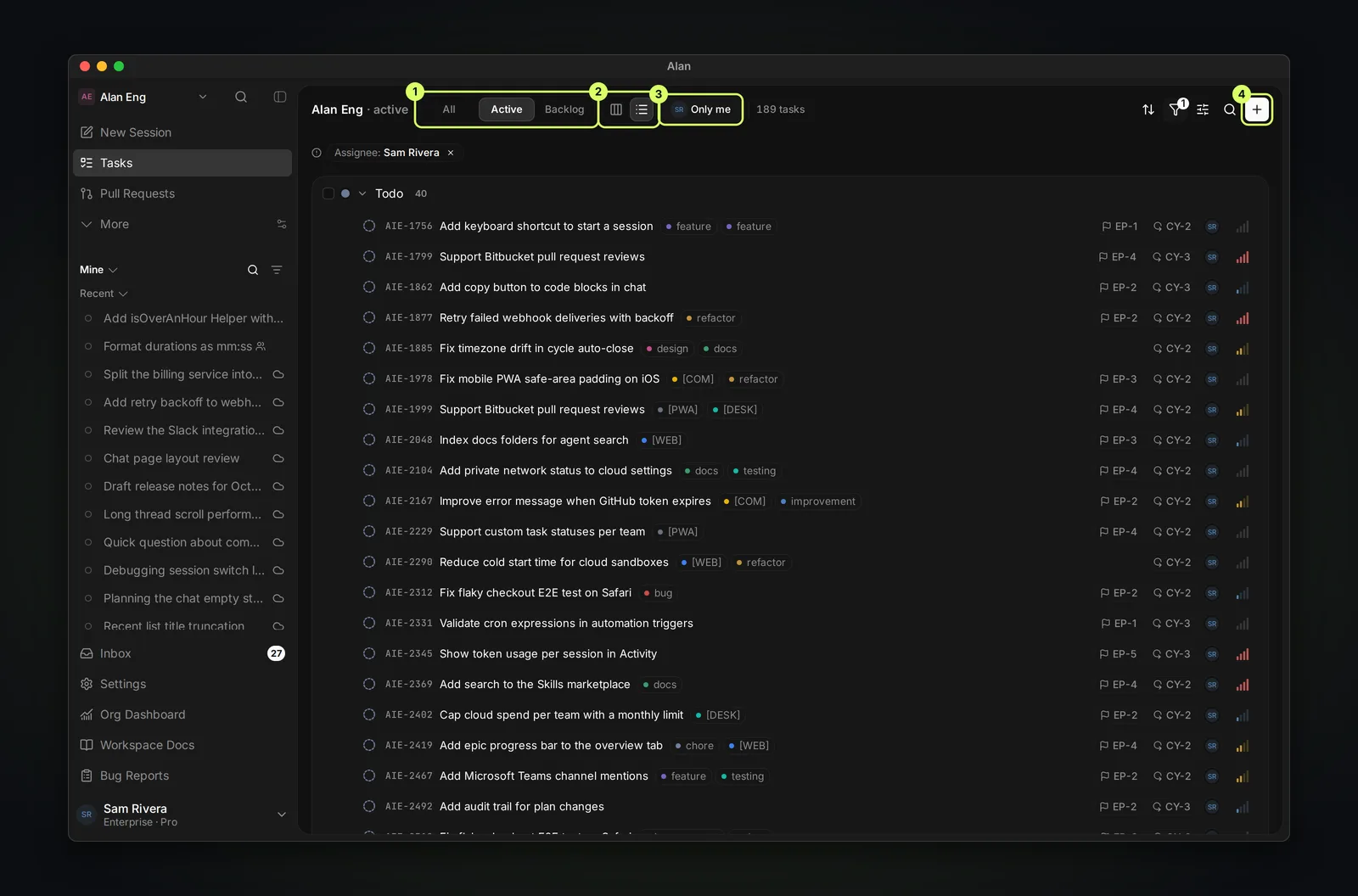
Tasks are grouped by status. Switch between **All**, **Active**, and **Backlog**, show them as a board or a list, and use **Only me**, sort, filters, display properties, and search to narrow the view. Choose **New task** (**+**) to create one.
|
|
16
|
+
|
|
17
|
+
## Agent mode: describe it
|
|
18
|
+
|
|
19
|
+
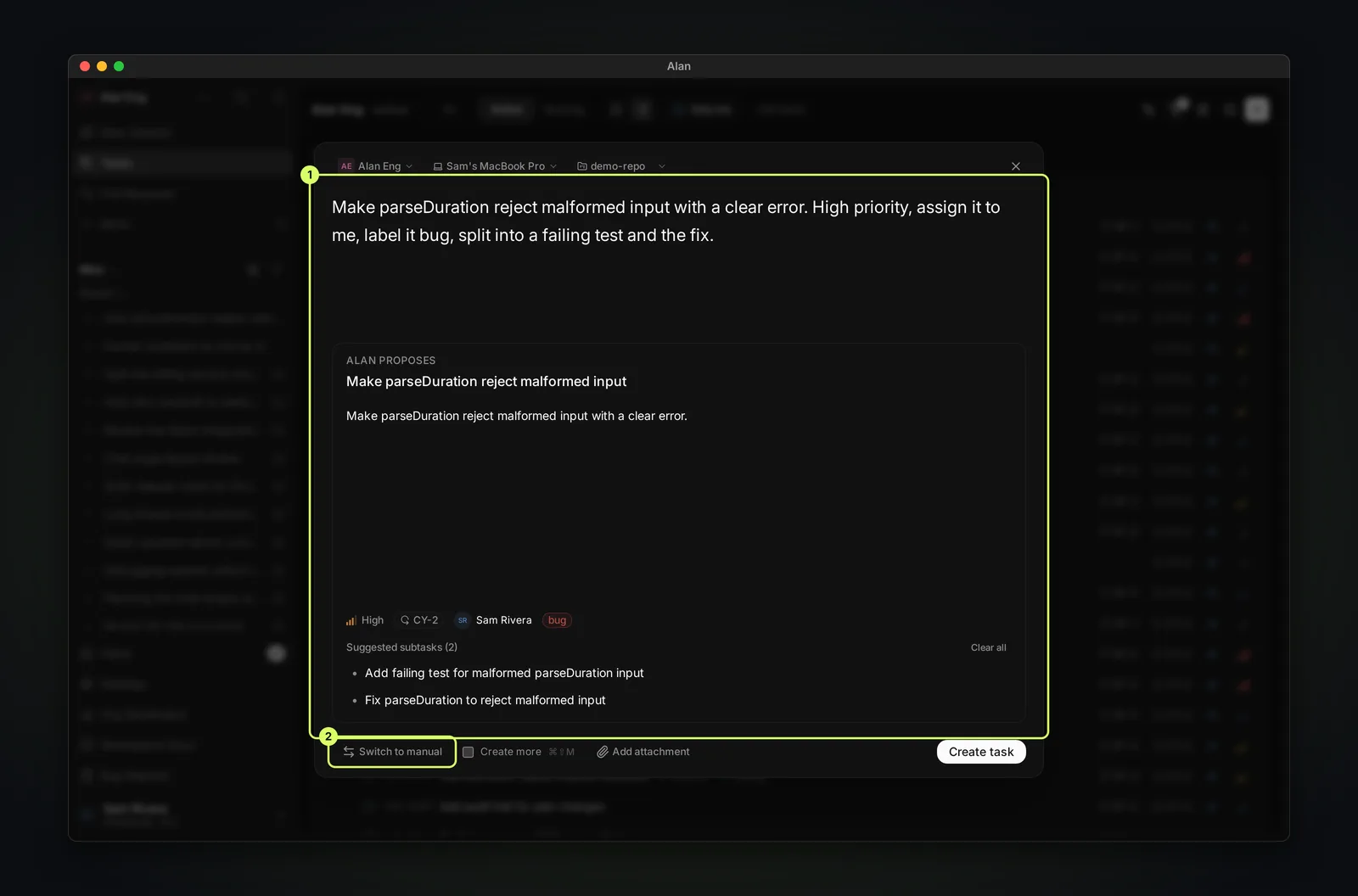
The dialog opens in **Agent** mode. Describe what you want in one box, including details such as priority, assignee, labels, and how to split the work. As you type, **Alan proposes** a title, description, properties, and **Suggested subtasks**. Edit the proposal, choose **Clear all** to drop the subtasks, then choose **Create task**.
|
|
20
|
+
|
|
21
|
+
Once Alan has processed your instruction, the proposed task shows editable status, priority, due date, estimate, assignee, and labels. Click a property to correct Alan's selection before creating the task; your corrections and clears take precedence over later suggestions. Cycle and epic pickers appear when enabled for your team. Manual mode shows these controls from the start.
|
|
22
|
+
|
|
23
|
+
To create the task and start an agent session on it in one go, press **⌘↵** (**Ctrl+Enter** on Windows and Linux) in the description box instead. The task needs a usable execution target; otherwise the dialog says what's missing. The new task opens with the session already running.
|
|
24
|
+
|
|
25
|
+
|
|
26
|
+
|
|
27
|
+
The header row of the dialog sets the team and where the task's sessions will run: a cloud environment or a connected computer and its folder.
|
|
28
|
+
|
|
29
|
+
## Manual mode: fill in the fields
|
|
30
|
+
|
|
31
|
+
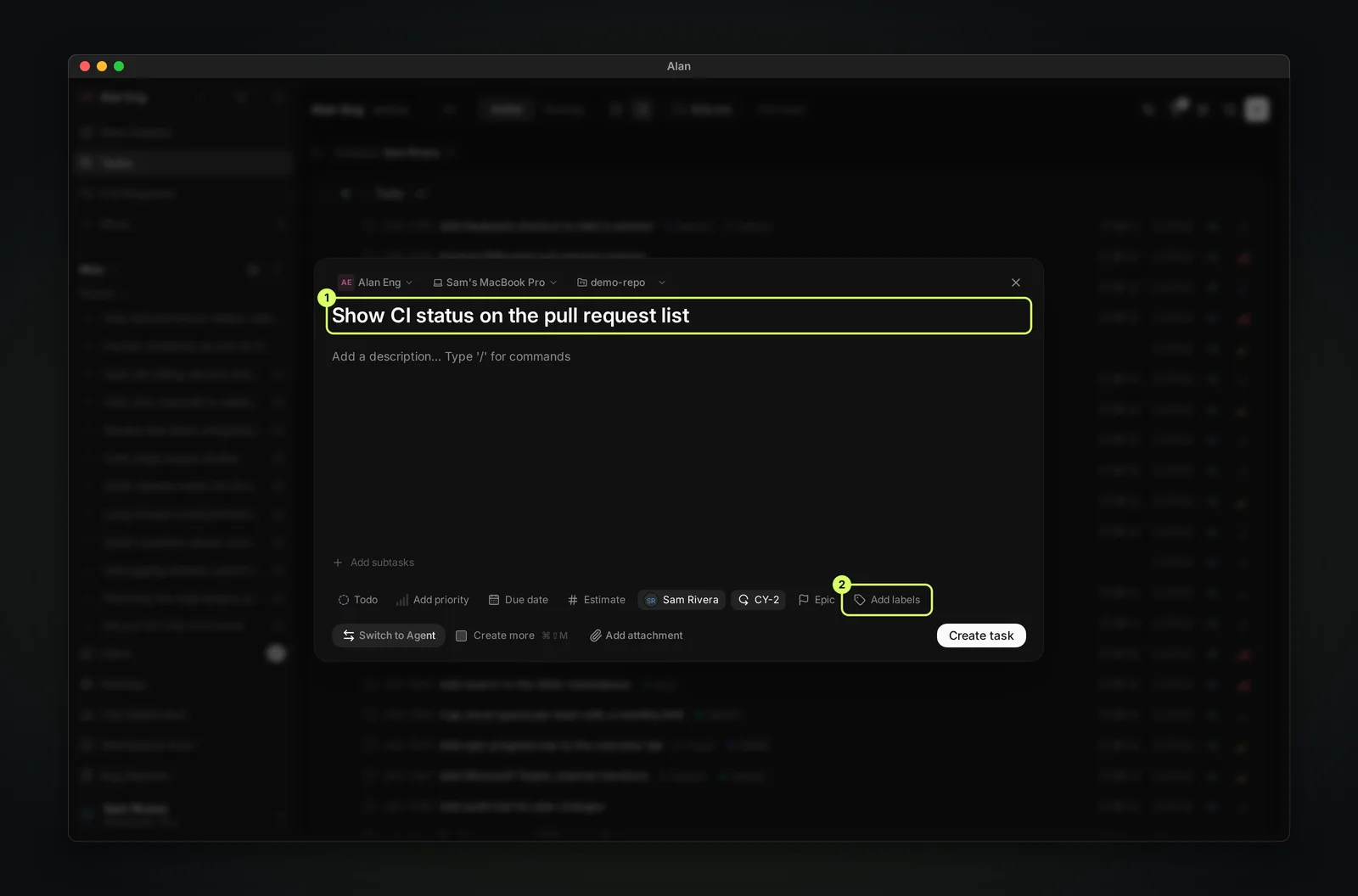
Choose **Switch to manual** to enter a **Task title**, a description (type `/` for commands), and **Add subtasks**, then set status, priority, due date, estimate, assignee, cycle, epic, and labels from the chips. **Switch to Agent** goes back.
|
|
32
|
+
|
|
33
|
+
|
|
34
|
+
|
|
35
|
+
Both modes have **Create more** (⌘⇧M) to keep the dialog open for the next task, and **Add attachment**. After creating, the **Task created** notice offers **Open**.
|
|
36
|
+
|
|
37
|
+
## Good task shape
|
|
38
|
+
|
|
39
|
+
Use this structure:
|
|
40
|
+
|
|
41
|
+
- **Title**: outcome in one line.
|
|
42
|
+
- **Description**: context, constraints, and acceptance criteria.
|
|
43
|
+
- **Priority**: urgency and impact.
|
|
44
|
+
- **Assignee**: default owner.
|
|
45
|
+
- **Labels**: area or type.
|
|
46
|
+
- **Links**: PRs, docs, incidents, designs, or customer context.
|
|
47
|
+
|
|
48
|
+
## Example task
|
|
49
|
+
|
|
50
|
+
**Title:** Add a password reset link to the sign-in page.
|
|
51
|
+
|
|
52
|
+
**Description:** People who forget their password need a way to request a reset email from the sign-in page.
|
|
53
|
+
|
|
54
|
+
**Acceptance criteria:**
|
|
55
|
+
|
|
56
|
+
- The sign-in page has a password reset link.
|
|
57
|
+
- The link opens a form that accepts an email address.
|
|
58
|
+
- After submission, the page explains what to do next.
|
|
59
|
+
|
|
60
|
+
Describe the result you need. Include relevant links and constraints, and avoid vague criteria such as "looks good."
|
|
61
|
+
|
|
62
|
+
## Next steps
|
|
63
|
+
|
|
64
|
+
- [Complete a task with an agent](complete-a-task.md) — Start a session, review the diff and pull request, and finish the task.
|
|
65
|
+
- [Subtasks and status](subtasks-and-status.md) — Break the task into verifiable pieces.
|
|
66
|
+
- [Task detail](task-detail.md) — Where scope, sessions, and evidence live.
|
|
67
|
+
- [Start a session](../agents-and-sessions/start-a-session.md) — Hand the task to an agent to execute.
|
|
@@ -0,0 +1,55 @@
|
|
|
1
|
+
> Source: [https://docs.tryalan.ai/docs/tasks/subtasks-and-status](https://docs.tryalan.ai/docs/tasks/subtasks-and-status)
|
|
2
|
+
|
|
3
|
+
# Subtasks and status
|
|
4
|
+
|
|
5
|
+
Subtasks make progress visible without splitting every small action into a separate task. Use them when a task has multiple steps that can be checked independently.
|
|
6
|
+
|
|
7
|
+
## Add subtasks
|
|
8
|
+
|
|
9
|
+
- **While creating a task**: in Agent mode, Alan suggests subtasks when your description says how to split the work. In manual mode, use **Add subtasks**.
|
|
10
|
+
- **On an existing task**: open **Task Overview** and choose **+** next to **Subtasks**. The header shows progress, for example **Subtasks 0/2**.
|
|
11
|
+
- **From an agent**: a session can create and update subtasks while it plans.
|
|
12
|
+
|
|
13
|
+
Each subtask has its own status, so you can mark pieces done as they land.
|
|
14
|
+
|
|
15
|
+
## Good subtasks
|
|
16
|
+
|
|
17
|
+
Give each subtask a clear result, for example:
|
|
18
|
+
|
|
19
|
+
- Add a password reset link to sign-in.
|
|
20
|
+
- Add the reset request form.
|
|
21
|
+
- Test the link and form.
|
|
22
|
+
|
|
23
|
+
Avoid vague subtasks:
|
|
24
|
+
|
|
25
|
+
- Improve docs.
|
|
26
|
+
- Make better.
|
|
27
|
+
- Check everything.
|
|
28
|
+
|
|
29
|
+
## Statuses
|
|
30
|
+
|
|
31
|
+
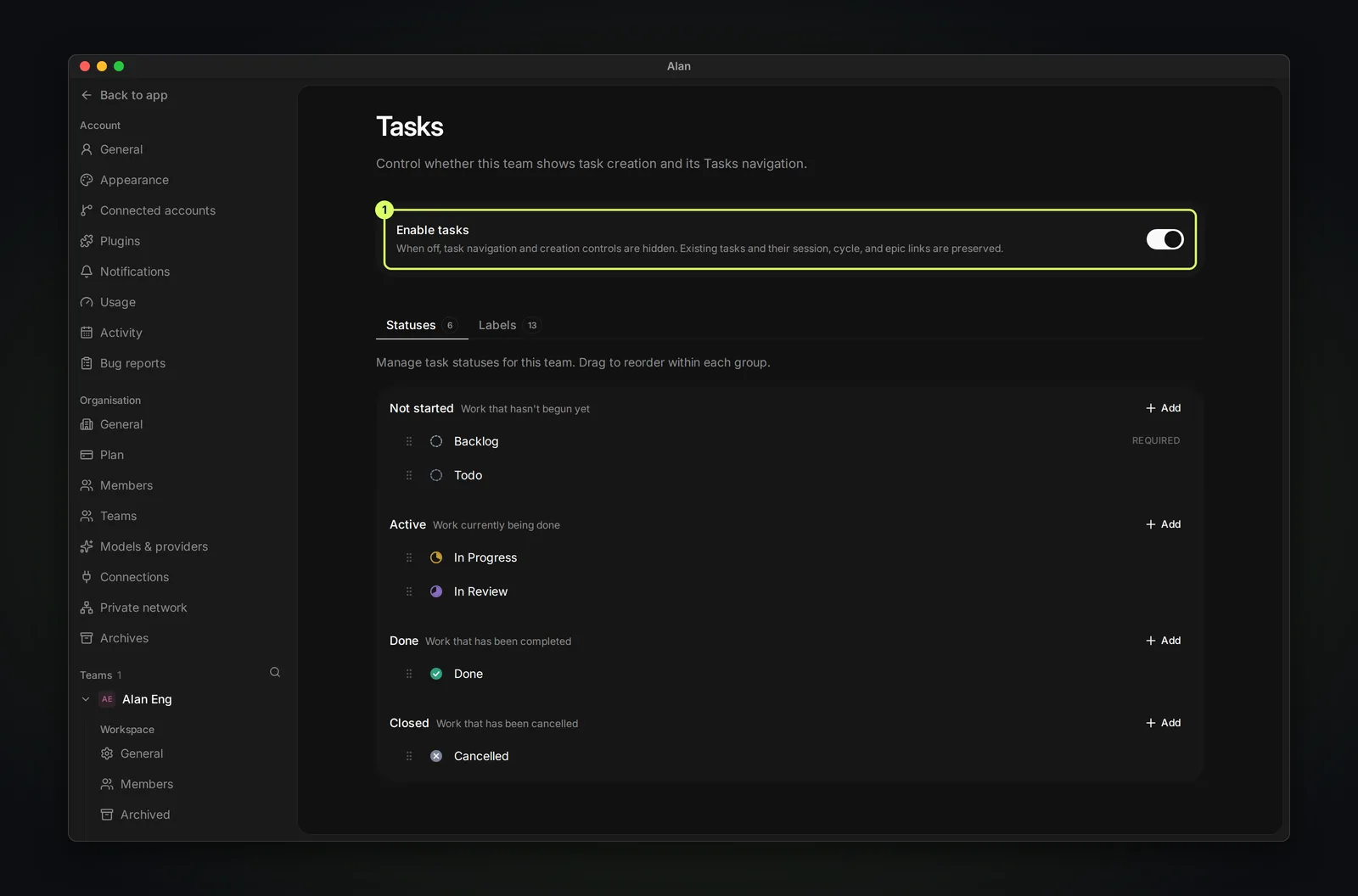
Every team starts with six statuses in four groups. The group decides where a task shows up, for example in **Active** or **Backlog** on the Tasks page.
|
|
32
|
+
|
|
33
|
+
| Group | Default statuses | Meaning |
|
|
34
|
+
| --- | --- | --- |
|
|
35
|
+
| **Not started** | Backlog, Todo | Work that hasn't begun yet. Backlog is required. |
|
|
36
|
+
| **Active** | In Progress, In Review | Work currently being done |
|
|
37
|
+
| **Done** | Done | Work that has been completed |
|
|
38
|
+
| **Closed** | Cancelled | Work that has been cancelled |
|
|
39
|
+
|
|
40
|
+
|
|
41
|
+
|
|
42
|
+
Teams can add their own statuses to any group and rename or recolor them in **Settings →** your team **→ Tasks → Statuses**; labels are managed on the **Labels** tab. Your team's list may therefore differ from the defaults.
|
|
43
|
+
|
|
44
|
+
## Keep status honest
|
|
45
|
+
|
|
46
|
+
Status should describe real progress, not intent. Move a task when the evidence matches: **In Progress** once a session is making changes, **In Review** once there is a pull request or a test report to check, **Done** when it has shipped.
|
|
47
|
+
|
|
48
|
+
Alan changes status automatically in one case only: when a task gets its first session, a task in a **Not started** status moves to the first **Active** status (**In Progress** by default). Opening, approving, or merging a pull request doesn't change status, so move the task to **In Review** and **Done** yourself, or ask the agent to. If no status fits, leave the task where it is and add a comment. See [Task statuses](../reference/statuses.md) for the full reference.
|
|
49
|
+
|
|
50
|
+
## Next steps
|
|
51
|
+
|
|
52
|
+
- [Task statuses](../reference/statuses.md) — The full status reference and board categories.
|
|
53
|
+
- [Task detail](task-detail.md) — Manage subtasks and status on the task.
|
|
54
|
+
- [Create a task](create-a-task.md) — Shape the parent task well first.
|
|
55
|
+
- [Cycles](../teams-and-planning/cycles.md) — How status moves across a cycle.
|
|
@@ -0,0 +1,56 @@
|
|
|
1
|
+
> Source: [https://docs.tryalan.ai/docs/tasks/task-artifacts](https://docs.tryalan.ai/docs/tasks/task-artifacts)
|
|
2
|
+
|
|
3
|
+
# Task artifacts
|
|
4
|
+
|
|
5
|
+
Artifacts save the outputs of a session: plans, test reports, documents, and whiteboards. When a session belongs to a task, its artifacts appear on that task. Standalone sessions can also have artifacts.
|
|
6
|
+
|
|
7
|
+
The rule of thumb: if someone should be able to resume this task tomorrow from the record alone, it belongs in an artifact, not a chat message.
|
|
8
|
+
|
|
9
|
+
|
|
10
|
+
|
|
11
|
+
## The artifact types
|
|
12
|
+
|
|
13
|
+
| Artifact | What it captures | Typically produced by |
|
|
14
|
+
| --- | --- | --- |
|
|
15
|
+
| **Plan** | What will change, why, how it will be verified, and open decisions | A session in **Plan** mode |
|
|
16
|
+
| **Test report** | What was tested, screenshots and recordings, and a pass, fail, or mixed result | A testing session after validation |
|
|
17
|
+
| **Document** | A written deliverable from the task, such as a summary, spec, or notes | Any agent, or you |
|
|
18
|
+
| **Whiteboard** | A diagram or sketch on a canvas | Any agent, or you |
|
|
19
|
+
|
|
20
|
+
Review sessions appear on the pull request. If the pull request has a primary linked task, Alan also creates a review document artifact on that task. See [Review work](../reviews-testing-deploys/review-work.md).
|
|
21
|
+
|
|
22
|
+
## Find and open artifacts
|
|
23
|
+
|
|
24
|
+
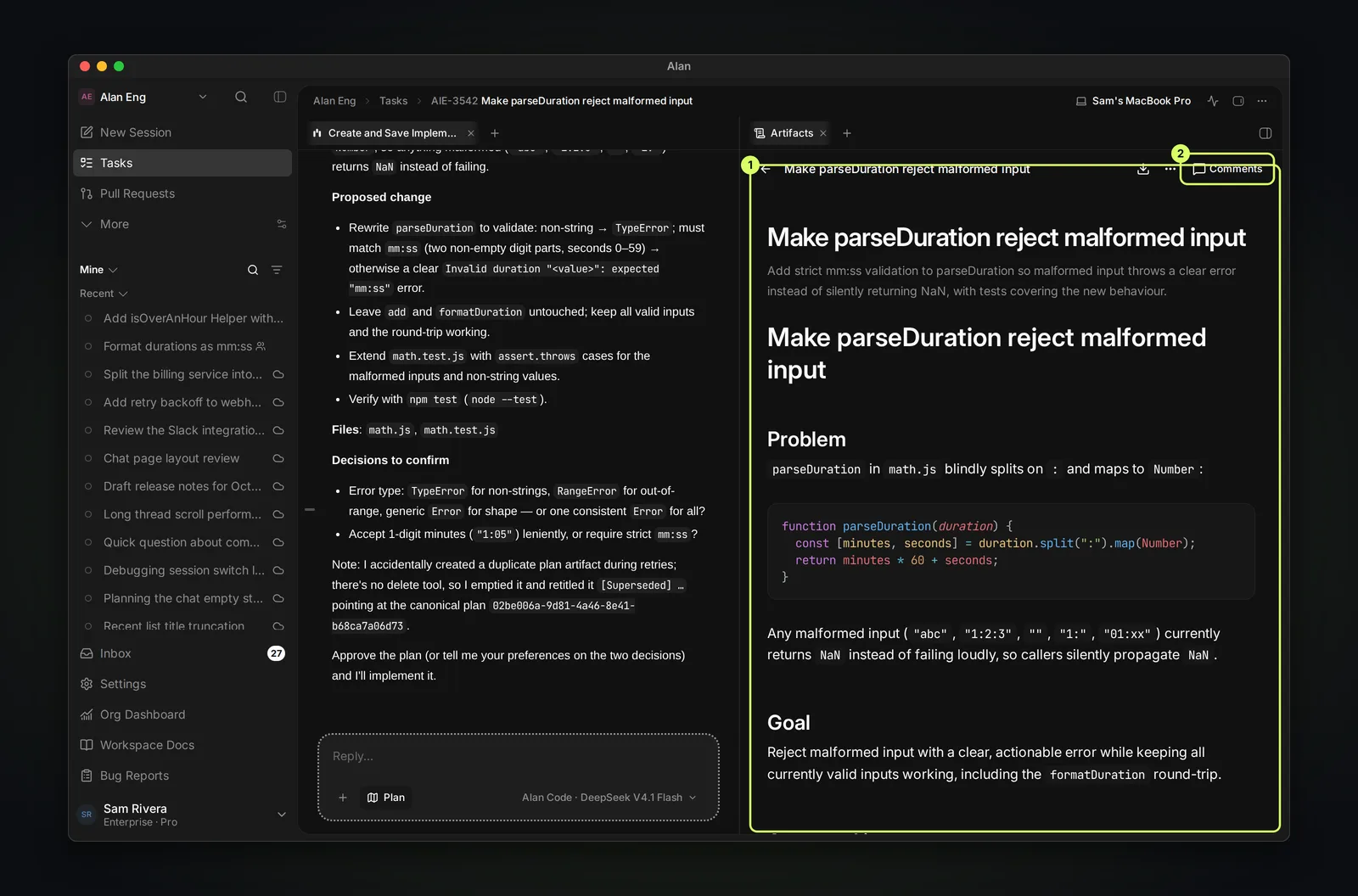
Open **Artifacts** in the task's right-hand panel. Each artifact shows its title, type, and age, for example **Plan · just now**. Select one to read it. The viewer has a download button, more actions (**…**), and **Comments**, so reviewers can discuss a plan line by line. Choose **New** to create a document, whiteboard, plan, or test report yourself.
|
|
25
|
+
|
|
26
|
+
Agents create artifacts with Alan's artifact tools. In **Plan** mode the agent saves its plan as an artifact when it can, and replies with a short summary in the session.
|
|
27
|
+
|
|
28
|
+
## Document vs artifact
|
|
29
|
+
|
|
30
|
+
They look similar but belong in different places:
|
|
31
|
+
|
|
32
|
+
- An **artifact** is a saved session output. It appears on the task when the session belongs to one.
|
|
33
|
+
- A **document** is a standalone page in the team — a PRD, spec, or wiki — that is not tied to one task.
|
|
34
|
+
|
|
35
|
+
Choose based on where readers need to find it: save a task deliverable as an artifact, and reusable team knowledge as a document, even when you write it during a task. See [Documents and artifacts](../reference/documents-and-artifacts.md).
|
|
36
|
+
|
|
37
|
+
## When to create one
|
|
38
|
+
|
|
39
|
+
Ask for an artifact when someone needs to review or reuse the output later: an implementation plan, a test report, or a written deliverable. Short answers can stay in chat.
|
|
40
|
+
|
|
41
|
+
## Common mistakes
|
|
42
|
+
|
|
43
|
+
> **Warning:** Check that the artifact appears on the intended task before handing off the work. If you use Alan's API or agent tools, use the correct task and session context. See [Links and IDs](../reference/links-and-ids.md).
|
|
44
|
+
|
|
45
|
+
- Leaving a long plan only in chat, where it is harder to find later.
|
|
46
|
+
- Creating a standalone document for something that is really a task output.
|
|
47
|
+
- Accepting chat-only results as the final record for important work.
|
|
48
|
+
|
|
49
|
+
If an artifact does not appear where you expect it, see [Missing artifact](../troubleshooting/missing-artifact.md).
|
|
50
|
+
|
|
51
|
+
## Next steps
|
|
52
|
+
|
|
53
|
+
- [Documents and artifacts](../reference/documents-and-artifacts.md) — When to use a standalone document versus a task artifact.
|
|
54
|
+
- [Task detail](task-detail.md) — Where the Artifacts panel and conversation live on a task.
|
|
55
|
+
- [Testing evidence](../reviews-testing-deploys/testing-evidence.md) — How test reports capture pass / fail / mixed results.
|
|
56
|
+
- [Missing artifact](../troubleshooting/missing-artifact.md) — Recover an artifact that is not visible where expected.
|
|
@@ -0,0 +1,65 @@
|
|
|
1
|
+
> Source: [https://docs.tryalan.ai/docs/tasks/task-detail](https://docs.tryalan.ai/docs/tasks/task-detail)
|
|
2
|
+
|
|
3
|
+
# Task detail
|
|
4
|
+
|
|
5
|
+
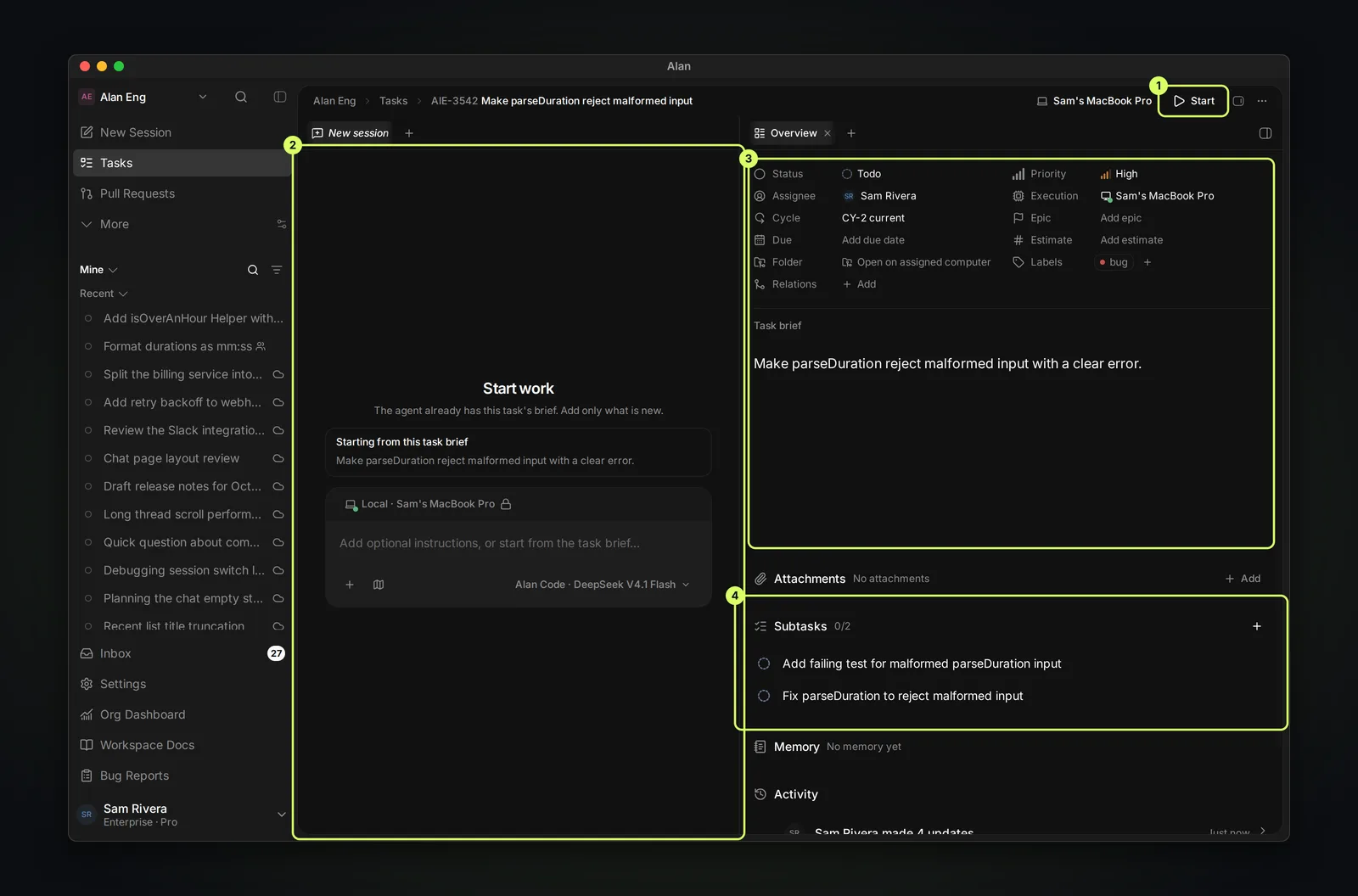
The task page is where work on a task happens. Sessions run on the left; the task's record (overview, artifacts, and the agent's workspace) sits on the right.
|
|
6
|
+
|
|
7
|
+
|
|
8
|
+
|
|
9
|
+
## Header
|
|
10
|
+
|
|
11
|
+
- **Execution target**: where this task's sessions run, for example **Sam's MacBook Pro** or a cloud environment.
|
|
12
|
+
- **Start**: starts an **Agent** session on the task's target straight away, with the message "Let's begin working on this task." The agent already has the brief. **Start** is disabled with "Choose a cloud environment or switch to a computer before starting." until the task has a target, and it disappears once the task has a session or is **Done** or **Cancelled**.
|
|
13
|
+
- **Open in side peek** and **Task actions** (**…**).
|
|
14
|
+
|
|
15
|
+
## Sessions (left)
|
|
16
|
+
|
|
17
|
+
Each session on the task is a tab; **+** adds another. A new task opens on **Start work**: the agent already has the task brief (**Starting from this task brief**), so add only what's new, or send the brief as is. The composer works like any other, including **Plan** mode; see [Start a session](../agents-and-sessions/start-a-session.md).
|
|
18
|
+
|
|
19
|
+
When the task's first session starts, a task in a **Not started** status (such as **Backlog** or **Todo**) moves to the first **Active** status, **In Progress** by default. After that, status changes are up to you or the agent. For the whole loop, see [Complete a task with an agent](complete-a-task.md).
|
|
20
|
+
|
|
21
|
+
## Workspace panels (right)
|
|
22
|
+
|
|
23
|
+
Open panels from the list on the right, or with **+** in the right-hand tab bar:
|
|
24
|
+
|
|
25
|
+
| Panel | What it shows |
|
|
26
|
+
| --- | --- |
|
|
27
|
+
| **Task Overview** | Properties, the brief, attachments, subtasks, memory, and activity |
|
|
28
|
+
| **Artifacts** | Plans, test reports, documents, and whiteboards. See [Task artifacts](task-artifacts.md). |
|
|
29
|
+
| **Desktop** | The agent's screen, when the session has one |
|
|
30
|
+
| **Browser** | Preview a page and pick elements from it |
|
|
31
|
+
| **Changes** | The working diff. Commit, **Push**, **Create PR**, and link or merge the task's pull requests. |
|
|
32
|
+
| **Terminal** | Run commands in the session's workspace |
|
|
33
|
+
| **Files** | Browse and edit the repository |
|
|
34
|
+
|
|
35
|
+
**Desktop**, **Changes**, **Terminal**, and **Files** need a session with an available workspace. Choosing an execution target alone does not make that workspace ready.
|
|
36
|
+
|
|
37
|
+
## Task Overview
|
|
38
|
+
|
|
39
|
+
- **Properties**: Status, Assignee, Cycle, Due, Folder, Relations, Priority, Execution, Epic, Estimate, and Labels, plus **Pull requests** once one is linked. Select any value to change it.
|
|
40
|
+
- **Pull requests**: each linked pull request with its review and check status. Alan links one when an agent opens it from a task session, or when its title or branch contains the task ID. To link another, choose **Task actions** (**…**) → **Add pull request**.
|
|
41
|
+
- **Task brief**: the description the agent starts from.
|
|
42
|
+
- **Attachments**: files and links for the task (**Add**).
|
|
43
|
+
- **Subtasks**: smaller pieces, each with its own status. See [Subtasks and status](subtasks-and-status.md).
|
|
44
|
+
- **Memory** and **Activity**: what Alan remembers about the task, and the history of changes and comments.
|
|
45
|
+
|
|
46
|
+
## Read before acting
|
|
47
|
+
|
|
48
|
+
Before starting a new session, check the brief, the subtasks, the latest plan or test report in **Artifacts**, and recent activity, so the agent doesn't repeat or contradict earlier work.
|
|
49
|
+
|
|
50
|
+
## Sandbox and local-run context
|
|
51
|
+
|
|
52
|
+
For a task session, the selected target determines where work happens. **Cloud** gives the session an isolated sandbox in your team's cloud environment. It goes to sleep after a few idle minutes and wakes when you send a message; if it needs attention, the session shows recovery actions such as **Repair session** or **Restart computer**. **This computer** and **Remote** run in the folder chosen in the composer on a computer you connected; there is no cloud sandbox.
|
|
53
|
+
|
|
54
|
+
Uncommitted files in a cloud sandbox never reach the environment's [image](../cloud-and-local/cloud-images.md), so commit or push work you want to keep. To move a task between targets, use **Switch environment** and treat the two targets as separate filesystems. See [Sandboxes](../cloud-and-local/sandboxes.md), [Cloud sessions and execution](../cloud-and-local/cloud-sessions-and-execution.md), and [Local execution](../cloud-and-local/local-execution.md).
|
|
55
|
+
|
|
56
|
+
## Side peek or full page
|
|
57
|
+
|
|
58
|
+
From lists, epics, and cycles, a task can open in a side peek. Use the full page when you need room for sessions, long artifacts, or the diff.
|
|
59
|
+
|
|
60
|
+
## Next steps
|
|
61
|
+
|
|
62
|
+
- [Task artifacts](task-artifacts.md) — The plans, documents, and test reports attached here.
|
|
63
|
+
- [Subtasks and status](subtasks-and-status.md) — Break down work and keep status honest.
|
|
64
|
+
- [Start a session](../agents-and-sessions/start-a-session.md) — Kick off agent work from the task.
|
|
65
|
+
- [Documents](../teams-and-planning/documents.md) — Capture standalone team knowledge outside the task.
|
|
@@ -0,0 +1,93 @@
|
|
|
1
|
+
> Source: [https://docs.tryalan.ai/docs/teams-and-planning/cycles](https://docs.tryalan.ai/docs/teams-and-planning/cycles)
|
|
2
|
+
|
|
3
|
+
# Cycles
|
|
4
|
+
|
|
5
|
+
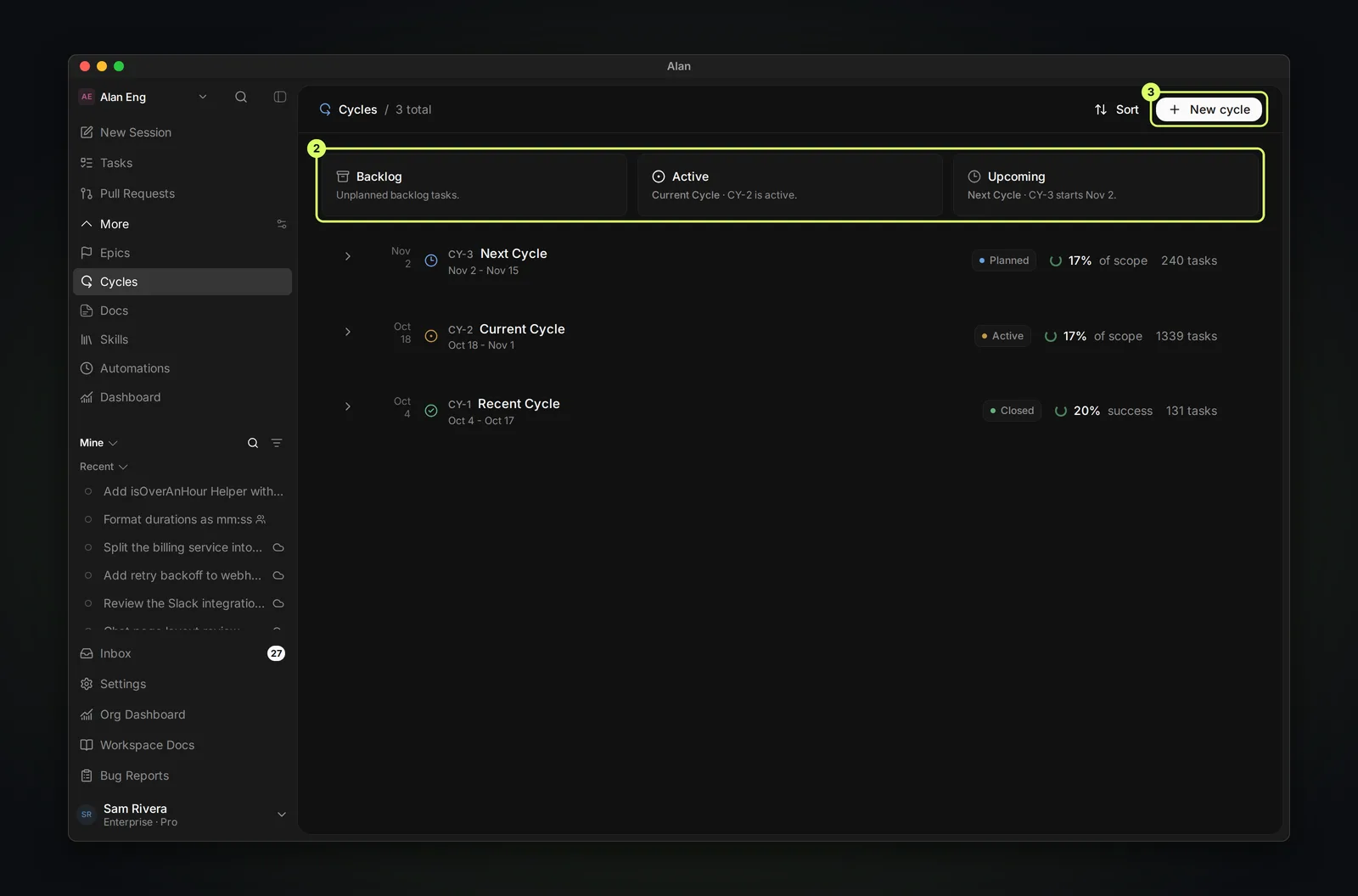
A cycle groups tasks for a set period, such as two weeks. Use it to plan what the team will work on next, track progress, and decide what happens to unfinished work. An [epic](epics.md) groups tasks by goal; a cycle groups them by time.
|
|
6
|
+
|
|
7
|
+
> **Note:** Cycles are off for new teams. Any team member can turn them on in **Settings →** your team **→ Cycles** with **Enable cycles**. Turning them off hides the Cycles and Backlog pages but keeps existing cycle assignments.
|
|
8
|
+
|
|
9
|
+
|
|
10
|
+
|
|
11
|
+
## See it in action
|
|
12
|
+
|
|
13
|
+
_Video: https://docs.tryalan.ai/images/screenshots/planning-tour.mp4_
|
|
14
|
+
|
|
15
|
+
## How cycle status works
|
|
16
|
+
|
|
17
|
+
Alan calculates status from the cycle's dates, whether it has been closed, and the team's auto-close setting:
|
|
18
|
+
|
|
19
|
+
| Status | When |
|
|
20
|
+
|---|---|
|
|
21
|
+
| Upcoming | Has not started yet |
|
|
22
|
+
| Active | Started and not past the end date |
|
|
23
|
+
| Past due | End date passed and auto-close is off |
|
|
24
|
+
| Completed | Closed by hand, or ended while **Auto-close expired cycles** is on |
|
|
25
|
+
|
|
26
|
+
## Cycle settings
|
|
27
|
+
|
|
28
|
+
|
|
29
|
+
|
|
30
|
+
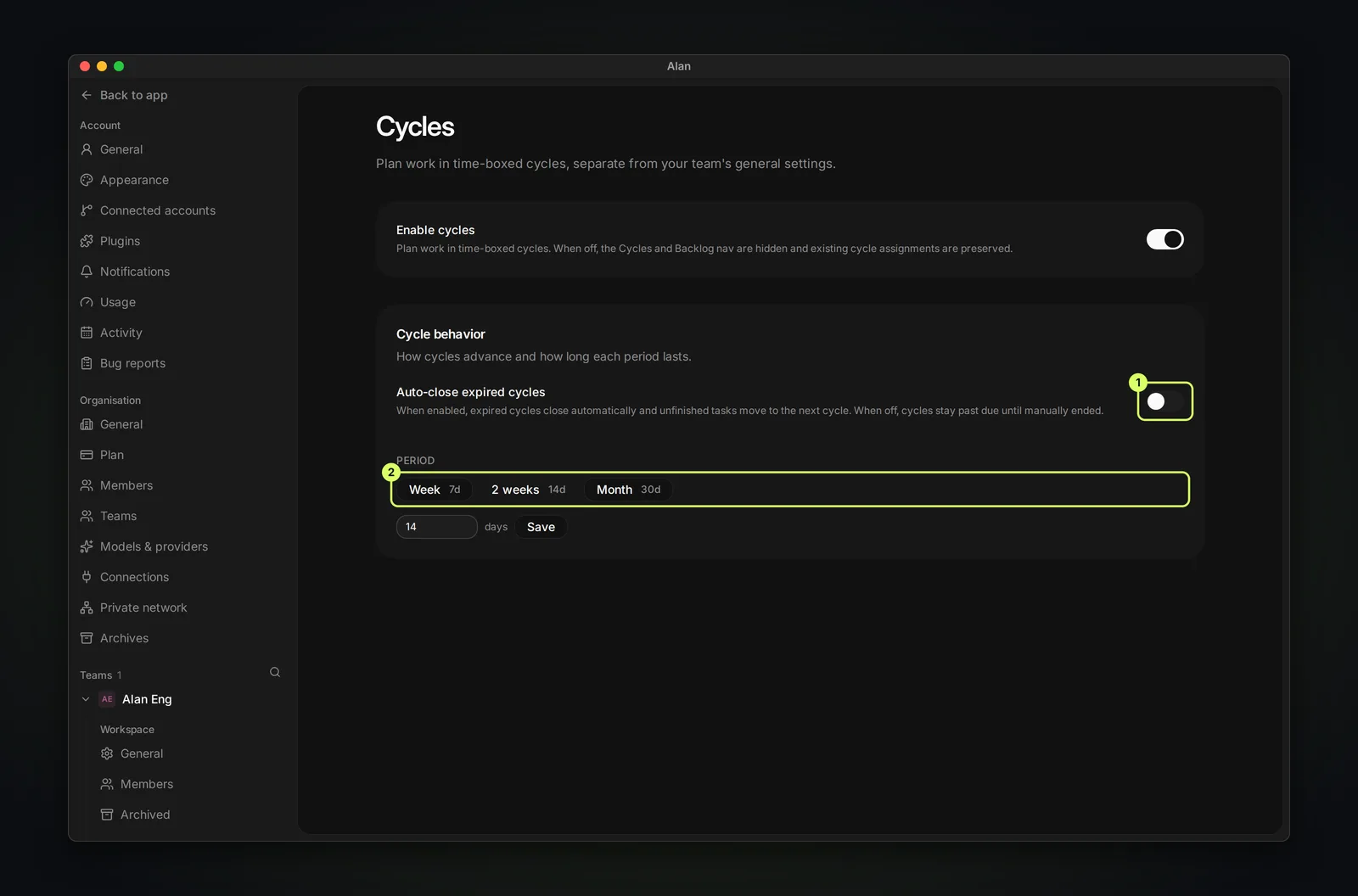
- **Auto-close expired cycles**: when on, Alan closes a cycle after its end date, creates the next cycle if there isn't one yet, and moves unfinished tasks into it. It checks every few minutes. When off, an expired cycle stays `past_due` until someone closes it, which is useful when you want a person to review spillover.
|
|
31
|
+
- **Period**: how long each cycle lasts: **Week** (7 days), **2 weeks** (14, the default), **Month** (30), or a custom number of days. Automatically created cycles use this length.
|
|
32
|
+
|
|
33
|
+
## Cycle vs. epic
|
|
34
|
+
|
|
35
|
+
They're independent, and a task can sit in **both**. The cycle says *when* you're trying to land the task; the epic says *what larger outcome it serves*. Neither is nested under the other.
|
|
36
|
+
|
|
37
|
+
> **Tip:** Assigning a task to a cycle does not pull it out of its epic. Use the epic for the durable goal and the cycle for the current push — a single task commonly carries both.
|
|
38
|
+
|
|
39
|
+
## The cycle lifecycle
|
|
40
|
+
|
|
41
|
+
**1. Plan**
|
|
42
|
+
|
|
43
|
+
Review candidate tasks and epics. Pull in only work that's actually expected to move — keep raw backlog out until it's ready. Confirm each task has an owner and a clear outcome.
|
|
44
|
+
|
|
45
|
+
**2. Start**
|
|
46
|
+
|
|
47
|
+
Starting the cycle stamps its start time and makes it `active`. Do this when the scope is stable enough to commit.
|
|
48
|
+
|
|
49
|
+
**3. Run**
|
|
50
|
+
|
|
51
|
+
Work the tasks from the cycle detail page. When something changes, update the task or epic — not chat. The cycle's progress recomputes from task status on every load.
|
|
52
|
+
|
|
53
|
+
**4. End**
|
|
54
|
+
|
|
55
|
+
Closing a cycle forces a decision on unfinished work: move each task to the next cycle, return it to the backlog, or review tasks individually. The end flow can create and start the next cycle in one step.
|
|
56
|
+
|
|
57
|
+
You can reopen a closed cycle if its end date has not passed. Alan then calculates its status from its dates and start time.
|
|
58
|
+
|
|
59
|
+
## Scope and rollover are tracked for you
|
|
60
|
+
|
|
61
|
+
A cycle doesn't just hold a task list — it records **how the scope changed**:
|
|
62
|
+
|
|
63
|
+
- **Why tasks entered** — planned in, created inside the cycle, carried from the previous one, or pulled from the backlog, an epic, or another cycle.
|
|
64
|
+
- **Why tasks exited** — completed, cancelled, carried forward, returned to the backlog, moved, or removed.
|
|
65
|
+
- **Rollover** — how many tasks rolled over, whether that was manual or automatic, and which cycle they landed in.
|
|
66
|
+
|
|
67
|
+
## Progress rollups
|
|
68
|
+
|
|
69
|
+
Every cycle view carries computed counts (subtasks excluded):
|
|
70
|
+
|
|
71
|
+
- **Total tasks** in the cycle.
|
|
72
|
+
- **Completed** and **started**, based on task status.
|
|
73
|
+
- **Rolled-over** count and the target cycle they moved to.
|
|
74
|
+
|
|
75
|
+
Progress percentage and elapsed-time percentage sit side by side on the cycle summary, so you can see whether completion is keeping pace with the clock.
|
|
76
|
+
|
|
77
|
+
## What to check before closing
|
|
78
|
+
|
|
79
|
+
- Finished tasks have artifacts or PR links.
|
|
80
|
+
- Blocked tasks carry a blocker reason.
|
|
81
|
+
- Follow-up work is captured as tasks.
|
|
82
|
+
- Unfinished scope is moved deliberately (rolled over or returned), not left ambiguous.
|
|
83
|
+
|
|
84
|
+
> **Warning:** Deleting a cycle is not the same as ending it. On delete, its tasks lose the cycle link and — if they aren't in an epic — fall back to the backlog. End a cycle to preserve its history; delete only to discard one created by mistake.
|
|
85
|
+
|
|
86
|
+
> **Note:** You create cycles yourself with **New cycle**. With **Auto-close expired cycles** on, Alan also creates the next cycle when the current one ends, using the team's period.
|
|
87
|
+
|
|
88
|
+
## Next steps
|
|
89
|
+
|
|
90
|
+
- [Epics](epics.md) — Group related work above the task level.
|
|
91
|
+
- [Members and teams](../administration/members-and-teams.md) — Who is on the team, their roles, and team settings.
|
|
92
|
+
- [Task statuses](../reference/statuses.md) — How tasks progress through a cycle.
|
|
93
|
+
- [Create a task](../tasks/create-a-task.md) — Add actionable work to the cycle.
|
|
@@ -0,0 +1,66 @@
|
|
|
1
|
+
> Source: [https://docs.tryalan.ai/docs/teams-and-planning/documents](https://docs.tryalan.ai/docs/teams-and-planning/documents)
|
|
2
|
+
|
|
3
|
+
# Documents
|
|
4
|
+
|
|
5
|
+
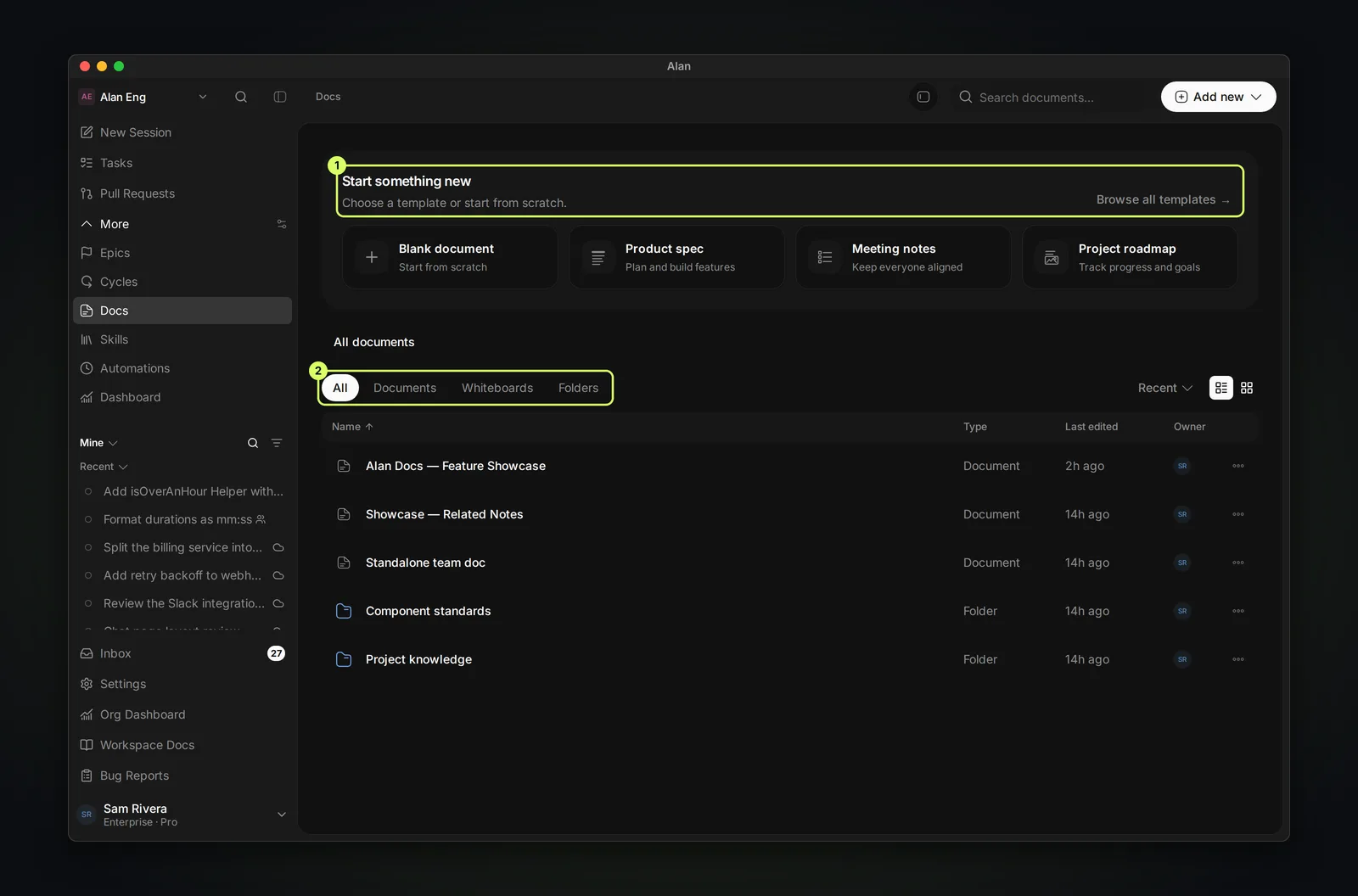
Documents are standalone pages that live in a team, not on a task. Use them for knowledge that outlives any single piece of work: PRDs, specs, wikis, and long-lived reference material. Find them under **Docs** in the team sidebar.
|
|
6
|
+
|
|
7
|
+
|
|
8
|
+
|
|
9
|
+
> **Note:** Document vs artifact: a **document** is standalone team knowledge; an **artifact** is output tied to a task and conversation. If the content belongs to a task, create an artifact instead — see [Documents and artifacts](../reference/documents-and-artifacts.md).
|
|
10
|
+
|
|
11
|
+
## Create a document
|
|
12
|
+
|
|
13
|
+
**1. Open Docs**
|
|
14
|
+
|
|
15
|
+
Go to **Docs** in the sidebar (under **More** unless you pinned it). **All documents** lists everything, with **All**, **Documents**, **Whiteboards**, and **Folders** tabs, list or grid view, and search.
|
|
16
|
+
|
|
17
|
+
**2. Start something new**
|
|
18
|
+
|
|
19
|
+
Pick a template under **Start something new**: **Blank document**, **Product spec**, **Meeting notes**, or **Project roadmap**, or choose **Browse all templates**. You can also use **Add new** for **New document**, **New whiteboard**, or **New folder**.
|
|
20
|
+
|
|
21
|
+
**3. Write**
|
|
22
|
+
|
|
23
|
+
Set the title and start writing. Type **`/`** for block commands and **`@`** to mention another document, task, subtask, person, artifact, or whiteboard.
|
|
24
|
+
|
|
25
|
+
|
|
26
|
+
|
|
27
|
+
## The editor
|
|
28
|
+
|
|
29
|
+
Documents use a collaborative rich-text editor:
|
|
30
|
+
|
|
31
|
+
- **Real-time collaboration.** Multiple people edit at once; you see collaborators' cursors and selections live.
|
|
32
|
+
- **Mentions (`@`).** Link documents, tasks, subtasks, people, artifacts, and whiteboards inline.
|
|
33
|
+
- **Slash commands (`/`).** Insert headings, lists, and other blocks.
|
|
34
|
+
- **Autosave.** The header shows **Saving…** then **Saved** — there's no manual save.
|
|
35
|
+
|
|
36
|
+
## Comments
|
|
37
|
+
|
|
38
|
+
Select text to leave a comment. Comments support threaded replies, emoji reactions, and **resolve / unresolve**. The header shows a **Comments** button (or the open-comment count). You can deep-link straight to a comment.
|
|
39
|
+
|
|
40
|
+
## Organize
|
|
41
|
+
|
|
42
|
+
- **Folders** group related documents; folders can nest. An empty one reads "This folder is empty".
|
|
43
|
+
- **Pages**: use **Add page** in a document's header to nest sub-pages, with breadcrumb navigation.
|
|
44
|
+
|
|
45
|
+
## Publish and share
|
|
46
|
+
|
|
47
|
+
- **Share** opens the sharing options. **Publish to web** creates a public, read-only link (`/share/`) that you can copy. Older `/share/docs/` links redirect to it while the document is published. **Unpublish** turns the link off.
|
|
48
|
+
- A document is private to the team until you publish it.
|
|
49
|
+
|
|
50
|
+
> **Warning:** Publishing makes a document readable by anyone with the link. Confirm there's nothing sensitive before you publish.
|
|
51
|
+
|
|
52
|
+
## Version history and archive
|
|
53
|
+
|
|
54
|
+
- **Version history** tracks changes with author and timestamp; restore any earlier version.
|
|
55
|
+
- **Archive** removes a document from the active list. Find it with the archived filter and choose **Restore** to bring it back, or **Delete permanently** to remove it.
|
|
56
|
+
|
|
57
|
+
## Export
|
|
58
|
+
|
|
59
|
+
Export a document to **PDF**, **Markdown (.md)**, or **HTML (.html)** from the document menu.
|
|
60
|
+
|
|
61
|
+
## Next steps
|
|
62
|
+
|
|
63
|
+
- [Whiteboard](whiteboard.md) — The canvas companion to documents, in the same Docs area.
|
|
64
|
+
- [Documents and artifacts](../reference/documents-and-artifacts.md) — Decide between a standalone document and a task artifact.
|
|
65
|
+
- [Task artifacts](../tasks/task-artifacts.md) — Outputs that belong to a task rather than the team.
|
|
66
|
+
- [Members and teams](../administration/members-and-teams.md) — Who is on the team, their roles, and team settings.
|