@alan-ai-hq/agent-manager-linux-arm64 0.1.199 → 0.1.201
This diff represents the content of publicly available package versions that have been released to one of the supported registries. The information contained in this diff is provided for informational purposes only and reflects changes between package versions as they appear in their respective public registries.
- package/alan-agent.cjs +8928 -5241
- package/alan-holder.cjs +5364 -3401
- package/alan-lease.cjs +808 -200
- package/builtin-skills/agent-desktop/SKILL.md +94 -0
- package/builtin-skills/alan-artifact/SKILL.md +128 -0
- package/builtin-skills/alan-artifact/examples/interactive-diagram.md +50 -0
- package/builtin-skills/alan-artifact/examples/prototype.md +53 -0
- package/builtin-skills/alan-artifact/examples/test-report.md +55 -0
- package/builtin-skills/alan-artifact/references/design.md +39 -0
- package/builtin-skills/alan-artifact/references/diagrams.md +20 -0
- package/builtin-skills/alan-deck/SKILL.md +189 -0
- package/builtin-skills/alan-diagrams/SKILL.md +105 -0
- package/builtin-skills/alan-diagrams/references/diagram-catalogue.md +847 -0
- package/builtin-skills/alan-docs/SKILL.md +143 -0
- package/builtin-skills/alan-docs/references/administration/members-and-teams.md +48 -0
- package/builtin-skills/alan-docs/references/administration/org-dashboard.md +19 -0
- package/builtin-skills/alan-docs/references/administration/organisation-settings.md +41 -0
- package/builtin-skills/alan-docs/references/agents-and-sessions/code-context.md +60 -0
- package/builtin-skills/alan-docs/references/agents-and-sessions/coding-agents-and-models.md +78 -0
- package/builtin-skills/alan-docs/references/agents-and-sessions/session-lifecycle.md +62 -0
- package/builtin-skills/alan-docs/references/agents-and-sessions/start-a-session.md +110 -0
- package/builtin-skills/alan-docs/references/automations/automation-runs.md +69 -0
- package/builtin-skills/alan-docs/references/automations/create-an-automation.md +143 -0
- package/builtin-skills/alan-docs/references/automations/overview.md +77 -0
- package/builtin-skills/alan-docs/references/cloud-and-local/cloud-images.md +64 -0
- package/builtin-skills/alan-docs/references/cloud-and-local/cloud-sessions-and-execution.md +89 -0
- package/builtin-skills/alan-docs/references/cloud-and-local/cloud-setup.md +128 -0
- package/builtin-skills/alan-docs/references/cloud-and-local/codex-cli-connector.md +92 -0
- package/builtin-skills/alan-docs/references/cloud-and-local/local-execution.md +213 -0
- package/builtin-skills/alan-docs/references/cloud-and-local/runtime-recovery.md +60 -0
- package/builtin-skills/alan-docs/references/cloud-and-local/sandboxes.md +74 -0
- package/builtin-skills/alan-docs/references/cloud-and-local/troubleshooting-and-faq.md +102 -0
- package/builtin-skills/alan-docs/references/get-started/connect-azure-devops.md +89 -0
- package/builtin-skills/alan-docs/references/get-started/connect-bitbucket.md +86 -0
- package/builtin-skills/alan-docs/references/get-started/connect-github.md +114 -0
- package/builtin-skills/alan-docs/references/get-started/join-a-team.md +114 -0
- package/builtin-skills/alan-docs/references/get-started/product-map.md +96 -0
- package/builtin-skills/alan-docs/references/get-started/quickstart.md +158 -0
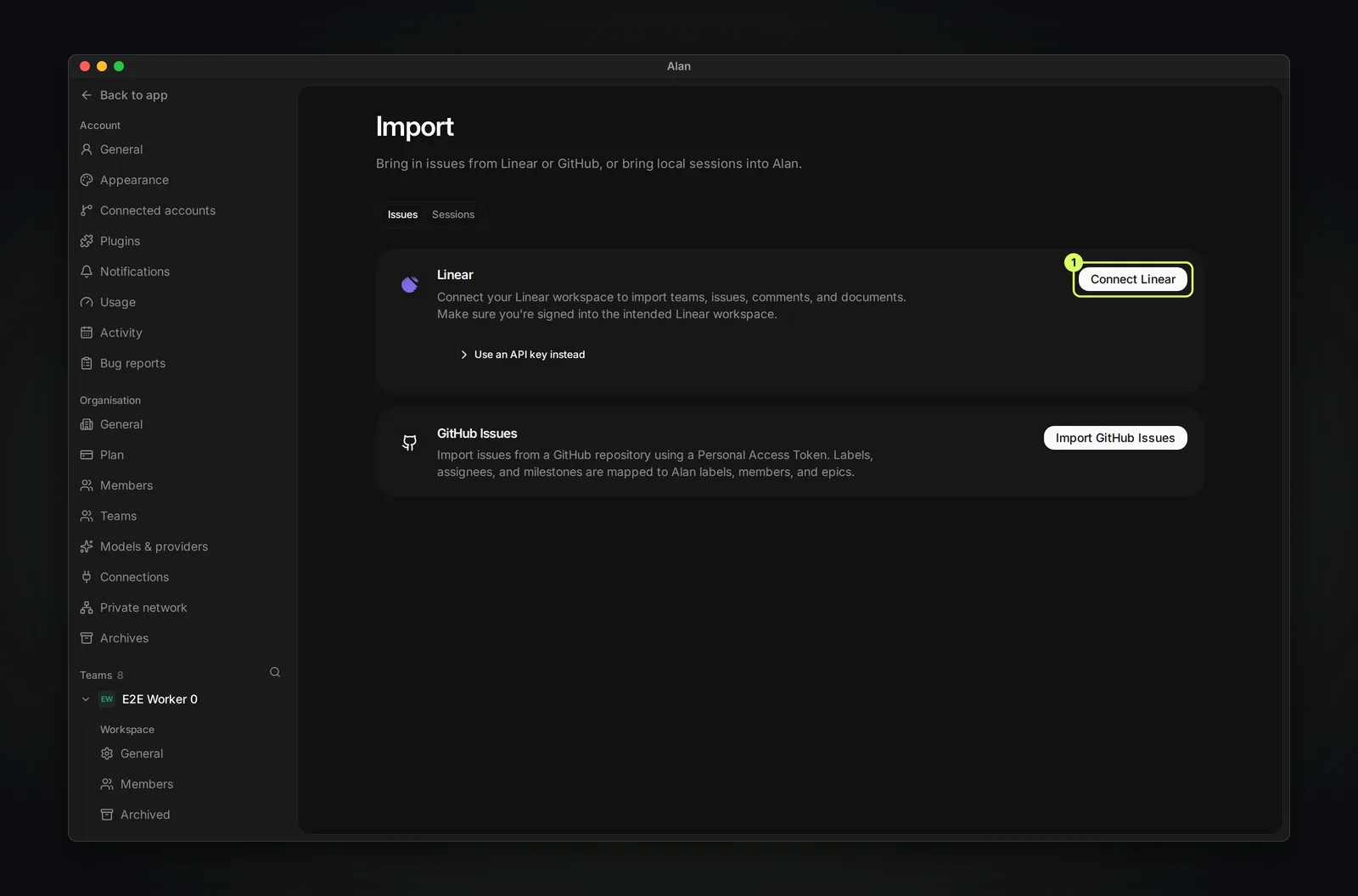
- package/builtin-skills/alan-docs/references/get-started/set-up-your-team.md +200 -0
- package/builtin-skills/alan-docs/references/get-started/sign-in.md +104 -0
- package/builtin-skills/alan-docs/references/get-started/welcome.md +39 -0
- package/builtin-skills/alan-docs/references/integrations/connect-microsoft-teams.md +116 -0
- package/builtin-skills/alan-docs/references/integrations/connect-slack.md +164 -0
- package/builtin-skills/alan-docs/references/integrations/import-from-linear.md +172 -0
- package/builtin-skills/alan-docs/references/plans-and-billing/plans-and-limits.md +115 -0
- package/builtin-skills/alan-docs/references/plans-and-billing/usage-and-credits.md +47 -0
- package/builtin-skills/alan-docs/references/reference/documents-and-artifacts.md +52 -0
- package/builtin-skills/alan-docs/references/reference/faq.md +89 -0
- package/builtin-skills/alan-docs/references/reference/feature-catalog.md +89 -0
- package/builtin-skills/alan-docs/references/reference/glossary.md +96 -0
- package/builtin-skills/alan-docs/references/reference/links-and-ids.md +80 -0
- package/builtin-skills/alan-docs/references/reference/roles-and-permissions.md +64 -0
- package/builtin-skills/alan-docs/references/reference/statuses.md +86 -0
- package/builtin-skills/alan-docs/references/reviews-testing-deploys/deployments.md +28 -0
- package/builtin-skills/alan-docs/references/reviews-testing-deploys/pull-requests.md +85 -0
- package/builtin-skills/alan-docs/references/reviews-testing-deploys/review-work.md +55 -0
- package/builtin-skills/alan-docs/references/reviews-testing-deploys/testing-evidence.md +52 -0
- package/builtin-skills/alan-docs/references/skills/plugins-and-mcp.md +24 -0
- package/builtin-skills/alan-docs/references/skills/skills.md +103 -0
- package/builtin-skills/alan-docs/references/tasks/complete-a-task.md +79 -0
- package/builtin-skills/alan-docs/references/tasks/create-a-task.md +67 -0
- package/builtin-skills/alan-docs/references/tasks/subtasks-and-status.md +55 -0
- package/builtin-skills/alan-docs/references/tasks/task-artifacts.md +56 -0
- package/builtin-skills/alan-docs/references/tasks/task-detail.md +65 -0
- package/builtin-skills/alan-docs/references/teams-and-planning/cycles.md +93 -0
- package/builtin-skills/alan-docs/references/teams-and-planning/documents.md +66 -0
- package/builtin-skills/alan-docs/references/teams-and-planning/epics.md +95 -0
- package/builtin-skills/alan-docs/references/teams-and-planning/whiteboard.md +52 -0
- package/builtin-skills/alan-docs/references/troubleshooting/agent-blocked.md +38 -0
- package/builtin-skills/alan-docs/references/troubleshooting/common-problems.md +118 -0
- package/builtin-skills/alan-docs/references/troubleshooting/github-access.md +41 -0
- package/builtin-skills/alan-docs/references/troubleshooting/missing-artifact.md +47 -0
- package/builtin-skills/alan-docs/references/troubleshooting/report-an-issue.md +74 -0
- package/builtin-skills/alan-docs/references/troubleshooting/runtime-unavailable.md +49 -0
- package/builtin-skills/alan-docs/scripts/generate-references.mjs +363 -0
- package/builtin-skills/alan-environment-setup/SKILL.md +368 -0
- package/builtin-skills/alan-environment-setup/references/android.md +118 -0
- package/builtin-skills/alan-environment-setup/references/troubleshooting.md +38 -0
- package/builtin-skills/alan-skill-authoring/SKILL.md +83 -0
- package/builtin-skills/alan-tasks/SKILL.md +195 -0
- package/builtin-skills/alan-test-android/SKILL.md +224 -0
- package/builtin-skills/alan-test-android/scripts/android-up.sh +227 -0
- package/builtin-skills/alan-test-android/scripts/install-launch.sh +38 -0
- package/builtin-skills/alan-test-android/scripts/record.sh +64 -0
- package/builtin-skills/alan-test-android/scripts/ui.py +367 -0
- package/builtin-skills/alan-test-desktop/SKILL.md +107 -0
- package/builtin-skills/alan-test-desktop/references/linux-recording.md +31 -0
- package/builtin-skills/alan-test-feature/SKILL.md +243 -0
- package/builtin-skills/alan-test-mobile/SKILL.md +65 -0
- package/builtin-skills/alan-test-web/SKILL.md +113 -0
- package/builtin-skills/alan-walkthrough/SKILL.md +152 -0
- package/builtin-skills/alan-walkthrough/scripts/mark-changes.js +419 -0
- package/builtin-skills/alan-walkthrough/scripts/publish-capture.mjs +288 -0
- package/builtin-skills/alan-workflows/SKILL.md +235 -0
- package/builtin-skills/manifest.json +19 -0
- package/package.json +3 -2
|
@@ -0,0 +1,172 @@
|
|
|
1
|
+
> Source: [https://docs.tryalan.ai/docs/integrations/import-from-linear](https://docs.tryalan.ai/docs/integrations/import-from-linear)
|
|
2
|
+
|
|
3
|
+
# Import issues from Linear
|
|
4
|
+
|
|
5
|
+
This page helps you copy issues from Linear into an Alan team. Each Linear issue becomes an Alan task.
|
|
6
|
+
|
|
7
|
+
The import is one-way. Alan reads from Linear and never changes anything in Linear.
|
|
8
|
+
|
|
9
|
+
Linear import is in each team's settings. It is not on the organisation **Connections** page.
|
|
10
|
+
|
|
11
|
+
## Before you start
|
|
12
|
+
|
|
13
|
+
- Your organisation uses the **Team** or **Enterprise** tier. These tiers include shared integrations, such as Linear. To check your tier, see [Plans and limits](../plans-and-billing/plans-and-limits.md).
|
|
14
|
+
- You are a member of the Alan team that will receive the tasks.
|
|
15
|
+
- You can sign in to the right Linear workspace in your browser.
|
|
16
|
+
- If you choose **Connect Linear**, a Linear workspace admin must approve the connection. If you are not a Linear admin, you can use a Linear API key instead. An API key is a secret code from Linear that lets Alan read your Linear data. [Connect with an API key](#connect-with-an-api-key) explains this.
|
|
17
|
+
|
|
18
|
+
## Who can do what
|
|
19
|
+
|
|
20
|
+
| Action | Who can do it |
|
|
21
|
+
| --- | --- |
|
|
22
|
+
| Connect or disconnect Linear | An organisation admin, or a member of every Alan team that already uses the Linear connection |
|
|
23
|
+
| Start, cancel or retry an import | Any member of the team that receives the tasks |
|
|
24
|
+
| Pause or resume the ongoing sync (Alan copying new Linear changes) for a team | Any member of that team |
|
|
25
|
+
|
|
26
|
+
There is one Linear connection for the whole Alan organisation. Every team uses the same connection.
|
|
27
|
+
|
|
28
|
+
## Connect Linear
|
|
29
|
+
|
|
30
|
+
**1. Open settings**
|
|
31
|
+
|
|
32
|
+
Open your account menu at the bottom of the sidebar. Choose **Settings**. You see the settings menu.
|
|
33
|
+
|
|
34
|
+
**2. Open the team's settings**
|
|
35
|
+
|
|
36
|
+
Under **Teams**, choose the team that should receive the tasks. You see the team's settings groups.
|
|
37
|
+
|
|
38
|
+
**3. Open Import**
|
|
39
|
+
|
|
40
|
+
In the **Connections** group, choose **Import**. The **Issues** tab opens. You see a **Linear** card and a **GitHub Issues** card.
|
|
41
|
+
|
|
42
|
+
**4. Choose Connect Linear**
|
|
43
|
+
|
|
44
|
+
On the **Linear** card, choose **Connect Linear** (1). Linear opens in a new browser tab. In the desktop app, it opens in your normal browser.
|
|
45
|
+
|
|
46
|
+
**5. Approve the connection in Linear**
|
|
47
|
+
|
|
48
|
+
In Linear, approve the request. Alan asks only for read access. Alan shows **Linear connected for** and your workspace name.
|
|
49
|
+
|
|
50
|
+
If you started in the desktop app, the browser tab shows **Linear connected in Alan**. Close the tab and go back to the app.
|
|
51
|
+
|
|
52
|
+
The **Linear** card now shows **Connected** and your Linear workspace name.
|
|
53
|
+
|
|
54
|
+
### Connect with an API key
|
|
55
|
+
|
|
56
|
+
Use this if you are not a Linear admin. The import then runs as the owner of the key.
|
|
57
|
+
|
|
58
|
+
1. In Linear, open **Settings → Security & access**. Create a personal API key and copy it.
|
|
59
|
+
2. In Alan, on the **Linear** card, choose **Use an API key instead**. A field for the key appears.
|
|
60
|
+
3. Paste the key into the field.
|
|
61
|
+
4. Choose **Connect**. The **Linear** card shows **Connected**.
|
|
62
|
+
|
|
63
|
+
|
|
64
|
+
|
|
65
|
+
> **Note:** The connection attempt expires after 15 minutes. If it expires, choose **Connect Linear** again.
|
|
66
|
+
|
|
67
|
+
## Import your issues
|
|
68
|
+
|
|
69
|
+
The import opens a short wizard with four steps. The tasks always go into the team whose settings you have open.
|
|
70
|
+
|
|
71
|
+
**1. Start the wizard**
|
|
72
|
+
|
|
73
|
+
On the **Linear** card, choose **Import from Linear**. You see **Step 1 of 4**.
|
|
74
|
+
|
|
75
|
+
**2. Pick the Linear teams**
|
|
76
|
+
|
|
77
|
+
Select one or more Linear teams. Each row shows the team's name and number of issues. Choose **Next**.
|
|
78
|
+
|
|
79
|
+
You choose whole Linear teams. You cannot pick one project, one label or only open issues.
|
|
80
|
+
|
|
81
|
+
**3. Match people**
|
|
82
|
+
|
|
83
|
+
Each Linear person has a menu of Alan members. People with the same email address are already matched and show **Email match**. Change a match if it is wrong. Leave a person as **Leave unmapped** if they are not in Alan. Choose **Next**.
|
|
84
|
+
|
|
85
|
+
**4. Choose what to import**
|
|
86
|
+
|
|
87
|
+
Turn each item on or off: **Comments**, **Documents**, **Attachments & pull requests**, **Relations**, **Cycles**, **Epics** and **Assets**. All of these are on at first. **Activity history** is off at first, because it makes the import much slower. Choose **Next**.
|
|
88
|
+
|
|
89
|
+
**5. Check the preview and start**
|
|
90
|
+
|
|
91
|
+
The preview shows how many issues Alan will import and how long it may take. Choose **Start import**. You see the **Linear import** progress window.
|
|
92
|
+
|
|
93
|
+
The import runs in the background, so you can close the window. Tasks appear in the team's task list while the import runs. When it finishes, you see **Imported** and a count of tasks, comments, documents and assets. Choose **Open** and the team name to see the tasks.
|
|
94
|
+
|
|
95
|
+
To start the import later, set **Start later (optional)** in step 3 of 4, where you choose what to import.
|
|
96
|
+
|
|
97
|
+
## What Alan copies
|
|
98
|
+
|
|
99
|
+
| In Linear | In Alan |
|
|
100
|
+
| --- | --- |
|
|
101
|
+
| Issue | A task in the team, with the same title, description, due date and labels |
|
|
102
|
+
| Sub-issue | A subtask of the matching task |
|
|
103
|
+
| Priority **Urgent**, **High**, **Medium**, **Low** or **No priority** | The same priority in Alan |
|
|
104
|
+
| Workflow state | A team status with the same name |
|
|
105
|
+
| Project | An epic |
|
|
106
|
+
| Cycle | A cycle |
|
|
107
|
+
| Document | A document |
|
|
108
|
+
| Assignee you matched | The task's assignee |
|
|
109
|
+
| Assignee you left unmapped | No assignee |
|
|
110
|
+
|
|
111
|
+
Alan adds Linear statuses and labels to the team's own lists. The team keeps its existing statuses. Each Linear status keeps its name, including custom statuses. Alan puts it in a status group by its type in Linear:
|
|
112
|
+
|
|
113
|
+
| Linear status type | Alan status group |
|
|
114
|
+
| --- | --- |
|
|
115
|
+
| Triage, Backlog, Unstarted | Not started |
|
|
116
|
+
| Started | Active |
|
|
117
|
+
| Completed | Done |
|
|
118
|
+
| Canceled, Duplicate | Closed |
|
|
119
|
+
|
|
120
|
+
To learn about status groups, see [Statuses](../reference/statuses.md).
|
|
121
|
+
|
|
122
|
+
Comments from people that you left unmapped are copied too. Alan shows them as written by the person who started the import. The original author's name is at the top of the comment.
|
|
123
|
+
|
|
124
|
+
Archived Linear issues are copied as deleted tasks. They do not show in the task list.
|
|
125
|
+
|
|
126
|
+
## Run the import again
|
|
127
|
+
|
|
128
|
+
You can run the import again at any time. Alan updates the tasks it already copied. It does not create duplicates.
|
|
129
|
+
|
|
130
|
+
Changes in Linear win. If a field changed in Linear, the next import or sync writes the Linear value over the Alan value.
|
|
131
|
+
|
|
132
|
+
After the first import, the card shows **Ongoing sync** for each linked team. Alan keeps copying changes from Linear to that team. To stop this, choose **Pause sync**. To start it again, choose **Resume sync**. Pausing does not delete any tasks.
|
|
133
|
+
|
|
134
|
+
A Linear team stays linked to the first Alan team you import it into. Other teams see it as locked. To import it again, open the team it is linked to.
|
|
135
|
+
|
|
136
|
+
## Disconnect Linear
|
|
137
|
+
|
|
138
|
+
1. On the **Linear** card, choose **Disconnect**. You see **Disconnect Linear?**
|
|
139
|
+
2. Choose **Disconnect** to confirm. Alan shows **Linear disconnected**.
|
|
140
|
+
|
|
141
|
+
Your imported tasks stay in Alan. A running import pauses. It continues after you connect again.
|
|
142
|
+
|
|
143
|
+
## If something goes wrong
|
|
144
|
+
|
|
145
|
+
**'Connecting Linear requires a Linear workspace admin.'**
|
|
146
|
+
|
|
147
|
+
Ask an admin of your Linear workspace to connect Linear. Or choose **Use an API key instead** and use your own Linear API key.
|
|
148
|
+
|
|
149
|
+
**'An import is already running for this Linear workspace.'**
|
|
150
|
+
|
|
151
|
+
Only one import can run at a time for each Linear workspace. Choose **View the active import** and wait for it to finish.
|
|
152
|
+
|
|
153
|
+
**A Linear team is locked**
|
|
154
|
+
|
|
155
|
+
The team was already imported into another Alan team. Open that Alan team's settings to import it again.
|
|
156
|
+
|
|
157
|
+
**Start import stays off**
|
|
158
|
+
|
|
159
|
+
One Alan team would receive more than 25,000 issues. Read the warning. To continue, turn on **I understand — import this volume anyway**.
|
|
160
|
+
|
|
161
|
+
**The import is paused and asks you to reconnect**
|
|
162
|
+
|
|
163
|
+
Alan lost access to Linear. Choose **Reconnect Linear**. The import continues from where it stopped.
|
|
164
|
+
|
|
165
|
+
**A new Linear team or person is missing from the wizard**
|
|
166
|
+
|
|
167
|
+
Alan keeps the list of Linear teams and people for 5 minutes. Wait 5 minutes, then open the wizard again.
|
|
168
|
+
|
|
169
|
+
## Next
|
|
170
|
+
|
|
171
|
+
- [Use the task page](../tasks/task-detail.md) — Open an imported task and start work on it.
|
|
172
|
+
- [Set up your team](../get-started/set-up-your-team.md) — Invite people and assign the first task.
|
|
@@ -0,0 +1,115 @@
|
|
|
1
|
+
> Source: [https://docs.tryalan.ai/docs/plans-and-billing/plans-and-limits](https://docs.tryalan.ai/docs/plans-and-billing/plans-and-limits)
|
|
2
|
+
|
|
3
|
+
# Plans and limits
|
|
4
|
+
|
|
5
|
+
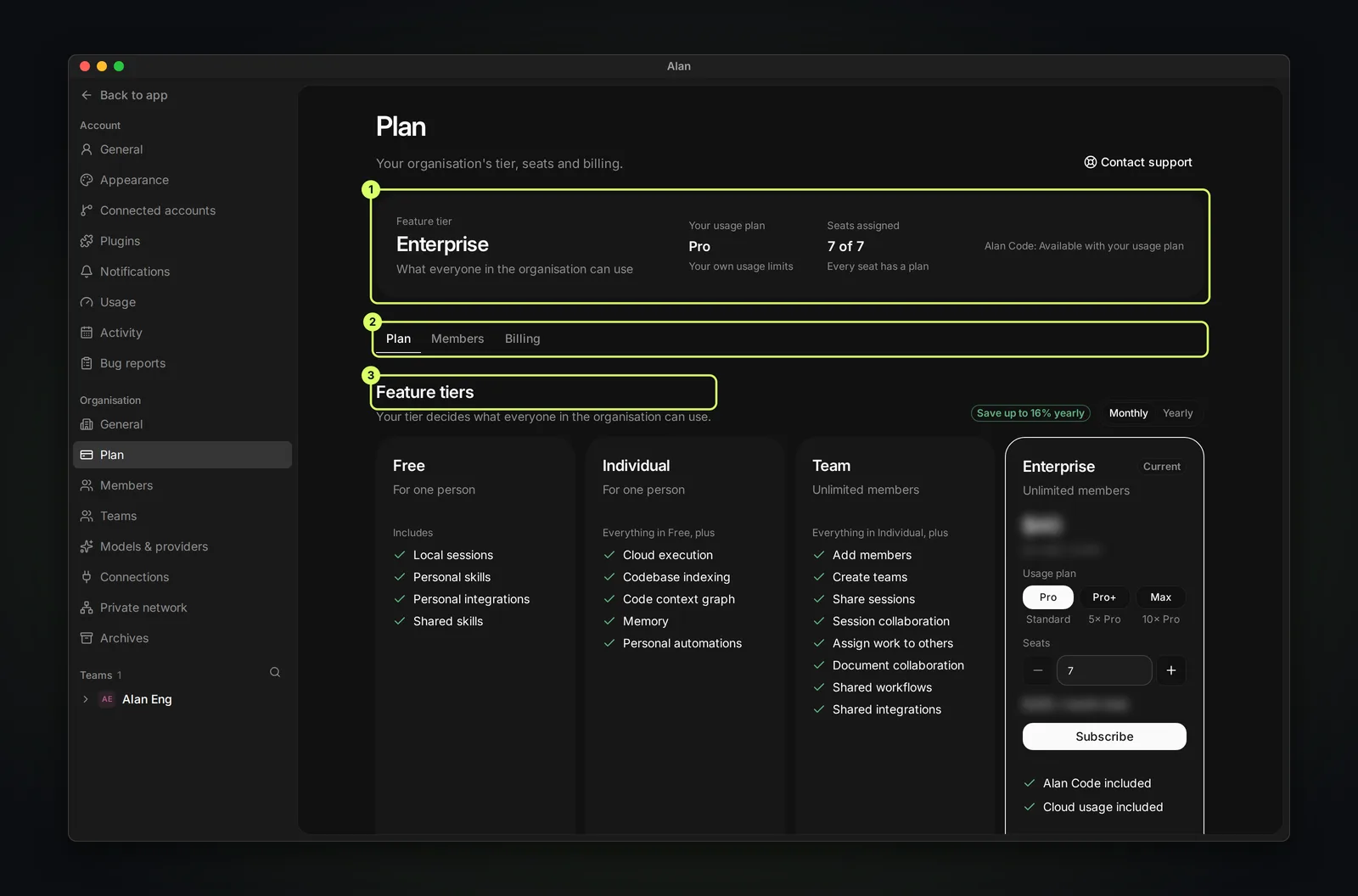
Your plan controls which features you can use and how much usage is included. A **seat** is a place for one member in the organization:
|
|
6
|
+
|
|
7
|
+
- A **feature tier** that decides which features everyone in the organization can use: **Free**, **Individual**, **Team**, or **Enterprise**.
|
|
8
|
+
- A **usage plan** for each seat that decides how much model and cloud usage that member gets each month: **Pro**, **Pro+**, or **Max**.
|
|
9
|
+
|
|
10
|
+
Open **Settings → Organisation → Plan** to check them. Only organization admins can change plans, seats, or billing.
|
|
11
|
+
|
|
12
|
+
|
|
13
|
+
|
|
14
|
+
_Video: https://docs.tryalan.ai/images/screenshots/plans-and-billing-tour.mp4_
|
|
15
|
+
|
|
16
|
+
> **Warning:** Check **Settings → Organisation → Plan** for your account's available plans, prices, and billing terms. Feature tiers and per-seat usage plans are separate; confirm both before subscribing.
|
|
17
|
+
|
|
18
|
+
## See which plan you're on
|
|
19
|
+
|
|
20
|
+
Open **Settings → Organisation → Plan**. The card at the top shows:
|
|
21
|
+
|
|
22
|
+
| Field | What it tells you |
|
|
23
|
+
| --- | --- |
|
|
24
|
+
| **Feature tier** | "What everyone in the organisation can use" |
|
|
25
|
+
| **Your usage plan** | Your own monthly limits, for example **Pro** |
|
|
26
|
+
| **Seats assigned** | For example **7 of 7**, and whether every seat has a usage plan |
|
|
27
|
+
|
|
28
|
+
The line **Alan Code: Available with your usage plan** confirms you can use Alan Code with your seat.
|
|
29
|
+
|
|
30
|
+
Below it are three tabs:
|
|
31
|
+
|
|
32
|
+
| Tab | What it's for |
|
|
33
|
+
| --- | --- |
|
|
34
|
+
| **Plan** | **Feature tiers**: compare tiers, change usage plan and seats, and subscribe. |
|
|
35
|
+
| **Members** | Pick a usage plan for each member. |
|
|
36
|
+
| **Billing** | **Usage credits** and **Billing history**. See [Usage and credits](usage-and-credits.md). |
|
|
37
|
+
|
|
38
|
+
If you aren't an admin, the page reads "Your usage plan in this organisation." and shows only your own plan, with "Ask an organisation admin to change plans, seats or billing."
|
|
39
|
+
|
|
40
|
+
## Features by tier
|
|
41
|
+
|
|
42
|
+
| Feature | Free | Individual | Team | Enterprise |
|
|
43
|
+
| --- | :---: | :---: | :---: | :---: |
|
|
44
|
+
| Members | For one person | For one person | Unlimited members | Unlimited members |
|
|
45
|
+
| Sessions on your own computer | ✅ | ✅ | ✅ | ✅ |
|
|
46
|
+
| Sessions in the cloud | — | ✅ | ✅ | ✅ |
|
|
47
|
+
| Connect integrations | ✅ | ✅ | ✅ | ✅ |
|
|
48
|
+
| Personal skills | ✅ | ✅ | ✅ | ✅ |
|
|
49
|
+
| Share skills with the team | ✅ | ✅ | ✅ | ✅ |
|
|
50
|
+
| Personal automations | — | ✅ | ✅ | ✅ |
|
|
51
|
+
| Codebase indexing | — | ✅ | ✅ | ✅ |
|
|
52
|
+
| Context graph and memory | — | ✅ | ✅ | ✅ |
|
|
53
|
+
| Invite members and create teams | — | — | ✅ | ✅ |
|
|
54
|
+
| Share sessions and work on them together | — | — | ✅ | ✅ |
|
|
55
|
+
| Share automations, integrations, and resources with the team | — | — | ✅ | ✅ |
|
|
56
|
+
| Assign tasks to others; collaborate on documents | — | — | ✅ | ✅ |
|
|
57
|
+
| Workspace Docs (organization-wide docs) | — | — | — | ✅ |
|
|
58
|
+
|
|
59
|
+
When a feature isn't in your tier, Alan says so where you'd use it. For example, the session composer's **Team** option shows "Team sharing is not included in this plan", and a cloud session on Free reads "Cloud isn't included in the Free plan. Upgrade to run work in the cloud." Choose **Compare all features** on the **Plan** tab for the full list.
|
|
60
|
+
|
|
61
|
+
## Usage plans
|
|
62
|
+
|
|
63
|
+
Each seat has a usage plan with a monthly allowance in US dollars. The allowance covers Alan Code model usage and the organization's cloud computers:
|
|
64
|
+
|
|
65
|
+
| Usage plan | Shown in the picker as | Monthly allowance per seat | Always yours for Alan Code (75%) | Shared with cloud (25%) |
|
|
66
|
+
| --- | --- | ---: | ---: | ---: |
|
|
67
|
+
| Pro | **Standard** | $10 | $7.50 | $2.50 |
|
|
68
|
+
| Pro+ | **5× Pro** | $50 | $37.50 | $12.50 |
|
|
69
|
+
| Max | **10× Pro** | $100 | $75 | $25 |
|
|
70
|
+
|
|
71
|
+
The allowance amounts come from Alan's plan catalog and can change; the picker shows the current ones.
|
|
72
|
+
|
|
73
|
+
You keep 75% for your own Alan Code usage. The remaining 25% can cover either your Alan Code usage or your team's cloud usage, whichever uses it first.
|
|
74
|
+
|
|
75
|
+
- **Alan Code** limits are per member. One member's usage never uses up another member's 75%.
|
|
76
|
+
- The **cloud budget** is pooled across the organization: it adds up the 25% share of every purchased seat. For example, 7 Pro seats give a $17.50 cloud budget for a full month. A seat added mid-month adds a prorated share. Purchased [usage credits](usage-and-credits.md) add budget for both cloud and Alan Code.
|
|
77
|
+
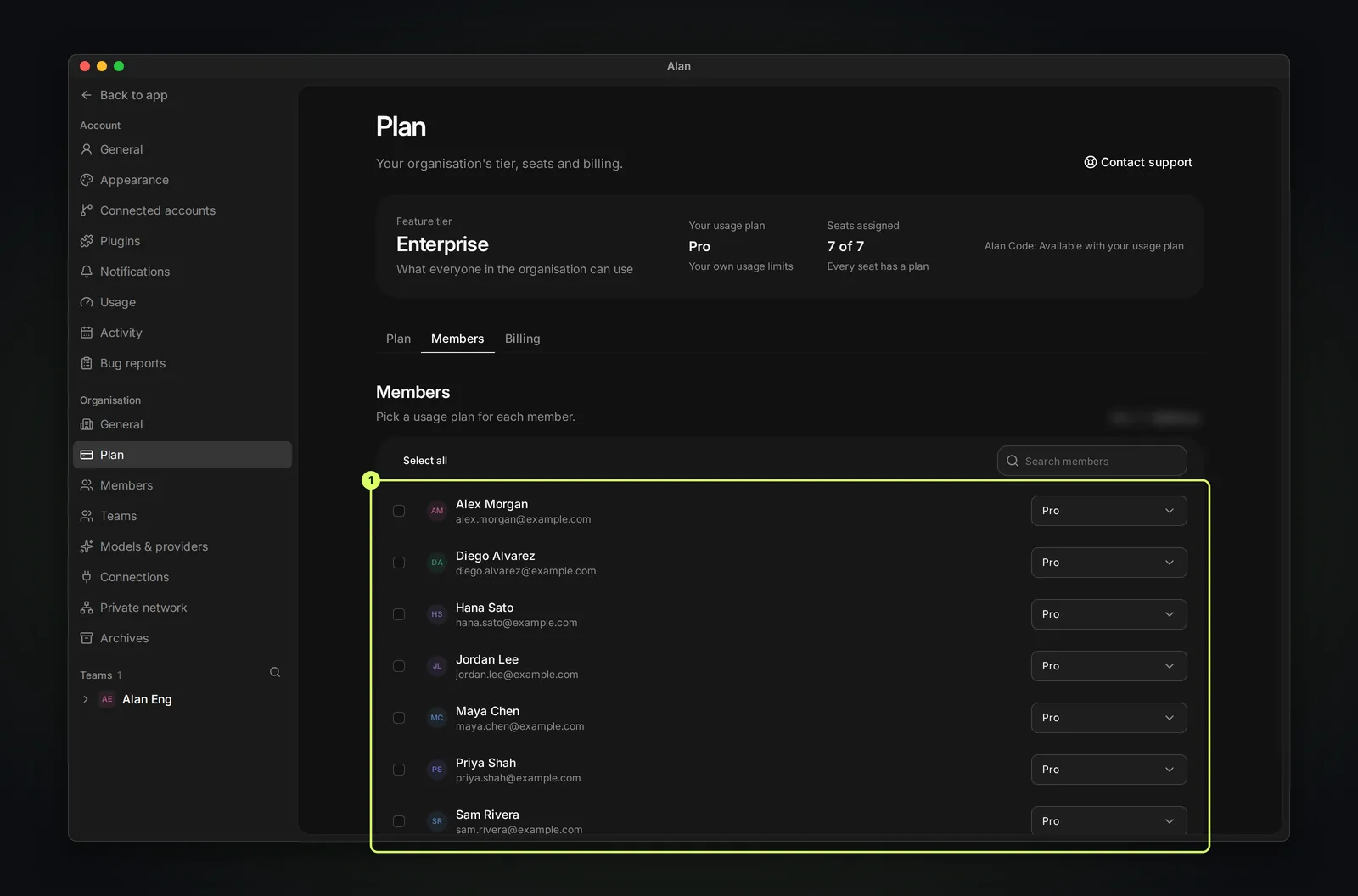
- Admins assign usage plans on the **Members** tab ("Pick a usage plan for each member."). Select members to set a plan for several at once. If your account allows it, a seat can stay **Unassigned**.
|
|
78
|
+
|
|
79
|
+
|
|
80
|
+
|
|
81
|
+
## Upgrade, change seats, or subscribe
|
|
82
|
+
|
|
83
|
+
**1. Open the Plan tab**
|
|
84
|
+
|
|
85
|
+
In **Settings → Organisation → Plan**, stay on the **Plan** tab. Under **Feature tiers**, your tier is marked **Current**.
|
|
86
|
+
|
|
87
|
+
**2. Choose the billing period**
|
|
88
|
+
|
|
89
|
+
Switch between **Monthly** and **Yearly**. The toggle shows the yearly saving, for example **Save up to 16% yearly**.
|
|
90
|
+
|
|
91
|
+
**3. Pick a tier, usage plan, and seats**
|
|
92
|
+
|
|
93
|
+
On the tier you want, pick a **Usage plan** (Pro, Pro+, or Max) and set **Seats**. Free and Individual are for one person, so they have no seat count. You need a seat for every member; with too few, Alan asks for more ("Every one of your N members needs a seat.").
|
|
94
|
+
|
|
95
|
+
**4. Subscribe**
|
|
96
|
+
|
|
97
|
+
Choose **Subscribe** and complete checkout. Back in Alan, the page checks for the new plan for about half a minute. If the payment still isn't reflected, choose **Refresh plan details**.
|
|
98
|
+
|
|
99
|
+
Tiers you can't buy online show **Talk to sales**. Use **Contact support** at the top of the page for invoices, trial or contract terms, or the timing and cost of subscription changes.
|
|
100
|
+
|
|
101
|
+
## What happens at a limit
|
|
102
|
+
|
|
103
|
+
| Limit | What you see | What to do |
|
|
104
|
+
| --- | --- | --- |
|
|
105
|
+
| A member's Alan Code allowance is used up | **Monthly limit reached**, with the reset date | Check usage credits or ask an admin about a larger usage plan. |
|
|
106
|
+
| The organization's cloud budget is used up | A budget warning; task and machine sandboxes pause after a grace period | Add usage credits, or run on your own computer. Automation runs already in progress can finish. |
|
|
107
|
+
| A team reached its cloud cap | A message that the team has reached its monthly cloud limit | Ask an admin to raise the team's cap. |
|
|
108
|
+
| Free tier and cloud | **Cloud isn't included in the Free plan** | Upgrade to Individual, Team, or Enterprise. |
|
|
109
|
+
|
|
110
|
+
See [Usage and credits](usage-and-credits.md) for how the cloud grace period works.
|
|
111
|
+
|
|
112
|
+
## Next steps
|
|
113
|
+
|
|
114
|
+
- [Usage and credits](usage-and-credits.md) — Watch usage and add credits.
|
|
115
|
+
- [Members and teams](../administration/members-and-teams.md) — Invite people and manage roles.
|
|
@@ -0,0 +1,47 @@
|
|
|
1
|
+
> Source: [https://docs.tryalan.ai/docs/plans-and-billing/usage-and-credits](https://docs.tryalan.ai/docs/plans-and-billing/usage-and-credits)
|
|
2
|
+
|
|
3
|
+
# Usage and credits
|
|
4
|
+
|
|
5
|
+
Check usage before starting more work, or when Alan says you have reached a limit. This page explains where to find the numbers and how an organization admin can add credits.
|
|
6
|
+
|
|
7
|
+
## Team usage
|
|
8
|
+
|
|
9
|
+
|
|
10
|
+
|
|
11
|
+
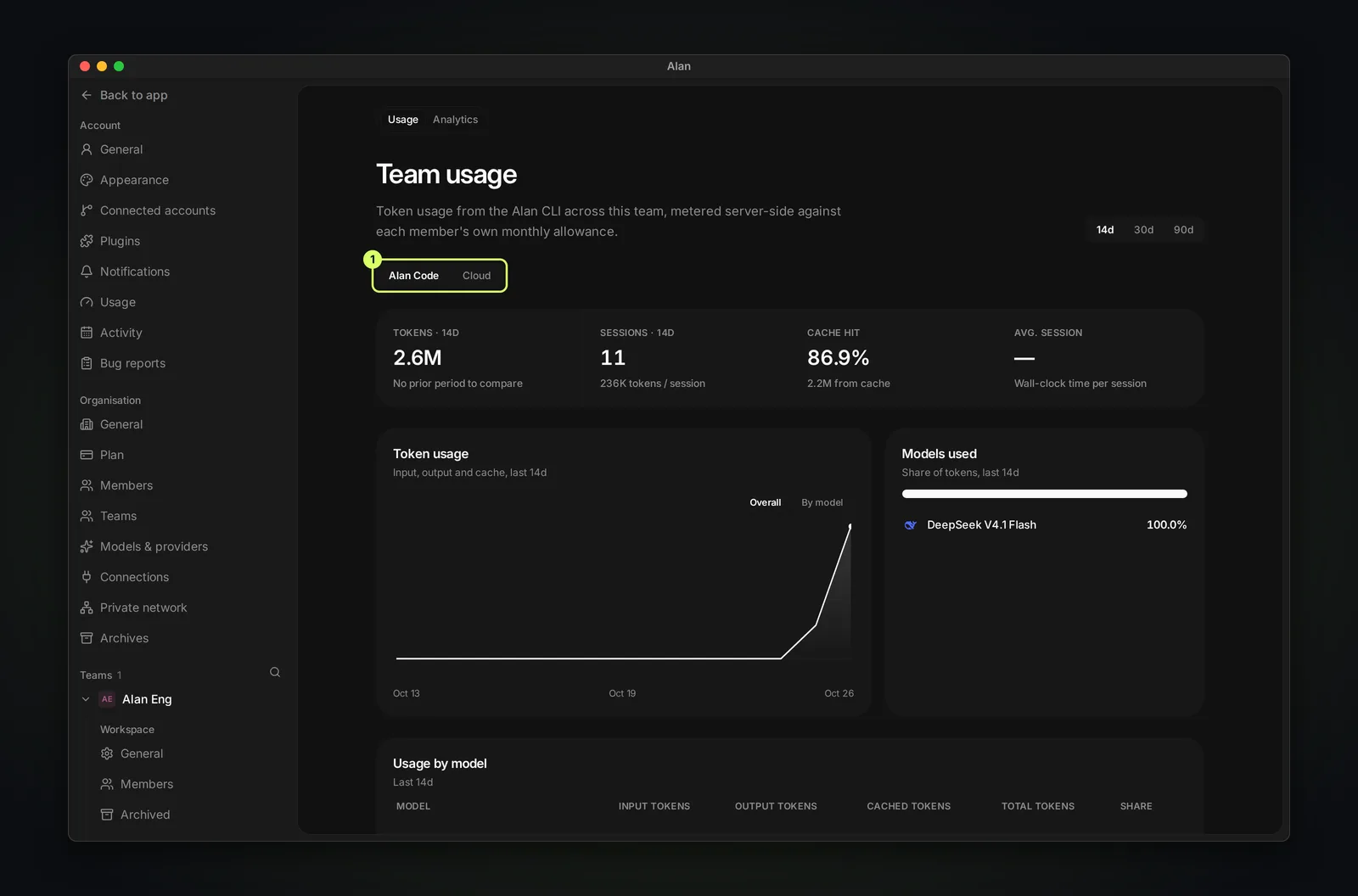
Open **Settings →** your team **→ Usage**. The **Team usage** page shows Alan Code and cloud usage for that team.
|
|
12
|
+
|
|
13
|
+
- Switch between **Alan Code** and **Cloud** usage, and between the last **14d**, **30d**, or **90d**.
|
|
14
|
+
- See totals (tokens, sessions, cache hit rate), a **Token usage** chart (**Overall** or **By model**), **Models used**, **Usage by model**, and **Usage by member**.
|
|
15
|
+
- Alan Code limits are per member ("Each member is capped individually."). The cloud budget, by contrast, is shared across the organization; see [Usage plans](plans-and-limits.md#usage-plans).
|
|
16
|
+
|
|
17
|
+
Team members can also open the **Analytics** tab here. The organization-wide [Org Dashboard](../administration/org-dashboard.md) is for organization admins. Your own usage is in **Settings → Account → Usage**.
|
|
18
|
+
|
|
19
|
+
## Usage credits
|
|
20
|
+
|
|
21
|
+
Purchased **Usage credits** add budget for both cloud computers and Alan Code. Unused purchased credits carry over; the seats' monthly cloud share does not. Organization admins manage purchases, and buying credits requires a paid plan.
|
|
22
|
+
|
|
23
|
+
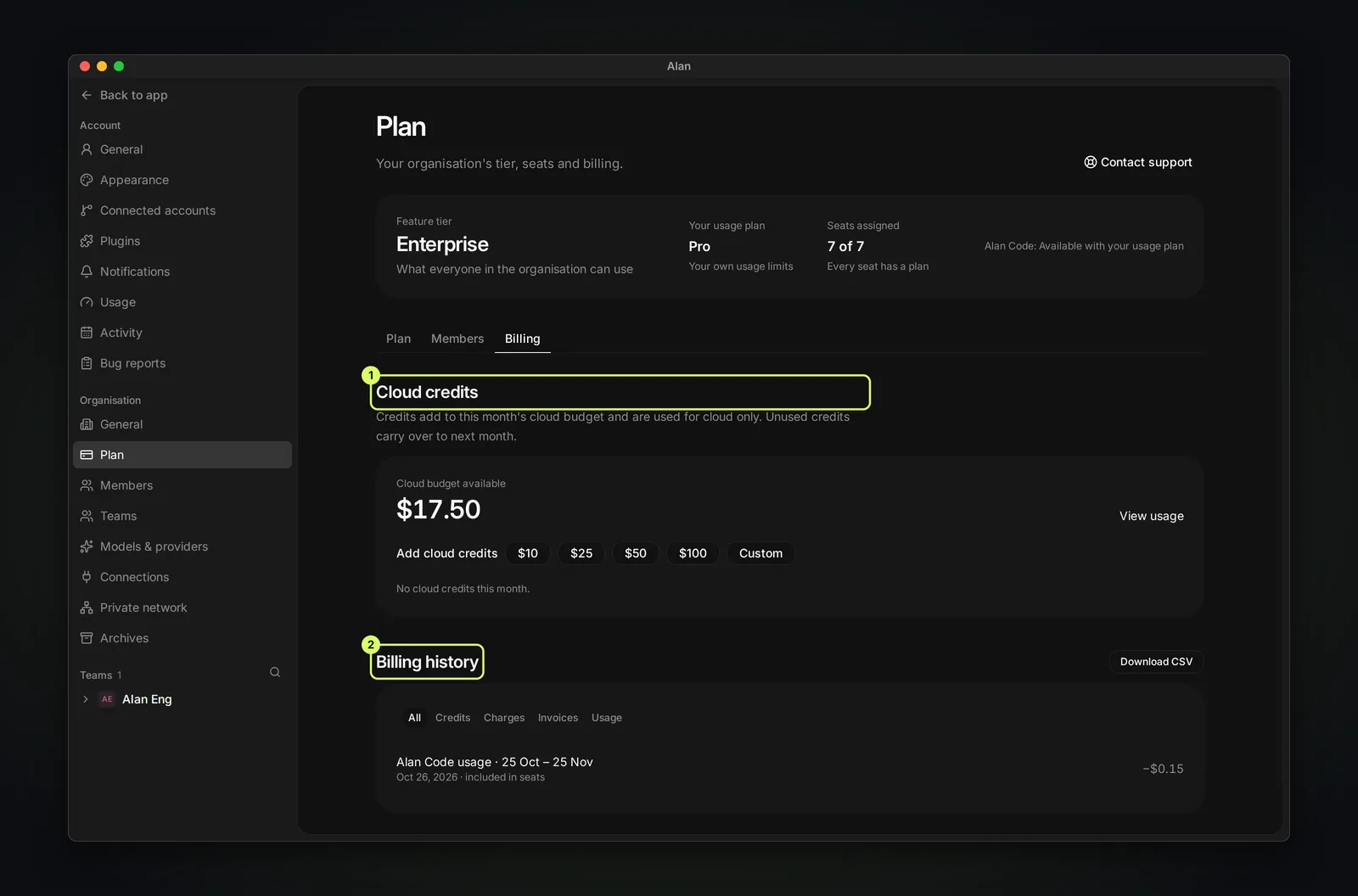
|
|
24
|
+
|
|
25
|
+
1. Open **Settings → Organisation → Plan** and choose the **Billing** tab.
|
|
26
|
+
2. Under **Usage credits**, choose an available pack, or **Custom** for another whole-dollar amount from $5 to $1,000.
|
|
27
|
+
3. Choose a pack or **Add usage credits** for a custom amount, then complete checkout. Your credits should appear within a minute.
|
|
28
|
+
|
|
29
|
+
The page shows **Purchased credits remaining**, including credits carried over from previous months. This balance excludes the allowance included with your plan. Choose **View usage** to see the full cloud budget and the plan's included allowance on the organization dashboard's **Spend** tab.
|
|
30
|
+
|
|
31
|
+
## Billing history
|
|
32
|
+
|
|
33
|
+
Below the credits, **Billing history** lists every transaction. Filter by **All**, **Credits**, **Charges**, **Invoices**, or **Usage**, and choose **Download CSV** to export it.
|
|
34
|
+
|
|
35
|
+
## When you reach a limit
|
|
36
|
+
|
|
37
|
+
- **Starting a cloud session** needs enough cloud budget for about 15 minutes of running. If there isn't enough, add credits or run on your own computer.
|
|
38
|
+
- **When the cloud budget runs out**, task and machine sandboxes normally pause after a 10-minute grace period, or 20 minutes if an agent is working. Automation runs already in progress are allowed to finish. Add credits to continue cloud work.
|
|
39
|
+
- **When a member's Alan Code allowance is used up**, check the available usage credits or ask an admin about a larger usage plan. The monthly allowance resets in the next billing period.
|
|
40
|
+
- **When the budget runs low**, Alan shows how many minutes of cloud are left. Organization admins receive a notification when the budget is used up.
|
|
41
|
+
|
|
42
|
+
These are the default timing limits; your deployment may use different settings. If a cloud session cannot start, check the budget and the reason shown before retrying.
|
|
43
|
+
|
|
44
|
+
## Next steps
|
|
45
|
+
|
|
46
|
+
- [Plans and limits](plans-and-limits.md) — Tiers, usage plans, and seats.
|
|
47
|
+
- [Org Dashboard](../administration/org-dashboard.md) — Usage across the whole organization.
|
|
@@ -0,0 +1,52 @@
|
|
|
1
|
+
> Source: [https://docs.tryalan.ai/docs/reference/documents-and-artifacts](https://docs.tryalan.ai/docs/reference/documents-and-artifacts)
|
|
2
|
+
|
|
3
|
+
# Documents and artifacts
|
|
4
|
+
|
|
5
|
+
Alan keeps written work in two places:
|
|
6
|
+
|
|
7
|
+
- A **document** is standalone knowledge that belongs to the team, such as a PRD, spec, or wiki page.
|
|
8
|
+
- An **artifact** is an output of a specific piece of work: a task, an automation, or a session.
|
|
9
|
+
|
|
10
|
+
Choose by purpose: use a document for knowledge the team will reuse, even when you write it during a task. Use an artifact for that task's plan, report, or other deliverable.
|
|
11
|
+
|
|
12
|
+
## At a glance
|
|
13
|
+
|
|
14
|
+
| | Document | Artifact |
|
|
15
|
+
| --- | --- | --- |
|
|
16
|
+
| Belongs to | A team, or the whole organization in **Workspace Docs** | Exactly one task, automation, or standalone session |
|
|
17
|
+
| Types | Document, whiteboard | **Plan**, **Test report**, **Document**, **Whiteboard** |
|
|
18
|
+
| Find it in | **Docs** in the team sidebar | The task or session's **Artifacts** panel |
|
|
19
|
+
| Typical content | PRDs, specs, meeting notes, roadmaps, architecture sketches | A plan to approve, test evidence, a task summary, a diagram for one change |
|
|
20
|
+
| Created by | You or an agent, often from a template | Usually an agent while it works; you can also choose **New** in **Artifacts** |
|
|
21
|
+
| Comments | ✅ | ✅ |
|
|
22
|
+
| Public link | **Share → Publish to web** | Publish from the artifact viewer |
|
|
23
|
+
| Organize | Folders and nested pages | Grouped by its task, automation, or session |
|
|
24
|
+
|
|
25
|
+
## Artifact types
|
|
26
|
+
|
|
27
|
+
| Type | Captures |
|
|
28
|
+
| --- | --- |
|
|
29
|
+
| **Plan** | What will change, why, how it will be verified, and open decisions |
|
|
30
|
+
| **Test report** | What was tested, with screenshots and recordings, and a pass, fail, or mixed result |
|
|
31
|
+
| **Document** | A written deliverable from the work, such as a summary, spec, or notes |
|
|
32
|
+
| **Whiteboard** | A diagram or sketch on a canvas |
|
|
33
|
+
|
|
34
|
+
Read pull request reviews under **Alan Review** on the pull request. When you start a review for a pull request with a primary linked task, Alan also creates a document artifact on that task. See [Task artifacts](../tasks/task-artifacts.md).
|
|
35
|
+
|
|
36
|
+
## Team docs and Workspace Docs
|
|
37
|
+
|
|
38
|
+
- **Team docs** live under **Docs** in a team (`/teams/{teamId}/docs`). Everyone in the team can open them.
|
|
39
|
+
- **Workspace Docs** are organization-wide documents and whiteboards (`/workspace/wiki`). They appear in the sidebar when Workspace Docs is turned on in **Settings → Organisation → General**, and need the Enterprise tier.
|
|
40
|
+
|
|
41
|
+
See [Documents](../teams-and-planning/documents.md), [Whiteboard](../teams-and-planning/whiteboard.md), and [Organisation settings](../administration/organisation-settings.md).
|
|
42
|
+
|
|
43
|
+
## Sharing outside Alan
|
|
44
|
+
|
|
45
|
+
Documents, whiteboards, and artifacts can all be published to a public, read-only link that anyone with the link can open. Check for secrets and customer data before publishing, and unpublish to turn the link off. See [Links and IDs](links-and-ids.md#public-links).
|
|
46
|
+
|
|
47
|
+
## Next steps
|
|
48
|
+
|
|
49
|
+
- [Task artifacts](../tasks/task-artifacts.md) — Find, read, and comment on artifacts.
|
|
50
|
+
- [Documents](../teams-and-planning/documents.md) — Templates, the editor, comments, and version history.
|
|
51
|
+
- [Links and IDs](links-and-ids.md) — The IDs and URLs behind documents and artifacts.
|
|
52
|
+
- [Missing artifact](../troubleshooting/missing-artifact.md) — Find an artifact that isn't where you expected.
|
|
@@ -0,0 +1,89 @@
|
|
|
1
|
+
> Source: [https://docs.tryalan.ai/docs/reference/faq](https://docs.tryalan.ai/docs/reference/faq)
|
|
2
|
+
|
|
3
|
+
# FAQ and common mistakes
|
|
4
|
+
|
|
5
|
+
Short answers, each with a link to the page that covers it in full.
|
|
6
|
+
|
|
7
|
+
## Getting started
|
|
8
|
+
|
|
9
|
+
**How do I sign in?**
|
|
10
|
+
|
|
11
|
+
Enter your work email, choose **Continue with email**, and enter the one-time code from your inbox. Google or single sign-on appear on the same page when they're enabled for your account. See [Sign in and first run](../get-started/sign-in.md).
|
|
12
|
+
|
|
13
|
+
**A teammate invited me. What happens?**
|
|
14
|
+
|
|
15
|
+
Open the invite link and sign in with the email address it was sent to. Onboarding skips naming a workspace and shows **You're joining** your team instead. Invitations expire after 7 days. See [Sign in and first run](../get-started/sign-in.md).
|
|
16
|
+
|
|
17
|
+
**Where do I land after onboarding?**
|
|
18
|
+
|
|
19
|
+
On **New Session**. Onboarding also adds a **How Alan works** document to your team's Docs, and a **Welcome to Alan 👋** task if Tasks is already on. See [Sign in and first run](../get-started/sign-in.md).
|
|
20
|
+
|
|
21
|
+
**Why is there no Tasks, Epics, or Cycles page?**
|
|
22
|
+
|
|
23
|
+
New teams start with all three turned off. Any team member can switch them on in **Settings →** your team **→ Tasks**, **Cycles**, or **Epics**. See the [Quickstart](../get-started/quickstart.md).
|
|
24
|
+
|
|
25
|
+
**How do I give agents access to my repositories?**
|
|
26
|
+
|
|
27
|
+
Open **Settings →** your team **→ Integrations**, choose **Add connection**, then link the permitted repositories with **Add repo**. Team-owned connections depend on organization policy. For a GitHub organization, ask its GitHub owner to make the first connection; organization-wide access also needs an Alan organization admin. See [Connect GitHub](../get-started/connect-github.md).
|
|
28
|
+
|
|
29
|
+
**Why can't I invite people or create a team?**
|
|
30
|
+
|
|
31
|
+
Inviting people to a team needs the team's admin role, and to the organization the organization admin role. Both, and creating teams, also need the Team or Enterprise tier. See [Roles and permissions](roles-and-permissions.md) and [Plans and limits](../plans-and-billing/plans-and-limits.md).
|
|
32
|
+
|
|
33
|
+
## Sessions and agents
|
|
34
|
+
|
|
35
|
+
**Cloud or my own computer?**
|
|
36
|
+
|
|
37
|
+
Use the cloud for isolated, repeatable work that doesn't need your machine. Use your own computer for an existing checkout, running services, or credentials that should stay local. Cloud sessions need the Individual tier or higher. See [Cloud sessions and execution](../cloud-and-local/cloud-sessions-and-execution.md).
|
|
38
|
+
|
|
39
|
+
**Can my teammates see my session?**
|
|
40
|
+
|
|
41
|
+
Only if it's a **Team** session. **Individual** sessions are visible to you alone. Choose before you send, in the composer's **Session** control. See [Start a session](../agents-and-sessions/start-a-session.md).
|
|
42
|
+
|
|
43
|
+
**The agent stopped, or my message says Not sent. What now?**
|
|
44
|
+
|
|
45
|
+
Reply in the same session to continue a stopped turn. **Not sent. The computer was stopped** means the message was cancelled before delivery. Start or wake the computer, then resend. See [Session lifecycle](../agents-and-sessions/session-lifecycle.md).
|
|
46
|
+
|
|
47
|
+
**My cloud sandbox is asleep or stopped. How do I get it back?**
|
|
48
|
+
|
|
49
|
+
For **Computer asleep**, choose **Wake up**. For **Computer shut down**, choose **Start**. For a failed or deleted computer, use **Repair session**. A deleted computer's files are lost, but the session history is kept. See [Sandboxes](../cloud-and-local/sandboxes.md).
|
|
50
|
+
|
|
51
|
+
**What happened to Workflows?**
|
|
52
|
+
|
|
53
|
+
They're now called **Automations**, under **Automations** in the team sidebar. Old `/workflows` links redirect. See [Automations](../automations/overview.md).
|
|
54
|
+
|
|
55
|
+
## Work and outputs
|
|
56
|
+
|
|
57
|
+
**Should this be a task or just a session?**
|
|
58
|
+
|
|
59
|
+
Make it a task when someone will track or review the outcome. A quick question can stay a session; choose **Convert to task** in the session header if it grows. See [Session lifecycle](../agents-and-sessions/session-lifecycle.md).
|
|
60
|
+
|
|
61
|
+
**When should something be an artifact instead of a chat reply?**
|
|
62
|
+
|
|
63
|
+
When someone should be able to pick up the work tomorrow from the record alone: plans, test reports, and summaries. See [Task artifacts](../tasks/task-artifacts.md).
|
|
64
|
+
|
|
65
|
+
**Document or artifact?**
|
|
66
|
+
|
|
67
|
+
A document is standalone team knowledge; an artifact belongs to one task, automation, or session. See [Documents and artifacts](documents-and-artifacts.md).
|
|
68
|
+
|
|
69
|
+
**My plan or report isn't on the task. Where is it?**
|
|
70
|
+
|
|
71
|
+
It may be on a different task or session, or the agent kept it in chat. See [Missing artifact](../troubleshooting/missing-artifact.md).
|
|
72
|
+
|
|
73
|
+
**Where do I find a task's ID?**
|
|
74
|
+
|
|
75
|
+
In the breadcrumb on the task page, for example `AIE-1751`, or with **Copy task ID** in the task's **…** menu. See [Links and IDs](links-and-ids.md).
|
|
76
|
+
|
|
77
|
+
## Common mistakes
|
|
78
|
+
|
|
79
|
+
- **Leaving the outcome in chat.** Ask for a plan or test report artifact so it stays on the task.
|
|
80
|
+
- **Making the first task too big.** "Improve onboarding" is a project; "Document the local runtime setup" is a task.
|
|
81
|
+
- **Moving status on intent.** Move a task to **In Review** when there is something to review, not when you plan to start.
|
|
82
|
+
- **Forgetting the execution target.** If the composer says **Choose an execution target before sending**, pick a cloud environment or a computer first.
|
|
83
|
+
- **Mixing up IDs.** Agents must use the `teamId`, `taskId`, and `conversationId` Alan gives them. See [Links and IDs](links-and-ids.md).
|
|
84
|
+
- **Publishing without checking.** A published link is readable by anyone who has it.
|
|
85
|
+
|
|
86
|
+
## Next steps
|
|
87
|
+
|
|
88
|
+
- [Glossary](glossary.md) — Plain definitions of Alan's terms.
|
|
89
|
+
- [Common problems](../troubleshooting/common-problems.md) — Fixes for the problems people hit most.
|
|
@@ -0,0 +1,89 @@
|
|
|
1
|
+
> Source: [https://docs.tryalan.ai/docs/reference/feature-catalog](https://docs.tryalan.ai/docs/reference/feature-catalog)
|
|
2
|
+
|
|
3
|
+
# Feature catalog
|
|
4
|
+
|
|
5
|
+
Find a feature, see where to use it, and open its guide.
|
|
6
|
+
|
|
7
|
+
Use **Settings → Organisation → Plan** to check which features your organization has. Plans and contracts can differ; see [Plans and limits](../plans-and-billing/plans-and-limits.md). For access rules, see [Roles and permissions](roles-and-permissions.md).
|
|
8
|
+
|
|
9
|
+
## Sessions and agents
|
|
10
|
+
|
|
11
|
+
| Feature | What it does | Where | Guide |
|
|
12
|
+
| --- | --- | --- | --- |
|
|
13
|
+
| Sessions on your own computer | Run an agent on the desktop app's computer or a connected machine | **New Session → Execution target → This computer** or **Remote** | [Local execution](../cloud-and-local/local-execution.md) |
|
|
14
|
+
| Cloud sessions | Run an agent in a managed cloud sandbox | **New Session → Execution target → Cloud** | [Cloud sessions and execution](../cloud-and-local/cloud-sessions-and-execution.md) |
|
|
15
|
+
| Cloud environment and images | Save repositories, environment files, setup commands, and agents for cloud sessions | **Settings →** team **→ Cloud Environment** | [Cloud setup](../cloud-and-local/cloud-setup.md) |
|
|
16
|
+
| Private network | Let cloud sandboxes reach internal services and VPNs | **Settings → Organisation → Private network** | [Organisation settings](../administration/organisation-settings.md) |
|
|
17
|
+
| Team sessions | Share a session so teammates see it in their list | Composer **Session → Team** | [Start a session](../agents-and-sessions/start-a-session.md) |
|
|
18
|
+
| Session collaboration | Work with other people in a shared session | A **Team** session | [Start a session](../agents-and-sessions/start-a-session.md) |
|
|
19
|
+
| Plan mode | Have the agent write a plan without changing files | Composer **Mode** | [Start a session](../agents-and-sessions/start-a-session.md) |
|
|
20
|
+
| Coding agents and models | Choose the CLI and model, and which models the organization allows | Composer **Agent and model**; **Settings → Organisation → Models & providers** | [Coding agents and models](../agents-and-sessions/coding-agents-and-models.md) |
|
|
21
|
+
|
|
22
|
+
## Context
|
|
23
|
+
|
|
24
|
+
| Feature | What it does | Where | Guide |
|
|
25
|
+
| --- | --- | --- | --- |
|
|
26
|
+
| Codebase indexing | Add code and docs from linked repositories to agent search | **Settings →** team **→ Integrations → Codebase indexing** | [Code context](../agents-and-sessions/code-context.md) |
|
|
27
|
+
| Context graph | Build connected context about your code and decisions | **Settings →** team **→ Context graph** | [Code context](../agents-and-sessions/code-context.md) |
|
|
28
|
+
| Memory | Keep durable context agents can use in later sessions | Task **Overview → Memory** | [Task detail](../tasks/task-detail.md) |
|
|
29
|
+
|
|
30
|
+
## Tasks and planning
|
|
31
|
+
|
|
32
|
+
| Feature | What it does | Where | Guide |
|
|
33
|
+
| --- | --- | --- | --- |
|
|
34
|
+
| Tasks | Track work with status, priority, labels, sessions, and artifacts | **Tasks** in the team sidebar, after **Enable tasks** | [Create a task](../tasks/create-a-task.md) |
|
|
35
|
+
| Assign work to others | Assign tasks, sessions, and epic leads to other members | Task **Assignee** | [Task detail](../tasks/task-detail.md) |
|
|
36
|
+
| Subtasks | Split a task into pieces with their own status | Task **Overview → Subtasks** | [Subtasks and status](../tasks/subtasks-and-status.md) |
|
|
37
|
+
| Custom statuses and labels | Rename, add, and reorder task statuses and labels | **Settings →** team **→ Tasks** | [Statuses](statuses.md) |
|
|
38
|
+
| Task artifacts | Keep plans, test reports, documents, and whiteboards on the task | Task **Artifacts** panel | [Task artifacts](../tasks/task-artifacts.md) |
|
|
39
|
+
| Epics | Group tasks under one outcome with a lead, dates, and progress | **Epics**, after **Enable epics** | [Epics](../teams-and-planning/epics.md) |
|
|
40
|
+
| Cycles | Time-box work, with automatic rollover | **Cycles**, after **Enable cycles** | [Cycles](../teams-and-planning/cycles.md) |
|
|
41
|
+
| Pull requests | Follow agent pull requests, reviews, and CI | **Pull Requests** in the team sidebar | [Pull requests](../reviews-testing-deploys/pull-requests.md) |
|
|
42
|
+
|
|
43
|
+
## Docs
|
|
44
|
+
|
|
45
|
+
| Feature | What it does | Where | Guide |
|
|
46
|
+
| --- | --- | --- | --- |
|
|
47
|
+
| Team docs | Write PRDs, specs, and notes together, with comments and version history | **Docs** in the team sidebar | [Documents](../teams-and-planning/documents.md) |
|
|
48
|
+
| Whiteboards | Sketch diagrams and flows on a shared canvas | **Docs → Add new → New whiteboard** | [Whiteboard](../teams-and-planning/whiteboard.md) |
|
|
49
|
+
| Workspace Docs | Organization-wide documents and whiteboards | **Workspace Docs** in the sidebar; turn on in **Settings → Organisation → General** | [Organisation settings](../administration/organisation-settings.md) |
|
|
50
|
+
| Public links | Publish a document, whiteboard, or artifact to a read-only link | **Share → Publish to web** | [Links and IDs](links-and-ids.md#public-links) |
|
|
51
|
+
|
|
52
|
+
## Skills, automations, and plugins
|
|
53
|
+
|
|
54
|
+
| Feature | What it does | Where | Guide |
|
|
55
|
+
| --- | --- | --- | --- |
|
|
56
|
+
| Personal skills | Write reusable instructions for your own agents | **Skills**, or type `/` in the composer | [Skills](../skills/skills.md) |
|
|
57
|
+
| Shared skills | Share skills with the team and copy them between teams | **Skills → Team skills** | [Skills](../skills/skills.md) |
|
|
58
|
+
| Personal automations | Run saved agent instructions on demand, on a schedule, or from an event | **Automations** in the team sidebar | [Automations](../automations/overview.md) |
|
|
59
|
+
| Shared automations | Publish automations for other members | **Automations** | [Automations](../automations/overview.md) |
|
|
60
|
+
| Plugins and MCP | Give agents tools and service connections | **Settings →** team **→ Plugins**; **Settings → Account → Plugins** | [Plugins and MCP](../skills/plugins-and-mcp.md) |
|
|
61
|
+
|
|
62
|
+
## Integrations
|
|
63
|
+
|
|
64
|
+
| Feature | What it does | Where | Guide |
|
|
65
|
+
| --- | --- | --- | --- |
|
|
66
|
+
| Source control | Let agents clone, push, and open pull requests on GitHub, Azure DevOps, or Bitbucket | **Settings →** team **→ Integrations → Add connection** | [Connect GitHub](../get-started/connect-github.md) |
|
|
67
|
+
| Slack | Mention **@Alan** in a thread to start a session | **Settings → Organisation → Connections** | [Connect Slack](../integrations/connect-slack.md) |
|
|
68
|
+
| Microsoft Teams | Mention Alan in a channel to start work | **Settings → Organisation → Connections** | [Connect Microsoft Teams](../integrations/connect-microsoft-teams.md) |
|
|
69
|
+
| Bitbucket | Connect Bitbucket Cloud workspaces and repositories | **Settings →** team **→ Integrations** | [Connect Bitbucket](../get-started/connect-bitbucket.md) |
|
|
70
|
+
| Azure DevOps | Use Azure Repos and their pull requests | **Settings →** team **→ Integrations** | [Connect Azure DevOps](../get-started/connect-azure-devops.md) |
|
|
71
|
+
| Shared integrations | Make an organization's integrations available to its teams | **Settings → Organisation → Connections** | [Connect GitHub](../get-started/connect-github.md) |
|
|
72
|
+
|
|
73
|
+
## Organization and billing
|
|
74
|
+
|
|
75
|
+
| Feature | What it does | Where | Guide |
|
|
76
|
+
| --- | --- | --- | --- |
|
|
77
|
+
| Invite members | Add people to the organization or a team | **Settings → Organisation → Members**; team **Members** | [Members and teams](../administration/members-and-teams.md) |
|
|
78
|
+
| Create teams | Organize people and work into more teams | Team switcher **Create team**; **Settings → Organisation → Teams** | [Members and teams](../administration/members-and-teams.md) |
|
|
79
|
+
| Plan and billing | Choose the tier, usage plans, seats, and cloud credits | **Settings → Organisation → Plan** | [Plans and limits](../plans-and-billing/plans-and-limits.md) |
|
|
80
|
+
| Usage | See token and cloud usage by model and member | **Settings →** team **→ Usage**; **Settings → Account → Usage** | [Usage and credits](../plans-and-billing/usage-and-credits.md) |
|
|
81
|
+
| Org Dashboard | Usage, adoption, and cloud spend across the organization | **Org Dashboard** in the sidebar | [Org Dashboard](../administration/org-dashboard.md) |
|
|
82
|
+
| Inbox | Notifications about your work | **Inbox** in the sidebar | [Product map](../get-started/product-map.md) |
|
|
83
|
+
|
|
84
|
+
## Next steps
|
|
85
|
+
|
|
86
|
+
- [Plans and limits](../plans-and-billing/plans-and-limits.md) — Tiers, usage plans, and seats.
|
|
87
|
+
- [Roles and permissions](roles-and-permissions.md) — What admins and members can do.
|
|
88
|
+
- [Product map](../get-started/product-map.md) — How the features fit together.
|
|
89
|
+
- [Glossary](glossary.md) — Plain definitions of Alan's terms.
|