@aigne/doc-smith 0.8.11-beta.6 → 0.8.11
This diff represents the content of publicly available package versions that have been released to one of the supported registries. The information contained in this diff is provided for informational purposes only and reflects changes between package versions as they appear in their respective public registries.
- package/.aigne/doc-smith/config.yaml +2 -0
- package/.aigne/doc-smith/output/structure-plan.json +2 -2
- package/.aigne/doc-smith/preferences.yml +28 -20
- package/.aigne/doc-smith/upload-cache.yaml +702 -0
- package/.release-please-manifest.json +1 -1
- package/CHANGELOG.md +20 -0
- package/README.md +1 -1
- package/agents/generate/document-structure-tools/add-document.mjs +35 -10
- package/agents/generate/document-structure-tools/delete-document.mjs +35 -12
- package/agents/generate/document-structure-tools/move-document.mjs +43 -17
- package/agents/generate/document-structure-tools/update-document.mjs +37 -10
- package/agents/generate/update-document-structure.yaml +1 -7
- package/agents/generate/user-review-document-structure.mjs +5 -4
- package/agents/translate/translate-document.yaml +1 -9
- package/agents/update/check-update-is-single.mjs +2 -1
- package/agents/update/document-tools/update-document-content.mjs +24 -14
- package/agents/update/fs-tools/glob.mjs +184 -0
- package/agents/update/fs-tools/grep.mjs +317 -0
- package/agents/update/fs-tools/read-file.mjs +307 -0
- package/agents/update/generate-document.yaml +4 -7
- package/agents/update/update-document-detail.yaml +6 -10
- package/agents/update/user-review-document.mjs +13 -13
- package/assets/screenshots/doc-complete-setup.png +0 -0
- package/assets/screenshots/doc-generate-docs.png +0 -0
- package/assets/screenshots/doc-generate.png +0 -0
- package/assets/screenshots/doc-generated-successfully.png +0 -0
- package/assets/screenshots/doc-publish.png +0 -0
- package/assets/screenshots/doc-regenerate.png +0 -0
- package/assets/screenshots/doc-translate-langs.png +0 -0
- package/assets/screenshots/doc-translate.png +0 -0
- package/assets/screenshots/doc-update.png +0 -0
- package/docs/advanced-how-it-works.ja.md +31 -31
- package/docs/advanced-how-it-works.md +9 -9
- package/docs/advanced-how-it-works.zh-TW.md +24 -24
- package/docs/advanced-how-it-works.zh.md +20 -20
- package/docs/advanced-quality-assurance.ja.md +57 -61
- package/docs/advanced-quality-assurance.md +57 -61
- package/docs/advanced-quality-assurance.zh-TW.md +57 -61
- package/docs/advanced-quality-assurance.zh.md +57 -61
- package/docs/advanced.ja.md +8 -4
- package/docs/advanced.md +7 -3
- package/docs/advanced.zh-TW.md +9 -5
- package/docs/advanced.zh.md +9 -5
- package/docs/changelog.ja.md +206 -29
- package/docs/changelog.md +177 -0
- package/docs/changelog.zh-TW.md +229 -52
- package/docs/changelog.zh.md +204 -27
- package/docs/cli-reference.ja.md +82 -52
- package/docs/cli-reference.md +56 -26
- package/docs/cli-reference.zh-TW.md +82 -52
- package/docs/cli-reference.zh.md +70 -40
- package/docs/configuration-interactive-setup.ja.md +45 -42
- package/docs/configuration-interactive-setup.md +8 -5
- package/docs/configuration-interactive-setup.zh-TW.md +26 -23
- package/docs/configuration-interactive-setup.zh.md +25 -22
- package/docs/configuration-language-support.ja.md +33 -63
- package/docs/configuration-language-support.md +32 -62
- package/docs/configuration-language-support.zh-TW.md +35 -65
- package/docs/configuration-language-support.zh.md +32 -62
- package/docs/configuration-llm-setup.ja.md +25 -23
- package/docs/configuration-llm-setup.md +20 -18
- package/docs/configuration-llm-setup.zh-TW.md +21 -19
- package/docs/configuration-llm-setup.zh.md +20 -18
- package/docs/configuration-preferences.ja.md +67 -52
- package/docs/configuration-preferences.md +56 -41
- package/docs/configuration-preferences.zh-TW.md +69 -54
- package/docs/configuration-preferences.zh.md +68 -53
- package/docs/configuration.ja.md +65 -81
- package/docs/configuration.md +19 -35
- package/docs/configuration.zh-TW.md +62 -79
- package/docs/configuration.zh.md +50 -67
- package/docs/features-generate-documentation.ja.md +44 -69
- package/docs/features-generate-documentation.md +36 -61
- package/docs/features-generate-documentation.zh-TW.md +42 -67
- package/docs/features-generate-documentation.zh.md +41 -67
- package/docs/features-publish-your-docs.ja.md +36 -36
- package/docs/features-publish-your-docs.md +2 -2
- package/docs/features-publish-your-docs.zh-TW.md +21 -21
- package/docs/features-publish-your-docs.zh.md +23 -23
- package/docs/features-translate-documentation.ja.md +40 -31
- package/docs/features-translate-documentation.md +15 -6
- package/docs/features-translate-documentation.zh-TW.md +37 -28
- package/docs/features-translate-documentation.zh.md +23 -14
- package/docs/features-update-and-refine.ja.md +68 -118
- package/docs/features-update-and-refine.md +58 -108
- package/docs/features-update-and-refine.zh-TW.md +67 -116
- package/docs/features-update-and-refine.zh.md +64 -114
- package/docs/features.ja.md +29 -19
- package/docs/features.md +25 -15
- package/docs/features.zh-TW.md +28 -18
- package/docs/features.zh.md +31 -21
- package/docs/getting-started.ja.md +40 -43
- package/docs/getting-started.md +36 -39
- package/docs/getting-started.zh-TW.md +38 -41
- package/docs/getting-started.zh.md +45 -48
- package/docs/overview.ja.md +63 -11
- package/docs/overview.md +60 -8
- package/docs/overview.zh-TW.md +67 -15
- package/docs/overview.zh.md +62 -10
- package/media.md +9 -9
- package/package.json +1 -1
- package/prompts/detail/custom/custom-components.md +304 -188
- package/prompts/detail/document-rules.md +4 -4
- package/prompts/detail/generate-document.md +21 -8
- package/prompts/detail/update-document.md +8 -12
- package/prompts/structure/update-document-structure.md +12 -8
- package/prompts/utils/feedback-refiner.md +3 -3
- package/tests/agents/generate/document-structure-tools/move-document.test.mjs +9 -9
- package/tests/agents/generate/user-review-document-structure.test.mjs +29 -8
- package/tests/agents/update/document-tools/update-document-content.test.mjs +115 -112
- package/tests/agents/update/fs-tools/glob.test.mjs +438 -0
- package/tests/agents/update/fs-tools/grep.test.mjs +279 -0
- package/tests/agents/update/fs-tools/read-file.test.mjs +553 -0
- package/tests/agents/update/user-review-document.test.mjs +48 -27
- package/types/document-schema.mjs +5 -6
- package/types/document-structure-schema.mjs +20 -8
|
@@ -1,96 +1,92 @@
|
|
|
1
1
|
# 品質保證
|
|
2
2
|
|
|
3
|
-
|
|
3
|
+
為確保所有產生的文件都符合高品質、一致性和準確性的標準,DocSmith 內建了一個全面、自動化的品質保證流程。這些內建的檢查會在發布前自動運行,以識別並標記常見的格式錯誤、失效連結和結構性問題。此過程確保最終的輸出成品具備專業性、可靠性,並讓使用者易於瀏覽。
|
|
4
4
|
|
|
5
|
-
|
|
6
|
-
|
|
7
|
-
```d2
|
|
5
|
+
```d2 品質保證流程 icon=lucide:shield-check
|
|
8
6
|
direction: down
|
|
9
7
|
|
|
10
|
-
|
|
11
|
-
label: "
|
|
8
|
+
Documentation-Content: {
|
|
9
|
+
label: "文件內容"
|
|
12
10
|
shape: rectangle
|
|
13
11
|
}
|
|
14
12
|
|
|
15
|
-
|
|
16
|
-
label: "
|
|
13
|
+
Quality-Assurance-Pipeline: {
|
|
14
|
+
label: "品質保證流程"
|
|
17
15
|
shape: rectangle
|
|
18
|
-
grid-columns:
|
|
16
|
+
grid-columns: 3
|
|
19
17
|
grid-gap: 50
|
|
20
18
|
|
|
21
|
-
|
|
22
|
-
label: "
|
|
19
|
+
Markdown-Validation: {
|
|
20
|
+
label: "1. Markdown 與內容驗證\n(基於 remark-lint)"
|
|
23
21
|
shape: rectangle
|
|
24
|
-
|
|
25
|
-
|
|
26
|
-
|
|
22
|
+
|
|
23
|
+
Check-1: "有效的 Markdown 語法"
|
|
24
|
+
Check-2: "標題完整性"
|
|
25
|
+
Check-3: "表格格式"
|
|
26
|
+
Check-4: "程式碼區塊完整性"
|
|
27
|
+
Check-5: "內容完整性"
|
|
27
28
|
}
|
|
28
29
|
|
|
29
|
-
|
|
30
|
-
label: "
|
|
30
|
+
Link-Asset-Validation: {
|
|
31
|
+
label: "2. 連結與資源完整性"
|
|
31
32
|
shape: rectangle
|
|
32
|
-
|
|
33
|
-
|
|
34
|
-
|
|
35
|
-
Table-Formatting: "匹配欄位數量"
|
|
33
|
+
|
|
34
|
+
Check-6: "失效連結偵測"
|
|
35
|
+
Check-7: "本地圖片驗證"
|
|
36
36
|
}
|
|
37
37
|
|
|
38
|
-
|
|
39
|
-
label: "
|
|
38
|
+
D2-Diagram-Validation: {
|
|
39
|
+
label: "3. D2 圖表驗證"
|
|
40
40
|
shape: rectangle
|
|
41
|
-
|
|
42
|
-
|
|
43
|
-
Markdown-Linting: "強制執行樣式規則"
|
|
41
|
+
|
|
42
|
+
Check-8: "D2 語法檢查"
|
|
44
43
|
}
|
|
45
44
|
}
|
|
46
45
|
|
|
47
|
-
|
|
48
|
-
label: "
|
|
49
|
-
shape:
|
|
46
|
+
Validation-Result: {
|
|
47
|
+
label: "所有檢查是否通過?"
|
|
48
|
+
shape: diamond
|
|
50
49
|
}
|
|
51
50
|
|
|
52
|
-
|
|
53
|
-
|
|
54
|
-
|
|
55
|
-
|
|
56
|
-
|
|
57
|
-
|
|
58
|
-
DocSmith 的品質保證流程涵蓋了幾個關鍵領域,以確保文檔的完整性。
|
|
59
|
-
|
|
60
|
-
#### 內容結構與完整性
|
|
61
|
-
|
|
62
|
-
DocSmith 執行多項檢查,以確保內容的結構完整性:
|
|
51
|
+
Published-Documentation: {
|
|
52
|
+
label: "已發布的文件"
|
|
53
|
+
shape: rectangle
|
|
54
|
+
style.fill: "#d4edda"
|
|
55
|
+
}
|
|
63
56
|
|
|
64
|
-
-
|
|
65
|
-
|
|
66
|
-
|
|
67
|
-
|
|
57
|
+
Error-Report: {
|
|
58
|
+
label: "錯誤報告"
|
|
59
|
+
shape: rectangle
|
|
60
|
+
style.fill: "#f8d7da"
|
|
61
|
+
}
|
|
68
62
|
|
|
69
|
-
|
|
63
|
+
Documentation-Content -> Quality-Assurance-Pipeline: "輸入"
|
|
64
|
+
Quality-Assurance-Pipeline -> Validation-Result: "驗證"
|
|
65
|
+
Validation-Result -> Published-Documentation: "是"
|
|
66
|
+
Validation-Result -> Error-Report: "否"
|
|
67
|
+
```
|
|
70
68
|
|
|
71
|
-
|
|
69
|
+
## Markdown 與內容結構驗證
|
|
72
70
|
|
|
73
|
-
|
|
71
|
+
品質保證的基礎是確保核心 Markdown 格式正確且結構健全。DocSmith 採用一個基於 `remark-lint` 的精密 linter,並輔以自訂檢查來捕捉常見的結構性問題。
|
|
74
72
|
|
|
75
|
-
|
|
73
|
+
主要的結構和格式檢查包括:
|
|
76
74
|
|
|
77
|
-
|
|
75
|
+
* **有效的 Markdown 語法**:遵循標準 Markdown 和 GFM (GitHub Flavored Markdown) 規範。
|
|
76
|
+
* **標題完整性**:偵測同一文件內的重複標題、不正確的標題縮排,以及使用超過一個頂層標題 (H1) 等問題。
|
|
77
|
+
* **表格格式**:驗證表格結構是否正確,特別是檢查標頭、分隔線和資料列之間的欄位數量是否不匹配。
|
|
78
|
+
* **程式碼區塊完整性**:確保所有程式碼區塊都以 ``` 正確地開啟和關閉。它還會檢查程式碼區塊內可能影響渲染結果的不一致縮排。
|
|
79
|
+
* **內容完整性**:一個驗證步驟,透過檢查產生的內容是否以適當的標點符號結尾,來確保內容不會看似被截斷。
|
|
78
80
|
|
|
79
|
-
|
|
81
|
+
## 連結與資源完整性
|
|
80
82
|
|
|
81
|
-
|
|
83
|
+
失效連結和遺失的圖片會降低使用者體驗。DocSmith 會執行檢查以驗證所有本地資源。
|
|
82
84
|
|
|
83
|
-
|
|
85
|
+
* **失效連結偵測**:系統會掃描所有相對 Markdown 連結,並驗證目標路徑是否對應到專案文件結構中定義的有效文件。此檢查可防止使用者在瀏覽文件時遇到「404 Not Found」錯誤。以 `http://` 或 `https://` 開頭的外部連結則不會被檢查。
|
|
86
|
+
* **本地圖片驗證**:對於所有透過 `![]()` 包含的本地圖片,驗證器會確認所引用的圖片檔案是否存在於指定路徑。這能確保最終的輸出成品中不會出現破損的圖片。
|
|
84
87
|
|
|
85
|
-
|
|
86
|
-
|---|---|
|
|
87
|
-
| `no-duplicate-headings` | 防止在同一部分中出現內容相同的多個標題。 |
|
|
88
|
-
| `no-undefined-references` | 確保所有連結和圖片引用都已定義。 |
|
|
89
|
-
| `no-unused-definitions` | 標記未使用的連結或圖片定義。 |
|
|
90
|
-
| `no-heading-content-indent` | 不允許在標題內容前縮排。 |
|
|
91
|
-
| `no-multiple-toplevel-headings` | 每個文件只允許一個頂層標題 (H1)。 |
|
|
92
|
-
| `code-block-style` | 強制執行一致的程式碼區塊樣式(例如,使用反引號)。 |
|
|
88
|
+
## D2 圖表驗證
|
|
93
89
|
|
|
94
|
-
|
|
90
|
+
為保證所有圖表都能正確渲染,DocSmith 會驗證每個 D2 圖表的語法。
|
|
95
91
|
|
|
96
|
-
|
|
92
|
+
每個標記為 `d2` 的程式碼區塊都會經過嚴格的語法檢查器處理。若發現任何語法錯誤,產生過程將會被中止,並顯示一則描述性的錯誤訊息。這可以防止發布含有破損或渲染不當的視覺圖表的文件。
|
|
@@ -1,96 +1,92 @@
|
|
|
1
1
|
# 质量保证
|
|
2
2
|
|
|
3
|
-
|
|
3
|
+
为确保所有生成的文档都符合高质量、一致性和准确性的标准,DocSmith 包含一个全面的自动化质量保证流程。这些内置检查会自动运行,以在发布前识别并标记常见的格式错误、断开的链接和结构性问题。此过程保证最终输出专业、可靠且易于用户浏览。
|
|
4
4
|
|
|
5
|
-
|
|
6
|
-
|
|
7
|
-
```d2
|
|
5
|
+
```d2 质量保证流程 icon=lucide:shield-check
|
|
8
6
|
direction: down
|
|
9
7
|
|
|
10
|
-
|
|
11
|
-
label: "
|
|
8
|
+
Documentation-Content: {
|
|
9
|
+
label: "文档内容"
|
|
12
10
|
shape: rectangle
|
|
13
11
|
}
|
|
14
12
|
|
|
15
|
-
|
|
16
|
-
label: "
|
|
13
|
+
Quality-Assurance-Pipeline: {
|
|
14
|
+
label: "质量保证流程"
|
|
17
15
|
shape: rectangle
|
|
18
|
-
grid-columns:
|
|
16
|
+
grid-columns: 3
|
|
19
17
|
grid-gap: 50
|
|
20
18
|
|
|
21
|
-
|
|
22
|
-
label: "
|
|
19
|
+
Markdown-Validation: {
|
|
20
|
+
label: "1. Markdown 和内容验证\n(基于 remark-lint)"
|
|
23
21
|
shape: rectangle
|
|
24
|
-
|
|
25
|
-
|
|
26
|
-
|
|
22
|
+
|
|
23
|
+
Check-1: "有效的 Markdown 语法"
|
|
24
|
+
Check-2: "标题完整性"
|
|
25
|
+
Check-3: "表格格式"
|
|
26
|
+
Check-4: "代码块完整性"
|
|
27
|
+
Check-5: "内容完整性"
|
|
27
28
|
}
|
|
28
29
|
|
|
29
|
-
|
|
30
|
-
label: "
|
|
30
|
+
Link-Asset-Validation: {
|
|
31
|
+
label: "2. 链接和资产完整性"
|
|
31
32
|
shape: rectangle
|
|
32
|
-
|
|
33
|
-
|
|
34
|
-
|
|
35
|
-
Table-Formatting: "匹配列数"
|
|
33
|
+
|
|
34
|
+
Check-6: "死链检测"
|
|
35
|
+
Check-7: "本地图片验证"
|
|
36
36
|
}
|
|
37
37
|
|
|
38
|
-
|
|
39
|
-
label: "
|
|
38
|
+
D2-Diagram-Validation: {
|
|
39
|
+
label: "3. D2 图表验证"
|
|
40
40
|
shape: rectangle
|
|
41
|
-
|
|
42
|
-
|
|
43
|
-
Markdown-Linting: "强制执行样式规则"
|
|
41
|
+
|
|
42
|
+
Check-8: "D2 语法检查"
|
|
44
43
|
}
|
|
45
44
|
}
|
|
46
45
|
|
|
47
|
-
|
|
48
|
-
label: "
|
|
49
|
-
shape:
|
|
46
|
+
Validation-Result: {
|
|
47
|
+
label: "所有检查是否通过?"
|
|
48
|
+
shape: diamond
|
|
50
49
|
}
|
|
51
50
|
|
|
52
|
-
|
|
53
|
-
|
|
54
|
-
|
|
55
|
-
|
|
56
|
-
|
|
57
|
-
|
|
58
|
-
DocSmith 的质量保证流程涵盖了几个关键领域,以确保文档的完整性。
|
|
59
|
-
|
|
60
|
-
#### 内容结构与完整性
|
|
61
|
-
|
|
62
|
-
DocSmith 执行多项检查以确保内容的结构完整性:
|
|
51
|
+
Published-Documentation: {
|
|
52
|
+
label: "已发布的文档"
|
|
53
|
+
shape: rectangle
|
|
54
|
+
style.fill: "#d4edda"
|
|
55
|
+
}
|
|
63
56
|
|
|
64
|
-
-
|
|
65
|
-
|
|
66
|
-
|
|
67
|
-
|
|
57
|
+
Error-Report: {
|
|
58
|
+
label: "错误报告"
|
|
59
|
+
shape: rectangle
|
|
60
|
+
style.fill: "#f8d7da"
|
|
61
|
+
}
|
|
68
62
|
|
|
69
|
-
|
|
63
|
+
Documentation-Content -> Quality-Assurance-Pipeline: "输入"
|
|
64
|
+
Quality-Assurance-Pipeline -> Validation-Result: "验证"
|
|
65
|
+
Validation-Result -> Published-Documentation: "是"
|
|
66
|
+
Validation-Result -> Error-Report: "否"
|
|
67
|
+
```
|
|
70
68
|
|
|
71
|
-
|
|
69
|
+
## Markdown 和内容结构验证
|
|
72
70
|
|
|
73
|
-
|
|
71
|
+
质量保证的基础是确保核心 Markdown 格式良好且结构合理。DocSmith 采用基于 `remark-lint` 的精密 linter,并辅以自定义检查来捕获常见的结构性问题。
|
|
74
72
|
|
|
75
|
-
|
|
73
|
+
关键的结构和格式检查包括:
|
|
76
74
|
|
|
77
|
-
|
|
75
|
+
* **有效的 Markdown 语法**:遵循标准 Markdown 和 GFM(GitHub Flavored Markdown)规范。
|
|
76
|
+
* **标题完整性**:检测同一文档中重复的标题、不正确的标题缩进以及使用多个顶级标题(H1)等问题。
|
|
77
|
+
* **表格格式**:验证表格结构是否正确,特别是检查表头、分隔行和数据行之间的列数是否不匹配。
|
|
78
|
+
* **代码块完整性**:确保所有代码块都使用 ``` 正确地开始和结束。它还会检查代码块内不一致的缩进,这可能会影响渲染。
|
|
79
|
+
* **内容完整性**:一个验证步骤,通过检查生成的内容是否以适当的标点符号结尾,来确保内容没有被截断。
|
|
78
80
|
|
|
79
|
-
|
|
81
|
+
## 链接和资产完整性
|
|
80
82
|
|
|
81
|
-
|
|
83
|
+
断开的链接和缺失的图片会降低用户体验。DocSmith 会执行检查以验证所有本地资源。
|
|
82
84
|
|
|
83
|
-
|
|
85
|
+
* **死链检测**:系统会扫描所有相对 Markdown 链接,并验证目标路径是否对应于项目文档结构中定义的有效文档。此检查可防止用户在浏览文档时遇到“404 Not Found”错误。以 `http://` 或 `https://` 开头的外部链接不会被检查。
|
|
86
|
+
* **本地图片验证**:对于所有通过 `![]()` 包含的本地图片,验证器会确认引用的图片文件是否存在于指定路径。这可以确保最终输出中不会出现损坏的图片。
|
|
84
87
|
|
|
85
|
-
|
|
86
|
-
|---|---|
|
|
87
|
-
| `no-duplicate-headings` | 防止在同一部分中出现内容相同的多个标题。 |
|
|
88
|
-
| `no-undefined-references` | 确保所有链接和图片引用都已定义。 |
|
|
89
|
-
| `no-unused-definitions` | 标记未被使用的链接或图片定义。 |
|
|
90
|
-
| `no-heading-content-indent` | 禁止在标题内容前缩进。 |
|
|
91
|
-
| `no-multiple-toplevel-headings` | 每个文档只允许一个顶级标题 (H1)。 |
|
|
92
|
-
| `code-block-style` | 强制代码块使用一致的样式(例如,使用反引号)。 |
|
|
88
|
+
## D2 图表验证
|
|
93
89
|
|
|
94
|
-
|
|
90
|
+
为保证所有图表都能正确渲染,DocSmith 会验证每个 D2 图表的语法。
|
|
95
91
|
|
|
96
|
-
|
|
92
|
+
每个标记为 `d2` 的代码块都会经过严格的语法检查器处理。如果发现任何语法错误,生成过程将停止并显示描述性错误消息。这可以防止发布包含损坏或渲染不当的可视图表的文档。
|
package/docs/advanced.ja.md
CHANGED
|
@@ -1,16 +1,20 @@
|
|
|
1
1
|
# 高度なトピック
|
|
2
2
|
|
|
3
|
-
|
|
3
|
+
このセクションでは、AIGNE DocSmithの内部アーキテクチャと動作メカニズムについて詳しく説明します。このセクションは、ツールの機能についてより深く理解したいユーザーを対象としており、高度なカスタマイズやプロジェクトへの貢献に役立ちます。この情報は、標準的な使用には必要ありません。
|
|
4
4
|
|
|
5
|
-
|
|
5
|
+
DocSmithは、AIアプリケーション開発のプラットフォームを提供するAIGNEエコシステムのコンポーネントです。次の図は、全体のアーキテクチャを示しています。
|
|
6
|
+
|
|
7
|
+
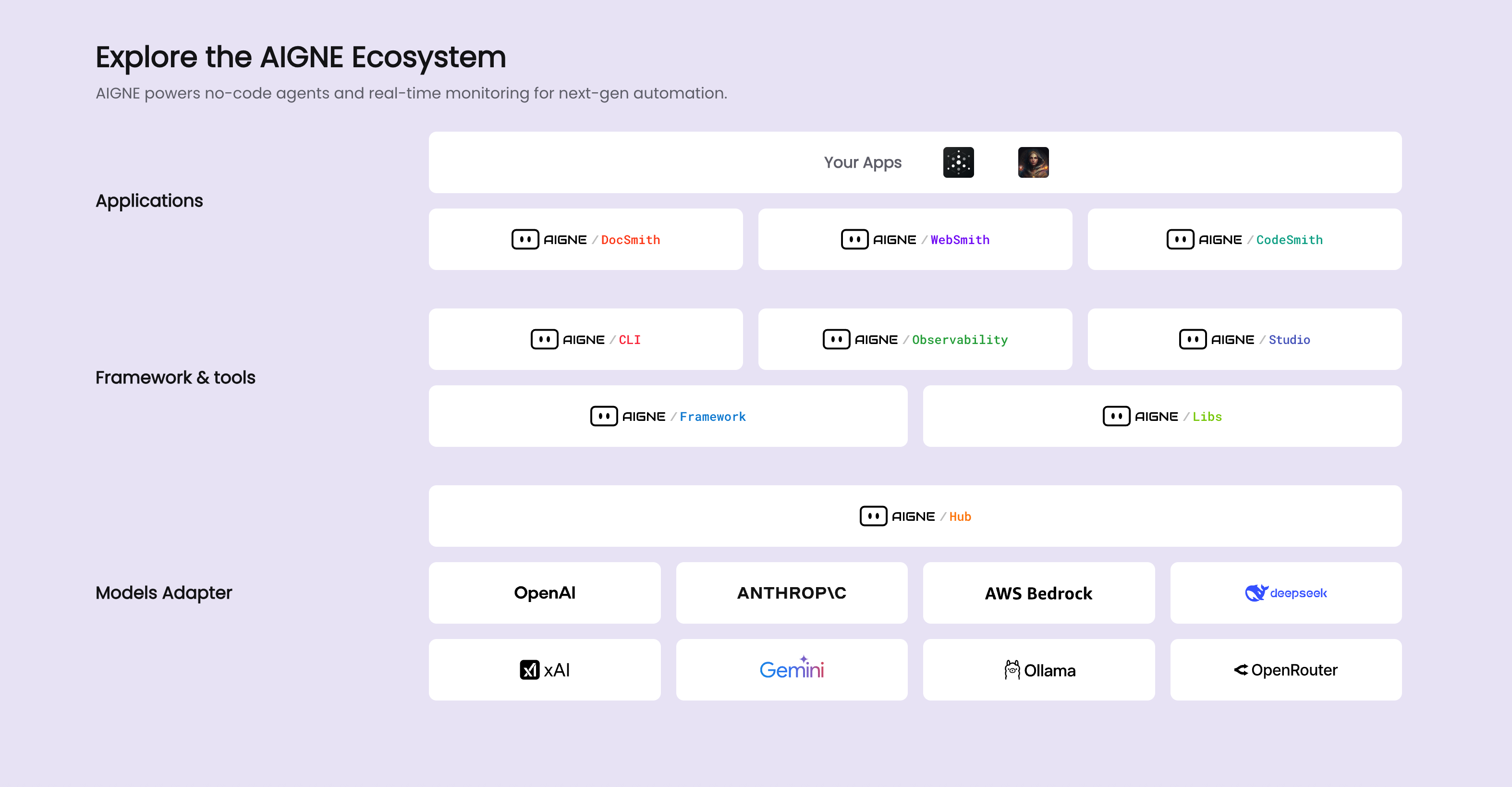
|
|
8
|
+
|
|
9
|
+
DocSmith内の特定のプロセスと品質管理手段については、以下の詳細なセクションを参照してください。
|
|
6
10
|
|
|
7
11
|
<x-cards data-columns="2">
|
|
8
12
|
<x-card data-title="仕組み" data-href="/advanced/how-it-works" data-icon="lucide:cpu">
|
|
9
13
|
DocSmithのアーキテクチャ概要。ドキュメント生成パイプラインにおけるAI Agentの役割を説明します。
|
|
10
14
|
</x-card>
|
|
11
15
|
<x-card data-title="品質保証" data-href="/advanced/quality-assurance" data-icon="lucide:shield-check">
|
|
12
|
-
|
|
16
|
+
リンクチェックやダイアグラム検証など、適切にフォーマットされエラーのないドキュメントを保証するためにDocSmithが実行する組み込みチェックについて理解します。
|
|
13
17
|
</x-card>
|
|
14
18
|
</x-cards>
|
|
15
19
|
|
|
16
|
-
|
|
20
|
+
これらのトピックを確認することで、DocSmithの機能を包括的に理解することができます。利用可能なすべてのコマンドとそのパラメータの完全なリファレンスについては、[CLIコマンドリファレンス](./cli-reference.md)を参照してください。
|
package/docs/advanced.md
CHANGED
|
@@ -1,8 +1,12 @@
|
|
|
1
1
|
# Advanced Topics
|
|
2
2
|
|
|
3
|
-
|
|
3
|
+
This section provides a detailed examination of the internal architecture and operational mechanics of AIGNE DocSmith. It is intended for users who wish to gain a deeper understanding of how the tool functions, which can be beneficial for advanced customization or contributing to the project. This information is not required for standard use.
|
|
4
4
|
|
|
5
|
-
|
|
5
|
+
DocSmith is a component of the AIGNE ecosystem, which provides a platform for AI application development. The following diagram illustrates the overall architecture.
|
|
6
|
+
|
|
7
|
+

|
|
8
|
+
|
|
9
|
+
To explore the specific processes and quality control measures within DocSmith, refer to the following detailed sections.
|
|
6
10
|
|
|
7
11
|
<x-cards data-columns="2">
|
|
8
12
|
<x-card data-title="How It Works" data-href="/advanced/how-it-works" data-icon="lucide:cpu">
|
|
@@ -13,4 +17,4 @@ To better understand the internal processes and quality controls, explore the fo
|
|
|
13
17
|
</x-card>
|
|
14
18
|
</x-cards>
|
|
15
19
|
|
|
16
|
-
By
|
|
20
|
+
By reviewing these topics, you can develop a comprehensive understanding of DocSmith's functionality. For a complete reference of all available commands and their parameters, please see the [CLI Command Reference](./cli-reference.md).
|
package/docs/advanced.zh-TW.md
CHANGED
|
@@ -1,16 +1,20 @@
|
|
|
1
1
|
# 進階主題
|
|
2
2
|
|
|
3
|
-
|
|
3
|
+
本節詳細介紹 AIGNE DocSmith 的內部架構和運作機制。它專為希望深入了解該工具如何運作的使用者而設計,這對於進階自訂或為專案做出貢獻非常有益。標準使用不需要這些資訊。
|
|
4
4
|
|
|
5
|
-
|
|
5
|
+
DocSmith 是 AIGNE 生態系的一個元件,該生態系為 AI 應用程式開發提供了一個平台。下圖說明了整體架構。
|
|
6
|
+
|
|
7
|
+

|
|
8
|
+
|
|
9
|
+
若要探索 DocSmith 內的具體流程和品質控制措施,請參閱以下詳細章節。
|
|
6
10
|
|
|
7
11
|
<x-cards data-columns="2">
|
|
8
12
|
<x-card data-title="運作方式" data-href="/advanced/how-it-works" data-icon="lucide:cpu">
|
|
9
|
-
DocSmith
|
|
13
|
+
DocSmith 的架構概覽,解釋 AI agent 在文件生成流程中的角色。
|
|
10
14
|
</x-card>
|
|
11
15
|
<x-card data-title="品質保證" data-href="/advanced/quality-assurance" data-icon="lucide:shield-check">
|
|
12
|
-
了解 DocSmith
|
|
16
|
+
了解 DocSmith 執行的內建檢查,以確保文件格式正確且無錯誤,包括連結檢查和圖表驗證。
|
|
13
17
|
</x-card>
|
|
14
18
|
</x-cards>
|
|
15
19
|
|
|
16
|
-
|
|
20
|
+
透過回顧這些主題,您可以全面了解 DocSmith 的功能。有關所有可用指令及其參數的完整參考,請參閱 [CLI 指令參考](./cli-reference.md)。
|
package/docs/advanced.zh.md
CHANGED
|
@@ -1,16 +1,20 @@
|
|
|
1
1
|
# 高级主题
|
|
2
2
|
|
|
3
|
-
|
|
3
|
+
本节详细阐述了 AIGNE DocSmith 的内部架构和运行机制。本节面向希望深入了解该工具工作原理的用户,这对于高级定制或为项目做出贡献大有裨益。标准使用无需了解这些信息。
|
|
4
4
|
|
|
5
|
-
|
|
5
|
+
DocSmith 是 AIGNE 生态系统的一个组件,该生态系统为 AI 应用开发提供了一个平台。下图展示了其整体架构。
|
|
6
|
+
|
|
7
|
+

|
|
8
|
+
|
|
9
|
+
要了解 DocSmith 内部的具体流程和质量控制措施,请参阅以下详细章节。
|
|
6
10
|
|
|
7
11
|
<x-cards data-columns="2">
|
|
8
12
|
<x-card data-title="工作原理" data-href="/advanced/how-it-works" data-icon="lucide:cpu">
|
|
9
|
-
DocSmith 的架构概述,解释了 AI
|
|
13
|
+
DocSmith 的架构概述,解释了 AI Agent 在文档生成流程中的作用。
|
|
10
14
|
</x-card>
|
|
11
15
|
<x-card data-title="质量保证" data-href="/advanced/quality-assurance" data-icon="lucide:shield-check">
|
|
12
|
-
了解 DocSmith
|
|
16
|
+
了解 DocSmith 为确保文档格式正确、无错误而执行的内置检查,包括链接检查和图表验证。
|
|
13
17
|
</x-card>
|
|
14
18
|
</x-cards>
|
|
15
19
|
|
|
16
|
-
|
|
20
|
+
通过阅读这些主题,您可以全面了解 DocSmith 的功能。有关所有可用命令及其参数的完整参考,请参阅 [CLI 命令参考](./cli-reference.md)。
|