@aigne/doc-smith 0.8.11-beta.6 → 0.8.11
This diff represents the content of publicly available package versions that have been released to one of the supported registries. The information contained in this diff is provided for informational purposes only and reflects changes between package versions as they appear in their respective public registries.
- package/.aigne/doc-smith/config.yaml +2 -0
- package/.aigne/doc-smith/output/structure-plan.json +2 -2
- package/.aigne/doc-smith/preferences.yml +28 -20
- package/.aigne/doc-smith/upload-cache.yaml +702 -0
- package/.release-please-manifest.json +1 -1
- package/CHANGELOG.md +20 -0
- package/README.md +1 -1
- package/agents/generate/document-structure-tools/add-document.mjs +35 -10
- package/agents/generate/document-structure-tools/delete-document.mjs +35 -12
- package/agents/generate/document-structure-tools/move-document.mjs +43 -17
- package/agents/generate/document-structure-tools/update-document.mjs +37 -10
- package/agents/generate/update-document-structure.yaml +1 -7
- package/agents/generate/user-review-document-structure.mjs +5 -4
- package/agents/translate/translate-document.yaml +1 -9
- package/agents/update/check-update-is-single.mjs +2 -1
- package/agents/update/document-tools/update-document-content.mjs +24 -14
- package/agents/update/fs-tools/glob.mjs +184 -0
- package/agents/update/fs-tools/grep.mjs +317 -0
- package/agents/update/fs-tools/read-file.mjs +307 -0
- package/agents/update/generate-document.yaml +4 -7
- package/agents/update/update-document-detail.yaml +6 -10
- package/agents/update/user-review-document.mjs +13 -13
- package/assets/screenshots/doc-complete-setup.png +0 -0
- package/assets/screenshots/doc-generate-docs.png +0 -0
- package/assets/screenshots/doc-generate.png +0 -0
- package/assets/screenshots/doc-generated-successfully.png +0 -0
- package/assets/screenshots/doc-publish.png +0 -0
- package/assets/screenshots/doc-regenerate.png +0 -0
- package/assets/screenshots/doc-translate-langs.png +0 -0
- package/assets/screenshots/doc-translate.png +0 -0
- package/assets/screenshots/doc-update.png +0 -0
- package/docs/advanced-how-it-works.ja.md +31 -31
- package/docs/advanced-how-it-works.md +9 -9
- package/docs/advanced-how-it-works.zh-TW.md +24 -24
- package/docs/advanced-how-it-works.zh.md +20 -20
- package/docs/advanced-quality-assurance.ja.md +57 -61
- package/docs/advanced-quality-assurance.md +57 -61
- package/docs/advanced-quality-assurance.zh-TW.md +57 -61
- package/docs/advanced-quality-assurance.zh.md +57 -61
- package/docs/advanced.ja.md +8 -4
- package/docs/advanced.md +7 -3
- package/docs/advanced.zh-TW.md +9 -5
- package/docs/advanced.zh.md +9 -5
- package/docs/changelog.ja.md +206 -29
- package/docs/changelog.md +177 -0
- package/docs/changelog.zh-TW.md +229 -52
- package/docs/changelog.zh.md +204 -27
- package/docs/cli-reference.ja.md +82 -52
- package/docs/cli-reference.md +56 -26
- package/docs/cli-reference.zh-TW.md +82 -52
- package/docs/cli-reference.zh.md +70 -40
- package/docs/configuration-interactive-setup.ja.md +45 -42
- package/docs/configuration-interactive-setup.md +8 -5
- package/docs/configuration-interactive-setup.zh-TW.md +26 -23
- package/docs/configuration-interactive-setup.zh.md +25 -22
- package/docs/configuration-language-support.ja.md +33 -63
- package/docs/configuration-language-support.md +32 -62
- package/docs/configuration-language-support.zh-TW.md +35 -65
- package/docs/configuration-language-support.zh.md +32 -62
- package/docs/configuration-llm-setup.ja.md +25 -23
- package/docs/configuration-llm-setup.md +20 -18
- package/docs/configuration-llm-setup.zh-TW.md +21 -19
- package/docs/configuration-llm-setup.zh.md +20 -18
- package/docs/configuration-preferences.ja.md +67 -52
- package/docs/configuration-preferences.md +56 -41
- package/docs/configuration-preferences.zh-TW.md +69 -54
- package/docs/configuration-preferences.zh.md +68 -53
- package/docs/configuration.ja.md +65 -81
- package/docs/configuration.md +19 -35
- package/docs/configuration.zh-TW.md +62 -79
- package/docs/configuration.zh.md +50 -67
- package/docs/features-generate-documentation.ja.md +44 -69
- package/docs/features-generate-documentation.md +36 -61
- package/docs/features-generate-documentation.zh-TW.md +42 -67
- package/docs/features-generate-documentation.zh.md +41 -67
- package/docs/features-publish-your-docs.ja.md +36 -36
- package/docs/features-publish-your-docs.md +2 -2
- package/docs/features-publish-your-docs.zh-TW.md +21 -21
- package/docs/features-publish-your-docs.zh.md +23 -23
- package/docs/features-translate-documentation.ja.md +40 -31
- package/docs/features-translate-documentation.md +15 -6
- package/docs/features-translate-documentation.zh-TW.md +37 -28
- package/docs/features-translate-documentation.zh.md +23 -14
- package/docs/features-update-and-refine.ja.md +68 -118
- package/docs/features-update-and-refine.md +58 -108
- package/docs/features-update-and-refine.zh-TW.md +67 -116
- package/docs/features-update-and-refine.zh.md +64 -114
- package/docs/features.ja.md +29 -19
- package/docs/features.md +25 -15
- package/docs/features.zh-TW.md +28 -18
- package/docs/features.zh.md +31 -21
- package/docs/getting-started.ja.md +40 -43
- package/docs/getting-started.md +36 -39
- package/docs/getting-started.zh-TW.md +38 -41
- package/docs/getting-started.zh.md +45 -48
- package/docs/overview.ja.md +63 -11
- package/docs/overview.md +60 -8
- package/docs/overview.zh-TW.md +67 -15
- package/docs/overview.zh.md +62 -10
- package/media.md +9 -9
- package/package.json +1 -1
- package/prompts/detail/custom/custom-components.md +304 -188
- package/prompts/detail/document-rules.md +4 -4
- package/prompts/detail/generate-document.md +21 -8
- package/prompts/detail/update-document.md +8 -12
- package/prompts/structure/update-document-structure.md +12 -8
- package/prompts/utils/feedback-refiner.md +3 -3
- package/tests/agents/generate/document-structure-tools/move-document.test.mjs +9 -9
- package/tests/agents/generate/user-review-document-structure.test.mjs +29 -8
- package/tests/agents/update/document-tools/update-document-content.test.mjs +115 -112
- package/tests/agents/update/fs-tools/glob.test.mjs +438 -0
- package/tests/agents/update/fs-tools/grep.test.mjs +279 -0
- package/tests/agents/update/fs-tools/read-file.test.mjs +553 -0
- package/tests/agents/update/user-review-document.test.mjs +48 -27
- package/types/document-schema.mjs +5 -6
- package/types/document-structure-schema.mjs +20 -8
|
@@ -1,121 +1,118 @@
|
|
|
1
1
|
# 快速入门
|
|
2
2
|
|
|
3
|
-
|
|
3
|
+
本指南将引导您逐步完成 AIGNE DocSmith 的安装、项目配置,并在几分钟内从源代码生成一套完整的文档。
|
|
4
4
|
|
|
5
5
|
## 第 1 步:先决条件
|
|
6
6
|
|
|
7
|
-
在开始之前,请确保您的系统上已安装 Node.js
|
|
7
|
+
在开始之前,请确保您的系统上已安装 Node.js 20 或更高版本。DocSmith 是一个在 Node.js 环境中运行的命令行工具。我们建议使用 Node.js 自带的 Node Package Manager (npm) 进行安装。
|
|
8
8
|
|
|
9
|
-
|
|
10
|
-
|
|
11
|
-
以下是在各种操作系统上安装 Node.js 的简要说明。
|
|
9
|
+
有关详细的安装说明,请参阅 [Node.js 官方网站](https://nodejs.org/)。下面提供了针对常见操作系统的简要指南。
|
|
12
10
|
|
|
13
11
|
**Windows**
|
|
14
|
-
1. 从 [Node.js
|
|
15
|
-
2.
|
|
12
|
+
1. 从 [Node.js 下载页面](https://nodejs.org/en/download) 下载 Windows 安装程序(`.msi`)。
|
|
13
|
+
2. 运行安装程序,并按照设置向导中的提示进行操作。
|
|
16
14
|
|
|
17
15
|
**macOS**
|
|
18
16
|
|
|
19
|
-
|
|
17
|
+
推荐的安装方法是使用 macOS 的包管理器 [Homebrew](https://brew.sh/)。
|
|
20
18
|
|
|
21
|
-
```bash
|
|
22
|
-
#
|
|
19
|
+
```bash Terminal icon=lucide:apple
|
|
20
|
+
# 如果尚未安装 Homebrew,请先安装
|
|
23
21
|
/bin/bash -c "$(curl -fsSL https://raw.githubusercontent.com/Homebrew/install/HEAD/install.sh)"
|
|
24
22
|
|
|
25
23
|
# 安装 Node.js
|
|
26
24
|
brew install node
|
|
27
25
|
```
|
|
28
26
|
|
|
29
|
-
|
|
27
|
+
或者,您也可以直接从 [Node.js 网站](https://nodejs.org/) 下载 macOS 安装程序(`.pkg`)。
|
|
30
28
|
|
|
31
29
|
**Linux**
|
|
32
30
|
|
|
33
|
-
对于基于
|
|
31
|
+
对于基于 Debian 和 Ubuntu 的发行版,请使用以下命令:
|
|
34
32
|
|
|
35
|
-
```bash
|
|
36
|
-
sudo apt update
|
|
33
|
+
```bash Terminal icon=lucide:laptop
|
|
34
|
+
sudo apt-get update
|
|
35
|
+
sudo apt-get install -y ca-certificates curl gnupg
|
|
37
36
|
curl -fsSL https://deb.nodesource.com/setup_lts.x | sudo -E bash -
|
|
38
37
|
sudo apt-get install -y nodejs
|
|
39
38
|
```
|
|
40
39
|
|
|
41
|
-
|
|
40
|
+
对于 Red Hat、CentOS 和 Fedora,请使用以下命令:
|
|
42
41
|
|
|
43
|
-
```bash
|
|
42
|
+
```bash Terminal icon=lucide:laptop
|
|
44
43
|
curl -fsSL https://rpm.nodesource.com/setup_lts.x | sudo bash -
|
|
45
44
|
sudo yum install nodejs
|
|
46
45
|
```
|
|
47
46
|
|
|
48
|
-
###
|
|
47
|
+
### 验证安装
|
|
49
48
|
|
|
50
|
-
|
|
49
|
+
安装完成后,打开您的终端并运行以下命令,以确认 Node.js 和 npm 已正确安装:
|
|
51
50
|
|
|
52
|
-
```bash
|
|
51
|
+
```bash Terminal
|
|
53
52
|
node --version
|
|
54
53
|
npm --version
|
|
55
54
|
```
|
|
56
55
|
|
|
57
56
|
## 第 2 步:安装 AIGNE CLI
|
|
58
57
|
|
|
59
|
-
DocSmith
|
|
58
|
+
DocSmith 工具作为官方 AIGNE 命令行界面(CLI)的一部分进行分发。使用 npm 在您的系统上全局安装 CLI:
|
|
60
59
|
|
|
61
|
-
```bash
|
|
62
|
-
npm
|
|
60
|
+
```bash Terminal icon=logos:npm
|
|
61
|
+
npm install -g @aigne/cli
|
|
63
62
|
```
|
|
64
63
|
|
|
65
|
-
|
|
64
|
+
安装完成后,运行其帮助命令来验证 DocSmith 是否可用:
|
|
66
65
|
|
|
67
|
-
```bash
|
|
68
|
-
aigne doc
|
|
66
|
+
```bash Terminal
|
|
67
|
+
aigne doc --help
|
|
69
68
|
```
|
|
70
69
|
|
|
71
|
-
|
|
70
|
+
此命令应显示 DocSmith 的帮助菜单,确认其已安装并准备就绪。
|
|
72
71
|
|
|
73
|
-
## 第 3
|
|
72
|
+
## 第 3 步:生成您的文档
|
|
74
73
|
|
|
75
|
-
安装 CLI
|
|
74
|
+
安装 AIGNE CLI 后,您现在可以生成文档了。在您的终端中,导航到项目的根目录并执行以下命令:
|
|
76
75
|
|
|
77
|
-
```bash
|
|
76
|
+
```bash Terminal icon=lucide:sparkles
|
|
78
77
|
aigne doc generate
|
|
79
78
|
```
|
|
80
79
|
|
|
81
|
-
|
|
80
|
+

|
|
82
81
|
|
|
83
|
-
|
|
82
|
+
### 自动配置
|
|
84
83
|
|
|
85
|
-
|
|
84
|
+
当您第一次在新项目中运行此命令时,DocSmith 会检测到不存在配置文件,并会自动启动一个交互式设置向导来引导您完成整个过程。
|
|
86
85
|
|
|
87
|
-
|
|
86
|
+
该向导将提出一系列问题来定义您文档的特性,包括:
|
|
88
87
|
|
|
89
|
-
|
|
90
|
-
|
|
91
|
-
|
|
92
|
-
|
|
93
|
-
|
|
88
|
+
* 主要目的和写作风格。
|
|
89
|
+
* 预期的目标受众(例如,开发者、最终用户)。
|
|
90
|
+
* 主要语言以及用于翻译的其他语言。
|
|
91
|
+
* 供 AI 分析的源代码路径。
|
|
92
|
+
* 生成文档文件的输出目录。
|
|
94
93
|
|
|
95
|
-

|
|
96
95
|
|
|
97
|
-
|
|
96
|
+
在您回答完提示后,DocSmith 会将您的选择保存到配置文件中,开始分析您的代码库,规划文档结构,并生成内容。
|
|
98
97
|
|
|
99
|
-

|
|
100
99
|
|
|
101
100
|
## 第 4 步:查看您的输出
|
|
102
101
|
|
|
103
|
-
|
|
104
|
-
|
|
105
|
-
|
|
102
|
+
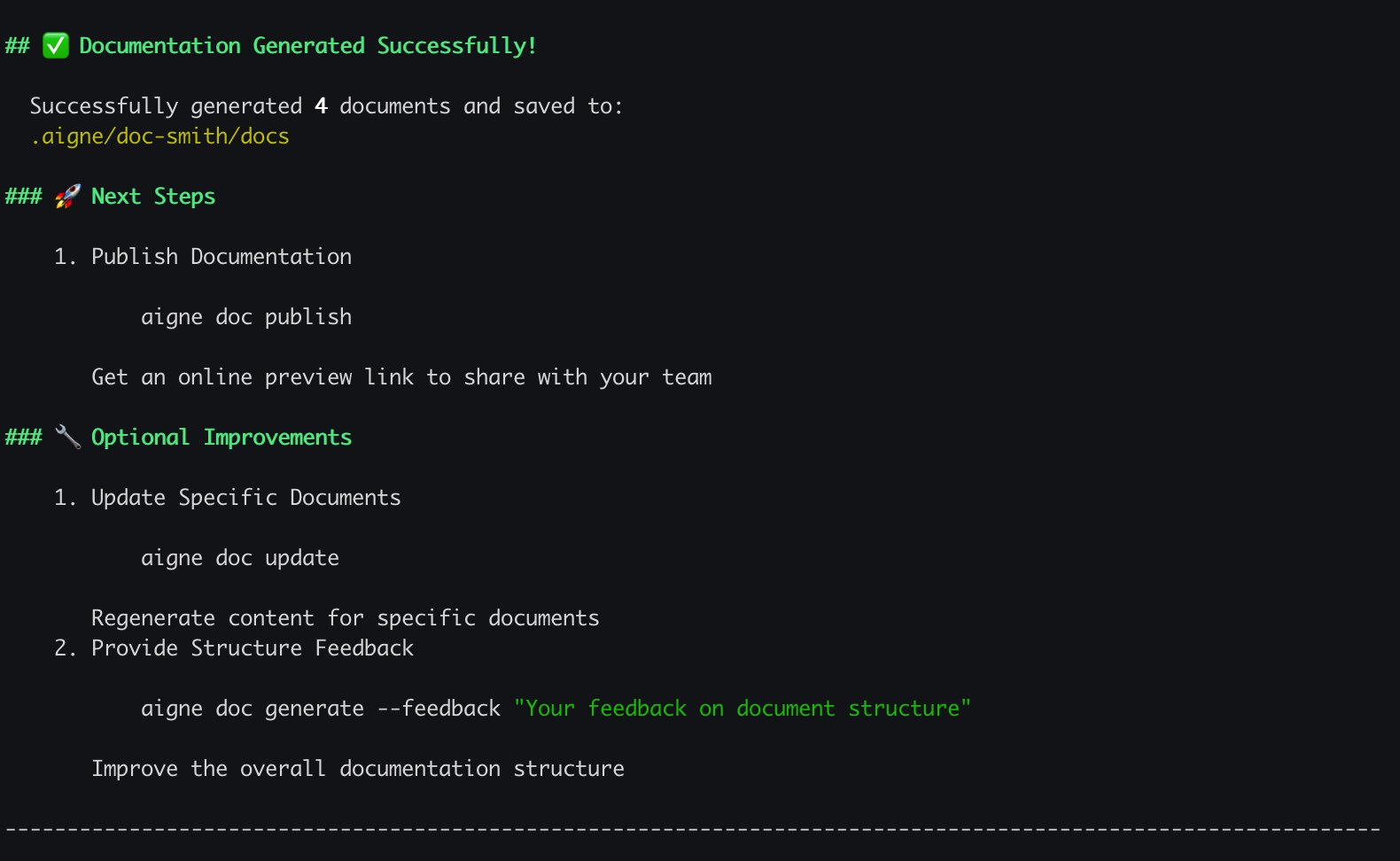
生成过程完成后,您的终端中将显示一条确认消息,表明您的文档已成功创建。您的新文档现在位于您在设置过程中指定的输出目录中。如果您使用了默认设置,可以在 `.aigne/doc-smith/docs` 中找到它。
|
|
106
103
|
|
|
107
|
-
|
|
104
|
+

|
|
108
105
|
|
|
109
106
|
## 接下来做什么?
|
|
110
107
|
|
|
111
|
-
|
|
108
|
+
您已成功生成了第一套文档。现在,您可以开始探索更高级的功能和自定义选项。
|
|
112
109
|
|
|
113
110
|
<x-cards>
|
|
114
111
|
<x-card data-title="核心功能" data-icon="lucide:box" data-href="/features">
|
|
115
|
-
|
|
112
|
+
探索主要命令和功能,从更新文档到在线发布。
|
|
116
113
|
</x-card>
|
|
117
114
|
<x-card data-title="配置指南" data-icon="lucide:settings" data-href="/configuration">
|
|
118
|
-
|
|
115
|
+
了解如何通过编辑配置文件来微调文档的风格、受众和语言。
|
|
119
116
|
</x-card>
|
|
120
117
|
<x-card data-title="CLI 命令参考" data-icon="lucide:terminal" data-href="/cli-reference">
|
|
121
118
|
获取所有可用的 `aigne doc` 命令及其选项的完整参考。
|
package/docs/overview.ja.md
CHANGED
|
@@ -2,29 +2,81 @@
|
|
|
2
2
|
|
|
3
3
|
AIGNE DocSmithは、ソースコードから直接ドキュメントを生成するAI駆動のツールです。[AIGNE Framework](https://www.aigne.io/en/framework)上に構築されており、構造化された多言語ドキュメントの作成を自動化します。このプロセスにより、ドキュメントの作成と保守にかかる手作業が削減され、コードベースとの同期が確保されます。
|
|
4
4
|
|
|
5
|
-
|
|
5
|
+
以下の図は、DocSmithのハイレベルなワークフローを示しています。
|
|
6
|
+
|
|
7
|
+
```d2
|
|
8
|
+
direction: right
|
|
9
|
+
style: {
|
|
10
|
+
font-size: 14
|
|
11
|
+
}
|
|
12
|
+
|
|
13
|
+
# Actors
|
|
14
|
+
source_code: "ソースコードリポジトリ" {
|
|
15
|
+
shape: cloud
|
|
16
|
+
style: {
|
|
17
|
+
fill: "#F0F4F8"
|
|
18
|
+
stroke: "#4A5568"
|
|
19
|
+
}
|
|
20
|
+
}
|
|
21
|
+
|
|
22
|
+
docsmith: "AIGNE DocSmithエンジン" {
|
|
23
|
+
shape: hexagon
|
|
24
|
+
style: {
|
|
25
|
+
fill: "#E6FFFA"
|
|
26
|
+
stroke: "#2C7A7B"
|
|
27
|
+
}
|
|
28
|
+
}
|
|
29
|
+
|
|
30
|
+
published_docs: "公開されたドキュメント" {
|
|
31
|
+
shape: document
|
|
32
|
+
style: {
|
|
33
|
+
fill: "#FEFCBF"
|
|
34
|
+
stroke: "#B7791F"
|
|
35
|
+
}
|
|
36
|
+
}
|
|
6
37
|
|
|
7
|
-
|
|
38
|
+
# Main Flow
|
|
39
|
+
source_code -> docsmith: "1. コードを分析"
|
|
40
|
+
docsmith -> published_docs: "2. 生成と公開"
|
|
8
41
|
|
|
9
|
-
|
|
42
|
+
# DocSmith Internal Process
|
|
43
|
+
subflow: {
|
|
44
|
+
direction: down
|
|
45
|
+
|
|
46
|
+
analyze: "構造の分析と計画"
|
|
47
|
+
generate: "コンテンツの生成"
|
|
48
|
+
translate: "翻訳(オプション)"
|
|
49
|
+
publish: "公開"
|
|
50
|
+
|
|
51
|
+
analyze -> generate -> translate -> publish
|
|
52
|
+
}
|
|
10
53
|
|
|
11
|
-
|
|
54
|
+
docsmith.subflow: subflow
|
|
55
|
+
```
|
|
12
56
|
|
|
13
57
|
## 主な機能
|
|
14
58
|
|
|
15
59
|
DocSmithは、ドキュメント作成プロセスを自動化し、簡素化するための一連の機能を提供します。
|
|
16
60
|
|
|
17
|
-
*
|
|
18
|
-
*
|
|
19
|
-
*
|
|
20
|
-
* **AIGNE Hub
|
|
21
|
-
*
|
|
22
|
-
*
|
|
61
|
+
* **構造計画:** コードベースを分析して、論理的なドキュメント構造を生成します。
|
|
62
|
+
* **コンテンツ生成:** 計画されたドキュメント構造に、ソースコードから生成されたコンテンツを埋め込みます。
|
|
63
|
+
* **多言語サポート:** ドキュメントを英語、中国語、スペイン語を含む12言語に翻訳します。
|
|
64
|
+
* **AIGNE Hub統合:** Google、OpenAI、Anthropicなどのさまざまな大規模言語モデル(LLM)へのアクセスを提供するサービスである[AIGNE Hub](https://www.aigne.io/en/hub)を使用し、個別のAPIキーを管理することなくモデルを切り替えることができます。
|
|
65
|
+
* **ワンクリック公開:** 共有可能なリンクでドキュメントを公開します。公式プラットフォームに公開するか、[Discuss Kit](https://www.web3kit.rocks/discuss-kit)を使用して独自のインスタンスを実行できます。
|
|
66
|
+
* **反復的な更新:** ソースコードの変更を検知してドキュメントを更新し、ユーザーのフィードバックに基づいて特定のドキュメントのターゲット再生成をサポートします。
|
|
67
|
+
|
|
68
|
+
## AIGNEエコシステムの一部
|
|
69
|
+
|
|
70
|
+
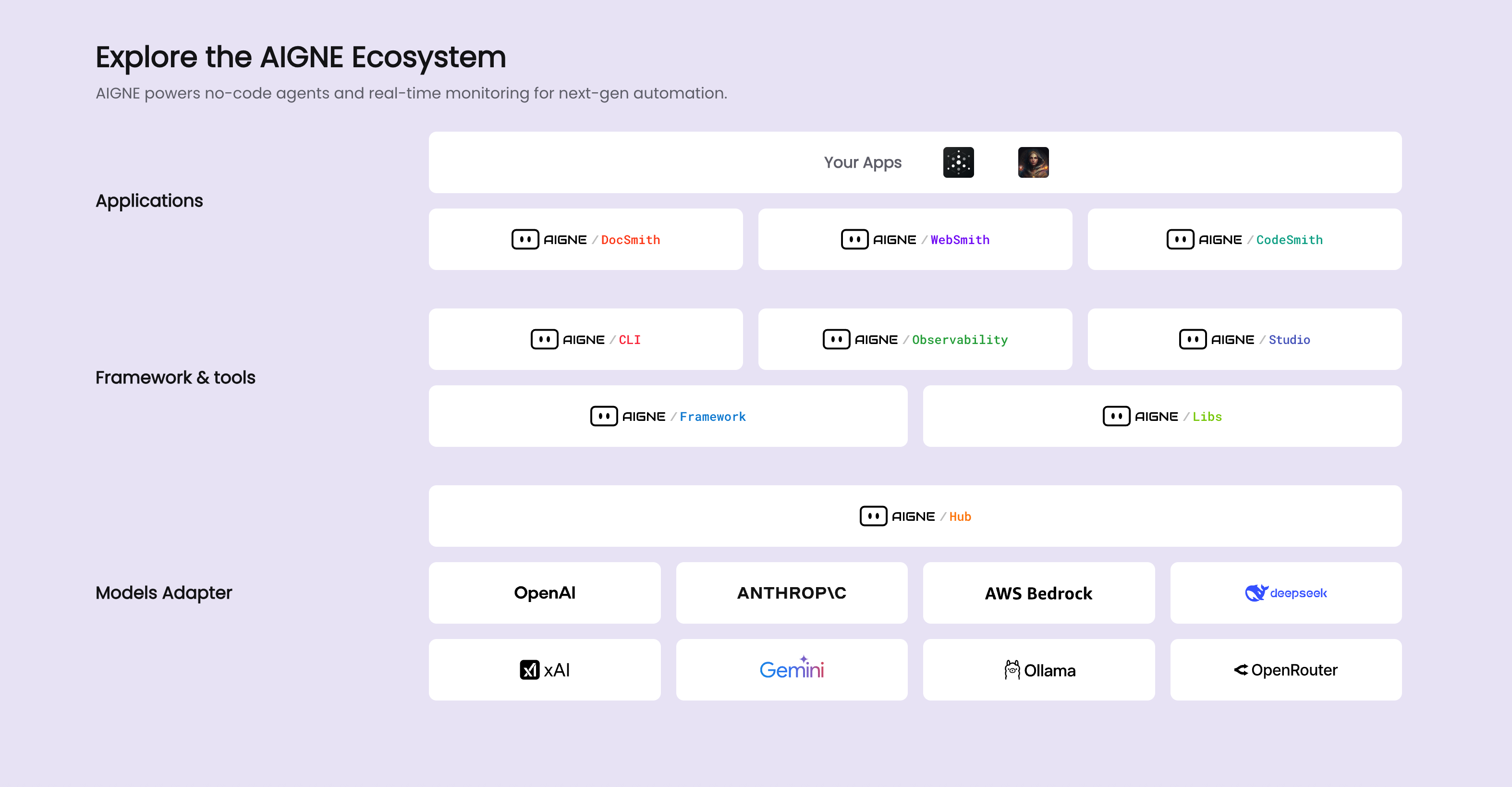
DocSmithは、AIアプリケーション開発のためのプラットフォームである[AIGNE](https://www.aigne.io)エコシステムのコンポーネントです。他のAIGNEコンポーネントと統合し、プラットフォームのAI機能とインフラストラクチャを利用します。
|
|
71
|
+
|
|
72
|
+
以下の図は、DocSmithがAIGNEアーキテクチャ内でどのように位置づけられているかを示しています。
|
|
73
|
+
|
|
74
|
+
|
|
23
75
|
|
|
24
76
|
## 次のステップ
|
|
25
77
|
|
|
26
78
|
DocSmithの使用を開始するには、インストールおよび設定ガイドに進んでください。
|
|
27
79
|
|
|
28
80
|
<x-card data-title="次へ:はじめに" data-href="/getting-started" data-icon="lucide:arrow-right-circle" data-cta="ガイドを開始">
|
|
29
|
-
|
|
81
|
+
ステップバイステップのガイドに従って、ツールをインストールし、最初のプロジェクトを設定し、ドキュメントを生成します。
|
|
30
82
|
</x-card>
|
package/docs/overview.md
CHANGED
|
@@ -2,13 +2,57 @@
|
|
|
2
2
|
|
|
3
3
|
AIGNE DocSmith is an AI-driven tool that generates documentation directly from your source code. Built on the [AIGNE Framework](https://www.aigne.io/en/framework), it automates the creation of structured, multi-language documents. This process reduces the manual effort of writing and maintaining documentation, ensuring it stays synchronized with the codebase.
|
|
4
4
|
|
|
5
|
-
|
|
5
|
+
The following diagram illustrates the high-level workflow of DocSmith:
|
|
6
6
|
|
|
7
|
-
|
|
7
|
+
```d2
|
|
8
|
+
direction: right
|
|
9
|
+
style: {
|
|
10
|
+
font-size: 14
|
|
11
|
+
}
|
|
8
12
|
|
|
9
|
-
|
|
13
|
+
# Actors
|
|
14
|
+
source_code: "Source Code Repository" {
|
|
15
|
+
shape: cloud
|
|
16
|
+
style: {
|
|
17
|
+
fill: "#F0F4F8"
|
|
18
|
+
stroke: "#4A5568"
|
|
19
|
+
}
|
|
20
|
+
}
|
|
10
21
|
|
|
11
|
-
|
|
22
|
+
docsmith: "AIGNE DocSmith Engine" {
|
|
23
|
+
shape: hexagon
|
|
24
|
+
style: {
|
|
25
|
+
fill: "#E6FFFA"
|
|
26
|
+
stroke: "#2C7A7B"
|
|
27
|
+
}
|
|
28
|
+
}
|
|
29
|
+
|
|
30
|
+
published_docs: "Published Documentation" {
|
|
31
|
+
shape: document
|
|
32
|
+
style: {
|
|
33
|
+
fill: "#FEFCBF"
|
|
34
|
+
stroke: "#B7791F"
|
|
35
|
+
}
|
|
36
|
+
}
|
|
37
|
+
|
|
38
|
+
# Main Flow
|
|
39
|
+
source_code -> docsmith: "1. Analyze Code"
|
|
40
|
+
docsmith -> published_docs: "2. Generate & Publish"
|
|
41
|
+
|
|
42
|
+
# DocSmith Internal Process
|
|
43
|
+
subflow: {
|
|
44
|
+
direction: down
|
|
45
|
+
|
|
46
|
+
analyze: "Analyze & Plan Structure"
|
|
47
|
+
generate: "Generate Content"
|
|
48
|
+
translate: "Translate (Optional)"
|
|
49
|
+
publish: "Publish"
|
|
50
|
+
|
|
51
|
+
analyze -> generate -> translate -> publish
|
|
52
|
+
}
|
|
53
|
+
|
|
54
|
+
docsmith.subflow: subflow
|
|
55
|
+
```
|
|
12
56
|
|
|
13
57
|
## Core Features
|
|
14
58
|
|
|
@@ -16,15 +60,23 @@ DocSmith provides a set of features to automate and simplify the documentation p
|
|
|
16
60
|
|
|
17
61
|
* **Structure Planning:** Analyzes a codebase to generate a logical documentation structure.
|
|
18
62
|
* **Content Generation:** Populates the planned documentation structure with content generated from the source code.
|
|
19
|
-
* **Multi-Language Support:** Translates documentation into 12 languages, including English, Chinese,
|
|
20
|
-
* **AIGNE Hub Integration:** Uses [AIGNE Hub](https://www.aigne.io/en/hub)
|
|
21
|
-
* **One-Click Publishing:** Makes your documentation live with shareable links
|
|
63
|
+
* **Multi-Language Support:** Translates documentation into 12 languages, including English, Chinese, and Spanish.
|
|
64
|
+
* **AIGNE Hub Integration:** Uses [AIGNE Hub](https://www.aigne.io/en/hub), a service that provides access to various Large Language Models (LLMs) like those from Google, OpenAI, and Anthropic, allowing model switching without managing individual API keys.
|
|
65
|
+
* **One-Click Publishing:** Makes your documentation live with shareable links. You can publish to the official platform or run your own instance using [Discuss Kit](https://www.web3kit.rocks/discuss-kit).
|
|
22
66
|
* **Iterative Updates:** Detects source code changes to update documentation and supports targeted regeneration of specific documents based on user feedback.
|
|
23
67
|
|
|
68
|
+
## Part of the AIGNE Ecosystem
|
|
69
|
+
|
|
70
|
+
DocSmith is a component of the [AIGNE](https://www.aigne.io) ecosystem, a platform for developing AI applications. It integrates with other AIGNE components to use the platform's AI capabilities and infrastructure.
|
|
71
|
+
|
|
72
|
+
The following diagram shows how DocSmith fits within the AIGNE architecture:
|
|
73
|
+
|
|
74
|
+

|
|
75
|
+
|
|
24
76
|
## Next Steps
|
|
25
77
|
|
|
26
78
|
To begin using DocSmith, proceed to the installation and configuration guide.
|
|
27
79
|
|
|
28
80
|
<x-card data-title="Next: Getting Started" data-href="/getting-started" data-icon="lucide:arrow-right-circle" data-cta="Start the guide">
|
|
29
|
-
|
|
81
|
+
Follow the step-by-step guide to install the tool, configure your first project, and generate documentation.
|
|
30
82
|
</x-card>
|
package/docs/overview.zh-TW.md
CHANGED
|
@@ -1,30 +1,82 @@
|
|
|
1
1
|
# 總覽
|
|
2
2
|
|
|
3
|
-
AIGNE DocSmith
|
|
3
|
+
AIGNE DocSmith 是一款由 AI 驅動的工具,可直接從您的原始程式碼生成文件。它基於 [AIGNE 框架](https://www.aigne.io/en/framework) 建構,能自動化建立結構化、多語言的文件。此過程減少了手動編寫和維護文件的工作量,確保文件與程式碼庫保持同步。
|
|
4
4
|
|
|
5
|
-
|
|
5
|
+
下圖說明了 DocSmith 的高階工作流程:
|
|
6
6
|
|
|
7
|
-
|
|
7
|
+
```d2
|
|
8
|
+
direction: right
|
|
9
|
+
style: {
|
|
10
|
+
font-size: 14
|
|
11
|
+
}
|
|
8
12
|
|
|
9
|
-
|
|
13
|
+
# 參與者
|
|
14
|
+
source_code: "原始程式碼儲存庫" {
|
|
15
|
+
shape: cloud
|
|
16
|
+
style: {
|
|
17
|
+
fill: "#F0F4F8"
|
|
18
|
+
stroke: "#4A5568"
|
|
19
|
+
}
|
|
20
|
+
}
|
|
10
21
|
|
|
11
|
-
|
|
22
|
+
docsmith: "AIGNE DocSmith 引擎" {
|
|
23
|
+
shape: hexagon
|
|
24
|
+
style: {
|
|
25
|
+
fill: "#E6FFFA"
|
|
26
|
+
stroke: "#2C7A7B"
|
|
27
|
+
}
|
|
28
|
+
}
|
|
29
|
+
|
|
30
|
+
published_docs: "已發佈文件" {
|
|
31
|
+
shape: document
|
|
32
|
+
style: {
|
|
33
|
+
fill: "#FEFCBF"
|
|
34
|
+
stroke: "#B7791F"
|
|
35
|
+
}
|
|
36
|
+
}
|
|
37
|
+
|
|
38
|
+
# 主要流程
|
|
39
|
+
source_code -> docsmith: "1. 分析程式碼"
|
|
40
|
+
docsmith -> published_docs: "2. 生成與發佈"
|
|
41
|
+
|
|
42
|
+
# DocSmith 內部流程
|
|
43
|
+
subflow: {
|
|
44
|
+
direction: down
|
|
45
|
+
|
|
46
|
+
analyze: "分析與規劃結構"
|
|
47
|
+
generate: "生成內容"
|
|
48
|
+
translate: "翻譯(選用)"
|
|
49
|
+
publish: "發佈"
|
|
50
|
+
|
|
51
|
+
analyze -> generate -> translate -> publish
|
|
52
|
+
}
|
|
53
|
+
|
|
54
|
+
docsmith.subflow: subflow
|
|
55
|
+
```
|
|
12
56
|
|
|
13
57
|
## 核心功能
|
|
14
58
|
|
|
15
|
-
DocSmith
|
|
59
|
+
DocSmith 提供一系列功能來自動化並簡化文件製作過程:
|
|
60
|
+
|
|
61
|
+
* **結構規劃:** 分析程式碼庫以生成邏輯性的文件結構。
|
|
62
|
+
* **內容生成:** 用從原始程式碼生成的內容填充已規劃的文件結構。
|
|
63
|
+
* **多語言支援:** 將文件翻譯成 12 種語言,包括英文、中文和西班牙文。
|
|
64
|
+
* **AIGNE Hub 整合:** 使用 [AIGNE Hub](https://www.aigne.io/en/hub),該服務提供對各種大型語言模型(LLMs)的存取,例如來自 Google、OpenAI 和 Anthropic 的模型,讓您無需管理個別的 API 金鑰即可切換模型。
|
|
65
|
+
* **一鍵發佈:** 透過可分享的連結讓您的文件上線。您可以發佈到官方平台,或使用 [Discuss Kit](https://www.web3kit.rocks/discuss-kit) 運行您自己的實例。
|
|
66
|
+
* **迭代更新:** 偵測原始程式碼的變更以更新文件,並支援根據使用者回饋對特定文件進行針對性地重新生成。
|
|
67
|
+
|
|
68
|
+
## AIGNE 生態系的一部分
|
|
69
|
+
|
|
70
|
+
DocSmith 是 [AIGNE](https://www.aigne.io) 生態系的一個組件,該生態系是一個用於開發 AI 應用程式的平台。它與其他 AIGNE 組件整合,以利用該平台的人工智慧能力和基礎設施。
|
|
71
|
+
|
|
72
|
+
下圖顯示了 DocSmith 如何融入 AIGNE 架構中:
|
|
16
73
|
|
|
17
|
-
|
|
18
|
-
* **內容生成:** 用從原始碼生成的內容填充規劃好的文件結構。
|
|
19
|
-
* **多語言支援:** 將文件翻譯成 12 種語言,包括英語、中文、日語和西班牙語。
|
|
20
|
-
* **AIGNE Hub 整合:** 使用 [AIGNE Hub](https://www.aigne.io/en/hub) 作為 LLM 提供者,允許切換模型而無需管理單獨的 API 金鑰。
|
|
21
|
-
* **文件發布:** 將文件發布到官方平台 [docsmith.aigne.io](https://docsmith.aigne.io/app/) 或使用者自己的 [Discuss Kit](https://www.arcblock.io/docs/web3-kit/en/discuss-kit) 實例。
|
|
22
|
-
* **迭代更新:** 偵測原始碼變更以更新文件,並支援根據使用者回饋對特定文件進行定向重新生成。
|
|
74
|
+

|
|
23
75
|
|
|
24
76
|
## 後續步驟
|
|
25
77
|
|
|
26
|
-
|
|
78
|
+
若要開始使用 DocSmith,請參閱安裝與設定指南。
|
|
27
79
|
|
|
28
|
-
<x-card data-title="
|
|
29
|
-
|
|
80
|
+
<x-card data-title="下一步:入門指南" data-href="/getting-started" data-icon="lucide:arrow-right-circle" data-cta="開始指南">
|
|
81
|
+
遵循逐步指南來安裝工具、設定您的第一個專案並生成文件。
|
|
30
82
|
</x-card>
|
package/docs/overview.zh.md
CHANGED
|
@@ -1,30 +1,82 @@
|
|
|
1
1
|
# 概述
|
|
2
2
|
|
|
3
|
-
AIGNE DocSmith 是一款 AI 驱动的工具,可直接从您的源代码生成文档。它基于 [AIGNE 框架](https://www.aigne.io/en/framework)
|
|
3
|
+
AIGNE DocSmith 是一款 AI 驱动的工具,可直接从您的源代码生成文档。它基于 [AIGNE 框架](https://www.aigne.io/en/framework) 构建,能够自动化创建结构化、多语言的文档。此过程减少了编写和维护文档的人工工作,确保文档与代码库保持同步。
|
|
4
4
|
|
|
5
|
-
|
|
5
|
+
下图说明了 DocSmith 的高级工作流程:
|
|
6
6
|
|
|
7
|
-
|
|
7
|
+
```d2
|
|
8
|
+
direction: right
|
|
9
|
+
style: {
|
|
10
|
+
font-size: 14
|
|
11
|
+
}
|
|
8
12
|
|
|
9
|
-
|
|
13
|
+
# Actors
|
|
14
|
+
source_code: "源代码仓库" {
|
|
15
|
+
shape: cloud
|
|
16
|
+
style: {
|
|
17
|
+
fill: "#F0F4F8"
|
|
18
|
+
stroke: "#4A5568"
|
|
19
|
+
}
|
|
20
|
+
}
|
|
10
21
|
|
|
11
|
-
|
|
22
|
+
docsmith: "AIGNE DocSmith 引擎" {
|
|
23
|
+
shape: hexagon
|
|
24
|
+
style: {
|
|
25
|
+
fill: "#E6FFFA"
|
|
26
|
+
stroke: "#2C7A7B"
|
|
27
|
+
}
|
|
28
|
+
}
|
|
29
|
+
|
|
30
|
+
published_docs: "已发布的文档" {
|
|
31
|
+
shape: document
|
|
32
|
+
style: {
|
|
33
|
+
fill: "#FEFCBF"
|
|
34
|
+
stroke: "#B7791F"
|
|
35
|
+
}
|
|
36
|
+
}
|
|
37
|
+
|
|
38
|
+
# Main Flow
|
|
39
|
+
source_code -> docsmith: "1. 分析代码"
|
|
40
|
+
docsmith -> published_docs: "2. 生成并发布"
|
|
41
|
+
|
|
42
|
+
# DocSmith Internal Process
|
|
43
|
+
subflow: {
|
|
44
|
+
direction: down
|
|
45
|
+
|
|
46
|
+
analyze: "分析并规划结构"
|
|
47
|
+
generate: "生成内容"
|
|
48
|
+
translate: "翻译(可选)"
|
|
49
|
+
publish: "发布"
|
|
50
|
+
|
|
51
|
+
analyze -> generate -> translate -> publish
|
|
52
|
+
}
|
|
53
|
+
|
|
54
|
+
docsmith.subflow: subflow
|
|
55
|
+
```
|
|
12
56
|
|
|
13
57
|
## 核心功能
|
|
14
58
|
|
|
15
59
|
DocSmith 提供了一系列功能来自动化和简化文档流程:
|
|
16
60
|
|
|
17
|
-
* **结构规划:**
|
|
61
|
+
* **结构规划:** 分析代码库以生成逻辑化的文档结构。
|
|
18
62
|
* **内容生成:** 使用从源代码生成的内容填充规划好的文档结构。
|
|
19
|
-
* **多语言支持:** 可将文档翻译成 12
|
|
20
|
-
* **AIGNE Hub 集成:** 使用 [AIGNE Hub](https://www.aigne.io/en/hub)
|
|
21
|
-
*
|
|
63
|
+
* **多语言支持:** 可将文档翻译成 12 种语言,包括英语、中文和西班牙语。
|
|
64
|
+
* **AIGNE Hub 集成:** 使用 [AIGNE Hub](https://www.aigne.io/en/hub),该服务提供对各种大语言模型 (LLM) 的访问,例如来自 Google、OpenAI 和 Anthropic 的模型,允许切换模型而无需管理各个 API 密钥。
|
|
65
|
+
* **一键发布:** 通过可共享的链接发布您的文档。您可以发布到官方平台,也可以使用 [Discuss Kit](https://www.web3kit.rocks/discuss-kit) 运行您自己的实例。
|
|
22
66
|
* **迭代更新:** 检测源代码变更以更新文档,并支持根据用户反馈对特定文档进行定向重新生成。
|
|
23
67
|
|
|
68
|
+
## AIGNE 生态系统的一部分
|
|
69
|
+
|
|
70
|
+
DocSmith 是 [AIGNE](https://www.aigne.io) 生态系统的一个组件,该生态系统是一个用于开发 AI 应用程序的平台。它与其他 AIGNE 组件集成,以利用该平台的人工智能能力和基础设施。
|
|
71
|
+
|
|
72
|
+
下图展示了 DocSmith 如何融入 AIGNE 架构:
|
|
73
|
+
|
|
74
|
+

|
|
75
|
+
|
|
24
76
|
## 后续步骤
|
|
25
77
|
|
|
26
78
|
要开始使用 DocSmith,请继续阅读安装和配置指南。
|
|
27
79
|
|
|
28
80
|
<x-card data-title="下一步:开始使用" data-href="/getting-started" data-icon="lucide:arrow-right-circle" data-cta="开始阅读指南">
|
|
29
|
-
|
|
81
|
+
按照分步指南安装工具、配置您的第一个项目并生成文档。
|
|
30
82
|
</x-card>
|
package/media.md
CHANGED
|
@@ -1,19 +1,19 @@
|
|
|
1
1
|
# 提供在文档中可使用的媒体素材
|
|
2
2
|
|
|
3
|
-

|
|
4
4
|
|
|
5
|
-

|
|
6
6
|
|
|
7
|
-

|
|
8
8
|
|
|
9
|
-

|
|
10
10
|
|
|
11
|
-

|
|
12
12
|
|
|
13
|
-

|
|
14
14
|
|
|
15
|
-

|
|
16
16
|
|
|
17
|
-

|
|
18
18
|
|
|
19
|
-

|