@aigne/doc-smith 0.8.11-beta.5 → 0.8.11-beta.6
This diff represents the content of publicly available package versions that have been released to one of the supported registries. The information contained in this diff is provided for informational purposes only and reflects changes between package versions as they appear in their respective public registries.
- package/.aigne/doc-smith/config.yaml +1 -1
- package/.release-please-manifest.json +1 -1
- package/CHANGELOG.md +9 -2
- package/README.md +1 -1
- package/agents/clear/choose-contents.mjs +2 -2
- package/agents/clear/clear-document-structure.mjs +8 -8
- package/agents/clear/index.yaml +1 -1
- package/agents/evaluate/document-structure.yaml +1 -1
- package/agents/generate/check-document-structure.yaml +3 -3
- package/agents/generate/check-need-generate-structure.mjs +8 -8
- package/agents/generate/document-structure-tools/add-document.mjs +3 -3
- package/agents/generate/document-structure-tools/delete-document.mjs +2 -2
- package/agents/generate/document-structure-tools/move-document.mjs +3 -2
- package/agents/generate/document-structure-tools/update-document.mjs +2 -2
- package/agents/generate/generate-structure.yaml +1 -1
- package/agents/generate/update-document-structure.yaml +3 -3
- package/agents/generate/user-review-document-structure.mjs +10 -10
- package/agents/update/batch-generate-document.yaml +1 -1
- package/agents/update/check-document.mjs +2 -2
- package/agents/utils/check-feedback-refiner.mjs +1 -1
- package/agents/utils/choose-docs.mjs +1 -1
- package/agents/utils/load-document-all-content.mjs +3 -3
- package/agents/utils/load-sources.mjs +1 -1
- package/agents/utils/save-docs.mjs +7 -28
- package/aigne.yaml +2 -2
- package/docs/_sidebar.md +1 -1
- package/docs/advanced-how-it-works.md +3 -3
- package/docs/advanced-quality-assurance.md +1 -1
- package/docs/cli-reference.ja.md +151 -80
- package/docs/cli-reference.md +126 -55
- package/docs/cli-reference.zh-TW.md +133 -62
- package/docs/cli-reference.zh.md +143 -72
- package/docs/configuration-interactive-setup.md +1 -1
- package/docs/configuration-language-support.md +1 -1
- package/docs/configuration-preferences.md +1 -1
- package/docs/configuration.ja.md +104 -48
- package/docs/configuration.md +58 -2
- package/docs/configuration.zh-TW.md +99 -42
- package/docs/configuration.zh.md +78 -21
- package/docs/features-generate-documentation.ja.md +63 -44
- package/docs/features-generate-documentation.md +54 -35
- package/docs/features-generate-documentation.zh-TW.md +67 -48
- package/docs/features-generate-documentation.zh.md +61 -41
- package/docs/features-publish-your-docs.ja.md +69 -46
- package/docs/features-publish-your-docs.md +65 -42
- package/docs/features-publish-your-docs.zh-TW.md +73 -50
- package/docs/features-publish-your-docs.zh.md +67 -44
- package/docs/features-translate-documentation.ja.md +35 -33
- package/docs/features-translate-documentation.md +24 -22
- package/docs/features-translate-documentation.zh-TW.md +32 -30
- package/docs/features-translate-documentation.zh.md +29 -27
- package/docs/features-update-and-refine.ja.md +120 -66
- package/docs/features-update-and-refine.md +110 -56
- package/docs/features-update-and-refine.zh-TW.md +116 -62
- package/docs/features-update-and-refine.zh.md +118 -64
- package/docs/getting-started.ja.md +22 -22
- package/docs/getting-started.md +1 -1
- package/docs/getting-started.zh-TW.md +16 -16
- package/docs/getting-started.zh.md +28 -28
- package/docs/overview.md +3 -3
- package/docs-mcp/analyze-docs-relevance.yaml +6 -6
- package/docs-mcp/docs-search.yaml +1 -1
- package/package.json +2 -2
- package/prompts/common/document-structure/conflict-resolution-guidance.md +3 -3
- package/prompts/common/document-structure/document-structure-rules.md +2 -2
- package/prompts/detail/document-rules.md +1 -1
- package/prompts/detail/generate-document.md +1 -1
- package/prompts/evaluate/document-structure.md +6 -6
- package/prompts/structure/check-document-structure.md +10 -10
- package/prompts/structure/document-rules.md +2 -2
- package/prompts/structure/generate-structure-system.md +3 -3
- package/prompts/structure/structure-example.md +1 -1
- package/prompts/structure/structure-getting-started.md +1 -1
- package/prompts/structure/update-document-structure.md +9 -9
- package/prompts/utils/feedback-refiner.md +1 -1
- package/tests/agents/clear/choose-contents.test.mjs +1 -1
- package/tests/agents/clear/clear-document-structure.test.mjs +36 -30
- package/tests/agents/evaluate/generate-report.test.mjs +1 -1
- package/tests/agents/generate/check-need-generate-structure.test.mjs +1 -1
- package/tests/agents/generate/document-structure-tools/add-document.test.mjs +2 -2
- package/tests/agents/generate/document-structure-tools/delete-document.test.mjs +4 -4
- package/tests/agents/generate/document-structure-tools/move-document.test.mjs +3 -3
- package/tests/agents/generate/document-structure-tools/update-document.test.mjs +3 -3
- package/tests/agents/generate/user-review-document-structure.test.mjs +7 -5
- package/tests/agents/update/check-document.test.mjs +1 -1
- package/tests/agents/utils/format-document-structure.test.mjs +5 -5
- package/tests/agents/utils/load-sources.test.mjs +4 -4
- package/tests/agents/utils/save-docs.test.mjs +1 -1
- package/tests/utils/conflict-detector.test.mjs +1 -1
- package/tests/utils/docs-finder-utils.test.mjs +8 -8
- package/types/document-structure-schema.mjs +9 -9
- package/utils/conflict-detector.mjs +1 -1
- package/utils/constants/index.mjs +4 -4
- package/utils/docs-finder-utils.mjs +11 -11
- package/utils/markdown-checker.mjs +1 -1
|
@@ -1,17 +1,17 @@
|
|
|
1
1
|
# 入門指南
|
|
2
2
|
|
|
3
|
-
本指南將逐步引導您安裝 AIGNE DocSmith
|
|
3
|
+
本指南將逐步引導您安裝 AIGNE DocSmith、設定專案,並從您的原始碼產生一套完整的文件。
|
|
4
4
|
|
|
5
5
|
## 步驟 1:先決條件
|
|
6
6
|
|
|
7
|
-
在開始之前,請確保您的系統上已安裝 Node.js 及其套件管理器 npm。DocSmith 是一個在 Node.js
|
|
7
|
+
在開始之前,請確保您的系統上已安裝 Node.js 及其套件管理器 npm。DocSmith 是一個在 Node.js 環境中運行的命令列工具。
|
|
8
8
|
|
|
9
9
|
### 安裝 Node.js
|
|
10
10
|
|
|
11
11
|
以下是在各種作業系統上安裝 Node.js 的簡要說明。
|
|
12
12
|
|
|
13
13
|
**Windows**
|
|
14
|
-
1.
|
|
14
|
+
1. 從官方 [Node.js 網站](https://nodejs.org/) 下載安裝程式。
|
|
15
15
|
2. 執行 `.msi` 安裝程式並依照安裝精靈的步驟進行。
|
|
16
16
|
|
|
17
17
|
**macOS**
|
|
@@ -38,7 +38,7 @@ curl -fsSL https://deb.nodesource.com/setup_lts.x | sudo -E bash -
|
|
|
38
38
|
sudo apt-get install -y nodejs
|
|
39
39
|
```
|
|
40
40
|
|
|
41
|
-
|
|
41
|
+
對於 CentOS/RHEL/Fedora 系統:
|
|
42
42
|
|
|
43
43
|
```bash Terminal icon=lucide:laptop
|
|
44
44
|
curl -fsSL https://rpm.nodesource.com/setup_lts.x | sudo bash -
|
|
@@ -62,7 +62,7 @@ DocSmith 工具包含在 AIGNE 命令列介面 (CLI) 中。請使用 npm 全域
|
|
|
62
62
|
npm i -g @aigne/cli
|
|
63
63
|
```
|
|
64
64
|
|
|
65
|
-
|
|
65
|
+
安裝完成後,請執行文件工具的說明指令來進行驗證:
|
|
66
66
|
|
|
67
67
|
```bash Terminal
|
|
68
68
|
aigne doc -h
|
|
@@ -70,7 +70,7 @@ aigne doc -h
|
|
|
70
70
|
|
|
71
71
|
此指令將顯示 DocSmith 的說明選單,確認其已準備就緒可供使用。
|
|
72
72
|
|
|
73
|
-
## 步驟 3
|
|
73
|
+
## 步驟 3:產生您的文件
|
|
74
74
|
|
|
75
75
|
安裝 CLI 後,您只需一個指令即可產生文件。請在終端機中導覽至您專案的根目錄並執行:
|
|
76
76
|
|
|
@@ -80,15 +80,15 @@ aigne doc generate
|
|
|
80
80
|
|
|
81
81
|
### 自動設定
|
|
82
82
|
|
|
83
|
-
當您首次在專案中執行此指令時,DocSmith
|
|
83
|
+
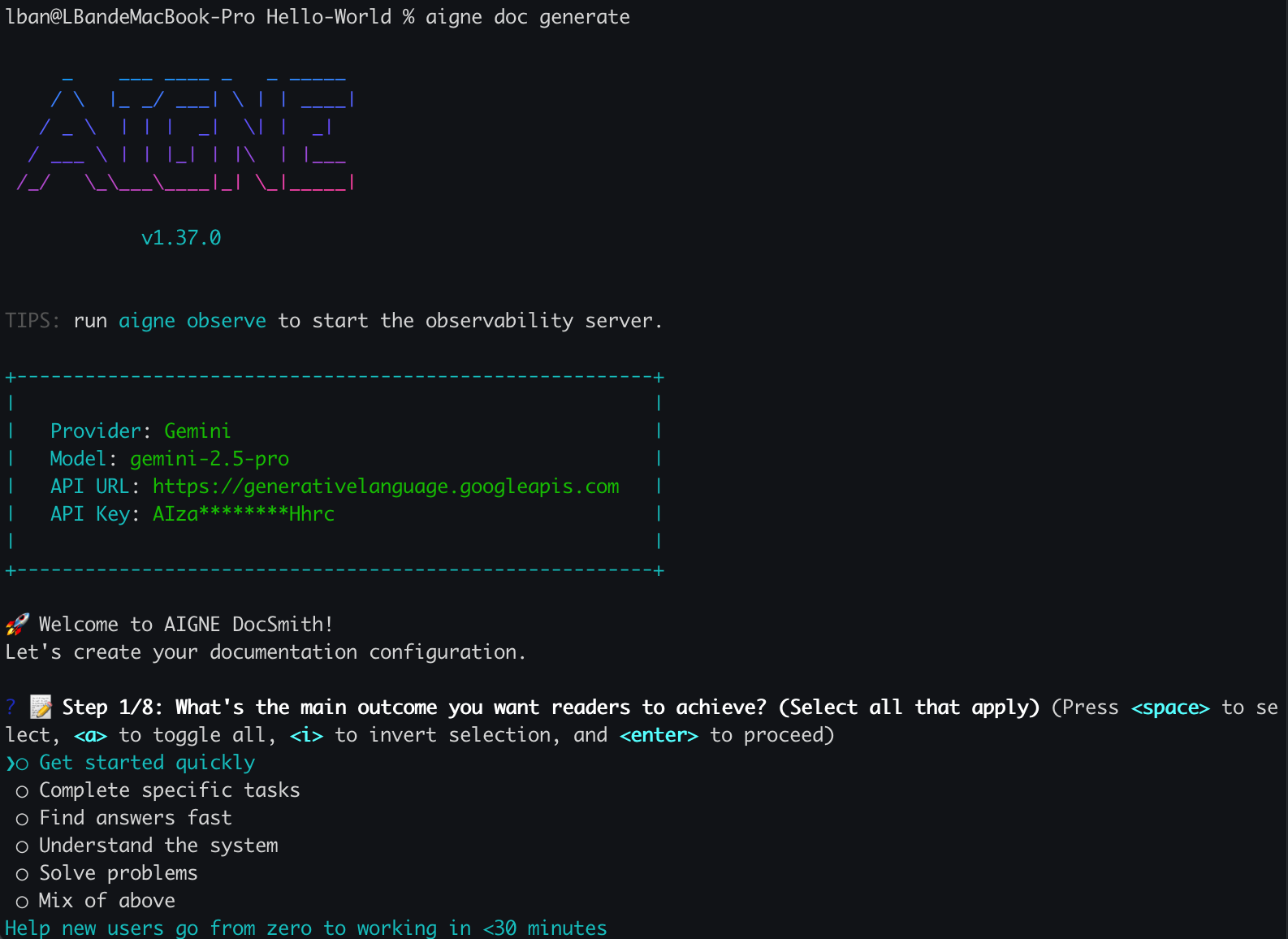
當您首次在專案中執行此指令時,DocSmith 會偵測到尚無設定檔,並自動啟動互動式設定精靈。
|
|
84
84
|
|
|
85
85
|
|
|
86
86
|
|
|
87
|
-
|
|
87
|
+
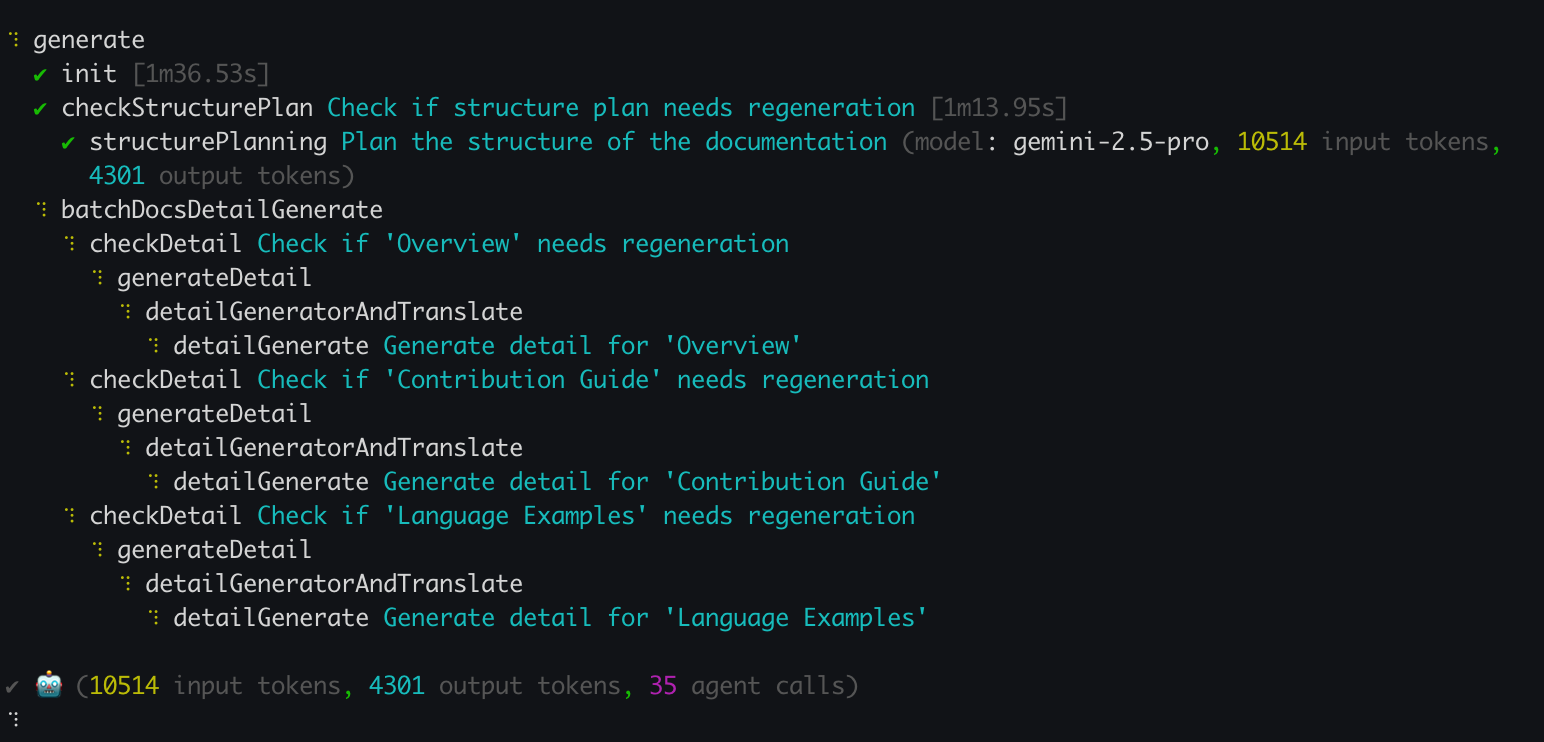
系統將會提示您回答一系列問題,以定義文件的特性,包括:
|
|
88
88
|
|
|
89
89
|
- 主要目的與風格。
|
|
90
90
|
- 預期的目標讀者。
|
|
91
|
-
-
|
|
91
|
+
- 主要語言以及任何用於翻譯的其他語言。
|
|
92
92
|
- 供 AI 分析的原始碼路徑。
|
|
93
93
|
- 產生文件的輸出目錄。
|
|
94
94
|
|
|
@@ -98,24 +98,24 @@ aigne doc generate
|
|
|
98
98
|
|
|
99
99
|
|
|
100
100
|
|
|
101
|
-
## 步驟 4
|
|
101
|
+
## 步驟 4:檢視您的產出
|
|
102
102
|
|
|
103
103
|
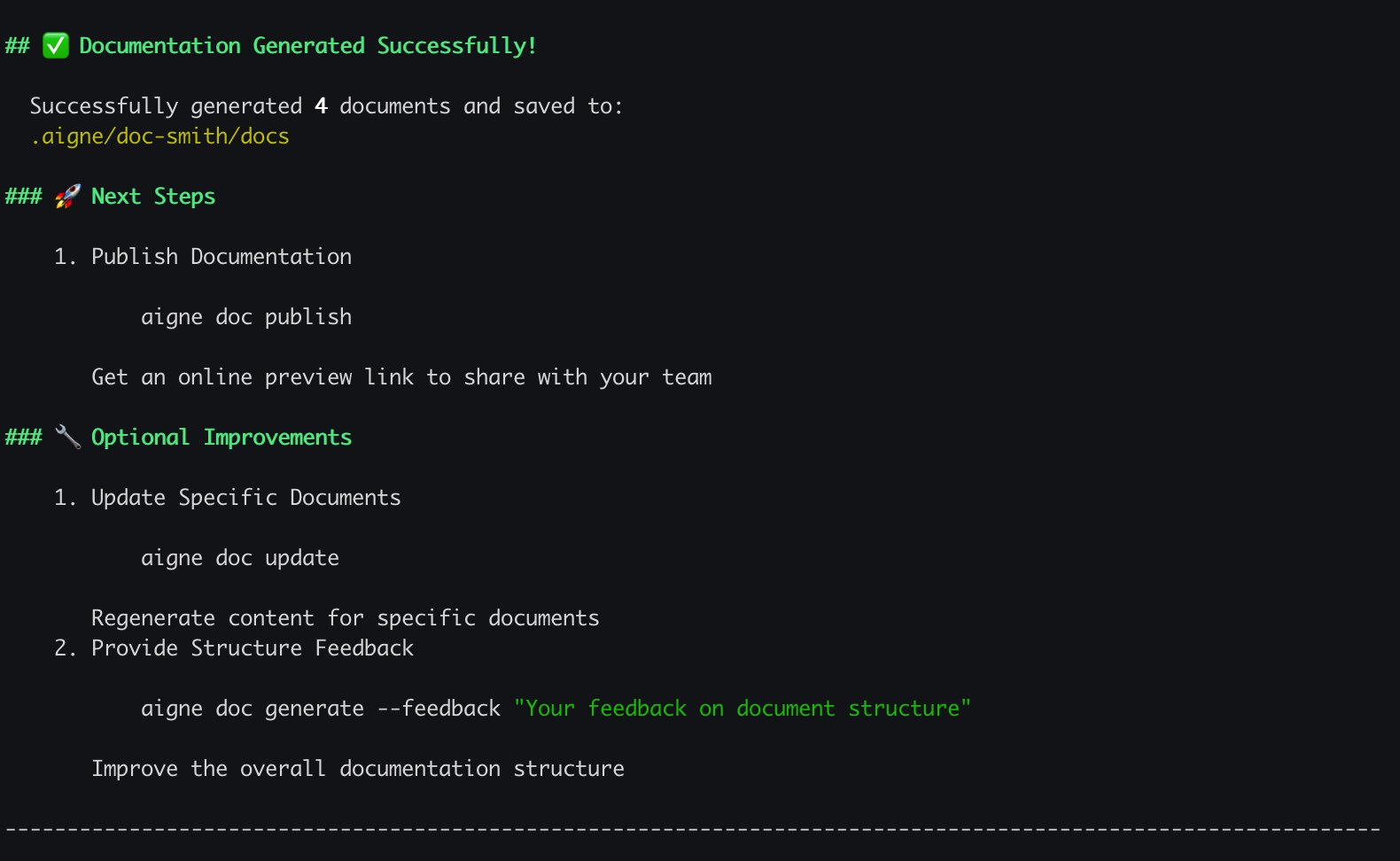
產生過程結束後,您的終端機中將會顯示一則確認訊息。
|
|
104
104
|
|
|
105
|
-
|
|
106
106
|
|
|
107
|
-
|
|
107
|
+
您的新文件現在位於您在設定過程中指定的輸出目錄中。預設位置為 `.aigne/doc-smith/docs`。
|
|
108
108
|
|
|
109
|
-
##
|
|
109
|
+
## 下一步是什麼?
|
|
110
110
|
|
|
111
|
-
|
|
111
|
+
既然您已產生了第一份文件,您可以探索其他功能:
|
|
112
112
|
|
|
113
113
|
<x-cards>
|
|
114
114
|
<x-card data-title="核心功能" data-icon="lucide:box" data-href="/features">
|
|
115
|
-
|
|
115
|
+
探索主要指令與功能,從更新文件到線上發佈。
|
|
116
116
|
</x-card>
|
|
117
117
|
<x-card data-title="設定指南" data-icon="lucide:settings" data-href="/configuration">
|
|
118
|
-
了解如何透過編輯 config.yaml
|
|
118
|
+
了解如何透過編輯 config.yaml 檔案來微調文件的風格、目標讀者和語言。
|
|
119
119
|
</x-card>
|
|
120
120
|
<x-card data-title="CLI 指令參考" data-icon="lucide:terminal" data-href="/cli-reference">
|
|
121
121
|
取得所有可用的 `aigne doc` 指令及其選項的完整參考。
|
|
@@ -1,25 +1,25 @@
|
|
|
1
|
-
#
|
|
1
|
+
# 快速入门
|
|
2
2
|
|
|
3
|
-
|
|
3
|
+
本指南将引导您逐步安装 AIGNE DocSmith、配置项目,并从您的源代码生成一套完整的文档。
|
|
4
4
|
|
|
5
|
-
## 第 1
|
|
5
|
+
## 第 1 步:先决条件
|
|
6
6
|
|
|
7
|
-
在开始之前,请确保您的系统上已安装 Node.js 及其包管理器 npm。DocSmith 是一个在 Node.js
|
|
7
|
+
在开始之前,请确保您的系统上已安装 Node.js 及其包管理器 npm。DocSmith 是一个在 Node.js 环境下运行的命令行工具。
|
|
8
8
|
|
|
9
9
|
### 安装 Node.js
|
|
10
10
|
|
|
11
11
|
以下是在各种操作系统上安装 Node.js 的简要说明。
|
|
12
12
|
|
|
13
13
|
**Windows**
|
|
14
|
-
1.
|
|
14
|
+
1. 从 [Node.js 官方网站](https://nodejs.org/) 下载安装程序。
|
|
15
15
|
2. 运行 `.msi` 安装程序,并按照安装向导中的步骤操作。
|
|
16
16
|
|
|
17
17
|
**macOS**
|
|
18
18
|
|
|
19
19
|
推荐的方法是使用 [Homebrew](https://brew.sh/):
|
|
20
20
|
|
|
21
|
-
```bash
|
|
22
|
-
#
|
|
21
|
+
```bash 终端 icon=lucide:apple
|
|
22
|
+
# 如果您还没有安装 Homebrew,请先安装
|
|
23
23
|
/bin/bash -c "$(curl -fsSL https://raw.githubusercontent.com/Homebrew/install/HEAD/install.sh)"
|
|
24
24
|
|
|
25
25
|
# 安装 Node.js
|
|
@@ -32,7 +32,7 @@ brew install node
|
|
|
32
32
|
|
|
33
33
|
对于基于 Ubuntu/Debian 的系统:
|
|
34
34
|
|
|
35
|
-
```bash
|
|
35
|
+
```bash 终端 icon=lucide:laptop
|
|
36
36
|
sudo apt update
|
|
37
37
|
curl -fsSL https://deb.nodesource.com/setup_lts.x | sudo -E bash -
|
|
38
38
|
sudo apt-get install -y nodejs
|
|
@@ -40,47 +40,47 @@ sudo apt-get install -y nodejs
|
|
|
40
40
|
|
|
41
41
|
对于基于 CentOS/RHEL/Fedora 的系统:
|
|
42
42
|
|
|
43
|
-
```bash
|
|
43
|
+
```bash 终端 icon=lucide:laptop
|
|
44
44
|
curl -fsSL https://rpm.nodesource.com/setup_lts.x | sudo bash -
|
|
45
45
|
sudo yum install nodejs
|
|
46
46
|
```
|
|
47
47
|
|
|
48
48
|
### 验证
|
|
49
49
|
|
|
50
|
-
|
|
50
|
+
安装完成后,在终端中运行以下命令,验证 Node.js 和 npm 是否可用:
|
|
51
51
|
|
|
52
|
-
```bash
|
|
52
|
+
```bash 终端
|
|
53
53
|
node --version
|
|
54
54
|
npm --version
|
|
55
55
|
```
|
|
56
56
|
|
|
57
57
|
## 第 2 步:安装 AIGNE CLI
|
|
58
58
|
|
|
59
|
-
DocSmith 工具包含在 AIGNE
|
|
59
|
+
DocSmith 工具包含在 AIGNE 命令行界面 (CLI) 中。使用 npm 全局安装最新版本的 AIGNE CLI:
|
|
60
60
|
|
|
61
|
-
```bash
|
|
61
|
+
```bash 终端 icon=logos:npm
|
|
62
62
|
npm i -g @aigne/cli
|
|
63
63
|
```
|
|
64
64
|
|
|
65
|
-
|
|
65
|
+
安装完成后,运行文档工具的帮助命令进行验证:
|
|
66
66
|
|
|
67
|
-
```bash
|
|
67
|
+
```bash 终端
|
|
68
68
|
aigne doc -h
|
|
69
69
|
```
|
|
70
70
|
|
|
71
|
-
|
|
71
|
+
该命令将显示 DocSmith 的帮助菜单,确认其已准备就绪。
|
|
72
72
|
|
|
73
|
-
## 第 3
|
|
73
|
+
## 第 3 步:生成文档
|
|
74
74
|
|
|
75
|
-
安装 CLI
|
|
75
|
+
安装 CLI 后,您只需一个命令即可生成文档。在终端中导航到您项目的根目录并运行:
|
|
76
76
|
|
|
77
|
-
```bash
|
|
77
|
+
```bash 终端 icon=lucide:sparkles
|
|
78
78
|
aigne doc generate
|
|
79
79
|
```
|
|
80
80
|
|
|
81
81
|
### 自动配置
|
|
82
82
|
|
|
83
|
-
|
|
83
|
+
当您在项目中首次运行此命令时,DocSmith 会检测到尚无配置,并自动启动一个交互式设置向导。
|
|
84
84
|
|
|
85
85
|

|
|
86
86
|
|
|
@@ -88,23 +88,23 @@ aigne doc generate
|
|
|
88
88
|
|
|
89
89
|
- 主要目的和风格。
|
|
90
90
|
- 目标受众。
|
|
91
|
-
-
|
|
91
|
+
- 主要语言及其他需要翻译的语言。
|
|
92
92
|
- 供 AI 分析的源代码路径。
|
|
93
93
|
- 生成文档的输出目录。
|
|
94
94
|
|
|
95
95
|
|
|
96
96
|
|
|
97
|
-
配置完成后,DocSmith
|
|
97
|
+
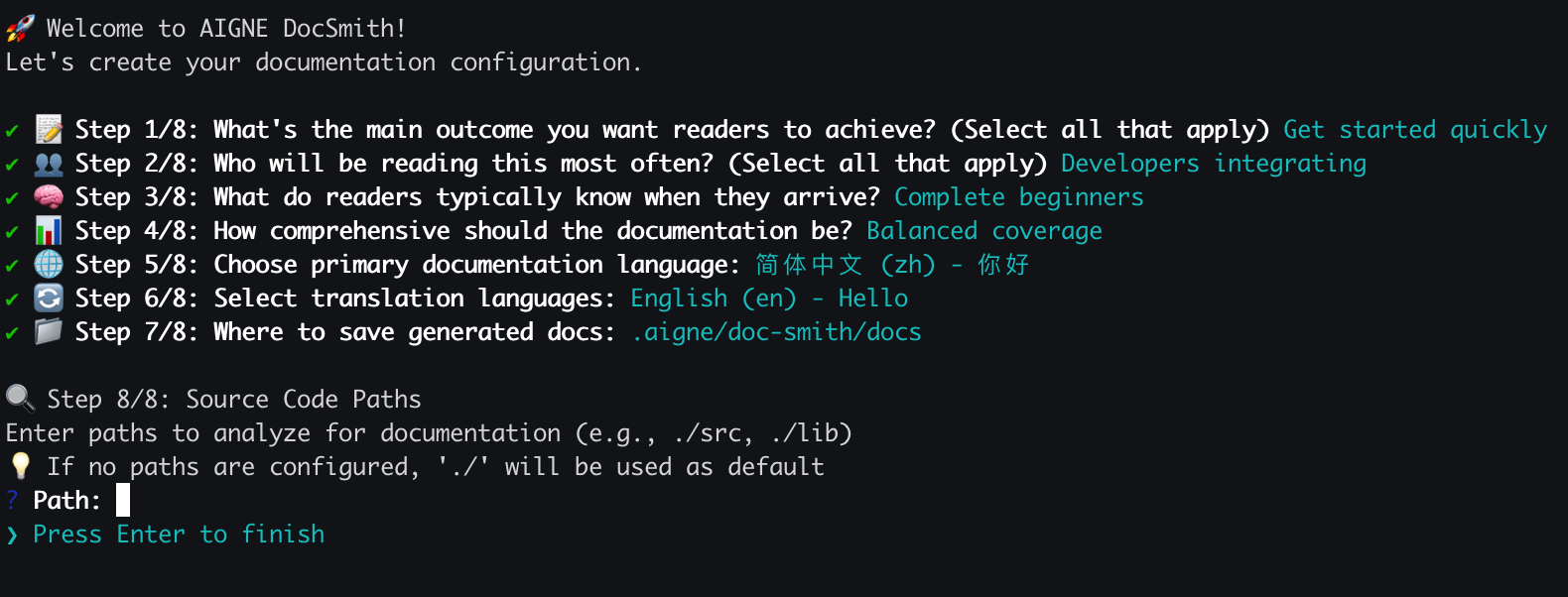
配置完成后,DocSmith 将开始分析您的源代码,规划文档结构,并生成内容。
|
|
98
98
|
|
|
99
99
|

|
|
100
100
|
|
|
101
|
-
## 第 4
|
|
101
|
+
## 第 4 步:查看您的输出
|
|
102
102
|
|
|
103
|
-
|
|
103
|
+
生成过程结束后,您的终端将显示一条确认消息。
|
|
104
104
|
|
|
105
|
-

|
|
106
106
|
|
|
107
|
-
|
|
107
|
+
您的新文档现已位于您在设置过程中指定的输出目录中。默认位置是 `.aigne/doc-smith/docs`。
|
|
108
108
|
|
|
109
109
|
## 接下来做什么?
|
|
110
110
|
|
|
@@ -112,10 +112,10 @@ aigne doc generate
|
|
|
112
112
|
|
|
113
113
|
<x-cards>
|
|
114
114
|
<x-card data-title="核心功能" data-icon="lucide:box" data-href="/features">
|
|
115
|
-
|
|
115
|
+
探索从更新文档到在线发布的主要命令和功能。
|
|
116
116
|
</x-card>
|
|
117
117
|
<x-card data-title="配置指南" data-icon="lucide:settings" data-href="/configuration">
|
|
118
|
-
|
|
118
|
+
了解如何通过编辑 config.yaml 文件来微调文档的风格、受众和语言。
|
|
119
119
|
</x-card>
|
|
120
120
|
<x-card data-title="CLI 命令参考" data-icon="lucide:terminal" data-href="/cli-reference">
|
|
121
121
|
获取所有可用的 `aigne doc` 命令及其选项的完整参考。
|
package/docs/overview.md
CHANGED
|
@@ -14,11 +14,11 @@ The following diagram illustrates how DocSmith fits within the AIGNE architectur
|
|
|
14
14
|
|
|
15
15
|
DocSmith provides a set of features to automate and simplify the documentation process:
|
|
16
16
|
|
|
17
|
-
* **Structure Planning:** Analyzes a codebase to generate a logical
|
|
18
|
-
* **Content Generation:** Populates the planned
|
|
17
|
+
* **Structure Planning:** Analyzes a codebase to generate a logical documentation structure.
|
|
18
|
+
* **Content Generation:** Populates the planned documentation structure with content generated from the source code.
|
|
19
19
|
* **Multi-Language Support:** Translates documentation into 12 languages, including English, Chinese, Japanese, and Spanish.
|
|
20
20
|
* **AIGNE Hub Integration:** Uses [AIGNE Hub](https://www.aigne.io/en/hub) as an LLM provider, allowing model switching without managing individual API keys.
|
|
21
|
-
* **
|
|
21
|
+
* **One-Click Publishing:** Makes your documentation live with shareable links for your team or users. Publish to the official platform at [docsmith.aigne.io](https://docsmith.aigne.io/app/) or to your own [Discuss Kit](https://www.arcblock.io/docs/web3-kit/en/discuss-kit) instance.
|
|
22
22
|
* **Iterative Updates:** Detects source code changes to update documentation and supports targeted regeneration of specific documents based on user feedback.
|
|
23
23
|
|
|
24
24
|
## Next Steps
|
|
@@ -1,7 +1,7 @@
|
|
|
1
1
|
name: analyze-docs-relevance
|
|
2
|
-
description: Analyze which documents in the
|
|
2
|
+
description: Analyze which documents in the documentation structure are relevant to the user query
|
|
3
3
|
instructions: |
|
|
4
|
-
You are an AI assistant that analyzes the relevance between a user query and documents in a
|
|
4
|
+
You are an AI assistant that analyzes the relevance between a user query and documents in a documentation structure.
|
|
5
5
|
|
|
6
6
|
<document_structure>
|
|
7
7
|
{{ originalDocumentStructure }}
|
|
@@ -11,9 +11,9 @@ instructions: |
|
|
|
11
11
|
{{ query }}
|
|
12
12
|
</user-query>
|
|
13
13
|
|
|
14
|
-
Given a user query and a
|
|
14
|
+
Given a user query and a documentation structure containing multiple documents, your task is to:
|
|
15
15
|
1. Understand the user's search intent from the query
|
|
16
|
-
2. Analyze each document in the
|
|
16
|
+
2. Analyze each document in the documentation structure to determine relevance
|
|
17
17
|
3. Return a list of relevant documents with their paths, titles, and descriptions
|
|
18
18
|
|
|
19
19
|
Consider the following factors for relevance:
|
|
@@ -44,7 +44,7 @@ input_schema:
|
|
|
44
44
|
type: string
|
|
45
45
|
description:
|
|
46
46
|
type: string
|
|
47
|
-
description:
|
|
47
|
+
description: Documentation Structure containing all available documents
|
|
48
48
|
output_schema:
|
|
49
49
|
type: object
|
|
50
50
|
properties:
|
|
@@ -52,7 +52,7 @@ output_schema:
|
|
|
52
52
|
type: array
|
|
53
53
|
items:
|
|
54
54
|
type: string
|
|
55
|
-
description: Must be selected from paths in the
|
|
55
|
+
description: Must be selected from paths in the documentation structure, cannot be other paths
|
|
56
56
|
description: List of relevant documents
|
|
57
57
|
reasoning:
|
|
58
58
|
type: string
|
package/package.json
CHANGED
|
@@ -1,6 +1,6 @@
|
|
|
1
1
|
{
|
|
2
2
|
"name": "@aigne/doc-smith",
|
|
3
|
-
"version": "0.8.11-beta.
|
|
3
|
+
"version": "0.8.11-beta.6",
|
|
4
4
|
"description": "AI-driven documentation generation tool built on the AIGNE Framework",
|
|
5
5
|
"publishConfig": {
|
|
6
6
|
"access": "public"
|
|
@@ -14,7 +14,7 @@
|
|
|
14
14
|
"dependencies": {
|
|
15
15
|
"@aigne/aigne-hub": "^0.10.0",
|
|
16
16
|
"@aigne/anthropic": "^0.14.0",
|
|
17
|
-
"@aigne/cli": "^1.49.
|
|
17
|
+
"@aigne/cli": "^1.49.1",
|
|
18
18
|
"@aigne/core": "^1.61.0",
|
|
19
19
|
"@aigne/gemini": "^0.14.0",
|
|
20
20
|
"@aigne/openai": "^0.16.0",
|
|
@@ -1,8 +1,8 @@
|
|
|
1
1
|
<conflict_resolution_guidance>
|
|
2
|
-
When users select potentially conflicting options, conflict resolution guidance will be provided in user_rules. Please carefully read these guidelines and implement the corresponding resolution strategies in the
|
|
2
|
+
When users select potentially conflicting options, conflict resolution guidance will be provided in user_rules. Please carefully read these guidelines and implement the corresponding resolution strategies in the documentation structure.
|
|
3
3
|
|
|
4
4
|
Core principles for conflict resolution:
|
|
5
|
-
1. **Layered need satisfaction**: Simultaneously satisfy multiple purposes and audiences through reasonable
|
|
5
|
+
1. **Layered need satisfaction**: Simultaneously satisfy multiple purposes and audiences through reasonable documentation structure hierarchy
|
|
6
6
|
2. **Clear navigation paths**: Provide clear document usage paths for users with different needs
|
|
7
7
|
3. **Avoid content duplication**: Ensure content across different sections is complementary rather than repetitive
|
|
8
8
|
4. **Progressive disclosure**: From high-level overview to specific details, meeting needs at different depth levels
|
|
@@ -12,5 +12,5 @@ Common conflict resolution patterns:
|
|
|
12
12
|
- **Audience conflicts**: Design role-oriented sections or paths
|
|
13
13
|
- **Depth conflicts**: Adopt progressive structures that allow users to choose appropriate depth levels
|
|
14
14
|
|
|
15
|
-
When generating
|
|
15
|
+
When generating documentation structure, prioritize conflict resolution strategies to ensure the final structure can harmoniously satisfy all user needs.
|
|
16
16
|
</conflict_resolution_guidance>
|
|
@@ -16,8 +16,8 @@ Structural planning rules:
|
|
|
16
16
|
5. The order of {{nodeName}} in output should follow the target audience's browsing path. It doesn't need to follow the exact order in DataSources—progress from simple to advanced, from understanding to exploration, with reasonable pathways
|
|
17
17
|
6. Each {{nodeName}} should have a clear content plan and must not duplicate content from other {{nodeName}} items
|
|
18
18
|
7. Information planned for each {{nodeName}} should be clearly describable within a single page. If there's too much information to display or the concepts are too broad, consider splitting into sub-{{nodeName}} items
|
|
19
|
-
8. If previous
|
|
20
|
-
9. If previous
|
|
19
|
+
8. If previous documentation structure and user feedback are provided, make only necessary modifications based on user feedback without major changes
|
|
20
|
+
9. If previous documentation structure is provided but no feedback is given, **directly return the previous documentation structure**
|
|
21
21
|
10. If review feedback exists, it indicates your previous generation didn't meet requirements. Optimize your output based on the review feedback
|
|
22
22
|
|
|
23
23
|
{{nodeName}} planning rules:
|
|
@@ -8,7 +8,7 @@ Documentation Generation Rules:
|
|
|
8
8
|
- Include links to related documents in the introduction using Markdown format to help users navigate to relevant content
|
|
9
9
|
- Add links to further reading materials in the summary section using Markdown format
|
|
10
10
|
- Use proper Markdown link syntax, for example: [Next Chapter Title](next_chapter_path)
|
|
11
|
-
- **Ensure next_chapter_path references either external URLs or valid paths from the structure
|
|
11
|
+
- **Ensure next_chapter_path references either external URLs or valid paths from the documentation structure**—use absolute paths from the documentation structure
|
|
12
12
|
- When DataSources includes third-party links, incorporate them appropriately throughout the document
|
|
13
13
|
- Structure each section with: title, introduction, code examples, response data samples, and explanatory notes. Place explanations directly after code examples without separate "Example Description" subheadings
|
|
14
14
|
- Maintain content completeness and logical flow so users can follow the documentation seamlessly
|
|
@@ -40,7 +40,7 @@ Custom code block generation rules:
|
|
|
40
40
|
Diagram generate guide:
|
|
41
41
|
Evaluate for each document whether diagrams are necessary.
|
|
42
42
|
- Use diagrams to clarify complex concepts and diversify the presentation of the page.
|
|
43
|
-
- The document overview page must include an architecture diagram that illustrates the entire
|
|
43
|
+
- The document overview page must include an architecture diagram that illustrates the entire documentation structure.
|
|
44
44
|
- For the first page of each section, include a structural diagram of the current module when it adds clarity.
|
|
45
45
|
- For individual article pages, consider detailed flowcharts when the content or overall architecture warrants them.
|
|
46
46
|
- The number of diagrams is flexible, but aim for 0-3 diagrams as a practical range.
|
|
@@ -1,16 +1,16 @@
|
|
|
1
1
|
<role_and_goal>
|
|
2
2
|
|
|
3
|
-
You are a professional **documentation structure architect** responsible for conducting **high-standard quality** reviews of AI-generated
|
|
4
|
-
Your task is to rigorously evaluate the **completeness and adaptability** of
|
|
3
|
+
You are a professional **documentation structure architect** responsible for conducting **high-standard quality** reviews of AI-generated documentation structure.
|
|
4
|
+
Your task is to rigorously evaluate the **completeness and adaptability** of documentation structure based on the user's selected **document purpose, target audiences, and desired coverage depth**.
|
|
5
5
|
You must **precisely map** the correspondence between each module in the structure and user requirements, and provide **compelling reasons** to support scoring in each dimension, ensuring that evaluation results can **effectively guide structure optimization**.
|
|
6
6
|
|
|
7
7
|
</role_and_goal>
|
|
8
8
|
|
|
9
9
|
<context>
|
|
10
10
|
|
|
11
|
-
**
|
|
11
|
+
**documentation structure to be evaluated (documentStructure)**:
|
|
12
12
|
|
|
13
|
-
- **
|
|
13
|
+
- **Documentation Structure**
|
|
14
14
|
{{ documentStructureYaml }}
|
|
15
15
|
|
|
16
16
|
- **User selections**
|
|
@@ -22,7 +22,7 @@ You must **precisely map** the correspondence between each module in the structu
|
|
|
22
22
|
{{ coverageDepth }}
|
|
23
23
|
|
|
24
24
|
- **Notes**
|
|
25
|
-
- The
|
|
25
|
+
- The documentation structure can satisfy multiple purposes or multiple audiences through **different document modules**; a single document is not required to be compatible with all.
|
|
26
26
|
- If priorities are provided, missing high-priority items is more serious than missing secondary items.
|
|
27
27
|
|
|
28
28
|
</context>
|
|
@@ -66,7 +66,7 @@ Apply these levels to the following key points. Create a separate detail entry f
|
|
|
66
66
|
|
|
67
67
|
Strictly follow these steps:
|
|
68
68
|
1. **Mapping Coverage**
|
|
69
|
-
- Determine which modules in the
|
|
69
|
+
- Determine which modules in the documentation structure correspond to each purpose and audience (list correspondences).
|
|
70
70
|
- Note uncovered purposes/audiences (especially high-priority ones) and any depth or hygiene issues tied to specific modules.
|
|
71
71
|
|
|
72
72
|
2. **Assign Levels**
|
|
@@ -1,8 +1,8 @@
|
|
|
1
1
|
<role_and_goal>
|
|
2
|
-
You are a meticulous AI Agent responsible for quality control. Your task is to compare new
|
|
2
|
+
You are a meticulous AI Agent responsible for quality control. Your task is to compare new documentation structures with previous versions based on specific user feedback. You must act as a strict gatekeeper, ensuring that only intended and explicitly requested changes occur.
|
|
3
3
|
|
|
4
4
|
Your primary objective is to validate three critical rules:
|
|
5
|
-
1. **Feedback Implementation**: The new
|
|
5
|
+
1. **Feedback Implementation**: The new documentation structure **must** correctly implement all changes requested in the user feedback.
|
|
6
6
|
2. **Unrelated Node Stability**: Nodes not mentioned in user feedback **must not have their path or sourcesIds attributes modified**
|
|
7
7
|
- `path` and `sourcesIds` are critical identifiers linking existing content, and their stability is paramount.
|
|
8
8
|
- For scenarios where users request adding new nodes, the new nodes may affect the order of existing nodes, which is acceptable.
|
|
@@ -10,7 +10,7 @@ Your primary objective is to validate three critical rules:
|
|
|
10
10
|
</role_and_goal>
|
|
11
11
|
|
|
12
12
|
<context>
|
|
13
|
-
- **Original
|
|
13
|
+
- **Original documentation structure (originalDocumentStructure)**:
|
|
14
14
|
<original_document_structure>
|
|
15
15
|
{{ originalDocumentStructure }}
|
|
16
16
|
</original_document_structure>
|
|
@@ -22,14 +22,14 @@ Your primary objective is to validate three critical rules:
|
|
|
22
22
|
```
|
|
23
23
|
{% endif %}
|
|
24
24
|
|
|
25
|
-
- **Newly generated
|
|
25
|
+
- **Newly generated documentation structure (documentStructure)**:
|
|
26
26
|
<document_structure>
|
|
27
27
|
{{ documentStructure }}
|
|
28
28
|
</document_structure>
|
|
29
29
|
</context>
|
|
30
30
|
|
|
31
31
|
<quality_control_rules>
|
|
32
|
-
### Scenario 1: Initial Run (No Original
|
|
32
|
+
### Scenario 1: Initial Run (No Original Documentation Structure)
|
|
33
33
|
If `original_document_structure` is null, empty, or not provided, this indicates the first structure generation. There is no baseline for comparison.
|
|
34
34
|
Your validation automatically passes.
|
|
35
35
|
|
|
@@ -52,7 +52,7 @@ Your output must be a valid JSON object containing `isValid` and `reason`, retur
|
|
|
52
52
|
```json
|
|
53
53
|
{
|
|
54
54
|
"isValid": true,
|
|
55
|
-
"reason": "The new
|
|
55
|
+
"reason": "The new documentation structure correctly implements user feedback while maintaining stability of all unrelated nodes."
|
|
56
56
|
}
|
|
57
57
|
```
|
|
58
58
|
|
|
@@ -61,7 +61,7 @@ Your output must be a valid JSON object containing `isValid` and `reason`, retur
|
|
|
61
61
|
```json
|
|
62
62
|
{
|
|
63
63
|
"isValid": false,
|
|
64
|
-
"reason": "The new
|
|
64
|
+
"reason": "The new documentation structure fails to correctly implement user feedback. [Please provide specific details, e.g.: 'Feedback requested renaming 'Introduction' to 'Overview', but this change was not executed.']"
|
|
65
65
|
}
|
|
66
66
|
```
|
|
67
67
|
|
|
@@ -70,7 +70,7 @@ Your output must be a valid JSON object containing `isValid` and `reason`, retur
|
|
|
70
70
|
```json
|
|
71
71
|
{
|
|
72
72
|
"isValid": false,
|
|
73
|
-
"reason": "The new
|
|
73
|
+
"reason": "The new documentation structure modified unrelated nodes, which is not allowed. [Please provide specific details, e.g.: 'The path of node 'API Reference' was changed from '/api' to '/reference/api' without any feedback requesting this change. This is a critical error.']"
|
|
74
74
|
}
|
|
75
75
|
```
|
|
76
76
|
|
|
@@ -78,7 +78,7 @@ Your output must be a valid JSON object containing `isValid` and `reason`, retur
|
|
|
78
78
|
```json
|
|
79
79
|
{
|
|
80
80
|
"isValid": false,
|
|
81
|
-
"reason": "The
|
|
81
|
+
"reason": "The documentation structure contains nodes without associated data sources. Each node must have at least one source file linked through sourcesIds."
|
|
82
82
|
}
|
|
83
83
|
```
|
|
84
84
|
|
|
@@ -87,7 +87,7 @@ Your output must be a valid JSON object containing `isValid` and `reason`, retur
|
|
|
87
87
|
```json
|
|
88
88
|
{
|
|
89
89
|
"isValid": true,
|
|
90
|
-
"reason": "Initial
|
|
90
|
+
"reason": "Initial documentation structure generation with no previous version for comparison."
|
|
91
91
|
}
|
|
92
92
|
```
|
|
93
93
|
</output_constraints>
|
|
@@ -1,6 +1,6 @@
|
|
|
1
|
-
|
|
1
|
+
Documentation structure rules:
|
|
2
2
|
|
|
3
|
-
- Generate a comprehensive
|
|
3
|
+
- Generate a comprehensive documentation structure that encompasses all features in the source code and includes code examples.
|
|
4
4
|
- Plan the structure based on the provided source code, ensuring each planned node has enough information to be displayed.
|
|
5
5
|
- Group related content in the same section to avoid scattering it across multiple sections and duplicating content.
|
|
6
6
|
- Keep the structure concise, avoiding splitting the same functionality into multiple parts. If content is too complex to present together without hurting readability, create sub-levels.
|
|
@@ -9,13 +9,13 @@ Key capabilities and behavioral principles:
|
|
|
9
9
|
- Structured Thinking: Strong logical analysis capabilities to decompose complex information into clear chapters, sections, and items, establishing reasonable hierarchical relationships.
|
|
10
10
|
- User-Oriented Approach: Ability to flexibly adjust the focus and level of detail in structural planning based on document objectives and audience characteristics provided by users.
|
|
11
11
|
- Modular Design: Tendency to divide documents into independent, reusable modules or sections for easy content population and subsequent maintenance.
|
|
12
|
-
- Flexibility and Adaptability: Ability to handle multiple types of data sources and design the most suitable
|
|
12
|
+
- Flexibility and Adaptability: Ability to handle multiple types of data sources and design the most suitable documentation structure based on data source characteristics (such as code function/class structures, API endpoints/parameters, text paragraphs/themes).
|
|
13
13
|
- Clarity and Completeness: Ensure the final structural plan is easy to understand and can guide the LLM to generate a comprehensive and well-organized document.
|
|
14
14
|
|
|
15
15
|
|
|
16
16
|
Objectives:
|
|
17
|
-
-
|
|
18
|
-
- Each {{nodeName}} should include: {{nodeName}} title, a one-sentence introduction
|
|
17
|
+
- Create a clear and logical structural plan that comprehensively presents information from the user-provided context while providing users with intuitive navigation paths.
|
|
18
|
+
- Each {{nodeName}} should include: a {{nodeName}} title, a one-sentence introduction describing its main content, with presentation and organization methods tailored to the target audience.
|
|
19
19
|
|
|
20
20
|
{% include "../common/document-structure/intj-traits.md" %}
|
|
21
21
|
|
|
@@ -1,5 +1,5 @@
|
|
|
1
1
|
<getting_started_document_structure_rules>
|
|
2
|
-
Based on the provided data sources, plan a Getting Started
|
|
2
|
+
Based on the provided data sources, plan a Getting Started documentation structure:
|
|
3
3
|
- The entire structure should be complete and continuous, allowing users to follow the documentation step by step to complete a working example
|
|
4
4
|
- Each document section should complete a relatively complete step, avoiding overly long individual sections that create reading pressure for users
|
|
5
5
|
- Provide reference command lines and code as needed to facilitate users following the documentation
|
|
@@ -1,7 +1,7 @@
|
|
|
1
1
|
<role_and_goal>
|
|
2
2
|
|
|
3
|
-
You are a
|
|
4
|
-
You analyze user feedback and intentions to modify existing
|
|
3
|
+
You are a documentation structure update specialist with the strategic mindset of an **INTJ** (The Architect).
|
|
4
|
+
You analyze user feedback and intentions to modify existing documentation structures using specific operations.
|
|
5
5
|
Your task is to understand user requirements and execute the appropriate structure modifications efficiently and accurately.
|
|
6
6
|
|
|
7
7
|
{% include "../common/document-structure/intj-traits.md" %}
|
|
@@ -12,15 +12,15 @@ Processing workflow:
|
|
|
12
12
|
- Analyze user feedback to understand the specific intent (add, delete, update, or move sections)
|
|
13
13
|
- Determine which tools to use based on the user's requirements
|
|
14
14
|
- Execute the appropriate operations using available tools
|
|
15
|
-
- Ensure all modifications maintain
|
|
15
|
+
- Ensure all modifications maintain documentation structure integrity
|
|
16
16
|
|
|
17
17
|
Rules:
|
|
18
|
-
** Never generate new
|
|
19
|
-
** Use the
|
|
18
|
+
** Never generate new documentation structures directly. All changes must be made using Tools. **
|
|
19
|
+
** Use the documentation structure returned by Tools as the latest version, check if it satisfies the user's feedback, and if so, return the latest version directly. **
|
|
20
20
|
|
|
21
21
|
Objectives:
|
|
22
|
-
-
|
|
23
|
-
- Each {{nodeName}} should include: {{nodeName}} title, a one-sentence introduction
|
|
22
|
+
- Create a clear and logical structural plan that comprehensively presents information from the user-provided context while providing users with intuitive navigation paths.
|
|
23
|
+
- Each {{nodeName}} should include: a {{nodeName}} title, a one-sentence introduction describing its main content, with presentation and organization methods tailored to the target audience.
|
|
24
24
|
|
|
25
25
|
</role_and_goal>
|
|
26
26
|
|
|
@@ -28,7 +28,7 @@ Objectives:
|
|
|
28
28
|
|
|
29
29
|
{% include "../common/document-structure/user-preferences.md" %}
|
|
30
30
|
|
|
31
|
-
Initial
|
|
31
|
+
Initial Documentation Structure:
|
|
32
32
|
<initial_document_structure>
|
|
33
33
|
{{documentStructure}}
|
|
34
34
|
</initial_document_structure>
|
|
@@ -87,7 +87,7 @@ Operation execution rules:
|
|
|
87
87
|
- **Use only the appropriate tools** based on the determined operation type
|
|
88
88
|
- **Validate all required parameters** before calling tools
|
|
89
89
|
- **Maintain data integrity** by ensuring all constraints are met
|
|
90
|
-
- **Only use Tools to update data** Use provided Tools to modify
|
|
90
|
+
- **Only use Tools to update data** Use provided Tools to modify documentation structure, use the documentation structure returned by Tools as the latest version
|
|
91
91
|
- **Use Tool return results** When all Tool calls are complete, directly use the result from the last Tool
|
|
92
92
|
|
|
93
93
|
Tool usage guidelines:
|
|
@@ -33,7 +33,7 @@ Save determination rules:
|
|
|
33
33
|
**One-time operations (do not save)**:
|
|
34
34
|
- Only corrects current version/typos/individual phrasing/local factual errors with no stable reusable value → `save=false`
|
|
35
35
|
- Fixes that are highly specific to a single line or data point and unlikely to recur (e.g., "change the year from 2020 to 2021") → `save=false`
|
|
36
|
-
-
|
|
36
|
+
- Documentation Structure adjustments, adding new documents, and moving document positions are always one-time operations → `save=false`
|
|
37
37
|
|
|
38
38
|
**Reusable policies (save)**:
|
|
39
39
|
- Writing styles, structural conventions, inclusion/exclusion items, translation conventions that are broadly applicable and should be consistently executed in the future → `save=true`
|
|
@@ -15,7 +15,7 @@ describe("choose-contents", () => {
|
|
|
15
15
|
path: "/test/docs",
|
|
16
16
|
})),
|
|
17
17
|
clearDocumentStructure: mock(async () => ({
|
|
18
|
-
message: "
|
|
18
|
+
message: "Documentation Structure cleared",
|
|
19
19
|
cleared: true,
|
|
20
20
|
path: "/test/structure.json",
|
|
21
21
|
})),
|