@aigne/doc-smith 0.8.11-beta.5 → 0.8.11-beta.6
This diff represents the content of publicly available package versions that have been released to one of the supported registries. The information contained in this diff is provided for informational purposes only and reflects changes between package versions as they appear in their respective public registries.
- package/.aigne/doc-smith/config.yaml +1 -1
- package/.release-please-manifest.json +1 -1
- package/CHANGELOG.md +9 -2
- package/README.md +1 -1
- package/agents/clear/choose-contents.mjs +2 -2
- package/agents/clear/clear-document-structure.mjs +8 -8
- package/agents/clear/index.yaml +1 -1
- package/agents/evaluate/document-structure.yaml +1 -1
- package/agents/generate/check-document-structure.yaml +3 -3
- package/agents/generate/check-need-generate-structure.mjs +8 -8
- package/agents/generate/document-structure-tools/add-document.mjs +3 -3
- package/agents/generate/document-structure-tools/delete-document.mjs +2 -2
- package/agents/generate/document-structure-tools/move-document.mjs +3 -2
- package/agents/generate/document-structure-tools/update-document.mjs +2 -2
- package/agents/generate/generate-structure.yaml +1 -1
- package/agents/generate/update-document-structure.yaml +3 -3
- package/agents/generate/user-review-document-structure.mjs +10 -10
- package/agents/update/batch-generate-document.yaml +1 -1
- package/agents/update/check-document.mjs +2 -2
- package/agents/utils/check-feedback-refiner.mjs +1 -1
- package/agents/utils/choose-docs.mjs +1 -1
- package/agents/utils/load-document-all-content.mjs +3 -3
- package/agents/utils/load-sources.mjs +1 -1
- package/agents/utils/save-docs.mjs +7 -28
- package/aigne.yaml +2 -2
- package/docs/_sidebar.md +1 -1
- package/docs/advanced-how-it-works.md +3 -3
- package/docs/advanced-quality-assurance.md +1 -1
- package/docs/cli-reference.ja.md +151 -80
- package/docs/cli-reference.md +126 -55
- package/docs/cli-reference.zh-TW.md +133 -62
- package/docs/cli-reference.zh.md +143 -72
- package/docs/configuration-interactive-setup.md +1 -1
- package/docs/configuration-language-support.md +1 -1
- package/docs/configuration-preferences.md +1 -1
- package/docs/configuration.ja.md +104 -48
- package/docs/configuration.md +58 -2
- package/docs/configuration.zh-TW.md +99 -42
- package/docs/configuration.zh.md +78 -21
- package/docs/features-generate-documentation.ja.md +63 -44
- package/docs/features-generate-documentation.md +54 -35
- package/docs/features-generate-documentation.zh-TW.md +67 -48
- package/docs/features-generate-documentation.zh.md +61 -41
- package/docs/features-publish-your-docs.ja.md +69 -46
- package/docs/features-publish-your-docs.md +65 -42
- package/docs/features-publish-your-docs.zh-TW.md +73 -50
- package/docs/features-publish-your-docs.zh.md +67 -44
- package/docs/features-translate-documentation.ja.md +35 -33
- package/docs/features-translate-documentation.md +24 -22
- package/docs/features-translate-documentation.zh-TW.md +32 -30
- package/docs/features-translate-documentation.zh.md +29 -27
- package/docs/features-update-and-refine.ja.md +120 -66
- package/docs/features-update-and-refine.md +110 -56
- package/docs/features-update-and-refine.zh-TW.md +116 -62
- package/docs/features-update-and-refine.zh.md +118 -64
- package/docs/getting-started.ja.md +22 -22
- package/docs/getting-started.md +1 -1
- package/docs/getting-started.zh-TW.md +16 -16
- package/docs/getting-started.zh.md +28 -28
- package/docs/overview.md +3 -3
- package/docs-mcp/analyze-docs-relevance.yaml +6 -6
- package/docs-mcp/docs-search.yaml +1 -1
- package/package.json +2 -2
- package/prompts/common/document-structure/conflict-resolution-guidance.md +3 -3
- package/prompts/common/document-structure/document-structure-rules.md +2 -2
- package/prompts/detail/document-rules.md +1 -1
- package/prompts/detail/generate-document.md +1 -1
- package/prompts/evaluate/document-structure.md +6 -6
- package/prompts/structure/check-document-structure.md +10 -10
- package/prompts/structure/document-rules.md +2 -2
- package/prompts/structure/generate-structure-system.md +3 -3
- package/prompts/structure/structure-example.md +1 -1
- package/prompts/structure/structure-getting-started.md +1 -1
- package/prompts/structure/update-document-structure.md +9 -9
- package/prompts/utils/feedback-refiner.md +1 -1
- package/tests/agents/clear/choose-contents.test.mjs +1 -1
- package/tests/agents/clear/clear-document-structure.test.mjs +36 -30
- package/tests/agents/evaluate/generate-report.test.mjs +1 -1
- package/tests/agents/generate/check-need-generate-structure.test.mjs +1 -1
- package/tests/agents/generate/document-structure-tools/add-document.test.mjs +2 -2
- package/tests/agents/generate/document-structure-tools/delete-document.test.mjs +4 -4
- package/tests/agents/generate/document-structure-tools/move-document.test.mjs +3 -3
- package/tests/agents/generate/document-structure-tools/update-document.test.mjs +3 -3
- package/tests/agents/generate/user-review-document-structure.test.mjs +7 -5
- package/tests/agents/update/check-document.test.mjs +1 -1
- package/tests/agents/utils/format-document-structure.test.mjs +5 -5
- package/tests/agents/utils/load-sources.test.mjs +4 -4
- package/tests/agents/utils/save-docs.test.mjs +1 -1
- package/tests/utils/conflict-detector.test.mjs +1 -1
- package/tests/utils/docs-finder-utils.test.mjs +8 -8
- package/types/document-structure-schema.mjs +9 -9
- package/utils/conflict-detector.mjs +1 -1
- package/utils/constants/index.mjs +4 -4
- package/utils/docs-finder-utils.mjs +11 -11
- package/utils/markdown-checker.mjs +1 -1
|
@@ -1,73 +1,127 @@
|
|
|
1
|
-
#
|
|
1
|
+
# 更新與完善
|
|
2
2
|
|
|
3
|
-
|
|
3
|
+
讓文件與不斷演進的程式碼庫保持同步是一個有條理的過程。AIGNE DocSmith 提供了直接而靈活的指令,可透過基於程式碼變更的自動更新,或透過精確、由回饋驅動的完善來讓您的內容保持最新。
|
|
4
4
|
|
|
5
|
-
|
|
5
|
+
本指南涵蓋以下程序:
|
|
6
6
|
|
|
7
|
-
-
|
|
8
|
-
-
|
|
7
|
+
- 在原始碼被修改時自動更新文件。
|
|
8
|
+
- 使用針對性的回饋重新生成特定文件。
|
|
9
9
|
- 調整整體文件結構。
|
|
10
10
|
|
|
11
11
|
### 文件更新工作流程
|
|
12
12
|
|
|
13
|
-
|
|
13
|
+
下圖說明了可用於更新文件的不同工作流程:
|
|
14
14
|
|
|
15
|
-
```d2
|
|
15
|
+
```d2 文件更新工作流程
|
|
16
16
|
direction: down
|
|
17
17
|
|
|
18
|
-
|
|
19
|
-
shape:
|
|
20
|
-
label: "
|
|
18
|
+
developer: {
|
|
19
|
+
shape: c4-person
|
|
20
|
+
label: "開發人員"
|
|
21
21
|
}
|
|
22
22
|
|
|
23
|
-
|
|
24
|
-
|
|
25
|
-
|
|
23
|
+
codebase: {
|
|
24
|
+
shape: cylinder
|
|
25
|
+
label: "原始碼"
|
|
26
26
|
}
|
|
27
27
|
|
|
28
|
-
|
|
29
|
-
|
|
30
|
-
|
|
28
|
+
updated-documentation: {
|
|
29
|
+
shape: cylinder
|
|
30
|
+
label: "已更新的\n文件"
|
|
31
31
|
}
|
|
32
32
|
|
|
33
|
-
|
|
34
|
-
label: "
|
|
33
|
+
workflows: {
|
|
34
|
+
label: "文件更新工作流程"
|
|
35
35
|
shape: rectangle
|
|
36
|
-
}
|
|
37
|
-
|
|
38
|
-
Start -> Code-Change
|
|
39
|
-
Start -> Content-Tweak
|
|
40
|
-
Start -> Structure-Tweak
|
|
41
|
-
|
|
42
|
-
Code-Change -> Generate-Command: "aigne doc generate"
|
|
43
|
-
|
|
44
|
-
Generate-Command -> Change-Detection: {
|
|
45
|
-
label: "變更偵測"
|
|
46
|
-
shape: diamond
|
|
47
|
-
}
|
|
48
|
-
Change-Detection -> Auto-Regen: "重新生成\n受影響文件"
|
|
49
|
-
|
|
50
|
-
Content-Tweak -> Update-Command: "aigne doc update\n--feedback"
|
|
51
|
-
Update-Command -> Manual-Regen: "重新生成\n特定文件"
|
|
52
|
-
|
|
53
|
-
Structure-Tweak -> Generate-Feedback-Command: "aigne doc generate\n--feedback"
|
|
54
|
-
Generate-Feedback-Command -> Replan: "重新規劃文件\n結構"
|
|
55
36
|
|
|
56
|
-
|
|
57
|
-
|
|
58
|
-
|
|
37
|
+
automatic-updates: {
|
|
38
|
+
label: "自動更新(程式碼驅動)"
|
|
39
|
+
shape: rectangle
|
|
40
|
+
|
|
41
|
+
cmd-generate: {
|
|
42
|
+
label: "aigne doc generate"
|
|
43
|
+
}
|
|
44
|
+
|
|
45
|
+
decision-force: {
|
|
46
|
+
label: "--forceRegenerate?"
|
|
47
|
+
shape: diamond
|
|
48
|
+
}
|
|
49
|
+
|
|
50
|
+
detect-changes: {
|
|
51
|
+
label: "偵測變更"
|
|
52
|
+
}
|
|
53
|
+
|
|
54
|
+
regen-affected: {
|
|
55
|
+
label: "重新生成\n受影響文件"
|
|
56
|
+
}
|
|
57
|
+
|
|
58
|
+
regen-all: {
|
|
59
|
+
label: "重新生成\n所有文件"
|
|
60
|
+
}
|
|
61
|
+
}
|
|
62
|
+
|
|
63
|
+
manual-refinements: {
|
|
64
|
+
label: "手動完善(回饋驅動)"
|
|
65
|
+
shape: rectangle
|
|
66
|
+
grid-columns: 2
|
|
67
|
+
grid-gap: 100
|
|
68
|
+
|
|
69
|
+
refine-individual: {
|
|
70
|
+
label: "完善個別文件"
|
|
71
|
+
shape: rectangle
|
|
72
|
+
|
|
73
|
+
cmd-update: {
|
|
74
|
+
label: "aigne doc update\n--feedback"
|
|
75
|
+
}
|
|
76
|
+
|
|
77
|
+
regen-specific: {
|
|
78
|
+
label: "重新生成\n特定文件"
|
|
79
|
+
}
|
|
80
|
+
}
|
|
81
|
+
|
|
82
|
+
optimize-structure: {
|
|
83
|
+
label: "優化整體結構"
|
|
84
|
+
shape: rectangle
|
|
85
|
+
|
|
86
|
+
cmd-generate-feedback: {
|
|
87
|
+
label: "aigne doc generate\n--feedback"
|
|
88
|
+
}
|
|
89
|
+
|
|
90
|
+
re-evaluate-plan: {
|
|
91
|
+
label: "重新評估\n文件計畫"
|
|
92
|
+
}
|
|
93
|
+
}
|
|
94
|
+
}
|
|
59
95
|
}
|
|
60
96
|
|
|
61
|
-
|
|
62
|
-
|
|
63
|
-
|
|
97
|
+
# --- Connections ---
|
|
98
|
+
|
|
99
|
+
# Path 1: Automatic Updates
|
|
100
|
+
developer -> codebase: "1. 進行變更"
|
|
101
|
+
codebase -> workflows.automatic-updates.cmd-generate: "2. 執行指令"
|
|
102
|
+
workflows.automatic-updates.cmd-generate -> workflows.automatic-updates.decision-force
|
|
103
|
+
workflows.automatic-updates.decision-force -> workflows.automatic-updates.detect-changes: "否"
|
|
104
|
+
workflows.automatic-updates.detect-changes -> workflows.automatic-updates.regen-affected
|
|
105
|
+
workflows.automatic-updates.decision-force -> workflows.automatic-updates.regen-all: "是"
|
|
106
|
+
workflows.automatic-updates.regen-affected -> updated-documentation
|
|
107
|
+
workflows.automatic-updates.regen-all -> updated-documentation
|
|
108
|
+
|
|
109
|
+
# Path 2: Individual Refinement
|
|
110
|
+
developer -> workflows.manual-refinements.refine-individual.cmd-update: "3. 提供\n內容回饋"
|
|
111
|
+
workflows.manual-refinements.refine-individual.cmd-update -> workflows.manual-refinements.refine-individual.regen-specific
|
|
112
|
+
workflows.manual-refinements.refine-individual.regen-specific -> updated-documentation
|
|
113
|
+
|
|
114
|
+
# Path 3: Structural Refinement
|
|
115
|
+
developer -> workflows.manual-refinements.optimize-structure.cmd-generate-feedback: "4. 提供\n結構性回饋"
|
|
116
|
+
workflows.manual-refinements.optimize-structure.cmd-generate-feedback -> workflows.manual-refinements.optimize-structure.re-evaluate-plan
|
|
117
|
+
workflows.manual-refinements.optimize-structure.re-evaluate-plan -> updated-documentation: "以\n新結構重新生成"
|
|
64
118
|
```
|
|
65
119
|
|
|
66
120
|
---
|
|
67
121
|
|
|
68
|
-
##
|
|
122
|
+
## 具備變更偵測的自動更新
|
|
69
123
|
|
|
70
|
-
當您執行 `aigne doc generate`
|
|
124
|
+
當您執行 `aigne doc generate` 指令時,DocSmith 會先分析您的程式碼庫以偵測自上次生成以來的變更。接著,它只會重新生成受這些變更影響的文件。這種預設行為可以節省時間並減少 API 的使用。
|
|
71
125
|
|
|
72
126
|
```shell icon=lucide:terminal
|
|
73
127
|
# DocSmith 將偵測變更並僅更新必要部分
|
|
@@ -78,7 +132,7 @@ aigne doc generate
|
|
|
78
132
|
|
|
79
133
|
### 強制完整重新生成
|
|
80
134
|
|
|
81
|
-
|
|
135
|
+
若要從頭開始重新生成所有文件,繞過快取和變更偵測,請使用 `--forceRegenerate` 旗標。當您進行了重大的設定變更或需要完全重建以確保一致性時,這項操作是必要的。
|
|
82
136
|
|
|
83
137
|
```shell icon=lucide:terminal
|
|
84
138
|
# 從頭開始重新生成所有文件
|
|
@@ -87,52 +141,52 @@ aigne doc generate --forceRegenerate
|
|
|
87
141
|
|
|
88
142
|
---
|
|
89
143
|
|
|
90
|
-
##
|
|
144
|
+
## 完善個別文件
|
|
91
145
|
|
|
92
|
-
|
|
146
|
+
若要在沒有相應程式碼變更的情況下改善特定文件的內容,請使用 `aigne doc update` 指令。此指令允許您提供針對性的指示以進行完善。
|
|
93
147
|
|
|
94
|
-
|
|
148
|
+
這可以透過互動模式或透過命令列參數以非互動方式完成。
|
|
95
149
|
|
|
96
150
|
### 互動模式
|
|
97
151
|
|
|
98
|
-
|
|
152
|
+
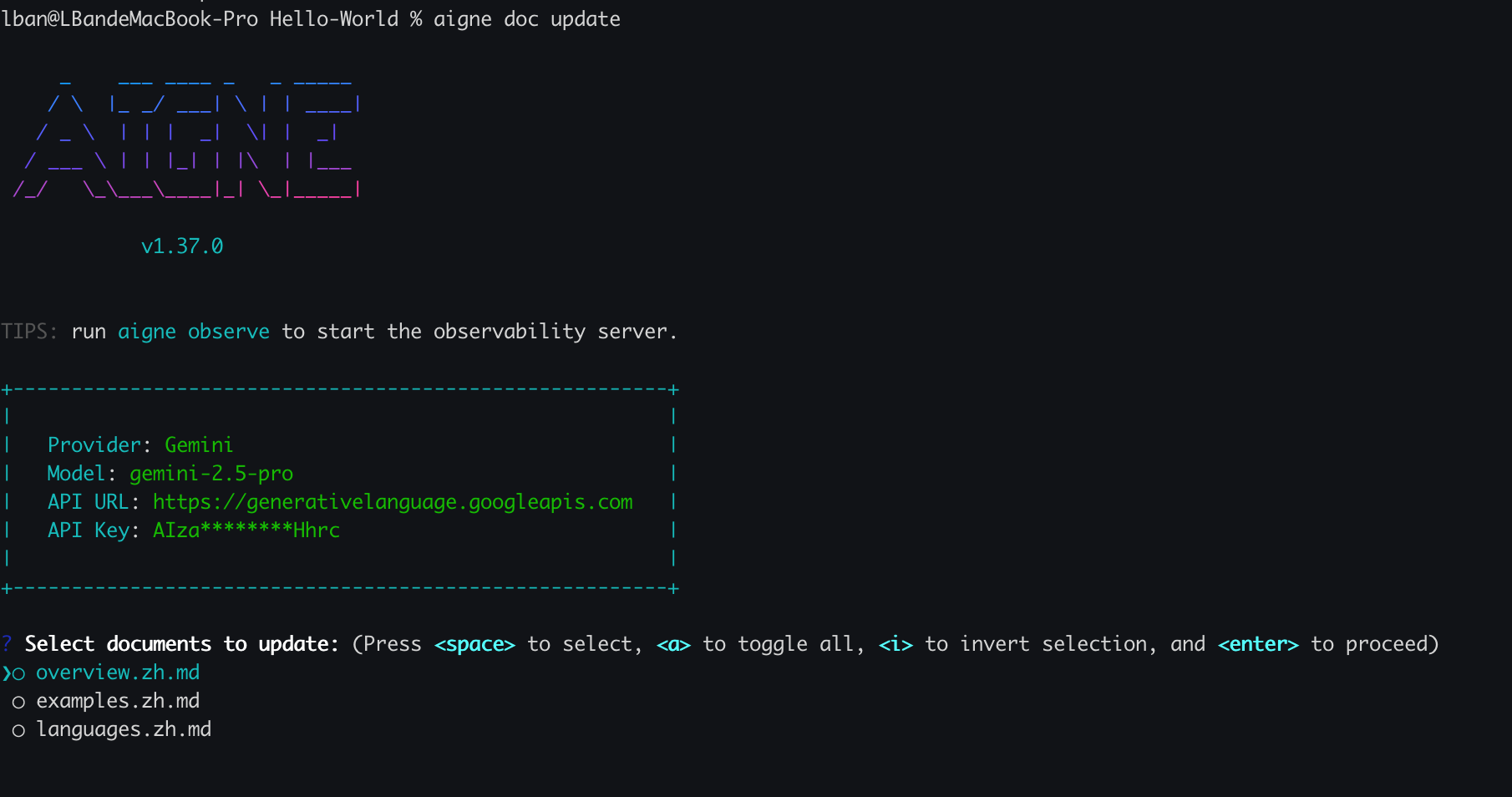
若要進行引導式流程,請在不帶任何參數的情況下執行該指令。DocSmith 將會顯示一個選單,讓您選擇想要更新的文件。選擇後,系統將提示您輸入回饋。
|
|
99
153
|
|
|
100
154
|
```shell icon=lucide:terminal
|
|
101
|
-
#
|
|
155
|
+
# 啟動互動式更新流程
|
|
102
156
|
aigne doc update
|
|
103
157
|
```
|
|
104
158
|
|
|
105
|
-
|
|
106
160
|
|
|
107
161
|
### 直接透過命令列更新
|
|
108
162
|
|
|
109
|
-
|
|
163
|
+
對於腳本化或更快速的工作流程,您可以使用旗標直接指定文件和回饋。這可以實現精確的非互動式更新。
|
|
110
164
|
|
|
111
165
|
```shell icon=lucide:terminal
|
|
112
|
-
#
|
|
166
|
+
# 透過回饋更新特定文件
|
|
113
167
|
aigne doc update --docs overview.md --feedback "Add a more detailed FAQ section at the end."
|
|
114
168
|
```
|
|
115
169
|
|
|
116
|
-
`update`
|
|
170
|
+
以下是 `update` 指令的關鍵參數:
|
|
117
171
|
|
|
118
172
|
| 參數 | 說明 |
|
|
119
|
-
|
|
|
120
|
-
| `--docs` |
|
|
173
|
+
| --- | --- |
|
|
174
|
+
| `--docs` | 要更新的文件的路徑。此旗標可多次使用以進行批次更新。 |
|
|
121
175
|
| `--feedback` | 重新生成內容時要使用的具體指示。 |
|
|
122
176
|
|
|
123
177
|
---
|
|
124
178
|
|
|
125
179
|
## 優化整體結構
|
|
126
180
|
|
|
127
|
-
|
|
181
|
+
除了完善個別文件內容外,您還可以調整整體的文件結構。如果現有組織不理想或缺少某個部分,您可以向 `generate` 指令提供回饋。
|
|
128
182
|
|
|
129
|
-
|
|
183
|
+
這會指示 DocSmith 根據您的輸入重新評估整個文件計畫。
|
|
130
184
|
|
|
131
185
|
```shell icon=lucide:terminal
|
|
132
|
-
#
|
|
186
|
+
# 根據特定回饋重新生成文件結構
|
|
133
187
|
aigne doc generate --feedback "Remove the 'About' section and add a detailed 'API Reference'."
|
|
134
188
|
```
|
|
135
189
|
|
|
136
|
-
|
|
190
|
+
此方法適用於對文件目錄進行高層次的變更,而非用於微小的內容編輯。
|
|
137
191
|
|
|
138
|
-
|
|
192
|
+
一旦您的內容完善後,下一步就是為全球受眾準備。有關說明,請參閱 [翻譯文件](./features-translate-documentation.md) 指南。
|
|
@@ -1,84 +1,138 @@
|
|
|
1
|
-
#
|
|
1
|
+
# 更新与完善
|
|
2
2
|
|
|
3
|
-
|
|
3
|
+
让文档与不断演进的代码库保持同步是一个系统性的过程。AIGNE DocSmith 提供了直接而灵活的命令来保持内容最新,既可以通过基于代码变更的自动更新,也可以通过精确的、由反馈驱动的完善。
|
|
4
4
|
|
|
5
|
-
|
|
5
|
+
本指南涵盖了以下操作流程:
|
|
6
6
|
|
|
7
|
-
-
|
|
8
|
-
-
|
|
7
|
+
- 在源代码修改时自动更新文档。
|
|
8
|
+
- 使用针对性的反馈重新生成特定文档。
|
|
9
9
|
- 调整整体文档结构。
|
|
10
10
|
|
|
11
11
|
### 文档更新工作流
|
|
12
12
|
|
|
13
|
-
|
|
13
|
+
下图展示了更新文档可用的不同工作流:
|
|
14
14
|
|
|
15
|
-
```d2
|
|
15
|
+
```d2 文档更新工作流
|
|
16
16
|
direction: down
|
|
17
17
|
|
|
18
|
-
|
|
19
|
-
shape:
|
|
20
|
-
label: "
|
|
18
|
+
developer: {
|
|
19
|
+
shape: c4-person
|
|
20
|
+
label: "开发者"
|
|
21
21
|
}
|
|
22
22
|
|
|
23
|
-
|
|
24
|
-
|
|
25
|
-
|
|
23
|
+
codebase: {
|
|
24
|
+
shape: cylinder
|
|
25
|
+
label: "源代码"
|
|
26
26
|
}
|
|
27
27
|
|
|
28
|
-
|
|
29
|
-
|
|
30
|
-
|
|
28
|
+
updated-documentation: {
|
|
29
|
+
shape: cylinder
|
|
30
|
+
label: "更新后的\n文档"
|
|
31
31
|
}
|
|
32
32
|
|
|
33
|
-
|
|
34
|
-
label: "
|
|
33
|
+
workflows: {
|
|
34
|
+
label: "文档更新工作流"
|
|
35
35
|
shape: rectangle
|
|
36
|
-
}
|
|
37
|
-
|
|
38
|
-
Start -> Code-Change
|
|
39
|
-
Start -> Content-Tweak
|
|
40
|
-
Start -> Structure-Tweak
|
|
41
|
-
|
|
42
|
-
Code-Change -> Generate-Command: "aigne doc generate"
|
|
43
|
-
|
|
44
|
-
Generate-Command -> Change-Detection: {
|
|
45
|
-
label: "变更检测"
|
|
46
|
-
shape: diamond
|
|
47
|
-
}
|
|
48
|
-
Change-Detection -> Auto-Regen: "重新生成\n受影响的文档"
|
|
49
|
-
|
|
50
|
-
Content-Tweak -> Update-Command: "aigne doc update\n--feedback"
|
|
51
|
-
Update-Command -> Manual-Regen: "重新生成\n特定文档"
|
|
52
|
-
|
|
53
|
-
Structure-Tweak -> Generate-Feedback-Command: "aigne doc generate\n--feedback"
|
|
54
|
-
Generate-Feedback-Command -> Replan: "重新规划文档\n结构"
|
|
55
36
|
|
|
56
|
-
|
|
57
|
-
|
|
58
|
-
|
|
37
|
+
automatic-updates: {
|
|
38
|
+
label: "自动更新(代码驱动)"
|
|
39
|
+
shape: rectangle
|
|
40
|
+
|
|
41
|
+
cmd-generate: {
|
|
42
|
+
label: "aigne doc generate"
|
|
43
|
+
}
|
|
44
|
+
|
|
45
|
+
decision-force: {
|
|
46
|
+
label: "--forceRegenerate?"
|
|
47
|
+
shape: diamond
|
|
48
|
+
}
|
|
49
|
+
|
|
50
|
+
detect-changes: {
|
|
51
|
+
label: "检测变更"
|
|
52
|
+
}
|
|
53
|
+
|
|
54
|
+
regen-affected: {
|
|
55
|
+
label: "重新生成\n受影响的文档"
|
|
56
|
+
}
|
|
57
|
+
|
|
58
|
+
regen-all: {
|
|
59
|
+
label: "重新生成\n所有文档"
|
|
60
|
+
}
|
|
61
|
+
}
|
|
62
|
+
|
|
63
|
+
manual-refinements: {
|
|
64
|
+
label: "手动完善(反馈驱动)"
|
|
65
|
+
shape: rectangle
|
|
66
|
+
grid-columns: 2
|
|
67
|
+
grid-gap: 100
|
|
68
|
+
|
|
69
|
+
refine-individual: {
|
|
70
|
+
label: "完善单个文档"
|
|
71
|
+
shape: rectangle
|
|
72
|
+
|
|
73
|
+
cmd-update: {
|
|
74
|
+
label: "aigne doc update\n--feedback"
|
|
75
|
+
}
|
|
76
|
+
|
|
77
|
+
regen-specific: {
|
|
78
|
+
label: "重新生成\n特定文档"
|
|
79
|
+
}
|
|
80
|
+
}
|
|
81
|
+
|
|
82
|
+
optimize-structure: {
|
|
83
|
+
label: "优化整体结构"
|
|
84
|
+
shape: rectangle
|
|
85
|
+
|
|
86
|
+
cmd-generate-feedback: {
|
|
87
|
+
label: "aigne doc generate\n--feedback"
|
|
88
|
+
}
|
|
89
|
+
|
|
90
|
+
re-evaluate-plan: {
|
|
91
|
+
label: "重新评估\n文档计划"
|
|
92
|
+
}
|
|
93
|
+
}
|
|
94
|
+
}
|
|
59
95
|
}
|
|
60
96
|
|
|
61
|
-
|
|
62
|
-
|
|
63
|
-
|
|
97
|
+
# --- 连接 ---
|
|
98
|
+
|
|
99
|
+
# 路径 1:自动更新
|
|
100
|
+
developer -> codebase: "1. 进行变更"
|
|
101
|
+
codebase -> workflows.automatic-updates.cmd-generate: "2. 运行命令"
|
|
102
|
+
workflows.automatic-updates.cmd-generate -> workflows.automatic-updates.decision-force
|
|
103
|
+
workflows.automatic-updates.decision-force -> workflows.automatic-updates.detect-changes: "否"
|
|
104
|
+
workflows.automatic-updates.detect-changes -> workflows.automatic-updates.regen-affected
|
|
105
|
+
workflows.automatic-updates.decision-force -> workflows.automatic-updates.regen-all: "是"
|
|
106
|
+
workflows.automatic-updates.regen-affected -> updated-documentation
|
|
107
|
+
workflows.automatic-updates.regen-all -> updated-documentation
|
|
108
|
+
|
|
109
|
+
# 路径 2:单个完善
|
|
110
|
+
developer -> workflows.manual-refinements.refine-individual.cmd-update: "3. 提供\n内容反馈"
|
|
111
|
+
workflows.manual-refinements.refine-individual.cmd-update -> workflows.manual-refinements.refine-individual.regen-specific
|
|
112
|
+
workflows.manual-refinements.refine-individual.regen-specific -> updated-documentation
|
|
113
|
+
|
|
114
|
+
# 路径 3:结构完善
|
|
115
|
+
developer -> workflows.manual-refinements.optimize-structure.cmd-generate-feedback: "4. 提供\n结构反馈"
|
|
116
|
+
workflows.manual-refinements.optimize-structure.cmd-generate-feedback -> workflows.manual-refinements.optimize-structure.re-evaluate-plan
|
|
117
|
+
workflows.manual-refinements.optimize-structure.re-evaluate-plan -> updated-documentation: "使用\n新结构重新生成"
|
|
64
118
|
```
|
|
65
119
|
|
|
66
120
|
---
|
|
67
121
|
|
|
68
|
-
##
|
|
122
|
+
## 通过变更检测实现自动更新
|
|
69
123
|
|
|
70
|
-
|
|
124
|
+
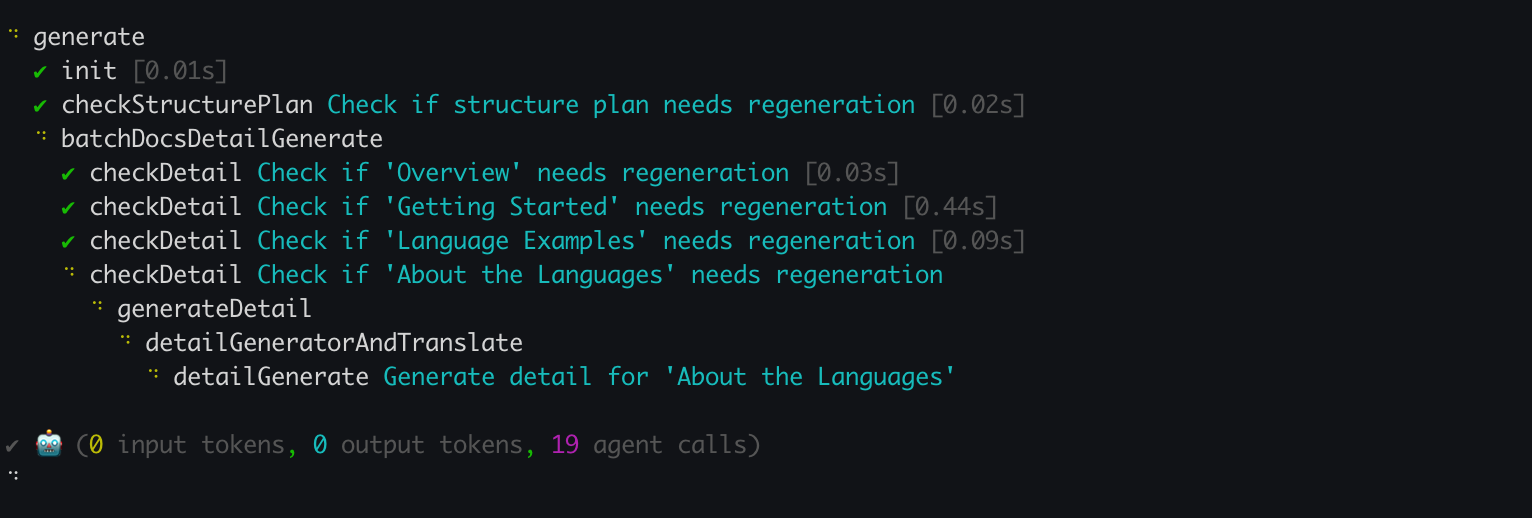
当您执行 `aigne doc generate` 命令时,DocSmith 会首先分析您的代码库以检测自上次生成以来的变更。然后,它仅重新生成受这些变更影响的文档。这种默认行为可以节省时间并减少 API 使用量。
|
|
71
125
|
|
|
72
126
|
```shell icon=lucide:terminal
|
|
73
|
-
# DocSmith
|
|
127
|
+
# DocSmith 将检测变更并仅更新必要的部分
|
|
74
128
|
aigne doc generate
|
|
75
129
|
```
|
|
76
130
|
|
|
77
|
-
|
|
78
132
|
|
|
79
133
|
### 强制完全重新生成
|
|
80
134
|
|
|
81
|
-
|
|
135
|
+
要从头开始重新生成所有文档,绕过缓存和变更检测,请使用 `--forceRegenerate` 标志。当您进行了重大的配置更改或需要完全重建以确保一致性时,此操作是必需的。
|
|
82
136
|
|
|
83
137
|
```shell icon=lucide:terminal
|
|
84
138
|
# 从头开始重新生成所有文档
|
|
@@ -87,52 +141,52 @@ aigne doc generate --forceRegenerate
|
|
|
87
141
|
|
|
88
142
|
---
|
|
89
143
|
|
|
90
|
-
##
|
|
144
|
+
## 完善单个文档
|
|
91
145
|
|
|
92
|
-
|
|
146
|
+
要在没有相应代码变更的情况下改进特定文档的内容,请使用 `aigne doc update` 命令。此命令允许您提供针对性的完善指令。
|
|
93
147
|
|
|
94
|
-
|
|
148
|
+
这可以通过交互方式或通过命令行参数以非交互方式完成。
|
|
95
149
|
|
|
96
150
|
### 交互模式
|
|
97
151
|
|
|
98
|
-
|
|
152
|
+
要进行引导式流程,请不带参数运行该命令。DocSmith 将会显示一个菜单,供您选择要更新的文档。选择后,系统将提示您输入反馈。
|
|
99
153
|
|
|
100
154
|
```shell icon=lucide:terminal
|
|
101
|
-
#
|
|
155
|
+
# 启动交互式更新流程
|
|
102
156
|
aigne doc update
|
|
103
157
|
```
|
|
104
158
|
|
|
105
|
-

|
|
106
160
|
|
|
107
161
|
### 直接通过命令行更新
|
|
108
162
|
|
|
109
|
-
|
|
163
|
+
对于脚本化或更快速的工作流,您可以使用标志直接指定文档和反馈。这样可以实现精确的非交互式更新。
|
|
110
164
|
|
|
111
165
|
```shell icon=lucide:terminal
|
|
112
166
|
# 使用反馈更新特定文档
|
|
113
167
|
aigne doc update --docs overview.md --feedback "在末尾添加更详细的常见问题解答部分。"
|
|
114
168
|
```
|
|
115
169
|
|
|
116
|
-
`update`
|
|
170
|
+
`update` 命令的主要参数如下:
|
|
117
171
|
|
|
118
|
-
| 参数
|
|
119
|
-
|
|
|
120
|
-
| `--docs`
|
|
121
|
-
| `--feedback` |
|
|
172
|
+
| 参数 | 描述 |
|
|
173
|
+
| --- | --- |
|
|
174
|
+
| `--docs` | 要更新的文档的路径。此标志可以多次使用以进行批量更新。 |
|
|
175
|
+
| `--feedback` | 重新生成内容时要使用的具体指令。 |
|
|
122
176
|
|
|
123
177
|
---
|
|
124
178
|
|
|
125
179
|
## 优化整体结构
|
|
126
180
|
|
|
127
|
-
|
|
181
|
+
除了完善单个文档内容外,您还可以调整整体文档结构。如果现有组织结构不理想或缺少某个部分,您可以向 `generate` 命令提供反馈。
|
|
128
182
|
|
|
129
|
-
|
|
183
|
+
这会指示 DocSmith 根据您的输入重新评估整个文档计划。
|
|
130
184
|
|
|
131
185
|
```shell icon=lucide:terminal
|
|
132
186
|
# 使用特定反馈重新生成文档结构
|
|
133
187
|
aigne doc generate --feedback "删除‘关于’部分,并添加详细的‘API 参考’。"
|
|
134
188
|
```
|
|
135
189
|
|
|
136
|
-
|
|
190
|
+
此方法适用于文档目录的高级别更改,而非次要内容编辑。
|
|
137
191
|
|
|
138
|
-
|
|
192
|
+
内容完善后,下一步是为全球受众做准备。有关说明,请参阅 [翻译文档](./features-translate-documentation.md) 指南。
|
|
@@ -1,10 +1,10 @@
|
|
|
1
1
|
# はじめに
|
|
2
2
|
|
|
3
|
-
このガイドでは、AIGNE DocSmith
|
|
3
|
+
このガイドでは、AIGNE DocSmithをインストールし、プロジェクトを設定し、ソースコードから完全なドキュメントセットを生成するための手順をステップバイステップで説明します。
|
|
4
4
|
|
|
5
|
-
## ステップ1
|
|
5
|
+
## ステップ1:前提条件
|
|
6
6
|
|
|
7
|
-
|
|
7
|
+
始める前に、お使いのシステムにNode.jsとそのパッケージマネージャーであるnpmがインストールされていることを確認してください。DocSmithはNode.js環境で動作するコマンドラインツールです。
|
|
8
8
|
|
|
9
9
|
### Node.jsのインストール
|
|
10
10
|
|
|
@@ -16,13 +16,13 @@
|
|
|
16
16
|
|
|
17
17
|
**macOS**
|
|
18
18
|
|
|
19
|
-
推奨される方法は[Homebrew](https://brew.sh/)
|
|
19
|
+
推奨される方法は[Homebrew](https://brew.sh/)を使用することです:
|
|
20
20
|
|
|
21
21
|
```bash Terminal icon=lucide:apple
|
|
22
|
-
#
|
|
22
|
+
# Homebrewがインストールされていない場合はインストールします
|
|
23
23
|
/bin/bash -c "$(curl -fsSL https://raw.githubusercontent.com/Homebrew/install/HEAD/install.sh)"
|
|
24
24
|
|
|
25
|
-
#
|
|
25
|
+
# Node.jsをインストールします
|
|
26
26
|
brew install node
|
|
27
27
|
```
|
|
28
28
|
|
|
@@ -30,7 +30,7 @@ brew install node
|
|
|
30
30
|
|
|
31
31
|
**Linux**
|
|
32
32
|
|
|
33
|
-
Ubuntu/Debian
|
|
33
|
+
Ubuntu/Debianベースのシステムの場合:
|
|
34
34
|
|
|
35
35
|
```bash Terminal icon=lucide:laptop
|
|
36
36
|
sudo apt update
|
|
@@ -38,7 +38,7 @@ curl -fsSL https://deb.nodesource.com/setup_lts.x | sudo -E bash -
|
|
|
38
38
|
sudo apt-get install -y nodejs
|
|
39
39
|
```
|
|
40
40
|
|
|
41
|
-
CentOS/RHEL/Fedora
|
|
41
|
+
CentOS/RHEL/Fedoraベースのシステムの場合:
|
|
42
42
|
|
|
43
43
|
```bash Terminal icon=lucide:laptop
|
|
44
44
|
curl -fsSL https://rpm.nodesource.com/setup_lts.x | sudo bash -
|
|
@@ -47,32 +47,32 @@ sudo yum install nodejs
|
|
|
47
47
|
|
|
48
48
|
### 確認
|
|
49
49
|
|
|
50
|
-
|
|
50
|
+
インストール後、ターミナルで次のコマンドを実行して、Node.jsとnpmが利用可能であることを確認します:
|
|
51
51
|
|
|
52
52
|
```bash Terminal
|
|
53
53
|
node --version
|
|
54
54
|
npm --version
|
|
55
55
|
```
|
|
56
56
|
|
|
57
|
-
## ステップ2
|
|
57
|
+
## ステップ2:AIGNE CLIのインストール
|
|
58
58
|
|
|
59
|
-
|
|
59
|
+
DocSmithツールは、AIGNEコマンドラインインターフェース(CLI)に含まれています。npmを使用してAIGNE CLIの最新バージョンをグローバルにインストールします:
|
|
60
60
|
|
|
61
61
|
```bash Terminal icon=logos:npm
|
|
62
62
|
npm i -g @aigne/cli
|
|
63
63
|
```
|
|
64
64
|
|
|
65
|
-
|
|
65
|
+
インストールが完了したら、ドキュメンテーションツールのヘルプコマンドを実行して確認します:
|
|
66
66
|
|
|
67
67
|
```bash Terminal
|
|
68
68
|
aigne doc -h
|
|
69
69
|
```
|
|
70
70
|
|
|
71
|
-
|
|
71
|
+
このコマンドを実行すると、DocSmithのヘルプメニューが表示され、使用準備が整ったことを確認できます。
|
|
72
72
|
|
|
73
|
-
## ステップ3
|
|
73
|
+
## ステップ3:ドキュメントの生成
|
|
74
74
|
|
|
75
|
-
CLI
|
|
75
|
+
CLIがインストールされたので、1つのコマンドでドキュメントを生成できます。ターミナルでプロジェクトのルートディレクトリに移動し、次を実行します:
|
|
76
76
|
|
|
77
77
|
```bash Terminal icon=lucide:sparkles
|
|
78
78
|
aigne doc generate
|
|
@@ -80,11 +80,11 @@ aigne doc generate
|
|
|
80
80
|
|
|
81
81
|
### 自動設定
|
|
82
82
|
|
|
83
|
-
プロジェクトでこのコマンドを初めて実行すると、DocSmith
|
|
83
|
+
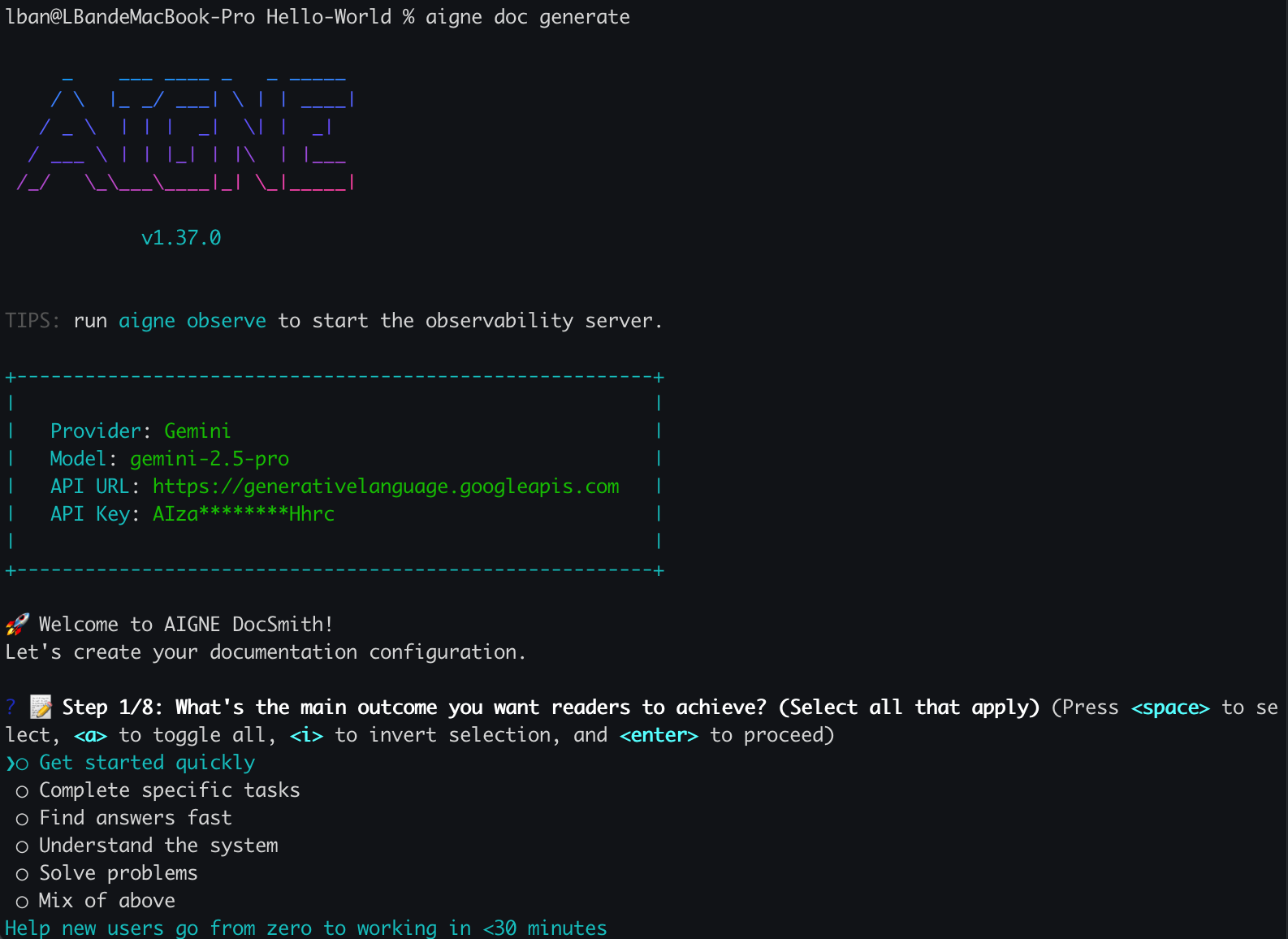
プロジェクトでこのコマンドを初めて実行すると、DocSmithは設定が存在しないことを検出し、自動的に対話式のセットアップウィザードを起動します。
|
|
84
84
|
|
|
85
85
|
|
|
86
86
|
|
|
87
|
-
|
|
87
|
+
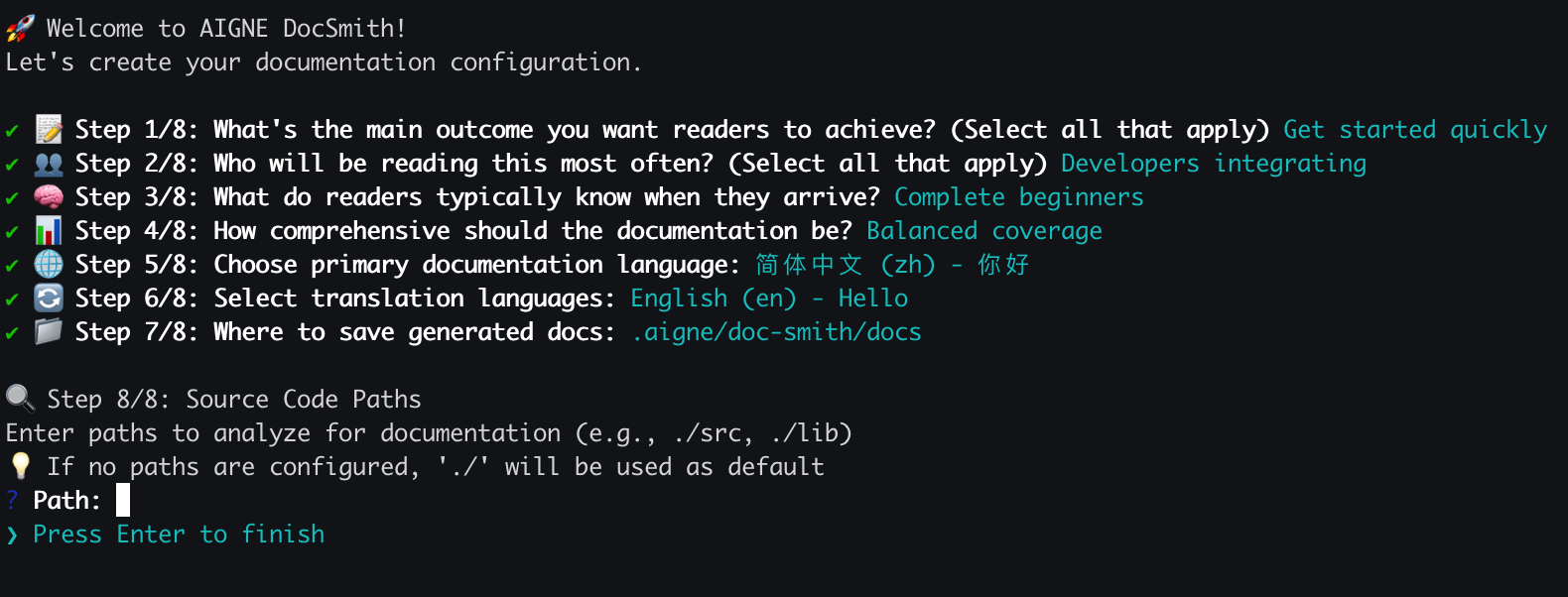
ドキュメントの特性を定義するための一連の質問が表示されます。これには以下が含まれます:
|
|
88
88
|
|
|
89
89
|
- 主な目的とスタイル。
|
|
90
90
|
- 対象読者。
|
|
@@ -94,21 +94,21 @@ aigne doc generate
|
|
|
94
94
|
|
|
95
95
|
|
|
96
96
|
|
|
97
|
-
設定が完了すると、DocSmith
|
|
97
|
+
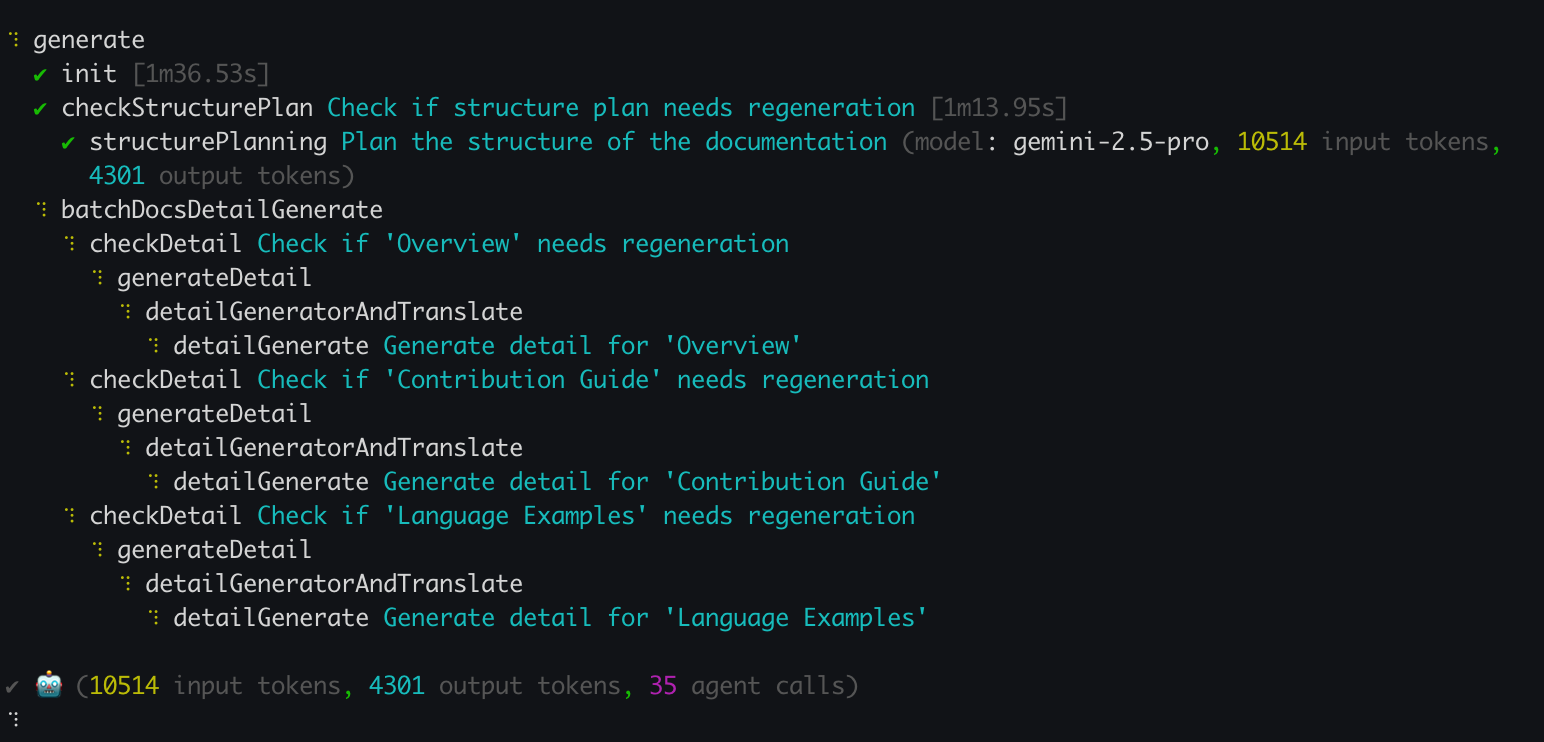
設定が完了すると、DocSmithはソースコードの分析、ドキュメント構造の計画、そしてコンテンツの生成に進みます。
|
|
98
98
|
|
|
99
|
-
|
|
100
100
|
|
|
101
|
-
## ステップ4
|
|
101
|
+
## ステップ4:出力の確認
|
|
102
102
|
|
|
103
103
|
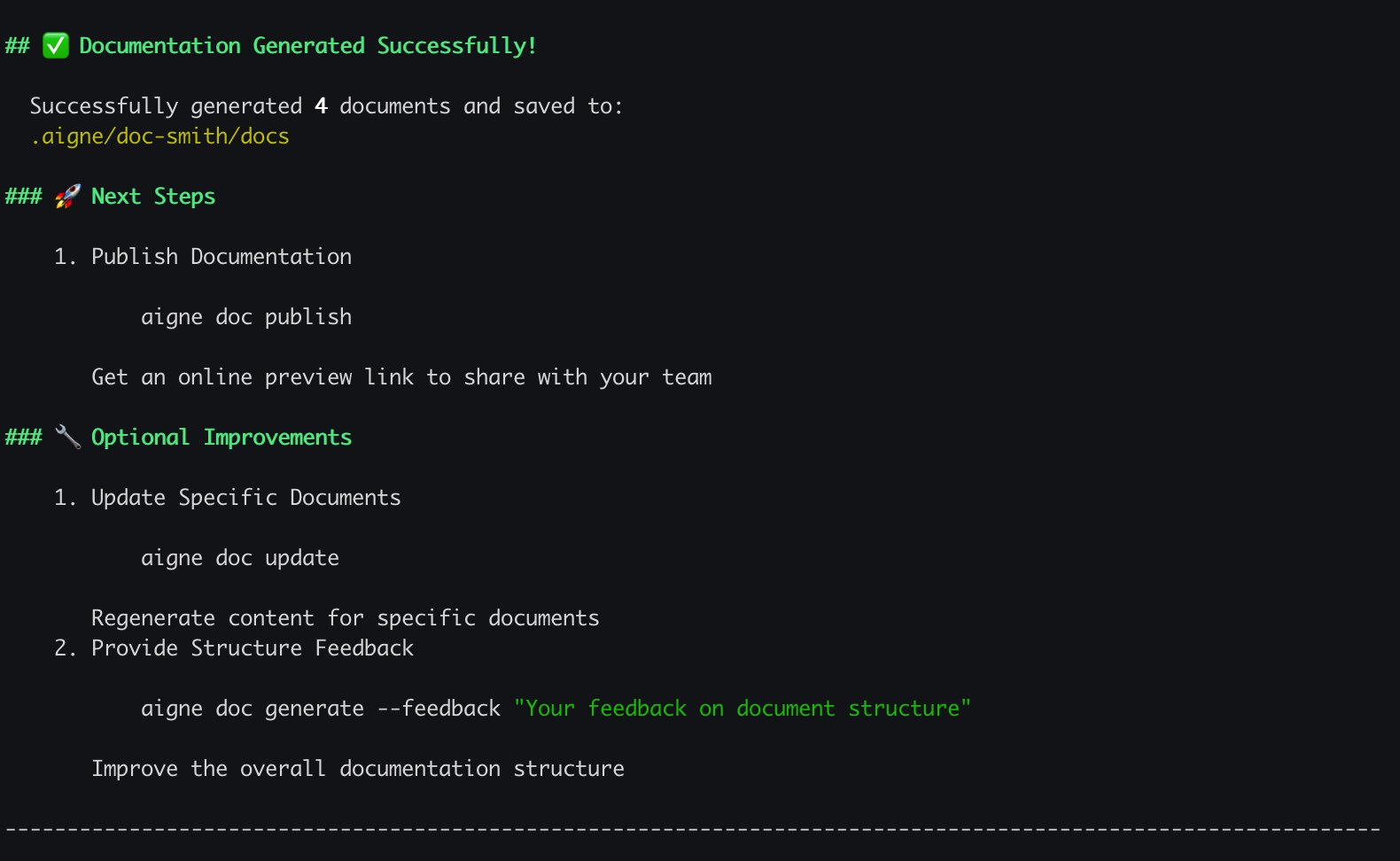
生成プロセスが終了すると、ターミナルに確認メッセージが表示されます。
|
|
104
104
|
|
|
105
105
|
|
|
106
106
|
|
|
107
|
-
|
|
107
|
+
新しいドキュメントは、セットアッププロセス中に指定した出力ディレクトリで利用可能になります。デフォルトの場所は`.aigne/doc-smith/docs`です。
|
|
108
108
|
|
|
109
109
|
## 次のステップ
|
|
110
110
|
|
|
111
|
-
|
|
111
|
+
最初のドキュメントセットを生成したので、他の機能を試すことができます:
|
|
112
112
|
|
|
113
113
|
<x-cards>
|
|
114
114
|
<x-card data-title="コア機能" data-icon="lucide:box" data-href="/features">
|
package/docs/getting-started.md
CHANGED
|
@@ -94,7 +94,7 @@ You will be prompted with a series of questions to define the documentation's ch
|
|
|
94
94
|
|
|
95
95
|

|
|
96
96
|
|
|
97
|
-
Once the configuration is complete, DocSmith will proceed to analyze your source code, plan the
|
|
97
|
+
Once the configuration is complete, DocSmith will proceed to analyze your source code, plan the documentation structure, and generate the content.
|
|
98
98
|
|
|
99
99
|

|
|
100
100
|
|