tencentcloud-sdk-nodejs 4.0.761 → 4.0.762
This diff represents the content of publicly available package versions that have been released to one of the supported registries. The information contained in this diff is provided for informational purposes only and reflects changes between package versions as they appear in their respective public registries.
- package/CHANGELOG.md +125 -0
- package/SERVICE_CHANGELOG.md +129 -135
- package/package.json +1 -1
- package/products.md +18 -18
- package/src/common/sdk_version.ts +1 -1
- package/src/services/asr/v20190614/asr_models.ts +22 -19
- package/src/services/cdwdoris/v20211228/cdwdoris_models.ts +6 -0
- package/src/services/cls/v20201016/cls_models.ts +106 -43
- package/src/services/ecm/v20190719/ecm_models.ts +17 -17
- package/src/services/ess/v20201111/ess_client.ts +27 -8
- package/src/services/ess/v20201111/ess_models.ts +9 -4
- package/src/services/essbasic/v20210526/essbasic_client.ts +18 -0
- package/src/services/essbasic/v20210526/essbasic_models.ts +6 -6
- package/src/services/lighthouse/v20200324/lighthouse_models.ts +18 -12
- package/src/services/oceanus/v20190422/oceanus_client.ts +23 -10
- package/src/services/oceanus/v20190422/oceanus_models.ts +147 -59
- package/src/services/ssl/v20191205/ssl_models.ts +22 -2
- package/src/services/tat/v20201028/tat_models.ts +1 -1
- package/src/services/tem/v20210701/tem_client.ts +1 -1
- package/src/services/tem/v20210701/tem_models.ts +1 -1
- package/src/services/teo/v20220901/teo_models.ts +2 -2
- package/src/services/tione/v20211111/tione_client.ts +25 -11
- package/src/services/tione/v20211111/tione_models.ts +214 -18
- package/src/services/tse/v20201207/tse_models.ts +2 -2
- package/src/services/wedata/v20210820/wedata_models.ts +5 -0
- package/tencentcloud/common/sdk_version.d.ts +1 -1
- package/tencentcloud/common/sdk_version.js +1 -1
- package/tencentcloud/services/asr/v20190614/asr_models.d.ts +22 -19
- package/tencentcloud/services/cdwdoris/v20211228/cdwdoris_models.d.ts +6 -0
- package/tencentcloud/services/cls/v20201016/cls_models.d.ts +106 -43
- package/tencentcloud/services/ecm/v20190719/ecm_models.d.ts +17 -17
- package/tencentcloud/services/ess/v20201111/ess_client.d.ts +27 -8
- package/tencentcloud/services/ess/v20201111/ess_client.js +27 -8
- package/tencentcloud/services/ess/v20201111/ess_models.d.ts +9 -4
- package/tencentcloud/services/essbasic/v20210526/essbasic_client.d.ts +18 -0
- package/tencentcloud/services/essbasic/v20210526/essbasic_client.js +18 -0
- package/tencentcloud/services/essbasic/v20210526/essbasic_models.d.ts +6 -6
- package/tencentcloud/services/lighthouse/v20200324/lighthouse_models.d.ts +18 -12
- package/tencentcloud/services/oceanus/v20190422/oceanus_client.d.ts +7 -3
- package/tencentcloud/services/oceanus/v20190422/oceanus_client.js +9 -3
- package/tencentcloud/services/oceanus/v20190422/oceanus_models.d.ts +143 -58
- package/tencentcloud/services/ssl/v20191205/ssl_models.d.ts +22 -2
- package/tencentcloud/services/tat/v20201028/tat_models.d.ts +1 -1
- package/tencentcloud/services/tem/v20210701/tem_client.d.ts +1 -1
- package/tencentcloud/services/tem/v20210701/tem_client.js +1 -1
- package/tencentcloud/services/tem/v20210701/tem_models.d.ts +1 -1
- package/tencentcloud/services/teo/v20220901/teo_models.d.ts +2 -2
- package/tencentcloud/services/tione/v20211111/tione_client.d.ts +7 -3
- package/tencentcloud/services/tione/v20211111/tione_client.js +9 -3
- package/tencentcloud/services/tione/v20211111/tione_models.d.ts +210 -18
- package/tencentcloud/services/tse/v20201207/tse_models.d.ts +2 -2
- package/tencentcloud/services/wedata/v20210820/wedata_models.d.ts +5 -0
- package/test/oceanus.v20190422.test.js +12 -2
- package/test/tione.v20211111.test.js +12 -2
|
@@ -62,7 +62,11 @@ class Client extends abstract_client_1.AbstractClient {
|
|
|
62
62
|
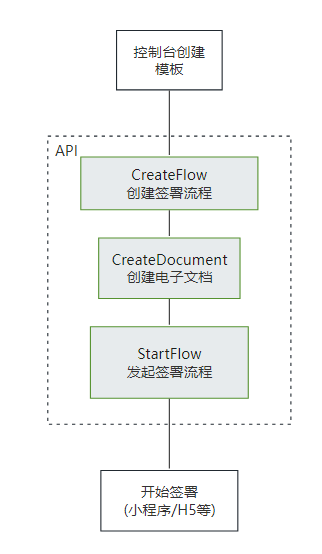
* 此接口用于启动流程。它是模板发起合同的最后一步。
|
|
63
63
|
在[创建签署流程](https://qian.tencent.com/developers/companyApis/startFlows/CreateFlow)和[创建电子文档](https://qian.tencent.com/developers/companyApis/startFlows/CreateDocument)之后,用于开始整个合同流程, 推进流程进入到签署环节。
|
|
64
64
|
|
|
65
|
-
|
|
65
|
+
|
|
66
|
+
|
|
67
|
+
注:
|
|
68
|
+
- **合同发起后就会扣减合同的额度**, 如果未签署完成时撤销合同会返还此额度(过期,拒签,签署完成,解除完成等状态不会返还额度)
|
|
69
|
+
- **静默(自动)签署不支持合同签署方存在填写**功能
|
|
66
70
|
*/
|
|
67
71
|
async StartFlow(req, cb) {
|
|
68
72
|
return this.request("StartFlow", req, cb);
|
|
@@ -248,7 +252,7 @@ class Client extends abstract_client_1.AbstractClient {
|
|
|
248
252
|
|
|
249
253
|
注:该接口需要给对应的流程指定一个模板id,并且填充该模板中需要补充的信息。需要配置<a href="https://qian.tencent.com/developers/companyApis/startFlows/CreateFlow" target="_blank">创建签署流程</a>和<a href="https://qian.tencent.com/developers/companyApis/startFlows/StartFlow" target="_blank">发起签署流程</a>接口使用。具体逻辑可以参考下图:
|
|
250
254
|
|
|
251
|
-
|
|
255
|
+

|
|
252
256
|
*/
|
|
253
257
|
async CreateDocument(req, cb) {
|
|
254
258
|
return this.request("CreateDocument", req, cb);
|
|
@@ -294,7 +298,9 @@ class Client extends abstract_client_1.AbstractClient {
|
|
|
294
298
|
|
|
295
299
|
注:配合<a href="https://qian.tencent.com/developers/companyApis/startFlows/CreateDocument" target="_blank">创建电子文档</a>和<a href="https://qian.tencent.com/developers/companyApis/startFlows/StartFlow" target="_blank">发起签署流程</a>接口使用。整体的逻辑如下图
|
|
296
300
|
|
|
297
|
-
|
|
301
|
+

|
|
302
|
+
|
|
303
|
+
注:**静默(自动)签署不支持合同签署方存在填写**功能
|
|
298
304
|
*/
|
|
299
305
|
async CreateFlow(req, cb) {
|
|
300
306
|
return this.request("CreateFlow", req, cb);
|
|
@@ -323,7 +329,9 @@ class Client extends abstract_client_1.AbstractClient {
|
|
|
323
329
|
|
|
324
330
|
注:
|
|
325
331
|
`1. 如果签署人是在PC端扫码签署,可以通过生成跳转链接自主转换成二维码,让签署人在PC端扫码签署`
|
|
332
|
+
|
|
326
333
|
`2. 签署链接的有效期为90天,超过有效期链接不可用`
|
|
334
|
+
|
|
327
335
|
`3. 如果需跳转详情页(即PathType值为1)进行填写或签署合同,需指定签署方信息:姓名、手机号码、企业名称等,才能生成正确的跳转链接`
|
|
328
336
|
|
|
329
337
|
其中小程序的原始Id如下,或者查看小程序信息自助获取。
|
|
@@ -348,6 +356,8 @@ class Client extends abstract_client_1.AbstractClient {
|
|
|
348
356
|
* 此接口(CreateFlowGroupByTemplates)可用于通过多个模板创建合同组签署流程。
|
|
349
357
|
|
|
350
358
|
适用场景:该接口适用于需要一次性完成多份合同签署的情况,多份合同一般具有关联性,用户以目录的形式查看合同。
|
|
359
|
+
|
|
360
|
+
注:`合同发起后就会扣减合同的额度, 如果未签署完成时撤销合同会返还此额度(过期,拒签,签署完成,解除完成等状态不会返还额度),合同组中每个合同会扣减一个合同额度`
|
|
351
361
|
*/
|
|
352
362
|
async CreateFlowGroupByTemplates(req, cb) {
|
|
353
363
|
return this.request("CreateFlowGroupByTemplates", req, cb);
|
|
@@ -372,8 +382,8 @@ class Client extends abstract_client_1.AbstractClient {
|
|
|
372
382
|
如果是其他类型可以配合<a href="https://qian.tencent.com/developers/companyApis/templatesAndFiles/CreateConvertTaskApi" target="_blank">创建文件转换任务</a>接口转换成PDF文件
|
|
373
383
|
|
|
374
384
|
注:
|
|
375
|
-
1.
|
|
376
|
-
2.
|
|
385
|
+
1. 图片类型(png/jpg/jpeg)限制大小为5M以下, PDF/word/excel等其他格式限制大小为60M以下
|
|
386
|
+
2. 调用此接口时需要设置单独的Domain请求域名,<font color="red">联调开发环境为: file.test.ess.tencent.cn,正式环境需要设置为:file.ess.tencent.cn</font>,代码示例
|
|
377
387
|
```
|
|
378
388
|
HttpProfile httpProfile = new HttpProfile();
|
|
379
389
|
httpProfile.setEndpoint("file.test.ess.tencent.cn");
|
|
@@ -398,9 +408,16 @@ httpProfile.setEndpoint("file.test.ess.tencent.cn");
|
|
|
398
408
|
}
|
|
399
409
|
/**
|
|
400
410
|
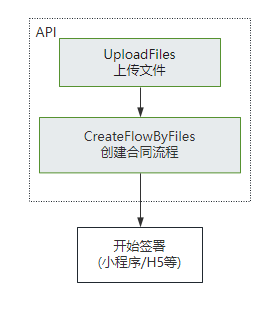
* 此接口(CreateFlowByFiles)用来通过上传后的pdf资源编号来创建待签署的合同流程。<br/>
|
|
401
|
-
|
|
402
|
-
|
|
403
|
-
|
|
411
|
+
适用场景:适用非制式的合同文件签署。一般开发者自己有完整的签署文件,可以通过该接口传入完整的PDF文件及流程信息生成待签署的合同流程。<br/>
|
|
412
|
+
|
|
413
|
+
该接口需要依赖[上传文件](https://qian.tencent.com/developers/companyApis/templatesAndFiles/UploadFiles)接口生成pdf资源编号(FileIds)进行使用。(如果非pdf文件需要调用[创建文件转换任务](https://qian.tencent.com/developers/companyApis/templatesAndFiles/CreateConvertTaskApi)接口转换成pdf资源)<br/>
|
|
414
|
+
|
|
415
|
+
|
|
416
|
+
|
|
417
|
+
注:
|
|
418
|
+
- 不同类型的签署方传参不同, 可以参考开发者中心的ApproverInfo结构体说明
|
|
419
|
+
- 合同**发起后就会扣减合同的额度**, 如果未签署完成时撤销合同会返还此额度(**过期,拒签,签署完成,解除完成等状态不会返还额度**)
|
|
420
|
+
- **静默(自动)签署不支持合同签署方存在填写**功能
|
|
404
421
|
*/
|
|
405
422
|
async CreateFlowByFiles(req, cb) {
|
|
406
423
|
return this.request("CreateFlowByFiles", req, cb);
|
|
@@ -710,6 +727,8 @@ httpProfile.setEndpoint("file.test.ess.tencent.cn");
|
|
|
710
727
|
适用场景:该接口适用于需要一次性完成多份合同签署的情况,多份合同一般具有关联性,用户以目录的形式查看合同。
|
|
711
728
|
|
|
712
729
|
注意事项:使用该接口需要先依赖[多文件上传](https://qian.tencent.com/developers/companyApis/templatesAndFiles/UploadFiles)接口返回的FileIds。
|
|
730
|
+
|
|
731
|
+
注:`合同发起后就会扣减合同的额度, 如果未签署完成时撤销合同会返还此额度(过期,拒签,签署完成,解除完成等状态不会返还额度),合同组中每个合同会扣减一个合同额度`
|
|
713
732
|
*/
|
|
714
733
|
async CreateFlowGroupByFiles(req, cb) {
|
|
715
734
|
return this.request("CreateFlowGroupByFiles", req, cb);
|
|
@@ -1240,7 +1240,7 @@ export interface FlowApproverDetail {
|
|
|
1240
1240
|
export interface CreateFlowGroupByFilesRequest {
|
|
1241
1241
|
/**
|
|
1242
1242
|
* 执行本接口操作的员工信息。
|
|
1243
|
-
注:
|
|
1243
|
+
注: `在调用此接口时,请确保指定的员工已获得所需的接口调用权限,并具备接口传入的相应资源的数据权限。`
|
|
1244
1244
|
*/
|
|
1245
1245
|
Operator: UserInfo;
|
|
1246
1246
|
/**
|
|
@@ -1674,7 +1674,7 @@ export interface CreateFlowRequest {
|
|
|
1674
1674
|
CcInfos?: Array<CcInfo>;
|
|
1675
1675
|
/**
|
|
1676
1676
|
* 个人自动签名的使用场景包括以下, 个人自动签署(即ApproverType设置成个人自动签署时)业务此值必传:
|
|
1677
|
-
<ul><li> **E_PRESCRIPTION_AUTO_SIGN
|
|
1677
|
+
<ul><li> **E_PRESCRIPTION_AUTO_SIGN**:电子处方单(医疗自动签) </li><li> **OTHER** : 通用场景</li></ul>
|
|
1678
1678
|
注: `个人自动签名场景是白名单功能,使用前请与对接的客户经理联系沟通。`
|
|
1679
1679
|
*/
|
|
1680
1680
|
AutoSignScene?: string;
|
|
@@ -2929,7 +2929,7 @@ export interface CreateFlowByFilesRequest {
|
|
|
2929
2929
|
Agent?: Agent;
|
|
2930
2930
|
/**
|
|
2931
2931
|
* 个人自动签名的使用场景包括以下, 个人自动签署(即ApproverType设置成个人自动签署时)业务此值必传:
|
|
2932
|
-
<ul><li> **E_PRESCRIPTION_AUTO_SIGN
|
|
2932
|
+
<ul><li> **E_PRESCRIPTION_AUTO_SIGN**:电子处方单(医疗自动签) </li><li> **OTHER** : 通用场景</li></ul>
|
|
2933
2933
|
注: `个人自动签名场景是白名单功能,使用前请与对接的客户经理联系沟通。`
|
|
2934
2934
|
*/
|
|
2935
2935
|
AutoSignScene?: string;
|
|
@@ -5351,7 +5351,7 @@ export interface GetTaskResultApiResponse {
|
|
|
5351
5351
|
*/
|
|
5352
5352
|
TaskMessage?: string;
|
|
5353
5353
|
/**
|
|
5354
|
-
* 资源Id
|
|
5354
|
+
* 资源Id(即FileId),用于[用PDF文件创建签署流程](https://qian.tencent.com/developers/companyApis/startFlows/CreateFlowByFiles)
|
|
5355
5355
|
*/
|
|
5356
5356
|
ResourceId?: string;
|
|
5357
5357
|
/**
|
|
@@ -5588,6 +5588,11 @@ export interface CreatePrepareFlowRequest {
|
|
|
5588
5588
|
在合同状态变更的回调信息等场景中,该字段的信息将原封不动地透传给贵方。回调的相关说明可参考开发者中心的<a href="https://qian.tencent.com/developers/company/callback_types_v2" target="_blank">回调通知</a>模块。
|
|
5589
5589
|
*/
|
|
5590
5590
|
UserData?: string;
|
|
5591
|
+
/**
|
|
5592
|
+
* 合同流程的抄送人列表,最多可支持50个抄送人,抄送人可查看合同内容及签署进度,但无需参与合同签署。
|
|
5593
|
+
|
|
5594
|
+
*/
|
|
5595
|
+
CcInfos?: CcInfo;
|
|
5591
5596
|
/**
|
|
5592
5597
|
* 合同Id:用于通过一个已发起的合同快速生成一个发起流程web链接
|
|
5593
5598
|
注: `该参数必须是一个待发起审核的合同id,并且还未审核通过`
|
|
@@ -134,7 +134,12 @@ https://developers.weixin.qq.com/miniprogram/dev/framework/open-ability/launchAp
|
|
|
134
134
|
|
|
135
135
|
**注**:
|
|
136
136
|
`1. 发起合同时候, 作为发起方的第三方子企业A员工的企业和员工必须经过实名, 而作为签署方的第三方子企业A员工/个人/自然人/SaaS平台企业员工/第三方子企业B员工企业中的企业和个人/员工可以未实名`
|
|
137
|
+
|
|
137
138
|
`2. 不同类型的签署方传参不同, 可以参考开发者中心的FlowApproverInfo结构体说明`
|
|
139
|
+
|
|
140
|
+
`3. 合同发起后就会扣减合同的额度, 如果未签署完成时撤销合同会返还此额度(过期,拒签,签署完成,解除完成等状态不会返还额度)`
|
|
141
|
+
|
|
142
|
+
`4. 静默(自动)签署不支持合同签署方存在填写功能`
|
|
138
143
|
*/
|
|
139
144
|
ChannelCreateFlowByFiles(req: ChannelCreateFlowByFilesRequest, cb?: (error: string, rep: ChannelCreateFlowByFilesResponse) => void): Promise<ChannelCreateFlowByFilesResponse>;
|
|
140
145
|
/**
|
|
@@ -304,7 +309,12 @@ https://developers.weixin.qq.com/miniprogram/dev/framework/open-ability/launchAp
|
|
|
304
309
|
|
|
305
310
|
**注**:
|
|
306
311
|
`1. 发起合同时候, 作为发起方的第三方子企业A员工的企业和员工必须经过实名, 而作为签署方的第三方子企业A员工/个人/自然人/SaaS平台企业员工/第三方子企业B员工企业中的企业和个人/员工可以未实名`
|
|
312
|
+
|
|
307
313
|
`2. 不同类型的签署方传参不同, 可以参考开发者中心的FlowApproverInfo结构体说明`
|
|
314
|
+
|
|
315
|
+
`3. 合同发起后就会扣减合同的额度, 如果未签署完成时撤销合同会返还此额度(过期,拒签,签署完成,解除完成等状态不会返还额度)`
|
|
316
|
+
|
|
317
|
+
`4. 静默(自动)签署不支持合同签署方存在填写功能`
|
|
308
318
|
*/
|
|
309
319
|
CreateFlowsByTemplates(req: CreateFlowsByTemplatesRequest, cb?: (error: string, rep: CreateFlowsByTemplatesResponse) => void): Promise<CreateFlowsByTemplatesResponse>;
|
|
310
320
|
/**
|
|
@@ -788,6 +798,10 @@ Web链接访问后,会根据子客企业(**Agent中ProxyOrganizationOpenId表
|
|
|
788
798
|
`1. 发起合同时候, 作为发起方的第三方子企业A员工的企业和员工必须经过实名, 而作为签署方的第三方子企业A员工/个人/自然人/SaaS平台企业员工/第三方子企业B员工企业中的企业和个人/员工可以未实名`
|
|
789
799
|
|
|
790
800
|
`2. 不同类型的签署方传参不同, 可以参考开发者中心的FlowApproverInfo结构体说明`
|
|
801
|
+
|
|
802
|
+
`3. 合同发起后就会扣减合同的额度, 如果未签署完成时撤销合同会返还此额度(过期,拒签,签署完成,解除完成等状态不会返还额度),合同组中每个合同会扣减一个合同额度`
|
|
803
|
+
|
|
804
|
+
`4. 静默(自动)签署不支持合同签署方存在填写功能`
|
|
791
805
|
*/
|
|
792
806
|
ChannelCreateFlowGroupByTemplates(req: ChannelCreateFlowGroupByTemplatesRequest, cb?: (error: string, rep: ChannelCreateFlowGroupByTemplatesResponse) => void): Promise<ChannelCreateFlowGroupByTemplatesResponse>;
|
|
793
807
|
/**
|
|
@@ -952,6 +966,10 @@ Web链接访问后,会根据子客企业(**Agent中ProxyOrganizationOpenId表
|
|
|
952
966
|
`1. 发起合同时候, 作为发起方的第三方子企业A员工的企业和员工必须经过实名, 而作为签署方的第三方子企业A员工/个人/自然人/SaaS平台企业员工/第三方子企业B员工企业中的企业和个人/员工可以未实名`
|
|
953
967
|
|
|
954
968
|
`2. 不同类型的签署方传参不同, 可以参考开发者中心的FlowApproverInfo结构体说明`
|
|
969
|
+
|
|
970
|
+
`3. 合同发起后就会扣减合同的额度, 如果未签署完成时撤销合同会返还此额度(过期,拒签,签署完成,解除完成等状态不会返还额度),合同组中每个合同会扣减一个合同额度`
|
|
971
|
+
|
|
972
|
+
`4. 静默(自动)签署不支持合同签署方存在填写功能`
|
|
955
973
|
*/
|
|
956
974
|
ChannelCreateFlowGroupByFiles(req: ChannelCreateFlowGroupByFilesRequest, cb?: (error: string, rep: ChannelCreateFlowGroupByFilesResponse) => void): Promise<ChannelCreateFlowGroupByFilesResponse>;
|
|
957
975
|
/**
|
|
@@ -164,7 +164,12 @@ https://developers.weixin.qq.com/miniprogram/dev/framework/open-ability/launchAp
|
|
|
164
164
|
|
|
165
165
|
**注**:
|
|
166
166
|
`1. 发起合同时候, 作为发起方的第三方子企业A员工的企业和员工必须经过实名, 而作为签署方的第三方子企业A员工/个人/自然人/SaaS平台企业员工/第三方子企业B员工企业中的企业和个人/员工可以未实名`
|
|
167
|
+
|
|
167
168
|
`2. 不同类型的签署方传参不同, 可以参考开发者中心的FlowApproverInfo结构体说明`
|
|
169
|
+
|
|
170
|
+
`3. 合同发起后就会扣减合同的额度, 如果未签署完成时撤销合同会返还此额度(过期,拒签,签署完成,解除完成等状态不会返还额度)`
|
|
171
|
+
|
|
172
|
+
`4. 静默(自动)签署不支持合同签署方存在填写功能`
|
|
168
173
|
*/
|
|
169
174
|
async ChannelCreateFlowByFiles(req, cb) {
|
|
170
175
|
return this.request("ChannelCreateFlowByFiles", req, cb);
|
|
@@ -360,7 +365,12 @@ https://developers.weixin.qq.com/miniprogram/dev/framework/open-ability/launchAp
|
|
|
360
365
|
|
|
361
366
|
**注**:
|
|
362
367
|
`1. 发起合同时候, 作为发起方的第三方子企业A员工的企业和员工必须经过实名, 而作为签署方的第三方子企业A员工/个人/自然人/SaaS平台企业员工/第三方子企业B员工企业中的企业和个人/员工可以未实名`
|
|
368
|
+
|
|
363
369
|
`2. 不同类型的签署方传参不同, 可以参考开发者中心的FlowApproverInfo结构体说明`
|
|
370
|
+
|
|
371
|
+
`3. 合同发起后就会扣减合同的额度, 如果未签署完成时撤销合同会返还此额度(过期,拒签,签署完成,解除完成等状态不会返还额度)`
|
|
372
|
+
|
|
373
|
+
`4. 静默(自动)签署不支持合同签署方存在填写功能`
|
|
364
374
|
*/
|
|
365
375
|
async CreateFlowsByTemplates(req, cb) {
|
|
366
376
|
return this.request("CreateFlowsByTemplates", req, cb);
|
|
@@ -920,6 +930,10 @@ Web链接访问后,会根据子客企业(**Agent中ProxyOrganizationOpenId表
|
|
|
920
930
|
`1. 发起合同时候, 作为发起方的第三方子企业A员工的企业和员工必须经过实名, 而作为签署方的第三方子企业A员工/个人/自然人/SaaS平台企业员工/第三方子企业B员工企业中的企业和个人/员工可以未实名`
|
|
921
931
|
|
|
922
932
|
`2. 不同类型的签署方传参不同, 可以参考开发者中心的FlowApproverInfo结构体说明`
|
|
933
|
+
|
|
934
|
+
`3. 合同发起后就会扣减合同的额度, 如果未签署完成时撤销合同会返还此额度(过期,拒签,签署完成,解除完成等状态不会返还额度),合同组中每个合同会扣减一个合同额度`
|
|
935
|
+
|
|
936
|
+
`4. 静默(自动)签署不支持合同签署方存在填写功能`
|
|
923
937
|
*/
|
|
924
938
|
async ChannelCreateFlowGroupByTemplates(req, cb) {
|
|
925
939
|
return this.request("ChannelCreateFlowGroupByTemplates", req, cb);
|
|
@@ -1098,6 +1112,10 @@ Web链接访问后,会根据子客企业(**Agent中ProxyOrganizationOpenId表
|
|
|
1098
1112
|
`1. 发起合同时候, 作为发起方的第三方子企业A员工的企业和员工必须经过实名, 而作为签署方的第三方子企业A员工/个人/自然人/SaaS平台企业员工/第三方子企业B员工企业中的企业和个人/员工可以未实名`
|
|
1099
1113
|
|
|
1100
1114
|
`2. 不同类型的签署方传参不同, 可以参考开发者中心的FlowApproverInfo结构体说明`
|
|
1115
|
+
|
|
1116
|
+
`3. 合同发起后就会扣减合同的额度, 如果未签署完成时撤销合同会返还此额度(过期,拒签,签署完成,解除完成等状态不会返还额度),合同组中每个合同会扣减一个合同额度`
|
|
1117
|
+
|
|
1118
|
+
`4. 静默(自动)签署不支持合同签署方存在填写功能`
|
|
1101
1119
|
*/
|
|
1102
1120
|
async ChannelCreateFlowGroupByFiles(req, cb) {
|
|
1103
1121
|
return this.request("ChannelCreateFlowGroupByFiles", req, cb);
|
|
@@ -1912,7 +1912,7 @@ export interface ChannelCreateFlowByFilesRequest {
|
|
|
1912
1912
|
CcNotifyType?: number;
|
|
1913
1913
|
/**
|
|
1914
1914
|
* 个人自动签名的使用场景包括以下, 个人自动签署(即ApproverType设置成个人自动签署时)业务此值必传:
|
|
1915
|
-
<ul><li> **E_PRESCRIPTION_AUTO_SIGN
|
|
1915
|
+
<ul><li> **E_PRESCRIPTION_AUTO_SIGN**:电子处方单(医疗自动签) </li><li> **OTHER** : 通用场景</li></ul>
|
|
1916
1916
|
注: `个人自动签名场景是白名单功能,使用前请与对接的客户经理联系沟通。`
|
|
1917
1917
|
*/
|
|
1918
1918
|
AutoSignScene?: string;
|
|
@@ -3054,9 +3054,9 @@ export interface CreateConsoleLoginUrlRequest {
|
|
|
3054
3054
|
<li>第三方平台子客企业标识: Agent.ProxyOrganizationOpenId</li>
|
|
3055
3055
|
<li>第三方平台子客企业中的员工标识: Agent.ProxyOperator.OpenId</li>
|
|
3056
3056
|
</ul>注:
|
|
3057
|
-
`1.
|
|
3058
|
-
`2.
|
|
3059
|
-
`3. 同渠道应用(Agent.AppId)
|
|
3057
|
+
`1. 企业激活时, 此时的Agent.ProxyOrganizationOpenId将会是企业激活后企业的唯一标识,建议开发者保存企业ProxyOrganizationOpenId,后续各项接口调用皆需要此参数。 `
|
|
3058
|
+
`2. 员工认证时, 此时的Agent.ProxyOperator.OpenId将会是员工认证加入企业后的唯一标识,建议开发者保存此员工的OpenId,后续各项接口调用皆需要此参数。 `
|
|
3059
|
+
`3. 同渠道应用(Agent.AppId)下,企业唯一标识ProxyOrganizationOpenId需要保持唯一,员工唯一标识OpenId也要保持唯一 (而不是企业下唯一)。 `
|
|
3060
3060
|
*/
|
|
3061
3061
|
Agent: Agent;
|
|
3062
3062
|
/**
|
|
@@ -3874,7 +3874,7 @@ export interface FlowInfo {
|
|
|
3874
3874
|
CcNotifyType?: number;
|
|
3875
3875
|
/**
|
|
3876
3876
|
* 个人自动签名的使用场景包括以下, 个人自动签署(即ApproverType设置成个人自动签署时)业务此值必传:
|
|
3877
|
-
<ul><li> **E_PRESCRIPTION_AUTO_SIGN
|
|
3877
|
+
<ul><li> **E_PRESCRIPTION_AUTO_SIGN**:电子处方单(医疗自动签) </li><li> **OTHER** : 通用场景</li></ul>
|
|
3878
3878
|
注: `个人自动签名场景是白名单功能,使用前请与对接的客户经理联系沟通。`
|
|
3879
3879
|
*/
|
|
3880
3880
|
AutoSignScene?: string;
|
|
@@ -5968,7 +5968,7 @@ export interface ChannelGetTaskResultApiResponse {
|
|
|
5968
5968
|
*/
|
|
5969
5969
|
TaskMessage?: string;
|
|
5970
5970
|
/**
|
|
5971
|
-
* 资源Id
|
|
5971
|
+
* 资源Id(即FileId),用于[用PDF文件创建签署流程](https://qian.tencent.com/developers/partnerApis/startFlows/ChannelCreateFlowByFiles)
|
|
5972
5972
|
*/
|
|
5973
5973
|
ResourceId?: string;
|
|
5974
5974
|
/**
|
|
@@ -2385,7 +2385,7 @@ export interface LoginSettings {
|
|
|
2385
2385
|
/**
|
|
2386
2386
|
* 密钥 ID 列表。关联密钥后,就可以通过对应的私钥来访问实例。注意:此字段可能返回 [],表示取不到有效值。
|
|
2387
2387
|
*/
|
|
2388
|
-
KeyIds
|
|
2388
|
+
KeyIds?: Array<string>;
|
|
2389
2389
|
}
|
|
2390
2390
|
/**
|
|
2391
2391
|
* DescribeDockerContainerConfiguration返回参数结构体
|
|
@@ -3635,7 +3635,10 @@ export interface FirewallRule {
|
|
|
3635
3635
|
*/
|
|
3636
3636
|
Port?: string;
|
|
3637
3637
|
/**
|
|
3638
|
-
* 网段或
|
|
3638
|
+
* IPv4网段或 IPv4地址(互斥)。
|
|
3639
|
+
示例值:0.0.0.0/0。
|
|
3640
|
+
|
|
3641
|
+
和Ipv6CidrBlock互斥,两者都不指定时,如果Protocol不是ICMPv6,则取默认值0.0.0.0/0。
|
|
3639
3642
|
*/
|
|
3640
3643
|
CidrBlock?: string;
|
|
3641
3644
|
/**
|
|
@@ -3663,27 +3666,30 @@ export interface FirewallRuleInfo {
|
|
|
3663
3666
|
/**
|
|
3664
3667
|
* 应用类型,取值:自定义,HTTP(80),HTTPS(443),Linux登录(22),Windows登录(3389),MySQL(3306),SQL Server(1433),全部TCP,全部UDP,Ping-ICMP,ALL。
|
|
3665
3668
|
*/
|
|
3666
|
-
AppType
|
|
3669
|
+
AppType?: string;
|
|
3667
3670
|
/**
|
|
3668
3671
|
* 协议,取值:TCP,UDP,ICMP,ALL。
|
|
3669
3672
|
*/
|
|
3670
|
-
Protocol
|
|
3673
|
+
Protocol?: string;
|
|
3671
3674
|
/**
|
|
3672
3675
|
* 端口,取值:ALL,单独的端口,逗号分隔的离散端口,减号分隔的端口范围。
|
|
3673
3676
|
*/
|
|
3674
|
-
Port
|
|
3677
|
+
Port?: string;
|
|
3675
3678
|
/**
|
|
3676
|
-
* 网段或
|
|
3679
|
+
* IPv4网段或 IPv4地址(互斥)。
|
|
3680
|
+
示例值:0.0.0.0/0。
|
|
3681
|
+
|
|
3682
|
+
和Ipv6CidrBlock互斥,两者都不指定时,如果Protocol不是ICMPv6,则取默认值0.0.0.0/0。
|
|
3677
3683
|
*/
|
|
3678
|
-
CidrBlock
|
|
3684
|
+
CidrBlock?: string;
|
|
3679
3685
|
/**
|
|
3680
3686
|
* 取值:ACCEPT,DROP。默认为 ACCEPT。
|
|
3681
3687
|
*/
|
|
3682
|
-
Action
|
|
3688
|
+
Action?: string;
|
|
3683
3689
|
/**
|
|
3684
3690
|
* 防火墙规则描述。
|
|
3685
3691
|
*/
|
|
3686
|
-
FirewallRuleDescription
|
|
3692
|
+
FirewallRuleDescription?: string;
|
|
3687
3693
|
}
|
|
3688
3694
|
/**
|
|
3689
3695
|
* CreateFirewallRules返回参数结构体
|
|
@@ -4036,16 +4042,16 @@ export interface SystemDisk {
|
|
|
4036
4042
|
取值范围:
|
|
4037
4043
|
<li> LOCAL_BASIC:本地硬盘</li><li> LOCAL_SSD:本地 SSD 硬盘</li><li> CLOUD_BASIC:普通云硬盘</li><li> CLOUD_SSD:SSD 云硬盘</li><li> CLOUD_PREMIUM:高性能云硬盘</li>
|
|
4038
4044
|
*/
|
|
4039
|
-
DiskType
|
|
4045
|
+
DiskType?: string;
|
|
4040
4046
|
/**
|
|
4041
4047
|
* 系统盘大小,单位:GB。
|
|
4042
4048
|
*/
|
|
4043
|
-
DiskSize
|
|
4049
|
+
DiskSize?: number;
|
|
4044
4050
|
/**
|
|
4045
4051
|
* 系统盘ID。
|
|
4046
4052
|
注意:此字段可能返回 null,表示取不到有效值。
|
|
4047
4053
|
*/
|
|
4048
|
-
DiskId
|
|
4054
|
+
DiskId?: string;
|
|
4049
4055
|
}
|
|
4050
4056
|
/**
|
|
4051
4057
|
* ApplyFirewallTemplate返回参数结构体
|
|
@@ -1,6 +1,6 @@
|
|
|
1
1
|
import { AbstractClient } from "../../../common/abstract_client";
|
|
2
2
|
import { ClientConfig } from "../../../common/interface";
|
|
3
|
-
import { CreateResourceRequest, ModifyFolderRequest, DescribeJobSubmissionLogResponse, DeleteJobsRequest, ModifyWorkSpaceRequest, CreateJobConfigResponse, CreateResourceConfigResponse, CreateJobConfigRequest, DescribeTreeJobsResponse, CopyJobsRequest, CopyJobsResponse, TriggerJobSavepointRequest, DescribeJobSavepointRequest, DescribeFolderResponse, DescribeWorkSpacesRequest, DescribeTreeResourcesRequest, DescribeResourceConfigsResponse, DescribeClustersRequest, CreateWorkSpaceResponse, CreateJobResponse, CreateFolderRequest, DeleteJobConfigsResponse, DeleteTableConfigRequest, DeleteResourcesResponse, ModifyJobResponse, FetchSqlGatewayStatementResultResponse, CreateWorkSpaceRequest, DeleteResourceConfigsRequest, DescribeJobSavepointResponse, DeleteFoldersRequest, DeleteWorkSpaceRequest, DescribeWorkSpacesResponse,
|
|
3
|
+
import { CreateResourceRequest, ModifyFolderRequest, DescribeJobSubmissionLogResponse, DeleteJobsRequest, ModifyWorkSpaceRequest, CreateJobConfigResponse, CreateResourceConfigResponse, CreateJobConfigRequest, DescribeTreeJobsResponse, CopyJobsRequest, CopyJobsResponse, TriggerJobSavepointRequest, DescribeJobSavepointRequest, DescribeClustersResponse, RunSqlGatewayStatementRequest, DescribeFolderResponse, DescribeWorkSpacesRequest, DescribeTreeResourcesRequest, DescribeResourceConfigsResponse, DescribeClustersRequest, CreateWorkSpaceResponse, CreateJobResponse, CreateFolderRequest, DeleteJobConfigsResponse, DeleteTableConfigRequest, DeleteResourcesResponse, ModifyJobResponse, FetchSqlGatewayStatementResultResponse, CreateWorkSpaceRequest, DeleteResourceConfigsRequest, DescribeJobSavepointResponse, DeleteFoldersRequest, DeleteWorkSpaceRequest, DescribeWorkSpacesResponse, CreateResourceResponse, DescribeSystemResourcesRequest, CreateFolderResponse, DescribeResourcesResponse, DescribeResourceRelatedJobsResponse, DescribeSystemResourcesResponse, CheckSavepointRequest, DeleteJobConfigsRequest, StopJobsRequest, RunJobsRequest, DeleteWorkSpaceResponse, TriggerJobSavepointResponse, DeleteJobsResponse, DescribeResourceRelatedJobsRequest, DescribeTreeResourcesResponse, RunJobsResponse, DeleteResourcesRequest, DescribeJobConfigsRequest, ModifyJobRequest, DeleteResourceConfigsResponse, DescribeJobSubmissionLogRequest, DescribeJobsRequest, DescribeResourceConfigsRequest, ModifyFolderResponse, ModifyWorkSpaceResponse, RunSqlGatewayStatementResponse, CreateJobRequest, DeleteTableConfigResponse, DescribeFolderRequest, DeleteFoldersResponse, CreateResourceConfigRequest, StopJobsResponse, DescribeResourcesRequest, DescribeJobEventsRequest, CheckSavepointResponse, DescribeJobsResponse, DescribeTreeJobsRequest, DescribeJobConfigsResponse, FetchSqlGatewayStatementResultRequest, DescribeJobEventsResponse } from "./oceanus_models";
|
|
4
4
|
/**
|
|
5
5
|
* oceanus client
|
|
6
6
|
* @class
|
|
@@ -68,9 +68,9 @@ export declare class Client extends AbstractClient {
|
|
|
68
68
|
*/
|
|
69
69
|
FetchSqlGatewayStatementResult(req: FetchSqlGatewayStatementResultRequest, cb?: (error: string, rep: FetchSqlGatewayStatementResultResponse) => void): Promise<FetchSqlGatewayStatementResultResponse>;
|
|
70
70
|
/**
|
|
71
|
-
*
|
|
71
|
+
* 获取指定作业的事件,包括作业启动停止、运行失败、快照失败、作业异常等各种事件类型
|
|
72
72
|
*/
|
|
73
|
-
|
|
73
|
+
DescribeJobEvents(req: DescribeJobEventsRequest, cb?: (error: string, rep: DescribeJobEventsResponse) => void): Promise<DescribeJobEventsResponse>;
|
|
74
74
|
/**
|
|
75
75
|
* 描述资源配置接口
|
|
76
76
|
*/
|
|
@@ -111,6 +111,10 @@ export declare class Client extends AbstractClient {
|
|
|
111
111
|
* 创建作业配置,一个作业最多有100个配置版本
|
|
112
112
|
*/
|
|
113
113
|
CreateJobConfig(req: CreateJobConfigRequest, cb?: (error: string, rep: CreateJobConfigResponse) => void): Promise<CreateJobConfigResponse>;
|
|
114
|
+
/**
|
|
115
|
+
* 查询集群
|
|
116
|
+
*/
|
|
117
|
+
DescribeClusters(req: DescribeClustersRequest, cb?: (error: string, rep: DescribeClustersResponse) => void): Promise<DescribeClustersResponse>;
|
|
114
118
|
/**
|
|
115
119
|
* 删除作业配置
|
|
116
120
|
*/
|
|
@@ -118,10 +118,10 @@ class Client extends abstract_client_1.AbstractClient {
|
|
|
118
118
|
return this.request("FetchSqlGatewayStatementResult", req, cb);
|
|
119
119
|
}
|
|
120
120
|
/**
|
|
121
|
-
*
|
|
121
|
+
* 获取指定作业的事件,包括作业启动停止、运行失败、快照失败、作业异常等各种事件类型
|
|
122
122
|
*/
|
|
123
|
-
async
|
|
124
|
-
return this.request("
|
|
123
|
+
async DescribeJobEvents(req, cb) {
|
|
124
|
+
return this.request("DescribeJobEvents", req, cb);
|
|
125
125
|
}
|
|
126
126
|
/**
|
|
127
127
|
* 描述资源配置接口
|
|
@@ -183,6 +183,12 @@ class Client extends abstract_client_1.AbstractClient {
|
|
|
183
183
|
async CreateJobConfig(req, cb) {
|
|
184
184
|
return this.request("CreateJobConfig", req, cb);
|
|
185
185
|
}
|
|
186
|
+
/**
|
|
187
|
+
* 查询集群
|
|
188
|
+
*/
|
|
189
|
+
async DescribeClusters(req, cb) {
|
|
190
|
+
return this.request("DescribeClusters", req, cb);
|
|
191
|
+
}
|
|
186
192
|
/**
|
|
187
193
|
* 删除作业配置
|
|
188
194
|
*/
|