tencentcloud-sdk-nodejs 4.0.761 → 4.0.762

This diff represents the content of publicly available package versions that have been released to one of the supported registries. The information contained in this diff is provided for informational purposes only and reflects changes between package versions as they appear in their respective public registries.
Files changed (54) hide show
  1. package/CHANGELOG.md +125 -0
  2. package/SERVICE_CHANGELOG.md +129 -135
  3. package/package.json +1 -1
  4. package/products.md +18 -18
  5. package/src/common/sdk_version.ts +1 -1
  6. package/src/services/asr/v20190614/asr_models.ts +22 -19
  7. package/src/services/cdwdoris/v20211228/cdwdoris_models.ts +6 -0
  8. package/src/services/cls/v20201016/cls_models.ts +106 -43
  9. package/src/services/ecm/v20190719/ecm_models.ts +17 -17
  10. package/src/services/ess/v20201111/ess_client.ts +27 -8
  11. package/src/services/ess/v20201111/ess_models.ts +9 -4
  12. package/src/services/essbasic/v20210526/essbasic_client.ts +18 -0
  13. package/src/services/essbasic/v20210526/essbasic_models.ts +6 -6
  14. package/src/services/lighthouse/v20200324/lighthouse_models.ts +18 -12
  15. package/src/services/oceanus/v20190422/oceanus_client.ts +23 -10
  16. package/src/services/oceanus/v20190422/oceanus_models.ts +147 -59
  17. package/src/services/ssl/v20191205/ssl_models.ts +22 -2
  18. package/src/services/tat/v20201028/tat_models.ts +1 -1
  19. package/src/services/tem/v20210701/tem_client.ts +1 -1
  20. package/src/services/tem/v20210701/tem_models.ts +1 -1
  21. package/src/services/teo/v20220901/teo_models.ts +2 -2
  22. package/src/services/tione/v20211111/tione_client.ts +25 -11
  23. package/src/services/tione/v20211111/tione_models.ts +214 -18
  24. package/src/services/tse/v20201207/tse_models.ts +2 -2
  25. package/src/services/wedata/v20210820/wedata_models.ts +5 -0
  26. package/tencentcloud/common/sdk_version.d.ts +1 -1
  27. package/tencentcloud/common/sdk_version.js +1 -1
  28. package/tencentcloud/services/asr/v20190614/asr_models.d.ts +22 -19
  29. package/tencentcloud/services/cdwdoris/v20211228/cdwdoris_models.d.ts +6 -0
  30. package/tencentcloud/services/cls/v20201016/cls_models.d.ts +106 -43
  31. package/tencentcloud/services/ecm/v20190719/ecm_models.d.ts +17 -17
  32. package/tencentcloud/services/ess/v20201111/ess_client.d.ts +27 -8
  33. package/tencentcloud/services/ess/v20201111/ess_client.js +27 -8
  34. package/tencentcloud/services/ess/v20201111/ess_models.d.ts +9 -4
  35. package/tencentcloud/services/essbasic/v20210526/essbasic_client.d.ts +18 -0
  36. package/tencentcloud/services/essbasic/v20210526/essbasic_client.js +18 -0
  37. package/tencentcloud/services/essbasic/v20210526/essbasic_models.d.ts +6 -6
  38. package/tencentcloud/services/lighthouse/v20200324/lighthouse_models.d.ts +18 -12
  39. package/tencentcloud/services/oceanus/v20190422/oceanus_client.d.ts +7 -3
  40. package/tencentcloud/services/oceanus/v20190422/oceanus_client.js +9 -3
  41. package/tencentcloud/services/oceanus/v20190422/oceanus_models.d.ts +143 -58
  42. package/tencentcloud/services/ssl/v20191205/ssl_models.d.ts +22 -2
  43. package/tencentcloud/services/tat/v20201028/tat_models.d.ts +1 -1
  44. package/tencentcloud/services/tem/v20210701/tem_client.d.ts +1 -1
  45. package/tencentcloud/services/tem/v20210701/tem_client.js +1 -1
  46. package/tencentcloud/services/tem/v20210701/tem_models.d.ts +1 -1
  47. package/tencentcloud/services/teo/v20220901/teo_models.d.ts +2 -2
  48. package/tencentcloud/services/tione/v20211111/tione_client.d.ts +7 -3
  49. package/tencentcloud/services/tione/v20211111/tione_client.js +9 -3
  50. package/tencentcloud/services/tione/v20211111/tione_models.d.ts +210 -18
  51. package/tencentcloud/services/tse/v20201207/tse_models.d.ts +2 -2
  52. package/tencentcloud/services/wedata/v20210820/wedata_models.d.ts +5 -0
  53. package/test/oceanus.v20190422.test.js +12 -2
  54. package/test/tione.v20211111.test.js +12 -2
@@ -284,7 +284,11 @@ export class Client extends AbstractClient {
284
284
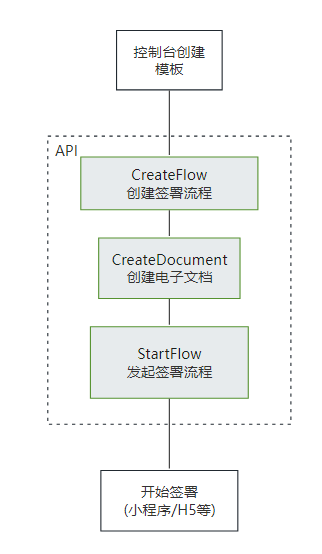
  * 此接口用于启动流程。它是模板发起合同的最后一步。
285
285
  在[创建签署流程](https://qian.tencent.com/developers/companyApis/startFlows/CreateFlow)和[创建电子文档](https://qian.tencent.com/developers/companyApis/startFlows/CreateDocument)之后,用于开始整个合同流程, 推进流程进入到签署环节。
286
286
 
287
- <svg id="SvgjsSvg1077" width="304" height="505" xmlns="http://www.w3.org/2000/svg" version="1.1" xmlns:xlink="http://www.w3.org/1999/xlink" xmlns:svgjs="http://svgjs.com/svgjs"><defs id="SvgjsDefs1078"><pattern patternUnits="userSpaceOnUse" id="pattern_mark_0" width="300" height="300"><text x="150" y="100" fill="rgba(229,229,229,0.8)" font-size="18" transform="rotate(-45, 150, 150)" style="dominant-baseline: middle; text-anchor: middle;"></text></pattern><pattern patternUnits="userSpaceOnUse" id="pattern_mark_1" width="300" height="300"><text x="150" y="200" fill="rgba(229,229,229,0.8)" font-size="18" transform="rotate(-45, 150, 150)" style="dominant-baseline: middle; text-anchor: middle;"></text></pattern><marker id="SvgjsMarker1096" markerWidth="12" markerHeight="8" refX="9" refY="4" viewBox="0 0 12 8" orient="auto" markerUnits="userSpaceOnUse" stroke-dasharray="0,0"><path id="SvgjsPath1097" d="M0,0 L12,4 L0,8 L0,0" fill="#323232" stroke="#323232" stroke-width="1"></path></marker><marker id="SvgjsMarker1108" markerWidth="12" markerHeight="8" refX="9" refY="4" viewBox="0 0 12 8" orient="auto" markerUnits="userSpaceOnUse" stroke-dasharray="0,0"><path id="SvgjsPath1109" d="M0,0 L12,4 L0,8 L0,0" fill="#323232" stroke="#323232" stroke-width="1"></path></marker><marker id="SvgjsMarker1120" markerWidth="12" markerHeight="8" refX="9" refY="4" viewBox="0 0 12 8" orient="auto" markerUnits="userSpaceOnUse" stroke-dasharray="0,0"><path id="SvgjsPath1121" d="M0,0 L12,4 L0,8 L0,0" fill="#323232" stroke="#323232" stroke-width="1"></path></marker><marker id="SvgjsMarker1140" markerWidth="12" markerHeight="8" refX="9" refY="4" viewBox="0 0 12 8" orient="auto" markerUnits="userSpaceOnUse" stroke-dasharray="0,0"><path id="SvgjsPath1141" d="M0,0 L12,4 L0,8 L0,0" fill="#323232" stroke="#323232" stroke-width="1"></path></marker></defs><rect id="svgbackgroundid" width="304" height="505" fill="transparent"></rect><rect id="SvgjsRect1080" width="304" height="505" fill="url(#pattern_mark_0)"></rect><rect id="SvgjsRect1081" width="304" height="505" fill="url(#pattern_mark_1)"></rect><g id="SvgjsG1082" transform="translate(58,121)"><path id="SvgjsPath1083" d="M 0 0L 221 0L 221 262L 0 262Z" stroke-dasharray="3,4" stroke="rgba(33,41,48,1)" stroke-width="1" fill-opacity="1" fill="#ffffff"></path><g id="SvgjsG1084"><text id="SvgjsText1085" font-family="微软雅黑" text-anchor="middle" font-size="13px" width="201px" fill="#323232" font-weight="400" align="middle" lineHeight="125%" anchor="middle" family="微软雅黑" size="13px" weight="400" font-style="" opacity="1" y="120.375" transform="rotate(0)"></text></g></g><g id="SvgjsG1086" transform="translate(88,140.00000000000006)"><path id="SvgjsPath1087" d="M 0 0L 161 0L 161 48L 0 48Z" stroke="rgba(86,146,48,1)" stroke-width="1" fill-opacity="1" fill="#e7ebed"></path><g id="SvgjsG1088"><text id="SvgjsText1089" font-family="微软雅黑" text-anchor="middle" font-size="13px" width="141px" fill="#323232" font-weight="400" align="middle" lineHeight="125%" anchor="middle" family="微软雅黑" size="13px" weight="400" font-style="" opacity="1" y="4.875" transform="rotate(0)"><tspan id="SvgjsTspan1090" dy="16" x="80.5"><tspan id="SvgjsTspan1091" style="text-decoration:;fill: rgb(28, 30, 33);">CreateFlow</tspan></tspan><tspan id="SvgjsTspan1092" dy="16" x="80.5"><tspan id="SvgjsTspan1093" style="text-decoration:;">创建签署流程</tspan></tspan></text></g></g><g id="SvgjsG1094"><path id="SvgjsPath1095" d="M168.5 188.50000000000006L168.5 200.83333333333337L168.5 200.83333333333337L168.5 211.86666666666667" stroke="#323232" stroke-width="1" fill="none" marker-end="url(#SvgjsMarker1096)"></path></g><g id="SvgjsG1098" transform="translate(104.25,213.66666666666669)"><path id="SvgjsPath1099" d="M 0 0L 128.5 0L 128.5 55L 0 55Z" stroke="rgba(86,146,48,1)" stroke-width="1" fill-opacity="1" fill="#e7ebed"></path><g id="SvgjsG1100"><text id="SvgjsText1101" font-family="微软雅黑" text-anchor="middle" font-size="13px" width="109px" fill="#323232" font-weight="400" align="middle" lineHeight="125%" anchor="middle" family="微软雅黑" size="13px" weight="400" font-style="" opacity="1" y="8.375" transform="rotate(0)"><tspan id="SvgjsTspan1102" dy="16" x="64.5"><tspan id="SvgjsTspan1103" style="text-decoration:;fill: rgb(28, 30, 33);">CreateDocument</tspan></tspan><tspan id="SvgjsTspan1104" dy="16" x="64.5"><tspan id="SvgjsTspan1105" style="text-decoration:;">创建电子文档</tspan></tspan></text></g></g><g id="SvgjsG1106"><path id="SvgjsPath1107" d="M168.5 269.16666666666674L168.5 281.5L168.5 281.5L168.5 292.5333333333334" stroke="#323232" stroke-width="1" fill="none" marker-end="url(#SvgjsMarker1108)"></path></g><g id="SvgjsG1110" transform="translate(96.75,294.33333333333337)"><path id="SvgjsPath1111" d="M 0 0L 143.5 0L 143.5 65L 0 65Z" stroke="rgba(86,146,48,1)" stroke-width="1" fill-opacity="1" fill="#e7ebed"></path><g id="SvgjsG1112"><text id="SvgjsText1113" font-family="微软雅黑" text-anchor="middle" font-size="13px" width="124px" fill="#323232" font-weight="400" align="middle" lineHeight="125%" anchor="middle" family="微软雅黑" size="13px" weight="400" font-style="" opacity="1" y="13.375" transform="rotate(0)"><tspan id="SvgjsTspan1114" dy="16" x="72"><tspan id="SvgjsTspan1115" style="text-decoration:;fill: rgb(28, 30, 33);">StartFlow</tspan></tspan><tspan id="SvgjsTspan1116" dy="16" x="72"><tspan id="SvgjsTspan1117" style="text-decoration:;">发起签署流程</tspan></tspan></text></g></g><g id="SvgjsG1118"><path id="SvgjsPath1119" d="M168.5 359.83333333333337L168.5 392.16666666666674L168.5 392.16666666666674L168.5 423.20000000000005" stroke="#323232" stroke-width="1" fill="none" marker-end="url(#SvgjsMarker1120)"></path></g><g id="SvgjsG1122" transform="translate(106.25,425)"><path id="SvgjsPath1123" d="M 0 0L 124.5 0L 124.5 55L 0 55Z" stroke="rgba(33,41,48,1)" stroke-width="1" fill-opacity="1" fill="#ffffff"></path><g id="SvgjsG1124"><text id="SvgjsText1125" font-family="微软雅黑" text-anchor="middle" font-size="13px" width="105px" fill="#323232" font-weight="400" align="middle" lineHeight="125%" anchor="middle" family="微软雅黑" size="13px" weight="400" font-style="" opacity="1" y="8.375" transform="rotate(0)"><tspan id="SvgjsTspan1126" dy="16" x="62.5"><tspan id="SvgjsTspan1127" style="text-decoration:;">开始签署</tspan></tspan><tspan id="SvgjsTspan1128" dy="16" x="62.5"><tspan id="SvgjsTspan1129" style="text-decoration:;">(小程序/H5等)</tspan></tspan></text></g></g><g id="SvgjsG1130" transform="translate(120.5,25)"><path id="SvgjsPath1131" d="M 0 0L 96 0L 96 54L 0 54Z" stroke="rgba(33,41,48,1)" stroke-width="1" fill-opacity="1" fill="#ffffff"></path><g id="SvgjsG1132"><text id="SvgjsText1133" font-family="微软雅黑" text-anchor="middle" font-size="13px" width="76px" fill="#323232" font-weight="400" align="middle" lineHeight="125%" anchor="middle" family="微软雅黑" size="13px" weight="400" font-style="" opacity="1" y="7.875" transform="rotate(0)"><tspan id="SvgjsTspan1134" dy="16" x="48"><tspan id="SvgjsTspan1135" style="text-decoration:;">控制台创建</tspan></tspan><tspan id="SvgjsTspan1136" dy="16" x="48"><tspan id="SvgjsTspan1137" style="text-decoration:;">模板</tspan></tspan></text></g></g><g id="SvgjsG1138"><path id="SvgjsPath1139" d="M168.5 79.5L168.5 109.5L168.5 109.5L168.5 138.20000000000005" stroke="#323232" stroke-width="1" fill="none" marker-end="url(#SvgjsMarker1140)"></path></g><g id="SvgjsG1142" transform="translate(25,114)"><path id="SvgjsPath1143" d="M 0 0L 100 0L 100 40L 0 40Z" stroke="none" fill="none"></path><g id="SvgjsG1144"><text id="SvgjsText1145" font-family="微软雅黑" text-anchor="middle" font-size="13px" width="100px" fill="#323232" font-weight="400" align="middle" lineHeight="125%" anchor="middle" family="微软雅黑" size="13px" weight="400" font-style="" opacity="1" y="9.375" transform="rotate(0)"><tspan id="SvgjsTspan1146" dy="16" x="50"><tspan id="SvgjsTspan1147" style="text-decoration:;">API</tspan></tspan></text></g></g></svg>
287
+ ![image](https://qcloudimg.tencent-cloud.cn/raw/06f2bc0f1772d8deac2f92b5df61a5ac.png)
288
+
289
+ 注:
290
+ - **合同发起后就会扣减合同的额度**, 如果未签署完成时撤销合同会返还此额度(过期,拒签,签署完成,解除完成等状态不会返还额度)
291
+ - **静默(自动)签署不支持合同签署方存在填写**功能
288
292
  */
289
293
  async StartFlow(
290
294
  req: StartFlowRequest,
@@ -550,7 +554,7 @@ export class Client extends AbstractClient {
550
554
 
551
555
  注:该接口需要给对应的流程指定一个模板id,并且填充该模板中需要补充的信息。需要配置<a href="https://qian.tencent.com/developers/companyApis/startFlows/CreateFlow" target="_blank">创建签署流程</a>和<a href="https://qian.tencent.com/developers/companyApis/startFlows/StartFlow" target="_blank">发起签署流程</a>接口使用。具体逻辑可以参考下图:
552
556
 
553
- <svg id="SvgjsSvg1077" width="304" height="505" xmlns="http://www.w3.org/2000/svg" version="1.1" xmlns:xlink="http://www.w3.org/1999/xlink" xmlns:svgjs="http://svgjs.com/svgjs"><defs id="SvgjsDefs1078"><pattern patternUnits="userSpaceOnUse" id="pattern_mark_0" width="300" height="300"><text x="150" y="100" fill="rgba(229,229,229,0.8)" font-size="18" transform="rotate(-45, 150, 150)" style="dominant-baseline: middle; text-anchor: middle;"></text></pattern><pattern patternUnits="userSpaceOnUse" id="pattern_mark_1" width="300" height="300"><text x="150" y="200" fill="rgba(229,229,229,0.8)" font-size="18" transform="rotate(-45, 150, 150)" style="dominant-baseline: middle; text-anchor: middle;"></text></pattern><marker id="SvgjsMarker1096" markerWidth="12" markerHeight="8" refX="9" refY="4" viewBox="0 0 12 8" orient="auto" markerUnits="userSpaceOnUse" stroke-dasharray="0,0"><path id="SvgjsPath1097" d="M0,0 L12,4 L0,8 L0,0" fill="#323232" stroke="#323232" stroke-width="1"></path></marker><marker id="SvgjsMarker1108" markerWidth="12" markerHeight="8" refX="9" refY="4" viewBox="0 0 12 8" orient="auto" markerUnits="userSpaceOnUse" stroke-dasharray="0,0"><path id="SvgjsPath1109" d="M0,0 L12,4 L0,8 L0,0" fill="#323232" stroke="#323232" stroke-width="1"></path></marker><marker id="SvgjsMarker1120" markerWidth="12" markerHeight="8" refX="9" refY="4" viewBox="0 0 12 8" orient="auto" markerUnits="userSpaceOnUse" stroke-dasharray="0,0"><path id="SvgjsPath1121" d="M0,0 L12,4 L0,8 L0,0" fill="#323232" stroke="#323232" stroke-width="1"></path></marker><marker id="SvgjsMarker1140" markerWidth="12" markerHeight="8" refX="9" refY="4" viewBox="0 0 12 8" orient="auto" markerUnits="userSpaceOnUse" stroke-dasharray="0,0"><path id="SvgjsPath1141" d="M0,0 L12,4 L0,8 L0,0" fill="#323232" stroke="#323232" stroke-width="1"></path></marker></defs><rect id="svgbackgroundid" width="304" height="505" fill="transparent"></rect><rect id="SvgjsRect1080" width="304" height="505" fill="url(#pattern_mark_0)"></rect><rect id="SvgjsRect1081" width="304" height="505" fill="url(#pattern_mark_1)"></rect><g id="SvgjsG1082" transform="translate(58,121)"><path id="SvgjsPath1083" d="M 0 0L 221 0L 221 262L 0 262Z" stroke-dasharray="3,4" stroke="rgba(33,41,48,1)" stroke-width="1" fill-opacity="1" fill="#ffffff"></path><g id="SvgjsG1084"><text id="SvgjsText1085" font-family="微软雅黑" text-anchor="middle" font-size="13px" width="201px" fill="#323232" font-weight="400" align="middle" lineHeight="125%" anchor="middle" family="微软雅黑" size="13px" weight="400" font-style="" opacity="1" y="120.375" transform="rotate(0)"></text></g></g><g id="SvgjsG1086" transform="translate(88,140.00000000000006)"><path id="SvgjsPath1087" d="M 0 0L 161 0L 161 48L 0 48Z" stroke="rgba(86,146,48,1)" stroke-width="1" fill-opacity="1" fill="#e7ebed"></path><g id="SvgjsG1088"><text id="SvgjsText1089" font-family="微软雅黑" text-anchor="middle" font-size="13px" width="141px" fill="#323232" font-weight="400" align="middle" lineHeight="125%" anchor="middle" family="微软雅黑" size="13px" weight="400" font-style="" opacity="1" y="4.875" transform="rotate(0)"><tspan id="SvgjsTspan1090" dy="16" x="80.5"><tspan id="SvgjsTspan1091" style="text-decoration:;fill: rgb(28, 30, 33);">CreateFlow</tspan></tspan><tspan id="SvgjsTspan1092" dy="16" x="80.5"><tspan id="SvgjsTspan1093" style="text-decoration:;">创建签署流程</tspan></tspan></text></g></g><g id="SvgjsG1094"><path id="SvgjsPath1095" d="M168.5 188.50000000000006L168.5 200.83333333333337L168.5 200.83333333333337L168.5 211.86666666666667" stroke="#323232" stroke-width="1" fill="none" marker-end="url(#SvgjsMarker1096)"></path></g><g id="SvgjsG1098" transform="translate(104.25,213.66666666666669)"><path id="SvgjsPath1099" d="M 0 0L 128.5 0L 128.5 55L 0 55Z" stroke="rgba(86,146,48,1)" stroke-width="1" fill-opacity="1" fill="#e7ebed"></path><g id="SvgjsG1100"><text id="SvgjsText1101" font-family="微软雅黑" text-anchor="middle" font-size="13px" width="109px" fill="#323232" font-weight="400" align="middle" lineHeight="125%" anchor="middle" family="微软雅黑" size="13px" weight="400" font-style="" opacity="1" y="8.375" transform="rotate(0)"><tspan id="SvgjsTspan1102" dy="16" x="64.5"><tspan id="SvgjsTspan1103" style="text-decoration:;fill: rgb(28, 30, 33);">CreateDocument</tspan></tspan><tspan id="SvgjsTspan1104" dy="16" x="64.5"><tspan id="SvgjsTspan1105" style="text-decoration:;">创建电子文档</tspan></tspan></text></g></g><g id="SvgjsG1106"><path id="SvgjsPath1107" d="M168.5 269.16666666666674L168.5 281.5L168.5 281.5L168.5 292.5333333333334" stroke="#323232" stroke-width="1" fill="none" marker-end="url(#SvgjsMarker1108)"></path></g><g id="SvgjsG1110" transform="translate(96.75,294.33333333333337)"><path id="SvgjsPath1111" d="M 0 0L 143.5 0L 143.5 65L 0 65Z" stroke="rgba(86,146,48,1)" stroke-width="1" fill-opacity="1" fill="#e7ebed"></path><g id="SvgjsG1112"><text id="SvgjsText1113" font-family="微软雅黑" text-anchor="middle" font-size="13px" width="124px" fill="#323232" font-weight="400" align="middle" lineHeight="125%" anchor="middle" family="微软雅黑" size="13px" weight="400" font-style="" opacity="1" y="13.375" transform="rotate(0)"><tspan id="SvgjsTspan1114" dy="16" x="72"><tspan id="SvgjsTspan1115" style="text-decoration:;fill: rgb(28, 30, 33);">StartFlow</tspan></tspan><tspan id="SvgjsTspan1116" dy="16" x="72"><tspan id="SvgjsTspan1117" style="text-decoration:;">发起签署流程</tspan></tspan></text></g></g><g id="SvgjsG1118"><path id="SvgjsPath1119" d="M168.5 359.83333333333337L168.5 392.16666666666674L168.5 392.16666666666674L168.5 423.20000000000005" stroke="#323232" stroke-width="1" fill="none" marker-end="url(#SvgjsMarker1120)"></path></g><g id="SvgjsG1122" transform="translate(106.25,425)"><path id="SvgjsPath1123" d="M 0 0L 124.5 0L 124.5 55L 0 55Z" stroke="rgba(33,41,48,1)" stroke-width="1" fill-opacity="1" fill="#ffffff"></path><g id="SvgjsG1124"><text id="SvgjsText1125" font-family="微软雅黑" text-anchor="middle" font-size="13px" width="105px" fill="#323232" font-weight="400" align="middle" lineHeight="125%" anchor="middle" family="微软雅黑" size="13px" weight="400" font-style="" opacity="1" y="8.375" transform="rotate(0)"><tspan id="SvgjsTspan1126" dy="16" x="62.5"><tspan id="SvgjsTspan1127" style="text-decoration:;">开始签署</tspan></tspan><tspan id="SvgjsTspan1128" dy="16" x="62.5"><tspan id="SvgjsTspan1129" style="text-decoration:;">(小程序/H5等)</tspan></tspan></text></g></g><g id="SvgjsG1130" transform="translate(120.5,25)"><path id="SvgjsPath1131" d="M 0 0L 96 0L 96 54L 0 54Z" stroke="rgba(33,41,48,1)" stroke-width="1" fill-opacity="1" fill="#ffffff"></path><g id="SvgjsG1132"><text id="SvgjsText1133" font-family="微软雅黑" text-anchor="middle" font-size="13px" width="76px" fill="#323232" font-weight="400" align="middle" lineHeight="125%" anchor="middle" family="微软雅黑" size="13px" weight="400" font-style="" opacity="1" y="7.875" transform="rotate(0)"><tspan id="SvgjsTspan1134" dy="16" x="48"><tspan id="SvgjsTspan1135" style="text-decoration:;">控制台创建</tspan></tspan><tspan id="SvgjsTspan1136" dy="16" x="48"><tspan id="SvgjsTspan1137" style="text-decoration:;">模板</tspan></tspan></text></g></g><g id="SvgjsG1138"><path id="SvgjsPath1139" d="M168.5 79.5L168.5 109.5L168.5 109.5L168.5 138.20000000000005" stroke="#323232" stroke-width="1" fill="none" marker-end="url(#SvgjsMarker1140)"></path></g><g id="SvgjsG1142" transform="translate(25,114)"><path id="SvgjsPath1143" d="M 0 0L 100 0L 100 40L 0 40Z" stroke="none" fill="none"></path><g id="SvgjsG1144"><text id="SvgjsText1145" font-family="微软雅黑" text-anchor="middle" font-size="13px" width="100px" fill="#323232" font-weight="400" align="middle" lineHeight="125%" anchor="middle" family="微软雅黑" size="13px" weight="400" font-style="" opacity="1" y="9.375" transform="rotate(0)"><tspan id="SvgjsTspan1146" dy="16" x="50"><tspan id="SvgjsTspan1147" style="text-decoration:;">API</tspan></tspan></text></g></g></svg>
557
+ ![image](https://qcloudimg.tencent-cloud.cn/raw/06f2bc0f1772d8deac2f92b5df61a5ac.png)
554
558
  */
555
559
  async CreateDocument(
556
560
  req: CreateDocumentRequest,
@@ -608,7 +612,9 @@ export class Client extends AbstractClient {
608
612
 
609
613
  注:配合<a href="https://qian.tencent.com/developers/companyApis/startFlows/CreateDocument" target="_blank">创建电子文档</a>和<a href="https://qian.tencent.com/developers/companyApis/startFlows/StartFlow" target="_blank">发起签署流程</a>接口使用。整体的逻辑如下图
610
614
 
611
- <svg id="SvgjsSvg1077" width="304" height="505" xmlns="http://www.w3.org/2000/svg" version="1.1" xmlns:xlink="http://www.w3.org/1999/xlink" xmlns:svgjs="http://svgjs.com/svgjs"><defs id="SvgjsDefs1078"><pattern patternUnits="userSpaceOnUse" id="pattern_mark_0" width="300" height="300"><text x="150" y="100" fill="rgba(229,229,229,0.8)" font-size="18" transform="rotate(-45, 150, 150)" style="dominant-baseline: middle; text-anchor: middle;"></text></pattern><pattern patternUnits="userSpaceOnUse" id="pattern_mark_1" width="300" height="300"><text x="150" y="200" fill="rgba(229,229,229,0.8)" font-size="18" transform="rotate(-45, 150, 150)" style="dominant-baseline: middle; text-anchor: middle;"></text></pattern><marker id="SvgjsMarker1096" markerWidth="12" markerHeight="8" refX="9" refY="4" viewBox="0 0 12 8" orient="auto" markerUnits="userSpaceOnUse" stroke-dasharray="0,0"><path id="SvgjsPath1097" d="M0,0 L12,4 L0,8 L0,0" fill="#323232" stroke="#323232" stroke-width="1"></path></marker><marker id="SvgjsMarker1108" markerWidth="12" markerHeight="8" refX="9" refY="4" viewBox="0 0 12 8" orient="auto" markerUnits="userSpaceOnUse" stroke-dasharray="0,0"><path id="SvgjsPath1109" d="M0,0 L12,4 L0,8 L0,0" fill="#323232" stroke="#323232" stroke-width="1"></path></marker><marker id="SvgjsMarker1120" markerWidth="12" markerHeight="8" refX="9" refY="4" viewBox="0 0 12 8" orient="auto" markerUnits="userSpaceOnUse" stroke-dasharray="0,0"><path id="SvgjsPath1121" d="M0,0 L12,4 L0,8 L0,0" fill="#323232" stroke="#323232" stroke-width="1"></path></marker><marker id="SvgjsMarker1140" markerWidth="12" markerHeight="8" refX="9" refY="4" viewBox="0 0 12 8" orient="auto" markerUnits="userSpaceOnUse" stroke-dasharray="0,0"><path id="SvgjsPath1141" d="M0,0 L12,4 L0,8 L0,0" fill="#323232" stroke="#323232" stroke-width="1"></path></marker></defs><rect id="svgbackgroundid" width="304" height="505" fill="transparent"></rect><rect id="SvgjsRect1080" width="304" height="505" fill="url(#pattern_mark_0)"></rect><rect id="SvgjsRect1081" width="304" height="505" fill="url(#pattern_mark_1)"></rect><g id="SvgjsG1082" transform="translate(58,121)"><path id="SvgjsPath1083" d="M 0 0L 221 0L 221 262L 0 262Z" stroke-dasharray="3,4" stroke="rgba(33,41,48,1)" stroke-width="1" fill-opacity="1" fill="#ffffff"></path><g id="SvgjsG1084"><text id="SvgjsText1085" font-family="微软雅黑" text-anchor="middle" font-size="13px" width="201px" fill="#323232" font-weight="400" align="middle" lineHeight="125%" anchor="middle" family="微软雅黑" size="13px" weight="400" font-style="" opacity="1" y="120.375" transform="rotate(0)"></text></g></g><g id="SvgjsG1086" transform="translate(88,140.00000000000006)"><path id="SvgjsPath1087" d="M 0 0L 161 0L 161 48L 0 48Z" stroke="rgba(86,146,48,1)" stroke-width="1" fill-opacity="1" fill="#e7ebed"></path><g id="SvgjsG1088"><text id="SvgjsText1089" font-family="微软雅黑" text-anchor="middle" font-size="13px" width="141px" fill="#323232" font-weight="400" align="middle" lineHeight="125%" anchor="middle" family="微软雅黑" size="13px" weight="400" font-style="" opacity="1" y="4.875" transform="rotate(0)"><tspan id="SvgjsTspan1090" dy="16" x="80.5"><tspan id="SvgjsTspan1091" style="text-decoration:;fill: rgb(28, 30, 33);">CreateFlow</tspan></tspan><tspan id="SvgjsTspan1092" dy="16" x="80.5"><tspan id="SvgjsTspan1093" style="text-decoration:;">创建签署流程</tspan></tspan></text></g></g><g id="SvgjsG1094"><path id="SvgjsPath1095" d="M168.5 188.50000000000006L168.5 200.83333333333337L168.5 200.83333333333337L168.5 211.86666666666667" stroke="#323232" stroke-width="1" fill="none" marker-end="url(#SvgjsMarker1096)"></path></g><g id="SvgjsG1098" transform="translate(104.25,213.66666666666669)"><path id="SvgjsPath1099" d="M 0 0L 128.5 0L 128.5 55L 0 55Z" stroke="rgba(86,146,48,1)" stroke-width="1" fill-opacity="1" fill="#e7ebed"></path><g id="SvgjsG1100"><text id="SvgjsText1101" font-family="微软雅黑" text-anchor="middle" font-size="13px" width="109px" fill="#323232" font-weight="400" align="middle" lineHeight="125%" anchor="middle" family="微软雅黑" size="13px" weight="400" font-style="" opacity="1" y="8.375" transform="rotate(0)"><tspan id="SvgjsTspan1102" dy="16" x="64.5"><tspan id="SvgjsTspan1103" style="text-decoration:;fill: rgb(28, 30, 33);">CreateDocument</tspan></tspan><tspan id="SvgjsTspan1104" dy="16" x="64.5"><tspan id="SvgjsTspan1105" style="text-decoration:;">创建电子文档</tspan></tspan></text></g></g><g id="SvgjsG1106"><path id="SvgjsPath1107" d="M168.5 269.16666666666674L168.5 281.5L168.5 281.5L168.5 292.5333333333334" stroke="#323232" stroke-width="1" fill="none" marker-end="url(#SvgjsMarker1108)"></path></g><g id="SvgjsG1110" transform="translate(96.75,294.33333333333337)"><path id="SvgjsPath1111" d="M 0 0L 143.5 0L 143.5 65L 0 65Z" stroke="rgba(86,146,48,1)" stroke-width="1" fill-opacity="1" fill="#e7ebed"></path><g id="SvgjsG1112"><text id="SvgjsText1113" font-family="微软雅黑" text-anchor="middle" font-size="13px" width="124px" fill="#323232" font-weight="400" align="middle" lineHeight="125%" anchor="middle" family="微软雅黑" size="13px" weight="400" font-style="" opacity="1" y="13.375" transform="rotate(0)"><tspan id="SvgjsTspan1114" dy="16" x="72"><tspan id="SvgjsTspan1115" style="text-decoration:;fill: rgb(28, 30, 33);">StartFlow</tspan></tspan><tspan id="SvgjsTspan1116" dy="16" x="72"><tspan id="SvgjsTspan1117" style="text-decoration:;">发起签署流程</tspan></tspan></text></g></g><g id="SvgjsG1118"><path id="SvgjsPath1119" d="M168.5 359.83333333333337L168.5 392.16666666666674L168.5 392.16666666666674L168.5 423.20000000000005" stroke="#323232" stroke-width="1" fill="none" marker-end="url(#SvgjsMarker1120)"></path></g><g id="SvgjsG1122" transform="translate(106.25,425)"><path id="SvgjsPath1123" d="M 0 0L 124.5 0L 124.5 55L 0 55Z" stroke="rgba(33,41,48,1)" stroke-width="1" fill-opacity="1" fill="#ffffff"></path><g id="SvgjsG1124"><text id="SvgjsText1125" font-family="微软雅黑" text-anchor="middle" font-size="13px" width="105px" fill="#323232" font-weight="400" align="middle" lineHeight="125%" anchor="middle" family="微软雅黑" size="13px" weight="400" font-style="" opacity="1" y="8.375" transform="rotate(0)"><tspan id="SvgjsTspan1126" dy="16" x="62.5"><tspan id="SvgjsTspan1127" style="text-decoration:;">开始签署</tspan></tspan><tspan id="SvgjsTspan1128" dy="16" x="62.5"><tspan id="SvgjsTspan1129" style="text-decoration:;">(小程序/H5等)</tspan></tspan></text></g></g><g id="SvgjsG1130" transform="translate(120.5,25)"><path id="SvgjsPath1131" d="M 0 0L 96 0L 96 54L 0 54Z" stroke="rgba(33,41,48,1)" stroke-width="1" fill-opacity="1" fill="#ffffff"></path><g id="SvgjsG1132"><text id="SvgjsText1133" font-family="微软雅黑" text-anchor="middle" font-size="13px" width="76px" fill="#323232" font-weight="400" align="middle" lineHeight="125%" anchor="middle" family="微软雅黑" size="13px" weight="400" font-style="" opacity="1" y="7.875" transform="rotate(0)"><tspan id="SvgjsTspan1134" dy="16" x="48"><tspan id="SvgjsTspan1135" style="text-decoration:;">控制台创建</tspan></tspan><tspan id="SvgjsTspan1136" dy="16" x="48"><tspan id="SvgjsTspan1137" style="text-decoration:;">模板</tspan></tspan></text></g></g><g id="SvgjsG1138"><path id="SvgjsPath1139" d="M168.5 79.5L168.5 109.5L168.5 109.5L168.5 138.20000000000005" stroke="#323232" stroke-width="1" fill="none" marker-end="url(#SvgjsMarker1140)"></path></g><g id="SvgjsG1142" transform="translate(25,114)"><path id="SvgjsPath1143" d="M 0 0L 100 0L 100 40L 0 40Z" stroke="none" fill="none"></path><g id="SvgjsG1144"><text id="SvgjsText1145" font-family="微软雅黑" text-anchor="middle" font-size="13px" width="100px" fill="#323232" font-weight="400" align="middle" lineHeight="125%" anchor="middle" family="微软雅黑" size="13px" weight="400" font-style="" opacity="1" y="9.375" transform="rotate(0)"><tspan id="SvgjsTspan1146" dy="16" x="50"><tspan id="SvgjsTspan1147" style="text-decoration:;">API</tspan></tspan></text></g></g></svg>
615
+ ![image](https://qcloudimg.tencent-cloud.cn/raw/06f2bc0f1772d8deac2f92b5df61a5ac.png)
616
+
617
+ 注:**静默(自动)签署不支持合同签署方存在填写**功能
612
618
  */
613
619
  async CreateFlow(
614
620
  req: CreateFlowRequest,
@@ -645,7 +651,9 @@ export class Client extends AbstractClient {
645
651
 
646
652
  注:
647
653
  `1. 如果签署人是在PC端扫码签署,可以通过生成跳转链接自主转换成二维码,让签署人在PC端扫码签署`
654
+
648
655
  `2. 签署链接的有效期为90天,超过有效期链接不可用`
656
+
649
657
  `3. 如果需跳转详情页(即PathType值为1)进行填写或签署合同,需指定签署方信息:姓名、手机号码、企业名称等,才能生成正确的跳转链接`
650
658
 
651
659
  其中小程序的原始Id如下,或者查看小程序信息自助获取。
@@ -678,6 +686,8 @@ export class Client extends AbstractClient {
678
686
  * 此接口(CreateFlowGroupByTemplates)可用于通过多个模板创建合同组签署流程。
679
687
 
680
688
  适用场景:该接口适用于需要一次性完成多份合同签署的情况,多份合同一般具有关联性,用户以目录的形式查看合同。
689
+
690
+ 注:`合同发起后就会扣减合同的额度, 如果未签署完成时撤销合同会返还此额度(过期,拒签,签署完成,解除完成等状态不会返还额度),合同组中每个合同会扣减一个合同额度`
681
691
  */
682
692
  async CreateFlowGroupByTemplates(
683
693
  req: CreateFlowGroupByTemplatesRequest,
@@ -710,8 +720,8 @@ export class Client extends AbstractClient {
710
720
  如果是其他类型可以配合<a href="https://qian.tencent.com/developers/companyApis/templatesAndFiles/CreateConvertTaskApi" target="_blank">创建文件转换任务</a>接口转换成PDF文件
711
721
 
712
722
  注:
713
- 1. `图片类型(png/jpg/jpeg)限制大小为5M以下, PDF/word/excel等其他格式限制大小为60M以下`
714
- 2. `联调开发环境调用时需要设置Domain接口请求域名为 file.test.ess.tencent.cn,正式环境需要设置为file.ess.tencent.cn,代码示例`
723
+ 1. 图片类型(png/jpg/jpeg)限制大小为5M以下, PDF/word/excel等其他格式限制大小为60M以下
724
+ 2. 调用此接口时需要设置单独的Domain请求域名,<font color="red">联调开发环境为: file.test.ess.tencent.cn,正式环境需要设置为:file.ess.tencent.cn</font>,代码示例
715
725
  ```
716
726
  HttpProfile httpProfile = new HttpProfile();
717
727
  httpProfile.setEndpoint("file.test.ess.tencent.cn");
@@ -744,9 +754,16 @@ httpProfile.setEndpoint("file.test.ess.tencent.cn");
744
754
 
745
755
  /**
746
756
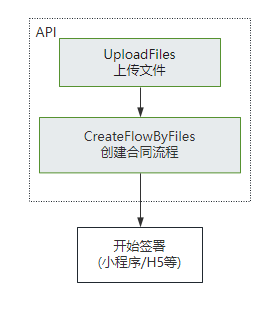
  * 此接口(CreateFlowByFiles)用来通过上传后的pdf资源编号来创建待签署的合同流程。<br/>
747
- 适用场景1:适用非制式的合同文件签署。一般开发者自己有完整的签署文件,可以通过该接口传入完整的PDF文件及流程信息生成待签署的合同流程。<br/>
748
- 适用场景2:可通过该接口传入制式合同文件,同时在指定位置添加签署控件。可以起到接口创建临时模板的效果。如果是标准的制式文件,建议使用模板功能生成模板ID进行合同流程的生成。<br/>
749
- 注意事项:该接口需要依赖“多文件上传”接口生成pdf资源编号(FileIds)进行使用。<br/>
757
+ 适用场景:适用非制式的合同文件签署。一般开发者自己有完整的签署文件,可以通过该接口传入完整的PDF文件及流程信息生成待签署的合同流程。<br/>
758
+
759
+ 该接口需要依赖[上传文件](https://qian.tencent.com/developers/companyApis/templatesAndFiles/UploadFiles)接口生成pdf资源编号(FileIds)进行使用。(如果非pdf文件需要调用[创建文件转换任务](https://qian.tencent.com/developers/companyApis/templatesAndFiles/CreateConvertTaskApi)接口转换成pdf资源)<br/>
760
+
761
+ ![image](https://qcloudimg.tencent-cloud.cn/raw/f097a74b289e3e1acd740936bdfe9843.png)
762
+
763
+ 注:
764
+ - 不同类型的签署方传参不同, 可以参考开发者中心的ApproverInfo结构体说明
765
+ - 合同**发起后就会扣减合同的额度**, 如果未签署完成时撤销合同会返还此额度(**过期,拒签,签署完成,解除完成等状态不会返还额度**)
766
+ - **静默(自动)签署不支持合同签署方存在填写**功能
750
767
  */
751
768
  async CreateFlowByFiles(
752
769
  req: CreateFlowByFilesRequest,
@@ -1172,6 +1189,8 @@ httpProfile.setEndpoint("file.test.ess.tencent.cn");
1172
1189
  适用场景:该接口适用于需要一次性完成多份合同签署的情况,多份合同一般具有关联性,用户以目录的形式查看合同。
1173
1190
 
1174
1191
  注意事项:使用该接口需要先依赖[多文件上传](https://qian.tencent.com/developers/companyApis/templatesAndFiles/UploadFiles)接口返回的FileIds。
1192
+
1193
+ 注:`合同发起后就会扣减合同的额度, 如果未签署完成时撤销合同会返还此额度(过期,拒签,签署完成,解除完成等状态不会返还额度),合同组中每个合同会扣减一个合同额度`
1175
1194
  */
1176
1195
  async CreateFlowGroupByFiles(
1177
1196
  req: CreateFlowGroupByFilesRequest,
@@ -1300,7 +1300,7 @@ export interface FlowApproverDetail {
1300
1300
  export interface CreateFlowGroupByFilesRequest {
1301
1301
  /**
1302
1302
  * 执行本接口操作的员工信息。
1303
- 注: `在调用此接口时,请确保指定的员工已获得所需的接口调用权限,并具备接口传入的相应资源的数据权限。
1303
+ 注: `在调用此接口时,请确保指定的员工已获得所需的接口调用权限,并具备接口传入的相应资源的数据权限。`
1304
1304
  */
1305
1305
  Operator: UserInfo
1306
1306
  /**
@@ -1744,7 +1744,7 @@ export interface CreateFlowRequest {
1744
1744
  CcInfos?: Array<CcInfo>
1745
1745
  /**
1746
1746
  * 个人自动签名的使用场景包括以下, 个人自动签署(即ApproverType设置成个人自动签署时)业务此值必传:
1747
- <ul><li> **E_PRESCRIPTION_AUTO_SIGN**:处方单(医疗自动签) </li></ul>
1747
+ <ul><li> **E_PRESCRIPTION_AUTO_SIGN**:电子处方单(医疗自动签) </li><li> **OTHER** : 通用场景</li></ul>
1748
1748
  注: `个人自动签名场景是白名单功能,使用前请与对接的客户经理联系沟通。`
1749
1749
  */
1750
1750
  AutoSignScene?: string
@@ -3035,7 +3035,7 @@ export interface CreateFlowByFilesRequest {
3035
3035
  Agent?: Agent
3036
3036
  /**
3037
3037
  * 个人自动签名的使用场景包括以下, 个人自动签署(即ApproverType设置成个人自动签署时)业务此值必传:
3038
- <ul><li> **E_PRESCRIPTION_AUTO_SIGN**:处方单(医疗自动签) </li></ul>
3038
+ <ul><li> **E_PRESCRIPTION_AUTO_SIGN**:电子处方单(医疗自动签) </li><li> **OTHER** : 通用场景</li></ul>
3039
3039
  注: `个人自动签名场景是白名单功能,使用前请与对接的客户经理联系沟通。`
3040
3040
  */
3041
3041
  AutoSignScene?: string
@@ -5522,7 +5522,7 @@ export interface GetTaskResultApiResponse {
5522
5522
  */
5523
5523
  TaskMessage?: string
5524
5524
  /**
5525
- * 资源Id,也是FileId,用于文件发起时使用
5525
+ * 资源Id(即FileId),用于[用PDF文件创建签署流程](https://qian.tencent.com/developers/companyApis/startFlows/CreateFlowByFiles)
5526
5526
  */
5527
5527
  ResourceId?: string
5528
5528
  /**
@@ -5766,6 +5766,11 @@ export interface CreatePrepareFlowRequest {
5766
5766
  在合同状态变更的回调信息等场景中,该字段的信息将原封不动地透传给贵方。回调的相关说明可参考开发者中心的<a href="https://qian.tencent.com/developers/company/callback_types_v2" target="_blank">回调通知</a>模块。
5767
5767
  */
5768
5768
  UserData?: string
5769
+ /**
5770
+ * 合同流程的抄送人列表,最多可支持50个抄送人,抄送人可查看合同内容及签署进度,但无需参与合同签署。
5771
+
5772
+ */
5773
+ CcInfos?: CcInfo
5769
5774
  /**
5770
5775
  * 合同Id:用于通过一个已发起的合同快速生成一个发起流程web链接
5771
5776
  注: `该参数必须是一个待发起审核的合同id,并且还未审核通过`
@@ -391,7 +391,12 @@ https://developers.weixin.qq.com/miniprogram/dev/framework/open-ability/launchAp
391
391
 
392
392
  **注**:
393
393
  `1. 发起合同时候, 作为发起方的第三方子企业A员工的企业和员工必须经过实名, 而作为签署方的第三方子企业A员工/个人/自然人/SaaS平台企业员工/第三方子企业B员工企业中的企业和个人/员工可以未实名`
394
+
394
395
  `2. 不同类型的签署方传参不同, 可以参考开发者中心的FlowApproverInfo结构体说明`
396
+
397
+ `3. 合同发起后就会扣减合同的额度, 如果未签署完成时撤销合同会返还此额度(过期,拒签,签署完成,解除完成等状态不会返还额度)`
398
+
399
+ `4. 静默(自动)签署不支持合同签署方存在填写功能`
395
400
  */
396
401
  async ChannelCreateFlowByFiles(
397
402
  req: ChannelCreateFlowByFilesRequest,
@@ -639,7 +644,12 @@ https://developers.weixin.qq.com/miniprogram/dev/framework/open-ability/launchAp
639
644
 
640
645
  **注**:
641
646
  `1. 发起合同时候, 作为发起方的第三方子企业A员工的企业和员工必须经过实名, 而作为签署方的第三方子企业A员工/个人/自然人/SaaS平台企业员工/第三方子企业B员工企业中的企业和个人/员工可以未实名`
647
+
642
648
  `2. 不同类型的签署方传参不同, 可以参考开发者中心的FlowApproverInfo结构体说明`
649
+
650
+ `3. 合同发起后就会扣减合同的额度, 如果未签署完成时撤销合同会返还此额度(过期,拒签,签署完成,解除完成等状态不会返还额度)`
651
+
652
+ `4. 静默(自动)签署不支持合同签署方存在填写功能`
643
653
  */
644
654
  async CreateFlowsByTemplates(
645
655
  req: CreateFlowsByTemplatesRequest,
@@ -1351,6 +1361,10 @@ Web链接访问后,会根据子客企业(**Agent中ProxyOrganizationOpenId表
1351
1361
  `1. 发起合同时候, 作为发起方的第三方子企业A员工的企业和员工必须经过实名, 而作为签署方的第三方子企业A员工/个人/自然人/SaaS平台企业员工/第三方子企业B员工企业中的企业和个人/员工可以未实名`
1352
1362
 
1353
1363
  `2. 不同类型的签署方传参不同, 可以参考开发者中心的FlowApproverInfo结构体说明`
1364
+
1365
+ `3. 合同发起后就会扣减合同的额度, 如果未签署完成时撤销合同会返还此额度(过期,拒签,签署完成,解除完成等状态不会返还额度),合同组中每个合同会扣减一个合同额度`
1366
+
1367
+ `4. 静默(自动)签署不支持合同签署方存在填写功能`
1354
1368
  */
1355
1369
  async ChannelCreateFlowGroupByTemplates(
1356
1370
  req: ChannelCreateFlowGroupByTemplatesRequest,
@@ -1557,6 +1571,10 @@ Web链接访问后,会根据子客企业(**Agent中ProxyOrganizationOpenId表
1557
1571
  `1. 发起合同时候, 作为发起方的第三方子企业A员工的企业和员工必须经过实名, 而作为签署方的第三方子企业A员工/个人/自然人/SaaS平台企业员工/第三方子企业B员工企业中的企业和个人/员工可以未实名`
1558
1572
 
1559
1573
  `2. 不同类型的签署方传参不同, 可以参考开发者中心的FlowApproverInfo结构体说明`
1574
+
1575
+ `3. 合同发起后就会扣减合同的额度, 如果未签署完成时撤销合同会返还此额度(过期,拒签,签署完成,解除完成等状态不会返还额度),合同组中每个合同会扣减一个合同额度`
1576
+
1577
+ `4. 静默(自动)签署不支持合同签署方存在填写功能`
1560
1578
  */
1561
1579
  async ChannelCreateFlowGroupByFiles(
1562
1580
  req: ChannelCreateFlowGroupByFilesRequest,
@@ -1974,7 +1974,7 @@ MobileCheck:手机号验证,用户手机号和参与方手机号(ApproverM
1974
1974
  CcNotifyType?: number
1975
1975
  /**
1976
1976
  * 个人自动签名的使用场景包括以下, 个人自动签署(即ApproverType设置成个人自动签署时)业务此值必传:
1977
- <ul><li> **E_PRESCRIPTION_AUTO_SIGN**:处方单(医疗自动签) </li></ul>
1977
+ <ul><li> **E_PRESCRIPTION_AUTO_SIGN**:电子处方单(医疗自动签) </li><li> **OTHER** : 通用场景</li></ul>
1978
1978
  注: `个人自动签名场景是白名单功能,使用前请与对接的客户经理联系沟通。`
1979
1979
  */
1980
1980
  AutoSignScene?: string
@@ -3150,9 +3150,9 @@ export interface CreateConsoleLoginUrlRequest {
3150
3150
  <li>第三方平台子客企业标识: Agent.ProxyOrganizationOpenId</li>
3151
3151
  <li>第三方平台子客企业中的员工标识: Agent.ProxyOperator.OpenId</li>
3152
3152
  </ul>注:
3153
- `1. 企业激活时, 此时的Agent.ProxyOrganizationOpenId将会是企业激活后企业的唯一标识, 建议开发者保存企业ProxyOrganizationOpenId,后续各项接口调用皆需要此参数。 `
3154
- `2. 员工认证时, 此时的Agent.ProxyOrganizationOpenId将会是员工认证加入企业后的唯一标识, 建议开发者保存此员工的penId, 后续各项接口调用皆需要此参数。 `
3155
- `3. 同渠道应用(Agent.AppId)下,企业唯一标识ProxyOrganizationOpenId需要保持唯一, 员工唯一标识OpenId也要保持唯一 (而不是企业下唯一)`
3153
+ `1. 企业激活时, 此时的Agent.ProxyOrganizationOpenId将会是企业激活后企业的唯一标识,建议开发者保存企业ProxyOrganizationOpenId,后续各项接口调用皆需要此参数。 `
3154
+ `2. 员工认证时, 此时的Agent.ProxyOperator.OpenId将会是员工认证加入企业后的唯一标识,建议开发者保存此员工的OpenId,后续各项接口调用皆需要此参数。 `
3155
+ `3. 同渠道应用(Agent.AppId)下,企业唯一标识ProxyOrganizationOpenId需要保持唯一,员工唯一标识OpenId也要保持唯一 (而不是企业下唯一)`
3156
3156
  */
3157
3157
  Agent: Agent
3158
3158
  /**
@@ -3986,7 +3986,7 @@ export interface FlowInfo {
3986
3986
  CcNotifyType?: number
3987
3987
  /**
3988
3988
  * 个人自动签名的使用场景包括以下, 个人自动签署(即ApproverType设置成个人自动签署时)业务此值必传:
3989
- <ul><li> **E_PRESCRIPTION_AUTO_SIGN**:处方单(医疗自动签) </li></ul>
3989
+ <ul><li> **E_PRESCRIPTION_AUTO_SIGN**:电子处方单(医疗自动签) </li><li> **OTHER** : 通用场景</li></ul>
3990
3990
  注: `个人自动签名场景是白名单功能,使用前请与对接的客户经理联系沟通。`
3991
3991
  */
3992
3992
  AutoSignScene?: string
@@ -6147,7 +6147,7 @@ export interface ChannelGetTaskResultApiResponse {
6147
6147
  */
6148
6148
  TaskMessage?: string
6149
6149
  /**
6150
- * 资源Id,也是FileId,用于文件发起时使用
6150
+ * 资源Id(即FileId),用于[用PDF文件创建签署流程](https://qian.tencent.com/developers/partnerApis/startFlows/ChannelCreateFlowByFiles)
6151
6151
  */
6152
6152
  ResourceId?: string
6153
6153
  /**
@@ -2543,7 +2543,7 @@ export interface LoginSettings {
2543
2543
  /**
2544
2544
  * 密钥 ID 列表。关联密钥后,就可以通过对应的私钥来访问实例。注意:此字段可能返回 [],表示取不到有效值。
2545
2545
  */
2546
- KeyIds: Array<string>
2546
+ KeyIds?: Array<string>
2547
2547
  }
2548
2548
 
2549
2549
  /**
@@ -3848,7 +3848,10 @@ export interface FirewallRule {
3848
3848
  */
3849
3849
  Port?: string
3850
3850
  /**
3851
- * 网段或 IP (互斥)。默认为 0.0.0.0/0,表示所有来源。
3851
+ * IPv4网段或 IPv4地址(互斥)
3852
+ 示例值:0.0.0.0/0。
3853
+
3854
+ 和Ipv6CidrBlock互斥,两者都不指定时,如果Protocol不是ICMPv6,则取默认值0.0.0.0/0。
3852
3855
  */
3853
3856
  CidrBlock?: string
3854
3857
  /**
@@ -3878,27 +3881,30 @@ export interface FirewallRuleInfo {
3878
3881
  /**
3879
3882
  * 应用类型,取值:自定义,HTTP(80),HTTPS(443),Linux登录(22),Windows登录(3389),MySQL(3306),SQL Server(1433),全部TCP,全部UDP,Ping-ICMP,ALL。
3880
3883
  */
3881
- AppType: string
3884
+ AppType?: string
3882
3885
  /**
3883
3886
  * 协议,取值:TCP,UDP,ICMP,ALL。
3884
3887
  */
3885
- Protocol: string
3888
+ Protocol?: string
3886
3889
  /**
3887
3890
  * 端口,取值:ALL,单独的端口,逗号分隔的离散端口,减号分隔的端口范围。
3888
3891
  */
3889
- Port: string
3892
+ Port?: string
3890
3893
  /**
3891
- * 网段或 IP (互斥)。默认为 0.0.0.0/0,表示所有来源。
3894
+ * IPv4网段或 IPv4地址(互斥)
3895
+ 示例值:0.0.0.0/0。
3896
+
3897
+ 和Ipv6CidrBlock互斥,两者都不指定时,如果Protocol不是ICMPv6,则取默认值0.0.0.0/0。
3892
3898
  */
3893
- CidrBlock: string
3899
+ CidrBlock?: string
3894
3900
  /**
3895
3901
  * 取值:ACCEPT,DROP。默认为 ACCEPT。
3896
3902
  */
3897
- Action: string
3903
+ Action?: string
3898
3904
  /**
3899
3905
  * 防火墙规则描述。
3900
3906
  */
3901
- FirewallRuleDescription: string
3907
+ FirewallRuleDescription?: string
3902
3908
  }
3903
3909
 
3904
3910
  /**
@@ -4270,16 +4276,16 @@ export interface SystemDisk {
4270
4276
  取值范围:
4271
4277
  <li> LOCAL_BASIC:本地硬盘</li><li> LOCAL_SSD:本地 SSD 硬盘</li><li> CLOUD_BASIC:普通云硬盘</li><li> CLOUD_SSD:SSD 云硬盘</li><li> CLOUD_PREMIUM:高性能云硬盘</li>
4272
4278
  */
4273
- DiskType: string
4279
+ DiskType?: string
4274
4280
  /**
4275
4281
  * 系统盘大小,单位:GB。
4276
4282
  */
4277
- DiskSize: number
4283
+ DiskSize?: number
4278
4284
  /**
4279
4285
  * 系统盘ID。
4280
4286
  注意:此字段可能返回 null,表示取不到有效值。
4281
4287
  */
4282
- DiskId: string
4288
+ DiskId?: string
4283
4289
  }
4284
4290
 
4285
4291
  /**
@@ -34,11 +34,14 @@ import {
34
34
  TriggerJobSavepointRequest,
35
35
  RefJobStatusCountItem,
36
36
  ResourceLocParam,
37
+ NodeConfig,
37
38
  WorkSpaceSetItem,
38
39
  DescribeJobSavepointRequest,
39
40
  ResultColumn,
40
41
  TreeJobSets,
41
42
  ResourceItem,
43
+ DescribeClustersResponse,
44
+ RunSqlGatewayStatementRequest,
42
45
  DescribeFolderResponse,
43
46
  ResourceLoc,
44
47
  CCN,
@@ -71,14 +74,13 @@ import {
71
74
  DeleteWorkSpaceRequest,
72
75
  DescribeWorkSpacesResponse,
73
76
  GatewayRefItem,
74
- DescribeJobsRequest,
75
77
  CreateResourceResponse,
76
78
  DescribeSystemResourcesRequest,
77
79
  CreateFolderResponse,
78
80
  DescribeResourcesResponse,
79
81
  RunJobDescription,
80
82
  DescribeResourceRelatedJobsResponse,
81
- DescribeClustersResponse,
83
+ JobEvent,
82
84
  ResourceRef,
83
85
  DescribeSystemResourcesResponse,
84
86
  ClazzLevel,
@@ -112,7 +114,7 @@ import {
112
114
  DeleteResourceConfigsResponse,
113
115
  Cluster,
114
116
  DescribeJobSubmissionLogRequest,
115
- NodeConfig,
117
+ DescribeJobsRequest,
116
118
  JobV1,
117
119
  JobConfig,
118
120
  DescribeResourceConfigsRequest,
@@ -131,7 +133,7 @@ import {
131
133
  StopJobsResponse,
132
134
  LogContent,
133
135
  DescribeResourcesRequest,
134
- RunSqlGatewayStatementRequest,
136
+ DescribeJobEventsRequest,
135
137
  CheckSavepointResponse,
136
138
  DescribeJobsResponse,
137
139
  ExpertModeConfiguration,
@@ -140,6 +142,7 @@ import {
140
142
  DescribeTreeJobsRequest,
141
143
  DescribeJobConfigsResponse,
142
144
  FetchSqlGatewayStatementResultRequest,
145
+ DescribeJobEventsResponse,
143
146
  } from "./oceanus_models"
144
147
 
145
148
  /**
@@ -302,13 +305,13 @@ export class Client extends AbstractClient {
302
305
  }
303
306
 
304
307
  /**
305
- * 查询集群
308
+ * 获取指定作业的事件,包括作业启动停止、运行失败、快照失败、作业异常等各种事件类型
306
309
  */
307
- async DescribeClusters(
308
- req: DescribeClustersRequest,
309
- cb?: (error: string, rep: DescribeClustersResponse) => void
310
- ): Promise<DescribeClustersResponse> {
311
- return this.request("DescribeClusters", req, cb)
310
+ async DescribeJobEvents(
311
+ req: DescribeJobEventsRequest,
312
+ cb?: (error: string, rep: DescribeJobEventsResponse) => void
313
+ ): Promise<DescribeJobEventsResponse> {
314
+ return this.request("DescribeJobEvents", req, cb)
312
315
  }
313
316
 
314
317
  /**
@@ -411,6 +414,16 @@ export class Client extends AbstractClient {
411
414
  return this.request("CreateJobConfig", req, cb)
412
415
  }
413
416
 
417
+ /**
418
+ * 查询集群
419
+ */
420
+ async DescribeClusters(
421
+ req: DescribeClustersRequest,
422
+ cb?: (error: string, rep: DescribeClustersResponse) => void
423
+ ): Promise<DescribeClustersResponse> {
424
+ return this.request("DescribeClusters", req, cb)
425
+ }
426
+
414
427
  /**
415
428
  * 删除作业配置
416
429
  */