tencentcloud-sdk-nodejs 4.0.761 → 4.0.762
This diff represents the content of publicly available package versions that have been released to one of the supported registries. The information contained in this diff is provided for informational purposes only and reflects changes between package versions as they appear in their respective public registries.
- package/CHANGELOG.md +125 -0
- package/SERVICE_CHANGELOG.md +129 -135
- package/package.json +1 -1
- package/products.md +18 -18
- package/src/common/sdk_version.ts +1 -1
- package/src/services/asr/v20190614/asr_models.ts +22 -19
- package/src/services/cdwdoris/v20211228/cdwdoris_models.ts +6 -0
- package/src/services/cls/v20201016/cls_models.ts +106 -43
- package/src/services/ecm/v20190719/ecm_models.ts +17 -17
- package/src/services/ess/v20201111/ess_client.ts +27 -8
- package/src/services/ess/v20201111/ess_models.ts +9 -4
- package/src/services/essbasic/v20210526/essbasic_client.ts +18 -0
- package/src/services/essbasic/v20210526/essbasic_models.ts +6 -6
- package/src/services/lighthouse/v20200324/lighthouse_models.ts +18 -12
- package/src/services/oceanus/v20190422/oceanus_client.ts +23 -10
- package/src/services/oceanus/v20190422/oceanus_models.ts +147 -59
- package/src/services/ssl/v20191205/ssl_models.ts +22 -2
- package/src/services/tat/v20201028/tat_models.ts +1 -1
- package/src/services/tem/v20210701/tem_client.ts +1 -1
- package/src/services/tem/v20210701/tem_models.ts +1 -1
- package/src/services/teo/v20220901/teo_models.ts +2 -2
- package/src/services/tione/v20211111/tione_client.ts +25 -11
- package/src/services/tione/v20211111/tione_models.ts +214 -18
- package/src/services/tse/v20201207/tse_models.ts +2 -2
- package/src/services/wedata/v20210820/wedata_models.ts +5 -0
- package/tencentcloud/common/sdk_version.d.ts +1 -1
- package/tencentcloud/common/sdk_version.js +1 -1
- package/tencentcloud/services/asr/v20190614/asr_models.d.ts +22 -19
- package/tencentcloud/services/cdwdoris/v20211228/cdwdoris_models.d.ts +6 -0
- package/tencentcloud/services/cls/v20201016/cls_models.d.ts +106 -43
- package/tencentcloud/services/ecm/v20190719/ecm_models.d.ts +17 -17
- package/tencentcloud/services/ess/v20201111/ess_client.d.ts +27 -8
- package/tencentcloud/services/ess/v20201111/ess_client.js +27 -8
- package/tencentcloud/services/ess/v20201111/ess_models.d.ts +9 -4
- package/tencentcloud/services/essbasic/v20210526/essbasic_client.d.ts +18 -0
- package/tencentcloud/services/essbasic/v20210526/essbasic_client.js +18 -0
- package/tencentcloud/services/essbasic/v20210526/essbasic_models.d.ts +6 -6
- package/tencentcloud/services/lighthouse/v20200324/lighthouse_models.d.ts +18 -12
- package/tencentcloud/services/oceanus/v20190422/oceanus_client.d.ts +7 -3
- package/tencentcloud/services/oceanus/v20190422/oceanus_client.js +9 -3
- package/tencentcloud/services/oceanus/v20190422/oceanus_models.d.ts +143 -58
- package/tencentcloud/services/ssl/v20191205/ssl_models.d.ts +22 -2
- package/tencentcloud/services/tat/v20201028/tat_models.d.ts +1 -1
- package/tencentcloud/services/tem/v20210701/tem_client.d.ts +1 -1
- package/tencentcloud/services/tem/v20210701/tem_client.js +1 -1
- package/tencentcloud/services/tem/v20210701/tem_models.d.ts +1 -1
- package/tencentcloud/services/teo/v20220901/teo_models.d.ts +2 -2
- package/tencentcloud/services/tione/v20211111/tione_client.d.ts +7 -3
- package/tencentcloud/services/tione/v20211111/tione_client.js +9 -3
- package/tencentcloud/services/tione/v20211111/tione_models.d.ts +210 -18
- package/tencentcloud/services/tse/v20201207/tse_models.d.ts +2 -2
- package/tencentcloud/services/wedata/v20210820/wedata_models.d.ts +5 -0
- package/test/oceanus.v20190422.test.js +12 -2
- package/test/tione.v20211111.test.js +12 -2
|
@@ -37,7 +37,7 @@ export interface AlarmInfo {
|
|
|
37
37
|
*/
|
|
38
38
|
MonitorTime?: MonitorTime;
|
|
39
39
|
/**
|
|
40
|
-
*
|
|
40
|
+
* 单触发条件。与MultiConditions参数互斥。
|
|
41
41
|
*/
|
|
42
42
|
Condition?: string;
|
|
43
43
|
/**
|
|
@@ -104,8 +104,8 @@ export interface AlarmInfo {
|
|
|
104
104
|
*/
|
|
105
105
|
AlarmLevel?: number;
|
|
106
106
|
/**
|
|
107
|
-
*
|
|
108
|
-
|
|
107
|
+
* 多触发条件。与
|
|
108
|
+
Condition互斥。
|
|
109
109
|
注意:此字段可能返回 null,表示取不到有效值。
|
|
110
110
|
*/
|
|
111
111
|
MultiConditions?: Array<MultiCondition>;
|
|
@@ -384,11 +384,13 @@ export interface SearchCosRechargeInfoRequest {
|
|
|
384
384
|
*/
|
|
385
385
|
Name: string;
|
|
386
386
|
/**
|
|
387
|
-
*
|
|
387
|
+
* 存储桶。
|
|
388
|
+
存储桶命名规范:https://cloud.tencent.com/document/product/436/13312
|
|
388
389
|
*/
|
|
389
390
|
Bucket: string;
|
|
390
391
|
/**
|
|
391
|
-
*
|
|
392
|
+
* 存储桶所在地域。
|
|
393
|
+
地域和访问域名:https://cloud.tencent.com/document/product/436/6224
|
|
392
394
|
*/
|
|
393
395
|
BucketRegion: string;
|
|
394
396
|
/**
|
|
@@ -1185,7 +1187,7 @@ export interface ScheduledSqlResouceInfo {
|
|
|
1185
1187
|
*/
|
|
1186
1188
|
BizType?: number;
|
|
1187
1189
|
/**
|
|
1188
|
-
*
|
|
1190
|
+
* 指标名称。当BizType为1时,MetricName需要填写
|
|
1189
1191
|
*/
|
|
1190
1192
|
MetricName?: string;
|
|
1191
1193
|
/**
|
|
@@ -1317,22 +1319,26 @@ export interface DeleteMachineGroupResponse {
|
|
|
1317
1319
|
*/
|
|
1318
1320
|
export interface KafkaProtocolInfo {
|
|
1319
1321
|
/**
|
|
1320
|
-
* 协议类型,支持的协议类型包括 plaintext、sasl_plaintext 或 sasl_ssl。建议使用 sasl_ssl
|
|
1322
|
+
* 协议类型,支持的协议类型包括 plaintext、sasl_plaintext 或 sasl_ssl。建议使用 sasl_ssl,此协议会进行连接加密同时需要用户认证。
|
|
1323
|
+
入参必填
|
|
1321
1324
|
注意:此字段可能返回 null,表示取不到有效值。
|
|
1322
1325
|
*/
|
|
1323
1326
|
Protocol?: string;
|
|
1324
1327
|
/**
|
|
1325
|
-
* 加密类型,支持 PLAIN、SCRAM-SHA-256 或 SCRAM-SHA-512
|
|
1328
|
+
* 加密类型,支持 PLAIN、SCRAM-SHA-256 或 SCRAM-SHA-512。
|
|
1329
|
+
当Protocol为sasl_plaintext或sasl_ssl时必填
|
|
1326
1330
|
注意:此字段可能返回 null,表示取不到有效值。
|
|
1327
1331
|
*/
|
|
1328
1332
|
Mechanism?: string;
|
|
1329
1333
|
/**
|
|
1330
|
-
*
|
|
1334
|
+
* 用户名。
|
|
1335
|
+
当Protocol为sasl_plaintext或sasl_ssl时必填
|
|
1331
1336
|
注意:此字段可能返回 null,表示取不到有效值。
|
|
1332
1337
|
*/
|
|
1333
1338
|
UserName?: string;
|
|
1334
1339
|
/**
|
|
1335
|
-
*
|
|
1340
|
+
* 用户密码。
|
|
1341
|
+
当Protocol为sasl_plaintext或sasl_ssl时必填
|
|
1336
1342
|
注意:此字段可能返回 null,表示取不到有效值。
|
|
1337
1343
|
*/
|
|
1338
1344
|
Password?: string;
|
|
@@ -1464,11 +1470,12 @@ export interface CreateCosRechargeRequest {
|
|
|
1464
1470
|
*/
|
|
1465
1471
|
Name: string;
|
|
1466
1472
|
/**
|
|
1467
|
-
* COS
|
|
1473
|
+
* COS存储桶。
|
|
1474
|
+
存储桶命名规范:https://cloud.tencent.com/document/product/436/13312
|
|
1468
1475
|
*/
|
|
1469
1476
|
Bucket: string;
|
|
1470
1477
|
/**
|
|
1471
|
-
* COS
|
|
1478
|
+
* COS存储桶所在地域。地域和访问域名:https://cloud.tencent.com/document/product/436/6224
|
|
1472
1479
|
*/
|
|
1473
1480
|
BucketRegion: string;
|
|
1474
1481
|
/**
|
|
@@ -2479,11 +2486,13 @@ export interface CheckRechargeKafkaServerRequest {
|
|
|
2479
2486
|
*/
|
|
2480
2487
|
KafkaType: number;
|
|
2481
2488
|
/**
|
|
2482
|
-
* 腾讯云CKafka实例ID
|
|
2489
|
+
* 腾讯云CKafka实例ID。
|
|
2490
|
+
KafkaType为0时,KafkaInstance必填
|
|
2483
2491
|
*/
|
|
2484
2492
|
KafkaInstance?: string;
|
|
2485
2493
|
/**
|
|
2486
|
-
*
|
|
2494
|
+
* 服务地址。
|
|
2495
|
+
KafkaType为1时,ServerAddr必填
|
|
2487
2496
|
*/
|
|
2488
2497
|
ServerAddr?: string;
|
|
2489
2498
|
/**
|
|
@@ -2491,7 +2500,7 @@ export interface CheckRechargeKafkaServerRequest {
|
|
|
2491
2500
|
*/
|
|
2492
2501
|
IsEncryptionAddr?: boolean;
|
|
2493
2502
|
/**
|
|
2494
|
-
*
|
|
2503
|
+
* 加密访问协议。IsEncryptionAddr参数为true时必填
|
|
2495
2504
|
*/
|
|
2496
2505
|
Protocol?: KafkaProtocolInfo;
|
|
2497
2506
|
}
|
|
@@ -2735,17 +2744,22 @@ export interface GetAlarmLogResponse {
|
|
|
2735
2744
|
*/
|
|
2736
2745
|
Analysis?: boolean;
|
|
2737
2746
|
/**
|
|
2738
|
-
*
|
|
2747
|
+
* 分析结果的列名,如果Query语句有SQL查询,则返回查询字段的列名;
|
|
2748
|
+
否则为空。
|
|
2739
2749
|
注意:此字段可能返回 null,表示取不到有效值。
|
|
2740
2750
|
*/
|
|
2741
2751
|
ColNames?: Array<string>;
|
|
2742
2752
|
/**
|
|
2743
|
-
*
|
|
2753
|
+
* 执行详情查询结果。
|
|
2754
|
+
|
|
2755
|
+
当Query字段无SQL语句时,返回查询结果。
|
|
2756
|
+
当Query字段有SQL语句时,可能返回null。
|
|
2744
2757
|
注意:此字段可能返回 null,表示取不到有效值。
|
|
2745
2758
|
*/
|
|
2746
2759
|
Results?: Array<LogInfo>;
|
|
2747
2760
|
/**
|
|
2748
|
-
*
|
|
2761
|
+
* 执行详情统计分析结果。当Query字段有SQL语句时,返回sql统计结果,否则可能返回null。
|
|
2762
|
+
|
|
2749
2763
|
注意:此字段可能返回 null,表示取不到有效值。
|
|
2750
2764
|
*/
|
|
2751
2765
|
AnalysisResults?: Array<LogItems>;
|
|
@@ -3229,7 +3243,49 @@ export interface AnalysisDimensional {
|
|
|
3229
3243
|
*/
|
|
3230
3244
|
Content: string;
|
|
3231
3245
|
/**
|
|
3232
|
-
*
|
|
3246
|
+
* 多维分析配置。
|
|
3247
|
+
|
|
3248
|
+
当Analysis的Type字段为query(自定义)时,支持
|
|
3249
|
+
{
|
|
3250
|
+
"Key": "SyntaxRule", // 语法规则
|
|
3251
|
+
"Value": "1" //0:Lucene语法 ,1: CQL语法
|
|
3252
|
+
}
|
|
3253
|
+
|
|
3254
|
+
|
|
3255
|
+
|
|
3256
|
+
当Analysis的Type字段为field(top5)时, 支持
|
|
3257
|
+
{
|
|
3258
|
+
"Key": "QueryIndex",
|
|
3259
|
+
"Value": "-1" // -1:自定义, 1:执行语句1, 2:执行语句2
|
|
3260
|
+
},{
|
|
3261
|
+
"Key": "CustomQuery", //检索语句。 QueryIndex为-1时有效且必填
|
|
3262
|
+
"Value": "* | select count(*) as count"
|
|
3263
|
+
},{
|
|
3264
|
+
"Key": "SyntaxRule", // 查不到这个字段也是老语法(Lucene)
|
|
3265
|
+
"Value": "0"//0:Lucene, 1:CQL
|
|
3266
|
+
}
|
|
3267
|
+
|
|
3268
|
+
当Analysis的Type字段为original(原始日志)时, 支持
|
|
3269
|
+
{
|
|
3270
|
+
"Key": "Fields",
|
|
3271
|
+
"Value": "__SOURCE__,__HOSTNAME__,__TIMESTAMP__,__PKG_LOGID__,__TAG__.pod_ip"
|
|
3272
|
+
}, {
|
|
3273
|
+
"Key": "QueryIndex",
|
|
3274
|
+
"Value": "-1" // -1:自定义, 1:执行语句1, 2:执行语句2
|
|
3275
|
+
},{
|
|
3276
|
+
"Key": "CustomQuery", // //检索语句。 QueryIndex为-1时有效且必填
|
|
3277
|
+
"Value": "* | select count(*) as count"
|
|
3278
|
+
},{
|
|
3279
|
+
"Key": "Format", //显示形式。1:每条日志一行,2:每条日志每个字段一行
|
|
3280
|
+
"Value": "2"
|
|
3281
|
+
},
|
|
3282
|
+
{
|
|
3283
|
+
"Key": "Limit", //最大日志条数
|
|
3284
|
+
"Value": "5"
|
|
3285
|
+
},{
|
|
3286
|
+
"Key": "SyntaxRule", // 查不到这个字段也是老语法
|
|
3287
|
+
"Value": "0"//0:Lucene, 1:CQL
|
|
3288
|
+
}
|
|
3233
3289
|
注意:此字段可能返回 null,表示取不到有效值。
|
|
3234
3290
|
*/
|
|
3235
3291
|
ConfigInfo?: Array<AlarmAnalysisConfig>;
|
|
@@ -4217,7 +4273,7 @@ export interface PreviewKafkaRechargeRequest {
|
|
|
4217
4273
|
*/
|
|
4218
4274
|
KafkaType: number;
|
|
4219
4275
|
/**
|
|
4220
|
-
* 用户需要导入的Kafka相关topic列表,多个topic
|
|
4276
|
+
* 用户需要导入的Kafka相关topic列表,多个topic之间使用半角逗号隔开。最多支持100个。
|
|
4221
4277
|
*/
|
|
4222
4278
|
UserKafkaTopics: string;
|
|
4223
4279
|
/**
|
|
@@ -4225,19 +4281,23 @@ export interface PreviewKafkaRechargeRequest {
|
|
|
4225
4281
|
*/
|
|
4226
4282
|
Offset: number;
|
|
4227
4283
|
/**
|
|
4228
|
-
* 腾讯云CKafka实例ID
|
|
4284
|
+
* 腾讯云CKafka实例ID。
|
|
4285
|
+
KafkaType为0时KafkaInstance必填
|
|
4229
4286
|
*/
|
|
4230
4287
|
KafkaInstance?: string;
|
|
4231
4288
|
/**
|
|
4232
|
-
*
|
|
4289
|
+
* 服务地址。
|
|
4290
|
+
KafkaType为1时ServerAddr必填
|
|
4233
4291
|
*/
|
|
4234
4292
|
ServerAddr?: string;
|
|
4235
4293
|
/**
|
|
4236
|
-
* ServerAddr
|
|
4294
|
+
* ServerAddr是否为加密连接。。
|
|
4295
|
+
KafkaType为1时有效。
|
|
4237
4296
|
*/
|
|
4238
4297
|
IsEncryptionAddr?: boolean;
|
|
4239
4298
|
/**
|
|
4240
|
-
*
|
|
4299
|
+
* 加密访问协议。
|
|
4300
|
+
KafkaType为1并且IsEncryptionAddr为true时Protocol必填
|
|
4241
4301
|
*/
|
|
4242
4302
|
Protocol?: KafkaProtocolInfo;
|
|
4243
4303
|
/**
|
|
@@ -4409,7 +4469,8 @@ export interface CreateKafkaRechargeRequest {
|
|
|
4409
4469
|
*/
|
|
4410
4470
|
IsEncryptionAddr?: boolean;
|
|
4411
4471
|
/**
|
|
4412
|
-
*
|
|
4472
|
+
* 加密访问协议。
|
|
4473
|
+
KafkaType为1并且IsEncryptionAddr为true时Protocol必填
|
|
4413
4474
|
*/
|
|
4414
4475
|
Protocol?: KafkaProtocolInfo;
|
|
4415
4476
|
/**
|
|
@@ -4417,7 +4478,8 @@ export interface CreateKafkaRechargeRequest {
|
|
|
4417
4478
|
*/
|
|
4418
4479
|
ConsumerGroupName?: string;
|
|
4419
4480
|
/**
|
|
4420
|
-
*
|
|
4481
|
+
* 日志导入规则。
|
|
4482
|
+
必填字段。
|
|
4421
4483
|
*/
|
|
4422
4484
|
LogRechargeRule?: LogRechargeRuleInfo;
|
|
4423
4485
|
}
|
|
@@ -4938,25 +5000,25 @@ export interface SearchCosRechargeInfoResponse {
|
|
|
4938
5000
|
* 匹配到的存储桶下的某个文件的前几行数据
|
|
4939
5001
|
注意:此字段可能返回 null,表示取不到有效值。
|
|
4940
5002
|
*/
|
|
4941
|
-
Data
|
|
5003
|
+
Data?: Array<string>;
|
|
4942
5004
|
/**
|
|
4943
5005
|
* 匹配到的存储桶下的文件个数
|
|
4944
5006
|
*/
|
|
4945
|
-
Sum
|
|
5007
|
+
Sum?: number;
|
|
4946
5008
|
/**
|
|
4947
5009
|
* 当前预览文件路径
|
|
4948
5010
|
注意:此字段可能返回 null,表示取不到有效值。
|
|
4949
5011
|
*/
|
|
4950
|
-
Path
|
|
5012
|
+
Path?: string;
|
|
4951
5013
|
/**
|
|
4952
5014
|
* 预览获取数据失败原因
|
|
4953
5015
|
注意:此字段可能返回 null,表示取不到有效值。
|
|
4954
5016
|
*/
|
|
4955
|
-
Msg
|
|
5017
|
+
Msg?: string;
|
|
4956
5018
|
/**
|
|
4957
5019
|
* 状态
|
|
4958
5020
|
*/
|
|
4959
|
-
Status
|
|
5021
|
+
Status?: number;
|
|
4960
5022
|
/**
|
|
4961
5023
|
* 唯一请求 ID,每次请求都会返回。定位问题时需要提供该次请求的 RequestId。
|
|
4962
5024
|
*/
|
|
@@ -5370,22 +5432,22 @@ export interface DescribeScheduledSqlInfoRequest {
|
|
|
5370
5432
|
*/
|
|
5371
5433
|
Limit?: number;
|
|
5372
5434
|
/**
|
|
5373
|
-
*
|
|
5435
|
+
* 任务名称。
|
|
5374
5436
|
*/
|
|
5375
5437
|
Name?: string;
|
|
5376
5438
|
/**
|
|
5377
|
-
* 任务id
|
|
5439
|
+
* 任务id。
|
|
5378
5440
|
*/
|
|
5379
5441
|
TaskId?: string;
|
|
5380
5442
|
/**
|
|
5381
|
-
* <li>srcTopicName
|
|
5382
|
-
<li>dstTopicName
|
|
5383
|
-
<li>srcTopicId按照【源日志主题ID】进行过滤。类型:String
|
|
5384
|
-
<li>dstTopicId按照【目标日志主题ID】进行过滤。类型:String
|
|
5385
|
-
<li>bizType按照【主题类型】进行过滤,0日志主题1
|
|
5386
|
-
<li>status
|
|
5387
|
-
<li>taskName
|
|
5388
|
-
<li>taskId按照【任务ID
|
|
5443
|
+
* <li>srcTopicName按照【源日志主题名称】进行过滤,模糊匹配。类型:String。必选:否</li>
|
|
5444
|
+
<li>dstTopicName按照【目标日志主题名称】进行过滤,模糊匹配。类型:String。必选:否</li>
|
|
5445
|
+
<li>srcTopicId按照【源日志主题ID】进行过滤。类型:String。必选:否</li>
|
|
5446
|
+
<li>dstTopicId按照【目标日志主题ID】进行过滤。类型:String。必选:否</li>
|
|
5447
|
+
<li>bizType按照【主题类型】进行过滤,0日志主题 1指标主题。类型:String。必选:否</li>
|
|
5448
|
+
<li>status按照【任务状态】进行过滤,1:运行 2:停止。类型:String。必选:否</li>
|
|
5449
|
+
<li>taskName按照【任务名称】进行过滤,模糊匹配。类型:String。必选:否</li>
|
|
5450
|
+
<li>taskId按照【任务ID】进行过滤,模糊匹配。类型:String。必选:否</li>
|
|
5389
5451
|
|
|
5390
5452
|
*/
|
|
5391
5453
|
Filters?: Array<Filter>;
|
|
@@ -5653,8 +5715,9 @@ export interface GetAlarmLogRequest {
|
|
|
5653
5715
|
/**
|
|
5654
5716
|
* 查询过滤条件,例如:
|
|
5655
5717
|
- 按告警策略ID查询:`alert_id:"alarm-0745ec00-e605-xxxx-b50b-54afe61fc971"`
|
|
5656
|
-
- 按监控对象ID查询:`monitored_object:"823d8bfa-76a7-xxxx-8399-8cda74d4009b"
|
|
5657
|
-
- 按告警策略ID及监控对象ID查询:`alert_id:"alarm-0745ec00-e605-xxxx-b50b-54afe61fc971" AND monitored_object:"823d8bfa-76a7-xxxx-8399-8cda74d4009b"
|
|
5718
|
+
- 按监控对象ID查询:`monitored_object:"823d8bfa-76a7-xxxx-8399-8cda74d4009b" `
|
|
5719
|
+
- 按告警策略ID及监控对象ID查询:`alert_id:"alarm-0745ec00-e605-xxxx-b50b-54afe61fc971" AND monitored_object:"823d8bfa-76a7-xxxx-8399-8cda74d4009b"`
|
|
5720
|
+
- 按告警策略ID及监控对象ID查询支持SQL语句:`(alert_id:"alarm-5ce45495-09e8-4d58-xxxx-768134bf330c") AND (monitored_object:"3c514e84-6f1f-46ec-xxxx-05de6163f7fe") AND NOT condition_evaluate_result: "Skip" AND condition_evaluate_result:[* TO *] | SELECT count(*) as top50StatisticsTotalCount, count_if(condition_evaluate_result='ProcessError') as top50StatisticsFailureCount, count_if(notification_send_result!='NotSend') as top50NoticeTotalCount, count_if(notification_send_result='SendPartFail' or notification_send_result='SendFail') as top50NoticeFailureCount, alert_id, alert_name, monitored_object, topic_type, happen_threshold, alert_threshold, notify_template group by alert_id, alert_name, monitored_object,topic_type, happen_threshold, alert_threshold, notify_template order by top50StatisticsTotalCount desc limit 1`
|
|
5658
5721
|
*/
|
|
5659
5722
|
Query: string;
|
|
5660
5723
|
/**
|
|
@@ -6526,71 +6526,71 @@ export interface Image {
|
|
|
6526
6526
|
/**
|
|
6527
6527
|
* 镜像ID
|
|
6528
6528
|
*/
|
|
6529
|
-
ImageId
|
|
6529
|
+
ImageId?: string;
|
|
6530
6530
|
/**
|
|
6531
6531
|
* 镜像名称
|
|
6532
6532
|
*/
|
|
6533
|
-
ImageName
|
|
6533
|
+
ImageName?: string;
|
|
6534
6534
|
/**
|
|
6535
6535
|
* 镜像状态
|
|
6536
6536
|
*/
|
|
6537
|
-
ImageState
|
|
6537
|
+
ImageState?: string;
|
|
6538
6538
|
/**
|
|
6539
6539
|
* 镜像类型
|
|
6540
6540
|
*/
|
|
6541
|
-
ImageType
|
|
6541
|
+
ImageType?: string;
|
|
6542
6542
|
/**
|
|
6543
6543
|
* 操作系统名称
|
|
6544
6544
|
*/
|
|
6545
|
-
ImageOsName
|
|
6545
|
+
ImageOsName?: string;
|
|
6546
6546
|
/**
|
|
6547
6547
|
* 镜像描述
|
|
6548
6548
|
*/
|
|
6549
|
-
ImageDescription
|
|
6549
|
+
ImageDescription?: string;
|
|
6550
6550
|
/**
|
|
6551
6551
|
* 镜像导入时间
|
|
6552
6552
|
*/
|
|
6553
|
-
ImageCreateTime
|
|
6553
|
+
ImageCreateTime?: string;
|
|
6554
6554
|
/**
|
|
6555
6555
|
* 操作系统位数
|
|
6556
6556
|
*/
|
|
6557
|
-
Architecture
|
|
6557
|
+
Architecture?: string;
|
|
6558
6558
|
/**
|
|
6559
6559
|
* 操作系统类型
|
|
6560
6560
|
*/
|
|
6561
|
-
OsType
|
|
6561
|
+
OsType?: string;
|
|
6562
6562
|
/**
|
|
6563
6563
|
* 操作系统版本
|
|
6564
6564
|
*/
|
|
6565
|
-
OsVersion
|
|
6565
|
+
OsVersion?: string;
|
|
6566
6566
|
/**
|
|
6567
6567
|
* 操作系统平台
|
|
6568
6568
|
*/
|
|
6569
|
-
Platform
|
|
6569
|
+
Platform?: string;
|
|
6570
6570
|
/**
|
|
6571
6571
|
* 镜像所有者
|
|
6572
6572
|
*/
|
|
6573
|
-
ImageOwner
|
|
6573
|
+
ImageOwner?: number;
|
|
6574
6574
|
/**
|
|
6575
6575
|
* 镜像大小。单位:GB
|
|
6576
6576
|
*/
|
|
6577
|
-
ImageSize
|
|
6577
|
+
ImageSize?: number;
|
|
6578
6578
|
/**
|
|
6579
6579
|
* 镜像来源信息
|
|
6580
6580
|
*/
|
|
6581
|
-
SrcImage
|
|
6581
|
+
SrcImage?: SrcImage;
|
|
6582
6582
|
/**
|
|
6583
6583
|
* 镜像来源类型
|
|
6584
6584
|
*/
|
|
6585
|
-
ImageSource
|
|
6585
|
+
ImageSource?: string;
|
|
6586
6586
|
/**
|
|
6587
6587
|
* 中间态和失败时候的任务ID
|
|
6588
6588
|
*/
|
|
6589
|
-
TaskId
|
|
6589
|
+
TaskId?: string;
|
|
6590
6590
|
/**
|
|
6591
6591
|
* 是否支持CloudInit
|
|
6592
6592
|
*/
|
|
6593
|
-
IsSupportCloudInit
|
|
6593
|
+
IsSupportCloudInit?: boolean;
|
|
6594
6594
|
}
|
|
6595
6595
|
/**
|
|
6596
6596
|
* DetachNetworkInterface请求参数结构体
|
|
@@ -36,7 +36,11 @@ export declare class Client extends AbstractClient {
|
|
|
36
36
|
* 此接口用于启动流程。它是模板发起合同的最后一步。
|
|
37
37
|
在[创建签署流程](https://qian.tencent.com/developers/companyApis/startFlows/CreateFlow)和[创建电子文档](https://qian.tencent.com/developers/companyApis/startFlows/CreateDocument)之后,用于开始整个合同流程, 推进流程进入到签署环节。
|
|
38
38
|
|
|
39
|
-
|
|
39
|
+
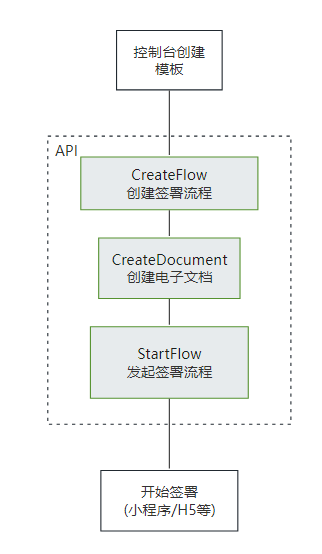
|
|
40
|
+
|
|
41
|
+
注:
|
|
42
|
+
- **合同发起后就会扣减合同的额度**, 如果未签署完成时撤销合同会返还此额度(过期,拒签,签署完成,解除完成等状态不会返还额度)
|
|
43
|
+
- **静默(自动)签署不支持合同签署方存在填写**功能
|
|
40
44
|
*/
|
|
41
45
|
StartFlow(req: StartFlowRequest, cb?: (error: string, rep: StartFlowResponse) => void): Promise<StartFlowResponse>;
|
|
42
46
|
/**
|
|
@@ -182,7 +186,7 @@ export declare class Client extends AbstractClient {
|
|
|
182
186
|
|
|
183
187
|
注:该接口需要给对应的流程指定一个模板id,并且填充该模板中需要补充的信息。需要配置<a href="https://qian.tencent.com/developers/companyApis/startFlows/CreateFlow" target="_blank">创建签署流程</a>和<a href="https://qian.tencent.com/developers/companyApis/startFlows/StartFlow" target="_blank">发起签署流程</a>接口使用。具体逻辑可以参考下图:
|
|
184
188
|
|
|
185
|
-
|
|
189
|
+

|
|
186
190
|
*/
|
|
187
191
|
CreateDocument(req: CreateDocumentRequest, cb?: (error: string, rep: CreateDocumentResponse) => void): Promise<CreateDocumentResponse>;
|
|
188
192
|
/**
|
|
@@ -222,7 +226,9 @@ export declare class Client extends AbstractClient {
|
|
|
222
226
|
|
|
223
227
|
注:配合<a href="https://qian.tencent.com/developers/companyApis/startFlows/CreateDocument" target="_blank">创建电子文档</a>和<a href="https://qian.tencent.com/developers/companyApis/startFlows/StartFlow" target="_blank">发起签署流程</a>接口使用。整体的逻辑如下图
|
|
224
228
|
|
|
225
|
-
|
|
229
|
+

|
|
230
|
+
|
|
231
|
+
注:**静默(自动)签署不支持合同签署方存在填写**功能
|
|
226
232
|
*/
|
|
227
233
|
CreateFlow(req: CreateFlowRequest, cb?: (error: string, rep: CreateFlowResponse) => void): Promise<CreateFlowResponse>;
|
|
228
234
|
/**
|
|
@@ -247,7 +253,9 @@ export declare class Client extends AbstractClient {
|
|
|
247
253
|
|
|
248
254
|
注:
|
|
249
255
|
`1. 如果签署人是在PC端扫码签署,可以通过生成跳转链接自主转换成二维码,让签署人在PC端扫码签署`
|
|
256
|
+
|
|
250
257
|
`2. 签署链接的有效期为90天,超过有效期链接不可用`
|
|
258
|
+
|
|
251
259
|
`3. 如果需跳转详情页(即PathType值为1)进行填写或签署合同,需指定签署方信息:姓名、手机号码、企业名称等,才能生成正确的跳转链接`
|
|
252
260
|
|
|
253
261
|
其中小程序的原始Id如下,或者查看小程序信息自助获取。
|
|
@@ -268,6 +276,8 @@ export declare class Client extends AbstractClient {
|
|
|
268
276
|
* 此接口(CreateFlowGroupByTemplates)可用于通过多个模板创建合同组签署流程。
|
|
269
277
|
|
|
270
278
|
适用场景:该接口适用于需要一次性完成多份合同签署的情况,多份合同一般具有关联性,用户以目录的形式查看合同。
|
|
279
|
+
|
|
280
|
+
注:`合同发起后就会扣减合同的额度, 如果未签署完成时撤销合同会返还此额度(过期,拒签,签署完成,解除完成等状态不会返还额度),合同组中每个合同会扣减一个合同额度`
|
|
271
281
|
*/
|
|
272
282
|
CreateFlowGroupByTemplates(req: CreateFlowGroupByTemplatesRequest, cb?: (error: string, rep: CreateFlowGroupByTemplatesResponse) => void): Promise<CreateFlowGroupByTemplatesResponse>;
|
|
273
283
|
/**
|
|
@@ -288,8 +298,8 @@ export declare class Client extends AbstractClient {
|
|
|
288
298
|
如果是其他类型可以配合<a href="https://qian.tencent.com/developers/companyApis/templatesAndFiles/CreateConvertTaskApi" target="_blank">创建文件转换任务</a>接口转换成PDF文件
|
|
289
299
|
|
|
290
300
|
注:
|
|
291
|
-
1.
|
|
292
|
-
2.
|
|
301
|
+
1. 图片类型(png/jpg/jpeg)限制大小为5M以下, PDF/word/excel等其他格式限制大小为60M以下
|
|
302
|
+
2. 调用此接口时需要设置单独的Domain请求域名,<font color="red">联调开发环境为: file.test.ess.tencent.cn,正式环境需要设置为:file.ess.tencent.cn</font>,代码示例
|
|
293
303
|
```
|
|
294
304
|
HttpProfile httpProfile = new HttpProfile();
|
|
295
305
|
httpProfile.setEndpoint("file.test.ess.tencent.cn");
|
|
@@ -310,9 +320,16 @@ httpProfile.setEndpoint("file.test.ess.tencent.cn");
|
|
|
310
320
|
DescribeFlowEvidenceReport(req: DescribeFlowEvidenceReportRequest, cb?: (error: string, rep: DescribeFlowEvidenceReportResponse) => void): Promise<DescribeFlowEvidenceReportResponse>;
|
|
311
321
|
/**
|
|
312
322
|
* 此接口(CreateFlowByFiles)用来通过上传后的pdf资源编号来创建待签署的合同流程。<br/>
|
|
313
|
-
|
|
314
|
-
|
|
315
|
-
|
|
323
|
+
适用场景:适用非制式的合同文件签署。一般开发者自己有完整的签署文件,可以通过该接口传入完整的PDF文件及流程信息生成待签署的合同流程。<br/>
|
|
324
|
+
|
|
325
|
+
该接口需要依赖[上传文件](https://qian.tencent.com/developers/companyApis/templatesAndFiles/UploadFiles)接口生成pdf资源编号(FileIds)进行使用。(如果非pdf文件需要调用[创建文件转换任务](https://qian.tencent.com/developers/companyApis/templatesAndFiles/CreateConvertTaskApi)接口转换成pdf资源)<br/>
|
|
326
|
+
|
|
327
|
+
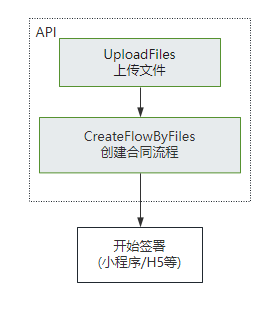
|
|
328
|
+
|
|
329
|
+
注:
|
|
330
|
+
- 不同类型的签署方传参不同, 可以参考开发者中心的ApproverInfo结构体说明
|
|
331
|
+
- 合同**发起后就会扣减合同的额度**, 如果未签署完成时撤销合同会返还此额度(**过期,拒签,签署完成,解除完成等状态不会返还额度**)
|
|
332
|
+
- **静默(自动)签署不支持合同签署方存在填写**功能
|
|
316
333
|
*/
|
|
317
334
|
CreateFlowByFiles(req: CreateFlowByFilesRequest, cb?: (error: string, rep: CreateFlowByFilesResponse) => void): Promise<CreateFlowByFilesResponse>;
|
|
318
335
|
/**
|
|
@@ -564,6 +581,8 @@ httpProfile.setEndpoint("file.test.ess.tencent.cn");
|
|
|
564
581
|
适用场景:该接口适用于需要一次性完成多份合同签署的情况,多份合同一般具有关联性,用户以目录的形式查看合同。
|
|
565
582
|
|
|
566
583
|
注意事项:使用该接口需要先依赖[多文件上传](https://qian.tencent.com/developers/companyApis/templatesAndFiles/UploadFiles)接口返回的FileIds。
|
|
584
|
+
|
|
585
|
+
注:`合同发起后就会扣减合同的额度, 如果未签署完成时撤销合同会返还此额度(过期,拒签,签署完成,解除完成等状态不会返还额度),合同组中每个合同会扣减一个合同额度`
|
|
567
586
|
*/
|
|
568
587
|
CreateFlowGroupByFiles(req: CreateFlowGroupByFilesRequest, cb?: (error: string, rep: CreateFlowGroupByFilesResponse) => void): Promise<CreateFlowGroupByFilesResponse>;
|
|
569
588
|
/**
|