@workos/mcp-docs-server 0.1.0 → 0.2.0
This diff represents the content of publicly available package versions that have been released to one of the supported registries. The information contained in this diff is provided for informational purposes only and reflects changes between package versions as they appear in their respective public registries.
- package/.docs/organized/changelogs/workos-platform.json +125 -125
- package/.docs/organized/docs/admin-portal/custom-branding.mdx +2 -4
- package/.docs/organized/docs/admin-portal/example-apps.mdx +11 -11
- package/.docs/organized/docs/admin-portal/index.mdx +39 -33
- package/.docs/organized/docs/audit-logs/admin-portal.mdx +1 -1
- package/.docs/organized/docs/audit-logs/editing-events.mdx +1 -1
- package/.docs/organized/docs/audit-logs/exporting-events.mdx +1 -1
- package/.docs/organized/docs/audit-logs/index.mdx +17 -2
- package/.docs/organized/docs/audit-logs/log-streams.mdx +325 -1
- package/.docs/organized/docs/audit-logs/metadata-schema.mdx +1 -1
- package/.docs/organized/docs/authkit/_navigation.mdx +108 -0
- package/.docs/organized/docs/{user-management → authkit}/actions.mdx +3 -4
- package/.docs/organized/docs/authkit/add-ons/google-analytics.mdx +79 -0
- package/.docs/organized/docs/authkit/add-ons/segment.mdx +77 -0
- package/.docs/organized/docs/authkit/add-ons/stripe.mdx +103 -0
- package/.docs/organized/docs/authkit/api-keys.mdx +99 -0
- package/.docs/organized/docs/{user-management → authkit}/branding.mdx +220 -2
- package/.docs/organized/docs/authkit/cli-auth.mdx +76 -0
- package/.docs/organized/docs/authkit/cli-installer.mdx +157 -0
- package/.docs/organized/docs/authkit/connect/m2m.mdx +65 -0
- package/.docs/organized/docs/authkit/connect/oauth.mdx +88 -0
- package/.docs/organized/docs/authkit/connect/standalone.mdx +179 -0
- package/.docs/organized/docs/authkit/connect.mdx +65 -0
- package/.docs/organized/docs/authkit/custom-email-providers.mdx +141 -0
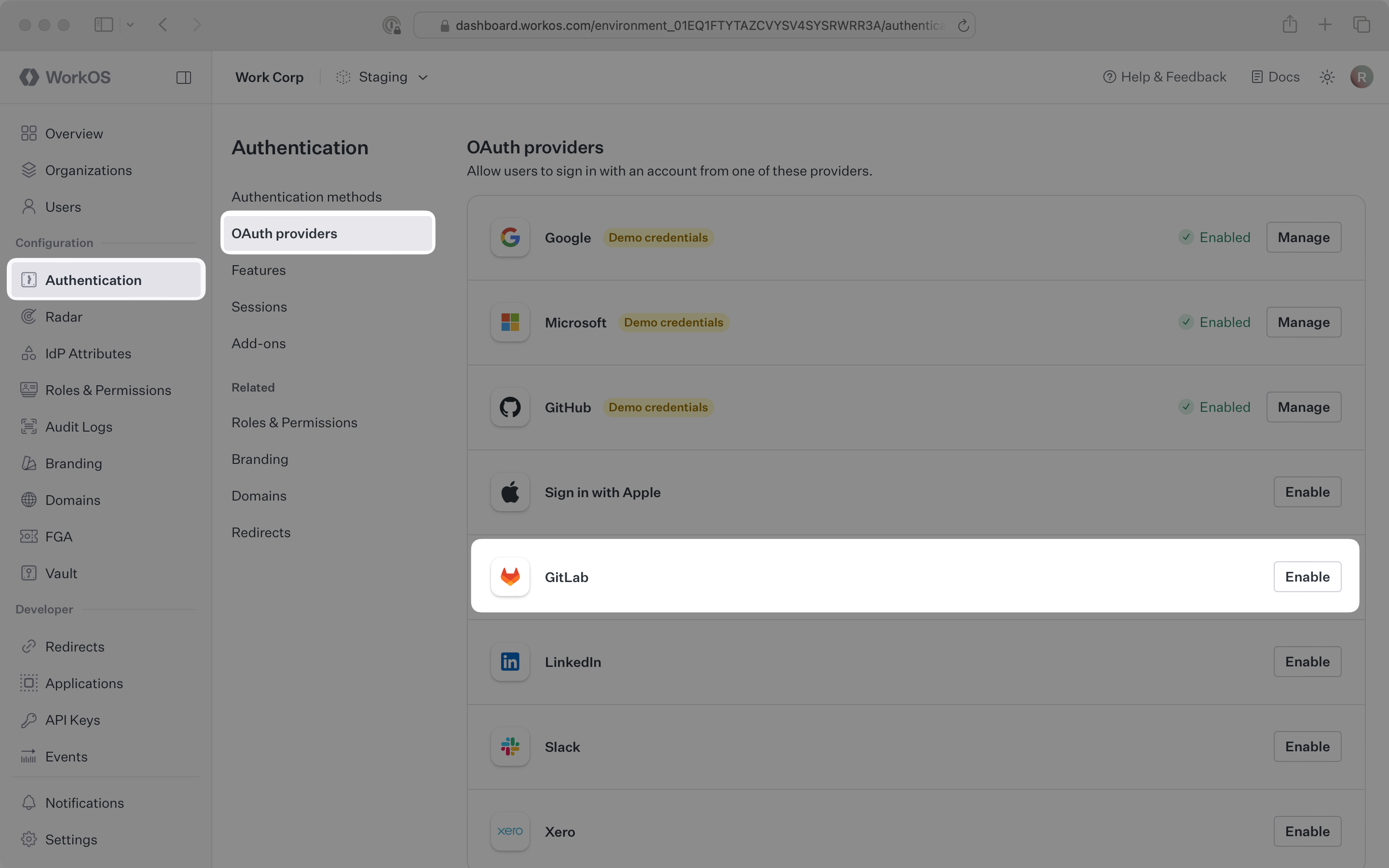
- package/.docs/organized/docs/{user-management → authkit}/custom-emails.mdx +15 -15
- package/.docs/organized/docs/authkit/directory-provisioning.mdx +89 -0
- package/.docs/organized/docs/{user-management → authkit}/domain-verification.mdx +5 -6
- package/.docs/organized/docs/{user-management → authkit}/email-password.mdx +2 -2
- package/.docs/organized/docs/authkit/email-verification.mdx +31 -0
- package/.docs/organized/docs/{user-management → authkit}/example-apps.mdx +3 -3
- package/.docs/organized/docs/authkit/hosted-ui.mdx +165 -0
- package/.docs/organized/docs/{user-management → authkit}/identity-linking.mdx +9 -9
- package/.docs/organized/docs/{user-management → authkit}/impersonation.mdx +8 -8
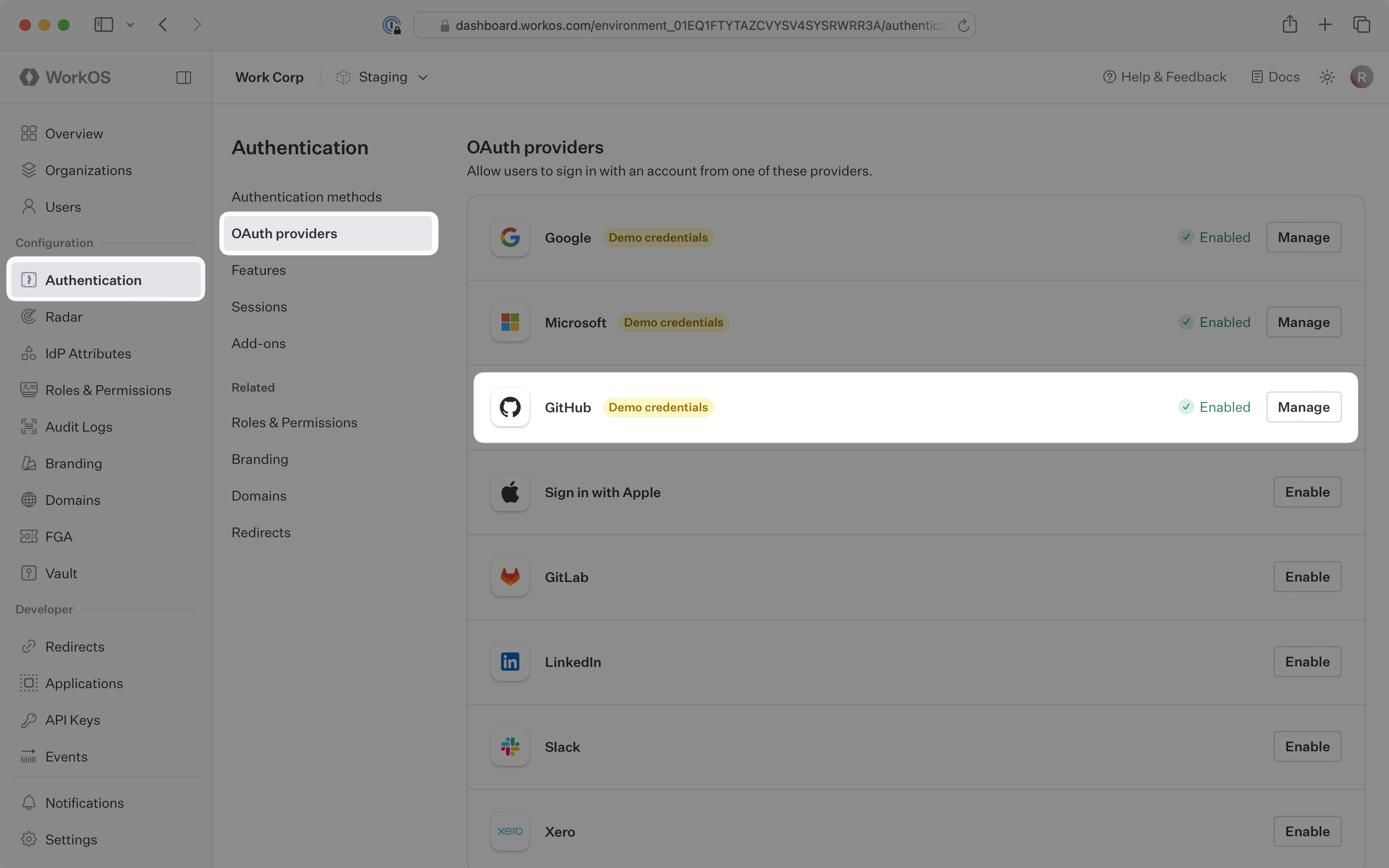
- package/.docs/organized/docs/{user-management → authkit}/index.mdx +141 -74
- package/.docs/organized/docs/{user-management → authkit}/invitations.mdx +4 -4
- package/.docs/organized/docs/{user-management → authkit}/invite-only-signup.mdx +3 -3
- package/.docs/organized/docs/authkit/jit-provisioning.mdx +42 -0
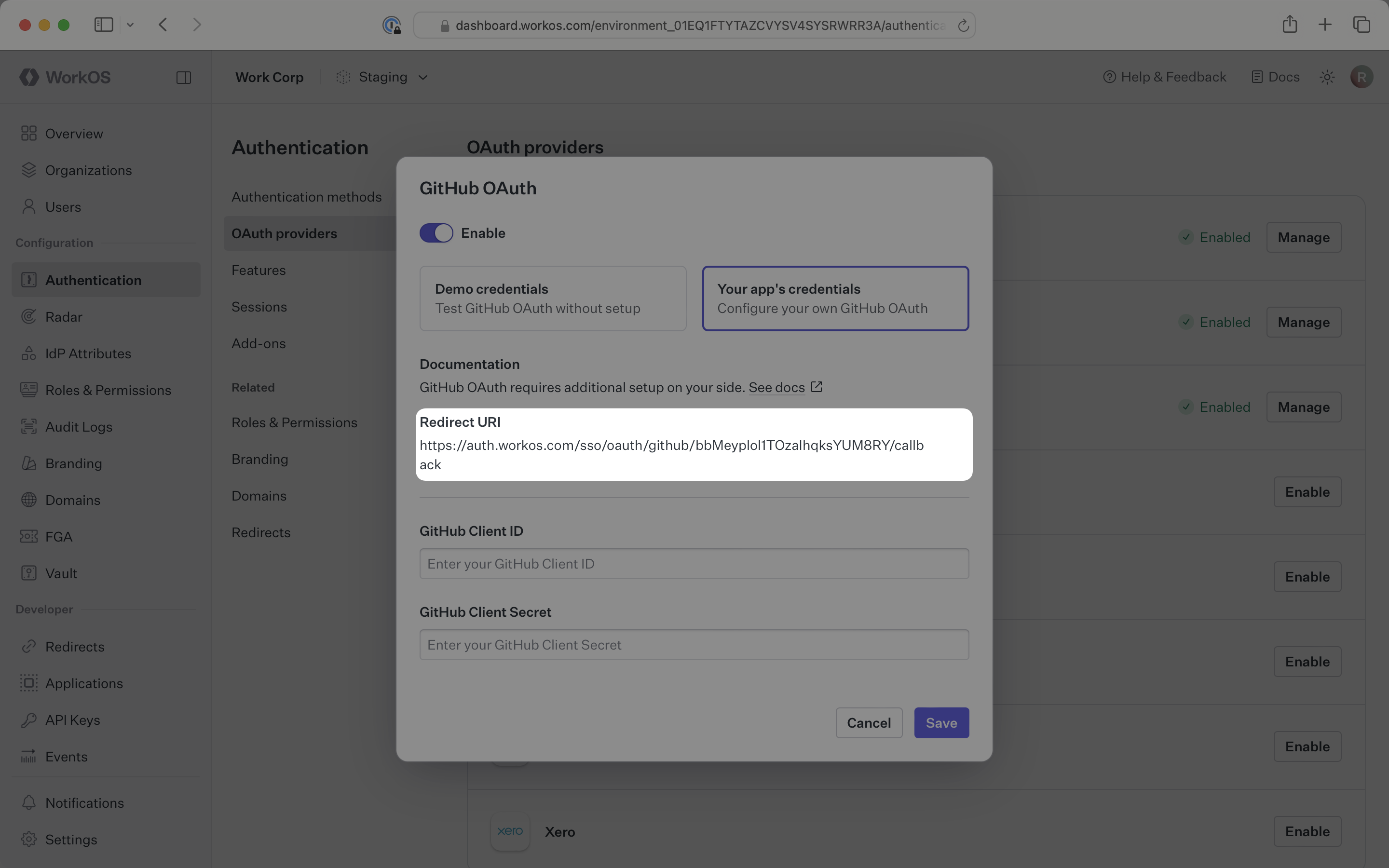
- package/.docs/organized/docs/{user-management → authkit}/jwt-templates.mdx +37 -3
- package/.docs/organized/docs/authkit/landing.mdx +22 -0
- package/.docs/organized/docs/{user-management → authkit}/magic-auth.mdx +3 -5
- package/.docs/organized/docs/{user-management → authkit}/mcp.mdx +46 -9
- package/.docs/organized/docs/{user-management → authkit}/metadata.mdx +9 -9
- package/.docs/organized/docs/{user-management → authkit}/mfa.mdx +2 -2
- package/.docs/organized/docs/{user-management → authkit}/migrations.mdx +4 -4
- package/.docs/organized/docs/{user-management → authkit}/modeling-your-app.mdx +11 -11
- package/.docs/organized/docs/{user-management → authkit}/organization-policies.mdx +3 -4
- package/.docs/organized/docs/authkit/overview.mdx +46 -0
- package/.docs/organized/docs/{user-management → authkit}/passkeys.mdx +3 -3
- package/.docs/organized/docs/authkit/pipes.mdx +75 -0
- package/.docs/organized/docs/{user-management → authkit}/radar.mdx +39 -4
- package/.docs/organized/docs/authkit/roles-and-permissions.mdx +208 -0
- package/.docs/organized/docs/{user-management → authkit}/sessions.mdx +32 -20
- package/.docs/organized/docs/{user-management → authkit}/social-login.mdx +16 -2
- package/.docs/organized/docs/{user-management → authkit}/sso-with-contractors.mdx +3 -4
- package/.docs/organized/docs/{user-management → authkit}/sso.mdx +2 -2
- package/.docs/organized/docs/authkit/users-organizations.mdx +107 -0
- package/.docs/organized/docs/custom-domains/admin-portal.mdx +0 -2
- package/.docs/organized/docs/custom-domains/authkit.mdx +0 -2
- package/.docs/organized/docs/custom-domains/email.mdx +2 -2
- package/.docs/organized/docs/deprecations/_navigation.mdx +8 -0
- package/.docs/organized/docs/deprecations/raw-attributes.mdx +136 -0
- package/.docs/organized/docs/directory-sync/attributes.mdx +50 -31
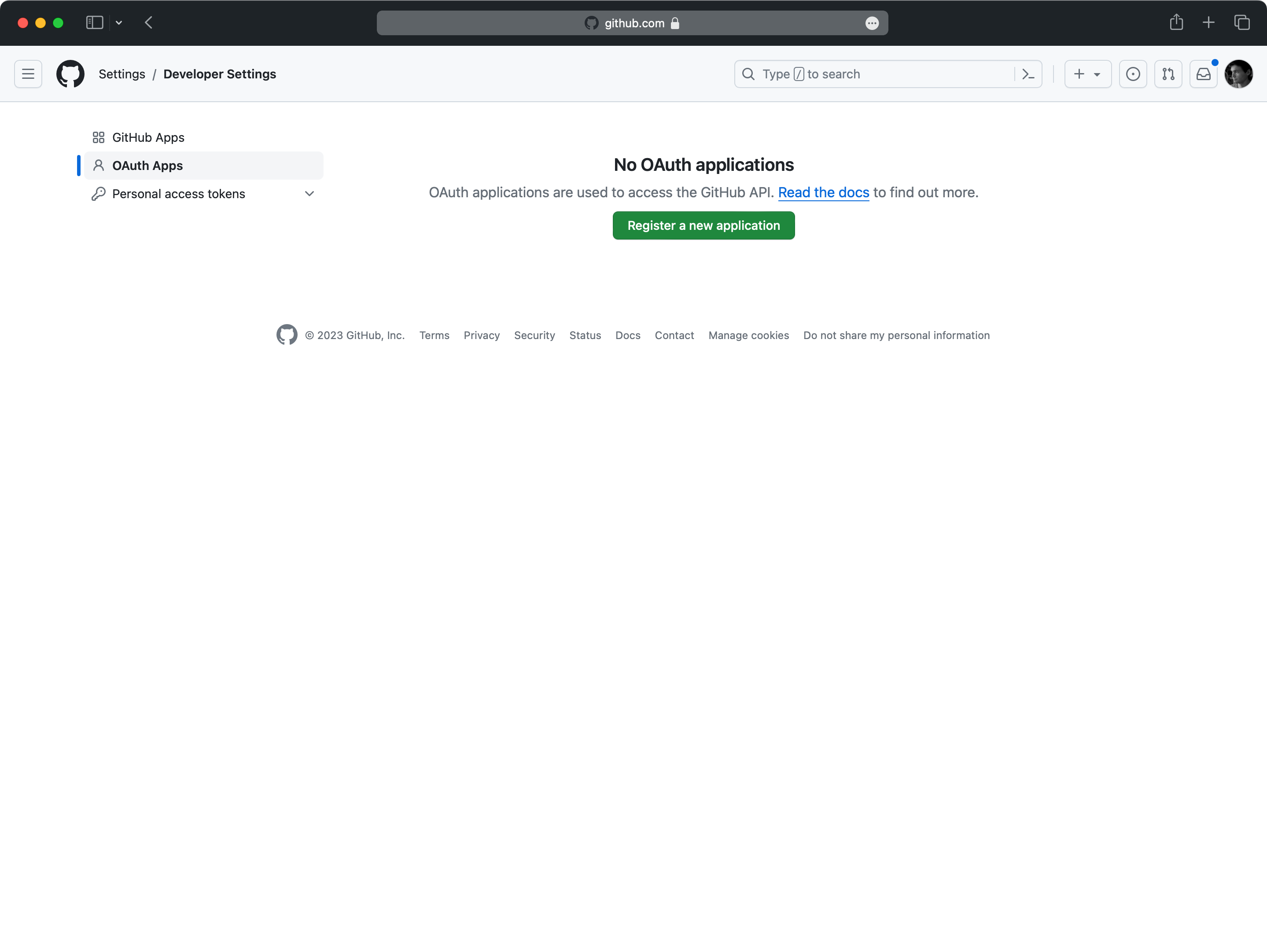
- package/.docs/organized/docs/directory-sync/example-apps.mdx +11 -11
- package/.docs/organized/docs/directory-sync/identity-provider-role-assignment.mdx +23 -26
- package/.docs/organized/docs/directory-sync/index.mdx +4 -2
- package/.docs/organized/docs/directory-sync/quick-start.mdx +3 -3
- package/.docs/organized/docs/directory-sync/understanding-events.mdx +2 -2
- package/.docs/organized/docs/domain-verification/api.mdx +8 -8
- package/.docs/organized/docs/domain-verification/index.mdx +3 -3
- package/.docs/organized/docs/email.mdx +49 -5
- package/.docs/organized/docs/events/data-syncing/events-api.mdx +3 -3
- package/.docs/organized/docs/events/data-syncing/index.mdx +2 -3
- package/.docs/organized/docs/events/data-syncing/webhooks.mdx +4 -4
- package/.docs/organized/docs/events/index.mdx +419 -33
- package/.docs/organized/docs/feature-flags/_navigation.mdx +10 -0
- package/.docs/organized/docs/feature-flags/index.mdx +80 -0
- package/.docs/organized/docs/feature-flags/slack-notifications.mdx +58 -0
- package/.docs/organized/docs/fga/_navigation.mdx +34 -54
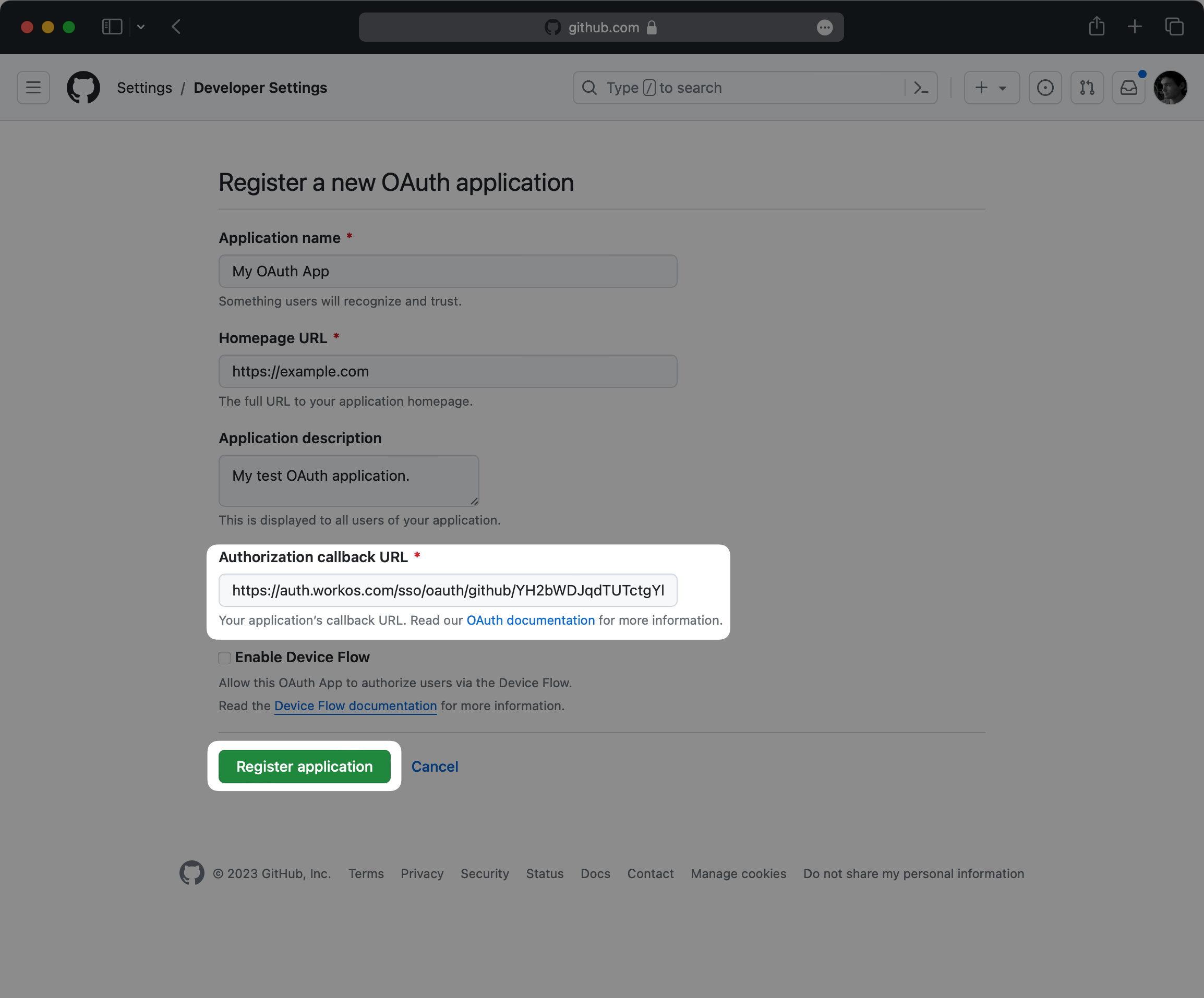
- package/.docs/organized/docs/fga/access-checks.mdx +109 -0
- package/.docs/organized/docs/fga/assignments.mdx +124 -0
- package/.docs/organized/docs/fga/authkit-integration.mdx +92 -0
- package/.docs/organized/docs/fga/high-cardinality-entities.mdx +172 -0
- package/.docs/organized/docs/fga/idp-role-assignment.mdx +66 -0
- package/.docs/organized/docs/fga/index.mdx +94 -29
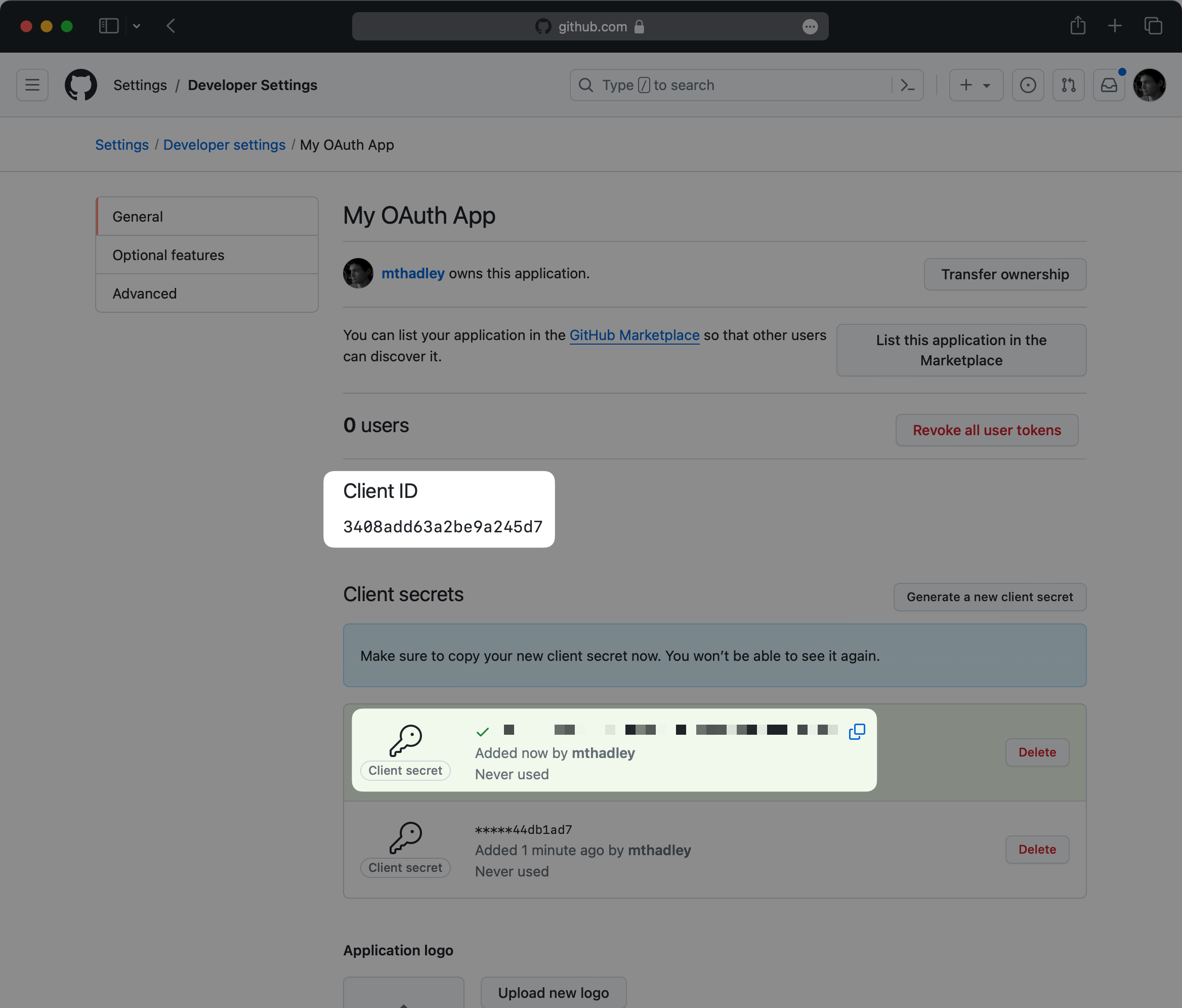
- package/.docs/organized/docs/fga/migration-openfga.mdx +306 -0
- package/.docs/organized/docs/fga/migration-oso.mdx +372 -0
- package/.docs/organized/docs/fga/migration-spicedb.mdx +364 -0
- package/.docs/organized/docs/fga/quick-start.mdx +283 -98
- package/.docs/organized/docs/fga/resource-discovery.mdx +78 -0
- package/.docs/organized/docs/fga/resource-types.mdx +165 -0
- package/.docs/organized/docs/fga/resources.mdx +179 -59
- package/.docs/organized/docs/fga/roles-and-permissions.mdx +122 -0
- package/.docs/organized/docs/fga/standalone-integration.mdx +176 -0
- package/.docs/organized/docs/glossary.mdx +7 -3
- package/.docs/organized/docs/integrations/access-people-hr.mdx +1 -1
- package/.docs/organized/docs/integrations/adp-oidc.mdx +1 -1
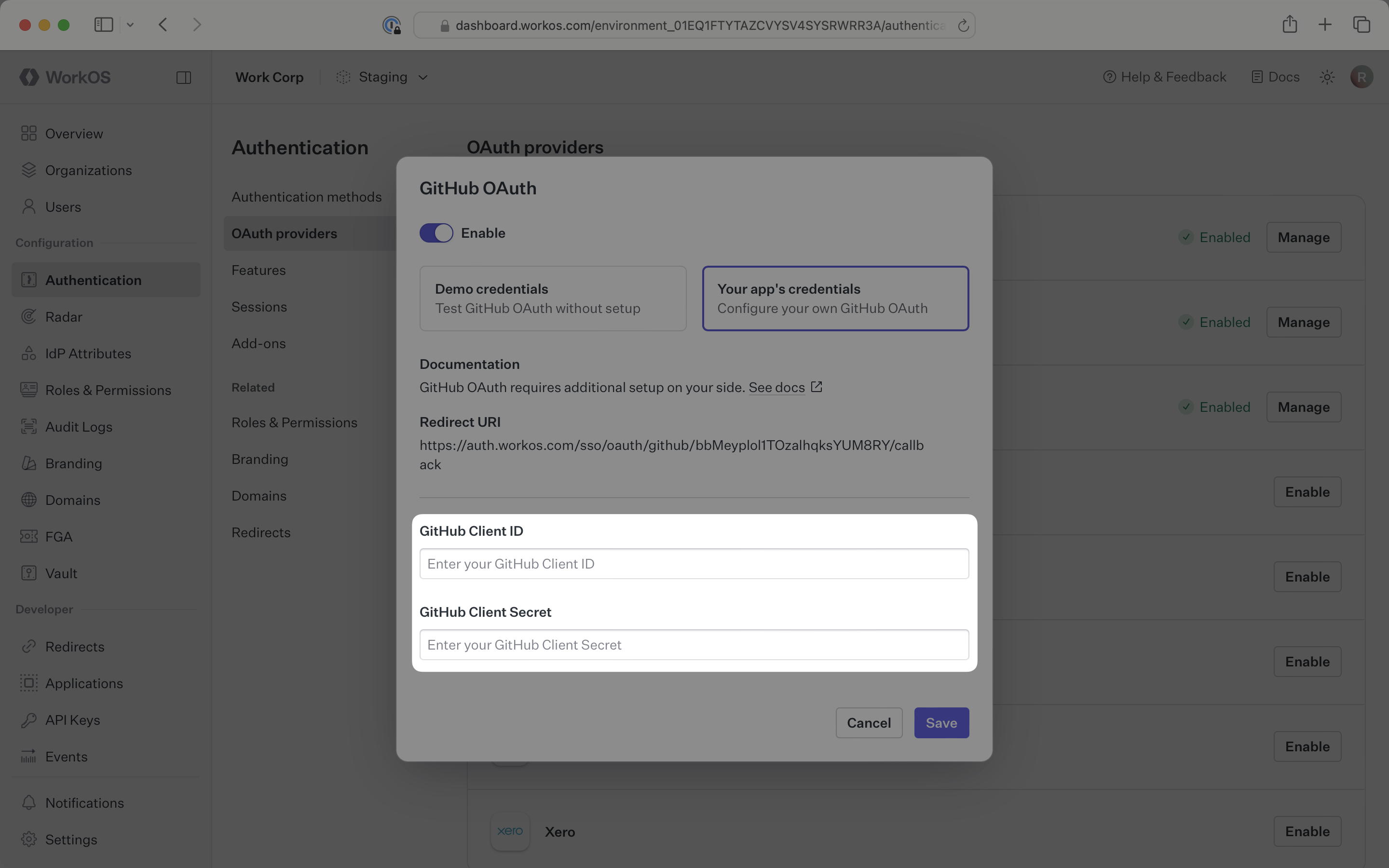
- package/.docs/organized/docs/integrations/apple.mdx +112 -69
- package/.docs/organized/docs/integrations/auth0-directory-sync.mdx +3 -1
- package/.docs/organized/docs/integrations/auth0-enterprise-connection.mdx +3 -1
- package/.docs/organized/docs/integrations/auth0-saml.mdx +3 -1
- package/.docs/organized/docs/integrations/bamboohr.mdx +4 -4
- package/.docs/organized/docs/integrations/breathe-hr.mdx +1 -1
- package/.docs/organized/docs/integrations/bubble.mdx +1 -1
- package/.docs/organized/docs/integrations/cas-saml.mdx +2 -2
- package/.docs/organized/docs/integrations/classlink-saml.mdx +2 -2
- package/.docs/organized/docs/integrations/clever-oidc.mdx +94 -0
- package/.docs/organized/docs/integrations/cloudflare-saml.mdx +35 -2
- package/.docs/organized/docs/integrations/cyberark-saml.mdx +2 -2
- package/.docs/organized/docs/integrations/cyberark-scim.mdx +1 -1
- package/.docs/organized/docs/integrations/duo-saml.mdx +2 -2
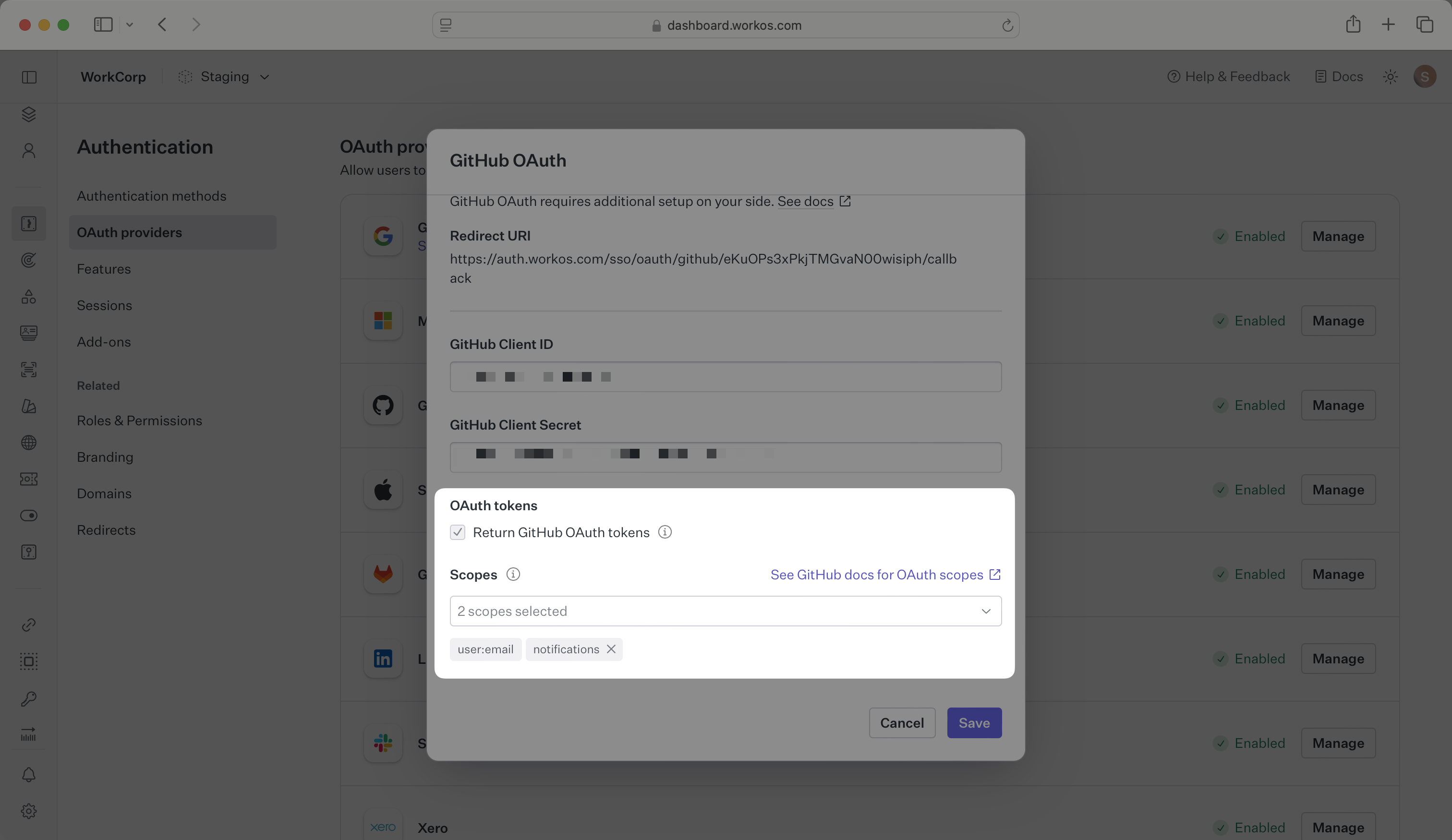
- package/.docs/organized/docs/integrations/entra-id-oidc.mdx +198 -0
- package/.docs/organized/docs/integrations/entra-id-saml.mdx +3 -3
- package/.docs/organized/docs/integrations/entra-id-scim.mdx +5 -1
- package/.docs/organized/docs/integrations/fourth.mdx +2 -2
- package/.docs/organized/docs/integrations/github-oauth.mdx +80 -33
- package/.docs/organized/docs/integrations/gitlab-oauth.mdx +86 -31
- package/.docs/organized/docs/integrations/google-directory-sync.mdx +5 -1
- package/.docs/organized/docs/integrations/google-oauth.mdx +87 -70
- package/.docs/organized/docs/integrations/google-oidc.mdx +142 -0
- package/.docs/organized/docs/integrations/google-saml.mdx +3 -3
- package/.docs/organized/docs/integrations/hibob.mdx +17 -4
- package/.docs/organized/docs/integrations/intuit-oauth.mdx +128 -0
- package/.docs/organized/docs/integrations/jumpcloud-saml.mdx +2 -2
- package/.docs/organized/docs/integrations/jumpcloud-scim.mdx +5 -1
- package/.docs/organized/docs/integrations/keycloak-saml.mdx +2 -2
- package/.docs/organized/docs/integrations/lastpass-saml.mdx +2 -2
- package/.docs/organized/docs/integrations/linkedin-oauth.mdx +69 -30
- package/.docs/organized/docs/integrations/microsoft-ad-fs-saml.mdx +2 -2
- package/.docs/organized/docs/integrations/microsoft-oauth.mdx +95 -38
- package/.docs/organized/docs/integrations/miniorange-saml.mdx +2 -2
- package/.docs/organized/docs/integrations/net-iq-saml.mdx +2 -2
- package/.docs/organized/docs/integrations/next-auth.mdx +1 -1
- package/.docs/organized/docs/integrations/oidc.mdx +37 -24
- package/.docs/organized/docs/integrations/okta-oidc.mdx +149 -0
- package/.docs/organized/docs/integrations/okta-saml.mdx +3 -3
- package/.docs/organized/docs/integrations/okta-scim.mdx +6 -2
- package/.docs/organized/docs/integrations/onelogin-saml.mdx +2 -2
- package/.docs/organized/docs/integrations/onelogin-scim.mdx +1 -1
- package/.docs/organized/docs/integrations/oracle-saml.mdx +2 -2
- package/.docs/organized/docs/integrations/pingfederate-saml.mdx +2 -2
- package/.docs/organized/docs/integrations/pingfederate-scim.mdx +1 -1
- package/.docs/organized/docs/integrations/pingone-saml.mdx +2 -2
- package/.docs/organized/docs/integrations/rippling-saml.mdx +2 -2
- package/.docs/organized/docs/integrations/rippling-scim.mdx +1 -1
- package/.docs/organized/docs/integrations/sailpoint-scim.mdx +77 -0
- package/.docs/organized/docs/integrations/salesforce-oauth.mdx +116 -0
- package/.docs/organized/docs/integrations/salesforce-saml.mdx +4 -4
- package/.docs/organized/docs/integrations/saml.mdx +43 -23
- package/.docs/organized/docs/integrations/scim.mdx +36 -24
- package/.docs/organized/docs/integrations/sftp.mdx +59 -36
- package/.docs/organized/docs/integrations/shibboleth-generic-saml.mdx +1 -1
- package/.docs/organized/docs/integrations/shibboleth-unsolicited-saml.mdx +1 -1
- package/.docs/organized/docs/integrations/simple-saml-php.mdx +2 -2
- package/.docs/organized/docs/integrations/slack-oauth.mdx +53 -49
- package/.docs/organized/docs/integrations/supabase-authkit.mdx +46 -0
- package/.docs/organized/docs/integrations/{supabase.mdx → supabase-sso.mdx} +6 -4
- package/.docs/organized/docs/integrations/vercel-oauth.mdx +120 -0
- package/.docs/organized/docs/integrations/vmware-saml.mdx +2 -2
- package/.docs/organized/docs/integrations/workday.mdx +1 -1
- package/.docs/organized/docs/integrations/xero-oauth.mdx +77 -32
- package/.docs/organized/docs/magic-link/example-apps.mdx +11 -11
- package/.docs/organized/docs/magic-link/index.mdx +2 -0
- package/.docs/organized/docs/mfa/example-apps.mdx +2 -2
- package/.docs/organized/docs/mfa/index.mdx +2 -2
- package/.docs/organized/docs/mfa/ux/enrollment.mdx +1 -1
- package/.docs/organized/docs/mfa/ux/sign-in.mdx +1 -1
- package/.docs/organized/docs/migrate/_navigation.mdx +21 -1
- package/.docs/organized/docs/migrate/auth0.mdx +5 -5
- package/.docs/organized/docs/migrate/aws-cognito.mdx +5 -5
- package/.docs/organized/docs/migrate/better-auth.mdx +282 -0
- package/.docs/organized/docs/migrate/clerk.mdx +9 -11
- package/.docs/organized/docs/migrate/descope.mdx +290 -0
- package/.docs/organized/docs/migrate/firebase.mdx +4 -4
- package/.docs/organized/docs/migrate/other-services.mdx +25 -6
- package/.docs/organized/docs/migrate/standalone-sso.mdx +14 -14
- package/.docs/organized/docs/migrate/stytch.mdx +363 -0
- package/.docs/organized/docs/migrate/supabase.mdx +255 -0
- package/.docs/organized/docs/on-prem-deployment.mdx +1 -1
- package/.docs/organized/docs/pipes/_navigation.mdx +12 -0
- package/.docs/organized/docs/pipes/index.mdx +75 -0
- package/.docs/organized/docs/pipes/providers.mdx +9 -0
- package/.docs/organized/docs/rbac/_navigation.mdx +16 -0
- package/.docs/organized/docs/rbac/configuration.mdx +80 -0
- package/.docs/organized/docs/rbac/idp-role-assignment.mdx +79 -0
- package/.docs/organized/docs/rbac/index.mdx +24 -0
- package/.docs/organized/docs/rbac/integration.mdx +59 -0
- package/.docs/organized/docs/rbac/organization-roles.mdx +38 -0
- package/.docs/organized/docs/rbac/quick-start.mdx +52 -0
- package/.docs/organized/docs/reference/_navigation.mdx +437 -284
- package/.docs/organized/docs/reference/admin-portal/portal-link/index.mdx +1 -1
- package/.docs/organized/docs/reference/admin-portal/provider-icons/index.mdx +3 -3
- package/.docs/organized/docs/reference/{api-keys.mdx → api-authentication/index.mdx} +3 -3
- package/.docs/organized/docs/reference/audit-logs/configuration/index.mdx +97 -0
- package/.docs/organized/docs/reference/audit-logs/{create-event.mdx → event/create.mdx} +12 -2
- package/.docs/organized/docs/reference/audit-logs/event/index.mdx +92 -0
- package/.docs/organized/docs/reference/audit-logs/{create-export.mdx → export/create.mdx} +1 -1
- package/.docs/organized/docs/reference/audit-logs/{get-export.mdx → export/get.mdx} +1 -1
- package/.docs/organized/docs/reference/audit-logs/{audit-log-export.mdx → export/index.mdx} +11 -12
- package/.docs/organized/docs/reference/audit-logs/{get-retention.mdx → retention/get.mdx} +1 -1
- package/.docs/organized/docs/reference/audit-logs/retention/index.mdx +25 -0
- package/.docs/organized/docs/reference/audit-logs/{set-retention.mdx → retention/set.mdx} +1 -1
- package/.docs/organized/docs/reference/audit-logs/{create-schema.mdx → schema/create.mdx} +1 -1
- package/.docs/organized/docs/reference/audit-logs/{audit-log-schema.mdx → schema/index.mdx} +5 -6
- package/.docs/organized/docs/reference/audit-logs/{list-actions.mdx → schema/list-actions.mdx} +2 -1
- package/.docs/organized/docs/reference/audit-logs/{list-schemas.mdx → schema/list.mdx} +1 -1
- package/.docs/organized/docs/reference/authkit/api-keys/create-for-organization.mdx +40 -0
- package/.docs/organized/docs/reference/authkit/api-keys/delete.mdx +23 -0
- package/.docs/organized/docs/reference/authkit/api-keys/index.mdx +275 -0
- package/.docs/organized/docs/reference/authkit/api-keys/list-for-organization.mdx +41 -0
- package/.docs/organized/docs/reference/authkit/api-keys/validate.mdx +77 -0
- package/.docs/organized/docs/reference/{user-management → authkit}/authentication/code.mdx +138 -18
- package/.docs/organized/docs/reference/{user-management → authkit}/authentication/email-verification.mdx +10 -10
- package/.docs/organized/docs/reference/{user-management → authkit}/authentication/get-authorization-url/error-codes.mdx +3 -3
- package/.docs/organized/docs/reference/{user-management → authkit}/authentication/get-authorization-url/index.mdx +64 -17
- package/.docs/organized/docs/reference/{user-management → authkit}/authentication/get-authorization-url/pkce.mdx +2 -2
- package/.docs/organized/docs/reference/authkit/authentication/get-authorization-url/redirect-uri.mdx +47 -0
- package/.docs/organized/docs/reference/{user-management → authkit}/authentication/index.mdx +19 -11
- package/.docs/organized/docs/reference/{user-management → authkit}/authentication/magic-auth.mdx +9 -9
- package/.docs/organized/docs/reference/{user-management → authkit}/authentication/organization-selection.mdx +9 -9
- package/.docs/organized/docs/reference/{user-management → authkit}/authentication/password.mdx +8 -8
- package/.docs/organized/docs/reference/{user-management → authkit}/authentication/refresh-and-seal-session-data.mdx +3 -3
- package/.docs/organized/docs/reference/{user-management → authkit}/authentication/refresh-token.mdx +17 -17
- package/.docs/organized/docs/reference/{user-management → authkit}/authentication/session-cookie.mdx +7 -3
- package/.docs/organized/docs/reference/{user-management → authkit}/authentication/totp.mdx +10 -10
- package/.docs/organized/docs/reference/{user-management → authkit}/authentication-errors/email-verification-required-error.mdx +3 -3
- package/.docs/organized/docs/reference/{user-management → authkit}/authentication-errors/index.mdx +1 -3
- package/.docs/organized/docs/reference/{user-management → authkit}/authentication-errors/mfa-challenge-error.mdx +3 -3
- package/.docs/organized/docs/reference/{user-management → authkit}/authentication-errors/mfa-enrollment-error.mdx +3 -3
- package/.docs/organized/docs/reference/{user-management → authkit}/authentication-errors/organization-authentication-required-error.mdx +3 -3
- package/.docs/organized/docs/reference/{user-management → authkit}/authentication-errors/organization-selection-error.mdx +3 -4
- package/.docs/organized/docs/reference/{user-management → authkit}/authentication-errors/sso-required-error.mdx +3 -3
- package/.docs/organized/docs/reference/authkit/cli-auth/device-authorization.mdx +61 -0
- package/.docs/organized/docs/reference/authkit/cli-auth/device-code.mdx +57 -0
- package/.docs/organized/docs/reference/authkit/cli-auth/error-codes.mdx +31 -0
- package/.docs/organized/docs/reference/authkit/cli-auth/index.mdx +22 -0
- package/.docs/organized/docs/reference/{user-management → authkit}/email-verification/get.mdx +8 -8
- package/.docs/organized/docs/reference/{user-management → authkit}/email-verification/index.mdx +9 -11
- package/.docs/organized/docs/reference/{user-management → authkit}/identity/index.mdx +6 -9
- package/.docs/organized/docs/reference/{user-management → authkit}/identity/list.mdx +5 -6
- package/.docs/organized/docs/reference/authkit/index.mdx +13 -0
- package/.docs/organized/docs/reference/{user-management → authkit}/invitation/accept.mdx +5 -5
- package/.docs/organized/docs/reference/{user-management → authkit}/invitation/find-by-token.mdx +8 -8
- package/.docs/organized/docs/reference/{user-management → authkit}/invitation/get.mdx +8 -9
- package/.docs/organized/docs/reference/{user-management → authkit}/invitation/index.mdx +10 -15
- package/.docs/organized/docs/reference/{user-management → authkit}/invitation/list.mdx +10 -11
- package/.docs/organized/docs/reference/authkit/invitation/resend.mdx +109 -0
- package/.docs/organized/docs/reference/{user-management → authkit}/invitation/revoke.mdx +8 -8
- package/.docs/organized/docs/reference/{user-management → authkit}/invitation/send.mdx +23 -13
- package/.docs/organized/docs/reference/{user-management → authkit}/logout/get-logout-url-from-session-cookie.mdx +2 -2
- package/.docs/organized/docs/reference/{user-management → authkit}/logout/get-logout-url.mdx +8 -8
- package/.docs/organized/docs/reference/{user-management → authkit}/logout/index.mdx +4 -5
- package/.docs/organized/docs/reference/{user-management → authkit}/magic-auth/create.mdx +10 -10
- package/.docs/organized/docs/reference/{user-management → authkit}/magic-auth/get.mdx +9 -10
- package/.docs/organized/docs/reference/{user-management → authkit}/magic-auth/index.mdx +10 -15
- package/.docs/organized/docs/reference/{user-management → authkit}/mfa/authentication-challenge.mdx +9 -10
- package/.docs/organized/docs/reference/{user-management → authkit}/mfa/authentication-factor.mdx +11 -11
- package/.docs/organized/docs/reference/{user-management → authkit}/mfa/enroll-auth-factor.mdx +19 -15
- package/.docs/organized/docs/reference/authkit/mfa/index.mdx +11 -0
- package/.docs/organized/docs/reference/{user-management → authkit}/mfa/list-auth-factors.mdx +9 -9
- package/.docs/organized/docs/reference/{user-management → authkit}/organization-membership/create.mdx +27 -10
- package/.docs/organized/docs/reference/{user-management → authkit}/organization-membership/deactivate.mdx +10 -10
- package/.docs/organized/docs/reference/{user-management → authkit}/organization-membership/delete.mdx +8 -8
- package/.docs/organized/docs/reference/{user-management → authkit}/organization-membership/get.mdx +8 -8
- package/.docs/organized/docs/reference/{user-management → authkit}/organization-membership/index.mdx +107 -14
- package/.docs/organized/docs/reference/{user-management → authkit}/organization-membership/list.mdx +10 -10
- package/.docs/organized/docs/reference/{user-management → authkit}/organization-membership/reactivate.mdx +11 -11
- package/.docs/organized/docs/reference/{user-management → authkit}/organization-membership/update.mdx +25 -9
- package/.docs/organized/docs/reference/{user-management → authkit}/password-reset/create.mdx +8 -8
- package/.docs/organized/docs/reference/{user-management → authkit}/password-reset/get.mdx +8 -8
- package/.docs/organized/docs/reference/{user-management → authkit}/password-reset/index.mdx +10 -12
- package/.docs/organized/docs/reference/{user-management → authkit}/password-reset/reset-password.mdx +8 -8
- package/.docs/organized/docs/reference/authkit/session/index.mdx +128 -0
- package/.docs/organized/docs/reference/authkit/session/list.mdx +110 -0
- package/.docs/organized/docs/reference/authkit/session/revoke.mdx +73 -0
- package/.docs/organized/docs/reference/{user-management → authkit}/session-helpers/authenticate.mdx +22 -6
- package/.docs/organized/docs/reference/{user-management → authkit}/session-helpers/get-logout-url.mdx +5 -5
- package/.docs/organized/docs/reference/{user-management → authkit}/session-helpers/index.mdx +2 -2
- package/.docs/organized/docs/reference/{user-management → authkit}/session-helpers/load-sealed-session.mdx +4 -4
- package/.docs/organized/docs/reference/{user-management → authkit}/session-helpers/refresh.mdx +18 -6
- package/.docs/organized/docs/reference/{user-management → authkit}/session-tokens/access-token.mdx +16 -8
- package/.docs/organized/docs/reference/authkit/session-tokens/index.mdx +5 -0
- package/.docs/organized/docs/reference/{user-management → authkit}/session-tokens/jwks.mdx +8 -8
- package/.docs/organized/docs/reference/authkit/session-tokens/refresh-token.mdx +8 -0
- package/.docs/organized/docs/reference/{user-management → authkit}/user/create.mdx +36 -17
- package/.docs/organized/docs/reference/{user-management → authkit}/user/delete.mdx +8 -9
- package/.docs/organized/docs/reference/{user-management → authkit}/user/get-by-external-id.mdx +16 -4
- package/.docs/organized/docs/reference/{user-management → authkit}/user/get.mdx +8 -8
- package/.docs/organized/docs/reference/{user-management → authkit}/user/index.mdx +25 -15
- package/.docs/organized/docs/reference/{user-management → authkit}/user/list.mdx +9 -12
- package/.docs/organized/docs/reference/{user-management → authkit}/user/update.mdx +43 -20
- package/.docs/organized/docs/reference/{client-libraries.mdx → client-libraries/index.mdx} +2 -2
- package/.docs/organized/docs/reference/directory-sync/directory/index.mdx +1 -1
- package/.docs/organized/docs/reference/directory-sync/directory-group/index.mdx +1 -24
- package/.docs/organized/docs/reference/directory-sync/directory-user/index.mdx +1 -29
- package/.docs/organized/docs/reference/directory-sync/directory-user/list.mdx +1 -1
- package/.docs/organized/docs/reference/directory-sync/index.mdx +1 -1
- package/.docs/organized/docs/reference/domain-verification/create.mdx +35 -0
- package/.docs/organized/docs/reference/domain-verification/delete.mdx +55 -0
- package/.docs/organized/docs/reference/domain-verification/get.mdx +29 -0
- package/.docs/organized/docs/reference/domain-verification/index.mdx +57 -1
- package/.docs/organized/docs/reference/domain-verification/verify.mdx +29 -0
- package/.docs/organized/docs/reference/{errors.mdx → errors/index.mdx} +1 -1
- package/.docs/organized/docs/reference/events/list.mdx +5 -4
- package/.docs/organized/docs/reference/feature-flags/flag/disable.mdx +33 -0
- package/.docs/organized/docs/reference/feature-flags/flag/enable.mdx +33 -0
- package/.docs/organized/docs/reference/feature-flags/flag/get.mdx +32 -0
- package/.docs/organized/docs/reference/feature-flags/flag/index.mdx +116 -0
- package/.docs/organized/docs/reference/feature-flags/flag/list.mdx +67 -0
- package/.docs/organized/docs/reference/feature-flags/index.mdx +123 -0
- package/.docs/organized/docs/reference/feature-flags/targeting/add.mdx +43 -0
- package/.docs/organized/docs/reference/feature-flags/targeting/index.mdx +23 -0
- package/.docs/organized/docs/reference/feature-flags/targeting/list-for-organization.mdx +132 -0
- package/.docs/organized/docs/reference/feature-flags/targeting/list-for-user.mdx +94 -0
- package/.docs/organized/docs/reference/feature-flags/targeting/remove.mdx +43 -0
- package/.docs/organized/docs/reference/fga/access-check/check.mdx +102 -0
- package/.docs/organized/docs/reference/fga/access-check/index.mdx +6 -0
- package/.docs/organized/docs/reference/fga/access-check/list-memberships-by-external-id.mdx +143 -0
- package/.docs/organized/docs/reference/fga/access-check/list-memberships.mdx +127 -0
- package/.docs/organized/docs/reference/fga/access-check/list-resources.mdx +152 -0
- package/.docs/organized/docs/reference/fga/index.mdx +14 -2
- package/.docs/organized/docs/reference/fga/resource/create.mdx +74 -88
- package/.docs/organized/docs/reference/fga/resource/delete-by-external-id.mdx +78 -0
- package/.docs/organized/docs/reference/fga/resource/delete.mdx +38 -62
- package/.docs/organized/docs/reference/fga/resource/get-by-external-id.mdx +60 -0
- package/.docs/organized/docs/reference/fga/resource/get.mdx +15 -63
- package/.docs/organized/docs/reference/fga/resource/index.mdx +74 -73
- package/.docs/organized/docs/reference/fga/resource/list.mdx +90 -131
- package/.docs/organized/docs/reference/fga/resource/update-by-external-id.mdx +81 -0
- package/.docs/organized/docs/reference/fga/resource/update.mdx +29 -85
- package/.docs/organized/docs/reference/fga/role-assignment/create.mdx +89 -0
- package/.docs/organized/docs/reference/fga/role-assignment/delete-by-id.mdx +59 -0
- package/.docs/organized/docs/reference/fga/role-assignment/delete.mdx +90 -0
- package/.docs/organized/docs/reference/fga/role-assignment/index.mdx +106 -0
- package/.docs/organized/docs/reference/fga/role-assignment/list.mdx +86 -0
- package/.docs/organized/docs/reference/index.mdx +21 -12
- package/.docs/organized/docs/reference/magic-link/passwordless-session/index.mdx +1 -1
- package/.docs/organized/docs/reference/mfa/{challenge-factor.mdx → challenge/create.mdx} +1 -1
- package/.docs/organized/docs/reference/mfa/{authentication-challenge.mdx → challenge/index.mdx} +11 -14
- package/.docs/organized/docs/reference/mfa/{verify-challenge.mdx → challenge/verify.mdx} +10 -12
- package/.docs/organized/docs/reference/mfa/{delete-factor.mdx → factor/delete.mdx} +1 -1
- package/.docs/organized/docs/reference/mfa/{enroll-factor.mdx → factor/enroll.mdx} +1 -1
- package/.docs/organized/docs/reference/mfa/{get-factor.mdx → factor/get.mdx} +1 -1
- package/.docs/organized/docs/reference/mfa/{authentication-factor.mdx → factor/index.mdx} +11 -12
- package/.docs/organized/docs/reference/organization/create.mdx +1 -6
- package/.docs/organized/docs/reference/organization/get-by-external-id.mdx +1 -1
- package/.docs/organized/docs/reference/organization/index.mdx +5 -5
- package/.docs/organized/docs/reference/organization/update.mdx +1 -1
- package/.docs/organized/docs/reference/{pagination.mdx → pagination/index.mdx} +1 -3
- package/.docs/organized/docs/reference/pipes/access-token/get.mdx +174 -0
- package/.docs/organized/docs/reference/pipes/access-token/index.mdx +44 -0
- package/.docs/organized/docs/reference/pipes/connected-account/delete.mdx +42 -0
- package/.docs/organized/docs/reference/pipes/connected-account/get-authorize-url.mdx +49 -0
- package/.docs/organized/docs/reference/pipes/connected-account/get.mdx +42 -0
- package/.docs/organized/docs/reference/pipes/connected-account/index.mdx +69 -0
- package/.docs/organized/docs/reference/pipes/index.mdx +8 -0
- package/.docs/organized/docs/reference/pipes/provider/index.mdx +70 -0
- package/.docs/organized/docs/reference/pipes/provider/list.mdx +47 -0
- package/.docs/organized/docs/reference/radar/attempts/index.mdx +1 -1
- package/.docs/organized/docs/reference/radar/lists/index.mdx +1 -1
- package/.docs/organized/docs/reference/rate-limits/index.mdx +56 -0
- package/.docs/organized/docs/reference/roles/index.mdx +12 -262
- package/.docs/organized/docs/reference/roles/organization-role/add-permission.mdx +75 -0
- package/.docs/organized/docs/reference/roles/organization-role/create.mdx +95 -0
- package/.docs/organized/docs/reference/roles/organization-role/delete.mdx +47 -0
- package/.docs/organized/docs/reference/roles/organization-role/get.mdx +55 -0
- package/.docs/organized/docs/reference/roles/organization-role/index.mdx +148 -0
- package/.docs/organized/docs/reference/roles/organization-role/list.mdx +68 -0
- package/.docs/organized/docs/reference/roles/organization-role/remove-permission.mdx +68 -0
- package/.docs/organized/docs/reference/roles/organization-role/set-permissions.mdx +79 -0
- package/.docs/organized/docs/reference/roles/organization-role/update.mdx +85 -0
- package/.docs/organized/docs/reference/roles/permission/create.mdx +101 -0
- package/.docs/organized/docs/reference/roles/permission/delete.mdx +38 -0
- package/.docs/organized/docs/reference/roles/permission/get.mdx +45 -0
- package/.docs/organized/docs/reference/roles/permission/index.mdx +128 -0
- package/.docs/organized/docs/reference/roles/permission/list.mdx +91 -0
- package/.docs/organized/docs/reference/roles/permission/update.mdx +80 -0
- package/.docs/organized/docs/reference/roles/role/add-permission.mdx +63 -0
- package/.docs/organized/docs/reference/roles/role/create.mdx +103 -0
- package/.docs/organized/docs/reference/roles/role/get.mdx +52 -0
- package/.docs/organized/docs/reference/roles/role/index.mdx +135 -0
- package/.docs/organized/docs/reference/roles/role/list.mdx +56 -0
- package/.docs/organized/docs/reference/roles/role/set-permissions.mdx +67 -0
- package/.docs/organized/docs/reference/roles/role/update.mdx +78 -0
- package/.docs/organized/docs/reference/sso/connection/index.mdx +2 -2
- package/.docs/organized/docs/reference/sso/get-authorization-url/error-codes.mdx +5 -3
- package/.docs/organized/docs/reference/sso/get-authorization-url/index.mdx +24 -2
- package/.docs/organized/docs/reference/sso/get-authorization-url/redirect-uri.mdx +25 -1
- package/.docs/organized/docs/reference/sso/index.mdx +1 -1
- package/.docs/organized/docs/reference/sso/logout/authorize.mdx +0 -1
- package/.docs/organized/docs/reference/sso/logout/index.mdx +1 -2
- package/.docs/organized/docs/reference/sso/logout/redirect.mdx +0 -1
- package/.docs/organized/docs/reference/sso/profile/get-profile-and-token.mdx +13 -1
- package/.docs/organized/docs/reference/sso/profile/index.mdx +25 -24
- package/.docs/organized/docs/reference/{testing.mdx → testing/index.mdx} +1 -1
- package/.docs/organized/docs/reference/vault/key/create-data-key.mdx +29 -0
- package/.docs/organized/docs/reference/vault/key/decrypt-data-key.mdx +20 -0
- package/.docs/organized/docs/reference/vault/key/decrypt-data.mdx +24 -0
- package/.docs/organized/docs/reference/vault/key/encrypt-data.mdx +20 -0
- package/.docs/organized/docs/reference/vault/object/create.mdx +17 -0
- package/.docs/organized/docs/reference/vault/object/delete.mdx +12 -0
- package/.docs/organized/docs/reference/vault/object/get-by-name.mdx +61 -0
- package/.docs/organized/docs/reference/vault/object/get.mdx +11 -0
- package/.docs/organized/docs/reference/vault/object/index.mdx +50 -4
- package/.docs/organized/docs/reference/vault/object/list.mdx +40 -1
- package/.docs/organized/docs/reference/vault/object/update.mdx +18 -0
- package/.docs/organized/docs/reference/vault/object/version.mdx +15 -2
- package/.docs/organized/docs/reference/vault/object/versions.mdx +13 -0
- package/.docs/organized/docs/reference/widgets/get-token.mdx +8 -5
- package/.docs/organized/docs/reference/workos-connect/applications/client-secrets/create.mdx +55 -0
- package/.docs/organized/docs/reference/workos-connect/applications/client-secrets/delete.mdx +28 -0
- package/.docs/organized/docs/reference/workos-connect/applications/client-secrets/index.mdx +60 -0
- package/.docs/organized/docs/reference/workos-connect/applications/client-secrets/list.mdx +52 -0
- package/.docs/organized/docs/reference/workos-connect/applications/create.mdx +79 -0
- package/.docs/organized/docs/reference/workos-connect/applications/delete.mdx +28 -0
- package/.docs/organized/docs/reference/workos-connect/applications/get.mdx +59 -0
- package/.docs/organized/docs/reference/workos-connect/applications/index.mdx +40 -0
- package/.docs/organized/docs/reference/workos-connect/applications/list.mdx +49 -0
- package/.docs/organized/docs/reference/workos-connect/applications/m2m.mdx +52 -0
- package/.docs/organized/docs/reference/workos-connect/applications/oauth.mdx +85 -0
- package/.docs/organized/docs/reference/workos-connect/applications/update.mdx +59 -0
- package/.docs/organized/docs/reference/workos-connect/authorize/index.mdx +29 -1
- package/.docs/organized/docs/reference/workos-connect/cli-auth/authorize-device/index.mdx +81 -0
- package/.docs/organized/docs/reference/workos-connect/cli-auth/device-code-grant.mdx +74 -0
- package/.docs/organized/docs/reference/workos-connect/cli-auth/index.mdx +23 -0
- package/.docs/organized/docs/reference/workos-connect/index.mdx +1 -1
- package/.docs/organized/docs/reference/workos-connect/introspection/index.mdx +8 -3
- package/.docs/organized/docs/reference/workos-connect/metadata/index.mdx +1 -1
- package/.docs/organized/docs/reference/workos-connect/metadata/oauth-authorization-server/index.mdx +1 -1
- package/.docs/organized/docs/reference/workos-connect/standalone/complete.mdx +68 -0
- package/.docs/organized/docs/reference/workos-connect/standalone/index.mdx +9 -0
- package/.docs/organized/docs/reference/workos-connect/standalone/user-consent-options.mdx +41 -0
- package/.docs/organized/docs/reference/workos-connect/token/authorization-code-grant/access-token.mdx +6 -0
- package/.docs/organized/docs/reference/workos-connect/token/authorization-code-grant/id-token.mdx +1 -1
- package/.docs/organized/docs/reference/workos-connect/token/{authorization-code-grant/index.mdx → authorization-code-grant.mdx} +23 -2
- package/.docs/organized/docs/reference/workos-connect/token/client-credentials-grant/access-token.mdx +1 -1
- package/.docs/organized/docs/reference/workos-connect/token/{client-credentials-grant/index.mdx → client-credentials-grant.mdx} +2 -2
- package/.docs/organized/docs/reference/workos-connect/token/index.mdx +5 -4
- package/.docs/organized/docs/reference/workos-connect/token/refresh-token-grant.mdx +1 -1
- package/.docs/organized/docs/reference/workos-connect/userinfo/index.mdx +2 -2
- package/.docs/organized/docs/sdks/authkit-js.mdx +14 -0
- package/.docs/organized/docs/sdks/authkit-nextjs.mdx +14 -0
- package/.docs/organized/docs/sdks/authkit-react-router.mdx +14 -0
- package/.docs/organized/docs/sdks/authkit-react.mdx +14 -0
- package/.docs/organized/docs/sdks/authkit-remix.mdx +14 -0
- package/.docs/organized/docs/sdks/authkit-tanstack-start.mdx +14 -0
- package/.docs/organized/docs/sso/_navigation.mdx +8 -2
- package/.docs/organized/docs/sso/attributes.mdx +15 -3
- package/.docs/organized/docs/sso/domains.mdx +8 -6
- package/.docs/organized/docs/sso/example-apps.mdx +2 -2
- package/.docs/organized/docs/sso/identity-provider-role-assignment.mdx +30 -30
- package/.docs/organized/docs/sso/index.mdx +7 -6
- package/.docs/organized/docs/sso/it-team-faq.mdx +1 -1
- package/.docs/organized/docs/sso/jit-provisioning.mdx +2 -3
- package/.docs/organized/docs/sso/launch-checklist.mdx +2 -2
- package/.docs/organized/docs/sso/login-flows.mdx +3 -3
- package/.docs/organized/docs/sso/redirect-uris.mdx +22 -11
- package/.docs/organized/docs/sso/saml-security.mdx +1 -1
- package/.docs/organized/docs/sso/sign-in-consent.mdx +59 -0
- package/.docs/organized/docs/sso/signing-certificates.mdx +7 -7
- package/.docs/organized/docs/sso/single-logout.mdx +0 -1
- package/.docs/organized/docs/sso/ux/sessions.mdx +99 -0
- package/.docs/organized/docs/sso/ux/sign-in.mdx +1 -1
- package/.docs/organized/docs/vault/_navigation.mdx +2 -0
- package/.docs/organized/docs/vault/byok.mdx +140 -0
- package/.docs/organized/docs/vault/index.mdx +1 -1
- package/.docs/organized/docs/widgets/_navigation.mdx +48 -0
- package/.docs/organized/docs/widgets/admin-portal-domain-verification.mdx +24 -0
- package/.docs/organized/docs/widgets/admin-portal-sso-connection.mdx +20 -0
- package/.docs/organized/docs/widgets/api-keys.mdx +28 -0
- package/.docs/organized/docs/widgets/audit-log-streaming.mdx +25 -0
- package/.docs/organized/docs/widgets/directory-sync.mdx +23 -0
- package/.docs/organized/docs/widgets/index.mdx +12 -0
- package/.docs/organized/docs/widgets/localization.mdx +111 -0
- package/.docs/organized/docs/widgets/organization-switcher.mdx +47 -0
- package/.docs/organized/docs/widgets/pipes.mdx +27 -0
- package/.docs/organized/docs/widgets/quick-start.mdx +38 -0
- package/.docs/organized/docs/widgets/styling/css-customization.mdx +100 -0
- package/.docs/organized/docs/widgets/styling/index.mdx +29 -0
- package/.docs/organized/docs/widgets/styling/theme-customization.mdx +51 -0
- package/.docs/organized/docs/widgets/tokens.mdx +17 -0
- package/.docs/organized/docs/widgets/user-management.mdx +28 -0
- package/.docs/organized/docs/widgets/user-profile.mdx +30 -0
- package/.docs/organized/docs/widgets/user-security.mdx +31 -0
- package/.docs/organized/docs/widgets/user-sessions.mdx +26 -0
- package/LICENSE +21 -0
- package/README.md +14 -1
- package/dist/prepare.js +1 -1
- package/dist/prepare.js.map +1 -1
- package/package.json +2 -1
- package/.docs/organized/docs/dashboard.mdx +0 -244
- package/.docs/organized/docs/demo/_navigation.mdx +0 -26
- package/.docs/organized/docs/demo/accordion.mdx +0 -34
- package/.docs/organized/docs/demo/checklist.mdx +0 -33
- package/.docs/organized/docs/demo/code-block.mdx +0 -185
- package/.docs/organized/docs/demo/definition-list.mdx +0 -35
- package/.docs/organized/docs/demo/index.mdx +0 -7
- package/.docs/organized/docs/demo/punctuation.mdx +0 -37
- package/.docs/organized/docs/demo/replacements.mdx +0 -26
- package/.docs/organized/docs/demo/table.mdx +0 -26
- package/.docs/organized/docs/demo/tabs.mdx +0 -17
- package/.docs/organized/docs/fga/identity-provider-sessions.mdx +0 -68
- package/.docs/organized/docs/fga/local-development.mdx +0 -155
- package/.docs/organized/docs/fga/modeling/abac.mdx +0 -107
- package/.docs/organized/docs/fga/modeling/blocklist.mdx +0 -84
- package/.docs/organized/docs/fga/modeling/conditional-roles.mdx +0 -99
- package/.docs/organized/docs/fga/modeling/custom-roles.mdx +0 -90
- package/.docs/organized/docs/fga/modeling/entitlements.mdx +0 -127
- package/.docs/organized/docs/fga/modeling/managed-service-provider.mdx +0 -131
- package/.docs/organized/docs/fga/modeling/org-roles-and-permissions.mdx +0 -95
- package/.docs/organized/docs/fga/modeling/policy-context.mdx +0 -231
- package/.docs/organized/docs/fga/modeling/public-access.mdx +0 -61
- package/.docs/organized/docs/fga/modeling/shareable-content.mdx +0 -106
- package/.docs/organized/docs/fga/modeling/superusers.mdx +0 -74
- package/.docs/organized/docs/fga/modeling/user-groups.mdx +0 -92
- package/.docs/organized/docs/fga/operations-usage.mdx +0 -104
- package/.docs/organized/docs/fga/playground.mdx +0 -12
- package/.docs/organized/docs/fga/policies.mdx +0 -462
- package/.docs/organized/docs/fga/query-language.mdx +0 -112
- package/.docs/organized/docs/fga/schema-management.mdx +0 -224
- package/.docs/organized/docs/fga/schema.mdx +0 -388
- package/.docs/organized/docs/fga/warrant-tokens.mdx +0 -44
- package/.docs/organized/docs/fga/warrants.mdx +0 -92
- package/.docs/organized/docs/reference/fga/batch-check.mdx +0 -277
- package/.docs/organized/docs/reference/fga/check.mdx +0 -563
- package/.docs/organized/docs/reference/fga/policy/create.mdx +0 -27
- package/.docs/organized/docs/reference/fga/policy/delete.mdx +0 -18
- package/.docs/organized/docs/reference/fga/policy/get.mdx +0 -23
- package/.docs/organized/docs/reference/fga/policy/index.mdx +0 -52
- package/.docs/organized/docs/reference/fga/policy/list.mdx +0 -41
- package/.docs/organized/docs/reference/fga/policy/update.mdx +0 -26
- package/.docs/organized/docs/reference/fga/query.mdx +0 -375
- package/.docs/organized/docs/reference/fga/resource/batch-write.mdx +0 -175
- package/.docs/organized/docs/reference/fga/resource-type/apply.mdx +0 -35
- package/.docs/organized/docs/reference/fga/resource-type/create.mdx +0 -24
- package/.docs/organized/docs/reference/fga/resource-type/delete.mdx +0 -22
- package/.docs/organized/docs/reference/fga/resource-type/get.mdx +0 -23
- package/.docs/organized/docs/reference/fga/resource-type/index.mdx +0 -68
- package/.docs/organized/docs/reference/fga/resource-type/list.mdx +0 -36
- package/.docs/organized/docs/reference/fga/resource-type/update.mdx +0 -23
- package/.docs/organized/docs/reference/fga/schema/apply.mdx +0 -42
- package/.docs/organized/docs/reference/fga/schema/get.mdx +0 -24
- package/.docs/organized/docs/reference/fga/schema/index.mdx +0 -39
- package/.docs/organized/docs/reference/fga/warrant/batch-write.mdx +0 -226
- package/.docs/organized/docs/reference/fga/warrant/create.mdx +0 -215
- package/.docs/organized/docs/reference/fga/warrant/delete.mdx +0 -212
- package/.docs/organized/docs/reference/fga/warrant/index.mdx +0 -186
- package/.docs/organized/docs/reference/fga/warrant/list.mdx +0 -282
- package/.docs/organized/docs/reference/idempotency.mdx +0 -21
- package/.docs/organized/docs/reference/organization-domain.mdx +0 -189
- package/.docs/organized/docs/reference/rate-limits.mdx +0 -50
- package/.docs/organized/docs/reference/roles/list-for-organization.mdx +0 -152
- package/.docs/organized/docs/reference/user-management/access-token/index.mdx +0 -13
- package/.docs/organized/docs/reference/user-management/authentication/get-authorization-url/redirect-uri.mdx +0 -23
- package/.docs/organized/docs/reference/user-management/index.mdx +0 -13
- package/.docs/organized/docs/reference/user-management/mfa/index.mdx +0 -5
- package/.docs/organized/docs/reference/user-management/session-tokens/index.mdx +0 -5
- package/.docs/organized/docs/reference/user-management/session-tokens/refresh-token.mdx +0 -8
- package/.docs/organized/docs/user-management/_navigation.mdx +0 -87
- package/.docs/organized/docs/user-management/authkit.mdx +0 -69
- package/.docs/organized/docs/user-management/connect.mdx +0 -110
- package/.docs/organized/docs/user-management/directory-provisioning.mdx +0 -78
- package/.docs/organized/docs/user-management/email-verification.mdx +0 -29
- package/.docs/organized/docs/user-management/entitlements.mdx +0 -46
- package/.docs/organized/docs/user-management/jit-provisioning.mdx +0 -36
- package/.docs/organized/docs/user-management/overview.mdx +0 -46
- package/.docs/organized/docs/user-management/roles-and-permissions.mdx +0 -155
- package/.docs/organized/docs/user-management/users-organizations.mdx +0 -91
- package/.docs/organized/docs/user-management/widgets.mdx +0 -190
|
@@ -1,6 +1,6 @@
|
|
|
1
1
|
---
|
|
2
2
|
title: GitHub OAuth
|
|
3
|
-
description: Learn how to set up OAuth with GitHub
|
|
3
|
+
description: Learn how to set up OAuth with GitHub
|
|
4
4
|
icon: github
|
|
5
5
|
breadcrumb:
|
|
6
6
|
title: Integrations
|
|
@@ -10,76 +10,123 @@ originalPath: .tmp-workos-clone/packages/docs/content/integrations/github-oauth.
|
|
|
10
10
|
|
|
11
11
|
## Introduction
|
|
12
12
|
|
|
13
|
-
|
|
13
|
+
The GitHub OAuth integration allows your users to authenticate using their GitHub credentials. WorkOS supports both **GitHub OAuth Apps** and **GitHub Apps** for authentication.
|
|
14
|
+
|
|
15
|
+
The configuration process involves creating an OAuth application or GitHub App in GitHub and configuring the client credentials in the WorkOS Dashboard.
|
|
16
|
+
|
|
17
|
+
---
|
|
18
|
+
|
|
19
|
+
## Testing with default credentials in the staging environment
|
|
20
|
+
|
|
21
|
+
WorkOS provides a default GitHub Client ID and Client Secret combination, which allows you to quickly enable and test GitHub OAuth. Use the [WorkOS API to initiate SSO](/sso/1-add-sso-to-your-app/add-an-endpoint-to-initiate-sso), setting the `provider` parameter to `GitHubOAuth`, and WorkOS will automatically use the default credentials until you add your own GitHub Client ID and Client Secret to the configuration in the WorkOS Dashboard.
|
|
22
|
+
|
|
23
|
+
> The default credentials are only intended for testing and therefore only available in the Staging environment. For your production environment, please follow the steps below to create and specify your own GitHub Client ID and Client Secret.
|
|
24
|
+
|
|
25
|
+
Please note that when you are using WorkOS default credentials, GitHub's authentication flow will display WorkOS' name, logo, and other information to users. Once you register your own application and use its GitHub Client ID and Client Secret for the OAuth flow, you will have the opportunity to customize the app, including its name, logo, contact email, etc.
|
|
14
26
|
|
|
15
27
|
---
|
|
16
28
|
|
|
17
29
|
## What WorkOS provides
|
|
18
30
|
|
|
19
|
-
|
|
31
|
+
When setting up GitHub OAuth, WorkOS provides one key piece of information that needs to be configured in your GitHub OAuth application:
|
|
32
|
+
|
|
33
|
+
- [Redirect URI](/glossary/redirect-uri): The endpoint where GitHub will send authentication responses after successful login
|
|
20
34
|
|
|
21
|
-
|
|
35
|
+
The Redirect URI is available in the [WorkOS Dashboard](https://dashboard.workos.com/). In the left navigation menu, select the **Authentication** tab and the **OAuth providers** sub-tab. Locate the **GitHub** section.
|
|
22
36
|
|
|
23
|
-
|
|
24
38
|
|
|
25
|
-
|
|
39
|
+
Click **Manage**. The **GitHub OAuth** configuration dialog will open. Locate the **Redirect URI**.
|
|
26
40
|
|
|
27
|
-
|
|
42
|
+
|
|
43
|
+
The **Redirect URI** serves as the destination for authentication responses and must be configured in your GitHub OAuth application as the authorization callback URL.
|
|
28
44
|
|
|
29
45
|
---
|
|
30
46
|
|
|
31
|
-
##
|
|
47
|
+
## What you'll need
|
|
32
48
|
|
|
33
|
-
|
|
49
|
+
You will need to obtain two pieces of information from a GitHub OAuth application:
|
|
34
50
|
|
|
35
|
-
|
|
51
|
+
- **GitHub Client ID**: Application identifier from GitHub
|
|
52
|
+
- **GitHub Client Secret**: Authentication secret for the application
|
|
36
53
|
|
|
37
|
-
|
|
54
|
+
The following sections will guide you through creating an OAuth application in your GitHub account and generating these credentials.
|
|
38
55
|
|
|
39
56
|
---
|
|
40
57
|
|
|
41
|
-
##
|
|
58
|
+
## (1) Create the GitHub OAuth Application or GitHub App
|
|
59
|
+
|
|
60
|
+
Sign in to GitHub and navigate to [**Developer settings**](https://github.com/settings/developers). You can create either an **OAuth App** or a **GitHub App**.
|
|
61
|
+
|
|
62
|
+
### Option A: OAuth App
|
|
63
|
+
|
|
64
|
+
Select **OAuth Apps** and create a new OAuth app. Be sure to at least enable the `user:email` scope, as this is required to retrieve the user's email address from GitHub, which is necessary for authentication. You can optionally configure additional scopes as needed.
|
|
65
|
+
|
|
66
|
+
|
|
67
|
+
|
|
68
|
+
> You can also register a new application under a GitHub Organization, which may be more appropriate if it is maintained by a team of developers. You can also [transfer ownership](https://docs.github.com/en/apps/oauth-apps/maintaining-oauth-apps/transferring-ownership-of-an-oauth-app) of your GitHub OAuth application to a GitHub organization later.
|
|
42
69
|
|
|
43
|
-
|
|
70
|
+
### Option B: GitHub App
|
|
44
71
|
|
|
45
|
-
|
|
72
|
+
Select **GitHub Apps** and create a new GitHub App. GitHub Apps offer more granular permissions and can provide refresh tokens with expiration for improved security. For more information, see GitHub's documentation on [differences between GitHub Apps and OAuth Apps](https://docs.github.com/en/apps/oauth-apps/building-oauth-apps/differences-between-github-apps-and-oauth-apps).
|
|
73
|
+
|
|
74
|
+
> When using a GitHub App, OAuth scopes are not applicable. Instead, permissions are configured directly on the GitHub App. Be sure to set the **Email addresses** account permission to **Read-only**, as this is required to retrieve the user's email address from GitHub. The access token is limited to the permissions that both your app and the user have.
|
|
46
75
|
|
|
47
76
|
---
|
|
48
77
|
|
|
49
|
-
|
|
78
|
+
## (2) Configure the application
|
|
50
79
|
|
|
51
|
-
|
|
80
|
+
Fill out the application form. For the **Authorization callback URL** (OAuth App) or **Callback URL** (GitHub App), enter the **Redirect URI** from the WorkOS Dashboard.
|
|
52
81
|
|
|
53
|
-
|
|
82
|
+
Click **Register application** (OAuth App) or **Create GitHub App** (GitHub App).
|
|
83
|
+
|
|
84
|
+
|
|
85
|
+
|
|
86
|
+
You'll be given a Client ID. Note this value as you'll need it for the WorkOS configuration.
|
|
87
|
+
|
|
88
|
+
Click **Generate a new client secret** to generate a new client secret. Note that this value is only temporarily available, so make sure to save it before proceeding.
|
|
89
|
+
|
|
90
|
+
|
|
91
|
+
|
|
92
|
+
---
|
|
93
|
+
|
|
94
|
+
## (3) Configure GitHub credentials in WorkOS
|
|
54
95
|
|
|
55
|
-
|
|
96
|
+
Now that you have the **GitHub Client ID** and **GitHub Client Secret** from the previous step return to the [WorkOS Dashboard](https://dashboard.workos.com/).
|
|
56
97
|
|
|
57
|
-
|
|
98
|
+
In the **GitHub OAuth** configuration dialog, select **Your app's credentials**. Paste the credentials from GitHub into their respective fields in the WorkOS Dashboard.
|
|
58
99
|
|
|
59
|
-
|
|
100
|
+
|
|
60
101
|
|
|
61
|
-
|
|
102
|
+
Click **Save** to complete the configuration.
|
|
62
103
|
|
|
63
|
-
|
|
104
|
+
You're now able to authenticate users with GitHub OAuth. You will use the `provider` query parameter in the Get Authorization URL API endpoint to support global GitHub OAuth for any domain. The `provider` query parameter should be set to `GitHubOAuth`.
|
|
105
|
+
|
|
106
|
+
---
|
|
64
107
|
|
|
65
|
-
|
|
108
|
+
## Configure Additional OAuth Scopes (Optional)
|
|
66
109
|
|
|
67
|
-
|
|
110
|
+
> This section only applies to GitHub OAuth Apps. GitHub Apps do not use OAuth scopes — permissions are configured directly on the GitHub App in GitHub's settings.
|
|
68
111
|
|
|
69
|
-
|
|
112
|
+
WorkOS will request the OAuth scopes that are required for authentication by default. You can optionally configure your integration to request additional OAuth scopes as needed.
|
|
70
113
|
|
|
71
|
-
|
|
114
|
+
When the **Return GitHub OAuth tokens** option is selected, the access token from GitHub will be included in the response from the [Authenticate with code API](/reference/authkit/authentication/code). For GitHub Apps, the response will also include a refresh token and expiration when available.
|
|
72
115
|
|
|
73
|
-
|
|
116
|
+
|
|
74
117
|
|
|
75
|
-
|
|
118
|
+
Any scopes configured here will be included on every GitHub OAuth request. To specify additional scopes dynamically, use the `provider_scopes` query parameter on the [Get Authorization URL API endpoint](/reference/authkit/authentication/get-authorization-url).
|
|
119
|
+
|
|
120
|
+
For more information, see GitHub's OAuth scopes [documentation](https://docs.github.com/en/apps/oauth-apps/building-oauth-apps/scopes-for-oauth-apps).
|
|
121
|
+
|
|
122
|
+
---
|
|
76
123
|
|
|
77
|
-
|
|
124
|
+
## Frequently asked questions
|
|
78
125
|
|
|
79
|
-
|
|
126
|
+
### How is the WorkOS GitHub OAuth integration different from implementing regular GitHub OAuth flow?
|
|
80
127
|
|
|
81
|
-
|
|
128
|
+
It's the same GitHub OAuth flow as you could build yourself, but it's encapsulated within WorkOS SSO. This means you don't need to build it yourself. In addition to GitHub OAuth, you can use WorkOS SSO to support other identity providers, all with a single integration.
|
|
82
129
|
|
|
83
|
-
|
|
130
|
+
### What is the provider query parameter and how is it used in the GitHub OAuth integration?
|
|
84
131
|
|
|
85
|
-
You
|
|
132
|
+
You can use the `provider` query parameter in the [Get Authorization URL API endpoint](/reference/sso/get-authorization-url) to support global GitHub OAuth for any domain. The `provider` query parameter should be set to `GitHubOAuth`.
|
|
@@ -1,6 +1,6 @@
|
|
|
1
1
|
---
|
|
2
2
|
title: GitLab OAuth
|
|
3
|
-
description: Learn how to set up OAuth with GitLab
|
|
3
|
+
description: Learn how to set up OAuth with GitLab
|
|
4
4
|
icon: gitlab
|
|
5
5
|
breadcrumb:
|
|
6
6
|
title: Integrations
|
|
@@ -10,72 +10,127 @@ originalPath: .tmp-workos-clone/packages/docs/content/integrations/gitlab-oauth.
|
|
|
10
10
|
|
|
11
11
|
## Introduction
|
|
12
12
|
|
|
13
|
-
|
|
13
|
+
The GitLab OAuth integration allows your users to authenticate using their GitLab credentials.
|
|
14
|
+
|
|
15
|
+
The configuration process involves creating an OAuth application in GitLab and configuring the client credentials in your WorkOS Dashboard.
|
|
14
16
|
|
|
15
17
|
---
|
|
16
18
|
|
|
17
19
|
## What WorkOS provides
|
|
18
20
|
|
|
19
|
-
|
|
21
|
+
When setting up GitLab OAuth, WorkOS provides one key piece of information that needs to be configured in your GitLab OAuth application:
|
|
22
|
+
|
|
23
|
+
- [Redirect URI](/glossary/redirect-uri): The endpoint where GitLab will send authentication responses after successful login
|
|
20
24
|
|
|
21
|
-
|
|
25
|
+
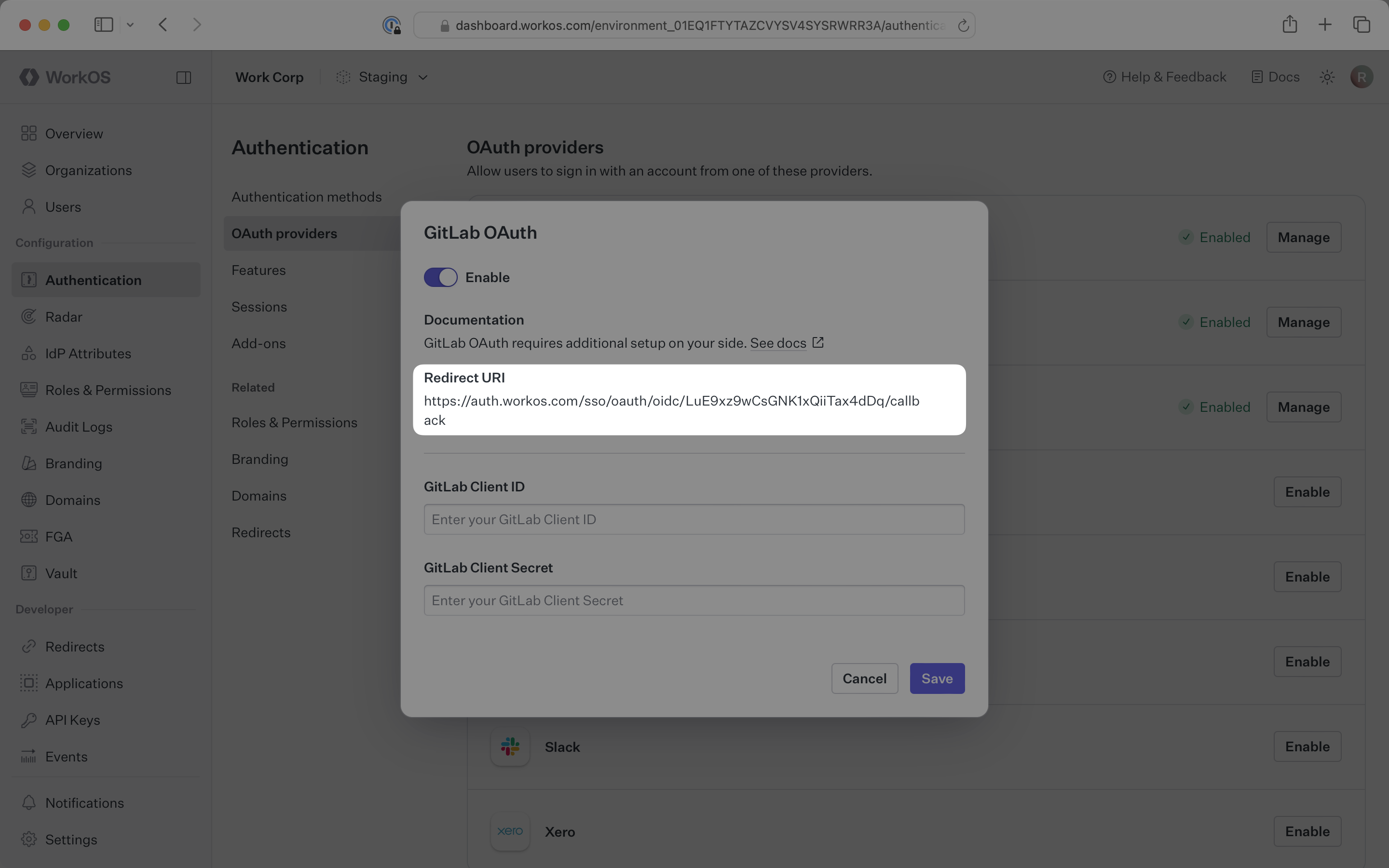
The Redirect URI is available in the [WorkOS Dashboard](https://dashboard.workos.com/). In the left navigation menu, select the **Authentication** tab and the **OAuth providers** sub-tab. Locate the **GitLab** section.
|
|
22
26
|
|
|
23
|
-
|
|
24
28
|
|
|
25
|
-
|
|
29
|
+
Click **Enable**. The **GitLab OAuth** configuration dialog will open. Locate the **Redirect URI**.
|
|
26
30
|
|
|
27
|
-
|
|
32
|
+
|
|
33
|
+
The **Redirect URI** serves as the destination for authentication responses and must be configured in your GitLab OAuth application as the redirect URI.
|
|
28
34
|
|
|
29
35
|
---
|
|
30
36
|
|
|
31
|
-
## What you
|
|
37
|
+
## What you'll need
|
|
38
|
+
|
|
39
|
+
You will need to obtain two pieces of information from a GitLab OAuth application:
|
|
32
40
|
|
|
33
|
-
|
|
41
|
+
- **GitLab Client ID**: Application identifier from GitLab (called Application ID in GitLab)
|
|
42
|
+
- **GitLab Client Secret**: Authentication secret for the application (called Secret in GitLab)
|
|
34
43
|
|
|
35
|
-
|
|
44
|
+
The following sections will guide you through creating an OAuth application in your GitLab account and generating these credentials.
|
|
36
45
|
|
|
37
46
|
---
|
|
38
47
|
|
|
39
|
-
|
|
48
|
+
## (1) Create the GitLab OAuth application
|
|
40
49
|
|
|
41
|
-
Log in to your [GitLab account](https://gitlab.com) and
|
|
50
|
+
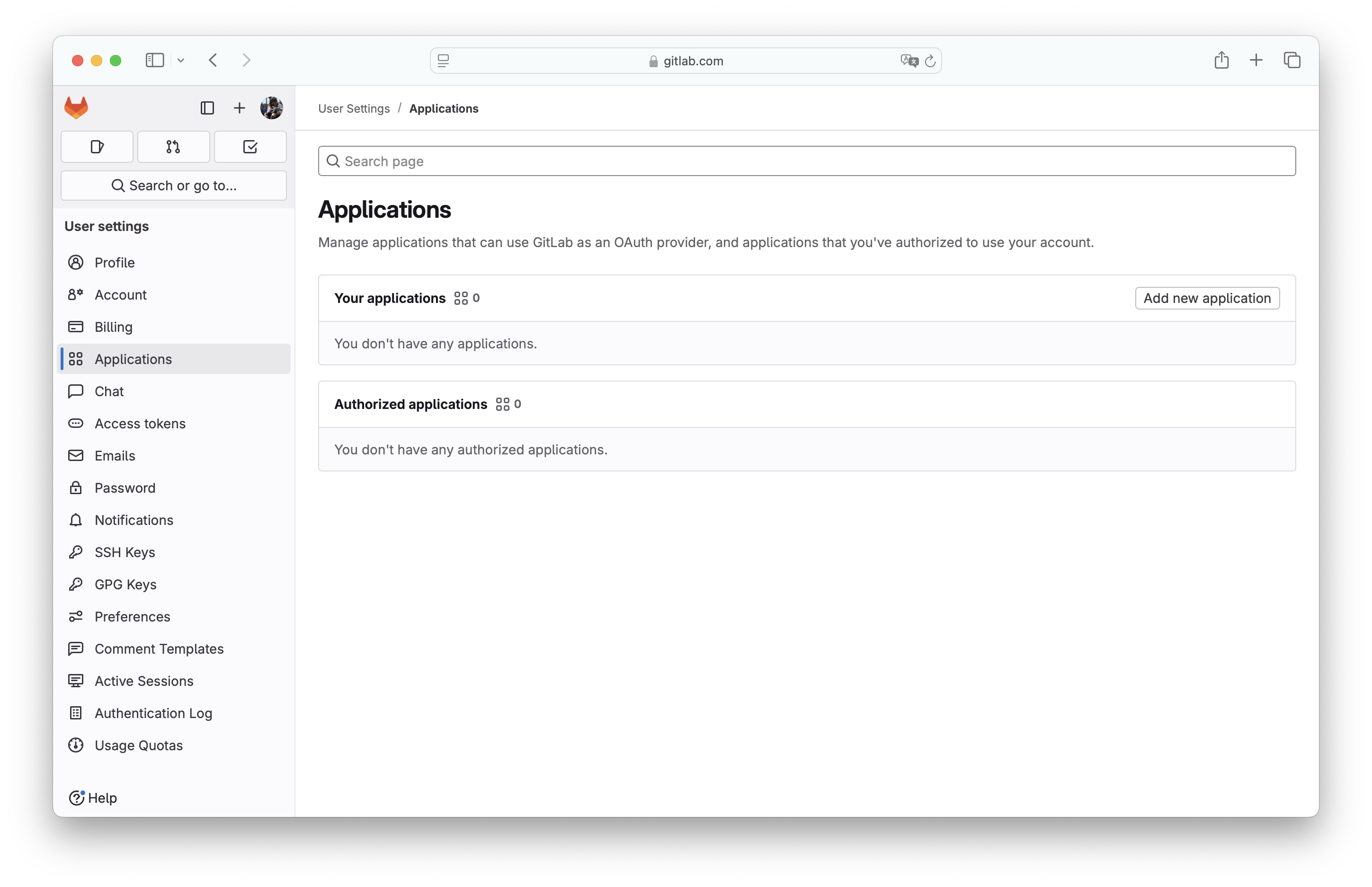
Log in to your [GitLab account](https://gitlab.com) and navigate to your user settings.
|
|
42
51
|
|
|
43
|
-
|
|
52
|
+
In the left navigation menu, select your avatar. Click **Edit profile**. Select **Applications**. Click **Add new application**.
|
|
44
53
|
|
|
45
|
-
|
|
54
|
+
|
|
46
55
|
|
|
47
56
|
> You can also register a new application under a group, which may be more appropriate if it is maintained by a team of developers, or instance-wide if you have a dedicated GitLab instance. For more on this see the [GitLab docs](https://docs.gitlab.com/integration/oauth_provider/).
|
|
48
57
|
|
|
49
|
-
|
|
58
|
+
---
|
|
59
|
+
|
|
60
|
+
## (2) Configure the GitLab OAuth application
|
|
61
|
+
|
|
62
|
+
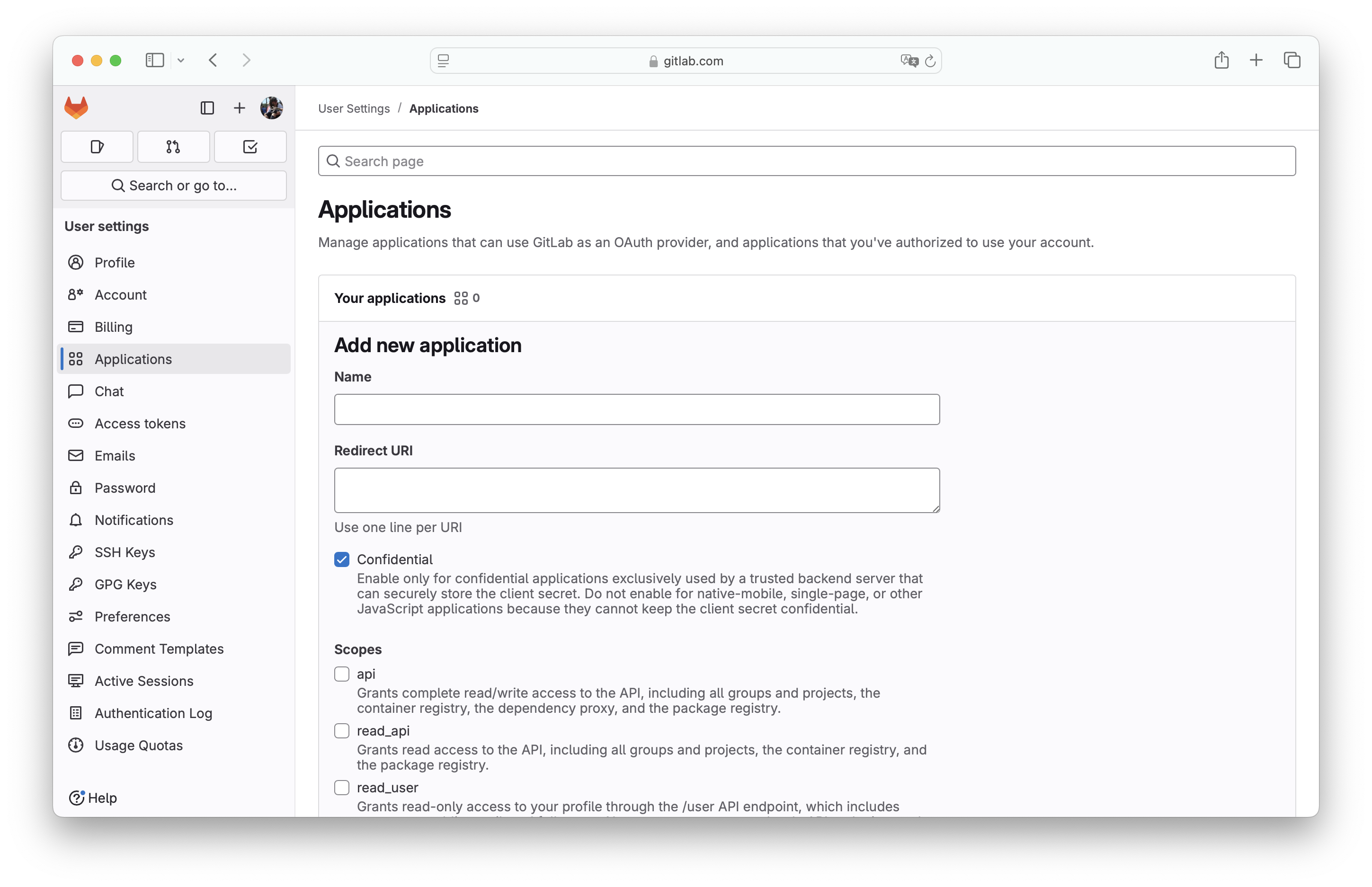
Fill out the form with relevant details about your application, including the application name.
|
|
63
|
+
|
|
64
|
+
For **Redirect URI**, enter the **Redirect URI** from the GitLab OAuth configuration in the WorkOS Dashboard.
|
|
65
|
+
|
|
66
|
+
|
|
67
|
+
|
|
68
|
+
The **Confidential** flag is enabled by default. It should be exclusively used by a trusted backend server that can securely store the client secret. For native-mobile, single-page, or other JavaScript applications, disable this flag.
|
|
69
|
+
|
|
70
|
+
Select the **openid**, **profile**, and **email** scopes for this app to allow the application to read user profile information, then click **Save application**.
|
|
71
|
+
|
|
72
|
+
---
|
|
73
|
+
|
|
74
|
+
## (3) Generate client credentials
|
|
75
|
+
|
|
76
|
+
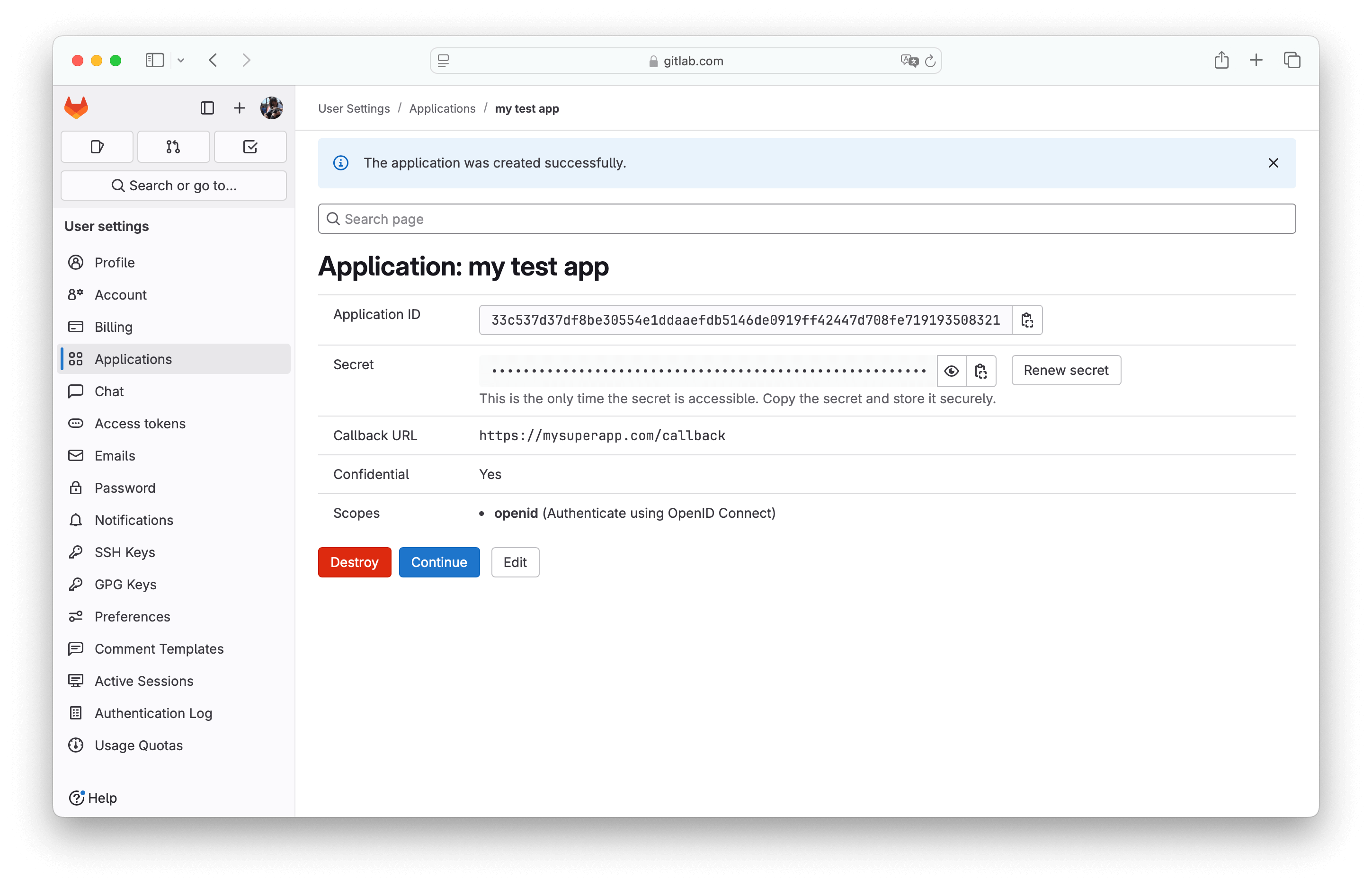
On the next page, you will see the GitLab **Application ID** and **Secret** for your new OAuth application.
|
|
77
|
+
|
|
78
|
+
|
|
50
79
|
|
|
51
|
-
|
|
80
|
+
Note the **Application ID** and **Secret** values as you'll need them for the WorkOS configuration.
|
|
52
81
|
|
|
53
|
-
|
|
82
|
+
---
|
|
83
|
+
|
|
84
|
+
## (4) Configure GitLab credentials in WorkOS
|
|
85
|
+
|
|
86
|
+
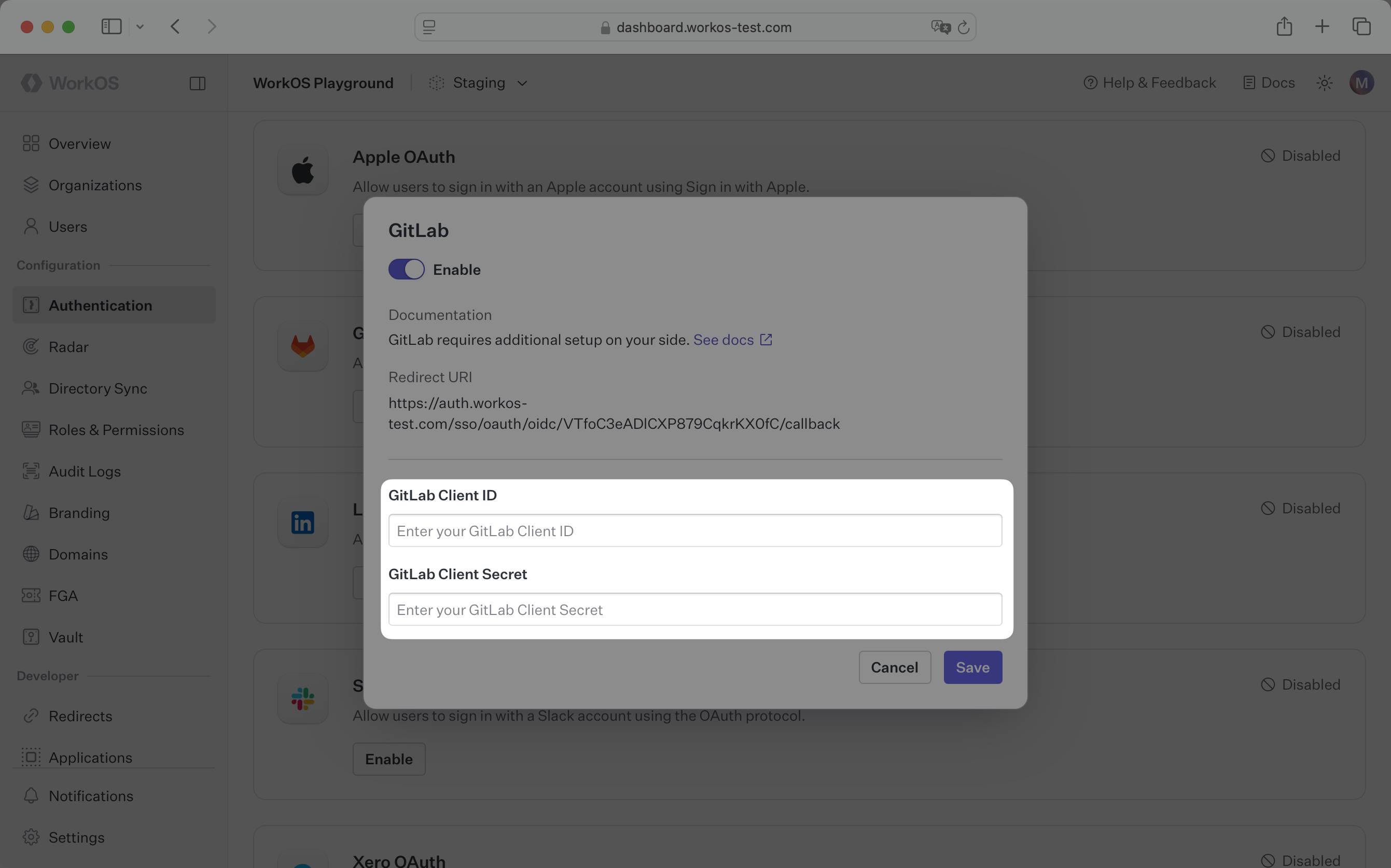
Now that you have the **GitLab Client ID** (Application ID) and **GitLab Client Secret** (Secret) from the previous step, return to the [WorkOS Dashboard](https://dashboard.workos.com).
|
|
87
|
+
|
|
88
|
+
In the **GitLab OAuth** configuration dialog, enable the integration. Paste the credentials from GitLab into their respective fields in the WorkOS Dashboard.
|
|
89
|
+
|
|
90
|
+
|
|
91
|
+
|
|
92
|
+
Click **Save** to complete the configuration.
|
|
93
|
+
|
|
94
|
+
You are now ready to start authenticating with GitLab OAuth. You will use the `provider` query parameter in the Get Authorization URL API endpoint to support global GitLab OAuth for any domain. The `provider` query parameter should be set to `GitLabOAuth`.
|
|
95
|
+
|
|
96
|
+
---
|
|
97
|
+
|
|
98
|
+
## Configure Additional OAuth Scopes (Optional)
|
|
99
|
+
|
|
100
|
+
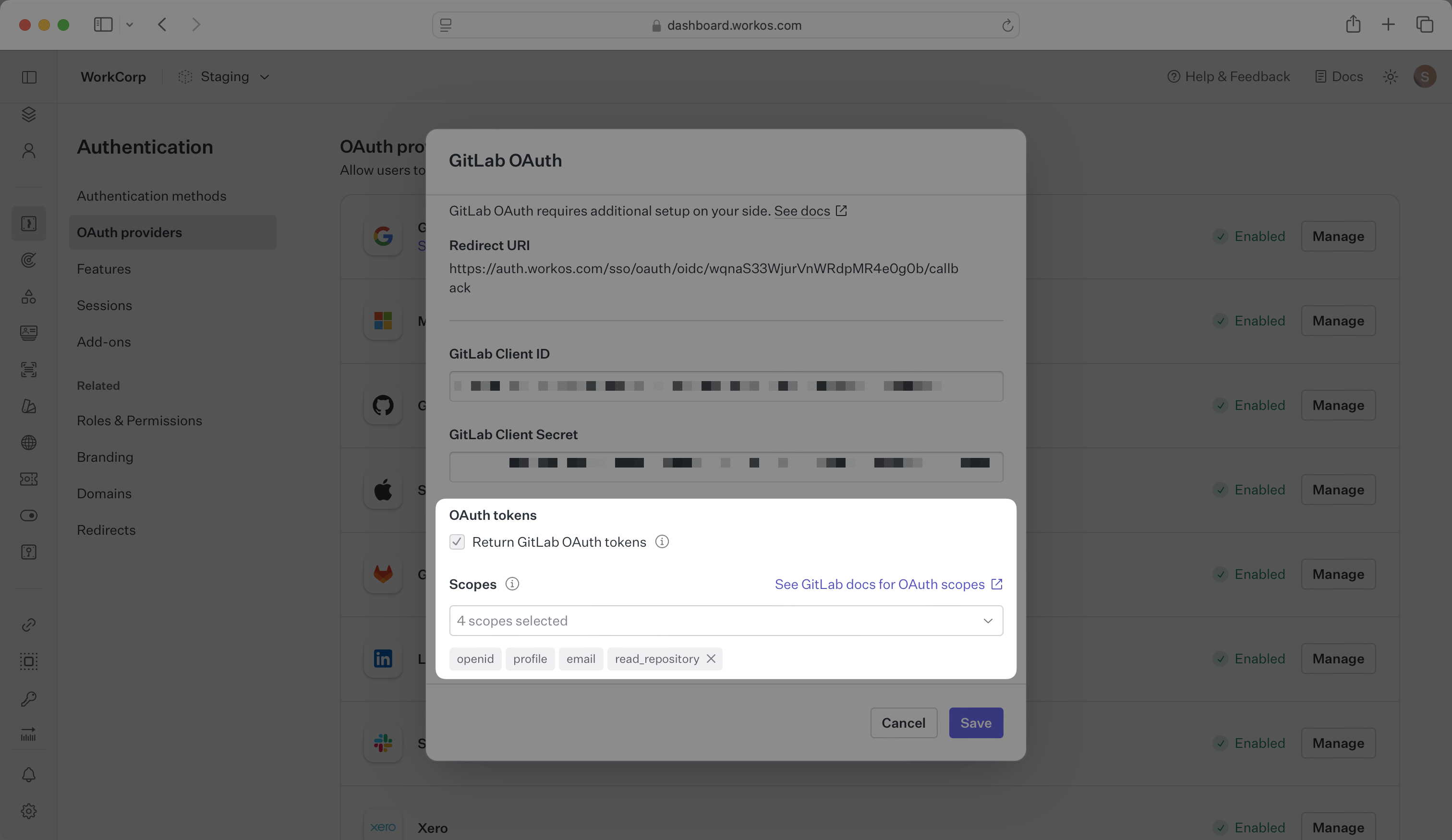
WorkOS will request the OAuth scopes that are required for authentication by default. You can optionally configure your integration to request additional OAuth scopes as needed.
|
|
101
|
+
|
|
102
|
+
When the **Return GitLab OAuth tokens** option is selected, the access token and refresh token from GitLab will be included in the response from the [Authenticate with code API](/reference/authkit/authentication/code).
|
|
54
103
|
|
|
55
|
-
|
|
56
105
|
|
|
57
|
-
|
|
106
|
+
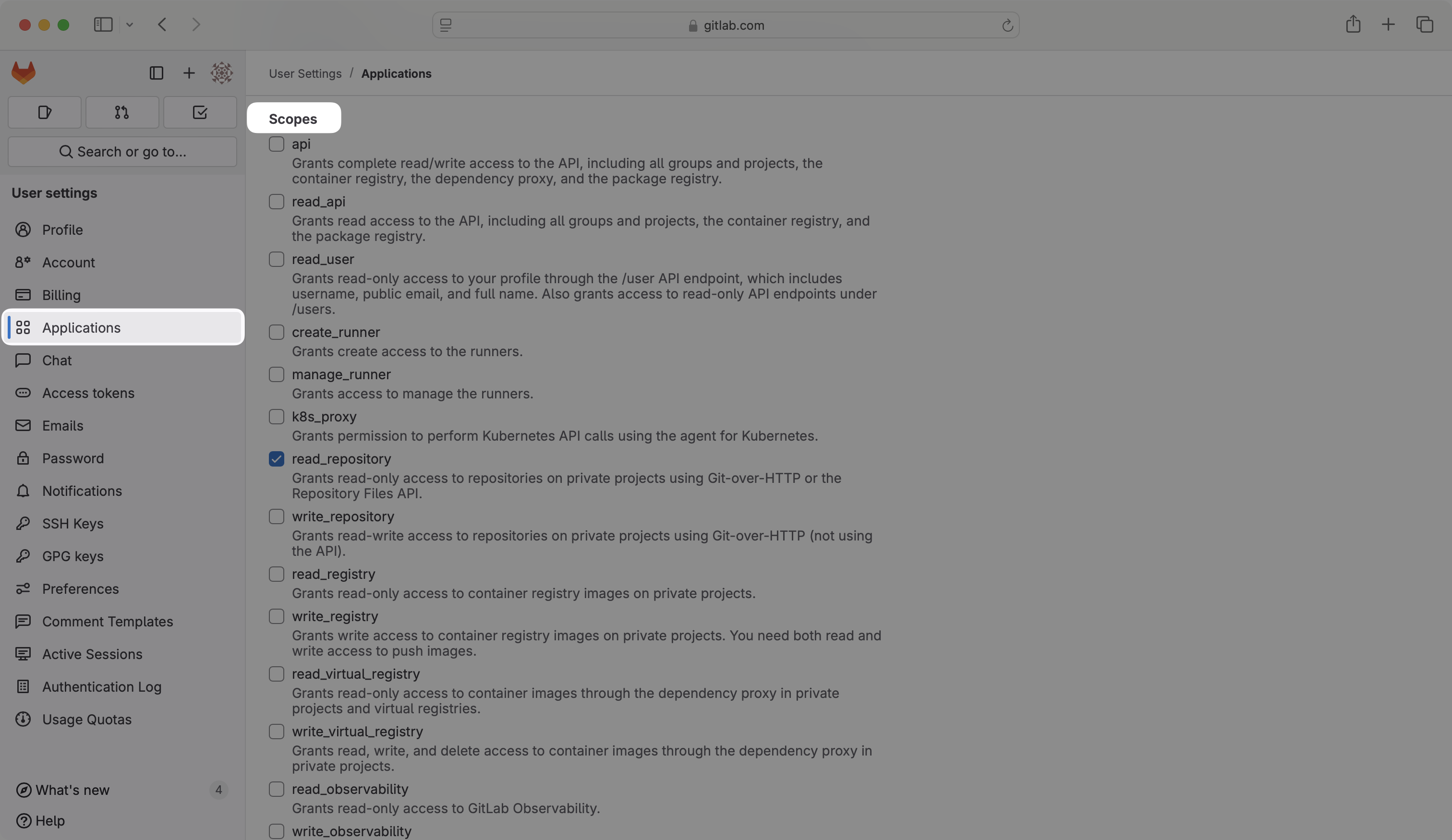
Any scopes configured here will be included on every GitLab OAuth request. To specify additional scopes dynamically, use the `provider_scopes` query parameter on the [Get Authorization URL API endpoint](/reference/authkit/authentication/get-authorization-url).
|
|
58
107
|
|
|
59
|
-
|
|
108
|
+
Any additional scopes that you plan to request must also be configured on the Application settings page in GitLab. For more information, see GitLab's OAuth scopes [documentation](https://docs.gitlab.com/integration/oauth_provider).
|
|
109
|
+
|
|
110
|
+
|
|
111
|
+
|
|
112
|
+
> IMPORTANT: Your users will see an error during sign-in if the scopes included on an authorization request are not included in the scopes configured on the Application settings page in GitLab. Changes to scopes should be tested in a staging environment before applying them to production.
|
|
113
|
+
|
|
114
|
+
---
|
|
60
115
|
|
|
61
|
-
|
|
116
|
+
## Frequently asked questions
|
|
62
117
|
|
|
63
|
-
|
|
118
|
+
### How is the WorkOS GitLab OAuth integration different from implementing regular GitLab OAuth flow?
|
|
64
119
|
|
|
65
|
-
|
|
120
|
+
It's the same GitLab OAuth flow as you could build yourself, but it's encapsulated within WorkOS SSO. This means you don't need to build it yourself. In addition to GitLab OAuth, you can use WorkOS SSO to support other identity providers, all with a single integration.
|
|
66
121
|
|
|
67
|
-
|
|
122
|
+
### What is the provider query parameter and how is it used in the GitLab OAuth integration?
|
|
68
123
|
|
|
69
|
-
|
|
124
|
+
You can use the `provider` query parameter in the [Get Authorization URL API endpoint](/reference/sso/get-authorization-url) to support global GitLab OAuth for any domain. The `provider` query parameter should be set to `GitLabOAuth`.
|
|
70
125
|
|
|
71
|
-
###
|
|
126
|
+
### What scopes are required for GitLab OAuth?
|
|
72
127
|
|
|
73
|
-
|
|
128
|
+
The **openid**, **profile**, and **email** scopes are required to allow the application to read user profile information necessary for authentication. This scope provides access to the user's basic profile data.
|
|
74
129
|
|
|
75
|
-
|
|
130
|
+
### Can I register the GitLab OAuth application under a group or organization?
|
|
76
131
|
|
|
77
|
-
|
|
132
|
+
Yes, you can register a new application under a GitLab group, which may be more appropriate if it is maintained by a team of developers. You can also register it instance-wide if you have a dedicated GitLab instance. See the [GitLab documentation](https://docs.gitlab.com/integration/oauth_provider/) for more details.
|
|
78
133
|
|
|
79
|
-
|
|
134
|
+
### What is the difference between Confidential and non-Confidential applications in GitLab?
|
|
80
135
|
|
|
81
|
-
|
|
136
|
+
The **Confidential** flag should be used for applications that can securely store the client secret, typically backend servers. For native mobile apps, single-page applications, or other JavaScript applications that cannot securely store secrets, you should disable this flag.
|
|
@@ -1,6 +1,6 @@
|
|
|
1
1
|
---
|
|
2
2
|
title: Google Directory Sync
|
|
3
|
-
description:
|
|
3
|
+
description: Learn about syncing your user list with Google Workspace.
|
|
4
4
|
icon: google
|
|
5
5
|
breadcrumb:
|
|
6
6
|
title: Integrations
|
|
@@ -84,3 +84,7 @@ Google Workspace directories are synced approximately every 30 minutes starting
|
|
|
84
84
|
### Does Google Directory Sync support nested groups?
|
|
85
85
|
|
|
86
86
|
Yes, nested groups (groups within groups) are supported in Google Directory Sync. This feature is currently available in a restricted preview. Contact [WorkOS support](mailto:support@workos.com) for additional details.
|
|
87
|
+
|
|
88
|
+
### What is the `idp_id` for directory groups from Google Workspace?
|
|
89
|
+
|
|
90
|
+
Google Workspace provides a unique identifier for each group, which is persisted as the `idp_id` for [directory groups](/reference/directory-sync/directory-group) in WorkOS.
|