@tencentcloud/sdk-mcp 1.3.7 → 1.3.9
This diff represents the content of publicly available package versions that have been released to one of the supported registries. The information contained in this diff is provided for informational purposes only and reflects changes between package versions as they appear in their respective public registries.
- package/package.json +2 -1
- package/resource/doc/chatuikit/android/integration.md +466 -484
- package/resource/doc/chatuikit/android/workflow.md +713 -0
- package/resource/doc/livekit/live/flutter/live-integration.md +208 -167
- package/resource/doc/livekit/voice/android/voice-audience-list.md +335 -0
- package/resource/doc/livekit/voice/android/voice-audio-effect.md +384 -0
- package/resource/doc/livekit/voice/android/voice-barrage.md +569 -0
- package/resource/doc/livekit/voice/android/voice-co-guest-interaction.md +748 -0
- package/resource/doc/livekit/voice/android/voice-gift.md +833 -0
- package/resource/doc/livekit/voice/android/voice-host-interaction.md +728 -0
- package/resource/doc/livekit/voice/android/voice-integration.md +886 -0
- package/resource/doc/livekit/voice/android/voice-room-list.md +493 -0
- package/resource/doc/livekit/voice/android/workflow.md +333 -0
- package/resource/doc/livekit/voice/flutter/voice-audience-list.md +337 -0
- package/resource/doc/livekit/voice/flutter/voice-audio-effect.md +739 -0
- package/resource/doc/livekit/voice/flutter/voice-barrage.md +578 -0
- package/resource/doc/livekit/voice/flutter/voice-co-guest-interaction.md +673 -0
- package/resource/doc/livekit/voice/flutter/voice-gift.md +812 -0
- package/resource/doc/livekit/voice/flutter/voice-integration.md +925 -0
- package/resource/doc/livekit/voice/flutter/voice-room-list.md +842 -0
- package/resource/doc/livekit/voice/flutter/workflow.md +359 -0
- package/resource/doc/livekit/voice/ios/voice-audience-list.md +335 -0
- package/resource/doc/livekit/voice/ios/voice-audio-effect.md +373 -0
- package/resource/doc/livekit/voice/ios/voice-barrage.md +529 -0
- package/resource/doc/livekit/voice/ios/voice-co-guest-interaction.md +701 -0
- package/resource/doc/livekit/voice/ios/voice-gift.md +785 -0
- package/resource/doc/livekit/voice/ios/voice-host-interaction.md +820 -0
- package/resource/doc/livekit/voice/ios/voice-integration.md +853 -0
- package/resource/doc/livekit/voice/ios/voice-room-list.md +467 -0
- package/resource/doc/livekit/voice/ios/workflow.md +358 -0
- package/resource/doc/livekit/voice/uni-app/voice-audience-list.md +264 -0
- package/resource/doc/livekit/voice/uni-app/voice-audio-effect.md +332 -0
- package/resource/doc/livekit/voice/uni-app/voice-barrage.md +482 -0
- package/resource/doc/livekit/voice/uni-app/voice-co-guest-interaction.md +944 -0
- package/resource/doc/livekit/voice/uni-app/voice-gift.md +716 -0
- package/resource/doc/livekit/voice/uni-app/voice-integration.md +613 -0
- package/resource/doc/livekit/voice/uni-app/voice-room-list.md +562 -0
- package/resource/doc/livekit/voice/uni-app/workflow.md +369 -0
- package/resource/doc/roomkit/vue/integration.md +119 -224
- package/resource/doc/roomkit/vue/workflow.md +472 -226
- package/resource/doc/tuicallkit/android/integration.md +675 -90
- package/resource/doc/tuicallkit/android/workflow.md +432 -0
- package/tools/common/present-scenario-choice.js +16 -0
- package/tools/common/present-scenario-choice.js.map +1 -0
- package/tools/common/record-prompt.js +31 -0
- package/tools/common/record-prompt.js.map +1 -1
- package/tools/common/record-result.js +32 -0
- package/tools/common/record-result.js.map +1 -1
- package/tools/definitions/get_native_call_uikit_integration_def.js +18 -2
- package/tools/definitions/get_native_call_uikit_integration_def.js.map +1 -1
- package/tools/definitions/get_native_chat_uikit_integration_def.js +29 -7
- package/tools/definitions/get_native_chat_uikit_integration_def.js.map +1 -1
- package/tools/definitions/get_native_live_uikit_integration_def.js +65 -40
- package/tools/definitions/get_native_live_uikit_integration_def.js.map +1 -1
- package/tools/definitions/get_native_live_uikit_interaction_def.js +42 -94
- package/tools/definitions/get_native_live_uikit_interaction_def.js.map +1 -1
- package/tools/definitions/get_web_room_feature_detail_def.js +29 -32
- package/tools/definitions/get_web_room_feature_detail_def.js.map +1 -1
- package/tools/definitions/get_web_room_uikit_integration_def.js +25 -9
- package/tools/definitions/get_web_room_uikit_integration_def.js.map +1 -1
- package/tools/definitions/present_scenario_choice_def.js +53 -0
- package/tools/definitions/present_scenario_choice_def.js.map +1 -0
- package/tools/definitions/record_prompt_def.js +6 -1
- package/tools/definitions/record_prompt_def.js.map +1 -1
- package/tools/definitions/record_result_def.js +34 -10
- package/tools/definitions/record_result_def.js.map +1 -1
- package/tools/index.js +2 -0
- package/tools/index.js.map +1 -1
- package/tools/live/get-native-live-uikit-integration.js +110 -34
- package/tools/live/get-native-live-uikit-integration.js.map +1 -1
- package/tools/live/get_native_live_uikit_interaction.js +128 -35
- package/tools/live/get_native_live_uikit_interaction.js.map +1 -1
- package/utils/get-device-identifier.js +58 -0
- package/utils/get-device-identifier.js.map +1 -0
- package/utils/report-cls-client.js +4 -2
- package/utils/report-cls-client.js.map +1 -1
- package/utils/report-es-client.js +1 -1
|
@@ -0,0 +1,482 @@
|
|
|
1
|
+
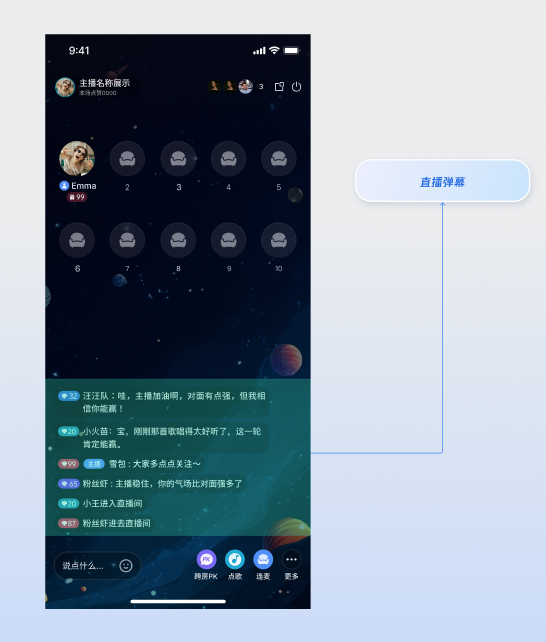
本篇文档旨在指导 uniapp 开发者如何使用 `AtomicXCore` 框架中的 `BarrageState` 模块,为您的直播应用快速集成功能丰富、性能卓越的弹幕系统。
|
|
2
|
+
|
|
3
|
+
|
|
4
|
+
|
|
5
|
+
|
|
6
|
+
## 核心功能
|
|
7
|
+
|
|
8
|
+
`BarrageState` 为您的直播应用提供了一套完整的弹幕解决方案,核心功能包括:
|
|
9
|
+
- 接收并展示直播间弹幕消息。
|
|
10
|
+
|
|
11
|
+
- 发送文本弹幕与观众互动。
|
|
12
|
+
|
|
13
|
+
- 发送自定义业务弹幕,以支持礼物、点赞等复杂场景。
|
|
14
|
+
|
|
15
|
+
- 在本地消息列表中插入系统提示(例如,“欢迎 XX 进入直播间”)。
|
|
16
|
+
|
|
17
|
+
|
|
18
|
+
## 实现步骤
|
|
19
|
+
|
|
20
|
+
### 步骤1:组件集成
|
|
21
|
+
|
|
22
|
+
请参考 [开始直播](https://write.woa.com/document/191127271985012736) 集成 **AtomicXCore**,完成接入。
|
|
23
|
+
|
|
24
|
+
### 步骤2:初始化并监听弹幕
|
|
25
|
+
|
|
26
|
+
获取一个与当前直播间 `liveID` 绑定的 `BarrageState` 实例,并且监听 `messageList` 来接收最新的**全量**弹幕消息列表。
|
|
27
|
+
``` typescript
|
|
28
|
+
import { useBarrageState } from "@/uni_modules/tuikit-atomic-x/state/BarrageState";
|
|
29
|
+
import { watch } from 'vue';
|
|
30
|
+
|
|
31
|
+
// liveID 是语聊房的唯一标识
|
|
32
|
+
const liveID = 'your_live_id'; // 替换为实际的语聊房 liveID
|
|
33
|
+
|
|
34
|
+
//通过 liveID 获取 BarrageState 的实例
|
|
35
|
+
const { messageList } = useBarrageState(liveID);
|
|
36
|
+
|
|
37
|
+
// 监听 messageList 的实时变更,用于驱动 UI 更新
|
|
38
|
+
watch(messageList, (newVal, oldVal) => {
|
|
39
|
+
console.log(newVal)
|
|
40
|
+
})
|
|
41
|
+
```
|
|
42
|
+
|
|
43
|
+
### 步骤3:发送文本弹幕
|
|
44
|
+
|
|
45
|
+
调用 `sendTextMessage` 方法向直播间内的所有用户广播一条纯文本消息。
|
|
46
|
+
``` typescript
|
|
47
|
+
import { useBarrageState } from "@/uni_modules/tuikit-atomic-x/state/BarrageState";
|
|
48
|
+
|
|
49
|
+
// liveID 是语聊房的唯一标识
|
|
50
|
+
const liveID = 'your_live_id'; // 替换为实际的语聊房 liveID
|
|
51
|
+
|
|
52
|
+
//通过 liveID 获取 BarrageState 的实例
|
|
53
|
+
const { sendTextMessage } = useBarrageState(liveID);
|
|
54
|
+
|
|
55
|
+
const sendMessage = () => {
|
|
56
|
+
sendTextMessage({
|
|
57
|
+
liveID: 'xxx', // 当前直播间的 liveID
|
|
58
|
+
text: 'xxx', // 您想要发送的弹幕
|
|
59
|
+
success: () => {
|
|
60
|
+
console.log("弹幕发送成功")
|
|
61
|
+
},
|
|
62
|
+
fail: (error) => {
|
|
63
|
+
console.log("弹幕发送失败", error)
|
|
64
|
+
}
|
|
65
|
+
})
|
|
66
|
+
}
|
|
67
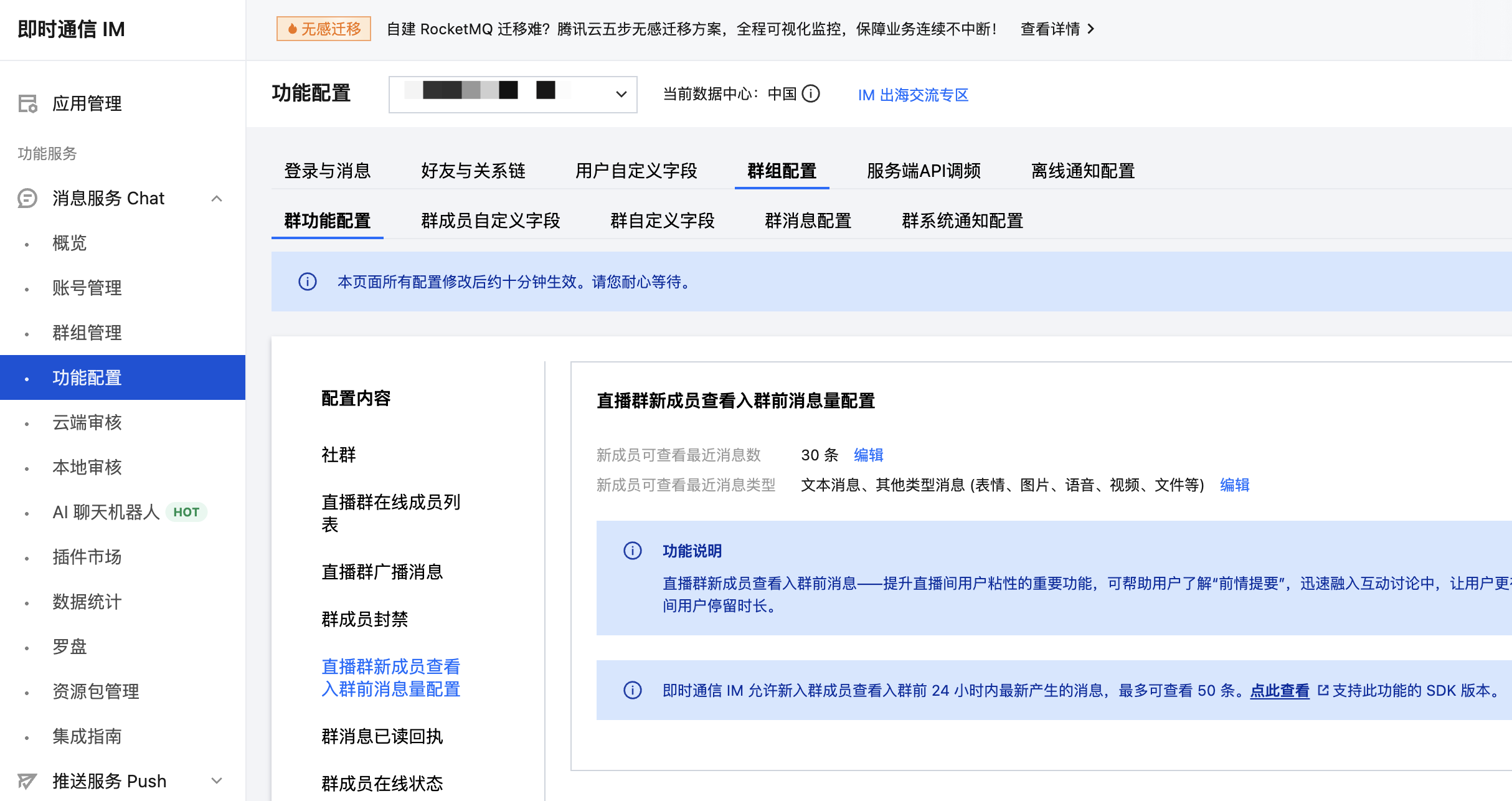
|
+
```
|
|
68
|
+
|
|
69
|
+
#### **接口参数**
|
|
70
|
+
<table>
|
|
71
|
+
<tr>
|
|
72
|
+
<td rowspan="1" colSpan="1" >**参数**</td>
|
|
73
|
+
|
|
74
|
+
<td rowspan="1" colSpan="1" >**类型**</td>
|
|
75
|
+
|
|
76
|
+
<td rowspan="1" colSpan="1" >**描述**</td>
|
|
77
|
+
</tr>
|
|
78
|
+
|
|
79
|
+
<tr>
|
|
80
|
+
<td rowspan="1" colSpan="1" >`liveID`</td>
|
|
81
|
+
|
|
82
|
+
<td rowspan="1" colSpan="1" >`string`</td>
|
|
83
|
+
|
|
84
|
+
<td rowspan="1" colSpan="1" >当前直播间的`liveID`。</td>
|
|
85
|
+
</tr>
|
|
86
|
+
|
|
87
|
+
<tr>
|
|
88
|
+
<td rowspan="1" colSpan="1" >`text`</td>
|
|
89
|
+
|
|
90
|
+
<td rowspan="1" colSpan="1" >`string`</td>
|
|
91
|
+
|
|
92
|
+
<td rowspan="1" colSpan="1" >要发送的文本内容。</td>
|
|
93
|
+
</tr>
|
|
94
|
+
|
|
95
|
+
<tr>
|
|
96
|
+
<td rowspan="1" colSpan="1" >`success`</td>
|
|
97
|
+
|
|
98
|
+
<td rowspan="1" colSpan="1" >`Function`</td>
|
|
99
|
+
|
|
100
|
+
<td rowspan="1" colSpan="1" >发送成功的回调。</td>
|
|
101
|
+
</tr>
|
|
102
|
+
|
|
103
|
+
<tr>
|
|
104
|
+
<td rowspan="1" colSpan="1" >`fail`</td>
|
|
105
|
+
|
|
106
|
+
<td rowspan="1" colSpan="1" >`Function`</td>
|
|
107
|
+
|
|
108
|
+
<td rowspan="1" colSpan="1" >发送失败的回调。</td>
|
|
109
|
+
</tr>
|
|
110
|
+
</table>
|
|
111
|
+
|
|
112
|
+
|
|
113
|
+
### 步骤4:发送自定义弹幕
|
|
114
|
+
|
|
115
|
+
发送一条包含自定义业务逻辑的消息,例如礼物、点赞或游戏化互动指令。这条消息对其他客户端来说是透明的,需要业务层自行解析。
|
|
116
|
+
``` typescript
|
|
117
|
+
import { useBarrageState } from "@/uni_modules/tuikit-atomic-x/state/BarrageState";
|
|
118
|
+
|
|
119
|
+
// liveID 是语聊房的唯一标识
|
|
120
|
+
const liveID = 'your_live_id'; // 替换为实际的语聊房 liveID
|
|
121
|
+
|
|
122
|
+
//通过 liveID 获取 BarrageState 的实例
|
|
123
|
+
const { sendCustomMessage } = useBarrageState(liveID);
|
|
124
|
+
|
|
125
|
+
/// 发送一条自定义弹幕,例如用于发送礼物
|
|
126
|
+
const sendGiftMessage = ( giftID: string, giftCount: number ) => {
|
|
127
|
+
// 1. 定义一个能识别业务的ID
|
|
128
|
+
const businessID = "live_gift"
|
|
129
|
+
// 2. 将业务数据编码为 JSON 字符串
|
|
130
|
+
const giftData = { "gift_id": giftId, "gift_count": giftCount }
|
|
131
|
+
// 3. 调用核心API发送自定义消息
|
|
132
|
+
sendCustomMessage({
|
|
133
|
+
liveID: 'xxx', // 当前直播间的 liveID
|
|
134
|
+
businessID,
|
|
135
|
+
data: JSON.stringify(giftData),
|
|
136
|
+
success: () => {
|
|
137
|
+
console.log("礼物消息发送成功")
|
|
138
|
+
},
|
|
139
|
+
fail: (error) => {
|
|
140
|
+
console.log("礼物消息发送失败", error)
|
|
141
|
+
}
|
|
142
|
+
})
|
|
143
|
+
}
|
|
144
|
+
```
|
|
145
|
+
|
|
146
|
+
#### **接口参数**
|
|
147
|
+
<table>
|
|
148
|
+
<tr>
|
|
149
|
+
<td rowspan="1" colSpan="1" >**参数**</td>
|
|
150
|
+
|
|
151
|
+
<td rowspan="1" colSpan="1" >**类型**</td>
|
|
152
|
+
|
|
153
|
+
<td rowspan="1" colSpan="1" >**描述**</td>
|
|
154
|
+
</tr>
|
|
155
|
+
|
|
156
|
+
<tr>
|
|
157
|
+
<td rowspan="1" colSpan="1" >`liveID`</td>
|
|
158
|
+
|
|
159
|
+
<td rowspan="1" colSpan="1" >`string`</td>
|
|
160
|
+
|
|
161
|
+
<td rowspan="1" colSpan="1" >当前直播间的`liveID`。</td>
|
|
162
|
+
</tr>
|
|
163
|
+
|
|
164
|
+
<tr>
|
|
165
|
+
<td rowspan="1" colSpan="1" >`businessId`</td>
|
|
166
|
+
|
|
167
|
+
<td rowspan="1" colSpan="1" >`string`</td>
|
|
168
|
+
|
|
169
|
+
<td rowspan="1" colSpan="1" >业务唯一标识符,例如 "live_gift",用于接收端区分不同的自定义消息。</td>
|
|
170
|
+
</tr>
|
|
171
|
+
|
|
172
|
+
<tr>
|
|
173
|
+
<td rowspan="1" colSpan="1" >`data`</td>
|
|
174
|
+
|
|
175
|
+
<td rowspan="1" colSpan="1" >`string`</td>
|
|
176
|
+
|
|
177
|
+
<td rowspan="1" colSpan="1" >业务数据,通常为 JSON 格式的字符串。</td>
|
|
178
|
+
</tr>
|
|
179
|
+
|
|
180
|
+
<tr>
|
|
181
|
+
<td rowspan="1" colSpan="1" >`success`</td>
|
|
182
|
+
|
|
183
|
+
<td rowspan="1" colSpan="1" >`Function`</td>
|
|
184
|
+
|
|
185
|
+
<td rowspan="1" colSpan="1" >发送成功的回调。</td>
|
|
186
|
+
</tr>
|
|
187
|
+
|
|
188
|
+
<tr>
|
|
189
|
+
<td rowspan="1" colSpan="1" >`fail`</td>
|
|
190
|
+
|
|
191
|
+
<td rowspan="1" colSpan="1" >`Function`</td>
|
|
192
|
+
|
|
193
|
+
<td rowspan="1" colSpan="1" >发送失败的回调。</td>
|
|
194
|
+
</tr>
|
|
195
|
+
</table>
|
|
196
|
+
|
|
197
|
+
|
|
198
|
+
### 步骤5:在本地插入提示消息
|
|
199
|
+
|
|
200
|
+
在当前用户的消息列表中插入一条本地消息,这条消息不会被发送到直播间的其他用户。这非常适合用来显示系统欢迎、警告或操作提示等信息。
|
|
201
|
+
``` typescript
|
|
202
|
+
import { useBarrageState } from "@/uni_modules/tuikit-atomic-x/state/BarrageState";
|
|
203
|
+
|
|
204
|
+
// liveID 是语聊房的唯一标识
|
|
205
|
+
const liveID = 'your_live_id'; // 替换为实际的语聊房 liveID
|
|
206
|
+
|
|
207
|
+
//通过 liveID 获取 BarrageState 的实例
|
|
208
|
+
const { appendLocalTip } = useBarrageState(liveID);
|
|
209
|
+
const showWelcomeMessage = (user: LiveUserInfo) => {
|
|
210
|
+
// 创建一条本地提示消息
|
|
211
|
+
let welcomeTip = {}
|
|
212
|
+
welcomeTip.liveID = liveID;
|
|
213
|
+
welcomeTip.sender = { userID: 'xxx' };
|
|
214
|
+
welcomeTip.sequence = Date.now();
|
|
215
|
+
welcomeTip.timestampInSecond = Date.now();
|
|
216
|
+
welcomeTip.messageType = 'TEXT';
|
|
217
|
+
welcomeTip.textContent = "欢迎 ${user.userName} 进入直播间!";
|
|
218
|
+
// 调用 BarrageStore 的接口将其插入弹幕列表
|
|
219
|
+
appendLocalTip(welcomeTip)
|
|
220
|
+
}
|
|
221
|
+
```
|
|
222
|
+
|
|
223
|
+
#### **接口参数**
|
|
224
|
+
<table>
|
|
225
|
+
<tr>
|
|
226
|
+
<td rowspan="1" colSpan="1" >**参数**</td>
|
|
227
|
+
|
|
228
|
+
<td rowspan="1" colSpan="1" >**类型**</td>
|
|
229
|
+
|
|
230
|
+
<td rowspan="1" colSpan="1" >**描述**</td>
|
|
231
|
+
</tr>
|
|
232
|
+
|
|
233
|
+
<tr>
|
|
234
|
+
<td rowspan="1" colSpan="1" >`message`</td>
|
|
235
|
+
|
|
236
|
+
<td rowspan="1" colSpan="1" >`string`</td>
|
|
237
|
+
|
|
238
|
+
<td rowspan="1" colSpan="1" >要在本地插入的消息对象。SDK 会将此消息对象追加到 `BarrageState` 的 `messageList` 中。</td>
|
|
239
|
+
</tr>
|
|
240
|
+
</table>
|
|
241
|
+
|
|
242
|
+
|
|
243
|
+
### 步骤6:管理用户发言(禁言与解禁)
|
|
244
|
+
|
|
245
|
+
作为主播或管理员,您可以对直播间内的用户发言权限进行管理,维护健康的社区氛围。
|
|
246
|
+
|
|
247
|
+
#### 禁止/解禁单个用户发言
|
|
248
|
+
|
|
249
|
+
通过 `LiveAudienceState` 中的 `disableSendMessage` 接口来实现对指定用户的禁言或解禁。此状态会被持久化,即使用户重新进入直播间,禁言状态依然有效。
|
|
250
|
+
``` typescript
|
|
251
|
+
import { useLiveAudienceState } from '@/uni_modules/tuikit-atomic-x/state/LiveAudienceState';
|
|
252
|
+
|
|
253
|
+
// liveID 是语聊房的唯一标识
|
|
254
|
+
const liveID = 'your_live_id'; // 替换为实际的语聊房 liveID
|
|
255
|
+
|
|
256
|
+
// 1. 通过 liveID 获取 LiveAudienceState 的实例
|
|
257
|
+
const { disableSendMessage } = useLiveAudienceState(liveID)
|
|
258
|
+
|
|
259
|
+
// 2. 定义要操作的用户 ID 和禁言状态
|
|
260
|
+
const userIdToMute = "user_id_to_be_muted"
|
|
261
|
+
const shouldDisable = true // true为禁言, false为解禁
|
|
262
|
+
|
|
263
|
+
// 3. 调用接口执行操作
|
|
264
|
+
const handleDisableSendMessage = () => {
|
|
265
|
+
disableSendMessage({
|
|
266
|
+
liveID: 'xxx', // 当前直播间 liveID
|
|
267
|
+
userID: userIdToMute,
|
|
268
|
+
isDisable: shouldDisable,
|
|
269
|
+
success: () => {
|
|
270
|
+
console.log(`${shouldDisable ? "禁言" : "解禁"}用户 ${userIdToMute}成功`)
|
|
271
|
+
},
|
|
272
|
+
fail: (error) => {
|
|
273
|
+
console.log("操作失败", error)
|
|
274
|
+
}
|
|
275
|
+
})
|
|
276
|
+
}
|
|
277
|
+
```
|
|
278
|
+
|
|
279
|
+
#### 开启/关闭全体禁言
|
|
280
|
+
|
|
281
|
+
要对直播间内所有用户(通常不包括主播自己)进行禁言,您需要通过 `LiveListState` 的 `updateLiveInfo` 更新直播间信息来实现。
|
|
282
|
+
``` typescript
|
|
283
|
+
// 1. 获取 LiveListState 的实例
|
|
284
|
+
const { updateLiveInfo, currentLive } = useLiveListState();
|
|
285
|
+
|
|
286
|
+
// 2. 获取当前直播间信息,并修改全体禁言状态
|
|
287
|
+
currentLive.value.isMessageDisable = true // true 为全体禁言, false 为关闭
|
|
288
|
+
|
|
289
|
+
// 3. 调用更新接口,并指定修改的标志位
|
|
290
|
+
const handleUpdateLiveInfo = () => {
|
|
291
|
+
updateLiveInfo({
|
|
292
|
+
liveInfo: currentLive.value,
|
|
293
|
+
modifyFlagList: ['IS_MESSAGE_DISABLE'],
|
|
294
|
+
success: () => {
|
|
295
|
+
console.log("全体禁言成功")
|
|
296
|
+
},
|
|
297
|
+
fail: (error) => {
|
|
298
|
+
console.log("操作失败", error)
|
|
299
|
+
}
|
|
300
|
+
})
|
|
301
|
+
}
|
|
302
|
+
|
|
303
|
+
```
|
|
304
|
+
|
|
305
|
+
## 功能进阶:高并发场景下的性能优化
|
|
306
|
+
|
|
307
|
+
当您使用 `BarrageState` 构建弹幕功能后,本章将指导您如何处理更复杂的业务场景,确保它能在真实、复杂的高并发直播场景下,依然为用户提供流畅、稳定的体验。本章将围绕两个核心业务场景,为您提供明确的优化方案和代码示例。
|
|
308
|
+
|
|
309
|
+
### 场景一:应对热门直播间的“弹幕风暴”
|
|
310
|
+
|
|
311
|
+
#### 场景描述
|
|
312
|
+
|
|
313
|
+
在一场热门活动中,直播间涌入大量观众,弹幕以每秒数十条的频率刷新。
|
|
314
|
+
|
|
315
|
+
#### 技术挑战
|
|
316
|
+
|
|
317
|
+
SDK 会以极高频率返回完整的弹幕列表。如果每次都更新完整的消息列表,主线程会被密集的UI布局和渲染操作阻塞,导致界面卡顿。
|
|
318
|
+
|
|
319
|
+
#### 优化方案:批处理与流量削峰 (Batch Processing & Debouncing)
|
|
320
|
+
|
|
321
|
+
不必响应每一次的数据更新,而是设定一个时间阈值(例如300毫秒)。只在距离上次 UI 刷新超过这个阈值后,才执行下一次刷新操作。极大提升流畅度。
|
|
322
|
+
|
|
323
|
+
#### 代码示例
|
|
324
|
+
``` typescript
|
|
325
|
+
import { watch } from 'vue';
|
|
326
|
+
// UI 展示数据
|
|
327
|
+
const mixMessageList = ref()
|
|
328
|
+
// ===== 防抖配置 =====
|
|
329
|
+
const DEBOUNCE_THRESHOLD = 300; // 300毫秒防抖阈值
|
|
330
|
+
let lastUpdateTime = 0;
|
|
331
|
+
let pendingMessages: any[] = []; // 待处理的消息队列
|
|
332
|
+
let debounceTimer: ReturnType<typeof setTimeout> | null = null;
|
|
333
|
+
|
|
334
|
+
/**
|
|
335
|
+
* 执行 UI 刷新操作
|
|
336
|
+
*/
|
|
337
|
+
const flushMessages = () => {
|
|
338
|
+
if (pendingMessages.length > 0) {
|
|
339
|
+
mixMessageList.value = [...mixMessageList.value, ...pendingMessages]; // 用于 UI 展示的数据
|
|
340
|
+
lastUpdateTime = Date.now(); // 更新最后刷新时间
|
|
341
|
+
pendingMessages = []; // 清空待处理消息
|
|
342
|
+
}
|
|
343
|
+
};
|
|
344
|
+
|
|
345
|
+
/**
|
|
346
|
+
* 防抖处理:累积消息直到达到时间阈值
|
|
347
|
+
*/
|
|
348
|
+
const debouncedUpdate = (newMessages: any[]) => {
|
|
349
|
+
// 将新消息添加到待处理队列
|
|
350
|
+
pendingMessages.push(...newMessages);
|
|
351
|
+
|
|
352
|
+
// 清除之前的定时器
|
|
353
|
+
if (debounceTimer) {
|
|
354
|
+
clearTimeout(debounceTimer);
|
|
355
|
+
}
|
|
356
|
+
|
|
357
|
+
const now = Date.now();
|
|
358
|
+
const timeSinceLastUpdate = now - lastUpdateTime;
|
|
359
|
+
|
|
360
|
+
// 如果距离上次更新已经超过阈值,立即执行更新
|
|
361
|
+
if (timeSinceLastUpdate >= DEBOUNCE_THRESHOLD) {
|
|
362
|
+
flushMessages();
|
|
363
|
+
} else {
|
|
364
|
+
// 否则设置定时器在阈值时间后执行更新
|
|
365
|
+
const remainingTime = DEBOUNCE_THRESHOLD - timeSinceLastUpdate;
|
|
366
|
+
debounceTimer = setTimeout(() => {
|
|
367
|
+
flushMessages();
|
|
368
|
+
debounceTimer = null;
|
|
369
|
+
}, remainingTime);
|
|
370
|
+
}
|
|
371
|
+
};
|
|
372
|
+
|
|
373
|
+
watch(messageList, (newVal, oldVal) => {
|
|
374
|
+
if (!newVal) return;
|
|
375
|
+
const value = newVal.slice((oldVal || []).length, (newVal || []).length);
|
|
376
|
+
if (value.length > 0) {
|
|
377
|
+
debouncedUpdate(value);
|
|
378
|
+
}
|
|
379
|
+
});
|
|
380
|
+
```
|
|
381
|
+
|
|
382
|
+
### 场景二:保障长时间直播的内存稳定性
|
|
383
|
+
|
|
384
|
+
#### 场景描述
|
|
385
|
+
|
|
386
|
+
您的应用需要支持数小时乃至全天候的“不间断直播”,例如游戏直播或慢直播。在此期间,App 必须保持稳定运行,不能因为长时间运行而意外退出。
|
|
387
|
+
|
|
388
|
+
#### 技术挑战
|
|
389
|
+
|
|
390
|
+
SDK 返回的全量 `messageList` 会在长时间直播中无限增长,即使 `UI` 层做了节流,数据层持有的这个巨大数组也会持续侵占内存,最终导致应用闪退。
|
|
391
|
+
|
|
392
|
+
#### 优化方案:固定容量的循环数组 (Circular Buffer)
|
|
393
|
+
|
|
394
|
+
**只让您自己的数据源(DataSource)持有有限数量的消息**。无论 `SDK` 返回的全量列表有多大,您的应用只截取其中最新的部分用于显示。
|
|
395
|
+
|
|
396
|
+
#### **代码示例**
|
|
397
|
+
|
|
398
|
+
在接收到 `SDK` 的全量列表后,只取最新的500条(或您定义的其他数量)来更新 `UI`。
|
|
399
|
+
``` typescript
|
|
400
|
+
// ===== 消息窗口配置(只保留最新N条消息)=====
|
|
401
|
+
const MAX_MESSAGES_COUNT = 500; // 最大消息数,超过则删除最早的消息
|
|
402
|
+
|
|
403
|
+
/**
|
|
404
|
+
* 裁剪消息列表:只保留最新的 N 条消息
|
|
405
|
+
* @param messages 待裁剪的消息数组
|
|
406
|
+
* @returns 裁剪后的消息数组
|
|
407
|
+
*/
|
|
408
|
+
const trimMessageList = (messages: any[]): any[] => {
|
|
409
|
+
if (messages.length > MAX_MESSAGES_COUNT) {
|
|
410
|
+
// 删除最早的消息,只保留最新的 MAX_MESSAGES_COUNT 条
|
|
411
|
+
const trimmed = messages.slice(messages.length - MAX_MESSAGES_COUNT);
|
|
412
|
+
console.warn(
|
|
413
|
+
`[BarrageList] 消息数量超过限制 ${MAX_MESSAGES_COUNT},已删除 ${messages.length - MAX_MESSAGES_COUNT} 条最早消息`
|
|
414
|
+
);
|
|
415
|
+
return trimmed;
|
|
416
|
+
}
|
|
417
|
+
return messages;
|
|
418
|
+
};
|
|
419
|
+
|
|
420
|
+
// 初始化时应用消息窗口限制
|
|
421
|
+
const mixMessageList = ref<any[]>(trimMessageList(messageList.value || []));
|
|
422
|
+
```
|
|
423
|
+
|
|
424
|
+
## API 文档
|
|
425
|
+
|
|
426
|
+
关于 [BarrageState](https://liteav.sdk.qcloud.com/doc/product/tuikit/atomic-x/uni-app/zh/v1.0/api/index.html#module-BarrageState) 及其相关类的所有公开接口、属性和方法的详细信息,请参阅随 [AtomicXCore](https://write.woa.com/document/192223419814899712) 框架的官方 API 文档。
|
|
427
|
+
|
|
428
|
+
## 常见问题
|
|
429
|
+
|
|
430
|
+
### 除了基础的文本弹幕,我们还希望实现“彩色弹幕”、“礼物弹幕”等更丰富的样式,该如何实现?
|
|
431
|
+
|
|
432
|
+
这是通过自定义消息 `sendCustomMessage` 来实现的。`BarrageState` 不会限制您的业务想象力。
|
|
433
|
+
|
|
434
|
+
**实现思路**
|
|
435
|
+
1. **定义数据结构:** 与您的客户端和服务器团队共同定义好自定义消息的 JSON 结构。例如,一条彩色弹幕可以这样定义:
|
|
436
|
+
|
|
437
|
+
``` json
|
|
438
|
+
{ "type": "colored_text", "text": "这是一条彩色弹幕!", "color": "#FF5733" }
|
|
439
|
+
```
|
|
440
|
+
2. **发送端:** 在发送时,将这个 JSON 结构转换为字符串,并通过 `sendCustomMessage` 的 `data` 参数发送出去。`businessID` 可以设置为一个能代表您业务的唯一标识,例如 "`barrage_style_v1`"。
|
|
441
|
+
|
|
442
|
+
3. **接收端**: 在接收到弹幕消息后,检查其 `messageType` 是否为 `'CUSTOM'` 以及 `businessID` 是否匹配。如果匹配,则解析 `data` 字符串(通常是解析JSON),根据解析出的数据(例如 `color、text`)来渲染您的自定义UI样式。
|
|
443
|
+
|
|
444
|
+
|
|
445
|
+
### 为什么我调用了 sendTextMessage,但是在消息列表中看不到我发送的消息?
|
|
446
|
+
|
|
447
|
+
**请按以下步骤排查:**
|
|
448
|
+
1. **检查 success,fail 回调**:`sendTextMessage` 方法有成功和失败回调。请检查回调返回的结果是成功还是失败。如果失败,错误信息会明确指出问题所在(例如“您已被禁言”、“网络错误”等)。
|
|
449
|
+
|
|
450
|
+
2. **确认订阅时机**:确保您对 `barrageState` 的订阅发生在该 `liveID` 对应的直播开始之后。如果在加入直播房间之前就开始监听,可能会错过部分消息。
|
|
451
|
+
|
|
452
|
+
3. **检查 liveID**:确认您在创建 `BarrageState` 实例、加入直播房间、以及发送消息时使用的 `liveID` 完全一致,包括大小写。
|
|
453
|
+
|
|
454
|
+
4. **网络问题**:检查设备当前的网络连接是否正常。消息发送依赖于网络。
|
|
455
|
+
|
|
456
|
+
|
|
457
|
+
### 新观众进入直播间时,如何让他们看到加入前的历史弹幕消息?
|
|
458
|
+
|
|
459
|
+
`AtomicXCore` 支持拉取历史弹幕消息,但这需要您在**服务端控制台**进行一项简单的配置。配置完成后,SDK 会自动处理后续的一切,您无需编写额外的代码。
|
|
460
|
+
|
|
461
|
+
**步骤1:在 IM 控制台进行配置**
|
|
462
|
+
1. 登录您的 [即时通信 IM 控制台](https://cloud.tencent.com/login?s_url=https%3A%2F%2Fconsole.cloud.tencent.com%2Fim)。
|
|
463
|
+
|
|
464
|
+
2. 在左侧导航栏按照路径:**消息服务 Chat** >** 功能配置 **>** 群组配置 **> **群功能配置** >** 直播群新成员查看入群前消息量配置**进行导航。
|
|
465
|
+
|
|
466
|
+
|
|
467
|
+
|
|
468
|
+
3. 修改“新成员可查看最近消息数”,最大支持 **50** 条。
|
|
469
|
+
|
|
470
|
+
|
|
471
|
+
**步骤2:客户端无感获取 **
|
|
472
|
+
|
|
473
|
+
|
|
474
|
+
完成上述配置后,您的客户端代码**无需做任何改动**。
|
|
475
|
+
|
|
476
|
+
|
|
477
|
+
当新用户加入直播间时,`AtomicXCore` 的底层 会自动拉取您配置的历史消息数量。这些历史消息会和实时消息一样,通过您已实现的 `BarrageState` 订阅通道推送给您的 UI 层。您的应用会像接收实时弹幕一样,自然地接收并展示这些历史弹幕。
|
|
478
|
+
|
|
479
|
+
|
|
480
|
+
### 为什么我的弹幕区域没有消息时,遮盖住了其底层区域的点击事件。
|
|
481
|
+
|
|
482
|
+
在 `nvue` 下,如果您给组件提供默认的宽高,即使该组件没有渲染,它还是会挂载在 `UI` 上。这里建议不要给组件提供默认的宽高,而是根据有没有内容渲染来进行宽高的动态计算。
|