@tencentcloud/sdk-mcp 1.3.7 → 1.3.9
This diff represents the content of publicly available package versions that have been released to one of the supported registries. The information contained in this diff is provided for informational purposes only and reflects changes between package versions as they appear in their respective public registries.
- package/package.json +2 -1
- package/resource/doc/chatuikit/android/integration.md +466 -484
- package/resource/doc/chatuikit/android/workflow.md +713 -0
- package/resource/doc/livekit/live/flutter/live-integration.md +208 -167
- package/resource/doc/livekit/voice/android/voice-audience-list.md +335 -0
- package/resource/doc/livekit/voice/android/voice-audio-effect.md +384 -0
- package/resource/doc/livekit/voice/android/voice-barrage.md +569 -0
- package/resource/doc/livekit/voice/android/voice-co-guest-interaction.md +748 -0
- package/resource/doc/livekit/voice/android/voice-gift.md +833 -0
- package/resource/doc/livekit/voice/android/voice-host-interaction.md +728 -0
- package/resource/doc/livekit/voice/android/voice-integration.md +886 -0
- package/resource/doc/livekit/voice/android/voice-room-list.md +493 -0
- package/resource/doc/livekit/voice/android/workflow.md +333 -0
- package/resource/doc/livekit/voice/flutter/voice-audience-list.md +337 -0
- package/resource/doc/livekit/voice/flutter/voice-audio-effect.md +739 -0
- package/resource/doc/livekit/voice/flutter/voice-barrage.md +578 -0
- package/resource/doc/livekit/voice/flutter/voice-co-guest-interaction.md +673 -0
- package/resource/doc/livekit/voice/flutter/voice-gift.md +812 -0
- package/resource/doc/livekit/voice/flutter/voice-integration.md +925 -0
- package/resource/doc/livekit/voice/flutter/voice-room-list.md +842 -0
- package/resource/doc/livekit/voice/flutter/workflow.md +359 -0
- package/resource/doc/livekit/voice/ios/voice-audience-list.md +335 -0
- package/resource/doc/livekit/voice/ios/voice-audio-effect.md +373 -0
- package/resource/doc/livekit/voice/ios/voice-barrage.md +529 -0
- package/resource/doc/livekit/voice/ios/voice-co-guest-interaction.md +701 -0
- package/resource/doc/livekit/voice/ios/voice-gift.md +785 -0
- package/resource/doc/livekit/voice/ios/voice-host-interaction.md +820 -0
- package/resource/doc/livekit/voice/ios/voice-integration.md +853 -0
- package/resource/doc/livekit/voice/ios/voice-room-list.md +467 -0
- package/resource/doc/livekit/voice/ios/workflow.md +358 -0
- package/resource/doc/livekit/voice/uni-app/voice-audience-list.md +264 -0
- package/resource/doc/livekit/voice/uni-app/voice-audio-effect.md +332 -0
- package/resource/doc/livekit/voice/uni-app/voice-barrage.md +482 -0
- package/resource/doc/livekit/voice/uni-app/voice-co-guest-interaction.md +944 -0
- package/resource/doc/livekit/voice/uni-app/voice-gift.md +716 -0
- package/resource/doc/livekit/voice/uni-app/voice-integration.md +613 -0
- package/resource/doc/livekit/voice/uni-app/voice-room-list.md +562 -0
- package/resource/doc/livekit/voice/uni-app/workflow.md +369 -0
- package/resource/doc/roomkit/vue/integration.md +119 -224
- package/resource/doc/roomkit/vue/workflow.md +472 -226
- package/resource/doc/tuicallkit/android/integration.md +675 -90
- package/resource/doc/tuicallkit/android/workflow.md +432 -0
- package/tools/common/present-scenario-choice.js +16 -0
- package/tools/common/present-scenario-choice.js.map +1 -0
- package/tools/common/record-prompt.js +31 -0
- package/tools/common/record-prompt.js.map +1 -1
- package/tools/common/record-result.js +32 -0
- package/tools/common/record-result.js.map +1 -1
- package/tools/definitions/get_native_call_uikit_integration_def.js +18 -2
- package/tools/definitions/get_native_call_uikit_integration_def.js.map +1 -1
- package/tools/definitions/get_native_chat_uikit_integration_def.js +29 -7
- package/tools/definitions/get_native_chat_uikit_integration_def.js.map +1 -1
- package/tools/definitions/get_native_live_uikit_integration_def.js +65 -40
- package/tools/definitions/get_native_live_uikit_integration_def.js.map +1 -1
- package/tools/definitions/get_native_live_uikit_interaction_def.js +42 -94
- package/tools/definitions/get_native_live_uikit_interaction_def.js.map +1 -1
- package/tools/definitions/get_web_room_feature_detail_def.js +29 -32
- package/tools/definitions/get_web_room_feature_detail_def.js.map +1 -1
- package/tools/definitions/get_web_room_uikit_integration_def.js +25 -9
- package/tools/definitions/get_web_room_uikit_integration_def.js.map +1 -1
- package/tools/definitions/present_scenario_choice_def.js +53 -0
- package/tools/definitions/present_scenario_choice_def.js.map +1 -0
- package/tools/definitions/record_prompt_def.js +6 -1
- package/tools/definitions/record_prompt_def.js.map +1 -1
- package/tools/definitions/record_result_def.js +34 -10
- package/tools/definitions/record_result_def.js.map +1 -1
- package/tools/index.js +2 -0
- package/tools/index.js.map +1 -1
- package/tools/live/get-native-live-uikit-integration.js +110 -34
- package/tools/live/get-native-live-uikit-integration.js.map +1 -1
- package/tools/live/get_native_live_uikit_interaction.js +128 -35
- package/tools/live/get_native_live_uikit_interaction.js.map +1 -1
- package/utils/get-device-identifier.js +58 -0
- package/utils/get-device-identifier.js.map +1 -0
- package/utils/report-cls-client.js +4 -2
- package/utils/report-cls-client.js.map +1 -1
- package/utils/report-es-client.js +1 -1
|
@@ -0,0 +1,886 @@
|
|
|
1
|
+
本文档将帮助开发者使用 `AtomicXCore SDK`的 `LiveListStore` 和 `LiveSeatStore` 快速构建一个包含主播开播和观众进房功能的语聊房 `App`。
|
|
2
|
+
|
|
3
|
+
## 核心概念
|
|
4
|
+
|
|
5
|
+
在开始集成之前,我们先通过下表了解一下 `LiveSeatStore` 相关的几个核心概念:
|
|
6
|
+
<table>
|
|
7
|
+
<tr>
|
|
8
|
+
<td rowspan="1" colSpan="1" >**核心概念**</td>
|
|
9
|
+
|
|
10
|
+
<td rowspan="1" colSpan="1" >**类型**</td>
|
|
11
|
+
|
|
12
|
+
<td rowspan="1" colSpan="1" >**核心职责与描述**</td>
|
|
13
|
+
</tr>
|
|
14
|
+
|
|
15
|
+
<tr>
|
|
16
|
+
<td rowspan="1" colSpan="1" >`LiveSeatStore`</td>
|
|
17
|
+
|
|
18
|
+
<td rowspan="1" colSpan="1" >`abstract class`</td>
|
|
19
|
+
|
|
20
|
+
<td rowspan="1" colSpan="1" >麦位管理核心,负责管理房间内的所有麦位信息和麦位相关操作。<br>通过 `liveSeatState.seatList` 暴露实时的麦位列表数据流。</td>
|
|
21
|
+
</tr>
|
|
22
|
+
|
|
23
|
+
<tr>
|
|
24
|
+
<td rowspan="2" colSpan="1" >`LiveSeatState`</td>
|
|
25
|
+
|
|
26
|
+
<td rowspan="2" colSpan="1" >`data class`</td>
|
|
27
|
+
|
|
28
|
+
<td rowspan="2" colSpan="1" >代表麦位的当前状态。<br>- `seatList` :是一个 `StateFlow`,存储了麦位列表的实时状态;<br>- `speakingUsers` :则代表当前正在说话的人和对应的音量。</td>
|
|
29
|
+
</tr>
|
|
30
|
+
|
|
31
|
+
<tr></tr>
|
|
32
|
+
|
|
33
|
+
<tr>
|
|
34
|
+
<td rowspan="1" colSpan="1" >`SeatInfo`</td>
|
|
35
|
+
|
|
36
|
+
<td rowspan="1" colSpan="1" >`data class`</td>
|
|
37
|
+
|
|
38
|
+
<td rowspan="1" colSpan="1" >单个麦位的数据模型。` LiveSeatStore` 所推送的麦位列表(`seatList`)就是由多个 `SeatInfo` 对象组成的。 <br>关键字段: <br>- `index`:麦位的索引(位置)。<br>- `isLocked `:麦位是否被锁定。 <br>- `userInfo`: 麦位上的用户信息。如果麦位为空,此字段也为空对象。</td>
|
|
39
|
+
</tr>
|
|
40
|
+
|
|
41
|
+
<tr>
|
|
42
|
+
<td rowspan="1" colSpan="1" >`SeatUserInfo`</td>
|
|
43
|
+
|
|
44
|
+
<td rowspan="1" colSpan="1" >`data class`</td>
|
|
45
|
+
|
|
46
|
+
<td rowspan="1" colSpan="1" >麦上用户的详细数据模型。 当一个用户成功上麦后,`SeatInfo` 中的 `userInfo` 字段就会被填充为此用户。 <br>关键字段: <br>- `userID`: 用户的唯一 ID。 <br>- `userName`: 用户的昵称。 <br>- `avatarURL`: 用户的头像 URL。 <br>- `microphoneStatus`: 麦克风状态(开/关)。 <br>- `cameraStatus`: 摄像头状态(开/关)。</td>
|
|
47
|
+
</tr>
|
|
48
|
+
</table>
|
|
49
|
+
|
|
50
|
+
|
|
51
|
+
## 准备工作
|
|
52
|
+
|
|
53
|
+
### 步骤1:开通服务
|
|
54
|
+
|
|
55
|
+
请参见 [开通服务](https://write.woa.com/document/141302177829593088),获取体验版或付费版 `SDK`。
|
|
56
|
+
|
|
57
|
+
### 步骤2:在当前项目中导入 AtomicXCore
|
|
58
|
+
|
|
59
|
+
**安装组件**:请在您的 `build.gradle` 文件中添加 `implementation 'com.tencent.atomicx:atomicxcore:latest'` 依赖,然后执行 `Gradle Sync`。
|
|
60
|
+
``` gradle
|
|
61
|
+
dependencies {
|
|
62
|
+
implementation 'io.trtc.uikit:atomicx-core:latest.release'
|
|
63
|
+
api "io.trtc.uikit:rtc_room_engine:latest.release"
|
|
64
|
+
api "com.tencent.liteav:LiteAVSDK_Professional:latest.release"
|
|
65
|
+
api "com.tencent.imsdk:imsdk-plus:latest.release"
|
|
66
|
+
// 其他依赖...
|
|
67
|
+
}
|
|
68
|
+
```
|
|
69
|
+
|
|
70
|
+
### 步骤3:实现登录逻辑
|
|
71
|
+
|
|
72
|
+
在项目中调用 `LoginStore.shared.login` 完成登录,**这是使用 **`AtomicXCore`** 所有功能的关键前提**。
|
|
73
|
+
|
|
74
|
+
> **重要:**
|
|
75
|
+
>
|
|
76
|
+
|
|
77
|
+
> 推荐在您 `App` 自身的用户账户登录成功后,再调用 `LoginStore.shared.login`,以确保登录业务逻辑的清晰和一致。
|
|
78
|
+
>
|
|
79
|
+
|
|
80
|
+
``` java
|
|
81
|
+
import android.os.Bundle
|
|
82
|
+
import androidx.appcompat.app.AppCompatActivity
|
|
83
|
+
import io.trtc.tuikit.atomicxcore.api.login.LoginStore
|
|
84
|
+
import io.trtc.tuikit.atomicxcore.api.CompletionHandler
|
|
85
|
+
import android.util.Log
|
|
86
|
+
|
|
87
|
+
class MainActivity : AppCompatActivity() {
|
|
88
|
+
override fun onCreate(savedInstanceState: Bundle?) {
|
|
89
|
+
super.onCreate(savedInstanceState)
|
|
90
|
+
|
|
91
|
+
LoginStore.shared.login(
|
|
92
|
+
this, // context
|
|
93
|
+
1400000001, // 替换为 SDKAppID
|
|
94
|
+
"test_001", // 替换为 UserID
|
|
95
|
+
"xxxxxxxxxxx", // 替换为 UserSig
|
|
96
|
+
object : CompletionHandler {
|
|
97
|
+
override fun onSuccess() {
|
|
98
|
+
// 登录成功处理
|
|
99
|
+
Log.d("Login", "login success");
|
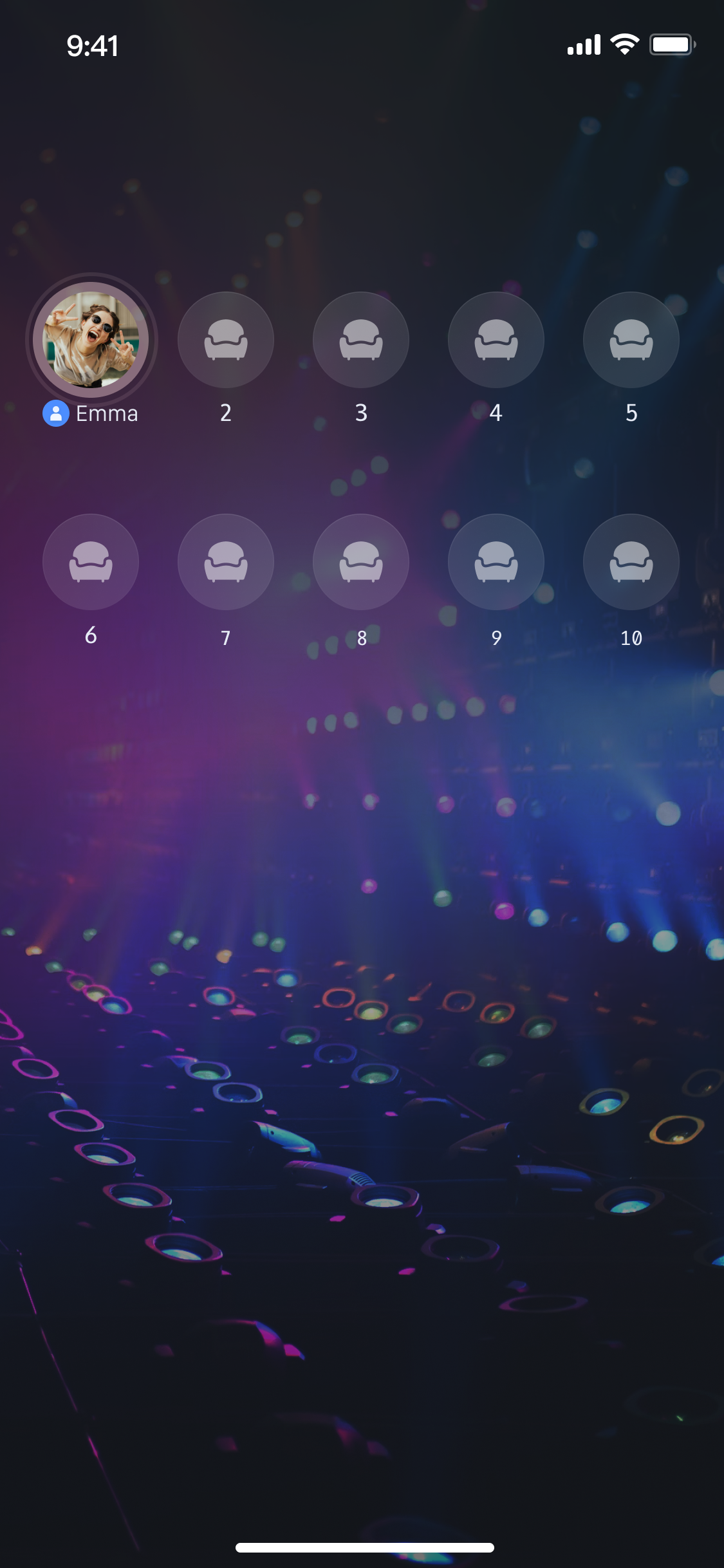
|
100
|
+
}
|
|
101
|
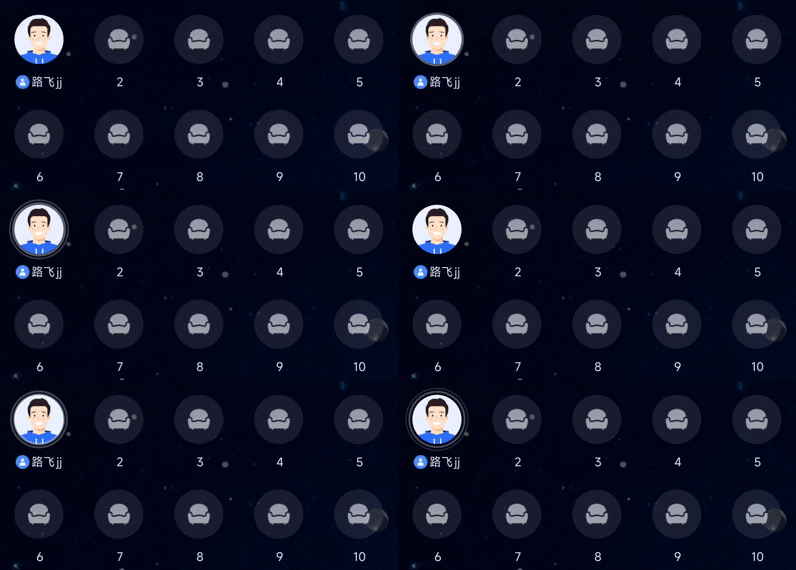
+
|
|
102
|
+
override fun onFailure(code: Int, desc: String) {
|
|
103
|
+
// 登录失败处理
|
|
104
|
+
Log.e("Login", "login failed, code: $code, error: $desc");
|
|
105
|
+
}
|
|
106
|
+
}
|
|
107
|
+
)
|
|
108
|
+
}
|
|
109
|
+
}
|
|
110
|
+
```
|
|
111
|
+
|
|
112
|
+
**登录接口参数说明:**
|
|
113
|
+
<table>
|
|
114
|
+
<tr>
|
|
115
|
+
<td rowspan="1" colSpan="1" >**参数**</td>
|
|
116
|
+
|
|
117
|
+
<td rowspan="1" colSpan="1" >**类型**</td>
|
|
118
|
+
|
|
119
|
+
<td rowspan="1" colSpan="1" >**说明**</td>
|
|
120
|
+
</tr>
|
|
121
|
+
|
|
122
|
+
<tr>
|
|
123
|
+
<td rowspan="1" colSpan="1" >`sdkAppId`</td>
|
|
124
|
+
|
|
125
|
+
<td rowspan="1" colSpan="1" >`Int`</td>
|
|
126
|
+
|
|
127
|
+
<td rowspan="1" colSpan="1" >从 [控制台](https://console.cloud.tencent.com/trtc) 获取,通常是以 `140` 或 `160` 开头的10位整数。</td>
|
|
128
|
+
</tr>
|
|
129
|
+
|
|
130
|
+
<tr>
|
|
131
|
+
<td rowspan="1" colSpan="1" >`userID`</td>
|
|
132
|
+
|
|
133
|
+
<td rowspan="1" colSpan="1" >`String`</td>
|
|
134
|
+
|
|
135
|
+
<td rowspan="1" colSpan="1" >当前用户的唯一 `ID`,仅包含英文字母、数字、连字符和下划线。为避免多端登录冲突,**请勿使用**`1`、`123`**等简单 ID**。</td>
|
|
136
|
+
</tr>
|
|
137
|
+
|
|
138
|
+
<tr>
|
|
139
|
+
<td rowspan="1" colSpan="1" >`userSig`</td>
|
|
140
|
+
|
|
141
|
+
<td rowspan="1" colSpan="1" >`String`</td>
|
|
142
|
+
|
|
143
|
+
<td rowspan="1" colSpan="1" >用于腾讯云鉴权的票据。请注意:<br>- 开发环境:您可以采用本地 `GenerateTestUserSig.genTestSig` 函数生成 `userSig` 或者 通过 [UserSig 辅助工具](https://console.cloud.tencent.com/im/tool-usersig) 生成临时的 `UserSig`。<br>- 生产环境:为了防止密钥泄露,请务必采用服务端生成 `UserSig` 的方式。详细信息请参考 [服务端生成 UserSig](https://cloud.tencent.com/document/product/647/17275)。<br>更多信息请参见 [如何计算及使用 UserSig](https://cloud.tencent.com/document/product/647/17275)。</td>
|
|
144
|
+
</tr>
|
|
145
|
+
</table>
|
|
146
|
+
|
|
147
|
+
|
|
148
|
+
## 搭建基础语聊房
|
|
149
|
+
|
|
150
|
+
### 步骤1:实现房主创建语聊房
|
|
151
|
+
|
|
152
|
+
房主开播流程如下,您只需执行以下几步操作,即可快速搭建一个语聊房。
|
|
153
|
+
|
|
154
|
+
#### **1. 初始化麦位 **`Store`
|
|
155
|
+
|
|
156
|
+
在您的房主 `Activity` 中,创建一个 `LiveSeatStore` 实例。您需要监听 `liveSeatState.seatList` 的变化,以实时获取麦位数据来渲染您的 `UI`。
|
|
157
|
+
``` java
|
|
158
|
+
import android.os.Bundle
|
|
159
|
+
import android.util.Log
|
|
160
|
+
import androidx.appcompat.app.AppCompatActivity
|
|
161
|
+
import io.trtc.tuikit.atomicxcore.api.device.DeviceStore
|
|
162
|
+
import io.trtc.tuikit.atomicxcore.api.live.LiveListStore
|
|
163
|
+
import io.trtc.tuikit.atomicxcore.api.live.LiveSeatStore
|
|
164
|
+
import kotlinx.coroutines.CoroutineScope
|
|
165
|
+
import kotlinx.coroutines.Dispatchers
|
|
166
|
+
import kotlinx.coroutines.launch
|
|
167
|
+
|
|
168
|
+
// YourAnchorActivity 代表您的房主Activity
|
|
169
|
+
class YourAnchorActivity : AppCompatActivity() {
|
|
170
|
+
|
|
171
|
+
private lateinit var liveListStore: LiveListStore
|
|
172
|
+
private lateinit var liveSeatStore: LiveSeatStore
|
|
173
|
+
private lateinit var deviceStore: DeviceStore
|
|
174
|
+
private val liveID = "test_voice_room_001"
|
|
175
|
+
|
|
176
|
+
override fun onCreate(savedInstanceState: Bundle?) {
|
|
177
|
+
super.onCreate(savedInstanceState)
|
|
178
|
+
setContentView(R.layout.activity_anchor) // 假设您有自己的布局
|
|
179
|
+
|
|
180
|
+
// 1. 初始化 Stores
|
|
181
|
+
liveListStore = LiveListStore.shared()
|
|
182
|
+
liveSeatStore = LiveSeatStore.create(liveID)
|
|
183
|
+
deviceStore = DeviceStore.shared()
|
|
184
|
+
|
|
185
|
+
// 2. 监听麦位列表变化
|
|
186
|
+
observeSeatList()
|
|
187
|
+
}
|
|
188
|
+
|
|
189
|
+
private fun observeSeatList() {
|
|
190
|
+
// 监听 seatList 变化,并更新您的麦位 UI
|
|
191
|
+
CoroutineScope(Dispatchers.Main).launch {
|
|
192
|
+
liveSeatStore.liveSeatState.seatList.collect { seatInfoList ->
|
|
193
|
+
// 在这里根据 seatInfoList 渲染您的麦位 UI
|
|
194
|
+
// 例如:updateMicSeatView(seatInfoList)
|
|
195
|
+
Log.d("AnchorActivity", "Seat list updated: ${seatInfoList.size} seats")
|
|
196
|
+
}
|
|
197
|
+
}
|
|
198
|
+
}
|
|
199
|
+
}
|
|
200
|
+
```
|
|
201
|
+
|
|
202
|
+
#### **2. 打开麦克风**
|
|
203
|
+
|
|
204
|
+
通过调用 `DeviceStore` 的 `openLocalMicrophone` 接口打开麦克风,示例代码如下:
|
|
205
|
+
``` java
|
|
206
|
+
import androidx.appcompat.app.AppCompatActivity
|
|
207
|
+
import io.trtc.tuikit.atomicxcore.api.device.DeviceStore
|
|
208
|
+
|
|
209
|
+
class YourAnchorActivity : AppCompatActivity() {
|
|
210
|
+
// ... 其他代码 ...
|
|
211
|
+
|
|
212
|
+
private fun openDevices() {
|
|
213
|
+
// 1. 打开麦克风
|
|
214
|
+
DeviceStore.shared().openLocalMicrophone(completion = null)
|
|
215
|
+
}
|
|
216
|
+
}
|
|
217
|
+
```
|
|
218
|
+
|
|
219
|
+
#### **3. 开始语聊**
|
|
220
|
+
|
|
221
|
+
通过调用 `LiveListStore` 的 `createLive` 接口开始语聊房直播,完整示例代码如下:
|
|
222
|
+
``` java
|
|
223
|
+
import android.os.Bundle
|
|
224
|
+
import android.util.Log
|
|
225
|
+
import androidx.appcompat.app.AppCompatActivity
|
|
226
|
+
import io.trtc.tuikit.atomicxcore.api.live.LiveInfo
|
|
227
|
+
import io.trtc.tuikit.atomicxcore.api.live.LiveInfoCompletionHandler
|
|
228
|
+
import io.trtc.tuikit.atomicxcore.api.live.TakeSeatMode
|
|
229
|
+
|
|
230
|
+
class YourAnchorActivity : AppCompatActivity() {
|
|
231
|
+
// ... 其他代码 ...
|
|
232
|
+
|
|
233
|
+
override fun onCreate(savedInstanceState: Bundle?) {
|
|
234
|
+
super.onCreate(savedInstanceState)
|
|
235
|
+
// ... 其他代码 ...
|
|
236
|
+
|
|
237
|
+
// 开始语聊
|
|
238
|
+
startLive()
|
|
239
|
+
}
|
|
240
|
+
|
|
241
|
+
private fun startLive() {
|
|
242
|
+
val liveInfo = LiveInfo().apply {
|
|
243
|
+
// 设置房间 id
|
|
244
|
+
liveID = this@YourAnchorActivity.liveID
|
|
245
|
+
// 设置房间名称
|
|
246
|
+
liveName = "test 语聊房"
|
|
247
|
+
// 配置为语聊房(启用麦位)
|
|
248
|
+
isSeatEnabled = true
|
|
249
|
+
// 房主默认上麦
|
|
250
|
+
keepOwnerOnSeat = true
|
|
251
|
+
// 5. 设置麦位布局模板(例如 70 为 10 麦位模板)
|
|
252
|
+
seatLayoutTemplateID = 70
|
|
253
|
+
// 6. 设置上麦模式,例如申请上麦
|
|
254
|
+
seatMode = TakeSeatMode.APPLY
|
|
255
|
+
// 7. 设置最大麦位数
|
|
256
|
+
maxSeatCount = 10
|
|
257
|
+
}
|
|
258
|
+
|
|
259
|
+
// 8. 调用 createLive 开始直播
|
|
260
|
+
liveListStore.createLive(liveInfo, object : LiveInfoCompletionHandler {
|
|
261
|
+
override fun onFailure(code: Int, desc: String) {
|
|
262
|
+
Log.e("Live", "Response startLive onError: $desc")
|
|
263
|
+
}
|
|
264
|
+
|
|
265
|
+
override fun onSuccess(liveInfo: LiveInfo) {
|
|
266
|
+
Log.d("Live", "Response startLive onSuccess")
|
|
267
|
+
// 房主创建成功后,默认会上麦,此时您可以调用 unmuteMicrophone
|
|
268
|
+
liveSeatStore.unmuteMicrophone(null)
|
|
269
|
+
}
|
|
270
|
+
})
|
|
271
|
+
}
|
|
272
|
+
}
|
|
273
|
+
```
|
|
274
|
+
|
|
275
|
+
`LiveInfo`** 参数说明**
|
|
276
|
+
<table>
|
|
277
|
+
<tr>
|
|
278
|
+
<td rowspan="1" colSpan="1" >**参数名**</td>
|
|
279
|
+
|
|
280
|
+
<td rowspan="1" colSpan="1" >**类型**</td>
|
|
281
|
+
|
|
282
|
+
<td rowspan="1" colSpan="1" >**属性**</td>
|
|
283
|
+
|
|
284
|
+
<td rowspan="1" colSpan="1" >**描述**</td>
|
|
285
|
+
</tr>
|
|
286
|
+
|
|
287
|
+
<tr>
|
|
288
|
+
<td rowspan="1" colSpan="1" >`liveID`</td>
|
|
289
|
+
|
|
290
|
+
<td rowspan="1" colSpan="1" >`String`</td>
|
|
291
|
+
|
|
292
|
+
<td rowspan="1" colSpan="1" >必填</td>
|
|
293
|
+
|
|
294
|
+
<td rowspan="1" colSpan="1" >直播间的唯一标识符</td>
|
|
295
|
+
</tr>
|
|
296
|
+
|
|
297
|
+
<tr>
|
|
298
|
+
<td rowspan="1" colSpan="1" >`liveName`</td>
|
|
299
|
+
|
|
300
|
+
<td rowspan="1" colSpan="1" >`String`</td>
|
|
301
|
+
|
|
302
|
+
<td rowspan="1" colSpan="1" >选填</td>
|
|
303
|
+
|
|
304
|
+
<td rowspan="1" colSpan="1" >直播间的标题</td>
|
|
305
|
+
</tr>
|
|
306
|
+
|
|
307
|
+
<tr>
|
|
308
|
+
<td rowspan="1" colSpan="1" >`notice`</td>
|
|
309
|
+
|
|
310
|
+
<td rowspan="1" colSpan="1" >`String`</td>
|
|
311
|
+
|
|
312
|
+
<td rowspan="1" colSpan="1" >选填</td>
|
|
313
|
+
|
|
314
|
+
<td rowspan="1" colSpan="1" >直播间的公告信息</td>
|
|
315
|
+
</tr>
|
|
316
|
+
|
|
317
|
+
<tr>
|
|
318
|
+
<td rowspan="1" colSpan="1" >`isMessageDisable`</td>
|
|
319
|
+
|
|
320
|
+
<td rowspan="1" colSpan="1" >`Boolean`</td>
|
|
321
|
+
|
|
322
|
+
<td rowspan="1" colSpan="1" >选填</td>
|
|
323
|
+
|
|
324
|
+
<td rowspan="1" colSpan="1" >是否禁言(`true`:是,`false`:否)</td>
|
|
325
|
+
</tr>
|
|
326
|
+
|
|
327
|
+
<tr>
|
|
328
|
+
<td rowspan="1" colSpan="1" >`isPublicVisible`</td>
|
|
329
|
+
|
|
330
|
+
<td rowspan="1" colSpan="1" >`Boolean`</td>
|
|
331
|
+
|
|
332
|
+
<td rowspan="1" colSpan="1" >选填</td>
|
|
333
|
+
|
|
334
|
+
<td rowspan="1" colSpan="1" >是否公开可见(`true`:是,`false`:否)</td>
|
|
335
|
+
</tr>
|
|
336
|
+
|
|
337
|
+
<tr>
|
|
338
|
+
<td rowspan="1" colSpan="1" >`isSeatEnabled`</td>
|
|
339
|
+
|
|
340
|
+
<td rowspan="1" colSpan="1" >`Boolean`</td>
|
|
341
|
+
|
|
342
|
+
<td rowspan="1" colSpan="1" >选填</td>
|
|
343
|
+
|
|
344
|
+
<td rowspan="1" colSpan="1" >是否启用麦位功能(`true`:是,`false`:否)</td>
|
|
345
|
+
</tr>
|
|
346
|
+
|
|
347
|
+
<tr>
|
|
348
|
+
<td rowspan="1" colSpan="1" >`keepOwnerOnSeat`</td>
|
|
349
|
+
|
|
350
|
+
<td rowspan="1" colSpan="1" >`Boolean`</td>
|
|
351
|
+
|
|
352
|
+
<td rowspan="1" colSpan="1" >选填</td>
|
|
353
|
+
|
|
354
|
+
<td rowspan="1" colSpan="1" >是否保持房主在麦位上</td>
|
|
355
|
+
</tr>
|
|
356
|
+
|
|
357
|
+
<tr>
|
|
358
|
+
<td rowspan="1" colSpan="1" >`maxSeatCount`</td>
|
|
359
|
+
|
|
360
|
+
<td rowspan="1" colSpan="1" >`Int`</td>
|
|
361
|
+
|
|
362
|
+
<td rowspan="1" colSpan="1" >必填</td>
|
|
363
|
+
|
|
364
|
+
<td rowspan="1" colSpan="1" >最大麦位数量</td>
|
|
365
|
+
</tr>
|
|
366
|
+
|
|
367
|
+
<tr>
|
|
368
|
+
<td rowspan="1" colSpan="1" >`seatMode`</td>
|
|
369
|
+
|
|
370
|
+
<td rowspan="1" colSpan="1" >[TakeSeatMode](https://tencent-rtc.github.io/TUIKit_Android/-atomic-x%20-core%20-a-p-i/io.trtc.tuikit.atomicxcore.api.live/-take-seat-mode/index.html)</td>
|
|
371
|
+
|
|
372
|
+
<td rowspan="1" colSpan="1" >选填</td>
|
|
373
|
+
|
|
374
|
+
<td rowspan="1" colSpan="1" >上麦模式(`FREE`:自由上麦,`APPLY`:申请上麦)</td>
|
|
375
|
+
</tr>
|
|
376
|
+
|
|
377
|
+
<tr>
|
|
378
|
+
<td rowspan="1" colSpan="1" >`seatLayoutTemplateID`</td>
|
|
379
|
+
|
|
380
|
+
<td rowspan="1" colSpan="1" >`Int`</td>
|
|
381
|
+
|
|
382
|
+
<td rowspan="1" colSpan="1" >必填</td>
|
|
383
|
+
|
|
384
|
+
<td rowspan="1" colSpan="1" >麦位布局模板 `ID`</td>
|
|
385
|
+
</tr>
|
|
386
|
+
|
|
387
|
+
<tr>
|
|
388
|
+
<td rowspan="1" colSpan="1" >`coverURL`</td>
|
|
389
|
+
|
|
390
|
+
<td rowspan="1" colSpan="1" >`String`</td>
|
|
391
|
+
|
|
392
|
+
<td rowspan="1" colSpan="1" >选填</td>
|
|
393
|
+
|
|
394
|
+
<td rowspan="1" colSpan="1" >直播间的封面图片地址</td>
|
|
395
|
+
</tr>
|
|
396
|
+
|
|
397
|
+
<tr>
|
|
398
|
+
<td rowspan="1" colSpan="1" >`backgroundURL`</td>
|
|
399
|
+
|
|
400
|
+
<td rowspan="1" colSpan="1" >`String`</td>
|
|
401
|
+
|
|
402
|
+
<td rowspan="1" colSpan="1" >选填</td>
|
|
403
|
+
|
|
404
|
+
<td rowspan="1" colSpan="1" >直播间的背景图片地址</td>
|
|
405
|
+
</tr>
|
|
406
|
+
|
|
407
|
+
<tr>
|
|
408
|
+
<td rowspan="1" colSpan="1" >`categoryList`</td>
|
|
409
|
+
|
|
410
|
+
<td rowspan="1" colSpan="1" >`List<Int>`</td>
|
|
411
|
+
|
|
412
|
+
<td rowspan="1" colSpan="1" >选填</td>
|
|
413
|
+
|
|
414
|
+
<td rowspan="1" colSpan="1" >直播间的分类标签列表</td>
|
|
415
|
+
</tr>
|
|
416
|
+
|
|
417
|
+
<tr>
|
|
418
|
+
<td rowspan="4" colSpan="1" >`activityStatus`</td>
|
|
419
|
+
|
|
420
|
+
<td rowspan="4" colSpan="1" >`Int`</td>
|
|
421
|
+
|
|
422
|
+
<td rowspan="4" colSpan="1" >选填</td>
|
|
423
|
+
|
|
424
|
+
<td rowspan="4" colSpan="1" >直播活动状态</td>
|
|
425
|
+
</tr>
|
|
426
|
+
|
|
427
|
+
<tr></tr>
|
|
428
|
+
|
|
429
|
+
<tr></tr>
|
|
430
|
+
|
|
431
|
+
<tr></tr>
|
|
432
|
+
|
|
433
|
+
<tr>
|
|
434
|
+
<td rowspan="2" colSpan="1" >`isGiftEnabled`</td>
|
|
435
|
+
|
|
436
|
+
<td rowspan="2" colSpan="1" >`Boolean`</td>
|
|
437
|
+
|
|
438
|
+
<td rowspan="2" colSpan="1" >选填</td>
|
|
439
|
+
|
|
440
|
+
<td rowspan="2" colSpan="1" >是否启用礼物功能(`true`:是,`false`:否)</td>
|
|
441
|
+
</tr>
|
|
442
|
+
|
|
443
|
+
<tr></tr>
|
|
444
|
+
</table>
|
|
445
|
+
|
|
446
|
+
|
|
447
|
+
#### **4. 构建麦位 UI 界面**
|
|
448
|
+
|
|
449
|
+
> **提示:**
|
|
450
|
+
>
|
|
451
|
+
|
|
452
|
+
> 麦位 `UI` 效果的业务代码,您也可以参考 `TUILiveKit` 开源项目中的 [SeatGridView.kt](https://github.com/Tencent-RTC/TUILiveKit/blob/main/Android/tuilivekit/src/main/java/com/trtc/uikit/livekit/voiceroomcore/SeatGridView.kt) 文件来了解完整的实现逻辑。
|
|
453
|
+
>
|
|
454
|
+
|
|
455
|
+
|
|
456
|
+
通过 LiveSeatStore 实例,监听 liveSeatState.seatList 的变化,以实时获取麦位数据来渲染您的 UI。您可以在 Activity 中(例如 YourAnchorActivity 或 YourAudienceActivity)通过以下方式监听数据:
|
|
457
|
+
``` java
|
|
458
|
+
import android.os.Bundle
|
|
459
|
+
import android.util.Log
|
|
460
|
+
import androidx.appcompat.app.AppCompatActivity
|
|
461
|
+
import kotlinx.coroutines.CoroutineScope
|
|
462
|
+
import kotlinx.coroutines.Dispatchers
|
|
463
|
+
import kotlinx.coroutines.launch
|
|
464
|
+
|
|
465
|
+
class YourAnchorActivity : AppCompatActivity() {
|
|
466
|
+
// ... 其他代码 ...
|
|
467
|
+
|
|
468
|
+
override fun onCreate(savedInstanceState: Bundle?) {
|
|
469
|
+
super.onCreate(savedInstanceState)
|
|
470
|
+
// ... 其他代码 ...
|
|
471
|
+
|
|
472
|
+
// 监听 seatList 变化
|
|
473
|
+
observeSeatList()
|
|
474
|
+
}
|
|
475
|
+
|
|
476
|
+
private fun observeSeatList() {
|
|
477
|
+
// 监听 seatList 变化,并更新您的麦位 UI
|
|
478
|
+
CoroutineScope(Dispatchers.Main).launch {
|
|
479
|
+
liveSeatStore.liveSeatState.seatList.collect { seatInfoList ->
|
|
480
|
+
// seatInfoList 即为最新的麦位列表 (List<SeatInfo>),在这里根据 seatInfoList 渲染您的麦位 UI
|
|
481
|
+
Log.d("AnchorActivity", "Seat list updated: ${seatInfoList.size} seats")
|
|
482
|
+
}
|
|
483
|
+
}
|
|
484
|
+
}
|
|
485
|
+
}
|
|
486
|
+
```
|
|
487
|
+
|
|
488
|
+
#### **5. 结束语聊**
|
|
489
|
+
|
|
490
|
+
语聊结束后,房主可以调用 `LiveListStore` 的 `endLive` 接口结束语聊,`SDK` 会处理停止推流和销毁房间的逻辑。
|
|
491
|
+
``` java
|
|
492
|
+
import android.util.Log
|
|
493
|
+
import androidx.appcompat.app.AppCompatActivity
|
|
494
|
+
import com.tencent.cloud.tuikit.engine.extension.TUILiveListManager
|
|
495
|
+
import io.trtc.tuikit.atomicxcore.api.live.StopLiveCompletionHandler
|
|
496
|
+
|
|
497
|
+
class YourAnchorActivity : AppCompatActivity() {
|
|
498
|
+
// ... 其他代码 ...
|
|
499
|
+
|
|
500
|
+
// 结束语聊
|
|
501
|
+
private fun stopLive() {
|
|
502
|
+
liveListStore.endLive(object : StopLiveCompletionHandler {
|
|
503
|
+
override fun onSuccess(statisticsData: TUILiveListManager.LiveStatisticsData) {
|
|
504
|
+
Log.d("Live", "endLive success, duration: ${statisticsData.liveDuration}")
|
|
505
|
+
}
|
|
506
|
+
|
|
507
|
+
override fun onFailure(code: Int, desc: String) {
|
|
508
|
+
Log.e("Live", "endLive error: $desc")
|
|
509
|
+
}
|
|
510
|
+
})
|
|
511
|
+
}
|
|
512
|
+
|
|
513
|
+
// 确保在 Activity 销毁时也调用
|
|
514
|
+
override fun onDestroy() {
|
|
515
|
+
super.onDestroy()
|
|
516
|
+
stopLive()
|
|
517
|
+
Log.d("Live", "YourAnchorActivity onDestroy")
|
|
518
|
+
}
|
|
519
|
+
}
|
|
520
|
+
```
|
|
521
|
+
|
|
522
|
+
### 步骤2:实现观众进入语聊房
|
|
523
|
+
|
|
524
|
+
观众进房流程如下,通过简单几步操作,即可实现观众进入语聊房。
|
|
525
|
+
|
|
526
|
+
#### **1. 初始化麦位 **`Store`
|
|
527
|
+
|
|
528
|
+
在您的观众 `Activity` 中,创建 `LiveSeatStore` 实例,并监听 `liveSeatState.seatList` 的变化,以渲染麦位 `UI`。
|
|
529
|
+
``` java
|
|
530
|
+
import io.trtc.tuikit.atomicxcore.api.live.LiveListStore
|
|
531
|
+
import io.trtc.tuikit.atomicxcore.api.live.LiveSeatStore
|
|
532
|
+
import android.os.Bundle
|
|
533
|
+
import androidx.appcompat.app.AppCompatActivity
|
|
534
|
+
import kotlinx.coroutines.CoroutineScope
|
|
535
|
+
import kotlinx.coroutines.Dispatchers
|
|
536
|
+
import kotlinx.coroutines.launch
|
|
537
|
+
import android.util.Log
|
|
538
|
+
|
|
539
|
+
// YourAudienceActivity 代表您的观众Activity
|
|
540
|
+
class YourAudienceActivity : AppCompatActivity() {
|
|
541
|
+
|
|
542
|
+
private lateinit var liveListStore: LiveListStore
|
|
543
|
+
private lateinit var liveSeatStore: LiveSeatStore
|
|
544
|
+
private val liveID = "test_voice_room_001" // 确保 liveID 与房主一致
|
|
545
|
+
|
|
546
|
+
override fun onCreate(savedInstanceState: Bundle?) {
|
|
547
|
+
super.onCreate(savedInstanceState)
|
|
548
|
+
setContentView(R.layout.activity_audience) // 假设您有自己的布局
|
|
549
|
+
|
|
550
|
+
// 1. 初始化 Stores
|
|
551
|
+
liveListStore = LiveListStore.shared()
|
|
552
|
+
liveSeatStore = LiveSeatStore.create(liveID)
|
|
553
|
+
|
|
554
|
+
// 2. 监听麦位列表变化
|
|
555
|
+
observeSeatList()
|
|
556
|
+
}
|
|
557
|
+
|
|
558
|
+
private fun observeSeatList() {
|
|
559
|
+
// 3. 监听 seatList 变化,并更新您的麦位 UI
|
|
560
|
+
CoroutineScope(Dispatchers.Main).launch {
|
|
561
|
+
liveSeatStore.liveSeatState.seatList.collect { seatInfoList ->
|
|
562
|
+
// 在这里根据 seatInfoList 渲染您的麦位 UI
|
|
563
|
+
// 例如:updateMicSeatView(seatInfoList)
|
|
564
|
+
Log.d("AudienceActivity", "Seat list updated: ${seatInfoList.size} seats")
|
|
565
|
+
}
|
|
566
|
+
}
|
|
567
|
+
}
|
|
568
|
+
}
|
|
569
|
+
```
|
|
570
|
+
|
|
571
|
+
#### **2. 进入语聊房**
|
|
572
|
+
|
|
573
|
+
通过调用 `LiveListStore` 的 `joinLive` 接口加入语聊房,完整示例代码如下:
|
|
574
|
+
``` java
|
|
575
|
+
import android.os.Bundle
|
|
576
|
+
import androidx.appcompat.app.AppCompatActivity
|
|
577
|
+
import android.util.Log
|
|
578
|
+
import io.trtc.tuikit.atomicxcore.api.live.LiveInfo
|
|
579
|
+
import io.trtc.tuikit.atomicxcore.api.live.LiveInfoCompletionHandler
|
|
580
|
+
|
|
581
|
+
// YourAudienceActivity 代表您的观众Activity
|
|
582
|
+
class YourAudienceActivity : AppCompatActivity() {
|
|
583
|
+
|
|
584
|
+
// ... 其他代码 ...
|
|
585
|
+
override fun onCreate(savedInstanceState: Bundle?) {
|
|
586
|
+
super.onCreate(savedInstanceState)
|
|
587
|
+
setContentView(R.layout.activity_audience) // 假设您有自己的布局
|
|
588
|
+
// ... 其他代码 ...
|
|
589
|
+
|
|
590
|
+
// 进入语聊房
|
|
591
|
+
joinLive()
|
|
592
|
+
}
|
|
593
|
+
|
|
594
|
+
private fun joinLive() {
|
|
595
|
+
// 1. 调用 joinLive 进入语聊房
|
|
596
|
+
liveListStore.joinLive(liveID, object : LiveInfoCompletionHandler {
|
|
597
|
+
override fun onSuccess(liveInfo: LiveInfo) {
|
|
598
|
+
Log.d("Live", "joinLive success")
|
|
599
|
+
}
|
|
600
|
+
override fun onFailure(code: Int, desc: String) {
|
|
601
|
+
Log.e("Live", "joinLive error: $desc")
|
|
602
|
+
}
|
|
603
|
+
})
|
|
604
|
+
}
|
|
605
|
+
}
|
|
606
|
+
```
|
|
607
|
+
|
|
608
|
+
#### **3. 构建麦位 UI 界面**
|
|
609
|
+
|
|
610
|
+
观众构建麦位 UI 界面的流程与主播完全一致,请参考主播 [构建麦位 UI 界面](https://write.woa.com/#cb03519e-15a4-4fda-8581-fba786d271d0)。
|
|
611
|
+
|
|
612
|
+
#### **4. 退出语聊房**
|
|
613
|
+
|
|
614
|
+
观众退出语聊房时,需要调用 `LiveListStore` 的 `leaveLive` 接口来退出。
|
|
615
|
+
``` java
|
|
616
|
+
import android.util.Log
|
|
617
|
+
import androidx.appcompat.app.AppCompatActivity
|
|
618
|
+
import io.trtc.tuikit.atomicxcore.api.CompletionHandler
|
|
619
|
+
|
|
620
|
+
// YourAudienceActivity 代表您的观众Activity
|
|
621
|
+
class YourAudienceActivity : AppCompatActivity() {
|
|
622
|
+
// ... 其他代码 ...
|
|
623
|
+
|
|
624
|
+
private fun leaveLive() {
|
|
625
|
+
liveListStore.leaveLive(object : CompletionHandler {
|
|
626
|
+
override fun onSuccess() {
|
|
627
|
+
Log.d("Live", "leaveLive success")
|
|
628
|
+
}
|
|
629
|
+
|
|
630
|
+
override fun onFailure(code: Int, desc: String) {
|
|
631
|
+
Log.e("Live", "leaveLive error: $desc")
|
|
632
|
+
}
|
|
633
|
+
})
|
|
634
|
+
}
|
|
635
|
+
|
|
636
|
+
// 确保在 Activity 销毁时也调用
|
|
637
|
+
override fun onDestroy() {
|
|
638
|
+
super.onDestroy()
|
|
639
|
+
leaveLive()
|
|
640
|
+
Log.d("Live", "YourAudienceActivity onDestroy")
|
|
641
|
+
}
|
|
642
|
+
}
|
|
643
|
+
```
|
|
644
|
+
|
|
645
|
+
### 运行效果
|
|
646
|
+
|
|
647
|
+
完成上述步骤后,即可完成一个最基础的语聊直播场景。您可以参考 [丰富语聊场景](https://write.woa.com/#789ad452-eaf1-433f-905d-fcb2945c1505) 来完善语聊场景。
|
|
648
|
+
|
|
649
|
+
|
|
650
|
+
|
|
651
|
+
|
|
652
|
+
## 功能进阶
|
|
653
|
+
|
|
654
|
+
### **实现麦上用户说话音浪**
|
|
655
|
+
|
|
656
|
+
在语聊房场景中,一个常见的需求是当麦上用户说话时,在其头像上显示一个波浪动画,以提示全房间用户“谁在说话”,`LiveSeatStore` 提供了 `speakingUsers` 数据流,专门用于实现此功能。
|
|
657
|
+
|
|
658
|
+
#### 实现效果
|
|
659
|
+
|
|
660
|
+
|
|
661
|
+
|
|
662
|
+
|
|
663
|
+
#### 实现方式
|
|
664
|
+
|
|
665
|
+
> **提示:**
|
|
666
|
+
>
|
|
667
|
+
|
|
668
|
+
> 麦上用户说话时展示波浪动画效果,您也可以参考 `TUILiveKit` 开源项目中的 [SeatGridView.kt](https://github.com/Tencent-RTC/TUILiveKit/blob/main/Android/tuilivekit/src/main/java/com/trtc/uikit/livekit/voiceroomcore/SeatGridView.kt) 文件来了解完整的实现逻辑。
|
|
669
|
+
>
|
|
670
|
+
|
|
671
|
+
|
|
672
|
+
在 `YourAnchorActivity` 中监听 `speakingUsers` 变化,并更新“正在说话”状态,代码示例如下:
|
|
673
|
+
``` java
|
|
674
|
+
import android.os.Bundle
|
|
675
|
+
import android.util.Log
|
|
676
|
+
import androidx.appcompat.app.AppCompatActivity
|
|
677
|
+
import kotlinx.coroutines.CoroutineScope
|
|
678
|
+
import kotlinx.coroutines.Dispatchers
|
|
679
|
+
import kotlinx.coroutines.launch
|
|
680
|
+
|
|
681
|
+
// 在 YourAnchorActivity 或 YourAudienceActivity 中
|
|
682
|
+
class YourAnchorActivity : AppCompatActivity() {
|
|
683
|
+
// ... (省略其他代码) ...
|
|
684
|
+
|
|
685
|
+
override fun onCreate(savedInstanceState: Bundle?) {
|
|
686
|
+
super.onCreate(savedInstanceState)
|
|
687
|
+
// ... (省略其他代码) ...
|
|
688
|
+
|
|
689
|
+
// 监听 speakingUsers 变化
|
|
690
|
+
observeSpeakingUsersState()
|
|
691
|
+
}
|
|
692
|
+
|
|
693
|
+
private fun observeSpeakingUsersState() {
|
|
694
|
+
// 监听 speakingUsers 变化,并更新“正在说话”状态
|
|
695
|
+
CoroutineScope(Dispatchers.Main).launch {
|
|
696
|
+
liveSeatStore.liveSeatState.speakingUsers.collect { speakingUserSet ->
|
|
697
|
+
// 将 "正在说话" 的用户 ID 集合 传递给 UI , 更新 UI 状态
|
|
698
|
+
Log.d("AnchorActivity", "Speaking users updated: ${speakingUserSet.size} users")
|
|
699
|
+
}
|
|
700
|
+
}
|
|
701
|
+
}
|
|
702
|
+
}
|
|
703
|
+
```
|
|
704
|
+
|
|
705
|
+
## 丰富语聊房场景
|
|
706
|
+
|
|
707
|
+
当您完成了基础的语聊房功能后,您可以参考以下功能指南来为语聊房添加丰富的互动玩法。
|
|
708
|
+
<table>
|
|
709
|
+
<tr>
|
|
710
|
+
<td rowspan="1" colSpan="1" >**功能**</td>
|
|
711
|
+
|
|
712
|
+
<td rowspan="1" colSpan="1" >**功能介绍**</td>
|
|
713
|
+
|
|
714
|
+
<td rowspan="1" colSpan="1" >**功能 Stores**</td>
|
|
715
|
+
|
|
716
|
+
<td rowspan="1" colSpan="1" >**实现指南**</td>
|
|
717
|
+
</tr>
|
|
718
|
+
|
|
719
|
+
<tr>
|
|
720
|
+
<td rowspan="1" colSpan="1" >**实现听众上麦**</td>
|
|
721
|
+
|
|
722
|
+
<td rowspan="1" colSpan="1" >听众申请上麦,与房主进行实时语音互动。</td>
|
|
723
|
+
|
|
724
|
+
<td rowspan="1" colSpan="1" >[CoGuestStore](https://tencent-rtc.github.io/TUIKit_Android/-atomic-x%20-core%20-a-p-i/io.trtc.tuikit.atomicxcore.api.live/-co-guest-store/index.html)</td>
|
|
725
|
+
|
|
726
|
+
<td rowspan="1" colSpan="1" >[观众上麦](https://write.woa.com/document/192834976562315264)</td>
|
|
727
|
+
</tr>
|
|
728
|
+
|
|
729
|
+
<tr>
|
|
730
|
+
<td rowspan="1" colSpan="1" >**实现房主跨房连线 PK**</td>
|
|
731
|
+
|
|
732
|
+
<td rowspan="1" colSpan="1" >两个不同房间的主播进行连线,实现互动或 PK。</td>
|
|
733
|
+
|
|
734
|
+
<td rowspan="1" colSpan="1" >[CoHostStore](https://tencent-rtc.github.io/TUIKit_Android/-atomic-x%20-core%20-a-p-i/io.trtc.tuikit.atomicxcore.api.live/-co-host-store/index.html)<br>[BattleStore](https://tencent-rtc.github.io/TUIKit_Android/-atomic-x%20-core%20-a-p-i/io.trtc.tuikit.atomicxcore.api.live/-battle-store/index.html)</td>
|
|
735
|
+
|
|
736
|
+
<td rowspan="1" colSpan="1" >[主播连线 & PK](https://write.woa.com/document/191656323613335552)</td>
|
|
737
|
+
</tr>
|
|
738
|
+
|
|
739
|
+
<tr>
|
|
740
|
+
<td rowspan="1" colSpan="1" >**添加弹幕聊天功能**</td>
|
|
741
|
+
|
|
742
|
+
<td rowspan="1" colSpan="1" >房间内成员可以发送和接收实时文字消息。</td>
|
|
743
|
+
|
|
744
|
+
<td rowspan="1" colSpan="1" >[BarrageStore](https://tencent-rtc.github.io/TUIKit_Android/-atomic-x%20-core%20-a-p-i/io.trtc.tuikit.atomicxcore.api.barrage/-barrage-store/index.html)</td>
|
|
745
|
+
|
|
746
|
+
<td rowspan="1" colSpan="1" >[实现弹幕功能](https://write.woa.com/document/192936794314723328)</td>
|
|
747
|
+
</tr>
|
|
748
|
+
|
|
749
|
+
<tr>
|
|
750
|
+
<td rowspan="1" colSpan="1" >**构建礼物赠送系统**</td>
|
|
751
|
+
|
|
752
|
+
<td rowspan="1" colSpan="1" >观众可以向主播赠送虚拟礼物,增加互动和趣味性。</td>
|
|
753
|
+
|
|
754
|
+
<td rowspan="1" colSpan="1" >[GiftStore](https://tencent-rtc.github.io/TUIKit_Android/-atomic-x%20-core%20-a-p-i/io.trtc.tuikit.atomicxcore.api.gift/-gift-store/index.html)</td>
|
|
755
|
+
|
|
756
|
+
<td rowspan="1" colSpan="1" >[实现礼物功能](https://write.woa.com/document/192936845047365632)</td>
|
|
757
|
+
</tr>
|
|
758
|
+
</table>
|
|
759
|
+
|
|
760
|
+
|
|
761
|
+
## API 文档
|
|
762
|
+
<table>
|
|
763
|
+
<tr>
|
|
764
|
+
<td rowspan="2" colSpan="1" >**Store/Component**</td>
|
|
765
|
+
|
|
766
|
+
<td rowspan="2" colSpan="1" >**功能描述**</td>
|
|
767
|
+
|
|
768
|
+
<td rowspan="2" colSpan="1" >**API 文档**</td>
|
|
769
|
+
</tr>
|
|
770
|
+
|
|
771
|
+
<tr></tr>
|
|
772
|
+
|
|
773
|
+
<tr>
|
|
774
|
+
<td rowspan="1" colSpan="1" >**LiveListStore**</td>
|
|
775
|
+
|
|
776
|
+
<td rowspan="1" colSpan="1" >直播间全生命周期管理:创建 / 加入 / 离开 / 销毁房间,查询房间列表,修改直播信息(名称、公告等),监听直播状态(如被踢出、结束)。</td>
|
|
777
|
+
|
|
778
|
+
<td rowspan="1" colSpan="1" >[API 文档](https://tencent-rtc.github.io/TUIKit_Android/-atomic-x%20-core%20-a-p-i/io.trtc.tuikit.atomicxcore.api.live/-live-list-store/index.html)</td>
|
|
779
|
+
</tr>
|
|
780
|
+
|
|
781
|
+
<tr>
|
|
782
|
+
<td rowspan="1" colSpan="1" >**LiveSeatStore**</td>
|
|
783
|
+
|
|
784
|
+
<td rowspan="1" colSpan="1" >麦位管理核心:管理麦位列表、麦上用户状态、麦位相关操作(上麦、下麦、踢人、锁麦、开关麦克风/摄像头等),监听麦位事件。</td>
|
|
785
|
+
|
|
786
|
+
<td rowspan="1" colSpan="1" >[API 文档](https://tencent-rtc.github.io/TUIKit_Android/-atomic-x%20-core%20-a-p-i/io.trtc.tuikit.atomicxcore.api.live/-live-seat-store/index.html)</td>
|
|
787
|
+
</tr>
|
|
788
|
+
|
|
789
|
+
<tr>
|
|
790
|
+
<td rowspan="1" colSpan="1" >**DeviceStore**</td>
|
|
791
|
+
|
|
792
|
+
<td rowspan="1" colSpan="1" >音视频设备控制:麦克风(开关 / 音量)、摄像头(开关 / 切换 / 画质)、屏幕共享,设备状态实时监听。</td>
|
|
793
|
+
|
|
794
|
+
<td rowspan="1" colSpan="1" >[API 文档](https://tencent-rtc.github.io/TUIKit_Android/-atomic-x%20-core%20-a-p-i/io.trtc.tuikit.atomicxcore.api.device/-device-store/index.html)</td>
|
|
795
|
+
</tr>
|
|
796
|
+
|
|
797
|
+
<tr>
|
|
798
|
+
<td rowspan="1" colSpan="1" >**CoGuestStore**</td>
|
|
799
|
+
|
|
800
|
+
<td rowspan="1" colSpan="1" >观众连麦管理:连麦申请 / 邀请 / 同意 / 拒绝,连麦成员权限控制(麦克风 / 摄像头),状态同步。</td>
|
|
801
|
+
|
|
802
|
+
<td rowspan="1" colSpan="1" >[API 文档](https://tencent-rtc.github.io/TUIKit_Android/-atomic-x%20-core%20-a-p-i/io.trtc.tuikit.atomicxcore.api.live/-co-guest-store/index.html)</td>
|
|
803
|
+
</tr>
|
|
804
|
+
|
|
805
|
+
<tr>
|
|
806
|
+
<td rowspan="1" colSpan="1" >**CoHostStore**</td>
|
|
807
|
+
|
|
808
|
+
<td rowspan="1" colSpan="1" >主播跨房连线:支持多布局模板(动态网格等),发起 / 接受 / 拒绝连线,连麦主播互动管理。</td>
|
|
809
|
+
|
|
810
|
+
<td rowspan="1" colSpan="1" >[API 文档](https://tencent-rtc.github.io/TUIKit_Android/-atomic-x%20-core%20-a-p-i/io.trtc.tuikit.atomicxcore.api.live/-co-host-store/index.html)</td>
|
|
811
|
+
</tr>
|
|
812
|
+
|
|
813
|
+
<tr>
|
|
814
|
+
<td rowspan="1" colSpan="1" >**BattleStore**</td>
|
|
815
|
+
|
|
816
|
+
<td rowspan="1" colSpan="1" >主播 PK 对战:发起 PK(配置时长 / 对手),管理 PK 状态(开始 / 结束),同步分数,监听对战结果。</td>
|
|
817
|
+
|
|
818
|
+
<td rowspan="1" colSpan="1" >[API 文档](https://tencent-rtc.github.io/TUIKit_Android/-atomic-x%20-core%20-a-p-i/io.trtc.tuikit.atomicxcore.api.live/-battle-store/index.html)</td>
|
|
819
|
+
</tr>
|
|
820
|
+
|
|
821
|
+
<tr>
|
|
822
|
+
<td rowspan="1" colSpan="1" >**GiftStore**</td>
|
|
823
|
+
|
|
824
|
+
<td rowspan="1" colSpan="1" >礼物互动:获取礼物列表,发送 / 接收礼物,监听礼物事件(含发送者、礼物详情)。</td>
|
|
825
|
+
|
|
826
|
+
<td rowspan="1" colSpan="1" >[API 文档](https://tencent-rtc.github.io/TUIKit_Android/-atomic-x%20-core%20-a-p-i/io.trtc.tuikit.atomicxcore.api.gift/-gift-store/index.html)</td>
|
|
827
|
+
</tr>
|
|
828
|
+
|
|
829
|
+
<tr>
|
|
830
|
+
<td rowspan="1" colSpan="1" >**BarrageStore**</td>
|
|
831
|
+
|
|
832
|
+
<td rowspan="1" colSpan="1" >弹幕功能:发送文本 / 自定义弹幕,维护弹幕列表,实时监听弹幕状态。</td>
|
|
833
|
+
|
|
834
|
+
<td rowspan="1" colSpan="1" >[API 文档](https://tencent-rtc.github.io/TUIKit_Android/-atomic-x%20-core%20-a-p-i/io.trtc.tuikit.atomicxcore.api.barrage/-barrage-store/index.html)</td>
|
|
835
|
+
</tr>
|
|
836
|
+
|
|
837
|
+
<tr>
|
|
838
|
+
<td rowspan="1" colSpan="1" >**LikeStore**</td>
|
|
839
|
+
|
|
840
|
+
<td rowspan="1" colSpan="1" >点赞互动:发送点赞,监听点赞事件,同步总点赞数。</td>
|
|
841
|
+
|
|
842
|
+
<td rowspan="1" colSpan="1" >[API 文档](https://tencent-rtc.github.io/TUIKit_Android/-atomic-x%20-core%20-a-p-i/io.trtc.tuikit.atomicxcore.api.live/-like-store/index.html)</td>
|
|
843
|
+
</tr>
|
|
844
|
+
|
|
845
|
+
<tr>
|
|
846
|
+
<td rowspan="1" colSpan="1" >**LiveAudienceStore**</td>
|
|
847
|
+
|
|
848
|
+
<td rowspan="1" colSpan="1" >观众管理:获取实时观众列表(ID / 名称 / 头像),统计观众数量,监听观众进出事件。</td>
|
|
849
|
+
|
|
850
|
+
<td rowspan="1" colSpan="1" >[API 文档](https://tencent-rtc.github.io/TUIKit_Android/-atomic-x%20-core%20-a-p-i/io.trtc.tuikit.atomicxcore.api.live/-live-audience-store/index.html)</td>
|
|
851
|
+
</tr>
|
|
852
|
+
|
|
853
|
+
<tr>
|
|
854
|
+
<td rowspan="1" colSpan="1" >**AudioEffectStore**</td>
|
|
855
|
+
|
|
856
|
+
<td rowspan="1" colSpan="1" >音频特效:变声(童声 / 男声)、混响(KTV 等)、耳返调节,实时切换特效。</td>
|
|
857
|
+
|
|
858
|
+
<td rowspan="1" colSpan="1" >[API 文档](https://tencent-rtc.github.io/TUIKit_Android/-atomic-x%20-core%20-a-p-i/io.trtc.tuikit.atomicxcore.api.device/-audio-effect-store/index.html)</td>
|
|
859
|
+
</tr>
|
|
860
|
+
|
|
861
|
+
<tr>
|
|
862
|
+
<td rowspan="1" colSpan="1" >**BaseBeautyStore**</td>
|
|
863
|
+
|
|
864
|
+
<td rowspan="1" colSpan="1" >基础美颜:调节磨皮 / 美白 / 红润(0-100 级),重置美颜状态,同步效果参数。</td>
|
|
865
|
+
|
|
866
|
+
<td rowspan="1" colSpan="1" >[API 文档](https://tencent-rtc.github.io/TUIKit_Android/-atomic-x%20-core%20-a-p-i/io.trtc.tuikit.atomicxcore.api.device/-base-beauty-store/index.html)</td>
|
|
867
|
+
</tr>
|
|
868
|
+
</table>
|
|
869
|
+
|
|
870
|
+
|
|
871
|
+
## 常见问题
|
|
872
|
+
|
|
873
|
+
### 听众调用 joinLive 后为什么没有声音?
|
|
874
|
+
- **检查设备权限**:请确保 `App` 已获得麦克风的系统使用权限。
|
|
875
|
+
|
|
876
|
+
- **检查房主端**:请确认房主端已正常调用 `DeviceStore.shared().openLocalMicrophone(null)` 以打开麦克风。
|
|
877
|
+
|
|
878
|
+
- **检查网络**:请检查设备网络连接是否正常。
|
|
879
|
+
|
|
880
|
+
|
|
881
|
+
### 为什么麦位列表没有显示或没有更新?
|
|
882
|
+
- **检查 Store 初始化**:请确保您在 `createLive` 或 `joinLive` 之前,已经使用相同的 `liveID` 正确创建了 `LiveSeatStore` 实例 `(LiveSeatStore.create(liveID))`。
|
|
883
|
+
|
|
884
|
+
- **检查数据监听**:请检查您是否正确监听了 `liveSeatStore.liveSeatState.seatList` 的数据流。
|
|
885
|
+
|
|
886
|
+
- **检查接口调用**:请确保 `createLive` (房主) 或 `joinLive` (听众) 接口已成功调用(在 `onSuccess` 回调中确认)。
|