@tencentcloud/sdk-mcp 1.3.4 → 1.3.5
This diff represents the content of publicly available package versions that have been released to one of the supported registries. The information contained in this diff is provided for informational purposes only and reflects changes between package versions as they appear in their respective public registries.
- package/package.json +1 -1
- package/resource/doc/chatuikit/android/features/theme.md +363 -0
- package/resource/doc/chatuikit/android/workflow.md +0 -0
- package/resource/doc/chatuikit/{android/client_api_android.md → faq/android_sdk/client-api.md} +0 -1
- package/resource/doc/chatuikit/faq/{native_sdk/faq.md → common/product.md} +8 -0
- package/resource/doc/chatuikit/faq/flutter_sdk/faq.md +54 -0
- package/resource/doc/chatuikit/faq/web_sdk/faq.md +1 -1
- package/resource/doc/chatuikit/flutter/features/theme.md +379 -0
- package/resource/doc/chatuikit/flutter/workflow.md +816 -0
- package/resource/doc/chatuikit/iOS/features/theme.md +416 -0
- package/resource/doc/chatuikit/iOS/workflow.md +0 -0
- package/resource/doc/chatuikit/react/components/chat-setting.md +124 -0
- package/resource/doc/chatuikit/react/components/contact-list.md +1331 -0
- package/resource/doc/chatuikit/react/components/search.md +885 -0
- package/resource/doc/chatuikit/vue/components/chat-setting.md +88 -0
- package/resource/doc/chatuikit/vue/components/contact-list.md +679 -0
- package/resource/doc/chatuikit/vue/components/search.md +1384 -0
- package/resource/doc/livekit/live/android/workflow.md +137 -4
- package/resource/doc/livekit/live/flutter/live-audience-list.md +337 -0
- package/resource/doc/livekit/live/flutter/live-audio-effect.md +739 -0
- package/resource/doc/livekit/live/flutter/live-barrage.md +578 -0
- package/resource/doc/livekit/live/flutter/live-base-beauty.md +484 -0
- package/resource/doc/livekit/live/flutter/live-co-guest-interaction.md +606 -0
- package/resource/doc/livekit/live/flutter/live-gift.md +812 -0
- package/resource/doc/livekit/live/flutter/live-host-interaction.md +1113 -0
- package/resource/doc/livekit/live/flutter/live-integration.md +1029 -0
- package/resource/doc/livekit/live/flutter/live-live-list.md +861 -0
- package/resource/doc/livekit/live/ios/live-audience-list.md +335 -0
- package/resource/doc/livekit/live/ios/live-audio-effect.md +373 -0
- package/resource/doc/livekit/live/ios/live-barrage.md +529 -0
- package/resource/doc/livekit/live/ios/live-base-beauty.md +237 -0
- package/resource/doc/livekit/live/ios/live-co-guest-interaction.md +483 -0
- package/resource/doc/livekit/live/ios/live-gift.md +785 -0
- package/resource/doc/livekit/live/ios/live-host-interaction.md +743 -0
- package/resource/doc/livekit/live/ios/live-integration.md +822 -0
- package/resource/doc/livekit/live/ios/live-live-list.md +535 -0
- package/resource/doc/livekit/live/ios/workflow.md +352 -0
- package/resource/doc/rtcengine/faq/web/web.md +2 -2
- package/resource/doc/rtcengine/web/how_to_integrated_web_sdk.md +2 -2
- package/resource/doc/rtcengine/web/plugin/20-advanced-customized-capture-rendering.md +84 -0
- package/resource/doc/rtcengine/web/plugin/21-advanced-auto-play-policy.md +86 -0
- package/resource/doc/rtcengine/web/plugin/22-advanced-audio-mixer.md +220 -0
- package/resource/doc/rtcengine/web/plugin/23-advanced-support-detection.md +217 -0
- package/resource/doc/rtcengine/web/plugin/24-advanced-network-quality.md +137 -0
- package/resource/doc/rtcengine/web/plugin/25-advanced-device-change.md +97 -0
- package/resource/doc/rtcengine/web/plugin/26-advanced-publish-cdn-stream.md +453 -0
- package/resource/doc/rtcengine/web/plugin/27-advanced-small-stream.md +180 -0
- package/resource/doc/rtcengine/web/plugin/28-advanced-beauty.md +349 -0
- package/resource/doc/rtcengine/web/plugin/29-advanced-water-mark.md +149 -0
- package/resource/doc/rtcengine/web/plugin/30-advanced-cross-room-link.md +96 -0
- package/resource/doc/rtcengine/web/plugin/31-advanced-plugins-overview.md +405 -0
- package/resource/doc/rtcengine/web/plugin/34-advanced-proxy.md +244 -0
- package/resource/doc/rtcengine/web/plugin/35-advanced-ai-denoiser.md +84 -0
- package/resource/doc/rtcengine/web/plugin/36-advanced-virtual-background.md +202 -0
- package/resource/doc/rtcengine/web/plugin/37-advanced-voice-changer.md +98 -0
- package/resource/doc/rtcengine/web/plugin/38-advanced-basic-beauty.md +95 -0
- package/resource/doc/rtcengine/web/plugin/39-advanced-video-decoder.md +33 -0
- package/resource/doc/rtcengine/web/plugin/40-advanced-video-mixer.md +380 -0
- package/resource/doc/rtcengine/web/plugin/41-advanced-small-stream-auto-switcher.md +91 -0
- package/resource/doc/rtcengine/web/plugin/42-advanced-realtime-transcriber.md +314 -0
- package/resource/doc/rtcengine/web/plugin/43-advanced-face-detection.md +180 -0
- package/tools/chat/get-native-chat-feature-detail.js +30 -0
- package/tools/chat/get-native-chat-feature-detail.js.map +1 -0
- package/tools/chat/get-native-chat-integration.js +30 -12
- package/tools/chat/get-native-chat-integration.js.map +1 -1
- package/tools/common/get-faq.js +2 -4
- package/tools/common/get-faq.js.map +1 -1
- package/tools/definitions/get_native_chat_feature_detail_def.js +32 -0
- package/tools/definitions/get_native_chat_feature_detail_def.js.map +1 -0
- package/tools/definitions/get_native_chat_uikit_integration_def.js +18 -6
- package/tools/definitions/get_native_chat_uikit_integration_def.js.map +1 -1
- package/tools/definitions/{get_native_live_extra_features_def.js → get_native_live_uikit_extra_features_def.js} +3 -3
- package/tools/definitions/get_native_live_uikit_extra_features_def.js.map +1 -0
- package/tools/definitions/{get_native_live_interaction_def.js → get_native_live_uikit_interaction_def.js} +3 -3
- package/tools/definitions/get_native_live_uikit_interaction_def.js.map +1 -0
- package/tools/definitions/get_web_chat_uikit_component_detail_def.js +46 -7
- package/tools/definitions/get_web_chat_uikit_component_detail_def.js.map +1 -1
- package/tools/index.js +6 -4
- package/tools/index.js.map +1 -1
- package/tools/live/{get_native_live_extra_features.js → get_native_live_uikit_extra_features.js} +4 -4
- package/tools/live/get_native_live_uikit_extra_features.js.map +1 -0
- package/tools/live/{get_native_live_interaction.js → get_native_live_uikit_interaction.js} +4 -4
- package/tools/live/get_native_live_uikit_interaction.js.map +1 -0
- package/tools/rtcengine/get-trtc-web-sdk-faq.js +1 -1
- package/tools/rtcengine/get-trtc-web-sdk-plugin.js +45 -0
- package/tools/rtcengine/get-trtc-web-sdk-plugin.js.map +1 -0
- package/utils/handle-component-name.js +0 -16
- package/utils/handle-component-name.js.map +1 -1
- package/utils/report-cls-client.js +1 -1
- package/utils/report-es-client.js +1 -1
- package/resource/doc/chatuikit/android/integrate_tuichat_only_android.md +0 -382
- package/resource/doc/chatuikit/android/ui_api_android.md +0 -418
- package/resource/doc/chatuikit/iOS/integrate_tuichat_only_iOS.md +0 -993
- package/resource/doc/chatuikit/iOS/ui_api_iOS.md +0 -526
- package/tools/definitions/get_native_live_extra_features_def.js.map +0 -1
- package/tools/definitions/get_native_live_interaction_def.js.map +0 -1
- package/tools/live/get_native_live_extra_features.js.map +0 -1
- package/tools/live/get_native_live_interaction.js.map +0 -1
- /package/resource/doc/chatuikit/android/{integrate_tuikit_android.md → integration.md} +0 -0
- /package/resource/doc/chatuikit/{flutter/client_api_Flutter.md → faq/flutter_sdk/client-api.md} +0 -0
- /package/resource/doc/chatuikit/{iOS/client_api_iOS.md → faq/ios_sdk/client-api.md} +0 -0
- /package/resource/doc/chatuikit/flutter/{integrate_tuikit_Flutter.md → integration.md} +0 -0
- /package/resource/doc/chatuikit/iOS/{integrate_tuikit_iOS.md → integration.md} +0 -0
- /package/resource/doc/chatuikit/react/components/{chatheader.md → chat-header.md} +0 -0
- /package/resource/doc/chatuikit/vue/components/{chatheader.md → chat-header.md} +0 -0
|
@@ -0,0 +1,416 @@
|
|
|
1
|
+
TUIKit SwiftUI 提供了强大的外观定制能力,支持自定义应用的主题模式(浅色/深色/跟随系统)和主题色。通过简单的配置,开发者可以轻松实现应用级别的主题切换和品牌色定制。
|
|
2
|
+
|
|
3
|
+
以消息列表为例,自定义主题模式和主题色的效果如下图所示:
|
|
4
|
+
<table>
|
|
5
|
+
<tr>
|
|
6
|
+
<td rowspan="1" colSpan="1" >**浅色 + 默认颜色**</td>
|
|
7
|
+
|
|
8
|
+
<td rowspan="1" colSpan="1" >**浅色 + 橘黄色**</td>
|
|
9
|
+
|
|
10
|
+
<td rowspan="1" colSpan="1" >**深色 + 默认颜色**</td>
|
|
11
|
+
|
|
12
|
+
<td rowspan="1" colSpan="1" >**深色 + 绿色主题**</td>
|
|
13
|
+
</tr>
|
|
14
|
+
|
|
15
|
+
<tr>
|
|
16
|
+
<td rowspan="1" colSpan="1" >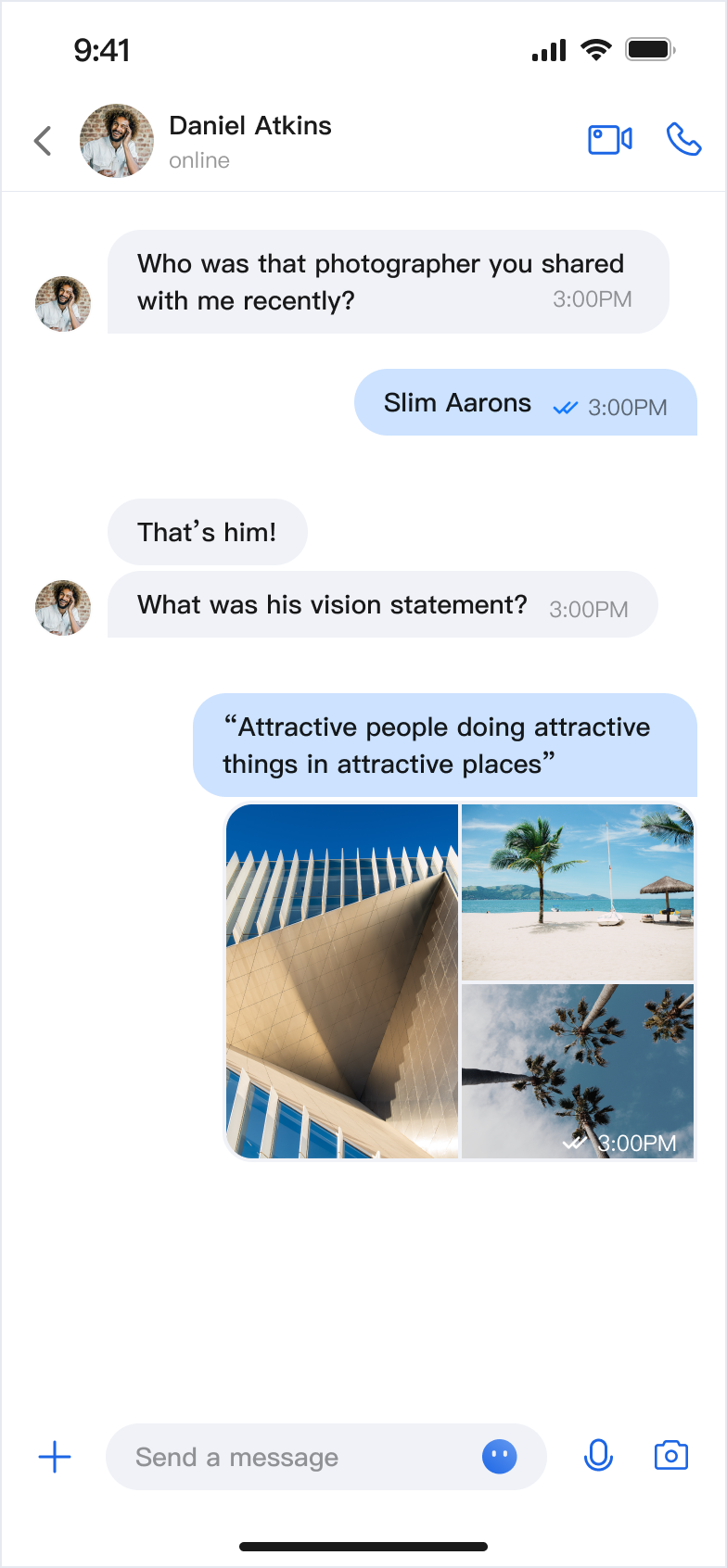</td>
|
|
17
|
+
|
|
18
|
+
<td rowspan="1" colSpan="1" ><br>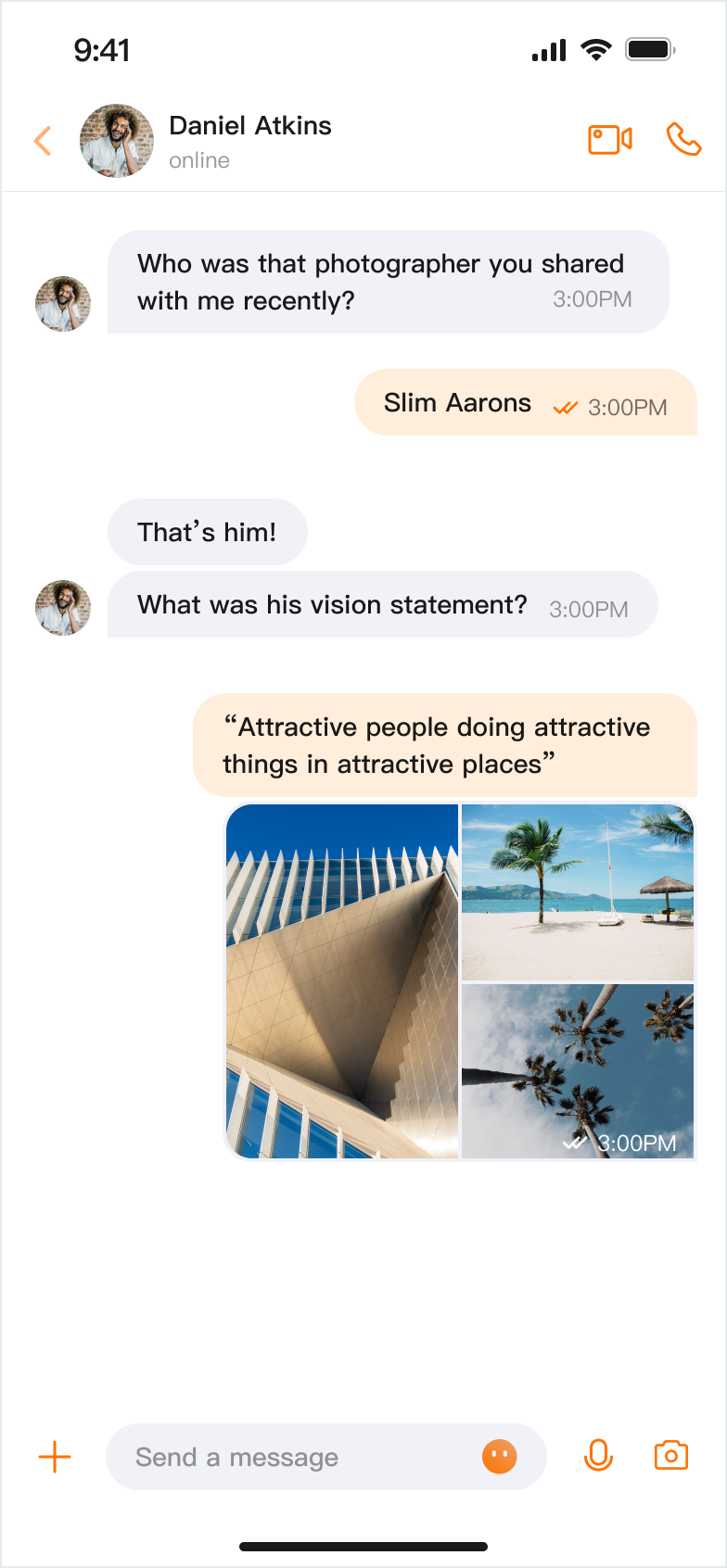</td>
|
|
19
|
+
|
|
20
|
+
<td rowspan="1" colSpan="1" >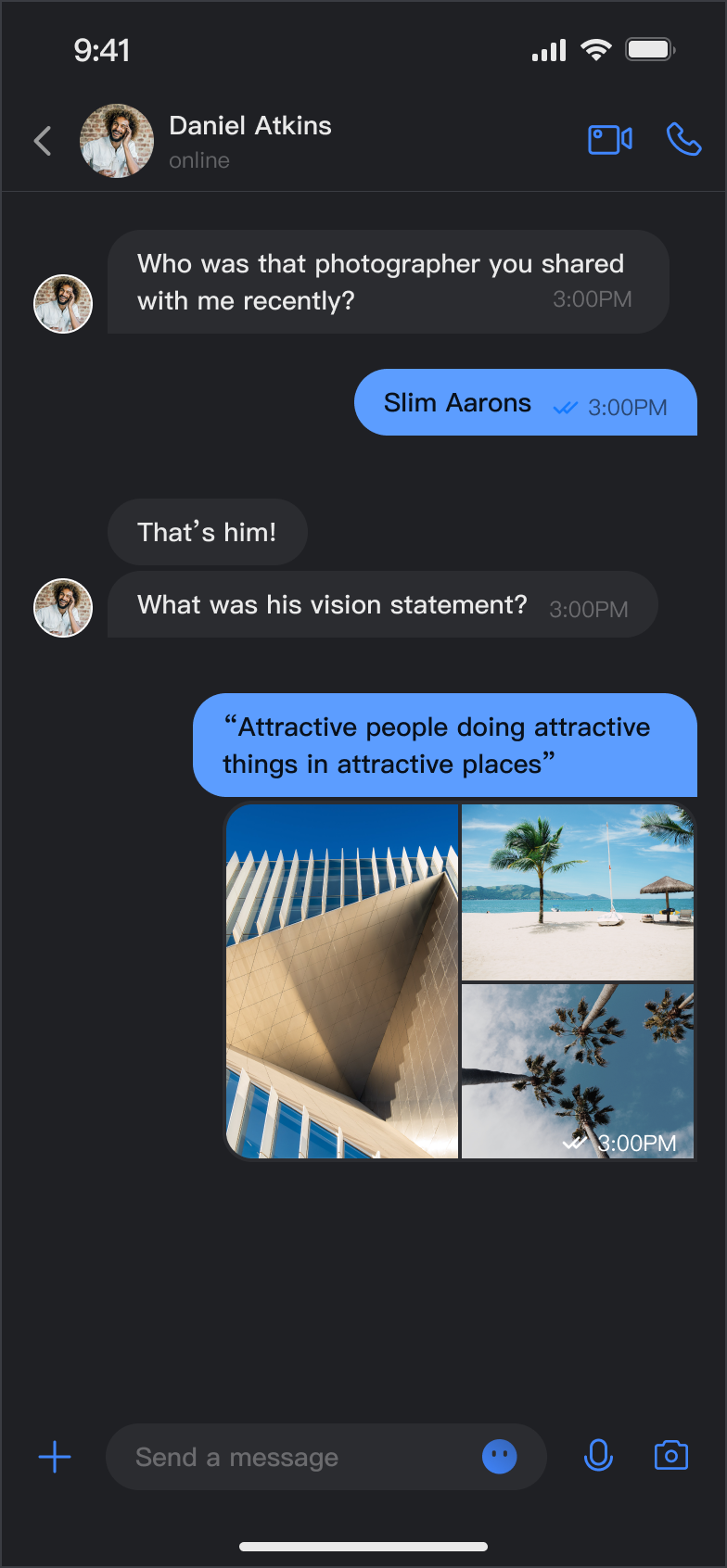</td>
|
|
21
|
+
|
|
22
|
+
<td rowspan="1" colSpan="1" >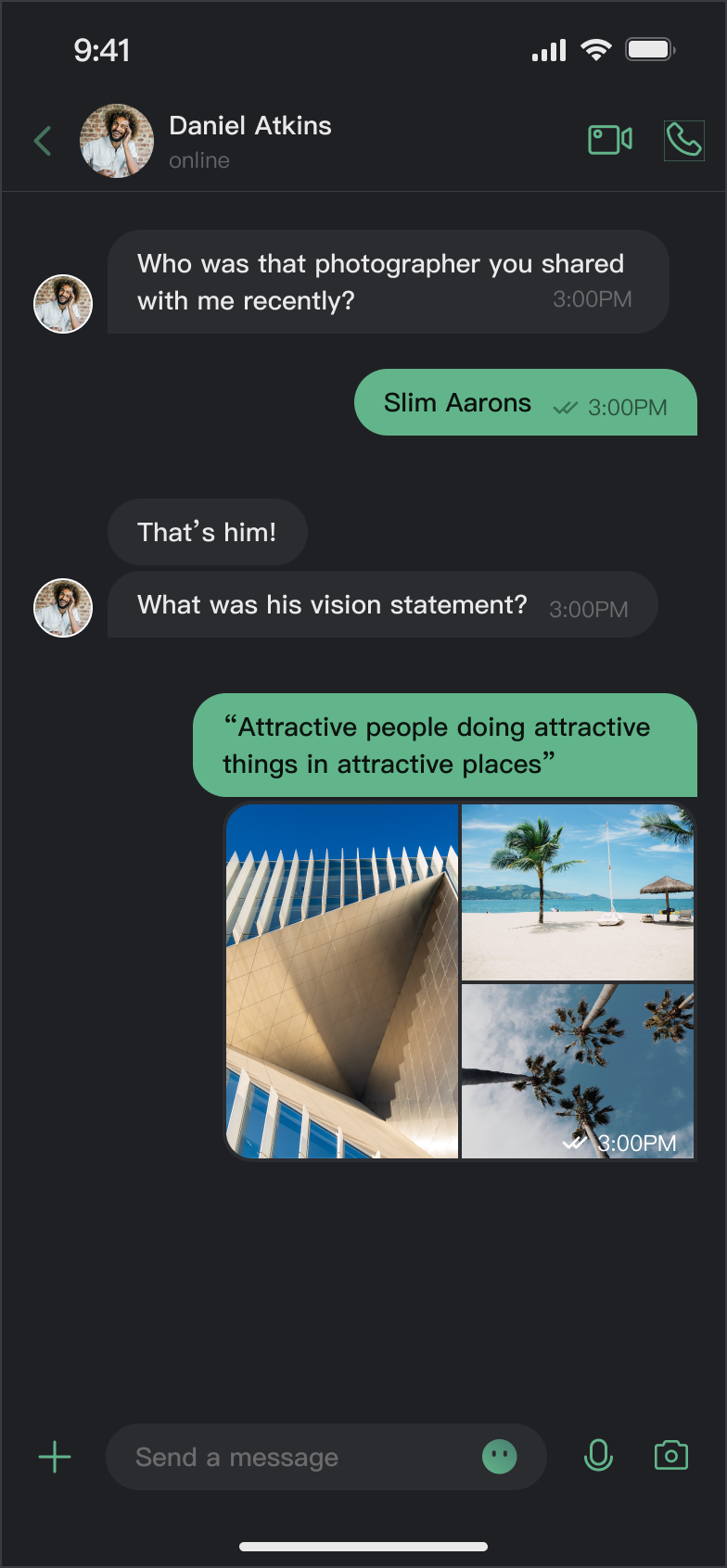</td>
|
|
23
|
+
</tr>
|
|
24
|
+
</table>
|
|
25
|
+
|
|
26
|
+
|
|
27
|
+
## 核心能力
|
|
28
|
+
|
|
29
|
+
**模式切换**
|
|
30
|
+
- 浅色模式(Light):适合日间使用的明亮界面。
|
|
31
|
+
|
|
32
|
+
- 深色模式(Dark):适合夜间使用的暗色界面。
|
|
33
|
+
|
|
34
|
+
- 跟随系统(System):自动跟随系统外观设置。
|
|
35
|
+
|
|
36
|
+
|
|
37
|
+
**主题色定制**
|
|
38
|
+
|
|
39
|
+
- 预设主题色:提供蓝、绿、红、橙等标准色。
|
|
40
|
+
|
|
41
|
+
- 自定义主题色:支持任意 Hex 格式颜色。
|
|
42
|
+
|
|
43
|
+
- 智能色板生成:自动生成 10 个色阶的完整色板。
|
|
44
|
+
|
|
45
|
+
- 清除自定义:一键恢复默认主题色。
|
|
46
|
+
|
|
47
|
+
|
|
48
|
+
## API 说明
|
|
49
|
+
|
|
50
|
+
以上功能基于 `ThemeState` 提供的一组简洁的 API,用于主题配置和信息查询。
|
|
51
|
+
|
|
52
|
+
### 设置主题模式
|
|
53
|
+
<table>
|
|
54
|
+
<tr>
|
|
55
|
+
<td rowspan="1" colSpan="1" >方法</td>
|
|
56
|
+
|
|
57
|
+
<td rowspan="1" colSpan="1" >参数</td>
|
|
58
|
+
|
|
59
|
+
<td rowspan="1" colSpan="1" >返回值</td>
|
|
60
|
+
|
|
61
|
+
<td rowspan="1" colSpan="1" >说明</td>
|
|
62
|
+
</tr>
|
|
63
|
+
|
|
64
|
+
<tr>
|
|
65
|
+
<td rowspan="1" colSpan="1" >`setThemeMode(_:)`</td>
|
|
66
|
+
|
|
67
|
+
<td rowspan="1" colSpan="1" >`ThemeMode`</td>
|
|
68
|
+
|
|
69
|
+
<td rowspan="1" colSpan="1" >`Void`</td>
|
|
70
|
+
|
|
71
|
+
<td rowspan="1" colSpan="1" >设置显示模式,自动保存并刷新。<br>• `.system`:跟随系统外观。<br>• `.light`:强制使用浅色模式。<br>• `.dark`:强制使用深色模式。</td>
|
|
72
|
+
</tr>
|
|
73
|
+
</table>
|
|
74
|
+
|
|
75
|
+
|
|
76
|
+
### 设置主题色
|
|
77
|
+
<table>
|
|
78
|
+
<tr>
|
|
79
|
+
<td rowspan="1" colSpan="1" >方法</td>
|
|
80
|
+
|
|
81
|
+
<td rowspan="1" colSpan="1" >参数</td>
|
|
82
|
+
|
|
83
|
+
<td rowspan="1" colSpan="1" >返回值</td>
|
|
84
|
+
|
|
85
|
+
<td rowspan="1" colSpan="1" >说明</td>
|
|
86
|
+
</tr>
|
|
87
|
+
|
|
88
|
+
<tr>
|
|
89
|
+
<td rowspan="1" colSpan="1" >`setPrimaryColor(_:)`</td>
|
|
90
|
+
|
|
91
|
+
<td rowspan="1" colSpan="1" >`String`</td>
|
|
92
|
+
|
|
93
|
+
<td rowspan="1" colSpan="1" >`Void`</td>
|
|
94
|
+
|
|
95
|
+
<td rowspan="1" colSpan="1" >设置主题色,需要 Hex 格式(例如 "#1C66E5")。</td>
|
|
96
|
+
</tr>
|
|
97
|
+
|
|
98
|
+
<tr>
|
|
99
|
+
<td rowspan="1" colSpan="1" >`clearPrimaryColor()`</td>
|
|
100
|
+
|
|
101
|
+
<td rowspan="1" colSpan="1" >无</td>
|
|
102
|
+
|
|
103
|
+
<td rowspan="1" colSpan="1" >`Void`</td>
|
|
104
|
+
|
|
105
|
+
<td rowspan="1" colSpan="1" >清除自定义主题色,恢复默认蓝色。</td>
|
|
106
|
+
</tr>
|
|
107
|
+
</table>
|
|
108
|
+
|
|
109
|
+
|
|
110
|
+
> **说明:**
|
|
111
|
+
>
|
|
112
|
+
> 1. 调用 `setThemeMode` 或 `setPrimaryColor` 后,配置会自动保存到 `UserDefaults`,无需手动保存。下次启动应用时会自动加载。
|
|
113
|
+
> 2. 修改主题配置时会自动清除缓存,确保色彩方案实时更新。开发者无需关心缓存管理。
|
|
114
|
+
> 3. 使用设置 API 时需避免频繁切换主题(如在循环中调用)。
|
|
115
|
+
|
|
116
|
+
|
|
117
|
+
### 查询 ThemeState 信息
|
|
118
|
+
|
|
119
|
+
通过以下只读属性可以查询当前的主题配置状态和信息:
|
|
120
|
+
<table>
|
|
121
|
+
<tr>
|
|
122
|
+
<td rowspan="1" colSpan="1" >属性</td>
|
|
123
|
+
|
|
124
|
+
<td rowspan="1" colSpan="1" >类型</td>
|
|
125
|
+
|
|
126
|
+
<td rowspan="1" colSpan="1" >说明</td>
|
|
127
|
+
</tr>
|
|
128
|
+
|
|
129
|
+
<tr>
|
|
130
|
+
<td rowspan="1" colSpan="1" >`currentMode`</td>
|
|
131
|
+
|
|
132
|
+
<td rowspan="1" colSpan="1" >`ThemeMode`</td>
|
|
133
|
+
|
|
134
|
+
<td rowspan="1" colSpan="1" >当前主题模式。</td>
|
|
135
|
+
</tr>
|
|
136
|
+
|
|
137
|
+
<tr>
|
|
138
|
+
<td rowspan="1" colSpan="1" >`currentPrimaryColor`</td>
|
|
139
|
+
|
|
140
|
+
<td rowspan="1" colSpan="1" >`String?`</td>
|
|
141
|
+
|
|
142
|
+
<td rowspan="1" colSpan="1" >当前主题色(Hex 格式)。</td>
|
|
143
|
+
</tr>
|
|
144
|
+
|
|
145
|
+
<tr>
|
|
146
|
+
<td rowspan="1" colSpan="1" >`hasCustomPrimaryColor`</td>
|
|
147
|
+
|
|
148
|
+
<td rowspan="1" colSpan="1" >`Bool`</td>
|
|
149
|
+
|
|
150
|
+
<td rowspan="1" colSpan="1" >是否设置了自定义主题色。</td>
|
|
151
|
+
</tr>
|
|
152
|
+
|
|
153
|
+
<tr>
|
|
154
|
+
<td rowspan="1" colSpan="1" >`isDarkMode`</td>
|
|
155
|
+
|
|
156
|
+
<td rowspan="1" colSpan="1" >`Bool`</td>
|
|
157
|
+
|
|
158
|
+
<td rowspan="1" colSpan="1" >当前是否为深色模式。</td>
|
|
159
|
+
</tr>
|
|
160
|
+
</table>
|
|
161
|
+
|
|
162
|
+
|
|
163
|
+
## 使用方式
|
|
164
|
+
|
|
165
|
+
本章节介绍如何在您的应用中集成和使用主题、主题色定制功能,按照从简单到复杂的顺序提供三种方式。
|
|
166
|
+
|
|
167
|
+
### 方式一:使用 AppBuilder 配置(推荐)
|
|
168
|
+
|
|
169
|
+
AppBuilder是一个便捷式功能及 UI 自定义配置工具,通过 JSON 配置文件统一管理,适用于 Web + Native 双端应用需要保持统一外观的场景。
|
|
170
|
+
|
|
171
|
+
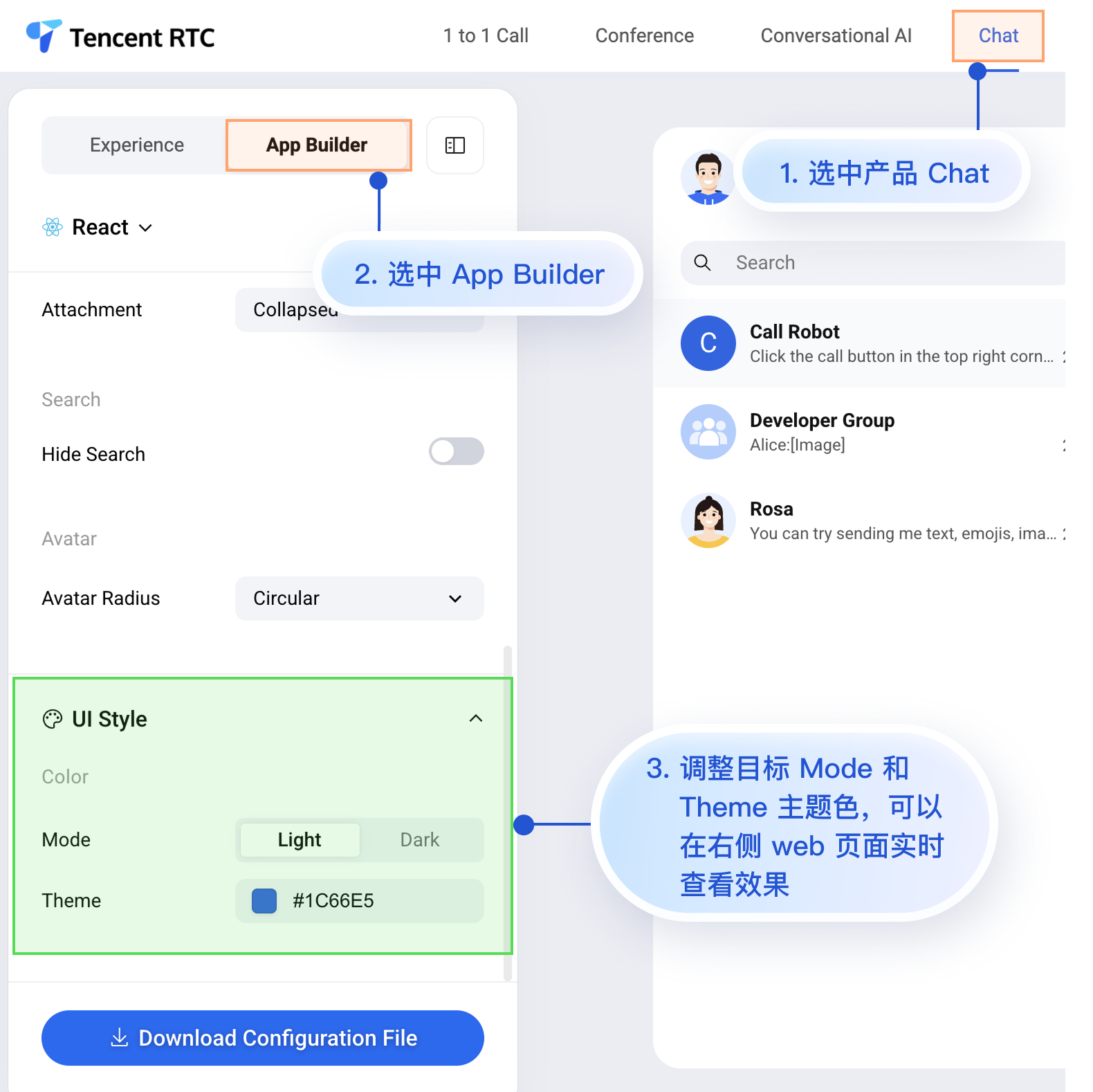
您可以在 [Chat Web 体验馆](https://trtc.io/demo/homepage/#/detail?scene=messenger) 体验 AppBuilder 功能,体验入口:
|
|
172
|
+
|
|
173
|
+
|
|
174
|
+
|
|
175
|
+
|
|
176
|
+
虽然 Chat Web 体验馆上暂时无法实时观看移动端的配置效果,但移动端已经预先支持了 AppBuilder 的配置能力。
|
|
177
|
+
|
|
178
|
+
接下来为您介绍在 Web 体验馆设置 AppBuilder 后,如何在移动端项目中应用该自定义配置。操作步骤比较简单,只有 3 步:
|
|
179
|
+
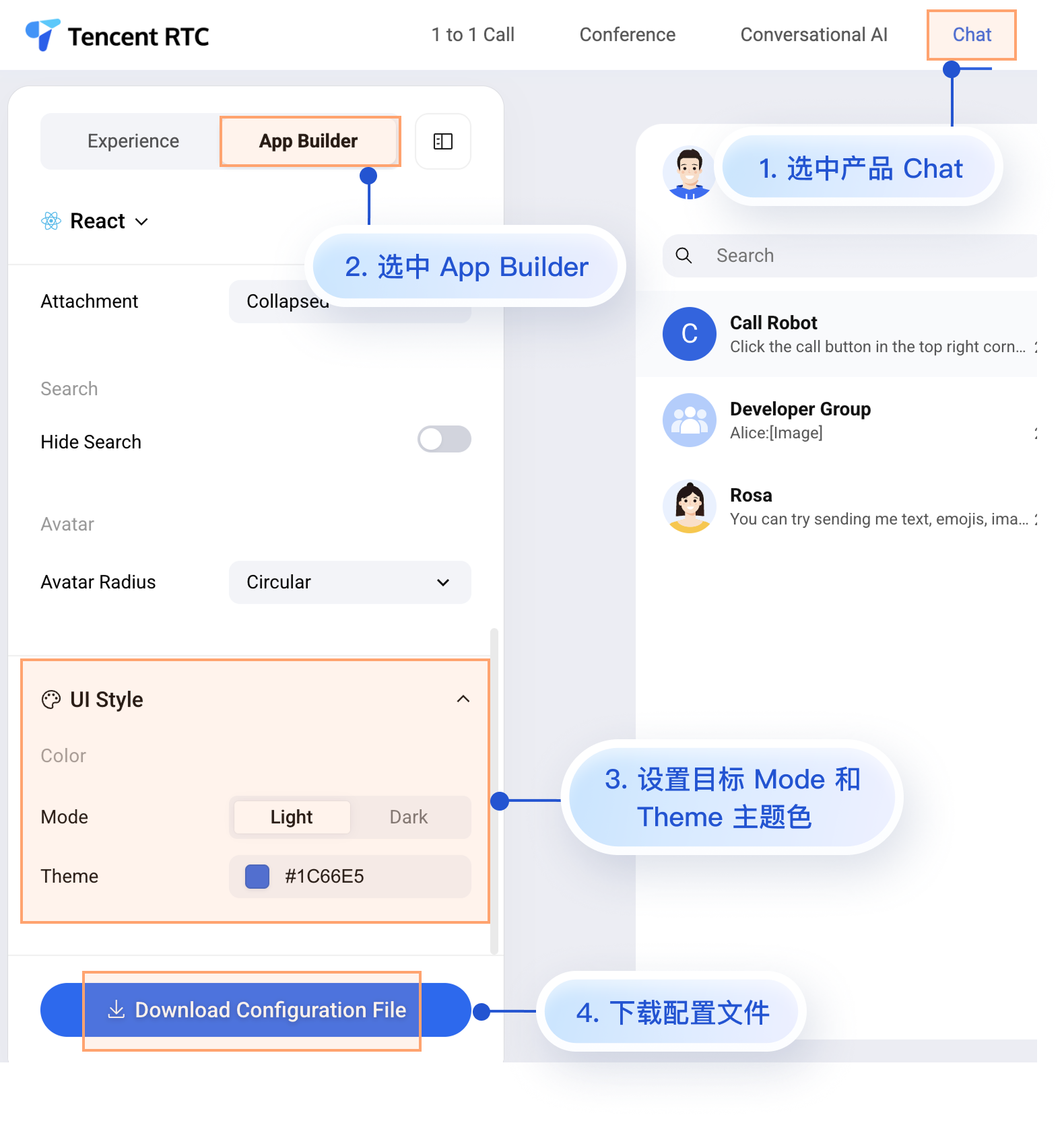
1. 下载配置文件。
|
|
180
|
+
|
|
181
|
+
2. 将配置文件 appConfig.json 拖入您的 iOS 项目中。
|
|
182
|
+
|
|
183
|
+
3. 在应用启动时加载配置文件。
|
|
184
|
+
|
|
185
|
+
|
|
186
|
+
#### 步骤1:下载配置文件
|
|
187
|
+
|
|
188
|
+
访问 [Chat Web 体验馆](https://trtc.io/demo/homepage/#/detail?scene=messenger),下载配置文件 appConfig.json。下载路径为:
|
|
189
|
+
|
|
190
|
+
|
|
191
|
+
|
|
192
|
+
|
|
193
|
+
`appConfig.json`文件内容如下所示,与 AppBuilder 页面的配置项一一对应,与定义外观相关的配置是 `theme`及其子字段:
|
|
194
|
+
``` json
|
|
195
|
+
{
|
|
196
|
+
"theme": {
|
|
197
|
+
"mode": "light", // 主题模式,light-浅色模式,dark-深色模式,system-自动跟随系统
|
|
198
|
+
"primaryColor": "#E65100" // 主色调,16 进制颜色值
|
|
199
|
+
},
|
|
200
|
+
"messageList": {
|
|
201
|
+
"alignment": "two-sided",
|
|
202
|
+
"enableReadReceipt": false,
|
|
203
|
+
"messageActionList": [
|
|
204
|
+
"copy",
|
|
205
|
+
"recall",
|
|
206
|
+
"quote",
|
|
207
|
+
"forward",
|
|
208
|
+
"delete"
|
|
209
|
+
]
|
|
210
|
+
},
|
|
211
|
+
"conversationList": {
|
|
212
|
+
"enableCreateConversation": true,
|
|
213
|
+
"conversationActionList": [
|
|
214
|
+
"delete",
|
|
215
|
+
"mute",
|
|
216
|
+
"pin",
|
|
217
|
+
"markUnread"
|
|
218
|
+
]
|
|
219
|
+
},
|
|
220
|
+
"messageInput": {
|
|
221
|
+
"hideSendButton": false,
|
|
222
|
+
"attachmentPickerMode": "collapsed"
|
|
223
|
+
},
|
|
224
|
+
"search": {
|
|
225
|
+
"hideSearch": false
|
|
226
|
+
},
|
|
227
|
+
"avatar": {
|
|
228
|
+
"shape": "circular"
|
|
229
|
+
}
|
|
230
|
+
}
|
|
231
|
+
```
|
|
232
|
+
|
|
233
|
+
**配置选项说明**
|
|
234
|
+
<table>
|
|
235
|
+
<tr>
|
|
236
|
+
<td rowspan="1" colSpan="1" >参数说明</td>
|
|
237
|
+
|
|
238
|
+
<td rowspan="1" colSpan="1" >类型</td>
|
|
239
|
+
|
|
240
|
+
<td rowspan="1" colSpan="1" >可选值</td>
|
|
241
|
+
|
|
242
|
+
<td rowspan="1" colSpan="1" >说明</td>
|
|
243
|
+
</tr>
|
|
244
|
+
|
|
245
|
+
<tr>
|
|
246
|
+
<td rowspan="1" colSpan="1" >`mode`</td>
|
|
247
|
+
|
|
248
|
+
<td rowspan="1" colSpan="1" >String</td>
|
|
249
|
+
|
|
250
|
+
<td rowspan="1" colSpan="1" >`"system"`, `"light"`, `"dark"`</td>
|
|
251
|
+
|
|
252
|
+
<td rowspan="1" colSpan="1" >主题模式。</td>
|
|
253
|
+
</tr>
|
|
254
|
+
|
|
255
|
+
<tr>
|
|
256
|
+
<td rowspan="1" colSpan="1" >`primaryColor`</td>
|
|
257
|
+
|
|
258
|
+
<td rowspan="1" colSpan="1" >String</td>
|
|
259
|
+
|
|
260
|
+
<td rowspan="1" colSpan="1" >Hex 颜色值,例如 `"#0ABF77"`</td>
|
|
261
|
+
|
|
262
|
+
<td rowspan="1" colSpan="1" >主题色。</td>
|
|
263
|
+
</tr>
|
|
264
|
+
</table>
|
|
265
|
+
|
|
266
|
+
|
|
267
|
+
#### 步骤2:将配置文件拖入项目中
|
|
268
|
+
|
|
269
|
+
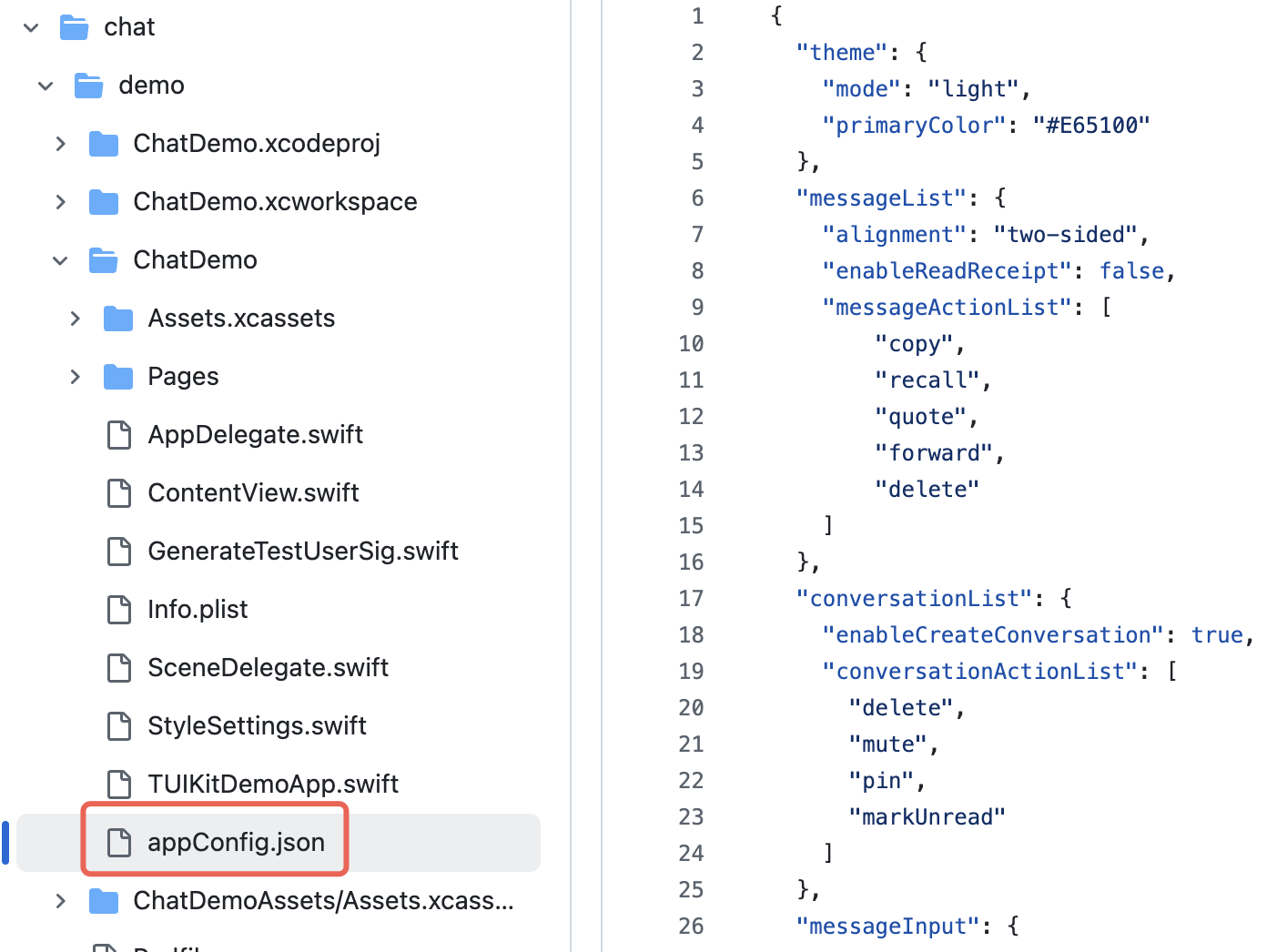
将 appConfig.json 拖入您的项目中,确保选择了正确的 Target,以及正常勾选了 Copy Bundle Resources。
|
|
270
|
+
|
|
271
|
+
以 Github 开源 Demo [TUIKit iOS SwiftUI](https://github.com/Tencent-RTC/TUIKit_iOS_SwiftUI/blob/main/chat/demo/ChatDemo/appConfig.json) 项目为例,appConfig.json 位于 demo/ChatDemo 的主 bundle 下:
|
|
272
|
+
|
|
273
|
+
|
|
274
|
+
|
|
275
|
+
|
|
276
|
+
#### 步骤3:加载配置文件
|
|
277
|
+
|
|
278
|
+
请在您的应用启动时设置 JSON 文件路径,加载配置文件。如果您将 appConfig.json 也放置在应用的主 bundle 中,您可以像这样获取到 JSON 文件:
|
|
279
|
+
``` swift
|
|
280
|
+
import AtomicX
|
|
281
|
+
|
|
282
|
+
@main
|
|
283
|
+
struct MyApp: App {
|
|
284
|
+
init() {
|
|
285
|
+
// 加载主题配置文件
|
|
286
|
+
if let path = Bundle.main.path(forResource: "appConfig", ofType: "json") {
|
|
287
|
+
AppBuilderHelper.setJsonPath(path: path)
|
|
288
|
+
}
|
|
289
|
+
}
|
|
290
|
+
|
|
291
|
+
var body: some Scene {
|
|
292
|
+
WindowGroup {
|
|
293
|
+
ContentView()
|
|
294
|
+
// 将 ThemeState.shared 注入应用的根视图下
|
|
295
|
+
.environmentObject(ThemeState.shared)
|
|
296
|
+
}
|
|
297
|
+
}
|
|
298
|
+
}
|
|
299
|
+
```
|
|
300
|
+
|
|
301
|
+
至此,无需编写额外代码,启动 App 后,TUIKit SwiftUI 组件的模式和主题色会自动显示成您在 appConfig.json 中设置的值。
|
|
302
|
+
|
|
303
|
+
### 方式二:代码设置主题模式
|
|
304
|
+
|
|
305
|
+
您可以通过 API `setThemeMode` 直接设置主题模式,其中的 themeState 是从环境变量中获取的 ThemeState.shared 单例对象。示例代码如下所示:
|
|
306
|
+
``` swift
|
|
307
|
+
import SwiftUI
|
|
308
|
+
import AtomicX
|
|
309
|
+
|
|
310
|
+
struct SettingsView: View {
|
|
311
|
+
@EnvironmentObject var themeState: ThemeState
|
|
312
|
+
|
|
313
|
+
var body: some View {
|
|
314
|
+
List {
|
|
315
|
+
Section("外观模式") {
|
|
316
|
+
Button("跟随系统") {
|
|
317
|
+
themeState.setThemeMode(.system)
|
|
318
|
+
}
|
|
319
|
+
Button("浅色模式") {
|
|
320
|
+
themeState.setThemeMode(.light)
|
|
321
|
+
}
|
|
322
|
+
Button("深色模式") {
|
|
323
|
+
themeState.setThemeMode(.dark)
|
|
324
|
+
}
|
|
325
|
+
}
|
|
326
|
+
}
|
|
327
|
+
.navigationTitle("设置")
|
|
328
|
+
}
|
|
329
|
+
}
|
|
330
|
+
```
|
|
331
|
+
|
|
332
|
+
### 方式三:代码设置主题色
|
|
333
|
+
|
|
334
|
+
您可以通过 API `setPrimaryColor` 设置主题色,只需要传入一个主颜色值,整个 TUIKit SwiftUI 组件会自动根据该主颜色值,为不同的组件适配出一组相同色系里的相似色值渲染界面,您无需再手动适配界面 UI。示例代码如下所示:
|
|
335
|
+
``` swift
|
|
336
|
+
struct CustomColorPicker: View {
|
|
337
|
+
@EnvironmentObject var themeState: ThemeState
|
|
338
|
+
@State private var customColor = "#1C66E5"
|
|
339
|
+
|
|
340
|
+
var body: some View {
|
|
341
|
+
VStack(spacing: 20) {
|
|
342
|
+
TextField("输入颜色值", text: $customColor)
|
|
343
|
+
.textFieldStyle(RoundedBorderTextFieldStyle())
|
|
344
|
+
.placeholder(when: customColor.isEmpty) {
|
|
345
|
+
Text("#1C66E5").foregroundColor(.gray)
|
|
346
|
+
}
|
|
347
|
+
|
|
348
|
+
Button("应用主题色") {
|
|
349
|
+
themeState.setPrimaryColor(customColor)
|
|
350
|
+
}
|
|
351
|
+
.disabled(!isValidHexColor(customColor))
|
|
352
|
+
}
|
|
353
|
+
.padding()
|
|
354
|
+
}
|
|
355
|
+
|
|
356
|
+
private func isValidHexColor(_ hex: String) -> Bool {
|
|
357
|
+
let pattern = "^#[0-9A-Fa-f]{6}$"
|
|
358
|
+
return hex.range(of: pattern, options: .regularExpression) != nil
|
|
359
|
+
}
|
|
360
|
+
}
|
|
361
|
+
```
|
|
362
|
+
|
|
363
|
+
> **使用建议:**
|
|
364
|
+
>
|
|
365
|
+
> - 对于大多数应用,推荐使用 JSON 配置文件的方式,简单可靠且支持多端统一。
|
|
366
|
+
> - 在整个应用中统一使用 `themeState.colors` 中的颜色,确保主题切换时界面保持一致。
|
|
367
|
+
|
|
368
|
+
|
|
369
|
+
## 常见问题
|
|
370
|
+
- **如何判断当前是否为深色模式?**
|
|
371
|
+
|
|
372
|
+
``` swift
|
|
373
|
+
if themeState.isDarkMode {
|
|
374
|
+
// 当前是深色模式
|
|
375
|
+
} else {
|
|
376
|
+
// 当前是浅色模式
|
|
377
|
+
}
|
|
378
|
+
```
|
|
379
|
+
- **如何在设置主题色后立即看到效果?**
|
|
380
|
+
|
|
381
|
+
|
|
382
|
+
主题色设置后会自动刷新 UI,因为 `ThemeState` 是 `ObservableObject`。确保您的视图使用了 `@EnvironmentObject` 或 `@ObservedObject` 来观察状态变化。
|
|
383
|
+
|
|
384
|
+
- **可以设置透明度吗?**
|
|
385
|
+
|
|
386
|
+
|
|
387
|
+
不支持。主题色只支持 6 位 Hex 格式(RGB),不支持 8 位格式(RGBA)。如需透明效果,请在使用颜色时添加 `.opacity()` 修饰符。
|
|
388
|
+
|
|
389
|
+
- **如何恢复默认主题?**
|
|
390
|
+
|
|
391
|
+
``` swift
|
|
392
|
+
themeState.clearPrimaryColor() // 清除自定义主题色
|
|
393
|
+
themeState.setThemeMode(.system) // 恢复跟随系统
|
|
394
|
+
```
|
|
395
|
+
- **主题配置存储在哪里?**
|
|
396
|
+
|
|
397
|
+
|
|
398
|
+
存储在 `UserDefaults` 中,key 为 `"BaseComponentThemeKey"`。应用卸载后会丢失,重新安装后恢复默认配置。
|
|
399
|
+
|
|
400
|
+
- **如何获取当前主题的完整配置?**
|
|
401
|
+
|
|
402
|
+
``` swift
|
|
403
|
+
let config = themeState.currentTheme
|
|
404
|
+
print("模式: \(config.mode)")
|
|
405
|
+
print("主题色: \(config.primaryColor ?? "默认")")
|
|
406
|
+
```
|
|
407
|
+
- **可以同时设置模式和主题色吗?**
|
|
408
|
+
|
|
409
|
+
|
|
410
|
+
可以分别调用两个方法,系统会自动合并配置:
|
|
411
|
+
|
|
412
|
+
``` swift
|
|
413
|
+
themeState.setThemeMode(.dark)
|
|
414
|
+
themeState.setPrimaryColor("#0ABF77")
|
|
415
|
+
```
|
|
416
|
+
|
|
File without changes
|
|
@@ -0,0 +1,124 @@
|
|
|
1
|
+
## 组件概述
|
|
2
|
+
|
|
3
|
+
ChatSetting 是一个聊天设置组件,它能根据当前激活的**会话类型**(单聊或群聊)自动渲染对应的设置界面。该组件通过统一的入口,无缝集成了 C2C(单聊) 和群聊两种模式的设置功能,为用户提供了流畅且一致的操作体验。
|
|
4
|
+
|
|
5
|
+
核心功能:
|
|
6
|
+
- 智能适配: 自动识别**会话类型**,并切换至相应的设置面板。
|
|
7
|
+
|
|
8
|
+
- 状态驱动: 基于当前会话状态,动态更新设置内容。
|
|
9
|
+
|
|
10
|
+
|
|
11
|
+
> **注意:**
|
|
12
|
+
>
|
|
13
|
+
|
|
14
|
+
> 如果当前没有激活的会话则不会显示。
|
|
15
|
+
>
|
|
16
|
+
|
|
17
|
+
|
|
18
|
+
## 快速使用
|
|
19
|
+
``` typescript
|
|
20
|
+
import {
|
|
21
|
+
UIKitProvider,
|
|
22
|
+
useLoginState,
|
|
23
|
+
LoginStatus,
|
|
24
|
+
ConversationList,
|
|
25
|
+
Chat,
|
|
26
|
+
ChatHeader,
|
|
27
|
+
MessageList,
|
|
28
|
+
MessageInput,
|
|
29
|
+
useUIOpenControlState,
|
|
30
|
+
ChatSetting,
|
|
31
|
+
Search,
|
|
32
|
+
VariantType,
|
|
33
|
+
ContactList,
|
|
34
|
+
ContactInfo,
|
|
35
|
+
} from "@tencentcloud/chat-uikit-react";
|
|
36
|
+
import { useState } from "react";
|
|
37
|
+
|
|
38
|
+
function App() {
|
|
39
|
+
const { isChatSettingOpen, isChatSearchOpen } = useUIOpenControlState();
|
|
40
|
+
const [activeTab, setActiveTab] = useState('chats');
|
|
41
|
+
|
|
42
|
+
// 从控制台获取登录信息
|
|
43
|
+
const { status } = useLoginState({
|
|
44
|
+
SDKAppID: 0,
|
|
45
|
+
userID: '',
|
|
46
|
+
userSig: '',
|
|
47
|
+
})
|
|
48
|
+
|
|
49
|
+
if (status !== LoginStatus.SUCCESS) {
|
|
50
|
+
return <div>Loading...</div>
|
|
51
|
+
}
|
|
52
|
+
|
|
53
|
+
// 语言支持 en-US(default) / zh-CN / ja-JP / ko-KR / zh-TW
|
|
54
|
+
// 主题支持 light(default) / dark
|
|
55
|
+
return (
|
|
56
|
+
<UIKitProvider>
|
|
57
|
+
<div style={{ height: '100vh', width: '100vw', display: 'flex', flexDirection: 'row' }}>
|
|
58
|
+
<ul>
|
|
59
|
+
<li onClick={() => {setActiveTab('chats')}}>chats</li>
|
|
60
|
+
<li onClick={() => {setActiveTab('contacts')}}>contact</li>
|
|
61
|
+
</ul>
|
|
62
|
+
{
|
|
63
|
+
activeTab === 'chats' && (
|
|
64
|
+
<>
|
|
65
|
+
<ConversationList style={{ minWidth: '300px', maxWidth: '350px' }}/>
|
|
66
|
+
<Chat PlaceholderEmpty="No messages yet">
|
|
67
|
+
<ChatHeader />
|
|
68
|
+
<MessageList />
|
|
69
|
+
<MessageInput />
|
|
70
|
+
</Chat>
|
|
71
|
+
{isChatSettingOpen && <ChatSetting />}
|
|
72
|
+
{isChatSearchOpen && <Search style={{ minWidth: '300px'}} variant={VariantType.EMBEDDED} />}
|
|
73
|
+
</>
|
|
74
|
+
)
|
|
75
|
+
}
|
|
76
|
+
{
|
|
77
|
+
activeTab === 'contacts' && (
|
|
78
|
+
<>
|
|
79
|
+
<ContactList style={{ minWidth: '300px', maxWidth: '350px' }}/>
|
|
80
|
+
<ContactInfo
|
|
81
|
+
PlaceholderEmpty="No contact yet"
|
|
82
|
+
onSendMessage={() => {setActiveTab('chats')}}
|
|
83
|
+
onEnterGroup={() => {setActiveTab('chats')}}
|
|
84
|
+
/>
|
|
85
|
+
</>
|
|
86
|
+
)
|
|
87
|
+
}
|
|
88
|
+
</div>
|
|
89
|
+
</UIKitProvider>
|
|
90
|
+
);
|
|
91
|
+
}
|
|
92
|
+
|
|
93
|
+
export default App;
|
|
94
|
+
```
|
|
95
|
+
|
|
96
|
+
## 相关文档
|
|
97
|
+
|
|
98
|
+
**官方文档**
|
|
99
|
+
- [自定义组件 - UIKitProvider](https://write.woa.com/document/157860913203511296)
|
|
100
|
+
|
|
101
|
+
- [自定义组件 - ConversationList](https://write.woa.com/document/157860932619919360)
|
|
102
|
+
|
|
103
|
+
- [自定义组件 - MessageList](https://write.woa.com/document/181344255270170624)
|
|
104
|
+
|
|
105
|
+
- [自定义组件 - MessageInput](https://write.woa.com/document/181344257863962624)
|
|
106
|
+
|
|
107
|
+
- [自定义组件 - ContactList](https://write.woa.com/document/181344260082749440)
|
|
108
|
+
|
|
109
|
+
- [自定义组件 - Search](https://write.woa.com/document/181344262590197760)
|
|
110
|
+
|
|
111
|
+
|
|
112
|
+
**NPM 包**
|
|
113
|
+
|
|
114
|
+
- [chat-uikit-react npm](https://www.npmjs.com/package/@tencentcloud/chat-uikit-react)
|
|
115
|
+
|
|
116
|
+
|
|
117
|
+
**GitHub**
|
|
118
|
+
|
|
119
|
+
- [GitHub Demo](https://github.com/TencentCloud/chat-uikit-react)
|
|
120
|
+
|
|
121
|
+
|
|
122
|
+
## 交流与反馈
|
|
123
|
+
|
|
124
|
+
如遇任何问题,可联系 [官网售后](https://cloud.tencent.com/act/event/connect-service#/) 反馈,享有专业工程师的支持,解决您的难题。
|