@tencentcloud/sdk-mcp 1.3.4 → 1.3.5
This diff represents the content of publicly available package versions that have been released to one of the supported registries. The information contained in this diff is provided for informational purposes only and reflects changes between package versions as they appear in their respective public registries.
- package/package.json +1 -1
- package/resource/doc/chatuikit/android/features/theme.md +363 -0
- package/resource/doc/chatuikit/android/workflow.md +0 -0
- package/resource/doc/chatuikit/{android/client_api_android.md → faq/android_sdk/client-api.md} +0 -1
- package/resource/doc/chatuikit/faq/{native_sdk/faq.md → common/product.md} +8 -0
- package/resource/doc/chatuikit/faq/flutter_sdk/faq.md +54 -0
- package/resource/doc/chatuikit/faq/web_sdk/faq.md +1 -1
- package/resource/doc/chatuikit/flutter/features/theme.md +379 -0
- package/resource/doc/chatuikit/flutter/workflow.md +816 -0
- package/resource/doc/chatuikit/iOS/features/theme.md +416 -0
- package/resource/doc/chatuikit/iOS/workflow.md +0 -0
- package/resource/doc/chatuikit/react/components/chat-setting.md +124 -0
- package/resource/doc/chatuikit/react/components/contact-list.md +1331 -0
- package/resource/doc/chatuikit/react/components/search.md +885 -0
- package/resource/doc/chatuikit/vue/components/chat-setting.md +88 -0
- package/resource/doc/chatuikit/vue/components/contact-list.md +679 -0
- package/resource/doc/chatuikit/vue/components/search.md +1384 -0
- package/resource/doc/livekit/live/android/workflow.md +137 -4
- package/resource/doc/livekit/live/flutter/live-audience-list.md +337 -0
- package/resource/doc/livekit/live/flutter/live-audio-effect.md +739 -0
- package/resource/doc/livekit/live/flutter/live-barrage.md +578 -0
- package/resource/doc/livekit/live/flutter/live-base-beauty.md +484 -0
- package/resource/doc/livekit/live/flutter/live-co-guest-interaction.md +606 -0
- package/resource/doc/livekit/live/flutter/live-gift.md +812 -0
- package/resource/doc/livekit/live/flutter/live-host-interaction.md +1113 -0
- package/resource/doc/livekit/live/flutter/live-integration.md +1029 -0
- package/resource/doc/livekit/live/flutter/live-live-list.md +861 -0
- package/resource/doc/livekit/live/ios/live-audience-list.md +335 -0
- package/resource/doc/livekit/live/ios/live-audio-effect.md +373 -0
- package/resource/doc/livekit/live/ios/live-barrage.md +529 -0
- package/resource/doc/livekit/live/ios/live-base-beauty.md +237 -0
- package/resource/doc/livekit/live/ios/live-co-guest-interaction.md +483 -0
- package/resource/doc/livekit/live/ios/live-gift.md +785 -0
- package/resource/doc/livekit/live/ios/live-host-interaction.md +743 -0
- package/resource/doc/livekit/live/ios/live-integration.md +822 -0
- package/resource/doc/livekit/live/ios/live-live-list.md +535 -0
- package/resource/doc/livekit/live/ios/workflow.md +352 -0
- package/resource/doc/rtcengine/faq/web/web.md +2 -2
- package/resource/doc/rtcengine/web/how_to_integrated_web_sdk.md +2 -2
- package/resource/doc/rtcengine/web/plugin/20-advanced-customized-capture-rendering.md +84 -0
- package/resource/doc/rtcengine/web/plugin/21-advanced-auto-play-policy.md +86 -0
- package/resource/doc/rtcengine/web/plugin/22-advanced-audio-mixer.md +220 -0
- package/resource/doc/rtcengine/web/plugin/23-advanced-support-detection.md +217 -0
- package/resource/doc/rtcengine/web/plugin/24-advanced-network-quality.md +137 -0
- package/resource/doc/rtcengine/web/plugin/25-advanced-device-change.md +97 -0
- package/resource/doc/rtcengine/web/plugin/26-advanced-publish-cdn-stream.md +453 -0
- package/resource/doc/rtcengine/web/plugin/27-advanced-small-stream.md +180 -0
- package/resource/doc/rtcengine/web/plugin/28-advanced-beauty.md +349 -0
- package/resource/doc/rtcengine/web/plugin/29-advanced-water-mark.md +149 -0
- package/resource/doc/rtcengine/web/plugin/30-advanced-cross-room-link.md +96 -0
- package/resource/doc/rtcengine/web/plugin/31-advanced-plugins-overview.md +405 -0
- package/resource/doc/rtcengine/web/plugin/34-advanced-proxy.md +244 -0
- package/resource/doc/rtcengine/web/plugin/35-advanced-ai-denoiser.md +84 -0
- package/resource/doc/rtcengine/web/plugin/36-advanced-virtual-background.md +202 -0
- package/resource/doc/rtcengine/web/plugin/37-advanced-voice-changer.md +98 -0
- package/resource/doc/rtcengine/web/plugin/38-advanced-basic-beauty.md +95 -0
- package/resource/doc/rtcengine/web/plugin/39-advanced-video-decoder.md +33 -0
- package/resource/doc/rtcengine/web/plugin/40-advanced-video-mixer.md +380 -0
- package/resource/doc/rtcengine/web/plugin/41-advanced-small-stream-auto-switcher.md +91 -0
- package/resource/doc/rtcengine/web/plugin/42-advanced-realtime-transcriber.md +314 -0
- package/resource/doc/rtcengine/web/plugin/43-advanced-face-detection.md +180 -0
- package/tools/chat/get-native-chat-feature-detail.js +30 -0
- package/tools/chat/get-native-chat-feature-detail.js.map +1 -0
- package/tools/chat/get-native-chat-integration.js +30 -12
- package/tools/chat/get-native-chat-integration.js.map +1 -1
- package/tools/common/get-faq.js +2 -4
- package/tools/common/get-faq.js.map +1 -1
- package/tools/definitions/get_native_chat_feature_detail_def.js +32 -0
- package/tools/definitions/get_native_chat_feature_detail_def.js.map +1 -0
- package/tools/definitions/get_native_chat_uikit_integration_def.js +18 -6
- package/tools/definitions/get_native_chat_uikit_integration_def.js.map +1 -1
- package/tools/definitions/{get_native_live_extra_features_def.js → get_native_live_uikit_extra_features_def.js} +3 -3
- package/tools/definitions/get_native_live_uikit_extra_features_def.js.map +1 -0
- package/tools/definitions/{get_native_live_interaction_def.js → get_native_live_uikit_interaction_def.js} +3 -3
- package/tools/definitions/get_native_live_uikit_interaction_def.js.map +1 -0
- package/tools/definitions/get_web_chat_uikit_component_detail_def.js +46 -7
- package/tools/definitions/get_web_chat_uikit_component_detail_def.js.map +1 -1
- package/tools/index.js +6 -4
- package/tools/index.js.map +1 -1
- package/tools/live/{get_native_live_extra_features.js → get_native_live_uikit_extra_features.js} +4 -4
- package/tools/live/get_native_live_uikit_extra_features.js.map +1 -0
- package/tools/live/{get_native_live_interaction.js → get_native_live_uikit_interaction.js} +4 -4
- package/tools/live/get_native_live_uikit_interaction.js.map +1 -0
- package/tools/rtcengine/get-trtc-web-sdk-faq.js +1 -1
- package/tools/rtcengine/get-trtc-web-sdk-plugin.js +45 -0
- package/tools/rtcengine/get-trtc-web-sdk-plugin.js.map +1 -0
- package/utils/handle-component-name.js +0 -16
- package/utils/handle-component-name.js.map +1 -1
- package/utils/report-cls-client.js +1 -1
- package/utils/report-es-client.js +1 -1
- package/resource/doc/chatuikit/android/integrate_tuichat_only_android.md +0 -382
- package/resource/doc/chatuikit/android/ui_api_android.md +0 -418
- package/resource/doc/chatuikit/iOS/integrate_tuichat_only_iOS.md +0 -993
- package/resource/doc/chatuikit/iOS/ui_api_iOS.md +0 -526
- package/tools/definitions/get_native_live_extra_features_def.js.map +0 -1
- package/tools/definitions/get_native_live_interaction_def.js.map +0 -1
- package/tools/live/get_native_live_extra_features.js.map +0 -1
- package/tools/live/get_native_live_interaction.js.map +0 -1
- /package/resource/doc/chatuikit/android/{integrate_tuikit_android.md → integration.md} +0 -0
- /package/resource/doc/chatuikit/{flutter/client_api_Flutter.md → faq/flutter_sdk/client-api.md} +0 -0
- /package/resource/doc/chatuikit/{iOS/client_api_iOS.md → faq/ios_sdk/client-api.md} +0 -0
- /package/resource/doc/chatuikit/flutter/{integrate_tuikit_Flutter.md → integration.md} +0 -0
- /package/resource/doc/chatuikit/iOS/{integrate_tuikit_iOS.md → integration.md} +0 -0
- /package/resource/doc/chatuikit/react/components/{chatheader.md → chat-header.md} +0 -0
- /package/resource/doc/chatuikit/vue/components/{chatheader.md → chat-header.md} +0 -0
package/package.json
CHANGED
|
@@ -0,0 +1,363 @@
|
|
|
1
|
+
TUIKit Compose 提供了强大的外观定制能力,支持自定义应用的主题模式(浅色/深色/跟随系统)和主题色。通过简单的配置,开发者可以轻松实现应用级别的主题切换和品牌色定制。
|
|
2
|
+
|
|
3
|
+
以消息列表为例,自定义主题模式和主题色的效果如下图所示:
|
|
4
|
+
<table>
|
|
5
|
+
<tr>
|
|
6
|
+
<td rowspan="1" colSpan="1" >**浅色 + 默认颜色**</td>
|
|
7
|
+
|
|
8
|
+
<td rowspan="1" colSpan="1" >**浅色 + 橘黄色**</td>
|
|
9
|
+
|
|
10
|
+
<td rowspan="1" colSpan="1" >**深色 + 默认颜色**</td>
|
|
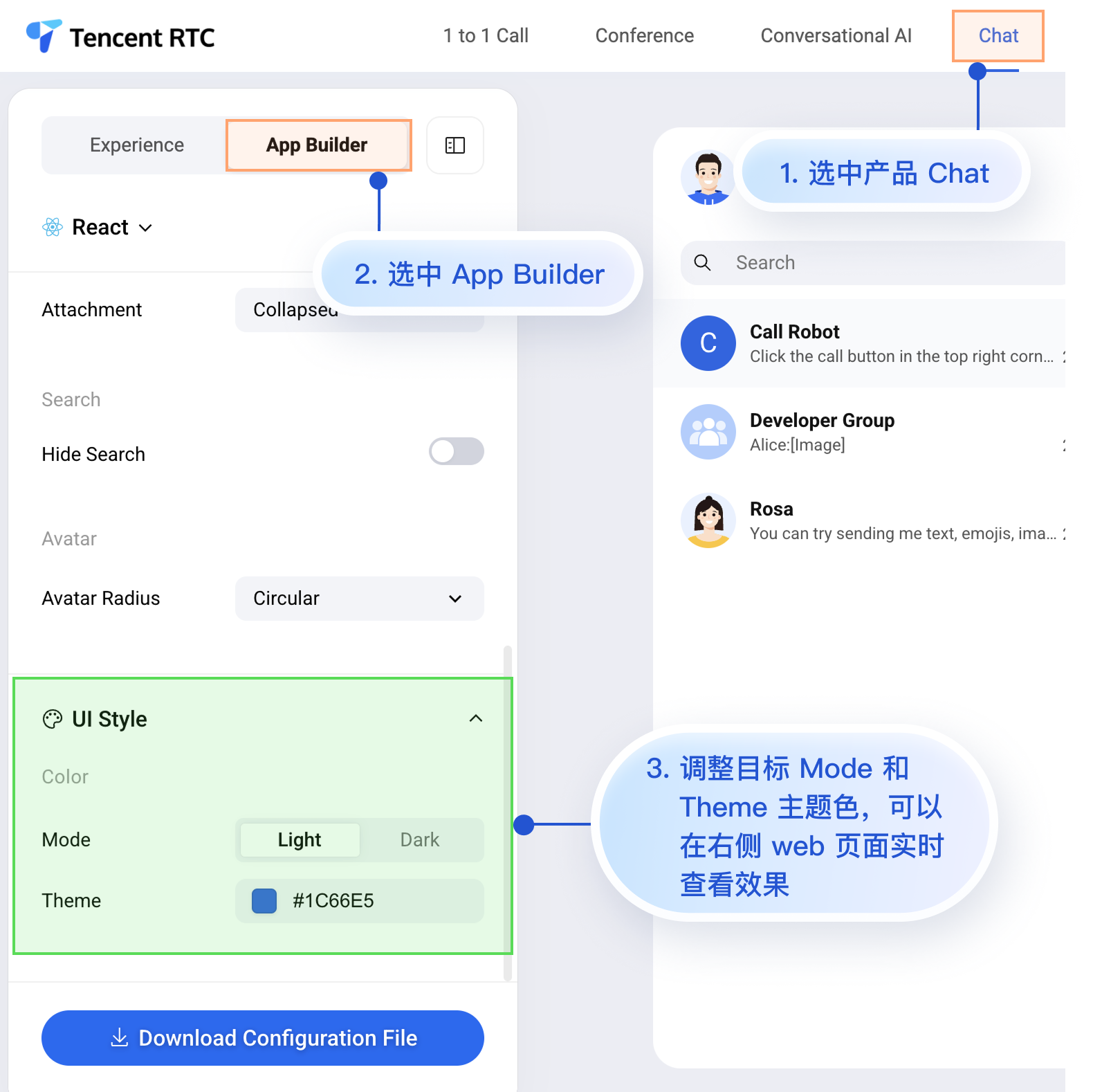
11
|
+
|
|
12
|
+
<td rowspan="1" colSpan="1" >**深色 + 绿色主题**</td>
|
|
13
|
+
</tr>
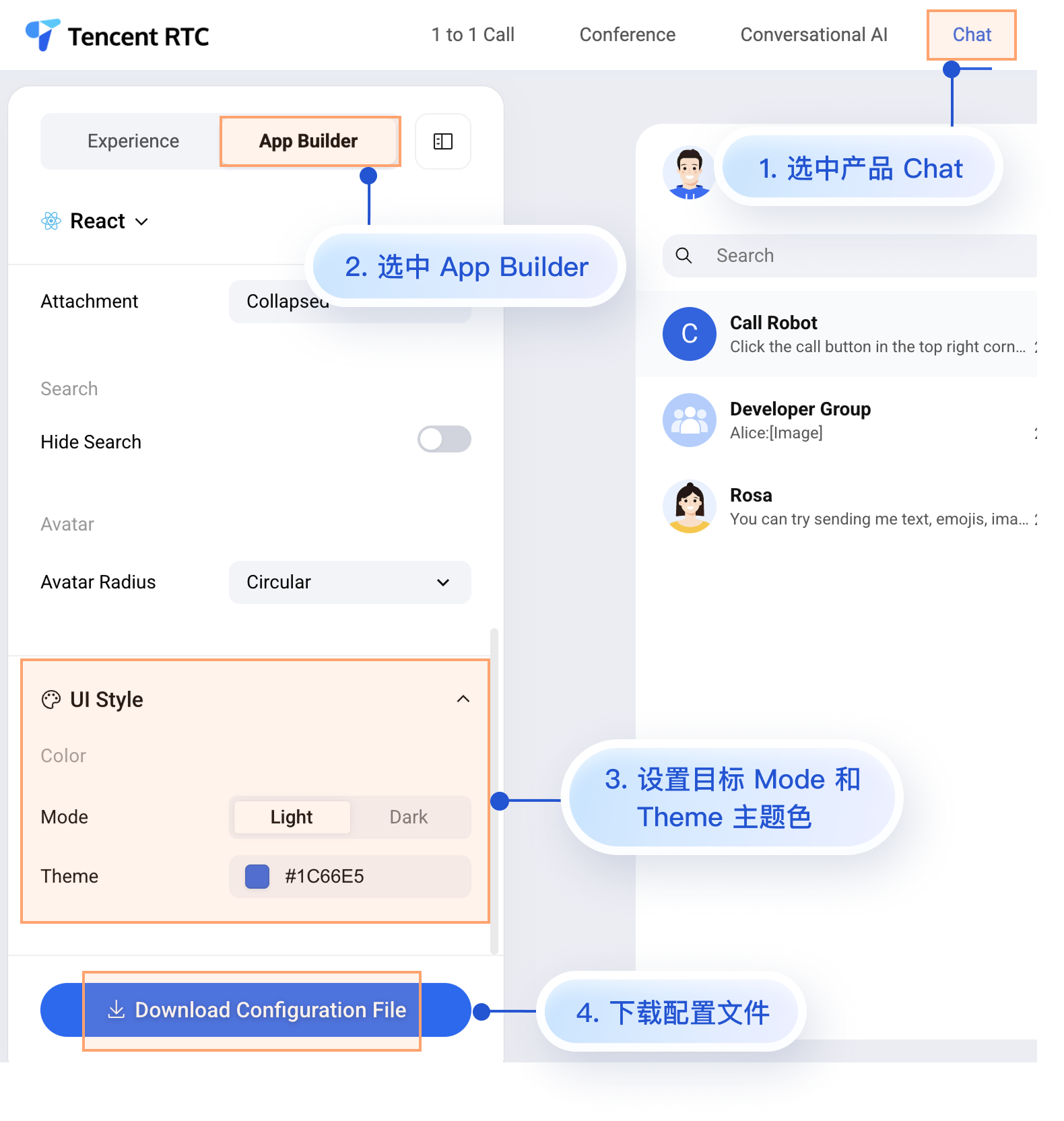
|
|
14
|
+
|
|
15
|
+
<tr>
|
|
16
|
+
<td rowspan="1" colSpan="1" ><br>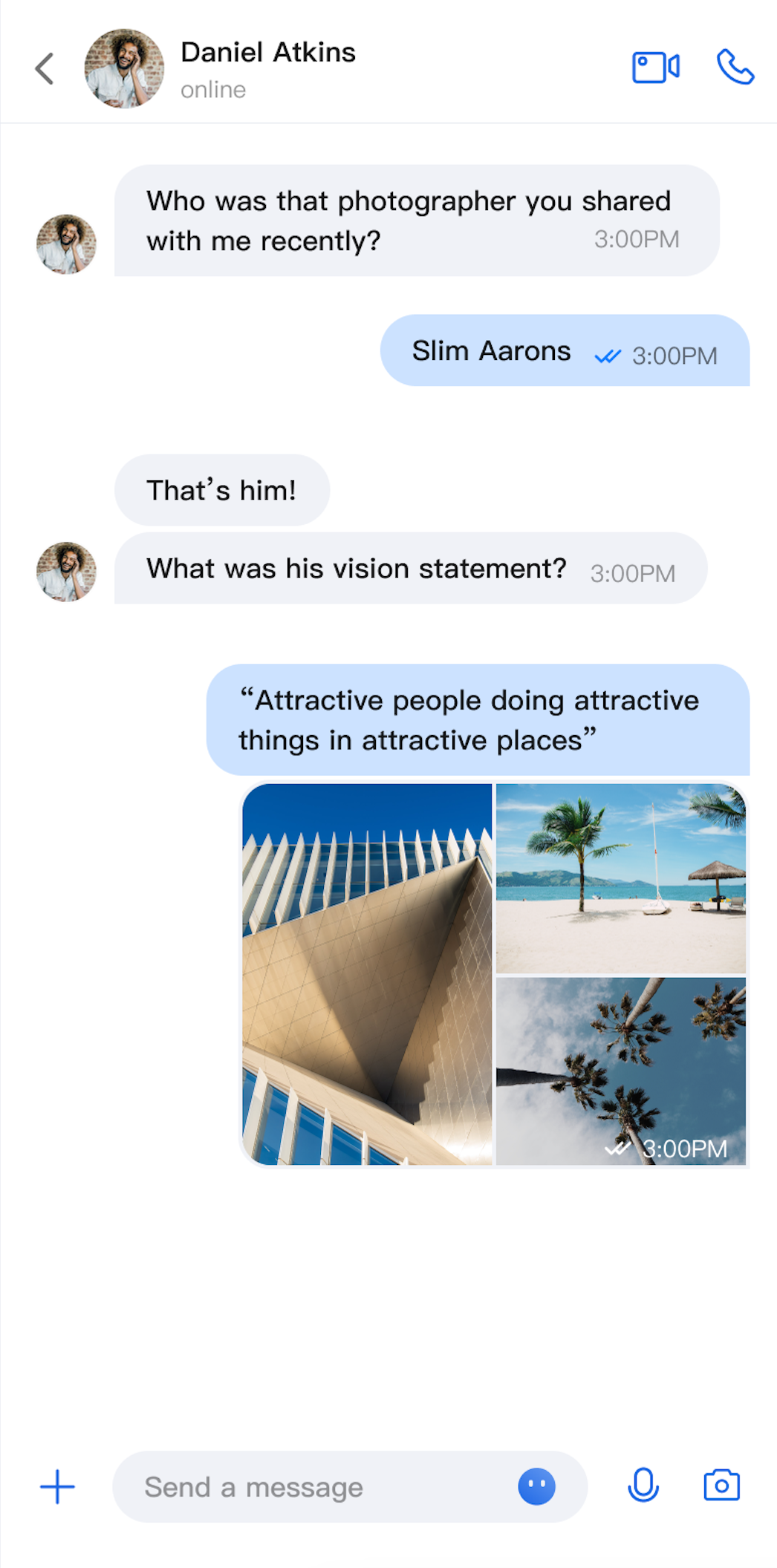</td>
|
|
17
|
+
|
|
18
|
+
<td rowspan="1" colSpan="1" ><br>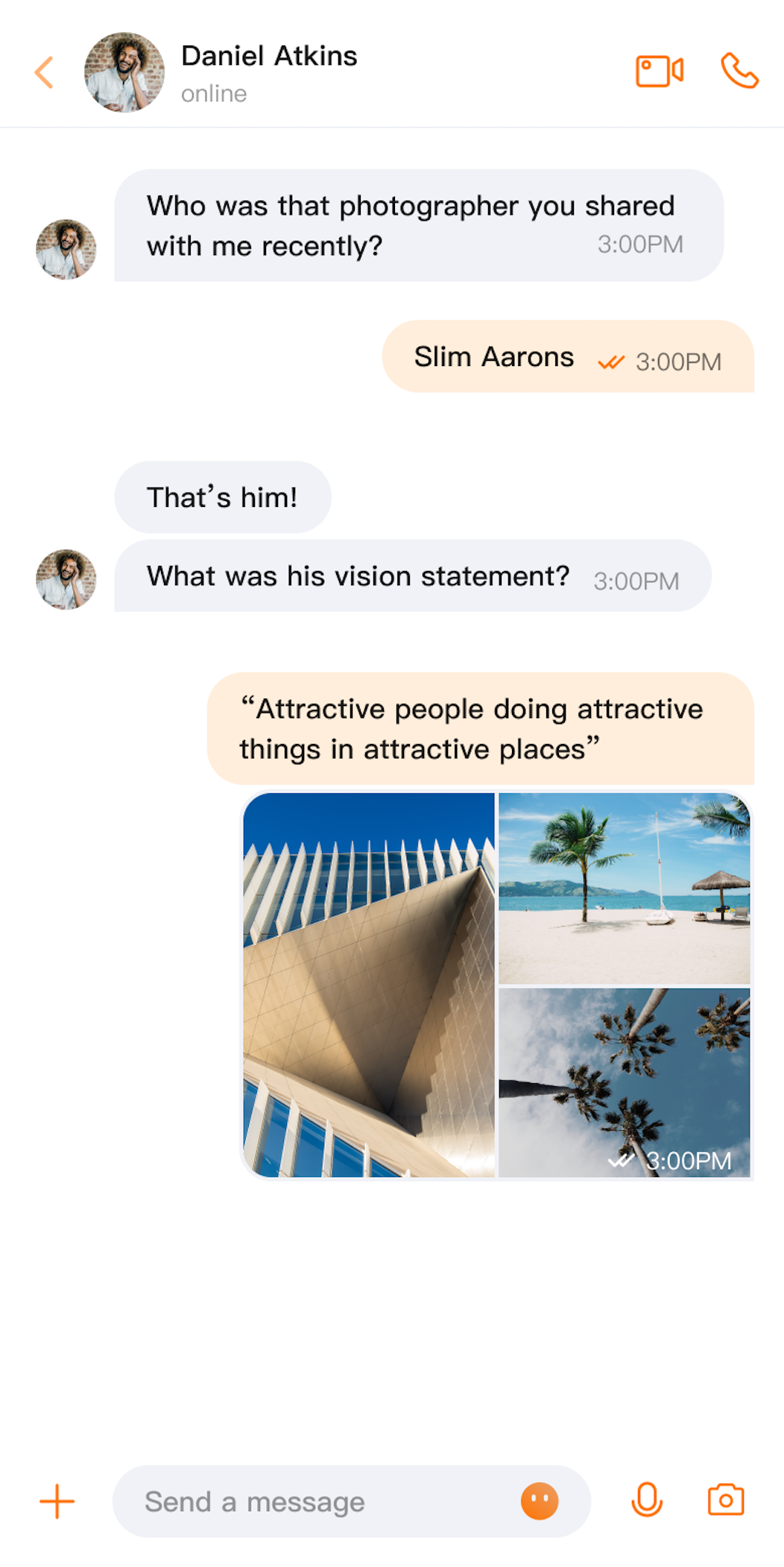</td>
|
|
19
|
+
|
|
20
|
+
<td rowspan="1" colSpan="1" ><br>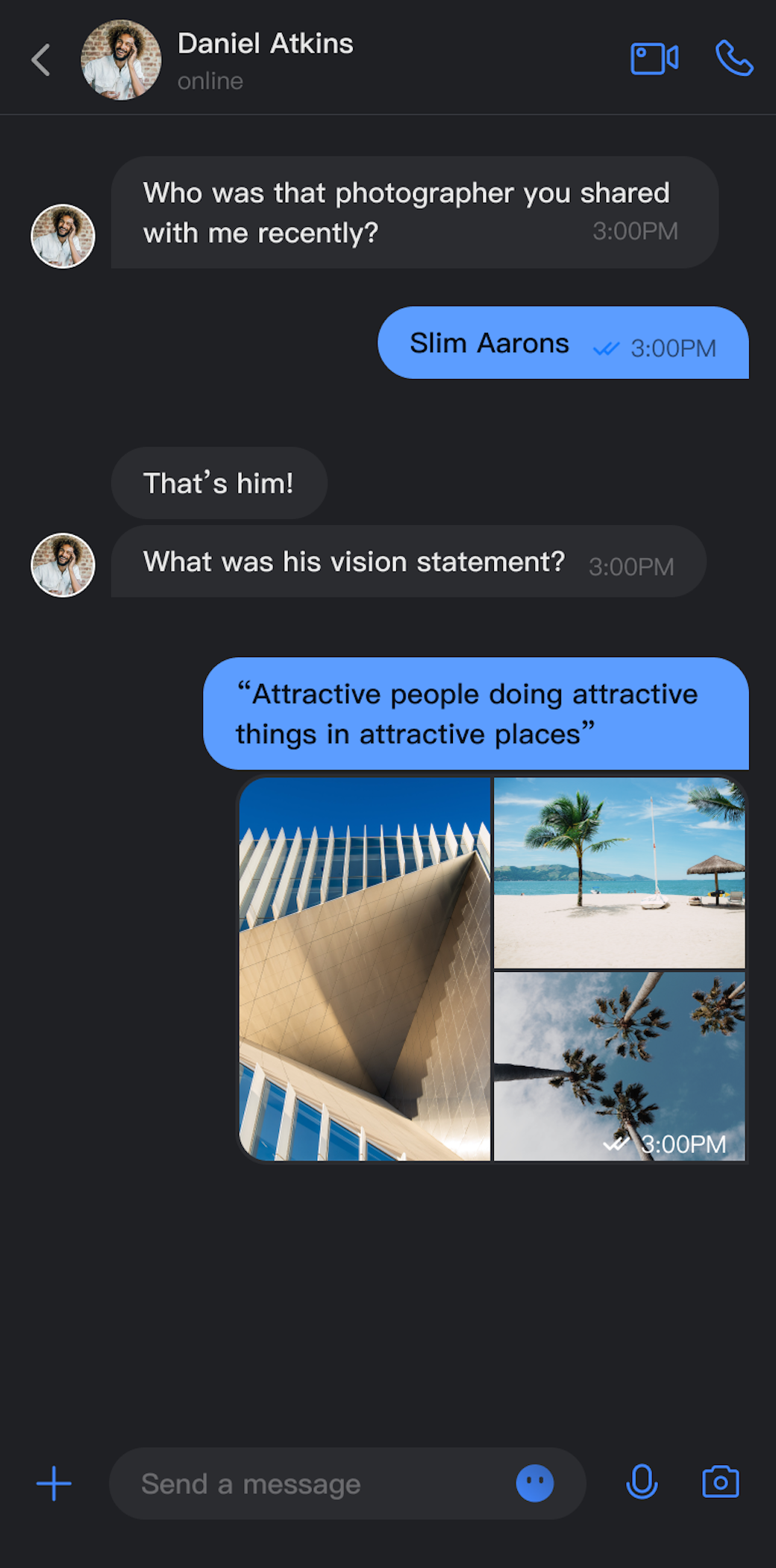</td>
|
|
21
|
+
|
|
22
|
+
<td rowspan="1" colSpan="1" ><br>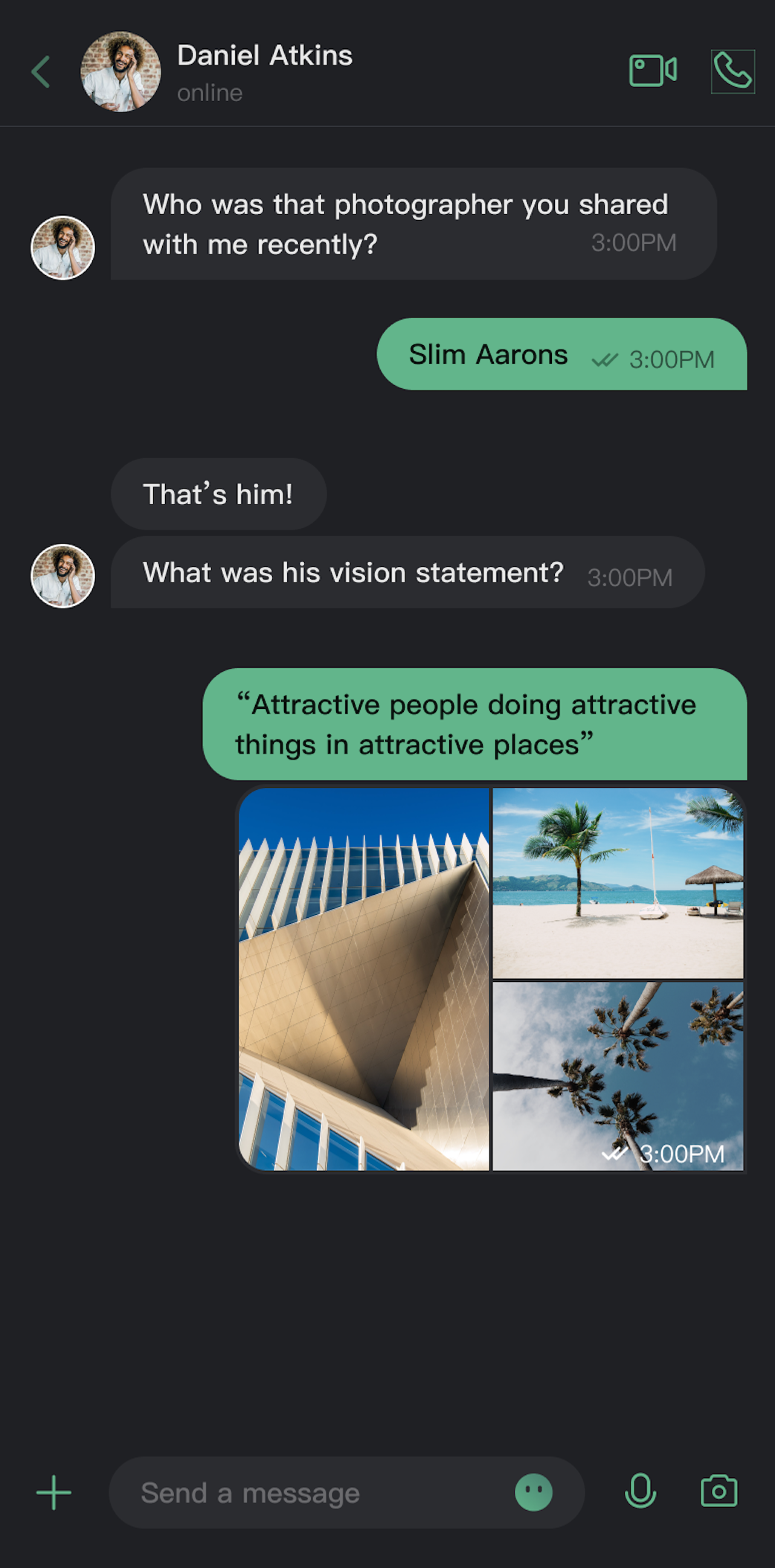</td>
|
|
23
|
+
</tr>
|
|
24
|
+
</table>
|
|
25
|
+
|
|
26
|
+
|
|
27
|
+
## 核心能力
|
|
28
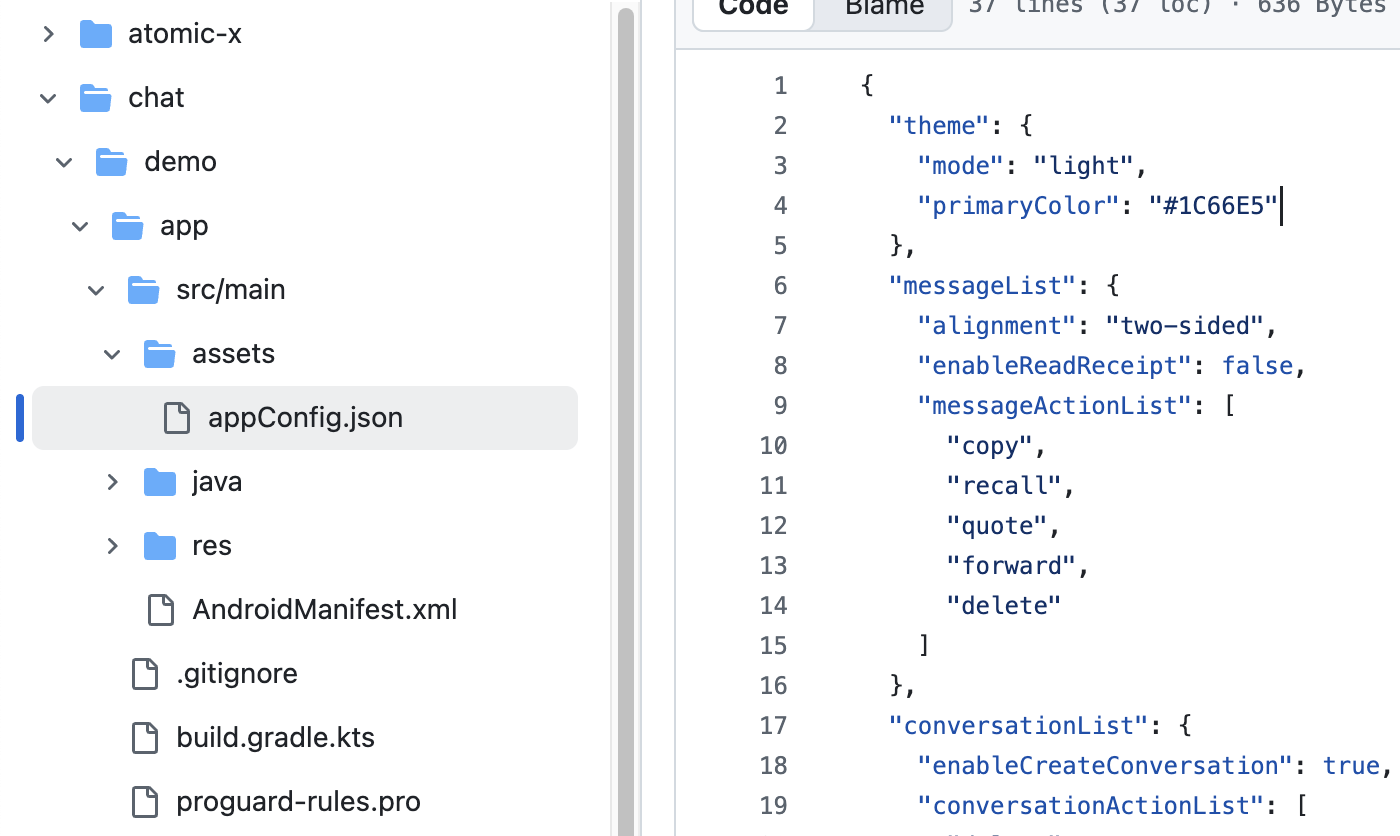
|
+
|
|
29
|
+
**模式切换**
|
|
30
|
+
- 浅色模式(Light):适合日间使用的明亮界面。
|
|
31
|
+
|
|
32
|
+
- 深色模式(Dark):适合夜间使用的暗色界面。
|
|
33
|
+
|
|
34
|
+
- 跟随系统(System):自动跟随系统外观设置。
|
|
35
|
+
|
|
36
|
+
|
|
37
|
+
**主题色定制**
|
|
38
|
+
|
|
39
|
+
- 预设主题色:提供蓝、绿、红、橙等标准色。
|
|
40
|
+
|
|
41
|
+
- 自定义主题色:支持任意 Hex 格式颜色。
|
|
42
|
+
|
|
43
|
+
- 智能色板生成:自动生成 10 个色阶的完整色板。
|
|
44
|
+
|
|
45
|
+
- 清除自定义:一键恢复默认主题色。
|
|
46
|
+
|
|
47
|
+
|
|
48
|
+
## API 说明
|
|
49
|
+
|
|
50
|
+
以上功能基于 `ThemeState` 提供的一组简洁的 API,用于主题配置和信息查询。
|
|
51
|
+
|
|
52
|
+
### 设置主题模式
|
|
53
|
+
<table>
|
|
54
|
+
<tr>
|
|
55
|
+
<td rowspan="1" colSpan="1" >方法</td>
|
|
56
|
+
|
|
57
|
+
<td rowspan="1" colSpan="1" >参数</td>
|
|
58
|
+
|
|
59
|
+
<td rowspan="1" colSpan="1" >返回值</td>
|
|
60
|
+
|
|
61
|
+
<td rowspan="1" colSpan="1" >说明</td>
|
|
62
|
+
</tr>
|
|
63
|
+
|
|
64
|
+
<tr>
|
|
65
|
+
<td rowspan="1" colSpan="1" >`setThemeMode`</td>
|
|
66
|
+
|
|
67
|
+
<td rowspan="1" colSpan="1" >`ThemeMode`</td>
|
|
68
|
+
|
|
69
|
+
<td rowspan="1" colSpan="1" >`Unit`</td>
|
|
70
|
+
|
|
71
|
+
<td rowspan="1" colSpan="1" >设置显示模式,自动保存并刷新。<br>• `ThemeMode.SYSTEM`:跟随系统外观。<br>• `ThemeMode.LIGHT`:强制使用浅色模式。<br>• `ThemeMode.DARK`:强制使用深色模式。</td>
|
|
72
|
+
</tr>
|
|
73
|
+
</table>
|
|
74
|
+
|
|
75
|
+
|
|
76
|
+
### 设置主题色
|
|
77
|
+
<table>
|
|
78
|
+
<tr>
|
|
79
|
+
<td rowspan="1" colSpan="1" >方法</td>
|
|
80
|
+
|
|
81
|
+
<td rowspan="1" colSpan="1" >参数</td>
|
|
82
|
+
|
|
83
|
+
<td rowspan="1" colSpan="1" >返回值</td>
|
|
84
|
+
|
|
85
|
+
<td rowspan="1" colSpan="1" >说明</td>
|
|
86
|
+
</tr>
|
|
87
|
+
|
|
88
|
+
<tr>
|
|
89
|
+
<td rowspan="1" colSpan="1" >`setPrimaryColor`</td>
|
|
90
|
+
|
|
91
|
+
<td rowspan="1" colSpan="1" >`String`</td>
|
|
92
|
+
|
|
93
|
+
<td rowspan="1" colSpan="1" >`Unit`</td>
|
|
94
|
+
|
|
95
|
+
<td rowspan="1" colSpan="1" >设置主题色,需要 Hex 格式(例如 "#1C66E5")。</td>
|
|
96
|
+
</tr>
|
|
97
|
+
|
|
98
|
+
<tr>
|
|
99
|
+
<td rowspan="1" colSpan="1" >`clearPrimaryColor`</td>
|
|
100
|
+
|
|
101
|
+
<td rowspan="1" colSpan="1" >无</td>
|
|
102
|
+
|
|
103
|
+
<td rowspan="1" colSpan="1" >`Unit`</td>
|
|
104
|
+
|
|
105
|
+
<td rowspan="1" colSpan="1" >清除自定义主题色,恢复默认蓝色。</td>
|
|
106
|
+
</tr>
|
|
107
|
+
</table>
|
|
108
|
+
|
|
109
|
+
|
|
110
|
+
> **说明:**
|
|
111
|
+
>
|
|
112
|
+
> - 调用 `setThemeMode` 或 `setPrimaryColor` 后,配置会自动保存到持久化存储,无需手动保存。下次启动应用时会自动加载。
|
|
113
|
+
> - 修改主题配置时会自动清除缓存,确保色彩方案实时更新。开发者无需关心缓存管理。
|
|
114
|
+
> - 使用设置 API 时需避免频繁切换主题(例如在循环中调用)。
|
|
115
|
+
|
|
116
|
+
|
|
117
|
+
### 查询 ThemeState 信息
|
|
118
|
+
|
|
119
|
+
通过以下只读属性可以查询当前的主题配置状态和信息:
|
|
120
|
+
<table>
|
|
121
|
+
<tr>
|
|
122
|
+
<td rowspan="1" colSpan="1" >属性</td>
|
|
123
|
+
|
|
124
|
+
<td rowspan="1" colSpan="1" >类型</td>
|
|
125
|
+
|
|
126
|
+
<td rowspan="1" colSpan="1" >说明</td>
|
|
127
|
+
</tr>
|
|
128
|
+
|
|
129
|
+
<tr>
|
|
130
|
+
<td rowspan="1" colSpan="1" >`currentMode`</td>
|
|
131
|
+
|
|
132
|
+
<td rowspan="1" colSpan="1" >`ThemeMode`</td>
|
|
133
|
+
|
|
134
|
+
<td rowspan="1" colSpan="1" >当前主题模式。</td>
|
|
135
|
+
</tr>
|
|
136
|
+
|
|
137
|
+
<tr>
|
|
138
|
+
<td rowspan="1" colSpan="1" >`currentPrimaryColor`</td>
|
|
139
|
+
|
|
140
|
+
<td rowspan="1" colSpan="1" >`String?`</td>
|
|
141
|
+
|
|
142
|
+
<td rowspan="1" colSpan="1" >当前主题色(Hex 格式)。</td>
|
|
143
|
+
</tr>
|
|
144
|
+
|
|
145
|
+
<tr>
|
|
146
|
+
<td rowspan="1" colSpan="1" >`hasCustomPrimaryColor`</td>
|
|
147
|
+
|
|
148
|
+
<td rowspan="1" colSpan="1" >`Boolean`</td>
|
|
149
|
+
|
|
150
|
+
<td rowspan="1" colSpan="1" >是否设置了自定义主题色。</td>
|
|
151
|
+
</tr>
|
|
152
|
+
|
|
153
|
+
<tr>
|
|
154
|
+
<td rowspan="1" colSpan="1" >`isDarkMode`</td>
|
|
155
|
+
|
|
156
|
+
<td rowspan="1" colSpan="1" >`Boolean`</td>
|
|
157
|
+
|
|
158
|
+
<td rowspan="1" colSpan="1" >当前是否为深色模式。</td>
|
|
159
|
+
</tr>
|
|
160
|
+
</table>
|
|
161
|
+
|
|
162
|
+
|
|
163
|
+
## 使用方式
|
|
164
|
+
|
|
165
|
+
本章节介绍如何在您的应用中集成和使用主题、主题色定制功能,按照从简单到复杂的顺序提供三种方式。
|
|
166
|
+
|
|
167
|
+
### 方式一:使用 AppBuilder 配置(推荐)
|
|
168
|
+
|
|
169
|
+
AppBuilder是一个便捷式功能及 UI 自定义配置工具,通过 JSON 配置文件统一管理,适用于 Web + Native 双端应用需要保持统一外观的场景。
|
|
170
|
+
|
|
171
|
+
您可以在 [Chat Web 体验馆](https://trtc.io/demo/homepage/#/detail?scene=messenger) 体验 AppBuilder 功能,体验入口:
|
|
172
|
+
|
|
173
|
+
|
|
174
|
+
|
|
175
|
+
|
|
176
|
+
虽然 Chat Web 体验馆上暂时无法实时观看移动端的配置效果,但移动端已经预先支持了 AppBuilder 的配置能力。
|
|
177
|
+
|
|
178
|
+
接下来为您介绍在 Web 体验馆设置 AppBuilder 后,如何在移动端项目中应用该自定义配置。操作步骤比较简单,只有 2 步:
|
|
179
|
+
1. 下载配置文件。
|
|
180
|
+
|
|
181
|
+
2. 将配置文件 appConfig.json 拖入您的 Android 项目中。
|
|
182
|
+
|
|
183
|
+
|
|
184
|
+
#### 1. 下载配置文件
|
|
185
|
+
|
|
186
|
+
访问 [Chat Web 体验馆](https://trtc.io/demo/homepage/#/detail?scene=messenger),下载配置文件 appConfig.json。下载路径为:
|
|
187
|
+
|
|
188
|
+
|
|
189
|
+
|
|
190
|
+
|
|
191
|
+
`appConfig.json`文件内容如下所示,与 AppBuilder 页面的配置项一一对应,与定义外观相关的配置是 `theme`及其子字段:
|
|
192
|
+
``` json
|
|
193
|
+
{
|
|
194
|
+
"theme": {
|
|
195
|
+
"mode": "light", // 主题模式,light-浅色模式,dark-深色模式,system-自动跟随系统
|
|
196
|
+
"primaryColor": "#E65100" // 主色调,16 进制颜色值
|
|
197
|
+
},
|
|
198
|
+
"messageList": {
|
|
199
|
+
"alignment": "two-sided",
|
|
200
|
+
"enableReadReceipt": false,
|
|
201
|
+
"messageActionList": [
|
|
202
|
+
"copy",
|
|
203
|
+
"recall",
|
|
204
|
+
"quote",
|
|
205
|
+
"forward",
|
|
206
|
+
"delete"
|
|
207
|
+
]
|
|
208
|
+
},
|
|
209
|
+
"conversationList": {
|
|
210
|
+
"enableCreateConversation": true,
|
|
211
|
+
"conversationActionList": [
|
|
212
|
+
"delete",
|
|
213
|
+
"mute",
|
|
214
|
+
"pin",
|
|
215
|
+
"markUnread"
|
|
216
|
+
]
|
|
217
|
+
},
|
|
218
|
+
"messageInput": {
|
|
219
|
+
"hideSendButton": false,
|
|
220
|
+
"attachmentPickerMode": "collapsed"
|
|
221
|
+
},
|
|
222
|
+
"search": {
|
|
223
|
+
"hideSearch": false
|
|
224
|
+
},
|
|
225
|
+
"avatar": {
|
|
226
|
+
"shape": "circular"
|
|
227
|
+
}
|
|
228
|
+
}
|
|
229
|
+
```
|
|
230
|
+
|
|
231
|
+
**配置选项说明**
|
|
232
|
+
<table>
|
|
233
|
+
<tr>
|
|
234
|
+
<td rowspan="1" colSpan="1" >参数说明</td>
|
|
235
|
+
|
|
236
|
+
<td rowspan="1" colSpan="1" >类型</td>
|
|
237
|
+
|
|
238
|
+
<td rowspan="1" colSpan="1" >可选值</td>
|
|
239
|
+
|
|
240
|
+
<td rowspan="1" colSpan="1" >说明</td>
|
|
241
|
+
</tr>
|
|
242
|
+
|
|
243
|
+
<tr>
|
|
244
|
+
<td rowspan="1" colSpan="1" >`mode`</td>
|
|
245
|
+
|
|
246
|
+
<td rowspan="1" colSpan="1" >String</td>
|
|
247
|
+
|
|
248
|
+
<td rowspan="1" colSpan="1" >`"system"`、`"light"`、`"dark"`</td>
|
|
249
|
+
|
|
250
|
+
<td rowspan="1" colSpan="1" >主题模式</td>
|
|
251
|
+
</tr>
|
|
252
|
+
|
|
253
|
+
<tr>
|
|
254
|
+
<td rowspan="1" colSpan="1" >`primaryColor`</td>
|
|
255
|
+
|
|
256
|
+
<td rowspan="1" colSpan="1" >String</td>
|
|
257
|
+
|
|
258
|
+
<td rowspan="1" colSpan="1" >Hex 颜色值,例如 `"#0ABF77"`</td>
|
|
259
|
+
|
|
260
|
+
<td rowspan="1" colSpan="1" >主题色</td>
|
|
261
|
+
</tr>
|
|
262
|
+
</table>
|
|
263
|
+
|
|
264
|
+
|
|
265
|
+
#### 2. 将配置文件拖入项目中
|
|
266
|
+
|
|
267
|
+
将 appConfig.json 拖入您的项目中。以 Github 开源 Demo [TUIKit Android Compose](https://github.com/Tencent-RTC/TUIKit_Android_Compose/blob/main/chat/demo/app/src/main/assets/appConfig.json) 项目为例,appConfig.json 位于 demo/app 的 assets 文件夹下:
|
|
268
|
+
|
|
269
|
+
|
|
270
|
+
|
|
271
|
+
|
|
272
|
+
至此,无需编写额外代码,启动 App 后,TUIKit Compose 组件的模式和主题色会自动显示成您在 appConfig.json 中设置的值。
|
|
273
|
+
|
|
274
|
+
### 方式二:代码设置主题模式
|
|
275
|
+
|
|
276
|
+
您可以通过 API `setThemeMode` 直接设置主题模式。示例代码如下所示:
|
|
277
|
+
``` swift
|
|
278
|
+
val themeState = ThemeState.shared
|
|
279
|
+
Column {
|
|
280
|
+
Button(onClick = {
|
|
281
|
+
themeState.setThemeMode(ThemeMode.SYSTEM)
|
|
282
|
+
}) { Text(text = "跟随系统") }
|
|
283
|
+
Button(onClick = {
|
|
284
|
+
themeState.setThemeMode(ThemeMode.LIGHT)
|
|
285
|
+
}) { Text(text = "浅色模式") }
|
|
286
|
+
Button(onClick = {
|
|
287
|
+
themeState.setThemeMode(ThemeMode.DARK)
|
|
288
|
+
}) { Text(text = "深色模式") }
|
|
289
|
+
}
|
|
290
|
+
```
|
|
291
|
+
|
|
292
|
+
### 方式三:代码设置主题色
|
|
293
|
+
|
|
294
|
+
您可以通过 API `setPrimaryColor` 设置主题色,只需要传入一个主颜色值,整个 TUIKit Compose 组件会自动根据该主颜色值,为不同的组件适配出一组相同色系里的相似色值渲染界面,您无需再手动适配界面 UI。示例代码如下所示:
|
|
295
|
+
``` swift
|
|
296
|
+
Column {
|
|
297
|
+
var text: String by remember { mutableStateOf("#1C66E5") }
|
|
298
|
+
|
|
299
|
+
fun isValidHexColor(): Boolean {
|
|
300
|
+
return text.matches(Regex("^#[0-9A-Fa-f]{6}$"))
|
|
301
|
+
}
|
|
302
|
+
BasicTextField(
|
|
303
|
+
value = text,
|
|
304
|
+
onValueChange = { text = it },
|
|
305
|
+
modifier = Modifier
|
|
306
|
+
.fillMaxWidth()
|
|
307
|
+
.padding(16.dp)
|
|
308
|
+
)
|
|
309
|
+
Button(
|
|
310
|
+
enabled = isValidHexColor(),
|
|
311
|
+
onClick = {
|
|
312
|
+
themeState.setPrimaryColor(text)
|
|
313
|
+
}) {
|
|
314
|
+
Text("应用主题色")
|
|
315
|
+
}
|
|
316
|
+
}
|
|
317
|
+
```
|
|
318
|
+
|
|
319
|
+
> **使用建议:**
|
|
320
|
+
>
|
|
321
|
+
> - 对于大多数应用,推荐使用 JSON 配置文件的方式,简单可靠且支持多端统一。
|
|
322
|
+
> - 在整个应用中统一使用 `themeState.colors` 中的颜色,确保主题切换时界面保持一致。
|
|
323
|
+
|
|
324
|
+
|
|
325
|
+
## 常见问题
|
|
326
|
+
|
|
327
|
+
### **如何判断当前是否为深色模式?**
|
|
328
|
+
``` java
|
|
329
|
+
if themeState.isDarkMode {
|
|
330
|
+
// 当前是深色模式
|
|
331
|
+
} else {
|
|
332
|
+
// 当前是浅色模式
|
|
333
|
+
}
|
|
334
|
+
```
|
|
335
|
+
|
|
336
|
+
### **可以设置透明度吗?**
|
|
337
|
+
|
|
338
|
+
不支持。主题色只支持 6 位 Hex 格式(RGB),不支持 8 位格式(RGBA)。
|
|
339
|
+
|
|
340
|
+
### **如何恢复默认主题?**
|
|
341
|
+
``` swift
|
|
342
|
+
themeState.clearPrimaryColor() // 清除自定义主题色
|
|
343
|
+
themeState.setThemeMode(ThemeMode.SYSTEM) // 恢复跟随系统
|
|
344
|
+
```
|
|
345
|
+
|
|
346
|
+
### **主题配置存储在哪里?**
|
|
347
|
+
|
|
348
|
+
存储在应用的持久化存储中。应用卸载后会丢失,重新安装后恢复默认配置。
|
|
349
|
+
|
|
350
|
+
### **如何获取当前主题的完整配置?**
|
|
351
|
+
``` swift
|
|
352
|
+
val config = themeState.currentTheme
|
|
353
|
+
print("模式: ${config.mode}")
|
|
354
|
+
print("主题色: ${config.primaryColor ?: "默认"}")
|
|
355
|
+
```
|
|
356
|
+
|
|
357
|
+
### **可以同时设置模式和主题色吗?**
|
|
358
|
+
|
|
359
|
+
可以分别调用两个方法,系统会自动合并配置:
|
|
360
|
+
``` swift
|
|
361
|
+
themeState.setThemeMode(ThemeMode.DARK)
|
|
362
|
+
themeState.setPrimaryColor("#0ABF77")
|
|
363
|
+
```
|
|
File without changes
|
|
@@ -0,0 +1,54 @@
|
|
|
1
|
+
---
|
|
2
|
+
product: 'Chat'
|
|
3
|
+
tech_stack: 'flutter_sdk'
|
|
4
|
+
framework: 'sdk'
|
|
5
|
+
title: 'flutter sdk 常见问题'
|
|
6
|
+
keywords: ['sdk 集成', '登录 API', '创建群组','发送消息','接收消息']
|
|
7
|
+
---
|
|
8
|
+
|
|
9
|
+
# Flutter SDK 常见问题
|
|
10
|
+
|
|
11
|
+
## Flutter SDK 常见问题解决方案 (Topic: SDK FAQ)
|
|
12
|
+
|
|
13
|
+
### Q: SDK 怎么实现消息回应?
|
|
14
|
+
**A:** SDK 支持消息回应能力,您需要购买旗舰版或企业版套餐,具体 API 有3个:
|
|
15
|
+
- 添加消息回应 [addMessageReaction](https://pub.dev/documentation/tencent_cloud_chat_sdk/latest/manager_v2_tim_message_manager/V2TIMMessageManager/addMessageReaction.html)
|
|
16
|
+
- 获取消息回应 [getMessageReactions](https://pub.dev/documentation/tencent_cloud_chat_sdk/latest/manager_v2_tim_message_manager/V2TIMMessageManager/getMessageReactions.html)
|
|
17
|
+
- 删除消息回应 [removeMessageReaction](https://pub.dev/documentation/tencent_cloud_chat_sdk/latest/manager_v2_tim_message_manager/V2TIMMessageManager/removeMessageReaction.html)
|
|
18
|
+
|
|
19
|
+
### Q: 单聊消息怎么标记已读?
|
|
20
|
+
**A:** 如果您需要标记单聊消息已读同时清空会话未读数,可以使用 [markC2CMessageAsRead](https://pub.dev/documentation/tencent_cloud_chat_sdk/latest/manager_v2_tim_message_manager/V2TIMMessageManager/markC2CMessageAsRead.html)。
|
|
21
|
+
|
|
22
|
+
### Q: 群聊消息怎么清空未读数?
|
|
23
|
+
**A:** 如果您需要清空群聊会话未读数,可以使用 [markGroupMessageAsRead](https://pub.dev/documentation/tencent_cloud_chat_sdk/latest/manager_v2_tim_message_manager/V2TIMMessageManager/markGroupMessageAsRead.html)。
|
|
24
|
+
|
|
25
|
+
### Q: 单聊和群聊消息怎么实现单条消息已读?
|
|
26
|
+
**A:** 如果您需要实现单条消息已读功能,需要使用消息已读回执能力。 如何开启已读回执、如何发送已读回执等详细信息可以参考:https://cloud.tencent.com/document/product/269/75345。
|
|
27
|
+
|
|
28
|
+
### Q: SDK 怎么发送图片消息?
|
|
29
|
+
**A:** 可以使用 [createImageMessage](https://pub.dev/documentation/tencent_cloud_chat_sdk/latest/manager_v2_tim_message_manager/V2TIMMessageManager/createImageMessage.html) 创建图片消息实例,然后使用 [sendMessage](https://pub.dev/documentation/tencent_cloud_chat_sdk/latest/manager_v2_tim_message_manager/V2TIMMessageManager/sendMessage.html) 发送图片消息。
|
|
30
|
+
|
|
31
|
+
### Q: SDK 怎么发送视频消息?
|
|
32
|
+
**A:** 可以使用 [createVideoMessage](https://pub.dev/documentation/tencent_cloud_chat_sdk/latest/manager_v2_tim_message_manager/V2TIMMessageManager/createVideoMessage.html) 创建视频消息实例,然后使用 [sendMessage](https://pub.dev/documentation/tencent_cloud_chat_sdk/latest/manager_v2_tim_message_manager/V2TIMMessageManager/sendMessage.html) 发送视频消息。
|
|
33
|
+
|
|
34
|
+
### Q: SDK 怎么发送语音消息?
|
|
35
|
+
**A:** 可以使用 [createSoundMessage](https://pub.dev/documentation/tencent_cloud_chat_sdk/latest/manager_v2_tim_message_manager/V2TIMMessageManager/createSoundMessage.html) 创建语音消息实例,然后使用 [sendMessage](https://pub.dev/documentation/tencent_cloud_chat_sdk/latest/manager_v2_tim_message_manager/V2TIMMessageManager/sendMessage.html) 发送语音消息。
|
|
36
|
+
|
|
37
|
+
### Q: SDK 怎么发送文件消息?
|
|
38
|
+
**A:** 可以使用 [createFileMessage](https://pub.dev/documentation/tencent_cloud_chat_sdk/latest/manager_v2_tim_message_manager/V2TIMMessageManager/createFileMessage.html) 创建文件消息实例,然后使用 [sendMessage](https://pub.dev/documentation/tencent_cloud_chat_sdk/latest/manager_v2_tim_message_manager/V2TIMMessageManager/sendMessage.html) 发送文件消息。
|
|
39
|
+
|
|
40
|
+
### Q: SDK 如何删除会话?
|
|
41
|
+
**A:** 删除会话仅支持单向删除,SDK 删除会话 API `deleteConversation`,参考文档:https://cloud.tencent.com/document/product/269/75380
|
|
42
|
+
|
|
43
|
+
### Q: SDK 如何删除会话历史消息?
|
|
44
|
+
**A:** SDK 清空消息分为两种:清空单聊消息、清空群聊消息。清空消息会同时清空当前会话内所有的消息,包含本地和云端消息,但不会删除会话本身,且清空的是单向的,不会把对方会话中的消息也情况。
|
|
45
|
+
- 清空单聊消息 [clearC2CHistoryMessage](https://cloud.tencent.com/document/product/269/75336)
|
|
46
|
+
- 清空群聊消息 [clearGroupHistoryMessage](https://cloud.tencent.com/document/product/269/75336)
|
|
47
|
+
|
|
48
|
+
### Q: SDK 怎么获取用户在线状态功能?
|
|
49
|
+
**A:**
|
|
50
|
+
1. SDK 提供了**用户状态查询、订阅、取消订阅 API 和状态变更事件通知**,详情可参考:https://cloud.tencent.com/document/product/269/105469
|
|
51
|
+
2. 服务端**在线状态变更回调**可参考:https://cloud.tencent.com/document/product/269/2570
|
|
52
|
+
|
|
53
|
+
### Q: SDK 怎么获取好友列表?
|
|
54
|
+
**A:** SDK 支持好友的管理,用户可以主动添加、删除好友,也可以设置仅针对好友才能发送消息。详情可参考:https://cloud.tencent.com/document/product/269/75421
|
|
@@ -117,7 +117,7 @@ promise.then(function(imResponse) {
|
|
|
117
117
|
### Q: Taro 开发的微信小程序如何集成 Chat SDK?
|
|
118
118
|
**A:** Chat SDK v4 `@tencentcloud/lite-chat` 同时支持在 web 浏览器和微信小程序环境运行,Taro 开发的微信小程序需要实现聊天功能可直接集成 `@tencentcloud/lite-chat`, 详情可参考:https://cloud.tencent.com/document/product/269/117335。
|
|
119
119
|
|
|
120
|
-
### Q:
|
|
120
|
+
### Q: Chat 怎么实现用户在线状态功能?
|
|
121
121
|
**A:**
|
|
122
122
|
1. Chat SDK 提供了**用户状态查询、订阅、取消订阅 API 和状态变更事件通知**,详情可参考:https://cloud.tencent.com/document/product/269/78125。
|
|
123
123
|
2. 服务端**在线状态变更回调**可参考:https://cloud.tencent.com/document/product/269/2570。
|