@tencentcloud/sdk-mcp 1.3.4 → 1.3.5
This diff represents the content of publicly available package versions that have been released to one of the supported registries. The information contained in this diff is provided for informational purposes only and reflects changes between package versions as they appear in their respective public registries.
- package/package.json +1 -1
- package/resource/doc/chatuikit/android/features/theme.md +363 -0
- package/resource/doc/chatuikit/android/workflow.md +0 -0
- package/resource/doc/chatuikit/{android/client_api_android.md → faq/android_sdk/client-api.md} +0 -1
- package/resource/doc/chatuikit/faq/{native_sdk/faq.md → common/product.md} +8 -0
- package/resource/doc/chatuikit/faq/flutter_sdk/faq.md +54 -0
- package/resource/doc/chatuikit/faq/web_sdk/faq.md +1 -1
- package/resource/doc/chatuikit/flutter/features/theme.md +379 -0
- package/resource/doc/chatuikit/flutter/workflow.md +816 -0
- package/resource/doc/chatuikit/iOS/features/theme.md +416 -0
- package/resource/doc/chatuikit/iOS/workflow.md +0 -0
- package/resource/doc/chatuikit/react/components/chat-setting.md +124 -0
- package/resource/doc/chatuikit/react/components/contact-list.md +1331 -0
- package/resource/doc/chatuikit/react/components/search.md +885 -0
- package/resource/doc/chatuikit/vue/components/chat-setting.md +88 -0
- package/resource/doc/chatuikit/vue/components/contact-list.md +679 -0
- package/resource/doc/chatuikit/vue/components/search.md +1384 -0
- package/resource/doc/livekit/live/android/workflow.md +137 -4
- package/resource/doc/livekit/live/flutter/live-audience-list.md +337 -0
- package/resource/doc/livekit/live/flutter/live-audio-effect.md +739 -0
- package/resource/doc/livekit/live/flutter/live-barrage.md +578 -0
- package/resource/doc/livekit/live/flutter/live-base-beauty.md +484 -0
- package/resource/doc/livekit/live/flutter/live-co-guest-interaction.md +606 -0
- package/resource/doc/livekit/live/flutter/live-gift.md +812 -0
- package/resource/doc/livekit/live/flutter/live-host-interaction.md +1113 -0
- package/resource/doc/livekit/live/flutter/live-integration.md +1029 -0
- package/resource/doc/livekit/live/flutter/live-live-list.md +861 -0
- package/resource/doc/livekit/live/ios/live-audience-list.md +335 -0
- package/resource/doc/livekit/live/ios/live-audio-effect.md +373 -0
- package/resource/doc/livekit/live/ios/live-barrage.md +529 -0
- package/resource/doc/livekit/live/ios/live-base-beauty.md +237 -0
- package/resource/doc/livekit/live/ios/live-co-guest-interaction.md +483 -0
- package/resource/doc/livekit/live/ios/live-gift.md +785 -0
- package/resource/doc/livekit/live/ios/live-host-interaction.md +743 -0
- package/resource/doc/livekit/live/ios/live-integration.md +822 -0
- package/resource/doc/livekit/live/ios/live-live-list.md +535 -0
- package/resource/doc/livekit/live/ios/workflow.md +352 -0
- package/resource/doc/rtcengine/faq/web/web.md +2 -2
- package/resource/doc/rtcengine/web/how_to_integrated_web_sdk.md +2 -2
- package/resource/doc/rtcengine/web/plugin/20-advanced-customized-capture-rendering.md +84 -0
- package/resource/doc/rtcengine/web/plugin/21-advanced-auto-play-policy.md +86 -0
- package/resource/doc/rtcengine/web/plugin/22-advanced-audio-mixer.md +220 -0
- package/resource/doc/rtcengine/web/plugin/23-advanced-support-detection.md +217 -0
- package/resource/doc/rtcengine/web/plugin/24-advanced-network-quality.md +137 -0
- package/resource/doc/rtcengine/web/plugin/25-advanced-device-change.md +97 -0
- package/resource/doc/rtcengine/web/plugin/26-advanced-publish-cdn-stream.md +453 -0
- package/resource/doc/rtcengine/web/plugin/27-advanced-small-stream.md +180 -0
- package/resource/doc/rtcengine/web/plugin/28-advanced-beauty.md +349 -0
- package/resource/doc/rtcengine/web/plugin/29-advanced-water-mark.md +149 -0
- package/resource/doc/rtcengine/web/plugin/30-advanced-cross-room-link.md +96 -0
- package/resource/doc/rtcengine/web/plugin/31-advanced-plugins-overview.md +405 -0
- package/resource/doc/rtcengine/web/plugin/34-advanced-proxy.md +244 -0
- package/resource/doc/rtcengine/web/plugin/35-advanced-ai-denoiser.md +84 -0
- package/resource/doc/rtcengine/web/plugin/36-advanced-virtual-background.md +202 -0
- package/resource/doc/rtcengine/web/plugin/37-advanced-voice-changer.md +98 -0
- package/resource/doc/rtcengine/web/plugin/38-advanced-basic-beauty.md +95 -0
- package/resource/doc/rtcengine/web/plugin/39-advanced-video-decoder.md +33 -0
- package/resource/doc/rtcengine/web/plugin/40-advanced-video-mixer.md +380 -0
- package/resource/doc/rtcengine/web/plugin/41-advanced-small-stream-auto-switcher.md +91 -0
- package/resource/doc/rtcengine/web/plugin/42-advanced-realtime-transcriber.md +314 -0
- package/resource/doc/rtcengine/web/plugin/43-advanced-face-detection.md +180 -0
- package/tools/chat/get-native-chat-feature-detail.js +30 -0
- package/tools/chat/get-native-chat-feature-detail.js.map +1 -0
- package/tools/chat/get-native-chat-integration.js +30 -12
- package/tools/chat/get-native-chat-integration.js.map +1 -1
- package/tools/common/get-faq.js +2 -4
- package/tools/common/get-faq.js.map +1 -1
- package/tools/definitions/get_native_chat_feature_detail_def.js +32 -0
- package/tools/definitions/get_native_chat_feature_detail_def.js.map +1 -0
- package/tools/definitions/get_native_chat_uikit_integration_def.js +18 -6
- package/tools/definitions/get_native_chat_uikit_integration_def.js.map +1 -1
- package/tools/definitions/{get_native_live_extra_features_def.js → get_native_live_uikit_extra_features_def.js} +3 -3
- package/tools/definitions/get_native_live_uikit_extra_features_def.js.map +1 -0
- package/tools/definitions/{get_native_live_interaction_def.js → get_native_live_uikit_interaction_def.js} +3 -3
- package/tools/definitions/get_native_live_uikit_interaction_def.js.map +1 -0
- package/tools/definitions/get_web_chat_uikit_component_detail_def.js +46 -7
- package/tools/definitions/get_web_chat_uikit_component_detail_def.js.map +1 -1
- package/tools/index.js +6 -4
- package/tools/index.js.map +1 -1
- package/tools/live/{get_native_live_extra_features.js → get_native_live_uikit_extra_features.js} +4 -4
- package/tools/live/get_native_live_uikit_extra_features.js.map +1 -0
- package/tools/live/{get_native_live_interaction.js → get_native_live_uikit_interaction.js} +4 -4
- package/tools/live/get_native_live_uikit_interaction.js.map +1 -0
- package/tools/rtcengine/get-trtc-web-sdk-faq.js +1 -1
- package/tools/rtcengine/get-trtc-web-sdk-plugin.js +45 -0
- package/tools/rtcengine/get-trtc-web-sdk-plugin.js.map +1 -0
- package/utils/handle-component-name.js +0 -16
- package/utils/handle-component-name.js.map +1 -1
- package/utils/report-cls-client.js +1 -1
- package/utils/report-es-client.js +1 -1
- package/resource/doc/chatuikit/android/integrate_tuichat_only_android.md +0 -382
- package/resource/doc/chatuikit/android/ui_api_android.md +0 -418
- package/resource/doc/chatuikit/iOS/integrate_tuichat_only_iOS.md +0 -993
- package/resource/doc/chatuikit/iOS/ui_api_iOS.md +0 -526
- package/tools/definitions/get_native_live_extra_features_def.js.map +0 -1
- package/tools/definitions/get_native_live_interaction_def.js.map +0 -1
- package/tools/live/get_native_live_extra_features.js.map +0 -1
- package/tools/live/get_native_live_interaction.js.map +0 -1
- /package/resource/doc/chatuikit/android/{integrate_tuikit_android.md → integration.md} +0 -0
- /package/resource/doc/chatuikit/{flutter/client_api_Flutter.md → faq/flutter_sdk/client-api.md} +0 -0
- /package/resource/doc/chatuikit/{iOS/client_api_iOS.md → faq/ios_sdk/client-api.md} +0 -0
- /package/resource/doc/chatuikit/flutter/{integrate_tuikit_Flutter.md → integration.md} +0 -0
- /package/resource/doc/chatuikit/iOS/{integrate_tuikit_iOS.md → integration.md} +0 -0
- /package/resource/doc/chatuikit/react/components/{chatheader.md → chat-header.md} +0 -0
- /package/resource/doc/chatuikit/vue/components/{chatheader.md → chat-header.md} +0 -0
|
@@ -0,0 +1,606 @@
|
|
|
1
|
+
**AtomicXCore** 提供了 [CoGuestStore](https://tencent-rtc.github.io/TUIKit_Flutter/api_live_co_guest_store/CoGuestStore-class.html) 模块,专门用于管理观众连麦的完整业务流程。开发者无需关心复杂的状态同步和信令交互,只需调用几个简单的方法,即可为您的直播添加强大的观众与主播音视频互动功能。
|
|
2
|
+
|
|
3
|
+
## 核心场景
|
|
4
|
+
|
|
5
|
+
`CoGuestStore` 支持以下两种最主流的连麦场景:
|
|
6
|
+
- **观众申请上麦**:观众主动发起连麦请求,主播在收到请求后进行同意或拒绝。
|
|
7
|
+
|
|
8
|
+
- **主播邀请上麦**:主播可以主动向直播间内的任意一位观众发起连麦邀请。
|
|
9
|
+
|
|
10
|
+
|
|
11
|
+
## 实现步骤
|
|
12
|
+
|
|
13
|
+
### 步骤1:组件集成
|
|
14
|
+
|
|
15
|
+
请参考 [开始直播](https://write.woa.com/document/191126413785100288) 集成 **AtomicXCore**,并完成 **LiveCoreWidget** 的接入。
|
|
16
|
+
|
|
17
|
+
完成集成后,开始实现连麦功能。
|
|
18
|
+
|
|
19
|
+
### 步骤2:实现观众申请上麦
|
|
20
|
+
|
|
21
|
+
#### 观众端实现
|
|
22
|
+
|
|
23
|
+
作为观众,您的核心任务是**发起申请、接收结果**和**主动下麦**。
|
|
24
|
+
1. **发起连麦申请**
|
|
25
|
+
|
|
26
|
+
|
|
27
|
+
当用户点击界面上的"申请连麦"按钮时,调用 `applyForSeat` 方法。
|
|
28
|
+
|
|
29
|
+
``` java
|
|
30
|
+
import 'package:atomic_x_core/atomicxcore.dart';
|
|
31
|
+
|
|
32
|
+
final String liveId = "房间ID";
|
|
33
|
+
final CoGuestStore guestStore = CoGuestStore.create(liveId);
|
|
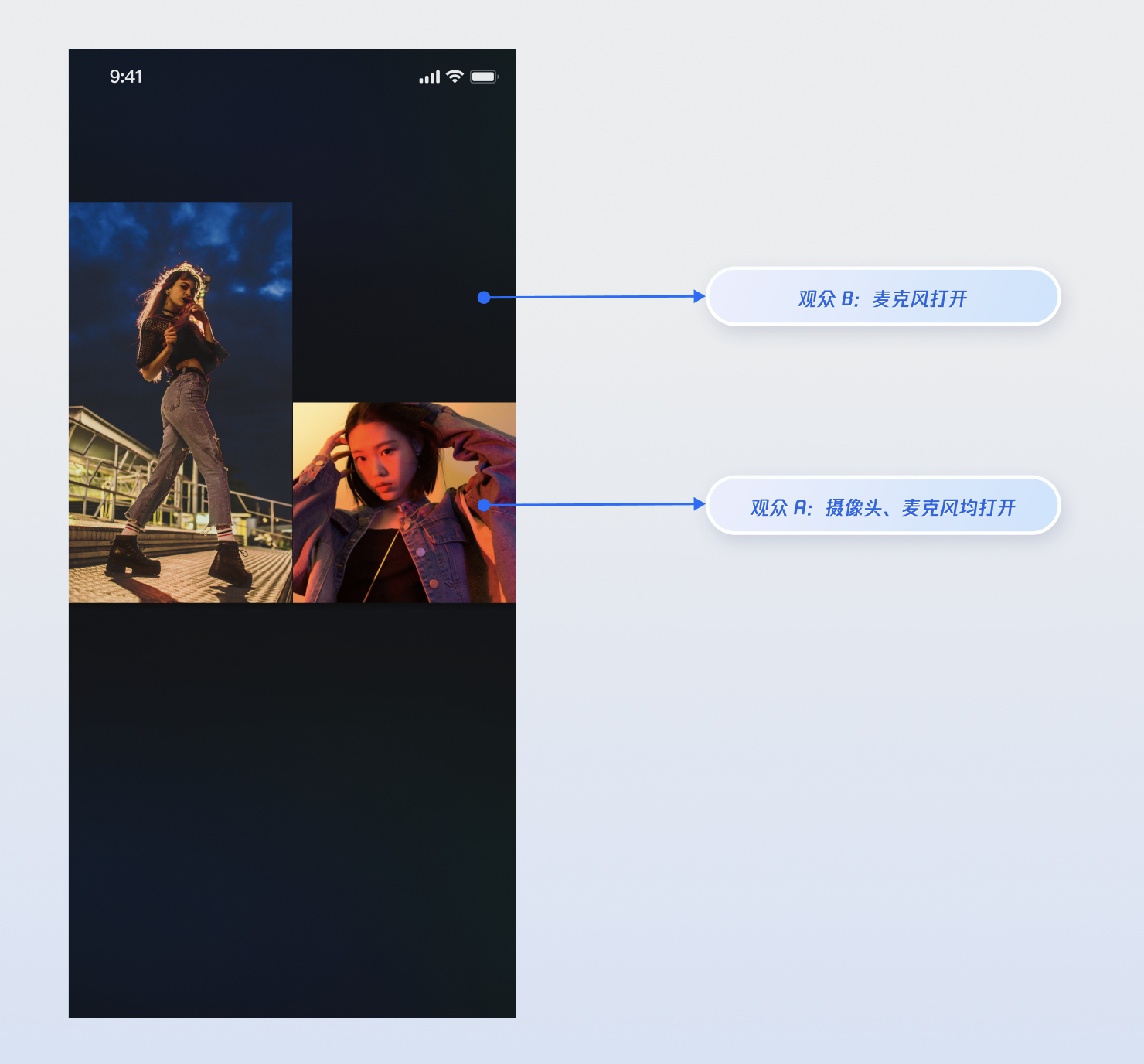
34
|
+
|
|
35
|
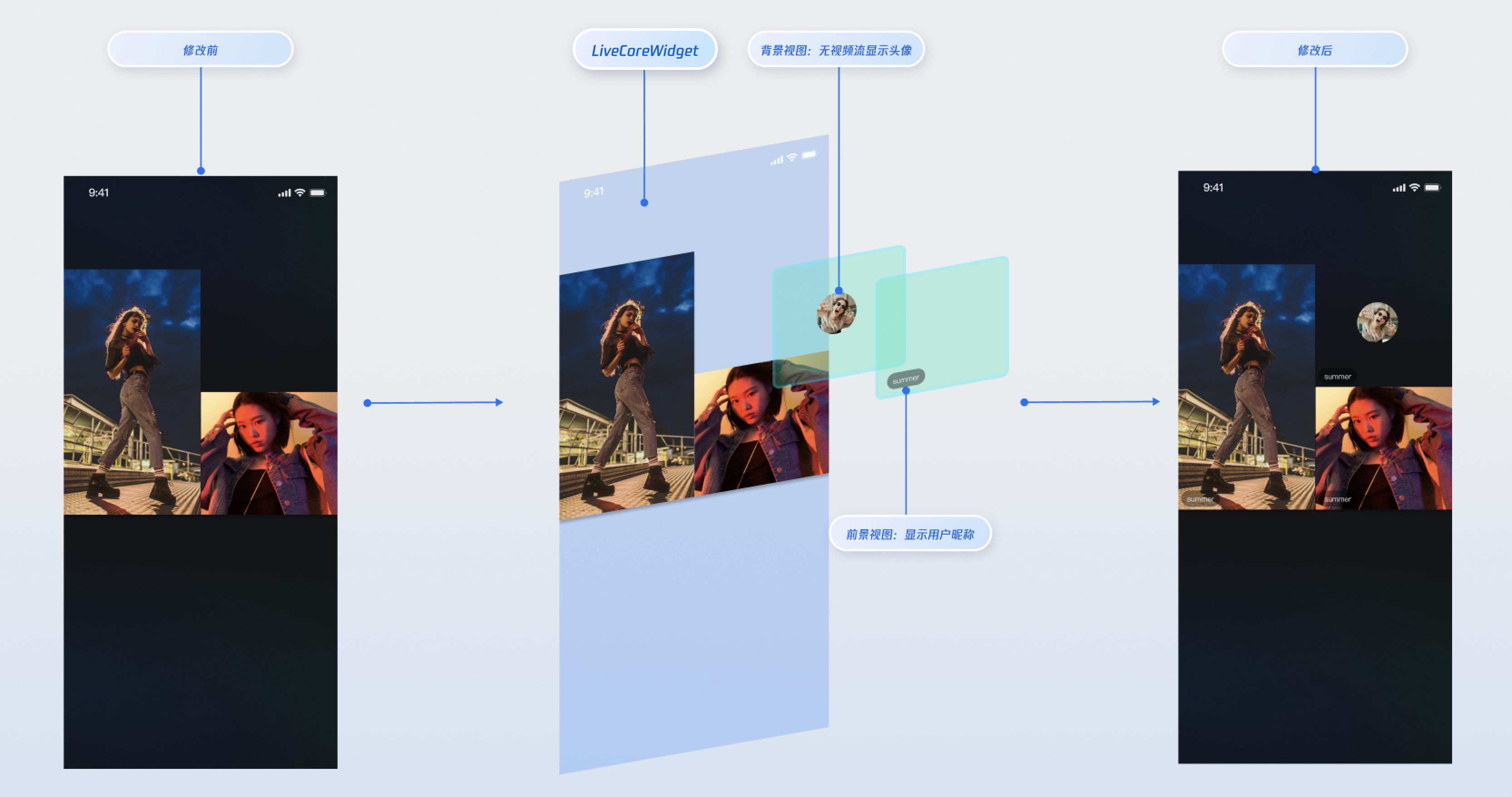
+
// 用户点击"申请连麦"
|
|
36
|
+
void requestToConnect() async {
|
|
37
|
+
// seatIndex: 麦位索引,取值范围为 -1(自动选择空麦位) 和 [0,当前房间支持最大麦位数-1] ,timeout: 请求超时时间(秒)
|
|
38
|
+
final result = await guestStore.applyForSeat(
|
|
39
|
+
seatIndex: 0,
|
|
40
|
+
timeout: 30,
|
|
41
|
+
extraInfo: null,
|
|
42
|
+
);
|
|
43
|
+
if (result.isSuccess) {
|
|
44
|
+
print("连麦申请已发送,等待主播处理...");
|
|
45
|
+
} else {
|
|
46
|
+
print("申请发送失败: ${result.errorMessage}");
|
|
47
|
+
}
|
|
48
|
+
}
|
|
49
|
+
```
|
|
50
|
+
2. **监听主播的响应**
|
|
51
|
+
|
|
52
|
+
|
|
53
|
+
通过 `addGuestListener` 添加监听器,您可以接收到主播的处理结果。
|
|
54
|
+
|
|
55
|
+
``` java
|
|
56
|
+
late GuestListener _guestListener;
|
|
57
|
+
|
|
58
|
+
// 在您的 Widget 初始化时订阅事件
|
|
59
|
+
void subscribeGuestEvents() {
|
|
60
|
+
_guestListener = GuestListener(
|
|
61
|
+
onApplicationAccepted: (hostUser) {
|
|
62
|
+
print("主播 ${hostUser.userName} 同意了你的申请,准备上麦");
|
|
63
|
+
// 1. 打开摄像头、麦克风
|
|
64
|
+
DeviceStore.shared.openLocalCamera(isFront: true);
|
|
65
|
+
DeviceStore.shared.openLocalMicrophone();
|
|
66
|
+
// 2. 在此更新 UI,例如关闭申请按钮,显示连麦中的状态
|
|
67
|
+
},
|
|
68
|
+
onApplicationRejected: (hostUser) {
|
|
69
|
+
print("主播 ${hostUser.userName} 拒绝了你的申请");
|
|
70
|
+
// 弹窗提示用户申请被拒绝
|
|
71
|
+
},
|
|
72
|
+
onInvitationReceived: (hostUser) {
|
|
73
|
+
print("收到主播 ${hostUser.userName} 的连麦邀请");
|
|
74
|
+
// 在此弹出一个对话框,让用户选择"接受"或"拒绝"
|
|
75
|
+
_showInvitationDialog(hostUser);
|
|
76
|
+
},
|
|
77
|
+
onKickedOffSeat: () {
|
|
78
|
+
print("您已被主播踢下麦位");
|
|
79
|
+
// 更新 UI,关闭摄像头和麦克风
|
|
80
|
+
},
|
|
81
|
+
);
|
|
82
|
+
guestStore.addGuestListener(_guestListener);
|
|
83
|
+
}
|
|
84
|
+
|
|
85
|
+
@override
|
|
86
|
+
void dispose() {
|
|
87
|
+
guestStore.removeGuestListener(_guestListener);
|
|
88
|
+
super.dispose();
|
|
89
|
+
}
|
|
90
|
+
```
|
|
91
|
+
3. **主动下麦**
|
|
92
|
+
|
|
93
|
+
|
|
94
|
+
当连麦观众想结束互动时,调用 `disconnect` 方法即可返回普通观众状态。
|
|
95
|
+
|
|
96
|
+
``` java
|
|
97
|
+
// 用户点击"下麦"按钮
|
|
98
|
+
void leaveSeat() async {
|
|
99
|
+
final result = await guestStore.disconnect();
|
|
100
|
+
if (result.isSuccess) {
|
|
101
|
+
print("已成功下麦");
|
|
102
|
+
} else {
|
|
103
|
+
print("下麦失败: ${result.errorMessage}");
|
|
104
|
+
}
|
|
105
|
+
}
|
|
106
|
+
```
|
|
107
|
+
4. **(可选) 取消申请**
|
|
108
|
+
|
|
109
|
+
|
|
110
|
+
如果观众在主播处理前想撤回申请,可以调用 `cancelApplication`。
|
|
111
|
+
|
|
112
|
+
``` java
|
|
113
|
+
// 用户在等待时,点击"取消申请"
|
|
114
|
+
void cancelRequest() async {
|
|
115
|
+
final result = await guestStore.cancelApplication();
|
|
116
|
+
if (result.isSuccess) {
|
|
117
|
+
print("申请已取消");
|
|
118
|
+
} else {
|
|
119
|
+
print("申请取消失败: ${result.errorMessage}");
|
|
120
|
+
}
|
|
121
|
+
}
|
|
122
|
+
```
|
|
123
|
+
|
|
124
|
+
#### 主播端实现
|
|
125
|
+
|
|
126
|
+
作为主播,您的核心任务是**接收申请、展示申请列表**和**处理申请**。
|
|
127
|
+
1. **监听新的连麦申请**
|
|
128
|
+
|
|
129
|
+
|
|
130
|
+
通过 `addHostListener` 添加监听器,您可以在有新观众申请时立即收到通知,并给出提示。
|
|
131
|
+
|
|
132
|
+
``` java
|
|
133
|
+
import 'package:atomic_x_core/atomicxcore.dart';
|
|
134
|
+
|
|
135
|
+
final String liveId = "房间ID";
|
|
136
|
+
final CoGuestStore guestStore = CoGuestStore.create(liveId);
|
|
137
|
+
late HostListener _hostListener;
|
|
138
|
+
late final VoidCallback _applicantsChangedListener = _onApplicantsChanged;
|
|
139
|
+
|
|
140
|
+
// 订阅主播事件
|
|
141
|
+
void subscribeHostEvents() {
|
|
142
|
+
_hostListener = HostListener(
|
|
143
|
+
onApplicationReceived: (guestUser) {
|
|
144
|
+
print("收到观众 ${guestUser.userName} 的连麦申请");
|
|
145
|
+
// 在此更新 UI,例如在"申请列表"按钮上显示红点
|
|
146
|
+
},
|
|
147
|
+
onInvitationAccepted: (guestUser) {
|
|
148
|
+
print("观众 ${guestUser.userName} 接受了你的邀请");
|
|
149
|
+
},
|
|
150
|
+
onInvitationRejected: (guestUser) {
|
|
151
|
+
print("观众 ${guestUser.userName} 拒绝了你的邀请");
|
|
152
|
+
},
|
|
153
|
+
);
|
|
154
|
+
guestStore.addHostListener(_hostListener);
|
|
155
|
+
}
|
|
156
|
+
|
|
157
|
+
@override
|
|
158
|
+
void dispose() {
|
|
159
|
+
guestStore.removeHostListener(_hostListener);
|
|
160
|
+
super.dispose();
|
|
161
|
+
}
|
|
162
|
+
```
|
|
163
|
+
2. **展示申请列表**
|
|
164
|
+
|
|
165
|
+
|
|
166
|
+
`CoGuestStore` 的 `coGuestState` 会实时维护当前的申请者列表,您可以监听它来刷新您的 UI。
|
|
167
|
+
|
|
168
|
+
``` java
|
|
169
|
+
// 订阅状态变更
|
|
170
|
+
void subscribeApplicants() {
|
|
171
|
+
guestStore.coGuestState.applicants.addListener(_applicantsChangedListener);
|
|
172
|
+
}
|
|
173
|
+
|
|
174
|
+
void _onApplicantsChanged() {
|
|
175
|
+
final applicants = guestStore.coGuestState.applicants.value;
|
|
176
|
+
print("当前申请人数: ${applicants.length}");
|
|
177
|
+
// 在此刷新您的"申请者列表"UI
|
|
178
|
+
setState(() {
|
|
179
|
+
_applicantList = applicants;
|
|
180
|
+
});
|
|
181
|
+
}
|
|
182
|
+
|
|
183
|
+
@override
|
|
184
|
+
void dispose() {
|
|
185
|
+
guestStore.coGuestState.applicants.removeListener(_applicantsChangedListener);
|
|
186
|
+
super.dispose();
|
|
187
|
+
}
|
|
188
|
+
```
|
|
189
|
+
3. **处理连麦申请**
|
|
190
|
+
|
|
191
|
+
|
|
192
|
+
当您在列表中选择一位观众并点击"同意"或"拒绝"时,调用相应的方法。
|
|
193
|
+
|
|
194
|
+
``` java
|
|
195
|
+
// 主播点击"同意"按钮,传入申请者的 userID
|
|
196
|
+
void accept(String userId) async {
|
|
197
|
+
final result = await guestStore.acceptApplication(userId);
|
|
198
|
+
if (result.isSuccess) {
|
|
199
|
+
print("已同意 $userId 的申请,对方正在上麦");
|
|
200
|
+
}
|
|
201
|
+
}
|
|
202
|
+
|
|
203
|
+
// 主播点击"拒绝"按钮
|
|
204
|
+
void reject(String userId) async {
|
|
205
|
+
final result = await guestStore.rejectApplication(userId);
|
|
206
|
+
if (result.isSuccess) {
|
|
207
|
+
print("已拒绝 $userId 的申请");
|
|
208
|
+
}
|
|
209
|
+
}
|
|
210
|
+
```
|
|
211
|
+
|
|
212
|
+
### 步骤3:实现主播邀请上麦
|
|
213
|
+
|
|
214
|
+
#### 主播端实现
|
|
215
|
+
1. **向观众发起邀请**
|
|
216
|
+
|
|
217
|
+
|
|
218
|
+
当主播在观众列表中选择某人并点击"邀请连麦"时,调用 `inviteToSeat` 方法。
|
|
219
|
+
|
|
220
|
+
``` java
|
|
221
|
+
// 主播选择观众并发起邀请
|
|
222
|
+
void invite(String userId) async {
|
|
223
|
+
// inviteeID: 被邀请者ID,seatIndex: 麦位索引,取值范围为 -1(自动选择空麦位) 和 [0,当前房间支持最大麦位数-1]
|
|
224
|
+
// timeout: 邀请超时时间
|
|
225
|
+
final result = await guestStore.inviteToSeat(
|
|
226
|
+
inviteeID: userId,
|
|
227
|
+
seatIndex: 0,
|
|
228
|
+
timeout: 30,
|
|
229
|
+
extraInfo: null,
|
|
230
|
+
);
|
|
231
|
+
if (result.isSuccess) {
|
|
232
|
+
print("已向 $userId 发出邀请,等待对方回应...");
|
|
233
|
+
}
|
|
234
|
+
}
|
|
235
|
+
```
|
|
236
|
+
2. **监听观众的回应**
|
|
237
|
+
|
|
238
|
+
|
|
239
|
+
通过 `HostListener` 监听邀请响应事件。
|
|
240
|
+
|
|
241
|
+
``` java
|
|
242
|
+
// 在 HostListener 中已配置回调
|
|
243
|
+
_hostListener = HostListener(
|
|
244
|
+
onInvitationAccepted: (guestUser) {
|
|
245
|
+
print("观众 ${guestUser.userName} 接受了你的邀请");
|
|
246
|
+
},
|
|
247
|
+
onInvitationRejected: (guestUser) {
|
|
248
|
+
print("观众 ${guestUser.userName} 拒绝了你的邀请");
|
|
249
|
+
},
|
|
250
|
+
);
|
|
251
|
+
```
|
|
252
|
+
|
|
253
|
+
#### 观众端实现
|
|
254
|
+
1. **接收主播的邀请**
|
|
255
|
+
|
|
256
|
+
|
|
257
|
+
通过 `GuestListener` 监听邀请事件。
|
|
258
|
+
|
|
259
|
+
``` java
|
|
260
|
+
// 在 GuestListener 中已配置回调
|
|
261
|
+
_guestListener = GuestListener(
|
|
262
|
+
onInvitationReceived: (hostUser) {
|
|
263
|
+
print("收到主播 ${hostUser.userName} 的连麦邀请");
|
|
264
|
+
// 在此弹出一个对话框,让用户选择"接受"或"拒绝"
|
|
265
|
+
_showInvitationDialog(hostUser);
|
|
266
|
+
},
|
|
267
|
+
);
|
|
268
|
+
```
|
|
269
|
+
2. **响应邀请**
|
|
270
|
+
|
|
271
|
+
|
|
272
|
+
当用户在弹出的对话框中做出选择后,调用相应的方法。
|
|
273
|
+
|
|
274
|
+
``` java
|
|
275
|
+
String inviterId = "发起邀请的主播ID"; // 从 onInvitationReceived 回调中获取
|
|
276
|
+
|
|
277
|
+
// 用户点击"接受"
|
|
278
|
+
void acceptInvitation() async {
|
|
279
|
+
final result = await guestStore.acceptInvitation(inviterId);
|
|
280
|
+
if (result.isSuccess) {
|
|
281
|
+
// 打开摄像头、麦克风
|
|
282
|
+
DeviceStore.shared.openLocalCamera(isFront: true);
|
|
283
|
+
DeviceStore.shared.openLocalMicrophone();
|
|
284
|
+
}
|
|
285
|
+
}
|
|
286
|
+
|
|
287
|
+
// 用户点击"拒绝"
|
|
288
|
+
void rejectInvitation() async {
|
|
289
|
+
await guestStore.rejectInvitation(inviterId);
|
|
290
|
+
}
|
|
291
|
+
```
|
|
292
|
+
|
|
293
|
+
### 运行效果
|
|
294
|
+
|
|
295
|
+
当您集成以上功能实现后,请分别使用两个观众与主播进行连麦操作,观众 A 同时打开摄像头和麦克风,观众 B 只打开麦克风,运行效果如下,您可以参考下一章节 [完善 UI 细节](https://write.woa.com/#.E5.AE.8C.E5.96.84-ui-.E7.BB.86.E8.8A.82) 来定制您想要的 UI 逻辑。
|
|
296
|
+
|
|
297
|
+
|
|
298
|
+
|
|
299
|
+
|
|
300
|
+
## 完善 UI 细节
|
|
301
|
+
|
|
302
|
+
您可以通过 `LiveCoreWidget` 的 `VideoWidgetBuilder` 参数提供的"插槽"能力,在观众连麦的视频流画面上添加自定义视图,用于显示昵称、头像等信息,或在他们关闭摄像头时提供占位图,以优化视觉体验。
|
|
303
|
+
|
|
304
|
+
### 实现视频流画面的昵称显示
|
|
305
|
+
|
|
306
|
+
#### **实现效果**
|
|
307
|
+
|
|
308
|
+
|
|
309
|
+
|
|
310
|
+
|
|
311
|
+
#### **实现方式**
|
|
312
|
+
- **步骤 1**:创建前景视图 (**CustomSeatForegroundView**),该视图用于在视频流上方显示用户信息。
|
|
313
|
+
|
|
314
|
+
``` java
|
|
315
|
+
import 'package:flutter/material.dart';
|
|
316
|
+
import 'package:rtc_room_engine/rtc_room_engine.dart';
|
|
317
|
+
|
|
318
|
+
/// 自定义的用户信息悬浮视图(前景)
|
|
319
|
+
class CustomSeatForegroundView extends StatelessWidget {
|
|
320
|
+
final SeatFullInfo seatInfo;
|
|
321
|
+
|
|
322
|
+
const CustomSeatForegroundView({
|
|
323
|
+
Key? key,
|
|
324
|
+
required this.seatInfo,
|
|
325
|
+
}) : super(key: key);
|
|
326
|
+
|
|
327
|
+
@override
|
|
328
|
+
Widget build(BuildContext context) {
|
|
329
|
+
return Container(
|
|
330
|
+
color: Colors.transparent,
|
|
331
|
+
child: Align(
|
|
332
|
+
alignment: Alignment.bottomLeft,
|
|
333
|
+
child: Container(
|
|
334
|
+
margin: const EdgeInsets.all(5),
|
|
335
|
+
padding: const EdgeInsets.symmetric(horizontal: 8, vertical: 4),
|
|
336
|
+
decoration: BoxDecoration(
|
|
337
|
+
color: Colors.black.withOpacity(0.5),
|
|
338
|
+
borderRadius: BorderRadius.circular(12),
|
|
339
|
+
),
|
|
340
|
+
child: Text(
|
|
341
|
+
seatInfo.userInfo.userName,
|
|
342
|
+
style: const TextStyle(
|
|
343
|
+
color: Colors.white,
|
|
344
|
+
fontSize: 14,
|
|
345
|
+
),
|
|
346
|
+
),
|
|
347
|
+
),
|
|
348
|
+
),
|
|
349
|
+
);
|
|
350
|
+
}
|
|
351
|
+
}
|
|
352
|
+
```
|
|
353
|
+
- **步骤 2**:创建背景视图 (**CustomSeatBackgroundView**),该视图用于在用户无视频流时作为占位图显示。
|
|
354
|
+
|
|
355
|
+
``` java
|
|
356
|
+
import 'package:flutter/material.dart';
|
|
357
|
+
import 'package:rtc_room_engine/rtc_room_engine.dart';
|
|
358
|
+
|
|
359
|
+
/// 自定义的头像占位视图(背景)
|
|
360
|
+
class CustomSeatBackgroundView extends StatelessWidget {
|
|
361
|
+
final SeatFullInfo seatInfo;
|
|
362
|
+
|
|
363
|
+
const CustomSeatBackgroundView({
|
|
364
|
+
Key? key,
|
|
365
|
+
required this.seatInfo,
|
|
366
|
+
}) : super(key: key);
|
|
367
|
+
|
|
368
|
+
@override
|
|
369
|
+
Widget build(BuildContext context) {
|
|
370
|
+
final avatarUrl = seatInfo.userInfo.avatarUrl;
|
|
371
|
+
return Container(
|
|
372
|
+
decoration: BoxDecoration(
|
|
373
|
+
color: Colors.grey[800],
|
|
374
|
+
),
|
|
375
|
+
child: Center(
|
|
376
|
+
child: Column(
|
|
377
|
+
mainAxisSize: MainAxisSize.min,
|
|
378
|
+
children: [
|
|
379
|
+
ClipOval(
|
|
380
|
+
child: avatarUrl.isNotEmpty
|
|
381
|
+
? Image.network(
|
|
382
|
+
avatarUrl,
|
|
383
|
+
width: 60,
|
|
384
|
+
height: 60,
|
|
385
|
+
fit: BoxFit.cover,
|
|
386
|
+
errorBuilder: (context, error, stackTrace) {
|
|
387
|
+
return _buildDefaultAvatar();
|
|
388
|
+
},
|
|
389
|
+
)
|
|
390
|
+
: _buildDefaultAvatar(),
|
|
391
|
+
),
|
|
392
|
+
const SizedBox(height: 8),
|
|
393
|
+
Text(
|
|
394
|
+
seatInfo.userInfo.userName,
|
|
395
|
+
style: const TextStyle(
|
|
396
|
+
color: Colors.white,
|
|
397
|
+
fontSize: 12,
|
|
398
|
+
),
|
|
399
|
+
),
|
|
400
|
+
],
|
|
401
|
+
),
|
|
402
|
+
),
|
|
403
|
+
);
|
|
404
|
+
}
|
|
405
|
+
|
|
406
|
+
Widget _buildDefaultAvatar() {
|
|
407
|
+
return Container(
|
|
408
|
+
width: 60,
|
|
409
|
+
height: 60,
|
|
410
|
+
color: Colors.grey,
|
|
411
|
+
child: const Icon(Icons.person, size: 40, color: Colors.white),
|
|
412
|
+
);
|
|
413
|
+
}
|
|
414
|
+
}
|
|
415
|
+
```
|
|
416
|
+
- **步骤 3**:通过 `VideoWidgetBuilder` 的 `coGuestWidgetBuilder` 回调构建自定义视图,根据 `viewLayer` 的值返回对应的视图。
|
|
417
|
+
|
|
418
|
+
``` java
|
|
419
|
+
import 'package:flutter/material.dart';
|
|
420
|
+
import 'package:atomic_x_core/atomicxcore.dart';
|
|
421
|
+
import 'package:rtc_room_engine/rtc_room_engine.dart';
|
|
422
|
+
|
|
423
|
+
/// 带有自定义连麦视图的直播页面
|
|
424
|
+
class CustomCoGuestLiveWidget extends StatefulWidget {
|
|
425
|
+
final String liveId;
|
|
426
|
+
|
|
427
|
+
const CustomCoGuestLiveWidget({
|
|
428
|
+
Key? key,
|
|
429
|
+
required this.liveId,
|
|
430
|
+
}) : super(key: key);
|
|
431
|
+
|
|
432
|
+
@override
|
|
433
|
+
State<CustomCoGuestLiveWidget> createState() => _CustomCoGuestLiveWidgetState();
|
|
434
|
+
}
|
|
435
|
+
|
|
436
|
+
class _CustomCoGuestLiveWidgetState extends State<CustomCoGuestLiveWidget> {
|
|
437
|
+
late LiveCoreController _controller;
|
|
438
|
+
|
|
439
|
+
@override
|
|
440
|
+
void initState() {
|
|
441
|
+
super.initState();
|
|
442
|
+
_controller = LiveCoreController.create();
|
|
443
|
+
_controller.setLiveID(widget.liveId);
|
|
444
|
+
}
|
|
445
|
+
|
|
446
|
+
@override
|
|
447
|
+
void dispose() {
|
|
448
|
+
_controller.dispose();
|
|
449
|
+
super.dispose();
|
|
450
|
+
}
|
|
451
|
+
|
|
452
|
+
/// 构建连麦观众的自定义视图
|
|
453
|
+
Widget _buildCoGuestWidget(
|
|
454
|
+
BuildContext context,
|
|
455
|
+
SeatFullInfo seatFullInfo,
|
|
456
|
+
ViewLayer viewLayer,
|
|
457
|
+
) {
|
|
458
|
+
if (viewLayer == ViewLayer.foreground) {
|
|
459
|
+
// 前景层:始终显示在视频画面的最上层,用于显示昵称等信息
|
|
460
|
+
return CustomSeatForegroundView(seatInfo: seatFullInfo);
|
|
461
|
+
} else {
|
|
462
|
+
// 背景层:仅在对应用户没有视频流时显示,用于显示头像占位图
|
|
463
|
+
return CustomSeatBackgroundView(seatInfo: seatFullInfo);
|
|
464
|
+
}
|
|
465
|
+
}
|
|
466
|
+
|
|
467
|
+
@override
|
|
468
|
+
Widget build(BuildContext context) {
|
|
469
|
+
return Scaffold(
|
|
470
|
+
body: LiveCoreWidget(
|
|
471
|
+
controller: _controller,
|
|
472
|
+
videoWidgetBuilder: VideoWidgetBuilder(
|
|
473
|
+
coGuestWidgetBuilder: _buildCoGuestWidget,
|
|
474
|
+
),
|
|
475
|
+
),
|
|
476
|
+
);
|
|
477
|
+
}
|
|
478
|
+
}
|
|
479
|
+
```
|
|
480
|
+
|
|
481
|
+
#### **参数说明**:
|
|
482
|
+
<table>
|
|
483
|
+
<tr>
|
|
484
|
+
<td rowspan="1" colSpan="1" >**参数**</td>
|
|
485
|
+
|
|
486
|
+
<td rowspan="1" colSpan="1" >**类型**</td>
|
|
487
|
+
|
|
488
|
+
<td rowspan="1" colSpan="1" >**说明**</td>
|
|
489
|
+
</tr>
|
|
490
|
+
|
|
491
|
+
<tr>
|
|
492
|
+
<td rowspan="1" colSpan="1" >`seatFullInfo`</td>
|
|
493
|
+
|
|
494
|
+
<td rowspan="1" colSpan="1" >`SeatFullInfo`</td>
|
|
495
|
+
|
|
496
|
+
<td rowspan="1" colSpan="1" >麦位信息对象,包含麦上用户的详细信息。</td>
|
|
497
|
+
</tr>
|
|
498
|
+
|
|
499
|
+
<tr>
|
|
500
|
+
<td rowspan="1" colSpan="1" >`seatFullInfo.userInfo.userId`</td>
|
|
501
|
+
|
|
502
|
+
<td rowspan="1" colSpan="1" >`String`</td>
|
|
503
|
+
|
|
504
|
+
<td rowspan="1" colSpan="1" >麦上用户的 ID。</td>
|
|
505
|
+
</tr>
|
|
506
|
+
|
|
507
|
+
<tr>
|
|
508
|
+
<td rowspan="1" colSpan="1" >`seatFullInfo.userInfo.userName`</td>
|
|
509
|
+
|
|
510
|
+
<td rowspan="1" colSpan="1" >`String`</td>
|
|
511
|
+
|
|
512
|
+
<td rowspan="1" colSpan="1" >麦上用户的昵称。</td>
|
|
513
|
+
</tr>
|
|
514
|
+
|
|
515
|
+
<tr>
|
|
516
|
+
<td rowspan="1" colSpan="1" >`seatFullInfo.userInfo.avatarUrl`</td>
|
|
517
|
+
|
|
518
|
+
<td rowspan="1" colSpan="1" >`String`</td>
|
|
519
|
+
|
|
520
|
+
<td rowspan="1" colSpan="1" >麦上用户的头像 URL。</td>
|
|
521
|
+
</tr>
|
|
522
|
+
|
|
523
|
+
<tr>
|
|
524
|
+
<td rowspan="1" colSpan="1" >`viewLayer`</td>
|
|
525
|
+
|
|
526
|
+
<td rowspan="1" colSpan="1" >`ViewLayer`</td>
|
|
527
|
+
|
|
528
|
+
<td rowspan="1" colSpan="1" >视图层级枚举。<br>- `ViewLayer.foreground` 表示前景挂件视图,始终显示在视频画面的最上层。<br>- `ViewLayer.background` 表示背景挂件视图,位于前景视图下层,仅在对应用户没有视频流(例如未开摄像头)的情况下显示,通常用于展示用户的默认头像或占位图。</td>
|
|
529
|
+
</tr>
|
|
530
|
+
</table>
|
|
531
|
+
|
|
532
|
+
|
|
533
|
+
## API 文档
|
|
534
|
+
|
|
535
|
+
关于 [CoGuestStore](https://tencent-rtc.github.io/TUIKit_Flutter/api_live_co_guest_store/CoGuestStore-class.html) 及其相关类的所有公开接口、属性和方法的详细信息,请参阅 [AtomicXCore](https://tencent-rtc.github.io/TUIKit_Flutter/index.html) 框架的官方 API 文档。本指南使用到的相关 Store 如下:
|
|
536
|
+
<table>
|
|
537
|
+
<tr>
|
|
538
|
+
<td rowspan="1" colSpan="1" >**Store/Component**</td>
|
|
539
|
+
|
|
540
|
+
<td rowspan="1" colSpan="1" >**功能描述**</td>
|
|
541
|
+
|
|
542
|
+
<td rowspan="1" colSpan="1" >**API 文档**</td>
|
|
543
|
+
</tr>
|
|
544
|
+
|
|
545
|
+
<tr>
|
|
546
|
+
<td rowspan="1" colSpan="1" >LiveCoreWidget</td>
|
|
547
|
+
|
|
548
|
+
<td rowspan="1" colSpan="1" >直播视频流展示与交互的核心视图组件:负责视频流渲染和视图挂件处理,支持主播直播、观众连麦、主播连线等场景。</td>
|
|
549
|
+
|
|
550
|
+
<td rowspan="1" colSpan="1" >[API 文档](https://tencent-rtc.github.io/TUIKit_Flutter/api_view_live_live_core_widget/LiveCoreWidget-class.html)</td>
|
|
551
|
+
</tr>
|
|
552
|
+
|
|
553
|
+
<tr>
|
|
554
|
+
<td rowspan="1" colSpan="1" >LiveCoreController</td>
|
|
555
|
+
|
|
556
|
+
<td rowspan="1" colSpan="1" >LiveCoreWidget 的控制器:用于设置直播 ID、控制预览等操作。</td>
|
|
557
|
+
|
|
558
|
+
<td rowspan="1" colSpan="1" >[API 文档](https://tencent-rtc.github.io/TUIKit_Flutter/api_view_live_live_core_widget/LiveCoreController-class.html)</td>
|
|
559
|
+
</tr>
|
|
560
|
+
|
|
561
|
+
<tr>
|
|
562
|
+
<td rowspan="1" colSpan="1" >VideoWidgetBuilder</td>
|
|
563
|
+
|
|
564
|
+
<td rowspan="1" colSpan="1" >视频视图适配器:用于自定义连麦观众、主播连线、PK 等场景的视频流挂件视图。</td>
|
|
565
|
+
|
|
566
|
+
<td rowspan="1" colSpan="1" >[API 文档](https://tencent-rtc.github.io/TUIKit_Flutter/api_view_live_live_core_widget/VideoWidgetBuilder-class.html)</td>
|
|
567
|
+
</tr>
|
|
568
|
+
|
|
569
|
+
<tr>
|
|
570
|
+
<td rowspan="1" colSpan="1" >DeviceStore</td>
|
|
571
|
+
|
|
572
|
+
<td rowspan="1" colSpan="1" >音视频设备控制:麦克风(开关 / 音量)、摄像头(开关 / 切换 / 画质)、屏幕共享,设备状态实时监听。</td>
|
|
573
|
+
|
|
574
|
+
<td rowspan="1" colSpan="1" >[API 文档](https://tencent-rtc.github.io/TUIKit_Flutter/api_device_device_store/DeviceStore-class.html)</td>
|
|
575
|
+
</tr>
|
|
576
|
+
|
|
577
|
+
<tr>
|
|
578
|
+
<td rowspan="1" colSpan="1" >CoGuestStore</td>
|
|
579
|
+
|
|
580
|
+
<td rowspan="1" colSpan="1" >观众连麦管理:连麦申请 / 邀请 / 同意 / 拒绝,连麦成员权限控制(麦克风 / 摄像头),状态同步。</td>
|
|
581
|
+
|
|
582
|
+
<td rowspan="1" colSpan="1" >[API 文档](https://tencent-rtc.github.io/TUIKit_Flutter/api_live_co_guest_store/CoGuestStore-class.html)</td>
|
|
583
|
+
</tr>
|
|
584
|
+
</table>
|
|
585
|
+
|
|
586
|
+
|
|
587
|
+
## 常见问题
|
|
588
|
+
|
|
589
|
+
### 如何管理通过 `VideoWidgetBuilder` 添加的自定义视图的生命周期和事件?
|
|
590
|
+
|
|
591
|
+
**LiveCoreWidget** 会自动管理您通过 `coGuestWidgetBuilder` 回调返回的视图的添加和移除,您无需手动处理。如果需要在自定义视图中处理用户交互(例如点击事件),请在创建视图时为其添加相应的事件处理即可。
|
|
592
|
+
|
|
593
|
+
### `ViewLayer` 参数有什么作用?
|
|
594
|
+
|
|
595
|
+
`ViewLayer` 用于区分前景和背景挂件:
|
|
596
|
+
- `ViewLayer.foreground`:前景层,始终显示在视频画面的最上层。
|
|
597
|
+
|
|
598
|
+
- `ViewLayer.background`:背景层,仅在对应用户没有视频流(例如未开摄像头)的情况下显示,通常用于展示用户的默认头像或占位图。
|
|
599
|
+
|
|
600
|
+
|
|
601
|
+
### 我的自定义视图为什么没有显示?
|
|
602
|
+
- **检查 VideoWidgetBuilder 设置**:请确认已正确设置 `LiveCoreWidget` 的 `videoWidgetBuilder` 参数。
|
|
603
|
+
|
|
604
|
+
- **检查回调实现**:请检查是否正确实现了 `coGuestWidgetBuilder` 回调函数。
|
|
605
|
+
|
|
606
|
+
- **检查返回值**:确保您的回调函数返回了一个有效的 `Widget` 实例。
|