@tencentcloud/sdk-mcp 1.3.1 → 1.3.2
This diff represents the content of publicly available package versions that have been released to one of the supported registries. The information contained in this diff is provided for informational purposes only and reflects changes between package versions as they appear in their respective public registries.
- package/index.js +5 -1
- package/index.js.map +1 -1
- package/package.json +1 -1
- package/resource/doc/chatuikit/faq/web_sdk/faq.md +117 -0
- package/resource/doc/chatuikit/flutter/client_api_Flutter.md +100 -179
- package/resource/doc/chatuikit/flutter/faq.md +17 -112
- package/resource/doc/chatuikit/flutter/integrate_tuikit_Flutter.md +272 -1281
- package/resource/doc/roomkit/vue/features/call-user-to-room.md +256 -0
- package/resource/doc/roomkit/vue/features/device-detection.md +388 -0
- package/resource/doc/roomkit/vue/features/device-state.md +480 -0
- package/resource/doc/roomkit/vue/features/free-beauty-panel.md +238 -0
- package/resource/doc/roomkit/vue/features/room-chat.md +427 -0
- package/resource/doc/roomkit/vue/features/room-participant-state.md +407 -0
- package/resource/doc/roomkit/vue/features/room-state.md +291 -0
- package/resource/doc/roomkit/vue/features/room-view.md +338 -0
- package/resource/doc/roomkit/vue/features/schedule-room.md +349 -0
- package/resource/doc/roomkit/vue/features/screen-share.md +333 -0
- package/resource/doc/roomkit/vue/features/virtual-background.md +281 -0
- package/resource/doc/roomkit/vue/features/workflow.md +553 -0
- package/resource/doc/roomkit/vue/integration.md +479 -0
- package/resource/doc/roomkit/vue/workflow.md +487 -0
- package/resource/doc/tuicallkit/react/api.md +16 -0
- package/resource/doc/tuicallkit/vue/api.md +16 -0
- package/tools/definitions/get_web_live_uikit_integration_def.js +1 -1
- package/tools/definitions/get_web_room_feature_detail_def.js +95 -0
- package/tools/definitions/get_web_room_feature_detail_def.js.map +1 -0
- package/tools/definitions/get_web_room_uikit_integration_def.js +44 -0
- package/tools/definitions/get_web_room_uikit_integration_def.js.map +1 -0
- package/tools/index.js +4 -2
- package/tools/index.js.map +1 -1
- package/tools/room/get-web-room-feature-detail.js +68 -0
- package/tools/room/get-web-room-feature-detail.js.map +1 -0
- package/tools/room/get-web-room-integration.js +43 -0
- package/tools/room/get-web-room-integration.js.map +1 -0
- package/utils/report-cls-client.js +1 -1
- package/utils/report-es-client.js +1 -1
- package/resource/doc/roomkit/vue/states/device-state.md +0 -316
- package/resource/doc/roomkit/vue/states/login-state.md +0 -51
- package/resource/doc/roomkit/vue/states/room-list-state.md +0 -287
- package/resource/doc/roomkit/vue/states/room-participant-state.md +0 -307
- package/tools/definitions/get_web_room_state_detail_def.js +0 -19
- package/tools/definitions/get_web_room_state_detail_def.js.map +0 -1
- package/tools/room/get-web-room-state-detail.js +0 -31
- package/tools/room/get-web-room-state-detail.js.map +0 -1
|
@@ -0,0 +1,238 @@
|
|
|
1
|
+
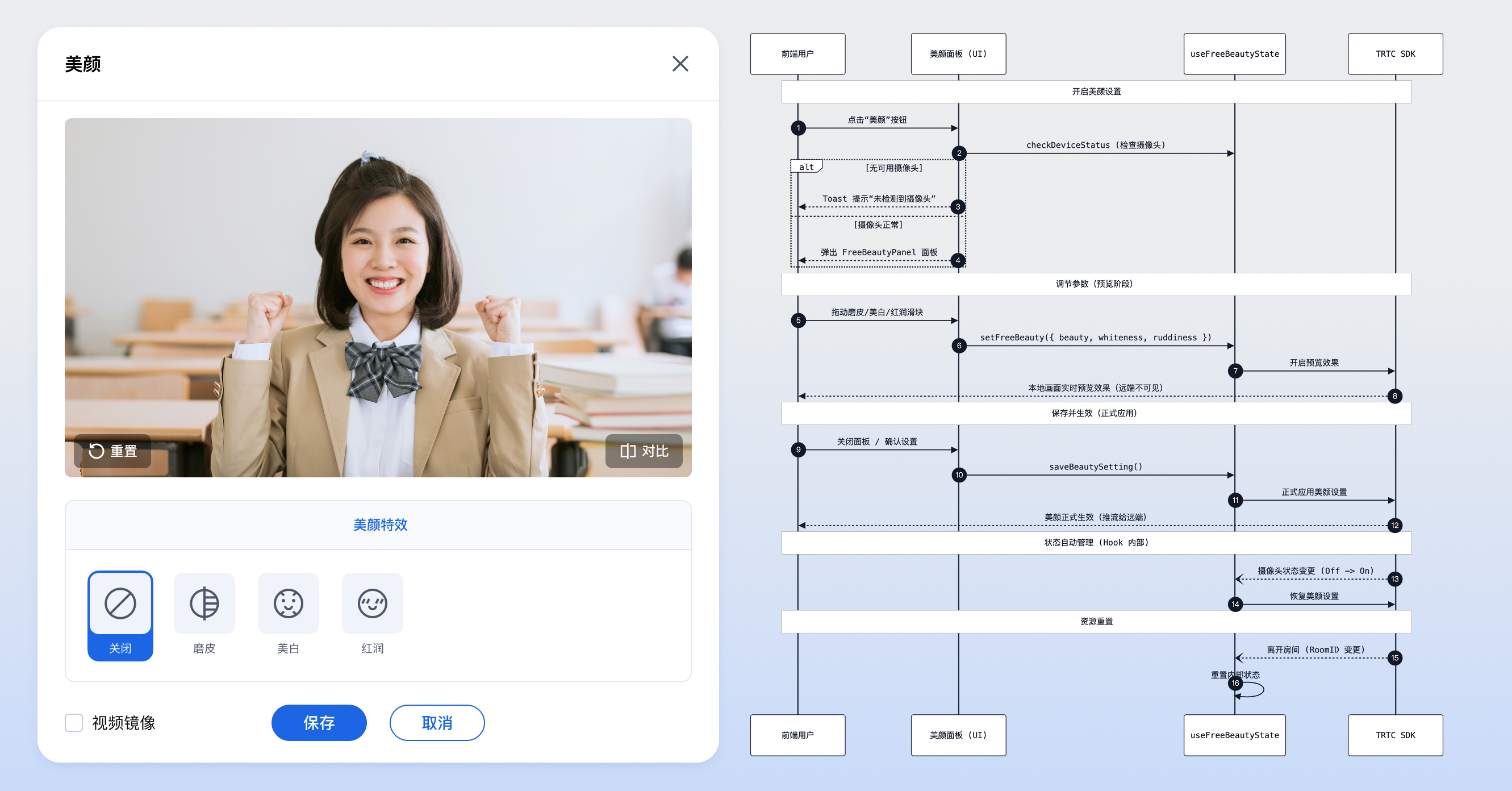
基础美颜功能允许用户在视频通话或直播中,对人像进行磨皮、美白和红润处理。
|
|
2
|
+
|
|
3
|
+
## 适用场景
|
|
4
|
+
- **视频会议:** 弱化皮肤瑕疵,提亮肤色,使参会者看起来更加专业和精神。
|
|
5
|
+
|
|
6
|
+
- **在线直播:** 主播通过美颜功能提升画面观感,吸引更多观众。
|
|
7
|
+
|
|
8
|
+
- **在线教育:** 教师和学生保持整洁自然的形象,营造良好的课堂氛围。
|
|
9
|
+
|
|
10
|
+
|
|
11
|
+
## 前提条件
|
|
12
|
+
- **用户状态:** 用户已经通过 useLoginState 完成登录鉴权,参考 [接入概览](https://write.woa.com/document/197379797539790848),处于 **已登录** 状态。
|
|
13
|
+
|
|
14
|
+
- **环境依赖:** 项目已引入 `tuikit-atomicx-vue3`。
|
|
15
|
+
|
|
16
|
+
- **设备要求:** 需要有可用的摄像头设备,并且用户已授权摄像头访问权限。如果用户拒绝授权,虚拟背景功能将无法使用。
|
|
17
|
+
|
|
18
|
+
|
|
19
|
+
## 实现基础美颜功能
|
|
20
|
+
|
|
21
|
+
本功能提供两种集成方案,您可以根据业务需求选择最适合的一种:
|
|
22
|
+
- **方案一(推荐):** 使用 UI 组件快速集成。直接引入 `tuikit-atomicx-vue3` 提供的美颜面板组件([FreeBeautyPanel](https://github.com/Tencent-RTC/TUIKit_Vue3/tree/main/packages/tuikit-atomicx-vue3/src/components/FreeBeautyPanel)),将其嵌入到您的应用弹窗中,开发成本最低。
|
|
23
|
+
|
|
24
|
+
- **方案二(高级):** 使用底层 API 自定义集成。基于 atomicx-core SDK API [useFreeBeautyState](https://web.sdk.qcloud.com/trtc/live/web/doc/zh/index.html#module-FreeBeautyState) 状态钩子自行实现 UI 和交互逻辑,灵活度最高。
|
|
25
|
+
|
|
26
|
+
|
|
27
|
+
|
|
28
|
+
|
|
29
|
+
## 方案一:使用 UI 组件快速集成
|
|
30
|
+
|
|
31
|
+
`tuikit-atomicx-vue3` 提供了核心美颜设置面板组件:
|
|
32
|
+
- [**FreeBeautyPanel**](https://github.com/Tencent-RTC/TUIKit_Vue3/tree/main/packages/tuikit-atomicx-vue3/src/components/FreeBeautyPanel)**:** 基础美颜配置面板,包含磨皮、美白、红润的参数调节功能。
|
|
33
|
+
|
|
34
|
+
|
|
35
|
+
### 步骤1:引入组件
|
|
36
|
+
``` typescript
|
|
37
|
+
import { FreeBeautyPanel } from 'tuikit-atomicx-vue3/room';
|
|
38
|
+
```
|
|
39
|
+
|
|
40
|
+
### 步骤2:使用组件
|
|
41
|
+
|
|
42
|
+
通常建议将 `FreeBeautyPanel` 放置在一个弹窗(Dialog)或模态框(Modal)中,通过按钮点击触发显示。
|
|
43
|
+
|
|
44
|
+
**以下示例展示了如何实现一个点击按钮弹出美颜设置的完整交互:**
|
|
45
|
+
|
|
46
|
+
> **注意:**
|
|
47
|
+
>
|
|
48
|
+
|
|
49
|
+
> 所有 TUIKit 组件必须包裹在 [UIKitProvider](https://write.woa.com/document/197379797539790848) 内部,否则将无法获取上下文依赖,导致样式异常。
|
|
50
|
+
>
|
|
51
|
+
|
|
52
|
+
``` typescript
|
|
53
|
+
<template>
|
|
54
|
+
<UIKitProvider theme="light" language="zh-CN">
|
|
55
|
+
<div class="toolbar-container">
|
|
56
|
+
<!-- 1. 触发按钮 -->
|
|
57
|
+
<button @click="openBeautySettings">设置美颜</button>
|
|
58
|
+
|
|
59
|
+
<!-- 2. 设置弹窗 -->
|
|
60
|
+
<div v-if="showSettings" class="modal-mask">
|
|
61
|
+
<div class="modal-content">
|
|
62
|
+
<div class="modal-header">
|
|
63
|
+
<span>基础美颜</span>
|
|
64
|
+
<button @click="showSettings = false">关闭</button>
|
|
65
|
+
</div>
|
|
66
|
+
|
|
67
|
+
<div class="modal-body">
|
|
68
|
+
<!-- 3. 引入面板组件 -->
|
|
69
|
+
<!-- @close 事件:当用户点击面板内的关闭按钮(如有)时触发 -->
|
|
70
|
+
<FreeBeautyPanel @close="showSettings = false" />
|
|
71
|
+
</div>
|
|
72
|
+
</div>
|
|
73
|
+
</div>
|
|
74
|
+
</div>
|
|
75
|
+
</UIKitProvider>
|
|
76
|
+
</template>
|
|
77
|
+
|
|
78
|
+
<script setup lang="ts">
|
|
79
|
+
import { ref } from 'vue';
|
|
80
|
+
import { UIKitProvider } from '@tencentcloud/uikit-base-component-vue3';
|
|
81
|
+
import { FreeBeautyPanel, useDeviceState } from 'tuikit-atomicx-vue3/room';
|
|
82
|
+
|
|
83
|
+
const showSettings = ref(false);
|
|
84
|
+
const { cameraList } = useDeviceState();
|
|
85
|
+
|
|
86
|
+
const openBeautySettings = () => {
|
|
87
|
+
// 1. 检查是否有可用摄像头
|
|
88
|
+
if (cameraList.value.length === 0) {
|
|
89
|
+
alert('未检测到摄像头,无法设置美颜');
|
|
90
|
+
return;
|
|
91
|
+
}
|
|
92
|
+
|
|
93
|
+
// 2. 打开设置面板
|
|
94
|
+
showSettings.value = true;
|
|
95
|
+
};
|
|
96
|
+
</script>
|
|
97
|
+
|
|
98
|
+
<style scoped>
|
|
99
|
+
.modal-mask {
|
|
100
|
+
position: fixed; top: 0; left: 0; width: 100%; height: 100%;
|
|
101
|
+
background: rgba(0,0,0,0.5); display: flex; justify-content: center; align-items: center; z-index: 1000;
|
|
102
|
+
}
|
|
103
|
+
.modal-content { background: white; width: 600px; border-radius: 8px; overflow: hidden; }
|
|
104
|
+
.modal-header { padding: 16px; display: flex; justify-content: space-between; border-bottom: 1px solid #eee; }
|
|
105
|
+
.modal-body { padding: 16px; }
|
|
106
|
+
</style>
|
|
107
|
+
```
|
|
108
|
+
|
|
109
|
+
该组件内部逻辑如下:
|
|
110
|
+
- **显示面板:** 用户点击按钮后弹出包含 `FreeBeautyPanel` 的弹窗。
|
|
111
|
+
|
|
112
|
+
- **调节参数:** 用户拖动面板内的滑块调节磨皮、美白、红润参数。
|
|
113
|
+
|
|
114
|
+
- **实时预览:** 调节过程中会实时调用预览接口预览美颜效果。
|
|
115
|
+
|
|
116
|
+
- **保存生效:** 关闭面板(触发 `@close` 事件)时自动保存当前设置,使其对远端生效。
|
|
117
|
+
|
|
118
|
+
|
|
119
|
+
## 方案二:使用底层 API 自定义集成
|
|
120
|
+
|
|
121
|
+
本节主要介绍如何通过 atomicx-core SDK API [useFreeBeautyState](https://web.sdk.qcloud.com/trtc/live/web/doc/zh/index.html#module-FreeBeautyState) 接口来实现基础美颜。
|
|
122
|
+
|
|
123
|
+
### 步骤1:设置预览
|
|
124
|
+
|
|
125
|
+
在用户调节美颜参数(例如拖动滑块)时,使用 [setFreeBeauty](https://web.sdk.qcloud.com/trtc/live/web/doc/zh/index.html#setFreeBeauty) 进行实时预览。此时效果仅本地可见,不会传输给远端用户。
|
|
126
|
+
|
|
127
|
+
> **注意:**
|
|
128
|
+
>
|
|
129
|
+
|
|
130
|
+
> 参数取值范围为 0-100。
|
|
131
|
+
>
|
|
132
|
+
|
|
133
|
+
``` typescript
|
|
134
|
+
import { useFreeBeautyState } from 'tuikit-atomicx-vue3/room';
|
|
135
|
+
|
|
136
|
+
const { setFreeBeauty, beautyConfig } = useFreeBeautyState();
|
|
137
|
+
|
|
138
|
+
// 示例:调节美颜参数
|
|
139
|
+
const updatePreview = async (beauty: number, white: number, ruddy: number) => {
|
|
140
|
+
// beautyConfig 中的值会自动更新,这里演示如何手动设置预览
|
|
141
|
+
await setFreeBeauty({
|
|
142
|
+
beautyLevel: beauty, // 磨皮 (0-100)
|
|
143
|
+
whitenessLevel: white, // 美白 (0-100)
|
|
144
|
+
ruddinessLevel: ruddy // 红润 (0-100)
|
|
145
|
+
});
|
|
146
|
+
};
|
|
147
|
+
```
|
|
148
|
+
|
|
149
|
+
### 步骤2:保存并生效
|
|
150
|
+
|
|
151
|
+
用户确认预览效果满意后,调用 [saveBeautySetting](https://web.sdk.qcloud.com/trtc/live/web/doc/zh/index.html#saveBeautySetting) 将当前配置应用到视频流中。此时远端用户可以看到美颜效果。
|
|
152
|
+
|
|
153
|
+
> **注意:**
|
|
154
|
+
>
|
|
155
|
+
|
|
156
|
+
> 虚拟背景功能依赖摄像头设备。可使用 [useDeviceState](https://web.sdk.qcloud.com/trtc/live/web/doc/zh/index.html#module-DeviceState) 检查设备状态。
|
|
157
|
+
>
|
|
158
|
+
> - [cameraList](https://web.sdk.qcloud.com/trtc/live/web/doc/zh/index.html#cameraList):当前可用的摄像头设备列表,如果列表为空,说明未检测到摄像头或摄像头权限被禁止。
|
|
159
|
+
|
|
160
|
+
``` typescript
|
|
161
|
+
import { useFreeBeautyState } from 'tuikit-atomicx-vue3/room';
|
|
162
|
+
|
|
163
|
+
const { saveBeautySetting } = useFreeBeautyState();
|
|
164
|
+
|
|
165
|
+
const applyBeauty = async () => {
|
|
166
|
+
// 保存当前预览的设置,使其对远端生效
|
|
167
|
+
await saveBeautySetting();
|
|
168
|
+
console.log('美颜已生效');
|
|
169
|
+
};
|
|
170
|
+
```
|
|
171
|
+
|
|
172
|
+
### 步骤3:关闭美颜效果
|
|
173
|
+
|
|
174
|
+
若需关闭美颜,只需将所有参数设置为 0 并保存。
|
|
175
|
+
``` typescript
|
|
176
|
+
const closeBeauty = async () => {
|
|
177
|
+
// 1. 将所有参数设为 0 并预览
|
|
178
|
+
await setFreeBeauty({
|
|
179
|
+
beautyLevel: 0,
|
|
180
|
+
whitenessLevel: 0,
|
|
181
|
+
ruddinessLevel: 0
|
|
182
|
+
});
|
|
183
|
+
|
|
184
|
+
// 2. 保存生效
|
|
185
|
+
await saveBeautySetting();
|
|
186
|
+
};
|
|
187
|
+
```
|
|
188
|
+
|
|
189
|
+
## 开发注意事项
|
|
190
|
+
- **参数范围:**`setFreeBeauty` 接收的参数(`beautyLevel`, `whitenessLevel`, `ruddinessLevel`)范围均为 0-100。
|
|
191
|
+
|
|
192
|
+
- **预览与生效:** 为了提供更好的用户体验,美颜调节分为**“预览”**和**“生效”**两个阶段。`setFreeBeauty` 仅用于本地预览,必须调用 `saveBeautySetting` 才会正式调用 `trtcCloud.setBeautyStyle` 应用到推流中。
|
|
193
|
+
|
|
194
|
+
- **设备依赖:** 美颜功能依赖于视频流,因此必须在摄像头开启的状态下才能看到效果。如果未检测到摄像头,建议禁用美颜入口。
|
|
195
|
+
|
|
196
|
+
- **性能消耗:** 开启美颜会增加一定的 CPU 和 GPU 负载,建议在低端设备上引导用户适度使用。
|
|
197
|
+
|
|
198
|
+
|
|
199
|
+
## 常见问题
|
|
200
|
+
|
|
201
|
+
### **为什么调节美颜后远端看不到效果?**
|
|
202
|
+
|
|
203
|
+
请确认是否调用了 `saveBeautySetting()`。`setFreeBeauty()` 仅用于本地预览,只有保存后才会应用到推流视频中。
|
|
204
|
+
|
|
205
|
+
### **没有摄像头时能设置美颜吗?**
|
|
206
|
+
|
|
207
|
+
不能。美颜功能是对视频流进行处理,如果没有采集到视频画面,美颜无法生效。建议在无摄像头时隐藏或禁用美颜入口。
|
|
208
|
+
|
|
209
|
+
### **离开房间或关闭摄像头后,需要手动重置美颜吗?**
|
|
210
|
+
|
|
211
|
+
不需要。`useFreeBeautyState` 内部已实现状态自动管理:
|
|
212
|
+
- 摄像头切换: 关闭摄像头时美颜暂停,重新开启后会自动恢复上次保存的设置。
|
|
213
|
+
|
|
214
|
+
- 进出房间: 退出房间时会自动重置所有美颜参数,无需开发者手动清理。
|
|
215
|
+
|
|
216
|
+
|
|
217
|
+
## **示例项目**
|
|
218
|
+
|
|
219
|
+
腾讯云在 GitHub 上提供了示例项目 [atomicx-vite-vue3-ts](https://github.com/Tencent-RTC/TUIRoomKit/tree/main/Web/example/atomicx-vite-vue3-ts) ,您可以参考以实现完整的 RoomKit 功能。
|
|
220
|
+
|
|
221
|
+
## API 文档
|
|
222
|
+
<table>
|
|
223
|
+
<tr>
|
|
224
|
+
<td rowspan="1" colSpan="1" >**State/Component**</td>
|
|
225
|
+
|
|
226
|
+
<td rowspan="1" colSpan="1" >**功能描述**</td>
|
|
227
|
+
|
|
228
|
+
<td rowspan="1" colSpan="1" >**API 文档**</td>
|
|
229
|
+
</tr>
|
|
230
|
+
|
|
231
|
+
<tr>
|
|
232
|
+
<td rowspan="1" colSpan="1" >**useFreeBeautyState**</td>
|
|
233
|
+
|
|
234
|
+
<td rowspan="1" colSpan="1" >免费美颜功能管理</td>
|
|
235
|
+
|
|
236
|
+
<td rowspan="1" colSpan="1" >[API 文档](https://web.sdk.qcloud.com/trtc/live/web/doc/zh/index.html#module-FreeBeautyState)</td>
|
|
237
|
+
</tr>
|
|
238
|
+
</table>
|
|
@@ -0,0 +1,427 @@
|
|
|
1
|
+
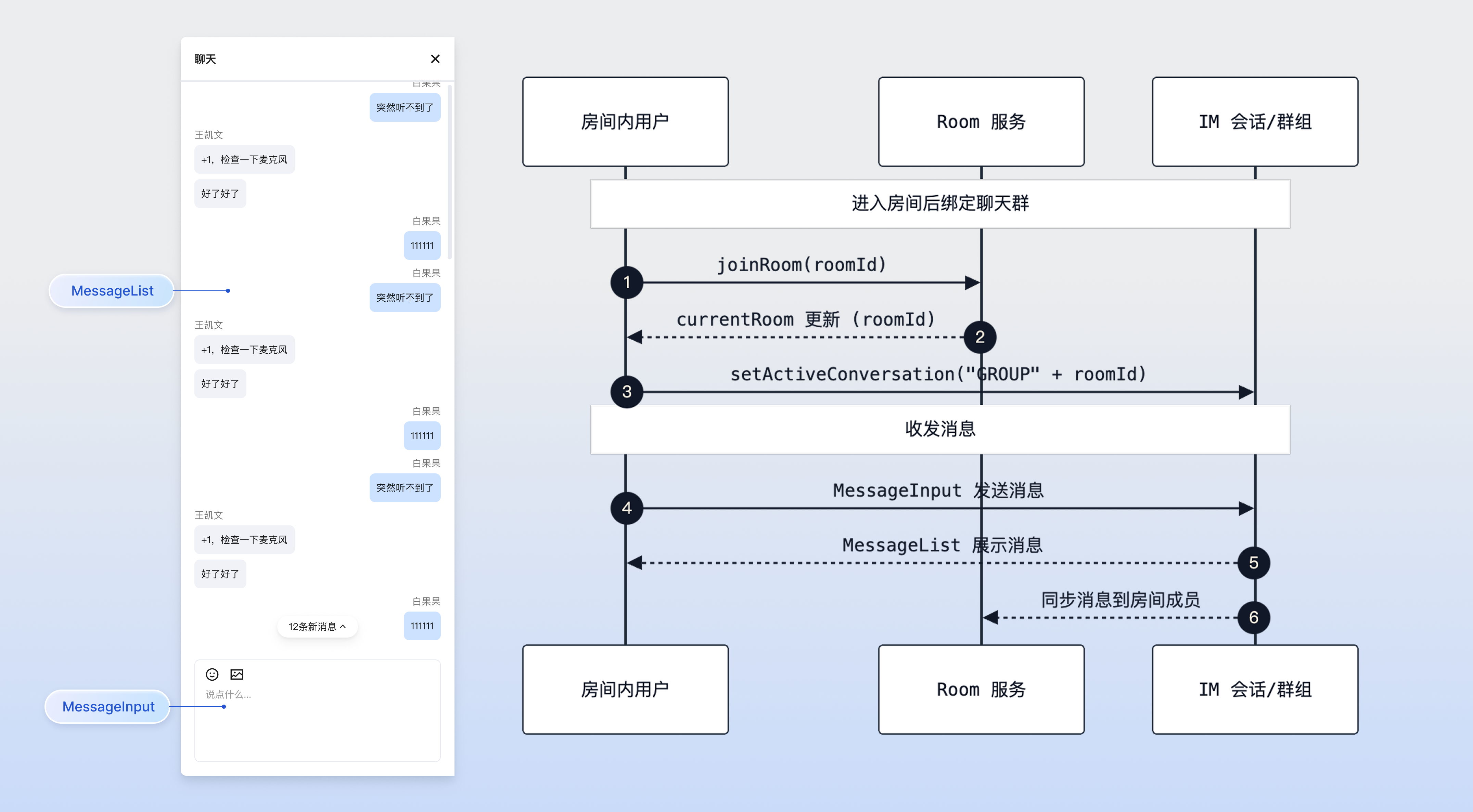
会中聊天功能允许会议内的成员通过文字、表情等形式进行实时互动。该功能基于 `tuikit-atomicx-vue3` 的 IM 组件能力实现,为用户提供便捷的即时通讯体验。
|
|
2
|
+
|
|
3
|
+
## 适用场景
|
|
4
|
+
- **在线研讨会:**主讲人进行视频演讲时,参会者可以通过文字提问或讨论。
|
|
5
|
+
|
|
6
|
+
- **远程协作:**团队成员在沟通时,可发送文字、图片、文件等。
|
|
7
|
+
|
|
8
|
+
- **直播教学:**学生可以在聊天区发送弹幕或问题,老师实时查看并解答,增强课堂互动性。
|
|
9
|
+
|
|
10
|
+
|
|
11
|
+
## 前提条件
|
|
12
|
+
|
|
13
|
+
在接入功能前,请确保满足以下条件:
|
|
14
|
+
- **用户状态:**用户已经通过 useLoginState 完成登录鉴权,参考 [接入概览](https://write.woa.com/document/197379797539790848),并已作为一个房间的房主或成员在房间内,参考 [房间管理](https://write.woa.com/document/197379861957083136)。
|
|
15
|
+
|
|
16
|
+
- **环境依赖:**项目已正确安装并引入 `tuikit-atomicx-vue3`。
|
|
17
|
+
|
|
18
|
+
|
|
19
|
+
## 实现会中聊天功能
|
|
20
|
+
|
|
21
|
+
本功能提供两种集成方案,您可以根据业务需求选择最适合的一种:
|
|
22
|
+
- **方案一(推荐):**使用 UI 组件快速集成。直接引入 `tuikit-atomicx-vue3` 提供的消息列表组件([MessageList](https://github.com/Tencent-RTC/TUIKit_Vue3/tree/main/packages/tuikit-atomicx-vue3/src/components/MessageList))和消息输入组件([MessageInput](https://github.com/Tencent-RTC/TUIKit_Vue3/tree/main/packages/tuikit-atomicx-vue3/src/components/MessageInput)),开发成本最低。
|
|
23
|
+
|
|
24
|
+
- **方案二(高级):**使用底层 API 自定义集成。基于 atomicx-core SDK API [useMessageListState](https://web.sdk.qcloud.com/trtc/live/web/doc/zh/index.html#module-MessageListState) 和 [useMessageInputState](https://web.sdk.qcloud.com/trtc/live/web/doc/zh/index.html#module-MessageInputState) 状态钩子自行实现 UI 和交互逻辑,灵活度最高。
|
|
25
|
+
|
|
26
|
+
|
|
27
|
+
|
|
28
|
+
会中聊天
|
|
29
|
+
|
|
30
|
+
|
|
31
|
+
## 方案一:使用 UI 组件快速集成
|
|
32
|
+
|
|
33
|
+
`tuikit-atomicx-vue3` 提供了两个核心组件:
|
|
34
|
+
- [**MessageList**](https://github.com/Tencent-RTC/TUIKit_Vue3/tree/main/packages/tuikit-atomicx-vue3/src/components/MessageList)**:** 消息列表组件,展示聊天记录,支持消息的复制、撤回、删除等操作。
|
|
35
|
+
|
|
36
|
+
- [**MessageInput**](https://github.com/Tencent-RTC/TUIKit_Vue3/tree/main/packages/tuikit-atomicx-vue3/src/components/MessageInput)**:** 消息输入组件,支持文本、表情、图片、文件发送,并可根据禁言状态自动禁用。
|
|
37
|
+
|
|
38
|
+
|
|
39
|
+
### 步骤1:数据初始化
|
|
40
|
+
|
|
41
|
+
在用户加入房间成功后,需要调用 [setActiveConversation](https://web.sdk.qcloud.com/trtc/live/web/doc/zh/index.html#setActiveConversation) 接口初始化聊天数据。建议监听 [currentRoom](https://web.sdk.qcloud.com/trtc/live/web/doc/zh/index.html#currentRoom) 的变化来自动处理。
|
|
42
|
+
|
|
43
|
+
> **说明:**
|
|
44
|
+
>
|
|
45
|
+
> - `GROUP` 为固定前缀,`setActiveConversation` 参数必须为 ``GROUP${roomId}``,否则无法正常收发消息。
|
|
46
|
+
> - `GROUP` 为 IM SDK 群组会话的固定前缀(参考 [IM 会话类型](https://web.sdk.qcloud.com/im/doc/zh-cn/Conversation.html))。房间聊天基于 IM 群组实现,因此会话 ID 必须为 ``GROUP${roomId}`` 格式。
|
|
47
|
+
|
|
48
|
+
``` typescript
|
|
49
|
+
import { watch } from 'vue';
|
|
50
|
+
import { useConversationListState } from 'tuikit-atomicx-vue3/chat';
|
|
51
|
+
import { useRoomState } from 'tuikit-atomicx-vue3/room';
|
|
52
|
+
|
|
53
|
+
const { currentRoom } = useRoomState();
|
|
54
|
+
const { setActiveConversation } = useConversationListState();
|
|
55
|
+
|
|
56
|
+
// 监听房间 ID 变化,自动切换到对应的 IM 群组会话
|
|
57
|
+
watch(() => currentRoom.value?.roomId, (roomId) => {
|
|
58
|
+
if (roomId) {
|
|
59
|
+
// 关键步骤:设置当前活跃会话 ID,规则为 "GROUP" + 房间ID
|
|
60
|
+
setActiveConversation(`GROUP${roomId}`);
|
|
61
|
+
}
|
|
62
|
+
}, { immediate: true });
|
|
63
|
+
```
|
|
64
|
+
|
|
65
|
+
### 步骤2: 使用组件
|
|
66
|
+
|
|
67
|
+
在您的页面中,可以直接组合使用这两个组件。同时结合 [useRoomParticipantState](https://web.sdk.qcloud.com/trtc/live/web/doc/zh/index.html#module-RoomParticipantState) 获取当前用户的禁言状态,控制输入框的可用性。
|
|
68
|
+
|
|
69
|
+
> **注意:**
|
|
70
|
+
>
|
|
71
|
+
|
|
72
|
+
> 所有 TUIKit 组件必须包裹在 [UIKitProvider](https://write.woa.com/document/197379797539790848) 内部,否则将无法获取上下文依赖,导致样式异常。
|
|
73
|
+
>
|
|
74
|
+
|
|
75
|
+
``` typescript
|
|
76
|
+
<template>
|
|
77
|
+
<UIKitProvider theme="light" language="zh-CN">
|
|
78
|
+
<div class="room-chat-container">
|
|
79
|
+
<!-- 消息列表组件 -->
|
|
80
|
+
<!-- messageActionList: 配置长按消息支持的操作,例如复制、撤回、删除 -->
|
|
81
|
+
<MessageList
|
|
82
|
+
class="message-list"
|
|
83
|
+
:messageActionList="['copy', 'recall', 'delete']"
|
|
84
|
+
/>
|
|
85
|
+
|
|
86
|
+
<!-- 消息输入组件 -->
|
|
87
|
+
<!-- disabled: 当用户被禁言时禁用输入框 -->
|
|
88
|
+
<!-- hideSendButton: 可选,隐藏发送按钮,使用回车发送 -->
|
|
89
|
+
<MessageInput
|
|
90
|
+
class="message-input"
|
|
91
|
+
:placeholder="inputPlaceholder"
|
|
92
|
+
:disabled="isMessageDisabled"
|
|
93
|
+
hideSendButton
|
|
94
|
+
/>
|
|
95
|
+
</div>
|
|
96
|
+
</UIKitProvider>
|
|
97
|
+
</template>
|
|
98
|
+
|
|
99
|
+
<script setup lang="ts">
|
|
100
|
+
import { computed } from 'vue';
|
|
101
|
+
import { UIKitProvider } from '@tencentcloud/uikit-base-component-vue3';
|
|
102
|
+
import { MessageInput, MessageList } from 'tuikit-atomicx-vue3/chat';
|
|
103
|
+
import { useRoomParticipantState } from 'tuikit-atomicx-vue3/room';
|
|
104
|
+
|
|
105
|
+
const { localParticipant } = useRoomParticipantState();
|
|
106
|
+
|
|
107
|
+
// 获取当前用户的禁言状态,isMessageDisabled 由房间后台实时同步,无需前端主动轮询,前端只需绑定该状态即可自动响应禁言变更。
|
|
108
|
+
const isMessageDisabled = computed(() => localParticipant.value?.isMessageDisabled);
|
|
109
|
+
|
|
110
|
+
// 根据状态动态显示占位符提示
|
|
111
|
+
const inputPlaceholder = computed(() =>
|
|
112
|
+
isMessageDisabled.value ? '您已被禁言' : '请输入消息...'
|
|
113
|
+
);
|
|
114
|
+
</script>
|
|
115
|
+
|
|
116
|
+
<style scoped>
|
|
117
|
+
.room-chat-container{display:flex;flex-direction:column;height:100%;padding:8px;gap:8px}.message-list{flex:1;overflow:hidden}.message-input{flex-shrink:0;border:1px solid #e0e0e0;border-radius:8px}
|
|
118
|
+
</style>
|
|
119
|
+
```
|
|
120
|
+
|
|
121
|
+
### 步骤3:处理未读消息计数(可选)
|
|
122
|
+
|
|
123
|
+
如果聊天窗口平时是折叠或关闭状态,您需要通过监听 [messageList](https://web.sdk.qcloud.com/trtc/live/web/doc/zh/index.html#messageList) 的变化来统计未读消息数,并在 UI 上(如聊天图标角标)进行提示。
|
|
124
|
+
``` typescript
|
|
125
|
+
import { ref, watch } from 'vue';
|
|
126
|
+
import { useMessageListState } from 'tuikit-atomicx-vue3/chat';
|
|
127
|
+
|
|
128
|
+
const { messageList } = useMessageListState();
|
|
129
|
+
const unreadCount = ref(0);
|
|
130
|
+
const isChatWindowOpen = ref(false); // 需根据您的业务逻辑维护此状态
|
|
131
|
+
|
|
132
|
+
watch(() => messageList.value?.length, (newLength, oldLength) => {
|
|
133
|
+
// 如果是首次加载或数据为空,不进行计数
|
|
134
|
+
if (!newLength || newLength === 0) return;
|
|
135
|
+
|
|
136
|
+
// 仅当聊天窗口关闭且收到新消息时,增加未读计数
|
|
137
|
+
if (!isChatWindowOpen.value && newLength > (oldLength || 0)) {
|
|
138
|
+
unreadCount.value += (newLength - (oldLength || 0));
|
|
139
|
+
}
|
|
140
|
+
});
|
|
141
|
+
|
|
142
|
+
// 当用户打开聊天窗口时,清空未读计数
|
|
143
|
+
const openChatWindow = () => {
|
|
144
|
+
isChatWindowOpen.value = true;
|
|
145
|
+
unreadCount.value = 0;
|
|
146
|
+
};
|
|
147
|
+
```
|
|
148
|
+
|
|
149
|
+
## 方案二:使用底层 API 自定义集成
|
|
150
|
+
|
|
151
|
+
本节主要介绍如何通过 atomicx-core SDK API [useMessageListState](https://web.sdk.qcloud.com/trtc/live/web/doc/zh/index.html#module-MessageListState) 和 [useMessageInputState](https://web.sdk.qcloud.com/trtc/live/web/doc/zh/index.html#module-MessageInputState) 接口来实现自定义的聊天界面。
|
|
152
|
+
|
|
153
|
+
> **注意:**
|
|
154
|
+
>
|
|
155
|
+
|
|
156
|
+
> `MessageInputState` 默认支持与 `@tiptap/vue-3` 编辑器集成。如果您仅需要简单的文本输入框(例如 `<input>` 或 `<textarea>`),请**忽略**`setEditorInstance`、`setContent` 等与编辑器实例绑定的 API,直接使用 `updateRawValue` 和 `sendMessage` 即可。
|
|
157
|
+
>
|
|
158
|
+
|
|
159
|
+
|
|
160
|
+
#### 步骤1:数据初始化
|
|
161
|
+
|
|
162
|
+
在用户加入房间成功后,需要调用 [setActiveConversation](https://web.sdk.qcloud.com/trtc/live/web/doc/zh/index.html#setActiveConversation) 接口初始化聊天数据。建议监听 [currentRoom](https://web.sdk.qcloud.com/trtc/live/web/doc/zh/index.html#currentRoom) 的变化来自动处理。
|
|
163
|
+
|
|
164
|
+
> **说明:**
|
|
165
|
+
>
|
|
166
|
+
> - `GROUP` 为固定前缀,`setActiveConversation` 参数必须为 ``GROUP${roomId}``,否则无法正常收发消息。
|
|
167
|
+
> - 在房间切换或退房时,建议重置或清空活跃会话,避免消息错发至错误会话。
|
|
168
|
+
|
|
169
|
+
``` typescript
|
|
170
|
+
import { watch } from 'vue';
|
|
171
|
+
import { useConversationListState } from 'tuikit-atomicx-vue3/chat';
|
|
172
|
+
import { useRoomState } from 'tuikit-atomicx-vue3/room';
|
|
173
|
+
|
|
174
|
+
const { currentRoom } = useRoomState();
|
|
175
|
+
const { setActiveConversation } = useConversationListState();
|
|
176
|
+
|
|
177
|
+
// 监听房间 ID 变化,自动切换到对应的 IM 群组会话
|
|
178
|
+
watch(() => currentRoom.value?.roomId, (roomId) => {
|
|
179
|
+
if (roomId) {
|
|
180
|
+
// 关键步骤:设置当前活跃会话 ID,规则为 "GROUP" + 房间ID
|
|
181
|
+
setActiveConversation(`GROUP${roomId}`);
|
|
182
|
+
}
|
|
183
|
+
}, { immediate: true });
|
|
184
|
+
```
|
|
185
|
+
|
|
186
|
+
#### 步骤2:获取消息列表
|
|
187
|
+
|
|
188
|
+
使用 [useMessageListState](https://web.sdk.qcloud.com/trtc/live/web/doc/zh/index.html#module-MessageListState) 获取当前会话的消息列表。`messageList` 是响应式数据,会自动更新新收到的消息。
|
|
189
|
+
``` typescript
|
|
190
|
+
import { useMessageListState } from 'tuikit-atomicx-vue3/chat';
|
|
191
|
+
|
|
192
|
+
const {
|
|
193
|
+
messageList, // 响应式消息列表
|
|
194
|
+
loadMoreOlderMessage, // 加载更多历史消息方法
|
|
195
|
+
hasMoreOlderMessage, // 是否还有更多历史消息
|
|
196
|
+
} = useMessageListState();
|
|
197
|
+
|
|
198
|
+
// 示例:渲染消息列表
|
|
199
|
+
// <div v-for="msg in messageList" :key="msg.ID">
|
|
200
|
+
// {{ msg.payload.text }}
|
|
201
|
+
// </div>
|
|
202
|
+
```
|
|
203
|
+
|
|
204
|
+
#### 步骤3:发送消息
|
|
205
|
+
|
|
206
|
+
使用 [useMessageInputState](https://web.sdk.qcloud.com/trtc/live/web/doc/zh/index.html#module-MessageInputState) 管理输入框内容并发送消息。
|
|
207
|
+
``` typescript
|
|
208
|
+
import { useMessageInputState } from 'tuikit-atomicx-vue3/chat';
|
|
209
|
+
|
|
210
|
+
const {
|
|
211
|
+
inputRawValue, // 响应式数据:当前输入内容
|
|
212
|
+
updateRawValue, // 方法:更新输入内容(会自动触发"对方正在输入"状态)
|
|
213
|
+
sendMessage // 方法:发送消息
|
|
214
|
+
} = useMessageInputState();
|
|
215
|
+
|
|
216
|
+
const handleSend = async () => {
|
|
217
|
+
// 校验非空
|
|
218
|
+
if (!inputRawValue.value) return;
|
|
219
|
+
|
|
220
|
+
try {
|
|
221
|
+
// 1. 发送消息
|
|
222
|
+
// 方式 A:发送当前 inputRawValue 的内容
|
|
223
|
+
await sendMessage();
|
|
224
|
+
|
|
225
|
+
// 方式 B:直接发送指定文本(不依赖 inputRawValue)
|
|
226
|
+
// await sendMessage('Hello World');
|
|
227
|
+
|
|
228
|
+
console.log('发送成功');
|
|
229
|
+
|
|
230
|
+
// 2. 发送成功后清空输入框
|
|
231
|
+
// 关键点:非富文本模式下,务必使用 updateRawValue('') 清空
|
|
232
|
+
// 请勿使用 setContent(''),该方法仅在绑定了 editor 实例后生效
|
|
233
|
+
updateRawValue('');
|
|
234
|
+
} catch (error) {
|
|
235
|
+
console.error('发送失败', error);
|
|
236
|
+
}
|
|
237
|
+
};
|
|
238
|
+
|
|
239
|
+
// 示例:绑定原生输入框
|
|
240
|
+
// <input
|
|
241
|
+
// :value="inputRawValue"
|
|
242
|
+
// @input="(e) => updateRawValue(e.target.value)"
|
|
243
|
+
// @keyup.enter="handleSend"
|
|
244
|
+
// />
|
|
245
|
+
```
|
|
246
|
+
|
|
247
|
+
#### 步骤4:加载历史消息
|
|
248
|
+
|
|
249
|
+
通过 [loadMoreOlderMessage](https://web.sdk.qcloud.com/trtc/live/web/doc/zh/index.html#module-MessageListState) 方法分页拉取历史消息。通常在滚动到列表顶部时触发。
|
|
250
|
+
|
|
251
|
+
> **注意:**
|
|
252
|
+
>
|
|
253
|
+
|
|
254
|
+
> 在加载历史消息后,通常需要手动调整滚动条位置,以保持当前浏览视角不发生跳变。
|
|
255
|
+
>
|
|
256
|
+
|
|
257
|
+
``` typescript
|
|
258
|
+
import { useMessageListState } from 'tuikit-atomicx-vue3/chat';
|
|
259
|
+
|
|
260
|
+
const {
|
|
261
|
+
hasMoreOlderMessage,
|
|
262
|
+
loadMoreOlderMessage
|
|
263
|
+
} = useMessageListState();
|
|
264
|
+
|
|
265
|
+
const loadHistory = async () => {
|
|
266
|
+
if (hasMoreOlderMessage.value) {
|
|
267
|
+
// 记录加载前的滚动高度
|
|
268
|
+
// const previousHeight = scrollContainer.value.scrollHeight;
|
|
269
|
+
|
|
270
|
+
await loadMoreOlderMessage();
|
|
271
|
+
|
|
272
|
+
// DOM 更新后恢复滚动位置
|
|
273
|
+
// nextTick(() => {
|
|
274
|
+
// const currentHeight = scrollContainer.value.scrollHeight;
|
|
275
|
+
// scrollContainer.value.scrollTop += (currentHeight - previousHeight);
|
|
276
|
+
// });
|
|
277
|
+
}
|
|
278
|
+
};
|
|
279
|
+
```
|
|
280
|
+
|
|
281
|
+
#### 步骤5:高级功能(已读回执)
|
|
282
|
+
|
|
283
|
+
如果您需要已读回执功能,可以使用 [setEnableReadReceipt](https://web.sdk.qcloud.com/trtc/live/web/doc/zh/index.html#setEnableReadReceipt)。
|
|
284
|
+
``` typescript
|
|
285
|
+
const {
|
|
286
|
+
setEnableReadReceipt, // 开启/关闭已读回执
|
|
287
|
+
} = useMessageListState();
|
|
288
|
+
|
|
289
|
+
// 开启已读回执
|
|
290
|
+
setEnableReadReceipt(true);
|
|
291
|
+
```
|
|
292
|
+
|
|
293
|
+
## 开发注意事项
|
|
294
|
+
- **禁言状态同步**
|
|
295
|
+
|
|
296
|
+
|
|
297
|
+
`localParticipant.isMessageDisabled` 是由房间管理员控制的。当管理员开启“全员禁言”或单独禁言某用户时,该属性会自动更新。请务必将此属性绑定到输入框的 `disabled` 状态上,以在前端层面限制用户发言。
|
|
298
|
+
|
|
299
|
+
- **会话切换时机**
|
|
300
|
+
|
|
301
|
+
|
|
302
|
+
确保 `setActiveConversation` 在进房成功后且 `roomId` 有值时调用。如果在进房前调用,可能会因为 SDK 尚未初始化完毕或未登录而失败。
|
|
303
|
+
|
|
304
|
+
- **容器布局要求(重要)**
|
|
305
|
+
|
|
306
|
+
|
|
307
|
+
消息列表组件内部处理了滚动逻辑,因此**父容器必须有固定的高度**(例如 `height: 100%` 或具体像素值)并设置 `overflow: hidden`,否则会导致列表无限拉长、无法滚动。
|
|
308
|
+
|
|
309
|
+
- **消息类型处理**
|
|
310
|
+
|
|
311
|
+
|
|
312
|
+
`messageList` 中包含多种类型的消息(文本、图片、文件等),自定义渲染时需根据 `msg.type` 进行区分处理。
|
|
313
|
+
|
|
314
|
+
- **输入状态管理**
|
|
315
|
+
|
|
316
|
+
|
|
317
|
+
使用 `updateRawValue` 更新输入内容会自动触发 "对方正在输入" 的状态通知(如果支持)。如果仅使用 `inputRawValue.value = 'xxx'` 可能不会触发该状态。
|
|
318
|
+
|
|
319
|
+
- **历史消息滚动维持**
|
|
320
|
+
|
|
321
|
+
|
|
322
|
+
在自定义开发中,调用 `loadMoreOlderMessage` 加载历史消息后,DOM 高度会增加。为了防止视图跳动,需要在加载前记录 `scrollHeight`,加载后(`nextTick`)计算高度差并调整 `scrollTop`。
|
|
323
|
+
|
|
324
|
+
- **新消息滚动策略**
|
|
325
|
+
|
|
326
|
+
|
|
327
|
+
建议实现“智能滚动”逻辑:当用户位于列表底部时,收到新消息自动滚动到底部;当用户正在浏览历史消息时,保持当前位置不动,并显示“有新消息”的提示气泡。
|
|
328
|
+
|
|
329
|
+
- **会话 ID 格式要求**
|
|
330
|
+
|
|
331
|
+
|
|
332
|
+
调用 `setActiveConversation` 时,必须使用 ``GROUP${roomId}`` 格式(GROUP 为固定前缀)。这是 IM SDK 群组会话的标准格式,不可自定义或省略前缀,否则无法正常收发消息。
|
|
333
|
+
|
|
334
|
+
|
|
335
|
+
## 常见问题
|
|
336
|
+
|
|
337
|
+
**切到群组会话失败或消息列表无内容?**
|
|
338
|
+
|
|
339
|
+
确保已登录并进房成功后再调用 `setActiveConversation('GROUP' + roomId)`;未登录或 roomId 为空会导致失败。
|
|
340
|
+
|
|
341
|
+
**消息收不到或列表空白?**
|
|
342
|
+
|
|
343
|
+
检查当前活跃会话是否正确(`GROUP` 前缀 + roomId),以及网络/鉴权是否正常;必要时重新设置活跃会话 `setActiveConversation` 刷新。
|
|
344
|
+
|
|
345
|
+
**未读计数不清零?**
|
|
346
|
+
|
|
347
|
+
需要手动维护未读计数逻辑。打开聊天窗口时,或收到新消息但窗口关闭时进行计数更新。
|
|
348
|
+
|
|
349
|
+
**被禁言仍能点击发送?**
|
|
350
|
+
|
|
351
|
+
请确保前端 UI 根据 `isMessageDisabled` 状态禁用了发送按钮和输入框。虽然服务端也会拦截,但前端禁用体验更好。
|
|
352
|
+
|
|
353
|
+
**自定义头像/昵称展示?**
|
|
354
|
+
|
|
355
|
+
可通过 `MessageList` 插槽或自定义 Message 组件,优先显示房间内的 `nameCard`,并自定义头像样式等。
|
|
356
|
+
|
|
357
|
+
**自定义方案如何发送图片或文件?**
|
|
358
|
+
|
|
359
|
+
`sendMessage` 方法支持传入 `InputContent[]` 数组。您可以构造包含 `type: 'image'` 或 `type: 'file'` 以及对应 `file` 对象的数组来实现富媒体消息发送。
|
|
360
|
+
``` typescript
|
|
361
|
+
import { useMessageInputState } from 'tuikit-atomicx-vue3/chat';
|
|
362
|
+
|
|
363
|
+
const { sendMessage } = useMessageInputState();
|
|
364
|
+
|
|
365
|
+
// 示例:发送图片
|
|
366
|
+
// const file = ...; // 从 input type="file" 获取的 File 对象
|
|
367
|
+
await sendMessage([{ type: 'image', file }]);
|
|
368
|
+
```
|
|
369
|
+
|
|
370
|
+
**如何修改 UI 组件的默认样式?**
|
|
371
|
+
|
|
372
|
+
`tuikit-atomicx-vue3` 的组件类名通常保持稳定。您可以使用 CSS 深度选择器(例如 Vue 的 `:deep()`)来覆盖默认样式。例如 `.message-list :deep(.tui-message-bubble) { background-color: #f0f0f0; }`。
|
|
373
|
+
|
|
374
|
+
## **示例项目**
|
|
375
|
+
|
|
376
|
+
腾讯云在 GitHub 上提供了示例项目 [atomicx-vite-vue3-ts](https://github.com/Tencent-RTC/TUIRoomKit/tree/main/Web/example/atomicx-vite-vue3-ts) ,您可以参考以实现完整的 RoomKit 功能。
|
|
377
|
+
|
|
378
|
+
## API 文档
|
|
379
|
+
<table>
|
|
380
|
+
<tr>
|
|
381
|
+
<td rowspan="1" colSpan="1" >**State/Component**</td>
|
|
382
|
+
|
|
383
|
+
<td rowspan="1" colSpan="1" >**功能描述**</td>
|
|
384
|
+
|
|
385
|
+
<td rowspan="1" colSpan="1" >**API 文档**</td>
|
|
386
|
+
</tr>
|
|
387
|
+
|
|
388
|
+
<tr>
|
|
389
|
+
<td rowspan="1" colSpan="1" >**useRoomState**</td>
|
|
390
|
+
|
|
391
|
+
<td rowspan="1" colSpan="1" >房间状态管理(创建、加入、预约等)</td>
|
|
392
|
+
|
|
393
|
+
<td rowspan="1" colSpan="1" >[API 文档](https://web.sdk.qcloud.com/trtc/live/web/doc/zh/index.html#module-RoomState)</td>
|
|
394
|
+
</tr>
|
|
395
|
+
|
|
396
|
+
<tr>
|
|
397
|
+
<td rowspan="1" colSpan="1" >**useRoomParticipantState**</td>
|
|
398
|
+
|
|
399
|
+
<td rowspan="1" colSpan="1" >房间参与者管理(成员列表、权限控制)</td>
|
|
400
|
+
|
|
401
|
+
<td rowspan="1" colSpan="1" >[API 文档](https://web.sdk.qcloud.com/trtc/live/web/doc/zh/index.html#module-RoomParticipantState)</td>
|
|
402
|
+
</tr>
|
|
403
|
+
|
|
404
|
+
<tr>
|
|
405
|
+
<td rowspan="1" colSpan="1" >**useConversationListState**</td>
|
|
406
|
+
|
|
407
|
+
<td rowspan="1" colSpan="1" >会话列表管理</td>
|
|
408
|
+
|
|
409
|
+
<td rowspan="1" colSpan="1" >[API 文档](https://web.sdk.qcloud.com/trtc/live/web/doc/zh/index.html#module-ConversationListState)</td>
|
|
410
|
+
</tr>
|
|
411
|
+
|
|
412
|
+
<tr>
|
|
413
|
+
<td rowspan="1" colSpan="1" >**useMessageListState**</td>
|
|
414
|
+
|
|
415
|
+
<td rowspan="1" colSpan="1" >消息列表管理</td>
|
|
416
|
+
|
|
417
|
+
<td rowspan="1" colSpan="1" >[API 文档](https://web.sdk.qcloud.com/trtc/live/web/doc/zh/index.html#module-MessageListState)</td>
|
|
418
|
+
</tr>
|
|
419
|
+
|
|
420
|
+
<tr>
|
|
421
|
+
<td rowspan="1" colSpan="1" >**useMessageInputState**</td>
|
|
422
|
+
|
|
423
|
+
<td rowspan="1" colSpan="1" >消息输入管理</td>
|
|
424
|
+
|
|
425
|
+
<td rowspan="1" colSpan="1" >[API 文档](https://web.sdk.qcloud.com/trtc/live/web/doc/zh/index.html#module-MessageInputState)</td>
|
|
426
|
+
</tr>
|
|
427
|
+
</table>
|