@tencentcloud/sdk-mcp 1.0.2 → 1.0.4
This diff represents the content of publicly available package versions that have been released to one of the supported registries. The information contained in this diff is provided for informational purposes only and reflects changes between package versions as they appear in their respective public registries.
- package/@tencent/aegis-node-sdk/lib/packages/core/src/constant/config.d.ts +14 -14
- package/@tencent/aegis-node-sdk/lib/packages/core/src/constant/global.d.ts +1 -1
- package/@tencent/aegis-node-sdk/lib/packages/core/src/constant/index.d.ts +9 -9
- package/@tencent/aegis-node-sdk/lib/packages/core/src/constant/report-ignore.d.ts +2 -2
- package/@tencent/aegis-node-sdk/lib/packages/core/src/core.d.ts +85 -85
- package/@tencent/aegis-node-sdk/lib/packages/core/src/hooks/afterRequestHooks.d.ts +3 -3
- package/@tencent/aegis-node-sdk/lib/packages/core/src/hooks/beforeRequestHooks.d.ts +9 -9
- package/@tencent/aegis-node-sdk/lib/packages/core/src/hooks/modifyRequestHooks.d.ts +3 -3
- package/@tencent/aegis-node-sdk/lib/packages/core/src/index.d.ts +9 -9
- package/@tencent/aegis-node-sdk/lib/packages/core/src/interface/config.d.ts +62 -62
- package/@tencent/aegis-node-sdk/lib/packages/core/src/interface/env.d.ts +11 -11
- package/@tencent/aegis-node-sdk/lib/packages/core/src/interface/index.d.ts +4 -4
- package/@tencent/aegis-node-sdk/lib/packages/core/src/interface/log.d.ts +130 -130
- package/@tencent/aegis-node-sdk/lib/packages/core/src/interface/send.d.ts +34 -34
- package/@tencent/aegis-node-sdk/lib/packages/core/src/pipes/format.d.ts +2 -2
- package/@tencent/aegis-node-sdk/lib/packages/core/src/pipes/index.d.ts +18 -18
- package/@tencent/aegis-node-sdk/lib/packages/core/src/pipes/length-limit.d.ts +8 -8
- package/@tencent/aegis-node-sdk/lib/packages/core/src/pipes/pv.d.ts +8 -8
- package/@tencent/aegis-node-sdk/lib/packages/core/src/pipes/remove-payload.d.ts +2 -2
- package/@tencent/aegis-node-sdk/lib/packages/core/src/pipes/repeat-limit.d.ts +4 -4
- package/@tencent/aegis-node-sdk/lib/packages/core/src/pipes/report.d.ts +10 -10
- package/@tencent/aegis-node-sdk/lib/packages/core/src/pipes/sample.d.ts +3 -3
- package/@tencent/aegis-node-sdk/lib/packages/core/src/pipes/throttle.d.ts +3 -3
- package/@tencent/aegis-node-sdk/lib/packages/core/src/pipes/trace/index.d.ts +34 -34
- package/@tencent/aegis-node-sdk/lib/packages/core/src/pipes/trace/jwt.d.ts +12 -12
- package/@tencent/aegis-node-sdk/lib/packages/core/src/pipes/trace/ot-js.d.ts +14 -14
- package/@tencent/aegis-node-sdk/lib/packages/core/src/pipes/trace/uuid.d.ts +2 -2
- package/@tencent/aegis-node-sdk/lib/packages/core/src/pipes/whitelist.d.ts +12 -12
- package/@tencent/aegis-node-sdk/lib/packages/core/src/pipes/write-before.d.ts +3 -3
- package/@tencent/aegis-node-sdk/lib/packages/core/src/plugin.d.ts +33 -33
- package/@tencent/aegis-node-sdk/lib/packages/core/src/util/destroy.d.ts +2 -2
- package/@tencent/aegis-node-sdk/lib/packages/core/src/util/event-emitter.d.ts +18 -18
- package/@tencent/aegis-node-sdk/lib/packages/core/src/util/index.d.ts +60 -60
- package/@tencent/aegis-node-sdk/lib/packages/node-sdk/src/index.d.ts +15 -15
- package/@tencent/aegis-node-sdk/lib/packages/node-sdk/src/interface/selector.d.ts +5 -5
- package/@tencent/aegis-node-sdk/lib/packages/node-sdk/src/pipes/batch-report-pipe.d.ts +6 -6
- package/@tencent/aegis-node-sdk/lib/packages/node-sdk/src/protocol/protocol_base.d.ts +18 -18
- package/@tencent/aegis-node-sdk/lib/packages/node-sdk/src/protocol/protocol_http.d.ts +12 -12
- package/@tencent/aegis-node-sdk/lib/packages/node-sdk/src/selector/ip_selector.d.ts +10 -10
- package/@tencent/aegis-node-sdk/lib/packages/node-sdk/src/selector/polaris_selector.d.ts +20 -20
- package/@tencent/aegis-node-sdk/lib/packages/node-sdk/src/selector/selector_base.d.ts +27 -27
- package/@tencent/aegis-node-sdk/lib/packages/node-sdk/src/util/eval_require.d.ts +2 -2
- package/mcp-server-prompt.png +0 -0
- package/mcp.json +9 -9
- package/package.json +1 -1
- package/resource/doc/chatuikit/android/client_api_android.md +1377 -0
- package/resource/doc/chatuikit/android/integrate_tuichat_only_android.md +382 -0
- package/resource/doc/chatuikit/android/integrate_tuikit_android.md +612 -0
- package/resource/doc/chatuikit/android/ui_api_android.md +418 -0
- package/resource/doc/chatuikit/faq/freq_qa.md +86 -0
- package/resource/doc/chatuikit/faq/sdk_qa.md +117 -0
- package/resource/doc/chatuikit/faq/vue_qa.md +344 -0
- package/resource/doc/chatuikit/faq/web_qa.md +118 -0
- package/resource/doc/chatuikit/flutter/client_api_Flutter.md +939 -0
- package/resource/doc/chatuikit/flutter/integrate_tuikit_Flutter.md +1432 -0
- package/resource/doc/chatuikit/iOS/client_api_iOS.md +1371 -0
- package/resource/doc/chatuikit/iOS/integrate_tuichat_only_iOS.md +993 -0
- package/resource/doc/chatuikit/iOS/integrate_tuikit_iOS.md +1427 -0
- package/resource/doc/chatuikit/iOS/ui_api_iOS.md +526 -0
- package/resource/doc/chatuikit/react/integrate_tuichat_only_react.md +185 -0
- package/resource/doc/chatuikit/react/integrate_tuichat_react.md +212 -0
- package/resource/doc/chatuikit/vue/integrate_tuichat_only_vue.md +149 -0
- package/resource/doc/chatuikit/vue/integrate_tuichat_vue.md +248 -0
- package/server.js +57 -33
- package/server.js.map +1 -1
- package/@tencent/polaris/node_modules/axios/CHANGELOG.md +0 -891
- package/@tencent/polaris/node_modules/axios/LICENSE +0 -19
- package/@tencent/polaris/node_modules/axios/README.md +0 -908
- package/@tencent/polaris/node_modules/axios/SECURITY.md +0 -5
- package/@tencent/polaris/node_modules/axios/UPGRADE_GUIDE.md +0 -168
- package/@tencent/polaris/node_modules/axios/dist/axios.js +0 -2277
- package/@tencent/polaris/node_modules/axios/dist/axios.map +0 -1
- package/@tencent/polaris/node_modules/axios/dist/axios.min.js +0 -4
- package/@tencent/polaris/node_modules/axios/dist/axios.min.map +0 -1
- package/@tencent/polaris/node_modules/axios/index.d.ts +0 -221
- package/@tencent/polaris/node_modules/axios/index.js +0 -1
- package/@tencent/polaris/node_modules/axios/lib/adapters/README.md +0 -37
- package/@tencent/polaris/node_modules/axios/lib/adapters/http.js +0 -388
- package/@tencent/polaris/node_modules/axios/lib/adapters/xhr.js +0 -212
- package/@tencent/polaris/node_modules/axios/lib/axios.js +0 -57
- package/@tencent/polaris/node_modules/axios/lib/cancel/Cancel.js +0 -19
- package/@tencent/polaris/node_modules/axios/lib/cancel/CancelToken.js +0 -119
- package/@tencent/polaris/node_modules/axios/lib/cancel/isCancel.js +0 -5
- package/@tencent/polaris/node_modules/axios/lib/core/Axios.js +0 -155
- package/@tencent/polaris/node_modules/axios/lib/core/InterceptorManager.js +0 -54
- package/@tencent/polaris/node_modules/axios/lib/core/README.md +0 -8
- package/@tencent/polaris/node_modules/axios/lib/core/buildFullPath.js +0 -20
- package/@tencent/polaris/node_modules/axios/lib/core/createError.js +0 -18
- package/@tencent/polaris/node_modules/axios/lib/core/dispatchRequest.js +0 -87
- package/@tencent/polaris/node_modules/axios/lib/core/enhanceError.js +0 -43
- package/@tencent/polaris/node_modules/axios/lib/core/mergeConfig.js +0 -99
- package/@tencent/polaris/node_modules/axios/lib/core/settle.js +0 -25
- package/@tencent/polaris/node_modules/axios/lib/core/transformData.js +0 -22
- package/@tencent/polaris/node_modules/axios/lib/defaults.js +0 -134
- package/@tencent/polaris/node_modules/axios/lib/env/README.md +0 -3
- package/@tencent/polaris/node_modules/axios/lib/env/data.js +0 -3
- package/@tencent/polaris/node_modules/axios/lib/helpers/README.md +0 -7
- package/@tencent/polaris/node_modules/axios/lib/helpers/bind.js +0 -11
- package/@tencent/polaris/node_modules/axios/lib/helpers/buildURL.js +0 -70
- package/@tencent/polaris/node_modules/axios/lib/helpers/combineURLs.js +0 -14
- package/@tencent/polaris/node_modules/axios/lib/helpers/cookies.js +0 -53
- package/@tencent/polaris/node_modules/axios/lib/helpers/deprecatedMethod.js +0 -24
- package/@tencent/polaris/node_modules/axios/lib/helpers/isAbsoluteURL.js +0 -14
- package/@tencent/polaris/node_modules/axios/lib/helpers/isAxiosError.js +0 -13
- package/@tencent/polaris/node_modules/axios/lib/helpers/isURLSameOrigin.js +0 -68
- package/@tencent/polaris/node_modules/axios/lib/helpers/normalizeHeaderName.js +0 -12
- package/@tencent/polaris/node_modules/axios/lib/helpers/parseHeaders.js +0 -53
- package/@tencent/polaris/node_modules/axios/lib/helpers/spread.js +0 -27
- package/@tencent/polaris/node_modules/axios/lib/helpers/toFormData.js +0 -55
- package/@tencent/polaris/node_modules/axios/lib/helpers/validator.js +0 -82
- package/@tencent/polaris/node_modules/axios/lib/utils.js +0 -349
- package/@tencent/polaris/node_modules/axios/package.json +0 -86
- package/@tencent/polaris/node_modules/axios/tsconfig.json +0 -14
- package/@tencent/polaris/node_modules/axios/tslint.json +0 -6
- package/resource/doc/tuicallkit/vue/api_TUICallObserver.md +0 -926
|
@@ -0,0 +1,344 @@
|
|
|
1
|
+
## 常见问题
|
|
2
|
+
|
|
3
|
+
### 1. 音视频相关问题如何解决?
|
|
4
|
+
|
|
5
|
+
请单击 [音视频通话 > 常见问题](https://write.woa.com/document/174907394083565568) 查看解决方案。
|
|
6
|
+
|
|
7
|
+
### **2. **我只想集成聊天窗口,如何单独集成 TUIChat?如果直接打开指定单聊/群聊会话?
|
|
8
|
+
|
|
9
|
+
独立集成聊天窗口,请参见 [TUIChat 独立集成方案](https://cloud.tencent.com/document/product/269/96740)。
|
|
10
|
+
|
|
11
|
+
### 3. js 工程如何接入 TUIKit 组件?
|
|
12
|
+
|
|
13
|
+
TUIKit 仅支持 ts 环境运行,您可以通过渐进式配置 typescript 来使您项目中已有的 js 代码 与 TUIKit 中 ts 代码共存。
|
|
14
|
+
|
|
15
|
+
|
|
16
|
+
|
|
17
|
+
【vue-cli】
|
|
18
|
+
|
|
19
|
+
请在您 vue-cli 脚手架创建的工程根目录执行:
|
|
20
|
+
``` bash
|
|
21
|
+
vue add typescript
|
|
22
|
+
```
|
|
23
|
+
|
|
24
|
+
之后按照如下进行配置项进行选择(为了保证能同时支持原有 js 代码 与 TUIKit 中 ts 代码,请您务必严格按照以下五个选项进行配置)
|
|
25
|
+
|
|
26
|
+
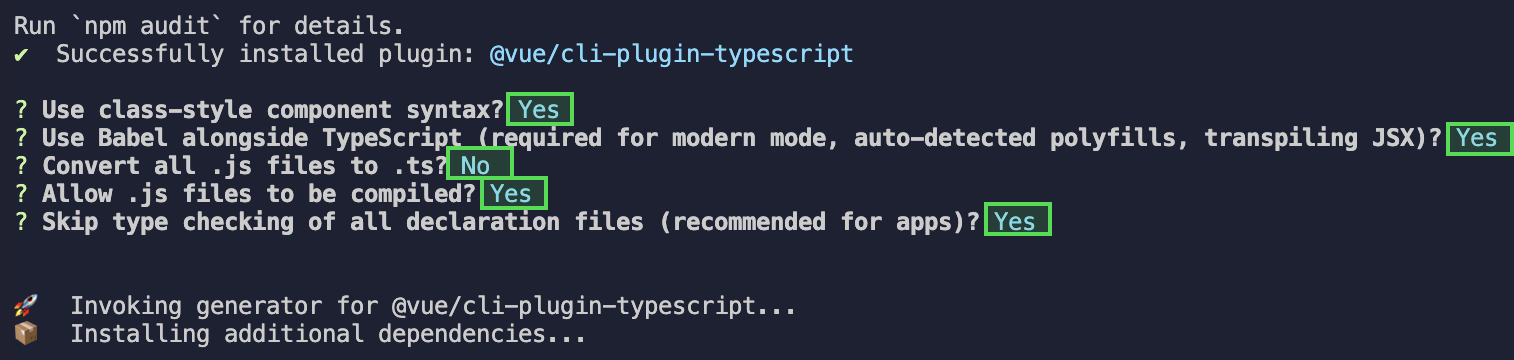
|
|
27
|
+
|
|
28
|
+
|
|
29
|
+
> **注意:**
|
|
30
|
+
>
|
|
31
|
+
|
|
32
|
+
> 完成以上步骤后,请重新运行项目!
|
|
33
|
+
>
|
|
34
|
+
|
|
35
|
+
|
|
36
|
+
【vite】
|
|
37
|
+
|
|
38
|
+
请在您 vite 创建的工程根目录执行:
|
|
39
|
+
``` bash
|
|
40
|
+
npm install -D typescript
|
|
41
|
+
```
|
|
42
|
+
|
|
43
|
+
### 4. 什么是 UserSig?如何生成 UserSig?
|
|
44
|
+
|
|
45
|
+
UserSig 是用户登录即时通信 IM 的密码,其本质是对 UserID 等信息加密后得到的密文。
|
|
46
|
+
|
|
47
|
+
UserSig 签发方式是将 UserSig 的计算代码集成到您的服务端,并提供面向项目的接口,在需要 UserSig 时由您的项目向业务服务器发起请求获取动态 UserSig。更多详情请参见 [服务端生成 UserSig](https://cloud.tencent.com/document/product/269/32688#console)。
|
|
48
|
+
|
|
49
|
+
> **注意**
|
|
50
|
+
>
|
|
51
|
+
|
|
52
|
+
> 本文示例代码采用的获取 UserSig 的方案是在客户端代码中配置 SECRETKEY,该方法中 SECRETKEY 很容易被反编译逆向破解,一旦您的密钥泄露,攻击者就可以盗用您的腾讯云流量,因此**该方法仅适合本地跑通功能调试**。 正确的 UserSig 签发方式请参见上文。
|
|
53
|
+
>
|
|
54
|
+
|
|
55
|
+
|
|
56
|
+
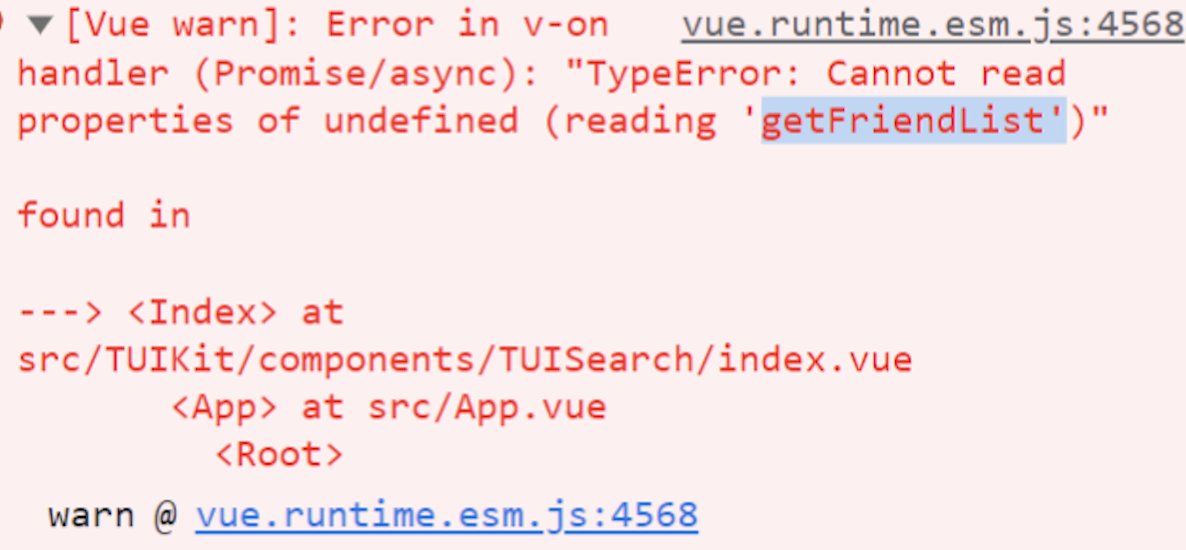
### 5. 运行时报错:"TypeError: Cannot read properties of undefined (reading "getFriendList")"
|
|
57
|
+
|
|
58
|
+
若按照上述步骤接入后,运行时出现以下错误,请您务必**删除 TUIKit 目录下的 node_modules 目录**,以保证 TUIKit 的依赖唯一性,避免 TUIKit 多份依赖造成问题。
|
|
59
|
+
|
|
60
|
+
|
|
61
|
+
|
|
62
|
+
|
|
63
|
+
### 6. 运行时报错:/chat-example/src/TUIKit/components/TUIChat /message-input/message-input-editor.vue .ts(8,23)TS1005: expected.
|
|
64
|
+
|
|
65
|
+

|
|
66
|
+
|
|
67
|
+
|
|
68
|
+
出现以上报错信息,是因为您安装的 @vue/cli 版本过低导致,**请您务必保证您的 @vue/cli 版本在 5.0.0 及以上**。升级方式如下:
|
|
69
|
+
``` javascript
|
|
70
|
+
npm install -g @vue/cli@5.0.8
|
|
71
|
+
```
|
|
72
|
+
|
|
73
|
+
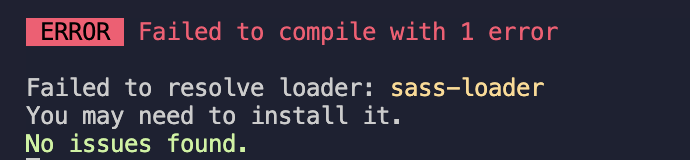
### 7. 运行时报错: Failed to resolve loader: sass-loader
|
|
74
|
+
|
|
75
|
+
|
|
76
|
+
|
|
77
|
+
|
|
78
|
+
出现以上报错信息,是因为您未安装 `sass` 环境导致,请执行以下命令进行 `sass`环境安装:
|
|
79
|
+
``` javascript
|
|
80
|
+
npm i -D sass sass-loader@10.1.1
|
|
81
|
+
```
|
|
82
|
+
|
|
83
|
+
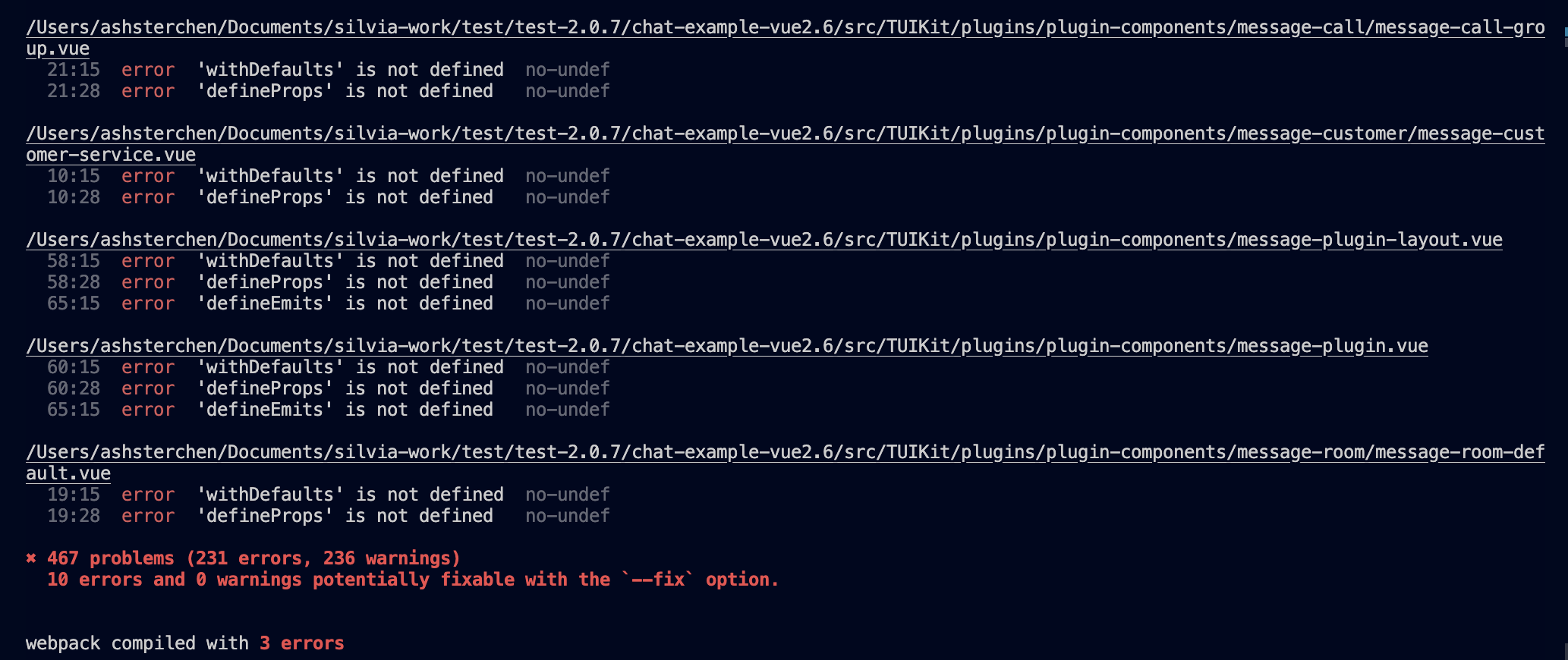
### 8. ESLint 报错:error 'withDefaults' is not defined no-undef? 'defineProps' is not defined no-undef? 以及 ESLint 其他报错?
|
|
84
|
+
|
|
85
|
+
|
|
86
|
+
|
|
87
|
+
|
|
88
|
+
**若 chat-uikit-vue 拷贝到 src 目录汇总与您本地项目代码风格不一致导致报错,可将本组件目录屏蔽,如在项目根目录增加 .eslintignore 文件:**
|
|
89
|
+
``` javascript
|
|
90
|
+
# .eslintignore
|
|
91
|
+
src/TUIKit
|
|
92
|
+
```
|
|
93
|
+
|
|
94
|
+
### 9. vue/cli 如何关闭 dev 模式下,webpack 全屏 overlay error 报错信息提示?
|
|
95
|
+
|
|
96
|
+
可以在您项目根目录的 vue.config.js 中进行关闭:
|
|
97
|
+
|
|
98
|
+
|
|
99
|
+
|
|
100
|
+
【webpack4】
|
|
101
|
+
``` javascript
|
|
102
|
+
module.exports = defineConfig({
|
|
103
|
+
...
|
|
104
|
+
devServer: {
|
|
105
|
+
client: {
|
|
106
|
+
overlay: false,
|
|
107
|
+
},
|
|
108
|
+
},
|
|
109
|
+
});
|
|
110
|
+
```
|
|
111
|
+
|
|
112
|
+
【webpack3】
|
|
113
|
+
``` javascript
|
|
114
|
+
module.exports = {
|
|
115
|
+
...
|
|
116
|
+
devServer: {
|
|
117
|
+
overlay: false,
|
|
118
|
+
},
|
|
119
|
+
};
|
|
120
|
+
```
|
|
121
|
+
|
|
122
|
+
### 10. 出现 Component name "XXXX" should always be multi-word 怎么办?
|
|
123
|
+
- IM TUIKit web 所使用的 ESLint 版本为 v6.7.2 ,对于模块名的驼峰式格式并不进行严格校验。
|
|
124
|
+
|
|
125
|
+
- 如果您出现此问题,您可以在 .eslintrc.js 文件中进行如下配置:
|
|
126
|
+
|
|
127
|
+
|
|
128
|
+
|
|
129
|
+
【shell】
|
|
130
|
+
``` bash
|
|
131
|
+
module.exports = {
|
|
132
|
+
...
|
|
133
|
+
rules: {
|
|
134
|
+
...
|
|
135
|
+
'vue/multi-word-component-names': 'warn',
|
|
136
|
+
},
|
|
137
|
+
};
|
|
138
|
+
```
|
|
139
|
+
|
|
140
|
+
### 11. 出现 ERESOLVE unable to resolve dependency tree 怎么办?
|
|
141
|
+
|
|
142
|
+
npm install 的时候如果出现 ERESOLVE unable to resolve dependency tree ,表示依赖安装冲突,可采用以下方式进行安装:
|
|
143
|
+
|
|
144
|
+
|
|
145
|
+
【shell】
|
|
146
|
+
``` bash
|
|
147
|
+
npm install --legacy-peer-deps
|
|
148
|
+
```
|
|
149
|
+
|
|
150
|
+
### 12. 运行报错如下'vue packages version mismatch',如何解决?
|
|
151
|
+
- 如果您是 vue2.7 项目,请在您项目根目录执行:
|
|
152
|
+
|
|
153
|
+
``` bash
|
|
154
|
+
npm i vue@2.7.9 vue-template-compiler@2.7.9
|
|
155
|
+
```
|
|
156
|
+
- 如果您是 vue2.6 项目,请在您项目根目录执行:
|
|
157
|
+
|
|
158
|
+
``` bash
|
|
159
|
+
npm i vue@2.6.14 vue-template-compiler@2.6.14
|
|
160
|
+
```
|
|
161
|
+
|
|
162
|
+
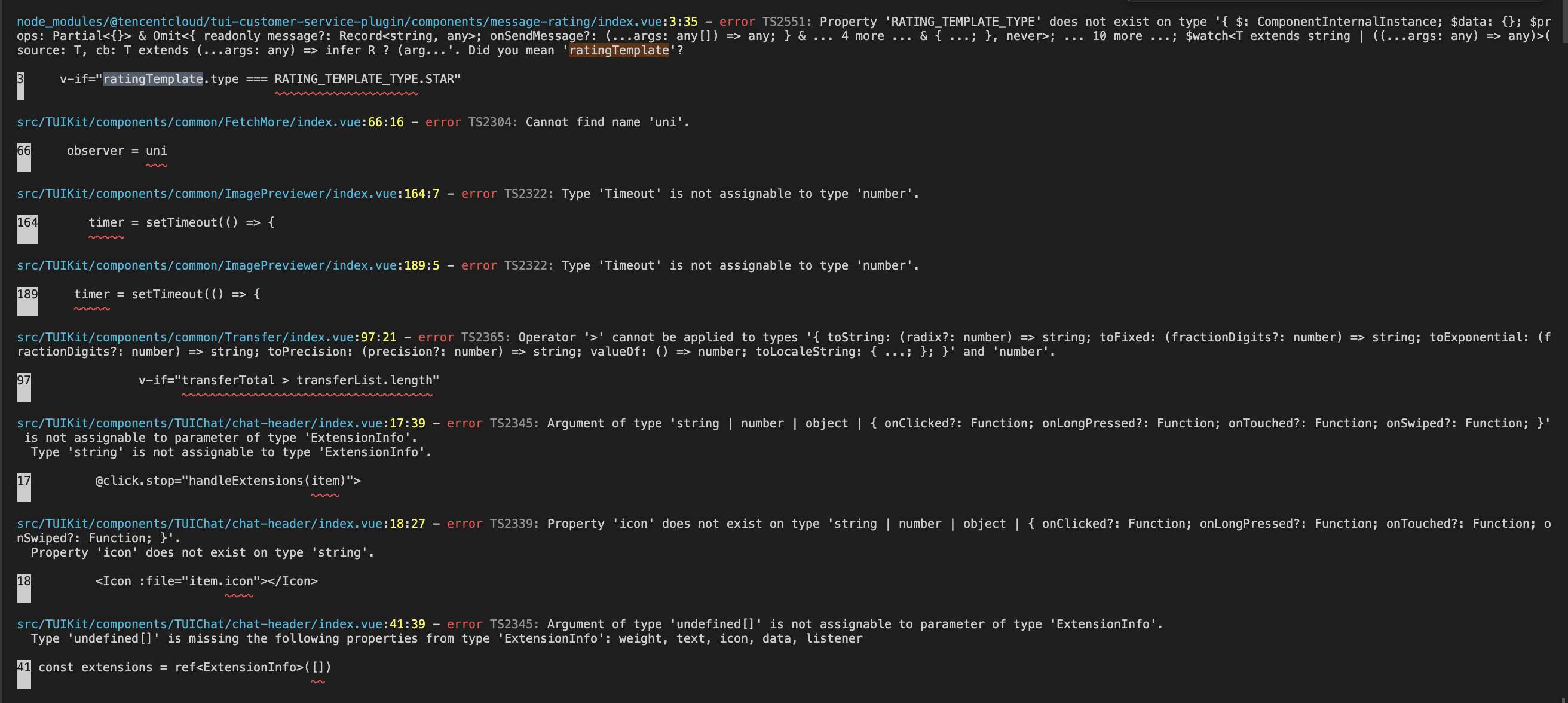
### 13. vite 项目 npm run build 之后 ts 报错?
|
|
163
|
+
|
|
164
|
+
|
|
165
|
+
|
|
166
|
+
|
|
167
|
+
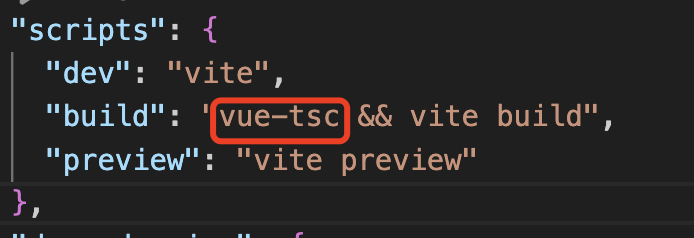
**原因**:package.json script 下 "build": "vue-tsc && vite build" 中的 vue-tsc 命令导致。
|
|
168
|
+
|
|
169
|
+
|
|
170
|
+
|
|
171
|
+
|
|
172
|
+
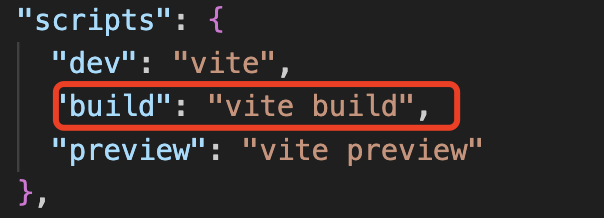
**解决方案**: 删除 vue-tsc 即可。 "build": "vite build"
|
|
173
|
+
|
|
174
|
+
|
|
175
|
+
|
|
176
|
+
|
|
177
|
+
### 14. 使用 pnpm 下载缺少依赖?
|
|
178
|
+
|
|
179
|
+
`pnpm` 安装 `@tencentcloud/chat-uikit-vue` 后拷贝到 TUIKit 目录使用会存在内部依赖缺失问题,建议您优先选择 `npm` / `yarn` 方式安装。
|
|
180
|
+
|
|
181
|
+
若您确实需要使用 pnpm 安装依赖,请在进行完上文接入步骤后:
|
|
182
|
+
1. 将 `node_modules/@tencentcloud/chat-uikit-vue/package.json` 中的依赖项拷贝到您自身项目根目录 `package.json` 中。
|
|
183
|
+
|
|
184
|
+
2. 运行 `pnpm i` , 进行内部缺失依赖安装。
|
|
185
|
+
|
|
186
|
+
|
|
187
|
+
### 15. H5 页面 iOS 低版本机型出现白屏?
|
|
188
|
+
|
|
189
|
+
您可以通过配置 polyfill 兼容低机型版本。(什么是 polyfill?polyfill 是一种用于解决浏览器兼容问题的技术。它用于模拟某些浏览器不支持的新特性,使得这些特性能在不支持的浏览器中正常工作。更多详情请参见 [babel-polyfill](https://babeljs.io/docs/babel-polyfill)。)
|
|
190
|
+
1. 安装 babel-polyfill:
|
|
191
|
+
|
|
192
|
+
``` bash
|
|
193
|
+
npm i @babel/polyfill
|
|
194
|
+
```
|
|
195
|
+
2. 入口文件引入 'babel-polyfill':
|
|
196
|
+
|
|
197
|
+
``` javascript
|
|
198
|
+
import 'babel-polyfill';
|
|
199
|
+
```
|
|
200
|
+
3. 新增 babel.config.js 配置
|
|
201
|
+
|
|
202
|
+
``` javascript
|
|
203
|
+
module.exports = {
|
|
204
|
+
presets: [
|
|
205
|
+
[
|
|
206
|
+
'@vue/cli-plugin-babel/preset',
|
|
207
|
+
{
|
|
208
|
+
useBuiltIns: 'entry',
|
|
209
|
+
corejs: 3,
|
|
210
|
+
},
|
|
211
|
+
],
|
|
212
|
+
[
|
|
213
|
+
'@babel/preset-env',
|
|
214
|
+
{
|
|
215
|
+
targets: {
|
|
216
|
+
browsers: ['iOS >= 11'],
|
|
217
|
+
},
|
|
218
|
+
useBuiltIns: 'entry',
|
|
219
|
+
corejs: 3,
|
|
220
|
+
},
|
|
221
|
+
],
|
|
222
|
+
],
|
|
223
|
+
};
|
|
224
|
+
```
|
|
225
|
+
|
|
226
|
+
###
|
|
227
|
+
|
|
228
|
+
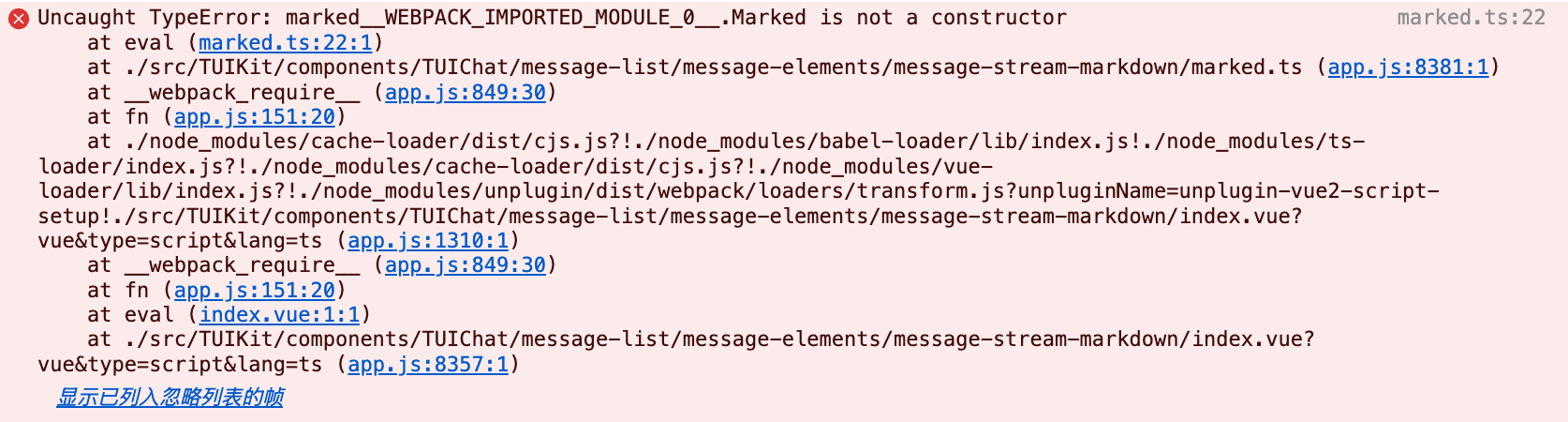
### 16. 运行报错:Uncaught TypeError: marked__WEBPACK_IMPORTED_MODULE_0_ Marked is not a constructor,如何处理?
|
|
229
|
+
|
|
230
|
+
如果您运行过程中出现如下错误,说明您当前 Vue CLI构建的项目环境版本较低,需要降低 uikit 中使用的 marked 版本至 5.1.2。
|
|
231
|
+
|
|
232
|
+
|
|
233
|
+
|
|
234
|
+
|
|
235
|
+
请在您项目的**根目录**使用以下脚本降低 marked 版本:
|
|
236
|
+
``` bash
|
|
237
|
+
npm i marked@5.1.2 --legacy-peer-deps
|
|
238
|
+
```
|
|
239
|
+
|
|
240
|
+
###
|
|
241
|
+
|
|
242
|
+
### 17. 编译报错 node_modules/marked/lib/marked.esm.js: Class private methods are not enabled,如何处理?
|
|
243
|
+
|
|
244
|
+
如果您运行过程中出现如下错误,说明您当前使用的 marked 版本过低,请升级 marked 版本至 6.0.0。
|
|
245
|
+
|
|
246
|
+

|
|
247
|
+
|
|
248
|
+
请在您项目的** 根目录 **使用以下脚本降低 marked 版本:
|
|
249
|
+
``` bash
|
|
250
|
+
npm i marked@6.0.0 --legacy-peer-deps
|
|
251
|
+
```
|
|
252
|
+
|
|
253
|
+
###
|
|
254
|
+
|
|
255
|
+
### 18. 运行报错 Uncaught SyntaxError: The requested module xxx does not provide an export named 'Friend'
|
|
256
|
+
|
|
257
|
+
如果您的 vite 项目运行过程中出现以下报错,请参见以下方案:
|
|
258
|
+
|
|
259
|
+

|
|
260
|
+
|
|
261
|
+
|
|
262
|
+
在根目录文件 `tsconfig.json` 下增加以下编译规则,分为以下两种情况:
|
|
263
|
+
1. 如果您的 `tsconfig.json` 没有 `references` 配置,直接在 tsconfig.json 中配置如下规则:
|
|
264
|
+
|
|
265
|
+
|
|
266
|
+
|
|
267
|
+
|
|
268
|
+
|
|
269
|
+
【typescript ≥ 5.0.0】
|
|
270
|
+
``` json
|
|
271
|
+
{
|
|
272
|
+
...
|
|
273
|
+
"compilerOptions": {
|
|
274
|
+
...
|
|
275
|
+
"verbatimModuleSyntax": false,
|
|
276
|
+
}
|
|
277
|
+
}
|
|
278
|
+
```
|
|
279
|
+
|
|
280
|
+
|
|
281
|
+
【typescript < 5.0.0】
|
|
282
|
+
``` json
|
|
283
|
+
{
|
|
284
|
+
...
|
|
285
|
+
"compilerOptions": {
|
|
286
|
+
...
|
|
287
|
+
"importsNotUsedAsValues": "preserve",
|
|
288
|
+
}
|
|
289
|
+
}
|
|
290
|
+
```
|
|
291
|
+
|
|
292
|
+
2. 如果您的 `tsconfig.json` 已有 `references` 配置,比如 vite 官方自动配置的 `"./tsconfig.app.json"`,`"./tsconfig.node.json" `等,由于 `references` 的特性,导致 `tsconfig.json `本身只是规则的引用文件,此时直接在 `tsconfig.json` 中配置以下规则无效。需要将规则添加至实际的`references`对应的文件中。以下是具体示例:
|
|
293
|
+
|
|
294
|
+
<table>
|
|
295
|
+
<tr>
|
|
296
|
+
<td rowspan="1" colSpan="1" >错误写法</td>
|
|
297
|
+
|
|
298
|
+
<td rowspan="1" colSpan="1" >正确写法</td>
|
|
299
|
+
</tr>
|
|
300
|
+
|
|
301
|
+
<tr>
|
|
302
|
+
<td rowspan="1" colSpan="1" >当 tsconfig.json 文件中已有 references 相关配置时,直接在 tsconfig.json 中声明以下规则无效</td>
|
|
303
|
+
|
|
304
|
+
<td rowspan="1" colSpan="1" >当 tsconfig.json 文件中已有 references 相关配置时,需要在对应的 references 内部文件中声明以下规则。下文中是在 references 中配置的根目录 `tsconfig.app.json` 文件中配置以下规则。</td>
|
|
305
|
+
</tr>
|
|
306
|
+
|
|
307
|
+
<tr>
|
|
308
|
+
<td rowspan="1" colSpan="1" >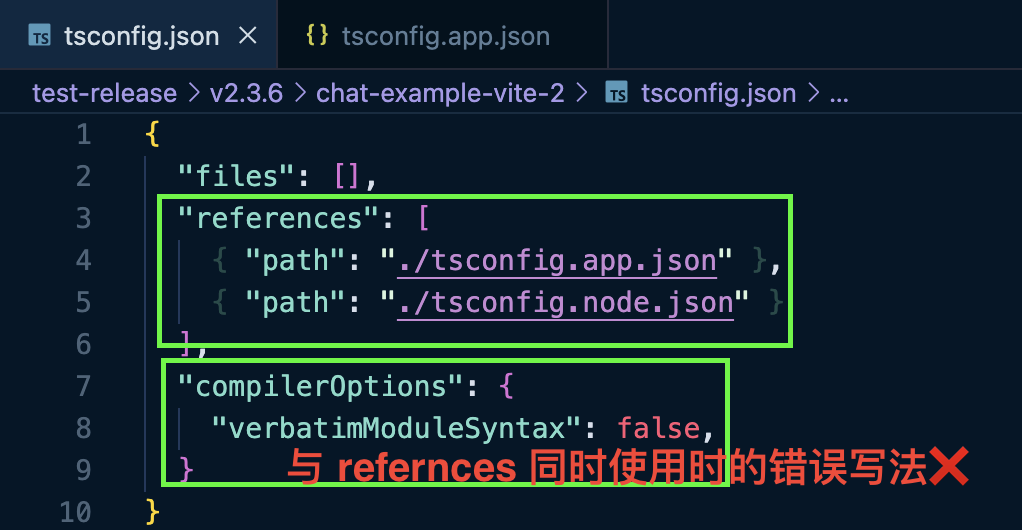</td>
|
|
309
|
+
|
|
310
|
+
<td rowspan="1" colSpan="1" >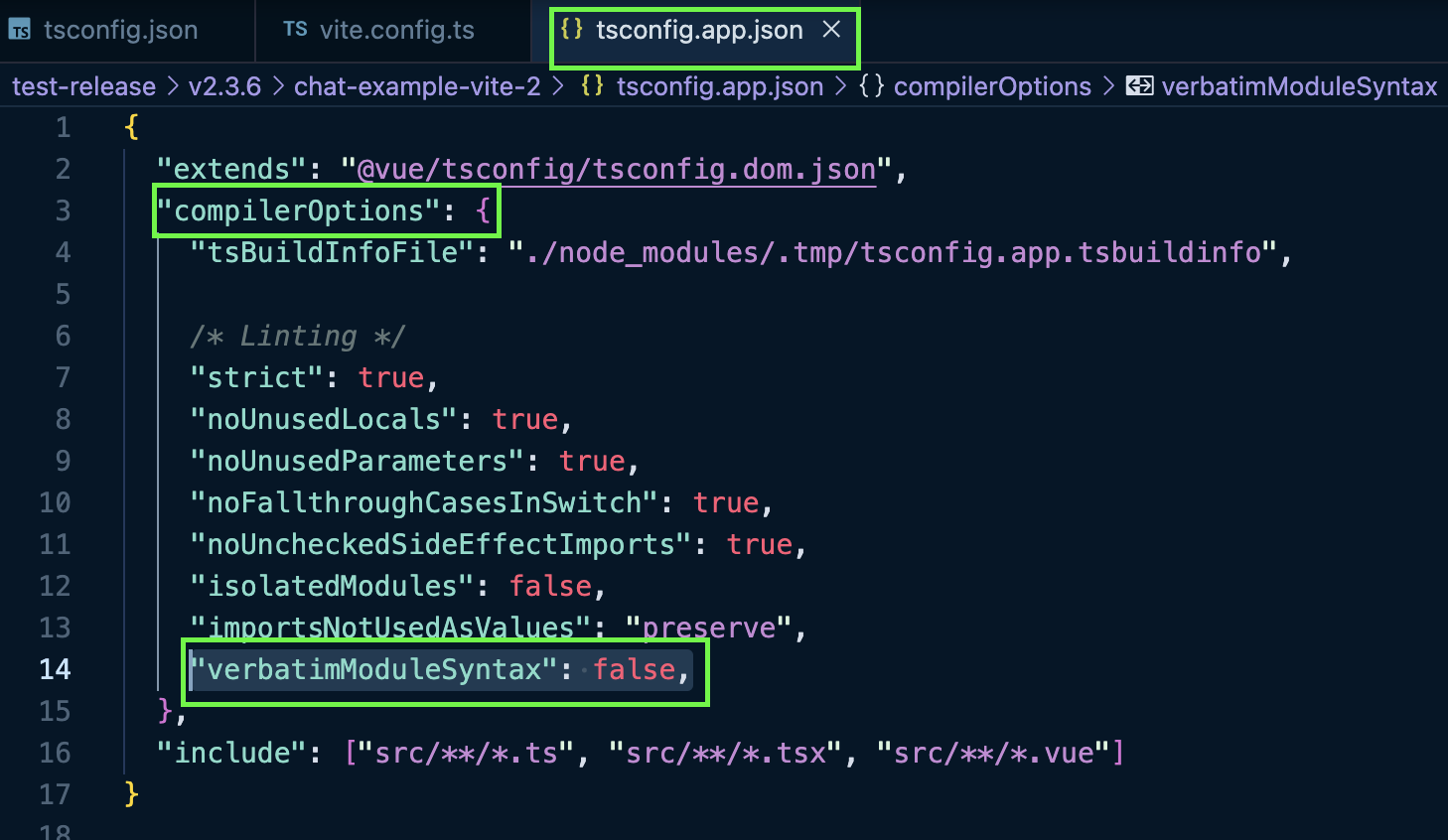</td>
|
|
311
|
+
</tr>
|
|
312
|
+
</table>
|
|
313
|
+
|
|
314
|
+
|
|
315
|
+
###
|
|
316
|
+
|
|
317
|
+
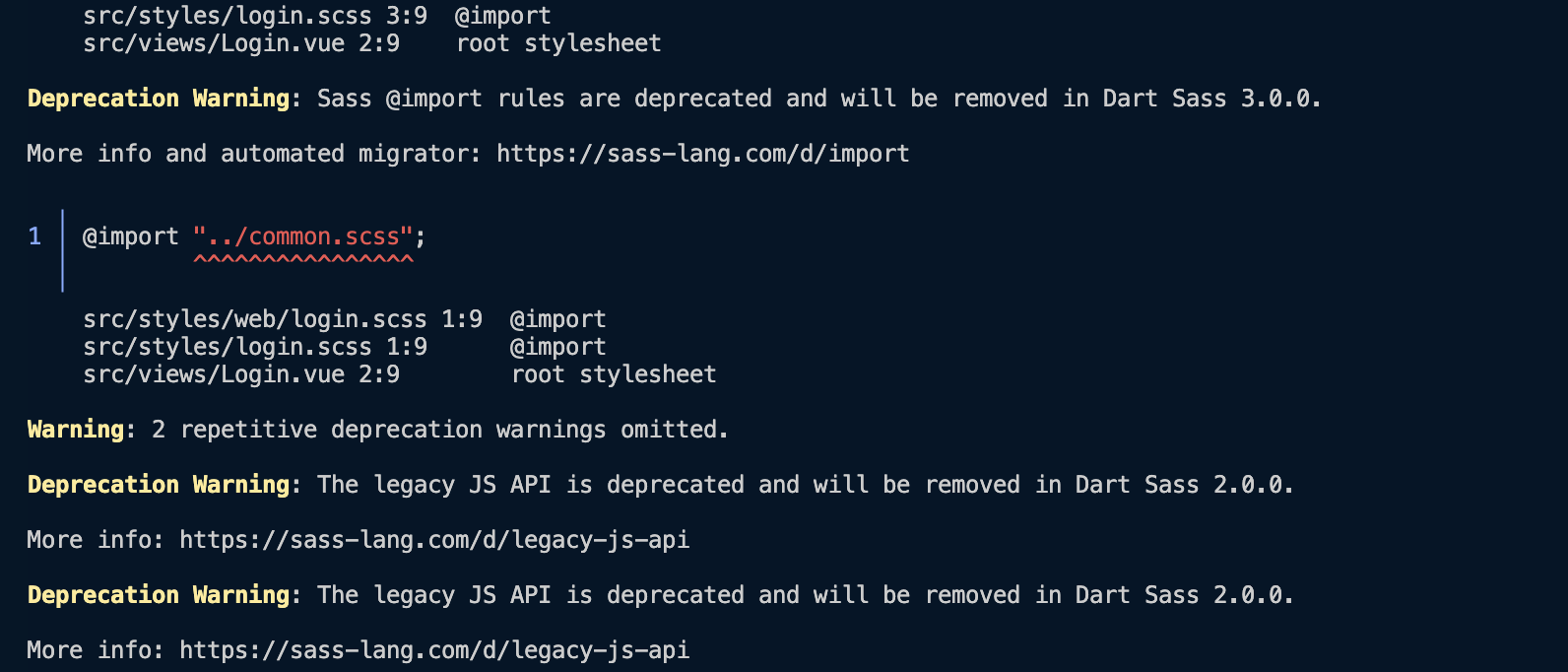
### 19. 编译后 Sass waring:Deprecation Warning: The legacy JS API is deprecated and will be removed in Dart Sass 2.0.0.
|
|
318
|
+
|
|
319
|
+
如果您在运行后出现如下提示,请不要担心,这是 sass 大版本规则更新后的 warning 提示;该提醒并不会影响您的正常运行。
|
|
320
|
+
|
|
321
|
+
如果您想去除此类 warning 提示,请将 sass 版本降级至 1.77.4 及以下。
|
|
322
|
+
|
|
323
|
+
|
|
324
|
+
|
|
325
|
+
``` bash
|
|
326
|
+
npm i -D sass@1.77.0 sass-loader@10.1.1
|
|
327
|
+
```
|
|
328
|
+
|
|
329
|
+
## 相关文档
|
|
330
|
+
|
|
331
|
+
#### Vue2 & Vue3 UIKit 相关:
|
|
332
|
+
- [集成音视频通话](https://cloud.tencent.com/document/product/269/79861)
|
|
333
|
+
|
|
334
|
+
- [chat-uikit-vue npm](https://www.npmjs.com/package/@tencentcloud/chat-uikit-vue)
|
|
335
|
+
|
|
336
|
+
- [Vue2 Demo源码及跑通示例](https://github.com/TencentCloud/chat-uikit-vue/tree/main/Vue2/Demo)
|
|
337
|
+
|
|
338
|
+
- [Vue3 Demo源码及跑通示例](https://github.com/TencentCloud/chat-uikit-vue/tree/main/Vue3/Demo)
|
|
339
|
+
|
|
340
|
+
|
|
341
|
+
#### Vue2 & Vue3 UIKit 逻辑层: engine 相关
|
|
342
|
+
- [chat-uikit-engine npm 仓库](https://www.npmjs.com/package/@tencentcloud/chat-uikit-engine)
|
|
343
|
+
|
|
344
|
+
- [chat-uikit-engine 接口文档](https://web.sdk.qcloud.com/im/doc/chat-engine/index.html)
|
|
@@ -0,0 +1,118 @@
|
|
|
1
|
+
### 用 Taro 开发项目,集成 WebIM v2.x,为什么一直收不到 TIM.EVENT.SDK_READY 事件?
|
|
2
|
+
|
|
3
|
+
WebIM v2.x 不需要被 Taro 编译。如果您通过 `npm i` 的方式集成了 WebIM,请手动将文件 `node_modules/tim-js-sdk/tim-js.js` 或 `node_modules/tim-wx-sdk/tim-wx.js` 拷贝到您项目的 src 目录下,并在配置文件中配置(更详细的请参见 [编译配置详情](https://nervjs.github.io/taro/docs/config-detail.html#weappcompileexclude))。
|
|
4
|
+
示例:
|
|
5
|
+
|
|
6
|
+
|
|
7
|
+
【js】
|
|
8
|
+
``` bash
|
|
9
|
+
weapp: {
|
|
10
|
+
compile: {
|
|
11
|
+
exclude: ['src/tencent-webim/tim-wx.js']
|
|
12
|
+
}
|
|
13
|
+
}
|
|
14
|
+
|
|
15
|
+
```
|
|
16
|
+
|
|
17
|
+
### 为什么调用 off 接口取消监听事件后,仍然能监听到 SDK 派发的事件?
|
|
18
|
+
|
|
19
|
+
对于同一个事件,如 [TIM.EVENT.MESSAGE_RECEIVED](https://web.sdk.qcloud.com/im/doc/zh-cn/module-EVENT.html#.MESSAGE_RECEIVED),调用 [on](https://web.sdk.qcloud.com/im/doc/zh-cn/SDK.html#on) 接口监听事件和调用 [off](https://web.sdk.qcloud.com/im/doc/zh-cn/SDK.html#off) 接口取消监听事件,handler 参数应当指向同一个 function,避免以下写法:
|
|
20
|
+
|
|
21
|
+
|
|
22
|
+
【js】
|
|
23
|
+
``` bash
|
|
24
|
+
// 注意!以下代码有 bug,无法取消监听 TIM.EVENT.MESSAGE_RECEIVED,因为 bind() 方法每次会返回一个新的函数
|
|
25
|
+
tim.on(TIM.EVENT.MESSAGE_RECEIVED, this.onMessageReceived.bind(this));
|
|
26
|
+
tim.off(TIM.EVENT.MESSAGE_RECEIVED, this.onMessageReceived.bind(this));
|
|
27
|
+
|
|
28
|
+
// 建议写法
|
|
29
|
+
tim.on(TIM.EVENT.MESSAGE_RECEIVED, onMessageReceived, this);
|
|
30
|
+
tim.off(TIM.EVENT.MESSAGE_RECEIVED, onMessageReceived);
|
|
31
|
+
|
|
32
|
+
```
|
|
33
|
+
|
|
34
|
+
> **说明**
|
|
35
|
+
>
|
|
36
|
+
|
|
37
|
+
> bind() 方法的详细说明请参见 [Function.prototype.bind()](https://developer.mozilla.org/zh-CN/docs/Web/JavaScript/Reference/Global_Objects/Function/bind)
|
|
38
|
+
>
|
|
39
|
+
|
|
40
|
+
|
|
41
|
+
### 调用 logout 接口,SDK 会自动取消监听接入侧通过调用 on 接口已监听的事件吗?
|
|
42
|
+
|
|
43
|
+
不会。取消监听事件,需接入侧主动调用 [off](https://web.sdk.qcloud.com/im/doc/zh-cn/SDK.html#off) 接口。
|
|
44
|
+
|
|
45
|
+
### 登录时遇到 Err_TLS_Third_Sig_Check_Session_Key_Too_Long 的提示?
|
|
46
|
+
|
|
47
|
+
密钥问题导致生成的 UserSig 鉴权失败。请参见 [生成 UserSig](https://cloud.tencent.com/document/product/269/32688)。
|
|
48
|
+
|
|
49
|
+
### 登录时遇到 TypeError: wx.$app.ready is not a function?
|
|
50
|
+
|
|
51
|
+
请通过监听事件 [TIM.EVENT.SDK_READY](https://web.sdk.qcloud.com/im/doc/zh-cn/module-EVENT.html#.SDK_READY) 代替直接使用 ready 函数,后者已经废弃。
|
|
52
|
+
|
|
53
|
+
### 登录成功后不能发送消息,提示接口调用时机不合理?
|
|
54
|
+
|
|
55
|
+
请监听事件 [TIM.EVENT.SDK_READY](https://web.sdk.qcloud.com/im/doc/zh-cn/module-EVENT.html#.SDK_READY),待 SDK ready 后再调用发送消息等需要鉴权的接口。
|
|
56
|
+
|
|
57
|
+
### WebIM v2.x 怎样拉取历史消息?没有 getC2CHistoryMsgs 接口了吗?
|
|
58
|
+
|
|
59
|
+
WebIM v2.x 没有 getC2CHistoryMsgs 接口,[getMessageList](https://web.sdk.qcloud.com/im/doc/zh-cn/SDK.html#getMessageList) 接口可用于"拉取历史消息"。
|
|
60
|
+
|
|
61
|
+
### 我想在音视频聊天室实现点赞,送鲜花的功能,请问该怎么办?
|
|
62
|
+
|
|
63
|
+
可以通过 [createCustomMessage](https://web.sdk.qcloud.com/im/doc/zh-cn/SDK.html#createCustomMessage) 和 [sendMessage](https://web.sdk.qcloud.com/im/doc/zh-cn/SDK.html#sendMessage) 接口实现。
|
|
64
|
+
|
|
65
|
+
### WebIM v2.x 和 WebIM v1.7.x 消息是互通的吗?
|
|
66
|
+
|
|
67
|
+
互通。如果条件允许,建议接入使用最新的 WebIM,获得更好的体验和维护。
|
|
68
|
+
|
|
69
|
+
### WebIM v2.x 如何兼容 REST API 或 旧版 IM 发送的组合消息?
|
|
70
|
+
|
|
71
|
+
请升级 SDK 版本至 2.1.3 或更高版本。组合消息的内容存储在 Message 实例的 _elements 属性,接入侧需自主解析,解析请参见 [消息格式](https://cloud.tencent.com/document/product/269/2720)。
|
|
72
|
+
非组合消息,请使用推荐做法:使用 [Message](https://web.sdk.qcloud.com/im/doc/zh-cn/Message.html) 实例的 type 和 payload 属性。
|
|
73
|
+
|
|
74
|
+
### 为什么 WebIM v2.x 调用 sendMessage发消息成功后,未收到 TIM.EVENT.MESSAGE_RECEIVED 事件?
|
|
75
|
+
|
|
76
|
+
[sendMessage](https://web.sdk.qcloud.com/im/doc/zh-cn/SDK.html#sendMessage) 接口返回 `Promise`,接入侧请通过 `Promise.then` 或 `Promise.catch` 处理发送消息成功或失败后的业务逻辑。
|
|
77
|
+
此时 SDK 不会派发 [TIM.EVENT.MESSAGE_RECEIVED](https://web.sdk.qcloud.com/im/doc/zh-cn/module-EVENT.html#.MESSAGE_RECEIVED) 事件,避免消息重复。
|
|
78
|
+
|
|
79
|
+
### 通过 getMessageList 拉取到的消息列表和通过监听 TIM.EVENT.MESSAGE_RECEIVED 事件收到的消息合并后,发现有时会消息乱序,为什么?
|
|
80
|
+
|
|
81
|
+
接入侧维护会话的消息列表时,请注意保证消息入列的顺序正确,若消息列表从旧到新排列,则通过 [getMessageList](https://web.sdk.qcloud.com/im/doc/zh-cn/SDK.html#getMessageList) 拉取到的历史消息应该从头部入列,通过监听 [TIM.EVENT.MESSAGE_RECEIVED](https://web.sdk.qcloud.com/im/doc/zh-cn/module-EVENT.html#.MESSAGE_RECEIVED) 事件收到的实时消息应该从尾部入列。
|
|
82
|
+
|
|
83
|
+
### 调用 createGroup 接口创建音视频聊天室后,收不到消息?
|
|
84
|
+
|
|
85
|
+
调用 [createGroup](https://web.sdk.qcloud.com/im/doc/zh-cn/SDK.html#createGroup) 接口创建音视频聊天室后,需调用 [joinGroup](https://web.sdk.qcloud.com/im/doc/zh-cn/SDK.html#joinGroup) 接口加入群组(必须带上类型 TIM.TYPES.GRP_AVCHATROOM),才能进行消息收发流程。
|
|
86
|
+
|
|
87
|
+
|
|
88
|
+
【js】
|
|
89
|
+
``` bash
|
|
90
|
+
let promise = tim.joinGroup({ groupID: 'group1', type: TIM.TYPES.GRP_AVCHATROOM });
|
|
91
|
+
promise.then(function(imResponse) {
|
|
92
|
+
switch (imResponse.data.status) {
|
|
93
|
+
case TIM.TYPES.JOIN_STATUS_WAIT_APPROVAL: // 等待管理员同意
|
|
94
|
+
break;
|
|
95
|
+
case TIM.TYPES.JOIN_STATUS_SUCCESS: // 加群成功
|
|
96
|
+
console.log(imResponse.data.group); // 加入的群组资料
|
|
97
|
+
break;
|
|
98
|
+
case TIM.TYPES.JOIN_STATUS_ALREADY_IN_GROUP: // 已经在群中
|
|
99
|
+
break;
|
|
100
|
+
default:
|
|
101
|
+
break;
|
|
102
|
+
}
|
|
103
|
+
}).catch(function(imError){
|
|
104
|
+
console.warn('joinGroup error:', imError); // 申请加群失败的相关信息
|
|
105
|
+
});
|
|
106
|
+
|
|
107
|
+
```
|
|
108
|
+
|
|
109
|
+
### 音视频聊天室怎么没有未读消息计数?为什么拉取不到历史消息?
|
|
110
|
+
|
|
111
|
+
已定的产品策略:音视频聊天室不支持未读消息计数,也不支持查看入群前历史消息,详细请参见 [群组系统](https://cloud.tencent.com/document/product/269/1502)。
|
|
112
|
+
**旗舰版或企业版**支持直播群新成员查看入群前历史消息(SDK 请升级到v2.16.0或更高版本)。
|
|
113
|
+
|
|
114
|
+
### 可以同时加入两个或多个音视频聊天室吗?
|
|
115
|
+
|
|
116
|
+
目前不可以。同一用户同时只能加入一个音视频聊天室。
|
|
117
|
+
**示例**:用户已在音视频聊天室 A 中,再加入音视频聊天室 B,SDK 会先退出音视频聊天室 A,然后加入音视频聊天室 B。
|
|
118
|
+
详细请参见 [joinGroup](https://web.sdk.qcloud.com/im/doc/zh-cn/SDK.html#joinGroup)。
|