@tencentcloud/sdk-mcp 1.0.2 → 1.0.4
This diff represents the content of publicly available package versions that have been released to one of the supported registries. The information contained in this diff is provided for informational purposes only and reflects changes between package versions as they appear in their respective public registries.
- package/@tencent/aegis-node-sdk/lib/packages/core/src/constant/config.d.ts +14 -14
- package/@tencent/aegis-node-sdk/lib/packages/core/src/constant/global.d.ts +1 -1
- package/@tencent/aegis-node-sdk/lib/packages/core/src/constant/index.d.ts +9 -9
- package/@tencent/aegis-node-sdk/lib/packages/core/src/constant/report-ignore.d.ts +2 -2
- package/@tencent/aegis-node-sdk/lib/packages/core/src/core.d.ts +85 -85
- package/@tencent/aegis-node-sdk/lib/packages/core/src/hooks/afterRequestHooks.d.ts +3 -3
- package/@tencent/aegis-node-sdk/lib/packages/core/src/hooks/beforeRequestHooks.d.ts +9 -9
- package/@tencent/aegis-node-sdk/lib/packages/core/src/hooks/modifyRequestHooks.d.ts +3 -3
- package/@tencent/aegis-node-sdk/lib/packages/core/src/index.d.ts +9 -9
- package/@tencent/aegis-node-sdk/lib/packages/core/src/interface/config.d.ts +62 -62
- package/@tencent/aegis-node-sdk/lib/packages/core/src/interface/env.d.ts +11 -11
- package/@tencent/aegis-node-sdk/lib/packages/core/src/interface/index.d.ts +4 -4
- package/@tencent/aegis-node-sdk/lib/packages/core/src/interface/log.d.ts +130 -130
- package/@tencent/aegis-node-sdk/lib/packages/core/src/interface/send.d.ts +34 -34
- package/@tencent/aegis-node-sdk/lib/packages/core/src/pipes/format.d.ts +2 -2
- package/@tencent/aegis-node-sdk/lib/packages/core/src/pipes/index.d.ts +18 -18
- package/@tencent/aegis-node-sdk/lib/packages/core/src/pipes/length-limit.d.ts +8 -8
- package/@tencent/aegis-node-sdk/lib/packages/core/src/pipes/pv.d.ts +8 -8
- package/@tencent/aegis-node-sdk/lib/packages/core/src/pipes/remove-payload.d.ts +2 -2
- package/@tencent/aegis-node-sdk/lib/packages/core/src/pipes/repeat-limit.d.ts +4 -4
- package/@tencent/aegis-node-sdk/lib/packages/core/src/pipes/report.d.ts +10 -10
- package/@tencent/aegis-node-sdk/lib/packages/core/src/pipes/sample.d.ts +3 -3
- package/@tencent/aegis-node-sdk/lib/packages/core/src/pipes/throttle.d.ts +3 -3
- package/@tencent/aegis-node-sdk/lib/packages/core/src/pipes/trace/index.d.ts +34 -34
- package/@tencent/aegis-node-sdk/lib/packages/core/src/pipes/trace/jwt.d.ts +12 -12
- package/@tencent/aegis-node-sdk/lib/packages/core/src/pipes/trace/ot-js.d.ts +14 -14
- package/@tencent/aegis-node-sdk/lib/packages/core/src/pipes/trace/uuid.d.ts +2 -2
- package/@tencent/aegis-node-sdk/lib/packages/core/src/pipes/whitelist.d.ts +12 -12
- package/@tencent/aegis-node-sdk/lib/packages/core/src/pipes/write-before.d.ts +3 -3
- package/@tencent/aegis-node-sdk/lib/packages/core/src/plugin.d.ts +33 -33
- package/@tencent/aegis-node-sdk/lib/packages/core/src/util/destroy.d.ts +2 -2
- package/@tencent/aegis-node-sdk/lib/packages/core/src/util/event-emitter.d.ts +18 -18
- package/@tencent/aegis-node-sdk/lib/packages/core/src/util/index.d.ts +60 -60
- package/@tencent/aegis-node-sdk/lib/packages/node-sdk/src/index.d.ts +15 -15
- package/@tencent/aegis-node-sdk/lib/packages/node-sdk/src/interface/selector.d.ts +5 -5
- package/@tencent/aegis-node-sdk/lib/packages/node-sdk/src/pipes/batch-report-pipe.d.ts +6 -6
- package/@tencent/aegis-node-sdk/lib/packages/node-sdk/src/protocol/protocol_base.d.ts +18 -18
- package/@tencent/aegis-node-sdk/lib/packages/node-sdk/src/protocol/protocol_http.d.ts +12 -12
- package/@tencent/aegis-node-sdk/lib/packages/node-sdk/src/selector/ip_selector.d.ts +10 -10
- package/@tencent/aegis-node-sdk/lib/packages/node-sdk/src/selector/polaris_selector.d.ts +20 -20
- package/@tencent/aegis-node-sdk/lib/packages/node-sdk/src/selector/selector_base.d.ts +27 -27
- package/@tencent/aegis-node-sdk/lib/packages/node-sdk/src/util/eval_require.d.ts +2 -2
- package/mcp-server-prompt.png +0 -0
- package/mcp.json +9 -9
- package/package.json +1 -1
- package/resource/doc/chatuikit/android/client_api_android.md +1377 -0
- package/resource/doc/chatuikit/android/integrate_tuichat_only_android.md +382 -0
- package/resource/doc/chatuikit/android/integrate_tuikit_android.md +612 -0
- package/resource/doc/chatuikit/android/ui_api_android.md +418 -0
- package/resource/doc/chatuikit/faq/freq_qa.md +86 -0
- package/resource/doc/chatuikit/faq/sdk_qa.md +117 -0
- package/resource/doc/chatuikit/faq/vue_qa.md +344 -0
- package/resource/doc/chatuikit/faq/web_qa.md +118 -0
- package/resource/doc/chatuikit/flutter/client_api_Flutter.md +939 -0
- package/resource/doc/chatuikit/flutter/integrate_tuikit_Flutter.md +1432 -0
- package/resource/doc/chatuikit/iOS/client_api_iOS.md +1371 -0
- package/resource/doc/chatuikit/iOS/integrate_tuichat_only_iOS.md +993 -0
- package/resource/doc/chatuikit/iOS/integrate_tuikit_iOS.md +1427 -0
- package/resource/doc/chatuikit/iOS/ui_api_iOS.md +526 -0
- package/resource/doc/chatuikit/react/integrate_tuichat_only_react.md +185 -0
- package/resource/doc/chatuikit/react/integrate_tuichat_react.md +212 -0
- package/resource/doc/chatuikit/vue/integrate_tuichat_only_vue.md +149 -0
- package/resource/doc/chatuikit/vue/integrate_tuichat_vue.md +248 -0
- package/server.js +57 -33
- package/server.js.map +1 -1
- package/@tencent/polaris/node_modules/axios/CHANGELOG.md +0 -891
- package/@tencent/polaris/node_modules/axios/LICENSE +0 -19
- package/@tencent/polaris/node_modules/axios/README.md +0 -908
- package/@tencent/polaris/node_modules/axios/SECURITY.md +0 -5
- package/@tencent/polaris/node_modules/axios/UPGRADE_GUIDE.md +0 -168
- package/@tencent/polaris/node_modules/axios/dist/axios.js +0 -2277
- package/@tencent/polaris/node_modules/axios/dist/axios.map +0 -1
- package/@tencent/polaris/node_modules/axios/dist/axios.min.js +0 -4
- package/@tencent/polaris/node_modules/axios/dist/axios.min.map +0 -1
- package/@tencent/polaris/node_modules/axios/index.d.ts +0 -221
- package/@tencent/polaris/node_modules/axios/index.js +0 -1
- package/@tencent/polaris/node_modules/axios/lib/adapters/README.md +0 -37
- package/@tencent/polaris/node_modules/axios/lib/adapters/http.js +0 -388
- package/@tencent/polaris/node_modules/axios/lib/adapters/xhr.js +0 -212
- package/@tencent/polaris/node_modules/axios/lib/axios.js +0 -57
- package/@tencent/polaris/node_modules/axios/lib/cancel/Cancel.js +0 -19
- package/@tencent/polaris/node_modules/axios/lib/cancel/CancelToken.js +0 -119
- package/@tencent/polaris/node_modules/axios/lib/cancel/isCancel.js +0 -5
- package/@tencent/polaris/node_modules/axios/lib/core/Axios.js +0 -155
- package/@tencent/polaris/node_modules/axios/lib/core/InterceptorManager.js +0 -54
- package/@tencent/polaris/node_modules/axios/lib/core/README.md +0 -8
- package/@tencent/polaris/node_modules/axios/lib/core/buildFullPath.js +0 -20
- package/@tencent/polaris/node_modules/axios/lib/core/createError.js +0 -18
- package/@tencent/polaris/node_modules/axios/lib/core/dispatchRequest.js +0 -87
- package/@tencent/polaris/node_modules/axios/lib/core/enhanceError.js +0 -43
- package/@tencent/polaris/node_modules/axios/lib/core/mergeConfig.js +0 -99
- package/@tencent/polaris/node_modules/axios/lib/core/settle.js +0 -25
- package/@tencent/polaris/node_modules/axios/lib/core/transformData.js +0 -22
- package/@tencent/polaris/node_modules/axios/lib/defaults.js +0 -134
- package/@tencent/polaris/node_modules/axios/lib/env/README.md +0 -3
- package/@tencent/polaris/node_modules/axios/lib/env/data.js +0 -3
- package/@tencent/polaris/node_modules/axios/lib/helpers/README.md +0 -7
- package/@tencent/polaris/node_modules/axios/lib/helpers/bind.js +0 -11
- package/@tencent/polaris/node_modules/axios/lib/helpers/buildURL.js +0 -70
- package/@tencent/polaris/node_modules/axios/lib/helpers/combineURLs.js +0 -14
- package/@tencent/polaris/node_modules/axios/lib/helpers/cookies.js +0 -53
- package/@tencent/polaris/node_modules/axios/lib/helpers/deprecatedMethod.js +0 -24
- package/@tencent/polaris/node_modules/axios/lib/helpers/isAbsoluteURL.js +0 -14
- package/@tencent/polaris/node_modules/axios/lib/helpers/isAxiosError.js +0 -13
- package/@tencent/polaris/node_modules/axios/lib/helpers/isURLSameOrigin.js +0 -68
- package/@tencent/polaris/node_modules/axios/lib/helpers/normalizeHeaderName.js +0 -12
- package/@tencent/polaris/node_modules/axios/lib/helpers/parseHeaders.js +0 -53
- package/@tencent/polaris/node_modules/axios/lib/helpers/spread.js +0 -27
- package/@tencent/polaris/node_modules/axios/lib/helpers/toFormData.js +0 -55
- package/@tencent/polaris/node_modules/axios/lib/helpers/validator.js +0 -82
- package/@tencent/polaris/node_modules/axios/lib/utils.js +0 -349
- package/@tencent/polaris/node_modules/axios/package.json +0 -86
- package/@tencent/polaris/node_modules/axios/tsconfig.json +0 -14
- package/@tencent/polaris/node_modules/axios/tslint.json +0 -6
- package/resource/doc/tuicallkit/vue/api_TUICallObserver.md +0 -926
|
@@ -0,0 +1,382 @@
|
|
|
1
|
+
## 适用场景
|
|
2
|
+
|
|
3
|
+
TUIChat 提供了私信聊天(1V1)和群聊(Group)功能,支持对消息的多种操作,例如发送不同类型的消息、对消息长按点赞/回复/引用、查询消息已读回执详情等。
|
|
4
|
+
|
|
5
|
+
您可以仅集成 TUIChat 到您的 App 中。聊天界面使用场景非常广泛,例如房产中介咨询、在线医疗问诊、电商在线客服、保险远程定损等。
|
|
6
|
+
|
|
7
|
+
界面效果如下图所示:
|
|
8
|
+
|
|
9
|
+
|
|
10
|
+
|
|
11
|
+
【经典版】
|
|
12
|
+
<table>
|
|
13
|
+
<tr>
|
|
14
|
+
<td rowspan="1" colSpan="1" >消息界面</td>
|
|
15
|
+
|
|
16
|
+
<td rowspan="1" colSpan="1" >发送多种类型消息</td>
|
|
17
|
+
</tr>
|
|
18
|
+
|
|
19
|
+
<tr>
|
|
20
|
+
<td rowspan="1" colSpan="1" >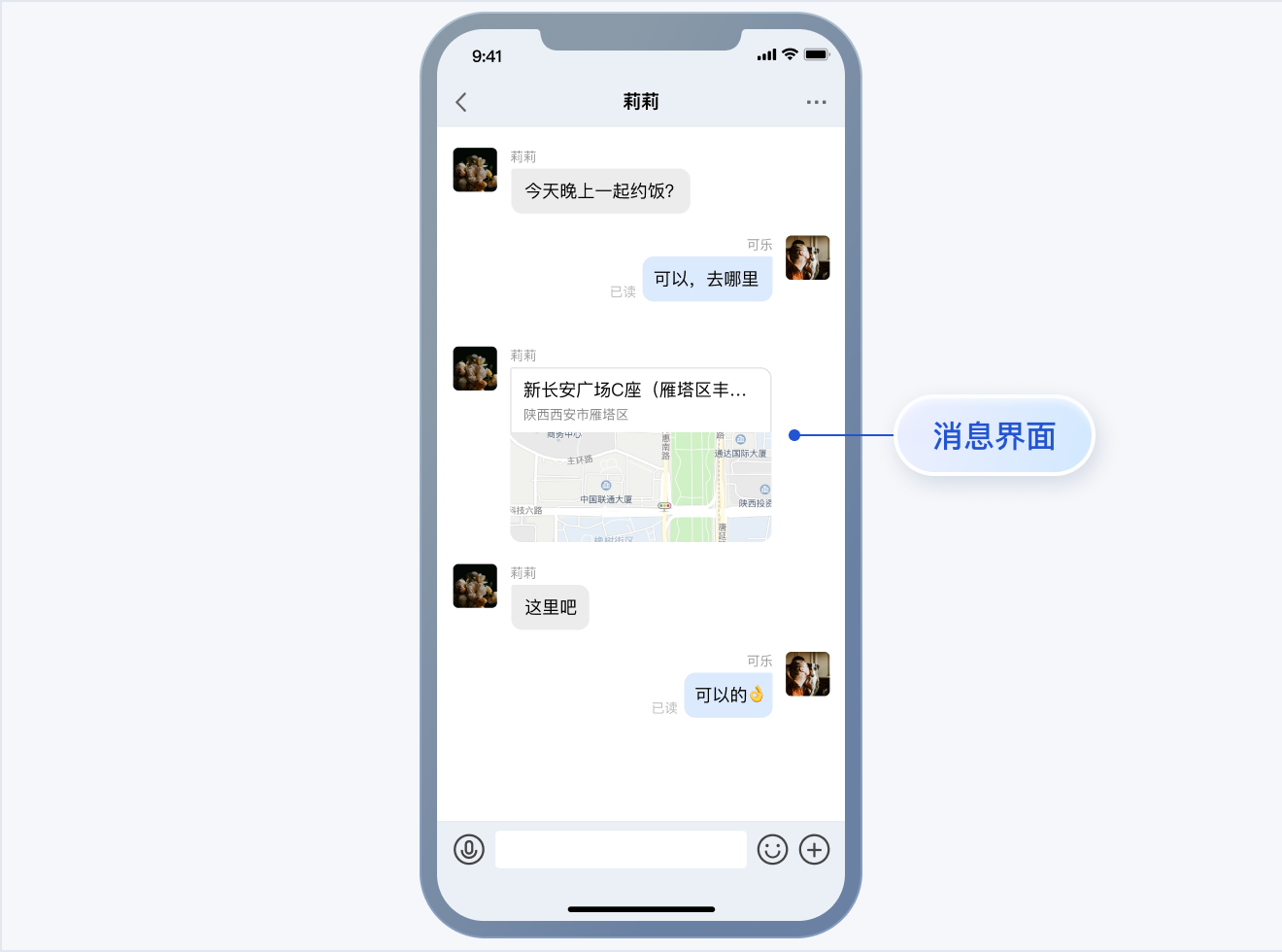</td>
|
|
21
|
+
|
|
22
|
+
<td rowspan="1" colSpan="1" ></td>
|
|
23
|
+
</tr>
|
|
24
|
+
</table>
|
|
25
|
+
|
|
26
|
+
<table>
|
|
27
|
+
<tr>
|
|
28
|
+
<td rowspan="1" colSpan="1" >消息点赞/回复/引用</td>
|
|
29
|
+
|
|
30
|
+
<td rowspan="1" colSpan="1" >消息回复详情</td>
|
|
31
|
+
</tr>
|
|
32
|
+
|
|
33
|
+
<tr>
|
|
34
|
+
<td rowspan="1" colSpan="1" >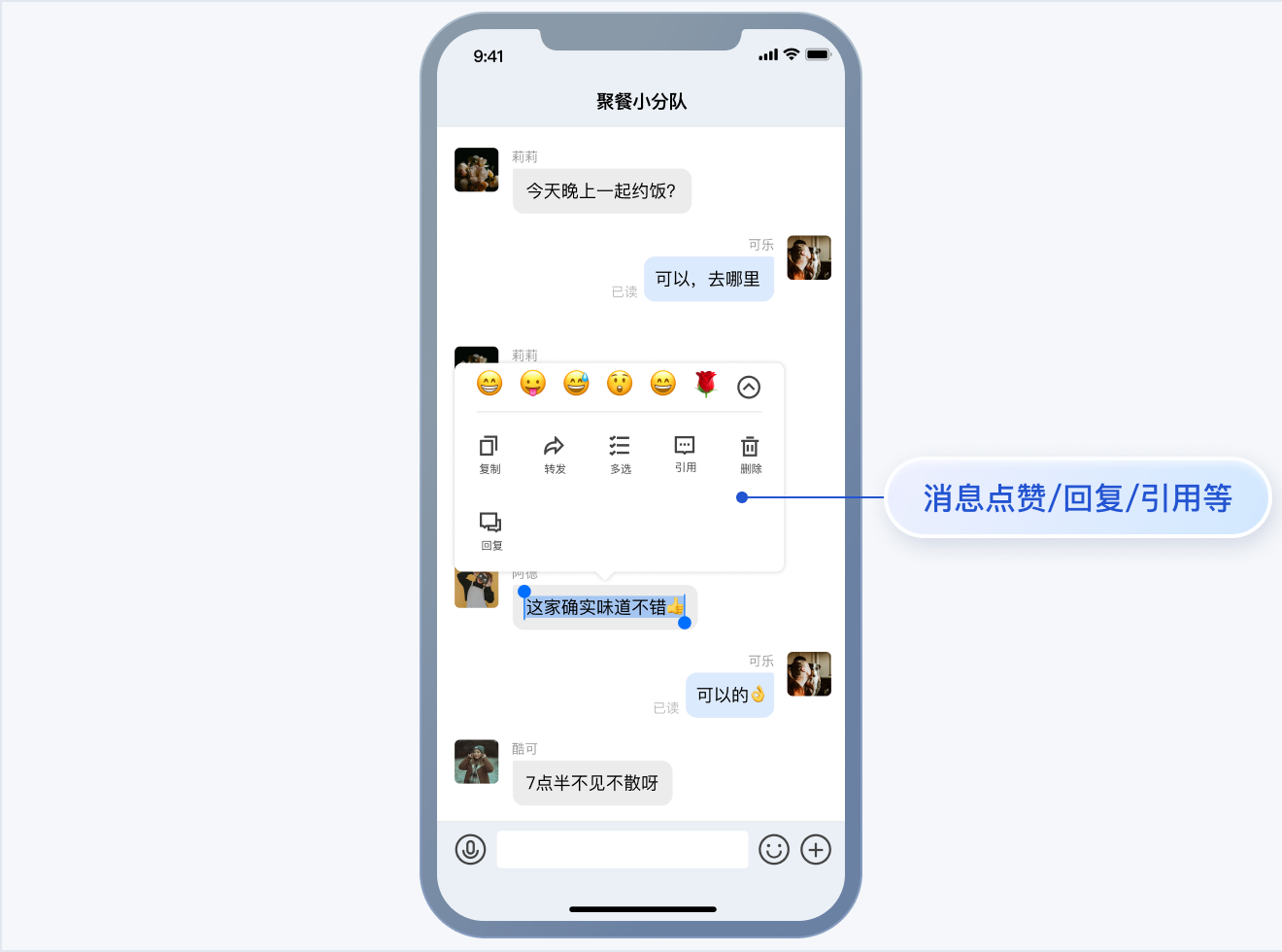</td>
|
|
35
|
+
|
|
36
|
+
<td rowspan="1" colSpan="1" >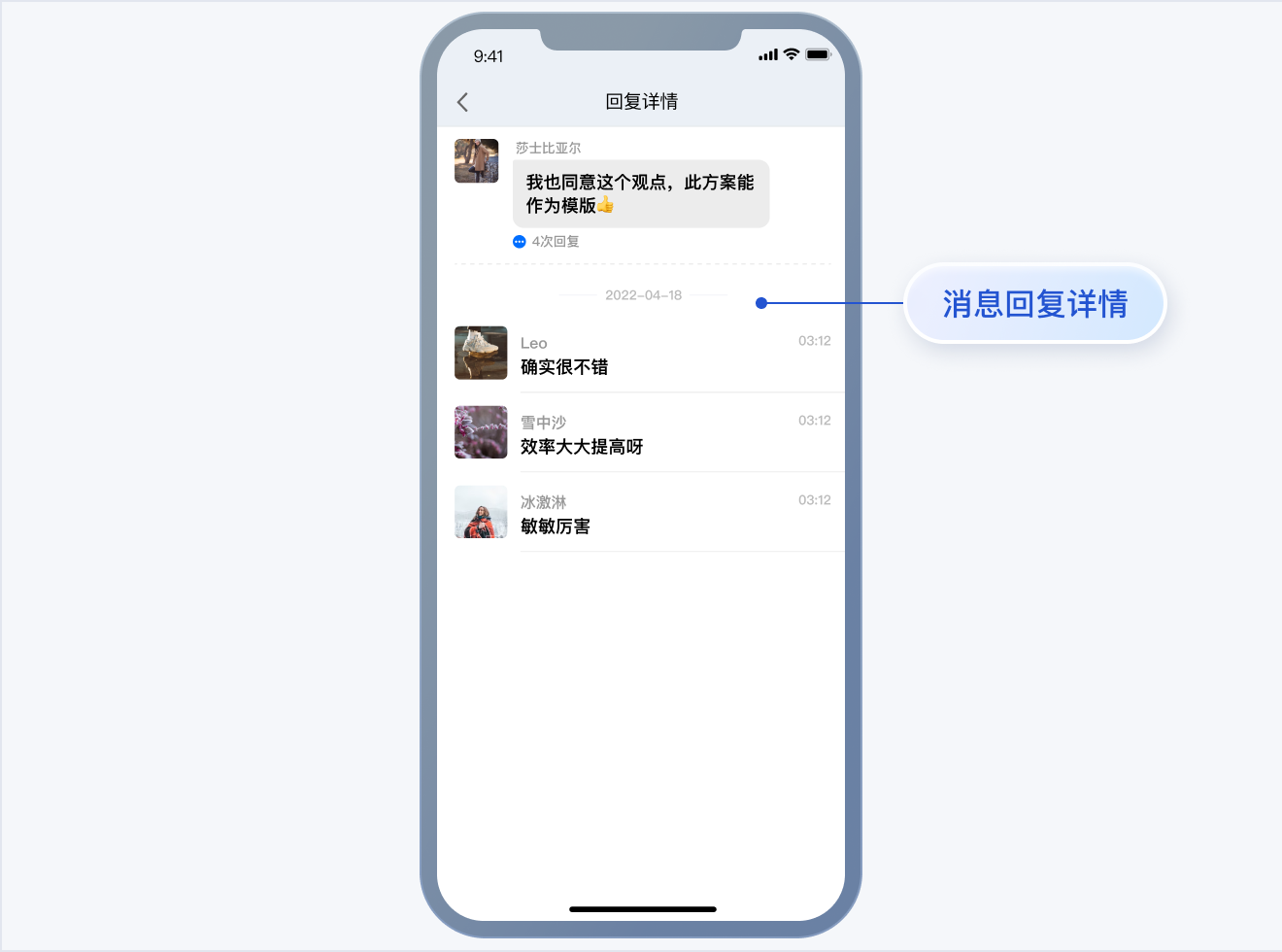</td>
|
|
37
|
+
</tr>
|
|
38
|
+
</table>
|
|
39
|
+
|
|
40
|
+
<table>
|
|
41
|
+
<tr>
|
|
42
|
+
<td rowspan="1" colSpan="1" >消息已读回执</td>
|
|
43
|
+
|
|
44
|
+
<td rowspan="1" colSpan="1" >已读回执详情</td>
|
|
45
|
+
</tr>
|
|
46
|
+
|
|
47
|
+
<tr>
|
|
48
|
+
<td rowspan="1" colSpan="1" >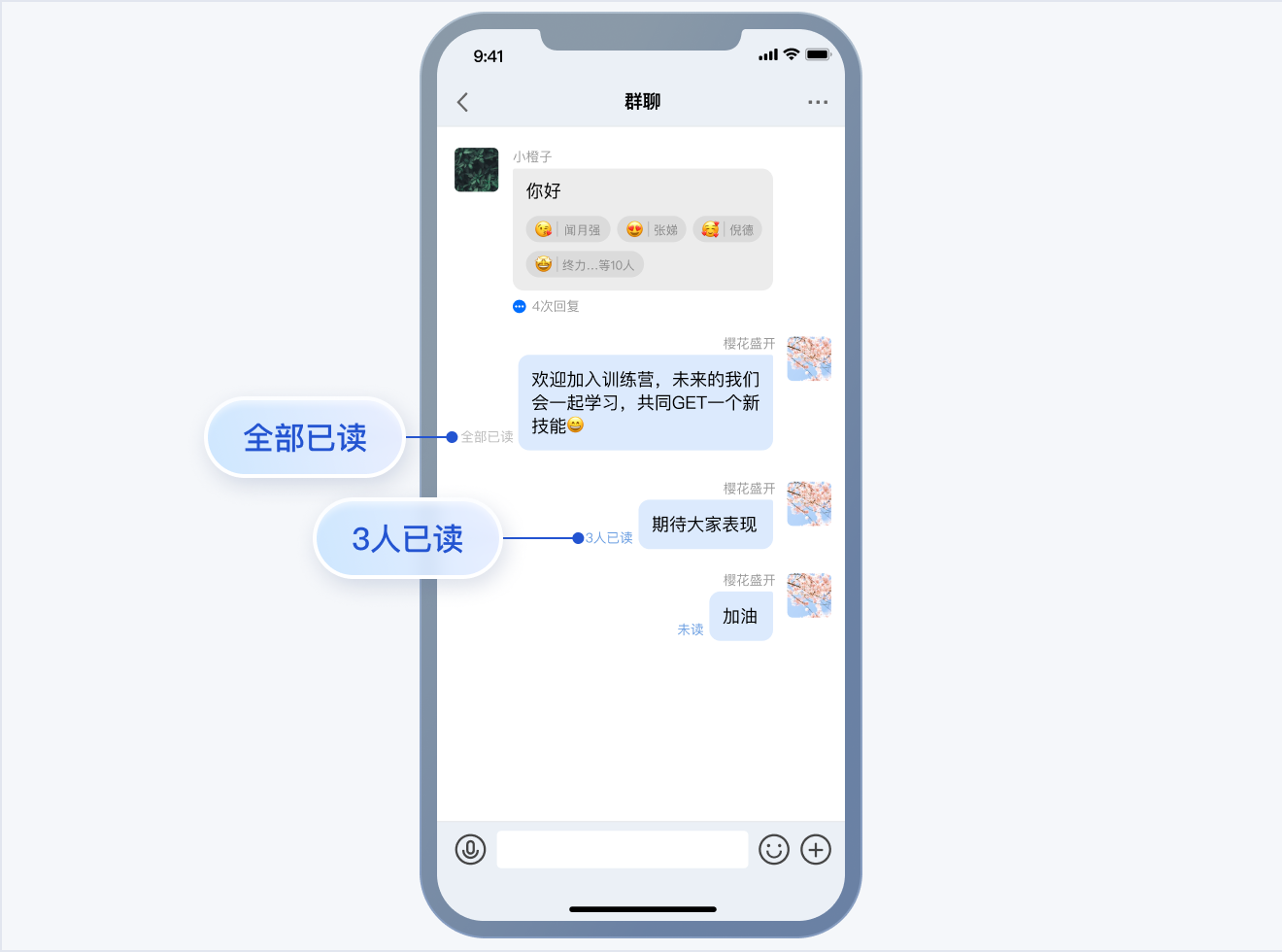</td>
|
|
49
|
+
|
|
50
|
+
<td rowspan="1" colSpan="1" >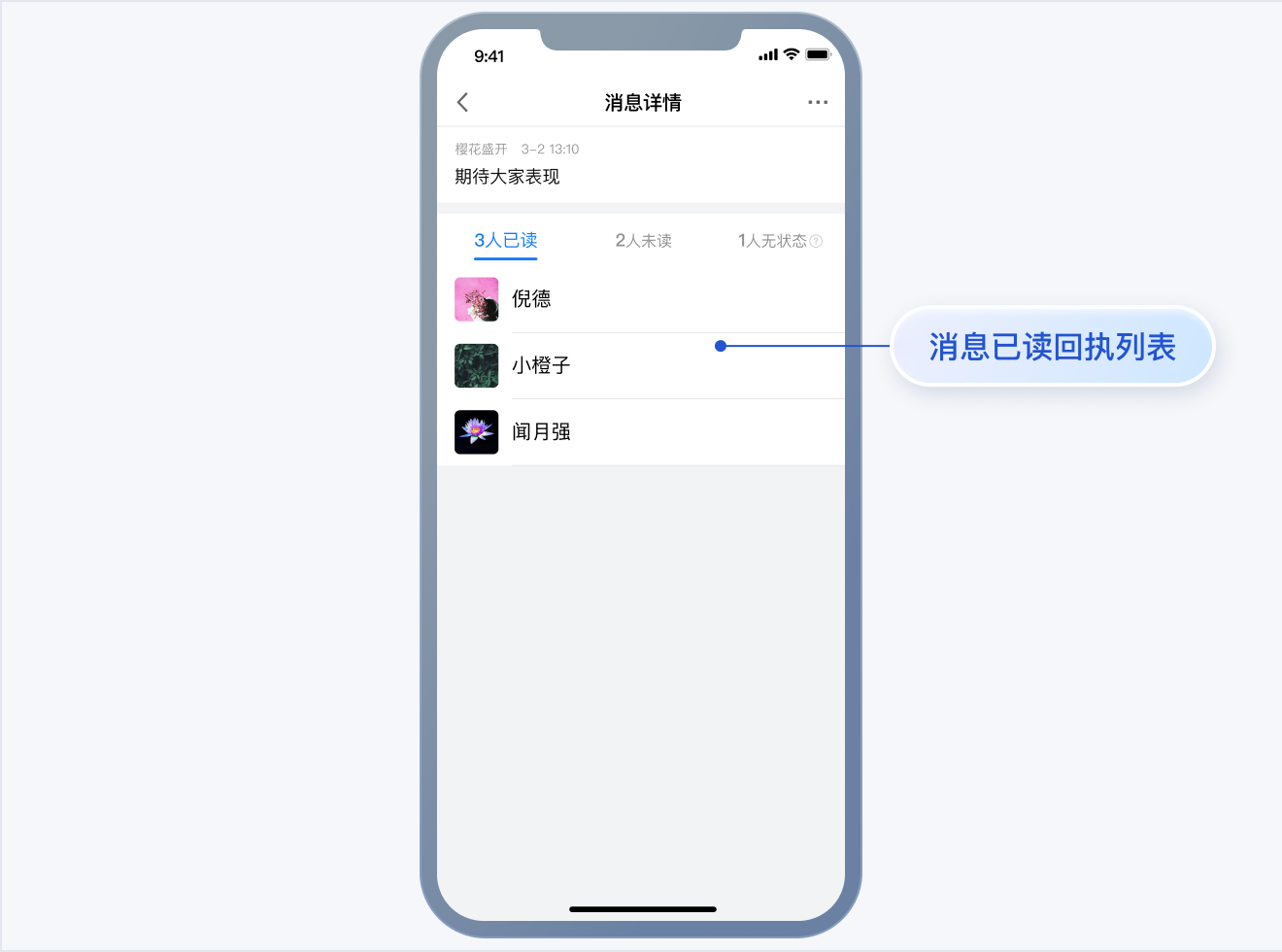</td>
|
|
51
|
+
</tr>
|
|
52
|
+
</table>
|
|
53
|
+
|
|
54
|
+
|
|
55
|
+
【简约版】
|
|
56
|
+
<table>
|
|
57
|
+
<tr>
|
|
58
|
+
<td rowspan="1" colSpan="1" >消息界面 \| 发送多种类型消息</td>
|
|
59
|
+
</tr>
|
|
60
|
+
|
|
61
|
+
<tr>
|
|
62
|
+
<td rowspan="1" colSpan="1" >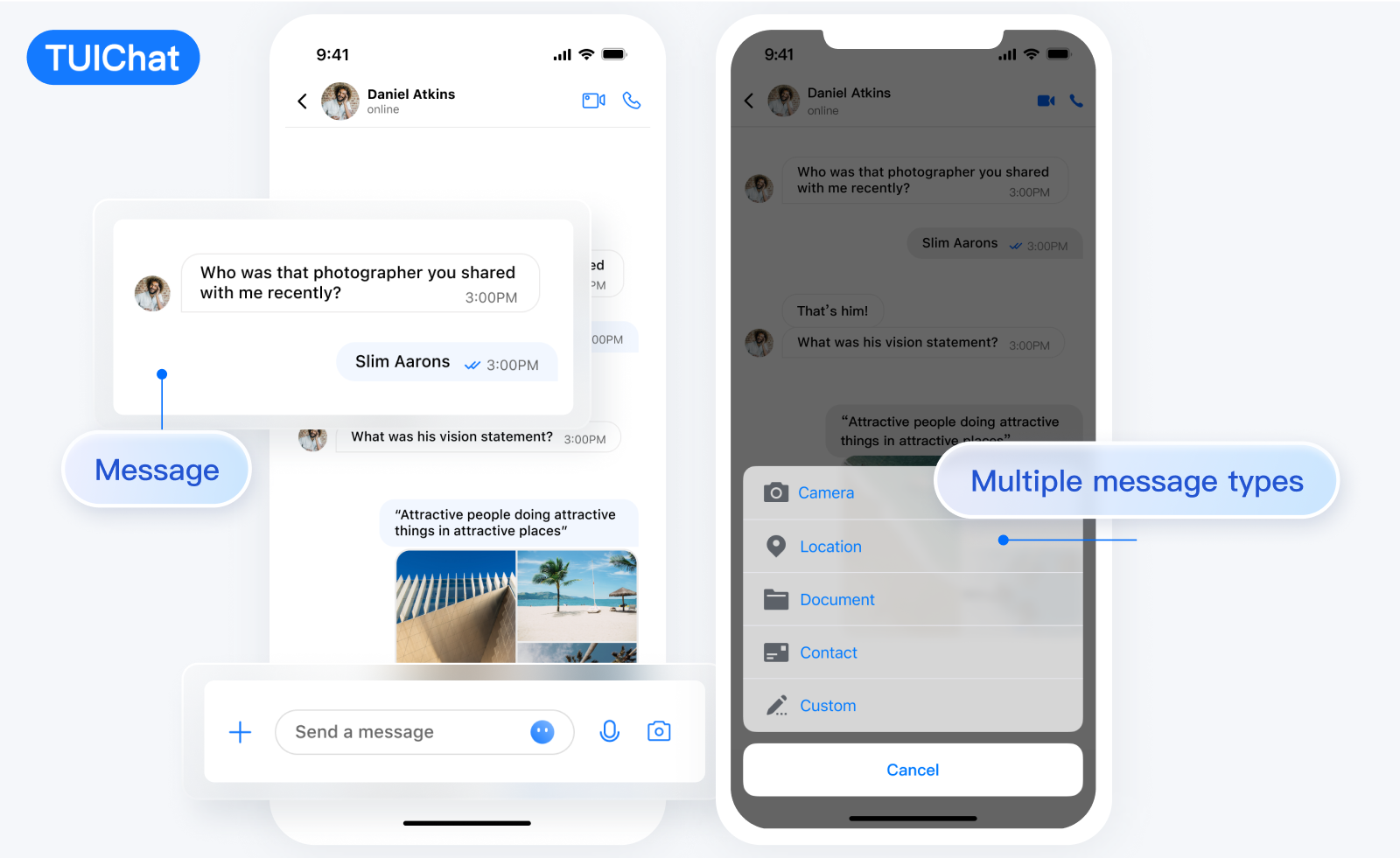</td>
|
|
63
|
+
</tr>
|
|
64
|
+
</table>
|
|
65
|
+
|
|
66
|
+
<table>
|
|
67
|
+
<tr>
|
|
68
|
+
<td rowspan="1" colSpan="1" >消息点赞 \| 回复 </td>
|
|
69
|
+
</tr>
|
|
70
|
+
|
|
71
|
+
<tr>
|
|
72
|
+
<td rowspan="1" colSpan="1" >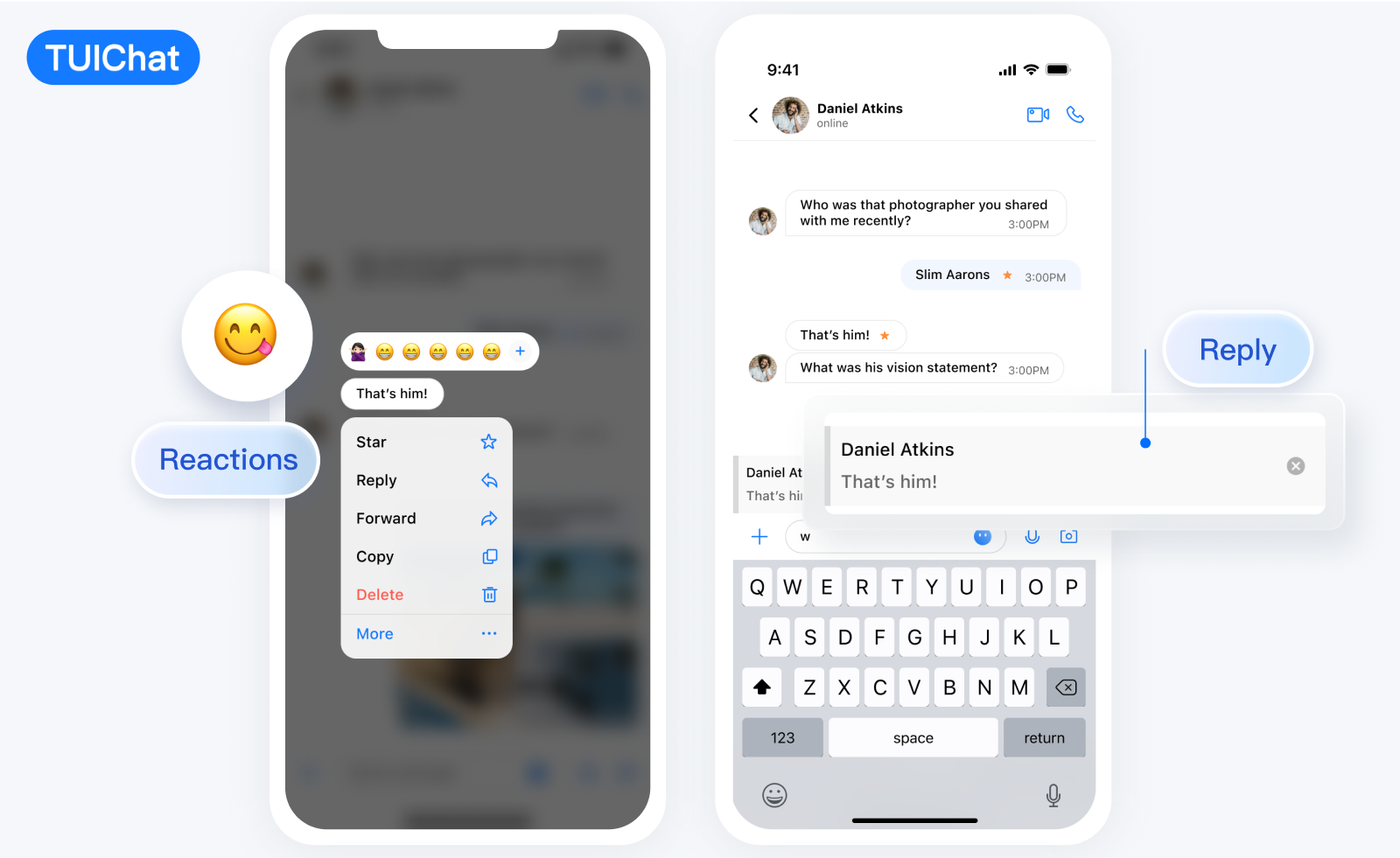</td>
|
|
73
|
+
</tr>
|
|
74
|
+
</table>
|
|
75
|
+
|
|
76
|
+
<table>
|
|
77
|
+
<tr>
|
|
78
|
+
<td rowspan="1" colSpan="1" >消息已读回执 \| 已读回执详情</td>
|
|
79
|
+
</tr>
|
|
80
|
+
|
|
81
|
+
<tr>
|
|
82
|
+
<td rowspan="1" colSpan="1" >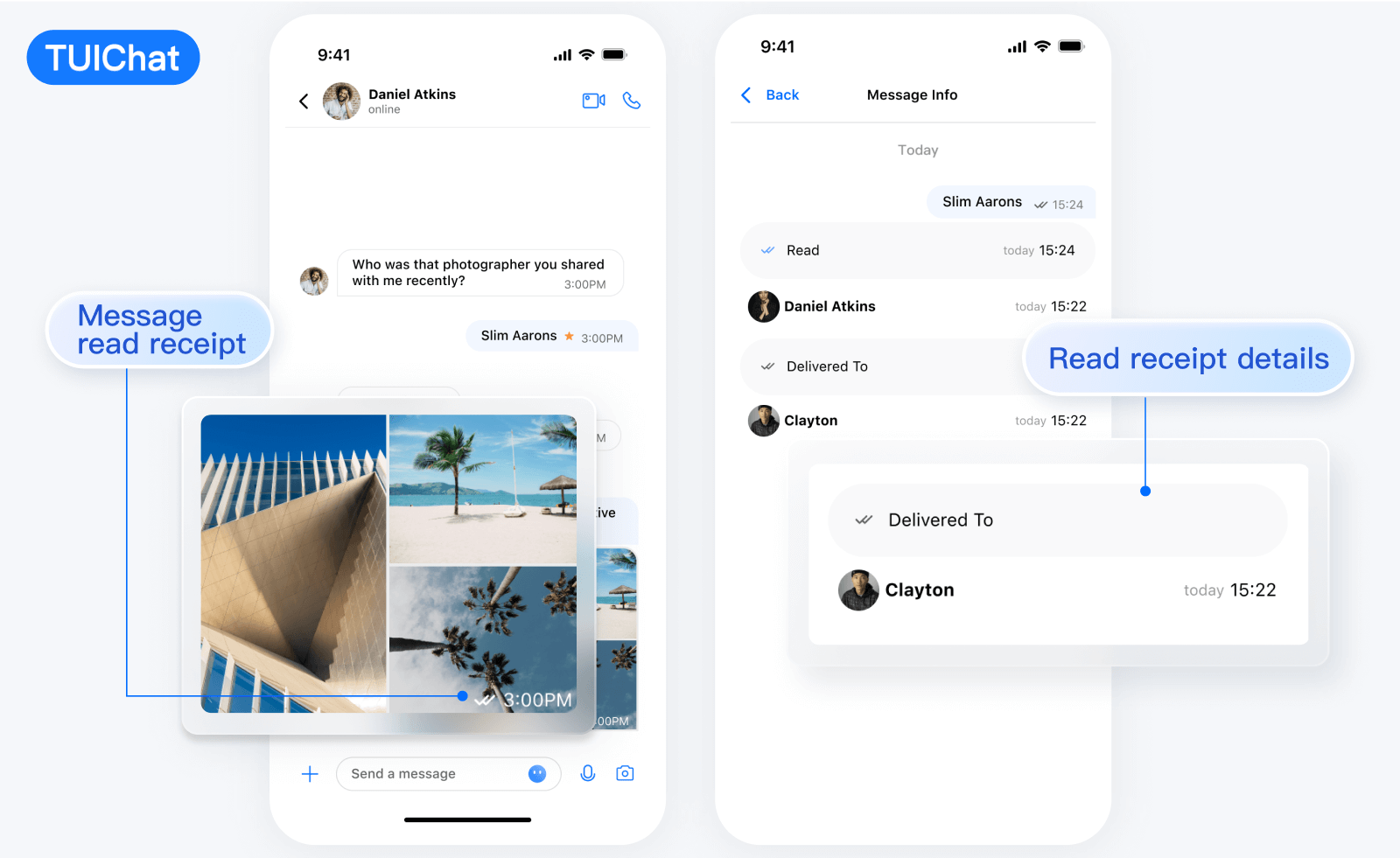</td>
|
|
83
|
+
</tr>
|
|
84
|
+
</table>
|
|
85
|
+
|
|
86
|
+
|
|
87
|
+
【RTL语言】
|
|
88
|
+
<table>
|
|
89
|
+
<tr>
|
|
90
|
+
<td rowspan="1" colSpan="1" >消息界面 \| 发送多种类型消息</td>
|
|
91
|
+
</tr>
|
|
92
|
+
|
|
93
|
+
<tr>
|
|
94
|
+
<td rowspan="1" colSpan="1" >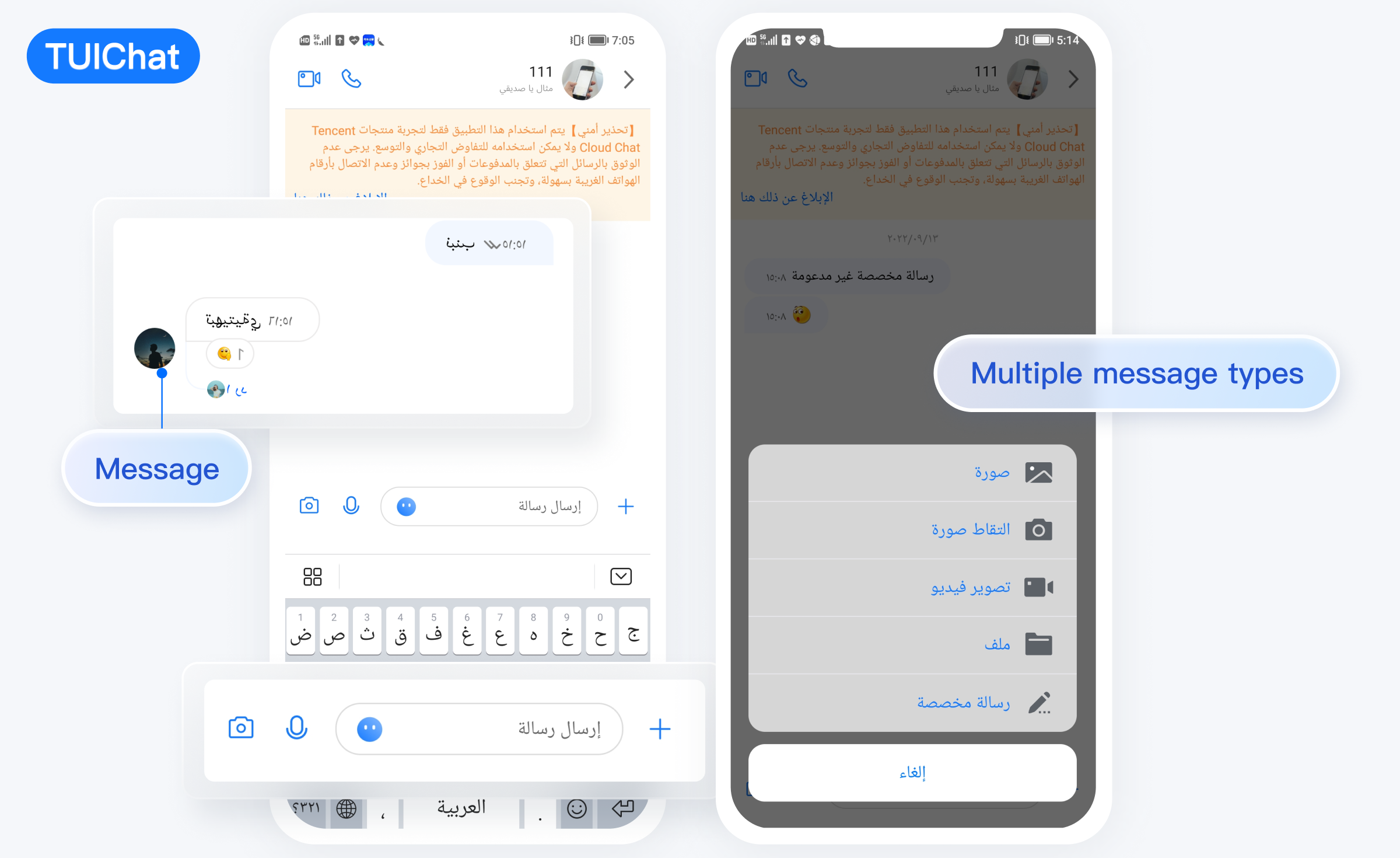</td>
|
|
95
|
+
</tr>
|
|
96
|
+
</table>
|
|
97
|
+
|
|
98
|
+
<table>
|
|
99
|
+
<tr>
|
|
100
|
+
<td rowspan="1" colSpan="1" >消息点赞 \| 回复 </td>
|
|
101
|
+
</tr>
|
|
102
|
+
|
|
103
|
+
<tr>
|
|
104
|
+
<td rowspan="1" colSpan="1" >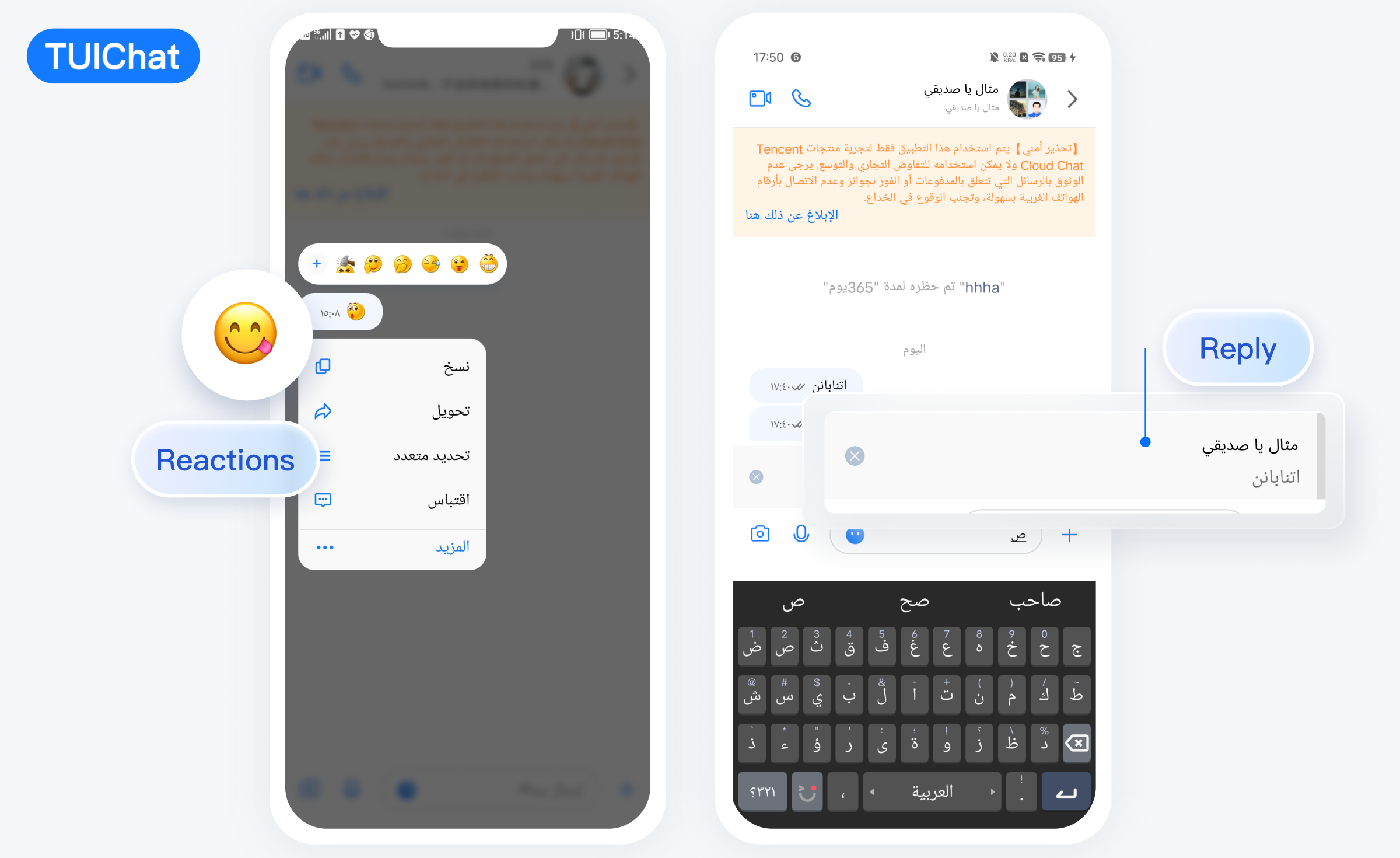</td>
|
|
105
|
+
</tr>
|
|
106
|
+
</table>
|
|
107
|
+
|
|
108
|
+
<table>
|
|
109
|
+
<tr>
|
|
110
|
+
<td rowspan="1" colSpan="1" >消息已读回执 \| 已读回执详情</td>
|
|
111
|
+
</tr>
|
|
112
|
+
|
|
113
|
+
<tr>
|
|
114
|
+
<td rowspan="1" colSpan="1" ></td>
|
|
115
|
+
</tr>
|
|
116
|
+
</table>
|
|
117
|
+
|
|
118
|
+
|
|
119
|
+
## 开发环境要求
|
|
120
|
+
- Android Studio-Giraffe
|
|
121
|
+
|
|
122
|
+
- Gradle-7.2
|
|
123
|
+
|
|
124
|
+
- Android Gradle Plugin Version-7.0.0
|
|
125
|
+
|
|
126
|
+
- kotlin-gradle-plugin-1.5.31
|
|
127
|
+
|
|
128
|
+
|
|
129
|
+
## 集成 TUIChat 源码
|
|
130
|
+
1. 从 GitHub 下载 [TUIKit 源码](https://github.com/TencentCloud/TIMSDK/tree/master/Android)。使 TUIKit 文件夹跟自己的工程文件夹同级,例如:
|
|
131
|
+
|
|
132
|
+
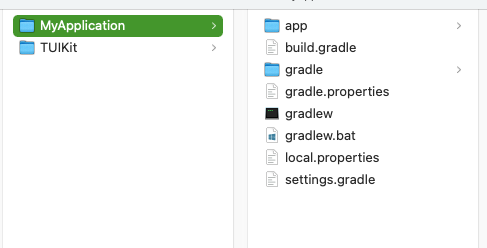
|
|
133
|
+
|
|
134
|
+
2. 在 settings.gradle 中添加 TUIChat 组件:
|
|
135
|
+
|
|
136
|
+
``` css
|
|
137
|
+
// 引入内部组件通信模块 (必要模块)
|
|
138
|
+
include ':tuicore'
|
|
139
|
+
project(':tuicore').projectDir = new File(settingsDir, '../TUIKit/TUICore/tuicore')
|
|
140
|
+
|
|
141
|
+
// 引入 IM 组件公共模块(必要模块)
|
|
142
|
+
include ':timcommon'
|
|
143
|
+
project(':timcommon').projectDir = new File(settingsDir, '../TUIKit/TIMCommon/timcommon')
|
|
144
|
+
|
|
145
|
+
// 引入聊天功能模块 (基础功能模块)
|
|
146
|
+
include ':tuichat'
|
|
147
|
+
project(':tuichat').projectDir = new File(settingsDir, '../TUIKit/TUIChat/tuichat')
|
|
148
|
+
```
|
|
149
|
+
3. 在 App 模块中添加 TUIChat 依赖:
|
|
150
|
+
|
|
151
|
+
``` css
|
|
152
|
+
api project(':tuichat')
|
|
153
|
+
```
|
|
154
|
+
4.
|
|
155
|
+
|
|
156
|
+
添加 maven 仓库 和 Kotlin 支持,在 root 工程的 build.gradle 文件(与 settings.gradle 同级)中添加:
|
|
157
|
+
|
|
158
|
+
``` java
|
|
159
|
+
buildscript {
|
|
160
|
+
repositories {
|
|
161
|
+
mavenCentral()
|
|
162
|
+
}
|
|
163
|
+
dependencies {
|
|
164
|
+
classpath 'com.android.tools.build:gradle:7.0.0'
|
|
165
|
+
classpath "org.jetbrains.kotlin:kotlin-gradle-plugin:1.5.31"
|
|
166
|
+
}
|
|
167
|
+
}
|
|
168
|
+
```
|
|
169
|
+
|
|
170
|
+
如果您使用 Gradle 8.x,则需要添加以下代码。
|
|
171
|
+
|
|
172
|
+
``` java
|
|
173
|
+
buildscript {
|
|
174
|
+
repositories {
|
|
175
|
+
mavenCentral()
|
|
176
|
+
maven { url "https://mirrors.tencent.com/nexus/repository/maven-public/" }
|
|
177
|
+
}
|
|
178
|
+
dependencies {
|
|
179
|
+
classpath 'com.android.tools.build:gradle:8.0.2'
|
|
180
|
+
classpath "org.jetbrains.kotlin:kotlin-gradle-plugin:1.9.0"
|
|
181
|
+
}
|
|
182
|
+
}
|
|
183
|
+
```
|
|
184
|
+
|
|
185
|
+
## 组件登录
|
|
186
|
+
|
|
187
|
+
TUIChat 组件登录成功之后才能正常使用聊天功能。
|
|
188
|
+
|
|
189
|
+
其中,sdkAppID 需要在 [即时通信 IM 控制台](https://console.cloud.tencent.com/im) 创建并获取,userSig 需要按规则计算,详细步骤请参见文档 [跑通 Demo - Android](https://cloud.tencent.com/document/product/269/36838)。
|
|
190
|
+
|
|
191
|
+
示例代码如下所示:
|
|
192
|
+
``` java
|
|
193
|
+
// 在用户 UI 点击登录的时候调用
|
|
194
|
+
TUILogin.login(context, sdkAppID, userID, userSig, new TUICallback() {
|
|
195
|
+
@Override
|
|
196
|
+
public void onSuccess() {
|
|
197
|
+
}
|
|
198
|
+
|
|
199
|
+
@Override
|
|
200
|
+
public void onError(final int code, final String desc) {
|
|
201
|
+
}
|
|
202
|
+
});
|
|
203
|
+
```
|
|
204
|
+
|
|
205
|
+
## 跳转到聊天窗口 Activity
|
|
206
|
+
|
|
207
|
+
您可以传入当前聊天界面对应的聊天信息,启动 Activity,跳转到聊天界面。
|
|
208
|
+
|
|
209
|
+
示例代码如下所示:
|
|
210
|
+
|
|
211
|
+
|
|
212
|
+
|
|
213
|
+
【经典版】
|
|
214
|
+
``` java
|
|
215
|
+
Intent intent;
|
|
216
|
+
if (isGroup) {
|
|
217
|
+
intent = new Intent(this, TUIGroupChatActivity.class);
|
|
218
|
+
} else {
|
|
219
|
+
intent = new Intent(this, TUIC2CChatActivity.class);
|
|
220
|
+
}
|
|
221
|
+
// 如果是 C2C 聊天,chatID 是对方的 UserID,如果是 Group 聊天,chatID 是 GroupID
|
|
222
|
+
intent.putExtra(TUIConstants.TUIChat.CHAT_ID, "chatID");
|
|
223
|
+
intent.putExtra(TUIConstants.TUIChat.CHAT_TYPE, isGroup ? V2TIMConversation.V2TIM_GROUP : V2TIMConversation.V2TIM_C2C);
|
|
224
|
+
startActivity(intent);
|
|
225
|
+
```
|
|
226
|
+
|
|
227
|
+
【简约版】
|
|
228
|
+
``` java
|
|
229
|
+
Intent intent;
|
|
230
|
+
if (isGroup) {
|
|
231
|
+
intent = new Intent(this, TUIGroupChatMinimalistActivity.class);
|
|
232
|
+
} else {
|
|
233
|
+
intent = new Intent(this, TUIC2CChatMinimalistActivity.class);
|
|
234
|
+
}
|
|
235
|
+
// 如果是 C2C 聊天,chatID 是对方的 UserID,如果是 Group 聊天,chatID 是 GroupID
|
|
236
|
+
intent.putExtra(TUIConstants.TUIChat.CHAT_ID, "chatID");
|
|
237
|
+
intent.putExtra(TUIConstants.TUIChat.CHAT_TYPE, isGroup ? V2TIMConversation.V2TIM_GROUP : V2TIMConversation.V2TIM_C2C);
|
|
238
|
+
startActivity(intent);
|
|
239
|
+
```
|
|
240
|
+
|
|
241
|
+
## 集成聊天窗口到自己的 Activity
|
|
242
|
+
|
|
243
|
+
您也可以将 TUIChat 聊天界面,嵌入到自己的 Activity 中。
|
|
244
|
+
|
|
245
|
+
示例代码如下所示:
|
|
246
|
+
|
|
247
|
+
|
|
248
|
+
|
|
249
|
+
【经典版】
|
|
250
|
+
``` java
|
|
251
|
+
Fragment fragment;
|
|
252
|
+
// 如果是 C2C 聊天,chatID 是对方的 UserID,如果是 Group 聊天,chatID 是 GroupID
|
|
253
|
+
if (isGroup) {
|
|
254
|
+
GroupChatInfo groupChatInfo = new GroupChatInfo();
|
|
255
|
+
groupChatInfo.setId(chatID);
|
|
256
|
+
TUIGroupChatFragment tuiGroupChatFragment = new TUIGroupChatFragment();
|
|
257
|
+
tuiGroupChatFragment.setChatInfo(groupChatInfo);
|
|
258
|
+
fragment = tuiGroupChatFragment;
|
|
259
|
+
} else {
|
|
260
|
+
C2CChatInfo c2cChatInfo = new C2CChatInfo();
|
|
261
|
+
c2cChatInfo.setId(chatID);
|
|
262
|
+
TUIC2CChatFragment tuic2CChatFragment = new TUIC2CChatFragment();
|
|
263
|
+
tuic2CChatFragment.setChatInfo(c2cChatInfo);
|
|
264
|
+
fragment = tuic2CChatFragment;
|
|
265
|
+
}
|
|
266
|
+
getSupportFragmentManager().beginTransaction()
|
|
267
|
+
.add(R.id.chat_fragment_container, fragment).commitAllowingStateLoss();
|
|
268
|
+
```
|
|
269
|
+
|
|
270
|
+
【简约版】
|
|
271
|
+
``` java
|
|
272
|
+
Fragment fragment;
|
|
273
|
+
// 如果是 C2C 聊天,chatID 是对方的 UserID,如果是 Group 聊天,chatID 是 GroupID
|
|
274
|
+
if (isGroup) {
|
|
275
|
+
GroupChatInfo groupChatInfo = new GroupChatInfo();
|
|
276
|
+
groupChatInfo.setId(chatID);
|
|
277
|
+
TUIGroupChatMinimalistFragment tuiGroupChatFragment = new TUIGroupChatMinimalistFragment();
|
|
278
|
+
tuiGroupChatFragment.setChatInfo(groupChatInfo);
|
|
279
|
+
fragment = tuiGroupChatFragment;
|
|
280
|
+
} else {
|
|
281
|
+
C2CChatInfo c2cChatInfo = new C2CChatInfo();
|
|
282
|
+
c2cChatInfo.setId(chatID);
|
|
283
|
+
TUIC2CChatMinimalistFragment tuic2CChatFragment = new TUIC2CChatMinimalistFragment();
|
|
284
|
+
tuic2CChatFragment.setChatInfo(c2cChatInfo);
|
|
285
|
+
fragment = tuic2CChatFragment;
|
|
286
|
+
}
|
|
287
|
+
getSupportFragmentManager().beginTransaction()
|
|
288
|
+
.add(R.id.chat_fragment_container, fragment).commitAllowingStateLoss();
|
|
289
|
+
```
|
|
290
|
+
|
|
291
|
+
## 常见问题
|
|
292
|
+
- **提示 "Manifest merger failed : Attribute application@allowBackup value=(true) from AndroidManifest.xml" 如何处理?**
|
|
293
|
+
|
|
294
|
+
|
|
295
|
+
IM SDK 中默认 `allowBackup` 的值为 `false` ,表示关闭应用的备份和恢复功能。
|
|
296
|
+
您可以在您的 `AndroidManifest.xml` 文件中删除 `allowBackup` 属性,表示关闭备份和恢复功能;也可以在 `AndroidManifest.xml` 文件的 application 节点中添加 `tools:replace="android:allowBackup"` 表示覆盖 IM SDK 的设置,使用您自己的设置。
|
|
297
|
+
|
|
298
|
+
|
|
299
|
+
例如:
|
|
300
|
+
|
|
301
|
+
``` xml
|
|
302
|
+
<manifest xmlns:android="http://schemas.android.com/apk/res/android"
|
|
303
|
+
xmlns:tools="http://schemas.android.com/tools"
|
|
304
|
+
package="com.tencent.qcloud.tuikit.myapplication">
|
|
305
|
+
|
|
306
|
+
<application
|
|
307
|
+
android:allowBackup="true"
|
|
308
|
+
android:name=".MApplication"
|
|
309
|
+
android:icon="@mipmap/ic_launcher"
|
|
310
|
+
android:label="@string/app_name"
|
|
311
|
+
android:roundIcon="@mipmap/ic_launcher_round"
|
|
312
|
+
android:supportsRtl="true"
|
|
313
|
+
android:theme="@style/Theme.MyApplication"
|
|
314
|
+
tools:replace="android:allowBackup">
|
|
315
|
+
<activity android:name=".MainActivity">
|
|
316
|
+
<intent-filter>
|
|
317
|
+
<action android:name="android.intent.action.MAIN" />
|
|
318
|
+
|
|
319
|
+
<category android:name="android.intent.category.LAUNCHER" />
|
|
320
|
+
</intent-filter>
|
|
321
|
+
</activity>
|
|
322
|
+
</application>
|
|
323
|
+
|
|
324
|
+
</manifest>
|
|
325
|
+
```
|
|
326
|
+
- **提示 "NDK at /Users/***/Library/Android/sdk/ndk-bundle did not have a source.properties file" 如何处理?**
|
|
327
|
+
|
|
328
|
+
|
|
329
|
+
只需要在 local.properties 文件中加入您的 NDK 路径,例如:
|
|
330
|
+
`ndk.dir=/Users/***/Library/Android/sdk/ndk/16.1.4479499`
|
|
331
|
+
|
|
332
|
+
- **提示 "Cannot fit requested classes in a single dex file" 如何处理?**
|
|
333
|
+
|
|
334
|
+
|
|
335
|
+
出现此问题可能是您的 API 级别设置比较低,需要在 App 的 build.gradle 文件中开启 `MultiDex` 支持, 添加 `multiDexEnabled true` 和对应依赖:
|
|
336
|
+
|
|
337
|
+
``` groovy
|
|
338
|
+
android {
|
|
339
|
+
defaultConfig {
|
|
340
|
+
...
|
|
341
|
+
minSdkVersion 19
|
|
342
|
+
targetSdkVersion 30
|
|
343
|
+
multiDexEnabled true
|
|
344
|
+
}
|
|
345
|
+
...
|
|
346
|
+
}
|
|
347
|
+
dependencies {
|
|
348
|
+
implementation "androidx.multidex:multidex:2.0.1"
|
|
349
|
+
}
|
|
350
|
+
```
|
|
351
|
+
|
|
352
|
+
同时,在您的 Application 文件中添加以下代码:
|
|
353
|
+
|
|
354
|
+
``` java
|
|
355
|
+
public class MyApplication extends SomeOtherApplication {
|
|
356
|
+
@Override
|
|
357
|
+
protected void attachBaseContext(Context base) {
|
|
358
|
+
super.attachBaseContext(base);
|
|
359
|
+
MultiDex.install(this);
|
|
360
|
+
}
|
|
361
|
+
}
|
|
362
|
+
```
|
|
363
|
+
- **提示 "Plugin with id 'kotlin-android' not found." 如何处理?**
|
|
364
|
+
|
|
365
|
+
|
|
366
|
+
因为 `TUIChat` 组件使用了 Kotlin 代码,所以需要添加 Kotlin 构建插件。请参考 [集成 TUIChat 源码第 4 步](https://write.woa.com/document/141390073883967488)。
|
|
367
|
+
|
|
368
|
+
- **Debug 版本的 App 功能正常,Release 版本的 App 功能出现异常 ?**
|
|
369
|
+
|
|
370
|
+
|
|
371
|
+
出现此问题很大概率是混淆导致的,请尽量不要混淆 TUIKit 。可以添加如下混淆规则:
|
|
372
|
+
|
|
373
|
+
``` typescript
|
|
374
|
+
# 避免删除代码逻辑
|
|
375
|
+
-dontshrink
|
|
376
|
+
-dontoptimize
|
|
377
|
+
# 避免混淆 TUIKit
|
|
378
|
+
-keep class com.tencent.qcloud.** { *; }
|
|
379
|
+
```
|
|
380
|
+
|
|
381
|
+
|
|
382
|
+
|