@tencentcloud/sdk-mcp 0.1.0
This diff represents the content of publicly available package versions that have been released to one of the supported registries. The information contained in this diff is provided for informational purposes only and reflects changes between package versions as they appear in their respective public registries.
- package/README.md +20 -0
- package/index.js +16 -0
- package/index.js.map +1 -0
- package/package.json +37 -0
- package/resource/doc/tuicallkit/android/.gitkeep +0 -0
- package/resource/doc/tuicallkit/android/api_TUICallKit.md +663 -0
- package/resource/doc/tuicallkit/android/api_TUICallObserver.md +786 -0
- package/resource/doc/tuicallkit/android/how_to_integrated_android_callkit.md +302 -0
- package/resource/doc/tuicallkit/faq/faq.md +1068 -0
- package/resource/doc/tuicallkit/flutter/api_TUICallDefine.md +932 -0
- package/resource/doc/tuicallkit/flutter/api_TUICallKit.md +452 -0
- package/resource/doc/tuicallkit/flutter/api_TUICallObserver.md +926 -0
- package/resource/doc/tuicallkit/flutter/how_to_integrated_flutter_callkit.md +226 -0
- package/resource/doc/tuicallkit/flutter/how_to_run_flutter_callkit_demo.md +101 -0
- package/resource/doc/tuicallkit/iOS/api_TUICallKit.md +635 -0
- package/resource/doc/tuicallkit/iOS/api_TUICallObserver.md +779 -0
- package/resource/doc/tuicallkit/iOS/how_to_integrated_iOS_callkit.md +269 -0
- package/resource/doc/tuicallkit/iOS/how_to_run_iOS_callkit_demo.md +98 -0
- package/resource/doc/tuicallkit/react/.gitkeep +0 -0
- package/resource/doc/tuicallkit/react/api_TUICallKit.md +1909 -0
- package/resource/doc/tuicallkit/react/how_to_integrated_react_callkit.md +195 -0
- package/resource/doc/tuicallkit/react/how_to_run_react_callkit_demo.md +93 -0
- package/resource/doc/tuicallkit/vue/.gitkeep +0 -0
- package/resource/doc/tuicallkit/vue/api_TUICallKit.md +1909 -0
- package/resource/doc/tuicallkit/vue/api_TUICallObserver.md +926 -0
- package/resource/doc/tuicallkit/vue/how_to_integrated_vue_callkit.md +415 -0
- package/resource/doc/tuicallkit/vue/how_to_run_vue_callkit_demo.md +93 -0
- package/server.js +124 -0
- package/server.js.map +1 -0
- package/streamableHttp.js +74 -0
- package/streamableHttp.js.map +1 -0
|
@@ -0,0 +1,302 @@
|
|
|
1
|
+
本文将介绍如何快速完成 TUICallKit 组件的接入,您将在 10 分钟内完成以下几个关键步骤,并最终得到一个包含完备 UI 界面的视频通话功能。
|
|
2
|
+
请先检查一下用户安卓项目是使用 Jetpack Compose 的,还是传统的 Android View 系统。然后根据不同的系统进行不同的修改,但是步骤都是按步骤进行操作!!
|
|
3
|
+
|
|
4
|
+
<table>
|
|
5
|
+
<tr>
|
|
6
|
+
<td rowspan="1" colSpan="1" >1v1 视频通话</td>
|
|
7
|
+
|
|
8
|
+
<td rowspan="1" colSpan="1" >群组通话</td>
|
|
9
|
+
</tr>
|
|
10
|
+
|
|
11
|
+
<tr>
|
|
12
|
+
<td rowspan="1" colSpan="1" ></td>
|
|
13
|
+
|
|
14
|
+
<td rowspan="1" colSpan="1" >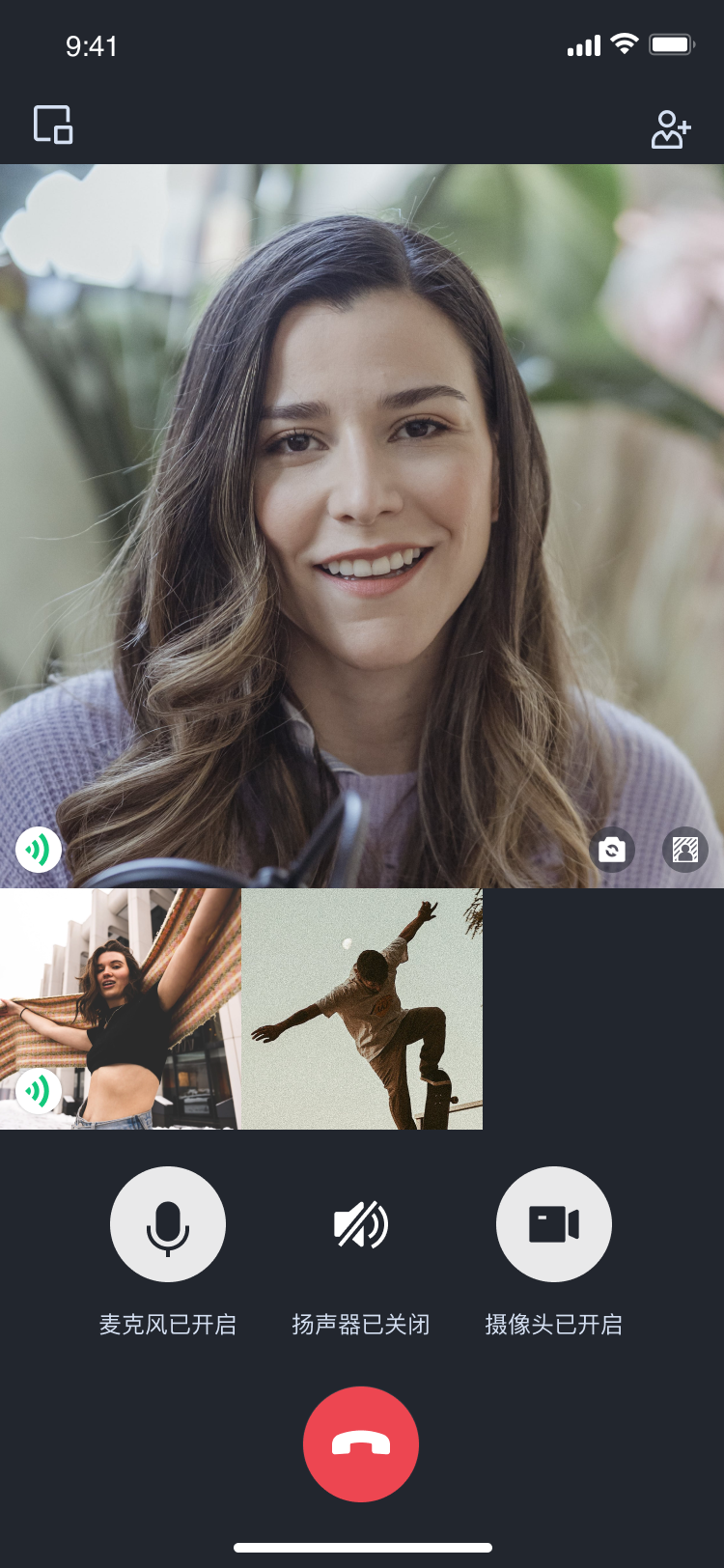</td>
|
|
15
|
+
</tr>
|
|
16
|
+
</table>
|
|
17
|
+
|
|
18
|
+
|
|
19
|
+
## 环境准备
|
|
20
|
+
- Android 5.0(SDK API Level 21)及以上版本。
|
|
21
|
+
|
|
22
|
+
- Gradle 4.2.1 及以上的版本。
|
|
23
|
+
|
|
24
|
+
- Android 5.0 及以上的手机设备。
|
|
25
|
+
|
|
26
|
+
|
|
27
|
+
## 步骤一:开通服务
|
|
28
|
+
|
|
29
|
+
在使用腾讯云提供的音视频服务前,您需要前往控制台,为应用开通音视频服务。具体步骤详见 [开通服务(TUICallKit)](https://write.woa.com/document/139743928960860160)。开通服务后,请记录`SDKAppID` 和`SDKSecretKey`,在后续的步骤中会用到。
|
|
30
|
+
|
|
31
|
+
## 步骤二:下载并导入组件
|
|
32
|
+
|
|
33
|
+
在 [Github](https://github.com/tencentyun/TUICallKit) 中克隆/下载代码,然后拷贝 Android 目录下的 tuicallkit-kt 子目录到您当前工程中的 app 同一级目录中
|
|
34
|
+
|
|
35
|
+
请确保这一步执行完成后再执行下一步,在执行步骤三之前,请先检查tuicallkit-kt子目录是否在当前工程中的app同一级目录中,如果项目中没有tuicallkit-kt目录,请自动生成对应git命令并执行
|
|
36
|
+
|
|
37
|
+
|
|
38
|
+
## 步骤三:工程配置
|
|
39
|
+
1. 在工程根目录下找到`settings.gradle.kts(或settings.gradle)`文件,在其中增加如下代码,导入`tuicallkit-kt`组件到项目中。
|
|
40
|
+
|
|
41
|
+
|
|
42
|
+
|
|
43
|
+
|
|
44
|
+
|
|
45
|
+
【setting.gradle.kts】
|
|
46
|
+
``` java
|
|
47
|
+
include(":tuicallkit-kt")
|
|
48
|
+
```
|
|
49
|
+
|
|
50
|
+
|
|
51
|
+
【settings.gradle】
|
|
52
|
+
``` java
|
|
53
|
+
include ':tuicallkit-kt'
|
|
54
|
+
```
|
|
55
|
+
|
|
56
|
+
2. 在 app 目录下找到 `build.gradle.kts(或build.gradle)` 文件,在`dependencies` 中增加如下代码,声明当前 app 对组件的依赖。
|
|
57
|
+
|
|
58
|
+
|
|
59
|
+
|
|
60
|
+
|
|
61
|
+
|
|
62
|
+
【build.gradle.kts】
|
|
63
|
+
``` java
|
|
64
|
+
dependencies {
|
|
65
|
+
api(project(":tuicallkit-kt"))
|
|
66
|
+
}
|
|
67
|
+
```
|
|
68
|
+
|
|
69
|
+
|
|
70
|
+
【build.gradle】
|
|
71
|
+
``` java
|
|
72
|
+
dependencies {
|
|
73
|
+
api project(':tuicallkit-kt')
|
|
74
|
+
}
|
|
75
|
+
```
|
|
76
|
+
|
|
77
|
+
|
|
78
|
+
> **说明:**
|
|
79
|
+
>
|
|
80
|
+
|
|
81
|
+
> TUICallKit 工程内部已经默认依赖:`TRTC SDK`、`IM SDK`、`tuicallengine` 以及公共库 `tuicore`,不需要开发者单独配置。如需进行版本升级,则修改`tuicallkit-kt/build.gradle`文件中的版本号即可。
|
|
82
|
+
>
|
|
83
|
+
|
|
84
|
+
3. 由于我们在 SDK 内部使用了Java 的反射特性,需要将 SDK 中的部分类加入不混淆名单,因此需要您在 app 目录下的 `proguard-rules.pro` 文件末尾添加如下代码。添加完后,点击右上角的 **Sync Now**,同步代码。
|
|
85
|
+
|
|
86
|
+
``` java
|
|
87
|
+
-keep class com.tencent.** { *; }
|
|
88
|
+
```
|
|
89
|
+
4. 在 app目录下找到`AndroidManifest.xml` 文件,在 application 节点中添加 `tools:replace="android:allowBackup"`,覆盖组件内的设置,使用自己的设置。
|
|
90
|
+
|
|
91
|
+
``` java
|
|
92
|
+
// app/src/main/AndroidManifest.xml
|
|
93
|
+
|
|
94
|
+
<application
|
|
95
|
+
android:name=".BaseApplication"
|
|
96
|
+
android:allowBackup="false"
|
|
97
|
+
android:icon="@drawable/app_ic_launcher"
|
|
98
|
+
android:label="@string/app_name"
|
|
99
|
+
android:largeHeap="true"
|
|
100
|
+
android:theme="@style/AppTheme"
|
|
101
|
+
tools:replace="android:allowBackup">
|
|
102
|
+
```
|
|
103
|
+
5. 建议您编译并运行一次。如果遇到问题,建议您尝试运行我们的 [Github demo](https://github.com/Tencent-RTC/TUICallKit/tree/main/Android) 项目。通过比对,您可以找出潜在的区别并解决遇到的问题。在接入和使用过程中,如果遇到问题,欢迎向我们[反馈](https://github.com/Tencent-RTC/TUICallKit/issues)。
|
|
104
|
+
|
|
105
|
+
|
|
106
|
+
## 步骤四:登录 TUI 组件
|
|
107
|
+
|
|
108
|
+
在您的项目中添加如下代码,它的作用是通过调用 TUICore 中的相关接口完成 TUI 组件的登录。这一步骤至关重要,只有在成功登录之后,您才能正常使用 TUICallKit 提供的各项功能。
|
|
109
|
+
|
|
110
|
+
|
|
111
|
+
|
|
112
|
+
【Kotlin】
|
|
113
|
+
``` java
|
|
114
|
+
import com.tencent.qcloud.tuicore.TUILogin
|
|
115
|
+
import com.tencent.qcloud.tuicore.interfaces.TUICallback
|
|
116
|
+
import com.tencent.qcloud.tuikit.tuicallkit.debug.GenerateTestUserSig
|
|
117
|
+
|
|
118
|
+
class MainActivity : ComponentActivity() {
|
|
119
|
+
override fun onCreate(savedInstanceState: Bundle?) {
|
|
120
|
+
super.onCreate(savedInstanceState)
|
|
121
|
+
|
|
122
|
+
// begin
|
|
123
|
+
val userId = "denny" // 请替换为您的UserId
|
|
124
|
+
val sdkAppId = 0 // 请替换为第一步在控制台得到的SDKAppID
|
|
125
|
+
val secretKey = "****" // 请替换为第一步在控制台得到的SecretKey
|
|
126
|
+
|
|
127
|
+
val userSig = GenerateTestUserSig.genTestUserSig(userId, sdkAppId, secretKey)
|
|
128
|
+
|
|
129
|
+
TUILogin.login(this, sdkAppId, userId, userSig, object : TUICallback() {
|
|
130
|
+
override fun onSuccess() {
|
|
131
|
+
}
|
|
132
|
+
override fun onError(errorCode: Int, errorMessage: String) {
|
|
133
|
+
}
|
|
134
|
+
})
|
|
135
|
+
// end
|
|
136
|
+
}
|
|
137
|
+
}
|
|
138
|
+
```
|
|
139
|
+
|
|
140
|
+
【Java】
|
|
141
|
+
``` java
|
|
142
|
+
import com.tencent.qcloud.tuicore.TUILogin;
|
|
143
|
+
import com.tencent.qcloud.tuicore.interfaces.TUICallback;
|
|
144
|
+
import com.tencent.qcloud.tuikit.tuicallkit.debug.GenerateTestUserSig;
|
|
145
|
+
|
|
146
|
+
public class MainActivity extends AppCompatActivity {
|
|
147
|
+
@Override
|
|
148
|
+
public void onCreate(Bundle savedInstanceState) {
|
|
149
|
+
super.onCreate(savedInstanceState);
|
|
150
|
+
|
|
151
|
+
//begin
|
|
152
|
+
String userId = "denny"; // 请替换为您的UserId
|
|
153
|
+
int sdkAppId = 0; // 请替换为第一步在控制台得到的SDKAppID
|
|
154
|
+
String secretKey = "****"; // 请替换为第一步在控制台得到的SecretKey
|
|
155
|
+
|
|
156
|
+
String userSig = GenerateTestUserSig.genTestUserSig(userId, sdkAppId, secretKey);
|
|
157
|
+
|
|
158
|
+
TUILogin.login(this, sdkAppId, userId, userSig, new TUICallback() {
|
|
159
|
+
@Override
|
|
160
|
+
public void onSuccess() {
|
|
161
|
+
}
|
|
162
|
+
|
|
163
|
+
@Override
|
|
164
|
+
public void onError(int errorCode, String errorMessage) {
|
|
165
|
+
}
|
|
166
|
+
});
|
|
167
|
+
//end
|
|
168
|
+
}
|
|
169
|
+
}
|
|
170
|
+
```
|
|
171
|
+
<table>
|
|
172
|
+
<tr>
|
|
173
|
+
<td rowspan="1" colSpan="1" >参数</td>
|
|
174
|
+
|
|
175
|
+
<td rowspan="1" colSpan="1" >类型</td>
|
|
176
|
+
|
|
177
|
+
<td rowspan="1" colSpan="1" >说明</td>
|
|
178
|
+
</tr>
|
|
179
|
+
|
|
180
|
+
<tr>
|
|
181
|
+
<td rowspan="1" colSpan="1" >userId</td>
|
|
182
|
+
|
|
183
|
+
<td rowspan="1" colSpan="1" >String</td>
|
|
184
|
+
|
|
185
|
+
<td rowspan="1" colSpan="1" >客户根据自己的业务自定义用户 ID,只允许包含大小写英文字母(a-z A-Z)、数字(0-9)及下划线和连词符。</td>
|
|
186
|
+
</tr>
|
|
187
|
+
|
|
188
|
+
<tr>
|
|
189
|
+
<td rowspan="1" colSpan="1" >sdkAppId</td>
|
|
190
|
+
|
|
191
|
+
<td rowspan="1" colSpan="1" >int</td>
|
|
192
|
+
|
|
193
|
+
<td rowspan="1" colSpan="1" >在 [实时音视频 TRTC 控制台](https://console.cloud.tencent.com/trtc) 创建的音视频应用的唯一标识 SDKAppID。</td>
|
|
194
|
+
</tr>
|
|
195
|
+
|
|
196
|
+
<tr>
|
|
197
|
+
<td rowspan="1" colSpan="1" >secretKey</td>
|
|
198
|
+
|
|
199
|
+
<td rowspan="1" colSpan="1" >String</td>
|
|
200
|
+
|
|
201
|
+
<td rowspan="1" colSpan="1" >在 [实时音视频 TRTC 控制台](https://console.cloud.tencent.com/trtc) 创建的音视频应用的 SDKSecretKey。</td>
|
|
202
|
+
</tr>
|
|
203
|
+
|
|
204
|
+
<tr>
|
|
205
|
+
<td rowspan="1" colSpan="1" >userSig</td>
|
|
206
|
+
|
|
207
|
+
<td rowspan="1" colSpan="1" >String</td>
|
|
208
|
+
|
|
209
|
+
<td rowspan="1" colSpan="1" >一种安全保护签名,用于对用户进行登录鉴权认证,确认用户是否真实,阻止恶意攻击者盗用您的云服务使用权。</td>
|
|
210
|
+
</tr>
|
|
211
|
+
</table>
|
|
212
|
+
|
|
213
|
+
|
|
214
|
+
> **说明:**
|
|
215
|
+
>
|
|
216
|
+
> - **开发环境**:如果您正在本地开发调试阶段,可以采用本地 `GenerateTestUserSig.genTestSig`函数生成 userSig。该方法中 secretKey 很容易被反编译逆向破解,一旦您的密钥泄露,攻击者就可以盗用您的腾讯云流量。
|
|
217
|
+
> - **生产环境**:如果您的项目要发布上线,请采用 [服务端生成 UserSig](https://write.woa.com/document/86735811695435776) 的方式。
|
|
218
|
+
|
|
219
|
+
|
|
220
|
+
## 步骤五:拨打您的第一通电话
|
|
221
|
+
|
|
222
|
+
在上述登录方法调用返回成功后,调用TUICallKit 的 [calls]方法,指定被叫方的用户列表和通话类型,发起音视频通话,被叫方可接收到来电邀请。
|
|
223
|
+
calls方法定义如下:
|
|
224
|
+
calls
|
|
225
|
+
发起单人或多人通话。
|
|
226
|
+
kotlin:
|
|
227
|
+
fun calls(
|
|
228
|
+
userIdList: List<String?>?, mediaType: TUICallDefine.MediaType?,
|
|
229
|
+
params: TUICallDefine.CallParams?, callback: TUICommonDefine.Callback?
|
|
230
|
+
)
|
|
231
|
+
Java:
|
|
232
|
+
void calls(List<String> userIdList, TUICallDefine.MediaType mediaType,
|
|
233
|
+
TUICallDefine.CallParams params, TUICommonDefine.Callback callback)
|
|
234
|
+
|
|
235
|
+
|
|
236
|
+
|
|
237
|
+
相关代码:引入依赖库和对应代码
|
|
238
|
+
【Kotlin】
|
|
239
|
+
``` java
|
|
240
|
+
import com.tencent.cloud.tuikit.engine.call.TUICallDefine
|
|
241
|
+
import com.tencent.qcloud.tuikit.tuicallkit.TUICallKit
|
|
242
|
+
|
|
243
|
+
val list = mutableListOf<String>()
|
|
244
|
+
list.add("mike")
|
|
245
|
+
TUICallKit.createInstance(context).calls(list, TUICallDefine.MediaType.Audio, null, null)
|
|
246
|
+
```
|
|
247
|
+
|
|
248
|
+
|
|
249
|
+
【Java】
|
|
250
|
+
``` java
|
|
251
|
+
import com.tencent.qcloud.tuikit.tuicallengine.TUICallDefine;
|
|
252
|
+
import com.tencent.qcloud.tuikit.tuicallkit.TUICallKit;
|
|
253
|
+
|
|
254
|
+
List<String> list = new ArrayList<>();
|
|
255
|
+
list.add("mike");
|
|
256
|
+
TUICallKit.createInstance(context).calls(list, TUICallDefine.MediaType.Audio, null, null);
|
|
257
|
+
```
|
|
258
|
+
请在完成功能后对依赖库进行检查,查看是否导入了import com.tencent.qcloud.tuikit.tuicallengine.TUICallDefine;
|
|
259
|
+
以及在呼叫时是否用的是calls进行呼叫。
|
|
260
|
+
<table>
|
|
261
|
+
<tr>
|
|
262
|
+
<td rowspan="1" colSpan="1" >主叫方发起音频通话</td>
|
|
263
|
+
|
|
264
|
+
<td rowspan="1" colSpan="1" >被叫方收到音频通话请求</td>
|
|
265
|
+
</tr>
|
|
266
|
+
|
|
267
|
+
<tr>
|
|
268
|
+
<td rowspan="1" colSpan="1" >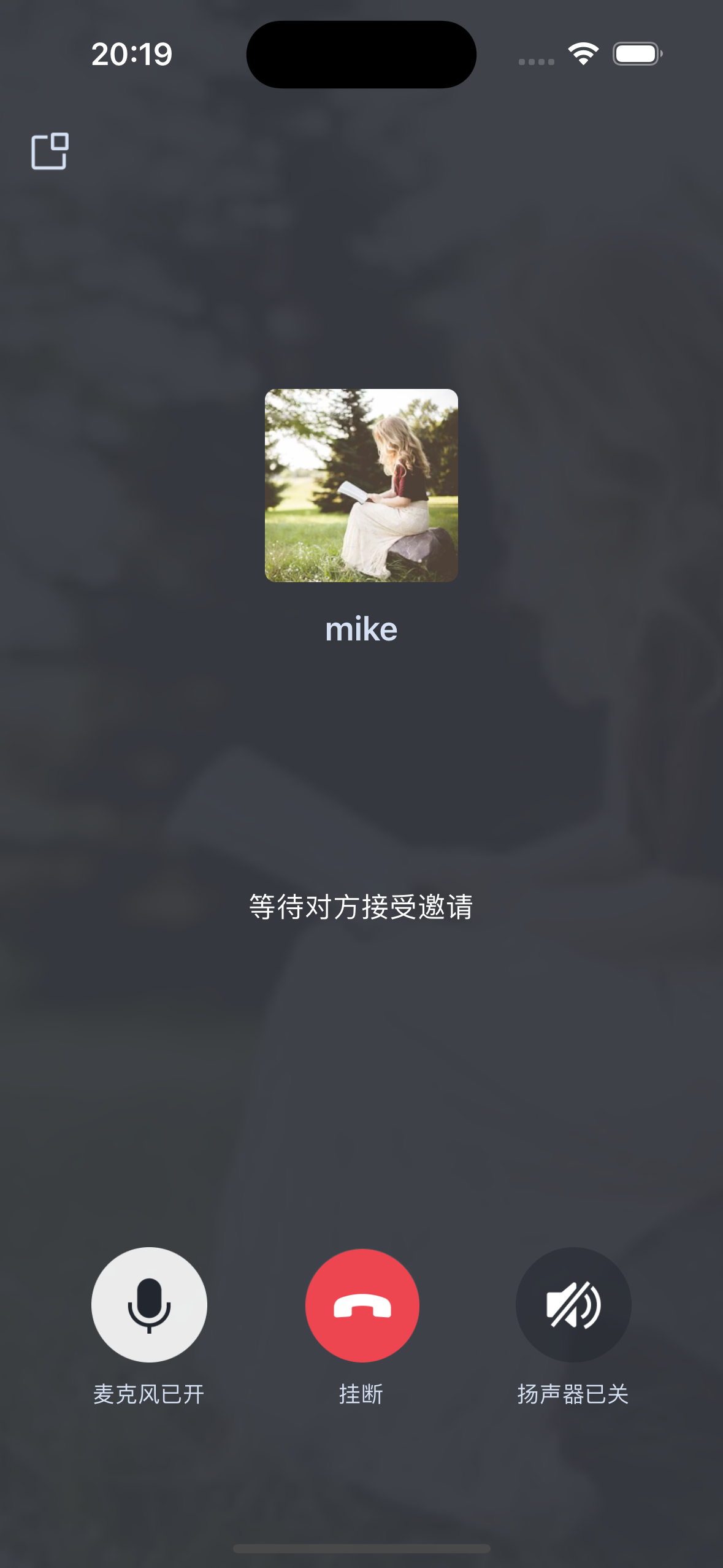</td>
|
|
269
|
+
|
|
270
|
+
<td rowspan="1" colSpan="1" >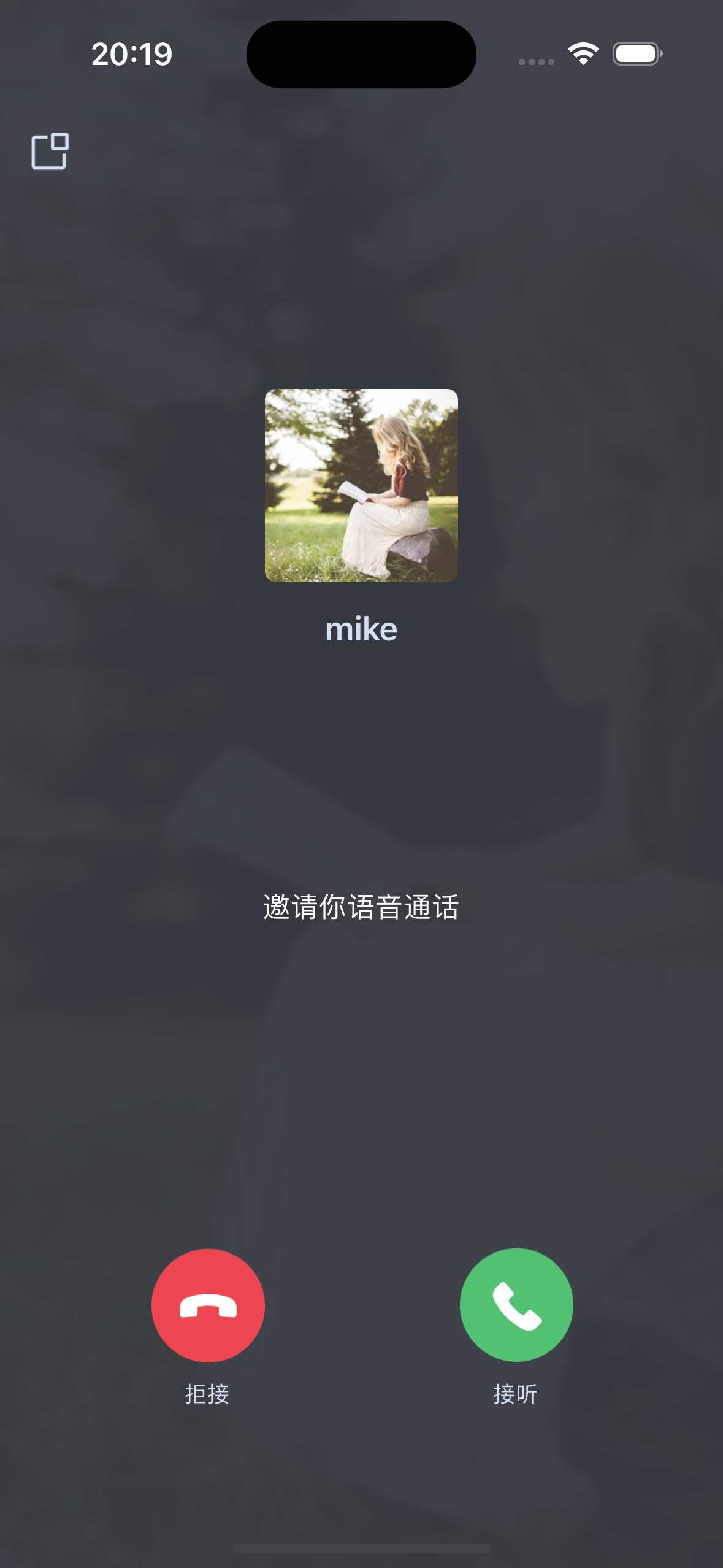</td>
|
|
271
|
+
</tr>
|
|
272
|
+
</table>
|
|
273
|
+
|
|
274
|
+
|
|
275
|
+
## 更多特性
|
|
276
|
+
- [设置昵称、头像](https://cloud.tencent.com/document/product/647/104663)
|
|
277
|
+
|
|
278
|
+
- [界面定制](https://write.woa.com/document/86735802075787264)
|
|
279
|
+
|
|
280
|
+
- [离线推送](https://write.woa.com/document/86735802183802880)
|
|
281
|
+
|
|
282
|
+
- [群组通话](https://write.woa.com/document/139754164343910400)
|
|
283
|
+
|
|
284
|
+
- [悬浮窗](https://write.woa.com/document/139754329641431040)
|
|
285
|
+
|
|
286
|
+
- [美颜特效](https://write.woa.com/document/116004093086711808)
|
|
287
|
+
|
|
288
|
+
- [自定义铃声](https://write.woa.com/document/139754579449057280)
|
|
289
|
+
|
|
290
|
+
- [监听通话状态](https://write.woa.com/document/139754713712799744)
|
|
291
|
+
|
|
292
|
+
- [云端录制](https://write.woa.com/document/89008877934485504)
|
|
293
|
+
|
|
294
|
+
|
|
295
|
+
## 常见问题
|
|
296
|
+
|
|
297
|
+
如果您的接入和使用中遇到问题,请参见 [常见问题](https://write.woa.com/document/86735803114926080)。
|
|
298
|
+
|
|
299
|
+
## 交流与反馈
|
|
300
|
+
- 如果您在使用过程中,有什么建议或者意见,可以在这里反馈:[TUICallKit 产品反馈问卷](https://wj.qq.com/s2/10622244/b9ae),感谢您的反馈。
|
|
301
|
+
|
|
302
|
+
- 如果您是开发者,也欢迎您加入我们的 TUICallKit 技术交流平台 [zhiliao](https://zhiliao.qq.com/s/cWSPGIIM62CC/cEUPGIIM62CE),进行技术交流和产品沟通。
|