@tencentcloud/sdk-mcp 0.1.0
This diff represents the content of publicly available package versions that have been released to one of the supported registries. The information contained in this diff is provided for informational purposes only and reflects changes between package versions as they appear in their respective public registries.
- package/README.md +20 -0
- package/index.js +16 -0
- package/index.js.map +1 -0
- package/package.json +37 -0
- package/resource/doc/tuicallkit/android/.gitkeep +0 -0
- package/resource/doc/tuicallkit/android/api_TUICallKit.md +663 -0
- package/resource/doc/tuicallkit/android/api_TUICallObserver.md +786 -0
- package/resource/doc/tuicallkit/android/how_to_integrated_android_callkit.md +302 -0
- package/resource/doc/tuicallkit/faq/faq.md +1068 -0
- package/resource/doc/tuicallkit/flutter/api_TUICallDefine.md +932 -0
- package/resource/doc/tuicallkit/flutter/api_TUICallKit.md +452 -0
- package/resource/doc/tuicallkit/flutter/api_TUICallObserver.md +926 -0
- package/resource/doc/tuicallkit/flutter/how_to_integrated_flutter_callkit.md +226 -0
- package/resource/doc/tuicallkit/flutter/how_to_run_flutter_callkit_demo.md +101 -0
- package/resource/doc/tuicallkit/iOS/api_TUICallKit.md +635 -0
- package/resource/doc/tuicallkit/iOS/api_TUICallObserver.md +779 -0
- package/resource/doc/tuicallkit/iOS/how_to_integrated_iOS_callkit.md +269 -0
- package/resource/doc/tuicallkit/iOS/how_to_run_iOS_callkit_demo.md +98 -0
- package/resource/doc/tuicallkit/react/.gitkeep +0 -0
- package/resource/doc/tuicallkit/react/api_TUICallKit.md +1909 -0
- package/resource/doc/tuicallkit/react/how_to_integrated_react_callkit.md +195 -0
- package/resource/doc/tuicallkit/react/how_to_run_react_callkit_demo.md +93 -0
- package/resource/doc/tuicallkit/vue/.gitkeep +0 -0
- package/resource/doc/tuicallkit/vue/api_TUICallKit.md +1909 -0
- package/resource/doc/tuicallkit/vue/api_TUICallObserver.md +926 -0
- package/resource/doc/tuicallkit/vue/how_to_integrated_vue_callkit.md +415 -0
- package/resource/doc/tuicallkit/vue/how_to_run_vue_callkit_demo.md +93 -0
- package/server.js +124 -0
- package/server.js.map +1 -0
- package/streamableHttp.js +74 -0
- package/streamableHttp.js.map +1 -0
|
@@ -0,0 +1,415 @@
|
|
|
1
|
+
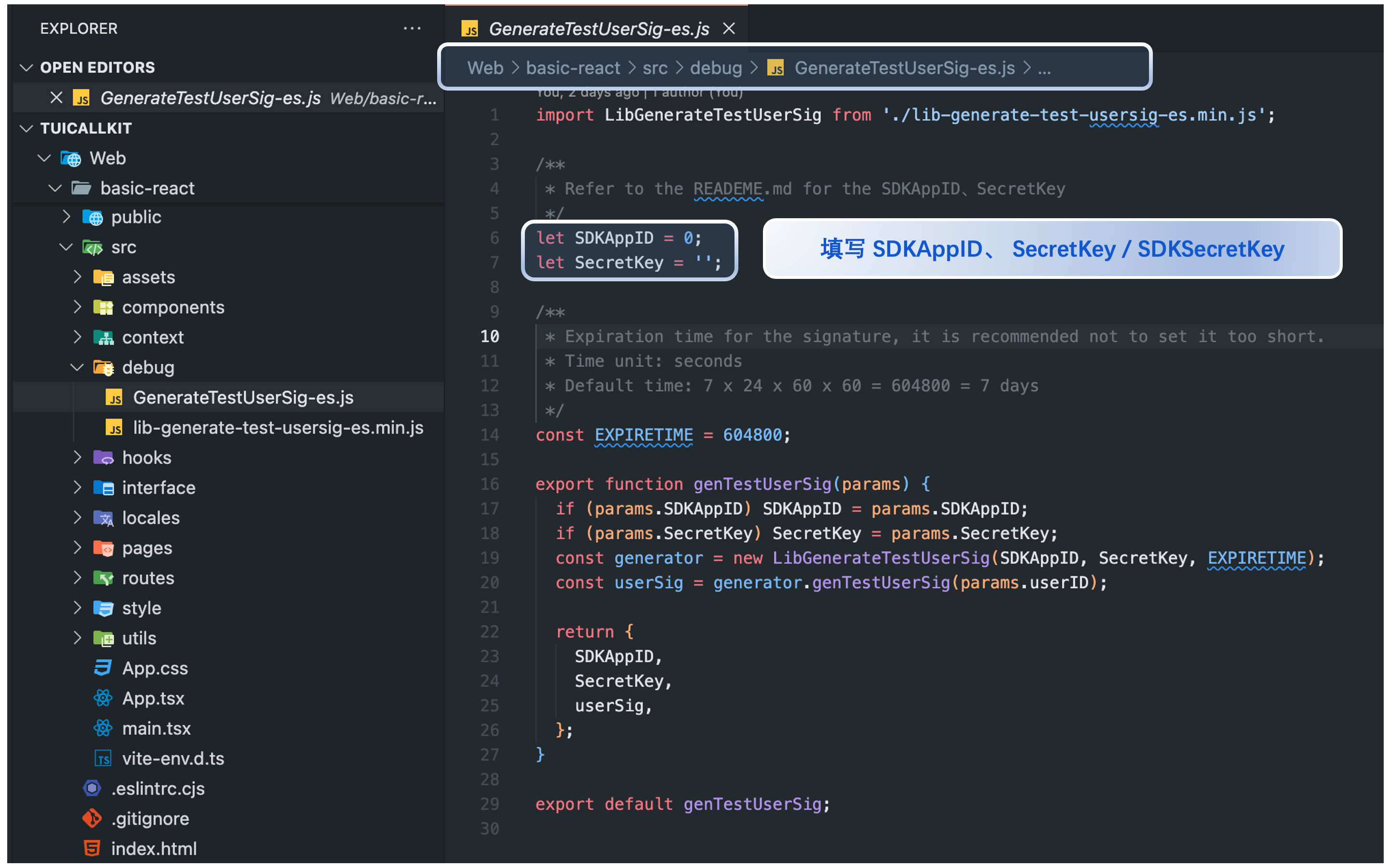
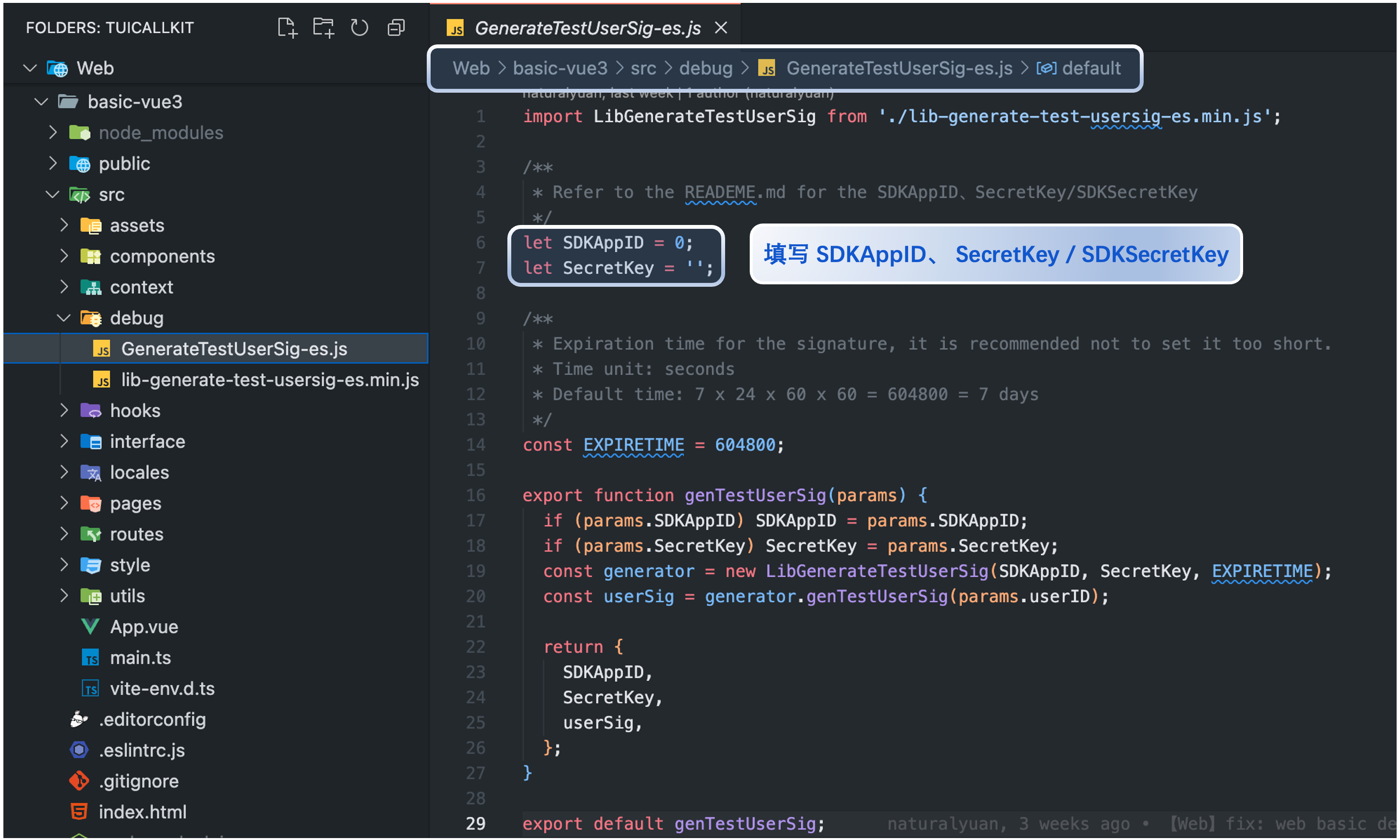
本文将介绍如何快速完成 TUICallKit 组件的接入,您将在10分钟内完成以下几个关键步骤,并最终得到一个包含完备 UI 界面的视频通话功能。
|
|
2
|
+
|
|
3
|
+

|
|
4
|
+
|
|
5
|
+
## 环境准备
|
|
6
|
+
- [Node.js](https://nodejs.org/en/) version 16+.
|
|
7
|
+
|
|
8
|
+
- Modern browser, supporting WebRTC APIs.
|
|
9
|
+
|
|
10
|
+
- **npm 包集成**
|
|
11
|
+
|
|
12
|
+
- Vue3 开发环境,集成 [@tencentcloud/call-uikit-vue](https://www.npmjs.com/package/@tencentcloud/call-uikit-vue) NPM 包。
|
|
13
|
+
|
|
14
|
+
- Vue2.7 开发环境:集成 [@tencentcloud/call-uikit-vue2](https://www.npmjs.com/package/@tencentcloud/call-uikit-vue2) NPM 包。
|
|
15
|
+
|
|
16
|
+
- Vue2.6 开发环境:集成 [@tencentcloud/call-uikit-vue2.6](https://www.npmjs.com/package/@tencentcloud/call-uikit-vue2.6) + [@vue/composition-api](https://www.npmjs.com/package/@vue/composition-api) NPM 包。
|
|
17
|
+
|
|
18
|
+
- **源码集成**
|
|
19
|
+
|
|
20
|
+
- Vue3 + TypeScript 开发环境:从 [@tencentcloud/call-uikit-vue](https://www.npmjs.com/package/@tencentcloud/call-uikit-vue) NPM 包拷贝源码。
|
|
21
|
+
|
|
22
|
+
- Vue2.7 + TypeScript 开发环境:从 [@tencentcloud/call-uikit-vue2](https://www.npmjs.com/package/@tencentcloud/call-uikit-vue2) NPM 包拷贝源码。
|
|
23
|
+
|
|
24
|
+
- Vue2.6 + TypeScript 开发环境:从 [@tencentcloud/call-uikit-vue2.6](https://www.npmjs.com/package/@tencentcloud/call-uikit-vue2.6) NPM 包拷贝源码。
|
|
25
|
+
|
|
26
|
+
- 需要:Vue2.6 + [unplugin-vue2-script-setup](https://www.npmjs.com/package/unplugin-vue2-script-setup) + [@vue/composition-api](https://www.npmjs.com/package/@vue/composition-api) 。
|
|
27
|
+
|
|
28
|
+
|
|
29
|
+
> **注意:**
|
|
30
|
+
>
|
|
31
|
+
> 1. HBuilderX 中选择 vue2 时,使用的是 vue2.6,因此需要使用:[@tencentcloud/call-uikit-vue2.6](https://www.npmjs.com/package/@tencentcloud/call-uikit-vue2.6)。
|
|
32
|
+
> 2. HBuilderX 中选择 vue3 时,使用的是 vue3,因此需要使用:[@tencentcloud/call-uikit-vue](https://www.npmjs.com/package/@tencentcloud/call-uikit-vue)。
|
|
33
|
+
|
|
34
|
+
|
|
35
|
+
## 步骤一:开通服务
|
|
36
|
+
|
|
37
|
+
请参见 [开通服务](https://cloud.tencent.com/document/product/647/104662),获取 `SDKAppID、SecretKey`,他们将在 [初始化 TUICallKit 组件](https://write.woa.com/document/86735801898577920) 作为**必填参数**使用。
|
|
38
|
+
|
|
39
|
+
## 步骤二:下载 TUICallKit 组件
|
|
40
|
+
|
|
41
|
+
推荐使用 NPM 集成,如果您需要采用源码集成,请参见 [TUICallKit 源码集成](https://cloud.tencent.com/document/product/647/81014)。
|
|
42
|
+
|
|
43
|
+
> **说明:**
|
|
44
|
+
>
|
|
45
|
+
|
|
46
|
+
> 如果您的工程同时使用了 **TUIChat UIKit**,请直接移步 [TUIKit 接入音视频通话](https://cloud.tencent.com/document/product/269/79861) 进行接入。
|
|
47
|
+
>
|
|
48
|
+
|
|
49
|
+
1. 下载 [@tencentcloud/call-uikit-vue](https://www.npmjs.com/package/@tencentcloud/call-uikit-vue) 组件。
|
|
50
|
+
|
|
51
|
+
|
|
52
|
+
|
|
53
|
+
|
|
54
|
+
【Vue3】
|
|
55
|
+
``` bash
|
|
56
|
+
npm install @tencentcloud/call-uikit-vue
|
|
57
|
+
```
|
|
58
|
+
|
|
59
|
+
【Vue2.7】
|
|
60
|
+
``` bash
|
|
61
|
+
npm install @tencentcloud/call-uikit-vue2
|
|
62
|
+
```
|
|
63
|
+
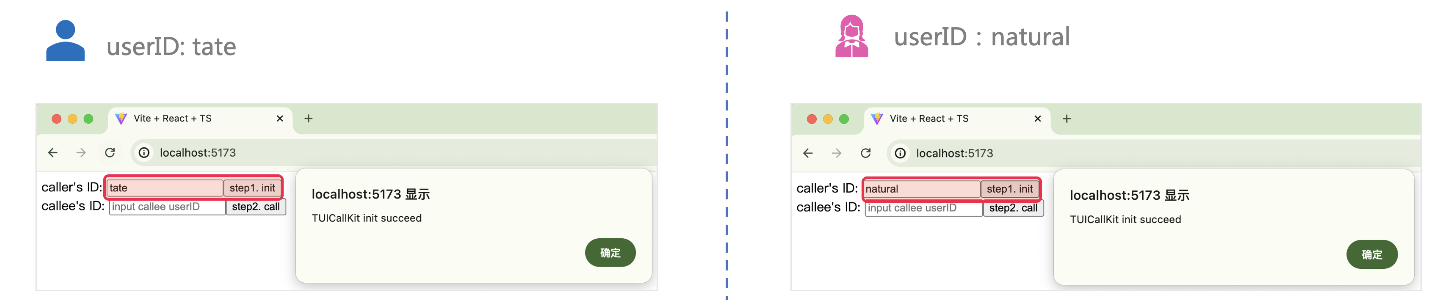
|
|
64
|
+
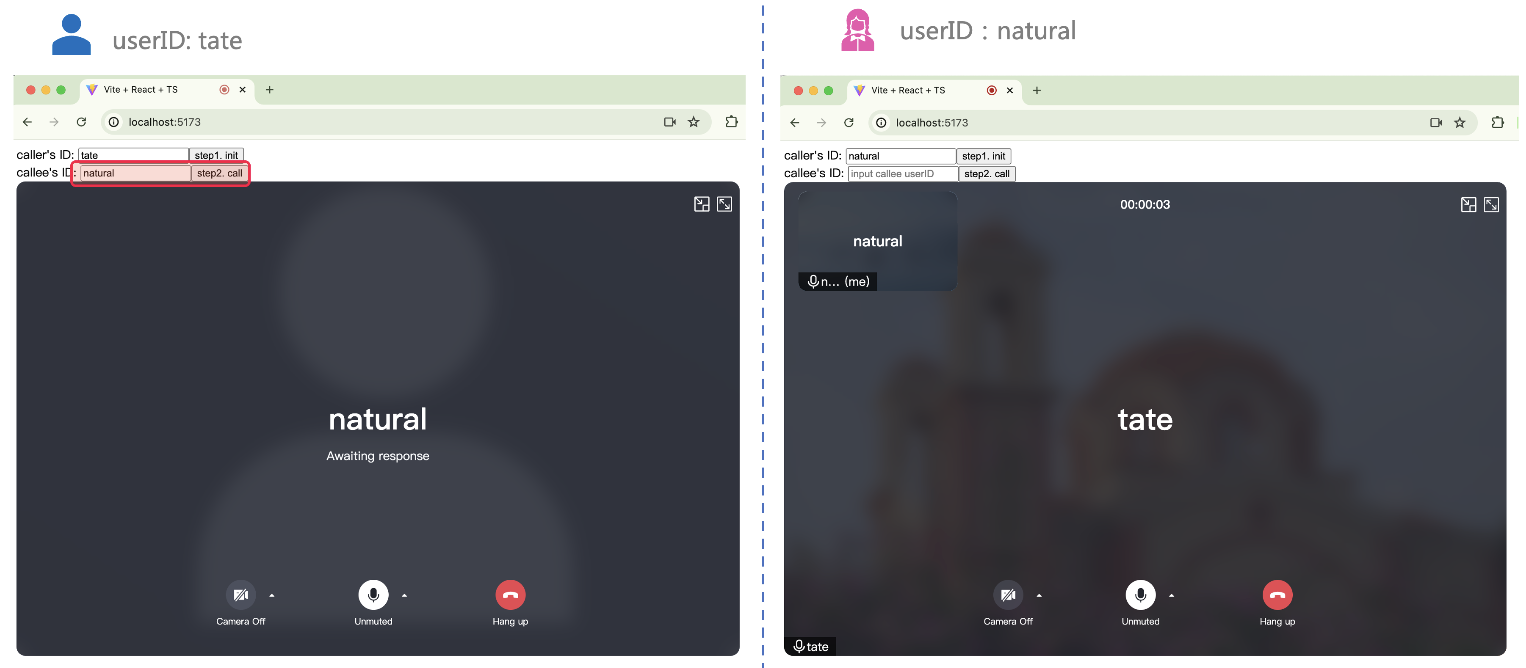
【Vue2.6】
|
|
65
|
+
``` bash
|
|
66
|
+
npm install @tencentcloud/call-uikit-vue2.6 @vue/composition-api
|
|
67
|
+
```
|
|
68
|
+
|
|
69
|
+
如果是源码集成还需要安装 [unplugin-vue2-script-setup](https://www.npmjs.com/package/unplugin-vue2-script-setup)。
|
|
70
|
+
``` bash
|
|
71
|
+
npm i -D unplugin-vue2-script-setup
|
|
72
|
+
```
|
|
73
|
+
|
|
74
|
+
2. 将 `debug` 目录复制到您的项目目录 `src/debug`,本地生成 userSig 时需要使用。
|
|
75
|
+
|
|
76
|
+
|
|
77
|
+
|
|
78
|
+
|
|
79
|
+
【Vue3】
|
|
80
|
+
|
|
81
|
+
|
|
82
|
+
|
|
83
|
+
【MacOS 端】
|
|
84
|
+
``` bash
|
|
85
|
+
cp -r node_modules/@tencentcloud/call-uikit-vue/debug ./src
|
|
86
|
+
```
|
|
87
|
+
|
|
88
|
+
【Windows 端】
|
|
89
|
+
``` bash
|
|
90
|
+
xcopy node_modules\@tencentcloud\call-uikit-vue\debug .\src\debug /i /e
|
|
91
|
+
```
|
|
92
|
+
|
|
93
|
+
【Vue2.7】
|
|
94
|
+
|
|
95
|
+
|
|
96
|
+
|
|
97
|
+
【MacOS 端】
|
|
98
|
+
``` bash
|
|
99
|
+
cp -r node_modules/@tencentcloud/call-uikit-vue2/debug ./src
|
|
100
|
+
```
|
|
101
|
+
|
|
102
|
+
【Windows 端】
|
|
103
|
+
``` bash
|
|
104
|
+
xcopy node_modules\@tencentcloud\call-uikit-vue2\debug .\src\debug /i /e
|
|
105
|
+
```
|
|
106
|
+
|
|
107
|
+
|
|
108
|
+
|
|
109
|
+
【Vue2.6】
|
|
110
|
+
|
|
111
|
+
|
|
112
|
+
|
|
113
|
+
【MacOS 端】
|
|
114
|
+
``` bash
|
|
115
|
+
cp -r node_modules/@tencentcloud/call-uikit-vue2.6/debug ./src
|
|
116
|
+
```
|
|
117
|
+
|
|
118
|
+
【Windows 端】
|
|
119
|
+
``` bash
|
|
120
|
+
xcopy node_modules\@tencentcloud\call-uikit-vue2.6\debug .\src\debug /i /e
|
|
121
|
+
```
|
|
122
|
+
|
|
123
|
+
|
|
124
|
+
## 步骤三:初始化 TUICallKit 组件
|
|
125
|
+
|
|
126
|
+
> **说明:**
|
|
127
|
+
>
|
|
128
|
+
|
|
129
|
+
> TUICallKit 组件需要放到一个 dom 节点里,用于控制 TUICallKit 的位置、宽高等样式。
|
|
130
|
+
>
|
|
131
|
+
|
|
132
|
+
1. 引入 [<TUICallKit />](https://cloud.tencent.com/document/product/647/81015#tuicallkit),该组件包含通话时的完整 UI 交互。
|
|
133
|
+
|
|
134
|
+
``` html
|
|
135
|
+
<template>
|
|
136
|
+
<div>
|
|
137
|
+
<span> caller's ID: </span>
|
|
138
|
+
<input type="text" v-model="callerUserID">
|
|
139
|
+
<button @click="init"> step1. init </button> <br>
|
|
140
|
+
<span> callee's ID: </span>
|
|
141
|
+
<input type="text" v-model="calleeUserID">
|
|
142
|
+
<button @click="call"> step2. call </button>
|
|
143
|
+
|
|
144
|
+
<!--【1】Import the TUICallKit component: Call interface UI -->
|
|
145
|
+
<TUICallKit style="width: 650px; height: 500px " />
|
|
146
|
+
</div>
|
|
147
|
+
</template>
|
|
148
|
+
```
|
|
149
|
+
2. 调用 [TUICallKitServer.init](https://cloud.tencent.com/document/product/647/81015#init) API 登录组件,需要在代码中`填写``SDKAppID、SecretKey`** 两个参数。**
|
|
150
|
+
|
|
151
|
+
|
|
152
|
+
|
|
153
|
+
|
|
154
|
+
【Vue3】
|
|
155
|
+
|
|
156
|
+
您可以选择在 `src/App.vue` 文件引入示例代码,示例代码采用的是 Vue3 `Composition API`写法。
|
|
157
|
+
``` javascript
|
|
158
|
+
import { ref } from 'vue';
|
|
159
|
+
import { TUICallKit, TUICallKitServer, TUICallType } from "@tencentcloud/call-uikit-vue";
|
|
160
|
+
import * as GenerateTestUserSig from "./debug/GenerateTestUserSig-es"; // Refer to Step 3
|
|
161
|
+
|
|
162
|
+
const SDKAppID = 0; // TODO: Replace with your SDKAppID (Notice: SDKAppID is of type number)
|
|
163
|
+
const SecretKey = 'xx'; // TODO: Replace with your SecretKey
|
|
164
|
+
|
|
165
|
+
const callerUserID = ref('');
|
|
166
|
+
const calleeUserID = ref('');
|
|
167
|
+
|
|
168
|
+
//【2】Initialize the TUICallKit component
|
|
169
|
+
const init = async () => {
|
|
170
|
+
const { userSig } = GenerateTestUserSig.genTestUserSig({
|
|
171
|
+
userID: callerUserID.value,
|
|
172
|
+
SDKAppID,
|
|
173
|
+
SecretKey: SecretKey,
|
|
174
|
+
});
|
|
175
|
+
await TUICallKitServer.init({
|
|
176
|
+
userID: callerUserID.value,
|
|
177
|
+
userSig,
|
|
178
|
+
SDKAppID,
|
|
179
|
+
// tim: this.tim // 如果工程中已有 tim 实例,需在此处传入
|
|
180
|
+
});
|
|
181
|
+
alert('TUICallKit init succeed');
|
|
182
|
+
}
|
|
183
|
+
</script>
|
|
184
|
+
```
|
|
185
|
+
|
|
186
|
+
【Vue2.7】
|
|
187
|
+
``` javascript
|
|
188
|
+
import { TUICallKit, TUICallKitServer, TUICallType } from "@tencentcloud/call-uikit-vue2";
|
|
189
|
+
import * as GenerateTestUserSig from "./debug/GenerateTestUserSig-es";
|
|
190
|
+
|
|
191
|
+
export default {
|
|
192
|
+
name: 'App',
|
|
193
|
+
data() {
|
|
194
|
+
return {
|
|
195
|
+
callerUserID: '',
|
|
196
|
+
calleeUserID: '',
|
|
197
|
+
SDKAppID: 0, // TODO: Replace with your SDKAppID
|
|
198
|
+
SecretKey: 'xx', // TODO: Replace with your SecretKey
|
|
199
|
+
};
|
|
200
|
+
},
|
|
201
|
+
components: {
|
|
202
|
+
TUICallKit
|
|
203
|
+
},
|
|
204
|
+
methods: {
|
|
205
|
+
//【2】Initialize the TUICallKit component
|
|
206
|
+
async init() {
|
|
207
|
+
try {
|
|
208
|
+
const { userSig } = GenerateTestUserSig.genTestUserSig({
|
|
209
|
+
userID: this.callerUserID,
|
|
210
|
+
SDKAppID: Number(this.SDKAppID),
|
|
211
|
+
SecretKey: this.SecretKey,
|
|
212
|
+
});
|
|
213
|
+
await TUICallKitServer.init({
|
|
214
|
+
SDKAppID: Number(this.SDKAppID),
|
|
215
|
+
userID: this.callerUserID,
|
|
216
|
+
userSig,
|
|
217
|
+
// tim: this.tim // 如果工程中已有 tim 实例,需在此处传入
|
|
218
|
+
});
|
|
219
|
+
alert("[TUICallKit] Initialization succeeds.");
|
|
220
|
+
} catch (error) {
|
|
221
|
+
alert(`[TUICallKit] Initialization failed. Reason: ${error}`);
|
|
222
|
+
}
|
|
223
|
+
},
|
|
224
|
+
}
|
|
225
|
+
}
|
|
226
|
+
|
|
227
|
+
```
|
|
228
|
+
|
|
229
|
+
【Vue2.6】
|
|
230
|
+
1. `main.ts 文件`注册 [@vue/composition-api](https://www.npmjs.com/package/@vue/composition-api) 。
|
|
231
|
+
|
|
232
|
+
|
|
233
|
+
|
|
234
|
+
|
|
235
|
+
|
|
236
|
+
【main.ts】
|
|
237
|
+
``` javascript
|
|
238
|
+
import Vue from 'vue'
|
|
239
|
+
import VueCompositionAPI from '@vue/composition-api'
|
|
240
|
+
Vue.use(VueCompositionAPI)
|
|
241
|
+
```
|
|
242
|
+
2. 将下面代码直接复制引用在 `App.vue `文件中。
|
|
243
|
+
|
|
244
|
+
``` javascript
|
|
245
|
+
import { TUICallKit, TUICallKitServer, TUICallType } from "@tencentcloud/call-uikit-vue2.6";
|
|
246
|
+
import * as GenerateTestUserSig from "./debug/GenerateTestUserSig-es";
|
|
247
|
+
|
|
248
|
+
export default {
|
|
249
|
+
name: 'App',
|
|
250
|
+
data() {
|
|
251
|
+
return {
|
|
252
|
+
callerUserID: '',
|
|
253
|
+
calleeUserID: '',
|
|
254
|
+
SDKAppID: 0, // TODO: Replace with your SDKAppID
|
|
255
|
+
SecretKey: 'xx', // TODO: Replace with your SecretKey
|
|
256
|
+
};
|
|
257
|
+
},
|
|
258
|
+
components: {
|
|
259
|
+
TUICallKit
|
|
260
|
+
},
|
|
261
|
+
methods: {
|
|
262
|
+
//【2】Initialize the TUICallKit component
|
|
263
|
+
async init() {
|
|
264
|
+
try {
|
|
265
|
+
const { userSig } = GenerateTestUserSig.genTestUserSig({
|
|
266
|
+
userID: this.callerUserID,
|
|
267
|
+
SDKAppID: Number(this.SDKAppID),
|
|
268
|
+
SecretKey: this.SecretKey,
|
|
269
|
+
});
|
|
270
|
+
await TUICallKitServer.init({
|
|
271
|
+
SDKAppID: Number(this.SDKAppID),
|
|
272
|
+
userID: this.callerUserID,
|
|
273
|
+
userSig,
|
|
274
|
+
// tim: this.tim // 如果工程中已有 tim 实例,需在此处传入
|
|
275
|
+
});
|
|
276
|
+
alert("[TUICallKit] Initialization succeeds.");
|
|
277
|
+
} catch (error) {
|
|
278
|
+
alert(`[TUICallKit] Initialization failed. Reason: ${error}`);
|
|
279
|
+
}
|
|
280
|
+
},
|
|
281
|
+
}
|
|
282
|
+
}
|
|
283
|
+
```
|
|
284
|
+
|
|
285
|
+
<table>
|
|
286
|
+
<tr>
|
|
287
|
+
<td rowspan="1" colSpan="1" >**参数**</td>
|
|
288
|
+
|
|
289
|
+
<td rowspan="1" colSpan="1" >**类型**</td>
|
|
290
|
+
|
|
291
|
+
<td rowspan="1" colSpan="1" >**说明**</td>
|
|
292
|
+
</tr>
|
|
293
|
+
|
|
294
|
+
<tr>
|
|
295
|
+
<td rowspan="1" colSpan="1" >userID</td>
|
|
296
|
+
|
|
297
|
+
<td rowspan="1" colSpan="1" >String</td>
|
|
298
|
+
|
|
299
|
+
<td rowspan="1" colSpan="1" >**用户的唯一标识符**,由您定义,只允许包含大小写英文字母(a-z A-Z)、数字(0-9)及下划线和连词符。</td>
|
|
300
|
+
</tr>
|
|
301
|
+
|
|
302
|
+
<tr>
|
|
303
|
+
<td rowspan="1" colSpan="1" >SDKAppID</td>
|
|
304
|
+
|
|
305
|
+
<td rowspan="1" colSpan="1" >Number</td>
|
|
306
|
+
|
|
307
|
+
<td rowspan="1" colSpan="1" >在 [Tencent RTC 控制台](https://console.cloud.tencent.com/trtc) 创建的音视频应用的唯一标识。</td>
|
|
308
|
+
</tr>
|
|
309
|
+
|
|
310
|
+
<tr>
|
|
311
|
+
<td rowspan="1" colSpan="1" >SDKSecretKey</td>
|
|
312
|
+
|
|
313
|
+
<td rowspan="1" colSpan="1" >String</td>
|
|
314
|
+
|
|
315
|
+
<td rowspan="1" colSpan="1" >在 [Tencent RTC 控制台](https://console.cloud.tencent.com/trtc) 创建的音视频应用的 SecretKey。</td>
|
|
316
|
+
</tr>
|
|
317
|
+
|
|
318
|
+
<tr>
|
|
319
|
+
<td rowspan="1" colSpan="1" >userSig</td>
|
|
320
|
+
|
|
321
|
+
<td rowspan="1" colSpan="1" >String</td>
|
|
322
|
+
|
|
323
|
+
<td rowspan="1" colSpan="1" >一种安全保护签名,用于对用户进行登录鉴权认证,确认用户是否真实,阻止恶意攻击者盗用您的云服务使用权。</td>
|
|
324
|
+
</tr>
|
|
325
|
+
</table>
|
|
326
|
+
|
|
327
|
+
|
|
328
|
+
> **userSig 说明:**
|
|
329
|
+
>
|
|
330
|
+
> - **开发环境**:如果您正在本地跑通 Demo、开发调试,可以采用 debug 文件中的 `genTestUserSig`(参考步骤3.2)函数生成 userSig。该方法中 SDKSecretKey 很容易被反编译逆向破解,一旦您的密钥泄露,攻击者就可以盗用您的腾讯云流量。
|
|
331
|
+
> - **生产环境**:如果您的项目要发布上线,请采用 [服务端生成 UserSig](https://cloud.tencent.com/document/product/647/17275) 的方式。
|
|
332
|
+
|
|
333
|
+
|
|
334
|
+
## 步骤四:拨打您的第一通电话
|
|
335
|
+
1. 调用 [TUICallKitServer.calls API](https://cloud.tencent.com/document/product/647/81015#calls) 拨打通话。
|
|
336
|
+
|
|
337
|
+
|
|
338
|
+
|
|
339
|
+
|
|
340
|
+
|
|
341
|
+
【Vue3】
|
|
342
|
+
``` javascript
|
|
343
|
+
//【3】Make a 1v1 video call
|
|
344
|
+
const call = async () => {
|
|
345
|
+
await TUICallKitServer.calls({
|
|
346
|
+
userIDList: [calleeUserID.value],
|
|
347
|
+
type: TUICallType.VIDEO_CALL,
|
|
348
|
+
});
|
|
349
|
+
};
|
|
350
|
+
```
|
|
351
|
+
|
|
352
|
+
|
|
353
|
+
【Vue2.7】
|
|
354
|
+
``` javascript
|
|
355
|
+
//【3】Make a 1v1 video call
|
|
356
|
+
async call () {
|
|
357
|
+
await TUICallKitServer.calls({
|
|
358
|
+
userIDList: [this.calleeUserID],
|
|
359
|
+
type: TUICallType.VIDEO_CALL,
|
|
360
|
+
});
|
|
361
|
+
}
|
|
362
|
+
```
|
|
363
|
+
|
|
364
|
+
|
|
365
|
+
【Vue2.6】
|
|
366
|
+
``` javascript
|
|
367
|
+
//【3】Make a 1v1 video call
|
|
368
|
+
async call () {
|
|
369
|
+
await TUICallKitServer.calls({
|
|
370
|
+
userIDList: [this.calleeUserID],
|
|
371
|
+
type: TUICallType.VIDEO_CALL,
|
|
372
|
+
});
|
|
373
|
+
}
|
|
374
|
+
```
|
|
375
|
+
|
|
376
|
+
2. 运行项目。
|
|
377
|
+
|
|
378
|
+
|
|
379
|
+
> **警告:**
|
|
380
|
+
>
|
|
381
|
+
|
|
382
|
+
> **本地环境请在 localhost 协议下访问,公网体验请在 HTTPS 协议下访问,具体参见 **[网络访问协议说明](https://web.sdk.qcloud.com/trtc/webrtc/doc/en/tutorial-05-info-browser.html#h2-3)**。**
|
|
383
|
+
>
|
|
384
|
+
|
|
385
|
+
3. 打开两个浏览器页面,输入不同的 userID(由您定义) 单击 `step1. init`登录(主叫方和被叫方)。
|
|
386
|
+
|
|
387
|
+
|
|
388
|
+
|
|
389
|
+
|
|
390
|
+
4. 两个 userID 都登录成功后,单击 `step2. call `拨打通话,如果您有通话问题,参见 [常见问题](https://cloud.tencent.com/document/product/647/78769)。
|
|
391
|
+
|
|
392
|
+
|
|
393
|
+
|
|
394
|
+
|
|
395
|
+
|
|
396
|
+
## 更多特性
|
|
397
|
+
- [设置昵称、头像](https://write.woa.com/document/140283367112228864)
|
|
398
|
+
|
|
399
|
+
- [群组通话](https://write.woa.com/document/139754159113613312)
|
|
400
|
+
|
|
401
|
+
- [悬浮窗](https://write.woa.com/document/139754324095582208)
|
|
402
|
+
|
|
403
|
+
- [自定义铃声](https://write.woa.com/document/139754575448756224)
|
|
404
|
+
|
|
405
|
+
- [监听通话状态、组件回调事件](https://write.woa.com/document/139754708026372096)
|
|
406
|
+
|
|
407
|
+
- [设置分辨率、填充模式](https://write.woa.com/document/140283358174851072)
|
|
408
|
+
|
|
409
|
+
- [界面定制](https://write.woa.com/document/90292932030300160)
|
|
410
|
+
|
|
411
|
+
|
|
412
|
+
## 常见问题
|
|
413
|
+
- 如果您的接入和使用中遇到问题,请参见 [常见问题](https://write.woa.com/document/86735803187277824)。
|
|
414
|
+
|
|
415
|
+
- 了解更多详情,请到 [腾讯云通信官方社群](https://zhiliao.qq.com/) 进行咨询和反馈。
|
|
@@ -0,0 +1,93 @@
|
|
|
1
|
+
本文将介绍如何快速实现音视频通话演示。您将在10分钟内完成以下关键步骤,并最终获得一个具有全面用户界面的视频通话功能。
|
|
2
|
+
|
|
3
|
+

|
|
4
|
+
|
|
5
|
+
## 环境准备
|
|
6
|
+
- Node.js, 如果没有,[请点击下载。](https://nodejs.org/en)
|
|
7
|
+
|
|
8
|
+
- Modern browser, supporting WebRTC API.
|
|
9
|
+
|
|
10
|
+
|
|
11
|
+
## 步骤一:下载 Demo
|
|
12
|
+
1. 打开终端,克隆仓库。
|
|
13
|
+
|
|
14
|
+
``` bash
|
|
15
|
+
git clone
|
|
16
|
+
```
|
|
17
|
+
2. 安装依赖。
|
|
18
|
+
|
|
19
|
+
|
|
20
|
+
|
|
21
|
+
|
|
22
|
+
|
|
23
|
+
【React】
|
|
24
|
+
``` bash
|
|
25
|
+
cd ./TUICallKit/Web/basic-react
|
|
26
|
+
```
|
|
27
|
+
|
|
28
|
+
|
|
29
|
+
【Vue3】
|
|
30
|
+
``` bash
|
|
31
|
+
cd ./TUICallKit/Web/basic-vue3
|
|
32
|
+
```
|
|
33
|
+
|
|
34
|
+
``` bash
|
|
35
|
+
npm install
|
|
36
|
+
```
|
|
37
|
+
|
|
38
|
+
## 步骤二:配置 Demo
|
|
39
|
+
1. [点击进入开通服务页面](https://trtc.io/document/59832?platform=android&product=call),获取`SDKAppID、SecretKey`**。**
|
|
40
|
+
|
|
41
|
+
2. 填写 `SDKAPPID、SecretKey`。
|
|
42
|
+
|
|
43
|
+
|
|
44
|
+
|
|
45
|
+
|
|
46
|
+
【React】
|
|
47
|
+
|
|
48
|
+
文件路径:`TUICallKit/Web/basic-react/src/debug/GenerateTestUserSig-es.js`
|
|
49
|
+
|
|
50
|
+
|
|
51
|
+
|
|
52
|
+
【Vue3】
|
|
53
|
+
|
|
54
|
+
文件路径:`TUICallKit/Web/basic-vue3/src/debug/GenerateTestUserSig-es.js`
|
|
55
|
+
|
|
56
|
+
|
|
57
|
+
|
|
58
|
+
|
|
59
|
+
## 步骤三:运行 Demo
|
|
60
|
+
|
|
61
|
+
打开终端,复制示例命令运行 Demo。
|
|
62
|
+
|
|
63
|
+
|
|
64
|
+
|
|
65
|
+
|
|
66
|
+
【TUICallKit/Web/basic-react】
|
|
67
|
+
``` bash
|
|
68
|
+
npm run dev
|
|
69
|
+
```
|
|
70
|
+
|
|
71
|
+
|
|
72
|
+
【TUICallKit/Web/basic-vue3】
|
|
73
|
+
``` bash
|
|
74
|
+
npm run dev
|
|
75
|
+
```
|
|
76
|
+
|
|
77
|
+
> **警告:**
|
|
78
|
+
>
|
|
79
|
+
|
|
80
|
+
> **本地环境请在 localhost 协议下访问,公网体验请在 HTTPS 协议下访问,具体参见 **[网络访问协议说明](https://web.sdk.qcloud.com/trtc/webrtc/doc/en/tutorial-05-info-browser.html#h2-3)**。**
|
|
81
|
+
>
|
|
82
|
+
|
|
83
|
+
|
|
84
|
+
## 步骤四:拨打您的第一通电话
|
|
85
|
+
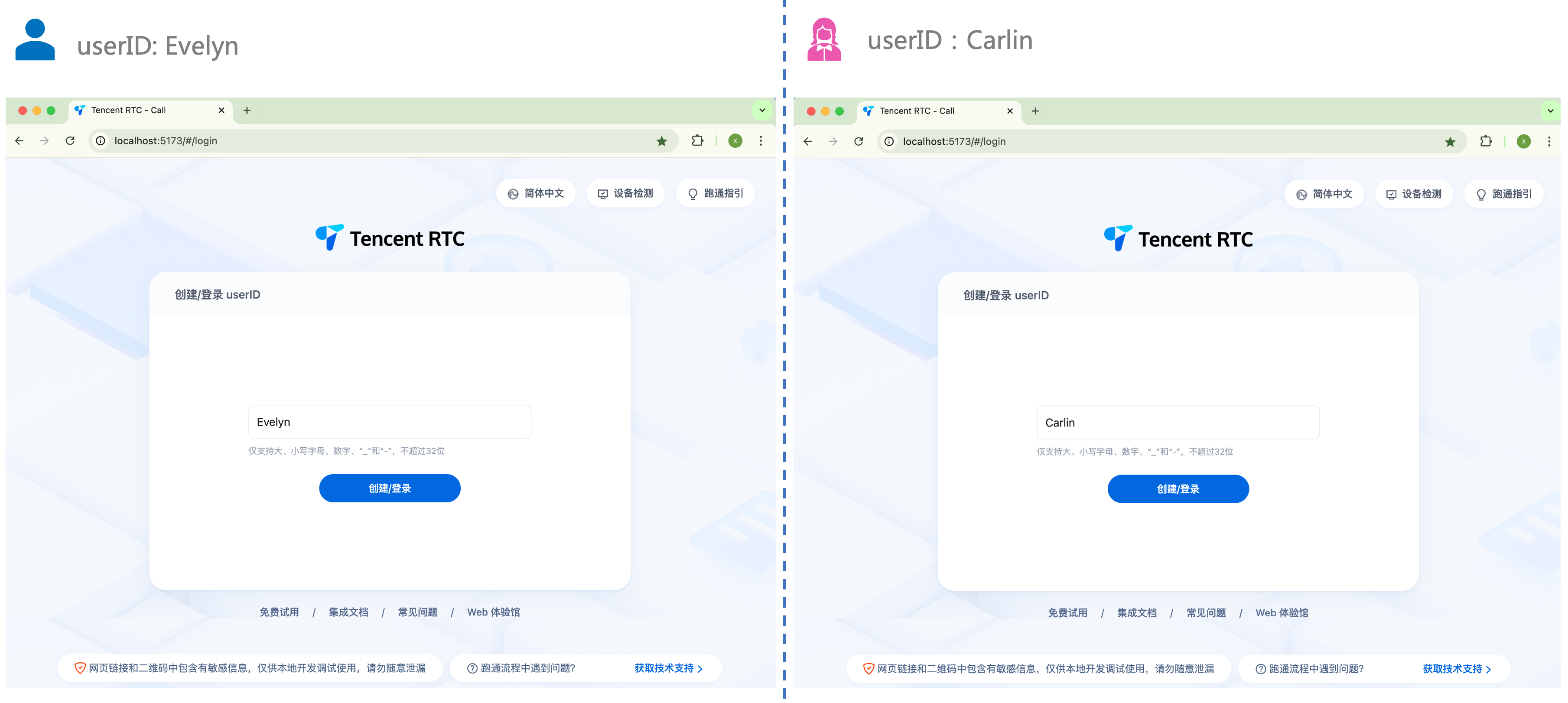
1. 打开浏览器页面,输入项目运行地址,登录 userID(由您定义)。
|
|
86
|
+
|
|
87
|
+
|
|
88
|
+
|
|
89
|
+
|
|
90
|
+
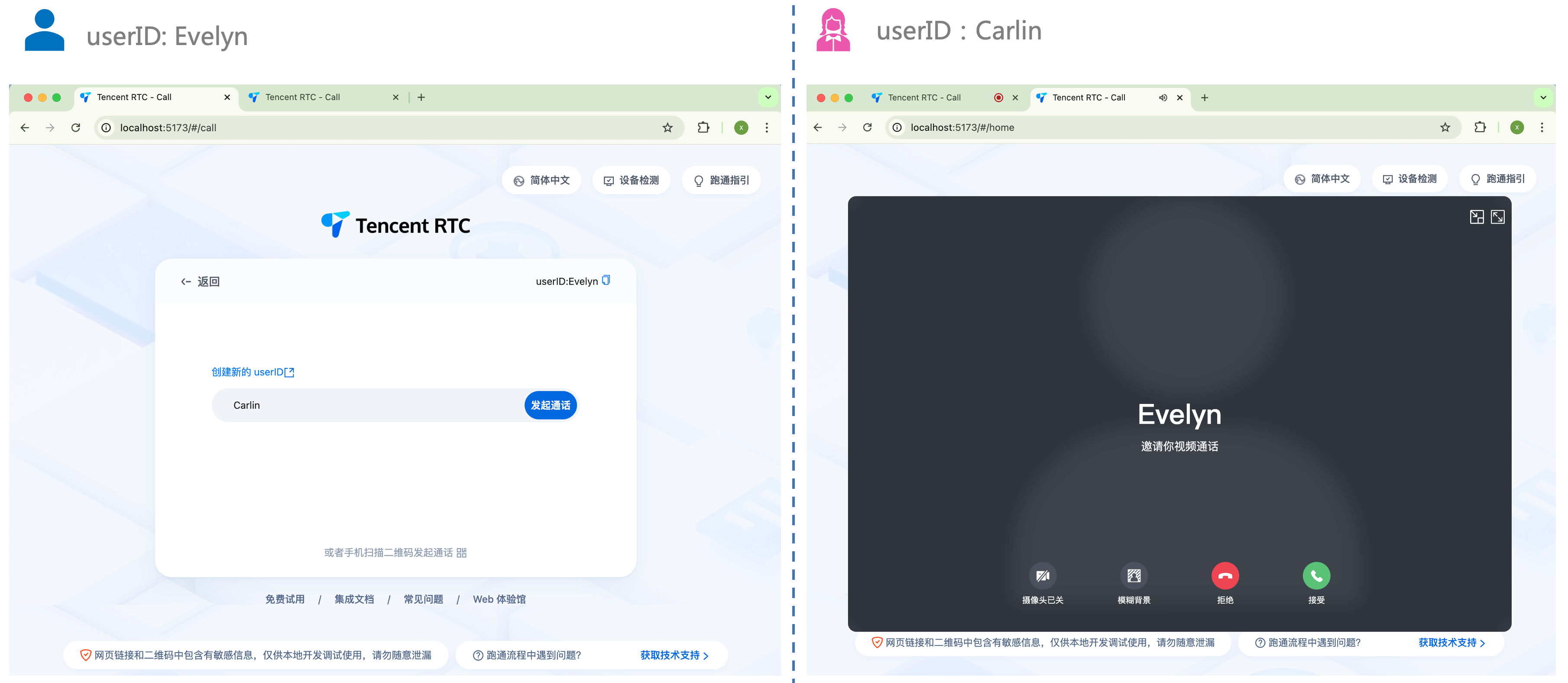
2. 输入被叫方的 userID,单击 `发起通话` 体验您的第一通话。
|
|
91
|
+
|
|
92
|
+
|
|
93
|
+
|
package/server.js
ADDED
|
@@ -0,0 +1,124 @@
|
|
|
1
|
+
"use strict";
|
|
2
|
+
var __importDefault = (this && this.__importDefault) || function (mod) {
|
|
3
|
+
return (mod && mod.__esModule) ? mod : { "default": mod };
|
|
4
|
+
};
|
|
5
|
+
Object.defineProperty(exports, "__esModule", { value: true });
|
|
6
|
+
exports.createServer = createServer;
|
|
7
|
+
const mcp_js_1 = require("@modelcontextprotocol/sdk/server/mcp.js");
|
|
8
|
+
const zod_1 = require("zod");
|
|
9
|
+
const path_1 = __importDefault(require("path"));
|
|
10
|
+
const fs_1 = require("fs");
|
|
11
|
+
function createServer() {
|
|
12
|
+
const server = new mcp_js_1.McpServer({
|
|
13
|
+
name: "Tencent RTC MCP Server",
|
|
14
|
+
version: "0.1.0",
|
|
15
|
+
});
|
|
16
|
+
const framework = ['vue', 'react', 'flutter', 'android', 'ios'];
|
|
17
|
+
const toolDefinitions = {
|
|
18
|
+
'read_tuicallkit_integrete_docs': {
|
|
19
|
+
name: 'read_tuicallkit_integrete_docs',
|
|
20
|
+
description: '根据输入的开发框架,读取 TUICallKit 对应框架的文档',
|
|
21
|
+
parameters: {
|
|
22
|
+
// @ts-ignore
|
|
23
|
+
framework: zod_1.z.enum(framework).optional().default('vue').describe('开发框架名称 (如: flutter, vue, react, android)'),
|
|
24
|
+
// @ts-ignore
|
|
25
|
+
sdkAppId: zod_1.z.string().describe('您的应用 sdkAppId'),
|
|
26
|
+
// @ts-ignore
|
|
27
|
+
secretKey: zod_1.z.string().describe('您的应用 sdkAppId 对应的 secretKey'),
|
|
28
|
+
},
|
|
29
|
+
},
|
|
30
|
+
'read_tuicallkit_faq_docs': {
|
|
31
|
+
name: 'read_tuicallkit_faq_docs',
|
|
32
|
+
description: '请输入您在使用 tuicallkit 遇到的问题!',
|
|
33
|
+
parameters: {
|
|
34
|
+
// @ts-ignore
|
|
35
|
+
question: zod_1.z.string().describe('请描述你的问题'),
|
|
36
|
+
// @ts-ignore
|
|
37
|
+
sdkAppId: zod_1.z.string().describe('您的应用 sdkAppId'),
|
|
38
|
+
},
|
|
39
|
+
},
|
|
40
|
+
};
|
|
41
|
+
const readLocalIntegrateDocsHandler = async ({ framework, sdkAppId, secretKey }) => {
|
|
42
|
+
if (!framework) {
|
|
43
|
+
throw new Error("框架名称是必需的");
|
|
44
|
+
}
|
|
45
|
+
try {
|
|
46
|
+
const content = await readResourcesFiles(framework);
|
|
47
|
+
return content;
|
|
48
|
+
}
|
|
49
|
+
catch (error) {
|
|
50
|
+
return {
|
|
51
|
+
content: [{
|
|
52
|
+
type: "text",
|
|
53
|
+
text: `读取文档时发生错误: ${error instanceof Error ? error.message : String(error)}`,
|
|
54
|
+
}],
|
|
55
|
+
};
|
|
56
|
+
}
|
|
57
|
+
};
|
|
58
|
+
const readLocalResoureFaqHandler = async ({ question, sdkAppId }) => {
|
|
59
|
+
try {
|
|
60
|
+
const content = await readResourcesFiles('FAQ');
|
|
61
|
+
return content;
|
|
62
|
+
}
|
|
63
|
+
catch (error) {
|
|
64
|
+
return {
|
|
65
|
+
content: [{
|
|
66
|
+
type: "text",
|
|
67
|
+
text: `读取文档时发生错误: ${error instanceof Error ? error.message : String(error)}`,
|
|
68
|
+
}],
|
|
69
|
+
};
|
|
70
|
+
}
|
|
71
|
+
};
|
|
72
|
+
// Define the handler for read_tencent_callkit_docs
|
|
73
|
+
const toolHandlers = {
|
|
74
|
+
'read_tuicallkit_integrete_docs': readLocalIntegrateDocsHandler,
|
|
75
|
+
'read_tuicallkit_faq_docs': readLocalResoureFaqHandler,
|
|
76
|
+
};
|
|
77
|
+
// Helper function to register all tools to a server instance
|
|
78
|
+
function registerAllTools(serverInstance) {
|
|
79
|
+
for (const toolName in toolDefinitions) {
|
|
80
|
+
if (toolName in toolHandlers) {
|
|
81
|
+
const toolDef = toolDefinitions[toolName];
|
|
82
|
+
serverInstance.tool(toolDef.name, toolDef.description, toolDef.parameters, toolHandlers[toolName]);
|
|
83
|
+
}
|
|
84
|
+
}
|
|
85
|
+
}
|
|
86
|
+
// Register all tools to the main server
|
|
87
|
+
registerAllTools(server);
|
|
88
|
+
return server;
|
|
89
|
+
}
|
|
90
|
+
// 读取 resources 某个 framework 下所有的 md 文档内容并返回
|
|
91
|
+
async function readResourcesFiles(framework) {
|
|
92
|
+
// 构建文档目录路径
|
|
93
|
+
const docPath = path_1.default.join(__dirname, 'resource', 'doc', 'tuicallkit', framework.toLowerCase());
|
|
94
|
+
// 检查目录是否存在
|
|
95
|
+
const stats = await fs_1.promises.stat(docPath);
|
|
96
|
+
if (!stats.isDirectory()) {
|
|
97
|
+
throw new Error(`框架 ${framework} 的文档目录不存在`);
|
|
98
|
+
}
|
|
99
|
+
// 读取目录下的所有文件
|
|
100
|
+
const files = await fs_1.promises.readdir(docPath, { withFileTypes: true });
|
|
101
|
+
let documentContent = '';
|
|
102
|
+
for (const file of files) {
|
|
103
|
+
if (file.isFile() && file.name.endsWith('.md')) {
|
|
104
|
+
const filePath = path_1.default.join(docPath, file.name);
|
|
105
|
+
const content = await fs_1.promises.readFile(filePath, 'utf-8');
|
|
106
|
+
documentContent += `\n\n## ${file.name}\n\n${content}`;
|
|
107
|
+
}
|
|
108
|
+
}
|
|
109
|
+
if (!documentContent.trim()) {
|
|
110
|
+
return {
|
|
111
|
+
content: [{
|
|
112
|
+
type: "text",
|
|
113
|
+
text: `框架 ${framework} 的文档目录下没有找到Markdown文档文件`,
|
|
114
|
+
}],
|
|
115
|
+
};
|
|
116
|
+
}
|
|
117
|
+
return {
|
|
118
|
+
content: [{
|
|
119
|
+
type: "text",
|
|
120
|
+
text: `# TUICallKit ${framework} 的开发文档\n${documentContent}`,
|
|
121
|
+
}],
|
|
122
|
+
};
|
|
123
|
+
}
|
|
124
|
+
//# sourceMappingURL=server.js.map
|
package/server.js.map
ADDED
|
@@ -0,0 +1 @@
|
|
|
1
|
+
{"version":3,"file":"server.js","sourceRoot":"","sources":["../src/server.ts"],"names":[],"mappings":";;;;;AAMA,oCAuFC;AA7FD,oEAAoE;AACpE,6BAAwB;AACxB,gDAAwB;AACxB,2BAAoC;AAGpC,SAAgB,YAAY;IAC1B,MAAM,MAAM,GAAG,IAAI,kBAAS,CAAC;QAC3B,IAAI,EAAE,wBAAwB;QAC9B,OAAO,EAAE,OAAO;KACjB,CAAC,CAAC;IAEH,MAAM,SAAS,GAAG,CAAE,KAAK,EAAE,OAAO,EAAE,SAAS,EAAE,SAAS,EAAE,KAAK,CAAE,CAAC;IAClE,MAAM,eAAe,GAAG;QACtB,gCAAgC,EAAE;YAChC,IAAI,EAAE,gCAAgC;YACtC,WAAW,EAAE,iCAAiC;YAC9C,UAAU,EAAE;gBACV,aAAa;gBACb,SAAS,EAAE,OAAC,CAAC,IAAI,CAAC,SAAS,CAAC,CAAC,QAAQ,EAAE,CAAC,OAAO,CAAC,KAAK,CAAC,CAAC,QAAQ,CAAC,0CAA0C,CAAC;gBAC3G,aAAa;gBACb,QAAQ,EAAE,OAAC,CAAC,MAAM,EAAE,CAAC,QAAQ,CAAC,eAAe,CAAC;gBAC9C,aAAa;gBACb,SAAS,EAAE,OAAC,CAAC,MAAM,EAAE,CAAC,QAAQ,CAAC,6BAA6B,CAAC;aAC9D;SACF;QACD,0BAA0B,EAAE;YAC1B,IAAI,EAAE,0BAA0B;YAChC,WAAW,EAAE,2BAA2B;YACxC,UAAU,EAAE;gBACV,aAAa;gBACb,QAAQ,EAAE,OAAC,CAAC,MAAM,EAAE,CAAC,QAAQ,CAAC,SAAS,CAAC;gBACxC,aAAa;gBACb,QAAQ,EAAE,OAAC,CAAC,MAAM,EAAE,CAAC,QAAQ,CAAC,eAAe,CAAC;aAC/C;SACF;KACF,CAAC;IAEF,MAAM,6BAA6B,GAAG,KAAK,EAAE,EAAE,SAAS,EAAE,QAAQ,EAAE,SAAS,EAAQ,EAAE,EAAE;QACvF,IAAI,CAAC,SAAS,EAAE,CAAC;YACf,MAAM,IAAI,KAAK,CAAC,UAAU,CAAC,CAAC;QAC9B,CAAC;QACD,IAAI,CAAC;YACH,MAAM,OAAO,GAAG,MAAM,kBAAkB,CAAC,SAAS,CAAC,CAAC;YACpD,OAAO,OAAO,CAAC;QACjB,CAAC;QAAC,OAAO,KAAK,EAAE,CAAC;YACf,OAAO;gBACL,OAAO,EAAE,CAAC;wBACR,IAAI,EAAE,MAAM;wBACZ,IAAI,EAAE,cAAc,KAAK,YAAY,KAAK,CAAC,CAAC,CAAC,KAAK,CAAC,OAAO,CAAC,CAAC,CAAC,MAAM,CAAC,KAAK,CAAC,EAAE;qBAC7E,CAAC;aACH,CAAC;QACJ,CAAC;IACH,CAAC,CAAC;IAEF,MAAM,0BAA0B,GAAG,KAAK,EAAE,EAAE,QAAQ,EAAE,QAAQ,EAAO,EAAE,EAAE;QACvE,IAAI,CAAC;YACH,MAAM,OAAO,GAAG,MAAM,kBAAkB,CAAC,KAAK,CAAC,CAAC;YAChD,OAAO,OAAO,CAAC;QACjB,CAAC;QAAC,OAAO,KAAK,EAAE,CAAC;YACf,OAAO;gBACL,OAAO,EAAE,CAAC;wBACR,IAAI,EAAE,MAAM;wBACZ,IAAI,EAAE,cAAc,KAAK,YAAY,KAAK,CAAC,CAAC,CAAC,KAAK,CAAC,OAAO,CAAC,CAAC,CAAC,MAAM,CAAC,KAAK,CAAC,EAAE;qBAC7E,CAAC;aACH,CAAC;QACJ,CAAC;IACH,CAAC,CAAC;IAEF,mDAAmD;IACnD,MAAM,YAAY,GAAG;QACnB,gCAAgC,EAAE,6BAA6B;QAC/D,0BAA0B,EAAE,0BAA0B;KACvD,CAAC;IAEF,6DAA6D;IAC7D,SAAS,gBAAgB,CAAC,cAAmB;QAC3C,KAAK,MAAM,QAAQ,IAAI,eAAe,EAAE,CAAC;YACvC,IAAI,QAAQ,IAAI,YAAY,EAAE,CAAC;gBAC7B,MAAM,OAAO,GAAG,eAAe,CAAC,QAAwC,CAAC,CAAC;gBAC1E,cAAc,CAAC,IAAI,CACjB,OAAO,CAAC,IAAI,EACZ,OAAO,CAAC,WAAW,EACnB,OAAO,CAAC,UAAU,EAClB,YAAY,CAAC,QAAqC,CAAC,CACpD,CAAC;YACJ,CAAC;QACH,CAAC;IACH,CAAC;IACD,wCAAwC;IACxC,gBAAgB,CAAC,MAAM,CAAC,CAAC;IAEzB,OAAO,MAAM,CAAC;AAChB,CAAC;AAED,4CAA4C;AAC5C,KAAK,UAAU,kBAAkB,CAAC,SAAiB;IACjD,WAAW;IACX,MAAM,OAAO,GAAG,cAAI,CAAC,IAAI,CAAC,SAAS,EAAE,UAAU,EAAE,KAAK,EAAE,YAAY,EAAE,SAAS,CAAC,WAAW,EAAE,CAAC,CAAC;IAC/F,WAAW;IACX,MAAM,KAAK,GAAG,MAAM,aAAE,CAAC,IAAI,CAAC,OAAO,CAAC,CAAC;IACrC,IAAI,CAAC,KAAK,CAAC,WAAW,EAAE,EAAE,CAAC;QACzB,MAAM,IAAI,KAAK,CAAC,MAAM,SAAS,WAAW,CAAC,CAAC;IAC9C,CAAC;IAED,aAAa;IACb,MAAM,KAAK,GAAG,MAAM,aAAE,CAAC,OAAO,CAAC,OAAO,EAAE,EAAE,aAAa,EAAE,IAAI,EAAE,CAAC,CAAC;IAEjE,IAAI,eAAe,GAAG,EAAE,CAAC;IACzB,KAAK,MAAM,IAAI,IAAI,KAAK,EAAE,CAAC;QACzB,IAAI,IAAI,CAAC,MAAM,EAAE,IAAI,IAAI,CAAC,IAAI,CAAC,QAAQ,CAAC,KAAK,CAAC,EAAE,CAAC;YAC/C,MAAM,QAAQ,GAAG,cAAI,CAAC,IAAI,CAAC,OAAO,EAAE,IAAI,CAAC,IAAI,CAAC,CAAC;YAC/C,MAAM,OAAO,GAAG,MAAM,aAAE,CAAC,QAAQ,CAAC,QAAQ,EAAE,OAAO,CAAC,CAAC;YACrD,eAAe,IAAI,UAAU,IAAI,CAAC,IAAI,OAAO,OAAO,EAAE,CAAC;QACzD,CAAC;IACH,CAAC;IAED,IAAI,CAAC,eAAe,CAAC,IAAI,EAAE,EAAE,CAAC;QAC5B,OAAO;YACL,OAAO,EAAE,CAAC;oBACR,IAAI,EAAE,MAAM;oBACZ,IAAI,EAAE,MAAM,SAAS,yBAAyB;iBAC/C,CAAC;SACH,CAAC;IACJ,CAAC;IAED,OAAO;QACL,OAAO,EAAE,CAAC;gBACR,IAAI,EAAE,MAAM;gBACZ,IAAI,EAAE,gBAAgB,SAAS,WAAW,eAAe,EAAE;aAC5D,CAAC;KACH,CAAC;AACJ,CAAC"}
|