@tencent-rtc/mcp 1.3.4 → 1.3.5
This diff represents the content of publicly available package versions that have been released to one of the supported registries. The information contained in this diff is provided for informational purposes only and reflects changes between package versions as they appear in their respective public registries.
- package/package.json +1 -1
- package/resource/doc/chatuikit/android/features/theme.md +363 -0
- package/resource/doc/chatuikit/{android/client_api_Android.md → faq/android_sdk/client-api.md} +0 -2
- package/resource/doc/chatuikit/faq/common/product.md +8 -0
- package/resource/doc/chatuikit/faq/flutter_sdk/faq.md +53 -0
- package/resource/doc/chatuikit/{iOS/client_api_iOS.md → faq/ios_sdk/client-api.md} +0 -2
- package/resource/doc/chatuikit/flutter/features/theme.md +379 -0
- package/resource/doc/chatuikit/flutter/integration.md +413 -0
- package/resource/doc/chatuikit/flutter/workflow.md +941 -0
- package/resource/doc/chatuikit/iOS/features/theme.md +416 -0
- package/resource/doc/chatuikit/iOS/workflow.md +0 -0
- package/resource/doc/chatuikit/react/components/chat-setting.md +86 -0
- package/resource/doc/chatuikit/react/components/contact-list.md +1093 -0
- package/resource/doc/chatuikit/react/components/search.md +745 -0
- package/resource/doc/chatuikit/vue/components/chat-setting.md +64 -0
- package/resource/doc/chatuikit/vue/components/contact-list.md +679 -0
- package/resource/doc/chatuikit/vue/components/search.md +1384 -0
- package/resource/doc/livekit/live/android/workflow.md +137 -6
- package/resource/doc/livekit/live/ios/live-audience-list.md +339 -0
- package/resource/doc/livekit/live/ios/live-audio-effect.md +370 -0
- package/resource/doc/livekit/live/ios/live-barrage.md +517 -0
- package/resource/doc/livekit/live/ios/live-base-beauty.md +247 -0
- package/resource/doc/livekit/live/ios/live-co-guest-interaction.md +518 -0
- package/resource/doc/livekit/live/ios/live-gift.md +783 -0
- package/resource/doc/livekit/live/ios/live-host-interaction.md +815 -0
- package/resource/doc/livekit/live/ios/live-integration.md +931 -0
- package/resource/doc/livekit/live/ios/live-live-list.md +485 -0
- package/resource/doc/livekit/live/ios/workflow.md +454 -0
- package/resource/doc/rtcengine/web/plugin/20-advanced-customized-capture-rendering.md +87 -0
- package/resource/doc/rtcengine/web/plugin/21-advanced-auto-play-policy.md +87 -0
- package/resource/doc/rtcengine/web/plugin/22-advanced-audio-mixer.md +175 -0
- package/resource/doc/rtcengine/web/plugin/23-advanced-support-detection.md +221 -0
- package/resource/doc/rtcengine/web/plugin/24-advanced-network-quality.md +140 -0
- package/resource/doc/rtcengine/web/plugin/25-advanced-device-change.md +99 -0
- package/resource/doc/rtcengine/web/plugin/26-advanced-publish-cdn-stream.md +451 -0
- package/resource/doc/rtcengine/web/plugin/27-advanced-small-stream.md +151 -0
- package/resource/doc/rtcengine/web/plugin/28-advanced-beauty.md +322 -0
- package/resource/doc/rtcengine/web/plugin/29-advanced-water-mark.md +149 -0
- package/resource/doc/rtcengine/web/plugin/30-advanced-cross-room-link.md +96 -0
- package/resource/doc/rtcengine/web/plugin/31-advanced-plugins-overview.md +330 -0
- package/resource/doc/rtcengine/web/plugin/34-advanced-proxy.md +248 -0
- package/resource/doc/rtcengine/web/plugin/35-advanced-ai-denoiser.md +81 -0
- package/resource/doc/rtcengine/web/plugin/36-advanced-virtual-background.md +242 -0
- package/resource/doc/rtcengine/web/plugin/37-advanced-voice-changer.md +99 -0
- package/resource/doc/rtcengine/web/plugin/39-advanced-video-decoder.md +33 -0
- package/resource/doc/rtcengine/web/plugin/40-advanced-video-mixer.md +379 -0
- package/resource/doc/rtcengine/web/plugin/41-advanced-small-stream-auto-switcher.md +91 -0
- package/resource/doc/rtcengine/web/plugin/42-advanced-realtime-transcriber.md +315 -0
- package/resource/doc/rtcengine/web/plugin/43-advanced-face-detection.md +180 -0
- package/tools/chat/get-native-chat-feature-detail.js +30 -0
- package/tools/chat/get-native-chat-feature-detail.js.map +1 -0
- package/tools/chat/get-native-chat-integration.js +30 -12
- package/tools/chat/get-native-chat-integration.js.map +1 -1
- package/tools/common/get-faq.js +2 -4
- package/tools/common/get-faq.js.map +1 -1
- package/tools/definitions/get_native_chat_feature_detail_def.js +32 -0
- package/tools/definitions/get_native_chat_feature_detail_def.js.map +1 -0
- package/tools/definitions/get_native_chat_uikit_integration_def.js +19 -7
- package/tools/definitions/get_native_chat_uikit_integration_def.js.map +1 -1
- package/tools/definitions/{get_native_live_extra_features_def.js → get_native_live_uikit_extra_features_def.js} +3 -3
- package/tools/definitions/get_native_live_uikit_extra_features_def.js.map +1 -0
- package/tools/definitions/{get_native_live_interaction_def.js → get_native_live_uikit_interaction_def.js} +3 -3
- package/tools/definitions/get_native_live_uikit_interaction_def.js.map +1 -0
- package/tools/definitions/get_web_chat_uikit_component_detail_def.js +49 -10
- package/tools/definitions/get_web_chat_uikit_component_detail_def.js.map +1 -1
- package/tools/index.js +6 -4
- package/tools/index.js.map +1 -1
- package/tools/live/{get_native_live_extra_features.js → get_native_live_uikit_extra_features.js} +4 -4
- package/tools/live/get_native_live_uikit_extra_features.js.map +1 -0
- package/tools/live/{get_native_live_interaction.js → get_native_live_uikit_interaction.js} +4 -4
- package/tools/live/get_native_live_uikit_interaction.js.map +1 -0
- package/tools/rtcengine/get-rtcengine-web-sdk-integration.js.map +1 -1
- package/tools/rtcengine/get-trtc-sdk-faq.js +32 -0
- package/tools/rtcengine/get-trtc-sdk-faq.js.map +1 -0
- package/tools/rtcengine/get-trtc-web-sdk-faq.js +1 -1
- package/tools/rtcengine/get-trtc-web-sdk-integration.js.map +1 -1
- package/tools/rtcengine/get-trtc-web-sdk-plugin.js +45 -0
- package/tools/rtcengine/get-trtc-web-sdk-plugin.js.map +1 -0
- package/utils/handle-component-name.js +0 -16
- package/utils/handle-component-name.js.map +1 -1
- package/utils/report-cls-client.js +1 -1
- package/utils/report-es-client.js +1 -1
- package/resource/doc/chatuikit/android/generate_UserSig.md +0 -306
- package/resource/doc/chatuikit/android/integrarte_only_tuichat_Android.md +0 -290
- package/resource/doc/chatuikit/android/quick_start_Android.md +0 -138
- package/resource/doc/chatuikit/android/show_typing_Android.md +0 -43
- package/resource/doc/chatuikit/flutter/generate_UserSig.md +0 -306
- package/resource/doc/chatuikit/flutter/integrate_tuikit_Flutter.md +0 -133
- package/resource/doc/chatuikit/iOS/generate_UserSig.md +0 -306
- package/resource/doc/chatuikit/iOS/integrate_only_tuichat_iOS.md +0 -748
- package/resource/doc/chatuikit/iOS/quick_start_iOS.md +0 -163
- package/resource/doc/chatuikit/iOS/show_typing_iOS.md +0 -52
- package/tools/definitions/get_native_live_extra_features_def.js.map +0 -1
- package/tools/definitions/get_native_live_interaction_def.js.map +0 -1
- package/tools/live/get_native_live_extra_features.js.map +0 -1
- package/tools/live/get_native_live_interaction.js.map +0 -1
- /package/resource/doc/chatuikit/android/{integrate_tuikit_Android.md → integration.md} +0 -0
- /package/resource/doc/chatuikit/{faq/native_sdk/faq.md → android/workflow.md} +0 -0
- /package/resource/doc/chatuikit/{flutter/client_api_Flutter.md → faq/flutter_sdk/client-api.md} +0 -0
- /package/resource/doc/chatuikit/iOS/{integrate_tuikit_iOS.md → integration.md} +0 -0
- /package/resource/doc/chatuikit/react/components/{chatheader.md → chat-header.md} +0 -0
- /package/resource/doc/chatuikit/vue/components/{chatheader.md → chat-header.md} +0 -0
|
@@ -1,306 +0,0 @@
|
|
|
1
|
-
This document outlines two authentication methods for Chat services, with a focus on UserSig, a security signature by Tencent Cloud to safeguard against unauthorized access. For basic cloud service usage, provide SDKAppID, UserID, and UserSig during SDK initialization or login.
|
|
2
|
-
- SDKAppID is used to identify your application.
|
|
3
|
-
|
|
4
|
-
- UserID is used to identify your user.
|
|
5
|
-
|
|
6
|
-
- UserSig is a security signature calculated based on the first two using the HMAC SHA256 encryption algorithm. As long as attackers cannot forge the UserSig, they cannot steal your cloud service traffic.
|
|
7
|
-
|
|
8
|
-
|
|
9
|
-
## Obtaining a Key
|
|
10
|
-
1. Log in to the [Chat console](https://console.trtc.io/chat).
|
|
11
|
-
|
|
12
|
-
|
|
13
|
-
> **Note: **
|
|
14
|
-
>
|
|
15
|
-
|
|
16
|
-
> If you do not have any app, [create an app](https://intl.cloud.tencent.com/document/product/1047/45914) and then perform [step 2](https://write.woa.com/#step2).
|
|
17
|
-
>
|
|
18
|
-
|
|
19
|
-
2. Click the target app card to go to its basic configuration page.
|
|
20
|
-
|
|
21
|
-
3. In the **Basic Information** section, click **Display key** to the right of **Key**.
|
|
22
|
-
|
|
23
|
-
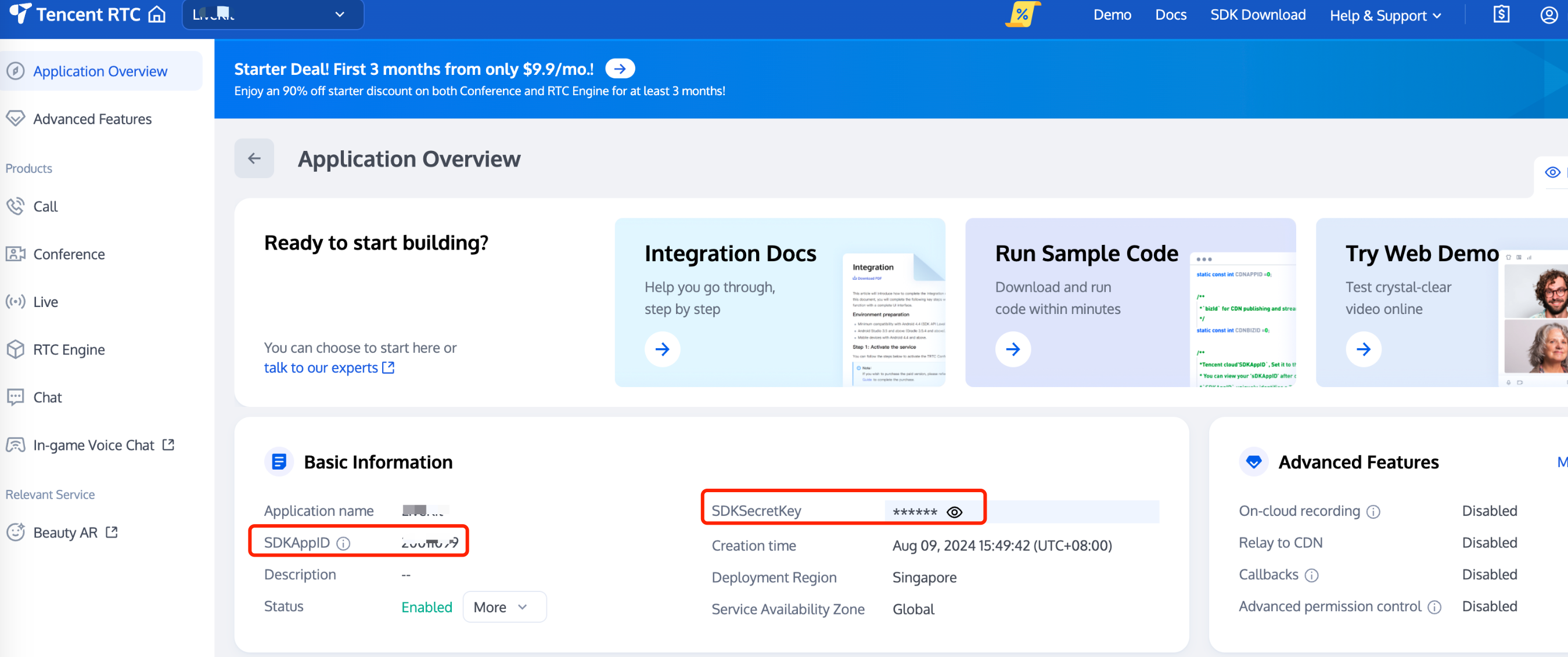
|
|
24
|
-
|
|
25
|
-
4. Click **Copy** to copy and save the key information.
|
|
26
|
-
|
|
27
|
-
|
|
28
|
-
> **Note: **
|
|
29
|
-
>
|
|
30
|
-
|
|
31
|
-
> Store the key information properly to prevent disclosure.
|
|
32
|
-
>
|
|
33
|
-
|
|
34
|
-
|
|
35
|
-
## Calculating UserSig on the Client
|
|
36
|
-
|
|
37
|
-
The `GenerateTestUserSig` open-source module provided in the sample code of the Chat SDK can help you quickly generate a UserSig. You only need to configure three member variables, including SDKAPPID (SDKAppID of the app), EXPIRETIME (UserSig expiration time), and SECRETKEY (key information), and then call the genTestUserSig() function to quickly obtain a UserSig.
|
|
38
|
-
|
|
39
|
-
To simplify this process, we provide the source code for computing a UserSig for the following languages and platforms. You can directly download and integrate the source code into your client.
|
|
40
|
-
<table>
|
|
41
|
-
<tr>
|
|
42
|
-
<td rowspan="1" colSpan="1" >Programing Language</td>
|
|
43
|
-
|
|
44
|
-
<td rowspan="1" colSpan="1" >Platform</td>
|
|
45
|
-
|
|
46
|
-
<td rowspan="1" colSpan="1" >GenerateTestUserSig Source Code</td>
|
|
47
|
-
</tr>
|
|
48
|
-
|
|
49
|
-
<tr>
|
|
50
|
-
<td rowspan="1" colSpan="1" >Java</td>
|
|
51
|
-
|
|
52
|
-
<td rowspan="1" colSpan="1" >Android</td>
|
|
53
|
-
|
|
54
|
-
<td rowspan="1" colSpan="1" >[GenerateTestUserSig.java](https://github.com/tencentyun/TIMSDK/blob/master/Android/Demo/app/src/main/java/com/tencent/qcloud/tim/demo/signature/GenerateTestUserSig.java)</td>
|
|
55
|
-
</tr>
|
|
56
|
-
|
|
57
|
-
<tr>
|
|
58
|
-
<td rowspan="1" colSpan="1" >Objective-C</td>
|
|
59
|
-
|
|
60
|
-
<td rowspan="1" colSpan="1" >iOS</td>
|
|
61
|
-
|
|
62
|
-
<td rowspan="1" colSpan="1" >[GenerateTestUserSig.h](https://github.com/tencentyun/TIMSDK/blob/master/iOS/Demo/TUIKitDemo/Private/GenerateTestUserSig.h)</td>
|
|
63
|
-
</tr>
|
|
64
|
-
|
|
65
|
-
<tr>
|
|
66
|
-
<td rowspan="1" colSpan="1" >Objective-C</td>
|
|
67
|
-
|
|
68
|
-
<td rowspan="1" colSpan="1" >Mac</td>
|
|
69
|
-
|
|
70
|
-
<td rowspan="1" colSpan="1" >[GenerateTestUserSig.h](https://github.com/tencentyun/TIMSDK/blob/master/Mac/Demo/TUIKitDemo/Debug/GenerateTestUserSig.h)</td>
|
|
71
|
-
</tr>
|
|
72
|
-
|
|
73
|
-
<tr>
|
|
74
|
-
<td rowspan="1" colSpan="1" >C++</td>
|
|
75
|
-
|
|
76
|
-
<td rowspan="1" colSpan="1" >Windows</td>
|
|
77
|
-
|
|
78
|
-
<td rowspan="1" colSpan="1" >[GenerateTestUserSig.h](https://github.com/tencentyun/TIMSDK/blob/master/Windows/Demo/IMApp/GenerateTestUserSig.h)</td>
|
|
79
|
-
</tr>
|
|
80
|
-
|
|
81
|
-
<tr>
|
|
82
|
-
<td rowspan="1" colSpan="1" >Javascript</td>
|
|
83
|
-
|
|
84
|
-
<td rowspan="1" colSpan="1" >Web</td>
|
|
85
|
-
|
|
86
|
-
<td rowspan="1" colSpan="1" >[GenerateTestUserSig.js](https://github.com/TencentCloud/chat-uikit-uniapp/blob/main/TUIKit/debug/GenerateTestUserSig.js)</td>
|
|
87
|
-
</tr>
|
|
88
|
-
|
|
89
|
-
<tr>
|
|
90
|
-
<td rowspan="1" colSpan="1" >Dart</td>
|
|
91
|
-
|
|
92
|
-
<td rowspan="1" colSpan="1" >Flutter</td>
|
|
93
|
-
|
|
94
|
-
<td rowspan="1" colSpan="1" >[GenerateTestUserSig.dart](https://github.com/TencentCloud/chat-demo-flutter/blob/main/lib/utils/GenerateTestUserSig.dart )</td>
|
|
95
|
-
</tr>
|
|
96
|
-
</table>
|
|
97
|
-
|
|
98
|
-
|
|
99
|
-
> **Note: **
|
|
100
|
-
>
|
|
101
|
-
|
|
102
|
-
> In this method, the `SECRETKEY` is vulnerable to decompilation and reverse engineering. Once your `SECRETKEY` is disclosed, attackers can steal your Tencent Cloud traffic. Therefore, **this method is only suitable for locally running a demo project and feature debugging**.
|
|
103
|
-
The correct way to issue a UserSig is to integrate the UserSig computing code into your server and provide app-oriented APIs. When UserSig is needed, your app will send a request to the business server to obtain a dynamic UserSig. For more information, see [How to Calculate UserSig](https://write.woa.com/#GeneratingdynamicUserSig).
|
|
104
|
-
>
|
|
105
|
-
|
|
106
|
-
|
|
107
|
-
## Calculating UserSig on the Server
|
|
108
|
-
|
|
109
|
-
Generating a UserSig on the server provides maximum protection against the disclosure of the key used for calculating the UserSig. You only need to deploy the code for calculating the UserSig on your server and provide an app-oriented API. When a UserSig is needed, your app will send a request to the business server to obtain a dynamic UserSig.
|
|
110
|
-
To simplify this process, we provide the source code for calculating a UserSig for the following languages and platforms. You can directly download and integrate the source code into your server.
|
|
111
|
-
<table>
|
|
112
|
-
<tr>
|
|
113
|
-
<td rowspan="1" colSpan="1" >Programming Language</td>
|
|
114
|
-
|
|
115
|
-
<td rowspan="1" colSpan="1" >Key Function</td>
|
|
116
|
-
|
|
117
|
-
<td rowspan="1" colSpan="1" >Download URL</td>
|
|
118
|
-
</tr>
|
|
119
|
-
|
|
120
|
-
<tr>
|
|
121
|
-
<td rowspan="1" colSpan="1" >Java</td>
|
|
122
|
-
|
|
123
|
-
<td rowspan="1" colSpan="1" >HMAC-SHA256</td>
|
|
124
|
-
|
|
125
|
-
<td rowspan="1" colSpan="1" >[genSig](https://github.com/Tencent-RTC/tls-sig-api-v2-java/blob/main/src/main/java/com/tencentcloud/TLSSigAPIv2.java)</td>
|
|
126
|
-
</tr>
|
|
127
|
-
|
|
128
|
-
<tr>
|
|
129
|
-
<td rowspan="1" colSpan="1" >GO</td>
|
|
130
|
-
|
|
131
|
-
<td rowspan="1" colSpan="1" >HMAC-SHA256</td>
|
|
132
|
-
|
|
133
|
-
<td rowspan="1" colSpan="1" >[GenSig](https://github.com/Tencent-RTC/tls-sig-api-v2-golang/blob/main/tencentyun/TLSSigAPI.go)</td>
|
|
134
|
-
</tr>
|
|
135
|
-
|
|
136
|
-
<tr>
|
|
137
|
-
<td rowspan="1" colSpan="1" >PHP</td>
|
|
138
|
-
|
|
139
|
-
<td rowspan="1" colSpan="1" >HMAC-SHA256</td>
|
|
140
|
-
|
|
141
|
-
<td rowspan="1" colSpan="1" >[genSig](https://github.com/Tencent-RTC/tls-sig-api-v2-php/blob/main/src/TLSSigAPIv2.php)</td>
|
|
142
|
-
</tr>
|
|
143
|
-
|
|
144
|
-
<tr>
|
|
145
|
-
<td rowspan="1" colSpan="1" >Nodejs</td>
|
|
146
|
-
|
|
147
|
-
<td rowspan="1" colSpan="1" >HMAC-SHA256</td>
|
|
148
|
-
|
|
149
|
-
<td rowspan="1" colSpan="1" >[genSig](https://github.com/Tencent-RTC/tls-sig-api-v2-node/blob/main/TLSSigAPIv2.js)</td>
|
|
150
|
-
</tr>
|
|
151
|
-
|
|
152
|
-
<tr>
|
|
153
|
-
<td rowspan="1" colSpan="1" >Python</td>
|
|
154
|
-
|
|
155
|
-
<td rowspan="1" colSpan="1" >HMAC-SHA256</td>
|
|
156
|
-
|
|
157
|
-
<td rowspan="1" colSpan="1" >[gen_sig](https://github.com/Tencent-RTC/tls-sig-api-v2-python/blob/main/TLSSigAPIv2.py)</td>
|
|
158
|
-
</tr>
|
|
159
|
-
|
|
160
|
-
<tr>
|
|
161
|
-
<td rowspan="1" colSpan="1" >C#</td>
|
|
162
|
-
|
|
163
|
-
<td rowspan="1" colSpan="1" >HMAC-SHA256</td>
|
|
164
|
-
|
|
165
|
-
<td rowspan="1" colSpan="1" >[GenSig](https://github.com/Tencent-RTC/tls-sig-api-v2-cs/blob/main/tls-sig-api-v2-cs/TLSSigAPIv2.cs)</td>
|
|
166
|
-
</tr>
|
|
167
|
-
|
|
168
|
-
<tr>
|
|
169
|
-
<td rowspan="1" colSpan="1" >C++</td>
|
|
170
|
-
|
|
171
|
-
<td rowspan="1" colSpan="1" >HMAC-SHA256</td>
|
|
172
|
-
|
|
173
|
-
<td rowspan="1" colSpan="1" >[gen_sig](https://github.com/Tencent-RTC/tls-sig-api-v2-cpp)</td>
|
|
174
|
-
</tr>
|
|
175
|
-
</table>
|
|
176
|
-
|
|
177
|
-
|
|
178
|
-
Key fields in a UserSig calculation function include the SDKAppID, UserID, and UserSig validity period, as described in the following table.
|
|
179
|
-
|
|
180
|
-
> **Note: **
|
|
181
|
-
>
|
|
182
|
-
|
|
183
|
-
> The following table uses the field names in the Java source code as an example. The field names may be different in other languages.
|
|
184
|
-
>
|
|
185
|
-
|
|
186
|
-
<table>
|
|
187
|
-
<tr>
|
|
188
|
-
<td rowspan="1" colSpan="1" >Field Name (Example)</td>
|
|
189
|
-
|
|
190
|
-
<td rowspan="1" colSpan="1" >Description</td>
|
|
191
|
-
</tr>
|
|
192
|
-
|
|
193
|
-
<tr>
|
|
194
|
-
<td rowspan="1" colSpan="1" >sdkappid</td>
|
|
195
|
-
|
|
196
|
-
<td rowspan="1" colSpan="1" >SDKAppID of the app. You can obtain the SDKAppID on the app card in the [Chat console](https://console.trtc.io/chat).</td>
|
|
197
|
-
</tr>
|
|
198
|
-
|
|
199
|
-
<tr>
|
|
200
|
-
<td rowspan="1" colSpan="1" >userId</td>
|
|
201
|
-
|
|
202
|
-
<td rowspan="1" colSpan="1" >User ID (former name: `Identifier`).</td>
|
|
203
|
-
</tr>
|
|
204
|
-
|
|
205
|
-
<tr>
|
|
206
|
-
<td rowspan="1" colSpan="1" >expire</td>
|
|
207
|
-
|
|
208
|
-
<td rowspan="1" colSpan="1" >UserSig validity period, in seconds.</td>
|
|
209
|
-
</tr>
|
|
210
|
-
|
|
211
|
-
<tr>
|
|
212
|
-
<td rowspan="1" colSpan="1" >userbuf</td>
|
|
213
|
-
|
|
214
|
-
<td rowspan="1" colSpan="1" >This field is set to `null` by default because APIs without UserBuf are used in Chat by default.APIs with UserBuf may be required in some TRTC use cases, for example, when entering a room. For more information, see [Enabling Advanced Permission Control](https://intl.cloud.tencent.com/document/product/647/35157).</td>
|
|
215
|
-
</tr>
|
|
216
|
-
|
|
217
|
-
<tr>
|
|
218
|
-
<td rowspan="1" colSpan="1" >key</td>
|
|
219
|
-
|
|
220
|
-
<td rowspan="1" colSpan="1" >Key. You can obtain a key on the app details page in the [Chat console](https://console.trtc.io/chat). For more information, see [Obtaining a Key](https://write.woa.com/#getkey).</td>
|
|
221
|
-
</tr>
|
|
222
|
-
</table>
|
|
223
|
-
|
|
224
|
-
|
|
225
|
-
## Old Version of Algorithm
|
|
226
|
-
|
|
227
|
-
To simplify signature computing so that customers can conveniently and quickly use Tencent Cloud services, the signature algorithm of the Chat service has been upgraded from ECDSA-SHA256 to HMAC-SHA256 since July 19, 2019. This means that all SDKAppIDs created after July 19, 2019 will use the new HMAC-SHA256 algorithm.
|
|
228
|
-
|
|
229
|
-
If your SDKAppID was created before July 19, 2019, we recommend that you upgrade the signature algorithm to [HMAC-SHA256](https://write.woa.com/#GeneratingdynamicUserSig). The upgrade will not affect your business. Alternatively, you can still use the signature algorithm of an earlier version. The URLs for downloading the source code for the ECDSA-SHA256 algorithm are as follows:
|
|
230
|
-
<table>
|
|
231
|
-
<tr>
|
|
232
|
-
<td rowspan="1" colSpan="1" >Programming Language</td>
|
|
233
|
-
|
|
234
|
-
<td rowspan="1" colSpan="1" >Signature Algorithm</td>
|
|
235
|
-
|
|
236
|
-
<td rowspan="1" colSpan="1" >Download Link</td>
|
|
237
|
-
</tr>
|
|
238
|
-
|
|
239
|
-
<tr>
|
|
240
|
-
<td rowspan="1" colSpan="1" >Java</td>
|
|
241
|
-
|
|
242
|
-
<td rowspan="1" colSpan="1" >ECDSA-SHA256</td>
|
|
243
|
-
|
|
244
|
-
<td rowspan="1" colSpan="1" >[GitHub](https://github.com/tencentyun/tls-sig-api-java)</td>
|
|
245
|
-
</tr>
|
|
246
|
-
|
|
247
|
-
<tr>
|
|
248
|
-
<td rowspan="1" colSpan="1" >GO</td>
|
|
249
|
-
|
|
250
|
-
<td rowspan="1" colSpan="1" >ECDSA-SHA256</td>
|
|
251
|
-
|
|
252
|
-
<td rowspan="1" colSpan="1" >[GitHub](https://github.com/tencentyun/tls-sig-api-golang)</td>
|
|
253
|
-
</tr>
|
|
254
|
-
|
|
255
|
-
<tr>
|
|
256
|
-
<td rowspan="1" colSpan="1" >PHP</td>
|
|
257
|
-
|
|
258
|
-
<td rowspan="1" colSpan="1" >ECDSA-SHA256</td>
|
|
259
|
-
|
|
260
|
-
<td rowspan="1" colSpan="1" >[GitHub](https://github.com/tencentyun/tls-sig-api-php)</td>
|
|
261
|
-
</tr>
|
|
262
|
-
|
|
263
|
-
<tr>
|
|
264
|
-
<td rowspan="1" colSpan="1" >Nodejs</td>
|
|
265
|
-
|
|
266
|
-
<td rowspan="1" colSpan="1" >ECDSA-SHA256</td>
|
|
267
|
-
|
|
268
|
-
<td rowspan="1" colSpan="1" >[GitHub](https://github.com/tencentyun/tls-sig-api-node)</td>
|
|
269
|
-
</tr>
|
|
270
|
-
|
|
271
|
-
<tr>
|
|
272
|
-
<td rowspan="1" colSpan="1" >Python</td>
|
|
273
|
-
|
|
274
|
-
<td rowspan="1" colSpan="1" >ECDSA-SHA256</td>
|
|
275
|
-
|
|
276
|
-
<td rowspan="1" colSpan="1" >[GitHub](https://github.com/tencentyun/tls-sig-api-python)</td>
|
|
277
|
-
</tr>
|
|
278
|
-
|
|
279
|
-
<tr>
|
|
280
|
-
<td rowspan="1" colSpan="1" >C#</td>
|
|
281
|
-
|
|
282
|
-
<td rowspan="1" colSpan="1" >ECDSA-SHA256</td>
|
|
283
|
-
|
|
284
|
-
<td rowspan="1" colSpan="1" >[GitHub](https://github.com/tencentyun/tls-sig-api-cs)</td>
|
|
285
|
-
</tr>
|
|
286
|
-
|
|
287
|
-
<tr>
|
|
288
|
-
<td rowspan="1" colSpan="1" >C++</td>
|
|
289
|
-
|
|
290
|
-
<td rowspan="1" colSpan="1" >ECDSA-SHA256</td>
|
|
291
|
-
|
|
292
|
-
<td rowspan="1" colSpan="1" >[GitHub](https://github.com/tencentyun/tls-sig-api)</td>
|
|
293
|
-
</tr>
|
|
294
|
-
</table>
|
|
295
|
-
|
|
296
|
-
|
|
297
|
-
## Get UserSig from the console
|
|
298
|
-
- Log in to Tencent-RTC Console, navigate to Development Tools > [UserSig Tools](https://console.trtc.io/usersig).
|
|
299
|
-
|
|
300
|
-
- Under the UserSig Generation Tool, select the corresponding SDKAppID and UserID.
|
|
301
|
-
|
|
302
|
-
- Click the Generate button to compute the corresponding UserSig.
|
|
303
|
-
|
|
304
|
-
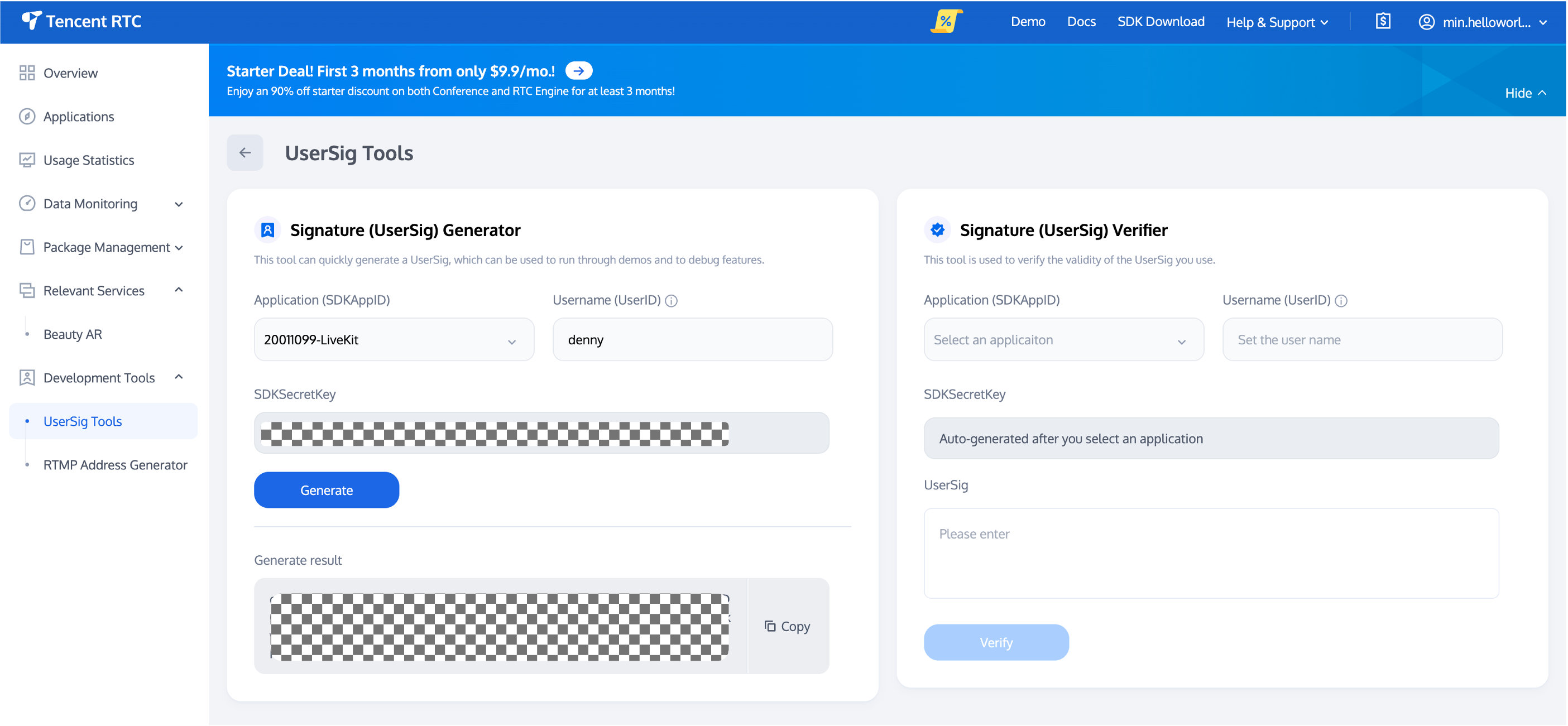
|
|
305
|
-
|
|
306
|
-
|
|
@@ -1,290 +0,0 @@
|
|
|
1
|
-
This article will introduce how to integrate the `TUIChat` chat component.
|
|
2
|
-
|
|
3
|
-
> **Note:**
|
|
4
|
-
>
|
|
5
|
-
> - Starting from version 5.7.1435, TUIChat supports the classic version of UI components.
|
|
6
|
-
> - Starting from version 6.9.3557, TUIChat introduced a brand new minimalist version of UI components.
|
|
7
|
-
|
|
8
|
-
|
|
9
|
-
You can freely choose between the classic or minimalist version of UI components according to your needs.
|
|
10
|
-
|
|
11
|
-
## Display Effect
|
|
12
|
-
|
|
13
|
-
TUIChat offers both private chat (1V1) and group chat (Group) features, supporting multiple operations on messages, such as sending different types of messages, long pressing a message to like/reply/quote, and querying message read receipt details.
|
|
14
|
-
|
|
15
|
-
You can integrate TUIChat into your app alone. The chat interface has a wide range of usage scenarios, such as real estate agency consultation, online medical consultation, e-commerce online customer service, and remote loss assessment for insurance.
|
|
16
|
-
The UI effect is as shown below:
|
|
17
|
-
|
|
18
|
-
|
|
19
|
-
|
|
20
|
-
【Minimalist】
|
|
21
|
-
<table>
|
|
22
|
-
<tr>
|
|
23
|
-
<td rowspan="1" colSpan="1" >Message UI \| Sending Different Types of Messages</td>
|
|
24
|
-
</tr>
|
|
25
|
-
|
|
26
|
-
<tr>
|
|
27
|
-
<td rowspan="1" colSpan="1" ><br>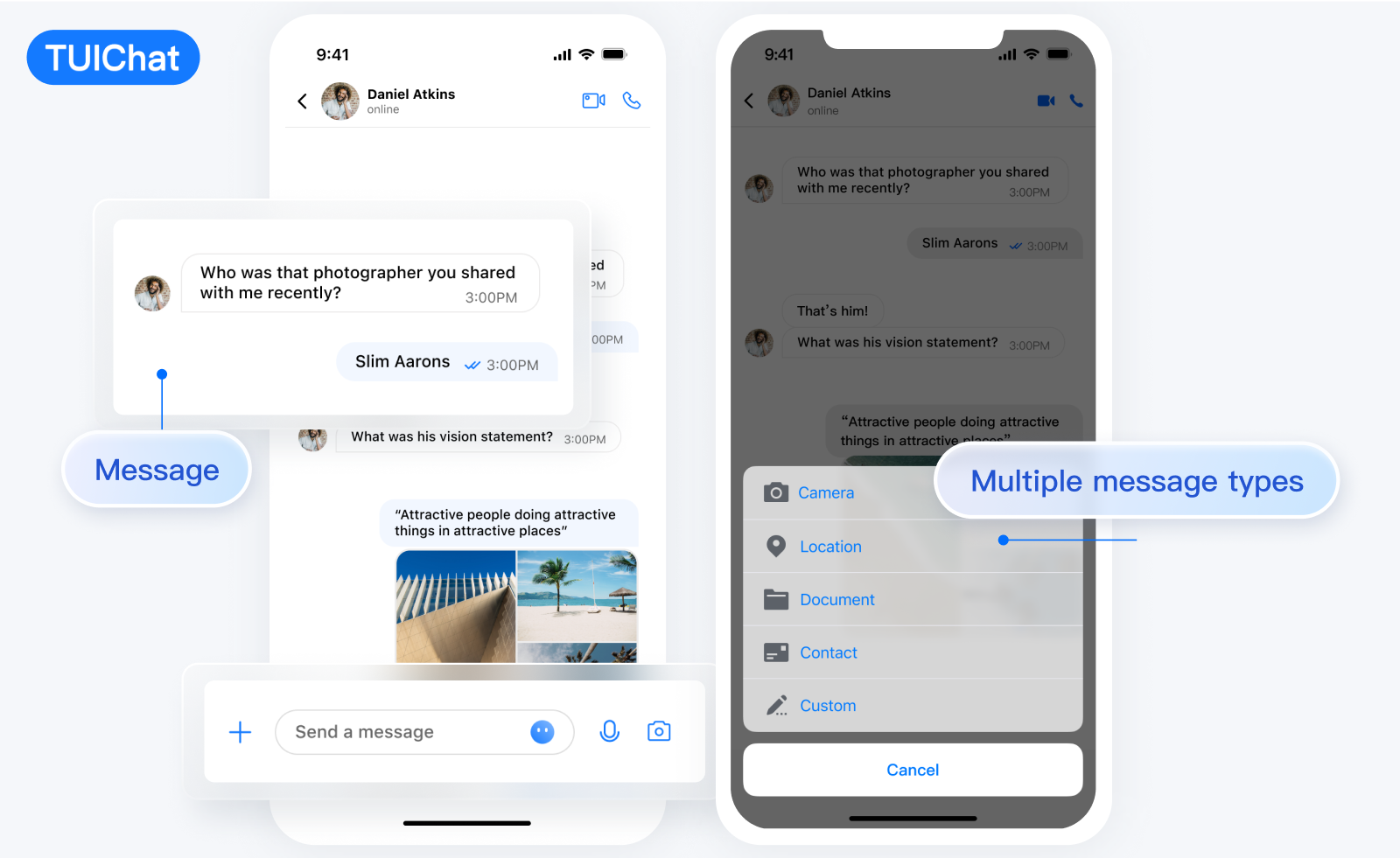</td>
|
|
28
|
-
</tr>
|
|
29
|
-
</table>
|
|
30
|
-
|
|
31
|
-
<table>
|
|
32
|
-
<tr>
|
|
33
|
-
<td rowspan="1" colSpan="1" >Message Reaction \| Reply </td>
|
|
34
|
-
</tr>
|
|
35
|
-
|
|
36
|
-
<tr>
|
|
37
|
-
<td rowspan="1" colSpan="1" ><br>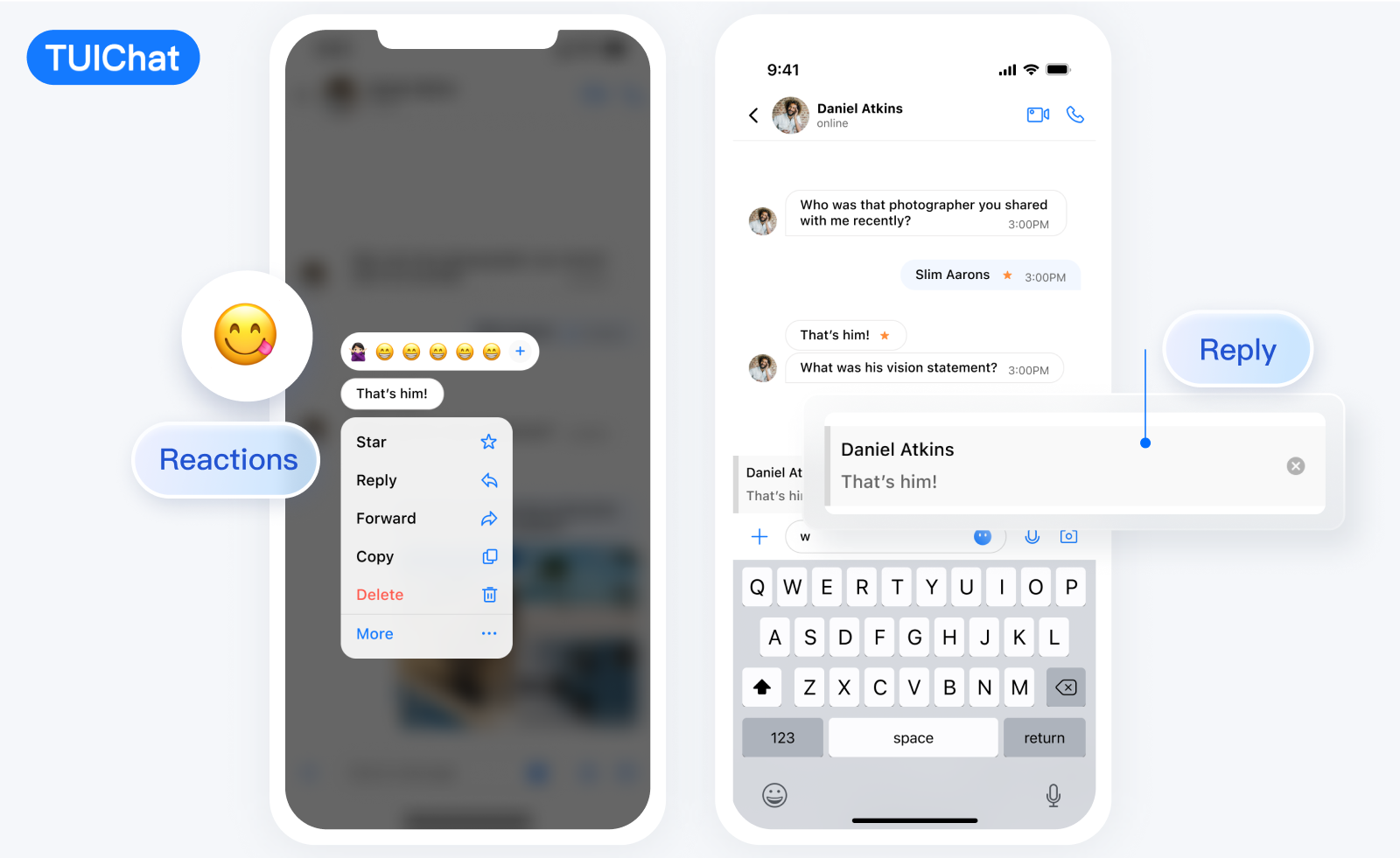</td>
|
|
38
|
-
</tr>
|
|
39
|
-
</table>
|
|
40
|
-
|
|
41
|
-
<table>
|
|
42
|
-
<tr>
|
|
43
|
-
<td rowspan="1" colSpan="1" >Message Read Receipt \| Read Receipt Details</td>
|
|
44
|
-
</tr>
|
|
45
|
-
|
|
46
|
-
<tr>
|
|
47
|
-
<td rowspan="1" colSpan="1" ><br>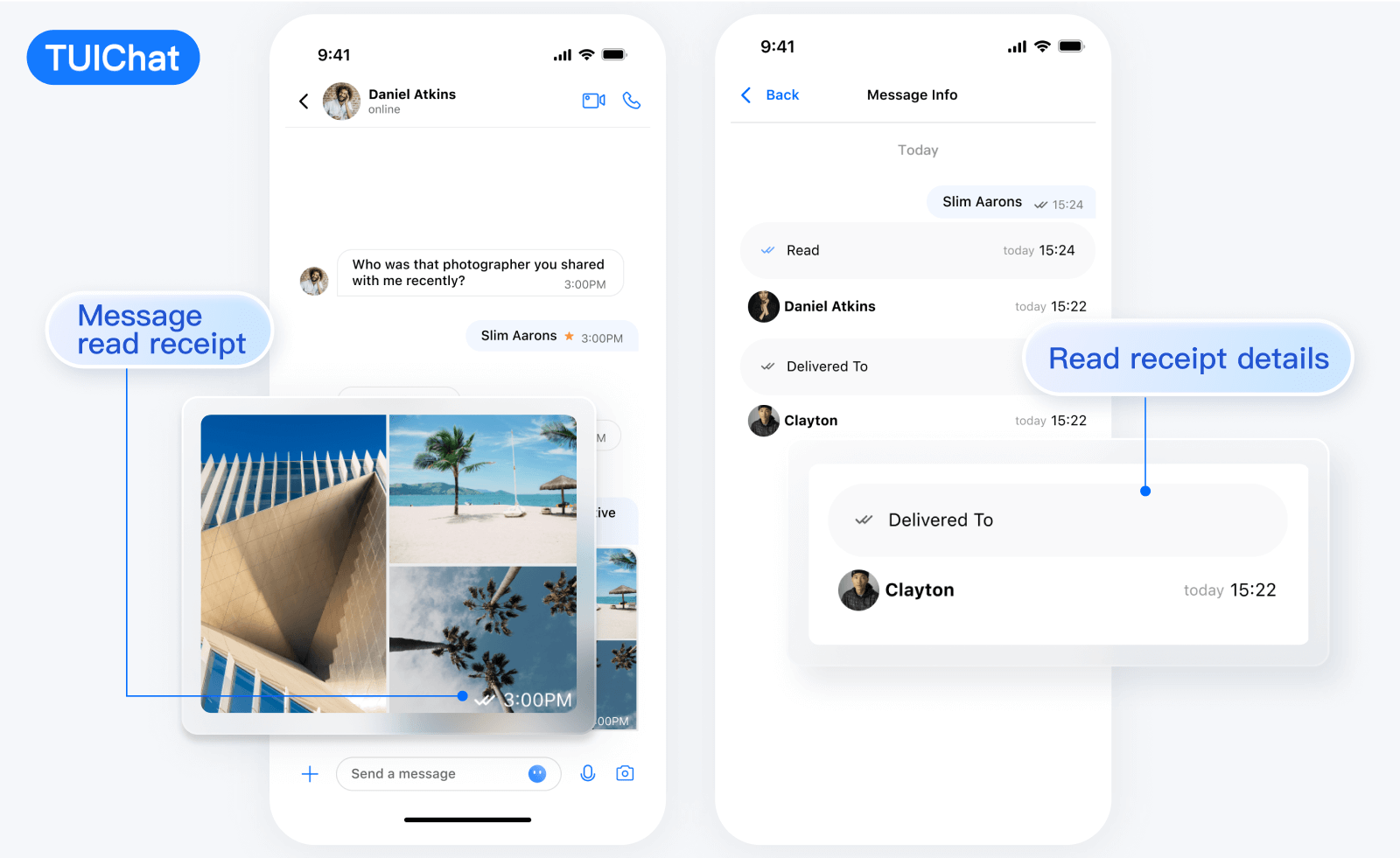</td>
|
|
48
|
-
</tr>
|
|
49
|
-
</table>
|
|
50
|
-
|
|
51
|
-
|
|
52
|
-
【RTL Language】
|
|
53
|
-
<table>
|
|
54
|
-
<tr>
|
|
55
|
-
<td rowspan="1" colSpan="1" >Message UI \| Sending Different Types of Messages</td>
|
|
56
|
-
</tr>
|
|
57
|
-
|
|
58
|
-
<tr>
|
|
59
|
-
<td rowspan="1" colSpan="1" ><br>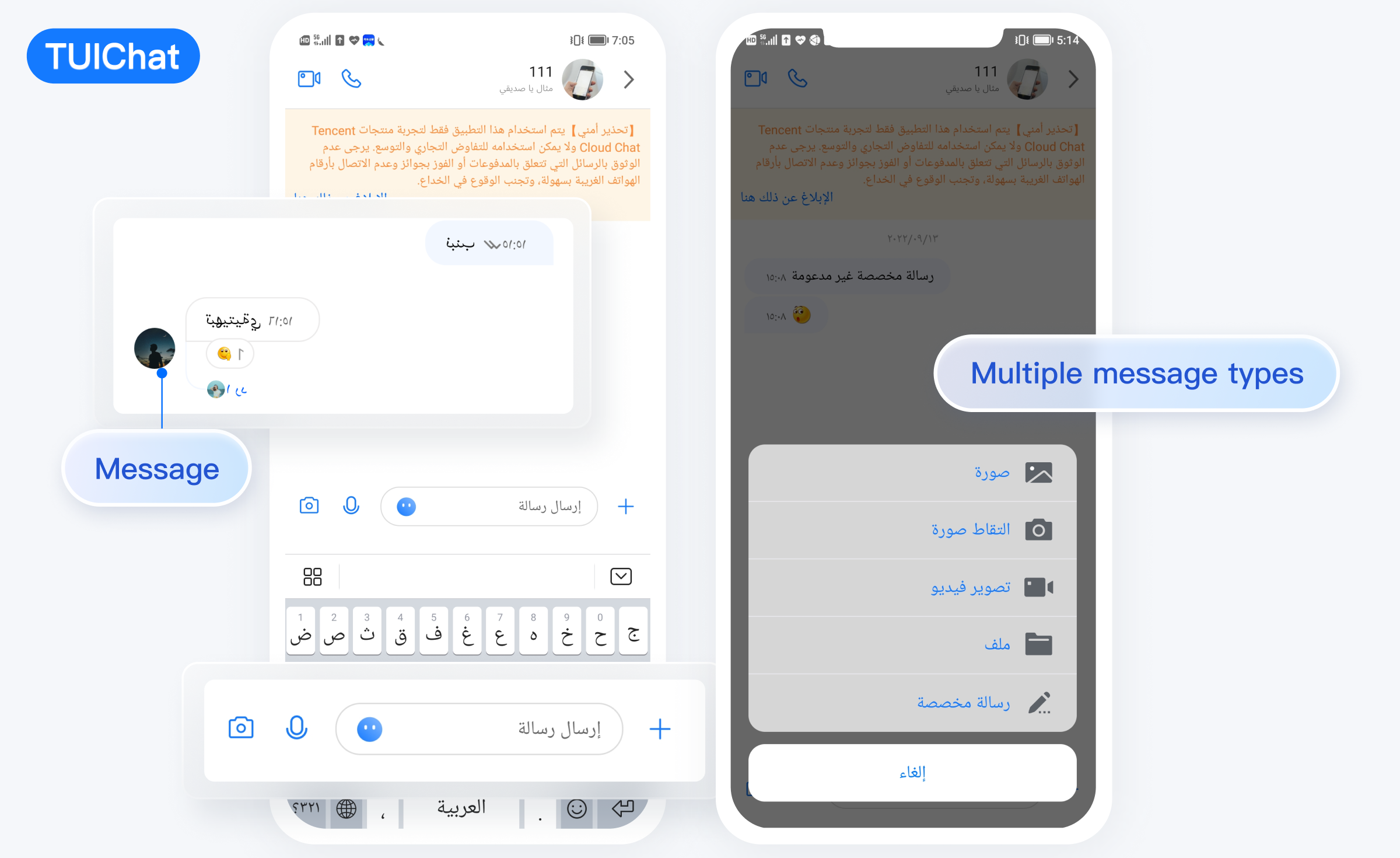</td>
|
|
60
|
-
</tr>
|
|
61
|
-
</table>
|
|
62
|
-
|
|
63
|
-
<table>
|
|
64
|
-
<tr>
|
|
65
|
-
<td rowspan="1" colSpan="1" >Message Reaction \| Reply </td>
|
|
66
|
-
</tr>
|
|
67
|
-
|
|
68
|
-
<tr>
|
|
69
|
-
<td rowspan="1" colSpan="1" ><br>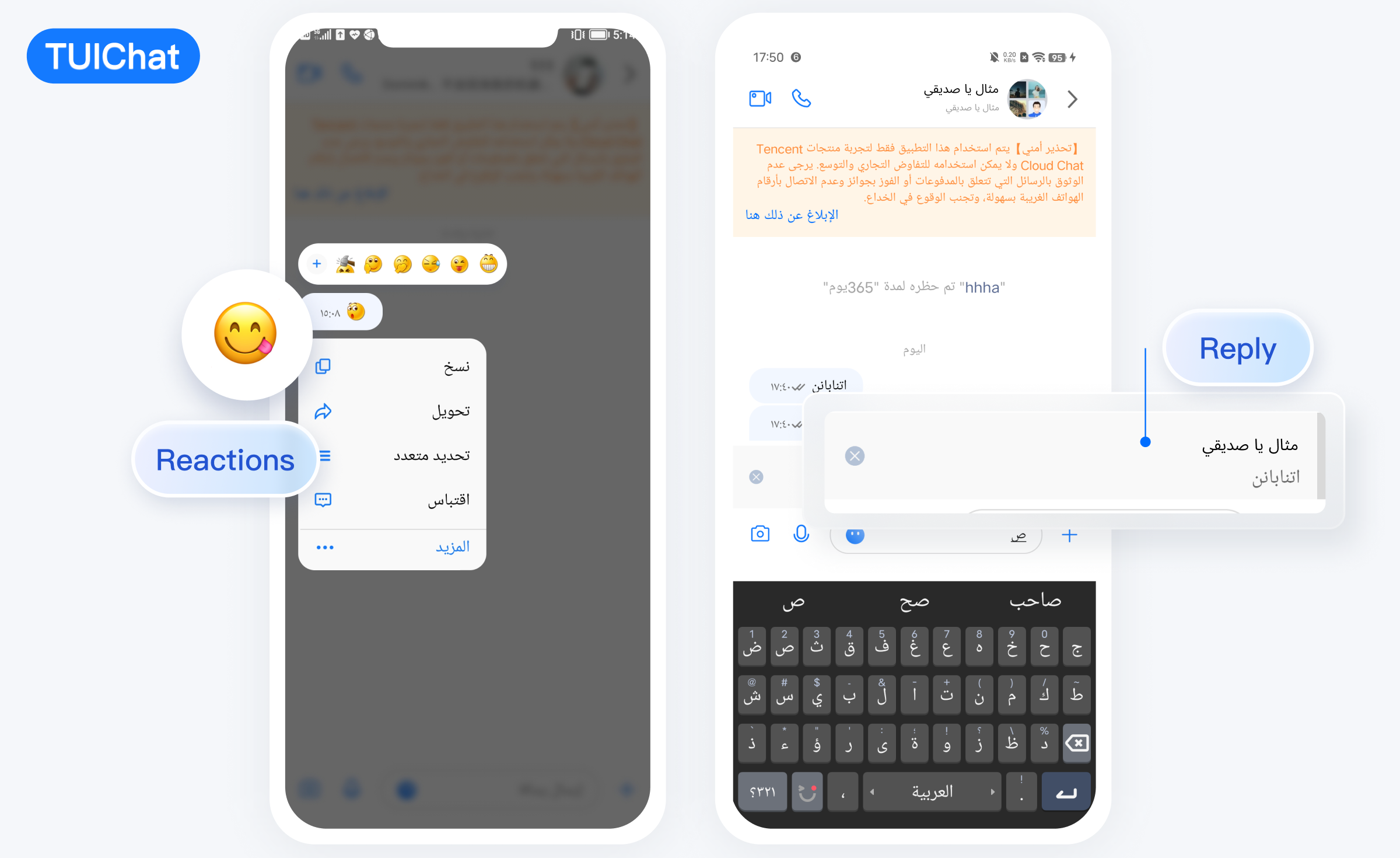</td>
|
|
70
|
-
</tr>
|
|
71
|
-
</table>
|
|
72
|
-
|
|
73
|
-
<table>
|
|
74
|
-
<tr>
|
|
75
|
-
<td rowspan="1" colSpan="1" >Message Read Receipt \| Read Receipt Details</td>
|
|
76
|
-
</tr>
|
|
77
|
-
|
|
78
|
-
<tr>
|
|
79
|
-
<td rowspan="1" colSpan="1" ><br>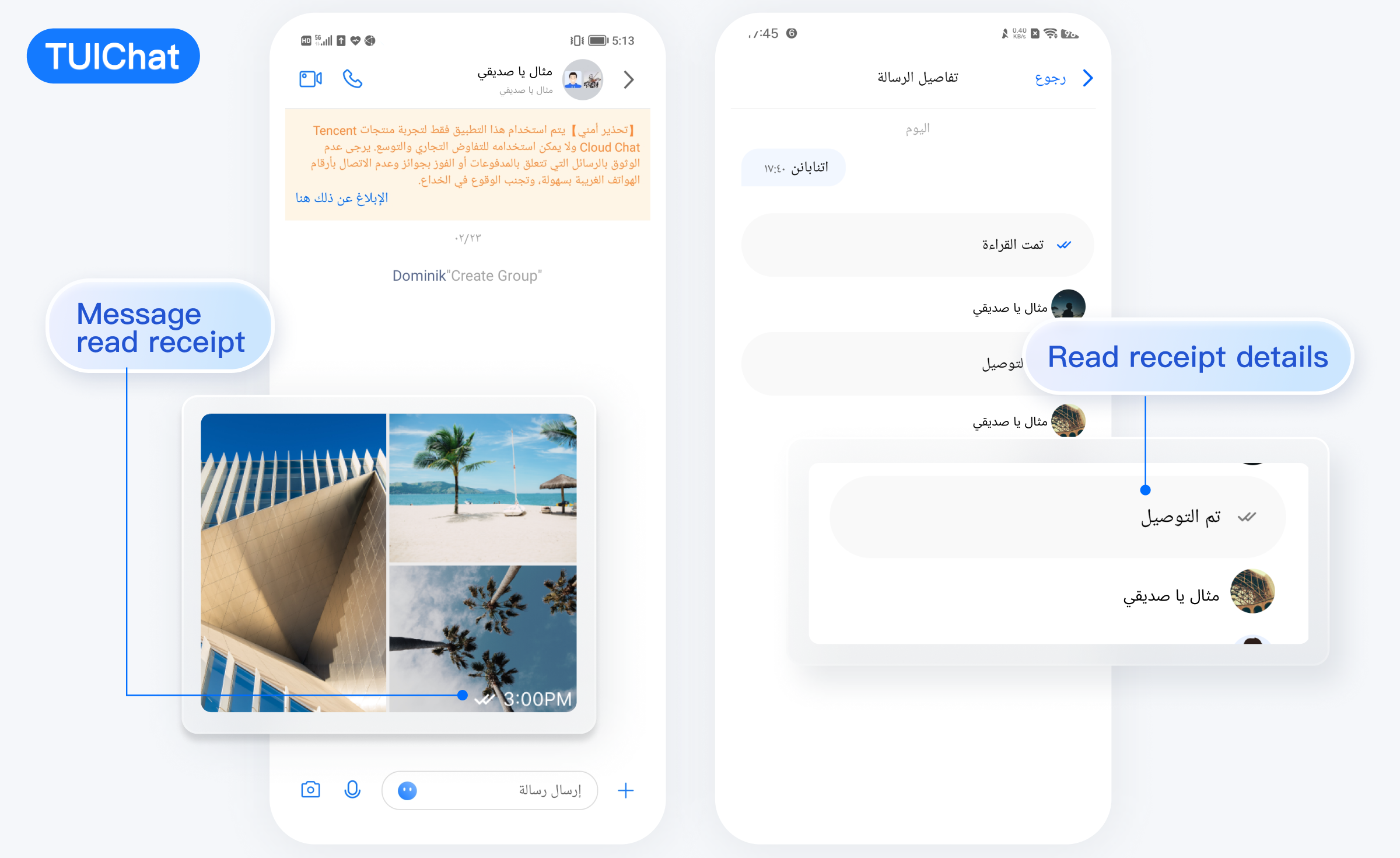</td>
|
|
80
|
-
</tr>
|
|
81
|
-
</table>
|
|
82
|
-
|
|
83
|
-
|
|
84
|
-
【Classic】
|
|
85
|
-
<table>
|
|
86
|
-
<tr>
|
|
87
|
-
<td rowspan="1" colSpan="1" >Message UI</td>
|
|
88
|
-
|
|
89
|
-
<td rowspan="1" colSpan="1" >Sending Different Types of Messages</td>
|
|
90
|
-
</tr>
|
|
91
|
-
|
|
92
|
-
<tr>
|
|
93
|
-
<td rowspan="1" colSpan="1" ><br>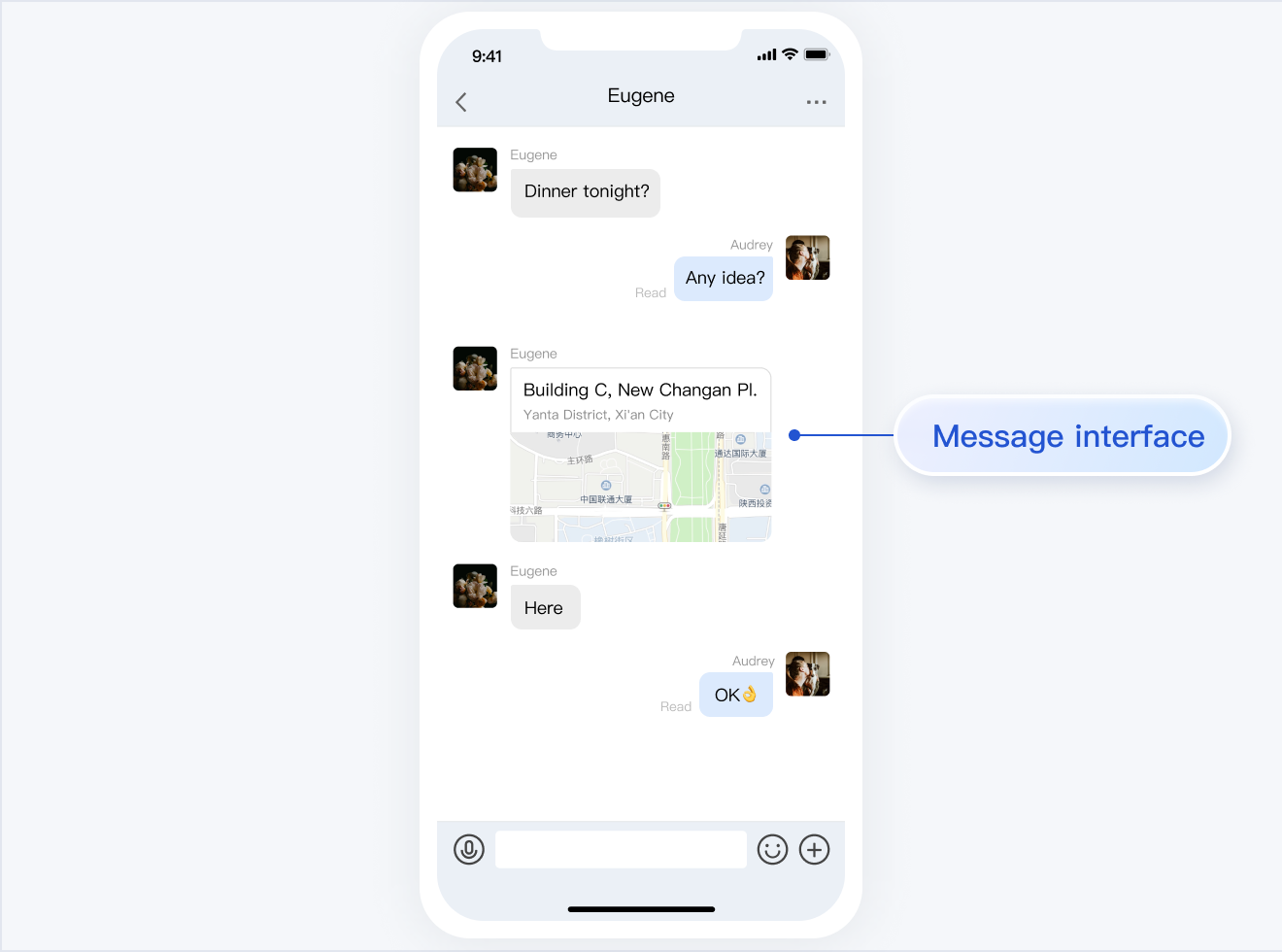</td>
|
|
94
|
-
|
|
95
|
-
<td rowspan="1" colSpan="1" ><br>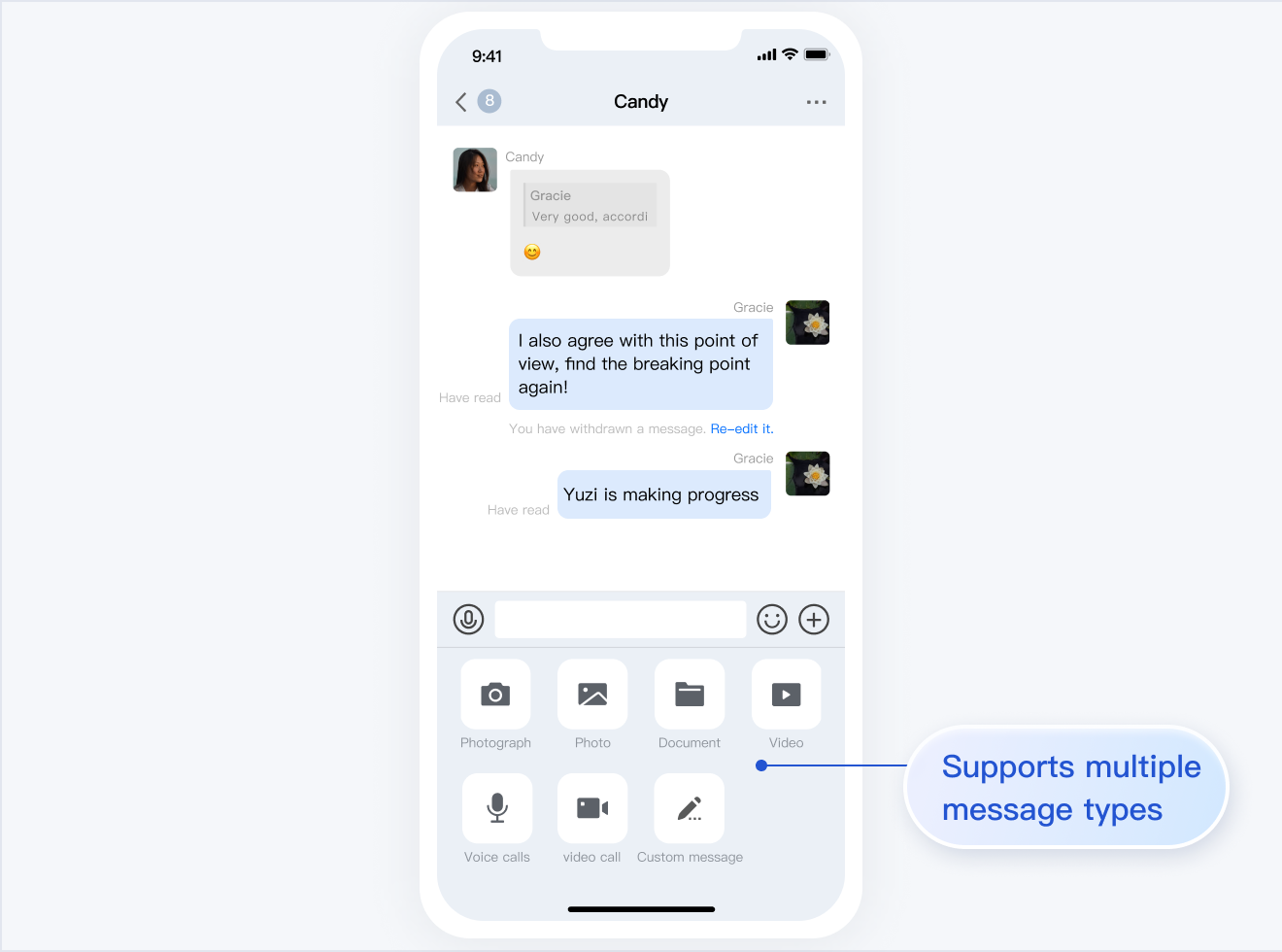</td>
|
|
96
|
-
</tr>
|
|
97
|
-
</table>
|
|
98
|
-
|
|
99
|
-
<table>
|
|
100
|
-
<tr>
|
|
101
|
-
<td rowspan="1" colSpan="1" >Message Likes/Reply/Quoting</td>
|
|
102
|
-
|
|
103
|
-
<td rowspan="1" colSpan="1" >Message Reply Details</td>
|
|
104
|
-
</tr>
|
|
105
|
-
|
|
106
|
-
<tr>
|
|
107
|
-
<td rowspan="1" colSpan="1" ><br>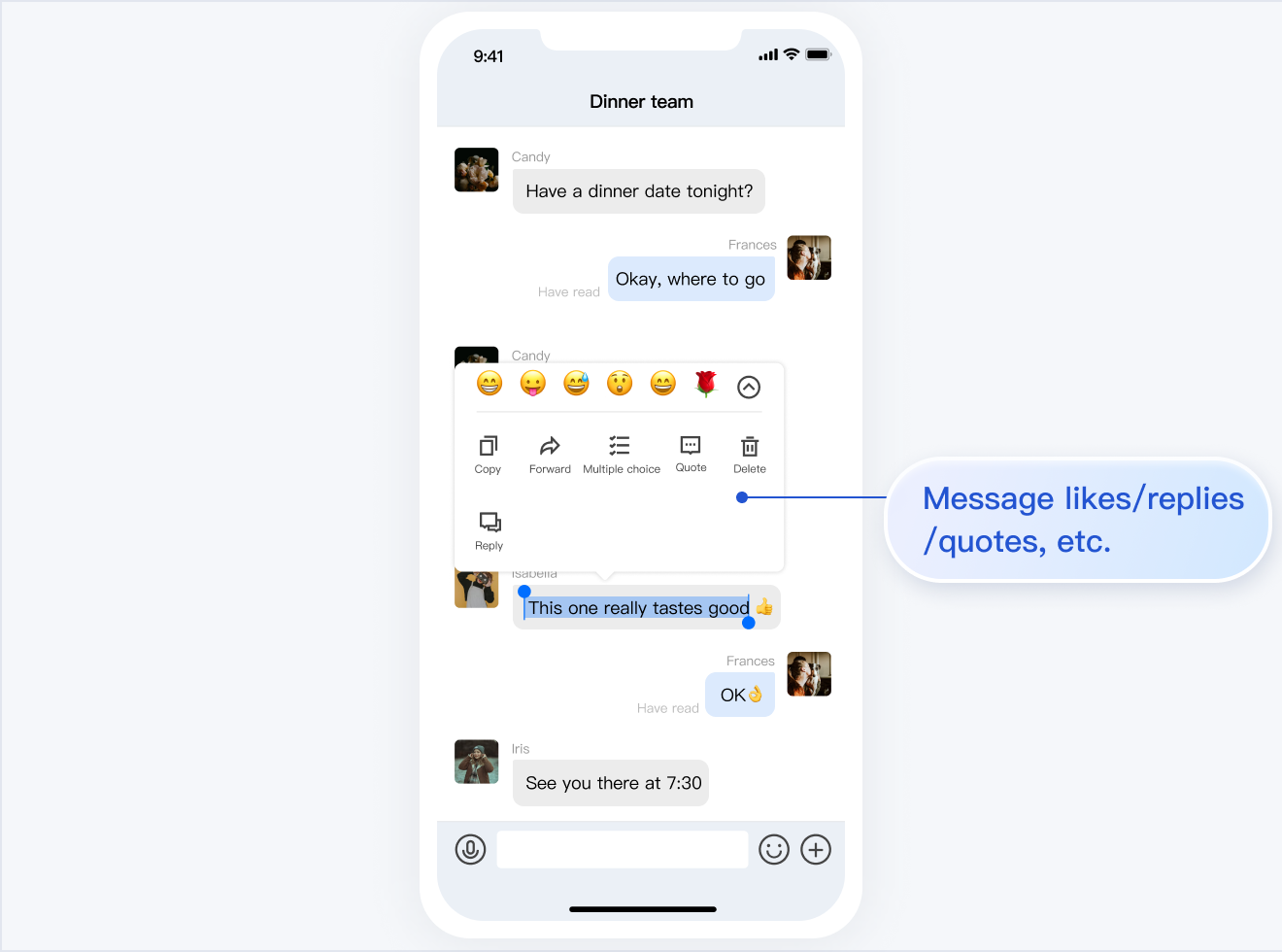</td>
|
|
108
|
-
|
|
109
|
-
<td rowspan="1" colSpan="1" ><br>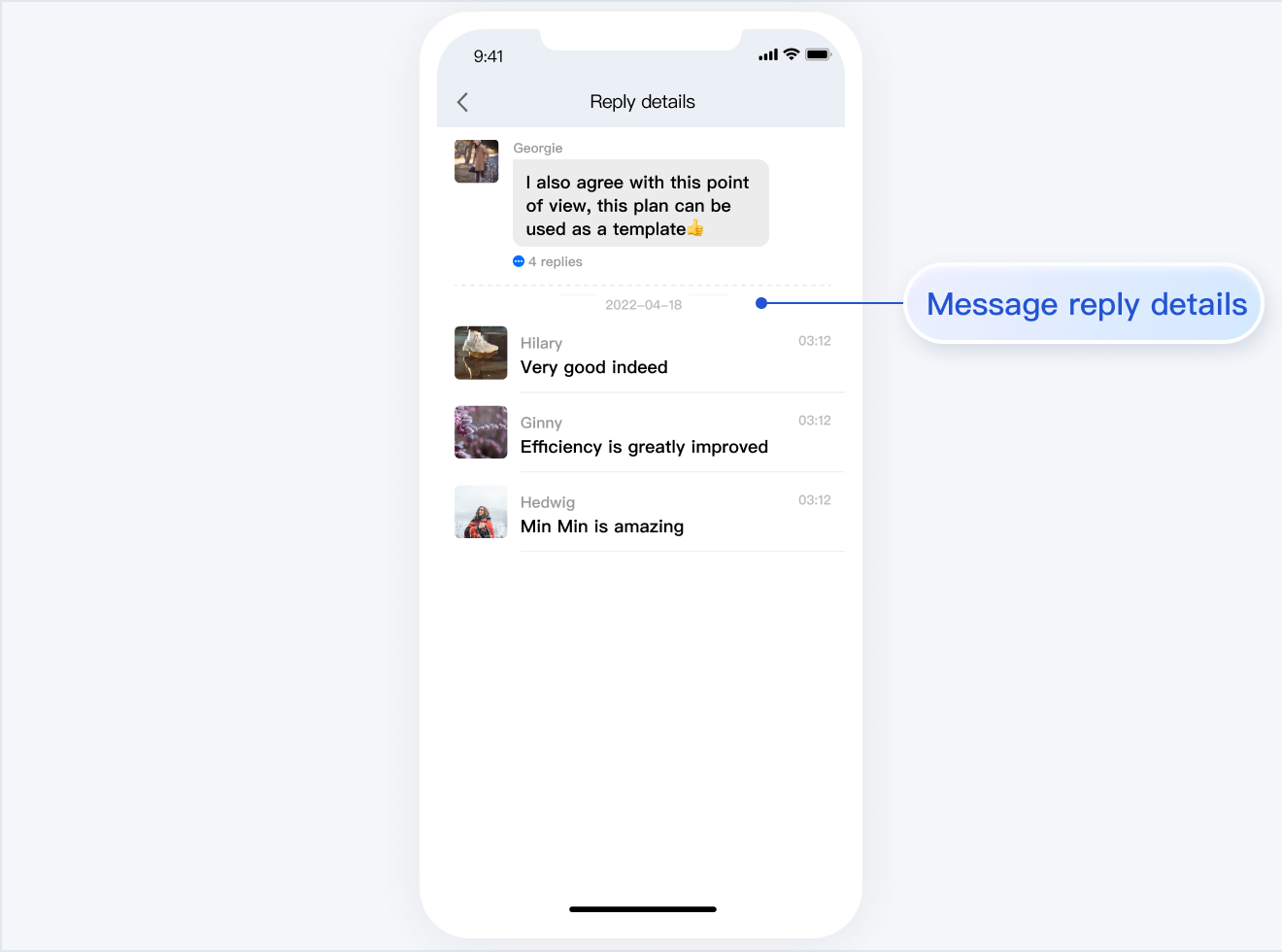</td>
|
|
110
|
-
</tr>
|
|
111
|
-
</table>
|
|
112
|
-
|
|
113
|
-
<table>
|
|
114
|
-
<tr>
|
|
115
|
-
<td rowspan="1" colSpan="1" >Message Read Receipt</td>
|
|
116
|
-
|
|
117
|
-
<td rowspan="1" colSpan="1" >Message Read Receipt Details</td>
|
|
118
|
-
</tr>
|
|
119
|
-
|
|
120
|
-
<tr>
|
|
121
|
-
<td rowspan="1" colSpan="1" ><br>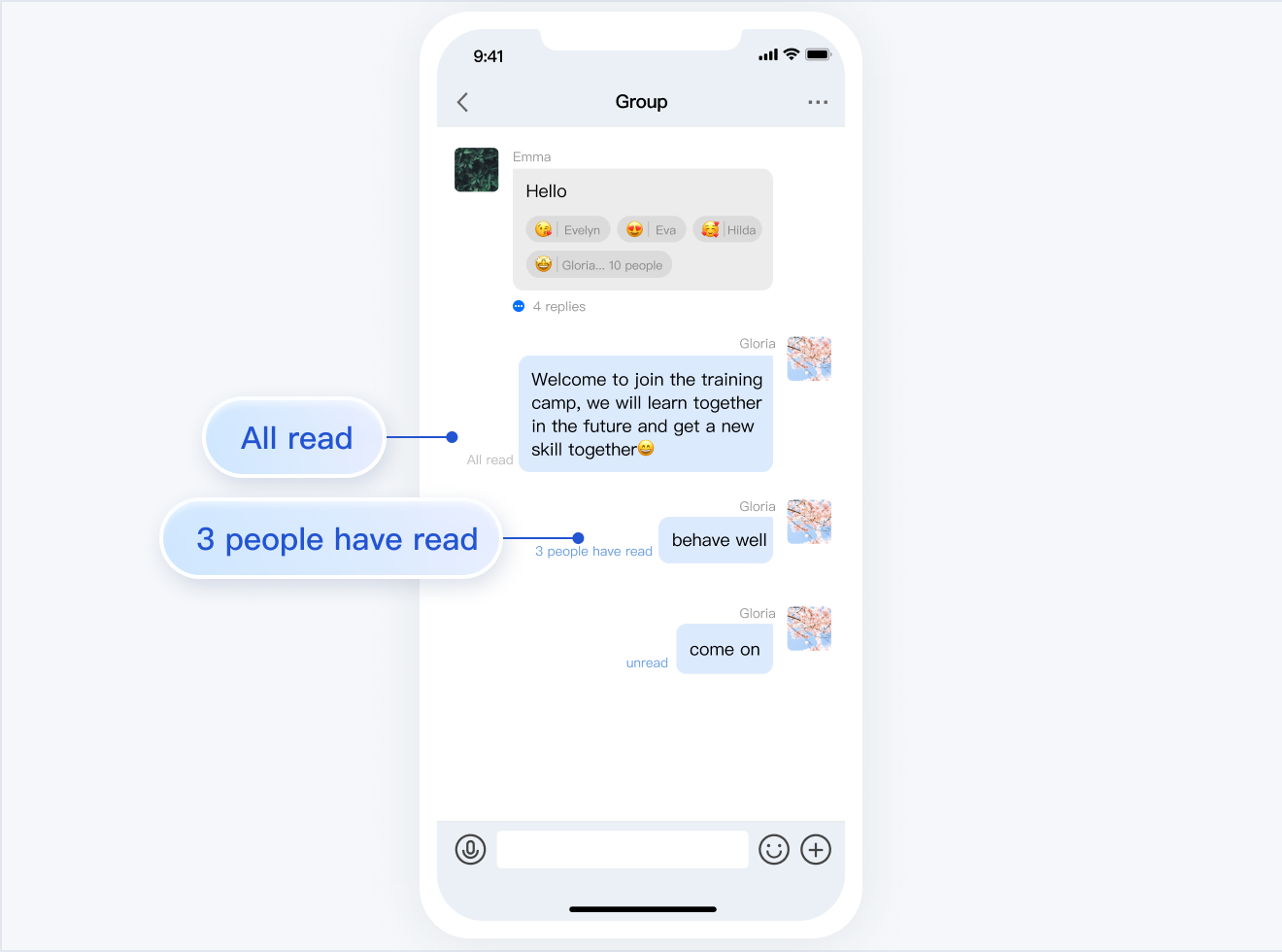</td>
|
|
122
|
-
|
|
123
|
-
<td rowspan="1" colSpan="1" ><br>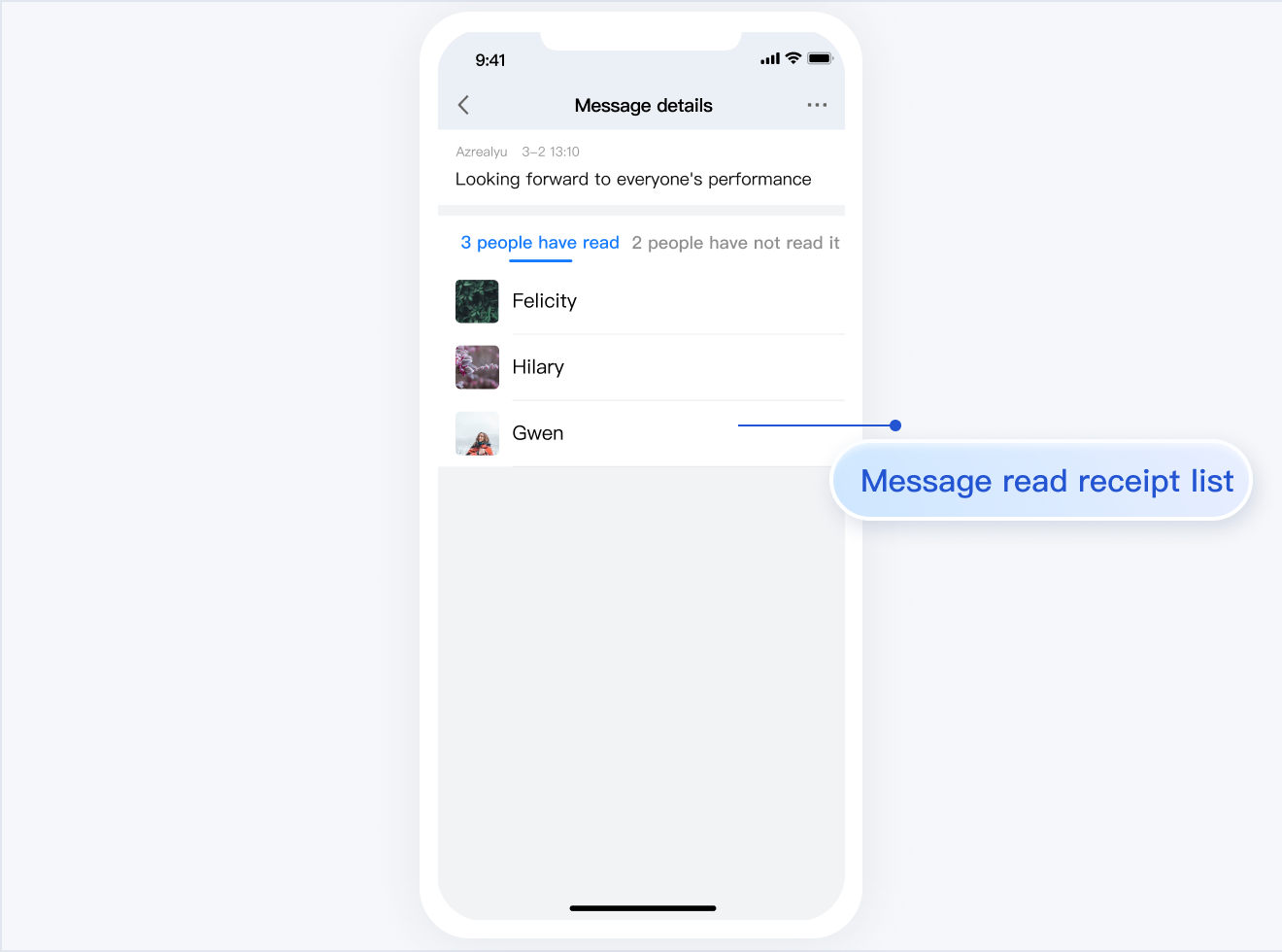</td>
|
|
124
|
-
</tr>
|
|
125
|
-
</table>
|
|
126
|
-
|
|
127
|
-
|
|
128
|
-
## Development Environment Requirements
|
|
129
|
-
- Android Studio-Giraffe
|
|
130
|
-
|
|
131
|
-
- Gradle-7.2
|
|
132
|
-
|
|
133
|
-
- Android Gradle Plugin Version-7.0.0
|
|
134
|
-
|
|
135
|
-
- kotlin-gradle-plugin-1.5.31
|
|
136
|
-
|
|
137
|
-
|
|
138
|
-
## Integrate TUIChat Source Code
|
|
139
|
-
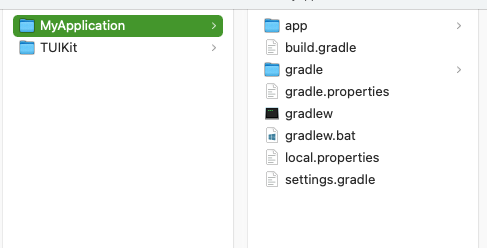
1. Download the [Source Code](https://github.com/TencentCloud/chat-uikit-android) from GitHub. Ensure the TUIKit folder is at the same level as your own project folder, for example:
|
|
140
|
-
|
|
141
|
-
|
|
142
|
-
|
|
143
|
-
2. Add the TUIChat component in settings.gradle:
|
|
144
|
-
|
|
145
|
-
``` css
|
|
146
|
-
// Include the internal communication module (required module)
|
|
147
|
-
include ':tuicore'
|
|
148
|
-
project(':tuicore').projectDir = new File(settingsDir, '../TUIKit/TUICore/tuicore')
|
|
149
|
-
|
|
150
|
-
// Include the Chat component common module (required module)
|
|
151
|
-
include ':timcommon'
|
|
152
|
-
project(':timcommon').projectDir = new File(settingsDir, '../TUIKit/TIMCommon/timcommon')
|
|
153
|
-
|
|
154
|
-
// Include the chat feature module (basic feature module)
|
|
155
|
-
include ':tuichat'
|
|
156
|
-
project(':tuichat').projectDir = new File(settingsDir, '../TUIKit/TUIChat/tuichat')
|
|
157
|
-
```
|
|
158
|
-
3. Add TUIChat dependency in the App module:
|
|
159
|
-
|
|
160
|
-
``` css
|
|
161
|
-
api project(':tuichat')
|
|
162
|
-
```
|
|
163
|
-
4.
|
|
164
|
-
|
|
165
|
-
Add the maven repository and Kotlin support in the build.gradle file of the root project (at the same level as settings.gradle):
|
|
166
|
-
|
|
167
|
-
``` java
|
|
168
|
-
buildscript {
|
|
169
|
-
repositories {
|
|
170
|
-
mavenCentral()
|
|
171
|
-
}
|
|
172
|
-
dependencies {
|
|
173
|
-
classpath 'com.android.tools.build:gradle:7.0.0'
|
|
174
|
-
classpath "org.jetbrains.kotlin:kotlin-gradle-plugin:1.5.31"
|
|
175
|
-
}
|
|
176
|
-
}
|
|
177
|
-
```
|
|
178
|
-
|
|
179
|
-
If you are using Gradle 8.x, you need to add the following code.
|
|
180
|
-
|
|
181
|
-
``` java
|
|
182
|
-
buildscript {
|
|
183
|
-
repositories {
|
|
184
|
-
mavenCentral()
|
|
185
|
-
maven { url "https://mirrors.tencent.com/nexus/repository/maven-public/" }
|
|
186
|
-
}
|
|
187
|
-
dependencies {
|
|
188
|
-
classpath 'com.android.tools.build:gradle:8.0.2'
|
|
189
|
-
classpath "org.jetbrains.kotlin:kotlin-gradle-plugin:1.9.0"
|
|
190
|
-
}
|
|
191
|
-
}
|
|
192
|
-
```
|
|
193
|
-
|
|
194
|
-
## Build Chat Interface
|
|
195
|
-
|
|
196
|
-
After integrating TUIChat, if you want to continue building the chat interface, please refer to the document: [Build Chat Interface](https://write.woa.com/document/147637806267928576).
|
|
197
|
-
|
|
198
|
-
## FAQs
|
|
199
|
-
- **How to handle error "Manifest merger failed: Attribute application@allowBackup value=(true) from AndroidManifest.xml"?**
|
|
200
|
-
|
|
201
|
-
|
|
202
|
-
In the Chat SDK, the default value of `allowBackup` is `false`, which indicates that the backup and restore features are disabled.
|
|
203
|
-
You can delete `allowBackup` attribute from your `AndroidManifest.xml` file to indicate that the backup and restore features are disabled. You can also add `tools:replace="android:allowBackup"` in the application node of `AndroidManifest.xml` file to indicate overriding Char SDK settings and use your own settings.
|
|
204
|
-
|
|
205
|
-
|
|
206
|
-
For example:
|
|
207
|
-
|
|
208
|
-
``` xml
|
|
209
|
-
<manifest xmlns:android="http://schemas.android.com/apk/res/android"
|
|
210
|
-
xmlns:tools="http://schemas.android.com/tools"
|
|
211
|
-
package="com.tencent.qcloud.tuikit.myapplication">
|
|
212
|
-
|
|
213
|
-
<application
|
|
214
|
-
android:allowBackup="true"
|
|
215
|
-
android:name=".MApplication"
|
|
216
|
-
android:icon="@mipmap/ic_launcher"
|
|
217
|
-
android:label="@string/app_name"
|
|
218
|
-
android:roundIcon="@mipmap/ic_launcher_round"
|
|
219
|
-
android:supportsRtl="true"
|
|
220
|
-
android:theme="@style/Theme.MyApplication"
|
|
221
|
-
tools:replace="android:allowBackup">
|
|
222
|
-
<activity android:name=".MainActivity">
|
|
223
|
-
<intent-filter>
|
|
224
|
-
<action android:name="android.intent.action.MAIN" />
|
|
225
|
-
|
|
226
|
-
<category android:name="android.intent.category.LAUNCHER" />
|
|
227
|
-
</intent-filter>
|
|
228
|
-
</activity>
|
|
229
|
-
</application>
|
|
230
|
-
|
|
231
|
-
</manifest>
|
|
232
|
-
```
|
|
233
|
-
- **How to handle error "NDK at /Users/***/Library/Android/sdk/ndk-bundle did not have a source.properties file"**
|
|
234
|
-
|
|
235
|
-
|
|
236
|
-
Simply add your NDK path to the local.properties file, for example:
|
|
237
|
-
`ndk.dir=/Users/***/Library/Android/sdk/ndk/16.1.4479499`
|
|
238
|
-
|
|
239
|
-
- **How to handle error "Cannot fit requested classes in a single dex file"?**
|
|
240
|
-
|
|
241
|
-
|
|
242
|
-
This issue might occur if your API level setting is too low. You need to enable `MultiDex` support in your App’s build.gradle file, by adding `multiDexEnabled true` and the corresponding dependency:
|
|
243
|
-
|
|
244
|
-
``` groovy
|
|
245
|
-
android {
|
|
246
|
-
defaultConfig {
|
|
247
|
-
...
|
|
248
|
-
minSdkVersion 19
|
|
249
|
-
targetSdkVersion 30
|
|
250
|
-
multiDexEnabled true
|
|
251
|
-
}
|
|
252
|
-
...
|
|
253
|
-
}
|
|
254
|
-
dependencies {
|
|
255
|
-
implementation "androidx.multidex:multidex:2.0.1"
|
|
256
|
-
}
|
|
257
|
-
```
|
|
258
|
-
|
|
259
|
-
In addition, add the following code to the Application file:
|
|
260
|
-
|
|
261
|
-
``` java
|
|
262
|
-
public class MyApplication extends SomeOtherApplication {
|
|
263
|
-
@Override
|
|
264
|
-
protected void attachBaseContext(Context base) {
|
|
265
|
-
super.attachBaseContext(base);
|
|
266
|
-
MultiDex.install(this);
|
|
267
|
-
}
|
|
268
|
-
}
|
|
269
|
-
```
|
|
270
|
-
- **How to handle error "Plugin with id 'kotlin-android' not found."?**
|
|
271
|
-
|
|
272
|
-
|
|
273
|
-
Since the `TUIChat` component uses the Kotlin code, you need to add a Kotlin build plug-in. Refer to step 4 of the [Integrate TUIChat Source Code](https://write.woa.com/document/142663384753270784) above.
|
|
274
|
-
|
|
275
|
-
- **Why does the App feature work normally in the Debug version but encounter issues in the Release version?**
|
|
276
|
-
|
|
277
|
-
|
|
278
|
-
This issue is very likely caused by ProGuard. Please try to avoid ProGuarding TUIKit. You can add the following rule:
|
|
279
|
-
|
|
280
|
-
``` typescript
|
|
281
|
-
# Avoid deleting code logic
|
|
282
|
-
-dontshrink
|
|
283
|
-
-dontoptimize
|
|
284
|
-
# Avoid aliasing TUIKit
|
|
285
|
-
-keep class com.tencent.qcloud.** { *; }
|
|
286
|
-
```
|
|
287
|
-
|
|
288
|
-
## Contact Us
|
|
289
|
-
|
|
290
|
-
If you have any questions about this article, feel free to join the [Telegram Technical Group](https://t.me/+EPk6TMZEZMM5OGY1), where you will receive reliable technical support.
|