@tencent-rtc/mcp 1.3.4 → 1.3.5
This diff represents the content of publicly available package versions that have been released to one of the supported registries. The information contained in this diff is provided for informational purposes only and reflects changes between package versions as they appear in their respective public registries.
- package/package.json +1 -1
- package/resource/doc/chatuikit/android/features/theme.md +363 -0
- package/resource/doc/chatuikit/{android/client_api_Android.md → faq/android_sdk/client-api.md} +0 -2
- package/resource/doc/chatuikit/faq/common/product.md +8 -0
- package/resource/doc/chatuikit/faq/flutter_sdk/faq.md +53 -0
- package/resource/doc/chatuikit/{iOS/client_api_iOS.md → faq/ios_sdk/client-api.md} +0 -2
- package/resource/doc/chatuikit/flutter/features/theme.md +379 -0
- package/resource/doc/chatuikit/flutter/integration.md +413 -0
- package/resource/doc/chatuikit/flutter/workflow.md +941 -0
- package/resource/doc/chatuikit/iOS/features/theme.md +416 -0
- package/resource/doc/chatuikit/iOS/workflow.md +0 -0
- package/resource/doc/chatuikit/react/components/chat-setting.md +86 -0
- package/resource/doc/chatuikit/react/components/contact-list.md +1093 -0
- package/resource/doc/chatuikit/react/components/search.md +745 -0
- package/resource/doc/chatuikit/vue/components/chat-setting.md +64 -0
- package/resource/doc/chatuikit/vue/components/contact-list.md +679 -0
- package/resource/doc/chatuikit/vue/components/search.md +1384 -0
- package/resource/doc/livekit/live/android/workflow.md +137 -6
- package/resource/doc/livekit/live/ios/live-audience-list.md +339 -0
- package/resource/doc/livekit/live/ios/live-audio-effect.md +370 -0
- package/resource/doc/livekit/live/ios/live-barrage.md +517 -0
- package/resource/doc/livekit/live/ios/live-base-beauty.md +247 -0
- package/resource/doc/livekit/live/ios/live-co-guest-interaction.md +518 -0
- package/resource/doc/livekit/live/ios/live-gift.md +783 -0
- package/resource/doc/livekit/live/ios/live-host-interaction.md +815 -0
- package/resource/doc/livekit/live/ios/live-integration.md +931 -0
- package/resource/doc/livekit/live/ios/live-live-list.md +485 -0
- package/resource/doc/livekit/live/ios/workflow.md +454 -0
- package/resource/doc/rtcengine/web/plugin/20-advanced-customized-capture-rendering.md +87 -0
- package/resource/doc/rtcengine/web/plugin/21-advanced-auto-play-policy.md +87 -0
- package/resource/doc/rtcengine/web/plugin/22-advanced-audio-mixer.md +175 -0
- package/resource/doc/rtcengine/web/plugin/23-advanced-support-detection.md +221 -0
- package/resource/doc/rtcengine/web/plugin/24-advanced-network-quality.md +140 -0
- package/resource/doc/rtcengine/web/plugin/25-advanced-device-change.md +99 -0
- package/resource/doc/rtcengine/web/plugin/26-advanced-publish-cdn-stream.md +451 -0
- package/resource/doc/rtcengine/web/plugin/27-advanced-small-stream.md +151 -0
- package/resource/doc/rtcengine/web/plugin/28-advanced-beauty.md +322 -0
- package/resource/doc/rtcengine/web/plugin/29-advanced-water-mark.md +149 -0
- package/resource/doc/rtcengine/web/plugin/30-advanced-cross-room-link.md +96 -0
- package/resource/doc/rtcengine/web/plugin/31-advanced-plugins-overview.md +330 -0
- package/resource/doc/rtcengine/web/plugin/34-advanced-proxy.md +248 -0
- package/resource/doc/rtcengine/web/plugin/35-advanced-ai-denoiser.md +81 -0
- package/resource/doc/rtcengine/web/plugin/36-advanced-virtual-background.md +242 -0
- package/resource/doc/rtcengine/web/plugin/37-advanced-voice-changer.md +99 -0
- package/resource/doc/rtcengine/web/plugin/39-advanced-video-decoder.md +33 -0
- package/resource/doc/rtcengine/web/plugin/40-advanced-video-mixer.md +379 -0
- package/resource/doc/rtcengine/web/plugin/41-advanced-small-stream-auto-switcher.md +91 -0
- package/resource/doc/rtcengine/web/plugin/42-advanced-realtime-transcriber.md +315 -0
- package/resource/doc/rtcengine/web/plugin/43-advanced-face-detection.md +180 -0
- package/tools/chat/get-native-chat-feature-detail.js +30 -0
- package/tools/chat/get-native-chat-feature-detail.js.map +1 -0
- package/tools/chat/get-native-chat-integration.js +30 -12
- package/tools/chat/get-native-chat-integration.js.map +1 -1
- package/tools/common/get-faq.js +2 -4
- package/tools/common/get-faq.js.map +1 -1
- package/tools/definitions/get_native_chat_feature_detail_def.js +32 -0
- package/tools/definitions/get_native_chat_feature_detail_def.js.map +1 -0
- package/tools/definitions/get_native_chat_uikit_integration_def.js +19 -7
- package/tools/definitions/get_native_chat_uikit_integration_def.js.map +1 -1
- package/tools/definitions/{get_native_live_extra_features_def.js → get_native_live_uikit_extra_features_def.js} +3 -3
- package/tools/definitions/get_native_live_uikit_extra_features_def.js.map +1 -0
- package/tools/definitions/{get_native_live_interaction_def.js → get_native_live_uikit_interaction_def.js} +3 -3
- package/tools/definitions/get_native_live_uikit_interaction_def.js.map +1 -0
- package/tools/definitions/get_web_chat_uikit_component_detail_def.js +49 -10
- package/tools/definitions/get_web_chat_uikit_component_detail_def.js.map +1 -1
- package/tools/index.js +6 -4
- package/tools/index.js.map +1 -1
- package/tools/live/{get_native_live_extra_features.js → get_native_live_uikit_extra_features.js} +4 -4
- package/tools/live/get_native_live_uikit_extra_features.js.map +1 -0
- package/tools/live/{get_native_live_interaction.js → get_native_live_uikit_interaction.js} +4 -4
- package/tools/live/get_native_live_uikit_interaction.js.map +1 -0
- package/tools/rtcengine/get-rtcengine-web-sdk-integration.js.map +1 -1
- package/tools/rtcengine/get-trtc-sdk-faq.js +32 -0
- package/tools/rtcengine/get-trtc-sdk-faq.js.map +1 -0
- package/tools/rtcengine/get-trtc-web-sdk-faq.js +1 -1
- package/tools/rtcengine/get-trtc-web-sdk-integration.js.map +1 -1
- package/tools/rtcengine/get-trtc-web-sdk-plugin.js +45 -0
- package/tools/rtcengine/get-trtc-web-sdk-plugin.js.map +1 -0
- package/utils/handle-component-name.js +0 -16
- package/utils/handle-component-name.js.map +1 -1
- package/utils/report-cls-client.js +1 -1
- package/utils/report-es-client.js +1 -1
- package/resource/doc/chatuikit/android/generate_UserSig.md +0 -306
- package/resource/doc/chatuikit/android/integrarte_only_tuichat_Android.md +0 -290
- package/resource/doc/chatuikit/android/quick_start_Android.md +0 -138
- package/resource/doc/chatuikit/android/show_typing_Android.md +0 -43
- package/resource/doc/chatuikit/flutter/generate_UserSig.md +0 -306
- package/resource/doc/chatuikit/flutter/integrate_tuikit_Flutter.md +0 -133
- package/resource/doc/chatuikit/iOS/generate_UserSig.md +0 -306
- package/resource/doc/chatuikit/iOS/integrate_only_tuichat_iOS.md +0 -748
- package/resource/doc/chatuikit/iOS/quick_start_iOS.md +0 -163
- package/resource/doc/chatuikit/iOS/show_typing_iOS.md +0 -52
- package/tools/definitions/get_native_live_extra_features_def.js.map +0 -1
- package/tools/definitions/get_native_live_interaction_def.js.map +0 -1
- package/tools/live/get_native_live_extra_features.js.map +0 -1
- package/tools/live/get_native_live_interaction.js.map +0 -1
- /package/resource/doc/chatuikit/android/{integrate_tuikit_Android.md → integration.md} +0 -0
- /package/resource/doc/chatuikit/{faq/native_sdk/faq.md → android/workflow.md} +0 -0
- /package/resource/doc/chatuikit/{flutter/client_api_Flutter.md → faq/flutter_sdk/client-api.md} +0 -0
- /package/resource/doc/chatuikit/iOS/{integrate_tuikit_iOS.md → integration.md} +0 -0
- /package/resource/doc/chatuikit/react/components/{chatheader.md → chat-header.md} +0 -0
- /package/resource/doc/chatuikit/vue/components/{chatheader.md → chat-header.md} +0 -0
package/package.json
CHANGED
|
@@ -0,0 +1,363 @@
|
|
|
1
|
+
TUIKit Compose provides powerful appearance customization capabilities, supporting custom theme modes (Light/Dark/Follow System) and theme colors for your application. Through simple configuration, developers can easily implement app-level theme switching and brand color customization.
|
|
2
|
+
|
|
3
|
+
Taking the message list as an example, the effects of custom theme modes and theme colors are shown below:
|
|
4
|
+
<table>
|
|
5
|
+
<tr>
|
|
6
|
+
<td rowspan="1" colSpan="1" >**Light + Default Color**</td>
|
|
7
|
+
|
|
8
|
+
<td rowspan="1" colSpan="1" >**Light + Orange**</td>
|
|
9
|
+
|
|
10
|
+
<td rowspan="1" colSpan="1" >**Dark + Default Color**</td>
|
|
11
|
+
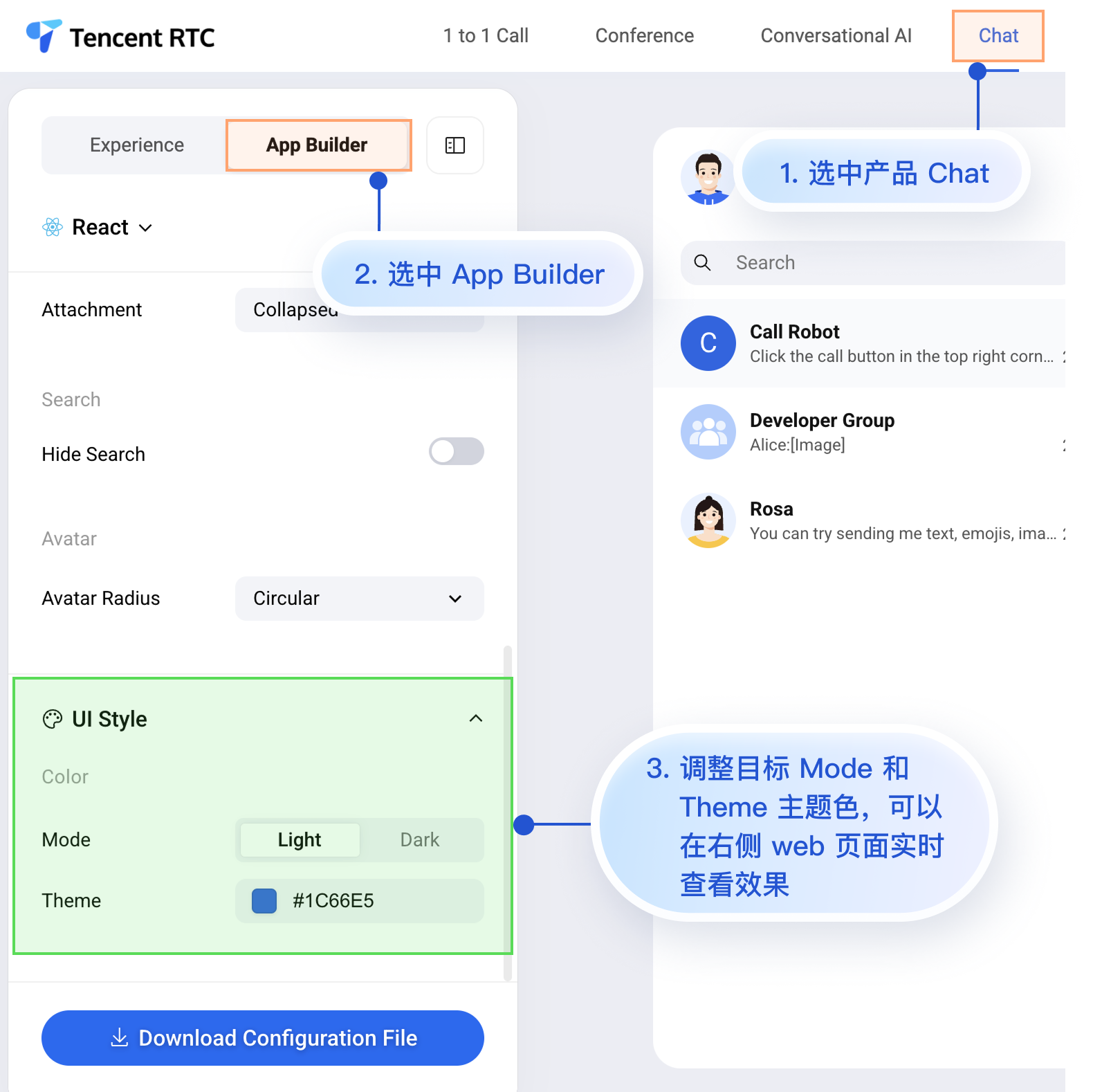
|
|
12
|
+
<td rowspan="1" colSpan="1" >**Dark + Green Theme**</td>
|
|
13
|
+
</tr>
|
|
14
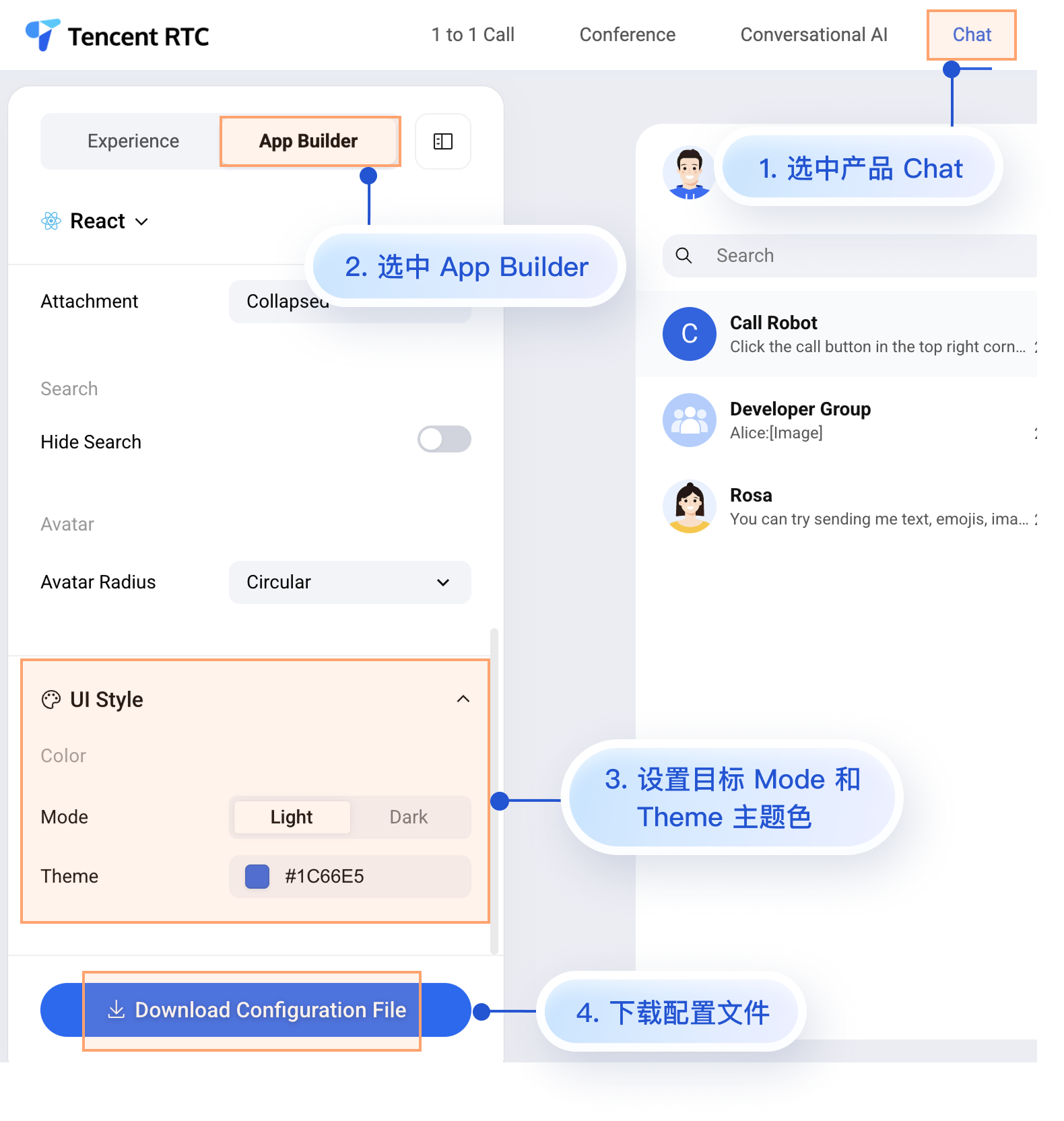
|
+
|
|
15
|
+
<tr>
|
|
16
|
+
<td rowspan="1" colSpan="1" ><br>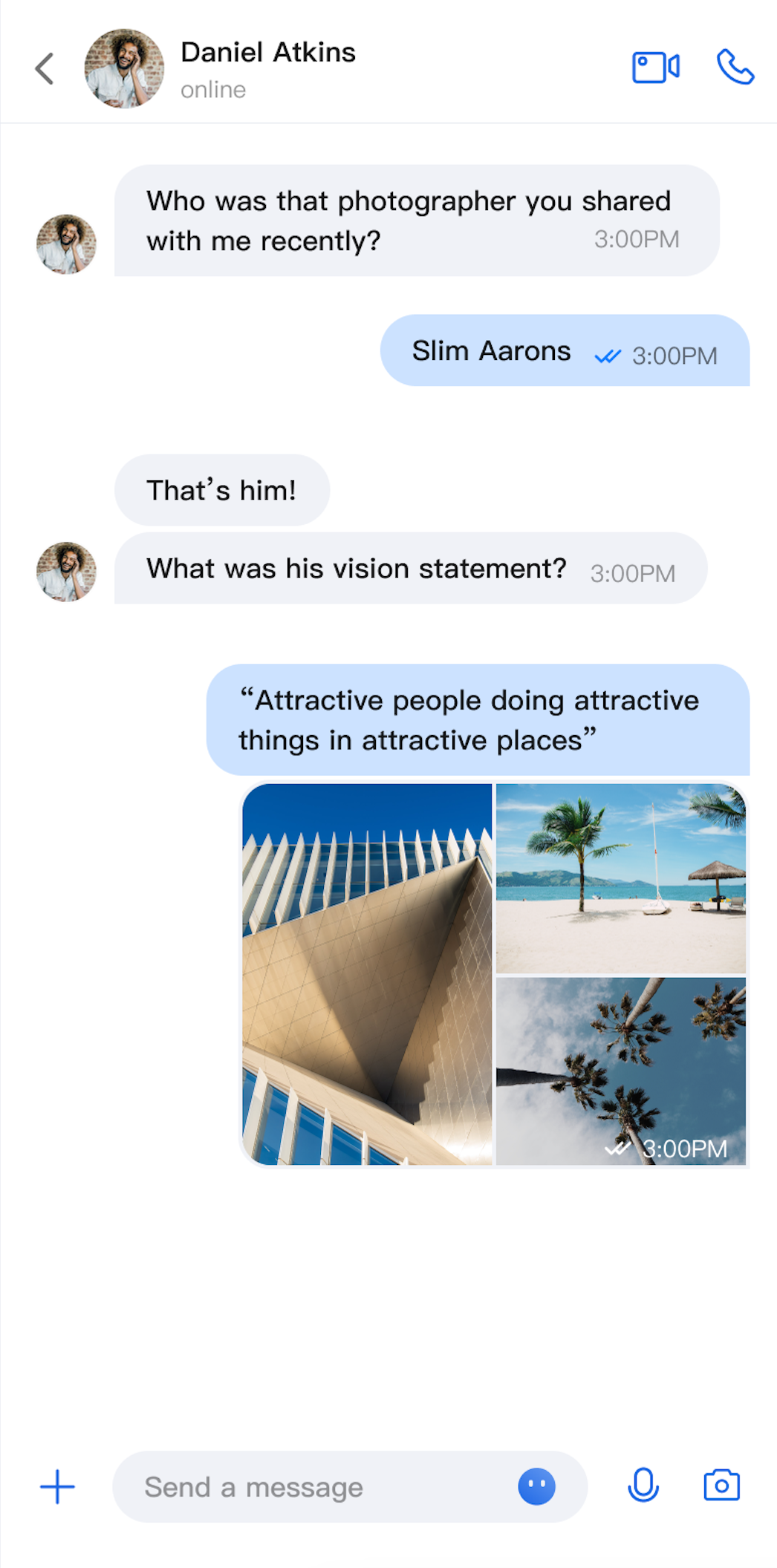</td>
|
|
17
|
+
|
|
18
|
+
<td rowspan="1" colSpan="1" ><br>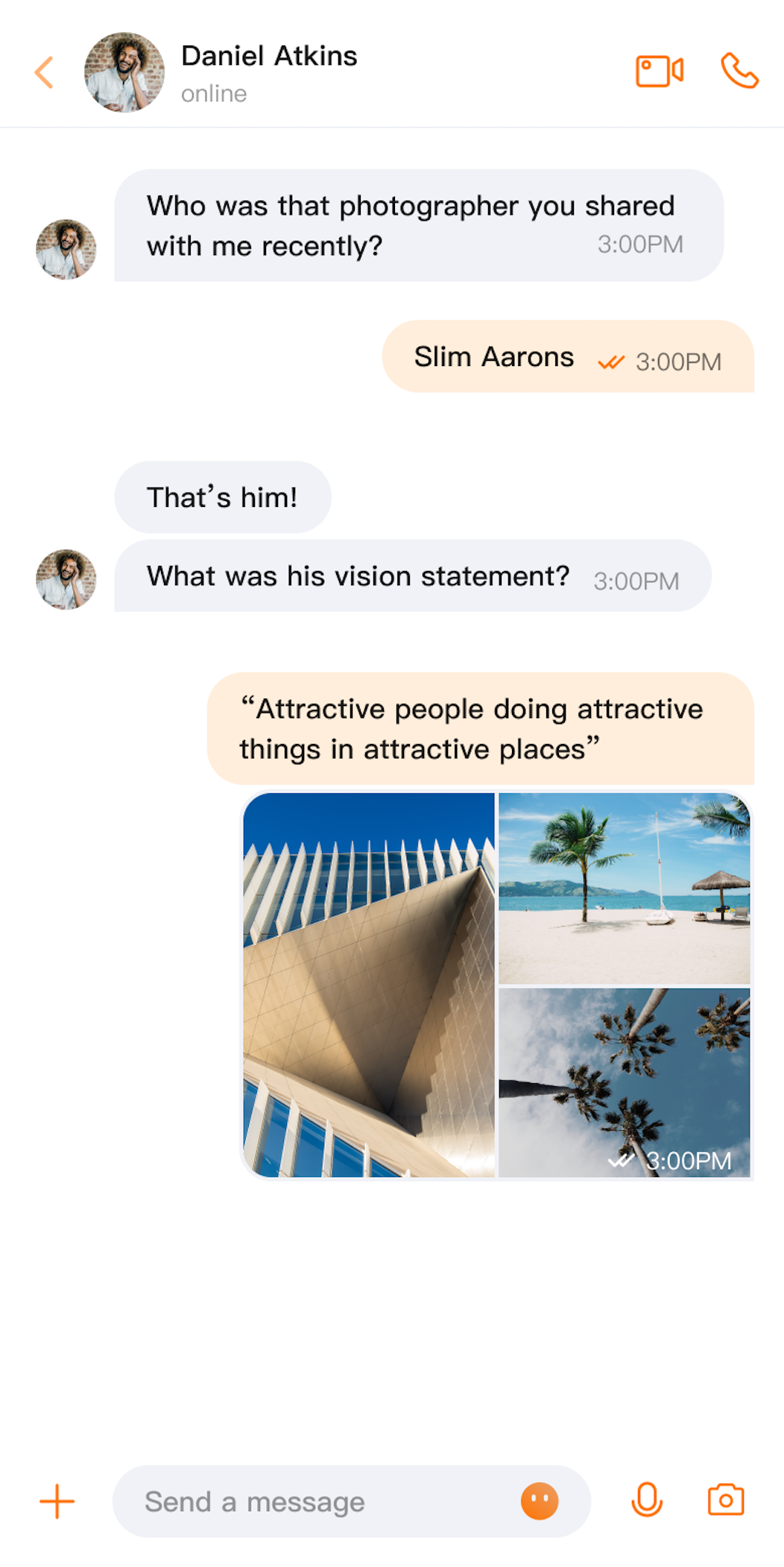</td>
|
|
19
|
+
|
|
20
|
+
<td rowspan="1" colSpan="1" ><br>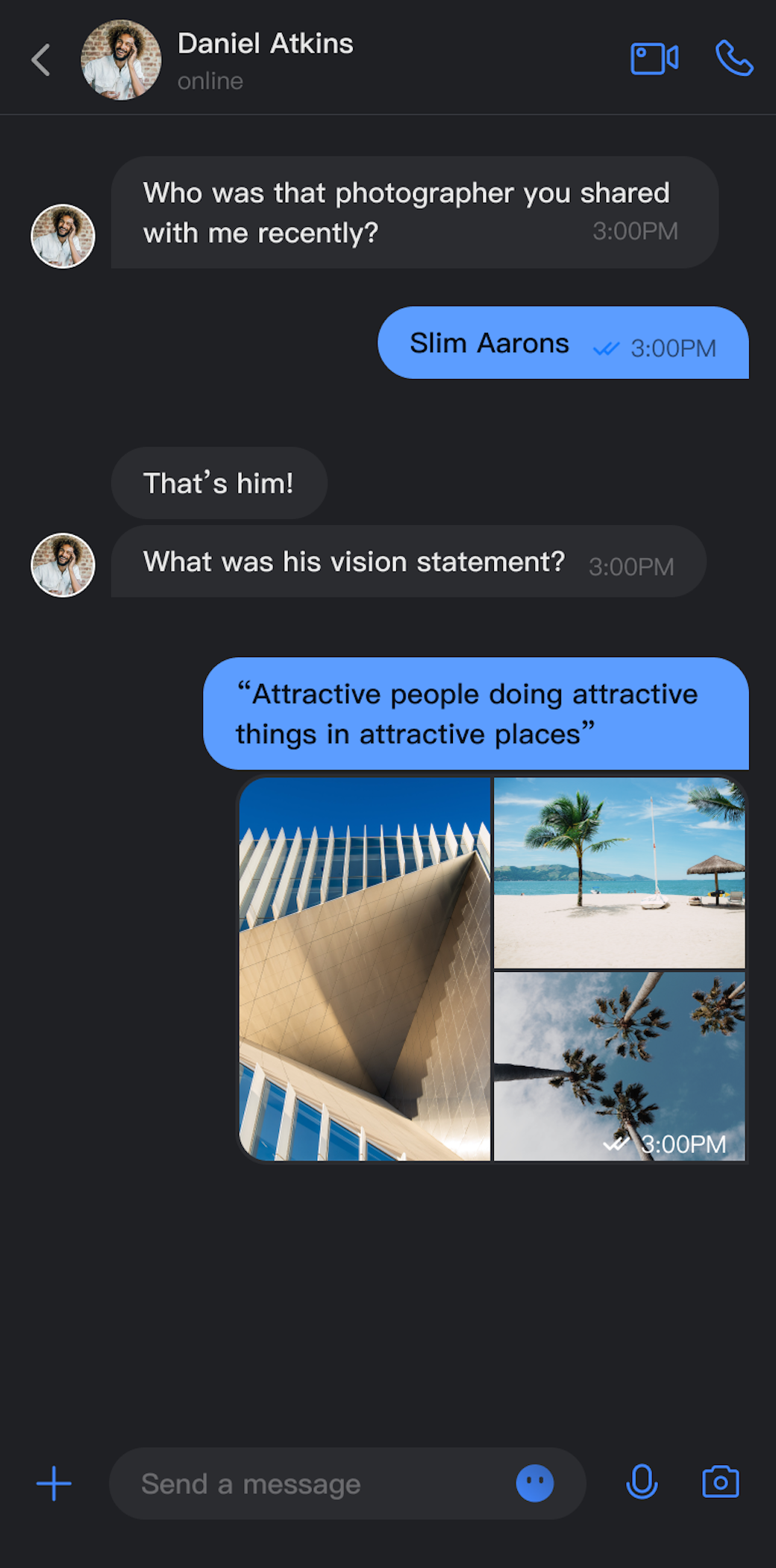</td>
|
|
21
|
+
|
|
22
|
+
<td rowspan="1" colSpan="1" ><br>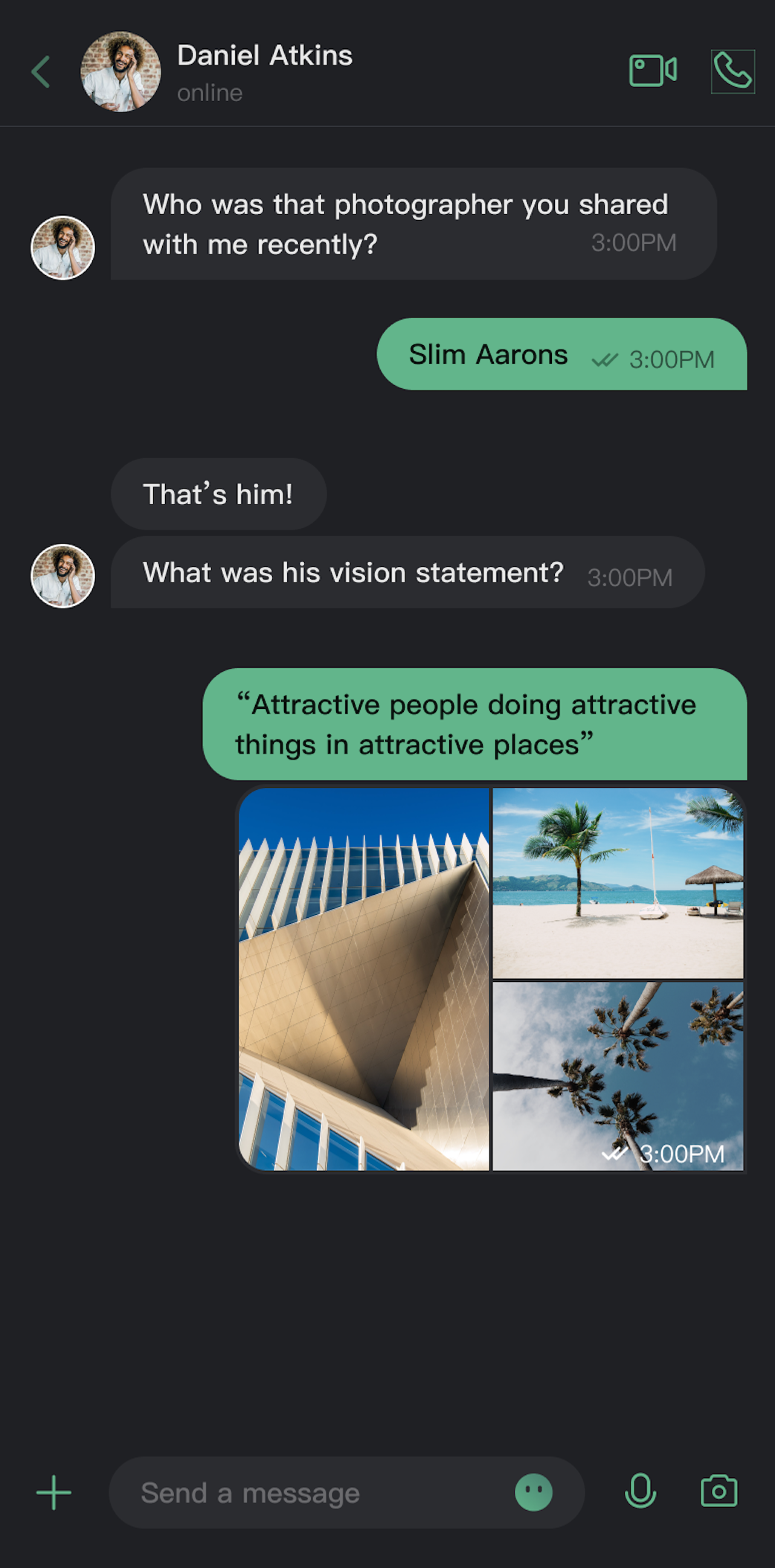</td>
|
|
23
|
+
</tr>
|
|
24
|
+
</table>
|
|
25
|
+
|
|
26
|
+
|
|
27
|
+
## Core Capabilities
|
|
28
|
+
|
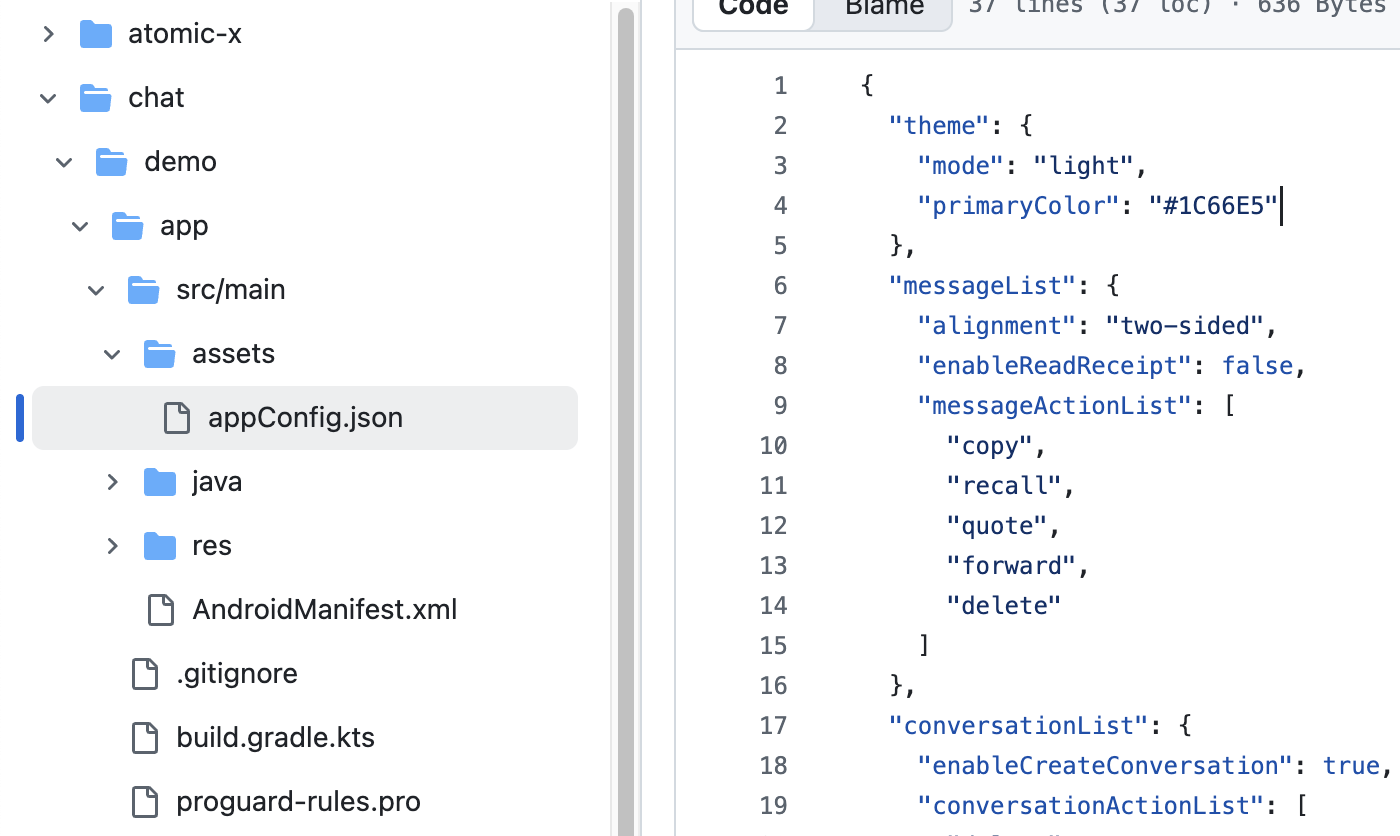
|
29
|
+
**Mode Switching**
|
|
30
|
+
- Light Mode: Bright interface suitable for daytime use.
|
|
31
|
+
|
|
32
|
+
- Dark Mode: Dark interface suitable for nighttime use.
|
|
33
|
+
|
|
34
|
+
- Follow System: Automatically follows system appearance settings.
|
|
35
|
+
|
|
36
|
+
|
|
37
|
+
**Theme Color Customization**
|
|
38
|
+
|
|
39
|
+
- Preset Theme Colors: Provides standard colors like blue, green, red, orange, etc.
|
|
40
|
+
|
|
41
|
+
- Custom Theme Colors: Supports any Hex format color.
|
|
42
|
+
|
|
43
|
+
- Smart Palette Generation: Automatically generates a complete palette of 10 color shades.
|
|
44
|
+
|
|
45
|
+
- Clear Customization: One-click restore to default theme color.
|
|
46
|
+
|
|
47
|
+
|
|
48
|
+
## API Reference
|
|
49
|
+
|
|
50
|
+
The above functionalities are based on a set of concise APIs provided by `ThemeState` for theme configuration and information queries.
|
|
51
|
+
|
|
52
|
+
### Set Theme Mode
|
|
53
|
+
<table>
|
|
54
|
+
<tr>
|
|
55
|
+
<td rowspan="1" colSpan="1" >Method</td>
|
|
56
|
+
|
|
57
|
+
<td rowspan="1" colSpan="1" >Parameters</td>
|
|
58
|
+
|
|
59
|
+
<td rowspan="1" colSpan="1" >Return Value</td>
|
|
60
|
+
|
|
61
|
+
<td rowspan="1" colSpan="1" >Description</td>
|
|
62
|
+
</tr>
|
|
63
|
+
|
|
64
|
+
<tr>
|
|
65
|
+
<td rowspan="1" colSpan="1" >`setThemeMode`</td>
|
|
66
|
+
|
|
67
|
+
<td rowspan="1" colSpan="1" >`ThemeMode`</td>
|
|
68
|
+
|
|
69
|
+
<td rowspan="1" colSpan="1" >`Unit`</td>
|
|
70
|
+
|
|
71
|
+
<td rowspan="1" colSpan="1" >Sets the display mode, automatically saves and refreshes.<br>• `ThemeMode.SYSTEM`: Follow system appearance.<br>• `ThemeMode.LIGHT`: Force light mode.<br>• `ThemeMode.DARK`: Force dark mode.</td>
|
|
72
|
+
</tr>
|
|
73
|
+
</table>
|
|
74
|
+
|
|
75
|
+
|
|
76
|
+
### Set Theme Color
|
|
77
|
+
<table>
|
|
78
|
+
<tr>
|
|
79
|
+
<td rowspan="1" colSpan="1" >Method</td>
|
|
80
|
+
|
|
81
|
+
<td rowspan="1" colSpan="1" >Parameters</td>
|
|
82
|
+
|
|
83
|
+
<td rowspan="1" colSpan="1" >Return Value</td>
|
|
84
|
+
|
|
85
|
+
<td rowspan="1" colSpan="1" >Description</td>
|
|
86
|
+
</tr>
|
|
87
|
+
|
|
88
|
+
<tr>
|
|
89
|
+
<td rowspan="1" colSpan="1" >`setPrimaryColor`</td>
|
|
90
|
+
|
|
91
|
+
<td rowspan="1" colSpan="1" >`String`</td>
|
|
92
|
+
|
|
93
|
+
<td rowspan="1" colSpan="1" >`Unit`</td>
|
|
94
|
+
|
|
95
|
+
<td rowspan="1" colSpan="1" >Sets the theme color, requires Hex format (e.g., "#1C66E5").</td>
|
|
96
|
+
</tr>
|
|
97
|
+
|
|
98
|
+
<tr>
|
|
99
|
+
<td rowspan="1" colSpan="1" >`clearPrimaryColor`</td>
|
|
100
|
+
|
|
101
|
+
<td rowspan="1" colSpan="1" >None</td>
|
|
102
|
+
|
|
103
|
+
<td rowspan="1" colSpan="1" >`Unit`</td>
|
|
104
|
+
|
|
105
|
+
<td rowspan="1" colSpan="1" >Clears custom theme color and restores default blue.</td>
|
|
106
|
+
</tr>
|
|
107
|
+
</table>
|
|
108
|
+
|
|
109
|
+
|
|
110
|
+
> **Note:**
|
|
111
|
+
>
|
|
112
|
+
> - After calling `setThemeMode` or `setPrimaryColor`, the configuration is automatically saved to persistent storage without manual saving. It will automatically load on next app launch.
|
|
113
|
+
> - Cache is automatically cleared when modifying theme configuration, ensuring the color scheme updates in real-time. Developers don't need to manage cache.
|
|
114
|
+
> - Avoid frequently switching themes when using settings APIs (e.g., calling in a loop).
|
|
115
|
+
|
|
116
|
+
|
|
117
|
+
### Query ThemeState Information
|
|
118
|
+
|
|
119
|
+
The following read-only properties can be used to query the current theme configuration status and information:
|
|
120
|
+
<table>
|
|
121
|
+
<tr>
|
|
122
|
+
<td rowspan="1" colSpan="1" >Property</td>
|
|
123
|
+
|
|
124
|
+
<td rowspan="1" colSpan="1" >Type</td>
|
|
125
|
+
|
|
126
|
+
<td rowspan="1" colSpan="1" >Description</td>
|
|
127
|
+
</tr>
|
|
128
|
+
|
|
129
|
+
<tr>
|
|
130
|
+
<td rowspan="1" colSpan="1" >`currentMode`</td>
|
|
131
|
+
|
|
132
|
+
<td rowspan="1" colSpan="1" >`ThemeMode`</td>
|
|
133
|
+
|
|
134
|
+
<td rowspan="1" colSpan="1" >Current theme mode.</td>
|
|
135
|
+
</tr>
|
|
136
|
+
|
|
137
|
+
<tr>
|
|
138
|
+
<td rowspan="1" colSpan="1" >`currentPrimaryColor`</td>
|
|
139
|
+
|
|
140
|
+
<td rowspan="1" colSpan="1" >`String?`</td>
|
|
141
|
+
|
|
142
|
+
<td rowspan="1" colSpan="1" >Current theme color (Hex format).</td>
|
|
143
|
+
</tr>
|
|
144
|
+
|
|
145
|
+
<tr>
|
|
146
|
+
<td rowspan="1" colSpan="1" >`hasCustomPrimaryColor`</td>
|
|
147
|
+
|
|
148
|
+
<td rowspan="1" colSpan="1" >`Boolean`</td>
|
|
149
|
+
|
|
150
|
+
<td rowspan="1" colSpan="1" >Whether a custom theme color is set.</td>
|
|
151
|
+
</tr>
|
|
152
|
+
|
|
153
|
+
<tr>
|
|
154
|
+
<td rowspan="1" colSpan="1" >`isDarkMode`</td>
|
|
155
|
+
|
|
156
|
+
<td rowspan="1" colSpan="1" >`Boolean`</td>
|
|
157
|
+
|
|
158
|
+
<td rowspan="1" colSpan="1" >Whether currently in dark mode.</td>
|
|
159
|
+
</tr>
|
|
160
|
+
</table>
|
|
161
|
+
|
|
162
|
+
|
|
163
|
+
## Usage
|
|
164
|
+
|
|
165
|
+
This section introduces how to integrate and use theme and theme color customization features in your application, providing three approaches from simple to complex.
|
|
166
|
+
|
|
167
|
+
### Approach 1: Using AppBuilder Configuration (Recommended)
|
|
168
|
+
|
|
169
|
+
AppBuilder is a convenient feature and UI customization configuration tool, managed through JSON configuration files, suitable for scenarios where Web + Native dual-platform applications need to maintain a unified appearance.
|
|
170
|
+
|
|
171
|
+
You can experience the AppBuilder feature at [Chat Web Demo](https://trtc.io/demo/homepage/#/detail?scene=messenger), experience entry:
|
|
172
|
+
|
|
173
|
+
|
|
174
|
+
|
|
175
|
+
|
|
176
|
+
Although the Chat Web Demo currently cannot preview mobile configuration effects in real-time, mobile platforms already support AppBuilder's configuration capabilities.
|
|
177
|
+
|
|
178
|
+
Next, we'll introduce how to apply custom configurations to mobile projects after setting up AppBuilder in the Web demo. The process is quite simple, with only 2 steps:
|
|
179
|
+
1. Download the configuration file.
|
|
180
|
+
|
|
181
|
+
2. Drag the configuration file appConfig.json into your Android project.
|
|
182
|
+
|
|
183
|
+
|
|
184
|
+
#### 1. Download Configuration File
|
|
185
|
+
|
|
186
|
+
Visit [Chat Web Demo](https://trtc.io/demo/homepage/#/detail?scene=messenger) and download the appConfig.json configuration file. The download path is:
|
|
187
|
+
|
|
188
|
+
|
|
189
|
+
|
|
190
|
+
|
|
191
|
+
The `appConfig.json` file content is shown below, corresponding one-to-one with the configuration items on the AppBuilder page. The appearance-related configurations are `theme` and its subfields:
|
|
192
|
+
``` json
|
|
193
|
+
{
|
|
194
|
+
"theme": {
|
|
195
|
+
"mode": "light", // Theme mode: light-Light mode, dark-Dark mode, system-Follow system
|
|
196
|
+
"primaryColor": "#E65100" // Primary color, hex color value
|
|
197
|
+
},
|
|
198
|
+
"messageList": {
|
|
199
|
+
"alignment": "two-sided",
|
|
200
|
+
"enableReadReceipt": false,
|
|
201
|
+
"messageActionList": [
|
|
202
|
+
"copy",
|
|
203
|
+
"recall",
|
|
204
|
+
"quote",
|
|
205
|
+
"forward",
|
|
206
|
+
"delete"
|
|
207
|
+
]
|
|
208
|
+
},
|
|
209
|
+
"conversationList": {
|
|
210
|
+
"enableCreateConversation": true,
|
|
211
|
+
"conversationActionList": [
|
|
212
|
+
"delete",
|
|
213
|
+
"mute",
|
|
214
|
+
"pin",
|
|
215
|
+
"markUnread"
|
|
216
|
+
]
|
|
217
|
+
},
|
|
218
|
+
"messageInput": {
|
|
219
|
+
"hideSendButton": false,
|
|
220
|
+
"attachmentPickerMode": "collapsed"
|
|
221
|
+
},
|
|
222
|
+
"search": {
|
|
223
|
+
"hideSearch": false
|
|
224
|
+
},
|
|
225
|
+
"avatar": {
|
|
226
|
+
"shape": "circular"
|
|
227
|
+
}
|
|
228
|
+
}
|
|
229
|
+
```
|
|
230
|
+
|
|
231
|
+
**Configuration Options**
|
|
232
|
+
<table>
|
|
233
|
+
<tr>
|
|
234
|
+
<td rowspan="1" colSpan="1" >Parameter</td>
|
|
235
|
+
|
|
236
|
+
<td rowspan="1" colSpan="1" >Type</td>
|
|
237
|
+
|
|
238
|
+
<td rowspan="1" colSpan="1" >Options</td>
|
|
239
|
+
|
|
240
|
+
<td rowspan="1" colSpan="1" >Description</td>
|
|
241
|
+
</tr>
|
|
242
|
+
|
|
243
|
+
<tr>
|
|
244
|
+
<td rowspan="1" colSpan="1" >`mode`</td>
|
|
245
|
+
|
|
246
|
+
<td rowspan="1" colSpan="1" >String</td>
|
|
247
|
+
|
|
248
|
+
<td rowspan="1" colSpan="1" >`"system"`, `"light"`, `"dark"`</td>
|
|
249
|
+
|
|
250
|
+
<td rowspan="1" colSpan="1" >Theme mode</td>
|
|
251
|
+
</tr>
|
|
252
|
+
|
|
253
|
+
<tr>
|
|
254
|
+
<td rowspan="1" colSpan="1" >`primaryColor`</td>
|
|
255
|
+
|
|
256
|
+
<td rowspan="1" colSpan="1" >String</td>
|
|
257
|
+
|
|
258
|
+
<td rowspan="1" colSpan="1" >Hex color value, e.g., `"#0ABF77"`</td>
|
|
259
|
+
|
|
260
|
+
<td rowspan="1" colSpan="1" >Theme color</td>
|
|
261
|
+
</tr>
|
|
262
|
+
</table>
|
|
263
|
+
|
|
264
|
+
|
|
265
|
+
#### 2. Add Configuration File to Project
|
|
266
|
+
|
|
267
|
+
Drag appConfig.json into your project. Taking the GitHub open source Demo [TUIKit Android Compose](https://github.com/Tencent-RTC/TUIKit_Android_Compose/blob/main/chat/demo/app/src/main/assets/appConfig.json) project as an example, appConfig.json is located in the demo/app's assets folder:
|
|
268
|
+
|
|
269
|
+
|
|
270
|
+
|
|
271
|
+
|
|
272
|
+
After this, without writing additional code, when you launch the app, the mode and theme color of TUIKit Compose components will automatically display the values you set in appConfig.json.
|
|
273
|
+
|
|
274
|
+
### Approach 2: Set Theme Mode via Code
|
|
275
|
+
|
|
276
|
+
You can directly set the theme mode through the API `setThemeMode`. Example code:
|
|
277
|
+
``` swift
|
|
278
|
+
val themeState = ThemeState.shared
|
|
279
|
+
Column {
|
|
280
|
+
Button(onClick = {
|
|
281
|
+
themeState.setThemeMode(ThemeMode.SYSTEM)
|
|
282
|
+
}) { Text(text = "Follow System") }
|
|
283
|
+
Button(onClick = {
|
|
284
|
+
themeState.setThemeMode(ThemeMode.LIGHT)
|
|
285
|
+
}) { Text(text = "Light Mode") }
|
|
286
|
+
Button(onClick = {
|
|
287
|
+
themeState.setThemeMode(ThemeMode.DARK)
|
|
288
|
+
}) { Text(text = "Dark Mode") }
|
|
289
|
+
}
|
|
290
|
+
```
|
|
291
|
+
|
|
292
|
+
### Approach 3: Set Theme Color via Code
|
|
293
|
+
|
|
294
|
+
You can set the theme color through the API `setPrimaryColor` by passing a primary color value. The entire TUIKit Compose component will automatically adapt a set of similar color values in the same color scheme based on this primary color value to render the interface, without the need for manual UI adaptation. Example code:
|
|
295
|
+
``` swift
|
|
296
|
+
Column {
|
|
297
|
+
var text: String by remember { mutableStateOf("#1C66E5") }
|
|
298
|
+
|
|
299
|
+
fun isValidHexColor(): Boolean {
|
|
300
|
+
return text.matches(Regex("^#[0-9A-Fa-f]{6}$"))
|
|
301
|
+
}
|
|
302
|
+
BasicTextField(
|
|
303
|
+
value = text,
|
|
304
|
+
onValueChange = { text = it },
|
|
305
|
+
modifier = Modifier
|
|
306
|
+
.fillMaxWidth()
|
|
307
|
+
.padding(16.dp)
|
|
308
|
+
)
|
|
309
|
+
Button(
|
|
310
|
+
enabled = isValidHexColor(),
|
|
311
|
+
onClick = {
|
|
312
|
+
themeState.setPrimaryColor(text)
|
|
313
|
+
}) {
|
|
314
|
+
Text("Apply Theme Color")
|
|
315
|
+
}
|
|
316
|
+
}
|
|
317
|
+
```
|
|
318
|
+
|
|
319
|
+
> **Usage Recommendations:**
|
|
320
|
+
>
|
|
321
|
+
> - For most applications, it's recommended to use the JSON configuration file approach, which is simple, reliable, and supports multi-platform uniformity.
|
|
322
|
+
> - Consistently use colors from `themeState.colors` throughout the application to ensure interface consistency when switching themes.
|
|
323
|
+
|
|
324
|
+
|
|
325
|
+
## FAQ
|
|
326
|
+
|
|
327
|
+
### **How to determine if currently in dark mode?**
|
|
328
|
+
``` java
|
|
329
|
+
if themeState.isDarkMode {
|
|
330
|
+
// Currently in dark mode
|
|
331
|
+
} else {
|
|
332
|
+
// Currently in light mode
|
|
333
|
+
}
|
|
334
|
+
```
|
|
335
|
+
|
|
336
|
+
### **Can I set transparency?**
|
|
337
|
+
|
|
338
|
+
Not supported. Theme colors only support 6-digit Hex format (RGB), not 8-digit format (RGBA).
|
|
339
|
+
|
|
340
|
+
### **How to restore default theme?**
|
|
341
|
+
``` swift
|
|
342
|
+
themeState.clearPrimaryColor() // Clear custom theme color
|
|
343
|
+
themeState.setThemeMode(ThemeMode.SYSTEM) // Restore follow system
|
|
344
|
+
```
|
|
345
|
+
|
|
346
|
+
### **Where is theme configuration stored?**
|
|
347
|
+
|
|
348
|
+
Stored in the app's persistent storage. It will be lost after uninstalling the app and will restore to default configuration after reinstalling.
|
|
349
|
+
|
|
350
|
+
### **How to get the complete current theme configuration?**
|
|
351
|
+
``` swift
|
|
352
|
+
val config = themeState.currentTheme
|
|
353
|
+
print("Mode: ${config.mode}")
|
|
354
|
+
print("Theme Color: ${config.primaryColor ?: "Default"}")
|
|
355
|
+
```
|
|
356
|
+
|
|
357
|
+
### **Can I set mode and theme color simultaneously?**
|
|
358
|
+
|
|
359
|
+
Yes, you can call both methods separately, and the system will automatically merge the configurations:
|
|
360
|
+
``` swift
|
|
361
|
+
themeState.setThemeMode(ThemeMode.DARK)
|
|
362
|
+
themeState.setPrimaryColor("#0ABF77")
|
|
363
|
+
```
|
|
@@ -0,0 +1,53 @@
|
|
|
1
|
+
---
|
|
2
|
+
product: 'Chat'
|
|
3
|
+
tech_stack: 'flutter_sdk'
|
|
4
|
+
framework: 'sdk'
|
|
5
|
+
title: 'Flutter SDK FAQ'
|
|
6
|
+
keywords: ['sdk integration', 'login API', 'create group','send message','receive message']
|
|
7
|
+
---
|
|
8
|
+
|
|
9
|
+
# Flutter SDK FAQ
|
|
10
|
+
|
|
11
|
+
## Flutter SDK FAQ Solutions (Topic: SDK FAQ)
|
|
12
|
+
|
|
13
|
+
### Q: How to implement message reactions in SDK?
|
|
14
|
+
**A:** The SDK supports message reaction capabilities. You need to purchase the Flagship or Enterprise edition package. There are 3 specific APIs:
|
|
15
|
+
- Add message reaction [addMessageReaction](https://pub.dev/documentation/tencent_cloud_chat_sdk/latest/manager_v2_tim_message_manager/V2TIMMessageManager/addMessageReaction.html)
|
|
16
|
+
- Get message reactions [getMessageReactions](https://pub.dev/documentation/tencent_cloud_chat_sdk/latest/manager_v2_tim_message_manager/V2TIMMessageManager/getMessageReactions.html)
|
|
17
|
+
- Remove message reaction [removeMessageReaction](https://pub.dev/documentation/tencent_cloud_chat_sdk/latest/manager_v2_tim_message_manager/V2TIMMessageManager/removeMessageReaction.html)
|
|
18
|
+
|
|
19
|
+
### Q: How to mark one-to-one messages as read?
|
|
20
|
+
**A:** If you need to mark one-to-one messages as read and clear the conversation unread count, you can use [markC2CMessageAsRead](https://pub.dev/documentation/tencent_cloud_chat_sdk/latest/manager_v2_tim_message_manager/V2TIMMessageManager/markC2CMessageAsRead.html).
|
|
21
|
+
|
|
22
|
+
### Q: How to clear unread count for group messages?
|
|
23
|
+
**A:** If you need to clear the unread count for group conversations, you can use [markGroupMessageAsRead](https://pub.dev/documentation/tencent_cloud_chat_sdk/latest/manager_v2_tim_message_manager/V2TIMMessageManager/markGroupMessageAsRead.html).
|
|
24
|
+
|
|
25
|
+
### Q: How to implement read receipts for individual messages in one-to-one and group chats?
|
|
26
|
+
**A:** If you need to implement read receipt functionality for individual messages, you need to use the message read receipt capability. For detailed information on how to enable read receipts and send read receipts, please refer to: https://trtc.io/document/48020?product=chat&menulabel=core%20sdk&platform=flutter.
|
|
27
|
+
|
|
28
|
+
### Q: How to send image messages in SDK?
|
|
29
|
+
**A:** You can use [createImageMessage](https://pub.dev/documentation/tencent_cloud_chat_sdk/latest/manager_v2_tim_message_manager/V2TIMMessageManager/createImageMessage.html) to create an image message instance, then use [sendMessage](https://pub.dev/documentation/tencent_cloud_chat_sdk/latest/manager_v2_tim_message_manager/V2TIMMessageManager/sendMessage.html) to send the image message.
|
|
30
|
+
|
|
31
|
+
### Q: How to send video messages in SDK?
|
|
32
|
+
**A:** You can use [createVideoMessage](https://pub.dev/documentation/tencent_cloud_chat_sdk/latest/manager_v2_tim_message_manager/V2TIMMessageManager/createVideoMessage.html) to create a video message instance, then use [sendMessage](https://pub.dev/documentation/tencent_cloud_chat_sdk/latest/manager_v2_tim_message_manager/V2TIMMessageManager/sendMessage.html) to send the video message.
|
|
33
|
+
|
|
34
|
+
### Q: How to send voice messages in SDK?
|
|
35
|
+
**A:** You can use [createSoundMessage](https://pub.dev/documentation/tencent_cloud_chat_sdk/latest/manager_v2_tim_message_manager/V2TIMMessageManager/createSoundMessage.html) to create a voice message instance, then use [sendMessage](https://pub.dev/documentation/tencent_cloud_chat_sdk/latest/manager_v2_tim_message_manager/V2TIMMessageManager/sendMessage.html) to send the voice message.
|
|
36
|
+
|
|
37
|
+
### Q: How to send file messages in SDK?
|
|
38
|
+
**A:** You can use [createFileMessage](https://pub.dev/documentation/tencent_cloud_chat_sdk/latest/manager_v2_tim_message_manager/V2TIMMessageManager/createFileMessage.html) to create a file message instance, then use [sendMessage](https://pub.dev/documentation/tencent_cloud_chat_sdk/latest/manager_v2_tim_message_manager/V2TIMMessageManager/sendMessage.html) to send the file message.
|
|
39
|
+
|
|
40
|
+
### Q: How to delete a conversation in SDK?
|
|
41
|
+
**A:** Deleting a conversation only supports one-way deletion. The SDK delete conversation API is `deleteConversation`, refer to documentation: https://trtc.io/document/48312?product=chat&menulabel=core%20sdk&platform=flutter
|
|
42
|
+
|
|
43
|
+
### Q: How to delete conversation history messages in SDK?
|
|
44
|
+
**A:** The SDK supports two types of message clearing: clearing one-to-one chat messages and clearing group chat messages. Clearing messages will clear all messages in the current conversation, including both local and cloud messages, but will not delete the conversation itself. The clearing is one-way and will not clear messages in the other party's conversation.
|
|
45
|
+
- Clear one-to-one chat messages [clearC2CHistoryMessage](https://trtc.io/document/48012?product=chat&menulabel=core%20sdk&platform=flutter)
|
|
46
|
+
- Clear group chat messages [clearGroupHistoryMessage](https://trtc.io/document/48012?product=chat&menulabel=core%20sdk&platform=flutter)
|
|
47
|
+
|
|
48
|
+
### Q: How to get user online status in SDK?
|
|
49
|
+
**A:**
|
|
50
|
+
1. Server-side **online status change callback** can be found at: https://trtc.io/document/34357?product=chat&menulabel=core%20sdk&platform=flutter
|
|
51
|
+
|
|
52
|
+
### Q: How to get friends list in SDK?
|
|
53
|
+
**A:** The SDK supports friend management. Users can actively add or delete friends, and can also set to only allow messages from friends. For details, please refer to: https://trtc.io/document/48154?product=chat&menulabel=core%20sdk&platform=flutter
|