@tencent-rtc/mcp 1.3.4 → 1.3.5
This diff represents the content of publicly available package versions that have been released to one of the supported registries. The information contained in this diff is provided for informational purposes only and reflects changes between package versions as they appear in their respective public registries.
- package/package.json +1 -1
- package/resource/doc/chatuikit/android/features/theme.md +363 -0
- package/resource/doc/chatuikit/{android/client_api_Android.md → faq/android_sdk/client-api.md} +0 -2
- package/resource/doc/chatuikit/faq/common/product.md +8 -0
- package/resource/doc/chatuikit/faq/flutter_sdk/faq.md +53 -0
- package/resource/doc/chatuikit/{iOS/client_api_iOS.md → faq/ios_sdk/client-api.md} +0 -2
- package/resource/doc/chatuikit/flutter/features/theme.md +379 -0
- package/resource/doc/chatuikit/flutter/integration.md +413 -0
- package/resource/doc/chatuikit/flutter/workflow.md +941 -0
- package/resource/doc/chatuikit/iOS/features/theme.md +416 -0
- package/resource/doc/chatuikit/iOS/workflow.md +0 -0
- package/resource/doc/chatuikit/react/components/chat-setting.md +86 -0
- package/resource/doc/chatuikit/react/components/contact-list.md +1093 -0
- package/resource/doc/chatuikit/react/components/search.md +745 -0
- package/resource/doc/chatuikit/vue/components/chat-setting.md +64 -0
- package/resource/doc/chatuikit/vue/components/contact-list.md +679 -0
- package/resource/doc/chatuikit/vue/components/search.md +1384 -0
- package/resource/doc/livekit/live/android/workflow.md +137 -6
- package/resource/doc/livekit/live/ios/live-audience-list.md +339 -0
- package/resource/doc/livekit/live/ios/live-audio-effect.md +370 -0
- package/resource/doc/livekit/live/ios/live-barrage.md +517 -0
- package/resource/doc/livekit/live/ios/live-base-beauty.md +247 -0
- package/resource/doc/livekit/live/ios/live-co-guest-interaction.md +518 -0
- package/resource/doc/livekit/live/ios/live-gift.md +783 -0
- package/resource/doc/livekit/live/ios/live-host-interaction.md +815 -0
- package/resource/doc/livekit/live/ios/live-integration.md +931 -0
- package/resource/doc/livekit/live/ios/live-live-list.md +485 -0
- package/resource/doc/livekit/live/ios/workflow.md +454 -0
- package/resource/doc/rtcengine/web/plugin/20-advanced-customized-capture-rendering.md +87 -0
- package/resource/doc/rtcengine/web/plugin/21-advanced-auto-play-policy.md +87 -0
- package/resource/doc/rtcengine/web/plugin/22-advanced-audio-mixer.md +175 -0
- package/resource/doc/rtcengine/web/plugin/23-advanced-support-detection.md +221 -0
- package/resource/doc/rtcengine/web/plugin/24-advanced-network-quality.md +140 -0
- package/resource/doc/rtcengine/web/plugin/25-advanced-device-change.md +99 -0
- package/resource/doc/rtcengine/web/plugin/26-advanced-publish-cdn-stream.md +451 -0
- package/resource/doc/rtcengine/web/plugin/27-advanced-small-stream.md +151 -0
- package/resource/doc/rtcengine/web/plugin/28-advanced-beauty.md +322 -0
- package/resource/doc/rtcengine/web/plugin/29-advanced-water-mark.md +149 -0
- package/resource/doc/rtcengine/web/plugin/30-advanced-cross-room-link.md +96 -0
- package/resource/doc/rtcengine/web/plugin/31-advanced-plugins-overview.md +330 -0
- package/resource/doc/rtcengine/web/plugin/34-advanced-proxy.md +248 -0
- package/resource/doc/rtcengine/web/plugin/35-advanced-ai-denoiser.md +81 -0
- package/resource/doc/rtcengine/web/plugin/36-advanced-virtual-background.md +242 -0
- package/resource/doc/rtcengine/web/plugin/37-advanced-voice-changer.md +99 -0
- package/resource/doc/rtcengine/web/plugin/39-advanced-video-decoder.md +33 -0
- package/resource/doc/rtcengine/web/plugin/40-advanced-video-mixer.md +379 -0
- package/resource/doc/rtcengine/web/plugin/41-advanced-small-stream-auto-switcher.md +91 -0
- package/resource/doc/rtcengine/web/plugin/42-advanced-realtime-transcriber.md +315 -0
- package/resource/doc/rtcengine/web/plugin/43-advanced-face-detection.md +180 -0
- package/tools/chat/get-native-chat-feature-detail.js +30 -0
- package/tools/chat/get-native-chat-feature-detail.js.map +1 -0
- package/tools/chat/get-native-chat-integration.js +30 -12
- package/tools/chat/get-native-chat-integration.js.map +1 -1
- package/tools/common/get-faq.js +2 -4
- package/tools/common/get-faq.js.map +1 -1
- package/tools/definitions/get_native_chat_feature_detail_def.js +32 -0
- package/tools/definitions/get_native_chat_feature_detail_def.js.map +1 -0
- package/tools/definitions/get_native_chat_uikit_integration_def.js +19 -7
- package/tools/definitions/get_native_chat_uikit_integration_def.js.map +1 -1
- package/tools/definitions/{get_native_live_extra_features_def.js → get_native_live_uikit_extra_features_def.js} +3 -3
- package/tools/definitions/get_native_live_uikit_extra_features_def.js.map +1 -0
- package/tools/definitions/{get_native_live_interaction_def.js → get_native_live_uikit_interaction_def.js} +3 -3
- package/tools/definitions/get_native_live_uikit_interaction_def.js.map +1 -0
- package/tools/definitions/get_web_chat_uikit_component_detail_def.js +49 -10
- package/tools/definitions/get_web_chat_uikit_component_detail_def.js.map +1 -1
- package/tools/index.js +6 -4
- package/tools/index.js.map +1 -1
- package/tools/live/{get_native_live_extra_features.js → get_native_live_uikit_extra_features.js} +4 -4
- package/tools/live/get_native_live_uikit_extra_features.js.map +1 -0
- package/tools/live/{get_native_live_interaction.js → get_native_live_uikit_interaction.js} +4 -4
- package/tools/live/get_native_live_uikit_interaction.js.map +1 -0
- package/tools/rtcengine/get-rtcengine-web-sdk-integration.js.map +1 -1
- package/tools/rtcengine/get-trtc-sdk-faq.js +32 -0
- package/tools/rtcengine/get-trtc-sdk-faq.js.map +1 -0
- package/tools/rtcengine/get-trtc-web-sdk-faq.js +1 -1
- package/tools/rtcengine/get-trtc-web-sdk-integration.js.map +1 -1
- package/tools/rtcengine/get-trtc-web-sdk-plugin.js +45 -0
- package/tools/rtcengine/get-trtc-web-sdk-plugin.js.map +1 -0
- package/utils/handle-component-name.js +0 -16
- package/utils/handle-component-name.js.map +1 -1
- package/utils/report-cls-client.js +1 -1
- package/utils/report-es-client.js +1 -1
- package/resource/doc/chatuikit/android/generate_UserSig.md +0 -306
- package/resource/doc/chatuikit/android/integrarte_only_tuichat_Android.md +0 -290
- package/resource/doc/chatuikit/android/quick_start_Android.md +0 -138
- package/resource/doc/chatuikit/android/show_typing_Android.md +0 -43
- package/resource/doc/chatuikit/flutter/generate_UserSig.md +0 -306
- package/resource/doc/chatuikit/flutter/integrate_tuikit_Flutter.md +0 -133
- package/resource/doc/chatuikit/iOS/generate_UserSig.md +0 -306
- package/resource/doc/chatuikit/iOS/integrate_only_tuichat_iOS.md +0 -748
- package/resource/doc/chatuikit/iOS/quick_start_iOS.md +0 -163
- package/resource/doc/chatuikit/iOS/show_typing_iOS.md +0 -52
- package/tools/definitions/get_native_live_extra_features_def.js.map +0 -1
- package/tools/definitions/get_native_live_interaction_def.js.map +0 -1
- package/tools/live/get_native_live_extra_features.js.map +0 -1
- package/tools/live/get_native_live_interaction.js.map +0 -1
- /package/resource/doc/chatuikit/android/{integrate_tuikit_Android.md → integration.md} +0 -0
- /package/resource/doc/chatuikit/{faq/native_sdk/faq.md → android/workflow.md} +0 -0
- /package/resource/doc/chatuikit/{flutter/client_api_Flutter.md → faq/flutter_sdk/client-api.md} +0 -0
- /package/resource/doc/chatuikit/iOS/{integrate_tuikit_iOS.md → integration.md} +0 -0
- /package/resource/doc/chatuikit/react/components/{chatheader.md → chat-header.md} +0 -0
- /package/resource/doc/chatuikit/vue/components/{chatheader.md → chat-header.md} +0 -0
|
@@ -0,0 +1,485 @@
|
|
|
1
|
+
`LiveListStore` is the core module of **AtomicXCore** responsible for managing the live room list, creating and joining rooms, and maintaining room state. With `LiveListStore`, you can implement comprehensive live streaming lifecycle management in your application.
|
|
2
|
+
|
|
3
|
+
|
|
4
|
+
|
|
5
|
+
|
|
6
|
+
## Core Features
|
|
7
|
+
- **Live Room List Fetching**: Retrieve all currently public live rooms, returned one page at a time.
|
|
8
|
+
|
|
9
|
+
- **Live Lifecycle Management**: Provides a complete set of interfaces for the entire live streaming workflow, including room creation, going live, joining, leaving, and ending a live session.
|
|
10
|
+
|
|
11
|
+
- **Real-Time Event Listening**: Listen for key events such as live session end or users being removed from a room.
|
|
12
|
+
|
|
13
|
+
|
|
14
|
+
## Core Concepts
|
|
15
|
+
<table>
|
|
16
|
+
<tr>
|
|
17
|
+
<td rowspan="1" colSpan="1" >**Core Concept**</td>
|
|
18
|
+
|
|
19
|
+
<td rowspan="1" colSpan="1" >**Type**</td>
|
|
20
|
+
|
|
21
|
+
<td rowspan="1" colSpan="1" >**Core Responsibility & Description**</td>
|
|
22
|
+
</tr>
|
|
23
|
+
|
|
24
|
+
<tr>
|
|
25
|
+
<td rowspan="1" colSpan="1" >`LiveInfo`</td>
|
|
26
|
+
|
|
27
|
+
<td rowspan="1" colSpan="1" >`struct`</td>
|
|
28
|
+
|
|
29
|
+
<td rowspan="1" colSpan="1" >- Represents the complete information model of a live room. <br>- Includes the live room ID (`liveID`), name (`liveName`), owner information (`liveOwner`), and custom metadata (`metaData`), among other properties.</td>
|
|
30
|
+
</tr>
|
|
31
|
+
|
|
32
|
+
<tr>
|
|
33
|
+
<td rowspan="1" colSpan="1" >`LiveListState`</td>
|
|
34
|
+
|
|
35
|
+
<td rowspan="1" colSpan="1" >`struct`</td>
|
|
36
|
+
|
|
37
|
+
<td rowspan="1" colSpan="1" >- Represents the current state of the live list module. <br>- The core property `liveList` is a StateFlow containing the fetched live room list; <br>- `currentLive` represents the information of the live room the user is currently in.</td>
|
|
38
|
+
</tr>
|
|
39
|
+
|
|
40
|
+
<tr>
|
|
41
|
+
<td rowspan="1" colSpan="1" >`LiveListEvent`</td>
|
|
42
|
+
|
|
43
|
+
<td rowspan="1" colSpan="1" >`enum`</td>
|
|
44
|
+
|
|
45
|
+
<td rowspan="1" colSpan="1" >Handles global live room events, including `.onLiveEnded` (live ended) and `.onKickedOutOfLive` (user removed from live), for responding to key room state changes.</td>
|
|
46
|
+
</tr>
|
|
47
|
+
|
|
48
|
+
<tr>
|
|
49
|
+
<td rowspan="1" colSpan="1" >`LiveListStore`</td>
|
|
50
|
+
|
|
51
|
+
<td rowspan="1" colSpan="1" >`class`</td>
|
|
52
|
+
|
|
53
|
+
<td rowspan="1" colSpan="1" >- The core management class for interacting with the live room list and room lifecycle. <br>- It is a global singleton responsible for all operations such as creating, joining, and updating live room information.</td>
|
|
54
|
+
</tr>
|
|
55
|
+
</table>
|
|
56
|
+
|
|
57
|
+
|
|
58
|
+
## Implementation
|
|
59
|
+
|
|
60
|
+
### Step 1: Component Integration
|
|
61
|
+
- **Video Live Streaming**:Refer to [Quick Start](https://write.woa.com/document/194571606121816064) to integrate AtomicXCore and complete the implementation of the [Host Video Streaming](https://write.woa.com/document/194571606121816064) and [Audience Join and Watch](https://write.woa.com/document/194571606121816064) features.
|
|
62
|
+
|
|
63
|
+
- **Voice Chat Room**:Refer to [Quick Start](https://write.woa.com/document/194571595685527552) to integrate AtomicXCore and complete the implementation of the [Host Audio Streaming](https://write.woa.com/document/194571595685527552) and [Audience Join and Watch](https://write.woa.com/document/194571595685527552) features.
|
|
64
|
+
|
|
65
|
+
|
|
66
|
+
### Step 2: Implement Audience Entry from Live Room List
|
|
67
|
+
|
|
68
|
+
Create a page to display the live room list using `UICollectionView` to lay out live room cards. When a user taps a card, retrieve the `liveID` for that room and navigate to the audience viewing page.
|
|
69
|
+
``` swift
|
|
70
|
+
import AtomicXCore
|
|
71
|
+
import SnapKit
|
|
72
|
+
import RTCRoomEngine
|
|
73
|
+
import Combine
|
|
74
|
+
|
|
75
|
+
class LiveListViewController: UIViewController, UICollectionViewDataSource, UICollectionViewDelegate, UICollectionViewDelegateFlowLayout {
|
|
76
|
+
|
|
77
|
+
private let liveListStore = LiveListStore.shared
|
|
78
|
+
private var cancellables = Set<AnyCancellable>()
|
|
79
|
+
private var liveList: [LiveInfo] = []
|
|
80
|
+
private var collectionView: UICollectionView!
|
|
81
|
+
|
|
82
|
+
override func viewDidLoad() {
|
|
83
|
+
super.viewDidLoad()
|
|
84
|
+
setupUI()
|
|
85
|
+
bindStore()
|
|
86
|
+
fetchLiveList()
|
|
87
|
+
}
|
|
88
|
+
|
|
89
|
+
private func bindStore() {
|
|
90
|
+
// Subscribe to state to automatically receive list updates
|
|
91
|
+
liveListStore.state
|
|
92
|
+
.subscribe(StatePublisherSelector(keyPath: \LiveListState.liveList))
|
|
93
|
+
.receive(on: DispatchQueue.main)
|
|
94
|
+
.sink { [weak self] fetchedList in
|
|
95
|
+
self?.liveList = fetchedList
|
|
96
|
+
self?.collectionView.reloadData()
|
|
97
|
+
}
|
|
98
|
+
.store(in: &cancellables)
|
|
99
|
+
}
|
|
100
|
+
|
|
101
|
+
private func fetchLiveList() {
|
|
102
|
+
liveListStore.fetchLiveList(cursor: "", count: 20) { result in
|
|
103
|
+
if case .failure(let error) = result {
|
|
104
|
+
print("Failed to fetch live room list: \(error.localizedDescription)")
|
|
105
|
+
}
|
|
106
|
+
}
|
|
107
|
+
}
|
|
108
|
+
|
|
109
|
+
// Called when the user taps a cell in the list
|
|
110
|
+
func collectionView(_ collectionView: UICollectionView, didSelectItemAt indexPath: IndexPath) {
|
|
111
|
+
let selectedLiveInfo = liveList[indexPath.item]
|
|
112
|
+
// Create the audience viewing page and pass in the liveID
|
|
113
|
+
let audienceVC = YourAudienceViewController(liveId: selectedLiveInfo.liveID)
|
|
114
|
+
audienceVC.modalPresentationStyle = .fullScreen
|
|
115
|
+
present(audienceVC, animated: true)
|
|
116
|
+
}
|
|
117
|
+
|
|
118
|
+
// --- UICollectionViewDataSource, Delegate, and UI setup methods ---
|
|
119
|
+
private func setupUI() {
|
|
120
|
+
let layout = UICollectionViewFlowLayout()
|
|
121
|
+
// ... (Customize your layout as needed)
|
|
122
|
+
collectionView = UICollectionView(frame: view.bounds, collectionViewLayout: layout)
|
|
123
|
+
collectionView.dataSource = self
|
|
124
|
+
collectionView.delegate = self
|
|
125
|
+
collectionView.register(UICollectionViewCell.self, forCellWithReuseIdentifier: "LiveCell")
|
|
126
|
+
view.addSubview(collectionView)
|
|
127
|
+
}
|
|
128
|
+
|
|
129
|
+
func collectionView(_ collectionView: UICollectionView, numberOfItemsInSection section: Int) -> Int {
|
|
130
|
+
return liveList.count
|
|
131
|
+
}
|
|
132
|
+
|
|
133
|
+
func collectionView(_ collectionView: UICollectionView, cellForItemAt indexPath: IndexPath) -> UICollectionViewCell {
|
|
134
|
+
let cell = collectionView.dequeueReusableCell(withReuseIdentifier: "LiveCell", for: indexPath)
|
|
135
|
+
cell.backgroundColor = .lightGray // Customize your cell style
|
|
136
|
+
// let liveInfo = liveList[indexPath.item]
|
|
137
|
+
// ... (e.g.: cell.titleLabel.text = liveInfo.liveName)
|
|
138
|
+
return cell
|
|
139
|
+
}
|
|
140
|
+
|
|
141
|
+
func collectionView(_ collectionView: UICollectionView, layout collectionViewLayout: UICollectionViewLayout, sizeForItemAt indexPath: IndexPath) -> CGSize {
|
|
142
|
+
// Adjust cell size for single or double column layout as needed
|
|
143
|
+
let width = (view.bounds.width - 30) / 2
|
|
144
|
+
return CGSize(width: width, height: width * 1.2)
|
|
145
|
+
}
|
|
146
|
+
}
|
|
147
|
+
```
|
|
148
|
+
|
|
149
|
+
#### LiveInfo Parameter Reference
|
|
150
|
+
<table>
|
|
151
|
+
<tr>
|
|
152
|
+
<td rowspan="1" colSpan="1" >**Parameter Name**</td>
|
|
153
|
+
|
|
154
|
+
<td rowspan="1" colSpan="1" >**Type**</td>
|
|
155
|
+
|
|
156
|
+
<td rowspan="1" colSpan="1" >**Description**</td>
|
|
157
|
+
</tr>
|
|
158
|
+
|
|
159
|
+
<tr>
|
|
160
|
+
<td rowspan="1" colSpan="1" >`liveID`</td>
|
|
161
|
+
|
|
162
|
+
<td rowspan="1" colSpan="1" >`String`</td>
|
|
163
|
+
|
|
164
|
+
<td rowspan="1" colSpan="1" >Unique identifier for the live room</td>
|
|
165
|
+
</tr>
|
|
166
|
+
|
|
167
|
+
<tr>
|
|
168
|
+
<td rowspan="1" colSpan="1" >`liveName`</td>
|
|
169
|
+
|
|
170
|
+
<td rowspan="1" colSpan="1" >`String`</td>
|
|
171
|
+
|
|
172
|
+
<td rowspan="1" colSpan="1" >Title of the live room</td>
|
|
173
|
+
</tr>
|
|
174
|
+
|
|
175
|
+
<tr>
|
|
176
|
+
<td rowspan="1" colSpan="1" >`coverURL`</td>
|
|
177
|
+
|
|
178
|
+
<td rowspan="1" colSpan="1" >`String`</td>
|
|
179
|
+
|
|
180
|
+
<td rowspan="1" colSpan="1" >URL of the live room cover image</td>
|
|
181
|
+
</tr>
|
|
182
|
+
|
|
183
|
+
<tr>
|
|
184
|
+
<td rowspan="1" colSpan="1" >`liveOwner`</td>
|
|
185
|
+
|
|
186
|
+
<td rowspan="1" colSpan="1" >[LiveUserInfo](https://tencent-rtc.github.io/TUIKit_iOS/documentation/atomicxcore/liveuserinfo)</td>
|
|
187
|
+
|
|
188
|
+
<td rowspan="1" colSpan="1" >Personal information of the room owner</td>
|
|
189
|
+
</tr>
|
|
190
|
+
|
|
191
|
+
<tr>
|
|
192
|
+
<td rowspan="1" colSpan="1" >`totalViewerCount`</td>
|
|
193
|
+
|
|
194
|
+
<td rowspan="1" colSpan="1" >`Int`</td>
|
|
195
|
+
|
|
196
|
+
<td rowspan="1" colSpan="1" >Total number of viewers in the live room</td>
|
|
197
|
+
</tr>
|
|
198
|
+
|
|
199
|
+
<tr>
|
|
200
|
+
<td rowspan="1" colSpan="1" >`categoryList`</td>
|
|
201
|
+
|
|
202
|
+
<td rowspan="1" colSpan="1" >`[NSNumber]`</td>
|
|
203
|
+
|
|
204
|
+
<td rowspan="1" colSpan="1" >List of category tags for the live room</td>
|
|
205
|
+
</tr>
|
|
206
|
+
|
|
207
|
+
<tr>
|
|
208
|
+
<td rowspan="1" colSpan="1" >`notice`</td>
|
|
209
|
+
|
|
210
|
+
<td rowspan="1" colSpan="1" >`String`</td>
|
|
211
|
+
|
|
212
|
+
<td rowspan="1" colSpan="1" >Announcement information for the live room</td>
|
|
213
|
+
</tr>
|
|
214
|
+
|
|
215
|
+
<tr>
|
|
216
|
+
<td rowspan="1" colSpan="1" >`metaData`</td>
|
|
217
|
+
|
|
218
|
+
<td rowspan="1" colSpan="1" >`[String: String]`</td>
|
|
219
|
+
|
|
220
|
+
<td rowspan="1" colSpan="1" >Developer-defined metadata for implementing complex business scenarios</td>
|
|
221
|
+
</tr>
|
|
222
|
+
</table>
|
|
223
|
+
|
|
224
|
+
|
|
225
|
+
## Advanced Features
|
|
226
|
+
|
|
227
|
+
### Scenario 1: Category Filtering for Live Room List
|
|
228
|
+
|
|
229
|
+
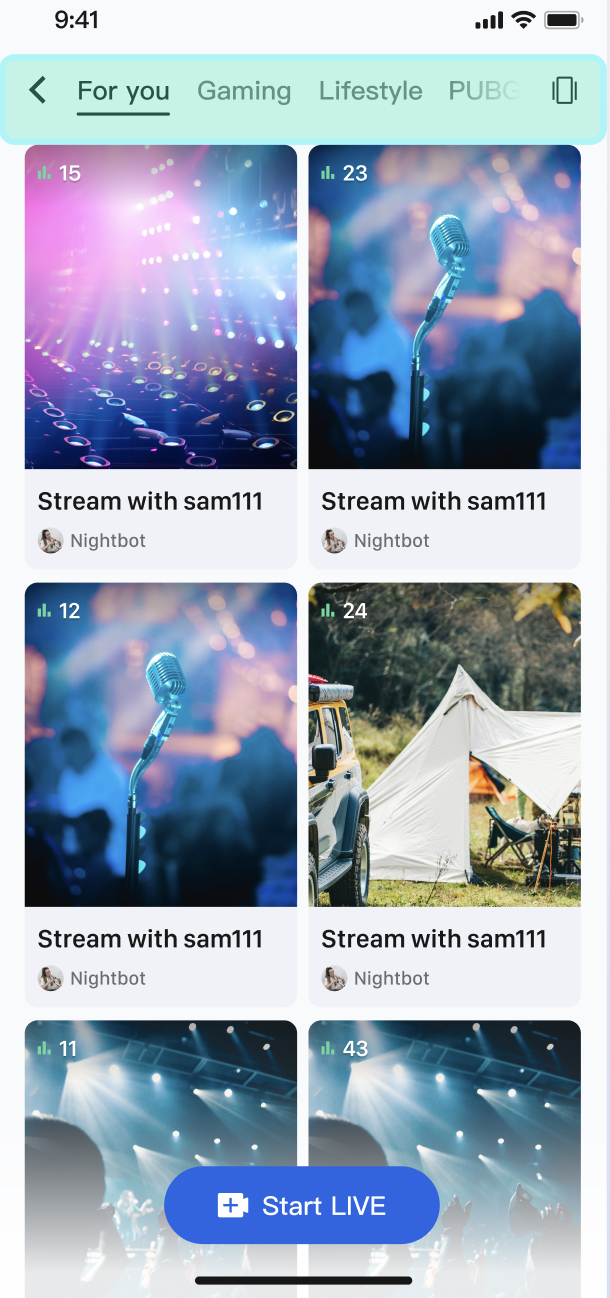
On the live plaza page, users can select category tags such as "Hot", "Music", "Games", etc. When a tag is selected, the live room list dynamically filters to display only rooms in the chosen category, helping users quickly discover relevant content.
|
|
230
|
+
|
|
231
|
+
|
|
232
|
+
|
|
233
|
+
|
|
234
|
+
#### Implementation
|
|
235
|
+
|
|
236
|
+
Use the `categoryList` property in the `LiveInfo` model. When the host sets a category at the start of the stream, the `LiveInfo` object returned by `fetchLiveList` includes this category data. After fetching the full live room list, filter it on the client side based on the selected category and update the UI.
|
|
237
|
+
|
|
238
|
+
#### Code Example
|
|
239
|
+
|
|
240
|
+
The following example shows how to extend a `LiveListManager` in `LiveListViewController` to handle data fetching and category filtering:
|
|
241
|
+
``` swift
|
|
242
|
+
import AtomicXCore
|
|
243
|
+
import Combine
|
|
244
|
+
|
|
245
|
+
// 1. Data manager for fetching and filtering
|
|
246
|
+
class LiveListManager {
|
|
247
|
+
private let liveListStore = LiveListStore.shared
|
|
248
|
+
private var cancellables = Set<AnyCancellable>()
|
|
249
|
+
private var fullLiveList: [LiveInfo] = []
|
|
250
|
+
|
|
251
|
+
// Publisher for the filtered live list
|
|
252
|
+
let filteredLiveListPublisher = CurrentValueSubject<[LiveInfo], Never>([])
|
|
253
|
+
|
|
254
|
+
init() {
|
|
255
|
+
liveListStore.state
|
|
256
|
+
.subscribe(StatePublisherSelector(keyPath: \LiveListState.liveList))
|
|
257
|
+
.receive(on: DispatchQueue.main)
|
|
258
|
+
.sink { [weak self] fetchedList in
|
|
259
|
+
self?.fullLiveList = fetchedList
|
|
260
|
+
// By default, publish the complete list
|
|
261
|
+
self?.filteredLiveListPublisher.send(fetchedList)
|
|
262
|
+
}
|
|
263
|
+
.store(in: &cancellables)
|
|
264
|
+
}
|
|
265
|
+
|
|
266
|
+
func fetchFirstPage() {
|
|
267
|
+
liveListStore.fetchLiveList(cursor: "", count: 20) { _ in }
|
|
268
|
+
}
|
|
269
|
+
|
|
270
|
+
/// Filter the live list by category
|
|
271
|
+
func filterLiveList(by categoryId: NSNumber?) {
|
|
272
|
+
guard let categoryId = categoryId else {
|
|
273
|
+
// Show the full list if no category is selected
|
|
274
|
+
filteredLiveListPublisher.send(fullLiveList)
|
|
275
|
+
return
|
|
276
|
+
}
|
|
277
|
+
let filteredList = fullLiveList.filter { liveInfo in
|
|
278
|
+
liveInfo.categoryList.contains(categoryId)
|
|
279
|
+
}
|
|
280
|
+
filteredLiveListPublisher.send(filteredList)
|
|
281
|
+
}
|
|
282
|
+
}
|
|
283
|
+
|
|
284
|
+
// 2. Use the manager in your LiveListViewController
|
|
285
|
+
class LiveListViewController: UIViewController, UICollectionViewDataSource, UICollectionViewDelegate {
|
|
286
|
+
|
|
287
|
+
private let manager = LiveListManager()
|
|
288
|
+
private var cancellables = Set<AnyCancellable>()
|
|
289
|
+
private var liveList: [LiveInfo] = []
|
|
290
|
+
private var collectionView: UICollectionView!
|
|
291
|
+
|
|
292
|
+
override func viewDidLoad() {
|
|
293
|
+
super.viewDidLoad()
|
|
294
|
+
// ... setupUI ...
|
|
295
|
+
|
|
296
|
+
// Bind data
|
|
297
|
+
manager.filteredLiveListPublisher
|
|
298
|
+
.receive(on: DispatchQueue.main)
|
|
299
|
+
.sink { [weak self] filteredList in
|
|
300
|
+
self?.liveList = filteredList
|
|
301
|
+
self?.collectionView.reloadData()
|
|
302
|
+
}
|
|
303
|
+
.store(in: &cancellables)
|
|
304
|
+
|
|
305
|
+
// Fetch the first page
|
|
306
|
+
manager.fetchFirstPage()
|
|
307
|
+
}
|
|
308
|
+
|
|
309
|
+
// Handle category selection (e.g., UISegmentedControl)
|
|
310
|
+
@objc func categorySegmentDidChange(_ sender: UISegmentedControl) {
|
|
311
|
+
let selectedCategoryId: NSNumber? = 1 // Example: "Music" category ID is 1
|
|
312
|
+
manager.filterLiveList(by: selectedCategoryId)
|
|
313
|
+
}
|
|
314
|
+
|
|
315
|
+
// ... (UICollectionView related code)
|
|
316
|
+
}
|
|
317
|
+
```
|
|
318
|
+
|
|
319
|
+
### Scenario 2: Swipe-to-Play for Live Room List
|
|
320
|
+
|
|
321
|
+
Users can switch between live rooms by swiping up or down. When a new live room is centered on the screen, its video will automatically start preview playback; when it is swiped away or no longer visible on the screen, playback will automatically stop to save bandwidth and device resources.
|
|
322
|
+
|
|
323
|
+
> **Note:**
|
|
324
|
+
>
|
|
325
|
+
|
|
326
|
+
> **Swipe-to-Play **is currently only supported for Video Live Streaming.
|
|
327
|
+
>
|
|
328
|
+
|
|
329
|
+
|
|
330
|
+
#### Interaction Flow
|
|
331
|
+
|
|
332
|
+
|
|
333
|
+
|
|
334
|
+
|
|
335
|
+
#### Implementation
|
|
336
|
+
|
|
337
|
+
`LiveCoreView` supports multiple instances. Create a separate `LiveCoreView` for each `UICollectionViewCell`. By listening to the scroll delegate methods of `UICollectionView`, you can control when the `LiveCoreView` in each cell should start or stop streaming, enabling "play on swipe in, stop on swipe out".
|
|
338
|
+
|
|
339
|
+
#### Code Example
|
|
340
|
+
|
|
341
|
+
Create a custom `LiveFeedCell` containing a `LiveCoreView`. Then, manage playback state in your view controller:
|
|
342
|
+
``` swift
|
|
343
|
+
import UIKit
|
|
344
|
+
import AtomicXCore
|
|
345
|
+
|
|
346
|
+
// 1. Custom UICollectionViewCell with LiveCoreView
|
|
347
|
+
class LiveFeedCell: UICollectionViewCell {
|
|
348
|
+
private var liveCoreView: LiveCoreView?
|
|
349
|
+
|
|
350
|
+
func setLiveInfo(_ liveInfo: LiveInfo) {
|
|
351
|
+
// Create a new LiveCoreView for the new live info
|
|
352
|
+
liveCoreView = LiveCoreView(viewType: .playView)
|
|
353
|
+
guard let liveCoreView = liveCoreView else { return }
|
|
354
|
+
contentView.addSubview(liveCoreView)
|
|
355
|
+
liveCoreView.frame = contentView.bounds
|
|
356
|
+
}
|
|
357
|
+
|
|
358
|
+
func startPlay(roomId: String) {
|
|
359
|
+
liveCoreView?.startPreviewLiveStream(roomId: roomId, isMuteAudio: false)
|
|
360
|
+
}
|
|
361
|
+
|
|
362
|
+
func stopPlay(roomId: String) {
|
|
363
|
+
liveCoreView?.stopPreviewLiveStream(roomId: roomId)
|
|
364
|
+
}
|
|
365
|
+
}
|
|
366
|
+
|
|
367
|
+
// 2. Manage playback in the ViewController
|
|
368
|
+
class LiveFeedViewController: UIViewController, UICollectionViewDataSource, UICollectionViewDelegate {
|
|
369
|
+
|
|
370
|
+
private var collectionView: UICollectionView!
|
|
371
|
+
private var liveList: [LiveInfo] = []
|
|
372
|
+
private var currentPlayingIndexPath: IndexPath?
|
|
373
|
+
|
|
374
|
+
// Called when scrolling stops
|
|
375
|
+
func scrollViewDidEndDecelerating(_ scrollView: UIScrollView) {
|
|
376
|
+
let page = Int(scrollView.contentOffset.y / view.frame.height)
|
|
377
|
+
let indexPath = IndexPath(item: page, section: 0)
|
|
378
|
+
// Switch playback only when the centered cell changes
|
|
379
|
+
if currentPlayingIndexPath != indexPath {
|
|
380
|
+
playVideo(at: indexPath)
|
|
381
|
+
}
|
|
382
|
+
}
|
|
383
|
+
|
|
384
|
+
// Called when a cell is about to leave the screen
|
|
385
|
+
func collectionView(_ collectionView: UICollectionView, didEndDisplaying cell: UICollectionViewCell, forItemAt indexPath: IndexPath) {
|
|
386
|
+
if let liveCell = cell as? LiveFeedCell {
|
|
387
|
+
let liveInfo = liveList[indexPath.item]
|
|
388
|
+
liveCell.stopPlay(roomId: liveInfo.liveID)
|
|
389
|
+
}
|
|
390
|
+
}
|
|
391
|
+
|
|
392
|
+
private func playVideo(at indexPath: IndexPath) {
|
|
393
|
+
if let cell = collectionView.cellForItem(at: indexPath) as? LiveFeedCell {
|
|
394
|
+
let liveInfo = liveList[indexPath.item]
|
|
395
|
+
cell.startPlay(roomId: liveInfo.liveID)
|
|
396
|
+
currentPlayingIndexPath = indexPath
|
|
397
|
+
}
|
|
398
|
+
}
|
|
399
|
+
|
|
400
|
+
// ... (Other UICollectionViewDataSource methods)
|
|
401
|
+
func collectionView(_ collectionView: UICollectionView, cellForItemAt indexPath: IndexPath) -> UICollectionViewCell {
|
|
402
|
+
let cell = collectionView.dequeueReusableCell(withReuseIdentifier: "LiveFeedCell", for: indexPath) as! LiveFeedCell
|
|
403
|
+
cell.setLiveInfo(liveList[indexPath.item])
|
|
404
|
+
return cell
|
|
405
|
+
}
|
|
406
|
+
}
|
|
407
|
+
```
|
|
408
|
+
|
|
409
|
+
## **API Documentation**
|
|
410
|
+
|
|
411
|
+
For detailed information on all public interfaces, properties, and methods of [LiveListStore](https://tencent-rtc.github.io/TUIKit_iOS/documentation/atomicxcore/liveliststore) and related classes, refer to the official API documentation included with the [AtomicXCore](https://tencent-rtc.github.io/TUIKit_iOS/documentation/atomicxcore) framework. The relevant Stores used in this document are as follows:
|
|
412
|
+
<table>
|
|
413
|
+
<tr>
|
|
414
|
+
<td rowspan="1" colSpan="1" >**Store/Component**</td>
|
|
415
|
+
|
|
416
|
+
<td rowspan="1" colSpan="1" >**Feature Description**</td>
|
|
417
|
+
|
|
418
|
+
<td rowspan="1" colSpan="1" >**API Documentation**</td>
|
|
419
|
+
</tr>
|
|
420
|
+
|
|
421
|
+
<tr>
|
|
422
|
+
<td rowspan="1" colSpan="1" >LiveCoreView</td>
|
|
423
|
+
|
|
424
|
+
<td rowspan="1" colSpan="1" >- Core view component for live video stream display and interaction. <br>- Responsible for video stream rendering and view widget handling, supporting scenarios such as host streaming, audience co-hosting, and host linking.</td>
|
|
425
|
+
|
|
426
|
+
<td rowspan="1" colSpan="1" >[API Documentation](https://tencent-rtc.github.io/TUIKit_iOS/documentation/atomicxcore/livecoreview)</td>
|
|
427
|
+
</tr>
|
|
428
|
+
|
|
429
|
+
<tr>
|
|
430
|
+
<td rowspan="1" colSpan="1" >LiveListStore</td>
|
|
431
|
+
|
|
432
|
+
<td rowspan="1" colSpan="1" >Full lifecycle management of live rooms: create, join, leave, destroy rooms; query room list; modify live information (name, announcement, etc.); listen to live status (such as being removed or ended).</td>
|
|
433
|
+
|
|
434
|
+
<td rowspan="1" colSpan="1" >[API Documentation](https://tencent-rtc.github.io/TUIKit_iOS/documentation/atomicxcore/liveliststore)</td>
|
|
435
|
+
</tr>
|
|
436
|
+
</table>
|
|
437
|
+
|
|
438
|
+
|
|
439
|
+
## FAQs
|
|
440
|
+
|
|
441
|
+
### Is the list data for voice chat rooms and video live rooms the same?
|
|
442
|
+
|
|
443
|
+
Yes. The data is unified; you do not need to fetch them separately. `LiveListStore` is a global singleton that manages the lifecycle of all "live" rooms in your application, including both video live rooms and voice chat rooms.
|
|
444
|
+
|
|
445
|
+
### How do I distinguish between voice chat rooms and video live rooms in the live room list?
|
|
446
|
+
|
|
447
|
+
`LiveListStore` does not differentiate between room business types. You must filter and categorize the list after fetching, at the application or UI layer.
|
|
448
|
+
|
|
449
|
+
We recommend two approaches:
|
|
450
|
+
|
|
451
|
+
**Approach 1 (Recommended): Use seatLayoutTemplateID for differentiation.**
|
|
452
|
+
|
|
453
|
+
This template ID defines the room layout. For supported template IDs and effects, refer to [Run And Test](https://write.woa.com/document/194571606121816064).
|
|
454
|
+
- **Step 1: Specify ID when creating a room**
|
|
455
|
+
|
|
456
|
+
- When calling `LiveListStore.shared.createLive`, set the `seatLayoutTemplateID` property of `LiveInfo` based on your business scenario:
|
|
457
|
+
|
|
458
|
+
- Voice chat rooms: Use template IDs in the range 1–199.
|
|
459
|
+
|
|
460
|
+
- Video live rooms: Use template IDs in the range 200–999.
|
|
461
|
+
|
|
462
|
+
- **Step 2: Filter when fetching the list**
|
|
463
|
+
|
|
464
|
+
- On the client side, after receiving the list in `LiveListStore.state.liveList`, determine the business scenario by checking the template ID range.
|
|
465
|
+
|
|
466
|
+
|
|
467
|
+
> **Note:**
|
|
468
|
+
>
|
|
469
|
+
|
|
470
|
+
> If the seatLayoutTemplateID does not match your business scenario (voice chat room or video live room), seat layout features may not work as expected.
|
|
471
|
+
>
|
|
472
|
+
|
|
473
|
+
|
|
474
|
+
**Approach 2:****Add a business prefix to **`liveID`**.**
|
|
475
|
+
|
|
476
|
+
|
|
477
|
+
This is an optional, application-layer convention to help you filter rooms quickly.
|
|
478
|
+
|
|
479
|
+
- **Step 1: Add prefix when creating a room**
|
|
480
|
+
|
|
481
|
+
- When generating liveID and calling createLive, assign different prefixes for each business type. For example: video live room IDs start with "Live_" (e.g., Live_12345), voice chat room IDs start with "voice_" (e.g., voice_67890).
|
|
482
|
+
|
|
483
|
+
- **Step 2: Check prefix when fetching the list**
|
|
484
|
+
|
|
485
|
+
- On the client side, after fetching the list, distinguish rooms by checking the liveID prefix.
|