@tencent-rtc/mcp 1.0.1 → 1.0.2
This diff represents the content of publicly available package versions that have been released to one of the supported registries. The information contained in this diff is provided for informational purposes only and reflects changes between package versions as they appear in their respective public registries.
- package/README.md +38 -37
- package/package.json +1 -1
- package/resource/doc/chatuikit/android/client_api_Android.md +1373 -0
- package/resource/doc/chatuikit/android/generate_UserSig.md +306 -0
- package/resource/doc/chatuikit/android/integrarte_only_tuichat_Android.md +290 -0
- package/resource/doc/chatuikit/android/integrate_tuikit_Android.md +287 -0
- package/resource/doc/chatuikit/android/quick_start_Android.md +138 -0
- package/resource/doc/chatuikit/android/show_typing_Android.md +43 -0
- package/resource/doc/chatuikit/faq/faq_sdk.md +120 -0
- package/resource/doc/chatuikit/faq/generate_UserSig.md +306 -0
- package/resource/doc/chatuikit/flutter/client_api_Flutter.md +932 -0
- package/resource/doc/chatuikit/flutter/generate_UserSig.md +306 -0
- package/resource/doc/chatuikit/flutter/integrate_only_tuichat_Flutter.md +333 -0
- package/resource/doc/chatuikit/flutter/integrate_tuikit_Flutter.md +769 -0
- package/resource/doc/chatuikit/flutter/quick_start_Flutter.md +217 -0
- package/resource/doc/chatuikit/iOS/client_api_iOS.md +1121 -0
- package/resource/doc/chatuikit/iOS/generate_UserSig.md +306 -0
- package/resource/doc/chatuikit/iOS/integrate_only_tuichat_iOS.md +748 -0
- package/resource/doc/chatuikit/iOS/integrate_tuikit_iOS.md +852 -0
- package/resource/doc/chatuikit/iOS/quick_start_iOS.md +163 -0
- package/resource/doc/chatuikit/iOS/show_typing_iOS.md +52 -0
- package/resource/doc/chatuikit/react/generate_UserSig.md +306 -0
- package/resource/doc/chatuikit/react/integrate_tuichat_only_react.md +202 -0
- package/resource/doc/chatuikit/react/integrate_tuichat_react.md +279 -0
- package/resource/doc/chatuikit/vue/generate_UserSig.md +306 -0
- package/resource/doc/chatuikit/vue/integrate_only_tuichat_Vue_web.md +124 -0
- package/resource/doc/chatuikit/vue/integrate_tuikit_Vue_web.md +552 -0
- package/server.js +51 -27
- package/server.js.map +1 -1
|
@@ -0,0 +1,202 @@
|
|
|
1
|
+
## Applicable Scenarios
|
|
2
|
+
|
|
3
|
+
Web & H5 platform, integrate independently private chat (1V1) or Group chat. This scenario is applicable for such as real estate consultancy, e-commerce customer service, remote insurance claims assessment.
|
|
4
|
+
|
|
5
|
+
You can directly experience the chat below. Meanwhile, you can quickly try online code implementation through [**Experience Sandbox**](https://codesandbox.io/p/sandbox/trtc-chat-only-gmtmfw).
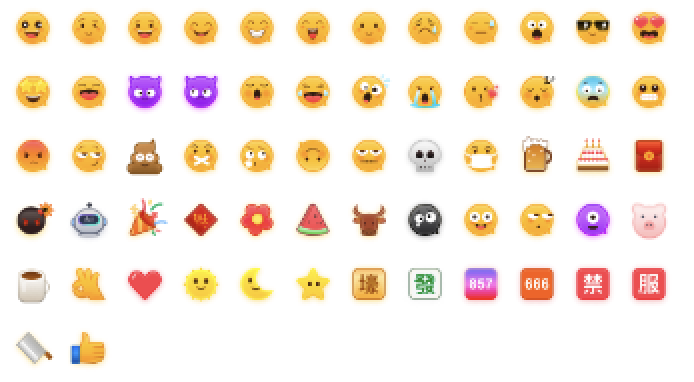
|
|
6
|
+
<iframe src="https://sdk-web-1252463788.cos.ap-hongkong.myqcloud.com/im/demo/docs-example/sample-chat/index.html#/chatbox?page=intergrationchat" style="width:100%;height:700px;border:none" allow="accelerometer; autoplay; clipboard-write; encrypted-media; gyroscope; picture-in-picture; web-share" referrerpolicy="no-referrer-when-downgrade" allowfullscreen></iframe>
|
|
7
|
+
|
|
8
|
+
|
|
9
|
+
## Development Environment Requirement
|
|
10
|
+
- React version 18
|
|
11
|
+
|
|
12
|
+
- TypeScript
|
|
13
|
+
|
|
14
|
+
- [Node.js](https://nodejs.org/en/) version 18+
|
|
15
|
+
|
|
16
|
+
- npm (version should match node version)
|
|
17
|
+
|
|
18
|
+
|
|
19
|
+
## Chat-Uikit-React Integration
|
|
20
|
+
|
|
21
|
+
### Step 1: Create Project
|
|
22
|
+
|
|
23
|
+
Create a new React project named **chat-app** (select React 18 during project creation and recommend using the Typescript template), and follow the prompt to run the initial project.
|
|
24
|
+
|
|
25
|
+
|
|
26
|
+
【shell】
|
|
27
|
+
``` bash
|
|
28
|
+
npm create rsbuild@latest
|
|
29
|
+
```
|
|
30
|
+
|
|
31
|
+
### Step 2: Download the Chat-Uikit-React Component
|
|
32
|
+
|
|
33
|
+
Download [chat-uikit-react](https://www.npmjs.com/package/@tencentcloud/chat-uikit-react) via npm and use it in the project.
|
|
34
|
+
|
|
35
|
+
|
|
36
|
+
【shell】
|
|
37
|
+
``` bash
|
|
38
|
+
npm i @tencentcloud/chat-uikit-react
|
|
39
|
+
```
|
|
40
|
+
|
|
41
|
+
### Step 3: Introduce the Chat-Uikit-React Component, Create and Open a Session to Chat
|
|
42
|
+
|
|
43
|
+
> **Note:**
|
|
44
|
+
>
|
|
45
|
+
|
|
46
|
+
> Note: The following code does not auto-fill `SDKAppID`, `userID`, or `userSig`. Retrieve related information in [procedure 4](https://write.woa.com/#step4) and replace them.
|
|
47
|
+
>
|
|
48
|
+
|
|
49
|
+
|
|
50
|
+
> **Note:**
|
|
51
|
+
>
|
|
52
|
+
> - Call API [createC2CConversation](https://write.woa.com/document/155521474134589440) to create a one-to-one chat.
|
|
53
|
+
> - Call API [createGroupConversation](https://write.woa.com/document/155521474134589440) to create a group chat.
|
|
54
|
+
> - Ways to enter a chat:
|
|
55
|
+
> - Call API [setActiveConversation](https://write.woa.com/document/155521474134589440), input conversationID to enter the chat page.
|
|
56
|
+
|
|
57
|
+
|
|
58
|
+
Replace the content in App.tsx, or you can create a new component and introduce it. [Experience Sandbox ->](https://codesandbox.io/p/sandbox/trtc-chat-only-gmtmfw?from-embed=)
|
|
59
|
+
``` typescript
|
|
60
|
+
import {
|
|
61
|
+
UIKitProvider,
|
|
62
|
+
useLoginState,
|
|
63
|
+
LoginStatus,
|
|
64
|
+
useConversationListState,
|
|
65
|
+
Chat,
|
|
66
|
+
MessageList,
|
|
67
|
+
MessageInput,
|
|
68
|
+
ChatHeader,
|
|
69
|
+
useUIOpenControlState,
|
|
70
|
+
ChatSetting,
|
|
71
|
+
Search,
|
|
72
|
+
VariantType,
|
|
73
|
+
} from "@tencentcloud/chat-uikit-react"
|
|
74
|
+
|
|
75
|
+
export default function App() {
|
|
76
|
+
|
|
77
|
+
const { isChatSettingOpen, isChatSearchOpen } = useUIOpenControlState();
|
|
78
|
+
const { setActiveConversation, createC2CConversation } = useConversationListState();
|
|
79
|
+
const { status } = useLoginState({
|
|
80
|
+
SDKAppID: 0, // Your SDKAppID, see procedure 4
|
|
81
|
+
userID: '', // Your logged in UserID, see procedure 5
|
|
82
|
+
userSig: '', // Your userSig, see procedure 5
|
|
83
|
+
onSuccess() {
|
|
84
|
+
const userID = ''; // userID: recipient's userID
|
|
85
|
+
createC2CConversation(userID).then((conversation) => {
|
|
86
|
+
setActiveConversation(conversation.conversationID);
|
|
87
|
+
})
|
|
88
|
+
}
|
|
89
|
+
});
|
|
90
|
+
|
|
91
|
+
if (status !== LoginStatus.SUCCESS) {
|
|
92
|
+
return <div>loading...</div>;
|
|
93
|
+
}
|
|
94
|
+
|
|
95
|
+
// Language support en-US(default) / zh-CN / ja-JP / ko-KR / zh-TW
|
|
96
|
+
// Theme supports light(default) / dark
|
|
97
|
+
return (
|
|
98
|
+
<div style={{display: 'flex', height: '100vh'}}>
|
|
99
|
+
<UIKitProvider language='en-US' theme='light'>
|
|
100
|
+
<Chat style={{ width: '100vw' }}>
|
|
101
|
+
<ChatHeader />
|
|
102
|
+
<MessageList />
|
|
103
|
+
<MessageInput />
|
|
104
|
+
</Chat>
|
|
105
|
+
{isChatSettingOpen && <ChatSetting />}
|
|
106
|
+
{isChatSearchOpen && <Search style={{ minWidth: '300px'}} variant={VariantType.EMBEDDED} />}
|
|
107
|
+
</UIKitProvider>
|
|
108
|
+
</div>
|
|
109
|
+
);
|
|
110
|
+
}
|
|
111
|
+
```
|
|
112
|
+
|
|
113
|
+
### Step 4: Creating an Application
|
|
114
|
+
1. Log in to the [Chat Console](https://console.trtc.io/).
|
|
115
|
+
|
|
116
|
+
2. Click "Create Application", enter your application name, then click "Create".
|
|
117
|
+
|
|
118
|
+
|
|
119
|
+
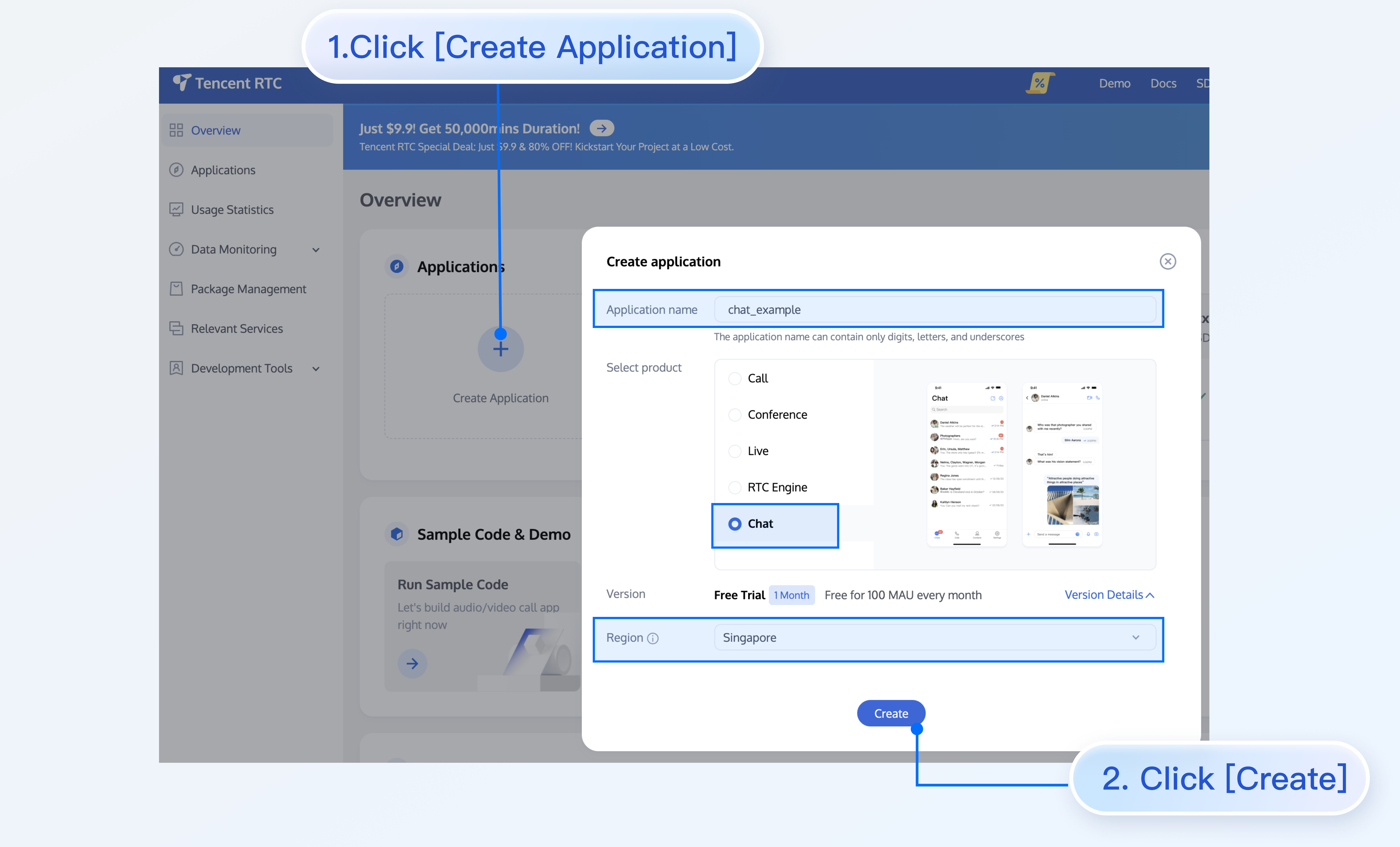
|
|
120
|
+
|
|
121
|
+
3. After creation, you can see the application status, service version, SDKAppID, createTime, tag, and expiration time on the console overview page.
|
|
122
|
+
|
|
123
|
+
|
|
124
|
+
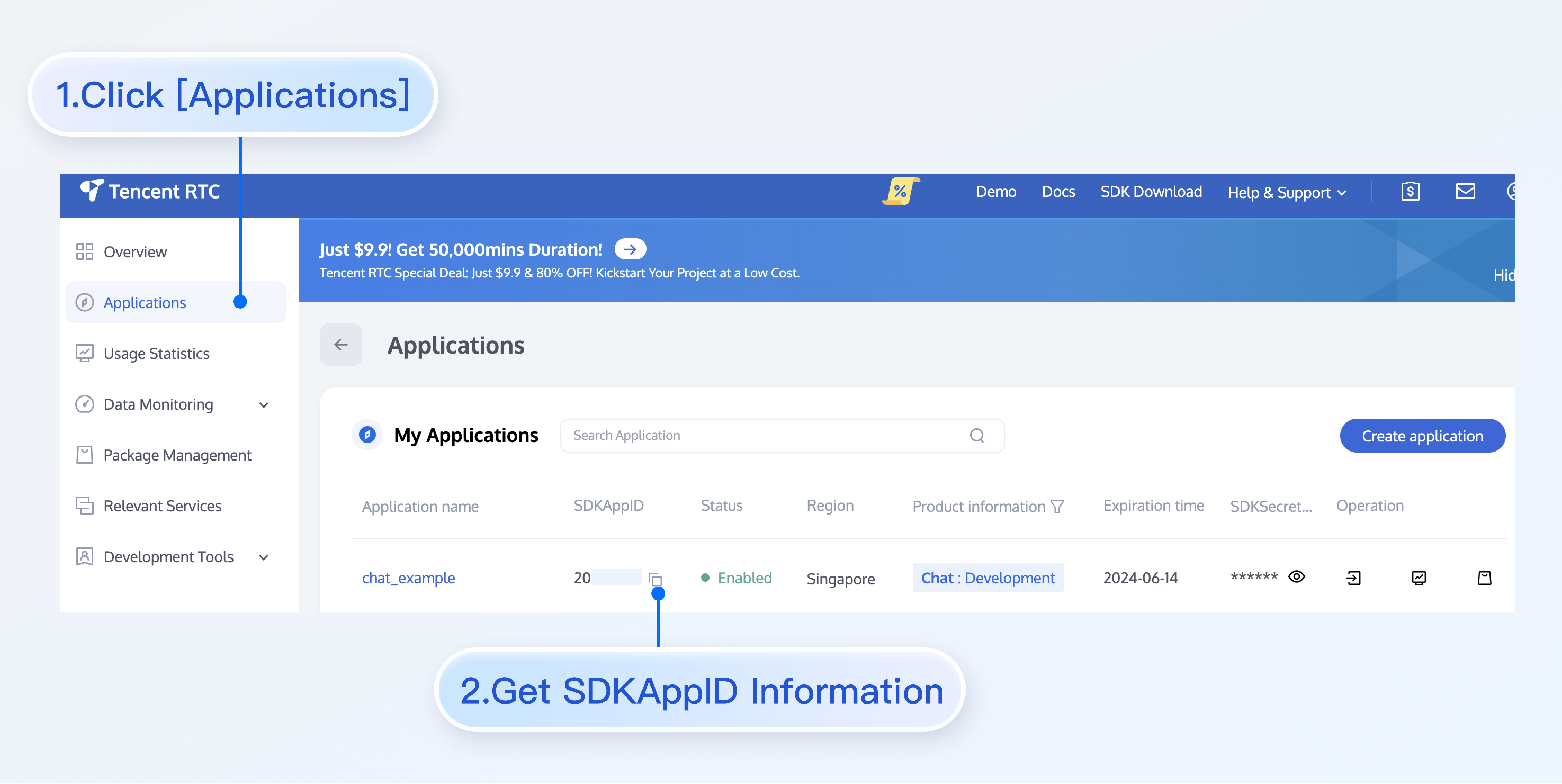
|
|
125
|
+
|
|
126
|
+
|
|
127
|
+
### Procedure 5: Obtain UserID and UserSig
|
|
128
|
+
- `userID`
|
|
129
|
+
|
|
130
|
+
- Click to enter the [Application](https://console.trtc.io/app) you created above. The `Chat` product entry will be shown in the left sidebar. Click to enter.
|
|
131
|
+
|
|
132
|
+
- After entering the Chat product subpage, click `Users` to enter the user management page.
|
|
133
|
+
|
|
134
|
+
- Click `Create account`, and a pop-up input box for account information will appear. If you are merely an ordinary member, we recommend you select the `General` data type.
|
|
135
|
+
|
|
136
|
+
- For a better experience in message sending and receiving and other features, we recommend creating two userIDs.
|
|
137
|
+
|
|
138
|
+
|
|
139
|
+
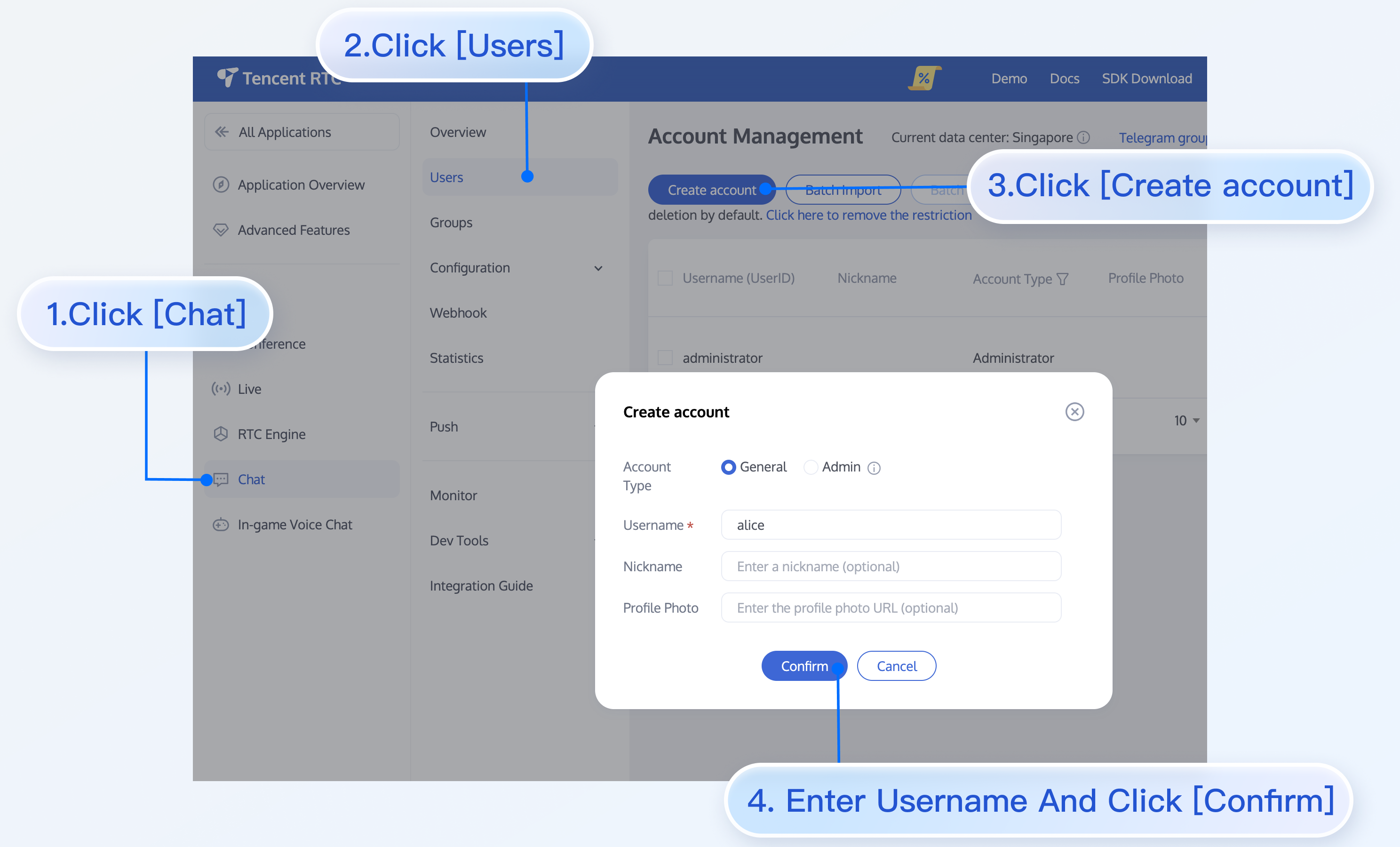
|
|
140
|
+
|
|
141
|
+
- `userSig`, usable development tools provided by the console to generate in real-time. Please click [Chat Console > Development Tools > UserSig Tools > Signature (UserSig) Generator](https://console.trtc.io/usersig).
|
|
142
|
+
|
|
143
|
+
|
|
144
|
+
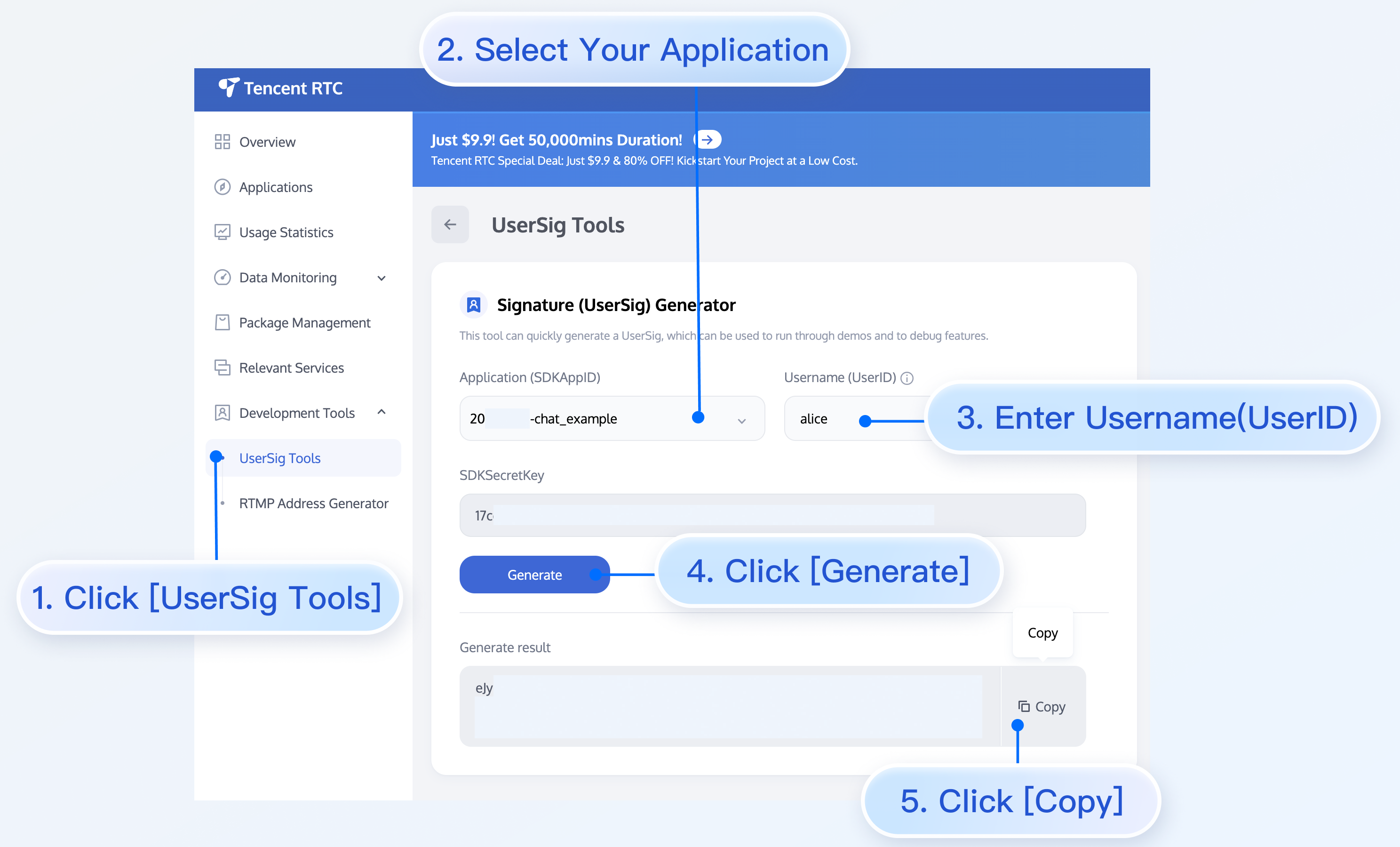
|
|
145
|
+
|
|
146
|
+
|
|
147
|
+
### Step 6: Start Project
|
|
148
|
+
|
|
149
|
+
Replace the SDKAppID, userID, and userSig in App.tsx, then run the command as follows:
|
|
150
|
+
|
|
151
|
+
|
|
152
|
+
【shell】
|
|
153
|
+
``` bash
|
|
154
|
+
npm run start
|
|
155
|
+
```
|
|
156
|
+
|
|
157
|
+
> **Note:**
|
|
158
|
+
>
|
|
159
|
+
> 1. Please ensure the [procedure 3](https://write.woa.com/#step3) code has successfully replaced `SDKAppID`, `userID`, and `userSig`. If not replaced, it will lead to abnormal project performance.
|
|
160
|
+
> 2. `userID` and `userSig` have a one-to-one relationship. Refer to [generate UserSig](https://trtc.io/document/39074?product=consoleguide).
|
|
161
|
+
> 3. If the project fails to start, please check whether the [development environment requirement](https://write.woa.com/#required) are met.
|
|
162
|
+
|
|
163
|
+
|
|
164
|
+
### Step 7: Send Your First Message
|
|
165
|
+
|
|
166
|
+
enter the message in the input box and press **enter** to send.
|
|
167
|
+
<iframe src="https://codesandbox.io/embed/gmtmfw?view=split&module=%2Fsrc%2FApp.tsx" style="width:100%;height:750px;border:0;border-radius:4px;overflow:hidden" title="chat-react-test" allow="accelerometer; ambient-light-sensor; camera; encrypted-media; geolocation; gyroscope; hid; microphone; midi; payment; usb; vr; xr-spatial-tracking" sandbox="allow-forms allow-modals allow-popups allow-presentation allow-same-origin allow-scripts"></iframe>
|
|
168
|
+
|
|
169
|
+
|
|
170
|
+
## FAQs
|
|
171
|
+
|
|
172
|
+
#### What Is UserSig
|
|
173
|
+
|
|
174
|
+
UserSig is the password for user login to Chat, which is essentially the encrypted ciphertext of UserID and other information.
|
|
175
|
+
|
|
176
|
+
#### How to Generate UserSig
|
|
177
|
+
|
|
178
|
+
The UserSig issuance method involves integrating the UserSig calculation code into your server and providing a project-oriented API. When UserSig is required, your project initiates a request to the business server to obtain a dynamic UserSig. For more details, see [UserSig generation by the server](https://cloud.tencent.com/document/product/269/32688#GeneratingdynamicUserSig).
|
|
179
|
+
|
|
180
|
+
> **Note:**
|
|
181
|
+
>
|
|
182
|
+
|
|
183
|
+
> The example code in this document uses a solution to obtain UserSig by configuring SECRETKEY in client-side code. In this method, SECRETKEY can be easily decompiled and reverse-engineered. Once your key is leaked, attackers can steal your Tencent Cloud traffic. Therefore, **this method is only suitable for local debugging**. For the correct UserSig issuance method, please refer to the context before.
|
|
184
|
+
>
|
|
185
|
+
|
|
186
|
+
|
|
187
|
+
#### Does React 17.X Version Support
|
|
188
|
+
|
|
189
|
+
Currently does not support version 17.x. Only React ≥ v18.0 is supported.
|
|
190
|
+
|
|
191
|
+
## Reference Documentation
|
|
192
|
+
|
|
193
|
+
#### UIKit Related
|
|
194
|
+
- [chat-uikit-react npm](https://www.npmjs.com/package/@tencentcloud/chat-uikit-react)
|
|
195
|
+
|
|
196
|
+
- [Demo source code and running example](https://github.com/TencentCloud/chat-uikit-react)
|
|
197
|
+
|
|
198
|
+
|
|
199
|
+
#### Implementing More Features, Refer to ChatEngine API Document
|
|
200
|
+
- [chat-uikit-engine API manual](https://web.sdk.qcloud.com/im/doc/chat-engine/index.html)
|
|
201
|
+
|
|
202
|
+
- [chat-uikit-engine npm](https://www.npmjs.com/package/@tencentcloud/chat-uikit-engine)
|
|
@@ -0,0 +1,279 @@
|
|
|
1
|
+
## Introduction
|
|
2
|
+
|
|
3
|
+
chat-uikit-react is a react UI component library based on Tencent Cloud Chat SDK. It provides some common UI components, including session, chat, group and other features. Based on these well-designed UI components, you can quickly build elegant, reliable and scalable chat applications.
|
|
4
|
+
|
|
5
|
+
You can directly experience the chat below. Meanwhile, you can quickly try online code implementation through [**Try On CodeSandbox**](https://codesandbox.io/p/sandbox/trtc-chat-full-48sffc?from-embed=).
|
|
6
|
+
<iframe src="https://web.sdk.qcloud.com/im/demo/docs-example/sample-chat/index.html#/inbox?page=intergration" style="width:100%;height:700px;border:none" allow="camera; microphone; accelerometer; autoplay; clipboard-write; encrypted-media; gyroscope; picture-in-picture; web-share" referrerpolicy="no-referrer-when-downgrade" allowfullscreen></iframe>
|
|
7
|
+
|
|
8
|
+
|
|
9
|
+
## Development Environment Requirement
|
|
10
|
+
- React version 18
|
|
11
|
+
|
|
12
|
+
- TypeScript
|
|
13
|
+
|
|
14
|
+
- [Node.js](https://nodejs.org/en/) version 18+
|
|
15
|
+
|
|
16
|
+
- npm (version should match node version)
|
|
17
|
+
|
|
18
|
+
|
|
19
|
+
## chat-uikit-react Integration
|
|
20
|
+
|
|
21
|
+
### Step 1: Create Project
|
|
22
|
+
|
|
23
|
+
Create a new React project named **chat-app** (select React 18 during project creation and recommend using the Typescript template), and follow the prompt to set up the initial project.
|
|
24
|
+
|
|
25
|
+
|
|
26
|
+
【shell】
|
|
27
|
+
``` bash
|
|
28
|
+
npm create rsbuild@latest
|
|
29
|
+
```
|
|
30
|
+
|
|
31
|
+
### Step 2: Download the Chat-Uikit-React Component
|
|
32
|
+
|
|
33
|
+
Download [chat-uikit-react](https://www.npmjs.com/package/@tencentcloud/chat-uikit-react) via npm for use in the project.
|
|
34
|
+
|
|
35
|
+
|
|
36
|
+
【shell】
|
|
37
|
+
``` bash
|
|
38
|
+
npm i @tencentcloud/chat-uikit-react
|
|
39
|
+
```
|
|
40
|
+
|
|
41
|
+
Copy the debug directory to the src/debug folder in the project directory. This is required when generating user signatures locally.
|
|
42
|
+
|
|
43
|
+
|
|
44
|
+
|
|
45
|
+
|
|
46
|
+
【MacOS】
|
|
47
|
+
``` bash
|
|
48
|
+
cp -r node_modules/@tencentcloud/chat-uikit-react/debug ./src
|
|
49
|
+
```
|
|
50
|
+
|
|
51
|
+
|
|
52
|
+
【Windows】
|
|
53
|
+
``` bash
|
|
54
|
+
xcopy node_modules\@tencentcloud\chat-uikit-react\debug .\src\debug /i /e
|
|
55
|
+
```
|
|
56
|
+
|
|
57
|
+
### Step 3: Introducing the Chat-Uikit-React Component
|
|
58
|
+
|
|
59
|
+
> **Note:**
|
|
60
|
+
>
|
|
61
|
+
> - The following code does not include `SDKAppID`, `userID`, and `UserSig`. You need to replace them with the relevant information obtained in [Step 4](https://write.woa.com/document/108053210129276928).
|
|
62
|
+
> - To respect the copyright of emoji designs, the Chat Demo/TUIKit project does not include large emoji graphics. Please replace them with your own designs or other emoji packs for which you hold the copyright before officially launching for commercial use. **The default smiley face emoji pack shown below is copyrighted by Tencent RTC** and is available for licensed use for a fee. If you need to obtain a license, please [submit a ticket](https://trtc.io/contact) contact us.
|
|
63
|
+
|
|
64
|
+
> 
|
|
65
|
+
>
|
|
66
|
+
|
|
67
|
+
|
|
68
|
+
Replace the content in App.tsx, or you can create a new component and import it. [**→ Experience in sandbox**](https://codesandbox.io/p/sandbox/trtc-chat-full-48sffc?from-embed=)**.**
|
|
69
|
+
``` typescript
|
|
70
|
+
import {
|
|
71
|
+
UIKitProvider,
|
|
72
|
+
useLoginState,
|
|
73
|
+
LoginStatus,
|
|
74
|
+
ConversationList,
|
|
75
|
+
Chat,
|
|
76
|
+
ChatHeader,
|
|
77
|
+
MessageList,
|
|
78
|
+
MessageInput,
|
|
79
|
+
useUIOpenControlState,
|
|
80
|
+
ChatSetting,
|
|
81
|
+
Search,
|
|
82
|
+
VariantType,
|
|
83
|
+
ContactList,
|
|
84
|
+
ContactInfo,
|
|
85
|
+
} from "@tencentcloud/chat-uikit-react";
|
|
86
|
+
import { useState } from "react";
|
|
87
|
+
import * as GenerateTestUserSig from "./debug/GenerateTestUserSig-es";
|
|
88
|
+
|
|
89
|
+
|
|
90
|
+
function App() {
|
|
91
|
+
const userID = ''; // TODO: Replace with your userID
|
|
92
|
+
const SDKAppID = 0; // TODO: Replace with your SDKAppID (Notice: SDKAppID is of type number)
|
|
93
|
+
const SDKSecretKey = ''; // TODO: Replace with your SDKSecretKey
|
|
94
|
+
|
|
95
|
+
const { isChatSettingOpen, isChatSearchOpen } = useUIOpenControlState();
|
|
96
|
+
const [activeTab, setActiveTab] = useState('chats');
|
|
97
|
+
|
|
98
|
+
const { userSig } = GenerateTestUserSig.genTestUserSig({
|
|
99
|
+
userID,
|
|
100
|
+
SDKAppID,
|
|
101
|
+
SecretKey: SDKSecretKey,
|
|
102
|
+
});
|
|
103
|
+
|
|
104
|
+
const { status } = useLoginState({
|
|
105
|
+
SDKAppID,
|
|
106
|
+
userID,
|
|
107
|
+
userSig,
|
|
108
|
+
})
|
|
109
|
+
|
|
110
|
+
if (status !== LoginStatus.SUCCESS) {
|
|
111
|
+
return <div>Loading...</div>
|
|
112
|
+
}
|
|
113
|
+
|
|
114
|
+
// Language support en-US(default) / zh-CN / ja-JP / ko-KR / zh-TW
|
|
115
|
+
// Theme support light(default) / dark
|
|
116
|
+
return (
|
|
117
|
+
<UIKitProvider>
|
|
118
|
+
<div style={{ height: '100vh', width: '100vw', display: 'flex', flexDirection: 'row' }}>
|
|
119
|
+
<ul>
|
|
120
|
+
<li onClick={() => {setActiveTab('chats')}}>chats</li>
|
|
121
|
+
<li onClick={() => {setActiveTab('contacts')}}>contact</li>
|
|
122
|
+
</ul>
|
|
123
|
+
{
|
|
124
|
+
activeTab === 'chats' && (
|
|
125
|
+
<>
|
|
126
|
+
<ConversationList style={{ minWidth: '300px', maxWidth: '350px' }}/>
|
|
127
|
+
<Chat PlaceholderEmpty="No messages yet">
|
|
128
|
+
<ChatHeader />
|
|
129
|
+
<MessageList />
|
|
130
|
+
<MessageInput />
|
|
131
|
+
</Chat>
|
|
132
|
+
{isChatSettingOpen && <ChatSetting />}
|
|
133
|
+
{isChatSearchOpen && <Search style={{ minWidth: '300px'}} variant={VariantType.EMBEDDED} />}
|
|
134
|
+
</>
|
|
135
|
+
)
|
|
136
|
+
}
|
|
137
|
+
{
|
|
138
|
+
activeTab === 'contacts' && (
|
|
139
|
+
<>
|
|
140
|
+
<ContactList style={{ minWidth: '300px', maxWidth: '350px' }}/>
|
|
141
|
+
<ContactInfo
|
|
142
|
+
PlaceholderEmpty="No contact yet"
|
|
143
|
+
onSendMessage={() => {setActiveTab('chats')}}
|
|
144
|
+
onEnterGroup={() => {setActiveTab('chats')}}
|
|
145
|
+
/>
|
|
146
|
+
</>
|
|
147
|
+
)
|
|
148
|
+
}
|
|
149
|
+
</div>
|
|
150
|
+
</UIKitProvider>
|
|
151
|
+
);
|
|
152
|
+
}
|
|
153
|
+
|
|
154
|
+
export default App;
|
|
155
|
+
```
|
|
156
|
+
<table>
|
|
157
|
+
<tr>
|
|
158
|
+
<td rowspan="1" colSpan="1" >Parameter</td>
|
|
159
|
+
|
|
160
|
+
<td rowspan="1" colSpan="1" >Type</td>
|
|
161
|
+
|
|
162
|
+
<td rowspan="1" colSpan="1" >Note</td>
|
|
163
|
+
</tr>
|
|
164
|
+
|
|
165
|
+
<tr>
|
|
166
|
+
<td rowspan="1" colSpan="1" >userID</td>
|
|
167
|
+
|
|
168
|
+
<td rowspan="1" colSpan="1" >String</td>
|
|
169
|
+
|
|
170
|
+
<td rowspan="1" colSpan="1" >Unique identifier of the user, defined by you, it is allowed to contain only upper and lower case letters (a-z, A-Z), numbers (0-9), underscores, and hyphens.</td>
|
|
171
|
+
</tr>
|
|
172
|
+
|
|
173
|
+
<tr>
|
|
174
|
+
<td rowspan="1" colSpan="1" >SDKAppID</td>
|
|
175
|
+
|
|
176
|
+
<td rowspan="1" colSpan="1" >Number</td>
|
|
177
|
+
|
|
178
|
+
<td rowspan="1" colSpan="1" >The unique identifier for the audio and video application created in the [Tencent RTC Console](https://console.trtc.io/).</td>
|
|
179
|
+
</tr>
|
|
180
|
+
|
|
181
|
+
<tr>
|
|
182
|
+
<td rowspan="1" colSpan="1" >SDKSecretKey</td>
|
|
183
|
+
|
|
184
|
+
<td rowspan="1" colSpan="1" >String</td>
|
|
185
|
+
|
|
186
|
+
<td rowspan="1" colSpan="1" >The SDKSecretKey of the audio and video application created in the [Tencent RTC Console](https://console.trtc.io/).</td>
|
|
187
|
+
</tr>
|
|
188
|
+
|
|
189
|
+
<tr>
|
|
190
|
+
<td rowspan="1" colSpan="1" >userSig</td>
|
|
191
|
+
|
|
192
|
+
<td rowspan="1" colSpan="1" >String</td>
|
|
193
|
+
|
|
194
|
+
<td rowspan="1" colSpan="1" >A security protection signature used for user log in authentication to confirm the user's identity and prevent malicious attackers from stealing your cloud service usage rights.</td>
|
|
195
|
+
</tr>
|
|
196
|
+
</table>
|
|
197
|
+
|
|
198
|
+
|
|
199
|
+
> **Explanation of UserSig:**
|
|
200
|
+
>
|
|
201
|
+
|
|
202
|
+
> **Development environment**: If you are running a demo locally and developing or debugging, you can use the `genTestUserSig` (Refer to Step 3.2) function in the debug file to generate a 'userSig'. In this method, SDKSecretKey is vulnerable to decompilation and reverse engineering. Once your key is leaked, attackers can steal your Tencent Cloud traffic.
|
|
203
|
+
>
|
|
204
|
+
|
|
205
|
+
> **Production environment**: If your project is going live, please use the [Server-side Generation of UserSig](https://trtc.io/document/34385) method.
|
|
206
|
+
>
|
|
207
|
+
|
|
208
|
+
|
|
209
|
+
### Step 4: Create an application
|
|
210
|
+
1. Log in to [Chat Console](https://console.trtc.io/) .
|
|
211
|
+
|
|
212
|
+
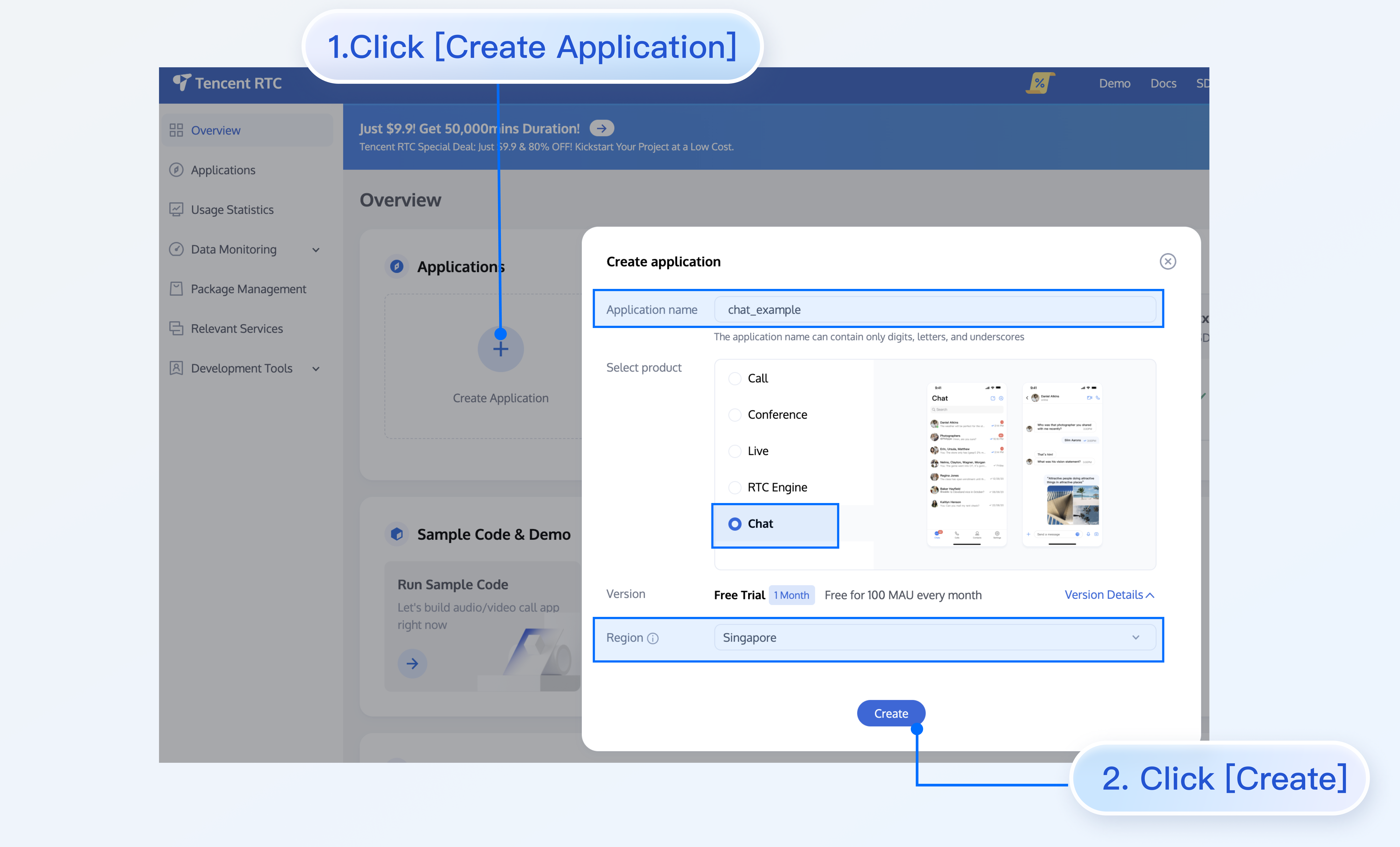
2. Click **Create Application**, enter your application name, then click **Create**.
|
|
213
|
+
|
|
214
|
+
|
|
215
|
+
|
|
216
|
+
|
|
217
|
+
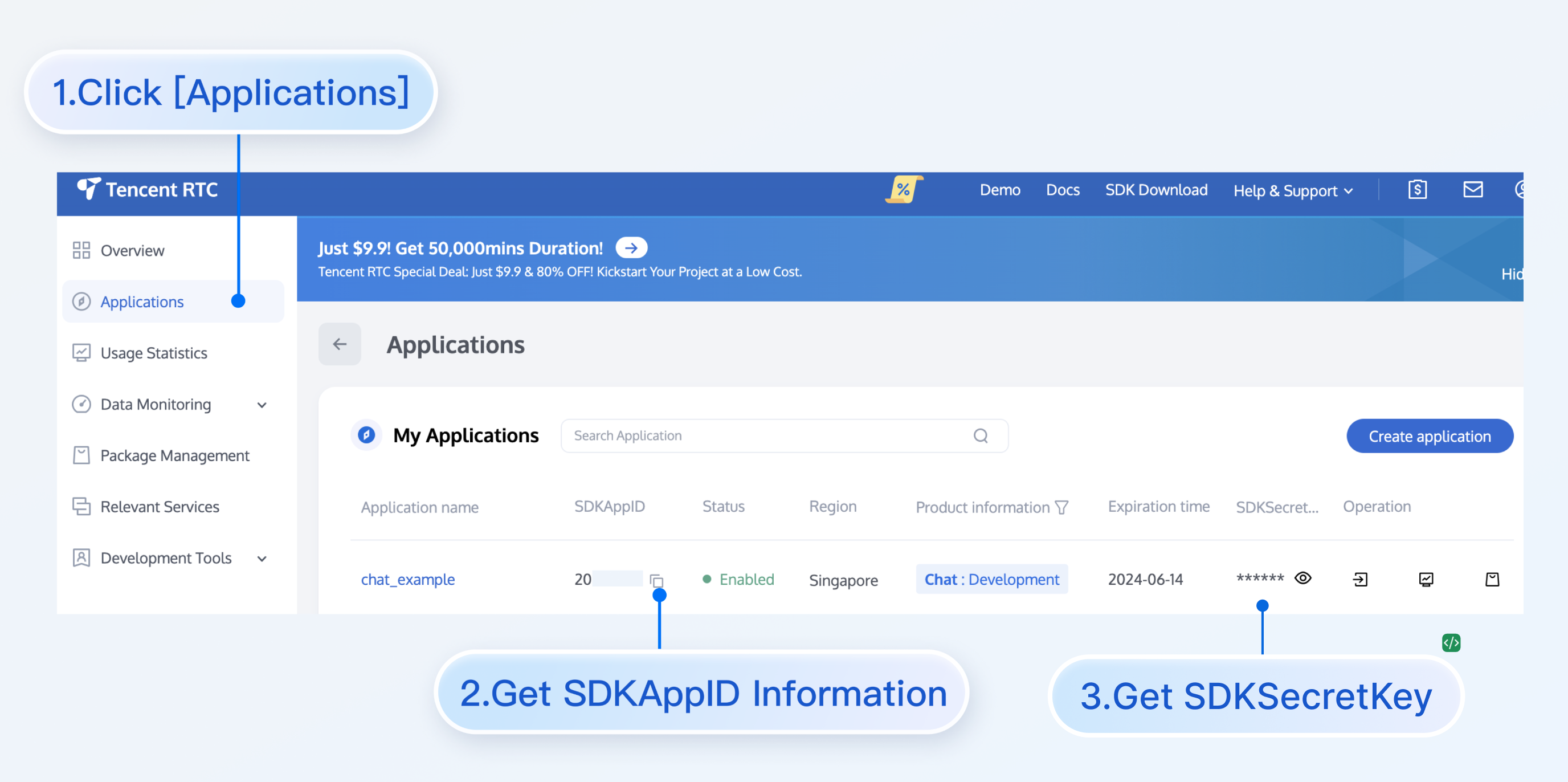
3. After creation, you can view the Application Status, service version, SDKAppID, creation time, Tag, and expiration time of the new application on the console overview page.
|
|
218
|
+
|
|
219
|
+
|
|
220
|
+
|
|
221
|
+
|
|
222
|
+
### Step 5: Start the Project
|
|
223
|
+
|
|
224
|
+
Replace SDKAppID, UserID, and UserSig in App.tsx, then run the following command:
|
|
225
|
+
|
|
226
|
+
|
|
227
|
+
【shell】
|
|
228
|
+
``` bash
|
|
229
|
+
npm run dev
|
|
230
|
+
```
|
|
231
|
+
|
|
232
|
+
> **Note:**
|
|
233
|
+
>
|
|
234
|
+
> 1. Please ensure that in Step 3 code, SDKAppID, UserID, and UserSig are all successfully replaced. Failure to replace them will result in abnormal project behavior.
|
|
235
|
+
> 2. A `userID` corresponds to a `userSig`, for more information, see [Generating UserSig](https://trtc.io/document/39074?product=consoleguide).
|
|
236
|
+
> 3. If the project fails to start, please check whether the [development environment requirements](https://write.woa.com/document/108053210129276928) are met.
|
|
237
|
+
|
|
238
|
+
|
|
239
|
+
### Step 6: Send your first message
|
|
240
|
+
|
|
241
|
+
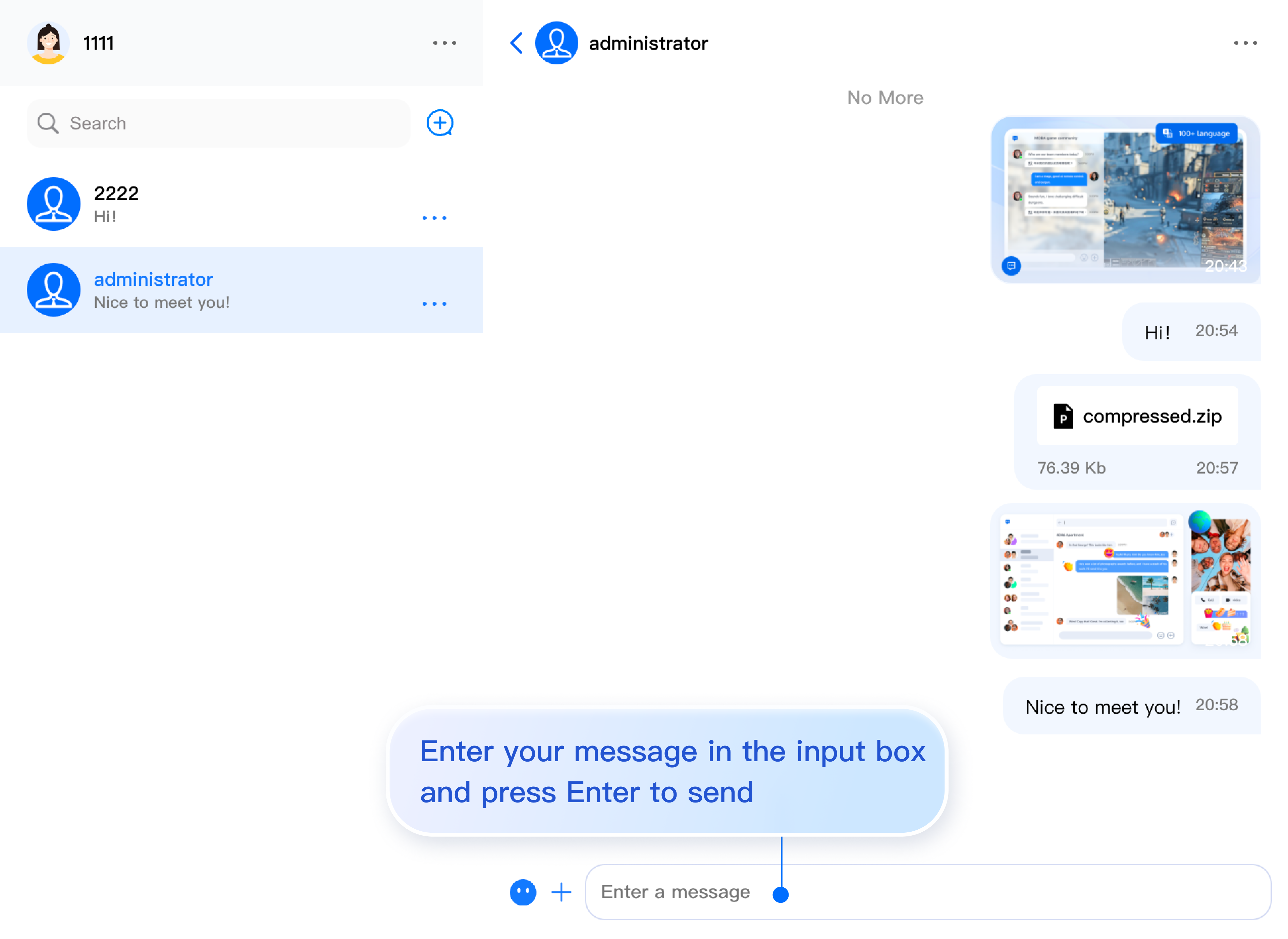
Enter your message in the input box and press Enter to send.
|
|
242
|
+
|
|
243
|
+
|
|
244
|
+
|
|
245
|
+
## FAQs
|
|
246
|
+
|
|
247
|
+
#### What is UserSig?
|
|
248
|
+
|
|
249
|
+
A UserSig is a password for users to log in to Chat. It is essentially the ciphertext generated by encrypting information such as the UserID.
|
|
250
|
+
|
|
251
|
+
#### How can I generate a UserSig?
|
|
252
|
+
|
|
253
|
+
The issuance method for UserSig involves integrating the calculation code of UserSig into your server, and providing an interface oriented towards your project. When UserSig is needed, your project sends a request to the business server to access the dynamic UserSig. For more information, please see [How to Generate a UserSig on the Server](https://trtc.io/document/39074?product=consoleguide).
|
|
254
|
+
|
|
255
|
+
> **Note:**
|
|
256
|
+
>
|
|
257
|
+
|
|
258
|
+
> The exemplary code provided in this document retrieves the UserSig by embedding the SECRETKEY in the client code. This approach makes the SECRETKEY highly susceptible to decompilation and reverse engineering. Once your encryption key is compromised, attackers can misappropriate your Tencent Cloud traffic. Hence, **this procedure is exclusively recommended for running functional debugging locally**. For the correct issuance of UserSig, please refer to the previous sections.
|
|
259
|
+
>
|
|
260
|
+
|
|
261
|
+
|
|
262
|
+
## Communication and Feedback
|
|
263
|
+
|
|
264
|
+
Join the [Telegram Technical Exchange Group](https://t.me/tencent_imsdk) or [WhatsApp Exchange Group](https://chat.whatsapp.com/IVa11ZkVmKTEwSWsAzSyik) to enjoy support from professional engineers and solve your problems.
|
|
265
|
+
|
|
266
|
+
## Documentation
|
|
267
|
+
|
|
268
|
+
#### UIKit Related:
|
|
269
|
+
- [chat-uikit-react npm](https://www.npmjs.com/package/@tencentcloud/chat-uikit-react)
|
|
270
|
+
|
|
271
|
+
- [Demo Source Code and Running Example](https://github.com/TencentCloud/chat-uikit-react)
|
|
272
|
+
|
|
273
|
+
|
|
274
|
+
#### For more features, refer to the ChatEngine API documentation:
|
|
275
|
+
- [chat-uikit-engine API Manual](https://web.sdk.qcloud.com/im/doc/chat-engine/index.html)
|
|
276
|
+
|
|
277
|
+
- [chat-uikit-engine npm](https://www.npmjs.com/package/@tencentcloud/chat-uikit-engine)
|
|
278
|
+
|
|
279
|
+
|