@serverless-devs/s 2.0.92 → 2.0.93-beta.4
This diff represents the content of publicly available package versions that have been released to one of the supported registries. The information contained in this diff is provided for informational purposes only and reflects changes between package versions as they appear in their respective public registries.
- package/CONTRIBUTORS.md +2 -0
- package/bin/s-component +2 -0
- package/bin/s-set-workspace +2 -0
- package/docs/readme.md +94 -0
- package/docs/zh/awesome.md +296 -0
- package/docs/zh/cicd.md +200 -0
- package/docs/zh/cli_design.md +100 -0
- package/docs/zh/command/clean.md +63 -0
- package/docs/zh/command/cli.md +92 -0
- package/docs/zh/command/component.md +76 -0
- package/docs/zh/command/config.md +278 -0
- package/docs/zh/command/custom.md +73 -0
- package/docs/zh/command/init.md +148 -0
- package/docs/zh/command/readme.md +76 -0
- package/docs/zh/command/set.md +195 -0
- package/docs/zh/default_provider_config/alibabacloud.md +82 -0
- package/docs/zh/default_provider_config/aws.md +12 -0
- package/docs/zh/default_provider_config/azure.md +9 -0
- package/docs/zh/default_provider_config/baiducloud.md +8 -0
- package/docs/zh/default_provider_config/gcp.md +21 -0
- package/docs/zh/default_provider_config/huaweicloud.md +52 -0
- package/docs/zh/default_provider_config/readme.md +9 -0
- package/docs/zh/default_provider_config/tencentcloud.md +41 -0
- package/docs/zh/install.md +52 -0
- package/docs/zh/package_dev.md +142 -0
- package/docs/zh/quick_start.md +297 -0
- package/docs/zh/readme.md +90 -0
- package/docs/zh/tool.md +80 -0
- package/docs/zh/yaml.md +203 -0
- package/docs/zh/yaml_and_cli.md +67 -0
- package/lib/clean/index.js +43 -35
- package/lib/cli/cli-manager.js +33 -22
- package/lib/cli/index.js +60 -62
- package/lib/component/index.d.ts +1 -0
- package/lib/component/index.js +161 -0
- package/lib/config/add/index.js +39 -39
- package/lib/config/delete/index.js +49 -59
- package/lib/config/get/index.d.ts +0 -1
- package/lib/config/get/index.js +46 -51
- package/lib/config/index.js +36 -35
- package/lib/constants/index.d.ts +0 -1
- package/lib/constants/index.js +1 -5
- package/lib/core/command/command-manager.js +36 -43
- package/lib/core/component/index.d.ts +14 -7
- package/lib/core/component/index.js +78 -52
- package/lib/core/plugin/index.js +4 -3
- package/lib/daemon/template.js +2 -4
- package/lib/error/human-error.d.ts +12 -2
- package/lib/error/human-error.js +63 -28
- package/lib/error/human-warning.d.ts +8 -0
- package/lib/error/human-warning.js +19 -0
- package/lib/error/index.d.ts +10 -1
- package/lib/error/index.js +74 -27
- package/lib/index.js +89 -94
- package/lib/init/index.js +76 -79
- package/lib/init/init-config.js +3 -5
- package/lib/init/init-manager.js +3 -4
- package/lib/init/update-template.js +3 -5
- package/lib/onboarding/index.js +5 -5
- package/lib/set/analysis/index.js +41 -37
- package/lib/set/index.js +34 -33
- package/lib/set/locale/index.js +54 -53
- package/lib/set/registry/index.js +52 -52
- package/lib/set/workspace/index.d.ts +1 -0
- package/lib/set/workspace/index.js +61 -0
- package/lib/specification/parse.js +9 -6
- package/lib/update-notifier/index.js +10 -10
- package/lib/utils/command-util.d.ts +0 -2
- package/lib/utils/command-util.js +2 -42
- package/lib/utils/common.d.ts +1 -0
- package/lib/utils/common.js +100 -20
- package/lib/utils/core.js +3 -3
- package/lib/utils/handler-set-config.d.ts +1 -1
- package/lib/utils/handler-set-config.js +6 -7
- package/lib/utils/i18n/en.js +4 -4
- package/lib/utils/i18n/index.js +3 -3
- package/lib/utils/i18n/zh.js +3 -3
- package/lib/utils/storage.js +3 -4
- package/package.json +2 -2
- package/readme.md +64 -38
- package/shell/postbuild.sh +2 -0
- package/spec/readme.md +59 -0
- package/spec/zh/0.0.1/readme.md +47 -0
- package/spec/zh/0.0.1/serverless_pacakge_model/1.purpose_and_goals.md +3 -0
- package/spec/zh/0.0.1/serverless_pacakge_model/2.overview_and_terminology.md +14 -0
- package/spec/zh/0.0.1/serverless_pacakge_model/3.package_model.md +434 -0
- package/spec/zh/0.0.1/serverless_pacakge_model/4.application_scopes.md +3 -0
- package/spec/zh/0.0.1/serverless_pacakge_model/5.design_principles.md +3 -0
- package/spec/zh/0.0.1/serverless_pacakge_model/readme.md +12 -0
- package/spec/zh/0.0.1/serverless_registry_model/1.purpose_and_goals.md +18 -0
- package/spec/zh/0.0.1/serverless_registry_model/2.overview_and_terminology.md +18 -0
- package/spec/zh/0.0.1/serverless_registry_model/3.registry_model.md +61 -0
- package/spec/zh/0.0.1/serverless_registry_model/4.application_scopes.md +6 -0
- package/spec/zh/0.0.1/serverless_registry_model/5.design_principles.md +3 -0
- package/spec/zh/0.0.1/serverless_registry_model/readme.md +12 -0
- package/spec/zh/0.0.1/serverless_user_model/1.purpose_and_goals.md +3 -0
- package/spec/zh/0.0.1/serverless_user_model/2.overview_and_terminology.md +16 -0
- package/spec/zh/0.0.1/serverless_user_model/3.user_model.md +218 -0
- package/spec/zh/0.0.1/serverless_user_model/4.application_scopes.md +4 -0
- package/spec/zh/0.0.1/serverless_user_model/5.design_principles.md +3 -0
- package/spec/zh/0.0.1/serverless_user_model/readme.md +12 -0
- package/bin/s-set-locale +0 -2
- package/readme_zh.md +0 -72
|
@@ -0,0 +1,100 @@
|
|
|
1
|
+
# 命令行设计规范
|
|
2
|
+
|
|
3
|
+
Serverless Devs 作为 Serverless 领域的开发者工具,其输出的标准化和规范化会在一定程度上对用户体验有比较明显的影响。
|
|
4
|
+
|
|
5
|
+
本文档将会通过一些文字和案例,对Serverless Devs的命令行工具输出,进行规范化升级。
|
|
6
|
+
|
|
7
|
+
## 规范详情
|
|
8
|
+
|
|
9
|
+
输出格式的规范目标是:
|
|
10
|
+
|
|
11
|
+
- 更清晰
|
|
12
|
+
- 更简约
|
|
13
|
+
- 不影响功能实用
|
|
14
|
+
|
|
15
|
+
基于以上三个原则,我们可以通过正常输出的形式、异常输出的形式等分别进行举例说明
|
|
16
|
+
|
|
17
|
+
### 基本输出
|
|
18
|
+
|
|
19
|
+
基本输出的形式,整体上包括两个部分:
|
|
20
|
+
|
|
21
|
+
1. 项目执行阶段
|
|
22
|
+
|
|
23
|
+
项目执行阶段主要包括一个基本格式:
|
|
24
|
+
|
|
25
|
+
```
|
|
26
|
+
⌛ Steps for process
|
|
27
|
+
====================
|
|
28
|
+
```
|
|
29
|
+
|
|
30
|
+
采用重写机制,不断的更新输出内容,每个项目执行完成可以输出相对应的结果,示例:
|
|
31
|
+
|
|
32
|
+
```
|
|
33
|
+
⌛ Steps for process
|
|
34
|
+
====================
|
|
35
|
+
✔ Pre-action completed (10s)
|
|
36
|
+
```
|
|
37
|
+
|
|
38
|
+
2. 结果输出阶段
|
|
39
|
+
|
|
40
|
+
项目执行阶段主要包括一个基本格式:
|
|
41
|
+
|
|
42
|
+
```
|
|
43
|
+
🚀 Result for process
|
|
44
|
+
====================
|
|
45
|
+
```
|
|
46
|
+
|
|
47
|
+
具体的项目输出采用`Yaml`的格式进行输出,输出时,项目名称要加下划线,如果没有输出则直接结束项目,示例:
|
|
48
|
+
|
|
49
|
+
```
|
|
50
|
+
🚀 Result for process
|
|
51
|
+
====================
|
|
52
|
+
✔ MyProject deployed (11s)
|
|
53
|
+
fc-deploy-test:
|
|
54
|
+
region: cn-hangzhou
|
|
55
|
+
service:
|
|
56
|
+
name: fc-deploy-service
|
|
57
|
+
memorySize: 128
|
|
58
|
+
```
|
|
59
|
+
|
|
60
|
+
#### 单项目输出示例
|
|
61
|
+
|
|
62
|
+

|
|
63
|
+
|
|
64
|
+
|
|
65
|
+
#### 多项目输出示例
|
|
66
|
+
|
|
67
|
+

|
|
68
|
+
|
|
69
|
+
|
|
70
|
+
### 调试模式
|
|
71
|
+
|
|
72
|
+
当用户使用`--debug`进入到调试模式,则会打印非常详细的信息在控制台,但是这些信息将会以灰色形式打印出来,以保持整体的层次感:
|
|
73
|
+
|
|
74
|
+

|
|
75
|
+
|
|
76
|
+
|
|
77
|
+
|
|
78
|
+
### 错误输出
|
|
79
|
+
|
|
80
|
+
当执行出现错误时,Serverless Devs要做到感知并输出相对应的内容:
|
|
81
|
+
|
|
82
|
+
```
|
|
83
|
+
⌛ Steps for process
|
|
84
|
+
====================
|
|
85
|
+
✔ MyProject pre-action completed (10s)
|
|
86
|
+
✖ MyProject failed to deploy:
|
|
87
|
+
|
|
88
|
+
Error Message:
|
|
89
|
+
t[r] is not a function
|
|
90
|
+
|
|
91
|
+
Env: darwin, node v15.14.0
|
|
92
|
+
Docs: https://github.com/serverless-devs/docs
|
|
93
|
+
Bugs: https://github.com/Serverless-Devs/Serverless-Devs/issues
|
|
94
|
+
Logs: ~/demo/demo/demo/s.log
|
|
95
|
+
```
|
|
96
|
+
|
|
97
|
+
动态效果为:
|
|
98
|
+
|
|
99
|
+
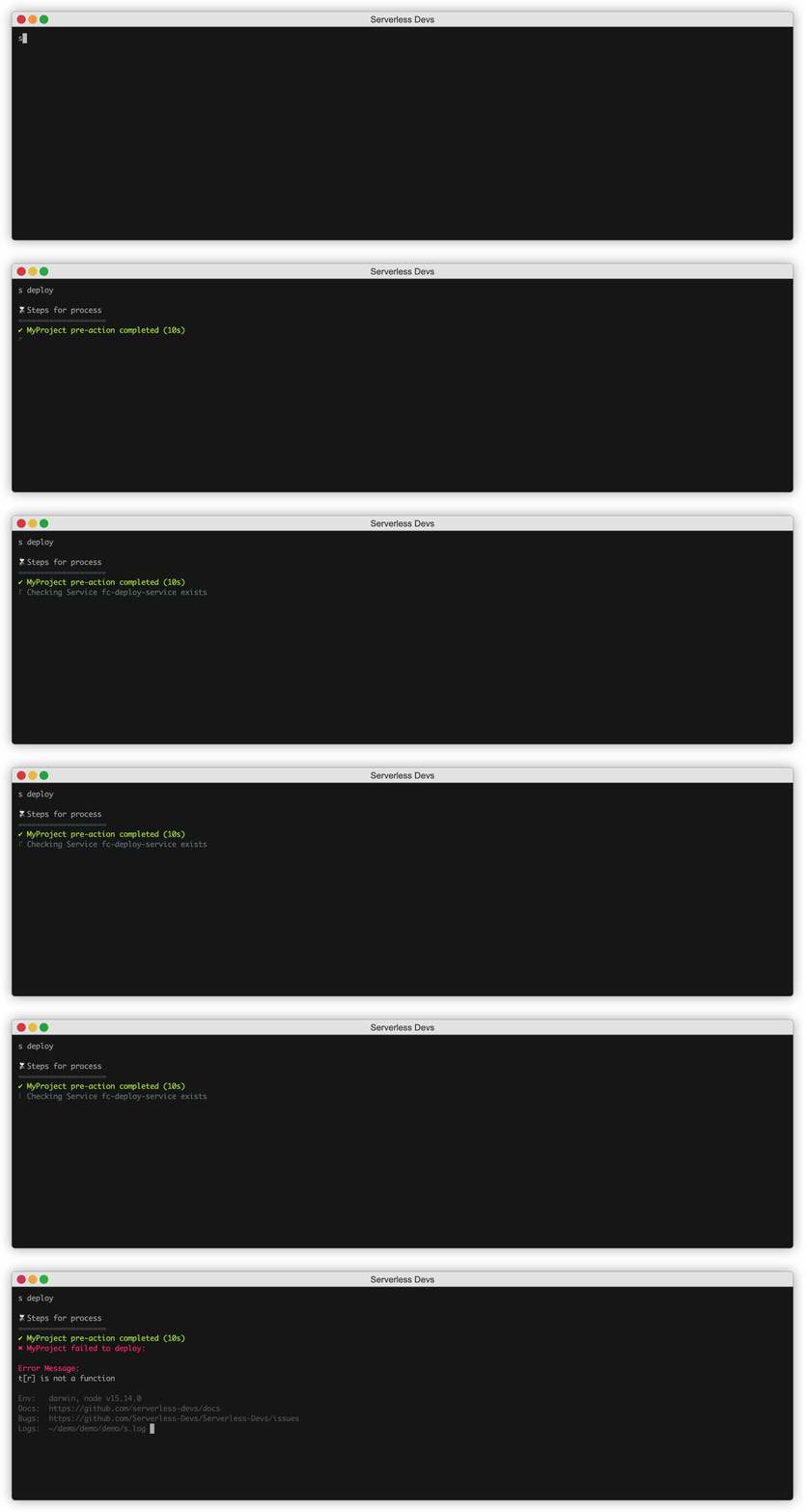
|
|
100
|
+
|
|
@@ -0,0 +1,63 @@
|
|
|
1
|
+
# Clean 命令
|
|
2
|
+
|
|
3
|
+
`clean`命令是清理 Serverless Devs 的缓存相关功能,可以通过该命令清理环境、不用的依赖包以及相关的缓存内容。
|
|
4
|
+
|
|
5
|
+
- [命令解析](#命令解析)
|
|
6
|
+
- [参数解析](#参数解析)
|
|
7
|
+
- [操作案例](#操作案例)
|
|
8
|
+
|
|
9
|
+
## 命令解析
|
|
10
|
+
|
|
11
|
+
当我们执行`s clean -h`之后,可以进行相关帮助信息的查看:
|
|
12
|
+
|
|
13
|
+
```shell script
|
|
14
|
+
$ s clean -h
|
|
15
|
+
Usage: s cli [options]
|
|
16
|
+
|
|
17
|
+
Clean up the cache related functions of serverless devs. You can clean up the environment, unused dependent packages and related cache contents through this command.
|
|
18
|
+
|
|
19
|
+
Example:
|
|
20
|
+
$ s clean --component fc-api
|
|
21
|
+
$ s clean --all
|
|
22
|
+
|
|
23
|
+
Tips:
|
|
24
|
+
Get all installed component: s component
|
|
25
|
+
|
|
26
|
+
📖 Document: https://github.com/Serverless-Devs/Serverless-Devs/tree/master/docs/zh/command/clean.md
|
|
27
|
+
|
|
28
|
+
Options:
|
|
29
|
+
--all Clean up the environment
|
|
30
|
+
--cache [dirName] Delete the <dirName> file in the cache
|
|
31
|
+
--component [componentName] Remove component (like: fc, fc@0.0.1)
|
|
32
|
+
-h, --help Display help for command
|
|
33
|
+
```
|
|
34
|
+
|
|
35
|
+
### 参数解析
|
|
36
|
+
|
|
37
|
+
| 参数全称 | 参数缩写 | 是否必填 | 参数含义 |
|
|
38
|
+
|-----|-----|-----|-----|
|
|
39
|
+
| all | | 选填 | 清理环境 |
|
|
40
|
+
| cache | | 选填 | 删除缓存里的的<dirName>文件 |
|
|
41
|
+
| component | | 选填 | 删除指定的组件,可以是组件名,也可以是[组件名@版本号] |
|
|
42
|
+
|
|
43
|
+
### 操作案例
|
|
44
|
+
|
|
45
|
+
如果想要清理掉某个组件,可以通过`--component`参数与具体的组件名进行清理,例如:
|
|
46
|
+
|
|
47
|
+
```shell script
|
|
48
|
+
$ s clean --component fc-api
|
|
49
|
+
Component [fc-api] has been cleaned up successfully.
|
|
50
|
+
```
|
|
51
|
+
|
|
52
|
+
如果想要清理整体环境,可以直接通过`--all`参数进行,例如:
|
|
53
|
+
|
|
54
|
+
```shell script
|
|
55
|
+
$ s clean --all
|
|
56
|
+
The environment of Serverless Devs has been cleaned up successfully.
|
|
57
|
+
```
|
|
58
|
+
|
|
59
|
+
## 注意事项
|
|
60
|
+
|
|
61
|
+
在进行指定组件的清理时,系统会按照指定的逻辑进行组件的清理:
|
|
62
|
+
1. 系统先会确定当前设置的 Registry 缓存中,存在的符合条件的组件,并进行清理;
|
|
63
|
+
2. 系统将会对系统的最终 Registry 缓存中(Github Registry),存在的符合条件的组件,并进行清理;
|
|
@@ -0,0 +1,92 @@
|
|
|
1
|
+
# Cli 命令
|
|
2
|
+
|
|
3
|
+
`cli`命令是去Yaml化的命令行模式,即可以通过命令行直接使用 Serverless Devs 的组件,而不需要依赖Yaml文件。
|
|
4
|
+
|
|
5
|
+
- [命令解析](#命令解析)
|
|
6
|
+
- [常见模式](#常见模式)
|
|
7
|
+
- [通用组件的支持](#通用组件的支持)
|
|
8
|
+
- [特定组件的支持](#特定组件的支持)
|
|
9
|
+
|
|
10
|
+
> Yaml 模式与 Cli 模式的区别和试用场景,可以参考文档[Yaml 模式 Cli 模式对比](./../yaml_and_cli.md)
|
|
11
|
+
|
|
12
|
+
## 命令解析
|
|
13
|
+
|
|
14
|
+
当我们执行`s cli -h`之后,可以进行相关帮助信息的查看:
|
|
15
|
+
|
|
16
|
+
```shell script
|
|
17
|
+
$ s cli -h
|
|
18
|
+
Usage: s cli [component] [method] [options]
|
|
19
|
+
|
|
20
|
+
Directly use serverless devs to use components, develop and manage applications without yaml configuration.
|
|
21
|
+
|
|
22
|
+
Example:
|
|
23
|
+
$ s cli fc-api listServices
|
|
24
|
+
$ s cli fc-api listFunctions --service-name my-service
|
|
25
|
+
$ s cli fc-api deploy -p "{/"function/": /"function-name/"}"
|
|
26
|
+
|
|
27
|
+
📖 Document: https://github.com/Serverless-Devs/Serverless-Devs/tree/master/docs/zh/command/cli.md
|
|
28
|
+
|
|
29
|
+
Options:
|
|
30
|
+
-a, --access [aliasName] Specify the access alias name
|
|
31
|
+
-p, --props [jsonString] The json string of props
|
|
32
|
+
-h, --help Display help for command
|
|
33
|
+
```
|
|
34
|
+
|
|
35
|
+
使用方法主要是:
|
|
36
|
+
|
|
37
|
+
```shell script
|
|
38
|
+
s cli [组件名称,例如fc,fc-api等] [组件的方法] -p/--props [该方法对应的Yaml属性(JSON字符串)] -a/--access [指定密钥信息] [其他设定]
|
|
39
|
+
```
|
|
40
|
+
|
|
41
|
+
|
|
42
|
+
## 常见模式
|
|
43
|
+
|
|
44
|
+
### 通用组件的支持
|
|
45
|
+
|
|
46
|
+
在`cli`模式下,可以通过`-p, --props [jsonString]`参数对组件进行通用的支持。
|
|
47
|
+
|
|
48
|
+
例如,某Serverless Devs应用可以通过以下`s.yaml`描述:
|
|
49
|
+
|
|
50
|
+
```yaml
|
|
51
|
+
edition: 1.0.0
|
|
52
|
+
access: "myaccess"
|
|
53
|
+
|
|
54
|
+
services:
|
|
55
|
+
website-starter:
|
|
56
|
+
component: devsapp/website
|
|
57
|
+
props:
|
|
58
|
+
bucket: testbucket
|
|
59
|
+
src:
|
|
60
|
+
codeUri: ./
|
|
61
|
+
publishDir: ./build
|
|
62
|
+
index: index.html
|
|
63
|
+
region: cn-hangzhou
|
|
64
|
+
hosts:
|
|
65
|
+
- host: auto
|
|
66
|
+
```
|
|
67
|
+
|
|
68
|
+
并且,可以通过`s website-starter deploy`,将`website-starter`部分进行部署。
|
|
69
|
+
|
|
70
|
+
此时,如果通过`cli`模式进行部署,可以不需要依赖上述Yaml,但是需要在命令行中,写上完整的参数信息:
|
|
71
|
+
|
|
72
|
+
```shell script
|
|
73
|
+
s cli devsapp/website deploy -p "{\"bucket\":\"testbucket\",\"src\":{\"codeUri\":\"./\",\"publishDir\":\"./build\",\"index\":\"index.html\"},\"region\":\"cn-hangzhou\",\"hosts\":[{\"host\":\"auto\"}]}" -a myaccess
|
|
74
|
+
```
|
|
75
|
+
|
|
76
|
+
### 特定组件的支持
|
|
77
|
+
|
|
78
|
+
在 Serverless Devs 目前已经存在的组件中,已经有一些比较优秀且针对 Cli 模式设计的组件,例如`fc-api`组件,就是一款命令行模式优先的组件,通过该组件,可以快速的使用阿里云函数计算的一些接口,进行操作,例如:
|
|
79
|
+
|
|
80
|
+
- 查看阿里云函数计算的某个地区下某个服务下的函数列表:
|
|
81
|
+
```shell script
|
|
82
|
+
s cli fc-api listFunctions --service-name my-service --region cn-beijing -a myaccess
|
|
83
|
+
```
|
|
84
|
+
- 通过纯命令行形式,对函数进行代码更新:
|
|
85
|
+
```shell script
|
|
86
|
+
s cli fc-api updateFunction --region cn-hangzhou --serviceName fc-deploy-service --functionName http-trigger-function --code '{"zipFile":"./"}'
|
|
87
|
+
```
|
|
88
|
+
|
|
89
|
+
除此之外,很多组件可以即对 Yaml 模式有比较好的支持,也会在某些情况下对 纯命令行模式,进行额外优化设计,例如 `fc` 组件的线上线下资源同步操作:
|
|
90
|
+
```shell script
|
|
91
|
+
s cli fc sync --region cn-shanghai --service-name myService --type config
|
|
92
|
+
```
|
|
@@ -0,0 +1,76 @@
|
|
|
1
|
+
# Component 命令
|
|
2
|
+
|
|
3
|
+
`component`命令是获取已经安装的组件详情信息。
|
|
4
|
+
|
|
5
|
+
- [命令解析](#命令解析)
|
|
6
|
+
- [参数解析](#参数解析)
|
|
7
|
+
- [操作案例](#操作案例)
|
|
8
|
+
- [注意事项](#注意事项)
|
|
9
|
+
|
|
10
|
+
## 命令解析
|
|
11
|
+
|
|
12
|
+
当我们执行`s component -h`之后,可以进行相关帮助信息的查看:
|
|
13
|
+
|
|
14
|
+
```shell script
|
|
15
|
+
$ s component -h
|
|
16
|
+
Usage: s component [options]
|
|
17
|
+
|
|
18
|
+
Get details of installed components.
|
|
19
|
+
|
|
20
|
+
Example:
|
|
21
|
+
$ s component
|
|
22
|
+
$ s component --component fc-api
|
|
23
|
+
|
|
24
|
+
📖 Document: https://github.com/Serverless-Devs/Serverless-Devs/tree/master/docs/zh/command/component.md
|
|
25
|
+
|
|
26
|
+
Options:
|
|
27
|
+
--component [componentName] Gets the specified component information (like: fc, fc@0.0.1)
|
|
28
|
+
-h, --help Display help for command
|
|
29
|
+
```
|
|
30
|
+
|
|
31
|
+
### 参数解析
|
|
32
|
+
|
|
33
|
+
| 参数全称 | 参数缩写 | 是否必填 | 参数含义 |
|
|
34
|
+
|-----|-----|-----|-----|
|
|
35
|
+
| name | | 选填 | 获取指定的组件信息,可以是组件名,也可以是[组件名@版本号] |
|
|
36
|
+
|
|
37
|
+
### 操作案例
|
|
38
|
+
|
|
39
|
+
如果想要获取某个组件,可以通过`--component`参数与具体的组件名进行清理,例如:
|
|
40
|
+
|
|
41
|
+
```shell script
|
|
42
|
+
$ s component --component fc-api
|
|
43
|
+
Component: fc
|
|
44
|
+
Reigstry: serverless registry [http://registry.devsapp.cn/simple]
|
|
45
|
+
Version: 0.1.27
|
|
46
|
+
Size: 100 MB
|
|
47
|
+
Description: 阿里云函数计算基础组件
|
|
48
|
+
Path: ~/.s/components/fc
|
|
49
|
+
Hompage: https://github.com/devsapp/fc
|
|
50
|
+
|
|
51
|
+
🙋 Delete the component, please use the command [s clean --component fc@0.1.27]
|
|
52
|
+
```
|
|
53
|
+
|
|
54
|
+
如果想要获取所有已经安装的组件信息,可以直接执行`s component`获取,例如:
|
|
55
|
+
|
|
56
|
+
```shell script
|
|
57
|
+
$ s component
|
|
58
|
+
|
|
59
|
+
🔎 serverless registry [http://registry.devsapp.cn/simple]
|
|
60
|
+
Component Description Size Version
|
|
61
|
+
fc 阿里云函数计算基础组件 100 MB 0.1.27
|
|
62
|
+
devsapp/fc 阿里云函数计算基础组件 100 MB 0.1.27
|
|
63
|
+
devsapp/fc 阿里云函数计算基础组件 100 MB 0.1.27
|
|
64
|
+
fc-api 函数计算api操作组件 100 MB 0.0.44
|
|
65
|
+
|
|
66
|
+
🔎 github registry [https://api.github.com/repos]
|
|
67
|
+
Component Description Size Version
|
|
68
|
+
fc 阿里云函数计算基础组件 100 MB 0.1.27
|
|
69
|
+
devsapp/fc 阿里云函数计算基础组件 100 MB 0.1.27
|
|
70
|
+
|
|
71
|
+
```
|
|
72
|
+
|
|
73
|
+
|
|
74
|
+
## 注意事项
|
|
75
|
+
|
|
76
|
+
在查询组件时,系统只会显示当前 Registry 与默认的 Github Reigstry 信息。如果需要查看其他 Reigstry 的信息,需要先通过`s set registry`进行 Reigstry 的切换
|
|
@@ -0,0 +1,278 @@
|
|
|
1
|
+
# Config 命令
|
|
2
|
+
|
|
3
|
+
`config`命令是密钥信息相关的命令,包括密钥的配置、密钥的查看以及密钥的修改、删除等。
|
|
4
|
+
|
|
5
|
+
- [命令解析](#命令解析)
|
|
6
|
+
- [config add 命令](#config-add-命令)
|
|
7
|
+
- [参数解析](#参数解析)
|
|
8
|
+
- [操作案例](#操作案例)
|
|
9
|
+
- [config get 命令](#config-get-命令)
|
|
10
|
+
- [参数解析](#参数解析-1)
|
|
11
|
+
- [操作案例](#操作案例-1)
|
|
12
|
+
- [config delete 命令](#config-delete-命令)
|
|
13
|
+
- [参数解析](#参数解析-2)
|
|
14
|
+
- [操作案例](#操作案例-2)
|
|
15
|
+
- [注意事项](#注意事项)
|
|
16
|
+
- [通过环境变量配置密钥信息](#通过环境变量配置密钥信息)
|
|
17
|
+
|
|
18
|
+
## 命令解析
|
|
19
|
+
|
|
20
|
+
当执行`s config -h`之后,可以进行相关帮助信息的查看:
|
|
21
|
+
|
|
22
|
+
```shell script
|
|
23
|
+
Usage: s config [commands] [options]
|
|
24
|
+
|
|
25
|
+
Configure venders account, including Alibaba Cloud, Baidu Cloud, Huawei Cloud, Tencent Cloud, etc.
|
|
26
|
+
|
|
27
|
+
📖 Document: https://github.com/Serverless-Devs/Serverless-Devs/tree/master/docs/zh/command/config.md
|
|
28
|
+
|
|
29
|
+
Options:
|
|
30
|
+
-h, --help Display help for command
|
|
31
|
+
|
|
32
|
+
Commands:
|
|
33
|
+
add ➕ Add an account
|
|
34
|
+
get ✔️ Get accounts
|
|
35
|
+
delete ✖️ Delete an account
|
|
36
|
+
```
|
|
37
|
+
|
|
38
|
+
在该命令中,包括了三个子命令:
|
|
39
|
+
- [add:添加密钥配置](#config-add-命令)
|
|
40
|
+
- [get:查看密钥配置](#config-get-命令)
|
|
41
|
+
- [delete:删除密钥配置](#config-delete-命令)
|
|
42
|
+
|
|
43
|
+
|
|
44
|
+
## config add 命令
|
|
45
|
+
|
|
46
|
+
通过`config add`命令,可以进行密钥的配置,使用者可以通过不同厂商的默认密钥模板进行密钥配置,也可以通过`Custom`选项进行自定义密钥配置。
|
|
47
|
+
|
|
48
|
+
通过`-h/--help`可以查看到配置帮助:
|
|
49
|
+
|
|
50
|
+
```shell script
|
|
51
|
+
Usage: s config add [commands] [name]
|
|
52
|
+
|
|
53
|
+
You can add an account
|
|
54
|
+
|
|
55
|
+
Example:
|
|
56
|
+
$ s config add
|
|
57
|
+
$ s config add --AccessKey ****** --SecretKey ******
|
|
58
|
+
$ s config add --AccessKeyID ****** --AccessKeySecret ****** --AccountID ****** --SecurityToken ******
|
|
59
|
+
$ s config add --keyList key1,key2,key3 --valueList value1,value2,value3
|
|
60
|
+
|
|
61
|
+
Configuration parameters template for vendors:
|
|
62
|
+
alibaba: AccountID, AccessKeyID, AccessKeySecret
|
|
63
|
+
aws: AccessKeyID, SecretAccessKey
|
|
64
|
+
baidu: AccessKeyID, SecretAccessKey
|
|
65
|
+
huawei: AccessKey, SecretKey
|
|
66
|
+
google: PrivateKeyData
|
|
67
|
+
tencent: AccountID, SecretID, SecretKey
|
|
68
|
+
|
|
69
|
+
🧭 How to get the key: https://github.com/Serverless-Devs/docs/tree/master/zh/others/provider-config
|
|
70
|
+
|
|
71
|
+
Options:
|
|
72
|
+
--AccountID [AccountID] AccountID of key information
|
|
73
|
+
--AccessKeyID [AccessKeyID] AccessKeyID of key information
|
|
74
|
+
--AccessKeySecret [AccessKeySecret] AccessKeySecret of key information
|
|
75
|
+
--SecurityToken [SecurityToken] SecurityToken of key information
|
|
76
|
+
--SecretAccessKey [SecretAccessKey] SecretAccessKey of key information
|
|
77
|
+
--AccessKey [AccessKey] AccessKey of key information
|
|
78
|
+
--SecretKey [SecretKey] SecretKey of key information
|
|
79
|
+
--SecretID [SecretID] SecretID of key information
|
|
80
|
+
--PrivateKeyData [PrivateKeyData] PrivateKeyData of key information
|
|
81
|
+
-kl , --keyList [keyList] Keys of key information, like: -kl key1,key2,key3
|
|
82
|
+
-il , --infoList [infoList] Values of key information, like: -il info1,info2,info3
|
|
83
|
+
-a, --access [aliasName] Key pair alias, if the alias is not set, use default instead
|
|
84
|
+
-f Mandatory overwrite key information
|
|
85
|
+
-h, --help Display help for command
|
|
86
|
+
```
|
|
87
|
+
|
|
88
|
+
|
|
89
|
+
### 参数解析
|
|
90
|
+
|
|
91
|
+
| 参数全称 | 参数缩写 | 是否必填 | 参数含义 |
|
|
92
|
+
|-----|-----|-----|-----|
|
|
93
|
+
| AccountID | - | 选填 | 部分云厂商配置密钥所需要的默认字段 |
|
|
94
|
+
| AccessKeyID | - | 选填 | 部分云厂商配置密钥所需要的默认字段 |
|
|
95
|
+
| AccessKeySecret | - | 选填 | 部分云厂商配置密钥所需要的默认字段 |
|
|
96
|
+
| SecurityToken | - | 选填 | 部分云厂商配置密钥所需要的默认字段 |
|
|
97
|
+
| SecretAccessKey | - | 选填 | 部分云厂商配置密钥所需要的默认字段 |
|
|
98
|
+
| AccessKey | - | 选填 | 部分云厂商配置密钥所需要的默认字段 |
|
|
99
|
+
| SecretKey | - | 选填 | 部分云厂商配置密钥所需要的默认字段 |
|
|
100
|
+
| SecretID | - | 选填 | 部分云厂商配置密钥所需要的默认字段 |
|
|
101
|
+
| PrivateKeyData | - | 选填 | 部分云厂商配置密钥所需要的默认字段 |
|
|
102
|
+
| keyList | kl | 选填 | 在默认字段无法满足配置诉求时,可以通过`keyList`与`infoList`进行批量自定义配置 |
|
|
103
|
+
| infoList | il | 选填 | 在默认字段无法满足配置诉求时,可以通过``keyList`与`infoList`进行批量自定义配置 |
|
|
104
|
+
| access | a | 选填 | 密钥的别名 |
|
|
105
|
+
| f | - | 选填 | 强制修改/覆盖已经配置的密钥信息 |
|
|
106
|
+
|
|
107
|
+
### 操作案例
|
|
108
|
+
|
|
109
|
+
可以通过`config add`直接进行密钥的添加:
|
|
110
|
+
|
|
111
|
+
```shell script
|
|
112
|
+
$ s config add
|
|
113
|
+
|
|
114
|
+
? Please select a provider: (Use arrow keys)
|
|
115
|
+
❯ Alibaba Cloud (alibaba)
|
|
116
|
+
AWS (aws)
|
|
117
|
+
Azure (azure)
|
|
118
|
+
Baidu Cloud (baidu)
|
|
119
|
+
Google Cloud (google)
|
|
120
|
+
Huawei Cloud (huawei)
|
|
121
|
+
Tencent Cloud (tencent)
|
|
122
|
+
Custom (others)
|
|
123
|
+
```
|
|
124
|
+
|
|
125
|
+
当使用者选择某个选项之后,系统会进行交互式引导:
|
|
126
|
+
|
|
127
|
+
```shell script
|
|
128
|
+
s config add
|
|
129
|
+
|
|
130
|
+
? Please select a provider: Alibaba Cloud (alibaba)
|
|
131
|
+
? AccountID **********
|
|
132
|
+
? AccessKeyID **********
|
|
133
|
+
? AccessKeySecret **********
|
|
134
|
+
? Please create alias for key pair. If not, please enter to skip default
|
|
135
|
+
```
|
|
136
|
+
|
|
137
|
+
也可以通过命令式直接进行密钥的添加:
|
|
138
|
+
```shell script
|
|
139
|
+
$ s config add --AccessKeyID ****** --AccessKeySecret ****** --AccountID ******
|
|
140
|
+
```
|
|
141
|
+
|
|
142
|
+
或者添加自定义内容:
|
|
143
|
+
```shell script
|
|
144
|
+
$ s config add --AccessKeyID ****** -kl key1,key2,key3 -il info1,info2,info3
|
|
145
|
+
```
|
|
146
|
+
|
|
147
|
+
- 常见云厂商密钥配置内容
|
|
148
|
+
|
|
149
|
+
```
|
|
150
|
+
alibaba: AccountID, AccessKeyID, AccessKeySecret,
|
|
151
|
+
aws: AccessKeyID, SecretAccessKey,
|
|
152
|
+
baidu: AccessKeyID, SecretAccessKey,
|
|
153
|
+
huawei: AccessKeyID, SecretAccessKey,
|
|
154
|
+
azure: KeyVaultName, TenantID, ClientID, ClientSecret,
|
|
155
|
+
tencent: AccountID, SecretID, SecretKey,
|
|
156
|
+
google: PrivateKeyData
|
|
157
|
+
```
|
|
158
|
+
|
|
159
|
+
> - 通过环境变量获取密钥方法: 这一部分可能会根据不同的文档有不同的可能性,所以需要参考对应的文档进行环境变量对应的`Key-Value`确定。
|
|
160
|
+
> - 常见云厂商密钥获取地址:
|
|
161
|
+
> - [阿里云](./../default_provider_config/alibabacloud.md)
|
|
162
|
+
> - [百度云](./../default_provider_config/baiducloud.md)
|
|
163
|
+
> - [AWS](./../default_provider_config/aws.md)
|
|
164
|
+
> - [Azure](./../default_provider_config/azure.md)
|
|
165
|
+
> - [Google Cloud](./../default_provider_config/gcp.md)
|
|
166
|
+
> - [华为云](./../default_provider_config/huaweicloud.md)
|
|
167
|
+
> - [腾讯云](./../default_provider_config/tencentcloud.md)
|
|
168
|
+
|
|
169
|
+
|
|
170
|
+
## config get 命令
|
|
171
|
+
|
|
172
|
+
通过`config get`命令,您可以获得配置过的账号信息。
|
|
173
|
+
|
|
174
|
+
通过`-h/--help`可以查看到配置帮助:
|
|
175
|
+
|
|
176
|
+
```shell script
|
|
177
|
+
$ s config get -h
|
|
178
|
+
|
|
179
|
+
Usage: s config get [options] [name]
|
|
180
|
+
|
|
181
|
+
You can get accounts.
|
|
182
|
+
|
|
183
|
+
Example:
|
|
184
|
+
$ s config get
|
|
185
|
+
$ s config get -a demo
|
|
186
|
+
|
|
187
|
+
|
|
188
|
+
Options:
|
|
189
|
+
-a, --access [aliasName] Key pair alia, if the alias is not set, use default instead
|
|
190
|
+
-h, --help Display help for command
|
|
191
|
+
```
|
|
192
|
+
|
|
193
|
+
### 参数解析
|
|
194
|
+
|
|
195
|
+
| 参数全称 | 参数缩写 | 是否必填 | 参数含义 |
|
|
196
|
+
|-----|-----|-----|-----|
|
|
197
|
+
| access | a | 选填 | 密钥的别名 |
|
|
198
|
+
|
|
199
|
+
### 操作案例
|
|
200
|
+
|
|
201
|
+
如果想要获取某个已经配置的密钥详情,可以通过`config get`进行获取,例如,想要获取别名为`test`的密钥信息,就可以执行:
|
|
202
|
+
|
|
203
|
+
```shell script
|
|
204
|
+
$ s config get -a test
|
|
205
|
+
test:
|
|
206
|
+
AccountID: 146**********468
|
|
207
|
+
AccessKeyID: LTA******************f5Q
|
|
208
|
+
AccessKeySecret: qDN************************Xp7
|
|
209
|
+
```
|
|
210
|
+
|
|
211
|
+
如果想获得全部的一配置的密钥信息,可以直接通过`config get`不加参数的形式获取:
|
|
212
|
+
|
|
213
|
+
```shell script
|
|
214
|
+
$ s config get
|
|
215
|
+
default:
|
|
216
|
+
AccountID: 158**********465
|
|
217
|
+
AccessKeyID: LTA******************ZCW
|
|
218
|
+
AccessKeySecret: mDL************************odO
|
|
219
|
+
test:
|
|
220
|
+
AccountID: 146**********468
|
|
221
|
+
AccessKeyID: LTA******************f5Q
|
|
222
|
+
AccessKeySecret: qDN************************Xp7
|
|
223
|
+
release:
|
|
224
|
+
AccountID: 176**********635
|
|
225
|
+
AccessKeyID: LTA******************Yy3
|
|
226
|
+
AccessKeySecret: LhT************************VB5
|
|
227
|
+
```
|
|
228
|
+
|
|
229
|
+
## config delete 命令
|
|
230
|
+
|
|
231
|
+
通过`config delete`命令,您可以删除配置过的账号信息。
|
|
232
|
+
|
|
233
|
+
通过`-h/--help`可以查看到配置帮助:
|
|
234
|
+
|
|
235
|
+
```shell script
|
|
236
|
+
$ s config delete -h
|
|
237
|
+
|
|
238
|
+
Usage: s config delete [options] [name]
|
|
239
|
+
|
|
240
|
+
You can delete an account.
|
|
241
|
+
|
|
242
|
+
Example:
|
|
243
|
+
$ s config delete -a demo
|
|
244
|
+
|
|
245
|
+
|
|
246
|
+
Options:
|
|
247
|
+
-a, --access [aliasName] Key pair alias, if the alias is not set, use default instead
|
|
248
|
+
-h,--help Display help for command
|
|
249
|
+
```
|
|
250
|
+
|
|
251
|
+
### 参数解析
|
|
252
|
+
|
|
253
|
+
| 参数全称 | 参数缩写 | 是否必填 | 参数含义 |
|
|
254
|
+
|-----|-----|-----|-----|
|
|
255
|
+
| access | a | 必填 | 密钥的别名 |
|
|
256
|
+
|
|
257
|
+
### 操作案例
|
|
258
|
+
|
|
259
|
+
如果想要删除某个已经配置的密钥,可以通过`config delete`进行删除,例如,想要删除别名为`test`的密钥信息,就可以执行:
|
|
260
|
+
|
|
261
|
+
```shell script
|
|
262
|
+
$ s config delete -a test
|
|
263
|
+
Key [test] has been successfully removed
|
|
264
|
+
```
|
|
265
|
+
|
|
266
|
+
## 注意事项
|
|
267
|
+
|
|
268
|
+
### 通过环境变量配置密钥信息
|
|
269
|
+
|
|
270
|
+
在某些时候,密钥是不方便直接进行配置到 Serverless Devs 工具中,此时可以考虑将密钥信息放在环境变量中。
|
|
271
|
+
|
|
272
|
+
例如,此时需要配置的密钥名为`s_secrets`,就可以在环境变量中,增加:
|
|
273
|
+
|
|
274
|
+
```text
|
|
275
|
+
s_secrets="{\"Key1\":\"Value1\",\"Key2\":\"Value2\"}"
|
|
276
|
+
```
|
|
277
|
+
|
|
278
|
+
此时就可以在使用是通过`${env(s_secrets)}`进行指定的环境变量密钥使用。
|
|
@@ -0,0 +1,73 @@
|
|
|
1
|
+
# 自定义命令使用指南
|
|
2
|
+
|
|
3
|
+
- [应用级操作](#应用级操作)
|
|
4
|
+
- [服务级操作](#服务级操作)
|
|
5
|
+
- [注意事项](#注意事项)
|
|
6
|
+
|
|
7
|
+
所谓的自定义命令指的是由组件决定的命令。由于 Serverless Devs 开发者工具,本身并不具备任何业务相关的能力(值得包括不限于函数的部署、应用的构建、项目的测试等),所以,这些能力都将会由组件提供,通过 Serverless Devs 开发者工具进行透出。
|
|
8
|
+
|
|
9
|
+
例如,某应用的资源/行为描述文件如下:
|
|
10
|
+
|
|
11
|
+
```yaml
|
|
12
|
+
edition: 1.0.0 # 命令行YAML规范版本,遵循语义化版本(Semantic Versioning)规范
|
|
13
|
+
name: FullStack # 项目名称
|
|
14
|
+
access: xxx-account1
|
|
15
|
+
|
|
16
|
+
services:
|
|
17
|
+
backend: # 服务名称
|
|
18
|
+
component: django-component # 组件名称
|
|
19
|
+
props: # 组件的属性值
|
|
20
|
+
src: ./backend_src
|
|
21
|
+
url: url
|
|
22
|
+
user—frontend: # 服务名称
|
|
23
|
+
component: vue-component # 组件名称
|
|
24
|
+
props: # 组件的属性值
|
|
25
|
+
src: ./frontend_src_user
|
|
26
|
+
url: url
|
|
27
|
+
admin-frontend: # 服务名称
|
|
28
|
+
component: vue-component # 组件名称
|
|
29
|
+
props: # 组件的属性值
|
|
30
|
+
src: ./frontend_src_admin
|
|
31
|
+
url: url
|
|
32
|
+
```
|
|
33
|
+
|
|
34
|
+
通过该 Yaml 文件可以看出以下信息:
|
|
35
|
+
1. 该应用的名字是`FullStack`,将会使用密钥`xxx-account1`;
|
|
36
|
+
2. 该应用拥有三个服务:
|
|
37
|
+
- `backend`服务:使用了`django-component`组件
|
|
38
|
+
- `user—frontend`服务:使用了`vue-component`组件
|
|
39
|
+
- `admin-frontend`服务:使用了`vue-component`组件
|
|
40
|
+
|
|
41
|
+
如果此时`django-component`组件和`vue-component`组件支持的自定义命令为:
|
|
42
|
+
|
|
43
|
+
| | `django-component` | `vue-component` |
|
|
44
|
+
| --- | --- | --- |
|
|
45
|
+
| `deploy` | 支持 | 支持 |
|
|
46
|
+
| `remove` | 支持 | 支持 |
|
|
47
|
+
| `test` | 支持 | 不支持 |
|
|
48
|
+
|
|
49
|
+
则可以通过自定义命令实现[应用级操作](#应用级操作)和[服务级操作](#服务级操作)。
|
|
50
|
+
|
|
51
|
+
## 应用级操作
|
|
52
|
+
|
|
53
|
+
在当前项目下,可以执行`s [自定义命令]`实现应用纬度的操作。
|
|
54
|
+
|
|
55
|
+
- 执行`s deploy`或者`s remove`时,由于`backend`、`user—frontend`、`admin-frontend`三个服务对应的组件,均支持`deploy`和`remove`方法,所以此时系统会按照[Serverless User Model所定义的服务顺序](../../../spec/zh/0.0.1/serverless_user_model/3.user_model.md#服务顺序),进行三个服务分别对应的组件的`deploy`或`remove`操作;**此时,系统的`exit code`为0;**
|
|
56
|
+
- 执行`s test`时,由于`user—frontend`、`admin-frontend`两个服务对应的组件并不支持`test`方法,所以此时系统会执行`backend`对应组件(`django-component`)的`test`操作;**此时,系统会对`user—frontend`、`admin-frontend`两个服务进行警告,但是并不会报错,最终的`exit code`为0;**
|
|
57
|
+
- 如果在执行相关的命令时,`backend`、`user—frontend`、`admin-frontend`三个服务任何一个服务在执行过程中出现了错误,系统则会报错,并终止下一步的操作,**此时,系统的`exit code`为101;**
|
|
58
|
+
|
|
59
|
+
> 关于Serverless Devs开发者工具,涉及到的 Exit Code,可以参考[开发者工具设计文档](../tool.md)
|
|
60
|
+
|
|
61
|
+
## 服务级操作
|
|
62
|
+
|
|
63
|
+
在当前项目下,可以执行`s [服务名] [自定义命令]`实现服务级操作。
|
|
64
|
+
|
|
65
|
+
- 执行`s backend deploy`等,可以针对服务`backend`进行`deploy`相关的操作,**如果顺利完成与其操作,系统的`exit code`为0;否则,出现错误,系统的`exit code`为101**;
|
|
66
|
+
- 执行`s admin-frontend test`是,由于服务`admin-frontend`对应的`test`方法是不存在的,**此时系统将会认为是未找到组件方法,系统的`exit code`为100**;
|
|
67
|
+
|
|
68
|
+
## 注意事项
|
|
69
|
+
|
|
70
|
+
在上面[应用级操作](#应用级操作)和[服务级操作](#服务级操作)中,我们不难发现,同样是某些组件不包括对应方法,但是在[应用级操作](#应用级操作)和[服务级操作](#服务级操作)中的表现形式却不同,这里的设计思路主要是为了保证[应用级操作](#应用级操作)的流畅性。所以其规律通常如下:
|
|
71
|
+
|
|
72
|
+
1. [应用级操作](#应用级操作)更多是一种批量操作,会按照[Serverless User Model所定义的服务顺序](../../../spec/zh/0.0.1/serverless_user_model/3.user_model.md#服务顺序)对应用下的所有服务进行分别操作;所以,此时如果出现某个服务对应的组件不包括当前方法,会以"批量操作"作为理由,跳过该服务,进行警告后继续执行,**此时,系统的`exit code`为0;**
|
|
73
|
+
2. [服务级操作](#服务级操作)更多是一种针对某个应用下的某个服务的特定操作,此时如果找不到对应的方法,则意味着本次操作没有意义,将会惊醒错误报告,**此时,系统的`exit code`为100;**
|