@nataliapc/mcp-openmsx 1.1.15 → 1.2.3
This diff represents the content of publicly available package versions that have been released to one of the supported registries. The information contained in this diff is provided for informational purposes only and reflects changes between package versions as they appear in their respective public registries.
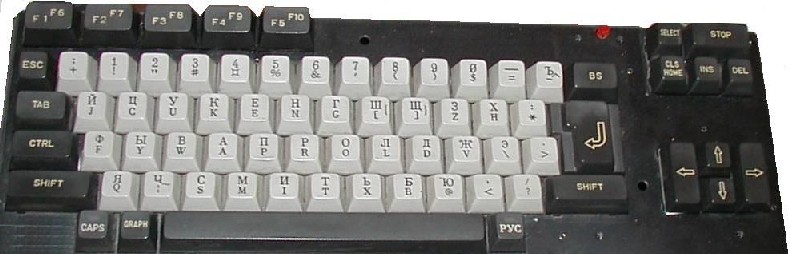
- package/README.md +84 -37
- package/dist/server.js +101 -40
- package/dist/utils.js +42 -2
- package/dist/vectordb.js +61 -0
- package/package.json +8 -3
- package/resources/audio/msx-midi.md +872 -0
- package/resources/audio/psg_registers.md +281 -0
- package/resources/audio/sound_cartridge_scc.md +123 -0
- package/resources/audio/sound_cartridge_scci.md +250 -0
- package/resources/audio/toc.json +8 -4
- package/resources/book--msx2-technical-handbook/toc.json +1 -1
- package/resources/msx-dos/MSX-DOS_2_Environment_Variables.md +1368 -0
- package/resources/msx-dos/MSX-DOS_File_extensions.md +154 -0
- package/resources/msx-dos/toc.json +13 -0
- package/resources/msx-unapi/toc.json +2 -2
- package/resources/others/keyboard_matrices.md +243 -0
- package/resources/others/toc.json +6 -0
- package/resources/programming/asm_callbios.md +79 -0
- package/resources/programming/asm_docopy.md +115 -0
- package/resources/programming/asm_fast_loops.md +200 -0
- package/resources/programming/asm_getslot.md +143 -0
- package/resources/programming/asm_interrupts.md +202 -0
- package/resources/programming/asm_load_screen.md +240 -0
- package/resources/programming/asm_mult_div_shifts.md +487 -0
- package/resources/programming/asm_raminpage1.md +56 -0
- package/resources/programming/asm_vdp_detection.md +78 -0
- package/resources/programming/asm_vdp_routines.md +343 -0
- package/resources/programming/asm_z80_routines_collection.md +810 -0
- package/resources/programming/basic_wiki/ABS().md +36 -0
- package/resources/programming/basic_wiki/AND.md +71 -0
- package/resources/programming/basic_wiki/ASC().md +38 -0
- package/resources/programming/basic_wiki/ATN().md +36 -0
- package/resources/programming/basic_wiki/AUTO.md +39 -0
- package/resources/programming/basic_wiki/BASE().md +147 -0
- package/resources/programming/basic_wiki/BEEP.md +27 -0
- package/resources/programming/basic_wiki/BIN$().md +36 -0
- package/resources/programming/basic_wiki/BLOAD.md +63 -0
- package/resources/programming/basic_wiki/BSAVE.md +61 -0
- package/resources/programming/basic_wiki/CALL.md +391 -0
- package/resources/programming/basic_wiki/CALL_ADJUST.md +40 -0
- package/resources/programming/basic_wiki/CALL_IMPOSE.md +28 -0
- package/resources/programming/basic_wiki/CALL_OPTIONS.md +26 -0
- package/resources/programming/basic_wiki/CALL_PAUSE.md +119 -0
- package/resources/programming/basic_wiki/CALL_PCMPLAY.md +60 -0
- package/resources/programming/basic_wiki/CALL_PCMREC.md +70 -0
- package/resources/programming/basic_wiki/CDBL().md +36 -0
- package/resources/programming/basic_wiki/CHR$().md +51 -0
- package/resources/programming/basic_wiki/CINT().md +36 -0
- package/resources/programming/basic_wiki/CIRCLE.md +51 -0
- package/resources/programming/basic_wiki/CLEAR.md +39 -0
- package/resources/programming/basic_wiki/CLOAD.md +27 -0
- package/resources/programming/basic_wiki/CLOAD?.md +31 -0
- package/resources/programming/basic_wiki/CLOSE.md +44 -0
- package/resources/programming/basic_wiki/CLS.md +51 -0
- package/resources/programming/basic_wiki/COLOR.md +143 -0
- package/resources/programming/basic_wiki/COLOR=.md +93 -0
- package/resources/programming/basic_wiki/COLOR_SPRITE$().md +83 -0
- package/resources/programming/basic_wiki/COLOR_SPRITE().md +85 -0
- package/resources/programming/basic_wiki/CONT.md +23 -0
- package/resources/programming/basic_wiki/COPY.md +215 -0
- package/resources/programming/basic_wiki/COPY_SCREEN.md +61 -0
- package/resources/programming/basic_wiki/COS().md +37 -0
- package/resources/programming/basic_wiki/CSAVE.md +35 -0
- package/resources/programming/basic_wiki/CSNG().md +36 -0
- package/resources/programming/basic_wiki/CSRLIN.md +33 -0
- package/resources/programming/basic_wiki/DATA.md +47 -0
- package/resources/programming/basic_wiki/DEFDBL.md +40 -0
- package/resources/programming/basic_wiki/DEFINT.md +40 -0
- package/resources/programming/basic_wiki/DEFSNG.md +40 -0
- package/resources/programming/basic_wiki/DEFSTR.md +40 -0
- package/resources/programming/basic_wiki/DEF_FN.md +49 -0
- package/resources/programming/basic_wiki/DEF_USR.md +33 -0
- package/resources/programming/basic_wiki/DELETE.md +49 -0
- package/resources/programming/basic_wiki/DIM.md +59 -0
- package/resources/programming/basic_wiki/DRAW.md +77 -0
- package/resources/programming/basic_wiki/ELSE.md +45 -0
- package/resources/programming/basic_wiki/END.md +32 -0
- package/resources/programming/basic_wiki/EOF().md +36 -0
- package/resources/programming/basic_wiki/EQV.md +76 -0
- package/resources/programming/basic_wiki/ERASE.md +35 -0
- package/resources/programming/basic_wiki/ERL.md +34 -0
- package/resources/programming/basic_wiki/ERR.md +143 -0
- package/resources/programming/basic_wiki/ERROR.md +145 -0
- package/resources/programming/basic_wiki/EXP().md +38 -0
- package/resources/programming/basic_wiki/FIELD.md +48 -0
- package/resources/programming/basic_wiki/FIX().md +44 -0
- package/resources/programming/basic_wiki/FN.md +61 -0
- package/resources/programming/basic_wiki/FOR...NEXT.md +80 -0
- package/resources/programming/basic_wiki/FRE().md +66 -0
- package/resources/programming/basic_wiki/GET_DATE.md +60 -0
- package/resources/programming/basic_wiki/GET_TIME.md +34 -0
- package/resources/programming/basic_wiki/GOSUB.md +41 -0
- package/resources/programming/basic_wiki/GOTO.md +41 -0
- package/resources/programming/basic_wiki/HEX$().md +36 -0
- package/resources/programming/basic_wiki/IF...GOTO...ELSE.md +55 -0
- package/resources/programming/basic_wiki/IF...THEN...ELSE.md +50 -0
- package/resources/programming/basic_wiki/IMP.md +83 -0
- package/resources/programming/basic_wiki/INKEY$.md +65 -0
- package/resources/programming/basic_wiki/INP().md +33 -0
- package/resources/programming/basic_wiki/INPUT$().md +51 -0
- package/resources/programming/basic_wiki/INPUT.md +93 -0
- package/resources/programming/basic_wiki/INSTR().md +44 -0
- package/resources/programming/basic_wiki/INT().md +44 -0
- package/resources/programming/basic_wiki/INTERVAL.md +57 -0
- package/resources/programming/basic_wiki/KEY().md +51 -0
- package/resources/programming/basic_wiki/KEY.md +254 -0
- package/resources/programming/basic_wiki/LEFT$().md +39 -0
- package/resources/programming/basic_wiki/LEN().md +36 -0
- package/resources/programming/basic_wiki/LET.md +68 -0
- package/resources/programming/basic_wiki/LINE.md +74 -0
- package/resources/programming/basic_wiki/LINE_INPUT.md +79 -0
- package/resources/programming/basic_wiki/LIST.md +58 -0
- package/resources/programming/basic_wiki/LLIST.md +43 -0
- package/resources/programming/basic_wiki/LOAD.md +56 -0
- package/resources/programming/basic_wiki/LOCATE.md +67 -0
- package/resources/programming/basic_wiki/LOG().md +36 -0
- package/resources/programming/basic_wiki/LPOS().md +31 -0
- package/resources/programming/basic_wiki/LPRINT.md +46 -0
- package/resources/programming/basic_wiki/MAXFILES.md +39 -0
- package/resources/programming/basic_wiki/MERGE.md +54 -0
- package/resources/programming/basic_wiki/MID$().md +72 -0
- package/resources/programming/basic_wiki/MOD.md +39 -0
- package/resources/programming/basic_wiki/MOTOR.md +46 -0
- package/resources/programming/basic_wiki/NEW.md +27 -0
- package/resources/programming/basic_wiki/NOT.md +61 -0
- package/resources/programming/basic_wiki/OCT$().md +36 -0
- package/resources/programming/basic_wiki/ON...GOSUB.md +45 -0
- package/resources/programming/basic_wiki/ON...GOTO.md +42 -0
- package/resources/programming/basic_wiki/ON_ERROR_GOTO.md +61 -0
- package/resources/programming/basic_wiki/ON_INTERVAL_GOSUB.md +54 -0
- package/resources/programming/basic_wiki/ON_KEY_GOSUB.md +56 -0
- package/resources/programming/basic_wiki/ON_SPRITE_GOSUB.md +41 -0
- package/resources/programming/basic_wiki/ON_STOP_GOSUB.md +56 -0
- package/resources/programming/basic_wiki/ON_STRIG_GOSUB.md +70 -0
- package/resources/programming/basic_wiki/OPEN.md +103 -0
- package/resources/programming/basic_wiki/OR.md +75 -0
- package/resources/programming/basic_wiki/OUT.md +35 -0
- package/resources/programming/basic_wiki/PAD().md +110 -0
- package/resources/programming/basic_wiki/PAINT.md +66 -0
- package/resources/programming/basic_wiki/PDL().md +53 -0
- package/resources/programming/basic_wiki/PEEK().md +44 -0
- package/resources/programming/basic_wiki/PLAY().md +58 -0
- package/resources/programming/basic_wiki/PLAY.md +196 -0
- package/resources/programming/basic_wiki/POINT.md +52 -0
- package/resources/programming/basic_wiki/POKE.md +51 -0
- package/resources/programming/basic_wiki/POS().md +36 -0
- package/resources/programming/basic_wiki/PRESET.md +61 -0
- package/resources/programming/basic_wiki/PRINT.md +179 -0
- package/resources/programming/basic_wiki/PSET.md +82 -0
- package/resources/programming/basic_wiki/PUT_KANJI.md +93 -0
- package/resources/programming/basic_wiki/PUT_SPRITE.md +143 -0
- package/resources/programming/basic_wiki/READ.md +45 -0
- package/resources/programming/basic_wiki/REM.md +42 -0
- package/resources/programming/basic_wiki/RENUM.md +78 -0
- package/resources/programming/basic_wiki/RESTORE.md +52 -0
- package/resources/programming/basic_wiki/RESUME.md +45 -0
- package/resources/programming/basic_wiki/RETURN.md +47 -0
- package/resources/programming/basic_wiki/RIGHT$().md +39 -0
- package/resources/programming/basic_wiki/RND().md +51 -0
- package/resources/programming/basic_wiki/RUN.md +56 -0
- package/resources/programming/basic_wiki/SAVE.md +65 -0
- package/resources/programming/basic_wiki/SCREEN.md +164 -0
- package/resources/programming/basic_wiki/SET_ADJUST.md +66 -0
- package/resources/programming/basic_wiki/SET_BEEP.md +76 -0
- package/resources/programming/basic_wiki/SET_DATE.md +103 -0
- package/resources/programming/basic_wiki/SET_PAGE.md +52 -0
- package/resources/programming/basic_wiki/SET_PASSWORD.md +75 -0
- package/resources/programming/basic_wiki/SET_PROMPT.md +61 -0
- package/resources/programming/basic_wiki/SET_SCREEN.md +100 -0
- package/resources/programming/basic_wiki/SET_SCROLL.md +55 -0
- package/resources/programming/basic_wiki/SET_TIME.md +83 -0
- package/resources/programming/basic_wiki/SET_TITLE.md +87 -0
- package/resources/programming/basic_wiki/SET_VIDEO.md +49 -0
- package/resources/programming/basic_wiki/SGN().md +38 -0
- package/resources/programming/basic_wiki/SIN().md +36 -0
- package/resources/programming/basic_wiki/SOUND.md +188 -0
- package/resources/programming/basic_wiki/SPACE$().md +38 -0
- package/resources/programming/basic_wiki/SPC().md +34 -0
- package/resources/programming/basic_wiki/SPRITE$().md +50 -0
- package/resources/programming/basic_wiki/SPRITE.md +31 -0
- package/resources/programming/basic_wiki/SQR().md +32 -0
- package/resources/programming/basic_wiki/STICK().md +70 -0
- package/resources/programming/basic_wiki/STOP.md +70 -0
- package/resources/programming/basic_wiki/STR$().md +37 -0
- package/resources/programming/basic_wiki/STRIG().md +82 -0
- package/resources/programming/basic_wiki/STRING$().md +42 -0
- package/resources/programming/basic_wiki/SWAP.md +62 -0
- package/resources/programming/basic_wiki/TAB().md +38 -0
- package/resources/programming/basic_wiki/TAN().md +36 -0
- package/resources/programming/basic_wiki/TIME.md +59 -0
- package/resources/programming/basic_wiki/TROFF.md +21 -0
- package/resources/programming/basic_wiki/TRON.md +39 -0
- package/resources/programming/basic_wiki/USR().md +66 -0
- package/resources/programming/basic_wiki/VAL().md +36 -0
- package/resources/programming/basic_wiki/VARPTR().md +50 -0
- package/resources/programming/basic_wiki/VDP().md +103 -0
- package/resources/programming/basic_wiki/VPEEK().md +46 -0
- package/resources/programming/basic_wiki/VPOKE.md +48 -0
- package/resources/programming/basic_wiki/WAIT.md +38 -0
- package/resources/programming/basic_wiki/WIDTH.md +76 -0
- package/resources/programming/basic_wiki/XOR.md +72 -0
- package/resources/programming/basic_wiki/_toc.json +871 -0
- package/resources/programming/dos_error_handling.md +85 -0
- package/resources/programming/toc.json +51 -36
- package/resources/programming/vdp_commands_speed.md +147 -0
- package/resources/programming/vdp_programming_faq.md +55 -0
- package/resources/programming/vdp_programming_tutorial.md +390 -0
- package/resources/programming/vdp_screensplit_programming_guide.md +166 -0
- package/resources/programming/vdp_scrolling_on_msx.md +124 -0
- package/resources/programming/vdp_the_yjk_screen_modes.md +227 -0
- package/resources/programming/vdp_v9938_vram_timings.md +539 -0
- package/resources/programming/vdp_v9938_vram_timings_part_2.md +281 -0
- package/resources/sdcc/toc.json +1 -1
- package/vector-db/index.json +1 -0
- /package/resources/msx-unapi/{Ethernet_UNAPI_specification_1.1.md → Ethernet_UNAPI_specification_1_1.md} +0 -0
- /package/resources/msx-unapi/{MSX_UNAPI_specification_1.1.md → MSX_UNAPI_specification_1_1.md} +0 -0
|
@@ -0,0 +1,154 @@
|
|
|
1
|
+
# Filename extensions used on MSX
|
|
2
|
+
|
|
3
|
+
|Extension|Description|Environment|
|
|
4
|
+
|:-:|:--|:--|
|
|
5
|
+
|ACC|Creator accompaniment data files||
|
|
6
|
+
|AGL|Sony Auto Graphic Loader files - see Sony HBI-V1 Video Digitizer cartridge||
|
|
7
|
+
|ARC|File(s) compressed in ARC format by System Enhancement Associates (SEA). Tools to extract are UNARC.COM (v1.6) and UNP.COM (v1.0 by Pierre Gielen).<br>The Unarchiver can be used to extract from this file. There are macOS and Windows/Linux versions.|MSX-DOS|
|
|
8
|
+
|ARC|File(s) compressed in Russian ARC format, incompatible with SEA's ARC format. Tools to extract are XARC.COM (v1.01) and ARCDE.COM (v1.03).|MSX-DOS|
|
|
9
|
+
|ARJ|File(s) compressed in ARJ format. Tool to extract are UNARC.COM (v1.10) and UNP.COM (v1.0 by Pierre Gielen).|MSX-DOS|
|
|
10
|
+
|APT|Studio FM pattern data file||
|
|
11
|
+
|ASC|Plain text (ASCII format) that can contain a BASIC program or data.|BASIC / Text editor|
|
|
12
|
+
|ASN|Assignment files for MIDI Blaster||
|
|
13
|
+
|BAS|BASIC program listing tokenized. These files can be executed from MSX-DOS with the BASIC name.bas command.|BASIC|
|
|
14
|
+
|BAT|Batch files (plain text) interpreted by MSX-DOS.|MSX-DOS|
|
|
15
|
+
|BGM|MuSICA binary music file. MuSICA is a software developed by ASCII to create music on 17 voices with PSG, FM and Konami's SCC.<br>We can use also the BGM player by (YMD)A or KINROU5 (by Masarun), an alternative driver to play the BGMs.|MuSICA driver, MSX-MUSIC, SCC, PSG|
|
|
16
|
+
|BGM|MSX-FAN music file. Not to be confused with MuSICA files. Songs in this format were contained in all their disk magazines, and later a specific player was released that even supported playback on MIDI.|MSPLAY(OPLL) / MSP(MIDI interface), MSX-DOS2|
|
|
17
|
+
|BGM|Bloadable MSX-MUSIC file created by the BIT2BGM.COM utility of Uwe Schröder that converts Synth Saurus musical files.|BGM.BIN driver, BASIC|
|
|
18
|
+
|BIN|Binary file created with the BASIC BSAVE instruction. Loads with BLOAD. The header have a length of 7 bytes (FEh + Start address + End address + execution address). It can contain machine language and data.<br>Many of these files can be executed from MSX-DOS with BINLOAD.COM (by MSX-Park) or BINLDR.COM (by gdx).|BASIC|
|
|
19
|
+
|BMP|Image file format native to Microsoft Windows. Best viewed with Deca BMP v1.25, aka DBMP.COM|MSX-DOS|
|
|
20
|
+
|BOK|MSX-View Picture book.|MSX View|
|
|
21
|
+
|BTM|Batch files supported by MSX-DOS 2 v.2.40 or later.|MSX-DOS 2|
|
|
22
|
+
|CAS|BIOS level cassette image for emulators, needs a separate tool to run or write to cassette. SofaCas allows to convert software on tape to CAS file and also play it using a homemade cable PC sound output to MSX cassette input. On MSX turbo R, we can use TRCAS (by Martos) to run CAS played by SofaCas.|MSX emulator / SofaCas|
|
|
23
|
+
|CH1|File created by Sony Character Editor||
|
|
24
|
+
|CMP|Compressed screen 5 image, including palette, created with DD-Graph.|Dot Designer's Graph (aka DD-Graph)|
|
|
25
|
+
|CMP|Compressed image, including palette, created with GIOS.|GIOS, aka Graphical Input/Output System|
|
|
26
|
+
|COM|Command containing a binary executable under MSX-DOS, CP/M or SymbOS<br>Can be also an executable file compressed with POPCOM.COM (v1.0 by Perpermint-Star).|MSX-DOS, CP/M, SymbOS|
|
|
27
|
+
|CPM|.COM file renamed to .CPM, either to be used in some CPM emulators, or to be able to workaround GMail's nanny protection against executable files. Just rename those back to .COM to be able to run them.|MSX-DOS, CP/M|
|
|
28
|
+
|DAT|File with data for Sony Animation Editor||
|
|
29
|
+
|DAT|Synthesizer configuration file for MIDI Blaster||
|
|
30
|
+
|DRM|File for the drums editor of the First Rate Music Hall tracker.||
|
|
31
|
+
|DSK|Disk image for emulators, needs a separate tool to run or write to normal disk.<br>Can be launched on real MSX with SofaRunit or using Nextor's EMUFILE command.|MSX-DOS, Nextor|
|
|
32
|
+
|DUA|Music-BOX dual data file (melody + sample)||
|
|
33
|
+
|EDI|File for the song editor of the First Rate Music Hall tracker.||
|
|
34
|
+
|EMx|Disk image for the floppy disk emulator (HDDEMU.COM) for MSX turbo R by Tsuyoshi. Internal structure is same as in DSK-files. Protected disks have additional information stored to files with HED-extension.|MSX-DOS|
|
|
35
|
+
|EVA|Video file in EVA format.|Video player|
|
|
36
|
+
|EVG|Yamaha SFG-05 event data file||
|
|
37
|
+
|EXE|Executable in SymbOS|SymbOS|
|
|
38
|
+
|FM|MSX-MUSIC BASIC file.|BASIC|
|
|
39
|
+
|FMP|MSX-MUSIC BASIC file.|BASIC|
|
|
40
|
+
|FMS|Synth Saurus sound file|Synth Saurus|
|
|
41
|
+
|FNT|Font file for the Scroll Power utility.||
|
|
42
|
+
|G9B|Library graphic format for GFX-9000.||
|
|
43
|
+
|GEx|x=5, 7 or 8. Synonym for .SCx, so check its description.|Image player|
|
|
44
|
+
|GEN|Plain text that contain Z80 assembly source code, used with GEN80 compiler|MSX-DOS|
|
|
45
|
+
|GIF|Graphics Interchange Format. They can be viewed with GIFI.COM (by Kakami Hiroyuki) and converted in MSX format with ENGIF.COM (v1.2 by Pierre Gielen) - See also SHOWEM.COM (by Steven van Loef) and GIFDUMP.COM (by Francesco Duranti)|MSX-DOS|
|
|
46
|
+
|GLx|Graph Saurus shape image file. Synonym to SHx, so check its description.|Graph Saurus, BASIC|
|
|
47
|
+
|GR5|Graphic file for Sony Animation Editor||
|
|
48
|
+
|GRA|Image file in QLD format. The viewer BLS.COM (v3.0a by SEIGA & FRS) supports it. Requires a complementary .RGB file that contains the palette.|MSX-DOS|
|
|
49
|
+
|GRP|Synonym for .SC2. See the .SCx file description.<br>Can also be a compressed image for Graph Saurus.|BASIC / Graph Saurus|
|
|
50
|
+
|GZ|File compressed in GZIP format by PC gzipers. Tool to extract is GUNZIP.COM.|MSX-DOS|
|
|
51
|
+
|HLP|MSX-DOS 2 help file (plain text)|MSX-DOS 2|
|
|
52
|
+
|INS|File for the instruments editor of the First Rate Music Hall tracker.||
|
|
53
|
+
|IPS|Patch for file. Needs IPS patcher.|MSX-DOS|
|
|
54
|
+
|ISH|Binary-to-text converted file encoded and decodable by Ish available from MSX・FAN disk #1. |MSX-DOS|
|
|
55
|
+
|JPG|Compressed image file in format JPEG. Some viewers can show image up to 1024x1024: JPD.COM (v0.23 by APi), JLD.COM (v1.11 by SEIGA). JPEG file can be produced on MSX from SCREEN 12 images with JSV.COM (v0.1 by SEIGA).|MSX-DOS 2|
|
|
56
|
+
|KSS|MSX music file that contains also player code. Use KSSPLAY.COM (by NYYRIKKI) to play it.|MSX-DOS|
|
|
57
|
+
|LDR|Tokenized Basic file usually BASIC program LoaDeR used to load and run a program consisting of several BAS files.|BASIC|
|
|
58
|
+
|LHA|File(s) compressed in LHA format. Tools to create a LHA archive are LHPACK.COM (v1.03 by H.Saito) or LHA.COM (v1.05a by Kyouju). Tools to extract are PMM.COM (v1.20 by Iita), LHARC.COM and LHEXT.COM (v1.33 by Kyouju).<br>The Unarchiver can be used to extract from this file. There are macOS and Windows/Linux versions.|MSX-DOS|
|
|
59
|
+
|LPF|Loop file for the Scroll Power utility.||
|
|
60
|
+
|LZH|Synonym for LHA.|MSX-DOS|
|
|
61
|
+
|MAG|Maki-chan V2 image file also extensively used on PC-9801 and Sharp X68000. Best viewed with Deca MAG v1.25, aka DMAG.COM. The v1.25a patched to support the MSX2 can be downloaded here.|MSX-DOS|
|
|
62
|
+
|MAX|Synonym for MAG.|MSX-DOS|
|
|
63
|
+
|MBK|Samplekit file for the music tracker MoonBlaster.||
|
|
64
|
+
|MBM|Music file for the music tracker MoonBlaster.||
|
|
65
|
+
|MBS|Sample file for the music tracker MoonBlaster.||
|
|
66
|
+
|MBV|Voice file for the music tracker MoonBlaster.||
|
|
67
|
+
|MBW|Wave song for the music tracker MoonBlaster.|MoonSound|
|
|
68
|
+
|MCM|Micro Cabin music file. Played by MCDRV.EXE|MSX-DOS|
|
|
69
|
+
|MDT|MSX Music-System music data file||
|
|
70
|
+
|MDX|Music file in a format designed for Sharp X68000. These files can be played by MPX2.COM (when driver installed with MXDRV.COM). Optional PDX files are PCM samples. Require the YAMAHA SFG-01/05 cartridge or the MFP PCM cartridge.|MSX-DOS 2, MDX Driver, 256kB~ of RAM|
|
|
71
|
+
|MEG|Plain text that contain Z80 assembly MegaAssembler source code. Extension also used for Mega-Rom images.|MSX-DOS|
|
|
72
|
+
|MEL|Music-BOX melody data file||
|
|
73
|
+
|MFM|FM song for MoonBlaster.|MoonSound|
|
|
74
|
+
|MGS|Music file in format developed by AIN. Played by MGSEL.COM (when driver installed with MGSDRV.COM).|MSX-DOS 2, MGS driver, YM-2413/OPLL, SCC|
|
|
75
|
+
|MID|Standard MIDI file (can be played using MIDI-interface or MoonSound software)|Various|
|
|
76
|
+
|MIF|Compressed image file.|Various|
|
|
77
|
+
|MIO|MIODRV Music file. Played by MIODRV Player.||
|
|
78
|
+
|MKI|Maki-chan V1 image file maintly used on Sharp X68000. Viewable with BLS.COM (v3.0a by SEIGA & FRS)|MSX-DOS|
|
|
79
|
+
|MOD|Amiga MOD file (can be played on MSX turbo R or MoonSound)|MSX-DOS|
|
|
80
|
+
|MP3|MPEG Audio Layer III file. MP3s can be played with Sunrise MP3 player, MPX Cartridge r1.1 by Junsoft or SE-ONE by TMT logic.||
|
|
81
|
+
|MPK|Music Player K-kaz song. Require WAMPK Player|MSX-DOS|
|
|
82
|
+
|MSx|Synth Saurus score file|Synth Saurus|
|
|
83
|
+
|MSD|MuSICA source music file (MML). We can also use KINROU4 (by Masarun), an alternative compiler.|MSX-DOS|
|
|
84
|
+
|MSQ|File created by Sony Realtime Keyboard Recorder||
|
|
85
|
+
|MUE|HAL Music Editor MUE music file. There's a patch to add mouse support here.|Cartridge|
|
|
86
|
+
|MUS|FAC Soundtracker music file||
|
|
87
|
+
|MUS|MGSDRV source MML file. Needs to be compiled to a MGS file with MGSC.COM. OTOH, MGSCR.COM can decompile MGS files back to the MUS source.|MSX-DOS2|
|
|
88
|
+
|MUS|Studio FM music file (not recommended)||
|
|
89
|
+
|MWK|MoonSound Wave sample kit||
|
|
90
|
+
|MWM|MoonBlaster for MoonSound Wave song||
|
|
91
|
+
|OPX|OPLL driver music format||
|
|
92
|
+
|OTO|File created by Sony Musical PSG Keyboard||
|
|
93
|
+
|PAC|Dump of SRAM contents (save games) of PAC or FM-PAC cartridge.||
|
|
94
|
+
|PAT|Studio FM pattern file||
|
|
95
|
+
|PCM|Sound sample file for MSX turbo R.||
|
|
96
|
+
|PCK|Packaged file for First Rate Music Hall tracker. Includes 4 songs with all instruments and drums data.||
|
|
97
|
+
|PCT|Dynamic Publisher page files.|Dynamic Publisher|
|
|
98
|
+
|PDT|File created by Sony Raku Raku Animation Editor||
|
|
99
|
+
|PDX|Optional PCM sample file used with an MDX file. You can play a PDX with PDXLOAD.COM by AIN. See also MDX extension.|MSX-DOS 2, MDX Driver, 256kB~ of RAM|
|
|
100
|
+
|PI|Yanagisawa's PI. A Japanese 16 color image format used on PC-98 and X68000. Viewable on the MSX with PI.COM v0.07|MSX-DOS2|
|
|
101
|
+
|PIC|SCREEN8 binary image. Synonym for .SC8, so check the .SCx description.|Philips Video Graph, Matsushita Video Graphics|
|
|
102
|
+
|PIC|Yanagisawa's PIC: A Japanese multi-platform image format with support for 16, 256 colors, 32768 or 65536 colors. Used on X68000, PC-98VA, FM-Towns, macOS classic and MSX2. Viewable on the MSX with BLS.COM (v3.0a by SEIGA & FRS)|MSX-DOS|
|
|
103
|
+
|PLx|Indexed Palette file in Raw format.<br>The Graph Saurus version (contains 8 sets of palettes with two bytes by color in RG 0B format). It's a companion for the respective .SRx or GLx files, so the respective pair must always be copied together.<br>There's also the single palette version, that is a companion file for .SHx images to customize their colors.<br>In both cases, it's never used for SCREEN8 and SCREEN12 images since these modes have no indexed palette support for the background.|Graph Saurus, BASIC|
|
|
104
|
+
|PMA|File(s) compressed in PMARC format. Tools to create an archive are PMARC.COM, PMARC2.COM (v2.0 by Sybex) and UNP.COM (v1.0 by Pierre Gielen). Tools to extract are PMM.COM (v1.20 by Iita), PMEXE.COM (v2.0) and PMEXT.COM (v2.22). PMEXT has been ported on Windows (v1.21 by Yoshihiko Mino).<br>TheUnarchiver can be used to extract from this file. There are macOS and Windows/Linux versions.|CP/M, MSX-DOS|
|
|
105
|
+
|PRO|Music file for Pro-Tracker (by Tyfoon Soft).|BASIC|
|
|
106
|
+
|PSG|PSG Sampler sample file.|PSG soundchip|
|
|
107
|
+
|Q4|XLD4 is an image file for the PC-98. Viewable on the MSX with XLD4.COM by SEIGA.|MSX-DOS2|
|
|
108
|
+
|Q4D|Text file with a description for the respective XLD4 image file. Encoded in Shift-JIS.|MSX-DOS2|
|
|
109
|
+
|RDT|MSX Music-System rhythm data file||
|
|
110
|
+
|RLT|Music Creator real time data files||
|
|
111
|
+
|ROM|Raw ROM image dump. Used by ROM loaders or emulators.|MSX-DOS / MSX emulator|
|
|
112
|
+
|RTM|Synth Saurus rhythm file|Synth Saurus|
|
|
113
|
+
|S1x|Contains the odd lines of an interlace image. For more info, see the SCx file.||
|
|
114
|
+
|S3M|See MOD file.||
|
|
115
|
+
|SAM|Music-BOX sample data file (used as drumkit file in Music Creator)||
|
|
116
|
+
SBM<br>SBK<br>SBP|Music data for SCC and PSG soundchips.|SCC-Blaffer NT, SCC, PSG|
|
|
117
|
+
|SBS|Instruments data for SCC and PSG soundchips.|SCC-Blaffer NT, SCC, PSG|
|
|
118
|
+
|SCx|Standard MSX-BASIC BLOAD image format, where 'x' is the screen mode, ranging from 0 to 8, A, B or C. It can optionally have a companion .S1x file that will contain the extra interlaced lines to double the vertical resolution.<br>It's the most common image format used on the MSX, used by the BASIC and many image editors. It can be viewed with BLS.COM (v3.0a by SEIGA & FRS).|BASIC|
|
|
119
|
+
|SCR|Screen-2 image created with Graphos III. It's an executable file with a loader that produces an effect. Loadable on MSX-BASIC with BLOAD"file",R.|Graphos III, BASIC|
|
|
120
|
+
|SCR|Compressed image (screen 5 to 8) created with Graphics Editor Halos from Halnote, Handy scanner software, Graphic Studio Pro, etc. (HAL Laboratory/Sony)||
|
|
121
|
+
|SDT|MSX Music-System sound data file (= voice data)||
|
|
122
|
+
|SDT|SCMD Music file for MSX made a MML compiler for Windows. The player is SC.COM.|MSX-DOS|
|
|
123
|
+
|SEE|Sound Effect data. (Shareware by Fuzzy Logic)|Sound Effect Editor, PSG soundchip|
|
|
124
|
+
|SEQ|Music Creator sequence data files||
|
|
125
|
+
|SFM|Studio FM music file||
|
|
126
|
+
|SHx|Standard MSX-BASIC COPY image format, where 'x' is the screen mode, ranging from 5 to 8, A, B or C. It can optionally have a companion .PLx file containing one or 8 palettes to customize the colors.<br>It's the 2nd most common image format used on the MSX, used by the BASIC and many image editors. It can be viewed with BLS.COM (v3.0a by SEIGA & FRS).|BASIC|
|
|
127
|
+
|SMx|FAC Soundtracker sample file||
|
|
128
|
+
|SMP|Sample file for Covox/SIMPL or MSX turbo R||
|
|
129
|
+
|SNG|Music file for the music editor SCC-Musixx by Tyfoon Soft.|BASIC, SCC soundchip|
|
|
130
|
+
|SPx|File created by Sony sprite editors||
|
|
131
|
+
|SPT|Music Creator step time data files||
|
|
132
|
+
|SPT|Text file for the Scroll Power utility.||
|
|
133
|
+
|SRx|Graph Saurus Image file. Requires the respective .PLx file. Can be optionally compressed with run-lenght. Uncompressed files can be loaded on MSX-BASIC with a BLOAD"FILE.SRx",S, but the external palette will have to be loaded with OPEN#1. (length: 0~6A00h/0D400h). Both compressed and uncompressed versions can also be viewed with BLS.COM (v3.0a by SEIGA & FRS).|Graph Saurus|
|
|
134
|
+
|STP|Dynamic Publisher stamp files. Contains an image that can be loaded on a page (.STP). Synonym for .GL6, so see the .GLx description.|Dynamic Publisher, BASIC|
|
|
135
|
+
|TIx|Graph Saurus tile file.|Graph Saurus|
|
|
136
|
+
|TSR|Terminate and Stay Resident programs to be used with MemMan 2.0 and higher.|MemMan|
|
|
137
|
+
|TXT|Plain text file generaly coded in ASCII, Ank or Shift-JIS.|Text editor / viewer|
|
|
138
|
+
|VCD|Voice file for the MSX Voice Recorder (HAL Laboratory)||
|
|
139
|
+
|VCD|MuSICA voice file|MuSICA driver|
|
|
140
|
+
|VGM|Music file that supports many sound chips, playable by VGMPLAY.COM (by Laurens Holst)|MSX-DOS|
|
|
141
|
+
|VOC|Music Creator voice data files||
|
|
142
|
+
|VOC|Studio FM voice data file||
|
|
143
|
+
|VOG|Yamaha SFG-05 voice data file||
|
|
144
|
+
|WAV|Sound sample file. Can be played with the MPX Cartridge r1.1 by Junsoft.||
|
|
145
|
+
|WB|Assembler Project file. For the The WBASS2 Z80 Assembler.||
|
|
146
|
+
|XM|See MOD file.||
|
|
147
|
+
|XPC|Rom Patch file for EXECROM.COM (A&L Software). EXECROM patches the Rom on the fly.|MSX-DOS|
|
|
148
|
+
|ZIP|File(s) compressed in ZIP format by PC zipers. The best tool to extract is SUZ.COM (v1.3 by Loutrax).|MSX-DOS|
|
|
149
|
+
|テキス|Japanese transliteration of TXT used in Disc Station.|Text editor / viewer|
|
|
150
|
+
|デタ|Japanese transliteration of DAT used in Disc Station.||
|
|
151
|
+
|ドク|Japanese transliteration of DOC used with text files in Disc Station.|Text editor / viewer|
|
|
152
|
+
|バス|Japanese transliteration of BAS used in Disc Station and several other disks. A file with this extension is usually an Easter egg that has to be executed independently.|BASIC|
|
|
153
|
+
|バッ|Japanese transliteration of BAT used in Disc Station.|MSX-DOS|
|
|
154
|
+
|ビン|Japanese transliteration of BIN used in Disc Station.||
|
|
@@ -13,6 +13,19 @@
|
|
|
13
13
|
"uri": "msxdocs://msx-dos/MSX-DOS_2_Function_Specifications",
|
|
14
14
|
"external_url": "https://map.grauw.nl/resources/dos2_functioncalls.php",
|
|
15
15
|
"description": "This document provides a comprehensive specification of MSX-DOS 2 function calls (version 2.20), detailing over 90 system functions accessible via two calling methods: CALL 00005h for MSX-DOS environment programs and CALL 0F37Dh for disk BASIC programs. The functions are categorized by compatibility level (CPM for CP/M 2.2 compatibility, MSX1 for MSX-DOS version 1 compatibility, and NEW for MSX-DOS 2 exclusive features) and cover essential system operations including file management (FCB and file handle based), directory operations, disk I/O, console I/O, memory management, process control, and device handling. Each function is thoroughly documented with parameters, return values, error conditions, and implementation details, making this an indispensable reference for MSX software development, system programming, and understanding the MSX-DOS operating system interface for both legacy compatibility and modern MSX development workflows."
|
|
16
|
+
},
|
|
17
|
+
{
|
|
18
|
+
"title": "MSX-DOS 2 Environment Variables",
|
|
19
|
+
"uri": "msxdocs://msx-dos/MSX-DOS_2_Environment_Variables",
|
|
20
|
+
"external_url": "https://www.msx.org/wiki/MSX-DOS_2_Environment_Variables",
|
|
21
|
+
"description": "This document provides a detailed overview of the environment variables used in MSX-DOS 2, including their purpose, default values, and how they can be modified. It covers variables such as PATH, which defines the search path for executable files; PROMPT, which sets the command prompt appearance; and others that control system behavior and configuration. The document serves as a reference for developers and users to understand how to customize their MSX-DOS 2 environment for optimal performance and usability."
|
|
22
|
+
},
|
|
23
|
+
{
|
|
24
|
+
"title": "MSX-DOS File extensions",
|
|
25
|
+
"uri": "msxdocs://msx-dos/MSX-DOS_File_extensions",
|
|
26
|
+
"external_url": "https://www.msx.org/wiki/File_extensions_used_on_MSX",
|
|
27
|
+
"description": "This document provides a comprehensive list of file extensions used in the MSX-DOS operating system, detailing their specific purposes and associations. It includes extensions for various types of files such as executable programs (.COM, .BAS), data files (.DAT, .TXT), and system files (.SYS, .CFG). Each extension is explained with its typical usage context."
|
|
16
28
|
}
|
|
29
|
+
|
|
17
30
|
]
|
|
18
31
|
}
|
|
@@ -10,12 +10,12 @@
|
|
|
10
10
|
},
|
|
11
11
|
{
|
|
12
12
|
"title": "MSX-UNAPI specification 1.1",
|
|
13
|
-
"uri": "msxdocs://msx-unapi/
|
|
13
|
+
"uri": "msxdocs://msx-unapi/MSX_UNAPI_specification_1_1",
|
|
14
14
|
"description": "The full core specification document, covering all the details on how to design an API, how to implement it, and how to discover and consume it from a client application."
|
|
15
15
|
},
|
|
16
16
|
{
|
|
17
17
|
"title": "Ethernet UNAPI specification",
|
|
18
|
-
"uri": "msxdocs://msx-unapi/
|
|
18
|
+
"uri": "msxdocs://msx-unapi/Ethernet_UNAPI_specification_1_1",
|
|
19
19
|
"description": "The specification of an API for Ethernet cards. This describes an UNAPI compliant API specification for Ethernet hardware for MSX computers."
|
|
20
20
|
},
|
|
21
21
|
{
|
|
@@ -0,0 +1,243 @@
|
|
|
1
|
+
# Keyboard matrices
|
|
2
|
+
|
|
3
|
+
The key matrix is a matrix of 11x8 bits in which the currently pressed keys on the keyboard are indicated. This document contains an overview of all the available keymatrices, since they can be slightly to very different for different types of MSX computers. Also it discusses several oddities about using the keyboard matrix on MSX, and how to read it.
|
|
4
|
+
|
|
5
|
+
## The keyboard version value
|
|
6
|
+
|
|
7
|
+
There is a keyboard version information value at bits 0-3 of address #002C in the BIOS, of which the values can be:
|
|
8
|
+
|
|
9
|
+
|Value|Keyboard version|
|
|
10
|
+
|:-:|---|
|
|
11
|
+
|0|Japanese|
|
|
12
|
+
|1|International (QWERTY/other)|
|
|
13
|
+
|2|French (AZERTY)|
|
|
14
|
+
|3|English|
|
|
15
|
+
|4|German (DIN)|
|
|
16
|
+
|6|Spanish / Argentinian|
|
|
17
|
+
|
|
18
|
+
However, this value isn't really useful to determine which key matrix layout you have to use. Daniel Caetano reported having encountered several MSX computers where this was the case:
|
|
19
|
+
|
|
20
|
+
- The problem resides in the fact the relation line/column -> ASCII is NOT default. It seems to be different on several machines, even if they are from the same country and have similar keyboard. The result is: in some computers, the keys act as expected (when you press the "A" key, the A appears on the screen). But on other computers, when you press the "A" key, something different appears (say, an "8" is shown).
|
|
21
|
+
- Before someone asks me, I know the byte 0x002C of ROM tells me the keyboard type. But this means nothing. On computers with the same value for this byte, the answer of the key matrix was different one from another. )^=
|
|
22
|
+
|
|
23
|
+
Anyways, I think – and Daniel agreed with me on this – that at least rows 6-10 are pretty much equal on all MSX models (though many have no num pads), since they are used very often in games and people would notice immediately that certain games had their keyboard layout all mixed up. But the other rows are not. Anyways, take care, and if you're not sure you can always just use the BIOS routines for it.
|
|
24
|
+
|
|
25
|
+
So what is the keyboard version byte useful for then?? It doesn't indicate the matrix layout, but it does indicate the layout as it is presented to the user. So it might be somewhat useful if you need to determine where which keys are located on the keyboard. For example if you want to use the AWSD keys as a secondary set of 'cursor keys' for a 2nd player, it would be interesting to know whether the player used a standard QWERTY keyboard or an AZERTY one (in which case the game should respond to the QZSD keys instead). But, in practice this isn't all there is to the story either. As you can see on the picture of the Russian keyboard below, the key layout isn't at all like QWERTY, but still that particular MSX's BIOS indicates the layout as '1' (international). Grmbl, they should have defined a 5th (Russian JCUKEN) layout! Or at least an 'Other' setting, instead of putting it under International.
|
|
26
|
+
|
|
27
|
+
## Japanese layouts
|
|
28
|
+
|
|
29
|
+
Similar to the QWERY vs. AZERTY layouts on roman keyboards, Japanese computers also have two kinds of kana key mappings, where the characters are located at different places. One is called the JIS-layout, the other the ANSI-layout. In JIS, the Japanese kana characters are ordered like our QWERTY keyboards – all mixed up, presumably ordered to make the most freqently used characters easily accessible (or was it to prevent typing errors... well, never mind that). The ANSI layout in the contrary is ordered very logically, like a hypothetical roman ABCDEF keyboard.
|
|
30
|
+
|
|
31
|
+
I find it easiest to visually distinguish between the two by looking at the location of the very recognizable 'no' (の) character. On a JIS keyboard, it is among the letters, at the K. On an ANSI keyboard, it's on the numbers row, at the 0. Note by the way that some keyboards show katakana characters instead of hiragana (such as the Sanyo Wavy 70FD), so there you need to look for a 'no' written as ノ. Must be very uncomfortable by the way, having two majorly different keyboard layouts. Ahwell.
|
|
32
|
+
|
|
33
|
+
It seems the most common computers use JIS, the turboR computers for example, but there are also quite a few which use ANSI. Fortunately, you do not have to guess about this. Bit 6 of PSG port A (register 14, read-only) indicates which of the layouts you should use. A 1 means the keyboard is JIS, a 0 means it is ANSI.
|
|
34
|
+
|
|
35
|
+
|PSG Register|Description|
|
|
36
|
+
|---|---|
|
|
37
|
+
|14|bit 6: Keyboard layout (1=JIS, 0=ANSI)|
|
|
38
|
+
|
|
39
|
+
## Key Ghosting
|
|
40
|
+
|
|
41
|
+
There is a limitation in most if not all MSX keyboards, which causes the effect known as 'key ghosting'. This means that sometimes the matrix indicates a key you didn't actually press as being pressed. If you for example try pressing SHIFT+S+X, there is a good chance that it will cause F1 to get 'pressed' aswell. Likewise, C+D+SPACE will also cause HOME to be pressed. The cause for this does not lay in a flaw in the MSX hardware, but rather in the keyboard itself. One could strongly reduce the happening of key ghosting by adding a series of diodes to the keyboard, however for some reason most, if not all, MSX manufacturers decided not to do so. Probably because it would require a fair number of added diodes :).
|
|
42
|
+
|
|
43
|
+
I'll now try to explain why this effect occurs. Let's start off with presenting you the following part of the (international) keyboard matrix layout, and please note that the highlighted keys are in the same two columns:
|
|
44
|
+
|
|
45
|
+
||bit 7|bit 6|bit 5|bit 4|bit 3|bit 2|bit 1|bit 0|
|
|
46
|
+
|---|---|---|---|---|---|---|---|---|
|
|
47
|
+
|**row 5**|Z|Y|X|W|V|U|T|S|
|
|
48
|
+
|**row 6**|F3|F2|F1|CODE|CAPS|GRAPH|CTRL|SHIFT|
|
|
49
|
+
|
|
50
|
+
First off, some explanation about how a common MSX keyboard works. The keyboard has 11 row wires inside, and depending on the value in the row select register it will put power on one of the ten wires. To each of these ten wires, their 8 corresponding keys are connected. Furthermore, there are also 8 column wires in the keyboard, these connect all keys in the same column. Now, if for example row 6 is selected, and SHIFT is pressed, the switch below it will connect row wire 6 with column wire 0, and power will start to flow, which is detected and is put into the row read register as a 0.
|
|
51
|
+
|
|
52
|
+
So far, all is fine. However part of the problem starts to occur if you press the S key aswell (or any key connected to the same column wire). In that case, power flows from the row 6 wire through the SHIFT key into the column 0 wire, but then it will also flow from the column 0 wire through the S key into the row 5 wire! So far no real problems yet, as setting row 6 will still result in a 11111110 value in the row read register (meaning SHIFT is pressed), and setting row 5 will do so likewise (meaning S is pressed).
|
|
53
|
+
|
|
54
|
+
Now imagine that you press the X key aswell. Remember that power is also flowing through row wire number 5, even though row 6 is selected, through the SHIFT and the S keys. If the X key is pressed, it connects the row 5 wire with the column 5 wire, resulting in both column wires 0 and 5 having power on them, and the value 11011110 will be put into the row read register. With the row select register set to 6, this will show up as both SHIFT and F1 being pressed, even though F1 is actually not.
|
|
55
|
+
|
|
56
|
+
Had there been diodes on the column wires between X / F1 and S / SHIFT then this would not have happened, because then power cannot flow from the SHIFT key to the F1 key through the row 5 wire like that. So if you'd add diodes between all keys on the column wires (that'll be 80 of them, to be precise :)), you would have partial protection against this. The most annoying cases of key ghosting (being typing MSX in capitals and typing CD<space>) would not occur anymore. However it is not complete protection, consider the SHIFT+F1+S scenario for example, it would still ghost the X key. This can be prevented by adding diodes between all keys on the row wires aswell (total diode count is now 157), however even then key ghosting can still occur (try SHIFT+F1+X). So complete protection against this can only be achieved by giving each key a separate wire, which means a much more complex board and controller.
|
|
57
|
+
|
|
58
|
+
The effect can also be countered in software. By not updating the key matrix in the system area when there are ghosted keys in it, the 'flawed' key combination resulting in a key being ghosted will not be passed through to the underlying program. As key ghosting will only occur if 3 or more keys are being pressed, a fairly simple approach would be to skip the key matrix update if that is the case. However, it is not a very user-friendly approach. The current version of Meridian (at the time of writing) does this, and when typing text in capitals the delay between the actual key press and the key being detected is very annoying. A better approach would be to detect a 'critical' key combination, where a 1st key lies in the same row as a 2nd key, and at the same time that 2nd key is in the same column as a 3rd key. Only in that case key ghosting will occur, and then you can skip the matrix update. If the key matrix is read out into the system memory like that, the nasty effects will be gone, and the only effect it will show is that in some cases a key press is detected a little later than usual.
|
|
59
|
+
|
|
60
|
+
This still won't allow the SHIFT+S+X combination to be pressed (for that you'd really need a hardware solution), however if you type the phrase 'MSX' a bit fast, and haven't released the S key before you press the X key (which happens to me all the time), at least it will properly write down MSX and not add color 15,4,4' because the F1 key is ghosted.
|
|
61
|
+
|
|
62
|
+
## Reading the key matrix
|
|
63
|
+
|
|
64
|
+
The key matrix can be read out through the PPI (part of the MSX engine):
|
|
65
|
+
|
|
66
|
+
|Port range|Description|
|
|
67
|
+
|---|---|
|
|
68
|
+
|#AA|bits 0-3: Row select|
|
|
69
|
+
|#A9 (read)|Row read (inverted)|
|
|
70
|
+
|
|
71
|
+
```assembler
|
|
72
|
+
in a,(#AA)
|
|
73
|
+
and #F0 ; only change bits 0-3
|
|
74
|
+
or b ; take row number from B
|
|
75
|
+
out (#AA),a
|
|
76
|
+
in a,(#A9) ; read row into A
|
|
77
|
+
```
|
|
78
|
+
|
|
79
|
+
However in general it is much easier to just read out the NEWKEY memory area at #FBE5-#FBEF which the BIOS interrupt routine (or your own interrupt routine) updates. Personally I like to refer to NEWKEY with "keys". Please note that the keyboard matrix is inverted – a 0 means the key is pressed, while a 1 means it isn't. Remember that a lot of keyboards haven't got a numpad, so don't use them for vital controls, or create an alternative (like Konami did in the headhunter game in SD Snatcher).
|
|
80
|
+
|
|
81
|
+
In the following example I will show you how to read out the space key its status. The space key is located in bit 0 of row 8:
|
|
82
|
+
|
|
83
|
+
```assembler
|
|
84
|
+
keys: EQU #FBE5
|
|
85
|
+
|
|
86
|
+
;
|
|
87
|
+
; Check whether space is pressed
|
|
88
|
+
;
|
|
89
|
+
Main_ReadKeys:
|
|
90
|
+
ld a,(keys+8) ; space
|
|
91
|
+
bit 0,a
|
|
92
|
+
jp z,spacepressed
|
|
93
|
+
|
|
94
|
+
...
|
|
95
|
+
|
|
96
|
+
ret
|
|
97
|
+
```
|
|
98
|
+
|
|
99
|
+
The key readout itself is pretty trivial, however as you can see, I have put the key readout routines in a subroutine. It is good practice to do this because then the key handlers will in effect be called as subroutines so they can quite with a RET instead of having to manually JP back to the mainloop afterwards... [Go To Statement Considered Harmful](http://www.acm.org/classics/oct95/), eh ;). Actually the real objection against it in this case is that it introduces redundant code (being the "JP main" at the end of each keyhandler), which is bad; if you change something like for example the spot of the main routine which has to be jumped to, all those keyhandler exit jumps need to be changed and it is easy to forget one.
|
|
100
|
+
|
|
101
|
+
Finally, a small Basic program which you can use for keyboard matrix testing purposes:
|
|
102
|
+
|
|
103
|
+
```basic
|
|
104
|
+
10 DEFINT A-Z:K=&HFBE5:CLS
|
|
105
|
+
20 FOR I=0 TO 10:PRINT RIGHT$("0000000"+BIN$(PEEK(K+I)),8):NEXT
|
|
106
|
+
30 PRINT CHR$(11):GOTO 20
|
|
107
|
+
```
|
|
108
|
+
|
|
109
|
+
## The key matrix layouts
|
|
110
|
+
|
|
111
|
+
(this list is still incomplete)
|
|
112
|
+
|
|
113
|
+
Two things: first of all, to display some key matrices you might need some fonts supporting Japanese characters and symbols, if you don't have them already. Such as MS Gothic (in Japanese Language support) or Arial Unicode MS (comes with MS Office). The other thing is that if there are two characters in a cell, the first is the basic character, and the second is with SHIFT pressed.
|
|
114
|
+
|
|
115
|
+
### International key matrix
|
|
116
|
+
|
|
117
|
+
||bit 7|bit 6|bit 5|bit 4|bit 3|bit 2|bit 1|bit 0|
|
|
118
|
+
|---|:-:|:-:|:-:|:-:|:-:|:-:|:-:|:-:|
|
|
119
|
+
|row 0|7 &|6 ^|5 %|4 $|3 #|2 @|1 !|0 )|
|
|
120
|
+
|row 1|; :|] }|[ {|\ ¦|= +|- _|9 (|8 *|
|
|
121
|
+
|row 2|B|A|DEAD|/ ?|. >|, <|` ~|' "|
|
|
122
|
+
|row 3|J|I|H|G|F|E|D|C|
|
|
123
|
+
|row 4|R|Q|P|O|N|M|L|K|
|
|
124
|
+
|row 5|Z|Y|X|W|V|U|T|S|
|
|
125
|
+
|row 6|F3|F2|F1|CODE|CAPS|GRAPH|CTRL|SHIFT|
|
|
126
|
+
|row 7|RET|SELECT|BS|STOP|TAB|ESC|F5|F4|
|
|
127
|
+
|row 8|→|↓|↑|←|DEL|INS|HOME|SPACE|
|
|
128
|
+
|row 9|NUM4|NUM3|NUM2|NUM1|NUM0|NUM/|NUM+|NUM*|
|
|
129
|
+
|row 10|NUM.|NUM,|NUM-|NUM9|NUM8|NUM7|NUM6|NUM5|
|
|
130
|
+
|
|
131
|
+
Note: DEAD is the dead key with the accents \`, ´, ^ and ¨. If you press it nothing will happen, but if you press a vowel next, it will put the selected accent above it (example: àáâä). You can pick one of the accents by pressing the dead key alone or in combination with SHIFT, CODE and CODE+SHIFT.
|
|
132
|
+
|
|
133
|
+
### Japanese key matrix
|
|
134
|
+
|
|
135
|
+
||bit 7|bit 6|bit 5|bit 4|bit 3|bit 2|bit 1|bit 0|
|
|
136
|
+
|---|:-:|:-:|:-:|:-:|:-:|:-:|:-:|:-:|
|
|
137
|
+
|row 0|7 '|6 &|5 %|4 $|3 #|2 "|1 !|0|
|
|
138
|
+
|row 1|; +|[ {|@ `|¥ ||^ ~|- =|9 )|8 (|
|
|
139
|
+
|row 2|B|A| _|/ ?|. >|, <|] }|: *|
|
|
140
|
+
|row 3|J|I|H|G|F|E|D|C|
|
|
141
|
+
|row 4|R|Q|P|O|N|M|L|K|
|
|
142
|
+
|row 5|Z|Y|X|W|V|U|T|S|
|
|
143
|
+
|row 6|F3|F2|F1|かな¹|CAPS|GRAPH|CTRL|SHIFT|
|
|
144
|
+
|row 7|RET|SELECT|BS|STOP|TAB|ESC|F5|F4|
|
|
145
|
+
|row 8|→|↓|↑|←|DEL|INS|HOME|SPACE|
|
|
146
|
+
|row 9|NUM4|NUM3|NUM2|NUM1|NUM0|NUM/|NUM+|NUM*|
|
|
147
|
+
|row 10|NUM.|NUM,|NUM-|NUM9|NUM8|NUM7|NUM6|NUM5|
|
|
148
|
+
|row 11²|||||No||Yes||
|
|
149
|
+
Notes:
|
|
150
|
+
|
|
151
|
+
¹ かな is Japanese writing for KANA. Unlike CODE, it is a toggle.
|
|
152
|
+
² Used by Panasonic turboR, FS-A1WX and FS-A1WSX.
|
|
153
|
+
|
|
154
|
+
As said, Japanese computers have two kinds of kana key layouts, JIS and ANSI. Amongst others the Panasonic FS-A1FX and Sanyo Wavy 70FD have the JIS-layout:
|
|
155
|
+
|
|
156
|
+
|JIS-layout|bit 7|bit 6|bit 5|bit 4|bit 3|bit 2|bit 1|bit 0|
|
|
157
|
+
|---|:-:|:-:|:-:|:-:|:-:|:-:|:-:|:-:|
|
|
158
|
+
|row 0|や ゃ|お ぉ|え ぇ|う ぅ|あ ぁ|ふ|め|わ を|
|
|
159
|
+
|row 1|れ|゜ 「|゛|ー|へ|ほ|よ ょ|ゆ ゅ|
|
|
160
|
+
|row 2|こ|ち|ろ|め ・|る 。|ね 、|む 」|け|
|
|
161
|
+
|row 3|ま|に|く|き|は|い ぃ|し|そ|
|
|
162
|
+
|row 4|す|た|せ|ら|み|も|り|の|
|
|
163
|
+
|row 5|つ っ|ん|さ|て|ひ|な|か|と|
|
|
164
|
+
|
|
165
|
+
The ANSI-layout is used by for example Panasonic FS-A1 computers:
|
|
166
|
+
|
|
167
|
+
|ANSI-layout|bit 7|bit 6|bit 5|bit 4|bit 3|bit 2|bit 1|bit 0|
|
|
168
|
+
|---|:-:|:-:|:-:|:-:|:-:|:-:|:-:|:-:|
|
|
169
|
+
|row 0|に|な|お ぉ|え ぇ|う ぅ|い ぃ|あ ぁ|の|
|
|
170
|
+
|row 1|も|ろ 「|れ|る|り|ら|ね|ぬ|
|
|
171
|
+
|row 2|と|さ|ん ・|を 。|わ 、|よ ょ|゜ 」|゛ ー|
|
|
172
|
+
|row 3|み|ふ|ま|そ|せ|く|す|つ っ|
|
|
173
|
+
|row 4|け|か|ほ|へ|や ゃ|ゆ ゅ|め|む|
|
|
174
|
+
|row 5|た|は|ち|き|て|ひ|こ|し|
|
|
175
|
+
|
|
176
|
+
These are the mappings for the key combinations with GRAPH:
|
|
177
|
+
|
|
178
|
+
|GRAPH|bit 7|bit 6|bit 5|bit 4|bit 3|bit 2|bit 1|bit 0|
|
|
179
|
+
|---|:-:|:-:|:-:|:-:|:-:|:-:|:-:|:-:|
|
|
180
|
+
|row 0|土|金|木|水|火|月|日|万|
|
|
181
|
+
|row 1|♣|○||円||─|千|百|
|
|
182
|
+
|row 2|┘||♦|♠|大|小|●|♥|
|
|
183
|
+
|row 3||│|時|┤|┼|┌|├|└|
|
|
184
|
+
|row 4|┬||π|||分|中||
|
|
185
|
+
|row 5||年|╳||┴||┐|秒|
|
|
186
|
+
|
|
187
|
+
Note: with GRAPH you can enter a couple of common Japanese characters; GRAPH-Y for 'year', GRAPH-S for 'second', and similarly 'hour' and 'minute'. The characters at GRAPH-1 to 7 are the days of the week, and GRAPH-8, 9 and 0 have the characters for 100, 1000 and 10000. GRAPH-\< has the character for 'small', \> has 'big' and GRAPH-L which is physically more or less inbetween \< and \> has the kanji for 'middle'. And finally, GRAPH-¥ is the Yen kanji, and GRAPH-P is Pi.
|
|
188
|
+
|
|
189
|
+
### Pioneer PX-7 key matrix
|
|
190
|
+
|
|
191
|
+
The Pioneer MSX with laser-disc player has no num-pad, but does have some extra special-purpose keys. Thanks to Sean Young and Manuel Bilderbeek for the info.
|
|
192
|
+
|
|
193
|
+
||bit 7|bit 6|bit 5|bit 4|bit 3|bit 2|bit 1|bit 0|
|
|
194
|
+
|---|:-:|:-:|:-:|:-:|:-:|:-:|:-:|:-:|
|
|
195
|
+
|row 9||||||super-impose|video|computer|
|
|
196
|
+
|
|
197
|
+
### UK key matrix
|
|
198
|
+
|
|
199
|
+
||bit 7|bit 6|bit 5|bit 4|bit 3|bit 2|bit 1|bit 0|
|
|
200
|
+
|---|:-:|:-:|:-:|:-:|:-:|:-:|:-:|:-:|
|
|
201
|
+
|row 2|B|A|£|/|.|,|`|'|
|
|
202
|
+
|
|
203
|
+
All other rows and the CODE- and GRAPH- matrices are equal to the International layout.
|
|
204
|
+
|
|
205
|
+
### Spanish / Argentinian key matrix
|
|
206
|
+
|
|
207
|
+
As found in the Talent TPC 310. Thanks go to Flyguille!
|
|
208
|
+
|
|
209
|
+
||bit 7|bit 6|bit 5|bit 4|bit 3|bit 2|bit 1|bit 0|
|
|
210
|
+
|---|:-:|:-:|:-:|:-:|:-:|:-:|:-:|:-:|
|
|
211
|
+
|row 1|ñ Ñ|] }|[ {|\ ¦|= +|- _|9 (|8 *|
|
|
212
|
+
|row 2|B|A|DEAD|/ ?|. >|, <|; :|' "|
|
|
213
|
+
|
|
214
|
+
All other rows are equal to the International layout.
|
|
215
|
+
|
|
216
|
+
Note: On the Talent TPC 310 you can also enter characters by holding the CTRL key while entering a character number, similar to the ALT + num pad numbers functionality on Windows PCs.
|
|
217
|
+
|
|
218
|
+
### Russian key matrix
|
|
219
|
+
|
|
220
|
+
As found in the Yamaha YIS805R and YIS503R. Thanks go to Stanislav Borutsky!
|
|
221
|
+
|
|
222
|
+
||bit 7|bit 6|bit 5|bit 4|bit 3|bit 2|bit 1|bit 0|
|
|
223
|
+
|---|:-:|:-:|:-:|:-:|:-:|:-:|:-:|:-:|
|
|
224
|
+
|row 0|& 6|% 5|¤ 4|# 3|" 2|! 1|+ ;|) 9|
|
|
225
|
+
|row 1|V Ж|* :|H Х|- ^ Ъ|= _|$ 0|( 8|' 7|
|
|
226
|
+
|row 2|I И|F Ф|? /|< ,|@ Ю|B Б|> .|\ Э|
|
|
227
|
+
|row 3|O О|[ { Ш|R Р|P П|A А|U У|W В|S С|
|
|
228
|
+
|row 4|K К|J Й|Z З|] } Щ|T Т|X Ь|D Д|L Л|
|
|
229
|
+
|row 5|Q Я|N Н|| ~ Ч|C Ц|M М|G Г|E Е|Y Ы|
|
|
230
|
+
|row 6|F3|F2|F1|РУС|CAPS|GRAPH|CTRL|SHIFT|
|
|
231
|
+
|row 7|RET|SELECT|BS|STOP|TAB|ESC|F5|F4|
|
|
232
|
+
|row 8|→|↓|↑|←|DEL|INS|HOME|SPACE|
|
|
233
|
+
|row 9|NUM4|NUM3|NUM2|NUM1|NUM0|NUM/|NUM+|NUM*|
|
|
234
|
+
|row 10|NUM.|NUM,|NUM-|NUM9|NUM8|NUM7|NUM6|NUM5|
|
|
235
|
+
|
|
236
|
+
Note: РУС works like the Japanese かな (KANA) key, it is a toggle.
|
|
237
|
+
|
|
238
|
+
And here is a photograph of the Russian keyboard:
|
|
239
|
+
|
|
240
|
+
|
|
241
|
+
## Source
|
|
242
|
+
|
|
243
|
+
https://map.grauw.nl/articles/keymatrix.php
|
|
@@ -6,6 +6,12 @@
|
|
|
6
6
|
"title": "MemMan v2.32 TSR Development Kit",
|
|
7
7
|
"uri": "https://map.grauw.nl/resources/tsrdev_en.php",
|
|
8
8
|
"description": "Development kit documentation for MemMan 2.32 TSR (Terminate and Stay Resident) programs on MSX2 systems. Covers new XTsrCall function (61), improved memory allocation with DOS2 RAMdisk support, enhanced Info function (50) for direct entry addresses, enlarged internal stack (240 bytes), and direct function calling methods to improve TSR program performance by bypassing EXTBIO hook overhead."
|
|
9
|
+
},
|
|
10
|
+
{
|
|
11
|
+
"title": "Keyboard matrices",
|
|
12
|
+
"uri": "msxdocs://others/keyboard_matrices",
|
|
13
|
+
"external_url": "https://map.grauw.nl/articles/keymatrix.php",
|
|
14
|
+
"description": "Comprehensive guide to MSX keyboard matrix layouts covering the 11x8 bit key matrix structure, keyboard version detection from BIOS address #002C, differences between Japanese, International, French, German, and Spanish keyboard layouts. Discusses keyboard matrix reading techniques and compatibility issues across different MSX computer models, with special focus on rows 6-10 standardization."
|
|
9
15
|
}
|
|
10
16
|
]
|
|
11
17
|
}
|
|
@@ -0,0 +1,79 @@
|
|
|
1
|
+
# Calling the BIOS from MSX-DOS
|
|
2
|
+
|
|
3
|
+
In the MSX-DOS environment there is no special entry for calling the MSX BIOS, however you can simply use an interslot call to reach it.
|
|
4
|
+
|
|
5
|
+
You can use this method to call the BIOS:
|
|
6
|
+
|
|
7
|
+
```assembly
|
|
8
|
+
CALSLT: EQU #001C
|
|
9
|
+
EXPTBL: EQU #FCC1
|
|
10
|
+
|
|
11
|
+
Call_Slot: ld iy,(EXPTBL-1) ;BIOS slot in iyh
|
|
12
|
+
ld ix,nnnn ;address of BIOS routine
|
|
13
|
+
call CALSLT ;interslot call
|
|
14
|
+
```
|
|
15
|
+
|
|
16
|
+
## The SUBROM
|
|
17
|
+
|
|
18
|
+
You can’t call the SUBROM from MSX-DOS as you would normally, the reason for this is that both EXTROM and CALSLT use the IX register to pass parameters. Calling directly to the SUBROM doesn’t work either, because using an interslot call to call the SUBROM is not allowed per the MSX2 standard. The reason for this, according to Alex Wulms in MCM 48, is that some DiskROMs couldn’t handle the the SUBROM being in page 0.
|
|
19
|
+
|
|
20
|
+
The official means to call the SUBROM from MSX-DOS is by using the following routine, provided by ASCII:
|
|
21
|
+
|
|
22
|
+
```assembly
|
|
23
|
+
; CALSUB
|
|
24
|
+
;
|
|
25
|
+
; In: IX = address of routine in MSX2 SUBROM
|
|
26
|
+
; AF, HL, DE, BC = parameters for the routine
|
|
27
|
+
;
|
|
28
|
+
; Out: AF, HL, DE, BC = depending on the routine
|
|
29
|
+
;
|
|
30
|
+
; Changes: IX, IY, AF', BC', DE', HL'
|
|
31
|
+
;
|
|
32
|
+
; Call MSX2 subrom from MSXDOS. Should work with all versions of MSXDOS.
|
|
33
|
+
;
|
|
34
|
+
; Notice: NMI hook will be changed. This should pose no problem as NMI is
|
|
35
|
+
; not supported on the MSX at all.
|
|
36
|
+
;
|
|
37
|
+
CALSLT: EQU #001C
|
|
38
|
+
NMI: EQU #0066
|
|
39
|
+
EXTROM: EQU #015f
|
|
40
|
+
EXPTBL: EQU #fcc1
|
|
41
|
+
H_NMI: EQU #fdd6
|
|
42
|
+
;
|
|
43
|
+
CALSUB: exx
|
|
44
|
+
ex af,af' ; store all registers
|
|
45
|
+
ld hl,EXTROM
|
|
46
|
+
push hl
|
|
47
|
+
ld hl,#C300
|
|
48
|
+
push hl ; push NOP ; JP EXTROM
|
|
49
|
+
push ix
|
|
50
|
+
ld hl,#21DD
|
|
51
|
+
push hl ; push LD IX,<entry>
|
|
52
|
+
ld hl,#3333
|
|
53
|
+
push hl ; push INC SP; INC SP
|
|
54
|
+
ld hl,0
|
|
55
|
+
add hl,sp ; HL = offset of routine
|
|
56
|
+
ld a,#C3
|
|
57
|
+
ld (H_NMI),a
|
|
58
|
+
ld (H_NMI+1),hl ; JP <routine> in NMI hook
|
|
59
|
+
ex af,af'
|
|
60
|
+
exx ; restore all registers
|
|
61
|
+
ld ix,NMI
|
|
62
|
+
ld iy,(EXPTBL-1)
|
|
63
|
+
call CALLSLT ; call NMI-hook via NMI entry in ROMBIOS
|
|
64
|
+
; NMI-hook will call SUBROM
|
|
65
|
+
exx
|
|
66
|
+
ex af,af' ; store all returned registers
|
|
67
|
+
ld hl,10
|
|
68
|
+
add hl,sp
|
|
69
|
+
ld sp,hl ; remove routine from stack
|
|
70
|
+
ex af,af'
|
|
71
|
+
exx ; restore all returned registers
|
|
72
|
+
ret
|
|
73
|
+
```
|
|
74
|
+
|
|
75
|
+
~Grauw
|
|
76
|
+
|
|
77
|
+
## Source
|
|
78
|
+
|
|
79
|
+
https://map.grauw.nl/sources/callbios.php
|
|
@@ -0,0 +1,115 @@
|
|
|
1
|
+
# DoCopy
|
|
2
|
+
|
|
3
|
+
The first time I wrote a routine to send a command to the VDP, it was the routine DoCopy, by Stefan Boer, published in Sunrise Special. Later on, as my programming skills improved I step by step improved the routine. Now, this is pretty much the end result, as fast as I could think of. Well, actually, when I really want to do a lot of copies, I usually use an even faster variant, with a faster response time. More about that after the first docopy routine.
|
|
4
|
+
|
|
5
|
+
```assembly
|
|
6
|
+
;
|
|
7
|
+
; Fast DoCopy, by Grauw
|
|
8
|
+
; In: HL = pointer to 15-byte VDP command data
|
|
9
|
+
; Out: HL = updated
|
|
10
|
+
;
|
|
11
|
+
DoCopy:
|
|
12
|
+
ld a,32
|
|
13
|
+
di
|
|
14
|
+
out (#99),a
|
|
15
|
+
ld a,17+128
|
|
16
|
+
out (#99),a
|
|
17
|
+
ld c,#9B
|
|
18
|
+
VDPready:
|
|
19
|
+
ld a,2
|
|
20
|
+
di
|
|
21
|
+
out (#99),a ; select s#2
|
|
22
|
+
ld a,15+128
|
|
23
|
+
out (#99),a
|
|
24
|
+
in a,(#99)
|
|
25
|
+
rra
|
|
26
|
+
ld a,0 ; back to s#0, enable ints
|
|
27
|
+
out (#99),a
|
|
28
|
+
ld a,15+128
|
|
29
|
+
ei
|
|
30
|
+
out (#99),a ; loop if vdp not ready (CE)
|
|
31
|
+
jp c,VDPready
|
|
32
|
+
outi ; 15x OUTI
|
|
33
|
+
outi ; (faster than OTIR)
|
|
34
|
+
outi
|
|
35
|
+
outi
|
|
36
|
+
outi
|
|
37
|
+
outi
|
|
38
|
+
outi
|
|
39
|
+
outi
|
|
40
|
+
outi
|
|
41
|
+
outi
|
|
42
|
+
outi
|
|
43
|
+
outi
|
|
44
|
+
outi
|
|
45
|
+
outi
|
|
46
|
+
outi
|
|
47
|
+
ret
|
|
48
|
+
```
|
|
49
|
+
|
|
50
|
+
I sometimes find this useful too, a separate routine to wait for the VDP to finish its current command.
|
|
51
|
+
|
|
52
|
+
```assembly
|
|
53
|
+
;
|
|
54
|
+
; This lil' routine waits until the VDP is done copying.
|
|
55
|
+
;
|
|
56
|
+
VDP_Ready:
|
|
57
|
+
ld a,2
|
|
58
|
+
di
|
|
59
|
+
out (#99),a ; select s#2
|
|
60
|
+
ld a,15+128
|
|
61
|
+
out (#99),a
|
|
62
|
+
in a,(#99)
|
|
63
|
+
rra
|
|
64
|
+
ld a,0 ; back to s#0, enable ints
|
|
65
|
+
out (#99),a
|
|
66
|
+
ld a,15+128
|
|
67
|
+
ei
|
|
68
|
+
out (#99),a ; loop if vdp not ready (CE)
|
|
69
|
+
jp c,VDPready
|
|
70
|
+
ret
|
|
71
|
+
```
|
|
72
|
+
|
|
73
|
+
And now, the faster variant of this routine. This one doesn’t switch between status register 0 and status register 2 anymore, which greatly improves the response time, very useful when you need to execute lots and lots of VDP commands consecutively. I believe Cas Cremer’s Core Dump w.i.p. gave me the idea. In any case, this one does not switch status registers anymore, however that will require status register 2 to be set all the time. Fortunately this is not much of a problem when you have your own interrupt handler set-up.
|
|
74
|
+
|
|
75
|
+
```assembly
|
|
76
|
+
;
|
|
77
|
+
; Faster again!!! DoCopy, by Grauw
|
|
78
|
+
; In: HL = pointer to 15-byte VDP command data
|
|
79
|
+
; Out: HL = updated
|
|
80
|
+
;
|
|
81
|
+
DoCopy:
|
|
82
|
+
ld a,32
|
|
83
|
+
di
|
|
84
|
+
out (#99),a
|
|
85
|
+
ld a,17+128
|
|
86
|
+
ei
|
|
87
|
+
out (#99),a
|
|
88
|
+
ld c,#9B
|
|
89
|
+
VDPready:
|
|
90
|
+
in a,(#99) ; loop if vdp not ready (CE)
|
|
91
|
+
rra
|
|
92
|
+
jp c,VDPready
|
|
93
|
+
outi ; 15x OUTI
|
|
94
|
+
outi ; (faster than OTIR)
|
|
95
|
+
outi
|
|
96
|
+
outi
|
|
97
|
+
outi
|
|
98
|
+
outi
|
|
99
|
+
outi
|
|
100
|
+
outi
|
|
101
|
+
outi
|
|
102
|
+
outi
|
|
103
|
+
outi
|
|
104
|
+
outi
|
|
105
|
+
outi
|
|
106
|
+
outi
|
|
107
|
+
outi
|
|
108
|
+
ret
|
|
109
|
+
```
|
|
110
|
+
|
|
111
|
+
~Grauw
|
|
112
|
+
|
|
113
|
+
## Source
|
|
114
|
+
|
|
115
|
+
https://map.grauw.nl/sources/docopy.php
|