@maccesar/titools 5.3.0 → 5.4.0
This diff represents the content of publicly available package versions that have been released to one of the supported registries. The information contained in this diff is provided for informational purposes only and reflects changes between package versions as they appear in their respective public registries.
- package/CONTRIBUTING.md +1 -1
- package/README.md +31 -60
- package/agents/ti-pro.md +3 -1
- package/commands/ti-audit.md +6 -4
- package/docs/examples.md +9 -0
- package/docs/knowledge-index.md +2 -1
- package/lib/config.js +1 -0
- package/package.json +1 -1
- package/skills/alloy-guides/SKILL.md +18 -179
- package/skills/alloy-guides/references/CLI_TASKS.md +17 -216
- package/skills/alloy-guides/references/CONCEPTS.md +27 -162
- package/skills/alloy-guides/references/CONTROLLERS.md +38 -236
- package/skills/alloy-guides/references/MODELS.md +47 -723
- package/skills/alloy-guides/references/MODELS_ADVANCED.md +21 -482
- package/skills/alloy-guides/references/VIEWS_DYNAMIC.md +12 -222
- package/skills/alloy-guides/references/VIEWS_STYLES.md +39 -358
- package/skills/alloy-guides/references/VIEWS_XML.md +36 -552
- package/skills/alloy-guides/references/WIDGETS.md +49 -127
- package/skills/alloy-howtos/SKILL.md +14 -169
- package/skills/alloy-howtos/references/best_practices.md +9 -113
- package/skills/alloy-howtos/references/cli_reference.md +18 -223
- package/skills/alloy-howtos/references/config_files.md +50 -133
- package/skills/alloy-howtos/references/debugging_troubleshooting.md +19 -63
- package/skills/alloy-howtos/references/samples.md +21 -138
- package/skills/ti-api/SKILL.md +10 -2
- package/skills/ti-api/references/api-android.md +36 -2
- package/skills/ti-api/references/api-app-platform.md +39 -3
- package/skills/ti-api/references/api-core.md +50 -18
- package/skills/ti-api/references/api-data-network.md +49 -35
- package/skills/ti-api/references/api-media.md +45 -27
- package/skills/ti-api/references/api-services.md +39 -9
- package/skills/ti-api/references/api-ui-android.md +33 -13
- package/skills/ti-api/references/api-ui-extras.md +41 -15
- package/skills/ti-api/references/api-ui-ios-animator.md +42 -26
- package/skills/ti-api/references/api-ui-ios.md +74 -2
- package/skills/ti-api/references/api-ui-lists.md +32 -16
- package/skills/ti-api/references/api-ui-text-input.md +34 -17
- package/skills/ti-api/references/api-ui-views.md +27 -1
- package/skills/ti-api/references/api-ui-windows-navigation.md +32 -18
- package/skills/ti-api/references/api-xml-global.md +66 -16
- package/skills/ti-create-release/SKILL.md +98 -0
- package/skills/ti-create-release/references/module-discovery.md +69 -0
- package/skills/ti-expert/references/adaptive-layouts.md +1 -1
- package/skills/ti-guides/SKILL.md +37 -76
- package/skills/ti-guides/references/advanced-data-and-images.md +122 -126
- package/skills/ti-guides/references/android-manifest.md +24 -83
- package/skills/ti-guides/references/app-distribution.md +31 -377
- package/skills/ti-guides/references/application-frameworks.md +127 -335
- package/skills/ti-guides/references/cli-reference.md +184 -633
- package/skills/ti-guides/references/commonjs-advanced.md +81 -231
- package/skills/ti-guides/references/compatibility-matrix.md +36 -75
- package/skills/ti-guides/references/hello-world.md +95 -70
- package/skills/ti-guides/references/hyperloop-native-access.md +52 -448
- package/skills/ti-guides/references/resources.md +174 -142
- package/skills/ti-guides/references/sdk-release-notes.md +28 -71
- package/skills/ti-guides/references/tiapp-config.md +222 -598
- package/skills/ti-howtos/SKILL.md +23 -123
- package/skills/ti-howtos/references/cross-platform-development.md +119 -324
- package/skills/ti-howtos/references/debugging-profiling.md +77 -445
- package/skills/ti-howtos/references/extending-titanium.md +199 -673
- package/skills/ti-howtos/references/local-data-sources.md +87 -300
- package/skills/ti-howtos/references/location-and-maps.md +86 -213
- package/skills/ti-howtos/references/media-apis.md +103 -223
- package/skills/ti-howtos/references/notification-services.md +86 -506
- package/skills/ti-howtos/references/remote-data-sources.md +97 -316
- package/skills/ti-howtos/references/using-modules.md +77 -133
- package/skills/ti-ui/SKILL.md +28 -143
- package/skills/ti-ui/references/icons-and-splash-screens.md +74 -403
- package/skills/ti-ui/references/layouts-and-positioning.md +175 -402
- package/skills/ti-ui/references/listviews-and-performance.md +100 -703
- package/skills/ti-ui/references/platform-conventions.md +180 -0
- package/skills/ti-ui/references/user-interface.md +43 -0
- package/skills/alloy-guides/references/VIEWS_WITHOUT_CONTROLLERS.md +0 -102
- package/skills/alloy-howtos/references/custom_tags.md +0 -148
- package/skills/ti-guides/references/coding-best-practices.md +0 -149
- package/skills/ti-guides/references/javascript-primer.md +0 -414
- package/skills/ti-guides/references/reserved-words.md +0 -36
- package/skills/ti-guides/references/style-and-conventions.md +0 -103
- package/skills/ti-howtos/references/android-platform-deep-dives.md +0 -624
- package/skills/ti-howtos/references/automation-fastlane-appium.md +0 -96
- package/skills/ti-howtos/references/buffer-codec-streams.md +0 -162
- package/skills/ti-howtos/references/google-maps-v2.md +0 -172
- package/skills/ti-howtos/references/ios-map-kit.md +0 -149
- package/skills/ti-howtos/references/ios-platform-deep-dives.md +0 -611
- package/skills/ti-howtos/references/tutorials.md +0 -565
- package/skills/ti-howtos/references/web-content-integration.md +0 -287
- package/skills/ti-howtos/references/webpack-build-pipeline.md +0 -124
- package/skills/ti-ui/references/accessibility-deep-dive.md +0 -288
- package/skills/ti-ui/references/animation-and-matrices.md +0 -569
- package/skills/ti-ui/references/application-structures.md +0 -626
- package/skills/ti-ui/references/custom-fonts-styling.md +0 -549
- package/skills/ti-ui/references/event-handling.md +0 -401
- package/skills/ti-ui/references/gestures.md +0 -448
- package/skills/ti-ui/references/orientation.md +0 -374
- package/skills/ti-ui/references/platform-ui-android.md +0 -727
- package/skills/ti-ui/references/platform-ui-ios.md +0 -576
- package/skills/ti-ui/references/scrolling-views.md +0 -288
- package/skills/ti-ui/references/tableviews.md +0 -542
|
@@ -0,0 +1,180 @@
|
|
|
1
|
+
# Platform conventions
|
|
2
|
+
|
|
3
|
+
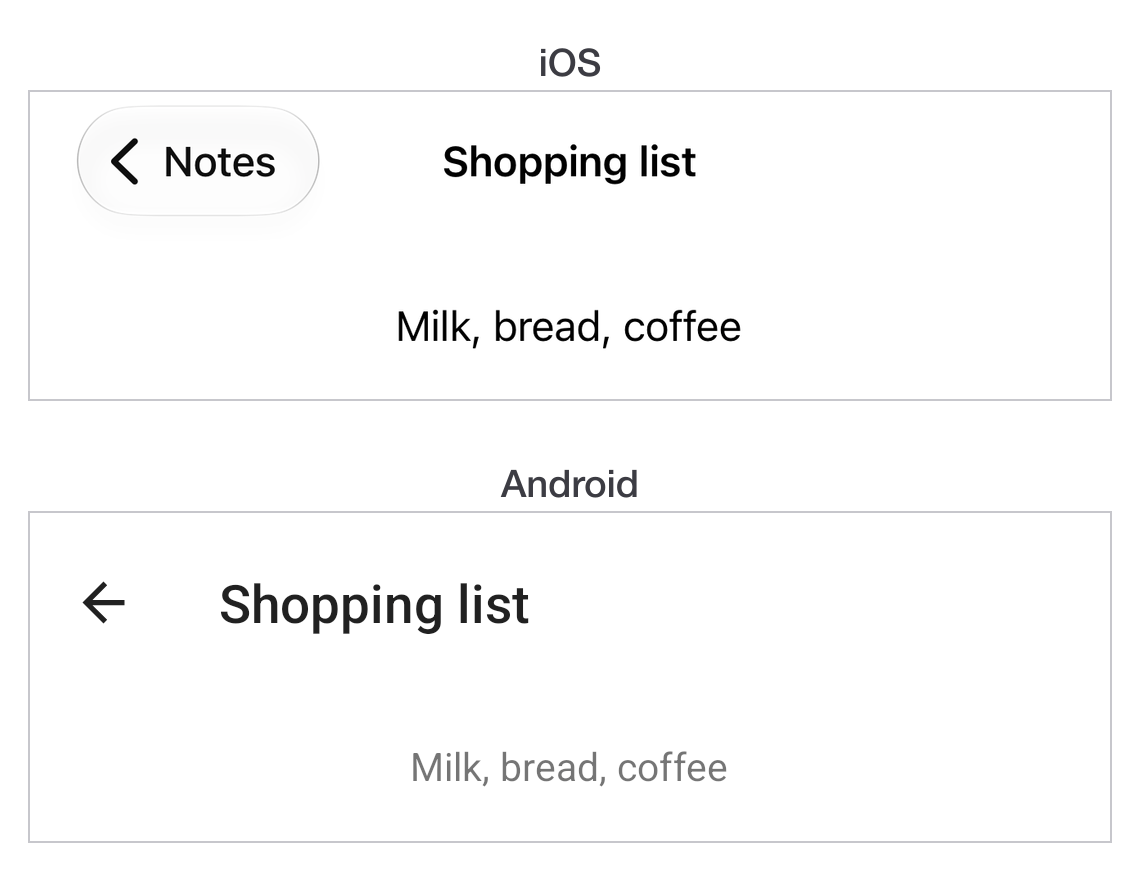
> Where iOS and Android genuinely expect different things, and what to do about each.
|
|
4
|
+
|
|
5
|
+
- Source: https://titaniumsdk.com/docs/build/ui/platform-conventions
|
|
6
|
+
- Written for Titanium SDK 13.4.0 and later.
|
|
7
|
+
- This corpus documents Titanium SDK 13.4.1. Anything here that does not name a version describes 13.4.1.
|
|
8
|
+
- Titanium is maintained by TiDev. The Appcelerator toolchain is retired: there is no `appc` CLI, no Appcelerator Studio and no hosted build service. The supported CLI is `titanium` on npm, invoked as `ti`.
|
|
9
|
+
|
|
10
|
+
---
|
|
11
|
+
|
|
12
|
+
Titanium gives you one layout system and one API, and most of a screen is the
|
|
13
|
+
same on both platforms. This page is for the places where that stops being
|
|
14
|
+
true - where the platforms differ in *approach* rather than in a property name,
|
|
15
|
+
and where writing one behaviour for both produces an app that feels wrong on
|
|
16
|
+
one of them.
|
|
17
|
+
|
|
18
|
+
Small differences are noted on the page they belong to. These are the
|
|
19
|
+
structural ones.
|
|
20
|
+
|
|
21
|
+
## Navigating between screens
|
|
22
|
+
|
|
23
|
+
**iOS stacks windows.** A `NavigationWindow` owns a stack, pushes a window on
|
|
24
|
+
with `openWindow` and pops it with `closeWindow`, and draws a back button in
|
|
25
|
+
the bar automatically.
|
|
26
|
+
|
|
27
|
+
**Android stacks activities.** Opening a window starts an activity, the
|
|
28
|
+
hardware or gesture back closes it, and there is no navigation container to
|
|
29
|
+
create.
|
|
30
|
+
|
|
31
|
+
```js
|
|
32
|
+
const android = Ti.Platform.osname === 'android';
|
|
33
|
+
|
|
34
|
+
const root = Ti.UI.createWindow({ title: 'List', backgroundColor: 'white' });
|
|
35
|
+
const nav = android ? null : Ti.UI.createNavigationWindow({ window: root });
|
|
36
|
+
|
|
37
|
+
/** Opens a screen the way the platform expects. The one place that branches. */
|
|
38
|
+
function push(win) {
|
|
39
|
+
if (nav) {
|
|
40
|
+
nav.openWindow(win);
|
|
41
|
+
} else {
|
|
42
|
+
win.open();
|
|
43
|
+
}
|
|
44
|
+
}
|
|
45
|
+
|
|
46
|
+
const open = Ti.UI.createButton({ title: 'Open detail' });
|
|
47
|
+
open.addEventListener('click', () => {
|
|
48
|
+
push(Ti.UI.createWindow({ title: 'Detail', backgroundColor: 'white' }));
|
|
49
|
+
});
|
|
50
|
+
root.add(open);
|
|
51
|
+
|
|
52
|
+
(nav ?? root).open();
|
|
53
|
+
```
|
|
54
|
+
|
|
55
|
+
One `push` rather than a platform check at every call site.
|
|
56
|
+
|
|
57
|
+
> [!IMPORTANT]
|
|
58
|
+
> `NavigationWindow` exists on Android too, but using it there gives you an
|
|
59
|
+
> iOS-shaped navigation inside an activity, and the system back button then
|
|
60
|
+
> does not do what a user expects. Let Android use its own stack.
|
|
61
|
+
|
|
62
|
+
## The back button
|
|
63
|
+
|
|
64
|
+
Android has one and iOS does not. That is a real difference in what a user can
|
|
65
|
+
do, not a styling choice.
|
|
66
|
+
|
|
67
|
+
```js
|
|
68
|
+
const win = Ti.UI.createWindow({ backgroundColor: 'white' });
|
|
69
|
+
let unsaved = true;
|
|
70
|
+
|
|
71
|
+
win.addEventListener('androidback', () => {
|
|
72
|
+
if (!unsaved) {
|
|
73
|
+
win.close();
|
|
74
|
+
return;
|
|
75
|
+
}
|
|
76
|
+
const ask = Ti.UI.createAlertDialog({
|
|
77
|
+
message: 'Discard changes?',
|
|
78
|
+
buttonNames: ['Cancel', 'Discard'],
|
|
79
|
+
cancel: 0
|
|
80
|
+
});
|
|
81
|
+
ask.addEventListener('click', (e) => {
|
|
82
|
+
if (e.index === 1) {
|
|
83
|
+
unsaved = false;
|
|
84
|
+
win.close();
|
|
85
|
+
}
|
|
86
|
+
});
|
|
87
|
+
ask.show();
|
|
88
|
+
});
|
|
89
|
+
|
|
90
|
+
win.open();
|
|
91
|
+
```
|
|
92
|
+
|
|
93
|
+
Adding an `androidback` listener replaces the default behaviour, so the window
|
|
94
|
+
no longer closes unless you close it. That is the point of the event, and it is
|
|
95
|
+
also the way to leave a user trapped on a screen if you forget the other
|
|
96
|
+
branch.
|
|
97
|
+
|
|
98
|
+
The last window closing exits the app on Android. `exitOnClose` on the root
|
|
99
|
+
window controls that.
|
|
100
|
+
|
|
101
|
+
## Title bars
|
|
102
|
+
|
|
103
|
+
iOS has a navigation bar owned by the stack; Android has an action bar owned by
|
|
104
|
+
the activity. They take different properties.
|
|
105
|
+
|
|
106
|
+
| | iOS | Android |
|
|
107
|
+
| --- | --- | --- |
|
|
108
|
+
| Title | `Window.title` | `Window.title` |
|
|
109
|
+
| Custom view | `Window.titleControl` | `ActionBar.customView` |
|
|
110
|
+
| Hide it | `Window.navBarHidden` | `ActionBar.hide()` |
|
|
111
|
+
| Back affordance | Automatic | `ActionBar.displayHomeAsUp` |
|
|
112
|
+
|
|
113
|
+
`Window.title` is the one that works on both, which is why it is worth
|
|
114
|
+
building screens that need nothing more.
|
|
115
|
+
|
|
116
|
+
## Tabs
|
|
117
|
+
|
|
118
|
+
`TabGroup` is the same object on both platforms and lands in different places:
|
|
119
|
+
a bottom tab bar on iOS, and tabs the platform places according to its own
|
|
120
|
+
version on Android. Both are correct for their platform.
|
|
121
|
+
|
|
122
|
+
The thing not to do is force one. An app with iOS-style bottom tabs on Android
|
|
123
|
+
reads as a port.
|
|
124
|
+
|
|
125
|
+
The guide recommends three to five tabs as a design choice, rather than an
|
|
126
|
+
API limit.
|
|
127
|
+
|
|
128
|
+
## Menus and actions
|
|
129
|
+
|
|
130
|
+
iOS puts secondary actions in the navigation bar or a toolbar. Android has an
|
|
131
|
+
options menu in the action bar's overflow.
|
|
132
|
+
|
|
133
|
+
There is no shared abstraction over the two. Either put the action somewhere
|
|
134
|
+
that exists on both - a button in the content - or write the platform-specific
|
|
135
|
+
version of each and pick with a check.
|
|
136
|
+
|
|
137
|
+
## Safe areas and system bars
|
|
138
|
+
|
|
139
|
+
iOS content runs under the notch and the home indicator unless told otherwise.
|
|
140
|
+
`extendSafeArea` on the window controls it. The released
|
|
141
|
+
[Window API](https://titaniumsdk.com/docs/sdk/13.4.1/Titanium.UI.Window)
|
|
142
|
+
defaults to `true` on iOS and `false` on Android. Set it to `false` when the
|
|
143
|
+
system should lay out content within the safe area; with `true`, position
|
|
144
|
+
content to avoid the system bars and physical obstructions.
|
|
145
|
+
|
|
146
|
+
Android draws behind the status bar in some themes and not others. Set
|
|
147
|
+
`theme` on the window to choose.
|
|
148
|
+
|
|
149
|
+
Test both on hardware with a notch or a cutout. A simulator in the default
|
|
150
|
+
device rarely shows the problem.
|
|
151
|
+
|
|
152
|
+
## Which platform am I on
|
|
153
|
+
|
|
154
|
+
```js
|
|
155
|
+
if (Ti.Platform.osname === 'android') { /* ... */ }
|
|
156
|
+
```
|
|
157
|
+
|
|
158
|
+
`Ti.Platform.osname` is `'android'`, `'iphone'` or `'ipad'` - so a test for iOS
|
|
159
|
+
has to accept two values. In Alloy, `OS_IOS` and `OS_ANDROID` are compile-time
|
|
160
|
+
constants and the branch not taken is removed from the build rather than
|
|
161
|
+
evaluated at runtime.
|
|
162
|
+
|
|
163
|
+
In TSS and XML, a platform attribute does the same:
|
|
164
|
+
|
|
165
|
+
```xml
|
|
166
|
+
<Alloy>
|
|
167
|
+
<Window>
|
|
168
|
+
<Button platform="android" title="Android only" />
|
|
169
|
+
</Window>
|
|
170
|
+
</Alloy>
|
|
171
|
+
```
|
|
172
|
+
|
|
173
|
+
Prefer those to a runtime check when the difference is layout rather than
|
|
174
|
+
behaviour: the code for the other platform never ships.
|
|
175
|
+
|
|
176
|
+
|
|
177
|
+
|
|
178
|
+
## Next
|
|
179
|
+
|
|
180
|
+
[Working with data](https://titaniumsdk.com/docs/build/data.md) covers storing things between launches.
|
|
@@ -0,0 +1,43 @@
|
|
|
1
|
+
# User interface
|
|
2
|
+
|
|
3
|
+
> Build screens with Titanium's layout system, lists, icons, and the places the platforms differ.
|
|
4
|
+
|
|
5
|
+
- Source: https://titaniumsdk.com/docs/build/ui
|
|
6
|
+
- Written for Titanium SDK 13.4.0 and later.
|
|
7
|
+
- This corpus documents Titanium SDK 13.4.1. Anything here that does not name a version describes 13.4.1.
|
|
8
|
+
- Titanium is maintained by TiDev. The Appcelerator toolchain is retired: there is no `appc` CLI, no Appcelerator Studio and no hosted build service. The supported CLI is `titanium` on npm, invoked as `ti`.
|
|
9
|
+
|
|
10
|
+
---
|
|
11
|
+
|
|
12
|
+
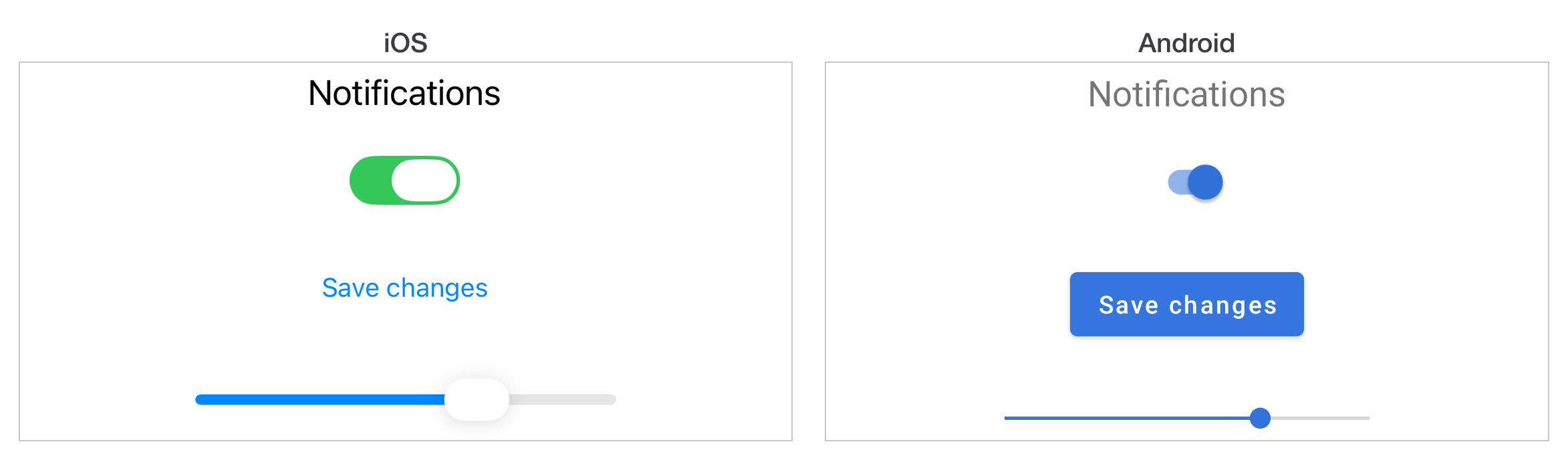
A Titanium view is a real native view. `Ti.UI.createButton()` makes a
|
|
13
|
+
`UIButton` on iOS and an `android.widget.Button` on Android, and you get a
|
|
14
|
+
handle to it. Nothing here is drawn by Titanium or approximated in a web view.
|
|
15
|
+
|
|
16
|
+
What Titanium adds on top is one layout system, shared by both platforms, so a
|
|
17
|
+
screen you describe once positions itself on either. That system is the first
|
|
18
|
+
thing to learn and the thing most new Titanium code gets wrong.
|
|
19
|
+
|
|
20
|
+
|
|
21
|
+
|
|
22
|
+
## Start here
|
|
23
|
+
|
|
24
|
+
[Layout and positioning](layouts-and-positioning.md) is the one to read first. Three
|
|
25
|
+
layout modes, two sizing constants, and a precedence order that explains why a
|
|
26
|
+
view you gave a `height` to ignored your `bottom`.
|
|
27
|
+
|
|
28
|
+
[Lists and tables](listviews-and-performance.md) covers `ListView` and `TableView`, and
|
|
29
|
+
which of the two to reach for. The short answer is `ListView`.
|
|
30
|
+
|
|
31
|
+
[Icons and launch screens](icons-and-splash-screens.md) is a
|
|
32
|
+
reference: what sizes each platform wants and where the files go.
|
|
33
|
+
|
|
34
|
+
[Platform conventions](platform-conventions.md) is for the places
|
|
35
|
+
iOS and Android genuinely diverge, rather than the small differences that fit
|
|
36
|
+
in a note on the page you were already reading.
|
|
37
|
+
|
|
38
|
+
## The API reference is the other half
|
|
39
|
+
|
|
40
|
+
These pages explain how the pieces fit together. What every property does, on
|
|
41
|
+
which platform, and since which release is in the
|
|
42
|
+
[Titanium API](https://titaniumsdk.com/docs/sdk.md), which is generated from the SDK itself and is
|
|
43
|
+
complete. When a guide and the reference disagree, the reference is right.
|
|
@@ -1,102 +0,0 @@
|
|
|
1
|
-
# Views without Controllers
|
|
2
|
-
|
|
3
|
-
## Introduction
|
|
4
|
-
|
|
5
|
-
Views can be created without controllers with an optional style sheet. These views can be used as building blocks to create a GUI. After you have defined your controller-less views, the application can either require in these views using markup or can dynamically generate these views in the controller code.
|
|
6
|
-
|
|
7
|
-
## XML Markup
|
|
8
|
-
|
|
9
|
-
In XML markup, use the `Require` tag to add controller-less views into another view. Assign the `src` attribute to the name of the view file minus the `.xml` extension and the `type` to `view`. Define the `id` attribute to access each instance of the controller-less view in the controller.
|
|
10
|
-
|
|
11
|
-
For instance, a button view could be reused repeatedly in a view-controller to construct a dialog box:
|
|
12
|
-
|
|
13
|
-
**app/views/foo.xml**
|
|
14
|
-
|
|
15
|
-
```xml
|
|
16
|
-
<Alloy>
|
|
17
|
-
<Button id='fooButton'>I am a foo button!</Button>
|
|
18
|
-
</Alloy>
|
|
19
|
-
```
|
|
20
|
-
|
|
21
|
-
This view can be inserted into another view multiple times:
|
|
22
|
-
|
|
23
|
-
**app/views/index.xml**
|
|
24
|
-
|
|
25
|
-
```xml
|
|
26
|
-
<Alloy>
|
|
27
|
-
<Window layout="vertical">
|
|
28
|
-
<Require id="button1" src="foo" type="view"/>
|
|
29
|
-
<Require id="button2" src="foo" type="view"/>
|
|
30
|
-
<Require id="button3" src="foo" type="view"/>
|
|
31
|
-
</Window>
|
|
32
|
-
</Alloy>
|
|
33
|
-
```
|
|
34
|
-
|
|
35
|
-
Then, the controller can use `$.button1`, `$.button2` and `$.button3` to access each instance of the foo view.
|
|
36
|
-
|
|
37
|
-
## Controller Code
|
|
38
|
-
|
|
39
|
-
**Starting with Alloy 1.4.0**, you can dynamically create views in the controller code. Each component in the controller-less view needs to be assigned an `id` attribute.
|
|
40
|
-
|
|
41
|
-
**To create a view without a corresponding controller:**
|
|
42
|
-
|
|
43
|
-
1. Use the `Alloy.createController()` method to create a controller from the controller-less view.
|
|
44
|
-
2. Use the `updateViews()` method with the created controller. Pass a style dictionary with the `id` of each component as the key and attributes as values.
|
|
45
|
-
3. Use the `getView()` method to retrieve the view.
|
|
46
|
-
4. Use the `add()` method to add the view to a parent component.
|
|
47
|
-
|
|
48
|
-
> **⚠️ ⚠️ Warning**
|
|
49
|
-
> Unlike other style dictionaries in Alloy, when using the `updateViews()` method, you can only apply styles using IDs. Class and view component styles do not work with this method.
|
|
50
|
-
>
|
|
51
|
-
> Using the `Require` or `Widget` elements to include external views in the controller-less view does not work with this procedure — you can include the external views, but the styles cannot be updated with the `updateViews` method.
|
|
52
|
-
|
|
53
|
-
For example:
|
|
54
|
-
|
|
55
|
-
**app/views/profile.xml**
|
|
56
|
-
|
|
57
|
-
```xml
|
|
58
|
-
<Alloy>
|
|
59
|
-
<View id="container">
|
|
60
|
-
<ImageView id="picture"/>
|
|
61
|
-
<Label id="name"/>
|
|
62
|
-
</View>
|
|
63
|
-
</Alloy>
|
|
64
|
-
```
|
|
65
|
-
|
|
66
|
-
**app/controllers/index.js**
|
|
67
|
-
|
|
68
|
-
```javascript
|
|
69
|
-
const profile = Alloy.createController('profile');
|
|
70
|
-
profile.updateViews({
|
|
71
|
-
"#container" : {
|
|
72
|
-
layout : "vertical"
|
|
73
|
-
},
|
|
74
|
-
"#picture" : {
|
|
75
|
-
image : "/appicon.png"
|
|
76
|
-
},
|
|
77
|
-
"#name" : {
|
|
78
|
-
text : "Mr. Man"
|
|
79
|
-
}
|
|
80
|
-
});
|
|
81
|
-
$.index.add(profile.getView());
|
|
82
|
-
|
|
83
|
-
$.index.open();
|
|
84
|
-
```
|
|
85
|
-
|
|
86
|
-
**Before Alloy 1.4.0**, to dynamically generate a view:
|
|
87
|
-
|
|
88
|
-
1. Create a new instance of the controller using `Alloy.createController()`.
|
|
89
|
-
2. Modify the properties directly.
|
|
90
|
-
3. Use `getView()` to retrieve the view.
|
|
91
|
-
4. Use `add()` to add it to a parent.
|
|
92
|
-
|
|
93
|
-
**app/controllers/index.js** (Alloy < 1.4.0)
|
|
94
|
-
|
|
95
|
-
```javascript
|
|
96
|
-
const profile = Alloy.createController('profile');
|
|
97
|
-
profile.container.layout = 'vertical';
|
|
98
|
-
profile.picture.image = '/appicon.png';
|
|
99
|
-
profile.name.text = 'Mr. Man';
|
|
100
|
-
$.index.add(profile.getView());
|
|
101
|
-
$.index.open();
|
|
102
|
-
```
|
|
@@ -1,148 +0,0 @@
|
|
|
1
|
-
# Creating custom tags in Titanium with Alloy
|
|
2
|
-
|
|
3
|
-
Custom tags let you create reusable UI components without the overhead of widgets. You can keep controls in a single file under `app/lib`.
|
|
4
|
-
|
|
5
|
-
## Why use custom tags?
|
|
6
|
-
|
|
7
|
-
When building cross-platform apps, you often need UI controls (like a web-style checkbox) that do not exist natively. You have three approaches:
|
|
8
|
-
|
|
9
|
-
1. **Direct XML/JS:** Copy and paste code into each view. Not reusable and easy to drift.
|
|
10
|
-
2. **Widgets:** Reusable, but require a folder structure and `dependencies` in `config.json`.
|
|
11
|
-
3. **Custom tags:** Single file in `app/lib/`, no config dependency, easy to share. They reduce platform-specific code in views.
|
|
12
|
-
|
|
13
|
-
## Basic setup
|
|
14
|
-
|
|
15
|
-
1. Create a file in `app/lib/` (e.g., `checkbox.js`)
|
|
16
|
-
2. Export a `create<TagName>` function
|
|
17
|
-
3. Use in XML with the `module` attribute
|
|
18
|
-
|
|
19
|
-
**view.xml**
|
|
20
|
-
```xml
|
|
21
|
-
<CheckBox module="checkbox" id="termsAccepted"
|
|
22
|
-
caption="I agree to the terms of use"
|
|
23
|
-
underline="true"
|
|
24
|
-
onCaptionClick="doShowTerms"
|
|
25
|
-
onChange="onCheckChange" />
|
|
26
|
-
```
|
|
27
|
-
The `module` attribute tells Alloy to look in `checkbox.js` for a `createCheckBox` function. Alloy passes the XML/TSS arguments and expects a `Ti.UI.*` component back.
|
|
28
|
-
|
|
29
|
-
## Robust example: CheckBox
|
|
30
|
-
|
|
31
|
-
**app/lib/checkbox.js**
|
|
32
|
-
```javascript
|
|
33
|
-
exports.createCheckBox = args => {
|
|
34
|
-
// Wrapper view for all components
|
|
35
|
-
const wrapper = Ti.UI.createView({
|
|
36
|
-
top: args.top || 5,
|
|
37
|
-
width: Ti.UI.SIZE,
|
|
38
|
-
height: Ti.UI.SIZE,
|
|
39
|
-
layout: "horizontal",
|
|
40
|
-
left: args.left || 20,
|
|
41
|
-
right: args.right || null,
|
|
42
|
-
checked: args.checked || false
|
|
43
|
-
});
|
|
44
|
-
|
|
45
|
-
// The box itself
|
|
46
|
-
const box = Ti.UI.createView({
|
|
47
|
-
width: 15,
|
|
48
|
-
height: 15,
|
|
49
|
-
borderWidth: 1,
|
|
50
|
-
borderColor: "#02A9F4"
|
|
51
|
-
});
|
|
52
|
-
|
|
53
|
-
// Attributed string for styled caption (e.g. underline)
|
|
54
|
-
const attr = Ti.UI.createAttributedString({
|
|
55
|
-
text: args.caption
|
|
56
|
-
});
|
|
57
|
-
|
|
58
|
-
if (args.underline) {
|
|
59
|
-
attr.applyProperties({
|
|
60
|
-
attributes: [{
|
|
61
|
-
type: Ti.UI.ATTRIBUTE_UNDERLINES_STYLE,
|
|
62
|
-
value: Ti.UI.ATTRIBUTE_UNDERLINE_STYLE_SINGLE,
|
|
63
|
-
range: [0, args.caption.length]
|
|
64
|
-
}]
|
|
65
|
-
});
|
|
66
|
-
}
|
|
67
|
-
|
|
68
|
-
const caption = Ti.UI.createLabel({
|
|
69
|
-
color: "#000",
|
|
70
|
-
attributedString: attr,
|
|
71
|
-
left: 10,
|
|
72
|
-
text: args.caption,
|
|
73
|
-
font: { fontSize: 10 }
|
|
74
|
-
});
|
|
75
|
-
|
|
76
|
-
// The tick (using Unicode to avoid assets)
|
|
77
|
-
const tick = Ti.UI.createLabel({
|
|
78
|
-
text: "\u2713",
|
|
79
|
-
left: 1,
|
|
80
|
-
color: "#02A9F4",
|
|
81
|
-
font: { fontWeight: "bold" },
|
|
82
|
-
visible: args.checked || false
|
|
83
|
-
});
|
|
84
|
-
|
|
85
|
-
// Handle clicks
|
|
86
|
-
caption.addEventListener("click", () => {
|
|
87
|
-
wrapper.fireEvent("captionClick");
|
|
88
|
-
});
|
|
89
|
-
|
|
90
|
-
box.addEventListener("click", () => {
|
|
91
|
-
tick.visible = !tick.visible;
|
|
92
|
-
wrapper.checked = !wrapper.checked;
|
|
93
|
-
wrapper.fireEvent("change", { checked: wrapper.checked });
|
|
94
|
-
});
|
|
95
|
-
|
|
96
|
-
box.add(tick);
|
|
97
|
-
wrapper.add(box);
|
|
98
|
-
wrapper.add(caption);
|
|
99
|
-
|
|
100
|
-
return wrapper;
|
|
101
|
-
};
|
|
102
|
-
```
|
|
103
|
-
|
|
104
|
-
## Global module override
|
|
105
|
-
|
|
106
|
-
Apply a module to all tags in a view by updating the `Alloy` tag. Alloy checks your file for tag creation overrides before using default implementations:
|
|
107
|
-
|
|
108
|
-
```xml
|
|
109
|
-
<Alloy module="ui">
|
|
110
|
-
<Window>
|
|
111
|
-
<CustomButton /> <!-- Looks for createCustomButton in app/lib/ui.js -->
|
|
112
|
-
<Label /> <!-- Checks ui.js for createLabel first -->
|
|
113
|
-
</Window>
|
|
114
|
-
</Alloy>
|
|
115
|
-
```
|
|
116
|
-
This is useful for adding default colors or properties (for example, a black default color for Android Labels) across a project.
|
|
117
|
-
|
|
118
|
-
## Key points
|
|
119
|
-
|
|
120
|
-
| Aspect | Description |
|
|
121
|
-
| ------------- | ------------------------------------------------------------- |
|
|
122
|
-
| File location | `app/lib/<module_name>.js` |
|
|
123
|
-
| Function name | `create<TagName>` (e.g., `createCheckBox` for `<CheckBox>`) |
|
|
124
|
-
| Return value | Must return a `Ti.UI.*` component (View, Button, Label, etc.) |
|
|
125
|
-
| Arguments | Receives all XML/TSS attributes in a single `args` object |
|
|
126
|
-
|
|
127
|
-
## Using Custom Tags Without Alloy XML
|
|
128
|
-
|
|
129
|
-
You can also use custom tags from plain JavaScript via `require()`:
|
|
130
|
-
|
|
131
|
-
```javascript
|
|
132
|
-
const checkbox = require("checkbox").createCheckBox({
|
|
133
|
-
caption: "I agree",
|
|
134
|
-
underline: true
|
|
135
|
-
});
|
|
136
|
-
win.add(checkbox);
|
|
137
|
-
```
|
|
138
|
-
|
|
139
|
-
This works because custom tags are standard CommonJS modules. The `module` attribute in XML is a convenience.
|
|
140
|
-
|
|
141
|
-
## Custom tags vs widgets
|
|
142
|
-
|
|
143
|
-
| Custom Tags | Widgets |
|
|
144
|
-
| ------------------------------------- | ---------------------------------------- |
|
|
145
|
-
| Single file in `app/lib/` | Separate folder structure |
|
|
146
|
-
| No `config.json` dependency needed | Requires `dependencies` in `config.json` |
|
|
147
|
-
| Simpler for single-component controls | Better for complex multi-view components |
|
|
148
|
-
| Easier to share across projects | More formal packaging |
|
|
@@ -1,149 +0,0 @@
|
|
|
1
|
-
# Coding best practices
|
|
2
|
-
|
|
3
|
-
Titanium apps are easiest to maintain when they use a single-context, modular pattern with clear structure and organized resources.
|
|
4
|
-
|
|
5
|
-
## 1. Scope management
|
|
6
|
-
|
|
7
|
-
- Avoid global scope. Global variables are not automatically garbage collected and can create naming conflicts.
|
|
8
|
-
- Always use `let` or `const`. The original guide uses `var`, but modern code should not. Omitting declarations places variables in global scope.
|
|
9
|
-
|
|
10
|
-
## 2. Memory leak prevention
|
|
11
|
-
|
|
12
|
-
- Listeners on `Ti.App`, `Ti.Geolocation`, and similar globals can leak memory if they reference local objects and are not removed.
|
|
13
|
-
```javascript
|
|
14
|
-
// Anti-pattern
|
|
15
|
-
Ti.App.addEventListener('data:sync', (e) => {
|
|
16
|
-
localView.text = e.text // localView is now leaked
|
|
17
|
-
})
|
|
18
|
-
```
|
|
19
|
-
- Rule: global events should only handle global objects. Always `removeEventListener` during cleanup.
|
|
20
|
-
|
|
21
|
-
## 3. Event naming conventions
|
|
22
|
-
|
|
23
|
-
- Do not use spaces in event names. Spaces can cause issues with Backbone.js and other libraries that split event names on spaces.
|
|
24
|
-
```javascript
|
|
25
|
-
// Wrong - may fire multiple times
|
|
26
|
-
Ti.App.fireEvent('my event')
|
|
27
|
-
|
|
28
|
-
// Correct - use colon or underscore
|
|
29
|
-
Ti.App.fireEvent('my:event')
|
|
30
|
-
Ti.App.fireEvent('my_event')
|
|
31
|
-
```
|
|
32
|
-
|
|
33
|
-
## 4. Performance
|
|
34
|
-
|
|
35
|
-
- Defer script loading. Only `require` modules when you need them.
|
|
36
|
-
|
|
37
|
-
Defer loading to reduce startup time. Only `require` modules when you need them.
|
|
38
|
-
|
|
39
|
-
Lazy script loading example:
|
|
40
|
-
```javascript
|
|
41
|
-
// must be loaded at launch
|
|
42
|
-
const WindowOne = require('ui/WindowOne').WindowOne;
|
|
43
|
-
const win1 = new WindowOne();
|
|
44
|
-
win1.open();
|
|
45
|
-
|
|
46
|
-
win1.addEventListener('click', () => {
|
|
47
|
-
// load window two JavaScript only when needed
|
|
48
|
-
const WindowTwo = require('ui/WindowTwo').WindowTwo;
|
|
49
|
-
const win2 = new WindowTwo();
|
|
50
|
-
win2.open();
|
|
51
|
-
|
|
52
|
-
win2.addEventListener('click', () => {
|
|
53
|
-
// load window three JavaScript only when needed
|
|
54
|
-
const WindowThree = require('ui/WindowThree').WindowThree;
|
|
55
|
-
const win3 = new WindowThree();
|
|
56
|
-
win3.open();
|
|
57
|
-
});
|
|
58
|
-
});
|
|
59
|
-
```
|
|
60
|
-
|
|
61
|
-
- Bridge efficiency: minimize requests for device properties like `Ti.Platform.osname`. Store them in a local variable:
|
|
62
|
-
```javascript
|
|
63
|
-
const isAndroid = (Ti.Platform.osname === 'android')
|
|
64
|
-
if (isAndroid) { /* Android path */ } else { /* iOS path */ }
|
|
65
|
-
```
|
|
66
|
-
- Avoid extending the `Ti` namespace. Three reasons:
|
|
67
|
-
1. Ti objects are proxies to native OS components — your extensions may conflict with native functionality.
|
|
68
|
-
2. Arrays stored on the namespace may be immutable; objects may be null unexpectedly.
|
|
69
|
-
3. There is no guarantee properties persist across SDK versions. Use your own namespace or CommonJS module instead of modifying `Ti`.
|
|
70
|
-
|
|
71
|
-
## 5. App architecture recommendations
|
|
72
|
-
|
|
73
|
-
### Modular components with CommonJS (recommended)
|
|
74
|
-
|
|
75
|
-
Titanium's primary recommended architecture. It uses discrete modules and avoids globals. See `commonjs-advanced.md` for module patterns and path resolution.
|
|
76
|
-
|
|
77
|
-
MyModule.js:
|
|
78
|
-
```javascript
|
|
79
|
-
// Private variable
|
|
80
|
-
const defaultMessage = "Hello world";
|
|
81
|
-
|
|
82
|
-
exports.sayHello = (msg) => {
|
|
83
|
-
Ti.API.info('Hello ' + msg);
|
|
84
|
-
};
|
|
85
|
-
|
|
86
|
-
exports.helloWorld = () => {
|
|
87
|
-
Ti.API.info(defaultMessage);
|
|
88
|
-
}
|
|
89
|
-
```
|
|
90
|
-
|
|
91
|
-
app.js:
|
|
92
|
-
```javascript
|
|
93
|
-
const myModule = require('/MyModule');
|
|
94
|
-
myModule.sayHello('User');
|
|
95
|
-
```
|
|
96
|
-
|
|
97
|
-
### Namespace with deferred loading (alternative pattern)
|
|
98
|
-
|
|
99
|
-
If not using CommonJS, you can still defer loading with a namespace:
|
|
100
|
-
|
|
101
|
-
```javascript
|
|
102
|
-
const someNameSpace = () => {
|
|
103
|
-
const API = {
|
|
104
|
-
init() {
|
|
105
|
-
// create UI or initialize
|
|
106
|
-
},
|
|
107
|
-
reset() {
|
|
108
|
-
// null objects, clean up
|
|
109
|
-
}
|
|
110
|
-
}
|
|
111
|
-
return API
|
|
112
|
-
}
|
|
113
|
-
const ns = new someNameSpace()
|
|
114
|
-
```
|
|
115
|
-
|
|
116
|
-
### Custom objects as components
|
|
117
|
-
|
|
118
|
-
Popular for rapid deployment. It uses a namespace hierarchy. This pattern is less efficient than CommonJS modules, and object references can persist after they are no longer needed.
|
|
119
|
-
|
|
120
|
-
```javascript
|
|
121
|
-
const myapp = {};
|
|
122
|
-
(() => {
|
|
123
|
-
myapp.ui = {};
|
|
124
|
-
myapp.ui.createApplicationWindow = () => {
|
|
125
|
-
const win = Ti.UI.createWindow({ backgroundColor:'white' });
|
|
126
|
-
return win;
|
|
127
|
-
};
|
|
128
|
-
})();
|
|
129
|
-
```
|
|
130
|
-
|
|
131
|
-
### Classical-based patterns
|
|
132
|
-
|
|
133
|
-
Not recommended. JavaScript is not class-based in the same way, and this approach adds overhead during rapid prototyping.
|
|
134
|
-
|
|
135
|
-
## 6. Security best practices
|
|
136
|
-
|
|
137
|
-
- Do not store sensitive data in non-JS files. JavaScript files are minified and obfuscated, but images, JSON, SQLite databases, and other non-JS files are packaged as-is. APK and IPA files are ZIP files that can be extracted.
|
|
138
|
-
```javascript
|
|
139
|
-
// Wrong - API keys visible in app/assets/config.json
|
|
140
|
-
const config = require('assets/config.json')
|
|
141
|
-
|
|
142
|
-
// Correct - store in code or use secure storage
|
|
143
|
-
const API_KEY = Ti.App.Properties.getString('api_key')
|
|
144
|
-
```
|
|
145
|
-
|
|
146
|
-
## 7. Multiplatform strategies
|
|
147
|
-
|
|
148
|
-
- Code branching: use for small differences.
|
|
149
|
-
- Platform files: use `.ios.js` or `.android.js` for major logic differences so code stays readable.
|