@maccesar/titools 5.3.0 → 5.4.0
This diff represents the content of publicly available package versions that have been released to one of the supported registries. The information contained in this diff is provided for informational purposes only and reflects changes between package versions as they appear in their respective public registries.
- package/CONTRIBUTING.md +1 -1
- package/README.md +31 -60
- package/agents/ti-pro.md +3 -1
- package/commands/ti-audit.md +6 -4
- package/docs/examples.md +9 -0
- package/docs/knowledge-index.md +2 -1
- package/lib/config.js +1 -0
- package/package.json +1 -1
- package/skills/alloy-guides/SKILL.md +18 -179
- package/skills/alloy-guides/references/CLI_TASKS.md +17 -216
- package/skills/alloy-guides/references/CONCEPTS.md +27 -162
- package/skills/alloy-guides/references/CONTROLLERS.md +38 -236
- package/skills/alloy-guides/references/MODELS.md +47 -723
- package/skills/alloy-guides/references/MODELS_ADVANCED.md +21 -482
- package/skills/alloy-guides/references/VIEWS_DYNAMIC.md +12 -222
- package/skills/alloy-guides/references/VIEWS_STYLES.md +39 -358
- package/skills/alloy-guides/references/VIEWS_XML.md +36 -552
- package/skills/alloy-guides/references/WIDGETS.md +49 -127
- package/skills/alloy-howtos/SKILL.md +14 -169
- package/skills/alloy-howtos/references/best_practices.md +9 -113
- package/skills/alloy-howtos/references/cli_reference.md +18 -223
- package/skills/alloy-howtos/references/config_files.md +50 -133
- package/skills/alloy-howtos/references/debugging_troubleshooting.md +19 -63
- package/skills/alloy-howtos/references/samples.md +21 -138
- package/skills/ti-api/SKILL.md +10 -2
- package/skills/ti-api/references/api-android.md +36 -2
- package/skills/ti-api/references/api-app-platform.md +39 -3
- package/skills/ti-api/references/api-core.md +50 -18
- package/skills/ti-api/references/api-data-network.md +49 -35
- package/skills/ti-api/references/api-media.md +45 -27
- package/skills/ti-api/references/api-services.md +39 -9
- package/skills/ti-api/references/api-ui-android.md +33 -13
- package/skills/ti-api/references/api-ui-extras.md +41 -15
- package/skills/ti-api/references/api-ui-ios-animator.md +42 -26
- package/skills/ti-api/references/api-ui-ios.md +74 -2
- package/skills/ti-api/references/api-ui-lists.md +32 -16
- package/skills/ti-api/references/api-ui-text-input.md +34 -17
- package/skills/ti-api/references/api-ui-views.md +27 -1
- package/skills/ti-api/references/api-ui-windows-navigation.md +32 -18
- package/skills/ti-api/references/api-xml-global.md +66 -16
- package/skills/ti-create-release/SKILL.md +98 -0
- package/skills/ti-create-release/references/module-discovery.md +69 -0
- package/skills/ti-expert/references/adaptive-layouts.md +1 -1
- package/skills/ti-guides/SKILL.md +37 -76
- package/skills/ti-guides/references/advanced-data-and-images.md +122 -126
- package/skills/ti-guides/references/android-manifest.md +24 -83
- package/skills/ti-guides/references/app-distribution.md +31 -377
- package/skills/ti-guides/references/application-frameworks.md +127 -335
- package/skills/ti-guides/references/cli-reference.md +184 -633
- package/skills/ti-guides/references/commonjs-advanced.md +81 -231
- package/skills/ti-guides/references/compatibility-matrix.md +36 -75
- package/skills/ti-guides/references/hello-world.md +95 -70
- package/skills/ti-guides/references/hyperloop-native-access.md +52 -448
- package/skills/ti-guides/references/resources.md +174 -142
- package/skills/ti-guides/references/sdk-release-notes.md +28 -71
- package/skills/ti-guides/references/tiapp-config.md +222 -598
- package/skills/ti-howtos/SKILL.md +23 -123
- package/skills/ti-howtos/references/cross-platform-development.md +119 -324
- package/skills/ti-howtos/references/debugging-profiling.md +77 -445
- package/skills/ti-howtos/references/extending-titanium.md +199 -673
- package/skills/ti-howtos/references/local-data-sources.md +87 -300
- package/skills/ti-howtos/references/location-and-maps.md +86 -213
- package/skills/ti-howtos/references/media-apis.md +103 -223
- package/skills/ti-howtos/references/notification-services.md +86 -506
- package/skills/ti-howtos/references/remote-data-sources.md +97 -316
- package/skills/ti-howtos/references/using-modules.md +77 -133
- package/skills/ti-ui/SKILL.md +28 -143
- package/skills/ti-ui/references/icons-and-splash-screens.md +74 -403
- package/skills/ti-ui/references/layouts-and-positioning.md +175 -402
- package/skills/ti-ui/references/listviews-and-performance.md +100 -703
- package/skills/ti-ui/references/platform-conventions.md +180 -0
- package/skills/ti-ui/references/user-interface.md +43 -0
- package/skills/alloy-guides/references/VIEWS_WITHOUT_CONTROLLERS.md +0 -102
- package/skills/alloy-howtos/references/custom_tags.md +0 -148
- package/skills/ti-guides/references/coding-best-practices.md +0 -149
- package/skills/ti-guides/references/javascript-primer.md +0 -414
- package/skills/ti-guides/references/reserved-words.md +0 -36
- package/skills/ti-guides/references/style-and-conventions.md +0 -103
- package/skills/ti-howtos/references/android-platform-deep-dives.md +0 -624
- package/skills/ti-howtos/references/automation-fastlane-appium.md +0 -96
- package/skills/ti-howtos/references/buffer-codec-streams.md +0 -162
- package/skills/ti-howtos/references/google-maps-v2.md +0 -172
- package/skills/ti-howtos/references/ios-map-kit.md +0 -149
- package/skills/ti-howtos/references/ios-platform-deep-dives.md +0 -611
- package/skills/ti-howtos/references/tutorials.md +0 -565
- package/skills/ti-howtos/references/web-content-integration.md +0 -287
- package/skills/ti-howtos/references/webpack-build-pipeline.md +0 -124
- package/skills/ti-ui/references/accessibility-deep-dive.md +0 -288
- package/skills/ti-ui/references/animation-and-matrices.md +0 -569
- package/skills/ti-ui/references/application-structures.md +0 -626
- package/skills/ti-ui/references/custom-fonts-styling.md +0 -549
- package/skills/ti-ui/references/event-handling.md +0 -401
- package/skills/ti-ui/references/gestures.md +0 -448
- package/skills/ti-ui/references/orientation.md +0 -374
- package/skills/ti-ui/references/platform-ui-android.md +0 -727
- package/skills/ti-ui/references/platform-ui-ios.md +0 -576
- package/skills/ti-ui/references/scrolling-views.md +0 -288
- package/skills/ti-ui/references/tableviews.md +0 -542
|
@@ -1,749 +1,146 @@
|
|
|
1
|
-
#
|
|
2
|
-
|
|
3
|
-
<!-- TOC-START -->
|
|
4
|
-
## Contents
|
|
5
|
-
|
|
6
|
-
- [1. Overview](#1-overview)
|
|
7
|
-
- [2. Basic ListView structure](#2-basic-listview-structure)
|
|
8
|
-
- [3. Templates](#3-templates)
|
|
9
|
-
- [4. Data binding](#4-data-binding)
|
|
10
|
-
- [5. Section operations](#5-section-operations)
|
|
11
|
-
- [6. Events](#6-events)
|
|
12
|
-
- [7. Critical performance rules](#7-critical-performance-rules)
|
|
13
|
-
- [8. iOS action items (swipe actions)](#8-ios-action-items-swipe-actions)
|
|
14
|
-
- [9. Editing mode (iOS)](#9-editing-mode-ios)
|
|
15
|
-
- [10. Search](#10-search)
|
|
16
|
-
- [11. Performance best practices](#11-performance-best-practices)
|
|
17
|
-
- [12. Transitioning from TableView](#12-transitioning-from-tableview)
|
|
18
|
-
- [13. Common patterns](#13-common-patterns)
|
|
19
|
-
- [14. Platform differences](#14-platform-differences)
|
|
20
|
-
- [15. Debugging](#15-debugging)
|
|
21
|
-
|
|
22
|
-
<!-- TOC-END -->
|
|
23
|
-
|
|
24
|
-
## 1. Overview
|
|
25
|
-
|
|
26
|
-
ListView is a data-oriented, high-performance replacement for TableView. It handles large datasets by recycling native views and managing the item lifecycle for you.
|
|
27
|
-
|
|
28
|
-
### Core concepts
|
|
29
|
-
|
|
30
|
-
| Concept | Description |
|
|
31
|
-
| ---------------- | ------------------------------------------------------------- |
|
|
32
|
-
| ListView | Container for sections |
|
|
33
|
-
| ListSection | Organizes items, supports CRUD operations |
|
|
34
|
-
| ListItem | Virtual view object (not directly accessible after rendering) |
|
|
35
|
-
| ItemTemplate | Defines row structure and binding |
|
|
36
|
-
| ListDataItem | Raw data bound to templates |
|
|
37
|
-
|
|
38
|
-
## 2. Basic ListView structure
|
|
39
|
-
|
|
40
|
-
### Declarative (Alloy XML)
|
|
41
|
-
|
|
42
|
-
```xml
|
|
43
|
-
<Alloy>
|
|
44
|
-
<Window>
|
|
45
|
-
<ListView id="myList">
|
|
46
|
-
<ListSection name="section1">
|
|
47
|
-
<ListItem title="Item 1"/>
|
|
48
|
-
<ListItem title="Item 2"/>
|
|
49
|
-
<ListItem title="Item 3"/>
|
|
50
|
-
</ListSection>
|
|
51
|
-
</ListView>
|
|
52
|
-
</Window>
|
|
53
|
-
</Alloy>
|
|
54
|
-
```
|
|
55
|
-
|
|
56
|
-
### Programmatic data binding
|
|
57
|
-
|
|
58
|
-
```javascript
|
|
59
|
-
const items = [
|
|
60
|
-
{ properties: { title: "Item 1" } },
|
|
61
|
-
{ properties: { title: "Item 2" } },
|
|
62
|
-
{ properties: { title: "Item 3" } }
|
|
63
|
-
];
|
|
64
|
-
|
|
65
|
-
$.myList.sections[0].setItems(items);
|
|
66
|
-
```
|
|
67
|
-
|
|
68
|
-
### Mapping external data
|
|
69
|
-
|
|
70
|
-
```javascript
|
|
71
|
-
const externalData = [
|
|
72
|
-
{ name: "Item 1", value: 100 },
|
|
73
|
-
{ name: "Item 2", value: 200 }
|
|
74
|
-
];
|
|
75
|
-
|
|
76
|
-
// Map to ListDataItem format
|
|
77
|
-
const items = _.map(externalData, (item) => {
|
|
78
|
-
return {
|
|
79
|
-
properties: {
|
|
80
|
-
title: item.name
|
|
81
|
-
},
|
|
82
|
-
// Custom binding
|
|
83
|
-
value: { text: item.value.toString() }
|
|
84
|
-
};
|
|
85
|
-
});
|
|
86
|
-
|
|
87
|
-
$.myList.sections[0].setItems(items);
|
|
88
|
-
```
|
|
89
|
-
|
|
90
|
-
## 3. Templates
|
|
91
|
-
|
|
92
|
-
### Default template
|
|
93
|
-
|
|
94
|
-
Built-in template with:
|
|
95
|
-
- ImageView (left on iOS, right on Android)
|
|
96
|
-
- Title label (left-aligned, black)
|
|
97
|
-
- Optional accessory icon
|
|
98
|
-
|
|
99
|
-
```xml
|
|
100
|
-
<ListView id="myList">
|
|
101
|
-
<ListSection>
|
|
102
|
-
<ListItem title="Title" image="icon.png" accessoryType="Ti.UI.LIST_ACCESSORY_TYPE_DISCLOSURE"/>
|
|
103
|
-
</ListSection>
|
|
104
|
-
</ListView>
|
|
105
|
-
```
|
|
106
|
-
|
|
107
|
-
### Custom templates
|
|
108
|
-
|
|
109
|
-
Create with `<Templates>` and `<ItemTemplate>`:
|
|
110
|
-
|
|
111
|
-
```xml
|
|
112
|
-
<ListView id="elementsList" defaultItemTemplate="elementTemplate">
|
|
113
|
-
<Templates>
|
|
114
|
-
<ItemTemplate name="elementTemplate">
|
|
115
|
-
<!-- Bindable elements with bindId -->
|
|
116
|
-
<Label bindId="symbol" id="symbol" />
|
|
117
|
-
<View id="atomProperties">
|
|
118
|
-
<Label bindId="name" id="name" />
|
|
119
|
-
<View id="secondLine">
|
|
120
|
-
<Label class="line2" bindId="number" id="number" />
|
|
121
|
-
<Label class="line2" bindId="mass" id="mass" />
|
|
122
|
-
</View>
|
|
123
|
-
</View>
|
|
124
|
-
<ImageView bindId="image" id="image" />
|
|
125
|
-
</ItemTemplate>
|
|
126
|
-
</Templates>
|
|
127
|
-
<ListSection>
|
|
128
|
-
<!-- Bind data using bindId:property syntax -->
|
|
129
|
-
<ListItem symbol:text="H" symbol:color="#090" name:text="Hydrogen" number:text="1" mass:text="1.00794"/>
|
|
130
|
-
</ListSection>
|
|
131
|
-
</ListView>
|
|
132
|
-
```
|
|
133
|
-
|
|
134
|
-
### Multiple templates
|
|
135
|
-
|
|
136
|
-
```xml
|
|
137
|
-
<ListView id="dynamicListView">
|
|
138
|
-
<Templates>
|
|
139
|
-
<ItemTemplate name="image_title" height="100">
|
|
140
|
-
<View layout="horizontal" left="15">
|
|
141
|
-
<ImageView bindId="image" id="image"/>
|
|
142
|
-
<Label bindId="label" id="label1"/>
|
|
143
|
-
</View>
|
|
144
|
-
</ItemTemplate>
|
|
145
|
-
<ItemTemplate name="title_only" height="50">
|
|
146
|
-
<View left="15">
|
|
147
|
-
<Label bindId="label"/>
|
|
148
|
-
</View>
|
|
149
|
-
</ItemTemplate>
|
|
150
|
-
</Templates>
|
|
151
|
-
<ListSection/>
|
|
152
|
-
</ListView>
|
|
153
|
-
```
|
|
154
|
-
|
|
155
|
-
Assign template per item:
|
|
156
|
-
|
|
157
|
-
```javascript
|
|
158
|
-
const items = [
|
|
159
|
-
{
|
|
160
|
-
label: { text: "Full item" },
|
|
161
|
-
image: { image: "photo.png" },
|
|
162
|
-
template: "image_title" // Use this template
|
|
163
|
-
},
|
|
164
|
-
{
|
|
165
|
-
label: { text: "Text only" },
|
|
166
|
-
template: "title_only" // Use this template
|
|
167
|
-
}
|
|
168
|
-
];
|
|
169
|
-
|
|
170
|
-
$.dynamicListView.sections[0].setItems(items);
|
|
171
|
-
```
|
|
172
|
-
|
|
173
|
-
### iOS built-in templates (iOS only)
|
|
174
|
-
|
|
175
|
-
iOS provides four built-in templates you can use without defining custom templates:
|
|
176
|
-
|
|
177
|
-
| Constant | Layout |
|
|
178
|
-
| ----------------------------------- | --------------------------------------------------------------- |
|
|
179
|
-
| `Ti.UI.LIST_ITEM_TEMPLATE_DEFAULT` | Left-justified title only (default) |
|
|
180
|
-
| `Ti.UI.LIST_ITEM_TEMPLATE_SUBTITLE` | Title with subtitle below in smaller gray text |
|
|
181
|
-
| `Ti.UI.LIST_ITEM_TEMPLATE_SETTINGS` | Left-justified title on left, right-justified subtitle on right |
|
|
182
|
-
| `Ti.UI.LIST_ITEM_TEMPLATE_CONTACTS` | Right-justified title with left-justified subtitle |
|
|
183
|
-
|
|
184
|
-
```javascript
|
|
185
|
-
const section = Ti.UI.createListSection({
|
|
186
|
-
items: [
|
|
187
|
-
{ properties: { title: 'Title', subtitle: 'Subtitle' } }
|
|
188
|
-
]
|
|
189
|
-
});
|
|
190
|
-
|
|
191
|
-
const listView = Ti.UI.createListView({
|
|
192
|
-
sections: [section],
|
|
193
|
-
defaultItemTemplate: Ti.UI.LIST_ITEM_TEMPLATE_SUBTITLE
|
|
194
|
-
});
|
|
195
|
-
```
|
|
196
|
-
|
|
197
|
-
### Supported template view classes
|
|
198
|
-
|
|
199
|
-
The following views can be used as child elements in custom templates: ActivityIndicator, Button, ImageView, Label, MaskedImage, ProgressBar, Slider, Switch, TextArea, TextField.
|
|
200
|
-
|
|
201
|
-
## 4. Data binding
|
|
202
|
-
|
|
203
|
-
### Binding syntax
|
|
204
|
-
|
|
205
|
-
XML (Alloy): `bindId:property="value"` JavaScript: `{ bindId: { property: value } }`
|
|
206
|
-
|
|
207
|
-
### Programmatic binding with custom templates
|
|
208
|
-
|
|
209
|
-
```javascript
|
|
210
|
-
const items = [
|
|
211
|
-
{
|
|
212
|
-
mass: { text: "1.00794" },
|
|
213
|
-
name: { text: "Hydrogen" },
|
|
214
|
-
number: { text: "1" },
|
|
215
|
-
symbol: { color: "#090", text: "H" }
|
|
216
|
-
},
|
|
217
|
-
{
|
|
218
|
-
mass: { text: "4.002602" },
|
|
219
|
-
name: { text: "Helium" },
|
|
220
|
-
number: { text: "2" },
|
|
221
|
-
symbol: { color: "#090", text: "He" }
|
|
222
|
-
}
|
|
223
|
-
];
|
|
224
|
-
|
|
225
|
-
$.elementsList.sections[0].setItems(items);
|
|
226
|
-
```
|
|
227
|
-
|
|
228
|
-
## 5. Section operations
|
|
229
|
-
|
|
230
|
-
### CRUD methods
|
|
231
|
-
|
|
232
|
-
| Method | Description |
|
|
233
|
-
| ------------------------------------- | ------------------ |
|
|
234
|
-
| `setItems(items)` | Replace all items |
|
|
235
|
-
| `appendItems(items)` | Add to end |
|
|
236
|
-
| `insertItemsAt(index, items)` | Insert at position |
|
|
237
|
-
| `replaceItemsAt(index, count, items)` | Replace range |
|
|
238
|
-
| `deleteItemsAt(index, count)` | Delete range |
|
|
239
|
-
|
|
240
|
-
### Example operations
|
|
241
|
-
|
|
242
|
-
```javascript
|
|
243
|
-
const section = $.myList.sections[0];
|
|
244
|
-
|
|
245
|
-
// Replace all (clears first)
|
|
246
|
-
section.setItems(items);
|
|
247
|
-
|
|
248
|
-
// Append to end
|
|
249
|
-
section.appendItems(newItems);
|
|
250
|
-
|
|
251
|
-
// Insert at position 5
|
|
252
|
-
section.insertItemsAt(5, moreItems);
|
|
253
|
-
|
|
254
|
-
// Replace 3 items starting at index 2
|
|
255
|
-
section.replaceItemsAt(2, 3, replacementItems);
|
|
256
|
-
|
|
257
|
-
// Delete 2 items starting at index 10
|
|
258
|
-
section.deleteItemsAt(10, 2);
|
|
259
|
-
```
|
|
260
|
-
|
|
261
|
-
### Row animation (iOS)
|
|
262
|
-
|
|
263
|
-
You can pass animation styles to append, delete, insert, replace, and update methods:
|
|
264
|
-
|
|
265
|
-
```javascript
|
|
266
|
-
section.deleteItemsAt(0, 1, {
|
|
267
|
-
animationStyle: Ti.UI.iOS.RowAnimationStyle.LEFT
|
|
268
|
-
});
|
|
269
|
-
|
|
270
|
-
section.appendItems(newItems, {
|
|
271
|
-
animationStyle: Ti.UI.iOS.RowAnimationStyle.FADE
|
|
272
|
-
});
|
|
273
|
-
```
|
|
274
|
-
|
|
275
|
-
Available styles: `Ti.UI.iOS.RowAnimationStyle.BOTTOM`, `FADE`, `LEFT`, `NONE`, `RIGHT`, `TOP`.
|
|
276
|
-
|
|
277
|
-
## 6. Events
|
|
278
|
-
|
|
279
|
-
### Item click
|
|
280
|
-
|
|
281
|
-
```xml
|
|
282
|
-
<ListView id="list" onItemclick="handleClick">
|
|
283
|
-
```
|
|
284
|
-
|
|
285
|
-
```javascript
|
|
286
|
-
function handleClick(e) {
|
|
287
|
-
// e.sectionIndex: which section
|
|
288
|
-
// e.itemIndex: which item
|
|
289
|
-
// e.bindId: which template element (null if row clicked)
|
|
290
|
-
// e.itemId: custom itemId if set
|
|
291
|
-
|
|
292
|
-
const section = $.list.sections[e.sectionIndex];
|
|
293
|
-
const item = section.getItemAt(e.itemIndex);
|
|
294
|
-
|
|
295
|
-
// Update item
|
|
296
|
-
item.properties.title += " (clicked)";
|
|
297
|
-
item.properties.color = 'red';
|
|
298
|
-
section.updateItemAt(e.itemIndex, item);
|
|
299
|
-
}
|
|
300
|
-
```
|
|
301
|
-
|
|
302
|
-
### Marker events (infinite scroll)
|
|
303
|
-
|
|
304
|
-
Markers act as tripwires for loading more data:
|
|
305
|
-
|
|
306
|
-
```javascript
|
|
307
|
-
// Set initial marker at item 100
|
|
308
|
-
$.myList.setMarker({ sectionIndex: 0, itemIndex: 99 });
|
|
309
|
-
|
|
310
|
-
// Handle marker event
|
|
311
|
-
function markerReached(e) {
|
|
312
|
-
// Load more data
|
|
313
|
-
const moreData = loadNextPage();
|
|
314
|
-
|
|
315
|
-
// Append to list
|
|
316
|
-
e.section.appendItems(moreData);
|
|
317
|
-
|
|
318
|
-
// Set next marker
|
|
319
|
-
const nextMarker = e.itemIndex + moreData.length - 1;
|
|
320
|
-
$.myList.setMarker({ sectionIndex: e.sectionIndex, itemIndex: nextMarker });
|
|
321
|
-
}
|
|
322
|
-
|
|
323
|
-
$.myList.addEventListener('marker', markerReached);
|
|
324
|
-
```
|
|
325
|
-
|
|
326
|
-
Since SDK 4.1.0, use `addMarker()` to add additional markers after the initial `setMarker()`:
|
|
327
|
-
|
|
328
|
-
```javascript
|
|
329
|
-
$.myList.addMarker({ sectionIndex: 0, itemIndex: 149 });
|
|
330
|
-
```
|
|
331
|
-
|
|
332
|
-
### Scroll events
|
|
333
|
-
|
|
334
|
-
Since SDK 4.1.0, use `scrollstart` and `scrollend` to monitor scrolling:
|
|
335
|
-
|
|
336
|
-
```javascript
|
|
337
|
-
$.myList.addEventListener('scrollstart', (e) => {
|
|
338
|
-
Ti.API.info(`Scroll started at section ${e.firstVisibleSectionIndex}, item ${e.firstVisibleItemIndex}`);
|
|
339
|
-
Ti.API.info(`Visible items: ${e.visibleItemCount}`);
|
|
340
|
-
});
|
|
341
|
-
|
|
342
|
-
$.myList.addEventListener('scrollend', (e) => {
|
|
343
|
-
Ti.API.info(`Scroll ended at section ${e.firstVisibleSectionIndex}, item ${e.firstVisibleItemIndex}`);
|
|
344
|
-
});
|
|
345
|
-
```
|
|
346
|
-
|
|
347
|
-
Event properties: `firstVisibleSectionIndex`, `firstVisibleItemIndex`, `visibleItemCount`.
|
|
348
|
-
|
|
349
|
-
### Template element events
|
|
350
|
-
|
|
351
|
-
```xml
|
|
352
|
-
<ListView id="likeList" onItemclick="handleItemClick">
|
|
353
|
-
<Templates>
|
|
354
|
-
<ItemTemplate name="custom">
|
|
355
|
-
<Label bindId="label" left="15" />
|
|
356
|
-
<ImageView bindId="icon" right="15" />
|
|
357
|
-
</ItemTemplate>
|
|
358
|
-
</Templates>
|
|
359
|
-
<ListSection>
|
|
360
|
-
<ListItem label:text="Like me?" icon:image="star_grey.png" />
|
|
361
|
-
</ListSection>
|
|
362
|
-
</ListView>
|
|
363
|
-
```
|
|
1
|
+
# Lists & tables
|
|
364
2
|
|
|
365
|
-
|
|
366
|
-
function handleItemClick(e) {
|
|
367
|
-
// Check which element was clicked
|
|
368
|
-
if (e.bindId === "icon") {
|
|
369
|
-
const item = e.section.getItemAt(e.itemIndex);
|
|
370
|
-
|
|
371
|
-
// Toggle image (update data, not e.source)
|
|
372
|
-
if (item.icon.image === "star_grey.png") {
|
|
373
|
-
item.icon.image = "star_gold.png";
|
|
374
|
-
} else {
|
|
375
|
-
item.icon.image = "star_grey.png";
|
|
376
|
-
}
|
|
3
|
+
> ListView, TableView, and which of the two to reach for.
|
|
377
4
|
|
|
378
|
-
|
|
379
|
-
|
|
380
|
-
|
|
381
|
-
|
|
5
|
+
- Source: https://titaniumsdk.com/docs/build/ui/lists
|
|
6
|
+
- Written for Titanium SDK 13.4.0 and later.
|
|
7
|
+
- This corpus documents Titanium SDK 13.4.1. Anything here that does not name a version describes 13.4.1.
|
|
8
|
+
- Titanium is maintained by TiDev. The Appcelerator toolchain is retired: there is no `appc` CLI, no Appcelerator Studio and no hosted build service. The supported CLI is `titanium` on npm, invoked as `ti`.
|
|
382
9
|
|
|
383
|
-
|
|
10
|
+
---
|
|
384
11
|
|
|
385
|
-
|
|
12
|
+
Titanium has two scrolling list types. **Reach for `ListView`.**
|
|
386
13
|
|
|
387
|
-
|
|
14
|
+
`TableView` represents rows as view proxies. `ListView` describes row layouts
|
|
15
|
+
as templates and supplies item data separately, so it is the recommended
|
|
16
|
+
approach for long lists.
|
|
388
17
|
|
|
389
|
-
|
|
390
|
-
|
|
391
|
-
|
|
392
|
-
</ItemTemplate>
|
|
393
|
-
```
|
|
18
|
+
Neither is deprecated, and `TableView` is still the simpler thing to reach for
|
|
19
|
+
when a "list" is a settings screen of eight fixed rows. Past that, use
|
|
20
|
+
`ListView`.
|
|
394
21
|
|
|
395
|
-
|
|
22
|
+
## A list in three parts
|
|
396
23
|
|
|
397
|
-
|
|
398
|
-
|
|
399
|
-
<Label bindId="title" height="40"/> <!-- Fixed -->
|
|
400
|
-
</ItemTemplate>
|
|
401
|
-
```
|
|
24
|
+
A `ListView` holds `ListSection`s, and a section holds items. An item is plain
|
|
25
|
+
data, not a view: it says which template to use and what to put in it.
|
|
402
26
|
|
|
403
|
-
|
|
27
|
+
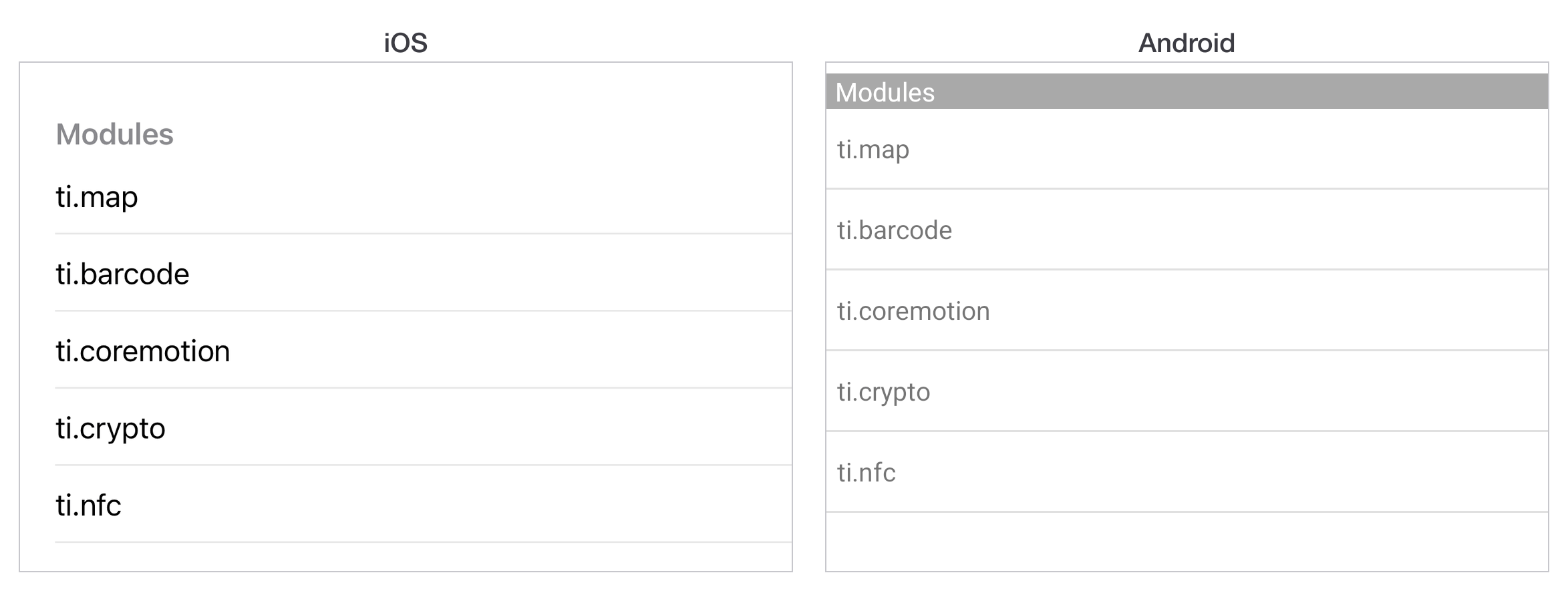
```js
|
|
28
|
+
const win = Ti.UI.createWindow({ backgroundColor: 'white' });
|
|
404
29
|
|
|
405
|
-
|
|
30
|
+
const section = Ti.UI.createListSection({ headerTitle: 'Modules' });
|
|
31
|
+
section.setItems([
|
|
32
|
+
{ properties: { title: 'ti.map' } },
|
|
33
|
+
{ properties: { title: 'ti.barcode' } },
|
|
34
|
+
{ properties: { title: 'ti.coremotion' } }
|
|
35
|
+
]);
|
|
406
36
|
|
|
407
|
-
|
|
37
|
+
const list = Ti.UI.createListView({ sections: [section] });
|
|
408
38
|
|
|
409
|
-
|
|
410
|
-
// DON'T - Will be lost when recycled
|
|
411
|
-
function handleClick(e) {
|
|
412
|
-
e.source.image = "star_gold.png";
|
|
413
|
-
}
|
|
414
|
-
```
|
|
415
|
-
|
|
416
|
-
Good:
|
|
417
|
-
|
|
418
|
-
```javascript
|
|
419
|
-
// DO - Update the data item
|
|
420
|
-
function handleClick(e) {
|
|
39
|
+
list.addEventListener('itemclick', (e) => {
|
|
421
40
|
const item = e.section.getItemAt(e.itemIndex);
|
|
422
|
-
|
|
423
|
-
e.section.updateItemAt(e.itemIndex, item);
|
|
424
|
-
}
|
|
425
|
-
```
|
|
426
|
-
|
|
427
|
-
### Rule 3: Minimize template count
|
|
428
|
-
|
|
429
|
-
Fewer templates means better native cell reuse.
|
|
430
|
-
|
|
431
|
-
Good: one template with conditional visibility
|
|
432
|
-
|
|
433
|
-
```xml
|
|
434
|
-
<ItemTemplate name="flexible">
|
|
435
|
-
<ImageView bindId="icon"/>
|
|
436
|
-
<Label bindId="title"/>
|
|
437
|
-
<Label bindId="subtitle"/> <!-- Hidden if not needed -->
|
|
438
|
-
</ItemTemplate>
|
|
439
|
-
```
|
|
440
|
-
|
|
441
|
-
Bad: multiple similar templates
|
|
442
|
-
|
|
443
|
-
```xml
|
|
444
|
-
<ItemTemplate name="withIcon">...</ItemTemplate>
|
|
445
|
-
<ItemTemplate name="withoutIcon">...</ItemTemplate>
|
|
446
|
-
<ItemTemplate name="withSubtitle">...</ItemTemplate>
|
|
447
|
-
```
|
|
448
|
-
|
|
449
|
-
### Rule 4: Use updateItemAt for changes
|
|
450
|
-
|
|
451
|
-
```javascript
|
|
452
|
-
// Get item data
|
|
453
|
-
const item = section.getItemAt(index);
|
|
454
|
-
|
|
455
|
-
// Modify properties
|
|
456
|
-
item.properties.backgroundColor = 'blue';
|
|
457
|
-
item.customField.text = 'Updated';
|
|
458
|
-
|
|
459
|
-
// Update in list
|
|
460
|
-
section.updateItemAt(index, item);
|
|
461
|
-
```
|
|
462
|
-
|
|
463
|
-
### Rule 5: Animations are limited
|
|
464
|
-
|
|
465
|
-
ListView items have limited animation support. For complex animations, consider TableView.
|
|
466
|
-
|
|
467
|
-
## 8. iOS action items (swipe actions)
|
|
468
|
-
|
|
469
|
-
```javascript
|
|
470
|
-
const section = $.myList.sections[0];
|
|
471
|
-
|
|
472
|
-
// Define edit actions as plain objects with title, style, and optional color
|
|
473
|
-
section.editActions = [
|
|
474
|
-
{
|
|
475
|
-
title: 'Delete',
|
|
476
|
-
style: Ti.UI.iOS.ROW_ACTION_STYLE_DESTRUCTIVE
|
|
477
|
-
},
|
|
478
|
-
{
|
|
479
|
-
title: 'More',
|
|
480
|
-
color: 'blue',
|
|
481
|
-
style: Ti.UI.iOS.ROW_ACTION_STYLE_NORMAL
|
|
482
|
-
}
|
|
483
|
-
];
|
|
484
|
-
section.canEdit = true;
|
|
485
|
-
|
|
486
|
-
// Handle actions - e.action is the title string of the tapped action
|
|
487
|
-
$.myList.addEventListener('editaction', (e) => {
|
|
488
|
-
if (e.action === 'Delete') {
|
|
489
|
-
e.section.deleteItemsAt(e.itemIndex, 1);
|
|
490
|
-
} else if (e.action === 'More') {
|
|
491
|
-
// Handle more action
|
|
492
|
-
Ti.API.info(`More tapped on item ${e.itemIndex} in section ${e.sectionIndex}`);
|
|
493
|
-
}
|
|
41
|
+
Ti.API.info(`tapped ${item.properties.title}`);
|
|
494
42
|
});
|
|
495
|
-
```
|
|
496
|
-
|
|
497
|
-
Available action styles:
|
|
498
|
-
- `Ti.UI.iOS.ROW_ACTION_STYLE_DEFAULT` - gray background
|
|
499
|
-
- `Ti.UI.iOS.ROW_ACTION_STYLE_DESTRUCTIVE` - red background (default)
|
|
500
|
-
- `Ti.UI.iOS.ROW_ACTION_STYLE_NORMAL` - custom color background
|
|
501
|
-
|
|
502
|
-
Event properties: `action` (string, the title), `itemId`, `itemIndex`, `section`, `sectionIndex`.
|
|
503
|
-
|
|
504
|
-
## 9. Editing mode (iOS)
|
|
505
|
-
|
|
506
|
-
Set `editing` to toggle edit mode and let users delete or reorder items:
|
|
507
43
|
|
|
508
|
-
|
|
509
|
-
|
|
510
|
-
$.myList.editing = true;
|
|
511
|
-
|
|
512
|
-
// Auto-remove sections that become empty during editing
|
|
513
|
-
$.myList.pruneSectionsOnEdit = true;
|
|
44
|
+
win.add(list);
|
|
45
|
+
win.open();
|
|
514
46
|
```
|
|
515
47
|
|
|
516
|
-
|
|
517
|
-
|
|
518
|
-
Fires when a user deletes an item in edit mode:
|
|
519
|
-
|
|
520
|
-
```javascript
|
|
521
|
-
$.myList.addEventListener('delete', (e) => {
|
|
522
|
-
Ti.API.info(`Deleted item ${e.itemIndex} from section ${e.sectionIndex}`);
|
|
523
|
-
});
|
|
524
|
-
```
|
|
48
|
+
`properties` sets properties on the row itself. With no template, `title` is
|
|
49
|
+
the one that shows.
|
|
525
50
|
|
|
526
|
-
|
|
51
|
+
## Templates
|
|
527
52
|
|
|
528
|
-
|
|
53
|
+
A template names the views in a row and gives each one a `bindId`. Items then
|
|
54
|
+
address those views by that id, so the data and the layout stay separate.
|
|
529
55
|
|
|
530
|
-
```
|
|
531
|
-
|
|
532
|
-
|
|
533
|
-
|
|
534
|
-
|
|
535
|
-
|
|
536
|
-
|
|
537
|
-
|
|
538
|
-
|
|
539
|
-
|
|
540
|
-
|
|
541
|
-
}
|
|
542
|
-
|
|
543
|
-
$.myList.searchView = searchView;
|
|
544
|
-
|
|
545
|
-
// Mark searchable text in items
|
|
546
|
-
const items = [
|
|
547
|
-
{
|
|
548
|
-
properties: {
|
|
549
|
-
title: "Apple",
|
|
550
|
-
searchableText: "Apple fruit red delicious" // Extra keywords
|
|
56
|
+
```js
|
|
57
|
+
const template = {
|
|
58
|
+
childTemplates: [
|
|
59
|
+
{
|
|
60
|
+
type: 'Ti.UI.Label',
|
|
61
|
+
bindId: 'name',
|
|
62
|
+
properties: { left: 16, font: { fontSize: 16, fontWeight: 'bold' } }
|
|
63
|
+
},
|
|
64
|
+
{
|
|
65
|
+
type: 'Ti.UI.Label',
|
|
66
|
+
bindId: 'detail',
|
|
67
|
+
properties: { right: 16, color: '#888', font: { fontSize: 14 } }
|
|
551
68
|
}
|
|
552
|
-
|
|
553
|
-
|
|
554
|
-
```
|
|
555
|
-
|
|
556
|
-
### Search properties
|
|
557
|
-
|
|
558
|
-
- `keepSectionsInSearch: true` preserves section headers while filtering results.
|
|
559
|
-
- `caseInsensitiveSearch: true` enables case-insensitive filtering.
|
|
560
|
-
|
|
561
|
-
```javascript
|
|
562
|
-
const listView = Ti.UI.createListView({
|
|
563
|
-
searchView: searchView,
|
|
564
|
-
keepSectionsInSearch: true,
|
|
565
|
-
caseInsensitiveSearch: true
|
|
566
|
-
});
|
|
567
|
-
```
|
|
568
|
-
|
|
569
|
-
### No results event
|
|
570
|
-
|
|
571
|
-
Since SDK 3.3.0, when items are filtered using `searchView` or `searchText`, the `noresults` event fires when there are no matches:
|
|
69
|
+
]
|
|
70
|
+
};
|
|
572
71
|
|
|
573
|
-
|
|
574
|
-
|
|
575
|
-
|
|
72
|
+
const list = Ti.UI.createListView({
|
|
73
|
+
templates: { row: template },
|
|
74
|
+
defaultItemTemplate: 'row',
|
|
75
|
+
sections: [section]
|
|
576
76
|
});
|
|
577
|
-
```
|
|
578
|
-
|
|
579
|
-
## 11. Performance best practices
|
|
580
|
-
|
|
581
|
-
Do:
|
|
582
|
-
- Use fixed heights in templates.
|
|
583
|
-
- Minimize number of templates.
|
|
584
|
-
- Use `updateItemAt()` for changes.
|
|
585
|
-
- Cache `sections[0]` reference.
|
|
586
|
-
- Use markers for infinite scroll.
|
|
587
|
-
- Test with real device data volumes.
|
|
588
|
-
|
|
589
|
-
Don't:
|
|
590
|
-
- Use `Ti.UI.SIZE` for row dimensions.
|
|
591
|
-
- Access `e.source` in itemclick events.
|
|
592
|
-
- Create too many similar templates.
|
|
593
|
-
- Add complex animations to list items.
|
|
594
|
-
- Ignore the recycled nature of views.
|
|
595
|
-
|
|
596
|
-
## 12. Transitioning from TableView
|
|
597
|
-
|
|
598
|
-
### Core logic differences
|
|
599
|
-
|
|
600
|
-
| TableView | ListView |
|
|
601
|
-
| -------------------- | ---------------------------- |
|
|
602
|
-
| TableViewRow | ListItem (Virtual) |
|
|
603
|
-
| `add()` views to row | `childTemplates` in Template |
|
|
604
|
-
| `data` property | `sections` property |
|
|
605
|
-
| Direct child access | Bound data updates only |
|
|
606
|
-
| `appendRow()` | `appendItems()` |
|
|
607
|
-
| `updateRow()` | `updateItemAt()` |
|
|
608
|
-
| `deleteRow()` | `deleteItemsAt()` |
|
|
609
|
-
|
|
610
|
-
### API differences
|
|
611
|
-
|
|
612
|
-
Properties not available for ListItem:
|
|
613
|
-
- `accessibilityLabel`, `className`, `editable`, `hasCheck`, `hasChild`, `hasDetail`, `leftImage`, `moveable`, `rightImage`.
|
|
614
|
-
- Alternatives: use `accessoryType` for indicators, and `image` or custom templates for images.
|
|
615
|
-
|
|
616
|
-
TableViewSection methods not supported by ListSection:
|
|
617
|
-
- `add`, `remove`, `rowAtIndex`.
|
|
618
|
-
- Alternatives: use `getItemAt` and `appendItems` or `deleteItemsAt`.
|
|
619
|
-
|
|
620
|
-
TableView methods not available to ListView:
|
|
621
|
-
- `appendRow`, `deleteRow`, `deselectRow`, `insertRowAfter`, `insertRowBefore`, `selectRow`, `updateRow`, `scrollToIndex`.
|
|
622
|
-
- Alternatives: use `scrollToItem` and `selectItem` (iOS). For row manipulation, use the containing ListSection.
|
|
623
|
-
|
|
624
|
-
## 13. Common patterns
|
|
625
|
-
|
|
626
|
-
### Infinite scroll with markers
|
|
627
|
-
|
|
628
|
-
```javascript
|
|
629
|
-
const PAGE_SIZE = 25;
|
|
630
|
-
let currentPage = 0;
|
|
631
77
|
|
|
632
|
-
|
|
633
|
-
|
|
634
|
-
|
|
635
|
-
|
|
636
|
-
$.myList.sections[0].setItems(data);
|
|
637
|
-
} else {
|
|
638
|
-
$.myList.sections[0].appendItems(data);
|
|
639
|
-
}
|
|
640
|
-
|
|
641
|
-
// Set marker for next page
|
|
642
|
-
const markerIndex = (page * PAGE_SIZE) + data.length - 1;
|
|
643
|
-
$.myList.setMarker({ sectionIndex: 0, itemIndex: markerIndex });
|
|
644
|
-
}
|
|
645
|
-
|
|
646
|
-
// Initial load
|
|
647
|
-
loadPage(0);
|
|
648
|
-
|
|
649
|
-
// Marker handler
|
|
650
|
-
$.myList.addEventListener('marker', (e) => {
|
|
651
|
-
currentPage++;
|
|
652
|
-
loadPage(currentPage);
|
|
653
|
-
});
|
|
78
|
+
section.setItems([
|
|
79
|
+
{ name: { text: 'ti.map' }, detail: { text: '5.7.0' } },
|
|
80
|
+
{ name: { text: 'ti.barcode' }, detail: { text: '4.2.0' } }
|
|
81
|
+
]);
|
|
654
82
|
```
|
|
655
83
|
|
|
656
|
-
|
|
84
|
+
Each key in an item that is not `properties` or `template` is a `bindId`, and
|
|
85
|
+
its value is the properties to set on that view.
|
|
657
86
|
|
|
658
|
-
|
|
659
|
-
|
|
87
|
+
> [!IMPORTANT]
|
|
88
|
+
> Row views are recycled. Every property a template sets on a row must be set
|
|
89
|
+
> by **every** item that uses it, or a row will inherit whatever the last item
|
|
90
|
+
> in that slot left behind. Set `color` on one item and not the next and the
|
|
91
|
+
> colour follows the recycled view down the list.
|
|
660
92
|
|
|
661
|
-
|
|
662
|
-
const item = e.section.getItemAt(e.itemIndex);
|
|
663
|
-
const key = `${e.sectionIndex}-${e.itemIndex}`;
|
|
664
|
-
|
|
665
|
-
if (selectedItems[key]) {
|
|
666
|
-
// Deselect
|
|
667
|
-
delete selectedItems[key];
|
|
668
|
-
item.properties.accessoryType = Ti.UI.LIST_ACCESSORY_TYPE_NONE;
|
|
669
|
-
} else {
|
|
670
|
-
// Select
|
|
671
|
-
selectedItems[key] = item;
|
|
672
|
-
item.properties.accessoryType = Ti.UI.LIST_ACCESSORY_TYPE_CHECKMARK;
|
|
673
|
-
}
|
|
674
|
-
|
|
675
|
-
e.section.updateItemAt(e.itemIndex, item);
|
|
676
|
-
});
|
|
677
|
-
```
|
|
93
|
+
## Changing the contents
|
|
678
94
|
|
|
679
|
-
|
|
95
|
+
Replace everything with `setItems`. Add to the end with `appendItems`. Change
|
|
96
|
+
one row in place with `updateItemAt`, which is what to use for a checkbox or a
|
|
97
|
+
"favourited" state, because it does not rebuild the section.
|
|
680
98
|
|
|
681
|
-
```
|
|
682
|
-
|
|
99
|
+
```js
|
|
100
|
+
section.updateItemAt(0, { name: { text: 'ti.map' }, detail: { text: '5.8.0' } });
|
|
683
101
|
```
|
|
684
102
|
|
|
685
|
-
|
|
686
|
-
|
|
687
|
-
### iOS vs Android
|
|
103
|
+
Sections are managed on the list: `appendSection`, `insertSectionAt`,
|
|
104
|
+
`replaceSectionAt`, `deleteSectionAt`.
|
|
688
105
|
|
|
689
|
-
|
|
690
|
-
| ---------------------- | ------------ | ------------- |
|
|
691
|
-
| Action items (swipe) | Full support | Not supported |
|
|
692
|
-
| Section index titles | Full support | Not supported |
|
|
693
|
-
| Search bar | Full support | Full support |
|
|
694
|
-
| Default template image | Left side | Right side |
|
|
695
|
-
| cacheSize property | Supported | Not supported |
|
|
106
|
+
## Which events fire
|
|
696
107
|
|
|
697
|
-
|
|
108
|
+
`itemclick` is the one you want, and it gives you `sectionIndex`, `itemIndex`,
|
|
109
|
+
`section` and `bindId` - the last being which view inside the row was tapped,
|
|
110
|
+
which is how one row can have a tappable button and a tappable body.
|
|
698
111
|
|
|
699
|
-
|
|
112
|
+
`scrollstart`, `scrolling`, `scrollend`, `dragstart` and `dragend` cover
|
|
113
|
+
scrolling. `marker` fires when a row you nominated with `setMarker` comes into
|
|
114
|
+
view, which is the hook for loading the next page of results.
|
|
700
115
|
|
|
701
|
-
|
|
702
|
-
const listView = Ti.UI.createListView({
|
|
703
|
-
style: Ti.UI.iOS.ListViewStyle.GROUPED,
|
|
704
|
-
sections: [sectionA, sectionB]
|
|
705
|
-
});
|
|
706
|
-
```
|
|
116
|
+
## TableView
|
|
707
117
|
|
|
708
|
-
|
|
118
|
+
`TableView` builds rows as real views, so a row is a view you can hold onto and
|
|
119
|
+
change directly:
|
|
709
120
|
|
|
710
|
-
|
|
711
|
-
|
|
712
|
-
|
|
713
|
-
|
|
714
|
-
|
|
715
|
-
|
|
716
|
-
|
|
717
|
-
pullView.add(Ti.UI.createLabel({ text: 'Pull to refresh...' }));
|
|
718
|
-
|
|
719
|
-
$.myList.pullView = pullView;
|
|
720
|
-
|
|
721
|
-
$.myList.addEventListener('pull', (e) => {
|
|
722
|
-
// User is pulling - update UI as needed
|
|
723
|
-
pullView.children[0].text = e.active ? 'Release to refresh...' : 'Pull to refresh...';
|
|
724
|
-
});
|
|
725
|
-
|
|
726
|
-
$.myList.addEventListener('pullend', (e) => {
|
|
727
|
-
// User released - trigger data refresh
|
|
728
|
-
refreshData();
|
|
121
|
+
```js
|
|
122
|
+
const table = Ti.UI.createTableView({
|
|
123
|
+
data: [
|
|
124
|
+
{ title: 'General' },
|
|
125
|
+
{ title: 'Notifications' },
|
|
126
|
+
{ title: 'Privacy' }
|
|
127
|
+
]
|
|
729
128
|
});
|
|
730
|
-
```
|
|
731
129
|
|
|
732
|
-
|
|
733
|
-
|
|
734
|
-
```javascript
|
|
735
|
-
// Number of views to pre-render offscreen
|
|
736
|
-
$.myList.cacheSize = 3; // Default
|
|
130
|
+
table.addEventListener('click', (e) => Ti.API.info(`row ${e.index}`));
|
|
737
131
|
```
|
|
738
132
|
|
|
739
|
-
|
|
740
|
-
|
|
741
|
-
|
|
133
|
+
That directness is useful for a short fixed list. Prefer template-based
|
|
134
|
+
`ListView` for long lists. Avoid treating the TableView model as a guarantee
|
|
135
|
+
that native rows are never reused: the released
|
|
136
|
+
[TableViewRow API](https://titaniumsdk.com/docs/sdk/13.4.1/Titanium.UI.TableViewRow)
|
|
137
|
+
documents structural row classes for Android rendering performance.
|
|
742
138
|
|
|
743
|
-
|
|
139
|
+
The event is `click`, not `itemclick`.
|
|
744
140
|
|
|
745
|
-
|
|
141
|
+
|
|
746
142
|
|
|
747
|
-
|
|
143
|
+
## Next
|
|
748
144
|
|
|
749
|
-
|
|
145
|
+
[Icons and launch screens](icons-and-splash-screens.md) is what the
|
|
146
|
+
app looks like before it opens.
|