@intlayer/docs 8.10.1 → 8.11.1
This diff represents the content of publicly available package versions that have been released to one of the supported registries. The information contained in this diff is provided for informational purposes only and reflects changes between package versions as they appear in their respective public registries.
- package/dist/cjs/common.cjs +3 -1
- package/dist/cjs/common.cjs.map +1 -1
- package/dist/cjs/generated/docs.entry.cjs +39 -19
- package/dist/cjs/generated/docs.entry.cjs.map +1 -1
- package/dist/esm/common.mjs +3 -1
- package/dist/esm/common.mjs.map +1 -1
- package/dist/esm/generated/docs.entry.mjs +39 -19
- package/dist/esm/generated/docs.entry.mjs.map +1 -1
- package/dist/types/common.d.ts.map +1 -1
- package/dist/types/generated/docs.entry.d.ts +2 -1
- package/dist/types/generated/docs.entry.d.ts.map +1 -1
- package/docs/ar/benchmark/nextjs.md +1 -1
- package/docs/ar/benchmark/solid.md +1 -1
- package/docs/ar/benchmark/svelte.md +1 -1
- package/docs/ar/benchmark/tanstack.md +1 -1
- package/docs/ar/dictionary/markdown.md +4 -7
- package/docs/ar/{intlayer_with_angular.md → intlayer_with_angular_19.md} +8 -7
- package/docs/ar/intlayer_with_angular_21.md +412 -0
- package/docs/bn/intlayer_with_angular_21.md +412 -0
- package/docs/cs/intlayer_with_angular_21.md +412 -0
- package/docs/de/benchmark/nextjs.md +1 -1
- package/docs/de/benchmark/solid.md +1 -1
- package/docs/de/benchmark/svelte.md +1 -1
- package/docs/de/benchmark/tanstack.md +1 -1
- package/docs/de/dictionary/markdown.md +4 -7
- package/docs/de/{intlayer_with_angular.md → intlayer_with_angular_19.md} +8 -7
- package/docs/de/intlayer_with_angular_21.md +412 -0
- package/docs/en/benchmark/nextjs.md +1 -1
- package/docs/en/benchmark/solid.md +1 -1
- package/docs/en/benchmark/svelte.md +1 -1
- package/docs/en/benchmark/tanstack.md +1 -1
- package/docs/en/dictionary/markdown.md +4 -7
- package/docs/en/{intlayer_with_angular.md → intlayer_with_angular_19.md} +8 -7
- package/docs/en/intlayer_with_angular_21.md +412 -0
- package/docs/en-GB/benchmark/nextjs.md +1 -1
- package/docs/en-GB/benchmark/solid.md +1 -1
- package/docs/en-GB/benchmark/svelte.md +1 -1
- package/docs/en-GB/benchmark/tanstack.md +1 -1
- package/docs/en-GB/{intlayer_with_angular.md → intlayer_with_angular_19.md} +8 -7
- package/docs/en-GB/intlayer_with_angular_21.md +412 -0
- package/docs/es/benchmark/nextjs.md +1 -1
- package/docs/es/benchmark/solid.md +1 -1
- package/docs/es/benchmark/svelte.md +1 -1
- package/docs/es/benchmark/tanstack.md +1 -1
- package/docs/es/dictionary/markdown.md +4 -7
- package/docs/es/{intlayer_with_angular.md → intlayer_with_angular_19.md} +8 -7
- package/docs/es/intlayer_with_angular_21.md +412 -0
- package/docs/fr/benchmark/nextjs.md +1 -1
- package/docs/fr/benchmark/solid.md +1 -1
- package/docs/fr/benchmark/svelte.md +1 -1
- package/docs/fr/benchmark/tanstack.md +1 -1
- package/docs/fr/dictionary/markdown.md +4 -7
- package/docs/fr/{intlayer_with_angular.md → intlayer_with_angular_19.md} +8 -7
- package/docs/fr/intlayer_with_angular_21.md +412 -0
- package/docs/hi/benchmark/nextjs.md +1 -1
- package/docs/hi/benchmark/solid.md +1 -1
- package/docs/hi/benchmark/svelte.md +1 -1
- package/docs/hi/benchmark/tanstack.md +1 -1
- package/docs/hi/dictionary/markdown.md +4 -7
- package/docs/hi/{intlayer_with_angular.md → intlayer_with_angular_19.md} +8 -7
- package/docs/hi/intlayer_with_angular_21.md +412 -0
- package/docs/id/benchmark/nextjs.md +1 -1
- package/docs/id/benchmark/solid.md +1 -1
- package/docs/id/benchmark/svelte.md +1 -1
- package/docs/id/benchmark/tanstack.md +1 -1
- package/docs/id/dictionary/markdown.md +4 -7
- package/docs/id/{intlayer_with_angular.md → intlayer_with_angular_19.md} +8 -7
- package/docs/id/intlayer_with_angular_21.md +412 -0
- package/docs/it/benchmark/nextjs.md +1 -1
- package/docs/it/benchmark/solid.md +1 -1
- package/docs/it/benchmark/svelte.md +1 -1
- package/docs/it/benchmark/tanstack.md +1 -1
- package/docs/it/dictionary/markdown.md +4 -7
- package/docs/it/{intlayer_with_angular.md → intlayer_with_angular_19.md} +8 -7
- package/docs/it/intlayer_with_angular_21.md +412 -0
- package/docs/ja/benchmark/nextjs.md +1 -1
- package/docs/ja/benchmark/solid.md +1 -1
- package/docs/ja/benchmark/svelte.md +1 -1
- package/docs/ja/benchmark/tanstack.md +1 -1
- package/docs/ja/{intlayer_with_angular.md → intlayer_with_angular_19.md} +8 -7
- package/docs/ja/intlayer_with_angular_21.md +412 -0
- package/docs/ko/benchmark/nextjs.md +1 -1
- package/docs/ko/benchmark/solid.md +1 -1
- package/docs/ko/benchmark/svelte.md +1 -1
- package/docs/ko/benchmark/tanstack.md +1 -1
- package/docs/ko/dictionary/markdown.md +4 -7
- package/docs/ko/{intlayer_with_angular.md → intlayer_with_angular_19.md} +8 -7
- package/docs/ko/intlayer_with_angular_21.md +412 -0
- package/docs/nl/intlayer_with_angular_21.md +412 -0
- package/docs/pl/benchmark/nextjs.md +1 -1
- package/docs/pl/benchmark/solid.md +1 -1
- package/docs/pl/benchmark/svelte.md +1 -1
- package/docs/pl/benchmark/tanstack.md +1 -1
- package/docs/pl/dictionary/markdown.md +4 -7
- package/docs/pl/{intlayer_with_angular.md → intlayer_with_angular_19.md} +8 -7
- package/docs/pl/intlayer_with_angular_21.md +412 -0
- package/docs/pt/benchmark/nextjs.md +1 -1
- package/docs/pt/benchmark/solid.md +1 -1
- package/docs/pt/benchmark/svelte.md +1 -1
- package/docs/pt/benchmark/tanstack.md +1 -1
- package/docs/pt/dictionary/markdown.md +4 -7
- package/docs/pt/{intlayer_with_angular.md → intlayer_with_angular_19.md} +8 -7
- package/docs/pt/intlayer_with_angular_21.md +412 -0
- package/docs/ru/benchmark/nextjs.md +1 -1
- package/docs/ru/benchmark/solid.md +1 -1
- package/docs/ru/benchmark/svelte.md +1 -1
- package/docs/ru/benchmark/tanstack.md +1 -1
- package/docs/ru/{intlayer_with_angular.md → intlayer_with_angular_19.md} +8 -7
- package/docs/ru/intlayer_with_angular_21.md +412 -0
- package/docs/tr/benchmark/nextjs.md +1 -1
- package/docs/tr/benchmark/solid.md +1 -1
- package/docs/tr/benchmark/svelte.md +1 -1
- package/docs/tr/benchmark/tanstack.md +1 -1
- package/docs/tr/dictionary/markdown.md +4 -7
- package/docs/tr/{intlayer_with_angular.md → intlayer_with_angular_19.md} +8 -7
- package/docs/tr/intlayer_with_angular_21.md +412 -0
- package/docs/uk/benchmark/nextjs.md +1 -1
- package/docs/uk/benchmark/solid.md +1 -1
- package/docs/uk/benchmark/svelte.md +1 -1
- package/docs/uk/benchmark/tanstack.md +1 -1
- package/docs/uk/dictionary/markdown.md +4 -7
- package/docs/uk/{intlayer_with_angular.md → intlayer_with_angular_19.md} +8 -7
- package/docs/uk/intlayer_with_angular_21.md +412 -0
- package/docs/ur/intlayer_with_angular_21.md +412 -0
- package/docs/vi/benchmark/nextjs.md +1 -1
- package/docs/vi/benchmark/solid.md +1 -1
- package/docs/vi/benchmark/svelte.md +1 -1
- package/docs/vi/benchmark/tanstack.md +1 -1
- package/docs/vi/dictionary/markdown.md +4 -7
- package/docs/vi/{intlayer_with_angular.md → intlayer_with_angular_19.md} +8 -7
- package/docs/vi/intlayer_with_angular_21.md +412 -0
- package/docs/zh/benchmark/nextjs.md +1 -1
- package/docs/zh/benchmark/solid.md +1 -1
- package/docs/zh/benchmark/svelte.md +1 -1
- package/docs/zh/benchmark/tanstack.md +1 -1
- package/docs/zh/dictionary/markdown.md +4 -7
- package/docs/zh/{intlayer_with_angular.md → intlayer_with_angular_19.md} +8 -7
- package/docs/zh/intlayer_with_angular_21.md +412 -0
- package/docs/zh-TW/intlayer_with_angular_21.md +412 -0
- package/package.json +6 -6
- package/src/common.ts +12 -6
- package/src/generated/docs.entry.ts +39 -19
|
@@ -0,0 +1,412 @@
|
|
|
1
|
+
---
|
|
2
|
+
createdAt: 2025-04-18
|
|
3
|
+
updatedAt: 2026-05-06
|
|
4
|
+
title: Angular i18n - Bir Angular 21 uygulaması (Vite) 2026'da nasıl çevrilir
|
|
5
|
+
description: Angular web sitenizi nasıl çok dilli yapacağınızı keşfedin. Onu uluslararasılaştırmak (i18n) ve çevirmek için belgeleri takip edin.
|
|
6
|
+
keywords:
|
|
7
|
+
- Uluslararasılaştırma
|
|
8
|
+
- Dokümantasyon
|
|
9
|
+
- Intlayer
|
|
10
|
+
- Angular
|
|
11
|
+
- JavaScript
|
|
12
|
+
slugs:
|
|
13
|
+
- doc
|
|
14
|
+
- environment
|
|
15
|
+
- angular
|
|
16
|
+
applicationTemplate: https://github.com/aymericzip/intlayer-angular-21-template
|
|
17
|
+
applicationShowcase: https://intlayer-angular-21-template.vercel.app/
|
|
18
|
+
history:
|
|
19
|
+
- version: 8.9.0
|
|
20
|
+
date: 2026-05-04
|
|
21
|
+
changes: "Solid useIntlayer API kullanımı doğrudan özellik erişimine güncellendi"
|
|
22
|
+
- version: 8.0.0
|
|
23
|
+
date: 2026-01-26
|
|
24
|
+
changes: "Kararlı sürüm yayınlandı"
|
|
25
|
+
- version: 8.0.0
|
|
26
|
+
date: 2025-12-30
|
|
27
|
+
changes: "init komutu eklendi"
|
|
28
|
+
- version: 5.5.10
|
|
29
|
+
date: 2025-06-29
|
|
30
|
+
changes: "İlk sürüm geçmişi"
|
|
31
|
+
---
|
|
32
|
+
|
|
33
|
+
# Angular 21 (Vite) web sitenizi Intlayer kullanarak çevirin | Uluslararasılaştırma (i18n)
|
|
34
|
+
|
|
35
|
+
## İçindekiler
|
|
36
|
+
|
|
37
|
+
<TOC/>
|
|
38
|
+
|
|
39
|
+
## Intlayer Nedir?
|
|
40
|
+
|
|
41
|
+
**Intlayer**, modern web uygulamalarında çok dilli desteği basitleştirmek için tasarlanmış yenilikçi, açık kaynaklı bir uluslararasılaştırma (i18n) kütüphanesidir.
|
|
42
|
+
|
|
43
|
+
Intlayer ile şunları yapabilirsiniz:
|
|
44
|
+
|
|
45
|
+
- Bileşen düzeyinde bildirimsel sözlükler kullanarak **çevirileri kolayca yönetin**.
|
|
46
|
+
- Meta verileri, rotaları ve içeriği **dinamik olarak yerelleştirin**.
|
|
47
|
+
- Otomatik tamamlamayı ve hata algılamayı iyileştiren otomatik oluşturulmuş türlerle **TypeScript desteği sağlayın**.
|
|
48
|
+
- Dinamik yerel ayar algılama ve değiştirme gibi **gelişmiş özelliklerden yararlanın**.
|
|
49
|
+
|
|
50
|
+
---
|
|
51
|
+
|
|
52
|
+
## Intlayer'ı Bir Angular Uygulamasına Kurmak İçin Adım Adım Kılavuz
|
|
53
|
+
|
|
54
|
+
<Tabs defaultTab="code">
|
|
55
|
+
<Tab label="Kod" value="code">
|
|
56
|
+
|
|
57
|
+
<iframe
|
|
58
|
+
src="https://ide.intlayer.org/aymericzip/intlayer-angular-21-template?file=intlayer.config.ts"
|
|
59
|
+
className="m-auto overflow-hidden rounded-lg border-0 max-md:size-full max-md:h-[700px] md:aspect-16/9 md:w-full"
|
|
60
|
+
title="Demo CodeSandbox - Uygulamanızı Intlayer kullanarak nasıl uluslararasılaştırabilirsiniz"
|
|
61
|
+
sandbox="allow-forms allow-modals allow-popups allow-presentation allow-same-origin allow-scripts"
|
|
62
|
+
loading="lazy"
|
|
63
|
+
/>
|
|
64
|
+
|
|
65
|
+
</Tab>
|
|
66
|
+
<Tab label="Demo" value="demo">
|
|
67
|
+
|
|
68
|
+
<iframe
|
|
69
|
+
src="https://intlayer-angular-21-template.vercel.app/"
|
|
70
|
+
className="m-auto overflow-hidden rounded-lg border-0 max-md:size-full max-md:h-[700px] md:aspect-16/9 md:w-full"
|
|
71
|
+
title="Demo - intlayer-angular-template"
|
|
72
|
+
sandbox="allow-forms allow-modals allow-popups allow-presentation allow-same-origin allow-scripts"
|
|
73
|
+
loading="lazy"
|
|
74
|
+
/>
|
|
75
|
+
|
|
76
|
+
</Tab>
|
|
77
|
+
</Tabs>
|
|
78
|
+
|
|
79
|
+
GitHub'da [Uygulama Şablonunu](https://github.com/aymericzip/intlayer-angular-21-template) görüntüleyin.
|
|
80
|
+
|
|
81
|
+
### Adım 1: Bağımlılıkları Yükleyin
|
|
82
|
+
|
|
83
|
+
Gerekli paketleri npm kullanarak kurun:
|
|
84
|
+
|
|
85
|
+
```bash packageManager="npm"
|
|
86
|
+
npm install intlayer angular-intlayer
|
|
87
|
+
npm install @angular-builders/custom-esbuild --save-dev
|
|
88
|
+
npx intlayer init
|
|
89
|
+
```
|
|
90
|
+
|
|
91
|
+
```bash packageManager="pnpm"
|
|
92
|
+
pnpm add intlayer angular-intlayer
|
|
93
|
+
pnpm add @angular-builders/custom-esbuild --save-dev
|
|
94
|
+
pnpm intlayer init
|
|
95
|
+
```
|
|
96
|
+
|
|
97
|
+
```bash packageManager="yarn"
|
|
98
|
+
yarn add intlayer angular-intlayer
|
|
99
|
+
yarn add @angular-builders/custom-esbuild --save-dev
|
|
100
|
+
yarn intlayer init
|
|
101
|
+
```
|
|
102
|
+
|
|
103
|
+
```bash packageManager="bun"
|
|
104
|
+
bun add intlayer angular-intlayer
|
|
105
|
+
bun add @angular-builders/custom-esbuild --dev
|
|
106
|
+
bun x intlayer init
|
|
107
|
+
```
|
|
108
|
+
|
|
109
|
+
- **intlayer**
|
|
110
|
+
|
|
111
|
+
Yapılandırma yönetimi, çeviri, [içerik bildirimi](https://github.com/aymericzip/intlayer/blob/main/docs/docs/tr/dictionary/content_file.md), dönüştürme ve [CLI komutları](https://github.com/aymericzip/intlayer/blob/main/docs/docs/tr/cli/index.md) için uluslararasılaştırma araçları sağlayan çekirdek paket.
|
|
112
|
+
|
|
113
|
+
- **angular-intlayer**
|
|
114
|
+
Intlayer'ı Angular uygulamasıyla bütünleştiren paket. Angular uluslararasılaştırması için bağlam sağlayıcılar ve kancalar sunar.
|
|
115
|
+
|
|
116
|
+
- **@angular-builders/custom-esbuild**
|
|
117
|
+
Angular CLI'nin esbuild yapılandırmasını özelleştirmek için gereklidir.
|
|
118
|
+
|
|
119
|
+
### Adım 2: Projenizin Yapılandırması
|
|
120
|
+
|
|
121
|
+
Uygulamanızın dillerini yapılandırmak için bir yapılandırma dosyası oluşturun:
|
|
122
|
+
|
|
123
|
+
```typescript fileName="intlayer.config.ts" codeFormat={["typescript", "esm", "commonjs"]}
|
|
124
|
+
import { Locales, type IntlayerConfig } from "intlayer";
|
|
125
|
+
|
|
126
|
+
const config: IntlayerConfig = {
|
|
127
|
+
internationalization: {
|
|
128
|
+
locales: [
|
|
129
|
+
Locales.ENGLISH,
|
|
130
|
+
Locales.FRENCH,
|
|
131
|
+
Locales.SPANISH,
|
|
132
|
+
// Diğer dilleriniz
|
|
133
|
+
],
|
|
134
|
+
defaultLocale: Locales.ENGLISH,
|
|
135
|
+
},
|
|
136
|
+
};
|
|
137
|
+
|
|
138
|
+
export default config;
|
|
139
|
+
```
|
|
140
|
+
|
|
141
|
+
> Bu yapılandırma dosyası aracılığıyla yerelleştirilmiş URL'ler, ara yazılım yönlendirmesi, çerez adları, içerik bildirimlerinizin konumu ve uzantısı oluşturabilir, konsoldaki Intlayer günlüklerini devre dışı bırakabilir ve daha fazlasını yapabilirsiniz. Kullanılabilir parametrelerin tam listesi için [yapılandırma belgelerine](https://github.com/aymericzip/intlayer/blob/main/docs/docs/tr/configuration.md) başvurun.
|
|
142
|
+
|
|
143
|
+
### Adım 3: Intlayer'ı Angular Yapılandırmanıza Entegre Edin
|
|
144
|
+
|
|
145
|
+
Intlayer'ı Angular CLI ile bütünleştirmek için özel bir oluşturucu (builder) kullanmanız gerekir. Bu kılavuz, Vite/esbuild kullandığınızı (Angular 21 projeleri için varsayılan) varsaymaktadır.
|
|
146
|
+
|
|
147
|
+
Öncelikle, `angular.json` dosyanızı özel esbuild oluşturucuyu kullanacak şekilde değiştirin. `build` ve `serve` yapılandırmalarını güncelleyin:
|
|
148
|
+
|
|
149
|
+
```json5 fileName="angular.json"
|
|
150
|
+
{
|
|
151
|
+
"projects": {
|
|
152
|
+
"your-app-name": {
|
|
153
|
+
"architect": {
|
|
154
|
+
"build": {
|
|
155
|
+
"builder": "@angular-builders/custom-esbuild:application", // replace "@angular/build:application"
|
|
156
|
+
"options": {
|
|
157
|
+
"define": {
|
|
158
|
+
"process.env": "{}",
|
|
159
|
+
},
|
|
160
|
+
"plugins": ["./esbuild.plugins.ts"],
|
|
161
|
+
"browser": "src/main.ts",
|
|
162
|
+
// ...
|
|
163
|
+
},
|
|
164
|
+
},
|
|
165
|
+
"serve": {
|
|
166
|
+
"builder": "@angular-builders/custom-esbuild:dev-server", // replace "@angular/build:dev-server"
|
|
167
|
+
"options": {
|
|
168
|
+
"prebundle": {
|
|
169
|
+
"exclude": [
|
|
170
|
+
"intlayer",
|
|
171
|
+
"angular-intlayer",
|
|
172
|
+
"@intlayer/config/built",
|
|
173
|
+
"@intlayer/core"
|
|
174
|
+
]
|
|
175
|
+
},
|
|
176
|
+
},
|
|
177
|
+
},
|
|
178
|
+
},
|
|
179
|
+
},
|
|
180
|
+
}
|
|
181
|
+
```
|
|
182
|
+
|
|
183
|
+
> `angular.json` içindeki `your-app-name` ifadesini projenizin gerçek adıyla değiştirdiğinizden emin olun.
|
|
184
|
+
|
|
185
|
+
Ardından, projenizin kök dizininde bir `esbuild.plugins.ts` dosyası oluşturun:
|
|
186
|
+
|
|
187
|
+
```typescript fileName="esbuild.plugins.ts"
|
|
188
|
+
import { intlayerEsbuildPlugin } from "angular-intlayer/esbuild";
|
|
189
|
+
|
|
190
|
+
export default [intlayerEsbuildPlugin()];
|
|
191
|
+
```
|
|
192
|
+
|
|
193
|
+
> `intlayerEsbuildPlugin` işlevi, esbuild'i Intlayer ile yapılandırır. İçerik beyan dosyalarını işlemek için eklentiyi yerleştirir ve optimum performans için takma adlar kurar.
|
|
194
|
+
|
|
195
|
+
> **NX kullanıcıları**: NX'in Angular derleyicileri, eklenti dosyalarını Node'un yerel ESM çözünürlüğü aracılığıyla yükler ve TypeScript eklenti dosyalarını anında derlemez. Bunun yerine bir `.mjs` dosyası kullanın ve `angular.json` dosyasındaki `plugins` referansını buna göre güncelleyin:
|
|
196
|
+
>
|
|
197
|
+
> ```javascript fileName="esbuild.plugins.mjs"
|
|
198
|
+
> import { intlayerEsbuildPlugin } from "angular-intlayer/esbuild";
|
|
199
|
+
>
|
|
200
|
+
> export default [intlayerEsbuildPlugin()];
|
|
201
|
+
> ```
|
|
202
|
+
>
|
|
203
|
+
> Ardından `angular.json` içinde `"./esbuild.plugins.ts"` yerine `"./esbuild.plugins.mjs"` değerini gösterin.
|
|
204
|
+
|
|
205
|
+
### Adım 4: İçeriğinizi Bildirin
|
|
206
|
+
|
|
207
|
+
Çevirileri depolamak için içerik bildirimlerinizi oluşturun ve yönetin:
|
|
208
|
+
|
|
209
|
+
```tsx fileName="src/app/app.content.ts" contentDeclarationFormat=["typescript", "esm", "cjs"]
|
|
210
|
+
import { t, type Dictionary } from "intlayer";
|
|
211
|
+
|
|
212
|
+
const appContent = {
|
|
213
|
+
key: "app",
|
|
214
|
+
content: {
|
|
215
|
+
title: t({
|
|
216
|
+
en: "Hello",
|
|
217
|
+
fr: "Bonjour",
|
|
218
|
+
es: "Hola",
|
|
219
|
+
}),
|
|
220
|
+
congratulations: t({
|
|
221
|
+
en: "Congratulations! Your app is running. 🎉",
|
|
222
|
+
fr: "Félicitations! Votre application est en cours d'exécution. 🎉",
|
|
223
|
+
es: "¡Felicidades! Tu aplicación está en ejecución. 🎉",
|
|
224
|
+
}),
|
|
225
|
+
exploreDocs: t({
|
|
226
|
+
en: "Explore the Docs",
|
|
227
|
+
fr: "Explorer les Docs",
|
|
228
|
+
es: "Explorar los Docs",
|
|
229
|
+
}),
|
|
230
|
+
learnWithTutorials: t({
|
|
231
|
+
en: "Learn with Tutorials",
|
|
232
|
+
fr: "Apprendre avec les Tutoriels",
|
|
233
|
+
es: "Aprender con los Tutorios",
|
|
234
|
+
}),
|
|
235
|
+
cliDocs: "CLI Docs",
|
|
236
|
+
angularLanguageService: t({
|
|
237
|
+
en: "Angular Language Service",
|
|
238
|
+
fr: "Service de Langage Angular",
|
|
239
|
+
es: "Servicio de Lenguaje Angular",
|
|
240
|
+
}),
|
|
241
|
+
angularDevTools: "Angular DevTools",
|
|
242
|
+
github: "Github",
|
|
243
|
+
twitter: "Twitter",
|
|
244
|
+
youtube: "Youtube",
|
|
245
|
+
},
|
|
246
|
+
} satisfies Dictionary;
|
|
247
|
+
|
|
248
|
+
export default appContent;
|
|
249
|
+
```
|
|
250
|
+
|
|
251
|
+
> İçerik bildirimleriniz, `contentDir` dizinine (varsayılan olarak `./src`) eklendiği sürece uygulamanızın herhangi bir yerinde tanımlanabilir. Ayrıca içerik bildirimi dosya uzantısıyla (varsayılan olarak `.content.{json,ts,tsx,js,jsx,mjs,cjs}`) eşleşmelidir.
|
|
252
|
+
|
|
253
|
+
> Daha fazla ayrıntı için [içerik bildirimi belgelerine](https://github.com/aymericzip/intlayer/blob/main/docs/docs/tr/dictionary/content_file.md) bakın.
|
|
254
|
+
|
|
255
|
+
### Adım 5: Kodunuzda Intlayer'dan Yararlanın
|
|
256
|
+
|
|
257
|
+
Tüm Angular uygulamanız boyunca Intlayer'ın uluslararasılaştırma özelliklerinden yararlanmak için, Intlayer'ı uygulamanızın yapılandırmasında sağlamanız gerekir.
|
|
258
|
+
|
|
259
|
+
```typescript fileName="src/app/app.config.ts"
|
|
260
|
+
import { ApplicationConfig } from "@angular/core";
|
|
261
|
+
import { provideRouter } from "@angular/router";
|
|
262
|
+
import { provideIntlayer } from "angular-intlayer";
|
|
263
|
+
import { routes } from "./app.routes";
|
|
264
|
+
|
|
265
|
+
export const appConfig: ApplicationConfig = {
|
|
266
|
+
providers: [
|
|
267
|
+
provideRouter(routes),
|
|
268
|
+
provideIntlayer(), // Intlayer sağlayıcısını buraya ekleyin
|
|
269
|
+
],
|
|
270
|
+
};
|
|
271
|
+
```
|
|
272
|
+
|
|
273
|
+
Ardından, herhangi bir bileşende `useIntlayer` işlevini kullanabilirsiniz.
|
|
274
|
+
|
|
275
|
+
```typescript fileName="src/app/app.component.ts"
|
|
276
|
+
import { Component } from "@angular/core";
|
|
277
|
+
import { RouterOutlet } from "@angular/router";
|
|
278
|
+
import { useIntlayer } from "angular-intlayer";
|
|
279
|
+
|
|
280
|
+
@Component({
|
|
281
|
+
selector: "app-root",
|
|
282
|
+
standalone: true,
|
|
283
|
+
imports: [RouterOutlet],
|
|
284
|
+
templateUrl: "./app.component.html",
|
|
285
|
+
styleUrl: "./app.component.css",
|
|
286
|
+
})
|
|
287
|
+
export class AppComponent {
|
|
288
|
+
content = useIntlayer("app");
|
|
289
|
+
}
|
|
290
|
+
```
|
|
291
|
+
|
|
292
|
+
Ve şablonunuzda:
|
|
293
|
+
|
|
294
|
+
```html fileName="src/app/app.component.html"
|
|
295
|
+
<div class="content">
|
|
296
|
+
<h1>{{ content().title }}</h1>
|
|
297
|
+
<p>{{ content().congratulations }}</p>
|
|
298
|
+
</div>
|
|
299
|
+
```
|
|
300
|
+
|
|
301
|
+
Intlayer içeriği bir `Signal` olarak döndürülür, böylece değerlere sinyali çağırarak erişebilirsiniz: `content().title`.
|
|
302
|
+
|
|
303
|
+
### (İsteğe Bağlı) Adım 6: İçeriğinizin dilini değiştirin
|
|
304
|
+
|
|
305
|
+
İçeriğinizin dilini değiştirmek için, `useLocale` işlevinin sağladığı `setLocale` işlevini kullanabilirsiniz. Bu, uygulamanın yerel ayarını belirlemenize ve içeriği buna göre güncellemenize olanak tanır.
|
|
306
|
+
|
|
307
|
+
Diller arasında geçiş yapmak için bir bileşen oluşturun:
|
|
308
|
+
|
|
309
|
+
```typescript fileName="src/app/locale-switcher.component.ts"
|
|
310
|
+
import { Component } from "@angular/core";
|
|
311
|
+
import { CommonModule } from "@angular/common";
|
|
312
|
+
import { useLocale } from "angular-intlayer";
|
|
313
|
+
|
|
314
|
+
@Component({
|
|
315
|
+
selector: "app-locale-switcher",
|
|
316
|
+
standalone: true,
|
|
317
|
+
imports: [CommonModule],
|
|
318
|
+
template: `
|
|
319
|
+
<div class="locale-switcher">
|
|
320
|
+
<select
|
|
321
|
+
[value]="locale()"
|
|
322
|
+
(change)="setLocale($any($event.target).value)"
|
|
323
|
+
>
|
|
324
|
+
@for (loc of availableLocales; track loc) {
|
|
325
|
+
<option [value]="loc">{{ loc }}</option>
|
|
326
|
+
}
|
|
327
|
+
</select>
|
|
328
|
+
</div>
|
|
329
|
+
`,
|
|
330
|
+
})
|
|
331
|
+
export class LocaleSwitcherComponent {
|
|
332
|
+
localeCtx = useLocale();
|
|
333
|
+
|
|
334
|
+
locale = this.localeCtx.locale;
|
|
335
|
+
availableLocales = this.localeCtx.availableLocales;
|
|
336
|
+
setLocale = this.localeCtx.setLocale;
|
|
337
|
+
}
|
|
338
|
+
```
|
|
339
|
+
|
|
340
|
+
Sonra bu bileşeni `app.component.ts` dosyanızda kullanın:
|
|
341
|
+
|
|
342
|
+
```typescript fileName="src/app/app.component.ts"
|
|
343
|
+
import { Component } from "@angular/core";
|
|
344
|
+
import { RouterOutlet } from "@angular/router";
|
|
345
|
+
import { useIntlayer } from "angular-intlayer";
|
|
346
|
+
import { LocaleSwitcherComponent } from "./locale-switcher.component";
|
|
347
|
+
|
|
348
|
+
@Component({
|
|
349
|
+
selector: "app-root",
|
|
350
|
+
standalone: true,
|
|
351
|
+
imports: [RouterOutlet, LocaleSwitcherComponent],
|
|
352
|
+
templateUrl: "./app.component.html",
|
|
353
|
+
styleUrl: "./app.component.css",
|
|
354
|
+
})
|
|
355
|
+
export class AppComponent {
|
|
356
|
+
content = useIntlayer("app");
|
|
357
|
+
}
|
|
358
|
+
```
|
|
359
|
+
|
|
360
|
+
### TypeScript'i Yapılandırın
|
|
361
|
+
|
|
362
|
+
Intlayer, TypeScript'in faydalarından yararlanmak ve kod tabanınızı daha güçlü kılmak için modül büyütme (Module Augmentation) kullanır.
|
|
363
|
+
|
|
364
|
+

|
|
365
|
+
|
|
366
|
+

|
|
367
|
+
|
|
368
|
+
TypeScript yapılandırmanızın otomatik oluşturulmuş türleri içerdiğinden emin olun.
|
|
369
|
+
|
|
370
|
+
```json5 fileName="tsconfig.json"
|
|
371
|
+
{
|
|
372
|
+
// ... Mevcut TypeScript yapılandırmalarınız
|
|
373
|
+
"include": [
|
|
374
|
+
// ... Mevcut TypeScript yapılandırmalarınız
|
|
375
|
+
".intlayer/**/*.ts", // Otomatik oluşturulan türleri dahil et
|
|
376
|
+
],
|
|
377
|
+
}
|
|
378
|
+
```
|
|
379
|
+
|
|
380
|
+
### Git Yapılandırması
|
|
381
|
+
|
|
382
|
+
Intlayer tarafından oluşturulan dosyaları yoksaymanız önerilir. Bu, onları Git deponuza işlemenizi engeller.
|
|
383
|
+
|
|
384
|
+
Bunu yapmak için, `.gitignore` dosyanıza aşağıdaki talimatları ekleyebilirsiniz:
|
|
385
|
+
|
|
386
|
+
```bash
|
|
387
|
+
# Intlayer tarafından oluşturulan dosyaları yoksay
|
|
388
|
+
.intlayer
|
|
389
|
+
```
|
|
390
|
+
|
|
391
|
+
### VS Code Uzantısı
|
|
392
|
+
|
|
393
|
+
Intlayer ile geliştirme deneyiminizi geliştirmek için resmi **Intlayer VS Code Extension**'ı kurabilirsiniz.
|
|
394
|
+
|
|
395
|
+
[VS Code Marketplace'ten yükleyin](https://marketplace.visualstudio.com/items?itemName=intlayer.intlayer-vs-code-extension)
|
|
396
|
+
|
|
397
|
+
Bu uzantı şunları sağlar:
|
|
398
|
+
|
|
399
|
+
- Çeviri anahtarları için **otomatik tamamlama**.
|
|
400
|
+
- Eksik çeviriler için **gerçek zamanlı hata algılama**.
|
|
401
|
+
- Çevrilmiş içeriğin **satır içi önizlemeleri**.
|
|
402
|
+
- Çevirileri kolayca oluşturmak ve güncellemek için **hızlı eylemler**.
|
|
403
|
+
|
|
404
|
+
Uzantının nasıl kullanılacağına dair daha fazla ayrıntı için [Intlayer VS Code Uzantı belgelerine](https://intlayer.org/doc/vs-code-extension) başvurun.
|
|
405
|
+
|
|
406
|
+
---
|
|
407
|
+
|
|
408
|
+
### Daha İleri Gidin
|
|
409
|
+
|
|
410
|
+
Daha ileri gitmek için [görsel düzenleyiciyi](https://github.com/aymericzip/intlayer/blob/main/docs/docs/tr/intlayer_visual_editor.md) uygulayabilir veya [CMS](https://github.com/aymericzip/intlayer/blob/main/docs/docs/tr/intlayer_CMS.md) kullanarak içeriğinizi dışsallaştırabilirsiniz.
|
|
411
|
+
|
|
412
|
+
---
|
|
@@ -165,7 +165,7 @@ Intlayer намагається оптимізувати всі ці парам
|
|
|
165
165
|
|
|
166
166
|
Зірки на GitHub є потужним індикатором популярності проекту, довіри спільноти та довгострокової актуальності. Хоча вони не є прямим показником технічної якості, вони відображають, скільки розробників вважають проект корисним, стежать за його розвитком і, ймовірно, впровадять його. Для оцінки цінності проекту зірки допомагають порівняти інтерес до альтернатив і дають уявлення про зростання екосистеми.
|
|
167
167
|
|
|
168
|
-
[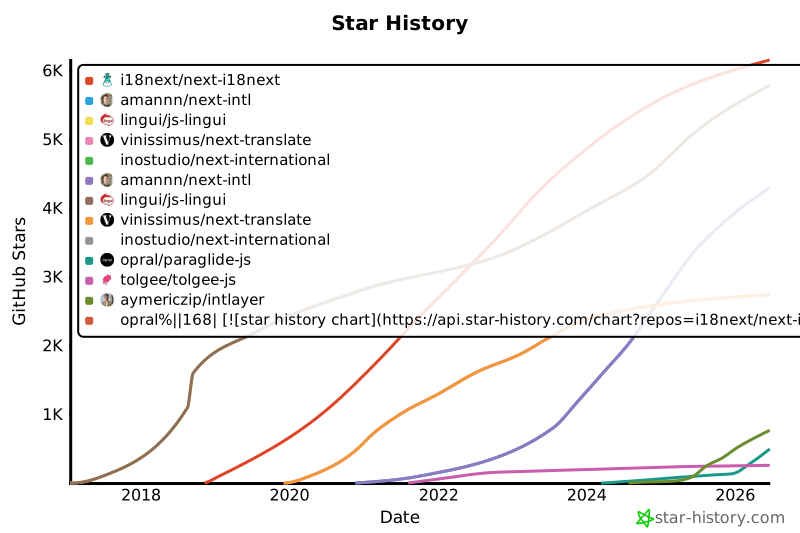](https://www.star-history.com/#i18next/next-i18next&amannn/next-intl&lingui/js-lingui&vinissimus/next-translate&inostudio/next-international&opral/paraglide-js&tolgee/tolgee-js&aymericzip/intlayer)
|
|
169
169
|
|
|
170
170
|
## Детальні результати
|
|
171
171
|
|
|
@@ -122,7 +122,7 @@ style="border:none;"
|
|
|
122
122
|
|
|
123
123
|
Зірки на GitHub є потужним індикатором популярності проекту, довіри спільноти та довгострокової актуальності. Хоча вони не є прямим показником технічної якості, вони відображають, скільки розробників вважають проект корисним, стежать за його розвитком і, ймовірно, впровадять його. Для оцінки цінності проекту зірки допомагають порівняти інтерес до альтернатив і дають уявлення про зростання екосистеми.
|
|
124
124
|
|
|
125
|
-
[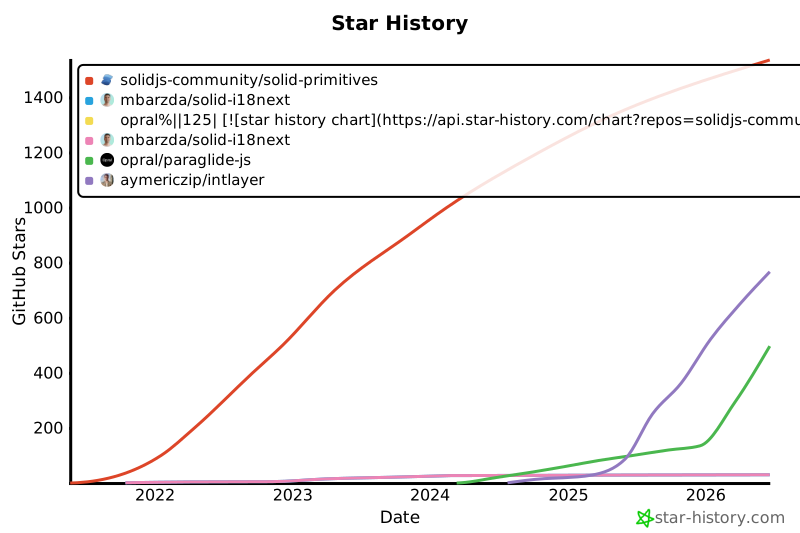](https://www.star-history.com/#solidjs-community/solid-primitives&mbarzda/solid-i18next&opral/paraglide-js&aymericzip/intlayer)
|
|
126
126
|
|
|
127
127
|
## Результати детально
|
|
128
128
|
|
|
@@ -120,7 +120,7 @@ style="border:none;"
|
|
|
120
120
|
|
|
121
121
|
Зірки на GitHub є потужним індикатором популярності проекту, довіри спільноти та довгострокової актуальності. Хоча вони не є прямим показником технічної якості, вони відображають, скільки розробників вважають проект корисним, стежать за його розвитком і, ймовірно, впровадять його. Для оцінки цінності проекту зірки допомагають порівняти інтерес до альтернатив і дають уявлення про зростання екосистеми.
|
|
122
122
|
|
|
123
|
-
[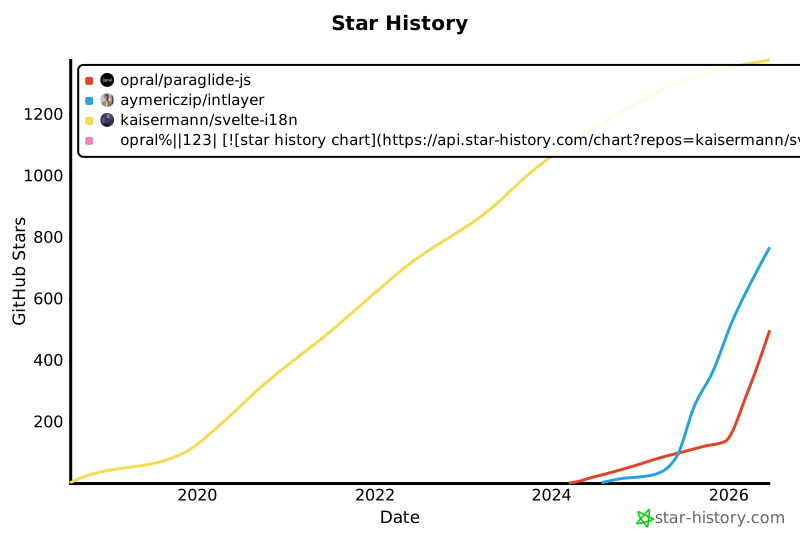](https://www.star-history.com/#kaisermann/svelte-i18n&opral/paraglide-js&aymericzip/intlayer)
|
|
124
124
|
|
|
125
125
|
## Результати детально
|
|
126
126
|
|
|
@@ -128,7 +128,7 @@ history:
|
|
|
128
128
|
|
|
129
129
|
Зірки на GitHub є потужним індикатором популярності проекту, довіри спільноти та довгострокової актуальності. Хоча вони не є прямим показником технічної якості, вони відображають, скільки розробників вважають проект корисним, стежать за його розвитком і, ймовірно, впровадять його. Для оцінки цінності проекту зірки допомагають порівняти інтерес до альтернатив і дають уявлення про зростання екосистеми.
|
|
130
130
|
|
|
131
|
-
[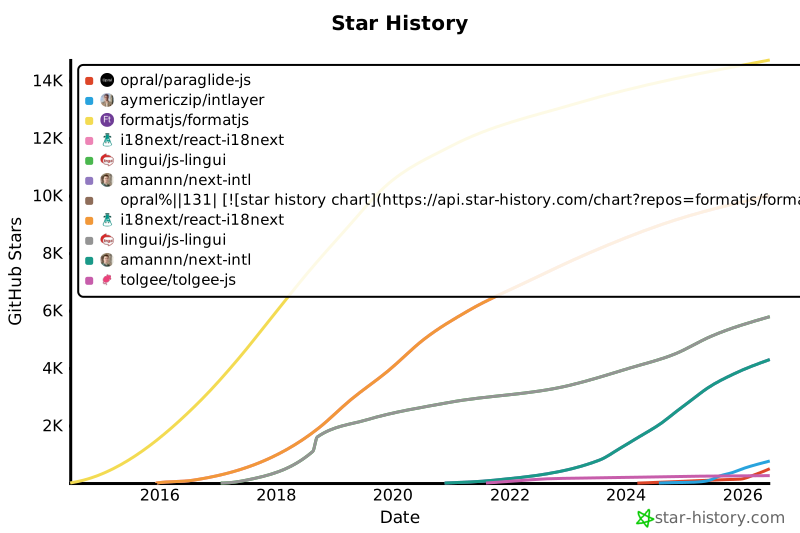](https://www.star-history.com/#formatjs/formatjs&i18next/react-i18next&lingui/js-lingui&amannn/next-intl&opral/paraglide-js&tolgee/tolgee-js&aymericzip/intlayer)
|
|
132
132
|
|
|
133
133
|
## Детальні результати
|
|
134
134
|
|
|
@@ -66,13 +66,10 @@ Intlayer підтримує вміст форматованого тексту,
|
|
|
66
66
|
Приклад структури файлів:
|
|
67
67
|
|
|
68
68
|
```text
|
|
69
|
-
content
|
|
70
|
-
├── en
|
|
71
|
-
|
|
72
|
-
|
|
73
|
-
│ └── markdown-file.fr.content.md
|
|
74
|
-
└── es/
|
|
75
|
-
└── markdown-file.es.content.md
|
|
69
|
+
content
|
|
70
|
+
├── markdown-file.en.content.md
|
|
71
|
+
├── markdown-file.fr.content.md
|
|
72
|
+
└── markdown-file.es.content.md
|
|
76
73
|
```
|
|
77
74
|
|
|
78
75
|
У front-matter ви можете додати будь-які властивості, визначені у [Визначенні словника](https://github.com/aymericzip/intlayer/blob/main/docs/docs/uk/dictionary/content_file.md)
|
|
@@ -1,7 +1,7 @@
|
|
|
1
1
|
---
|
|
2
2
|
createdAt: 2025-04-18
|
|
3
3
|
updatedAt: 2026-05-06
|
|
4
|
-
title: Angular i18n - Як перекласти додаток Angular
|
|
4
|
+
title: Angular i18n - Як перекласти додаток Angular 19 (Webpack)
|
|
5
5
|
description: Дізнайтеся, як зробити свій Angular веб-сайт багатомовним. Дотримуйтесь документації для інтернаціоналізації (i18n) та перекладу.
|
|
6
6
|
keywords:
|
|
7
7
|
- Інтернаціоналізація
|
|
@@ -13,8 +13,9 @@ slugs:
|
|
|
13
13
|
- doc
|
|
14
14
|
- environment
|
|
15
15
|
- angular
|
|
16
|
-
|
|
17
|
-
|
|
16
|
+
- 19
|
|
17
|
+
applicationTemplate: https://github.com/aymericzip/intlayer-angular-19-template
|
|
18
|
+
applicationShowcase: https://intlayer-angular-19-template.vercel.app
|
|
18
19
|
history:
|
|
19
20
|
- version: 8.9.0
|
|
20
21
|
date: 2026-05-04
|
|
@@ -27,7 +28,7 @@ history:
|
|
|
27
28
|
changes: "Ініціалізація історії"
|
|
28
29
|
---
|
|
29
30
|
|
|
30
|
-
# Перекладіть свій Angular веб-сайт за допомогою Intlayer | Інтернаціоналізація (i18n)
|
|
31
|
+
# Перекладіть свій Angular 19 (Webpack) веб-сайт за допомогою Intlayer | Інтернаціоналізація (i18n)
|
|
31
32
|
|
|
32
33
|
## Зміст
|
|
33
34
|
|
|
@@ -52,7 +53,7 @@ history:
|
|
|
52
53
|
<Tab label="Код" value="code">
|
|
53
54
|
|
|
54
55
|
<iframe
|
|
55
|
-
src="https://ide.intlayer.org/aymericzip/intlayer-angular-template?file=intlayer.config.ts"
|
|
56
|
+
src="https://ide.intlayer.org/aymericzip/intlayer-angular-19-template?file=intlayer.config.ts"
|
|
56
57
|
className="m-auto overflow-hidden rounded-lg border-0 max-md:size-full max-md:h-[700px] md:aspect-16/9 md:w-full"
|
|
57
58
|
title="Демо CodeSandbox - Як інтернаціоналізувати ваш додаток за допомогою Intlayer"
|
|
58
59
|
sandbox="allow-forms allow-modals allow-popups allow-presentation allow-same-origin allow-scripts"
|
|
@@ -63,7 +64,7 @@ history:
|
|
|
63
64
|
<Tab label="Демо" value="demo">
|
|
64
65
|
|
|
65
66
|
<iframe
|
|
66
|
-
src="https://intlayer-angular-template.vercel.app"
|
|
67
|
+
src="https://intlayer-angular-19-template.vercel.app"
|
|
67
68
|
className="m-auto overflow-hidden rounded-lg border-0 max-md:size-full max-md:h-[700px] md:aspect-16/9 md:w-full"
|
|
68
69
|
title="Демо - intlayer-angular-template"
|
|
69
70
|
sandbox="allow-forms allow-modals allow-popups allow-presentation allow-same-origin allow-scripts"
|
|
@@ -73,7 +74,7 @@ history:
|
|
|
73
74
|
</Tab>
|
|
74
75
|
</Tabs>
|
|
75
76
|
|
|
76
|
-
Дивіться [Шаблон додатка](https://github.com/aymericzip/intlayer-angular-template) на GitHub.
|
|
77
|
+
Дивіться [Шаблон додатка](https://github.com/aymericzip/intlayer-angular-19-template) на GitHub.
|
|
77
78
|
|
|
78
79
|
### Крок 1: Встановлення залежностей
|
|
79
80
|
|