@intlayer/docs 8.10.1 → 8.11.1
This diff represents the content of publicly available package versions that have been released to one of the supported registries. The information contained in this diff is provided for informational purposes only and reflects changes between package versions as they appear in their respective public registries.
- package/dist/cjs/common.cjs +3 -1
- package/dist/cjs/common.cjs.map +1 -1
- package/dist/cjs/generated/docs.entry.cjs +39 -19
- package/dist/cjs/generated/docs.entry.cjs.map +1 -1
- package/dist/esm/common.mjs +3 -1
- package/dist/esm/common.mjs.map +1 -1
- package/dist/esm/generated/docs.entry.mjs +39 -19
- package/dist/esm/generated/docs.entry.mjs.map +1 -1
- package/dist/types/common.d.ts.map +1 -1
- package/dist/types/generated/docs.entry.d.ts +2 -1
- package/dist/types/generated/docs.entry.d.ts.map +1 -1
- package/docs/ar/benchmark/nextjs.md +1 -1
- package/docs/ar/benchmark/solid.md +1 -1
- package/docs/ar/benchmark/svelte.md +1 -1
- package/docs/ar/benchmark/tanstack.md +1 -1
- package/docs/ar/dictionary/markdown.md +4 -7
- package/docs/ar/{intlayer_with_angular.md → intlayer_with_angular_19.md} +8 -7
- package/docs/ar/intlayer_with_angular_21.md +412 -0
- package/docs/bn/intlayer_with_angular_21.md +412 -0
- package/docs/cs/intlayer_with_angular_21.md +412 -0
- package/docs/de/benchmark/nextjs.md +1 -1
- package/docs/de/benchmark/solid.md +1 -1
- package/docs/de/benchmark/svelte.md +1 -1
- package/docs/de/benchmark/tanstack.md +1 -1
- package/docs/de/dictionary/markdown.md +4 -7
- package/docs/de/{intlayer_with_angular.md → intlayer_with_angular_19.md} +8 -7
- package/docs/de/intlayer_with_angular_21.md +412 -0
- package/docs/en/benchmark/nextjs.md +1 -1
- package/docs/en/benchmark/solid.md +1 -1
- package/docs/en/benchmark/svelte.md +1 -1
- package/docs/en/benchmark/tanstack.md +1 -1
- package/docs/en/dictionary/markdown.md +4 -7
- package/docs/en/{intlayer_with_angular.md → intlayer_with_angular_19.md} +8 -7
- package/docs/en/intlayer_with_angular_21.md +412 -0
- package/docs/en-GB/benchmark/nextjs.md +1 -1
- package/docs/en-GB/benchmark/solid.md +1 -1
- package/docs/en-GB/benchmark/svelte.md +1 -1
- package/docs/en-GB/benchmark/tanstack.md +1 -1
- package/docs/en-GB/{intlayer_with_angular.md → intlayer_with_angular_19.md} +8 -7
- package/docs/en-GB/intlayer_with_angular_21.md +412 -0
- package/docs/es/benchmark/nextjs.md +1 -1
- package/docs/es/benchmark/solid.md +1 -1
- package/docs/es/benchmark/svelte.md +1 -1
- package/docs/es/benchmark/tanstack.md +1 -1
- package/docs/es/dictionary/markdown.md +4 -7
- package/docs/es/{intlayer_with_angular.md → intlayer_with_angular_19.md} +8 -7
- package/docs/es/intlayer_with_angular_21.md +412 -0
- package/docs/fr/benchmark/nextjs.md +1 -1
- package/docs/fr/benchmark/solid.md +1 -1
- package/docs/fr/benchmark/svelte.md +1 -1
- package/docs/fr/benchmark/tanstack.md +1 -1
- package/docs/fr/dictionary/markdown.md +4 -7
- package/docs/fr/{intlayer_with_angular.md → intlayer_with_angular_19.md} +8 -7
- package/docs/fr/intlayer_with_angular_21.md +412 -0
- package/docs/hi/benchmark/nextjs.md +1 -1
- package/docs/hi/benchmark/solid.md +1 -1
- package/docs/hi/benchmark/svelte.md +1 -1
- package/docs/hi/benchmark/tanstack.md +1 -1
- package/docs/hi/dictionary/markdown.md +4 -7
- package/docs/hi/{intlayer_with_angular.md → intlayer_with_angular_19.md} +8 -7
- package/docs/hi/intlayer_with_angular_21.md +412 -0
- package/docs/id/benchmark/nextjs.md +1 -1
- package/docs/id/benchmark/solid.md +1 -1
- package/docs/id/benchmark/svelte.md +1 -1
- package/docs/id/benchmark/tanstack.md +1 -1
- package/docs/id/dictionary/markdown.md +4 -7
- package/docs/id/{intlayer_with_angular.md → intlayer_with_angular_19.md} +8 -7
- package/docs/id/intlayer_with_angular_21.md +412 -0
- package/docs/it/benchmark/nextjs.md +1 -1
- package/docs/it/benchmark/solid.md +1 -1
- package/docs/it/benchmark/svelte.md +1 -1
- package/docs/it/benchmark/tanstack.md +1 -1
- package/docs/it/dictionary/markdown.md +4 -7
- package/docs/it/{intlayer_with_angular.md → intlayer_with_angular_19.md} +8 -7
- package/docs/it/intlayer_with_angular_21.md +412 -0
- package/docs/ja/benchmark/nextjs.md +1 -1
- package/docs/ja/benchmark/solid.md +1 -1
- package/docs/ja/benchmark/svelte.md +1 -1
- package/docs/ja/benchmark/tanstack.md +1 -1
- package/docs/ja/{intlayer_with_angular.md → intlayer_with_angular_19.md} +8 -7
- package/docs/ja/intlayer_with_angular_21.md +412 -0
- package/docs/ko/benchmark/nextjs.md +1 -1
- package/docs/ko/benchmark/solid.md +1 -1
- package/docs/ko/benchmark/svelte.md +1 -1
- package/docs/ko/benchmark/tanstack.md +1 -1
- package/docs/ko/dictionary/markdown.md +4 -7
- package/docs/ko/{intlayer_with_angular.md → intlayer_with_angular_19.md} +8 -7
- package/docs/ko/intlayer_with_angular_21.md +412 -0
- package/docs/nl/intlayer_with_angular_21.md +412 -0
- package/docs/pl/benchmark/nextjs.md +1 -1
- package/docs/pl/benchmark/solid.md +1 -1
- package/docs/pl/benchmark/svelte.md +1 -1
- package/docs/pl/benchmark/tanstack.md +1 -1
- package/docs/pl/dictionary/markdown.md +4 -7
- package/docs/pl/{intlayer_with_angular.md → intlayer_with_angular_19.md} +8 -7
- package/docs/pl/intlayer_with_angular_21.md +412 -0
- package/docs/pt/benchmark/nextjs.md +1 -1
- package/docs/pt/benchmark/solid.md +1 -1
- package/docs/pt/benchmark/svelte.md +1 -1
- package/docs/pt/benchmark/tanstack.md +1 -1
- package/docs/pt/dictionary/markdown.md +4 -7
- package/docs/pt/{intlayer_with_angular.md → intlayer_with_angular_19.md} +8 -7
- package/docs/pt/intlayer_with_angular_21.md +412 -0
- package/docs/ru/benchmark/nextjs.md +1 -1
- package/docs/ru/benchmark/solid.md +1 -1
- package/docs/ru/benchmark/svelte.md +1 -1
- package/docs/ru/benchmark/tanstack.md +1 -1
- package/docs/ru/{intlayer_with_angular.md → intlayer_with_angular_19.md} +8 -7
- package/docs/ru/intlayer_with_angular_21.md +412 -0
- package/docs/tr/benchmark/nextjs.md +1 -1
- package/docs/tr/benchmark/solid.md +1 -1
- package/docs/tr/benchmark/svelte.md +1 -1
- package/docs/tr/benchmark/tanstack.md +1 -1
- package/docs/tr/dictionary/markdown.md +4 -7
- package/docs/tr/{intlayer_with_angular.md → intlayer_with_angular_19.md} +8 -7
- package/docs/tr/intlayer_with_angular_21.md +412 -0
- package/docs/uk/benchmark/nextjs.md +1 -1
- package/docs/uk/benchmark/solid.md +1 -1
- package/docs/uk/benchmark/svelte.md +1 -1
- package/docs/uk/benchmark/tanstack.md +1 -1
- package/docs/uk/dictionary/markdown.md +4 -7
- package/docs/uk/{intlayer_with_angular.md → intlayer_with_angular_19.md} +8 -7
- package/docs/uk/intlayer_with_angular_21.md +412 -0
- package/docs/ur/intlayer_with_angular_21.md +412 -0
- package/docs/vi/benchmark/nextjs.md +1 -1
- package/docs/vi/benchmark/solid.md +1 -1
- package/docs/vi/benchmark/svelte.md +1 -1
- package/docs/vi/benchmark/tanstack.md +1 -1
- package/docs/vi/dictionary/markdown.md +4 -7
- package/docs/vi/{intlayer_with_angular.md → intlayer_with_angular_19.md} +8 -7
- package/docs/vi/intlayer_with_angular_21.md +412 -0
- package/docs/zh/benchmark/nextjs.md +1 -1
- package/docs/zh/benchmark/solid.md +1 -1
- package/docs/zh/benchmark/svelte.md +1 -1
- package/docs/zh/benchmark/tanstack.md +1 -1
- package/docs/zh/dictionary/markdown.md +4 -7
- package/docs/zh/{intlayer_with_angular.md → intlayer_with_angular_19.md} +8 -7
- package/docs/zh/intlayer_with_angular_21.md +412 -0
- package/docs/zh-TW/intlayer_with_angular_21.md +412 -0
- package/package.json +6 -6
- package/src/common.ts +12 -6
- package/src/generated/docs.entry.ts +39 -19
|
@@ -0,0 +1,412 @@
|
|
|
1
|
+
---
|
|
2
|
+
createdAt: 2025-04-18
|
|
3
|
+
updatedAt: 2026-05-06
|
|
4
|
+
title: Angular i18n - Hoe een Angular 21 app (Vite) te vertalen in 2026
|
|
5
|
+
description: Ontdek hoe u uw Angular website meertalig kunt maken. Volg de documentatie om het te internationaliseren (i18n) en te vertalen.
|
|
6
|
+
keywords:
|
|
7
|
+
- Internationalisatie
|
|
8
|
+
- Documentatie
|
|
9
|
+
- Intlayer
|
|
10
|
+
- Angular
|
|
11
|
+
- JavaScript
|
|
12
|
+
slugs:
|
|
13
|
+
- doc
|
|
14
|
+
- environment
|
|
15
|
+
- angular
|
|
16
|
+
applicationTemplate: https://github.com/aymericzip/intlayer-angular-21-template
|
|
17
|
+
applicationShowcase: https://intlayer-angular-21-template.vercel.app/
|
|
18
|
+
history:
|
|
19
|
+
- version: 8.9.0
|
|
20
|
+
date: 2026-05-04
|
|
21
|
+
changes: "Solid useIntlayer API-gebruik geüpdatet naar directe eigenschaptoegang"
|
|
22
|
+
- version: 8.0.0
|
|
23
|
+
date: 2026-01-26
|
|
24
|
+
changes: "Stabiele versie vrijgegeven"
|
|
25
|
+
- version: 8.0.0
|
|
26
|
+
date: 2025-12-30
|
|
27
|
+
changes: "init-commando toegevoegd"
|
|
28
|
+
- version: 5.5.10
|
|
29
|
+
date: 2025-06-29
|
|
30
|
+
changes: "Initiële geschiedenis"
|
|
31
|
+
---
|
|
32
|
+
|
|
33
|
+
# Vertaal uw Angular 21 (Vite) website met Intlayer | Internationalisatie (i18n)
|
|
34
|
+
|
|
35
|
+
## Inhoudsopgave
|
|
36
|
+
|
|
37
|
+
<TOC/>
|
|
38
|
+
|
|
39
|
+
## Wat is Intlayer?
|
|
40
|
+
|
|
41
|
+
**Intlayer** is een innovatieve, open-source internationalisatie (i18n) bibliotheek ontworpen om meertalige ondersteuning te vereenvoudigen in moderne webapplicaties.
|
|
42
|
+
|
|
43
|
+
Met Intlayer kunt u:
|
|
44
|
+
|
|
45
|
+
- **Eenvoudig vertalingen beheren** met behulp van declaratieve woordenboeken op componentniveau.
|
|
46
|
+
- **Metagegevens**, routes en inhoud **dynamisch lokaliseren**.
|
|
47
|
+
- **TypeScript-ondersteuning garanderen** met automatisch gegenereerde types, wat de automatische aanvulling en foutdetectie verbetert.
|
|
48
|
+
- **Profiteren van geavanceerde functies**, zoals dynamische taaldetectie en -wisseling.
|
|
49
|
+
|
|
50
|
+
---
|
|
51
|
+
|
|
52
|
+
## Stapsgewijze handleiding om Intlayer in te stellen in een Angular-applicatie
|
|
53
|
+
|
|
54
|
+
<Tabs defaultTab="code">
|
|
55
|
+
<Tab label="Code" value="code">
|
|
56
|
+
|
|
57
|
+
<iframe
|
|
58
|
+
src="https://ide.intlayer.org/aymericzip/intlayer-angular-21-template?file=intlayer.config.ts"
|
|
59
|
+
className="m-auto overflow-hidden rounded-lg border-0 max-md:size-full max-md:h-[700px] md:aspect-16/9 md:w-full"
|
|
60
|
+
title="Demo CodeSandbox - Hoe u uw applicatie kunt internationaliseren met Intlayer"
|
|
61
|
+
sandbox="allow-forms allow-modals allow-popups allow-presentation allow-same-origin allow-scripts"
|
|
62
|
+
loading="lazy"
|
|
63
|
+
/>
|
|
64
|
+
|
|
65
|
+
</Tab>
|
|
66
|
+
<Tab label="Demo" value="demo">
|
|
67
|
+
|
|
68
|
+
<iframe
|
|
69
|
+
src="https://intlayer-angular-21-template.vercel.app/"
|
|
70
|
+
className="m-auto overflow-hidden rounded-lg border-0 max-md:size-full max-md:h-[700px] md:aspect-16/9 md:w-full"
|
|
71
|
+
title="Demo - intlayer-angular-template"
|
|
72
|
+
sandbox="allow-forms allow-modals allow-popups allow-presentation allow-same-origin allow-scripts"
|
|
73
|
+
loading="lazy"
|
|
74
|
+
/>
|
|
75
|
+
|
|
76
|
+
</Tab>
|
|
77
|
+
</Tabs>
|
|
78
|
+
|
|
79
|
+
Zie de [Applicatiesjabloon](https://github.com/aymericzip/intlayer-angular-21-template) op GitHub.
|
|
80
|
+
|
|
81
|
+
### Stap 1: Afhankelijkheden installeren
|
|
82
|
+
|
|
83
|
+
Installeer de benodigde pakketten via npm:
|
|
84
|
+
|
|
85
|
+
```bash packageManager="npm"
|
|
86
|
+
npm install intlayer angular-intlayer
|
|
87
|
+
npm install @angular-builders/custom-esbuild --save-dev
|
|
88
|
+
npx intlayer init
|
|
89
|
+
```
|
|
90
|
+
|
|
91
|
+
```bash packageManager="pnpm"
|
|
92
|
+
pnpm add intlayer angular-intlayer
|
|
93
|
+
pnpm add @angular-builders/custom-esbuild --save-dev
|
|
94
|
+
pnpm intlayer init
|
|
95
|
+
```
|
|
96
|
+
|
|
97
|
+
```bash packageManager="yarn"
|
|
98
|
+
yarn add intlayer angular-intlayer
|
|
99
|
+
yarn add @angular-builders/custom-esbuild --save-dev
|
|
100
|
+
yarn intlayer init
|
|
101
|
+
```
|
|
102
|
+
|
|
103
|
+
```bash packageManager="bun"
|
|
104
|
+
bun add intlayer angular-intlayer
|
|
105
|
+
bun add @angular-builders/custom-esbuild --dev
|
|
106
|
+
bun x intlayer init
|
|
107
|
+
```
|
|
108
|
+
|
|
109
|
+
- **intlayer**
|
|
110
|
+
|
|
111
|
+
Het kernpakket dat internationalisatietools biedt voor configuratiebeheer, vertaling, [inhoudsdeclaratie](https://github.com/aymericzip/intlayer/blob/main/docs/docs/nl/dictionary/content_file.md), transpilatie en [CLI-commando's](https://github.com/aymericzip/intlayer/blob/main/docs/docs/nl/cli/index.md).
|
|
112
|
+
|
|
113
|
+
- **angular-intlayer**
|
|
114
|
+
Het pakket dat Intlayer integreert met de Angular-applicatie. Het biedt contextproviders en hooks voor Angular-internationalisatie.
|
|
115
|
+
|
|
116
|
+
- **@angular-builders/custom-esbuild**
|
|
117
|
+
Vereist om de esbuild-configuratie van Angular CLI aan te passen.
|
|
118
|
+
|
|
119
|
+
### Stap 2: Configuratie van uw project
|
|
120
|
+
|
|
121
|
+
Maak een configuratiebestand aan om de talen van uw applicatie te configureren:
|
|
122
|
+
|
|
123
|
+
```typescript fileName="intlayer.config.ts" codeFormat={["typescript", "esm", "commonjs"]}
|
|
124
|
+
import { Locales, type IntlayerConfig } from "intlayer";
|
|
125
|
+
|
|
126
|
+
const config: IntlayerConfig = {
|
|
127
|
+
internationalization: {
|
|
128
|
+
locales: [
|
|
129
|
+
Locales.ENGLISH,
|
|
130
|
+
Locales.FRENCH,
|
|
131
|
+
Locales.SPANISH,
|
|
132
|
+
// Uw andere talen
|
|
133
|
+
],
|
|
134
|
+
defaultLocale: Locales.ENGLISH,
|
|
135
|
+
},
|
|
136
|
+
};
|
|
137
|
+
|
|
138
|
+
export default config;
|
|
139
|
+
```
|
|
140
|
+
|
|
141
|
+
> Via dit configuratiebestand kunt u gelokaliseerde URL's instellen, middleware-omleidingen, cookienamen, de locatie en extensie van uw inhoudsdeclaraties instellen, Intlayer-logs in de console uitschakelen, en nog veel meer. Zie de [configuratiedocumentatie](https://github.com/aymericzip/intlayer/blob/main/docs/docs/nl/configuration.md) voor een volledige lijst met beschikbare parameters.
|
|
142
|
+
|
|
143
|
+
### Stap 3: Intlayer integreren in uw Angular-configuratie
|
|
144
|
+
|
|
145
|
+
Om Intlayer met de Angular CLI te integreren, moet u een aangepaste builder gebruiken. Deze handleiding gaat ervan uit dat u Vite/esbuild gebruikt (standaard voor Angular 21-projecten).
|
|
146
|
+
|
|
147
|
+
Pas eerst uw `angular.json` aan om de aangepaste esbuild-builder te gebruiken. Werk de `build`- en `serve`-configuraties bij:
|
|
148
|
+
|
|
149
|
+
```json5 fileName="angular.json"
|
|
150
|
+
{
|
|
151
|
+
"projects": {
|
|
152
|
+
"your-app-name": {
|
|
153
|
+
"architect": {
|
|
154
|
+
"build": {
|
|
155
|
+
"builder": "@angular-builders/custom-esbuild:application", // replace "@angular/build:application"
|
|
156
|
+
"options": {
|
|
157
|
+
"define": {
|
|
158
|
+
"process.env": "{}",
|
|
159
|
+
},
|
|
160
|
+
"plugins": ["./esbuild.plugins.ts"],
|
|
161
|
+
"browser": "src/main.ts",
|
|
162
|
+
// ...
|
|
163
|
+
},
|
|
164
|
+
},
|
|
165
|
+
"serve": {
|
|
166
|
+
"builder": "@angular-builders/custom-esbuild:dev-server", // replace "@angular/build:dev-server"
|
|
167
|
+
"options": {
|
|
168
|
+
"prebundle": {
|
|
169
|
+
"exclude": [
|
|
170
|
+
"intlayer",
|
|
171
|
+
"angular-intlayer",
|
|
172
|
+
"@intlayer/config/built",
|
|
173
|
+
"@intlayer/core"
|
|
174
|
+
]
|
|
175
|
+
},
|
|
176
|
+
},
|
|
177
|
+
},
|
|
178
|
+
},
|
|
179
|
+
},
|
|
180
|
+
}
|
|
181
|
+
```
|
|
182
|
+
|
|
183
|
+
> Zorg ervoor dat u `your-app-name` vervangt door de daadwerkelijke naam van uw project in `angular.json`.
|
|
184
|
+
|
|
185
|
+
Maak vervolgens een `esbuild.plugins.ts`-bestand aan in de root van uw project:
|
|
186
|
+
|
|
187
|
+
```typescript fileName="esbuild.plugins.ts"
|
|
188
|
+
import { intlayerEsbuildPlugin } from "angular-intlayer/esbuild";
|
|
189
|
+
|
|
190
|
+
export default [intlayerEsbuildPlugin()];
|
|
191
|
+
```
|
|
192
|
+
|
|
193
|
+
> De functie `intlayerEsbuildPlugin` configureert esbuild met Intlayer. Deze injecteert de plug-in om inhoudsdeclaratiebestanden te verwerken en stelt configuraties in voor optimale prestaties.
|
|
194
|
+
|
|
195
|
+
> **NX-gebruikers**: De Angular-builders van NX laden plugin-bestanden via Node's native ESM-resolutie en compileren TypeScript-plugin-bestanden niet on-the-fly. Gebruik in plaats daarvan een `.mjs`-bestand en werk de `plugins`-verwijzing in `angular.json` dienovereenkomstig bij:
|
|
196
|
+
>
|
|
197
|
+
> ```javascript fileName="esbuild.plugins.mjs"
|
|
198
|
+
> import { intlayerEsbuildPlugin } from "angular-intlayer/esbuild";
|
|
199
|
+
>
|
|
200
|
+
> export default [intlayerEsbuildPlugin()];
|
|
201
|
+
> ```
|
|
202
|
+
>
|
|
203
|
+
> Verwijs vervolgens in `angular.json` naar `"./esbuild.plugins.mjs"` in plaats van `"./esbuild.plugins.ts"`.
|
|
204
|
+
|
|
205
|
+
### Stap 4: Verklaar uw Inhoud
|
|
206
|
+
|
|
207
|
+
Maak en beheer uw inhoudsdeclaraties om vertalingen op te slaan:
|
|
208
|
+
|
|
209
|
+
```tsx fileName="src/app/app.content.ts" contentDeclarationFormat=["typescript", "esm", "cjs"]
|
|
210
|
+
import { t, type Dictionary } from "intlayer";
|
|
211
|
+
|
|
212
|
+
const appContent = {
|
|
213
|
+
key: "app",
|
|
214
|
+
content: {
|
|
215
|
+
title: t({
|
|
216
|
+
en: "Hello",
|
|
217
|
+
fr: "Bonjour",
|
|
218
|
+
es: "Hola",
|
|
219
|
+
}),
|
|
220
|
+
congratulations: t({
|
|
221
|
+
en: "Congratulations! Your app is running. 🎉",
|
|
222
|
+
fr: "Félicitations! Votre application est en cours d'exécution. 🎉",
|
|
223
|
+
es: "¡Felicidades! Tu aplicación está en ejecución. 🎉",
|
|
224
|
+
}),
|
|
225
|
+
exploreDocs: t({
|
|
226
|
+
en: "Explore the Docs",
|
|
227
|
+
fr: "Explorer les Docs",
|
|
228
|
+
es: "Explorar los Docs",
|
|
229
|
+
}),
|
|
230
|
+
learnWithTutorials: t({
|
|
231
|
+
en: "Learn with Tutorials",
|
|
232
|
+
fr: "Apprendre avec les Tutoriels",
|
|
233
|
+
es: "Aprender con los Tutorios",
|
|
234
|
+
}),
|
|
235
|
+
cliDocs: "CLI Docs",
|
|
236
|
+
angularLanguageService: t({
|
|
237
|
+
en: "Angular Language Service",
|
|
238
|
+
fr: "Service de Langage Angular",
|
|
239
|
+
es: "Servicio de Lenguaje Angular",
|
|
240
|
+
}),
|
|
241
|
+
angularDevTools: "Angular DevTools",
|
|
242
|
+
github: "Github",
|
|
243
|
+
twitter: "Twitter",
|
|
244
|
+
youtube: "Youtube",
|
|
245
|
+
},
|
|
246
|
+
} satisfies Dictionary;
|
|
247
|
+
|
|
248
|
+
export default appContent;
|
|
249
|
+
```
|
|
250
|
+
|
|
251
|
+
> Uw inhoudsdeclaraties kunnen overal in uw applicatie worden gedefinieerd, zolang ze maar worden opgenomen in de directory `contentDir` (standaard `./src`). En zolang ze overeenkomen met de bestandsextensie voor inhoudsdeclaraties (standaard `.content.{json,ts,tsx,js,jsx,mjs,cjs}`).
|
|
252
|
+
|
|
253
|
+
> Zie voor meer informatie de [documentatie over inhoudsdeclaratie](https://github.com/aymericzip/intlayer/blob/main/docs/docs/nl/dictionary/content_file.md).
|
|
254
|
+
|
|
255
|
+
### Stap 5: Gebruik Intlayer in uw Code
|
|
256
|
+
|
|
257
|
+
Om de internationalisatiefuncties van Intlayer in uw hele Angular-applicatie te gebruiken, moet u Intlayer toevoegen aan de applicatieconfiguratie.
|
|
258
|
+
|
|
259
|
+
```typescript fileName="src/app/app.config.ts"
|
|
260
|
+
import { ApplicationConfig } from "@angular/core";
|
|
261
|
+
import { provideRouter } from "@angular/router";
|
|
262
|
+
import { provideIntlayer } from "angular-intlayer";
|
|
263
|
+
import { routes } from "./app.routes";
|
|
264
|
+
|
|
265
|
+
export const appConfig: ApplicationConfig = {
|
|
266
|
+
providers: [
|
|
267
|
+
provideRouter(routes),
|
|
268
|
+
provideIntlayer(), // Voeg hier de Intlayer-provider toe
|
|
269
|
+
],
|
|
270
|
+
};
|
|
271
|
+
```
|
|
272
|
+
|
|
273
|
+
Vervolgens kunt u de functie `useIntlayer` in een component gebruiken.
|
|
274
|
+
|
|
275
|
+
```typescript fileName="src/app/app.component.ts"
|
|
276
|
+
import { Component } from "@angular/core";
|
|
277
|
+
import { RouterOutlet } from "@angular/router";
|
|
278
|
+
import { useIntlayer } from "angular-intlayer";
|
|
279
|
+
|
|
280
|
+
@Component({
|
|
281
|
+
selector: "app-root",
|
|
282
|
+
standalone: true,
|
|
283
|
+
imports: [RouterOutlet],
|
|
284
|
+
templateUrl: "./app.component.html",
|
|
285
|
+
styleUrl: "./app.component.css",
|
|
286
|
+
})
|
|
287
|
+
export class AppComponent {
|
|
288
|
+
content = useIntlayer("app");
|
|
289
|
+
}
|
|
290
|
+
```
|
|
291
|
+
|
|
292
|
+
En in uw template:
|
|
293
|
+
|
|
294
|
+
```html fileName="src/app/app.component.html"
|
|
295
|
+
<div class="content">
|
|
296
|
+
<h1>{{ content().title }}</h1>
|
|
297
|
+
<p>{{ content().congratulations }}</p>
|
|
298
|
+
</div>
|
|
299
|
+
```
|
|
300
|
+
|
|
301
|
+
Intlayer-inhoud wordt geretourneerd als een `Signal`, dus u hebt toegang tot de waarden door de signaal aan te roepen: `content().title`.
|
|
302
|
+
|
|
303
|
+
### (Optioneel) Stap 6: Verander de taal van uw inhoud
|
|
304
|
+
|
|
305
|
+
Om de taal van uw inhoud te wijzigen, kunt u de functie `setLocale` gebruiken die wordt aangeboden door de functie `useLocale`. Hiermee kunt u de taal van de applicatie instellen en de inhoud dienovereenkomstig bijwerken.
|
|
306
|
+
|
|
307
|
+
Maak een component om tussen de talen te wisselen:
|
|
308
|
+
|
|
309
|
+
```typescript fileName="src/app/locale-switcher.component.ts"
|
|
310
|
+
import { Component } from "@angular/core";
|
|
311
|
+
import { CommonModule } from "@angular/common";
|
|
312
|
+
import { useLocale } from "angular-intlayer";
|
|
313
|
+
|
|
314
|
+
@Component({
|
|
315
|
+
selector: "app-locale-switcher",
|
|
316
|
+
standalone: true,
|
|
317
|
+
imports: [CommonModule],
|
|
318
|
+
template: `
|
|
319
|
+
<div class="locale-switcher">
|
|
320
|
+
<select
|
|
321
|
+
[value]="locale()"
|
|
322
|
+
(change)="setLocale($any($event.target).value)"
|
|
323
|
+
>
|
|
324
|
+
@for (loc of availableLocales; track loc) {
|
|
325
|
+
<option [value]="loc">{{ loc }}</option>
|
|
326
|
+
}
|
|
327
|
+
</select>
|
|
328
|
+
</div>
|
|
329
|
+
`,
|
|
330
|
+
})
|
|
331
|
+
export class LocaleSwitcherComponent {
|
|
332
|
+
localeCtx = useLocale();
|
|
333
|
+
|
|
334
|
+
locale = this.localeCtx.locale;
|
|
335
|
+
availableLocales = this.localeCtx.availableLocales;
|
|
336
|
+
setLocale = this.localeCtx.setLocale;
|
|
337
|
+
}
|
|
338
|
+
```
|
|
339
|
+
|
|
340
|
+
Gebruik deze component vervolgens in uw `app.component.ts`:
|
|
341
|
+
|
|
342
|
+
```typescript fileName="src/app/app.component.ts"
|
|
343
|
+
import { Component } from "@angular/core";
|
|
344
|
+
import { RouterOutlet } from "@angular/router";
|
|
345
|
+
import { useIntlayer } from "angular-intlayer";
|
|
346
|
+
import { LocaleSwitcherComponent } from "./locale-switcher.component";
|
|
347
|
+
|
|
348
|
+
@Component({
|
|
349
|
+
selector: "app-root",
|
|
350
|
+
standalone: true,
|
|
351
|
+
imports: [RouterOutlet, LocaleSwitcherComponent],
|
|
352
|
+
templateUrl: "./app.component.html",
|
|
353
|
+
styleUrl: "./app.component.css",
|
|
354
|
+
})
|
|
355
|
+
export class AppComponent {
|
|
356
|
+
content = useIntlayer("app");
|
|
357
|
+
}
|
|
358
|
+
```
|
|
359
|
+
|
|
360
|
+
### TypeScript configureren
|
|
361
|
+
|
|
362
|
+
Intlayer maakt gebruik van module augmentation om de voordelen van TypeScript te benutten en uw codebase steviger te maken.
|
|
363
|
+
|
|
364
|
+

|
|
365
|
+
|
|
366
|
+

|
|
367
|
+
|
|
368
|
+
Zorg ervoor dat uw TypeScript-configuratie de automatisch gegenereerde types bevat.
|
|
369
|
+
|
|
370
|
+
```json5 fileName="tsconfig.json"
|
|
371
|
+
{
|
|
372
|
+
// ... Uw bestaande TypeScript-configuraties
|
|
373
|
+
"include": [
|
|
374
|
+
// ... Uw bestaande TypeScript-configuraties
|
|
375
|
+
".intlayer/**/*.ts", // Automatisch gegenereerde types toevoegen
|
|
376
|
+
],
|
|
377
|
+
}
|
|
378
|
+
```
|
|
379
|
+
|
|
380
|
+
### Git Configuratie
|
|
381
|
+
|
|
382
|
+
Het wordt aanbevolen om de bestanden die door Intlayer worden gegenereerd, te negeren. Dit voorkomt dat u deze vastlegt in uw Git-repository.
|
|
383
|
+
|
|
384
|
+
Om dit te doen, kunt u de volgende instructies toevoegen aan uw `.gitignore`-bestand:
|
|
385
|
+
|
|
386
|
+
```bash
|
|
387
|
+
# Negeer bestanden gegenereerd door Intlayer
|
|
388
|
+
.intlayer
|
|
389
|
+
```
|
|
390
|
+
|
|
391
|
+
### VS Code Extensie
|
|
392
|
+
|
|
393
|
+
Om uw ontwikkelingservaring met Intlayer te verbeteren, kunt u de officiële **Intlayer VS Code Extensie** installeren.
|
|
394
|
+
|
|
395
|
+
[Installeren vanuit de VS Code Marketplace](https://marketplace.visualstudio.com/items?itemName=intlayer.intlayer-vs-code-extension)
|
|
396
|
+
|
|
397
|
+
Deze extensie biedt:
|
|
398
|
+
|
|
399
|
+
- **Automatische aanvulling** voor vertaalsleutels.
|
|
400
|
+
- **Foutdetectie in realtime** voor ontbrekende vertalingen.
|
|
401
|
+
- **Inline previews** van vertaalde inhoud.
|
|
402
|
+
- **Snelle acties** om gemakkelijk vertalingen te maken en bij te werken.
|
|
403
|
+
|
|
404
|
+
Voor meer informatie over hoe u de extensie kunt gebruiken, zie de [Intlayer VS Code Extensie documentatie](https://intlayer.org/doc/vs-code-extension).
|
|
405
|
+
|
|
406
|
+
---
|
|
407
|
+
|
|
408
|
+
### Verder Gaan
|
|
409
|
+
|
|
410
|
+
Om nog verder te gaan, kunt u de [visuele editor](https://github.com/aymericzip/intlayer/blob/main/docs/docs/nl/intlayer_visual_editor.md) implementeren of uw inhoud externaliseren met behulp van de [CMS](https://github.com/aymericzip/intlayer/blob/main/docs/docs/nl/intlayer_CMS.md).
|
|
411
|
+
|
|
412
|
+
---
|
|
@@ -165,7 +165,7 @@ Uruchomiłem tę samą wielojęzyczną aplikację w prawdziwej przeglądarce dla
|
|
|
165
165
|
|
|
166
166
|
Gwiazdki na GitHubie są silnym wskaźnikiem popularności projektu, zaufania społeczności i długoterminowego znaczenia. Choć nie są bezpośrednią miarą jakości technicznej, odzwierciedlają, ilu programistów uważa projekt za przydatny, śledzi jego postępy i prawdopodobnie go przyjmie. Przy szacowaniu wartości projektu gwiazdki pomagają porównać zainteresowanie alternatywami i dostarczają wglądu w rozwój ekosystemu.
|
|
167
167
|
|
|
168
|
-
[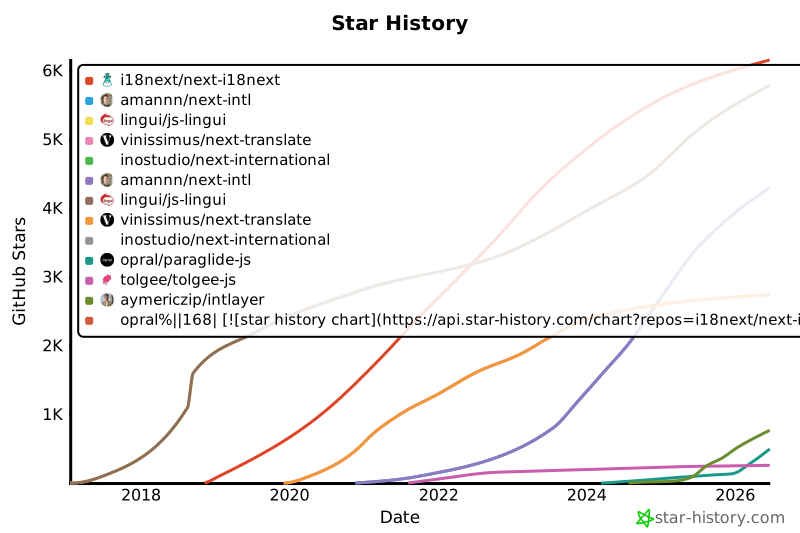](https://www.star-history.com/#i18next/next-i18next&amannn/next-intl&lingui/js-lingui&vinissimus/next-translate&inostudio/next-international&opral/paraglide-js&tolgee/tolgee-js&aymericzip/intlayer)
|
|
169
169
|
|
|
170
170
|
## Szczegóły wyników
|
|
171
171
|
|
|
@@ -122,7 +122,7 @@ Porównaliśmy **cztery strategie ładowania**:
|
|
|
122
122
|
|
|
123
123
|
Gwiazdki na GitHubie są silnym wskaźnikiem popularności projektu, zaufania społeczności i długoterminowego znaczenia. Choć nie są bezpośrednią miarą jakości technicznej, odzwierciedlają, ilu programistów uważa projekt za przydatny, śledzi jego postępy i prawdopodobnie go przyjmie. Przy szacowaniu wartości projektu gwiazdki pomagają porównać zainteresowanie alternatywami i dostarczają wglądu w rozwój ekosystemu.
|
|
124
124
|
|
|
125
|
-
[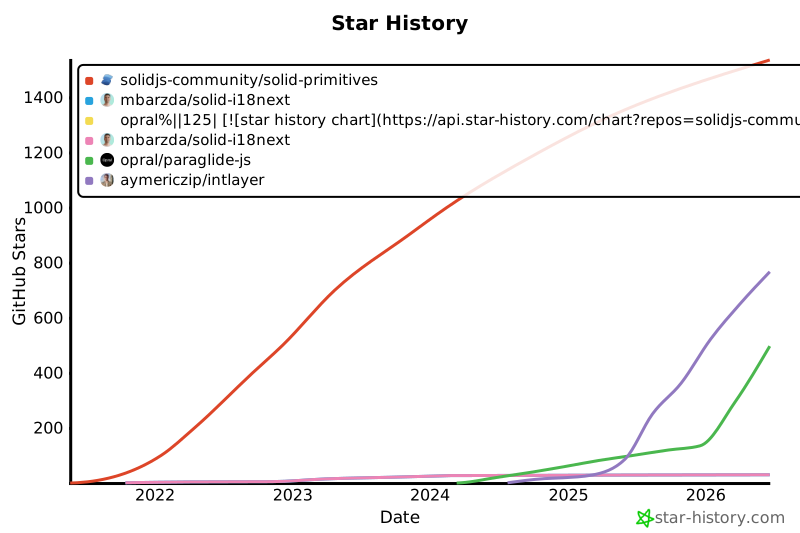](https://www.star-history.com/#solidjs-community/solid-primitives&mbarzda/solid-i18next&opral/paraglide-js&aymericzip/intlayer)
|
|
126
126
|
|
|
127
127
|
## Wyniki szczegółowe
|
|
128
128
|
|
|
@@ -120,7 +120,7 @@ Porównaliśmy **cztery strategie ładowania**:
|
|
|
120
120
|
|
|
121
121
|
Gwiazdki na GitHubie są silnym wskaźnikiem popularności projektu, zaufania społeczności i długoterminowego znaczenia. Choć nie są bezpośrednią miarą jakości technicznej, odzwierciedlają, ilu programistów uważa projekt za przydatny, śledzi jego postępy i prawdopodobnie go przyjmie. Przy szacowaniu wartości projektu gwiazdki pomagają porównać zainteresowanie alternatywami i dostarczają wglądu w rozwój ekosystemu.
|
|
122
122
|
|
|
123
|
-
[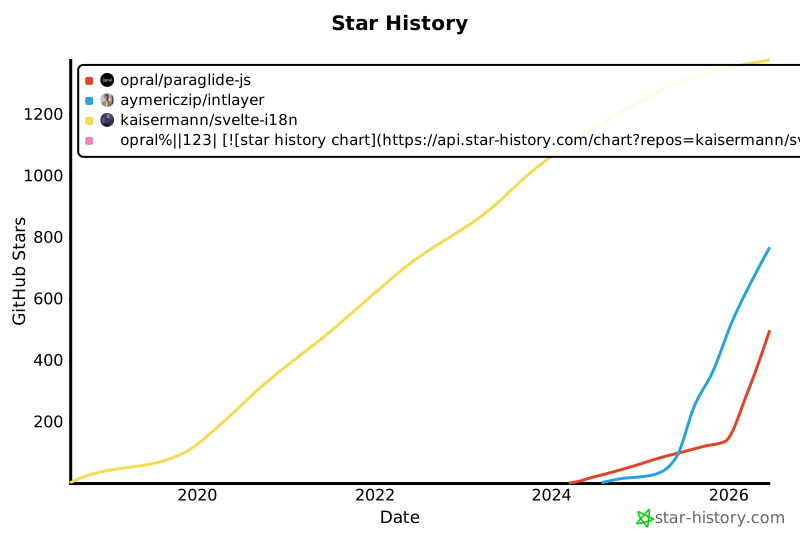](https://www.star-history.com/#kaisermann/svelte-i18n&opral/paraglide-js&aymericzip/intlayer)
|
|
124
124
|
|
|
125
125
|
## Wyniki szczegółowe
|
|
126
126
|
|
|
@@ -128,7 +128,7 @@ Porównaliśmy **cztery strategie ładowania**:
|
|
|
128
128
|
|
|
129
129
|
Gwiazdki na GitHubie są silnym wskaźnikiem popularności projektu, zaufania społeczności i długoterminowego znaczenia. Choć nie są bezpośrednią miarą jakości technicznej, odzwierciedlają, ilu programistów uważa projekt za przydatny, śledzi jego postępy i prawdopodobnie go przyjmie. Przy szacowaniu wartości projektu gwiazdki pomagają porównać zainteresowanie alternatywami i dostarczają wglądu w rozwój ekosystemu.
|
|
130
130
|
|
|
131
|
-
[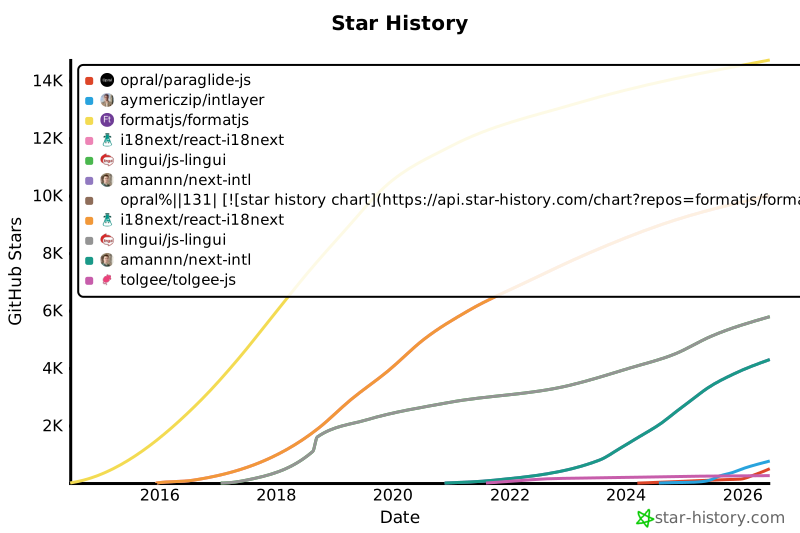](https://www.star-history.com/#formatjs/formatjs&i18next/react-i18next&lingui/js-lingui&amannn/next-intl&opral/paraglide-js&tolgee/tolgee-js&aymericzip/intlayer)
|
|
132
132
|
|
|
133
133
|
## Szczegóły wyników
|
|
134
134
|
|
|
@@ -66,13 +66,10 @@ Możesz zadeklarować treść Markdown używając funkcji `md` lub po prostu jak
|
|
|
66
66
|
Przykład struktury plików:
|
|
67
67
|
|
|
68
68
|
```text
|
|
69
|
-
content
|
|
70
|
-
├── en
|
|
71
|
-
|
|
72
|
-
|
|
73
|
-
│ └── markdown-file.fr.content.md
|
|
74
|
-
└── es/
|
|
75
|
-
└── markdown-file.es.content.md
|
|
69
|
+
content
|
|
70
|
+
├── markdown-file.en.content.md
|
|
71
|
+
├── markdown-file.fr.content.md
|
|
72
|
+
└── markdown-file.es.content.md
|
|
76
73
|
```
|
|
77
74
|
|
|
78
75
|
Do front-matter można dodać dowolne właściwości zdefiniowane w [Definicji słownika](https://github.com/aymericzip/intlayer/blob/main/docs/docs/pl/dictionary/content_file.md)
|
|
@@ -1,7 +1,7 @@
|
|
|
1
1
|
---
|
|
2
2
|
createdAt: 2025-04-18
|
|
3
3
|
updatedAt: 2026-05-06
|
|
4
|
-
title: Angular i18n - Jak przetłumaczyć aplikację Angular
|
|
4
|
+
title: Angular i18n - Jak przetłumaczyć aplikację Angular 19 (Webpack)
|
|
5
5
|
description: Dowiedz się, jak uczynić swoją stronę Angular wielojęzyczną. Postępuj zgodnie z dokumentacją, aby ją umiędzynarodowić (i18n) i przetłumaczyć.
|
|
6
6
|
keywords:
|
|
7
7
|
- Umiędzynarodowienie
|
|
@@ -13,8 +13,9 @@ slugs:
|
|
|
13
13
|
- doc
|
|
14
14
|
- environment
|
|
15
15
|
- angular
|
|
16
|
-
|
|
17
|
-
|
|
16
|
+
- 19
|
|
17
|
+
applicationTemplate: https://github.com/aymericzip/intlayer-angular-19-template
|
|
18
|
+
applicationShowcase: https://intlayer-angular-19-template.vercel.app
|
|
18
19
|
history:
|
|
19
20
|
- version: 8.9.0
|
|
20
21
|
date: 2026-05-04
|
|
@@ -27,7 +28,7 @@ history:
|
|
|
27
28
|
changes: "Zainicjuj historię"
|
|
28
29
|
---
|
|
29
30
|
|
|
30
|
-
# Przetłumacz swoją stronę Angular za pomocą Intlayer | Umiędzynarodowienie (i18n)
|
|
31
|
+
# Przetłumacz swoją stronę Angular 19 (Webpack) za pomocą Intlayer | Umiędzynarodowienie (i18n)
|
|
31
32
|
|
|
32
33
|
## Spis treści
|
|
33
34
|
|
|
@@ -52,7 +53,7 @@ Z Intlayer możesz:
|
|
|
52
53
|
<Tab label="Kod" value="code">
|
|
53
54
|
|
|
54
55
|
<iframe
|
|
55
|
-
src="https://ide.intlayer.org/aymericzip/intlayer-angular-template?file=intlayer.config.ts"
|
|
56
|
+
src="https://ide.intlayer.org/aymericzip/intlayer-angular-19-template?file=intlayer.config.ts"
|
|
56
57
|
className="m-auto overflow-hidden rounded-lg border-0 max-md:size-full max-md:h-[700px] md:aspect-16/9 md:w-full"
|
|
57
58
|
title="Demo CodeSandbox - Jak umiędzynarodowić swoją aplikację za pomocą Intlayer"
|
|
58
59
|
sandbox="allow-forms allow-modals allow-popups allow-presentation allow-same-origin allow-scripts"
|
|
@@ -63,7 +64,7 @@ Z Intlayer możesz:
|
|
|
63
64
|
<Tab label="Demo" value="demo">
|
|
64
65
|
|
|
65
66
|
<iframe
|
|
66
|
-
src="https://intlayer-angular-template.vercel.app"
|
|
67
|
+
src="https://intlayer-angular-19-template.vercel.app"
|
|
67
68
|
className="m-auto overflow-hidden rounded-lg border-0 max-md:size-full max-md:h-[700px] md:aspect-16/9 md:w-full"
|
|
68
69
|
title="Demo - intlayer-angular-template"
|
|
69
70
|
sandbox="allow-forms allow-modals allow-popups allow-presentation allow-same-origin allow-scripts"
|
|
@@ -73,7 +74,7 @@ Z Intlayer możesz:
|
|
|
73
74
|
</Tab>
|
|
74
75
|
</Tabs>
|
|
75
76
|
|
|
76
|
-
Zobacz [Szablon aplikacji](https://github.com/aymericzip/intlayer-angular-template) na GitHubie.
|
|
77
|
+
Zobacz [Szablon aplikacji](https://github.com/aymericzip/intlayer-angular-19-template) na GitHubie.
|
|
77
78
|
|
|
78
79
|
### Krok 1: Instalacja zależności
|
|
79
80
|
|