@intlayer/docs 8.10.0-canary.1 → 8.10.1
This diff represents the content of publicly available package versions that have been released to one of the supported registries. The information contained in this diff is provided for informational purposes only and reflects changes between package versions as they appear in their respective public registries.
- package/docs/ar/dictionary/markdown.md +349 -19
- package/docs/ar/interest_of_intlayer.md +1 -1
- package/docs/bn/interest_of_intlayer.md +1 -1
- package/docs/cs/interest_of_intlayer.md +1 -1
- package/docs/de/dictionary/markdown.md +349 -19
- package/docs/de/interest_of_intlayer.md +1 -1
- package/docs/en/dictionary/markdown.md +338 -20
- package/docs/en/interest_of_intlayer.md +1 -1
- package/docs/en-GB/dictionary/markdown.md +349 -19
- package/docs/en-GB/interest_of_intlayer.md +1 -1
- package/docs/es/dictionary/markdown.md +349 -19
- package/docs/es/interest_of_intlayer.md +1 -1
- package/docs/fr/dictionary/markdown.md +349 -19
- package/docs/fr/interest_of_intlayer.md +1 -1
- package/docs/hi/dictionary/markdown.md +349 -19
- package/docs/hi/interest_of_intlayer.md +1 -1
- package/docs/id/dictionary/markdown.md +349 -19
- package/docs/id/interest_of_intlayer.md +1 -1
- package/docs/it/dictionary/markdown.md +349 -19
- package/docs/it/interest_of_intlayer.md +1 -1
- package/docs/ja/interest_of_intlayer.md +1 -1
- package/docs/ko/dictionary/markdown.md +349 -19
- package/docs/ko/interest_of_intlayer.md +1 -1
- package/docs/nl/interest_of_intlayer.md +1 -1
- package/docs/pl/dictionary/markdown.md +349 -19
- package/docs/pl/interest_of_intlayer.md +1 -1
- package/docs/pt/benchmark/solid.md +1 -1
- package/docs/pt/benchmark/svelte.md +1 -1
- package/docs/pt/dictionary/markdown.md +349 -19
- package/docs/pt/interest_of_intlayer.md +1 -1
- package/docs/ru/dictionary/markdown.md +458 -16
- package/docs/ru/interest_of_intlayer.md +1 -1
- package/docs/tr/dictionary/markdown.md +349 -19
- package/docs/tr/interest_of_intlayer.md +1 -1
- package/docs/uk/dictionary/markdown.md +349 -19
- package/docs/uk/interest_of_intlayer.md +1 -1
- package/docs/ur/interest_of_intlayer.md +1 -1
- package/docs/vi/dictionary/markdown.md +349 -19
- package/docs/vi/interest_of_intlayer.md +1 -1
- package/docs/zh/dictionary/markdown.md +349 -19
- package/docs/zh/interest_of_intlayer.md +1 -1
- package/docs/zh-TW/interest_of_intlayer.md +1 -1
- package/package.json +7 -7
|
@@ -95,34 +95,34 @@ Puoi dichiarare i contenuti Markdown usando la funzione `md` o semplicemente com
|
|
|
95
95
|
```
|
|
96
96
|
|
|
97
97
|
</Tab>
|
|
98
|
-
<Tab label="
|
|
99
|
-
|
|
98
|
+
<Tab label="File Esterni" value="external-files">
|
|
99
|
+
Importa direttamente i file `.md` usando la funzione `file`.
|
|
100
100
|
|
|
101
101
|
```typescript fileName="markdownDictionary.content.ts"
|
|
102
|
+
import { md, file, t } from "intlayer";
|
|
103
|
+
|
|
102
104
|
export default {
|
|
103
105
|
key: "app",
|
|
104
|
-
contentAutoTransformation: true, // Abilita il rilevamento automatico dei contenuti Markdown - Può essere impostato globalmente in intlayer.config.ts
|
|
105
106
|
content: {
|
|
106
|
-
|
|
107
|
+
content: t({
|
|
108
|
+
en: md(file("./myMarkdown.en.md")),
|
|
109
|
+
it: md(file("./myMarkdown.it.md")),
|
|
110
|
+
}),
|
|
107
111
|
},
|
|
108
112
|
};
|
|
109
113
|
```
|
|
110
114
|
|
|
111
115
|
</Tab>
|
|
112
116
|
|
|
113
|
-
<Tab label="
|
|
114
|
-
|
|
117
|
+
<Tab label="Rilevamento Automatico" value="automatic-detection">
|
|
118
|
+
Se la stringa contiene indicatori comuni di Markdown (come intestazioni, elenchi, link, ecc.), Intlayer la trasformerà automaticamente.
|
|
115
119
|
|
|
116
120
|
```typescript fileName="markdownDictionary.content.ts"
|
|
117
|
-
import { md, file, t } from "intlayer";
|
|
118
|
-
|
|
119
121
|
export default {
|
|
120
122
|
key: "app",
|
|
123
|
+
contentAutoTransformation: true, // Abilita il rilevamento automatico dei contenuti Markdown - Può essere impostato globalmente in intlayer.config.ts
|
|
121
124
|
content: {
|
|
122
|
-
|
|
123
|
-
en: md(file("./myMarkdown.en.md")),
|
|
124
|
-
it: md(file("./myMarkdown.it.md")),
|
|
125
|
-
}),
|
|
125
|
+
myMarkdownContent: "## Il mio titolo \n\nLorem Ipsum",
|
|
126
126
|
},
|
|
127
127
|
};
|
|
128
128
|
```
|
|
@@ -130,8 +130,6 @@ Puoi dichiarare i contenuti Markdown usando la funzione `md` o semplicemente com
|
|
|
130
130
|
</Tab>
|
|
131
131
|
</Tabs>
|
|
132
132
|
|
|
133
|
-
---
|
|
134
|
-
|
|
135
133
|
## Rendering del Markdown
|
|
136
134
|
|
|
137
135
|
Intlayer fornisce due modi indipendenti per eseguire il rendering del Markdown:
|
|
@@ -147,7 +145,7 @@ Il rendering del Markdown supporta **MDX** — usa qualsiasi componente JSX/fram
|
|
|
147
145
|
### 1. Rendering Automatico (tramite `useIntlayer`)
|
|
148
146
|
|
|
149
147
|
<Tabs group="framework">
|
|
150
|
-
<Tab label="React
|
|
148
|
+
<Tab label="React" value="react">
|
|
151
149
|
I nodi Markdown possono essere renderizzati direttamente come JSX.
|
|
152
150
|
|
|
153
151
|
```tsx fileName="App.tsx"
|
|
@@ -197,6 +195,57 @@ Il rendering del Markdown supporta **MDX** — usa qualsiasi componente JSX/fram
|
|
|
197
195
|
{myMarkdownContent.metadata.title}
|
|
198
196
|
```
|
|
199
197
|
|
|
198
|
+
</Tab>
|
|
199
|
+
<Tab label="Next.js" value="nextjs">
|
|
200
|
+
I nodi Markdown possono essere renderizzati direttamente come JSX.
|
|
201
|
+
|
|
202
|
+
```tsx fileName="App.tsx"
|
|
203
|
+
import { useIntlayer } from "next-intlayer";
|
|
204
|
+
import { MarkdownProvider } from "next-intlayer/markdown";
|
|
205
|
+
|
|
206
|
+
const AppContent = () => {
|
|
207
|
+
const { myMarkdownContent } = useIntlayer("app");
|
|
208
|
+
|
|
209
|
+
return <div>{myMarkdownContent}</div>;
|
|
210
|
+
};
|
|
211
|
+
|
|
212
|
+
const App = () => (
|
|
213
|
+
<MarkdownProvider
|
|
214
|
+
components={{
|
|
215
|
+
h1: ({ children }) => <h1 style={{ color: "red" }}>{children}</h1>,
|
|
216
|
+
MyButton: (props) => <button {...props} />, // Componente MDX
|
|
217
|
+
}}
|
|
218
|
+
>
|
|
219
|
+
<AppContent />
|
|
220
|
+
</MarkdownProvider>
|
|
221
|
+
);
|
|
222
|
+
```
|
|
223
|
+
|
|
224
|
+
> Se `MarkdownProvider` non è presente, Intlayer eseguirà il rendering del markdown usando il parser da Markdown a JSX predefinito.
|
|
225
|
+
|
|
226
|
+
Puoi anche fornire sovrascritture locali per nodi specifici utilizzando il metodo `.use()`:
|
|
227
|
+
|
|
228
|
+
```tsx
|
|
229
|
+
{myMarkdownContent.use({
|
|
230
|
+
h1: ({ children }) => <h1 style={{ color: "red" }}>{children}</h1>,
|
|
231
|
+
})}
|
|
232
|
+
```
|
|
233
|
+
|
|
234
|
+
Puoi recuperare il Markdown come stringa:
|
|
235
|
+
|
|
236
|
+
```tsx
|
|
237
|
+
{myMarkdownContent.value}
|
|
238
|
+
{String(myMarkdownContent)}
|
|
239
|
+
{myMarkdownContent.toString()}
|
|
240
|
+
```
|
|
241
|
+
|
|
242
|
+
E puoi accedere ai metadati del tuo markdown in questo modo:
|
|
243
|
+
|
|
244
|
+
```tsx
|
|
245
|
+
{myMarkdownContent.metadata}
|
|
246
|
+
{myMarkdownContent.metadata.title}
|
|
247
|
+
```
|
|
248
|
+
|
|
200
249
|
</Tab>
|
|
201
250
|
<Tab label="Vue" value="vue">
|
|
202
251
|
In Vue, il contenuto Markdown può essere renderizzato usando il tag `component` integrato o direttamente come nodo.
|
|
@@ -441,7 +490,7 @@ Il rendering del Markdown supporta **MDX** — usa qualsiasi componente JSX/fram
|
|
|
441
490
|
Queste utility eseguono il rendering **solo di stringhe Markdown pure** e sono indipendenti da `useIntlayer`. Usale quando hai bisogno di renderizzare Markdown da fonti diverse dai tuoi dizionari.
|
|
442
491
|
|
|
443
492
|
<Tabs group="framework">
|
|
444
|
-
<Tab label="React
|
|
493
|
+
<Tab label="React" value="react">
|
|
445
494
|
|
|
446
495
|
#### Componente `<MarkdownRenderer />`
|
|
447
496
|
|
|
@@ -479,6 +528,45 @@ Queste utility eseguono il rendering **solo di stringhe Markdown pure** e sono i
|
|
|
479
528
|
const jsx = renderMarkdown("# Il Mio Titolo", { forceBlock: true });
|
|
480
529
|
```
|
|
481
530
|
|
|
531
|
+
</Tab>
|
|
532
|
+
<Tab label="Next.js" value="nextjs">
|
|
533
|
+
|
|
534
|
+
#### Componente `<MarkdownRenderer />`
|
|
535
|
+
|
|
536
|
+
Esegue il rendering di una stringa Markdown con opzioni specifiche.
|
|
537
|
+
|
|
538
|
+
```tsx
|
|
539
|
+
import { MarkdownRenderer } from "next-intlayer/markdown";
|
|
540
|
+
|
|
541
|
+
<MarkdownRenderer forceBlock={true} tagfilter={true}>
|
|
542
|
+
{"# Il Mio Titolo"}
|
|
543
|
+
</MarkdownRenderer>
|
|
544
|
+
```
|
|
545
|
+
|
|
546
|
+
#### Hook `useMarkdownRenderer()`
|
|
547
|
+
|
|
548
|
+
Ottieni una funzione di rendering preconfigurata.
|
|
549
|
+
|
|
550
|
+
```tsx
|
|
551
|
+
import { useMarkdownRenderer } from "next-intlayer/markdown";
|
|
552
|
+
|
|
553
|
+
const renderMarkdown = useMarkdownRenderer({
|
|
554
|
+
forceBlock: true,
|
|
555
|
+
components: { h1: (props) => <h1 {...props} className="custom" /> }
|
|
556
|
+
});
|
|
557
|
+
|
|
558
|
+
return renderMarkdown("# Il Mio Titolo");
|
|
559
|
+
```
|
|
560
|
+
|
|
561
|
+
#### Utility `renderMarkdown()`
|
|
562
|
+
Utility indipendente per il rendering al di fuori dei componenti.
|
|
563
|
+
|
|
564
|
+
```tsx
|
|
565
|
+
import { renderMarkdown } from "next-intlayer/markdown";
|
|
566
|
+
|
|
567
|
+
const jsx = renderMarkdown("# Il Mio Titolo", { forceBlock: true });
|
|
568
|
+
```
|
|
569
|
+
|
|
482
570
|
</Tab>
|
|
483
571
|
<Tab label="Vue" value="vue">
|
|
484
572
|
|
|
@@ -608,14 +696,12 @@ Queste utility eseguono il rendering **solo di stringhe Markdown pure** e sono i
|
|
|
608
696
|
</Tab>
|
|
609
697
|
</Tabs>
|
|
610
698
|
|
|
611
|
-
---
|
|
612
|
-
|
|
613
699
|
## Configurazione Globale con `MarkdownProvider`
|
|
614
700
|
|
|
615
701
|
Il `MarkdownProvider` (o il suo equivalente nel framework) configura la pipeline di rendering Markdown per l'intera applicazione. Questo si applica sia al rendering automatico di `useIntlayer` che alle utility di supporto. Le opzioni impostate qui sono quelle predefinite — `.use()` le sovrascrive a livello di nodo.
|
|
616
702
|
|
|
617
703
|
<Tabs group="framework">
|
|
618
|
-
<Tab label="React
|
|
704
|
+
<Tab label="React" value="react">
|
|
619
705
|
|
|
620
706
|
```tsx fileName="AppProvider.tsx"
|
|
621
707
|
import { MarkdownProvider } from "react-intlayer/markdown";
|
|
@@ -633,6 +719,7 @@ Il `MarkdownProvider` (o il suo equivalente nel framework) configura la pipeline
|
|
|
633
719
|
);
|
|
634
720
|
```
|
|
635
721
|
|
|
722
|
+
|
|
636
723
|
> MDX è supportato — qualsiasi nome di componente usato all'interno del tuo Markdown (es. `<MyCustomJSXComponent />`) viene risolto tramite la mappa `components`.
|
|
637
724
|
|
|
638
725
|
Puoi anche usare il tuo renderer markdown:
|
|
@@ -643,6 +730,7 @@ Il `MarkdownProvider` (o il suo equivalente nel framework) configura la pipeline
|
|
|
643
730
|
export const AppProvider = ({ children }) => (
|
|
644
731
|
<MarkdownProvider
|
|
645
732
|
renderMarkdown={async (md) => {
|
|
733
|
+
// Use dynamic import to reduce the bundle size of your application
|
|
646
734
|
const { renderMarkdown } = await import('react-intlayer/markdown');
|
|
647
735
|
return renderMarkdown(md);
|
|
648
736
|
}}
|
|
@@ -654,6 +742,48 @@ Il `MarkdownProvider` (o il suo equivalente nel framework) configura la pipeline
|
|
|
654
742
|
|
|
655
743
|
> Importare dinamicamente il tuo renderer Markdown è un buon modo per ridurre le dimensioni del bundle della tua applicazione.
|
|
656
744
|
|
|
745
|
+
</Tab>
|
|
746
|
+
<Tab label="Next.js" value="nextjs">
|
|
747
|
+
|
|
748
|
+
```tsx fileName="AppProvider.tsx"
|
|
749
|
+
import { MarkdownProvider } from "next-intlayer/markdown";
|
|
750
|
+
|
|
751
|
+
export const AppProvider = ({ children }) => (
|
|
752
|
+
<MarkdownProvider
|
|
753
|
+
components={{
|
|
754
|
+
h1: (props) => <h1 style={{color: 'green'}} {...props} />,
|
|
755
|
+
a: ({ href, ...props }) => <a style={{color: 'red'}} {...props} />,
|
|
756
|
+
MyCustomJSXComponent: (props) => <span style={{color: 'red'}} {...props} />,
|
|
757
|
+
}}
|
|
758
|
+
>
|
|
759
|
+
{children}
|
|
760
|
+
</MarkdownProvider>
|
|
761
|
+
);
|
|
762
|
+
```
|
|
763
|
+
|
|
764
|
+
|
|
765
|
+
> MDX è supportato — qualsiasi nome di componente usato all'interno del tuo Markdown (es. `<MyCustomJSXComponent />`) viene risolto tramite la mappa `components`.
|
|
766
|
+
|
|
767
|
+
Puoi anche usare il tuo renderer markdown:
|
|
768
|
+
|
|
769
|
+
```tsx fileName="AppProvider.tsx"
|
|
770
|
+
import { MarkdownProvider } from "next-intlayer/markdown";
|
|
771
|
+
|
|
772
|
+
export const AppProvider = ({ children }) => (
|
|
773
|
+
<MarkdownProvider
|
|
774
|
+
renderMarkdown={async (md) => {
|
|
775
|
+
// Use dynamic import to reduce the bundle size of your application
|
|
776
|
+
const { renderMarkdown } = await import('next-intlayer/markdown');
|
|
777
|
+
return renderMarkdown(md);
|
|
778
|
+
}}
|
|
779
|
+
>
|
|
780
|
+
{children}
|
|
781
|
+
</MarkdownProvider>
|
|
782
|
+
);
|
|
783
|
+
```
|
|
784
|
+
|
|
785
|
+
> Importare dinamicamente il tuo renderer Markdown è un buon modo per ridurre le dimensioni del bundle della tua applicazione.
|
|
786
|
+
|
|
657
787
|
</Tab>
|
|
658
788
|
<Tab label="Vue" value="vue">
|
|
659
789
|
|
|
@@ -679,6 +809,9 @@ Il `MarkdownProvider` (o il suo equivalente nel framework) configura la pipeline
|
|
|
679
809
|
app.mount("#app");
|
|
680
810
|
```
|
|
681
811
|
|
|
812
|
+
|
|
813
|
+
> MDX è supportato — qualsiasi nome di componente usato all'interno del tuo Markdown (es. `<MyCustomJSXComponent />`) viene risolto tramite la mappa `components`.
|
|
814
|
+
|
|
682
815
|
Puoi anche usare il tuo renderer markdown:
|
|
683
816
|
|
|
684
817
|
```typescript fileName="main.ts"
|
|
@@ -720,6 +853,9 @@ Il `MarkdownProvider` (o il suo equivalente nel framework) configura la pipeline
|
|
|
720
853
|
</MarkdownProvider>
|
|
721
854
|
```
|
|
722
855
|
|
|
856
|
+
|
|
857
|
+
> MDX è supportato — qualsiasi nome di componente usato all'interno del tuo Markdown (es. `<MyCustomJSXComponent />`) viene risolto tramite la mappa `components`.
|
|
858
|
+
|
|
723
859
|
Puoi anche usare il tuo renderer markdown:
|
|
724
860
|
|
|
725
861
|
```svelte fileName="App.svelte"
|
|
@@ -756,6 +892,9 @@ Il `MarkdownProvider` (o il suo equivalente nel framework) configura la pipeline
|
|
|
756
892
|
);
|
|
757
893
|
```
|
|
758
894
|
|
|
895
|
+
|
|
896
|
+
> MDX è supportato — qualsiasi nome di componente usato all'interno del tuo Markdown (es. `<MyCustomJSXComponent />`) viene risolto tramite la mappa `components`.
|
|
897
|
+
|
|
759
898
|
Puoi anche usare il tuo renderer markdown:
|
|
760
899
|
|
|
761
900
|
```tsx fileName="AppProvider.tsx"
|
|
@@ -792,6 +931,9 @@ Il `MarkdownProvider` (o il suo equivalente nel framework) configura la pipeline
|
|
|
792
931
|
);
|
|
793
932
|
```
|
|
794
933
|
|
|
934
|
+
|
|
935
|
+
> MDX è supportato — qualsiasi nome di componente usato all'interno del tuo Markdown (es. `<MyCustomJSXComponent />`) viene risolto tramite la mappa `components`.
|
|
936
|
+
|
|
795
937
|
Puoi anche usare il tuo renderer markdown:
|
|
796
938
|
|
|
797
939
|
```tsx fileName="AppProvider.tsx"
|
|
@@ -835,3 +977,191 @@ Il `MarkdownProvider` (o il suo equivalente nel framework) configura la pipeline
|
|
|
835
977
|
|
|
836
978
|
</Tab>
|
|
837
979
|
</Tabs>
|
|
980
|
+
|
|
981
|
+
## Suspense
|
|
982
|
+
|
|
983
|
+
Il renderer Markdown di Intlayer è caricato dinamicamente. Sebbene ottimizzato, il chunk del parser sottostante è di circa 55 kb. Il caricamento sincrono ritarda il rendering iniziale della pagina e riduce il First Contentful Paint (FCP).
|
|
984
|
+
|
|
985
|
+
Per evitare di bloccare l'interfaccia utente, Intlayer si integra con l'API Suspense di React. Recupera il parser in background e lancia una Promise durante il download.
|
|
986
|
+
|
|
987
|
+
Avvolgi qualsiasi componente che renderizza Intlayer Markdown in un limite `<Suspense>`. Questo visualizza uno stato di fallback localizzato durante il download del chunk, consentendo al resto del DOM di essere renderizzato immediatamente.
|
|
988
|
+
|
|
989
|
+
Avviso: Se non si fornisce un limite `<Suspense>`, React sospenderà a livello di root o bloccherà il rendering dell'intero albero dei componenti fino al completo caricamento del chunk di 55 kb.
|
|
990
|
+
|
|
991
|
+
<Tabs>
|
|
992
|
+
<Tab label="Next.js" value="nextjs">
|
|
993
|
+
|
|
994
|
+
In Next.js App Router, puoi utilizzare React `Suspense` per i componenti client o un file `loading.tsx` per i componenti server.
|
|
995
|
+
|
|
996
|
+
**Componente Client:**
|
|
997
|
+
|
|
998
|
+
```tsx fileName="components/MyComponent.tsx"
|
|
999
|
+
"use client";
|
|
1000
|
+
import { useIntlayer } from "next-intlayer";
|
|
1001
|
+
import { Suspense } from "react";
|
|
1002
|
+
|
|
1003
|
+
const MyComponent = () => {
|
|
1004
|
+
const markdownContent = useIntlayer("my-markdown");
|
|
1005
|
+
|
|
1006
|
+
return (
|
|
1007
|
+
<Suspense fallback={<div>Loading...</div>}>{markdownContent}</Suspense>
|
|
1008
|
+
);
|
|
1009
|
+
};
|
|
1010
|
+
```
|
|
1011
|
+
|
|
1012
|
+
**Componente Server con `loading.tsx`:**
|
|
1013
|
+
|
|
1014
|
+
```tsx fileName="app/loading.tsx"
|
|
1015
|
+
export default function Loading() {
|
|
1016
|
+
return <div>Loading...</div>;
|
|
1017
|
+
}
|
|
1018
|
+
```
|
|
1019
|
+
|
|
1020
|
+
```tsx fileName="app/page.tsx"
|
|
1021
|
+
import { useIntlayer } from "next-intlayer/server";
|
|
1022
|
+
|
|
1023
|
+
const MyPage = () => {
|
|
1024
|
+
const markdownContent = useIntlayer("my-markdown");
|
|
1025
|
+
return <div>{markdownContent}</div>;
|
|
1026
|
+
};
|
|
1027
|
+
|
|
1028
|
+
export default MyPage;
|
|
1029
|
+
```
|
|
1030
|
+
|
|
1031
|
+
</Tab>
|
|
1032
|
+
|
|
1033
|
+
<Tab label="React" value="react">
|
|
1034
|
+
|
|
1035
|
+
```tsx
|
|
1036
|
+
import { useIntlayer } from "react-intlayer";
|
|
1037
|
+
import { Suspense } from "react";
|
|
1038
|
+
|
|
1039
|
+
const MyComponent = () => {
|
|
1040
|
+
const markdownContent = useIntlayer("my-markdown");
|
|
1041
|
+
|
|
1042
|
+
return (
|
|
1043
|
+
<Suspense fallback={<div>Loading...</div>}>{markdownContent}</Suspense>
|
|
1044
|
+
);
|
|
1045
|
+
};
|
|
1046
|
+
```
|
|
1047
|
+
|
|
1048
|
+
</Tab>
|
|
1049
|
+
|
|
1050
|
+
<Tab label="Vue" value="vue">
|
|
1051
|
+
|
|
1052
|
+
Vue ha un componente `<Suspense>` integrato. Avvolgi il componente che renderizza il contenuto Markdown in un limite `<Suspense>`.
|
|
1053
|
+
|
|
1054
|
+
```vue fileName="MyComponent.vue"
|
|
1055
|
+
<script setup>
|
|
1056
|
+
import { useIntlayer } from "vue-intlayer";
|
|
1057
|
+
|
|
1058
|
+
const { markdownContent } = useIntlayer("my-markdown");
|
|
1059
|
+
</script>
|
|
1060
|
+
|
|
1061
|
+
<template>
|
|
1062
|
+
<Suspense>
|
|
1063
|
+
<component :is="markdownContent" />
|
|
1064
|
+
<template #fallback>
|
|
1065
|
+
<div>Loading...</div>
|
|
1066
|
+
</template>
|
|
1067
|
+
</Suspense>
|
|
1068
|
+
</template>
|
|
1069
|
+
```
|
|
1070
|
+
|
|
1071
|
+
</Tab>
|
|
1072
|
+
<Tab label="Svelte" value="svelte">
|
|
1073
|
+
|
|
1074
|
+
Svelte non ha un equivalente dell'API Suspense. Usa un blocco `{#await}` per gestire il rendering asincrono del contenuto Markdown.
|
|
1075
|
+
|
|
1076
|
+
```svelte fileName="MyComponent.svelte"
|
|
1077
|
+
<script lang="ts">
|
|
1078
|
+
import { useIntlayer } from "svelte-intlayer";
|
|
1079
|
+
|
|
1080
|
+
const content = useIntlayer("my-markdown");
|
|
1081
|
+
</script>
|
|
1082
|
+
|
|
1083
|
+
{#await $content.markdownContent}
|
|
1084
|
+
<div>Loading...</div>
|
|
1085
|
+
{:then rendered}
|
|
1086
|
+
{@html rendered}
|
|
1087
|
+
{/await}
|
|
1088
|
+
```
|
|
1089
|
+
|
|
1090
|
+
</Tab>
|
|
1091
|
+
<Tab label="Preact" value="preact">
|
|
1092
|
+
|
|
1093
|
+
Preact supporta l'API Suspense di React tramite `preact/compat`.
|
|
1094
|
+
|
|
1095
|
+
```tsx fileName="MyComponent.tsx"
|
|
1096
|
+
import { useIntlayer } from "preact-intlayer";
|
|
1097
|
+
import { Suspense } from "preact/compat";
|
|
1098
|
+
|
|
1099
|
+
const MyComponent = () => {
|
|
1100
|
+
const markdownContent = useIntlayer("my-markdown");
|
|
1101
|
+
|
|
1102
|
+
return (
|
|
1103
|
+
<Suspense fallback={<div>Loading...</div>}>{markdownContent}</Suspense>
|
|
1104
|
+
);
|
|
1105
|
+
};
|
|
1106
|
+
```
|
|
1107
|
+
|
|
1108
|
+
</Tab>
|
|
1109
|
+
<Tab label="Solid" value="solid">
|
|
1110
|
+
|
|
1111
|
+
Solid ha il suo componente `<Suspense>` da `solid-js`.
|
|
1112
|
+
|
|
1113
|
+
```tsx fileName="MyComponent.tsx"
|
|
1114
|
+
import { useIntlayer } from "solid-intlayer";
|
|
1115
|
+
import { Suspense } from "solid-js";
|
|
1116
|
+
|
|
1117
|
+
const MyComponent = () => {
|
|
1118
|
+
const { markdownContent } = useIntlayer("my-markdown");
|
|
1119
|
+
|
|
1120
|
+
return (
|
|
1121
|
+
<Suspense fallback={<div>Loading...</div>}>{markdownContent}</Suspense>
|
|
1122
|
+
);
|
|
1123
|
+
};
|
|
1124
|
+
```
|
|
1125
|
+
|
|
1126
|
+
</Tab>
|
|
1127
|
+
<Tab label="Angular" value="angular">
|
|
1128
|
+
|
|
1129
|
+
Angular non ha un'API Suspense. Usa le viste differite (`@defer`) per gestire i contenuti Markdown caricati in modo lazy (richiede Angular 17+).
|
|
1130
|
+
|
|
1131
|
+
```typescript fileName="my.component.ts"
|
|
1132
|
+
import { Component } from "@angular/core";
|
|
1133
|
+
import { useIntlayer } from "angular-intlayer";
|
|
1134
|
+
|
|
1135
|
+
@Component({
|
|
1136
|
+
selector: "app-my",
|
|
1137
|
+
template: `
|
|
1138
|
+
@defer {
|
|
1139
|
+
<div [innerHTML]="content().markdownContent"></div>
|
|
1140
|
+
} @loading {
|
|
1141
|
+
<div>Loading...</div>
|
|
1142
|
+
}
|
|
1143
|
+
`,
|
|
1144
|
+
})
|
|
1145
|
+
export class MyComponent {
|
|
1146
|
+
content = useIntlayer("my-markdown");
|
|
1147
|
+
}
|
|
1148
|
+
```
|
|
1149
|
+
|
|
1150
|
+
</Tab>
|
|
1151
|
+
</Tabs>
|
|
1152
|
+
|
|
1153
|
+
---
|
|
1154
|
+
|
|
1155
|
+
## Riferimento opzioni
|
|
1156
|
+
|
|
1157
|
+
Queste opzioni possono essere passate a `MarkdownProvider`, `MarkdownRenderer`, `useMarkdownRenderer` e `renderMarkdown`.
|
|
1158
|
+
|
|
1159
|
+
| Option | Type | Default | Descrizione |
|
|
1160
|
+
| :-------------------- | :---------- | :------ | :--------------------------------------------------------------------------------------------------------- |
|
|
1161
|
+
| `forceBlock` | `boolean` | `false` | Forza l'output a essere avvolto in un elemento a livello di blocco (es. `<div>`). |
|
|
1162
|
+
| `forceInline` | `boolean` | `false` | Forza l'output a essere avvolto in un elemento in linea (es. `<span>`). |
|
|
1163
|
+
| `tagfilter` | `boolean` | `true` | Abilita il GitHub Tag Filter per una maggiore sicurezza rimuovendo i tag HTML pericolosi. |
|
|
1164
|
+
| `preserveFrontmatter` | `boolean` | `false` | Se `true`, il frontmatter all'inizio della stringa Markdown non verrà rimosso. |
|
|
1165
|
+
| `components` | `Overrides` | `{}` | Una mappa di tag HTML per componenti personalizzati (es. `{ h1: MyHeading }`). |
|
|
1166
|
+
| `wrapper` | `Component` | `null` | Un componente personalizzato per avvolgere il Markdown renderizzato. |
|
|
1167
|
+
| `renderMarkdown` | `Function` | `null` | Una funzione di rendering personalizzata per sostituire completamente il compilatore Markdown predefinito. |
|
|
@@ -224,7 +224,7 @@ Questo approccio ti consente di:
|
|
|
224
224
|
|
|
225
225
|
Le stelle di GitHub sono un forte indicatore della popolarità di un progetto, della fiducia della comunità e della pertinenza a lungo termine. Sebbene non siano una misura diretta della qualità tecnica, riflettono quanti sviluppatori trovano il progetto utile, ne seguono i progressi e sono propensi ad adottarlo. Per stimare il valore di un progetto, le stelle aiutano a confrontare la trazione tra le alternative e forniscono approfondimenti sulla crescita dell'ecosistema.
|
|
226
226
|
|
|
227
|
-
[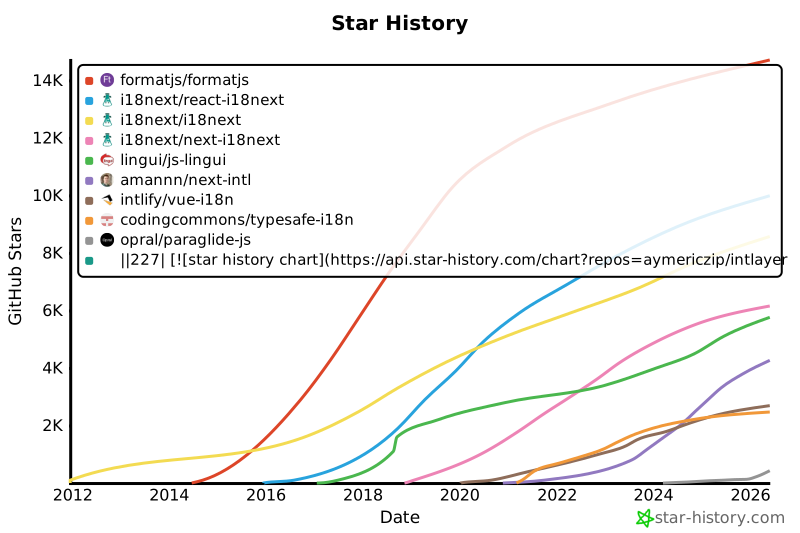](https://www.star-history.com/#aymericzip/intlayer&formatjs/formatjs&i18next/react-i18next&i18next/i18next&i18next/next-i18next&lingui/js-lingui&amannn/next-intl&intlify/vue-i18n&codingcommons/typesafe-i18n&opral/paraglide-js)
|
|
228
228
|
|
|
229
229
|
---
|
|
230
230
|
|
|
@@ -224,7 +224,7 @@ export const ComponentExample = () => {
|
|
|
224
224
|
|
|
225
225
|
GitHubのスターは、プロジェクトの普及度、コミュニティの信頼、および長期的な関連性を示す強力な指標です。技術的な品質を直接測定するものではありませんが、どれだけの開発者がプロジェクトを有用だと感じ、その進捗をフォローし、採用する可能性があるかを反映しています。プロジェクトの価値を見積もる際、スターは代替案との勢いの比較を助け、エコシステムの成長に関する洞察を提供します。
|
|
226
226
|
|
|
227
|
-
[](https://www.star-history.com/#aymericzip/intlayer&formatjs/formatjs&i18next/react-i18next&i18next/i18next&i18next/next-i18next&lingui/js-lingui&amannn/next-intl&intlify/vue-i18n&codingcommons/typesafe-i18n&opral/paraglide-js)
|
|
228
228
|
|
|
229
229
|
---
|
|
230
230
|
|