@intlayer/docs 8.10.0-canary.1 → 8.10.1
This diff represents the content of publicly available package versions that have been released to one of the supported registries. The information contained in this diff is provided for informational purposes only and reflects changes between package versions as they appear in their respective public registries.
- package/docs/ar/dictionary/markdown.md +349 -19
- package/docs/ar/interest_of_intlayer.md +1 -1
- package/docs/bn/interest_of_intlayer.md +1 -1
- package/docs/cs/interest_of_intlayer.md +1 -1
- package/docs/de/dictionary/markdown.md +349 -19
- package/docs/de/interest_of_intlayer.md +1 -1
- package/docs/en/dictionary/markdown.md +338 -20
- package/docs/en/interest_of_intlayer.md +1 -1
- package/docs/en-GB/dictionary/markdown.md +349 -19
- package/docs/en-GB/interest_of_intlayer.md +1 -1
- package/docs/es/dictionary/markdown.md +349 -19
- package/docs/es/interest_of_intlayer.md +1 -1
- package/docs/fr/dictionary/markdown.md +349 -19
- package/docs/fr/interest_of_intlayer.md +1 -1
- package/docs/hi/dictionary/markdown.md +349 -19
- package/docs/hi/interest_of_intlayer.md +1 -1
- package/docs/id/dictionary/markdown.md +349 -19
- package/docs/id/interest_of_intlayer.md +1 -1
- package/docs/it/dictionary/markdown.md +349 -19
- package/docs/it/interest_of_intlayer.md +1 -1
- package/docs/ja/interest_of_intlayer.md +1 -1
- package/docs/ko/dictionary/markdown.md +349 -19
- package/docs/ko/interest_of_intlayer.md +1 -1
- package/docs/nl/interest_of_intlayer.md +1 -1
- package/docs/pl/dictionary/markdown.md +349 -19
- package/docs/pl/interest_of_intlayer.md +1 -1
- package/docs/pt/benchmark/solid.md +1 -1
- package/docs/pt/benchmark/svelte.md +1 -1
- package/docs/pt/dictionary/markdown.md +349 -19
- package/docs/pt/interest_of_intlayer.md +1 -1
- package/docs/ru/dictionary/markdown.md +458 -16
- package/docs/ru/interest_of_intlayer.md +1 -1
- package/docs/tr/dictionary/markdown.md +349 -19
- package/docs/tr/interest_of_intlayer.md +1 -1
- package/docs/uk/dictionary/markdown.md +349 -19
- package/docs/uk/interest_of_intlayer.md +1 -1
- package/docs/ur/interest_of_intlayer.md +1 -1
- package/docs/vi/dictionary/markdown.md +349 -19
- package/docs/vi/interest_of_intlayer.md +1 -1
- package/docs/zh/dictionary/markdown.md +349 -19
- package/docs/zh/interest_of_intlayer.md +1 -1
- package/docs/zh-TW/interest_of_intlayer.md +1 -1
- package/package.json +7 -7
|
@@ -95,34 +95,34 @@ You can declare Markdown content using the `md` function or simply as a string (
|
|
|
95
95
|
```
|
|
96
96
|
|
|
97
97
|
</Tab>
|
|
98
|
-
<Tab label="
|
|
99
|
-
|
|
98
|
+
<Tab label="External Files" value="external-files">
|
|
99
|
+
Import `.md` files directly using the `file` function.
|
|
100
100
|
|
|
101
101
|
```typescript fileName="markdownDictionary.content.ts"
|
|
102
|
+
import { md, file, t } from "intlayer";
|
|
103
|
+
|
|
102
104
|
export default {
|
|
103
105
|
key: "app",
|
|
104
|
-
contentAutoTransformation: true, // Enable automatic detection of Markdown content - Can be set globally in intlayer.config.ts
|
|
105
106
|
content: {
|
|
106
|
-
|
|
107
|
+
content: t({
|
|
108
|
+
en: md(file("./myMarkdown.en-GB.md")),
|
|
109
|
+
fr: md(file("./myMarkdown.fr.md")),
|
|
110
|
+
}),
|
|
107
111
|
},
|
|
108
112
|
};
|
|
109
113
|
```
|
|
110
114
|
|
|
111
115
|
</Tab>
|
|
112
116
|
|
|
113
|
-
<Tab label="
|
|
114
|
-
|
|
117
|
+
<Tab label="Automatic Detection" value="automatic-detection">
|
|
118
|
+
If the string contains common Markdown indicators (like headings, lists, links, etc.), Intlayer will automatically transform it.
|
|
115
119
|
|
|
116
120
|
```typescript fileName="markdownDictionary.content.ts"
|
|
117
|
-
import { md, file, t } from "intlayer";
|
|
118
|
-
|
|
119
121
|
export default {
|
|
120
122
|
key: "app",
|
|
123
|
+
contentAutoTransformation: true, // Enable automatic detection of Markdown content - Can be set globally in intlayer.config.ts
|
|
121
124
|
content: {
|
|
122
|
-
|
|
123
|
-
en: md(file("./myMarkdown.en-GB.md")),
|
|
124
|
-
fr: md(file("./myMarkdown.fr.md")),
|
|
125
|
-
}),
|
|
125
|
+
myMarkdownContent: "## My title \n\nLorem Ipsum",
|
|
126
126
|
},
|
|
127
127
|
};
|
|
128
128
|
```
|
|
@@ -130,8 +130,6 @@ You can declare Markdown content using the `md` function or simply as a string (
|
|
|
130
130
|
</Tab>
|
|
131
131
|
</Tabs>
|
|
132
132
|
|
|
133
|
-
---
|
|
134
|
-
|
|
135
133
|
## Rendering Markdown
|
|
136
134
|
|
|
137
135
|
Intlayer provides two independent ways to render Markdown:
|
|
@@ -147,7 +145,7 @@ Markdown rendering supports **MDX** — use any JSX/framework component by name
|
|
|
147
145
|
### 1. Automatic Rendering (via `useIntlayer`)
|
|
148
146
|
|
|
149
147
|
<Tabs group="framework">
|
|
150
|
-
<Tab label="React
|
|
148
|
+
<Tab label="React" value="react">
|
|
151
149
|
Markdown nodes can be rendered directly as JSX.
|
|
152
150
|
|
|
153
151
|
```tsx fileName="App.tsx"
|
|
@@ -197,6 +195,57 @@ Markdown rendering supports **MDX** — use any JSX/framework component by name
|
|
|
197
195
|
{myMarkdownContent.metadata.title}
|
|
198
196
|
```
|
|
199
197
|
|
|
198
|
+
</Tab>
|
|
199
|
+
<Tab label="Next.js" value="nextjs">
|
|
200
|
+
Markdown nodes can be rendered directly as JSX.
|
|
201
|
+
|
|
202
|
+
```tsx fileName="App.tsx"
|
|
203
|
+
import { useIntlayer } from "next-intlayer";
|
|
204
|
+
import { MarkdownProvider } from "next-intlayer/markdown";
|
|
205
|
+
|
|
206
|
+
const AppContent = () => {
|
|
207
|
+
const { myMarkdownContent } = useIntlayer("app");
|
|
208
|
+
|
|
209
|
+
return <div>{myMarkdownContent}</div>;
|
|
210
|
+
};
|
|
211
|
+
|
|
212
|
+
const App = () => (
|
|
213
|
+
<MarkdownProvider
|
|
214
|
+
components={{
|
|
215
|
+
h1: ({ children }) => <h1 style={{ color: "red" }}>{children}</h1>,
|
|
216
|
+
MyButton: (props) => <button {...props} />, // MDX Component
|
|
217
|
+
}}
|
|
218
|
+
>
|
|
219
|
+
<AppContent />
|
|
220
|
+
</MarkdownProvider>
|
|
221
|
+
);
|
|
222
|
+
```
|
|
223
|
+
|
|
224
|
+
> If `MarkdownProvider` is not present, Intlayer will render the markdown using the default Markdown to JSX parser.
|
|
225
|
+
|
|
226
|
+
You can also provide local overrides for specific nodes using the `.use()` method:
|
|
227
|
+
|
|
228
|
+
```tsx
|
|
229
|
+
{myMarkdownContent.use({
|
|
230
|
+
h1: ({ children }) => <h1 style={{ color: "red" }}>{children}</h1>,
|
|
231
|
+
})}
|
|
232
|
+
```
|
|
233
|
+
|
|
234
|
+
You can retrieve the Markdown as a string:
|
|
235
|
+
|
|
236
|
+
```tsx
|
|
237
|
+
{myMarkdownContent.value}
|
|
238
|
+
{String(myMarkdownContent)}
|
|
239
|
+
{myMarkdownContent.toString()}
|
|
240
|
+
```
|
|
241
|
+
|
|
242
|
+
And you can access your markdown metadata like this:
|
|
243
|
+
|
|
244
|
+
```tsx
|
|
245
|
+
{myMarkdownContent.metadata}
|
|
246
|
+
{myMarkdownContent.metadata.title}
|
|
247
|
+
```
|
|
248
|
+
|
|
200
249
|
</Tab>
|
|
201
250
|
<Tab label="Vue" value="vue">
|
|
202
251
|
In Vue, Markdown content can be rendered using the built-in `component` tag or directly as a node.
|
|
@@ -441,7 +490,7 @@ Markdown rendering supports **MDX** — use any JSX/framework component by name
|
|
|
441
490
|
These utilities render **only raw Markdown strings** and are independent of `useIntlayer`. Use them when you need to render Markdown from sources other than your dictionaries.
|
|
442
491
|
|
|
443
492
|
<Tabs group="framework">
|
|
444
|
-
<Tab label="React
|
|
493
|
+
<Tab label="React" value="react">
|
|
445
494
|
|
|
446
495
|
#### `<MarkdownRenderer />` Component
|
|
447
496
|
|
|
@@ -479,6 +528,45 @@ These utilities render **only raw Markdown strings** and are independent of `use
|
|
|
479
528
|
const jsx = renderMarkdown("# My Title", { forceBlock: true });
|
|
480
529
|
```
|
|
481
530
|
|
|
531
|
+
</Tab>
|
|
532
|
+
<Tab label="Next.js" value="nextjs">
|
|
533
|
+
|
|
534
|
+
#### `<MarkdownRenderer />` Component
|
|
535
|
+
|
|
536
|
+
Renders a Markdown string with specific options.
|
|
537
|
+
|
|
538
|
+
```tsx
|
|
539
|
+
import { MarkdownRenderer } from "next-intlayer/markdown";
|
|
540
|
+
|
|
541
|
+
<MarkdownRenderer forceBlock={true} tagfilter={true}>
|
|
542
|
+
{"# My Title"}
|
|
543
|
+
</MarkdownRenderer>
|
|
544
|
+
```
|
|
545
|
+
|
|
546
|
+
#### `useMarkdownRenderer()` Hook
|
|
547
|
+
|
|
548
|
+
Get a pre-configured renderer function.
|
|
549
|
+
|
|
550
|
+
```tsx
|
|
551
|
+
import { useMarkdownRenderer } from "next-intlayer/markdown";
|
|
552
|
+
|
|
553
|
+
const renderMarkdown = useMarkdownRenderer({
|
|
554
|
+
forceBlock: true,
|
|
555
|
+
components: { h1: (props) => <h1 {...props} className="custom" /> }
|
|
556
|
+
});
|
|
557
|
+
|
|
558
|
+
return renderMarkdown("# My Title");
|
|
559
|
+
```
|
|
560
|
+
|
|
561
|
+
#### `renderMarkdown()` Utility
|
|
562
|
+
Standalone utility for rendering outside of components.
|
|
563
|
+
|
|
564
|
+
```tsx
|
|
565
|
+
import { renderMarkdown } from "next-intlayer/markdown";
|
|
566
|
+
|
|
567
|
+
const jsx = renderMarkdown("# My Title", { forceBlock: true });
|
|
568
|
+
```
|
|
569
|
+
|
|
482
570
|
</Tab>
|
|
483
571
|
<Tab label="Vue" value="vue">
|
|
484
572
|
|
|
@@ -608,14 +696,12 @@ These utilities render **only raw Markdown strings** and are independent of `use
|
|
|
608
696
|
</Tab>
|
|
609
697
|
</Tabs>
|
|
610
698
|
|
|
611
|
-
---
|
|
612
|
-
|
|
613
699
|
## Global Configuration with `MarkdownProvider`
|
|
614
700
|
|
|
615
701
|
The `MarkdownProvider` (or its framework equivalent) configures the Markdown rendering pipeline for your entire application. This applies to both the automatic `useIntlayer` rendering and the helper utilities. Options set here are the defaults — `.use()` overrides them at the node level.
|
|
616
702
|
|
|
617
703
|
<Tabs group="framework">
|
|
618
|
-
<Tab label="React
|
|
704
|
+
<Tab label="React" value="react">
|
|
619
705
|
|
|
620
706
|
```tsx fileName="AppProvider.tsx"
|
|
621
707
|
import { MarkdownProvider } from "react-intlayer/markdown";
|
|
@@ -633,6 +719,7 @@ The `MarkdownProvider` (or its framework equivalent) configures the Markdown ren
|
|
|
633
719
|
);
|
|
634
720
|
```
|
|
635
721
|
|
|
722
|
+
|
|
636
723
|
> MDX is supported — any component name used inside your Markdown (e.g. `<MyCustomJSXComponent />`) is resolved against the `components` map.
|
|
637
724
|
|
|
638
725
|
You can also use your own markdown renderer:
|
|
@@ -643,6 +730,7 @@ The `MarkdownProvider` (or its framework equivalent) configures the Markdown ren
|
|
|
643
730
|
export const AppProvider = ({ children }) => (
|
|
644
731
|
<MarkdownProvider
|
|
645
732
|
renderMarkdown={async (md) => {
|
|
733
|
+
// Use dynamic import to reduce the bundle size of your application
|
|
646
734
|
const { renderMarkdown } = await import('react-intlayer/markdown');
|
|
647
735
|
return renderMarkdown(md);
|
|
648
736
|
}}
|
|
@@ -654,6 +742,48 @@ The `MarkdownProvider` (or its framework equivalent) configures the Markdown ren
|
|
|
654
742
|
|
|
655
743
|
> Importing your Markdown renderer dynamically is a great way to reduce the bundle size of your application.
|
|
656
744
|
|
|
745
|
+
</Tab>
|
|
746
|
+
<Tab label="Next.js" value="nextjs">
|
|
747
|
+
|
|
748
|
+
```tsx fileName="AppProvider.tsx"
|
|
749
|
+
import { MarkdownProvider } from "next-intlayer/markdown";
|
|
750
|
+
|
|
751
|
+
export const AppProvider = ({ children }) => (
|
|
752
|
+
<MarkdownProvider
|
|
753
|
+
components={{
|
|
754
|
+
h1: (props) => <h1 style={{color: 'green'}} {...props} />,
|
|
755
|
+
a: ({ href, ...props }) => <a style={{color: 'red'}} {...props} />,
|
|
756
|
+
MyCustomJSXComponent: (props) => <span style={{color: 'red'}} {...props} />,
|
|
757
|
+
}}
|
|
758
|
+
>
|
|
759
|
+
{children}
|
|
760
|
+
</MarkdownProvider>
|
|
761
|
+
);
|
|
762
|
+
```
|
|
763
|
+
|
|
764
|
+
|
|
765
|
+
> MDX is supported — any component name used inside your Markdown (e.g. `<MyCustomJSXComponent />`) is resolved against the `components` map.
|
|
766
|
+
|
|
767
|
+
You can also use your own markdown renderer:
|
|
768
|
+
|
|
769
|
+
```tsx fileName="AppProvider.tsx"
|
|
770
|
+
import { MarkdownProvider } from "next-intlayer/markdown";
|
|
771
|
+
|
|
772
|
+
export const AppProvider = ({ children }) => (
|
|
773
|
+
<MarkdownProvider
|
|
774
|
+
renderMarkdown={async (md) => {
|
|
775
|
+
// Use dynamic import to reduce the bundle size of your application
|
|
776
|
+
const { renderMarkdown } = await import('next-intlayer/markdown');
|
|
777
|
+
return renderMarkdown(md);
|
|
778
|
+
}}
|
|
779
|
+
>
|
|
780
|
+
{children}
|
|
781
|
+
</MarkdownProvider>
|
|
782
|
+
);
|
|
783
|
+
```
|
|
784
|
+
|
|
785
|
+
> Importing your Markdown renderer dynamically is a great way to reduce the bundle size of your application.
|
|
786
|
+
|
|
657
787
|
</Tab>
|
|
658
788
|
<Tab label="Vue" value="vue">
|
|
659
789
|
|
|
@@ -679,6 +809,9 @@ The `MarkdownProvider` (or its framework equivalent) configures the Markdown ren
|
|
|
679
809
|
app.mount("#app");
|
|
680
810
|
```
|
|
681
811
|
|
|
812
|
+
|
|
813
|
+
> MDX is supported — any component name used inside your Markdown (e.g. `<MyCustomJSXComponent />`) is resolved against the `components` map.
|
|
814
|
+
|
|
682
815
|
You can also use your own markdown renderer:
|
|
683
816
|
|
|
684
817
|
```typescript fileName="main.ts"
|
|
@@ -720,6 +853,9 @@ The `MarkdownProvider` (or its framework equivalent) configures the Markdown ren
|
|
|
720
853
|
</MarkdownProvider>
|
|
721
854
|
```
|
|
722
855
|
|
|
856
|
+
|
|
857
|
+
> MDX is supported — any component name used inside your Markdown (e.g. `<MyCustomJSXComponent />`) is resolved against the `components` map.
|
|
858
|
+
|
|
723
859
|
You can also use your own markdown renderer:
|
|
724
860
|
|
|
725
861
|
```svelte fileName="App.svelte"
|
|
@@ -756,6 +892,9 @@ The `MarkdownProvider` (or its framework equivalent) configures the Markdown ren
|
|
|
756
892
|
);
|
|
757
893
|
```
|
|
758
894
|
|
|
895
|
+
|
|
896
|
+
> MDX is supported — any component name used inside your Markdown (e.g. `<MyCustomJSXComponent />`) is resolved against the `components` map.
|
|
897
|
+
|
|
759
898
|
You can also use your own markdown renderer:
|
|
760
899
|
|
|
761
900
|
```tsx fileName="AppProvider.tsx"
|
|
@@ -792,6 +931,9 @@ The `MarkdownProvider` (or its framework equivalent) configures the Markdown ren
|
|
|
792
931
|
);
|
|
793
932
|
```
|
|
794
933
|
|
|
934
|
+
|
|
935
|
+
> MDX is supported — any component name used inside your Markdown (e.g. `<MyCustomJSXComponent />`) is resolved against the `components` map.
|
|
936
|
+
|
|
795
937
|
You can also use your own markdown renderer:
|
|
796
938
|
|
|
797
939
|
```tsx fileName="AppProvider.tsx"
|
|
@@ -835,3 +977,191 @@ The `MarkdownProvider` (or its framework equivalent) configures the Markdown ren
|
|
|
835
977
|
|
|
836
978
|
</Tab>
|
|
837
979
|
</Tabs>
|
|
980
|
+
|
|
981
|
+
## Suspense
|
|
982
|
+
|
|
983
|
+
The Intlayer Markdown renderer is dynamically loaded. Although optimized, the underlying parser chunk is approximately 55kb. Loading this synchronously delays the initial page rendering and degrades First Contentful Paint (FCP).
|
|
984
|
+
|
|
985
|
+
To prevent blocking the UI, Intlayer integrates with React's Suspense API. It fetches the parser in the background and throws a Promise during the download.
|
|
986
|
+
|
|
987
|
+
Wrap any component rendering Intlayer Markdown in a `<Suspense>` boundary. This displays a localized fallback state while the chunk downloads, allowing the rest of your DOM to render immediately.
|
|
988
|
+
|
|
989
|
+
Warning: If you do not provide a `<Suspense>` boundary, React will suspend at the root level or block the entire component tree from rendering until the 55kb chunk is fully loaded.
|
|
990
|
+
|
|
991
|
+
<Tabs>
|
|
992
|
+
<Tab label="Next.js" value="nextjs">
|
|
993
|
+
|
|
994
|
+
In Next.js App Router, you can use either React `Suspense` for client components or a `loading.tsx` file for server components.
|
|
995
|
+
|
|
996
|
+
**Client Component:**
|
|
997
|
+
|
|
998
|
+
```tsx fileName="components/MyComponent.tsx"
|
|
999
|
+
"use client";
|
|
1000
|
+
import { useIntlayer } from "next-intlayer";
|
|
1001
|
+
import { Suspense } from "react";
|
|
1002
|
+
|
|
1003
|
+
const MyComponent = () => {
|
|
1004
|
+
const markdownContent = useIntlayer("my-markdown");
|
|
1005
|
+
|
|
1006
|
+
return (
|
|
1007
|
+
<Suspense fallback={<div>Loading...</div>}>{markdownContent}</Suspense>
|
|
1008
|
+
);
|
|
1009
|
+
};
|
|
1010
|
+
```
|
|
1011
|
+
|
|
1012
|
+
**Server Component with `loading.tsx`:**
|
|
1013
|
+
|
|
1014
|
+
```tsx fileName="app/loading.tsx"
|
|
1015
|
+
export default function Loading() {
|
|
1016
|
+
return <div>Loading...</div>;
|
|
1017
|
+
}
|
|
1018
|
+
```
|
|
1019
|
+
|
|
1020
|
+
```tsx fileName="app/page.tsx"
|
|
1021
|
+
import { useIntlayer } from "next-intlayer/server";
|
|
1022
|
+
|
|
1023
|
+
const MyPage = () => {
|
|
1024
|
+
const markdownContent = useIntlayer("my-markdown");
|
|
1025
|
+
return <div>{markdownContent}</div>;
|
|
1026
|
+
};
|
|
1027
|
+
|
|
1028
|
+
export default MyPage;
|
|
1029
|
+
```
|
|
1030
|
+
|
|
1031
|
+
</Tab>
|
|
1032
|
+
|
|
1033
|
+
<Tab label="React" value="react">
|
|
1034
|
+
|
|
1035
|
+
```tsx
|
|
1036
|
+
import { useIntlayer } from "react-intlayer";
|
|
1037
|
+
import { Suspense } from "react";
|
|
1038
|
+
|
|
1039
|
+
const MyComponent = () => {
|
|
1040
|
+
const markdownContent = useIntlayer("my-markdown");
|
|
1041
|
+
|
|
1042
|
+
return (
|
|
1043
|
+
<Suspense fallback={<div>Loading...</div>}>{markdownContent}</Suspense>
|
|
1044
|
+
);
|
|
1045
|
+
};
|
|
1046
|
+
```
|
|
1047
|
+
|
|
1048
|
+
</Tab>
|
|
1049
|
+
|
|
1050
|
+
<Tab label="Vue" value="vue">
|
|
1051
|
+
|
|
1052
|
+
Vue has a built-in `<Suspense>` component. Wrap the component rendering Markdown content in a `<Suspense>` boundary.
|
|
1053
|
+
|
|
1054
|
+
```vue fileName="MyComponent.vue"
|
|
1055
|
+
<script setup>
|
|
1056
|
+
import { useIntlayer } from "vue-intlayer";
|
|
1057
|
+
|
|
1058
|
+
const { markdownContent } = useIntlayer("my-markdown");
|
|
1059
|
+
</script>
|
|
1060
|
+
|
|
1061
|
+
<template>
|
|
1062
|
+
<Suspense>
|
|
1063
|
+
<component :is="markdownContent" />
|
|
1064
|
+
<template #fallback>
|
|
1065
|
+
<div>Loading...</div>
|
|
1066
|
+
</template>
|
|
1067
|
+
</Suspense>
|
|
1068
|
+
</template>
|
|
1069
|
+
```
|
|
1070
|
+
|
|
1071
|
+
</Tab>
|
|
1072
|
+
<Tab label="Svelte" value="svelte">
|
|
1073
|
+
|
|
1074
|
+
Svelte does not have a Suspense API equivalent. Use an `{#await}` block to handle async rendering of Markdown content.
|
|
1075
|
+
|
|
1076
|
+
```svelte fileName="MyComponent.svelte"
|
|
1077
|
+
<script lang="ts">
|
|
1078
|
+
import { useIntlayer } from "svelte-intlayer";
|
|
1079
|
+
|
|
1080
|
+
const content = useIntlayer("my-markdown");
|
|
1081
|
+
</script>
|
|
1082
|
+
|
|
1083
|
+
{#await $content.markdownContent}
|
|
1084
|
+
<div>Loading...</div>
|
|
1085
|
+
{:then rendered}
|
|
1086
|
+
{@html rendered}
|
|
1087
|
+
{/await}
|
|
1088
|
+
```
|
|
1089
|
+
|
|
1090
|
+
</Tab>
|
|
1091
|
+
<Tab label="Preact" value="preact">
|
|
1092
|
+
|
|
1093
|
+
Preact supports React's Suspense API via `preact/compat`.
|
|
1094
|
+
|
|
1095
|
+
```tsx fileName="MyComponent.tsx"
|
|
1096
|
+
import { useIntlayer } from "preact-intlayer";
|
|
1097
|
+
import { Suspense } from "preact/compat";
|
|
1098
|
+
|
|
1099
|
+
const MyComponent = () => {
|
|
1100
|
+
const markdownContent = useIntlayer("my-markdown");
|
|
1101
|
+
|
|
1102
|
+
return (
|
|
1103
|
+
<Suspense fallback={<div>Loading...</div>}>{markdownContent}</Suspense>
|
|
1104
|
+
);
|
|
1105
|
+
};
|
|
1106
|
+
```
|
|
1107
|
+
|
|
1108
|
+
</Tab>
|
|
1109
|
+
<Tab label="Solid" value="solid">
|
|
1110
|
+
|
|
1111
|
+
Solid has its own `<Suspense>` component from `solid-js`.
|
|
1112
|
+
|
|
1113
|
+
```tsx fileName="MyComponent.tsx"
|
|
1114
|
+
import { useIntlayer } from "solid-intlayer";
|
|
1115
|
+
import { Suspense } from "solid-js";
|
|
1116
|
+
|
|
1117
|
+
const MyComponent = () => {
|
|
1118
|
+
const { markdownContent } = useIntlayer("my-markdown");
|
|
1119
|
+
|
|
1120
|
+
return (
|
|
1121
|
+
<Suspense fallback={<div>Loading...</div>}>{markdownContent}</Suspense>
|
|
1122
|
+
);
|
|
1123
|
+
};
|
|
1124
|
+
```
|
|
1125
|
+
|
|
1126
|
+
</Tab>
|
|
1127
|
+
<Tab label="Angular" value="angular">
|
|
1128
|
+
|
|
1129
|
+
Angular does not have a Suspense API. Use Angular's deferrable views (`@defer`) to handle lazy-loaded Markdown content (requires Angular 17+).
|
|
1130
|
+
|
|
1131
|
+
```typescript fileName="my.component.ts"
|
|
1132
|
+
import { Component } from "@angular/core";
|
|
1133
|
+
import { useIntlayer } from "angular-intlayer";
|
|
1134
|
+
|
|
1135
|
+
@Component({
|
|
1136
|
+
selector: "app-my",
|
|
1137
|
+
template: `
|
|
1138
|
+
@defer {
|
|
1139
|
+
<div [innerHTML]="content().markdownContent"></div>
|
|
1140
|
+
} @loading {
|
|
1141
|
+
<div>Loading...</div>
|
|
1142
|
+
}
|
|
1143
|
+
`,
|
|
1144
|
+
})
|
|
1145
|
+
export class MyComponent {
|
|
1146
|
+
content = useIntlayer("my-markdown");
|
|
1147
|
+
}
|
|
1148
|
+
```
|
|
1149
|
+
|
|
1150
|
+
</Tab>
|
|
1151
|
+
</Tabs>
|
|
1152
|
+
|
|
1153
|
+
---
|
|
1154
|
+
|
|
1155
|
+
## Options Reference
|
|
1156
|
+
|
|
1157
|
+
These options can be passed to `MarkdownProvider`, `MarkdownRenderer`, `useMarkdownRenderer`, and `renderMarkdown`.
|
|
1158
|
+
|
|
1159
|
+
| Option | Type | Default | Description |
|
|
1160
|
+
| :-------------------- | :---------- | :------ | :------------------------------------------------------------------------------------ |
|
|
1161
|
+
| `forceBlock` | `boolean` | `false` | Forces the output to be wrapped in a block-level element (e.g., `<div>`). |
|
|
1162
|
+
| `forceInline` | `boolean` | `false` | Forces the output to be wrapped in an inline element (e.g., `<span>`). |
|
|
1163
|
+
| `tagfilter` | `boolean` | `true` | Enables the GitHub Tag Filter for improved security by stripping dangerous HTML tags. |
|
|
1164
|
+
| `preserveFrontmatter` | `boolean` | `false` | If `true`, frontmatter at the beginning of the Markdown string will not be stripped. |
|
|
1165
|
+
| `components` | `Overrides` | `{}` | A map of HTML tags to custom components (e.g., `{ h1: MyHeading }`). |
|
|
1166
|
+
| `wrapper` | `Component` | `null` | A custom component to wrap the rendered Markdown. |
|
|
1167
|
+
| `renderMarkdown` | `Function` | `null` | A custom rendering function to completely replace the default Markdown compiler. |
|
|
@@ -224,7 +224,7 @@ This approach allows you to:
|
|
|
224
224
|
|
|
225
225
|
GitHub stars are a strong indicator of a project's popularity, community trust, and long-term relevance. While not a direct measure of technical quality, they reflect how many developers find the project useful, follow its progress, and are likely to adopt it. For estimating the value of a project, stars help compare traction across alternatives and provide insights into ecosystem growth.
|
|
226
226
|
|
|
227
|
-
[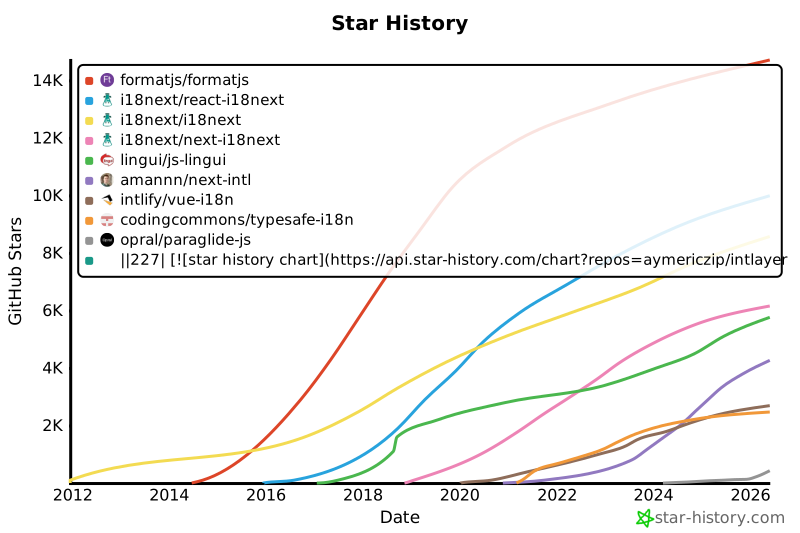](https://www.star-history.com/#aymericzip/intlayer&formatjs/formatjs&i18next/react-i18next&i18next/i18next&i18next/next-i18next&lingui/js-lingui&amannn/next-intl&intlify/vue-i18n&codingcommons/typesafe-i18n&opral/paraglide-js)
|
|
228
228
|
|
|
229
229
|
---
|
|
230
230
|
|