@intlayer/docs 8.10.0-canary.1 → 8.10.1
This diff represents the content of publicly available package versions that have been released to one of the supported registries. The information contained in this diff is provided for informational purposes only and reflects changes between package versions as they appear in their respective public registries.
- package/docs/ar/dictionary/markdown.md +349 -19
- package/docs/ar/interest_of_intlayer.md +1 -1
- package/docs/bn/interest_of_intlayer.md +1 -1
- package/docs/cs/interest_of_intlayer.md +1 -1
- package/docs/de/dictionary/markdown.md +349 -19
- package/docs/de/interest_of_intlayer.md +1 -1
- package/docs/en/dictionary/markdown.md +338 -20
- package/docs/en/interest_of_intlayer.md +1 -1
- package/docs/en-GB/dictionary/markdown.md +349 -19
- package/docs/en-GB/interest_of_intlayer.md +1 -1
- package/docs/es/dictionary/markdown.md +349 -19
- package/docs/es/interest_of_intlayer.md +1 -1
- package/docs/fr/dictionary/markdown.md +349 -19
- package/docs/fr/interest_of_intlayer.md +1 -1
- package/docs/hi/dictionary/markdown.md +349 -19
- package/docs/hi/interest_of_intlayer.md +1 -1
- package/docs/id/dictionary/markdown.md +349 -19
- package/docs/id/interest_of_intlayer.md +1 -1
- package/docs/it/dictionary/markdown.md +349 -19
- package/docs/it/interest_of_intlayer.md +1 -1
- package/docs/ja/interest_of_intlayer.md +1 -1
- package/docs/ko/dictionary/markdown.md +349 -19
- package/docs/ko/interest_of_intlayer.md +1 -1
- package/docs/nl/interest_of_intlayer.md +1 -1
- package/docs/pl/dictionary/markdown.md +349 -19
- package/docs/pl/interest_of_intlayer.md +1 -1
- package/docs/pt/benchmark/solid.md +1 -1
- package/docs/pt/benchmark/svelte.md +1 -1
- package/docs/pt/dictionary/markdown.md +349 -19
- package/docs/pt/interest_of_intlayer.md +1 -1
- package/docs/ru/dictionary/markdown.md +458 -16
- package/docs/ru/interest_of_intlayer.md +1 -1
- package/docs/tr/dictionary/markdown.md +349 -19
- package/docs/tr/interest_of_intlayer.md +1 -1
- package/docs/uk/dictionary/markdown.md +349 -19
- package/docs/uk/interest_of_intlayer.md +1 -1
- package/docs/ur/interest_of_intlayer.md +1 -1
- package/docs/vi/dictionary/markdown.md +349 -19
- package/docs/vi/interest_of_intlayer.md +1 -1
- package/docs/zh/dictionary/markdown.md +349 -19
- package/docs/zh/interest_of_intlayer.md +1 -1
- package/docs/zh-TW/interest_of_intlayer.md +1 -1
- package/package.json +7 -7
|
@@ -95,34 +95,34 @@ Intlayer 支持使用 Markdown 语法定义的富文本内容。这使您可以
|
|
|
95
95
|
```
|
|
96
96
|
|
|
97
97
|
</Tab>
|
|
98
|
-
<Tab label="
|
|
99
|
-
|
|
98
|
+
<Tab label="外部文件" value="external-files">
|
|
99
|
+
使用 `file` 函数直接导入 `.md` 文件。
|
|
100
100
|
|
|
101
101
|
```typescript fileName="markdownDictionary.content.ts"
|
|
102
|
+
import { md, file, t } from "intlayer";
|
|
103
|
+
|
|
102
104
|
export default {
|
|
103
105
|
key: "app",
|
|
104
|
-
contentAutoTransformation: true, // 启用 Markdown 内容的自动检测 - 可以在 intlayer.config.ts 中全局设置
|
|
105
106
|
content: {
|
|
106
|
-
|
|
107
|
+
content: t({
|
|
108
|
+
en: md(file("./myMarkdown.en.md")),
|
|
109
|
+
zh: md(file("./myMarkdown.zh.md")),
|
|
110
|
+
}),
|
|
107
111
|
},
|
|
108
112
|
};
|
|
109
113
|
```
|
|
110
114
|
|
|
111
115
|
</Tab>
|
|
112
116
|
|
|
113
|
-
<Tab label="
|
|
114
|
-
|
|
117
|
+
<Tab label="自动检测" value="automatic-detection">
|
|
118
|
+
如果字符串包含常见的 Markdown 指示符(如标题、列表、链接等),Intlayer 会自动转换它。
|
|
115
119
|
|
|
116
120
|
```typescript fileName="markdownDictionary.content.ts"
|
|
117
|
-
import { md, file, t } from "intlayer";
|
|
118
|
-
|
|
119
121
|
export default {
|
|
120
122
|
key: "app",
|
|
123
|
+
contentAutoTransformation: true, // 启用 Markdown 内容的自动检测 - 可以在 intlayer.config.ts 中全局设置
|
|
121
124
|
content: {
|
|
122
|
-
|
|
123
|
-
en: md(file("./myMarkdown.en.md")),
|
|
124
|
-
zh: md(file("./myMarkdown.zh.md")),
|
|
125
|
-
}),
|
|
125
|
+
myMarkdownContent: "## 我的标题 \n\nLorem Ipsum",
|
|
126
126
|
},
|
|
127
127
|
};
|
|
128
128
|
```
|
|
@@ -130,8 +130,6 @@ Intlayer 支持使用 Markdown 语法定义的富文本内容。这使您可以
|
|
|
130
130
|
</Tab>
|
|
131
131
|
</Tabs>
|
|
132
132
|
|
|
133
|
-
---
|
|
134
|
-
|
|
135
133
|
## 渲染 Markdown
|
|
136
134
|
|
|
137
135
|
Intlayer 提供两种独立的方式来渲染 Markdown:
|
|
@@ -147,7 +145,7 @@ Markdown 渲染支持 **MDX** — 在您的 Markdown 中直接按名称使用任
|
|
|
147
145
|
### 1. 自动渲染(通过 `useIntlayer`)
|
|
148
146
|
|
|
149
147
|
<Tabs group="framework">
|
|
150
|
-
<Tab label="React
|
|
148
|
+
<Tab label="React" value="react">
|
|
151
149
|
Markdown 节点可以直接呈现为 JSX。
|
|
152
150
|
|
|
153
151
|
```tsx fileName="App.tsx"
|
|
@@ -197,6 +195,57 @@ Markdown 渲染支持 **MDX** — 在您的 Markdown 中直接按名称使用任
|
|
|
197
195
|
{myMarkdownContent.metadata.title}
|
|
198
196
|
```
|
|
199
197
|
|
|
198
|
+
</Tab>
|
|
199
|
+
<Tab label="Next.js" value="nextjs">
|
|
200
|
+
Markdown 节点可以直接呈现为 JSX。
|
|
201
|
+
|
|
202
|
+
```tsx fileName="App.tsx"
|
|
203
|
+
import { useIntlayer } from "next-intlayer";
|
|
204
|
+
import { MarkdownProvider } from "next-intlayer/markdown";
|
|
205
|
+
|
|
206
|
+
const AppContent = () => {
|
|
207
|
+
const { myMarkdownContent } = useIntlayer("app");
|
|
208
|
+
|
|
209
|
+
return <div>{myMarkdownContent}</div>;
|
|
210
|
+
};
|
|
211
|
+
|
|
212
|
+
const App = () => (
|
|
213
|
+
<MarkdownProvider
|
|
214
|
+
components={{
|
|
215
|
+
h1: ({ children }) => <h1 style={{ color: "red" }}>{children}</h1>,
|
|
216
|
+
MyButton: (props) => <button {...props} />, // MDX 组件
|
|
217
|
+
}}
|
|
218
|
+
>
|
|
219
|
+
<AppContent />
|
|
220
|
+
</MarkdownProvider>
|
|
221
|
+
);
|
|
222
|
+
```
|
|
223
|
+
|
|
224
|
+
> 如果没有提供 `MarkdownProvider`,Intlayer 将使用默认的 Markdown 转 JSX 解析器渲染 markdown。
|
|
225
|
+
|
|
226
|
+
您还可以使用 `.use()` 方法提供特定节点的局部覆盖:
|
|
227
|
+
|
|
228
|
+
```tsx
|
|
229
|
+
{myMarkdownContent.use({
|
|
230
|
+
h1: ({ children }) => <h1 style={{ color: "red" }}>{children}</h1>,
|
|
231
|
+
})}
|
|
232
|
+
```
|
|
233
|
+
|
|
234
|
+
您可以以字符串形式检索 Markdown:
|
|
235
|
+
|
|
236
|
+
```tsx
|
|
237
|
+
{myMarkdownContent.value}
|
|
238
|
+
{String(myMarkdownContent)}
|
|
239
|
+
{myMarkdownContent.toString()}
|
|
240
|
+
```
|
|
241
|
+
|
|
242
|
+
您可以像这样访问您的 markdown 元数据:
|
|
243
|
+
|
|
244
|
+
```tsx
|
|
245
|
+
{myMarkdownContent.metadata}
|
|
246
|
+
{myMarkdownContent.metadata.title}
|
|
247
|
+
```
|
|
248
|
+
|
|
200
249
|
</Tab>
|
|
201
250
|
<Tab label="Vue" value="vue">
|
|
202
251
|
在 Vue 中,Markdown 内容可以使用内置的 `component` 或直接作为节点来呈现。
|
|
@@ -441,7 +490,7 @@ Markdown 渲染支持 **MDX** — 在您的 Markdown 中直接按名称使用任
|
|
|
441
490
|
这些实用程序渲染 **仅限原始 Markdown 字符串** 且独立于 `useIntlayer`。当您需要从词典以外的来源渲染 Markdown 时使用它们。
|
|
442
491
|
|
|
443
492
|
<Tabs group="framework">
|
|
444
|
-
<Tab label="React
|
|
493
|
+
<Tab label="React" value="react">
|
|
445
494
|
|
|
446
495
|
#### `<MarkdownRenderer />` 组件
|
|
447
496
|
|
|
@@ -479,6 +528,45 @@ Markdown 渲染支持 **MDX** — 在您的 Markdown 中直接按名称使用任
|
|
|
479
528
|
const jsx = renderMarkdown("# 我的标题", { forceBlock: true });
|
|
480
529
|
```
|
|
481
530
|
|
|
531
|
+
</Tab>
|
|
532
|
+
<Tab label="Next.js" value="nextjs">
|
|
533
|
+
|
|
534
|
+
#### `<MarkdownRenderer />` 组件
|
|
535
|
+
|
|
536
|
+
使用特定选项渲染 Markdown 字符串。
|
|
537
|
+
|
|
538
|
+
```tsx
|
|
539
|
+
import { MarkdownRenderer } from "next-intlayer/markdown";
|
|
540
|
+
|
|
541
|
+
<MarkdownRenderer forceBlock={true} tagfilter={true}>
|
|
542
|
+
{"# 我的标题"}
|
|
543
|
+
</MarkdownRenderer>
|
|
544
|
+
```
|
|
545
|
+
|
|
546
|
+
#### `useMarkdownRenderer()` 钩子
|
|
547
|
+
|
|
548
|
+
获取预配置的渲染器函数。
|
|
549
|
+
|
|
550
|
+
```tsx
|
|
551
|
+
import { useMarkdownRenderer } from "next-intlayer/markdown";
|
|
552
|
+
|
|
553
|
+
const renderMarkdown = useMarkdownRenderer({
|
|
554
|
+
forceBlock: true,
|
|
555
|
+
components: { h1: (props) => <h1 {...props} className="custom" /> }
|
|
556
|
+
});
|
|
557
|
+
|
|
558
|
+
return renderMarkdown("# 我的标题");
|
|
559
|
+
```
|
|
560
|
+
|
|
561
|
+
#### `renderMarkdown()` 实用程序
|
|
562
|
+
组件外部渲染的独立实用程序。
|
|
563
|
+
|
|
564
|
+
```tsx
|
|
565
|
+
import { renderMarkdown } from "next-intlayer/markdown";
|
|
566
|
+
|
|
567
|
+
const jsx = renderMarkdown("# 我的标题", { forceBlock: true });
|
|
568
|
+
```
|
|
569
|
+
|
|
482
570
|
</Tab>
|
|
483
571
|
<Tab label="Vue" value="vue">
|
|
484
572
|
|
|
@@ -608,14 +696,12 @@ Markdown 渲染支持 **MDX** — 在您的 Markdown 中直接按名称使用任
|
|
|
608
696
|
</Tab>
|
|
609
697
|
</Tabs>
|
|
610
698
|
|
|
611
|
-
---
|
|
612
|
-
|
|
613
699
|
## 使用 `MarkdownProvider` 进行全局配置
|
|
614
700
|
|
|
615
701
|
`MarkdownProvider`(或其框架对应的组件)为整个应用程序配置 Markdown 渲染管道。它适用于自动 `useIntlayer` 渲染和辅助实用程序。此处设置的选项为默认值 — `.use()` 在节点级别将其覆盖。
|
|
616
702
|
|
|
617
703
|
<Tabs group="framework">
|
|
618
|
-
<Tab label="React
|
|
704
|
+
<Tab label="React" value="react">
|
|
619
705
|
|
|
620
706
|
```tsx fileName="AppProvider.tsx"
|
|
621
707
|
import { MarkdownProvider } from "react-intlayer/markdown";
|
|
@@ -633,6 +719,7 @@ Markdown 渲染支持 **MDX** — 在您的 Markdown 中直接按名称使用任
|
|
|
633
719
|
);
|
|
634
720
|
```
|
|
635
721
|
|
|
722
|
+
|
|
636
723
|
> 支持 MDX — Markdown 内部使用的任何组件名称(例如 `<MyCustomJSXComponent />`)都会根据 `components` 映射进行解析。
|
|
637
724
|
|
|
638
725
|
您还可以使用自己的 markdown 渲染器:
|
|
@@ -643,6 +730,7 @@ Markdown 渲染支持 **MDX** — 在您的 Markdown 中直接按名称使用任
|
|
|
643
730
|
export const AppProvider = ({ children }) => (
|
|
644
731
|
<MarkdownProvider
|
|
645
732
|
renderMarkdown={async (md) => {
|
|
733
|
+
// Use dynamic import to reduce the bundle size of your application
|
|
646
734
|
const { renderMarkdown } = await import('react-intlayer/markdown');
|
|
647
735
|
return renderMarkdown(md);
|
|
648
736
|
}}
|
|
@@ -654,6 +742,48 @@ Markdown 渲染支持 **MDX** — 在您的 Markdown 中直接按名称使用任
|
|
|
654
742
|
|
|
655
743
|
> 动态导入您的 Markdown 渲染器是减少应用程序包大小的好方法。
|
|
656
744
|
|
|
745
|
+
</Tab>
|
|
746
|
+
<Tab label="Next.js" value="nextjs">
|
|
747
|
+
|
|
748
|
+
```tsx fileName="AppProvider.tsx"
|
|
749
|
+
import { MarkdownProvider } from "next-intlayer/markdown";
|
|
750
|
+
|
|
751
|
+
export const AppProvider = ({ children }) => (
|
|
752
|
+
<MarkdownProvider
|
|
753
|
+
components={{
|
|
754
|
+
h1: (props) => <h1 style={{color: 'green'}} {...props} />,
|
|
755
|
+
a: ({ href, ...props }) => <a style={{color: 'red'}} {...props} />,
|
|
756
|
+
MyCustomJSXComponent: (props) => <span style={{color: 'red'}} {...props} />,
|
|
757
|
+
}}
|
|
758
|
+
>
|
|
759
|
+
{children}
|
|
760
|
+
</MarkdownProvider>
|
|
761
|
+
);
|
|
762
|
+
```
|
|
763
|
+
|
|
764
|
+
|
|
765
|
+
> 支持 MDX — Markdown 内部使用的任何组件名称(例如 `<MyCustomJSXComponent />`)都会根据 `components` 映射进行解析。
|
|
766
|
+
|
|
767
|
+
您还可以使用自己的 markdown 渲染器:
|
|
768
|
+
|
|
769
|
+
```tsx fileName="AppProvider.tsx"
|
|
770
|
+
import { MarkdownProvider } from "next-intlayer/markdown";
|
|
771
|
+
|
|
772
|
+
export const AppProvider = ({ children }) => (
|
|
773
|
+
<MarkdownProvider
|
|
774
|
+
renderMarkdown={async (md) => {
|
|
775
|
+
// Use dynamic import to reduce the bundle size of your application
|
|
776
|
+
const { renderMarkdown } = await import('next-intlayer/markdown');
|
|
777
|
+
return renderMarkdown(md);
|
|
778
|
+
}}
|
|
779
|
+
>
|
|
780
|
+
{children}
|
|
781
|
+
</MarkdownProvider>
|
|
782
|
+
);
|
|
783
|
+
```
|
|
784
|
+
|
|
785
|
+
> 动态导入您的 Markdown 渲染器是减少应用程序包大小的好方法。
|
|
786
|
+
|
|
657
787
|
</Tab>
|
|
658
788
|
<Tab label="Vue" value="vue">
|
|
659
789
|
|
|
@@ -679,6 +809,9 @@ Markdown 渲染支持 **MDX** — 在您的 Markdown 中直接按名称使用任
|
|
|
679
809
|
app.mount("#app");
|
|
680
810
|
```
|
|
681
811
|
|
|
812
|
+
|
|
813
|
+
> 支持 MDX — Markdown 内部使用的任何组件名称(例如 `<MyCustomJSXComponent />`)都会根据 `components` 映射进行解析。
|
|
814
|
+
|
|
682
815
|
您还可以使用自己的 markdown 渲染器:
|
|
683
816
|
|
|
684
817
|
```typescript fileName="main.ts"
|
|
@@ -720,6 +853,9 @@ Markdown 渲染支持 **MDX** — 在您的 Markdown 中直接按名称使用任
|
|
|
720
853
|
</MarkdownProvider>
|
|
721
854
|
```
|
|
722
855
|
|
|
856
|
+
|
|
857
|
+
> 支持 MDX — Markdown 内部使用的任何组件名称(例如 `<MyCustomJSXComponent />`)都会根据 `components` 映射进行解析。
|
|
858
|
+
|
|
723
859
|
您还可以使用自己的 markdown 渲染器:
|
|
724
860
|
|
|
725
861
|
```svelte fileName="App.svelte"
|
|
@@ -756,6 +892,9 @@ Markdown 渲染支持 **MDX** — 在您的 Markdown 中直接按名称使用任
|
|
|
756
892
|
);
|
|
757
893
|
```
|
|
758
894
|
|
|
895
|
+
|
|
896
|
+
> 支持 MDX — Markdown 内部使用的任何组件名称(例如 `<MyCustomJSXComponent />`)都会根据 `components` 映射进行解析。
|
|
897
|
+
|
|
759
898
|
您还可以使用自己的 markdown 渲染器:
|
|
760
899
|
|
|
761
900
|
```tsx fileName="AppProvider.tsx"
|
|
@@ -792,6 +931,9 @@ Markdown 渲染支持 **MDX** — 在您的 Markdown 中直接按名称使用任
|
|
|
792
931
|
);
|
|
793
932
|
```
|
|
794
933
|
|
|
934
|
+
|
|
935
|
+
> 支持 MDX — Markdown 内部使用的任何组件名称(例如 `<MyCustomJSXComponent />`)都会根据 `components` 映射进行解析。
|
|
936
|
+
|
|
795
937
|
您还可以使用自己的 markdown 渲染器:
|
|
796
938
|
|
|
797
939
|
```tsx fileName="AppProvider.tsx"
|
|
@@ -835,3 +977,191 @@ Markdown 渲染支持 **MDX** — 在您的 Markdown 中直接按名称使用任
|
|
|
835
977
|
|
|
836
978
|
</Tab>
|
|
837
979
|
</Tabs>
|
|
980
|
+
|
|
981
|
+
## Suspense (悬念)
|
|
982
|
+
|
|
983
|
+
Intlayer Markdown渲染器是动态加载的。虽然经过优化,但底层解析器块的大小约为55kb。同步加载会延迟初始页面渲染,并降低首次内容绘制(FCP)。
|
|
984
|
+
|
|
985
|
+
为防止阻塞UI,Intlayer集成了React的Suspense API。它在后台获取解析器,并在下载期间抛出Promise。
|
|
986
|
+
|
|
987
|
+
将渲染Intlayer Markdown的任何组件包装在`<Suspense>`边界中。这会在下载块时显示本地化的后备状态,从而允许立即渲染DOM的其余部分。
|
|
988
|
+
|
|
989
|
+
警告:如果不提供`<Suspense>`边界,React将在根级别暂停或阻止整个组件树的渲染,直到55kb的块完全加载完毕。
|
|
990
|
+
|
|
991
|
+
<Tabs>
|
|
992
|
+
<Tab label="Next.js" value="nextjs">
|
|
993
|
+
|
|
994
|
+
在Next.js App Router中,您可以为客户端组件使用React `Suspense`,或为服务器组件使用`loading.tsx`文件。
|
|
995
|
+
|
|
996
|
+
**客户端组件:**
|
|
997
|
+
|
|
998
|
+
```tsx fileName="components/MyComponent.tsx"
|
|
999
|
+
"use client";
|
|
1000
|
+
import { useIntlayer } from "next-intlayer";
|
|
1001
|
+
import { Suspense } from "react";
|
|
1002
|
+
|
|
1003
|
+
const MyComponent = () => {
|
|
1004
|
+
const markdownContent = useIntlayer("my-markdown");
|
|
1005
|
+
|
|
1006
|
+
return (
|
|
1007
|
+
<Suspense fallback={<div>Loading...</div>}>{markdownContent}</Suspense>
|
|
1008
|
+
);
|
|
1009
|
+
};
|
|
1010
|
+
```
|
|
1011
|
+
|
|
1012
|
+
**带有`loading.tsx`的服务器组件:**
|
|
1013
|
+
|
|
1014
|
+
```tsx fileName="app/loading.tsx"
|
|
1015
|
+
export default function Loading() {
|
|
1016
|
+
return <div>Loading...</div>;
|
|
1017
|
+
}
|
|
1018
|
+
```
|
|
1019
|
+
|
|
1020
|
+
```tsx fileName="app/page.tsx"
|
|
1021
|
+
import { useIntlayer } from "next-intlayer/server";
|
|
1022
|
+
|
|
1023
|
+
const MyPage = () => {
|
|
1024
|
+
const markdownContent = useIntlayer("my-markdown");
|
|
1025
|
+
return <div>{markdownContent}</div>;
|
|
1026
|
+
};
|
|
1027
|
+
|
|
1028
|
+
export default MyPage;
|
|
1029
|
+
```
|
|
1030
|
+
|
|
1031
|
+
</Tab>
|
|
1032
|
+
|
|
1033
|
+
<Tab label="React" value="react">
|
|
1034
|
+
|
|
1035
|
+
```tsx
|
|
1036
|
+
import { useIntlayer } from "react-intlayer";
|
|
1037
|
+
import { Suspense } from "react";
|
|
1038
|
+
|
|
1039
|
+
const MyComponent = () => {
|
|
1040
|
+
const markdownContent = useIntlayer("my-markdown");
|
|
1041
|
+
|
|
1042
|
+
return (
|
|
1043
|
+
<Suspense fallback={<div>Loading...</div>}>{markdownContent}</Suspense>
|
|
1044
|
+
);
|
|
1045
|
+
};
|
|
1046
|
+
```
|
|
1047
|
+
|
|
1048
|
+
</Tab>
|
|
1049
|
+
|
|
1050
|
+
<Tab label="Vue" value="vue">
|
|
1051
|
+
|
|
1052
|
+
Vue内置了`<Suspense>`组件。将渲染Markdown内容的组件包装在`<Suspense>`边界中。
|
|
1053
|
+
|
|
1054
|
+
```vue fileName="MyComponent.vue"
|
|
1055
|
+
<script setup>
|
|
1056
|
+
import { useIntlayer } from "vue-intlayer";
|
|
1057
|
+
|
|
1058
|
+
const { markdownContent } = useIntlayer("my-markdown");
|
|
1059
|
+
</script>
|
|
1060
|
+
|
|
1061
|
+
<template>
|
|
1062
|
+
<Suspense>
|
|
1063
|
+
<component :is="markdownContent" />
|
|
1064
|
+
<template #fallback>
|
|
1065
|
+
<div>Loading...</div>
|
|
1066
|
+
</template>
|
|
1067
|
+
</Suspense>
|
|
1068
|
+
</template>
|
|
1069
|
+
```
|
|
1070
|
+
|
|
1071
|
+
</Tab>
|
|
1072
|
+
<Tab label="Svelte" value="svelte">
|
|
1073
|
+
|
|
1074
|
+
Svelte没有Suspense API的等效项。使用`{#await}`块处理Markdown内容的异步渲染。
|
|
1075
|
+
|
|
1076
|
+
```svelte fileName="MyComponent.svelte"
|
|
1077
|
+
<script lang="ts">
|
|
1078
|
+
import { useIntlayer } from "svelte-intlayer";
|
|
1079
|
+
|
|
1080
|
+
const content = useIntlayer("my-markdown");
|
|
1081
|
+
</script>
|
|
1082
|
+
|
|
1083
|
+
{#await $content.markdownContent}
|
|
1084
|
+
<div>Loading...</div>
|
|
1085
|
+
{:then rendered}
|
|
1086
|
+
{@html rendered}
|
|
1087
|
+
{/await}
|
|
1088
|
+
```
|
|
1089
|
+
|
|
1090
|
+
</Tab>
|
|
1091
|
+
<Tab label="Preact" value="preact">
|
|
1092
|
+
|
|
1093
|
+
Preact通过`preact/compat`支持React的Suspense API。
|
|
1094
|
+
|
|
1095
|
+
```tsx fileName="MyComponent.tsx"
|
|
1096
|
+
import { useIntlayer } from "preact-intlayer";
|
|
1097
|
+
import { Suspense } from "preact/compat";
|
|
1098
|
+
|
|
1099
|
+
const MyComponent = () => {
|
|
1100
|
+
const markdownContent = useIntlayer("my-markdown");
|
|
1101
|
+
|
|
1102
|
+
return (
|
|
1103
|
+
<Suspense fallback={<div>Loading...</div>}>{markdownContent}</Suspense>
|
|
1104
|
+
);
|
|
1105
|
+
};
|
|
1106
|
+
```
|
|
1107
|
+
|
|
1108
|
+
</Tab>
|
|
1109
|
+
<Tab label="Solid" value="solid">
|
|
1110
|
+
|
|
1111
|
+
Solid有自己的来自`solid-js`的`<Suspense>`组件。
|
|
1112
|
+
|
|
1113
|
+
```tsx fileName="MyComponent.tsx"
|
|
1114
|
+
import { useIntlayer } from "solid-intlayer";
|
|
1115
|
+
import { Suspense } from "solid-js";
|
|
1116
|
+
|
|
1117
|
+
const MyComponent = () => {
|
|
1118
|
+
const { markdownContent } = useIntlayer("my-markdown");
|
|
1119
|
+
|
|
1120
|
+
return (
|
|
1121
|
+
<Suspense fallback={<div>Loading...</div>}>{markdownContent}</Suspense>
|
|
1122
|
+
);
|
|
1123
|
+
};
|
|
1124
|
+
```
|
|
1125
|
+
|
|
1126
|
+
</Tab>
|
|
1127
|
+
<Tab label="Angular" value="angular">
|
|
1128
|
+
|
|
1129
|
+
Angular没有Suspense API。使用Angular的可延迟视图(`@defer`)来处理延迟加载的Markdown内容(需要Angular 17+)。
|
|
1130
|
+
|
|
1131
|
+
```typescript fileName="my.component.ts"
|
|
1132
|
+
import { Component } from "@angular/core";
|
|
1133
|
+
import { useIntlayer } from "angular-intlayer";
|
|
1134
|
+
|
|
1135
|
+
@Component({
|
|
1136
|
+
selector: "app-my",
|
|
1137
|
+
template: `
|
|
1138
|
+
@defer {
|
|
1139
|
+
<div [innerHTML]="content().markdownContent"></div>
|
|
1140
|
+
} @loading {
|
|
1141
|
+
<div>Loading...</div>
|
|
1142
|
+
}
|
|
1143
|
+
`,
|
|
1144
|
+
})
|
|
1145
|
+
export class MyComponent {
|
|
1146
|
+
content = useIntlayer("my-markdown");
|
|
1147
|
+
}
|
|
1148
|
+
```
|
|
1149
|
+
|
|
1150
|
+
</Tab>
|
|
1151
|
+
</Tabs>
|
|
1152
|
+
|
|
1153
|
+
---
|
|
1154
|
+
|
|
1155
|
+
## 选项参考
|
|
1156
|
+
|
|
1157
|
+
这些选项可传递给`MarkdownProvider`、`MarkdownRenderer`、`useMarkdownRenderer`和`renderMarkdown`。
|
|
1158
|
+
|
|
1159
|
+
| Option | Type | Default | 描述 |
|
|
1160
|
+
| :-------------------- | :---------- | :------ | :--------------------------------------------------------- |
|
|
1161
|
+
| `forceBlock` | `boolean` | `false` | 强制将输出包装在块级元素(例如`<div>`)中。 |
|
|
1162
|
+
| `forceInline` | `boolean` | `false` | 强制将输出包装在内联元素(例如`<span>`)中。 |
|
|
1163
|
+
| `tagfilter` | `boolean` | `true` | 启用GitHub标签过滤器以通过剥离危险的HTML标签来提高安全性。 |
|
|
1164
|
+
| `preserveFrontmatter` | `boolean` | `false` | 如果为`true`,则不会剥离Markdown字符串开头的frontmatter。 |
|
|
1165
|
+
| `components` | `Overrides` | `{}` | HTML标签到自定义组件的映射(例如`{ h1: MyHeading }`)。 |
|
|
1166
|
+
| `wrapper` | `Component` | `null` | 用于包装渲染Markdown的自定义组件。 |
|
|
1167
|
+
| `renderMarkdown` | `Function` | `null` | 自定义渲染函数,用于完全替换默认的Markdown编译器。 |
|
|
@@ -224,7 +224,7 @@ export const ComponentExample = () => {
|
|
|
224
224
|
|
|
225
225
|
GitHub 星数是项目受欢迎程度、社区信任和长期相关性的有力指标。虽然星数不是技术质量的直接衡量标准,但它们反映了有多少开发人员发现该项目有用、关注其进展并可能采用它。在评估项目价值时,星数有助于比较不同方案的吸引力,并提供对生态系统增长的见解。
|
|
226
226
|
|
|
227
|
-
[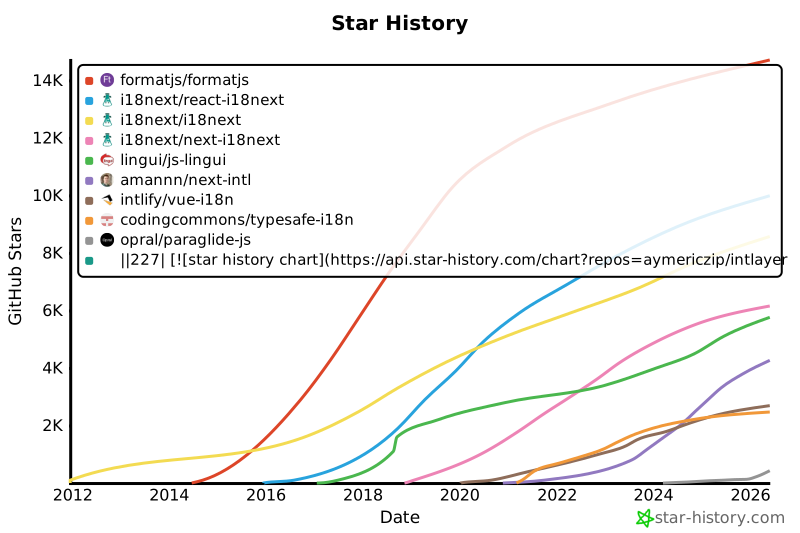](https://www.star-history.com/#aymericzip/intlayer&formatjs/formatjs&i18next/react-i18next&i18next/i18next&i18next/next-i18next&lingui/js-lingui&amannn/next-intl&intlify/vue-i18n&codingcommons/typesafe-i18n&opral/paraglide-js)
|
|
228
228
|
|
|
229
229
|
---
|
|
230
230
|
|
|
@@ -224,7 +224,7 @@ export const ComponentExample = () => {
|
|
|
224
224
|
|
|
225
225
|
GitHub 星數是專案受歡迎程度、社區信任和長期相關性的有力指標。雖然星數不是技術質量的直接衡量標準,但它們反映了有多少開發人員發現該專案有用、關注其進展並可能採用它。在評估專案價值時,星數有助於比較不同方案的吸引力,並提供對生態系統增長的見解。
|
|
226
226
|
|
|
227
|
-
[](https://www.star-history.com/#aymericzip/intlayer&formatjs/formatjs&i18next/react-i18next&i18next/i18next&i18next/next-i18next&lingui/js-lingui&amannn/next-intl&intlify/vue-i18n&codingcommons/typesafe-i18n&opral/paraglide-js)
|
|
228
228
|
|
|
229
229
|
---
|
|
230
230
|
|
package/package.json
CHANGED
|
@@ -1,6 +1,6 @@
|
|
|
1
1
|
{
|
|
2
2
|
"name": "@intlayer/docs",
|
|
3
|
-
"version": "8.10.
|
|
3
|
+
"version": "8.10.1",
|
|
4
4
|
"private": false,
|
|
5
5
|
"description": "Intlayer documentation",
|
|
6
6
|
"keywords": [
|
|
@@ -72,13 +72,13 @@
|
|
|
72
72
|
"watch": "webpack --config ./webpack.config.ts --watch"
|
|
73
73
|
},
|
|
74
74
|
"dependencies": {
|
|
75
|
-
"@intlayer/config": "8.10.
|
|
76
|
-
"@intlayer/core": "8.10.
|
|
77
|
-
"@intlayer/types": "8.10.
|
|
75
|
+
"@intlayer/config": "8.10.1",
|
|
76
|
+
"@intlayer/core": "8.10.1",
|
|
77
|
+
"@intlayer/types": "8.10.1"
|
|
78
78
|
},
|
|
79
79
|
"devDependencies": {
|
|
80
|
-
"@intlayer/api": "8.10.
|
|
81
|
-
"@intlayer/cli": "8.10.
|
|
80
|
+
"@intlayer/api": "8.10.1",
|
|
81
|
+
"@intlayer/cli": "8.10.1",
|
|
82
82
|
"@types/node": "25.9.1",
|
|
83
83
|
"@utils/ts-config": "1.0.4",
|
|
84
84
|
"@utils/ts-config-types": "1.0.4",
|
|
@@ -87,7 +87,7 @@
|
|
|
87
87
|
"rimraf": "6.1.3",
|
|
88
88
|
"tsdown": "0.22.00",
|
|
89
89
|
"typescript": "6.0.3",
|
|
90
|
-
"vitest": "4.1.
|
|
90
|
+
"vitest": "4.1.7"
|
|
91
91
|
},
|
|
92
92
|
"engines": {
|
|
93
93
|
"node": ">=14.18"
|