@alan-ai-hq/agent-manager-linux-x64 0.1.199 → 0.1.201
This diff represents the content of publicly available package versions that have been released to one of the supported registries. The information contained in this diff is provided for informational purposes only and reflects changes between package versions as they appear in their respective public registries.
- package/alan-agent.cjs +8928 -5241
- package/alan-holder.cjs +5364 -3401
- package/alan-lease.cjs +808 -200
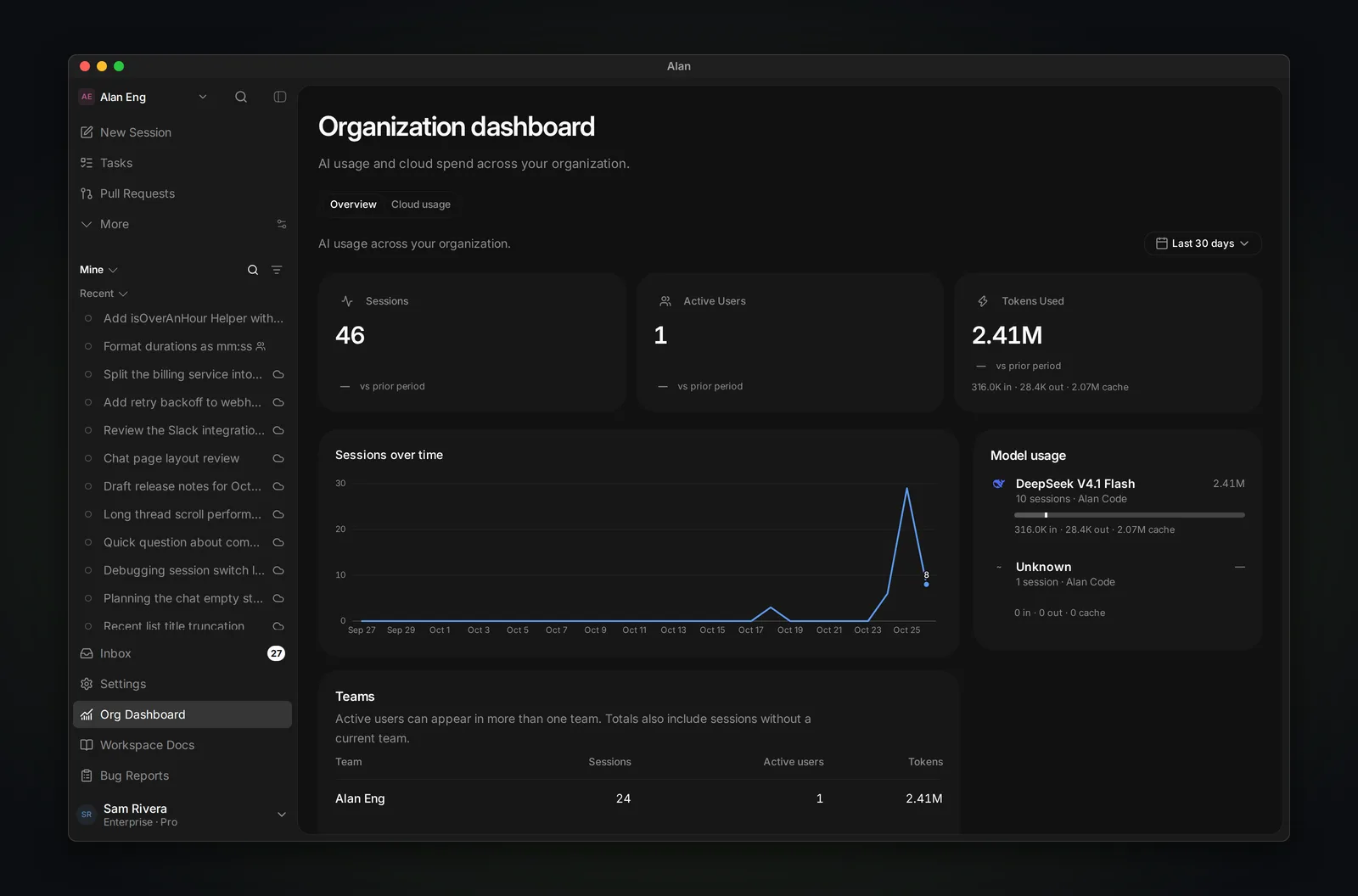
- package/builtin-skills/agent-desktop/SKILL.md +94 -0
- package/builtin-skills/alan-artifact/SKILL.md +128 -0
- package/builtin-skills/alan-artifact/examples/interactive-diagram.md +50 -0
- package/builtin-skills/alan-artifact/examples/prototype.md +53 -0
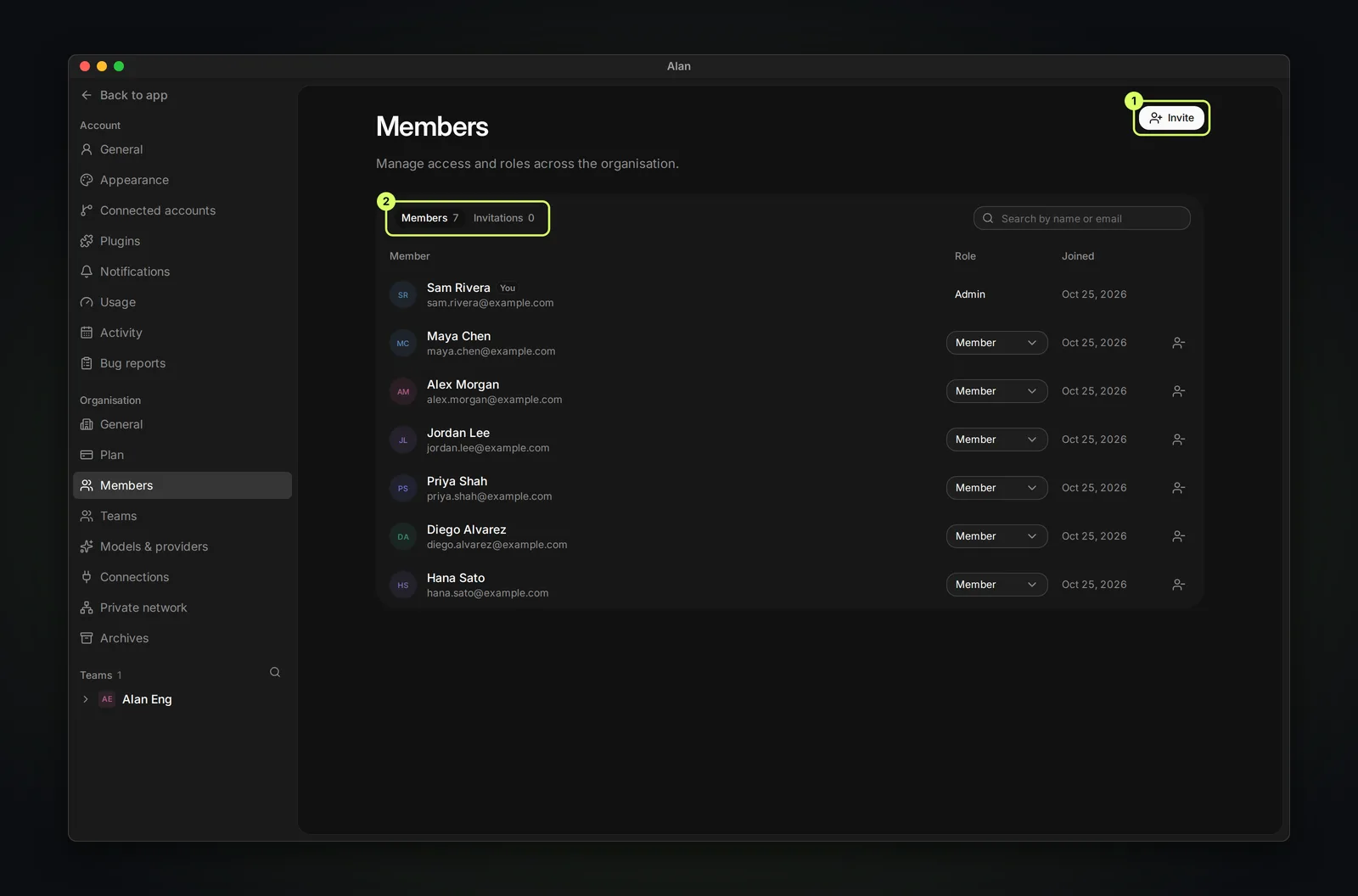
- package/builtin-skills/alan-artifact/examples/test-report.md +55 -0
- package/builtin-skills/alan-artifact/references/design.md +39 -0
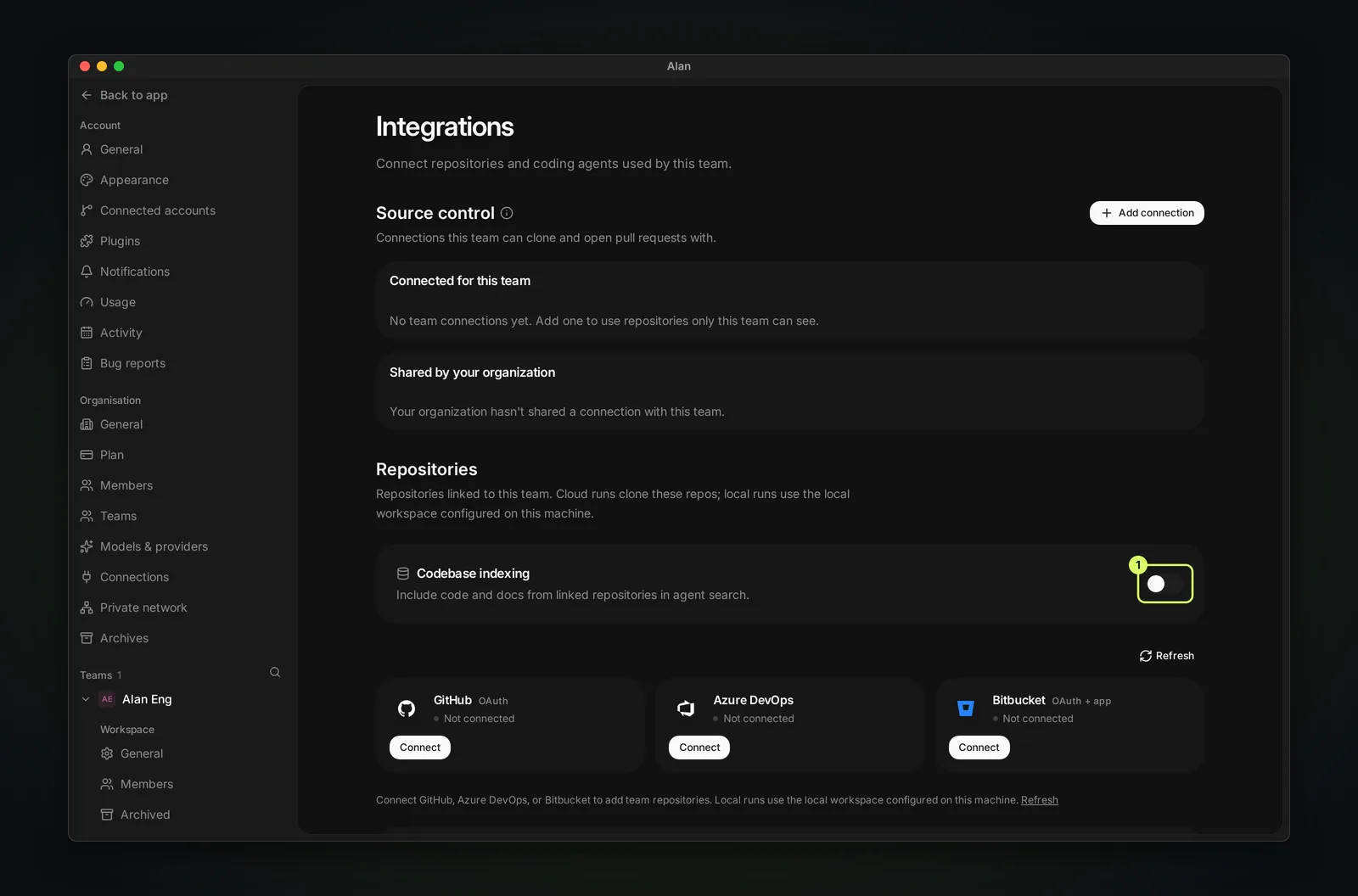
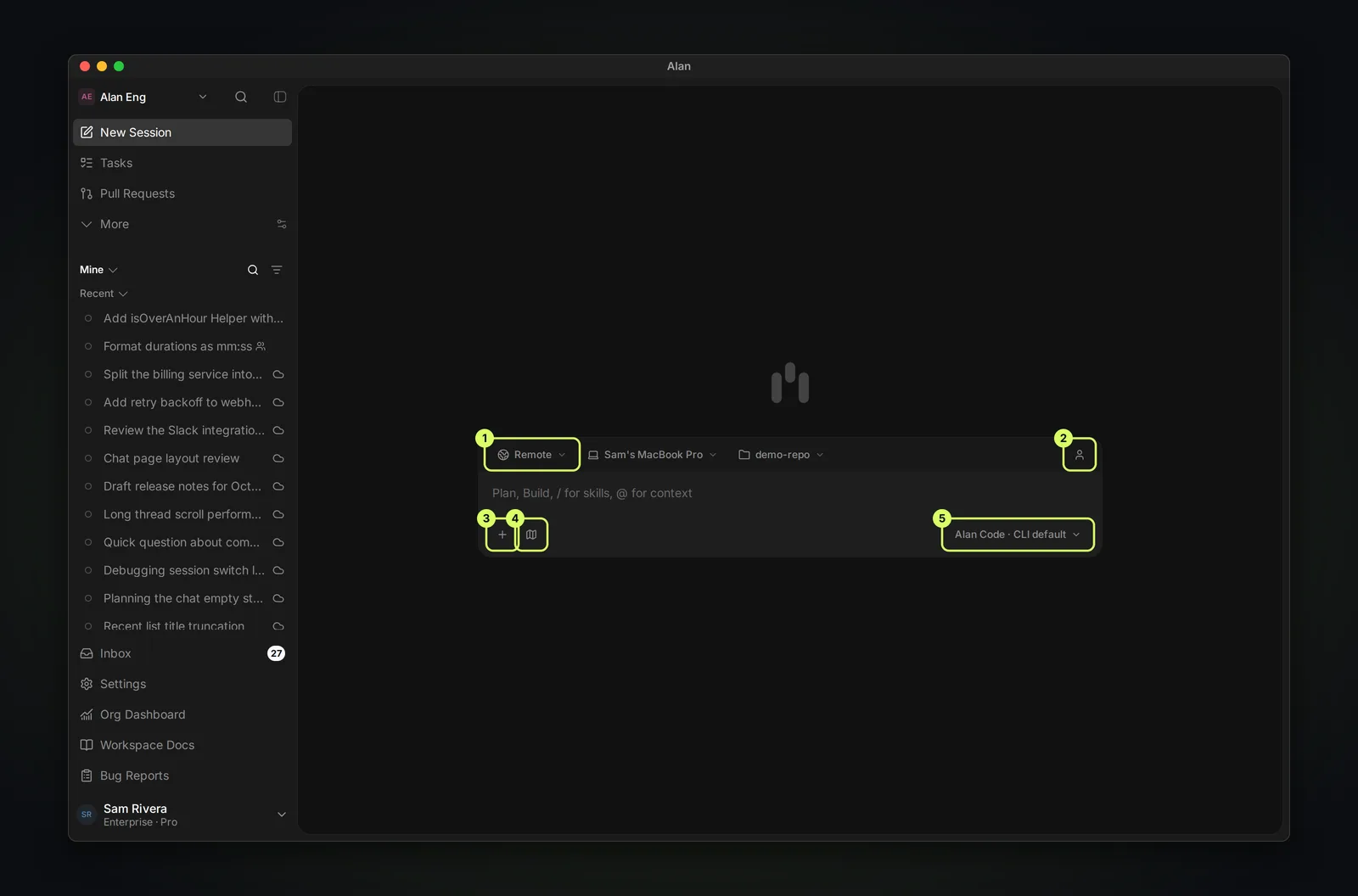
- package/builtin-skills/alan-artifact/references/diagrams.md +20 -0
- package/builtin-skills/alan-deck/SKILL.md +189 -0
- package/builtin-skills/alan-diagrams/SKILL.md +105 -0
- package/builtin-skills/alan-diagrams/references/diagram-catalogue.md +847 -0
- package/builtin-skills/alan-docs/SKILL.md +143 -0
- package/builtin-skills/alan-docs/references/administration/members-and-teams.md +48 -0
- package/builtin-skills/alan-docs/references/administration/org-dashboard.md +19 -0
- package/builtin-skills/alan-docs/references/administration/organisation-settings.md +41 -0
- package/builtin-skills/alan-docs/references/agents-and-sessions/code-context.md +60 -0
- package/builtin-skills/alan-docs/references/agents-and-sessions/coding-agents-and-models.md +78 -0
- package/builtin-skills/alan-docs/references/agents-and-sessions/session-lifecycle.md +62 -0
- package/builtin-skills/alan-docs/references/agents-and-sessions/start-a-session.md +110 -0
- package/builtin-skills/alan-docs/references/automations/automation-runs.md +69 -0
- package/builtin-skills/alan-docs/references/automations/create-an-automation.md +143 -0
- package/builtin-skills/alan-docs/references/automations/overview.md +77 -0
- package/builtin-skills/alan-docs/references/cloud-and-local/cloud-images.md +64 -0
- package/builtin-skills/alan-docs/references/cloud-and-local/cloud-sessions-and-execution.md +89 -0
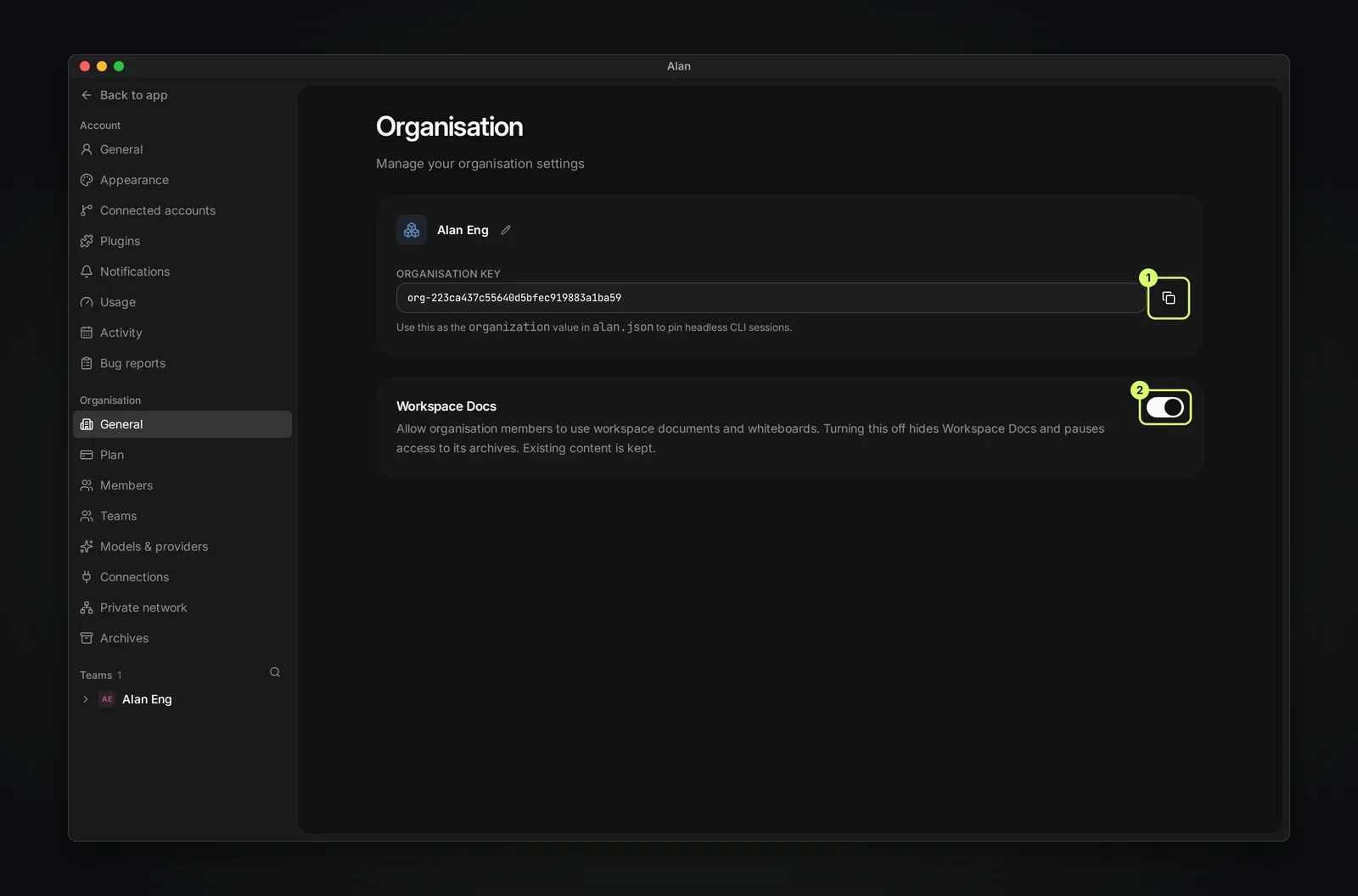
- package/builtin-skills/alan-docs/references/cloud-and-local/cloud-setup.md +128 -0
- package/builtin-skills/alan-docs/references/cloud-and-local/codex-cli-connector.md +92 -0
- package/builtin-skills/alan-docs/references/cloud-and-local/local-execution.md +213 -0
- package/builtin-skills/alan-docs/references/cloud-and-local/runtime-recovery.md +60 -0
- package/builtin-skills/alan-docs/references/cloud-and-local/sandboxes.md +74 -0
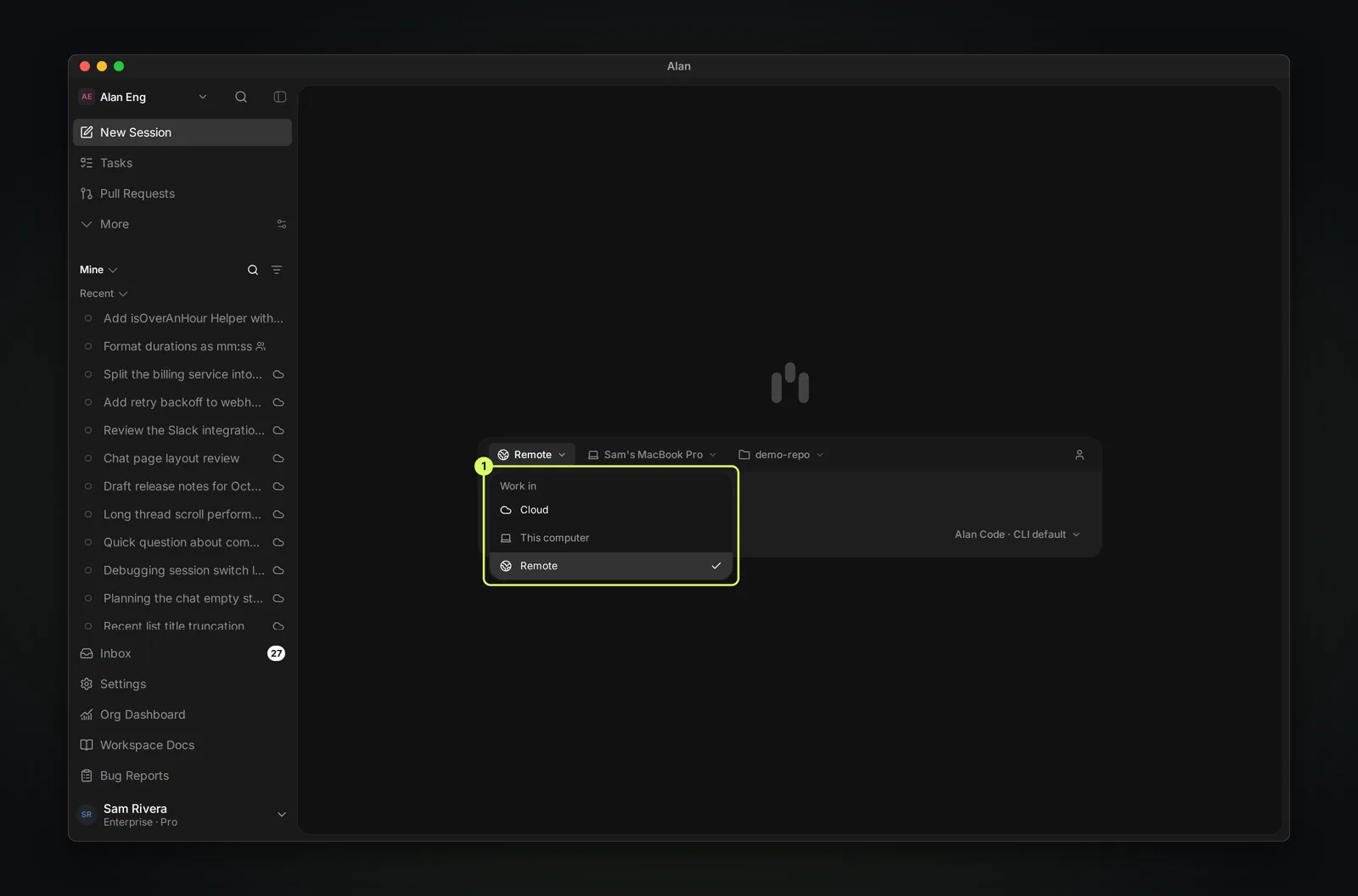
- package/builtin-skills/alan-docs/references/cloud-and-local/troubleshooting-and-faq.md +102 -0
- package/builtin-skills/alan-docs/references/get-started/connect-azure-devops.md +89 -0
- package/builtin-skills/alan-docs/references/get-started/connect-bitbucket.md +86 -0
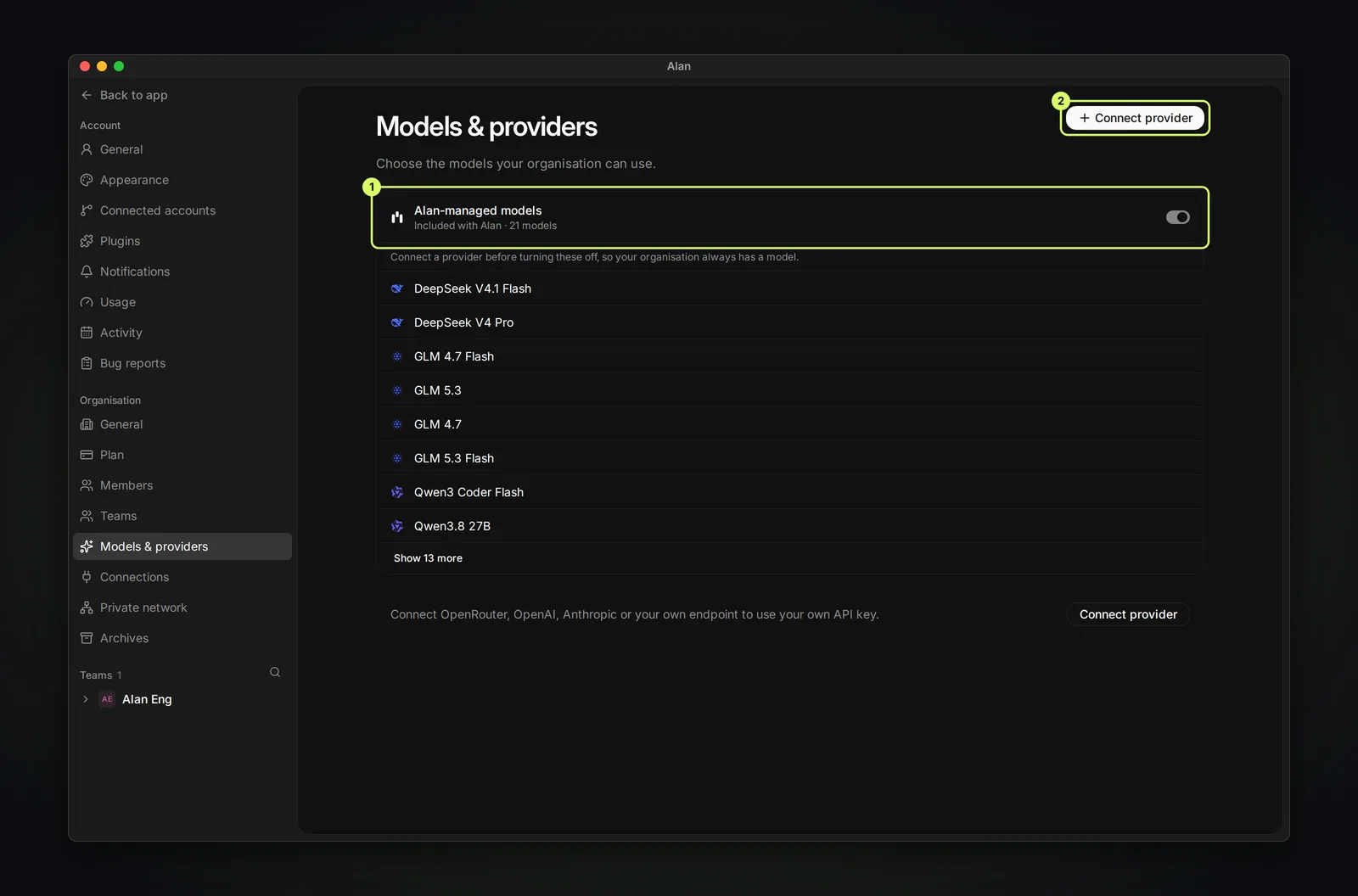
- package/builtin-skills/alan-docs/references/get-started/connect-github.md +114 -0
- package/builtin-skills/alan-docs/references/get-started/join-a-team.md +114 -0
- package/builtin-skills/alan-docs/references/get-started/product-map.md +96 -0
- package/builtin-skills/alan-docs/references/get-started/quickstart.md +158 -0
- package/builtin-skills/alan-docs/references/get-started/set-up-your-team.md +200 -0
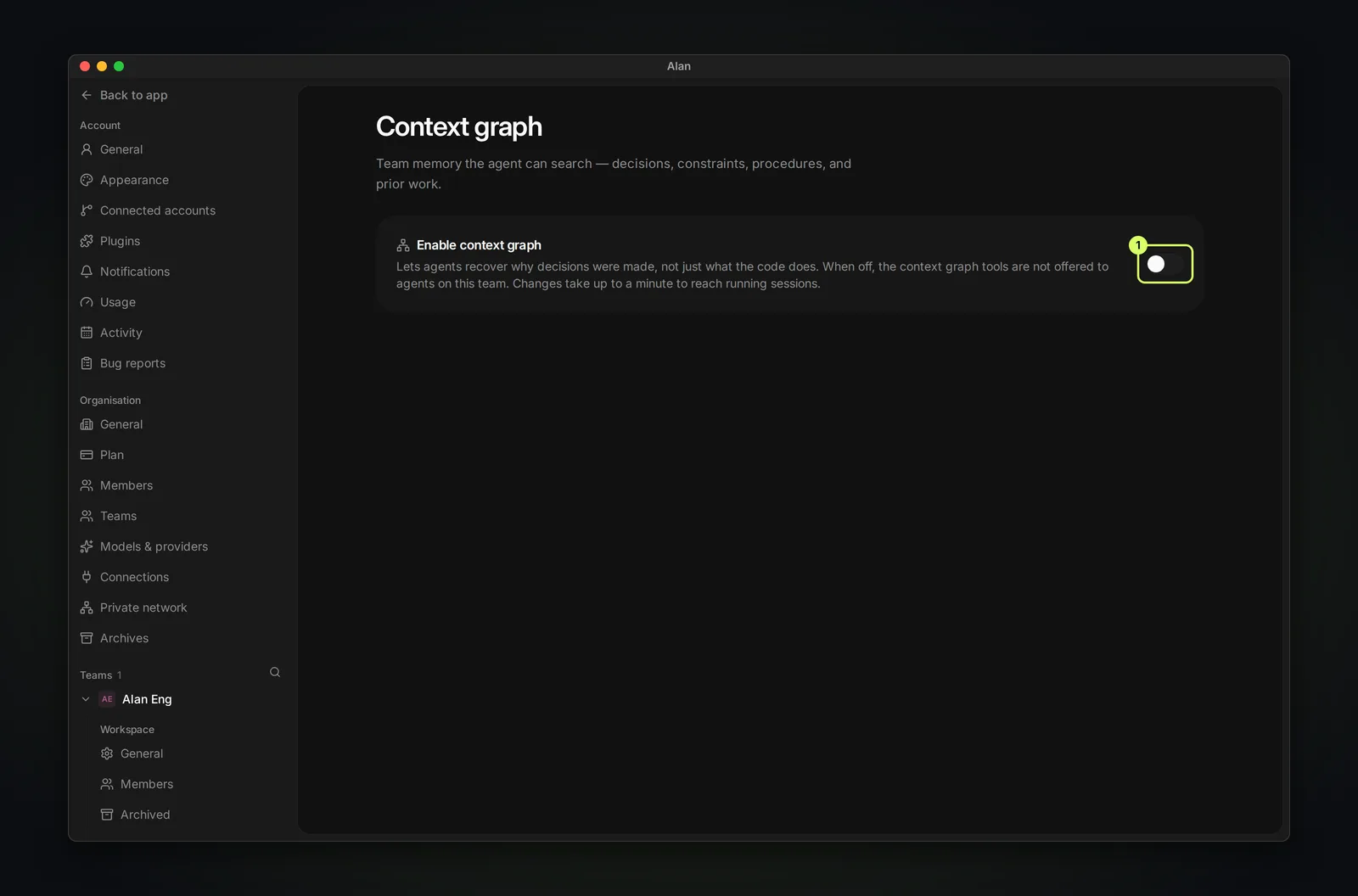
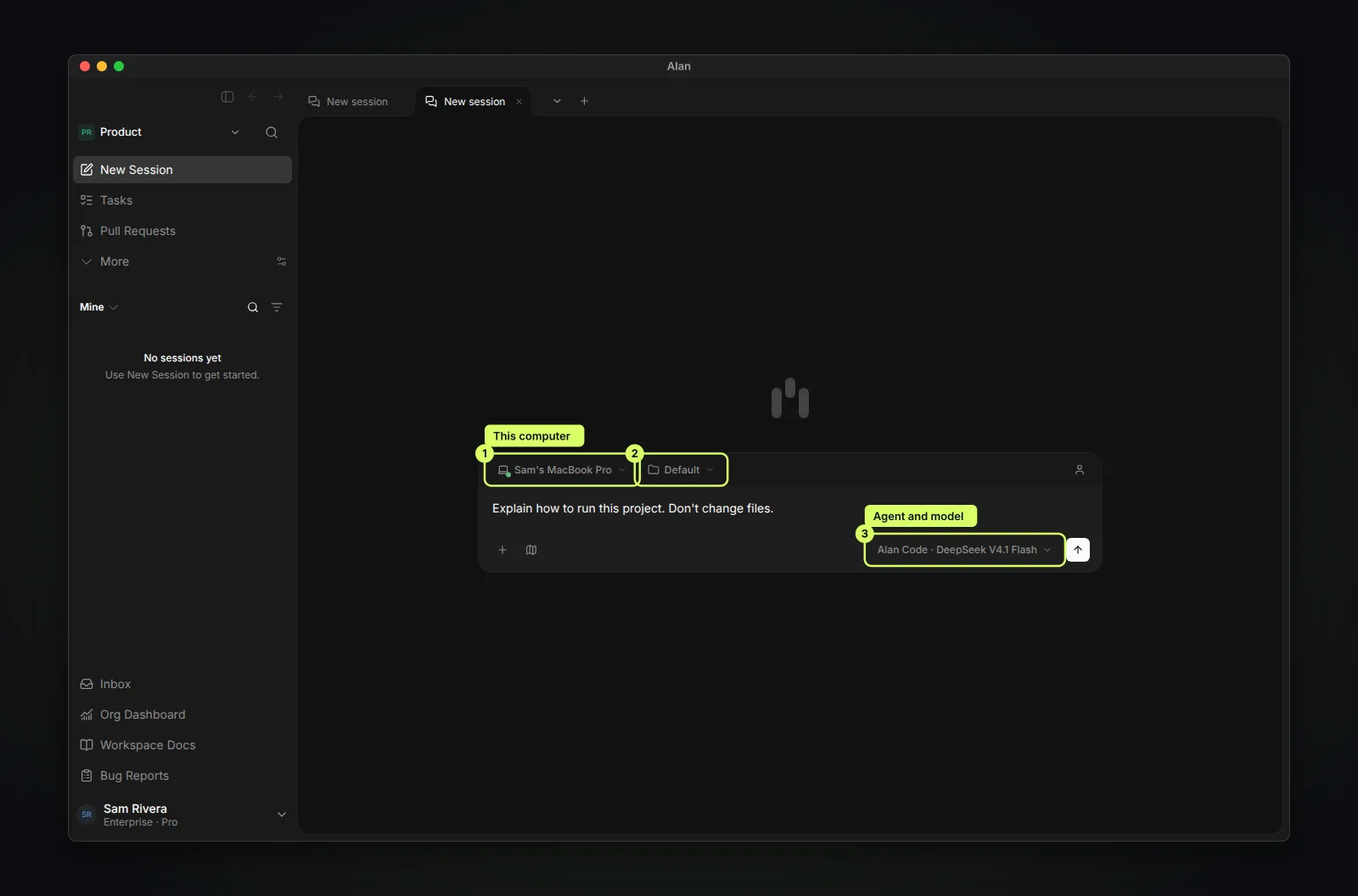
- package/builtin-skills/alan-docs/references/get-started/sign-in.md +104 -0
- package/builtin-skills/alan-docs/references/get-started/welcome.md +39 -0
- package/builtin-skills/alan-docs/references/integrations/connect-microsoft-teams.md +116 -0
- package/builtin-skills/alan-docs/references/integrations/connect-slack.md +164 -0
- package/builtin-skills/alan-docs/references/integrations/import-from-linear.md +172 -0
- package/builtin-skills/alan-docs/references/plans-and-billing/plans-and-limits.md +115 -0
- package/builtin-skills/alan-docs/references/plans-and-billing/usage-and-credits.md +47 -0
- package/builtin-skills/alan-docs/references/reference/documents-and-artifacts.md +52 -0
- package/builtin-skills/alan-docs/references/reference/faq.md +89 -0
- package/builtin-skills/alan-docs/references/reference/feature-catalog.md +89 -0
- package/builtin-skills/alan-docs/references/reference/glossary.md +96 -0
- package/builtin-skills/alan-docs/references/reference/links-and-ids.md +80 -0
- package/builtin-skills/alan-docs/references/reference/roles-and-permissions.md +64 -0
- package/builtin-skills/alan-docs/references/reference/statuses.md +86 -0
- package/builtin-skills/alan-docs/references/reviews-testing-deploys/deployments.md +28 -0
- package/builtin-skills/alan-docs/references/reviews-testing-deploys/pull-requests.md +85 -0
- package/builtin-skills/alan-docs/references/reviews-testing-deploys/review-work.md +55 -0
- package/builtin-skills/alan-docs/references/reviews-testing-deploys/testing-evidence.md +52 -0
- package/builtin-skills/alan-docs/references/skills/plugins-and-mcp.md +24 -0
- package/builtin-skills/alan-docs/references/skills/skills.md +103 -0
- package/builtin-skills/alan-docs/references/tasks/complete-a-task.md +79 -0
- package/builtin-skills/alan-docs/references/tasks/create-a-task.md +67 -0
- package/builtin-skills/alan-docs/references/tasks/subtasks-and-status.md +55 -0
- package/builtin-skills/alan-docs/references/tasks/task-artifacts.md +56 -0
- package/builtin-skills/alan-docs/references/tasks/task-detail.md +65 -0
- package/builtin-skills/alan-docs/references/teams-and-planning/cycles.md +93 -0
- package/builtin-skills/alan-docs/references/teams-and-planning/documents.md +66 -0
- package/builtin-skills/alan-docs/references/teams-and-planning/epics.md +95 -0
- package/builtin-skills/alan-docs/references/teams-and-planning/whiteboard.md +52 -0
- package/builtin-skills/alan-docs/references/troubleshooting/agent-blocked.md +38 -0
- package/builtin-skills/alan-docs/references/troubleshooting/common-problems.md +118 -0
- package/builtin-skills/alan-docs/references/troubleshooting/github-access.md +41 -0
- package/builtin-skills/alan-docs/references/troubleshooting/missing-artifact.md +47 -0
- package/builtin-skills/alan-docs/references/troubleshooting/report-an-issue.md +74 -0
- package/builtin-skills/alan-docs/references/troubleshooting/runtime-unavailable.md +49 -0
- package/builtin-skills/alan-docs/scripts/generate-references.mjs +363 -0
- package/builtin-skills/alan-environment-setup/SKILL.md +368 -0
- package/builtin-skills/alan-environment-setup/references/android.md +118 -0
- package/builtin-skills/alan-environment-setup/references/troubleshooting.md +38 -0
- package/builtin-skills/alan-skill-authoring/SKILL.md +83 -0
- package/builtin-skills/alan-tasks/SKILL.md +195 -0
- package/builtin-skills/alan-test-android/SKILL.md +224 -0
- package/builtin-skills/alan-test-android/scripts/android-up.sh +227 -0
- package/builtin-skills/alan-test-android/scripts/install-launch.sh +38 -0
- package/builtin-skills/alan-test-android/scripts/record.sh +64 -0
- package/builtin-skills/alan-test-android/scripts/ui.py +367 -0
- package/builtin-skills/alan-test-desktop/SKILL.md +107 -0
- package/builtin-skills/alan-test-desktop/references/linux-recording.md +31 -0
- package/builtin-skills/alan-test-feature/SKILL.md +243 -0
- package/builtin-skills/alan-test-mobile/SKILL.md +65 -0
- package/builtin-skills/alan-test-web/SKILL.md +113 -0
- package/builtin-skills/alan-walkthrough/SKILL.md +152 -0
- package/builtin-skills/alan-walkthrough/scripts/mark-changes.js +419 -0
- package/builtin-skills/alan-walkthrough/scripts/publish-capture.mjs +288 -0
- package/builtin-skills/alan-workflows/SKILL.md +235 -0
- package/builtin-skills/manifest.json +19 -0
- package/package.json +3 -2
|
@@ -0,0 +1,143 @@
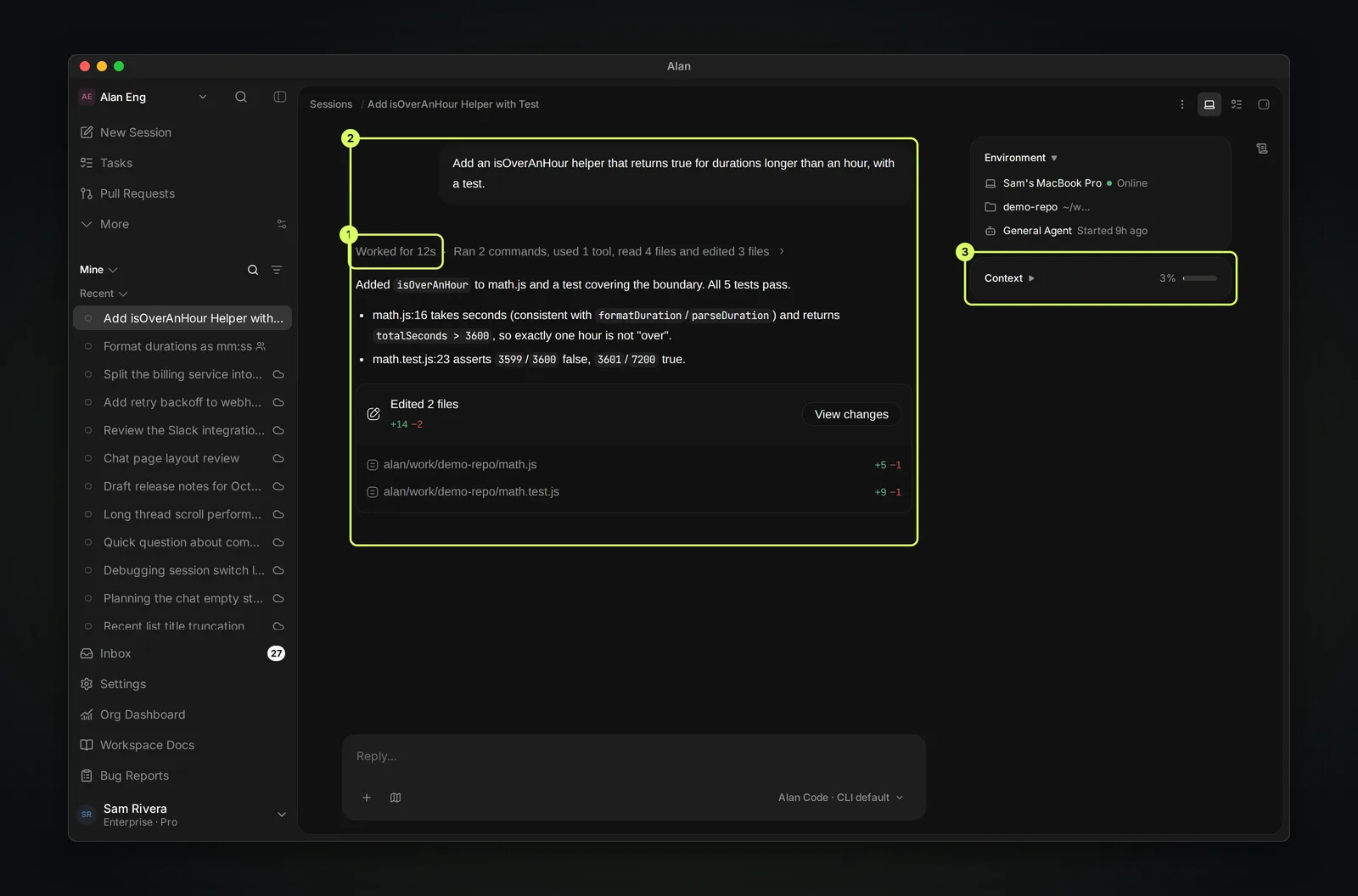
|
|
|
1
|
+
---
|
|
2
|
+
name: alan-docs
|
|
3
|
+
version: 1.0.1
|
|
4
|
+
description: "Use when a question is about Alan itself: how a feature works, how to set it up or configure it, what a status, role, limit or setting means, where something lives in the product, or how to connect a service (plugins and MCP). Ships every current page of Alan's product documentation as Markdown under references/, listed in the index below; each page opens with its docs.tryalan.ai URL and internal links point at the local files. Read the matching page before answering, and prefer its wording. A claim about Alan that no page supports is a guess, so say it is one. Do not use it for a customer's own product, repository or codebase, for general programming questions, or for operating an Alan session, task, workflow or artifact (those use the Alan tools directly)."
|
|
5
|
+
---
|
|
6
|
+
|
|
7
|
+
# Alan documentation
|
|
8
|
+
|
|
9
|
+
The current product documentation for Alan, as Markdown files under
|
|
10
|
+
`references/`. Pick the page from the index below and read it with your file
|
|
11
|
+
tools; links between pages point at the local files, and image and video
|
|
12
|
+
sources point at their public `docs.tryalan.ai` URLs. Every page opens with its
|
|
13
|
+
public URL, and that URL — not the local path — is the link to give a person.
|
|
14
|
+
|
|
15
|
+
These pages describe **the Alan product**: how to sign in, run a session, plan
|
|
16
|
+
and track work, connect code hosts and chat, set up cloud execution, connect
|
|
17
|
+
plugins and MCP services, manage a team, read a plan and its limits, and fix
|
|
18
|
+
common problems. They are copied from this repository's own docs source
|
|
19
|
+
(`apps/docs/content/docs`) and cover the whole published guides, reference and
|
|
20
|
+
troubleshooting set. Release notes (the changelog) are not bundled.
|
|
21
|
+
|
|
22
|
+
## How to answer from these pages
|
|
23
|
+
|
|
24
|
+
1. **Find the page in the index.** Match the question to the page whose
|
|
25
|
+
description fits; open that file and read it before answering. The
|
|
26
|
+
descriptions are one line each, so when none obviously fits, search the
|
|
27
|
+
reference files for the question's key words with your file tools and open
|
|
28
|
+
the best hit: a page can cover a topic its description does not name.
|
|
29
|
+
2. **Prefer the page's wording.** When the page states a status name, a setting
|
|
30
|
+
path (**Settings →** your team **→ …**), a field, or a limit, use it as
|
|
31
|
+
written instead of paraphrasing from memory.
|
|
32
|
+
3. **Give the public URL.** Each page's first line is its `docs.tryalan.ai`
|
|
33
|
+
URL. Link that for anything a person will read or share.
|
|
34
|
+
4. **Say when it is a guess.** A claim about Alan that no page here supports is
|
|
35
|
+
a guess: say it is one, and do not present it as documented behavior. If the
|
|
36
|
+
index has no page for the question and a search of the reference files finds
|
|
37
|
+
nothing either, say the documentation does not cover it rather than inventing
|
|
38
|
+
an answer.
|
|
39
|
+
5. **Do not stretch these pages beyond the product.** They describe what a
|
|
40
|
+
person sees in Alan, not the internals of a customer's repository. For a
|
|
41
|
+
customer's own code or product, read that codebase instead.
|
|
42
|
+
|
|
43
|
+
## Scope and upkeep
|
|
44
|
+
|
|
45
|
+
- **Source of truth.** Every file here is generated from `apps/docs/content/docs`
|
|
46
|
+
by `scripts/generate-references.mjs`. Regenerate with
|
|
47
|
+
`node scripts/generate-references.mjs` after the product docs change; the
|
|
48
|
+
script also prints the index with `--print-index`.
|
|
49
|
+
- **What is bundled.** The published guides, reference and troubleshooting
|
|
50
|
+
pages of `docs.tryalan.ai`. The changelog and the `(changelog)` tree are
|
|
51
|
+
excluded: they are dated release notes, not an explanation of how Alan works.
|
|
52
|
+
- **No public API reference.** This repository publishes no REST/OpenAPI
|
|
53
|
+
reference for Alan, so there is no generated API page to bundle. Questions
|
|
54
|
+
about programmatic access are answered only where a product page covers them —
|
|
55
|
+
chiefly **Plugins and MCP** for connecting services to agents.
|
|
56
|
+
|
|
57
|
+
## Documentation
|
|
58
|
+
|
|
59
|
+
### Get started
|
|
60
|
+
- [Welcome to Alan](references/get-started/welcome.md) — Alan is a software factory for planning work, running coding agents, reviewing changes, testing, and deploying.
|
|
61
|
+
- [Quickstart](references/get-started/quickstart.md) — Run your first agent task on your own computer in about 10 minutes. Works on the Free plan.
|
|
62
|
+
- [Sign in and first run](references/get-started/sign-in.md) — Sign in, walk through the onboarding wizard, and reach your first session.
|
|
63
|
+
- [Set up your team](references/get-started/set-up-your-team.md) — A checklist for admins: choose a plan, invite people, connect code, turn on Tasks and assign the first task.
|
|
64
|
+
- [Join a team](references/get-started/join-a-team.md) — Accept an invitation, finish onboarding, and find the tasks assigned to you.
|
|
65
|
+
- [Connect GitHub](references/get-started/connect-github.md) — Connect your team's GitHub projects, choose which repositories Alan can use, and link each teammate's account.
|
|
66
|
+
- [Connect Bitbucket](references/get-started/connect-bitbucket.md) — Connect your team's Bitbucket Cloud workspaces, add repositories, and link each teammate's account.
|
|
67
|
+
- [Connect Azure DevOps](references/get-started/connect-azure-devops.md) — Connect Azure Repos to your Alan team, choose repositories, and link your Microsoft account when available.
|
|
68
|
+
- [Product map](references/get-started/product-map.md) — How teams, sessions, tasks, artifacts, documents, epics, cycles, and automations fit together.
|
|
69
|
+
|
|
70
|
+
### Integrations
|
|
71
|
+
- [Connect Slack](references/integrations/connect-slack.md) — Mention @Alan in Slack to start a coding session from a thread or a direct message.
|
|
72
|
+
- [Connect Microsoft Teams](references/integrations/connect-microsoft-teams.md) — Mention @Alan in Teams channels to start cloud sessions in the Alan team that owns the channel.
|
|
73
|
+
- [Import issues from Linear](references/integrations/import-from-linear.md) — Connect Linear and copy your Linear issues into an Alan team as tasks.
|
|
74
|
+
|
|
75
|
+
### Teams and planning
|
|
76
|
+
- [Epics](references/teams-and-planning/epics.md) — Group related tasks under one outcome, track status and target dates, and roll up progress automatically.
|
|
77
|
+
- [Cycles](references/teams-and-planning/cycles.md) — Plan, execute, and close time-boxed work with automatic scope tracking and rollover.
|
|
78
|
+
- [Documents](references/teams-and-planning/documents.md) — Standalone team pages — PRDs, specs, and wikis — with a collaborative editor.
|
|
79
|
+
- [Whiteboard](references/teams-and-planning/whiteboard.md) — A collaborative canvas for diagrams, flows, and sketches, alongside your documents.
|
|
80
|
+
|
|
81
|
+
### Tasks
|
|
82
|
+
- [Create a task](references/tasks/create-a-task.md) — Create a task with a clear outcome, owner, and details for an agent or teammate.
|
|
83
|
+
- [Complete a task with an agent](references/tasks/complete-a-task.md) — Take one task from start to finish: start a session, plan or build, review the diff, open a pull request, and move the task to Done.
|
|
84
|
+
- [Task detail](references/tasks/task-detail.md) — Use task detail as the source of truth for scope, sessions, decisions, and evidence.
|
|
85
|
+
- [Subtasks and status](references/tasks/subtasks-and-status.md) — Break work into verifiable pieces and keep status meaningful.
|
|
86
|
+
- [Task artifacts](references/tasks/task-artifacts.md) — Attach durable outputs to the task instead of burying them in chat.
|
|
87
|
+
|
|
88
|
+
### Agents and sessions
|
|
89
|
+
- [Coding agents, models, and defaults](references/agents-and-sessions/coding-agents-and-models.md) — Choose which coding agents and models are available, and set defaults for a computer or cloud environment.
|
|
90
|
+
- [Start a session](references/agents-and-sessions/start-a-session.md) — Choose where the agent runs, pick an agent and model, describe the work, and follow it live.
|
|
91
|
+
- [Code context](references/agents-and-sessions/code-context.md) — Give every agent the product and code context it needs to make grounded decisions.
|
|
92
|
+
- [Session lifecycle](references/agents-and-sessions/session-lifecycle.md) — What each session state means while an agent works, waits, finishes, or stops, and how to recover.
|
|
93
|
+
|
|
94
|
+
### Skills
|
|
95
|
+
- [Skills](references/skills/skills.md) — Find, create, and import skills, run them from the composer with /, and manage their versions.
|
|
96
|
+
- [Plugins and MCP](references/skills/plugins-and-mcp.md) — Install plugins and connect services so every agent on a team can use them.
|
|
97
|
+
|
|
98
|
+
### Cloud and local
|
|
99
|
+
- [Local execution](references/cloud-and-local/local-execution.md) — Run an agent on your own computer: connect the computer, turn on a coding agent, choose a folder and send.
|
|
100
|
+
- [Cloud sessions and execution](references/cloud-and-local/cloud-sessions-and-execution.md) — Choose where a session runs (Cloud, This computer, or Remote), how the default is picked, and what a cloud session looks like while it runs.
|
|
101
|
+
- [Cloud setup](references/cloud-and-local/cloud-setup.md) — Set up repositories, variables, and scripts for your team's cloud sessions.
|
|
102
|
+
- [Images and builds](references/cloud-and-local/cloud-images.md) — How the cloud environment's image is built, how to read the Builds tab, and how to roll back to an earlier image.
|
|
103
|
+
- [Sandboxes](references/cloud-and-local/sandboxes.md) — How a cloud session's computer starts, sleeps, wakes, and recovers, and what each status means.
|
|
104
|
+
- [Connect Codex CLI](references/cloud-and-local/codex-cli-connector.md) — Share ChatGPT accounts with your team's Codex pool so cloud sessions can run OpenAI's Codex CLI.
|
|
105
|
+
- [Runtime recovery](references/cloud-and-local/runtime-recovery.md) — Recover a cloud or local session when its computer or agent stops responding.
|
|
106
|
+
- [Troubleshooting and FAQ](references/cloud-and-local/troubleshooting-and-faq.md) — Symptom-first fixes and quick answers for cloud sessions, connected computers, and execution targets.
|
|
107
|
+
|
|
108
|
+
### Automations
|
|
109
|
+
- [Automations overview](references/automations/overview.md) — Save agent instructions once and let Alan run them on a schedule, on a GitHub, Bitbucket, or Alan event, or when you press Run now.
|
|
110
|
+
- [Create an automation](references/automations/create-an-automation.md) — Write instructions, choose triggers and tools, test with Run now, then turn it on.
|
|
111
|
+
- [Automation runs](references/automations/automation-runs.md) — Find an automation's runs, read what each one did, and decide whether to retry or edit.
|
|
112
|
+
|
|
113
|
+
### Reviews, testing, deploys
|
|
114
|
+
- [Pull requests](references/reviews-testing-deploys/pull-requests.md) — Track your team's pull requests, check reviews and automated checks, link them to tasks, and merge from Alan.
|
|
115
|
+
- [Review work](references/reviews-testing-deploys/review-work.md) — Start a Review Agent session on a pull request and get findings you can act on.
|
|
116
|
+
- [Testing evidence](references/reviews-testing-deploys/testing-evidence.md) — Get a test report with screenshots and a pass, fail, or mixed result before you merge.
|
|
117
|
+
- [Deployments](references/reviews-testing-deploys/deployments.md) — Prepare a release, run your existing deployment process in a session, and check the result.
|
|
118
|
+
|
|
119
|
+
### Plans and billing
|
|
120
|
+
- [Plans and limits](references/plans-and-billing/plans-and-limits.md) — See which plan you're on, what each tier includes, how per-seat usage plans work, and how to upgrade or add seats.
|
|
121
|
+
- [Usage and credits](references/plans-and-billing/usage-and-credits.md) — Check team usage, understand limits, and add credits for cloud and Alan Code.
|
|
122
|
+
|
|
123
|
+
### Administration
|
|
124
|
+
- [Organisation settings](references/administration/organisation-settings.md) — Settings that apply to your whole Alan organization: identity, plan, members, teams, models, connections, network, and archives.
|
|
125
|
+
- [Members and teams](references/administration/members-and-teams.md) — Invite people, set their roles, and organize them into teams.
|
|
126
|
+
- [Org Dashboard](references/administration/org-dashboard.md) — See AI usage, adoption, and cloud spend across the whole organization.
|
|
127
|
+
|
|
128
|
+
### Troubleshooting
|
|
129
|
+
- [Common problems](references/troubleshooting/common-problems.md) — Find the message you're seeing and fix it yourself.
|
|
130
|
+
- [Agent is blocked](references/troubleshooting/agent-blocked.md) — Work out why an agent stopped and get it moving again in the same session.
|
|
131
|
+
- [Runtime unavailable](references/troubleshooting/runtime-unavailable.md) — Get a session running again when its computer, VM, or cloud environment is down.
|
|
132
|
+
- [Missing artifact](references/troubleshooting/missing-artifact.md) — Find a plan, test report, document, or whiteboard that isn't where you expect.
|
|
133
|
+
- [GitHub access issues](references/troubleshooting/github-access.md) — Fix missing repositories, missing pull requests, and push or pull request failures.
|
|
134
|
+
- [Report an issue](references/troubleshooting/report-an-issue.md) — File a bug report from inside Alan, attach evidence, and follow it until it's resolved.
|
|
135
|
+
|
|
136
|
+
### Reference
|
|
137
|
+
- [Glossary](references/reference/glossary.md) — Plain definitions of the terms used across Alan and these docs.
|
|
138
|
+
- [FAQ and common mistakes](references/reference/faq.md) — Short answers to common questions about Alan, and the mistakes that cost the most time.
|
|
139
|
+
- [Feature catalog](references/reference/feature-catalog.md) — Find Alan's main features, where to use them, and the guide for each.
|
|
140
|
+
- [Documents and artifacts](references/reference/documents-and-artifacts.md) — Where each kind of written output lives in Alan, and how to choose between a document and an artifact.
|
|
141
|
+
- [Statuses](references/reference/statuses.md) — Default statuses for tasks, epics, and cycles, the groups they belong to, and what each one means.
|
|
142
|
+
- [Roles and permissions](references/reference/roles-and-permissions.md) — What admins and members can do in an organization and in a team, and how invitations work.
|
|
143
|
+
- [Links and IDs](references/reference/links-and-ids.md) — Readable IDs like AIE-1234, the internal IDs behind them, and how to share links to Alan records.
|
|
@@ -0,0 +1,48 @@
|
|
|
1
|
+
> Source: [https://docs.tryalan.ai/docs/administration/members-and-teams](https://docs.tryalan.ai/docs/administration/members-and-teams)
|
|
2
|
+
|
|
3
|
+
# Members and teams
|
|
4
|
+
|
|
5
|
+
People belong to the **organization**, and work happens in **teams**. Each person has a role in the organization and a role in every team they join: **Admin** or **Member**.
|
|
6
|
+
|
|
7
|
+
## Invite members
|
|
8
|
+
|
|
9
|
+
Only organization admins can invite people to the organization. Members see the list but not **Invite**.
|
|
10
|
+
|
|
11
|
+
|
|
12
|
+
|
|
13
|
+
1. Open **Settings → Organisation → Members**.
|
|
14
|
+
2. Choose **Invite** and enter email addresses.
|
|
15
|
+
3. Track pending invites on the **Invitations** tab.
|
|
16
|
+
|
|
17
|
+
Invitees open the email link and sign in with the invited address. You do not need to buy seats first. When you subscribe on the [Plan](../plans-and-billing/plans-and-limits.md) page, you need one seat for each member. Inviting members requires the Team or Enterprise tier.
|
|
18
|
+
|
|
19
|
+
To invite someone to a specific team, open **Settings →** that team **→ Members**. Team admins can manage team membership there; organization membership and team membership are separate.
|
|
20
|
+
|
|
21
|
+
Organization admins change a member's role from the role menu next to their name, or remove them with the remove button.
|
|
22
|
+
|
|
23
|
+
> **Warning:** Removing a member also removes their team memberships and ends their seat assignment. It does not delete the tasks or conversations they created. Review their assigned work and shared connections before removing them.
|
|
24
|
+
|
|
25
|
+
## Teams
|
|
26
|
+
|
|
27
|
+
**Settings → Organisation → Teams** lists every team ("Manage each team's settings, or open its workspace"). Choose **New team** to create one, or use **Create team** in the team switcher in the sidebar. On the Team or Enterprise tier any member can create a team, and the person who creates it becomes its admin.
|
|
28
|
+
|
|
29
|
+
Open **Settings →** the team to manage its members, planning, computers, connections, and usage. Team admins manage access on the team's **Members** page.
|
|
30
|
+
|
|
31
|
+
## What each role can do
|
|
32
|
+
|
|
33
|
+
| Action | Org admin | Team admin | Member |
|
|
34
|
+
| --- | :---: | :---: | :---: |
|
|
35
|
+
| Edit the organization's name and icon; manage plan, seats, and billing | ✅ | — | — |
|
|
36
|
+
| Invite people to the organization, change their roles, or remove them | ✅ | — | — |
|
|
37
|
+
| Delete the organization | ✅ | — | — |
|
|
38
|
+
| Create teams (Team or Enterprise tier) | ✅ | ✅ | ✅ |
|
|
39
|
+
| Add or remove team members, change their team role, delete the team | ✅ | ✅ | — |
|
|
40
|
+
| Change a team's settings (Tasks, Cycles, Epics, agents and models, CLI connections, Alan Agent, indexing) | ✅ | ✅ | ✅ |
|
|
41
|
+
| Work in the team: sessions, tasks, docs | ✅ | ✅ | ✅ |
|
|
42
|
+
|
|
43
|
+
Organization admins can do everything a team admin can in every team. Repository access also depends on the connection's owner, who it is shared with, and the organization's policy. Follow [Connect GitHub](../get-started/connect-github.md) for setup, or [Roles and permissions](../reference/roles-and-permissions.md) for the full role rules.
|
|
44
|
+
|
|
45
|
+
## Next steps
|
|
46
|
+
|
|
47
|
+
- [Organisation settings](organisation-settings.md) — Everything else an organization admin manages.
|
|
48
|
+
- [Plans and limits](../plans-and-billing/plans-and-limits.md) — Seats and what each tier includes.
|
|
@@ -0,0 +1,19 @@
|
|
|
1
|
+
> Source: [https://docs.tryalan.ai/docs/administration/org-dashboard](https://docs.tryalan.ai/docs/administration/org-dashboard)
|
|
2
|
+
|
|
3
|
+
# Org Dashboard
|
|
4
|
+
|
|
5
|
+
Organization admins use **Org Dashboard** in the sidebar to compare AI usage across teams and review cloud spend. Other members can view their personal usage and their team's Usage page.
|
|
6
|
+
|
|
7
|
+
|
|
8
|
+
|
|
9
|
+
- **Overview** summarizes activity for the selected period.
|
|
10
|
+
- **Teams**, **People**, and **Models & skills** break down usage and adoption.
|
|
11
|
+
- **Spend** shows organization-wide cloud usage and costs.
|
|
12
|
+
- Choose a time range to compare activity over the period you need.
|
|
13
|
+
|
|
14
|
+
For one team's numbers, open **Settings →** your team **→ Usage**. See [Usage and credits](../plans-and-billing/usage-and-credits.md).
|
|
15
|
+
|
|
16
|
+
## Next steps
|
|
17
|
+
|
|
18
|
+
- [Usage and credits](../plans-and-billing/usage-and-credits.md) — Team usage and usage credits.
|
|
19
|
+
- [Organisation settings](organisation-settings.md) — Manage the organization.
|
|
@@ -0,0 +1,41 @@
|
|
|
1
|
+
> Source: [https://docs.tryalan.ai/docs/administration/organisation-settings](https://docs.tryalan.ai/docs/administration/organisation-settings)
|
|
2
|
+
|
|
3
|
+
# Organisation settings
|
|
4
|
+
|
|
5
|
+
Your **organization** (also called your workspace) holds every team, member, plan, and shared connection. Everyone in the organization sees the **Organisation** group in **Settings**; only some controls are limited to organization admins:
|
|
6
|
+
|
|
7
|
+
- **General**: only admins can edit the name and icon.
|
|
8
|
+
- **Members**: only admins see **Invite** and can change roles or remove people. Members see the list ("People in this organisation. Organisation admins manage access and roles.").
|
|
9
|
+
- **Plan**: members see only their own usage plan; seats, billing, and usage credits are for admins.
|
|
10
|
+
|
|
11
|
+
Any member can manage **Models & providers**. Access to other sections also depends on your plan and whether a connection or document is shared with you.
|
|
12
|
+
|
|
13
|
+
| Section | What you manage |
|
|
14
|
+
| --- | --- |
|
|
15
|
+
| **General** | Name, icon, organisation key, and Workspace Docs |
|
|
16
|
+
| **Plan** | Feature tier, usage plan, seats, billing, and usage credits. See [Plans and limits](../plans-and-billing/plans-and-limits.md). |
|
|
17
|
+
| **Members** | Who belongs to the organization and their role. See [Members and teams](members-and-teams.md). |
|
|
18
|
+
| **Teams** | Create teams and open each team's settings |
|
|
19
|
+
| **Models & providers** | Which models the organization can use, and your own provider keys |
|
|
20
|
+
| **Connections** | Source control and other connections shared with teams. See [Connect GitHub](../get-started/connect-github.md). |
|
|
21
|
+
| **Private network** | Internal services and VPNs cloud sandboxes can reach |
|
|
22
|
+
| **Archives** | Organization-wide documents and whiteboards you can restore |
|
|
23
|
+
|
|
24
|
+
## General
|
|
25
|
+
|
|
26
|
+
|
|
27
|
+
|
|
28
|
+
- **Name and icon**: choose **Edit organisation name** or **Select team icon**.
|
|
29
|
+
- **Organisation key**: copy it into the `organization` value of an `alan.json` file to pin headless CLI sessions to this organization.
|
|
30
|
+
- **Workspace Docs**: lets members use organization-wide documents and whiteboards. Turning it off hides Workspace Docs and pauses access to its archives; existing content is kept. Workspace Docs requires the Enterprise tier.
|
|
31
|
+
|
|
32
|
+
## Models & providers
|
|
33
|
+
|
|
34
|
+
|
|
35
|
+
|
|
36
|
+
"Choose the models your organisation can use." **Alan-managed models** are included with Alan. To use your own API key, choose **Connect provider** and connect OpenRouter, OpenAI, Anthropic, or your own endpoint. You can only turn Alan-managed models off once another provider is connected, so the organization always has a model. Provider keys are stored encrypted.
|
|
37
|
+
|
|
38
|
+
## Next steps
|
|
39
|
+
|
|
40
|
+
- [Members and teams](members-and-teams.md) — Invite people and organize them into teams.
|
|
41
|
+
- [Org Dashboard](org-dashboard.md) — See adoption and usage across the organization.
|
|
@@ -0,0 +1,60 @@
|
|
|
1
|
+
> Source: [https://docs.tryalan.ai/docs/agents-and-sessions/code-context](https://docs.tryalan.ai/docs/agents-and-sessions/code-context)
|
|
2
|
+
|
|
3
|
+
# Code context
|
|
4
|
+
|
|
5
|
+
## What code context does
|
|
6
|
+
|
|
7
|
+
Code context lets agents search the selected branch of a linked repository. It includes source code and eligible documentation, such as Markdown files in `docs/` and `notes/`. Agents use the results to find relevant files, then check the current checkout before answering or making changes.
|
|
8
|
+
|
|
9
|
+
## Turn it on
|
|
10
|
+
|
|
11
|
+
Codebase indexing is a team setting that any team member can change. It depends on your plan.
|
|
12
|
+
|
|
13
|
+
|
|
14
|
+
|
|
15
|
+
1. Open **Settings**, then your team's **Integrations**.
|
|
16
|
+
2. Under **Repositories**, switch on **Codebase indexing** ("Include code and docs from linked repositories in agent search").
|
|
17
|
+
3. Each linked repository shows its status: **Not indexed**, **Indexing...** (fetching files, processing files, building the search index), **Indexed**, **Paused**, **Failed**, or **No update needed**.
|
|
18
|
+
4. Use the repository's action to **Index**, **Reindex**, **Resume**, or **Try again**. **Index details** shows a summary and offers **Pause** and **Delete index data**.
|
|
19
|
+
|
|
20
|
+
Alan reindexes when you change a repository's branch ("Branch updated — re-indexing for search"). If the index falls behind, choose **Reindex**.
|
|
21
|
+
|
|
22
|
+
## What gets indexed
|
|
23
|
+
|
|
24
|
+
Readable project files, including `.md` and `.mdx` documentation, help agents understand both the implementation and the decisions behind it.
|
|
25
|
+
|
|
26
|
+
Files that are generated, binary, oversized, ignored by the repository, or likely to contain secrets stay out. Your repository rules still apply.
|
|
27
|
+
|
|
28
|
+
## How agents use it
|
|
29
|
+
|
|
30
|
+
When an agent needs to understand a codebase, it first searches code context for broad orientation. The result points to relevant files, symbols, and excerpts. The agent then reads the current local source before making a claim or editing code, because a local worktree can differ from the indexed branch.
|
|
31
|
+
|
|
32
|
+
Agents have two useful tools:
|
|
33
|
+
|
|
34
|
+
- `code_context_status` checks availability and returns the safe repository choices for the team.
|
|
35
|
+
- `search_code_context` finds code and documentation from a question or symbol name. It can select a relevant team repository automatically, or search a specific connected repository.
|
|
36
|
+
|
|
37
|
+
An empty result does not prove the code is missing. The index may be unavailable, still updating, or behind the current checkout.
|
|
38
|
+
|
|
39
|
+
## Context graph: team memory
|
|
40
|
+
|
|
41
|
+
The **Context graph** is team memory that agents can search: decisions, constraints, procedures, and prior work. It lets an agent recover *why* something was decided, not just what the code does.
|
|
42
|
+
|
|
43
|
+
|
|
44
|
+
|
|
45
|
+
Switch on **Enable context graph** in **Settings →** your team **→ Context graph**. When it's off, the context graph tools aren't offered to agents on the team. Changes take up to a minute to reach running sessions. Like indexing, it depends on your organization's plan; the team switch alone doesn't grant access.
|
|
46
|
+
|
|
47
|
+
During a session, memory lookups appear in the transcript as **Searching memory**, then **Recalled memory**, **No memory found**, or **Memory unavailable**.
|
|
48
|
+
|
|
49
|
+
## When something is missing
|
|
50
|
+
|
|
51
|
+
- **No repository appears:** link it in **Settings → your team → Integrations** first. See [Connect GitHub](../get-started/connect-github.md).
|
|
52
|
+
- **The index is behind:** choose **Reindex** and wait for **Indexed**.
|
|
53
|
+
- **Indexing failed:** choose **Try again**. If it keeps failing, open **Index details**, choose **Delete index data**, then **Reindex**.
|
|
54
|
+
- **A recent local change is absent:** the shared index follows the configured branch, not unpushed local work. Ask the agent to inspect the local checkout.
|
|
55
|
+
- **A document is absent:** ensure it is a readable `.md` or `.mdx` file, is not ignored, and does not contain sensitive material.
|
|
56
|
+
|
|
57
|
+
## Next steps
|
|
58
|
+
|
|
59
|
+
- [Connect GitHub](../get-started/connect-github.md) — Add the repositories your team wants Alan to understand.
|
|
60
|
+
- [Start a session](start-a-session.md) — Give an agent a scoped objective and let it use code context to begin.
|
|
@@ -0,0 +1,78 @@
|
|
|
1
|
+
> Source: [https://docs.tryalan.ai/docs/agents-and-sessions/coding-agents-and-models](https://docs.tryalan.ai/docs/agents-and-sessions/coding-agents-and-models)
|
|
2
|
+
|
|
3
|
+
# Coding agents, models, and defaults
|
|
4
|
+
|
|
5
|
+
> **Note:** A **coding agent** is the software that runs the work, such as Alan Code, Claude Code, or Codex.
|
|
6
|
+
|
|
7
|
+
A **coding agent** is the CLI that actually edits files and runs commands. Alan supports **Alan Code** (built in, nothing to install), Claude Code, Codex, GitHub Copilot, Cursor Agent, Droid, Antigravity, Grok Build, Kimi, Command Code, and OpenCode. Each session uses one coding agent and one of its models. What you can pick depends on where the session runs: every computer and every cloud environment has its own list of enabled agents, approved models, and a default.
|
|
8
|
+
|
|
9
|
+
## Pick the agent and model in the composer
|
|
10
|
+
|
|
11
|
+
|
|
12
|
+
|
|
13
|
+
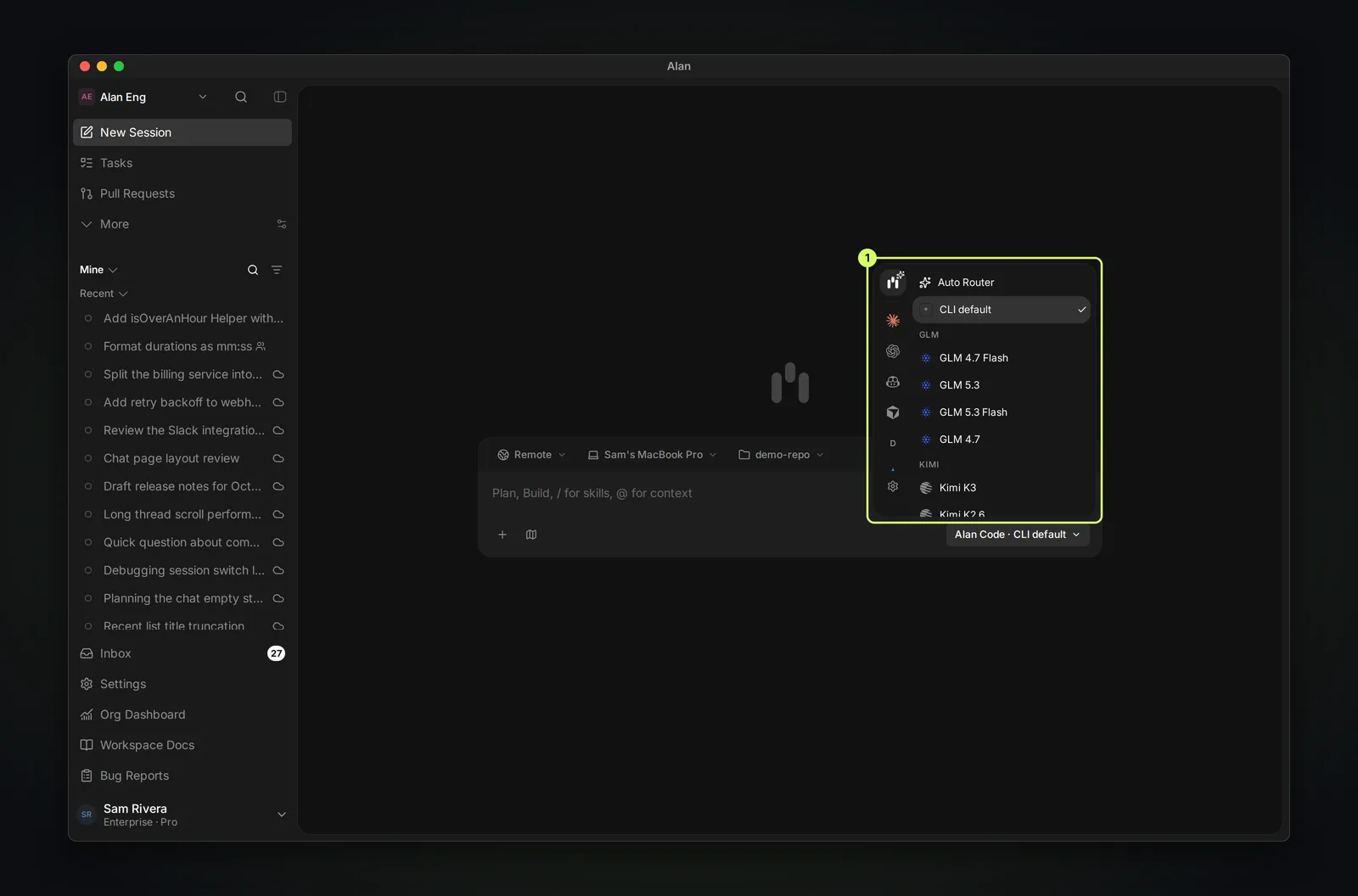
Open **Agent and model** at the bottom right of the composer. The left column lists the coding agents enabled for the current target; select one to see its models, grouped by model family. For **Alan Code**, **Auto** lets Alan choose the model. The button then reads, for example, **Alan Code · DeepSeek V4.1 Flash**, or **Alan Code · CLI default** when the target's default is used. If nothing is enabled for the target, it reads **No supported agent CLIs detected**.
|
|
14
|
+
|
|
15
|
+
## Where to configure it
|
|
16
|
+
|
|
17
|
+
| What | Where | Who |
|
|
18
|
+
| --- | --- | --- |
|
|
19
|
+
| Agents and models on a computer | Alan desktop app → **Settings → Account → General → Computers** → choose the computer → **Agents** | The computer's owner |
|
|
20
|
+
| Agents and models in a cloud environment | **Settings →** your team **→ Cloud Environment → Agents** | Any team member |
|
|
21
|
+
| Which models the organization allows | **Settings → Organisation → Models & providers** ("Choose the models your organisation can use.") | Any organization member |
|
|
22
|
+
| The provider behind **Alan Agent** | **Settings →** your team **→ Alan Agent** | Any team member |
|
|
23
|
+
|
|
24
|
+
> **Note:** The **Computers** list only appears in the desktop app. In a browser it reads **No computers connected — Open the Alan desktop app to connect this computer**.
|
|
25
|
+
|
|
26
|
+
## Local computer: the Agents tab
|
|
27
|
+
|
|
28
|
+
Choose which agents and models appear when this computer is selected. A green dot means the CLI is installed; its account status shows whether it is signed in.
|
|
29
|
+
|
|
30
|
+
On your current computer, the **CLI** column can offer **Install** or **Setup guide**. An Alan-managed installation shows **Managed v…**; a CLI you installed yourself shows **Existing CLI** with **Install latest**, which installs a current Alan-managed copy (use it when the agent reports that its CLI is too old for a model). A managed installation's menu can switch back to **Use existing CLI**. These installation controls apply to the current computer, not a remote machine.
|
|
31
|
+
|
|
32
|
+
**1. Rescan if a CLI was just installed**
|
|
33
|
+
|
|
34
|
+
Choose **Rescan models** to re-detect installed CLIs and their available models (reads **Scanning…** while it runs). A toast confirms **Agent models rescanned**, or reports **Model rescan failed. Is the computer online?**
|
|
35
|
+
|
|
36
|
+
**2. Enable a provider**
|
|
37
|
+
|
|
38
|
+
Each row is one coding agent, for example Claude Code, Codex, GitHub Copilot, Cursor Agent, Antigravity, or OpenCode, with an **On** switch, its install status (**Available**, **Offline**, or **Not installed**), and a models summary button.
|
|
39
|
+
|
|
40
|
+
**3. Choose its models**
|
|
41
|
+
|
|
42
|
+
Open the models button — it reads **Not installed**, **No models**, **Select models**, or **`{n}` of `{total}` model(s)**. The dropdown header is **`{Provider}` models** with a **Select all** / **Clear** toggle; every model underneath is its own checkbox. Select the models you want to offer in the composer.
|
|
43
|
+
|
|
44
|
+
**4. Set the default**
|
|
45
|
+
|
|
46
|
+
The **Default** row has two dropdowns — **Provider** and **Model** — for the provider/model combination the composer preselects on this computer.
|
|
47
|
+
|
|
48
|
+
**5. Save**
|
|
49
|
+
|
|
50
|
+
A **Save changes** button appears when you make a change (**Unsaved changes** label, **Discard** to revert). Saving shows **Saving…**, then a toast: **Agent settings saved**, or **Failed to save agent settings** on error.
|
|
51
|
+
|
|
52
|
+
## Cloud environment: the Agents tab
|
|
53
|
+
|
|
54
|
+
Open **Settings →** your team **→ Cloud Environment → Agents**. Under **Agent defaults** ("Control which agents and models are available for this team's Cloud environment."), each supported coding agent has a switch and a models menu, and the default picker sets which agent and model new cloud sessions start with. Below it, **Alan Code models** lists the models Alan Code can use: new models from Alan and from your organisation's connected providers appear automatically, and you can turn individual ones off.
|
|
55
|
+
|
|
56
|
+
Changes save automatically shortly after you stop editing; a toast appears only if saving fails (**Failed to save agent settings**). The tab exists once the team has a cloud environment; see [Cloud setup](../cloud-and-local/cloud-setup.md).
|
|
57
|
+
|
|
58
|
+
## Alan Agent
|
|
59
|
+
|
|
60
|
+
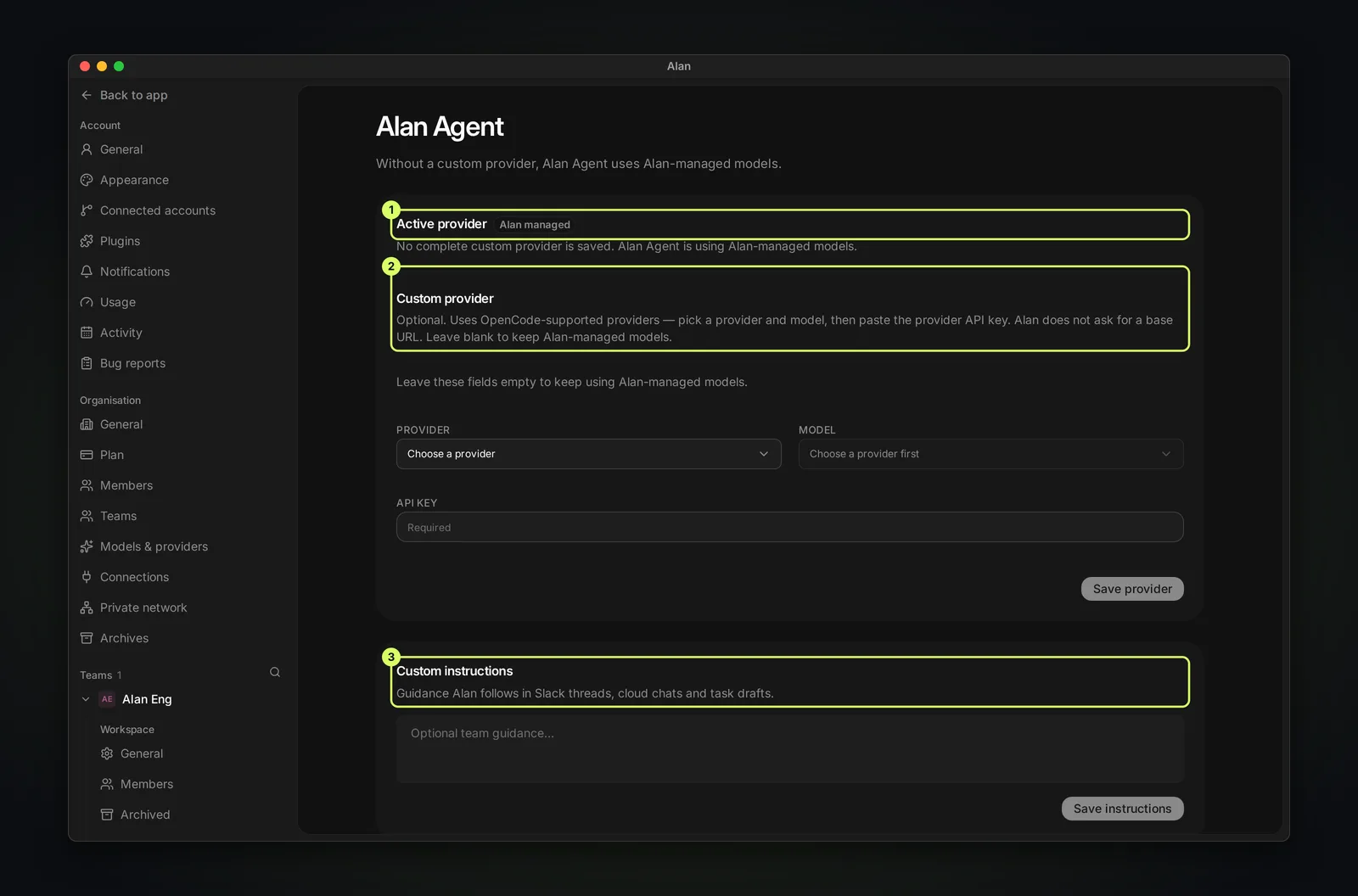
**Alan Agent** is the lightweight agent behind Slack threads, cloud chats, and task drafts. It uses Alan-managed models unless someone on the team adds a custom provider.
|
|
61
|
+
|
|
62
|
+
|
|
63
|
+
|
|
64
|
+
- **Active provider** shows what Alan Agent uses now, for example **Alan managed**.
|
|
65
|
+
- **Custom provider** is optional. Pick an OpenCode-supported provider and model, paste the provider API key, and choose **Save provider**. Alan does not ask for a base URL.
|
|
66
|
+
- **Custom instructions** is guidance Alan follows in Slack threads, cloud chats, and task drafts. Any team member can change it.
|
|
67
|
+
|
|
68
|
+
## Common mistakes
|
|
69
|
+
|
|
70
|
+
- Enabling a provider on a cloud environment but never confirming it's actually installed — the Agents tab reflects catalog support, not a live install check; the sandbox confirms availability when a session actually starts.
|
|
71
|
+
- Assuming installation also signs you in. Check the agent's account status, finish its sign-in if needed, then use **Rescan models** if models are missing.
|
|
72
|
+
- Leaving a provider's model list empty on a local computer. Unlike cloud (which auto-selects on first enable), a local computer with a provider **On** but zero models checked has nothing to offer in the composer.
|
|
73
|
+
|
|
74
|
+
## Next steps
|
|
75
|
+
|
|
76
|
+
- [Local execution](../cloud-and-local/local-execution.md) — Connect a computer and choose a local project folder.
|
|
77
|
+
- [Cloud setup](../cloud-and-local/cloud-setup.md) — Set up a cloud environment and its coding agents.
|
|
78
|
+
- [Connect Codex CLI](../cloud-and-local/codex-cli-connector.md) — Connect a ChatGPT account for cloud Codex sessions.
|
|
@@ -0,0 +1,62 @@
|
|
|
1
|
+
> Source: [https://docs.tryalan.ai/docs/agents-and-sessions/session-lifecycle](https://docs.tryalan.ai/docs/agents-and-sessions/session-lifecycle)
|
|
2
|
+
|
|
3
|
+
# Session lifecycle
|
|
4
|
+
|
|
5
|
+
Every message you send starts a **turn**: the agent works until it finishes, needs you, or is stopped. The status line at the top of each turn shows its progress.
|
|
6
|
+
|
|
7
|
+
## Turn states
|
|
8
|
+
|
|
9
|
+
```mermaid
|
|
10
|
+
stateDiagram-v2
|
|
11
|
+
[*] --> Working: you send a message
|
|
12
|
+
Working --> WaitingForInput: the agent asks a question
|
|
13
|
+
WaitingForInput --> Working: you answer
|
|
14
|
+
Working --> Worked: the turn finishes
|
|
15
|
+
Working --> Stopped: you stop it
|
|
16
|
+
Worked --> Working: you reply
|
|
17
|
+
Stopped --> Working: you reply
|
|
18
|
+
```
|
|
19
|
+
|
|
20
|
+
| Label | Meaning |
|
|
21
|
+
| --- | --- |
|
|
22
|
+
| **Working for 25s** | The agent is running. A spinner and, when reported, a token count show next to it. |
|
|
23
|
+
| **Waiting for input** | The agent asked a question or needs approval. Answer it in the card ("Waiting for your answer") to continue. |
|
|
24
|
+
| **Worked for 10s** | The turn finished. The line also summarizes the work, for example **Ran 2 commands, read 3 files and edited 2 files**. Select it to expand every step. |
|
|
25
|
+
| **Stopped after 12s** | You stopped the turn. Work done until then is kept. |
|
|
26
|
+
| **Stopped before it started** | The turn was stopped or failed before the agent began. |
|
|
27
|
+
|
|
28
|
+
A turn in **Plan** mode ends with a **Plan ready for review** card. **Accept Plan** starts a new turn in **Agent** mode to build it, and the card then reads **Plan accepted**; **Reject Plan** marks it **Plan rejected**.
|
|
29
|
+
|
|
30
|
+
## Sending while the agent works
|
|
31
|
+
|
|
32
|
+
You can keep typing while a turn runs. Each extra message shows its delivery state:
|
|
33
|
+
|
|
34
|
+
| Label | Meaning |
|
|
35
|
+
| --- | --- |
|
|
36
|
+
| **Sending…** | The message is on its way. |
|
|
37
|
+
| **Sent to the running agent** | The agent received it during the current turn. |
|
|
38
|
+
| **Queued. Runs after the current turn** | It starts the next turn automatically. |
|
|
39
|
+
| **Runs next. The agent finished before reading it** | The turn ended first, so the message starts a new one. |
|
|
40
|
+
| **Not sent. The computer was stopped** | The machine went offline. Start it again, then resend. |
|
|
41
|
+
|
|
42
|
+
## Where the session runs
|
|
43
|
+
|
|
44
|
+
A session's turns run on its execution target, which has its own status in the side panel, for example **Cloud machine · Ready** or a computer that is **Online**. A cloud machine can be asleep: the transcript shows a placeholder with **Wake up**. Waking or restarting the machine doesn't change the session; its history stays.
|
|
45
|
+
|
|
46
|
+
> **Note:** The machine and the turn are separate. A machine that is offline means turns can't run; a turn that is **Stopped** means that turn ended. See [Sandboxes](../cloud-and-local/sandboxes.md) for cloud machine states.
|
|
47
|
+
|
|
48
|
+
## Recover and continue
|
|
49
|
+
|
|
50
|
+
- **A turn stopped early:** reply in the same session to continue from where it stopped.
|
|
51
|
+
- **The machine is offline or asleep:** choose **Wake up**, or start the computer, then resend any message marked **Not sent**.
|
|
52
|
+
- **The work changed direction:** start a new session so the transcript stays focused, or choose **Convert to task** in the session header to track it as a task.
|
|
53
|
+
- **You need to see what happened:** expand the **Worked for** line to inspect the reported steps. On a task, open **Changes** to review the working diff.
|
|
54
|
+
|
|
55
|
+
If a reply is missing, check the delivery label and expand the turn's steps before resending. The agent may already have received your message or changed files.
|
|
56
|
+
|
|
57
|
+
## Next steps
|
|
58
|
+
|
|
59
|
+
- [Start a session](start-a-session.md) — Choose a target, agent, and model, and follow the work.
|
|
60
|
+
- [Sandboxes](../cloud-and-local/sandboxes.md) — Cloud machine states and recovery actions.
|
|
61
|
+
- [Runtime recovery](../cloud-and-local/runtime-recovery.md) — Recover when a machine or run disconnects.
|
|
62
|
+
- [Task artifacts](../tasks/task-artifacts.md) — Save durable outputs so the next session can pick up.
|
|
@@ -0,0 +1,110 @@
|
|
|
1
|
+
> Source: [https://docs.tryalan.ai/docs/agents-and-sessions/start-a-session](https://docs.tryalan.ai/docs/agents-and-sessions/start-a-session)
|
|
2
|
+
|
|
3
|
+
# Start a session
|
|
4
|
+
|
|
5
|
+
A **session** is one conversation with a coding agent. The agent runs on an execution target: a cloud computer or a computer you connected. Depending on its profile and mode, it can inspect or edit files, run commands, and report back in the conversation. Start one from **New Session** for standalone work, or from a task's **Start work** panel when the work should stay with a task. For the full task loop, from first session to **Done**, see [Complete a task with an agent](../tasks/complete-a-task.md).
|
|
6
|
+
|
|
7
|
+
_Video: https://docs.tryalan.ai/images/screenshots/sessions-start-a-session.mp4_
|
|
8
|
+
|
|
9
|
+
## The composer
|
|
10
|
+
|
|
11
|
+
|
|
12
|
+
|
|
13
|
+
| # | Control | What it sets |
|
|
14
|
+
| --- | --- | --- |
|
|
15
|
+
| 1 | **Execution target** | Where the agent runs. See [Choose where it runs](#choose-where-it-runs). |
|
|
16
|
+
| 2 | **Session** | **Individual** (only you see it) or **Team** (teammates see it in their session list). |
|
|
17
|
+
| 3 | **+** | Attach **Files**, or add skills and plugins. |
|
|
18
|
+
| 4 | **Mode** | **Agent** works directly. **Plan** (the map icon; the composer gets a dashed outline) is read-only: the agent inspects the code and writes a plan without changing files, saving it as an artifact when it can. |
|
|
19
|
+
| 5 | **Agent and model** | The coding agent and model that do the work. See [Coding agents and models](coding-agents-and-models.md). |
|
|
20
|
+
|
|
21
|
+
In the message box, type `/` to choose a [skill](../skills/skills.md) and `@` to add context such as files or Alan records.
|
|
22
|
+
|
|
23
|
+
### Plan, then build
|
|
24
|
+
|
|
25
|
+
When an agent submits a plan, a **Plan ready for review** card appears. If the plan was saved as an artifact, **Open plan** opens it. **Accept Plan** switches back to **Agent** mode and tells the agent to implement it; **Reject Plan** leaves it unbuilt so you can reply with changes.
|
|
26
|
+
|
|
27
|
+
> **Note:** **Team** sessions depend on your plan. If team sharing isn't included, the control stays on **Individual** and reads "Team sharing is not included in this plan".
|
|
28
|
+
|
|
29
|
+
## Choose where it runs
|
|
30
|
+
|
|
31
|
+
|
|
32
|
+
|
|
33
|
+
- **Cloud**: a managed cloud computer. If the environment has no image yet, choose **Set up cloud environment**. If a selected repository is missing from the image, choose **Set up selected repositories**. See [Cloud setup](../cloud-and-local/cloud-setup.md).
|
|
34
|
+
- **This computer**: the computer running the Alan desktop app. It is unavailable in the browser.
|
|
35
|
+
- **Remote**: a computer or VM you connected to Alan. It appears only once at least one remote machine is connected to the team. Choosing it opens the list of connected machines; a green dot means the machine is online. Then pick a **Folder**: a recent project, **Default workspace** (`~/.alan/workspace`), or search for another folder. See [Local execution](../cloud-and-local/local-execution.md).
|
|
36
|
+
|
|
37
|
+
If you send without a usable target, the composer shows **Choose an execution target before sending**.
|
|
38
|
+
|
|
39
|
+
## Your first solo session
|
|
40
|
+
|
|
41
|
+
Choose **This computer** in the desktop app, then select your local project folder and an available agent and model. You can start locally without setting up a cloud environment. GitHub is optional for this first session. If your agent CLI isn't listed yet, add it first; see [Local execution](../cloud-and-local/local-execution.md#2-turn-on-a-coding-agent).
|
|
42
|
+
|
|
43
|
+
|
|
44
|
+
|
|
45
|
+
If you just connected GitHub, choose the repository's **local checkout** as the folder. The GitHub connection gives access to the repository, but does not select or clone a local working folder for you.
|
|
46
|
+
|
|
47
|
+
## Write a good first message
|
|
48
|
+
|
|
49
|
+
Include the goal, the scope, the evidence you want, and any limits on commits, pull requests, or deploys.
|
|
50
|
+
|
|
51
|
+
```text
|
|
52
|
+
Add an isOverAnHour helper that returns true for durations longer than an hour, with a test.
|
|
53
|
+
Keep changes to math.js and math.test.js, run the tests, and don't commit.
|
|
54
|
+
```
|
|
55
|
+
|
|
56
|
+
### From understanding to a change
|
|
57
|
+
|
|
58
|
+
Start by asking the agent to understand your project:
|
|
59
|
+
|
|
60
|
+
```text
|
|
61
|
+
Explain what this project does, how to run it, and where the main features live.
|
|
62
|
+
Read the project instructions first. Don't change files.
|
|
63
|
+
```
|
|
64
|
+
|
|
65
|
+
For a change, switch to **Plan** mode and give a concrete problem, expected behavior, and constraints:
|
|
66
|
+
|
|
67
|
+
```text
|
|
68
|
+
Plan a fix for this problem: [what happens now].
|
|
69
|
+
Expected behavior: [what should happen instead].
|
|
70
|
+
Explain the likely files to change and how you will verify the result.
|
|
71
|
+
```
|
|
72
|
+
|
|
73
|
+
Read the plan, ask follow-up questions in the same session, and switch to **Agent** mode when you are ready:
|
|
74
|
+
|
|
75
|
+
```text
|
|
76
|
+
Implement the plan we agreed on. Keep the change within the described scope.
|
|
77
|
+
Run the relevant checks and explain what changed and any remaining gaps.
|
|
78
|
+
Don't commit or push yet; I want to inspect the diff first.
|
|
79
|
+
```
|
|
80
|
+
|
|
81
|
+
Use `@` to add relevant context or **+ → Files** to attach a screenshot or example. Include reproduction steps and error text for bugs. You do not need to know file names: ask the agent to find the relevant code.
|
|
82
|
+
|
|
83
|
+
After reviewing the diff and check results, you can ask for a follow-up fix. If GitHub is connected and the local checkout can be pushed, you can continue with:
|
|
84
|
+
|
|
85
|
+
```text
|
|
86
|
+
Create a branch for these changes, commit only this session's work, push it,
|
|
87
|
+
and open a pull request explaining the change and validation. Don't merge it.
|
|
88
|
+
```
|
|
89
|
+
|
|
90
|
+
Continue with [Pull requests](../reviews-testing-deploys/pull-requests.md) to inspect the PR, or [connect GitHub](../get-started/connect-github.md) first if you want that workflow. You can also keep working locally without publishing anything.
|
|
91
|
+
|
|
92
|
+
Press **Enter** to send. A new session takes its title from your message, and it appears in the sidebar.
|
|
93
|
+
|
|
94
|
+
## Follow the work
|
|
95
|
+
|
|
96
|
+
|
|
97
|
+
|
|
98
|
+
While the agent works, the transcript updates live. When a turn finishes you see:
|
|
99
|
+
|
|
100
|
+
- A summary such as **Worked for 10s · Ran 2 commands, read 3 files and edited 2 files**. Select it to expand every step.
|
|
101
|
+
- The agent's reply, with code blocks and file references.
|
|
102
|
+
- Tool steps for commands and file edits reported by the coding agent. For the working diff on a task, open its **Changes** panel; for standalone local work, review the checkout with your editor or Git.
|
|
103
|
+
|
|
104
|
+
The side panel shows the machine and its status, when the session started, the working folder, **Context** usage, and **Outputs** such as artifacts the session created. Reply in the same composer to continue: ask for fixes, more tests, or a pull request.
|
|
105
|
+
|
|
106
|
+
## Find sessions later
|
|
107
|
+
|
|
108
|
+
|
|
109
|
+
|
|
110
|
+
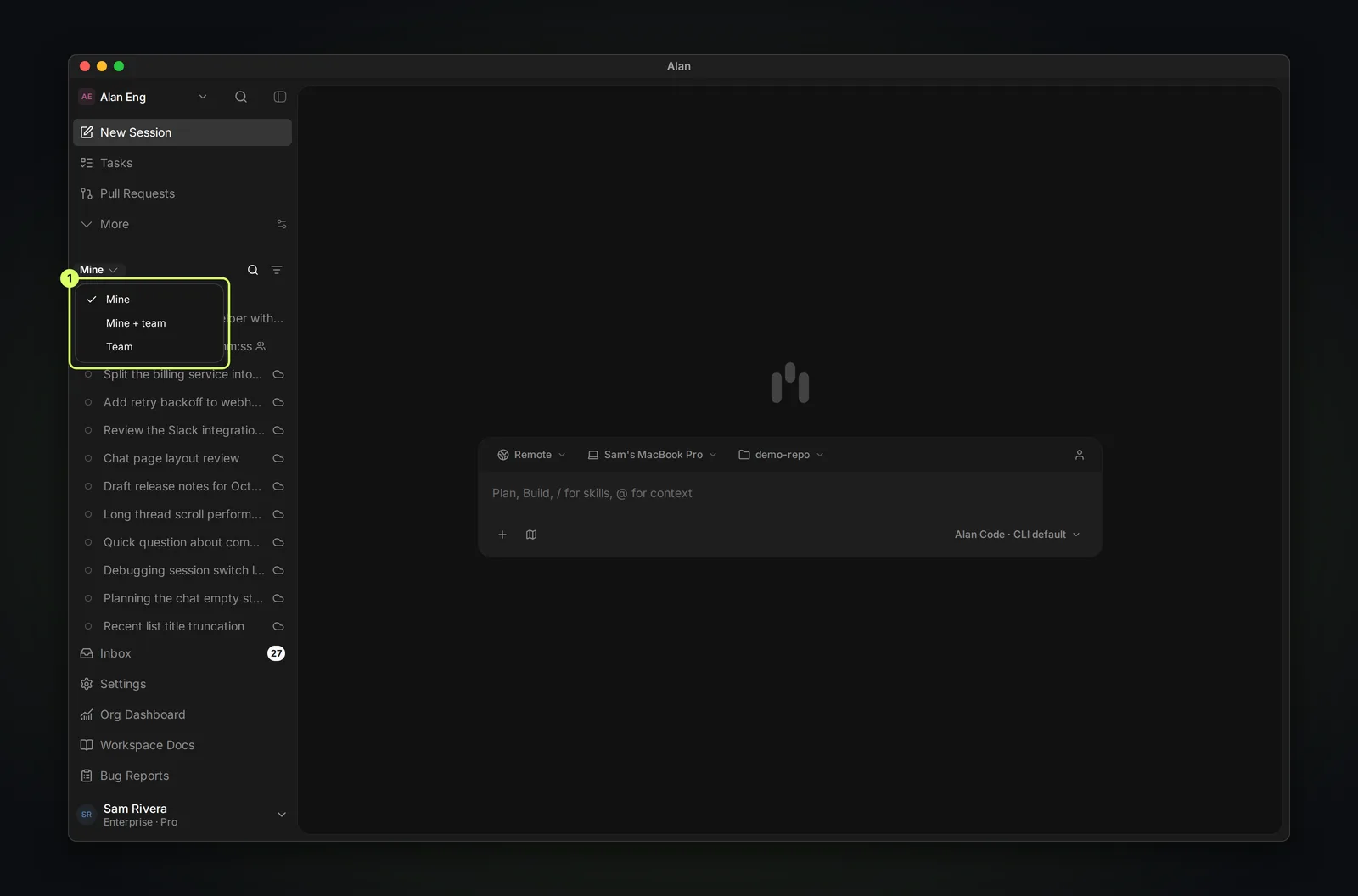
The sidebar lists recent sessions. Use the scope menu to show **Mine** or **Team** sessions, and the search button to find one by title. Hover a session to **Pin** or **Archive** it.
|