@alan-ai-hq/agent-manager-linux-x64 0.1.199 → 0.1.201
This diff represents the content of publicly available package versions that have been released to one of the supported registries. The information contained in this diff is provided for informational purposes only and reflects changes between package versions as they appear in their respective public registries.
- package/alan-agent.cjs +8928 -5241
- package/alan-holder.cjs +5364 -3401
- package/alan-lease.cjs +808 -200
- package/builtin-skills/agent-desktop/SKILL.md +94 -0
- package/builtin-skills/alan-artifact/SKILL.md +128 -0
- package/builtin-skills/alan-artifact/examples/interactive-diagram.md +50 -0
- package/builtin-skills/alan-artifact/examples/prototype.md +53 -0
- package/builtin-skills/alan-artifact/examples/test-report.md +55 -0
- package/builtin-skills/alan-artifact/references/design.md +39 -0
- package/builtin-skills/alan-artifact/references/diagrams.md +20 -0
- package/builtin-skills/alan-deck/SKILL.md +189 -0
- package/builtin-skills/alan-diagrams/SKILL.md +105 -0
- package/builtin-skills/alan-diagrams/references/diagram-catalogue.md +847 -0
- package/builtin-skills/alan-docs/SKILL.md +143 -0
- package/builtin-skills/alan-docs/references/administration/members-and-teams.md +48 -0
- package/builtin-skills/alan-docs/references/administration/org-dashboard.md +19 -0
- package/builtin-skills/alan-docs/references/administration/organisation-settings.md +41 -0
- package/builtin-skills/alan-docs/references/agents-and-sessions/code-context.md +60 -0
- package/builtin-skills/alan-docs/references/agents-and-sessions/coding-agents-and-models.md +78 -0
- package/builtin-skills/alan-docs/references/agents-and-sessions/session-lifecycle.md +62 -0
- package/builtin-skills/alan-docs/references/agents-and-sessions/start-a-session.md +110 -0
- package/builtin-skills/alan-docs/references/automations/automation-runs.md +69 -0
- package/builtin-skills/alan-docs/references/automations/create-an-automation.md +143 -0
- package/builtin-skills/alan-docs/references/automations/overview.md +77 -0
- package/builtin-skills/alan-docs/references/cloud-and-local/cloud-images.md +64 -0
- package/builtin-skills/alan-docs/references/cloud-and-local/cloud-sessions-and-execution.md +89 -0
- package/builtin-skills/alan-docs/references/cloud-and-local/cloud-setup.md +128 -0
- package/builtin-skills/alan-docs/references/cloud-and-local/codex-cli-connector.md +92 -0
- package/builtin-skills/alan-docs/references/cloud-and-local/local-execution.md +213 -0
- package/builtin-skills/alan-docs/references/cloud-and-local/runtime-recovery.md +60 -0
- package/builtin-skills/alan-docs/references/cloud-and-local/sandboxes.md +74 -0
- package/builtin-skills/alan-docs/references/cloud-and-local/troubleshooting-and-faq.md +102 -0
- package/builtin-skills/alan-docs/references/get-started/connect-azure-devops.md +89 -0
- package/builtin-skills/alan-docs/references/get-started/connect-bitbucket.md +86 -0
- package/builtin-skills/alan-docs/references/get-started/connect-github.md +114 -0
- package/builtin-skills/alan-docs/references/get-started/join-a-team.md +114 -0
- package/builtin-skills/alan-docs/references/get-started/product-map.md +96 -0
- package/builtin-skills/alan-docs/references/get-started/quickstart.md +158 -0
- package/builtin-skills/alan-docs/references/get-started/set-up-your-team.md +200 -0
- package/builtin-skills/alan-docs/references/get-started/sign-in.md +104 -0
- package/builtin-skills/alan-docs/references/get-started/welcome.md +39 -0
- package/builtin-skills/alan-docs/references/integrations/connect-microsoft-teams.md +116 -0
- package/builtin-skills/alan-docs/references/integrations/connect-slack.md +164 -0
- package/builtin-skills/alan-docs/references/integrations/import-from-linear.md +172 -0
- package/builtin-skills/alan-docs/references/plans-and-billing/plans-and-limits.md +115 -0
- package/builtin-skills/alan-docs/references/plans-and-billing/usage-and-credits.md +47 -0
- package/builtin-skills/alan-docs/references/reference/documents-and-artifacts.md +52 -0
- package/builtin-skills/alan-docs/references/reference/faq.md +89 -0
- package/builtin-skills/alan-docs/references/reference/feature-catalog.md +89 -0
- package/builtin-skills/alan-docs/references/reference/glossary.md +96 -0
- package/builtin-skills/alan-docs/references/reference/links-and-ids.md +80 -0
- package/builtin-skills/alan-docs/references/reference/roles-and-permissions.md +64 -0
- package/builtin-skills/alan-docs/references/reference/statuses.md +86 -0
- package/builtin-skills/alan-docs/references/reviews-testing-deploys/deployments.md +28 -0
- package/builtin-skills/alan-docs/references/reviews-testing-deploys/pull-requests.md +85 -0
- package/builtin-skills/alan-docs/references/reviews-testing-deploys/review-work.md +55 -0
- package/builtin-skills/alan-docs/references/reviews-testing-deploys/testing-evidence.md +52 -0
- package/builtin-skills/alan-docs/references/skills/plugins-and-mcp.md +24 -0
- package/builtin-skills/alan-docs/references/skills/skills.md +103 -0
- package/builtin-skills/alan-docs/references/tasks/complete-a-task.md +79 -0
- package/builtin-skills/alan-docs/references/tasks/create-a-task.md +67 -0
- package/builtin-skills/alan-docs/references/tasks/subtasks-and-status.md +55 -0
- package/builtin-skills/alan-docs/references/tasks/task-artifacts.md +56 -0
- package/builtin-skills/alan-docs/references/tasks/task-detail.md +65 -0
- package/builtin-skills/alan-docs/references/teams-and-planning/cycles.md +93 -0
- package/builtin-skills/alan-docs/references/teams-and-planning/documents.md +66 -0
- package/builtin-skills/alan-docs/references/teams-and-planning/epics.md +95 -0
- package/builtin-skills/alan-docs/references/teams-and-planning/whiteboard.md +52 -0
- package/builtin-skills/alan-docs/references/troubleshooting/agent-blocked.md +38 -0
- package/builtin-skills/alan-docs/references/troubleshooting/common-problems.md +118 -0
- package/builtin-skills/alan-docs/references/troubleshooting/github-access.md +41 -0
- package/builtin-skills/alan-docs/references/troubleshooting/missing-artifact.md +47 -0
- package/builtin-skills/alan-docs/references/troubleshooting/report-an-issue.md +74 -0
- package/builtin-skills/alan-docs/references/troubleshooting/runtime-unavailable.md +49 -0
- package/builtin-skills/alan-docs/scripts/generate-references.mjs +363 -0
- package/builtin-skills/alan-environment-setup/SKILL.md +368 -0
- package/builtin-skills/alan-environment-setup/references/android.md +118 -0
- package/builtin-skills/alan-environment-setup/references/troubleshooting.md +38 -0
- package/builtin-skills/alan-skill-authoring/SKILL.md +83 -0
- package/builtin-skills/alan-tasks/SKILL.md +195 -0
- package/builtin-skills/alan-test-android/SKILL.md +224 -0
- package/builtin-skills/alan-test-android/scripts/android-up.sh +227 -0
- package/builtin-skills/alan-test-android/scripts/install-launch.sh +38 -0
- package/builtin-skills/alan-test-android/scripts/record.sh +64 -0
- package/builtin-skills/alan-test-android/scripts/ui.py +367 -0
- package/builtin-skills/alan-test-desktop/SKILL.md +107 -0
- package/builtin-skills/alan-test-desktop/references/linux-recording.md +31 -0
- package/builtin-skills/alan-test-feature/SKILL.md +243 -0
- package/builtin-skills/alan-test-mobile/SKILL.md +65 -0
- package/builtin-skills/alan-test-web/SKILL.md +113 -0
- package/builtin-skills/alan-walkthrough/SKILL.md +152 -0
- package/builtin-skills/alan-walkthrough/scripts/mark-changes.js +419 -0
- package/builtin-skills/alan-walkthrough/scripts/publish-capture.mjs +288 -0
- package/builtin-skills/alan-workflows/SKILL.md +235 -0
- package/builtin-skills/manifest.json +19 -0
- package/package.json +3 -2
|
@@ -0,0 +1,96 @@
|
|
|
1
|
+
> Source: [https://docs.tryalan.ai/docs/reference/glossary](https://docs.tryalan.ai/docs/reference/glossary)
|
|
2
|
+
|
|
3
|
+
# Glossary
|
|
4
|
+
|
|
5
|
+
The terms you'll meet most in Alan. Where two terms are easy to confuse, the definition says how they differ.
|
|
6
|
+
|
|
7
|
+
## Organization and teams
|
|
8
|
+
|
|
9
|
+
**Organization (workspace)**: Your company's account in Alan. It holds teams, members, the plan and billing, model providers, and shared connections. Not to be confused with a **local workspace**, a folder on a computer where an agent works. See [Organisation settings](../administration/organisation-settings.md).
|
|
10
|
+
|
|
11
|
+
**Team**: Where day-to-day work happens. A team has its own members, settings, repositories, cloud environment, sessions, tasks, docs, skills, and automations. See [Members and teams](../administration/members-and-teams.md).
|
|
12
|
+
|
|
13
|
+
**Team identifier**: The 2–4 character prefix of a team's task IDs, for example `AIE` in `AIE-1234`. See [Links and IDs](links-and-ids.md).
|
|
14
|
+
|
|
15
|
+
**Admin and Member**: The two roles, held once in the organization and once in each team. See [Roles and permissions](roles-and-permissions.md).
|
|
16
|
+
|
|
17
|
+
**Inbox**: Your notifications, in the sidebar.
|
|
18
|
+
|
|
19
|
+
## Sessions and agents
|
|
20
|
+
|
|
21
|
+
**Session**: One conversation with an agent, running on an execution target. Start one from **New Session**, from a task, from Slack or Microsoft Teams, or from an automation. Older docs and Alan's tools call it a *conversation* or *chat*. See [Start a session](../agents-and-sessions/start-a-session.md).
|
|
22
|
+
|
|
23
|
+
**Individual and Team sessions**: Who can see a session. **Individual** sessions are only visible to you; **Team** sessions appear in teammates' session lists.
|
|
24
|
+
|
|
25
|
+
**Turn**: One round of agent work after you send a message, shown as **Working**, **Waiting for input**, **Worked**, or **Stopped**. See [Session lifecycle](../agents-and-sessions/session-lifecycle.md).
|
|
26
|
+
|
|
27
|
+
**Mode**: **Agent** works directly. **Plan** is read-only: the agent inspects the code and writes a plan without changing files.
|
|
28
|
+
|
|
29
|
+
**Coding agent**: The CLI that edits files and runs commands, such as Alan Code, Claude Code, or Codex, with one of its models. See [Coding agents and models](../agents-and-sessions/coding-agents-and-models.md).
|
|
30
|
+
|
|
31
|
+
**Skill**: A packaged set of instructions an agent loads when a job matches it. Type `/` in the composer to use one. See [Skills](../skills/skills.md).
|
|
32
|
+
|
|
33
|
+
**Plugin and MCP**: Plugins add tools and service connections for agents; MCP (Model Context Protocol) is the standard many of them use. See [Plugins and MCP](../skills/plugins-and-mcp.md).
|
|
34
|
+
|
|
35
|
+
**Automation**: Saved agent instructions that run on demand, on a schedule, or from an event. Previously called a *workflow*. See [Automations](../automations/overview.md).
|
|
36
|
+
|
|
37
|
+
## Where agents run
|
|
38
|
+
|
|
39
|
+
**Execution target**: Where a session runs: **Cloud**, **This computer** (the desktop app), or a **Remote** computer or VM. See [Cloud sessions and execution](../cloud-and-local/cloud-sessions-and-execution.md).
|
|
40
|
+
|
|
41
|
+
**Computer and team VM**: A machine you connect to Alan. Your own computers are listed in **Settings → Account → General → Computers** in the desktop app; shared team VMs are in **Settings →** your team **→ VMs**. See [Local execution](../cloud-and-local/local-execution.md).
|
|
42
|
+
|
|
43
|
+
**Cloud environment**: A team's saved setup for cloud sessions: repositories, environment files, setup commands, and coding agents. Configure it in **Settings →** your team **→ Cloud Environment**. See [Cloud setup](../cloud-and-local/cloud-setup.md).
|
|
44
|
+
|
|
45
|
+
**Image**: The prepared starting point a cloud environment builds, so new cloud sessions don't have to install everything again. See [Images](../cloud-and-local/cloud-images.md).
|
|
46
|
+
|
|
47
|
+
**Sandbox**: The cloud machine a session runs on. It can be running, paused, stopped, deleted, or failed, independently of the session's history. See [Sandboxes](../cloud-and-local/sandboxes.md).
|
|
48
|
+
|
|
49
|
+
**Environment setup skill**: The built-in `alan-environment-setup` skill that **Set up cloud environment** runs to install and verify a project and build its image. See [Set up with an agent](../cloud-and-local/cloud-setup.md#set-up-with-an-agent).
|
|
50
|
+
|
|
51
|
+
## Work and planning
|
|
52
|
+
|
|
53
|
+
**Task**: A tracked unit of work with a title, brief, status, priority, assignee, labels, subtasks, sessions, and artifacts. Each has a readable ID such as `AIE-1234`. See [Task detail](../tasks/task-detail.md).
|
|
54
|
+
|
|
55
|
+
**Subtask**: A smaller piece of a task with its own status. See [Subtasks and status](../tasks/subtasks-and-status.md).
|
|
56
|
+
|
|
57
|
+
**Status and status group**: Where a task or epic is in its lifecycle. Every status belongs to one of four groups: **Not started**, **Active**, **Done**, or **Closed**. See [Statuses](statuses.md).
|
|
58
|
+
|
|
59
|
+
**Epic**: A group of tasks that deliver one outcome, with its own status, lead, target dates, and progress. Readable ID `EP-1`. See [Epics](../teams-and-planning/epics.md).
|
|
60
|
+
|
|
61
|
+
**Cycle**: A scheduled period, two weeks by default, for the work your team plans to finish. Readable ID `CY-2`. A task can be in an epic and a cycle at the same time. See [Cycles](../teams-and-planning/cycles.md).
|
|
62
|
+
|
|
63
|
+
**Backlog**: The first status in the **Not started** group. Every team must keep it, for tasks and for epics.
|
|
64
|
+
|
|
65
|
+
## Outputs
|
|
66
|
+
|
|
67
|
+
**Artifact**: An output of work on one task, automation, or session: a **Plan**, **Test report**, **Document**, or **Whiteboard**. See [Task artifacts](../tasks/task-artifacts.md).
|
|
68
|
+
|
|
69
|
+
**Document**: A standalone team page, such as a PRD, spec, or wiki, under **Docs**. Different from an artifact, which belongs to one piece of work. See [Documents and artifacts](documents-and-artifacts.md).
|
|
70
|
+
|
|
71
|
+
**Whiteboard**: A collaborative canvas for diagrams and sketches, under **Docs** or as an artifact. See [Whiteboard](../teams-and-planning/whiteboard.md).
|
|
72
|
+
|
|
73
|
+
**Workspace Docs**: Organization-wide documents and whiteboards, available on the Enterprise tier.
|
|
74
|
+
|
|
75
|
+
**Published link**: A public, read-only link to a document, whiteboard, or artifact. See [Links and IDs](links-and-ids.md#public-links).
|
|
76
|
+
|
|
77
|
+
## Context
|
|
78
|
+
|
|
79
|
+
**Codebase indexing**: Adds code and docs from a team's linked repositories to agent search. See [Code context](../agents-and-sessions/code-context.md).
|
|
80
|
+
|
|
81
|
+
**Context graph and memory**: Durable context, such as decisions and what Alan remembers about a task, that agents can use in later sessions. See [Code context](../agents-and-sessions/code-context.md#context-graph-team-memory).
|
|
82
|
+
|
|
83
|
+
## Plans and billing
|
|
84
|
+
|
|
85
|
+
**Feature tier**: Decides which features your organization has: **Free**, **Individual**, **Team**, or **Enterprise**.
|
|
86
|
+
|
|
87
|
+
**Usage plan**: Each seat's monthly model and cloud allowance: **Pro**, **Pro+**, or **Max**.
|
|
88
|
+
|
|
89
|
+
**Seat**: One member's place on the plan. Each member needs one.
|
|
90
|
+
|
|
91
|
+
**Usage credits**: Purchased budget for cloud sandboxes and Alan Code, managed in **Settings → Organisation → Plan**. See [Plans and limits](../plans-and-billing/plans-and-limits.md) and [Usage and credits](../plans-and-billing/usage-and-credits.md).
|
|
92
|
+
|
|
93
|
+
## Next steps
|
|
94
|
+
|
|
95
|
+
- [Product map](../get-started/product-map.md) — How these pieces fit together.
|
|
96
|
+
- [Feature catalog](feature-catalog.md) — Find main features and their guides.
|
|
@@ -0,0 +1,80 @@
|
|
|
1
|
+
> Source: [https://docs.tryalan.ai/docs/reference/links-and-ids](https://docs.tryalan.ai/docs/reference/links-and-ids)
|
|
2
|
+
|
|
3
|
+
# Links and IDs
|
|
4
|
+
|
|
5
|
+
Alan shows two kinds of identifier:
|
|
6
|
+
|
|
7
|
+
- **Readable IDs** such as `AIE-1234`, `EP-1`, and `CY-2`. Use them in conversation, search, commit messages, and pull request titles.
|
|
8
|
+
- **Internal IDs** (UUIDs) in URLs and in Alan's agent tools. They never change and are not interchangeable between record types.
|
|
9
|
+
|
|
10
|
+
## Readable IDs
|
|
11
|
+
|
|
12
|
+
| Record | Format | Example | How it's built |
|
|
13
|
+
| --- | --- | --- | --- |
|
|
14
|
+
| Task | `-` | `AIE-1751` | The team's identifier plus a number that counts up within the team |
|
|
15
|
+
| Epic | `EP-` | `EP-1` | A number that counts up within the team |
|
|
16
|
+
| Cycle | `CY-` | `CY-2` | A number that counts up within the team; shown before the cycle's name, for example **CY-2 - Launch prep** |
|
|
17
|
+
|
|
18
|
+
The **team identifier** is 2–4 uppercase letters or digits, unique within your organization. Alan suggests one from the team name; any team member can change it in **Settings →** your team **→ General → Identifier**. Changing it changes the prefix shown on existing tasks. Their numbers and internal IDs stay the same; use **Copy link** for a stable reference.
|
|
19
|
+
|
|
20
|
+
Because epic and cycle numbers restart in every team, `EP-1` and `CY-2` only identify a record together with its team.
|
|
21
|
+
|
|
22
|
+
|
|
23
|
+
|
|
24
|
+
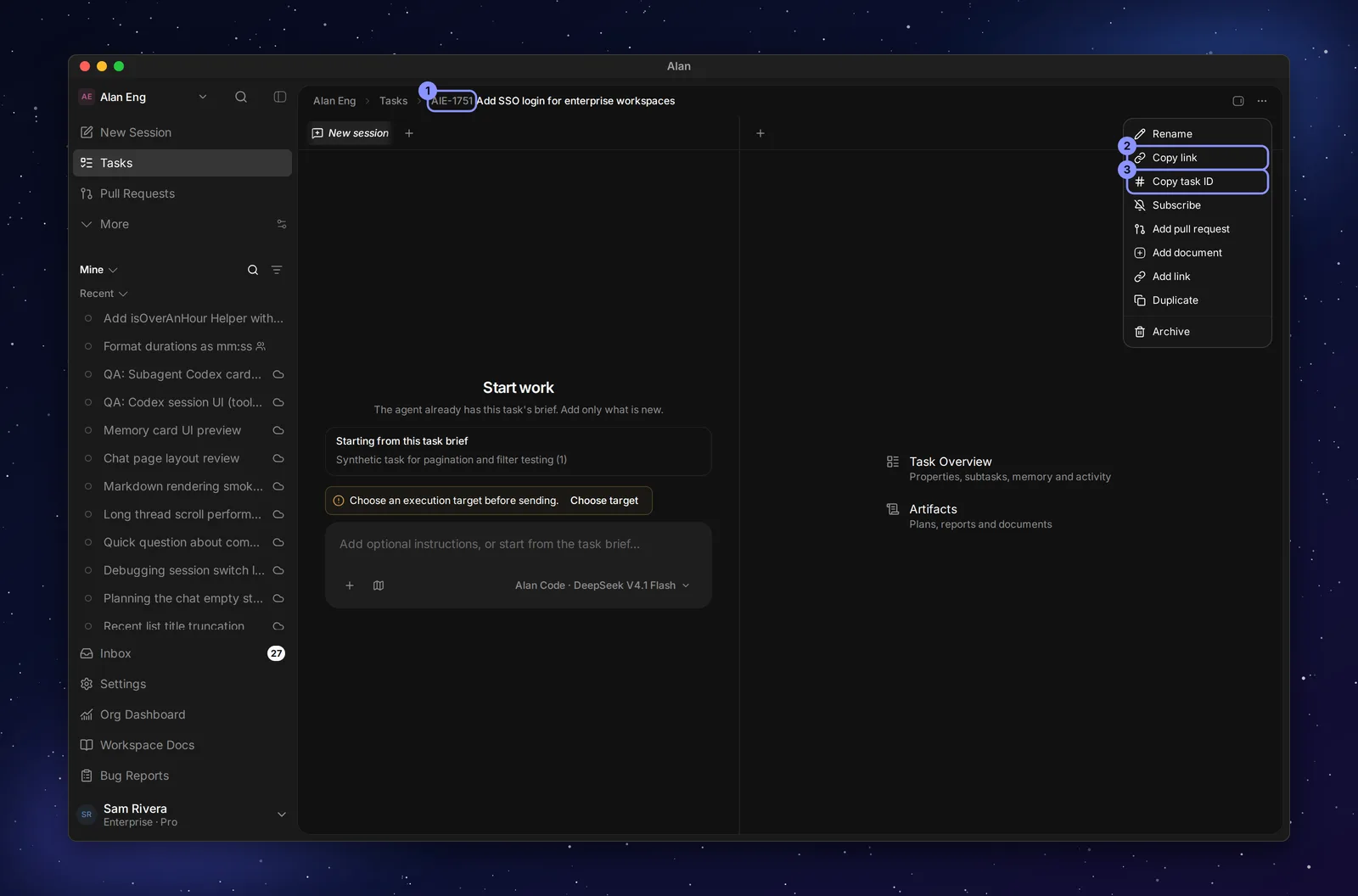
- **Copy task ID** copies the readable ID, for example `AIE-1751`.
|
|
25
|
+
- **Copy link** copies the task's URL.
|
|
26
|
+
- Task search matches the title, the readable ID (`AIE-964`), or the bare number (`964` or `#964`).
|
|
27
|
+
|
|
28
|
+
## Page URLs
|
|
29
|
+
|
|
30
|
+
Most record URLs use internal IDs. Opening a private record requires signing in and access to its team. Pull request URLs use the repository name and pull request number; invitation URLs use a token.
|
|
31
|
+
|
|
32
|
+
| Page | URL |
|
|
33
|
+
| --- | --- |
|
|
34
|
+
| Session | `/teams/{teamId}/chats/{chatId}` |
|
|
35
|
+
| Task | `/teams/{teamId}/tasks/{taskId}` (also opens under `/backlog/{taskId}`, or a cycle page with `?task={taskId}`) |
|
|
36
|
+
| Epic | `/teams/{teamId}/epics/{epicId}` |
|
|
37
|
+
| Cycle | `/teams/{teamId}/cycles/{cycleId}` |
|
|
38
|
+
| Team document or whiteboard | `/teams/{teamId}/docs/{documentId}` |
|
|
39
|
+
| Workspace Docs page | `/workspace/wiki/{documentId}` |
|
|
40
|
+
| Automation | `/teams/{teamId}/automations/{automationId}` |
|
|
41
|
+
| Automation run | `/teams/{teamId}/automations/sessions/{runId}` |
|
|
42
|
+
| Pull request | `/teams/{teamId}/pull-requests/{owner}/{repo}/{number}` |
|
|
43
|
+
| Team settings | `/teams/{teamId}/settings/{section}`, for example `/settings/tasks` |
|
|
44
|
+
| Invitation | `/invite/{token}` |
|
|
45
|
+
|
|
46
|
+
Older links keep working: `/teams/{teamId}/workflows/...` and `/teams/{teamId}/agents/...` redirect to `/automations/...`, and `/teams/{teamId}/overview` redirects to the team's home. A team URL without a page, `/teams/{teamId}`, opens **New Session**.
|
|
47
|
+
|
|
48
|
+
## Public links
|
|
49
|
+
|
|
50
|
+
Publishing a document, whiteboard, or artifact creates a read-only link that anyone can open without signing in:
|
|
51
|
+
|
|
52
|
+
```text
|
|
53
|
+
https://<your Alan host>/share/{token}
|
|
54
|
+
```
|
|
55
|
+
|
|
56
|
+
The token is random and is not the document's ID. **Unpublish** turns the link off. Links in the older formats `/share/docs/{documentId}` and `/share/artifacts/{artifactId}` redirect to the current link while the record is still published. See [Documents](../teams-and-planning/documents.md#publish-and-share).
|
|
57
|
+
|
|
58
|
+
## Internal IDs used by agents
|
|
59
|
+
|
|
60
|
+
When an agent works with Alan's tools, it passes internal IDs. Each one names a different kind of record:
|
|
61
|
+
|
|
62
|
+
| ID | Identifies | Appears in |
|
|
63
|
+
| --- | --- | --- |
|
|
64
|
+
| `teamId` | A team | Every team URL |
|
|
65
|
+
| `taskId` | A task or subtask | Task URLs |
|
|
66
|
+
| `conversationId` | A session (called `chatId` in URLs) | Session URLs |
|
|
67
|
+
| `documentId` | A team or Workspace Docs document, or a whiteboard | Docs URLs |
|
|
68
|
+
| `artifactId` | An artifact | Agent tools; artifacts open from their task, session, or automation |
|
|
69
|
+
| `epicId`, `cycleId` | An epic or cycle | Epic and cycle URLs |
|
|
70
|
+
|
|
71
|
+
An artifact has exactly one home: a task, an automation, or a standalone session. A team document belongs to the team, not to a task. See [Documents and artifacts](documents-and-artifacts.md).
|
|
72
|
+
|
|
73
|
+
> **Warning:** Never swap these IDs. Passing a `taskId` where a `conversationId` is expected, or inventing an ID, can attach an artifact to the wrong place, where nobody looks for it. Agents should use the IDs Alan gives them, and the `url` returned by Alan's tools rather than building URLs themselves.
|
|
74
|
+
|
|
75
|
+
## Next steps
|
|
76
|
+
|
|
77
|
+
- [Documents and artifacts](documents-and-artifacts.md) — Where each kind of output lives.
|
|
78
|
+
- [Task detail](../tasks/task-detail.md) — The task page, its sessions, and its panels.
|
|
79
|
+
- [Missing artifact](../troubleshooting/missing-artifact.md) — Find an artifact that isn't where you expected.
|
|
80
|
+
- [Statuses](statuses.md) — Task, epic, and cycle statuses.
|
|
@@ -0,0 +1,64 @@
|
|
|
1
|
+
> Source: [https://docs.tryalan.ai/docs/reference/roles-and-permissions](https://docs.tryalan.ai/docs/reference/roles-and-permissions)
|
|
2
|
+
|
|
3
|
+
# Roles and permissions
|
|
4
|
+
|
|
5
|
+
Alan has two roles, **Admin** and **Member**, at two levels:
|
|
6
|
+
|
|
7
|
+
- **Organization role**: one per person, for the whole organization (also called the workspace).
|
|
8
|
+
- **Team role**: one per team you belong to. Being an admin of one team doesn't make you an admin of another.
|
|
9
|
+
|
|
10
|
+
Organization admins manage organization membership, billing, and spending. Team admins manage membership in their own teams. Members can change team settings and configure agents and models. Connecting source control also depends on organization policy and permissions in the provider, such as GitHub.
|
|
11
|
+
|
|
12
|
+
> **Note:** Organization admins can act as a team admin in every team, including teams they haven't joined.
|
|
13
|
+
|
|
14
|
+
## Who can do what
|
|
15
|
+
|
|
16
|
+
| Action | Org admin | Team admin | Member |
|
|
17
|
+
| --- | :---: | :---: | :---: |
|
|
18
|
+
| Work in a team: sessions, tasks, epics, cycles, docs, skills, automations | ✅ | ✅ | ✅ |
|
|
19
|
+
| Change team settings: General (name, identifier, icon), Tasks, Cycles, Epics, statuses and labels | ✅ | ✅ | ✅ |
|
|
20
|
+
| Configure the team's cloud environment, coding agents, models, CLI credentials, and Alan Agent | ✅ | ✅ | ✅ |
|
|
21
|
+
| Add team-owned source control connections when allowed by organization policy | ✅ | ✅ | ✅ |
|
|
22
|
+
| Link repositories available to the team and turn on codebase indexing | ✅ | ✅ | ✅ |
|
|
23
|
+
| Manage sharing of organization-owned source control connections | ✅ | — | — |
|
|
24
|
+
| Manage organization model providers | ✅ | ✅ | ✅ |
|
|
25
|
+
| Create a team (you become its admin) | ✅ | ✅ | ✅ |
|
|
26
|
+
| Invite people to a team, change team roles, remove team members, revoke team invitations | ✅ | ✅ | — |
|
|
27
|
+
| Delete a team | ✅ | ✅ | — |
|
|
28
|
+
| Invite people to the organization, change organization roles, remove organization members | ✅ | — | — |
|
|
29
|
+
| Plan, seats, billing, and cloud credits | ✅ | — | — |
|
|
30
|
+
| Rename or delete the organization | ✅ | — | — |
|
|
31
|
+
|
|
32
|
+
For GitHub, connecting a GitHub organization for the first time requires its GitHub owner. An organization-wide GitHub connection also requires an Alan organization admin. See [Connect GitHub](../get-started/connect-github.md) for the setup steps.
|
|
33
|
+
|
|
34
|
+
Your plan can still switch a feature off for everyone, whatever their role. For example, creating teams and inviting members need the Team or Enterprise tier. See the [Feature catalog](feature-catalog.md) and [Plans and limits](../plans-and-billing/plans-and-limits.md).
|
|
35
|
+
|
|
36
|
+
Some limits apply regardless of role:
|
|
37
|
+
|
|
38
|
+
- A team must keep at least one admin. Alan blocks demoting or removing the last one, so promote someone else first.
|
|
39
|
+
- You can't remove yourself from a team or from the organization; ask an admin.
|
|
40
|
+
- You can't delete your organization's only team.
|
|
41
|
+
- **Individual** sessions stay visible only to the person who started them. See [Start a session](../agents-and-sessions/start-a-session.md).
|
|
42
|
+
|
|
43
|
+
The **Org Dashboard**, including organization-wide cloud spend, is for organization admins. Team members can view their team's cloud usage and spending; personal usage is available in account settings.
|
|
44
|
+
|
|
45
|
+
## Invitations
|
|
46
|
+
|
|
47
|
+
Team admins invite people from the team's **Members** page; organization admins can also invite from **Settings → Organisation → Members**. See [Members and teams](../administration/members-and-teams.md).
|
|
48
|
+
|
|
49
|
+
1. Add one or more email addresses and choose a role, **Admin** or **Member**.
|
|
50
|
+
2. The invitee gets a link (`/invite/{token}`). It expires after **7 days**.
|
|
51
|
+
3. Opening it shows **Join** with the team name and an **Accept invitation** button. The invitee must sign in with the email address the invitation was sent to.
|
|
52
|
+
|
|
53
|
+
An invitation is **pending** until it's **accepted**, or it ends as **expired** or **revoked**. Invitations for your email address are also applied when you first sign in. See [Sign in and first run](../get-started/sign-in.md).
|
|
54
|
+
|
|
55
|
+
## Agents
|
|
56
|
+
|
|
57
|
+
What an agent can do in a session depends on its available tools and your access. For example, pull request review sessions can't edit files. Ask an agent to confirm before anything irreversible, such as a production deploy, a force push, or deleting data, and keep credentials out of task text, artifacts, and documents.
|
|
58
|
+
|
|
59
|
+
## Next steps
|
|
60
|
+
|
|
61
|
+
- [Members and teams](../administration/members-and-teams.md) — Invite people and organize them into teams.
|
|
62
|
+
- [Organisation settings](../administration/organisation-settings.md) — Everything else about your organization.
|
|
63
|
+
- [Connect GitHub](../get-started/connect-github.md) — Set up team repository access and link your own GitHub account.
|
|
64
|
+
- [Feature catalog](feature-catalog.md) — Find main features and their guides.
|
|
@@ -0,0 +1,86 @@
|
|
|
1
|
+
> Source: [https://docs.tryalan.ai/docs/reference/statuses](https://docs.tryalan.ai/docs/reference/statuses)
|
|
2
|
+
|
|
3
|
+
# Statuses
|
|
4
|
+
|
|
5
|
+
Tasks, epics, and cycles each have a status. Task and epic statuses come from a list your team can customize; cycle status depends on its dates, start and close actions, and the team's auto-close setting.
|
|
6
|
+
|
|
7
|
+
| Object | Where the list comes from | Customize in |
|
|
8
|
+
| --- | --- | --- |
|
|
9
|
+
| Task | Team list, starting from the defaults below | **Settings →** your team **→ Tasks → Statuses** |
|
|
10
|
+
| Epic | Team list, starting from the defaults below | **Settings →** your team **→ Epics → Epic statuses** |
|
|
11
|
+
| Cycle | Calculated from dates, start and close actions, and auto-close settings | **Settings →** your team **→ Cycles** (auto-close and period only) |
|
|
12
|
+
|
|
13
|
+
## Status groups
|
|
14
|
+
|
|
15
|
+
Every task and epic status belongs to one of four groups. The group, not the name, decides how Alan treats the status, for example which tasks count as started or completed.
|
|
16
|
+
|
|
17
|
+
| Group | Settings description |
|
|
18
|
+
| --- | --- |
|
|
19
|
+
| **Not started** | "Work that hasn't begun yet" |
|
|
20
|
+
| **Active** | "Work currently being done" |
|
|
21
|
+
| **Done** | "Work that has been completed" |
|
|
22
|
+
| **Closed** | "Work that has been cancelled" |
|
|
23
|
+
|
|
24
|
+
## Task statuses
|
|
25
|
+
|
|
26
|
+
A new team starts with six task statuses:
|
|
27
|
+
|
|
28
|
+
| Status | Group | Use it when |
|
|
29
|
+
| --- | --- | --- |
|
|
30
|
+
| **Backlog** | Not started | The work is captured but not planned. Every team must keep this status. |
|
|
31
|
+
| **Todo** | Not started | The work is defined and ready to pick up. |
|
|
32
|
+
| **In Progress** | Active | Someone, or an agent session, is making changes. |
|
|
33
|
+
| **In Review** | Active | There is a pull request, plan, or test report to check. |
|
|
34
|
+
| **Done** | Done | The work has shipped or been accepted. |
|
|
35
|
+
| **Cancelled** | Closed | The work stopped without being completed. |
|
|
36
|
+
|
|
37
|
+
Creating the first session on a task moves it from a **Not started** status to the first **Active** status, usually **In Progress**. It does not wait for the agent to edit files.
|
|
38
|
+
|
|
39
|
+
Teams can add statuses to any group, rename and recolor them, and drag to reorder them within a group, so your team's list may differ from this one. See [Subtasks and status](../tasks/subtasks-and-status.md).
|
|
40
|
+
|
|
41
|
+
## Epic statuses
|
|
42
|
+
|
|
43
|
+
| Status | Group |
|
|
44
|
+
| --- | --- |
|
|
45
|
+
| **Backlog** (required) | Not started |
|
|
46
|
+
| **Planned** | Not started |
|
|
47
|
+
| **In Progress** | Active |
|
|
48
|
+
| **Completed** | Done |
|
|
49
|
+
| **Canceled** | Closed |
|
|
50
|
+
|
|
51
|
+
See [Epics](../teams-and-planning/epics.md).
|
|
52
|
+
|
|
53
|
+
## Cycle statuses
|
|
54
|
+
|
|
55
|
+
Alan calculates cycle status from its dates, whether someone started or closed it, and the team's **Auto-close expired cycles** setting.
|
|
56
|
+
|
|
57
|
+
| Shown as | Value | When |
|
|
58
|
+
| --- | --- | --- |
|
|
59
|
+
| **Planned** | `upcoming` | The cycle has not started yet. |
|
|
60
|
+
| **Active** | `active` | The cycle has started, its end date has not passed, and it has not been closed. |
|
|
61
|
+
| **Past due** | `past_due` | The end date has passed, and auto-close is off, so the cycle waits for someone to close it. |
|
|
62
|
+
| **Closed** | `completed` | Someone closed it, or it ended while auto-close is on. |
|
|
63
|
+
|
|
64
|
+
See [Cycles](../teams-and-planning/cycles.md).
|
|
65
|
+
|
|
66
|
+
## Other states
|
|
67
|
+
|
|
68
|
+
| What | States | Reference |
|
|
69
|
+
| --- | --- | --- |
|
|
70
|
+
| Test report result | pass, fail, or mixed | [Testing evidence](../reviews-testing-deploys/testing-evidence.md) |
|
|
71
|
+
| Invitation | pending, accepted, expired, or revoked | [Roles and permissions](roles-and-permissions.md#invitations) |
|
|
72
|
+
| Session turn | **Working**, **Waiting for input**, **Worked**, **Stopped** | [Session lifecycle](../agents-and-sessions/session-lifecycle.md) |
|
|
73
|
+
| Cloud sandbox | Running, paused, stopped, deleted, or failed | [Sandboxes](../cloud-and-local/sandboxes.md) |
|
|
74
|
+
|
|
75
|
+
The session turn label **Working** describes an agent run, not a task status.
|
|
76
|
+
|
|
77
|
+
## Keep status honest
|
|
78
|
+
|
|
79
|
+
When changing status yourself, use **In Progress** for work underway, **In Review** when there is something to check, and **Done** when the work is accepted or shipped. Agents can change task status with Alan's task tools, so tell an agent explicitly if you want it to move status for you. Opening, approving, or merging a pull request does not change task status; set **In Review** and **Done** yourself.
|
|
80
|
+
|
|
81
|
+
## Next steps
|
|
82
|
+
|
|
83
|
+
- [Subtasks and status](../tasks/subtasks-and-status.md) — Customize statuses and split work into subtasks.
|
|
84
|
+
- [Epics](../teams-and-planning/epics.md) — Epic statuses, progress, and target dates.
|
|
85
|
+
- [Cycles](../teams-and-planning/cycles.md) — Auto-close, rollover, and cycle progress.
|
|
86
|
+
- [Glossary](glossary.md) — Definitions for the terms on this page.
|
|
@@ -0,0 +1,28 @@
|
|
|
1
|
+
> Source: [https://docs.tryalan.ai/docs/reviews-testing-deploys/deployments](https://docs.tryalan.ai/docs/reviews-testing-deploys/deployments)
|
|
2
|
+
|
|
3
|
+
# Deployments
|
|
4
|
+
|
|
5
|
+
Use Alan sessions to prepare releases, run your repository's deployment commands, and check the result. Deployment still uses your existing scripts or pipeline; Alan does not provide a separate release dashboard.
|
|
6
|
+
|
|
7
|
+
## Before the release
|
|
8
|
+
|
|
9
|
+
- **Merge-ready pull requests.** Check review state, **Required** checks, and conflicts on the pull request page, then merge from **Merge**. See [Pull requests](pull-requests.md).
|
|
10
|
+
- **Evidence.** Each linked task should have a test report that matches what the pull request claims. See [Testing evidence](testing-evidence.md).
|
|
11
|
+
- **A release summary.** Ask an agent to list what's going out. For example: "List the pull requests merged into main since the last release tag, with linked tasks and any known risks."
|
|
12
|
+
|
|
13
|
+
## Running your own deploy steps
|
|
14
|
+
|
|
15
|
+
If your repository has its own deploy scripts or a repository skill such as `/deploy`, an agent can run them in a session like any other command, with the access that session's computer or cloud environment has. Alan doesn't add approvals, environments, or rollback on top. Keep production credentials and approvals in your deploy pipeline.
|
|
16
|
+
|
|
17
|
+
## After the release
|
|
18
|
+
|
|
19
|
+
Ask an agent to run the narrowest check that proves the change is live, for example loading the changed route or calling a health endpoint, and to file a test report with what passed, what was skipped, and what still needs watching.
|
|
20
|
+
|
|
21
|
+
To run the same post-release check every time, create an [automation](../automations/create-an-automation.md), for example one triggered by **Pull Request Merged**.
|
|
22
|
+
|
|
23
|
+
## Next steps
|
|
24
|
+
|
|
25
|
+
- [Pull requests](pull-requests.md) — Check readiness and merge.
|
|
26
|
+
- [Testing evidence](testing-evidence.md) — Prove the change works before and after release.
|
|
27
|
+
- [Skills](../skills/skills.md) — Package your team's release steps as a skill.
|
|
28
|
+
- [Create an automation](../automations/create-an-automation.md) — Run a check on every merge.
|
|
@@ -0,0 +1,85 @@
|
|
|
1
|
+
> Source: [https://docs.tryalan.ai/docs/reviews-testing-deploys/pull-requests](https://docs.tryalan.ai/docs/reviews-testing-deploys/pull-requests)
|
|
2
|
+
|
|
3
|
+
# Pull requests
|
|
4
|
+
|
|
5
|
+
A **pull request** proposes file changes for review before they become part of the project. The **Pull Requests** page in the sidebar lists open and closed pull requests from the repositories linked to your team. Open one to read the discussion, see checks and reviewers, link it to a task or session, start an Alan review, and merge it.
|
|
6
|
+
|
|
7
|
+
Alan reads pull requests from **GitHub**, **Azure DevOps**, and **Bitbucket**. A pull request shows up once its repository is linked to the team; see [Connect GitHub](../get-started/connect-github.md), [Connect Bitbucket](../get-started/connect-bitbucket.md), or [Connect Azure DevOps](../get-started/connect-azure-devops.md).
|
|
8
|
+
|
|
9
|
+
## The pull request list
|
|
10
|
+
|
|
11
|
+
|
|
12
|
+
|
|
13
|
+
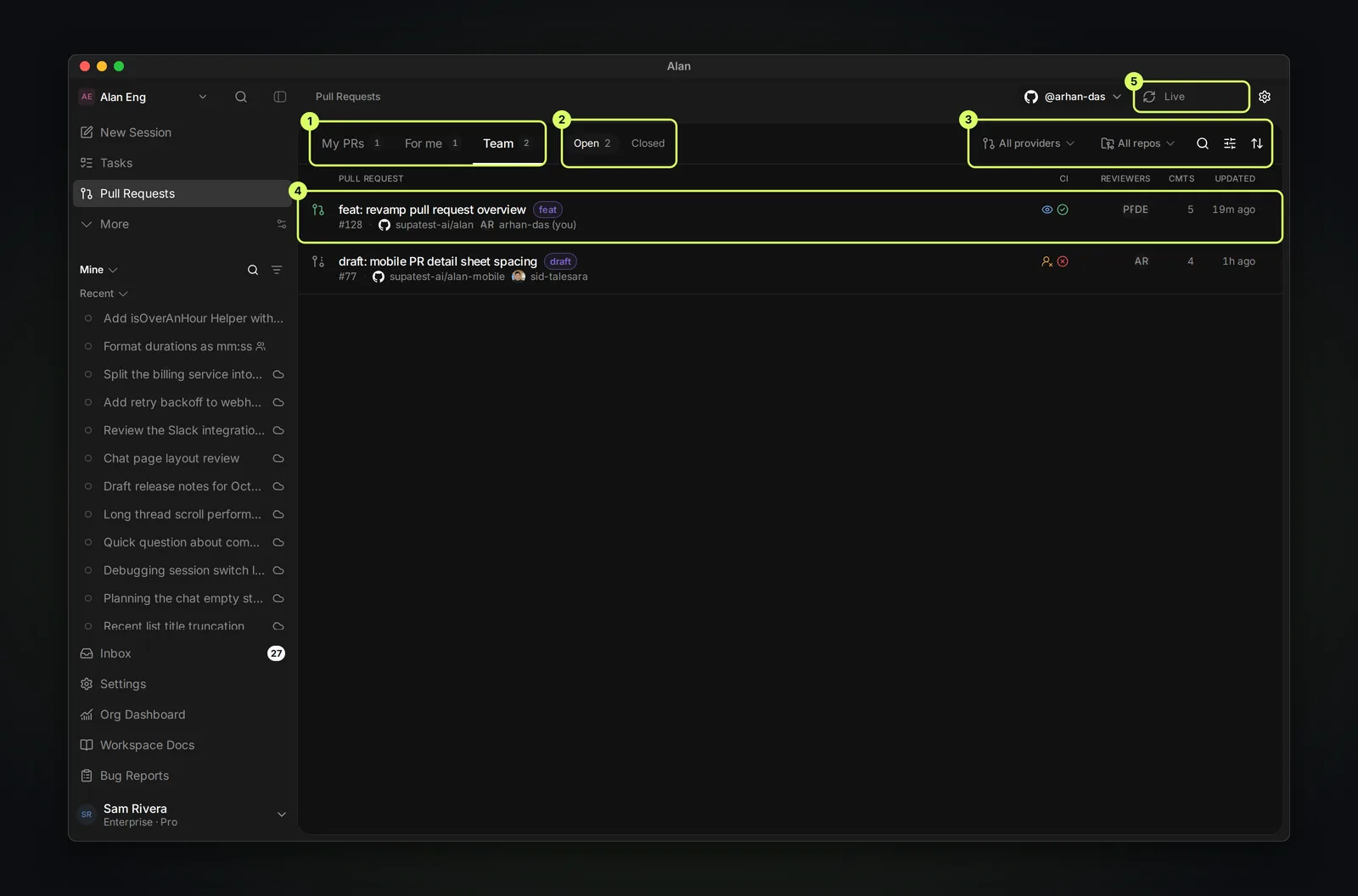
| Tab | Shows |
|
|
14
|
+
| --- | --- |
|
|
15
|
+
| **My PRs** | Pull requests you opened |
|
|
16
|
+
| **For me** | Pull requests where you are a requested reviewer. This is the default tab. |
|
|
17
|
+
| **Team** | Every pull request on the team's linked repositories |
|
|
18
|
+
|
|
19
|
+
**My PRs** and **For me** need your personal account linked, so Alan knows which pull requests are yours. If it isn't, the page shows **Connect your GitHub account** (or the Azure DevOps or Bitbucket equivalent). Link it in **Settings → Account → Connected accounts**.
|
|
20
|
+
|
|
21
|
+
Choose **Open** for active pull requests, or **Closed** for finished ones. **Closed** adds **All**, **Merged**, and **Closed only** to narrow further. On the right:
|
|
22
|
+
|
|
23
|
+
- **All providers** and **All repos** narrow the list to one provider or repository.
|
|
24
|
+
- Search filters by title.
|
|
25
|
+
- **Filters** narrows by team member, author, **CI**, **Review**, and labels. **Include drafts** is on by default.
|
|
26
|
+
- **Display** sets **Sort by** (**Recently updated**, **Newest**, **Oldest**, **Most comments**) and **Group by** (**No grouping**, **Repository**, **Status**).
|
|
27
|
+
|
|
28
|
+
The list refreshes on its own. The header shows **Live** while updates stream in, or a countdown such as **Auto-refresh 30s**; select the refresh icon to update now. The settings icon opens the team's repository settings.
|
|
29
|
+
|
|
30
|
+
### Read a row
|
|
31
|
+
|
|
32
|
+
Each row shows the title, number, repository, author, labels, and linked Alan tasks. **CI** means automated checks, such as tests and builds. Reviews are feedback from people or agents. Check both:
|
|
33
|
+
|
|
34
|
+
| Column | Values |
|
|
35
|
+
| --- | --- |
|
|
36
|
+
| **CI** | **Passing**, **Failing**, **Running**, or **No checks** |
|
|
37
|
+
| Review (icon next to CI) | **Approved**, **Changes requested**, **Review required**, or **No review** |
|
|
38
|
+
| **Reviewers** | Requested reviewers |
|
|
39
|
+
| **Cmts** and **Updated** | Comment count and last activity |
|
|
40
|
+
|
|
41
|
+
Drafts carry a **draft** label. Filter by **CI** or **Review** to build a queue, such as every pull request with **Failing** checks.
|
|
42
|
+
|
|
43
|
+
## Pull request detail
|
|
44
|
+
|
|
45
|
+
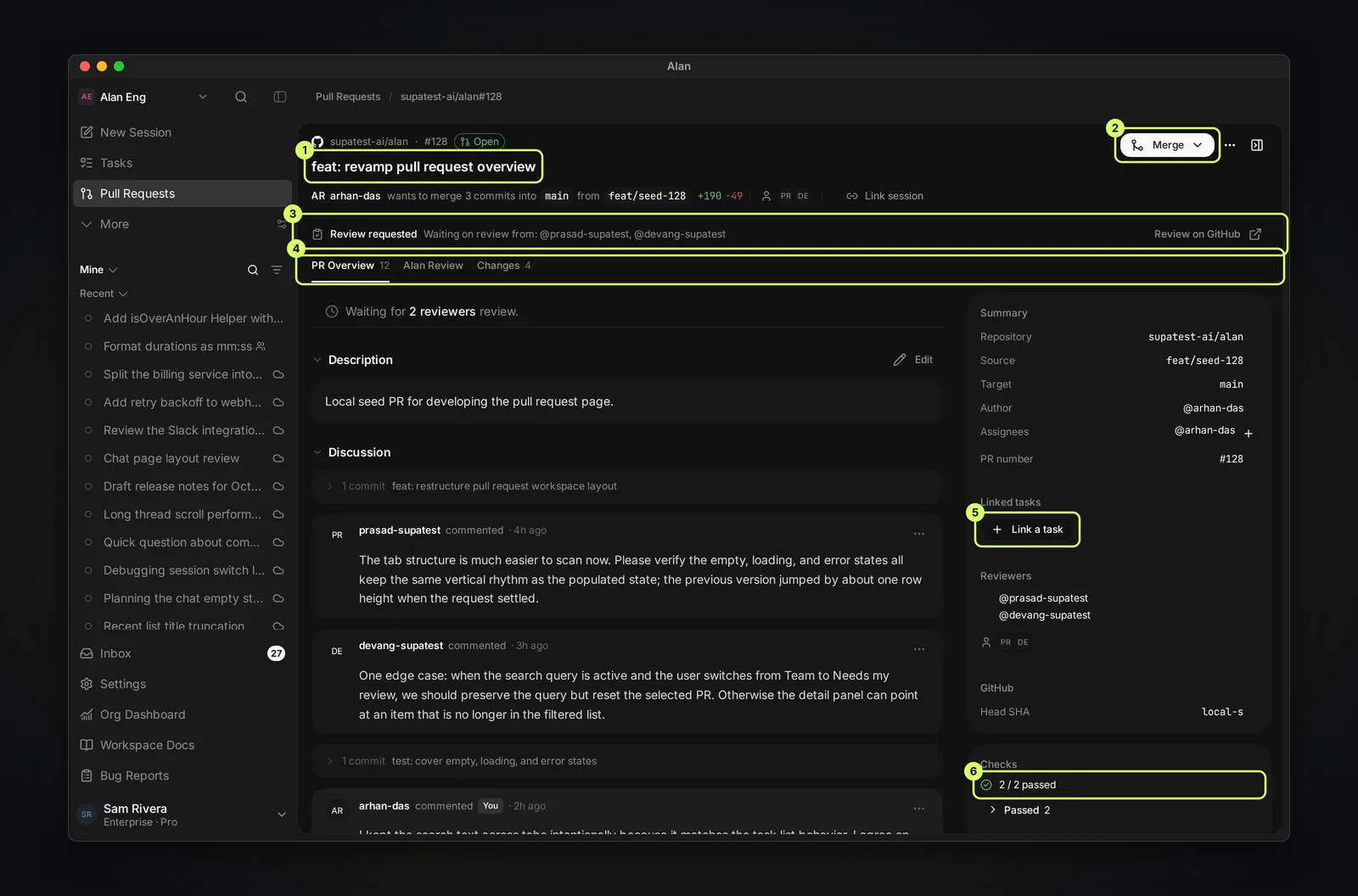
Select a row to open the pull request.
|
|
46
|
+
|
|
47
|
+
|
|
48
|
+
|
|
49
|
+
- **Header**: the repository, number, and state (**Open**, **Draft**, **Merged**, or **Closed**), the title (select it to edit), the branches, and **Link session**.
|
|
50
|
+
- **Status line**: what the pull request is waiting on, for example **Review requested** with "Waiting on review from: @…". **Review on GitHub** opens it on the provider.
|
|
51
|
+
- **PR Overview**: the description, the discussion (comments, reviews, and commits in order), and a box to comment on the provider.
|
|
52
|
+
- **Alan Review**: review sessions with the Review Agent. See [Review work](review-work.md).
|
|
53
|
+
- **Changes**: the diff, file by file. Its **Commits** sub-tab lists the commits.
|
|
54
|
+
- **Right-hand panel**: summary, assignees, **Linked tasks** (**Link a task**), reviewers (request more here), and **Checks** with each check marked **Required** or **Optional**.
|
|
55
|
+
|
|
56
|
+
## Link pull requests to tasks and sessions
|
|
57
|
+
|
|
58
|
+
Link a pull request to the work that produced it, so reviewers can see the brief and the task shows its pull request.
|
|
59
|
+
|
|
60
|
+
- **Link a task** in the right-hand panel searches the team's tasks; you can link several. Linked tasks appear as chips on the list row.
|
|
61
|
+
- **Link session** in the header links a session.
|
|
62
|
+
|
|
63
|
+
When an agent opens a pull request from a task session, Alan links them for you.
|
|
64
|
+
|
|
65
|
+
## Before you merge
|
|
66
|
+
|
|
67
|
+
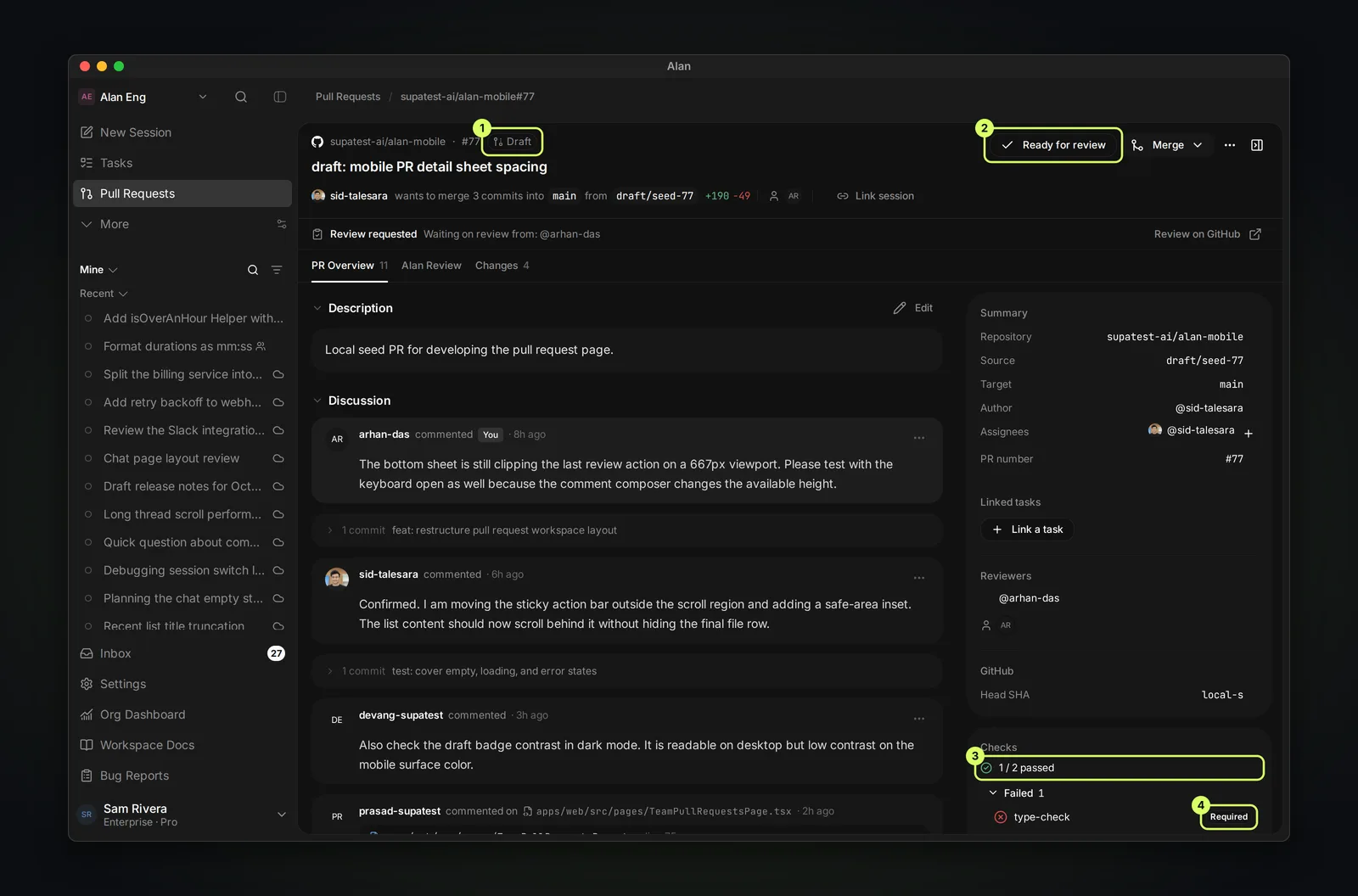
Review state, CI, draft state, and conflicts are separate. One green signal doesn't make a pull request ready.
|
|
68
|
+
|
|
69
|
+
|
|
70
|
+
|
|
71
|
+
Check, in order:
|
|
72
|
+
|
|
73
|
+
1. **Not a draft.** Choose **Ready for review** first; Alan won't merge a draft.
|
|
74
|
+
2. **Review**: no **Changes requested**, and required reviews are in.
|
|
75
|
+
3. **Checks**: every **Required** check passes. Optional checks never block a merge, and a failing one shows **Optional checks failing** above the diff.
|
|
76
|
+
4. **No conflicts**: the merge status shows **No conflicts with base branch**. If the branch is behind, choose **Update branch**. For conflicts, choose **Resolve with agent** to start a review session that plans the fix; review sessions can't edit files, so apply it in an editing session. See [Review work](review-work.md).
|
|
77
|
+
5. **Evidence**: the linked task has a test report or other validation. See [Testing evidence](testing-evidence.md).
|
|
78
|
+
|
|
79
|
+
## Merge or close
|
|
80
|
+
|
|
81
|
+
Open the **Merge** menu and choose **Create a merge commit**, **Squash and merge**, or **Rebase and merge**. Alan confirms the method, branch, and change size before **Confirm merge**.
|
|
82
|
+
|
|
83
|
+
When a pull request can't merge yet, the menu shows **Can't merge yet** with the reasons, and the Merge button explains the first blocker on hover, such as required reviews, failing checks, or conflicts to resolve on the provider. A draft or a conflicted branch also disables the merge methods.
|
|
84
|
+
|
|
85
|
+
The same menu has **Close pull request**, with an optional closing comment. After a merge, the header shows **Delete branch** to remove the source branch.
|
|
@@ -0,0 +1,55 @@
|
|
|
1
|
+
> Source: [https://docs.tryalan.ai/docs/reviews-testing-deploys/review-work](https://docs.tryalan.ai/docs/reviews-testing-deploys/review-work)
|
|
2
|
+
|
|
3
|
+
# Review work
|
|
4
|
+
|
|
5
|
+
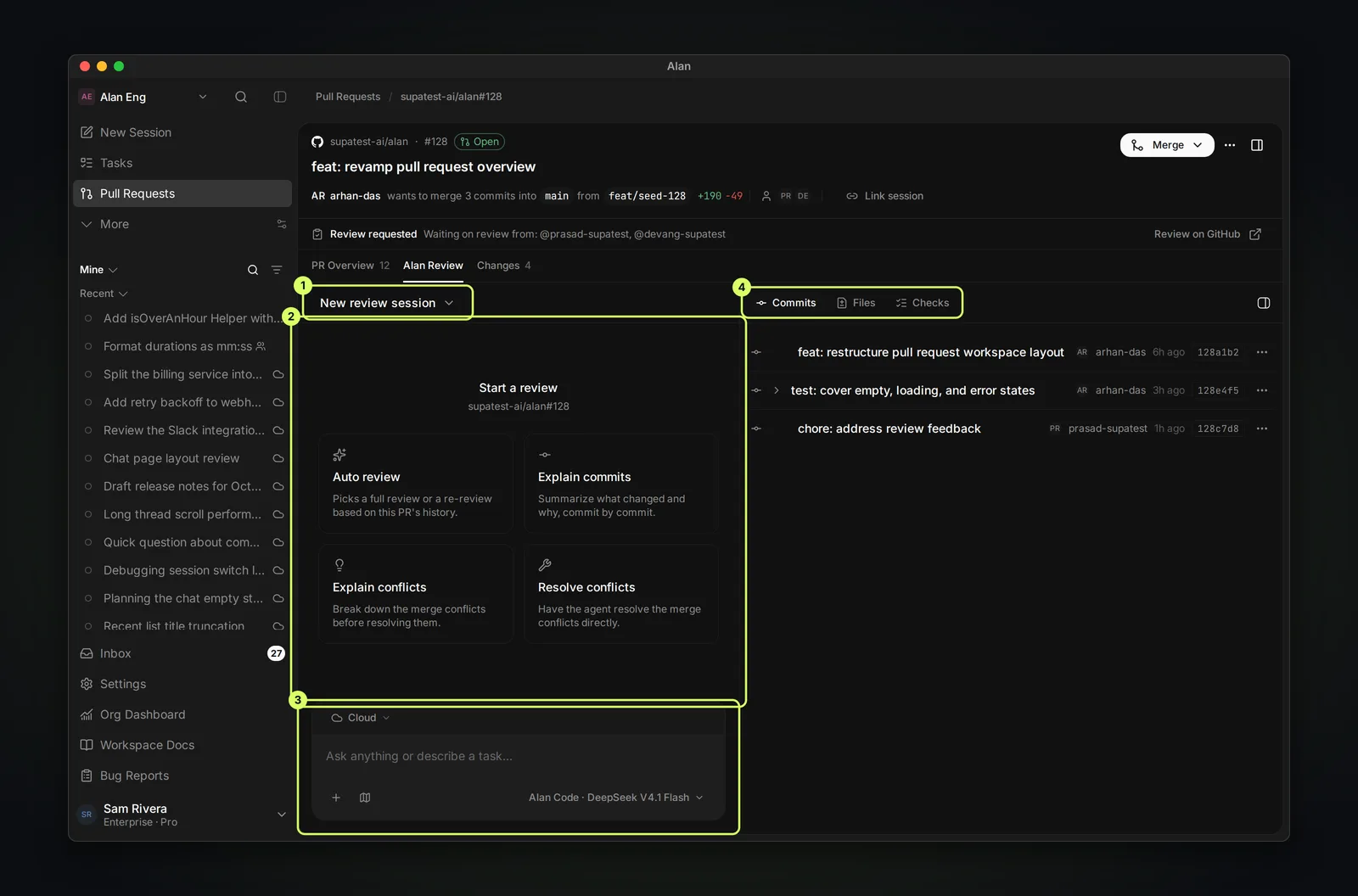
Every pull request in Alan has an **Alan Review** tab. Start a session there and the **Review Agent** reads the pull request, its commits, checks, and any linked task, then reports findings ordered by severity. It can run commands but can't edit files, so a review never changes your branch.
|
|
6
|
+
|
|
7
|
+
|
|
8
|
+
|
|
9
|
+
## Start a review
|
|
10
|
+
|
|
11
|
+
1. Open the pull request from **Pull Requests** and choose **Alan Review**.
|
|
12
|
+
2. Check the execution target in the composer: a cloud environment or one of your computers. The review runs there, like any session. Without one, Alan shows "Select a local runtime or a cloud environment to start a PR review."
|
|
13
|
+
3. Choose a starter, or type your own request and send it.
|
|
14
|
+
|
|
15
|
+
| Starter | What the agent does |
|
|
16
|
+
| --- | --- |
|
|
17
|
+
| **Auto review** | "Picks a full review or a re-review based on this PR's history." |
|
|
18
|
+
| **Explain commits** | "Summarize what changed and why, commit by commit." |
|
|
19
|
+
| **Explain conflicts** | "Break down the merge conflicts before resolving them." |
|
|
20
|
+
| **Resolve conflicts** | Requests a conflict fix. Review Agent sessions cannot edit files; use an editing session to apply the fix. |
|
|
21
|
+
|
|
22
|
+
When the session starts you'll see **Review Agent session started**. The session menu at the top (**New review session** until you pick one) lists every review session on this pull request, so you can return to an earlier review or start another.
|
|
23
|
+
|
|
24
|
+
If the pull request hasn't finished syncing, starting is blocked with "Sync this pull request before starting a session." Wait a moment and try again.
|
|
25
|
+
|
|
26
|
+
## Point the agent at specifics
|
|
27
|
+
|
|
28
|
+
The panel on the right has **Commits**, **Files**, and **Checks**. Use their actions to drop a commit, file, or check into the composer, with **Explain** adding an instruction such as explaining a failing check. Close the panel with its toggle when you want more room for the conversation.
|
|
29
|
+
|
|
30
|
+
A focused request gets a better review than a general one:
|
|
31
|
+
|
|
32
|
+
```text
|
|
33
|
+
Review this PR for regressions introduced by the diff. List findings first, most severe first, with file and line references. Call out missing tests for changed behavior. Skip style comments.
|
|
34
|
+
```
|
|
35
|
+
|
|
36
|
+
## What the Review Agent does
|
|
37
|
+
|
|
38
|
+
The Review Agent is the read-only role Alan uses for pull request reviews. It:
|
|
39
|
+
|
|
40
|
+
- Reads the pull request goal, changed files, and current checks.
|
|
41
|
+
- Reads the linked task's brief, decisions, and recent artifacts when a task is linked, so it reviews against the intended scope.
|
|
42
|
+
- Prioritizes correctness, regressions, data loss, security, migration risk, and missing tests.
|
|
43
|
+
- Reports findings by severity. If nothing blocks the merge, it says so and lists remaining test gaps.
|
|
44
|
+
- Can run commands and create artifacts, but can't edit files, start sessions, or manage subtasks.
|
|
45
|
+
|
|
46
|
+
|
|
47
|
+
## Keep the result
|
|
48
|
+
|
|
49
|
+
A review lives on the pull request: its sessions stay under **Alan Review**, and anyone on the team can open them. To share findings outside Alan, ask the agent to post them to the pull request as a review, or copy the summary into a comment from **PR Overview**.
|
|
50
|
+
|
|
51
|
+
If the pull request has a primary linked task, Alan also creates a review artifact on that task. If the findings change the task's plan, record the decision there. See [Task artifacts](../tasks/task-artifacts.md).
|
|
52
|
+
|
|
53
|
+
## Review automatically
|
|
54
|
+
|
|
55
|
+
To review pull requests without starting each session yourself, create an automation with the GitHub **Review Requested** trigger. See [Create an automation](../automations/create-an-automation.md).
|
|
@@ -0,0 +1,52 @@
|
|
|
1
|
+
> Source: [https://docs.tryalan.ai/docs/reviews-testing-deploys/testing-evidence](https://docs.tryalan.ai/docs/reviews-testing-deploys/testing-evidence)
|
|
2
|
+
|
|
3
|
+
# Testing evidence
|
|
4
|
+
|
|
5
|
+
A test report records what was tested, how it was tested, what happened, and what remains unverified. Screenshots and recordings should support the results beside them. Alan saves it as an artifact on the task or session, where reviewers can read and comment on it.
|
|
6
|
+
|
|
7
|
+
## How a test report gets made
|
|
8
|
+
|
|
9
|
+
- **The agent tests its own work.** When an agent changes a user-facing flow, it runs the app, exercises the change, and writes a test report, using Alan's built-in **alan-test-feature** skill when it's installed. If testing is blocked, it still files a partial report that names the blocker.
|
|
10
|
+
- **You ask for one.** For example: "Test the new filter on the Pull Requests page in the browser and create a test report with screenshots."
|
|
11
|
+
- **You write one.** In the task's **Artifacts** panel choose **New**, then **Test report**.
|
|
12
|
+
|
|
13
|
+
The report lands in **Artifacts** on the task, or on the session if it isn't part of a task, and appears as a card in the conversation.
|
|
14
|
+
|
|
15
|
+
## Read a test report
|
|
16
|
+
|
|
17
|
+
| Part | What it tells you |
|
|
18
|
+
| --- | --- |
|
|
19
|
+
| Title and summary | What was tested and the outcome, in a sentence or two |
|
|
20
|
+
| Result | **Pass**, **Fail**, or **Mixed** |
|
|
21
|
+
| Report body | How it was tested, what happened, and what is still unverified, with screenshots and recordings placed where they prove a point |
|
|
22
|
+
| Branch | The branch that was tested, when the agent records it |
|
|
23
|
+
|
|
24
|
+
Older reports can also show **Steps** (with a count such as **4/5 steps passed**), **Issues**, **Recording**, and **Screenshots** sections.
|
|
25
|
+
|
|
26
|
+
Use **Mixed** when some checks passed and others failed or couldn't run. A report that says what is unverified is more useful than one that claims a clean pass.
|
|
27
|
+
|
|
28
|
+
Like other artifacts, a test report has a download button, more actions (**…**), and **Comments**. See [Task artifacts](../tasks/task-artifacts.md).
|
|
29
|
+
|
|
30
|
+
## Match evidence to risk
|
|
31
|
+
|
|
32
|
+
| Change | Enough evidence |
|
|
33
|
+
| --- | --- |
|
|
34
|
+
| Docs or copy | The rendered page |
|
|
35
|
+
| Logic with unit tests | Test and type-check output |
|
|
36
|
+
| A user-facing flow | A test report with screenshots or a recording of the real app |
|
|
37
|
+
| Data, migrations, or runtime behavior | A test report, plus the checks that cover the risky path |
|
|
38
|
+
|
|
39
|
+
For browser evidence, capture the real route in the state that changed, not a nearby page or a mock.
|
|
40
|
+
|
|
41
|
+
## Before you merge
|
|
42
|
+
|
|
43
|
+
- The linked task has a test report whose result matches what the pull request claims.
|
|
44
|
+
- The pull request's **Required** checks pass. See [Pull requests](pull-requests.md#before-you-merge).
|
|
45
|
+
- Anything marked unverified has an owner or a follow-up task.
|
|
46
|
+
|
|
47
|
+
## Next steps
|
|
48
|
+
|
|
49
|
+
- [Task artifacts](../tasks/task-artifacts.md) — Where test reports live and how to find them.
|
|
50
|
+
- [Review work](review-work.md) — Pair the evidence with a Review Agent session.
|
|
51
|
+
- [Pull requests](pull-requests.md) — Check review and CI state before merging.
|
|
52
|
+
- [Missing artifact](../troubleshooting/missing-artifact.md) — Find a test report that isn't where you expect.
|
|
@@ -0,0 +1,24 @@
|
|
|
1
|
+
> Source: [https://docs.tryalan.ai/docs/skills/plugins-and-mcp](https://docs.tryalan.ai/docs/skills/plugins-and-mcp)
|
|
2
|
+
|
|
3
|
+
# Plugins and MCP
|
|
4
|
+
|
|
5
|
+
**Plugins** add tools and service connections that agents can use, for example reading CI results, querying a database, or opening issues. **MCP** (Model Context Protocol) is the standard many of these connections use.
|
|
6
|
+
|
|
7
|
+
Manage team plugins in **Settings →** your team **→ Plugins** ("Plugins and connections every agent in your team can use"). Manage your own plugins in **Settings → Account → Plugins**. Type `/plugins` in the composer to jump there.
|
|
8
|
+
|
|
9
|
+
## Browse the marketplace
|
|
10
|
+
|
|
11
|
+
|
|
12
|
+
|
|
13
|
+
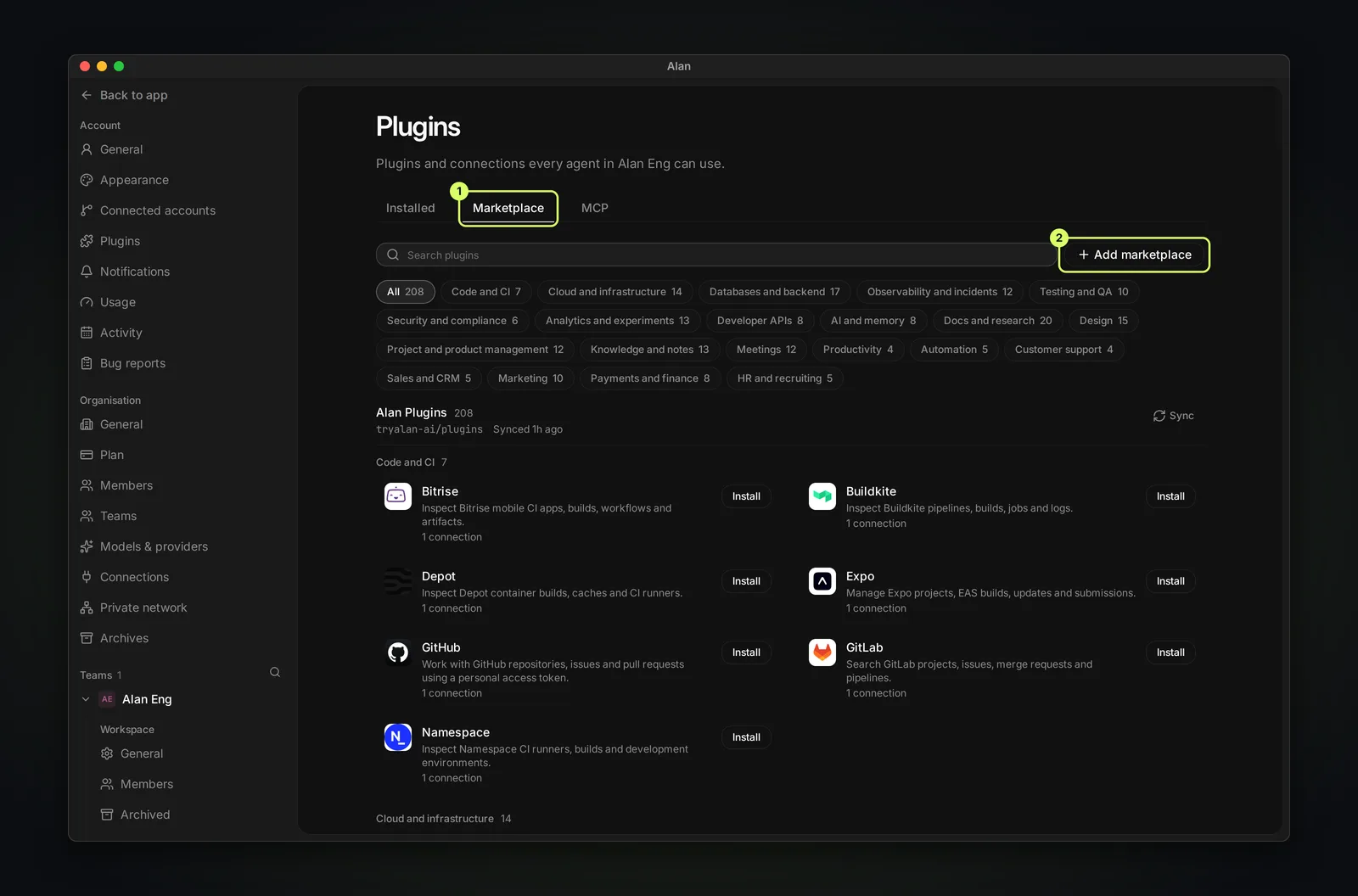
The **Marketplace** tab lists plugins by category, such as Code and CI, Cloud and infrastructure, Databases and backend, Observability and incidents, Testing and QA, and Design. Search, filter, and choose **Install**. **Add marketplace** adds another plugin catalog, and **Sync** refreshes one. **Installed** shows what your team has.
|
|
14
|
+
|
|
15
|
+
## Connect services (MCP)
|
|
16
|
+
|
|
17
|
+
|
|
18
|
+
|
|
19
|
+
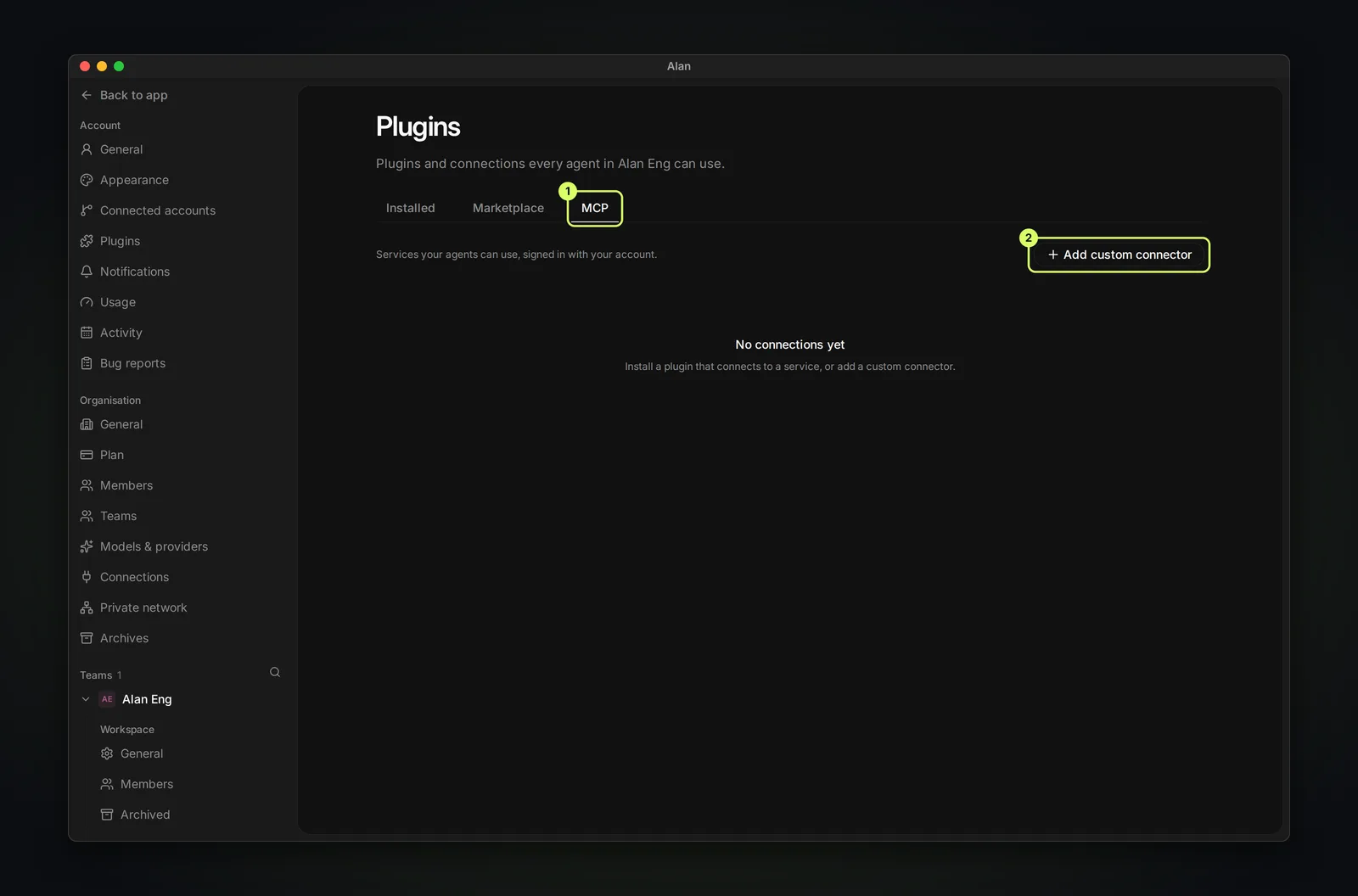
The **MCP** tab lists service connections that agents can use with your account. Install a plugin that connects to a service, or choose **Add custom connector** for your own MCP server. Credentials you add are stored encrypted.
|
|
20
|
+
|
|
21
|
+
## Next steps
|
|
22
|
+
|
|
23
|
+
- [Skills](skills.md) — Package your team's procedures as skills.
|
|
24
|
+
- [Integrations](../integrations/connect-slack.md) — Connect Slack, Microsoft Teams, and Azure DevOps.
|