dataframe-textual 2.2.1__py3-none-any.whl
This diff represents the content of publicly available package versions that have been released to one of the supported registries. The information contained in this diff is provided for informational purposes only and reflects changes between package versions as they appear in their respective public registries.
- dataframe_textual/__init__.py +60 -0
- dataframe_textual/__main__.py +107 -0
- dataframe_textual/common.py +786 -0
- dataframe_textual/data_frame_help_panel.py +115 -0
- dataframe_textual/data_frame_table.py +3940 -0
- dataframe_textual/data_frame_viewer.py +625 -0
- dataframe_textual/sql_screen.py +238 -0
- dataframe_textual/table_screen.py +527 -0
- dataframe_textual/yes_no_screen.py +752 -0
- dataframe_textual-2.2.1.dist-info/METADATA +846 -0
- dataframe_textual-2.2.1.dist-info/RECORD +14 -0
- dataframe_textual-2.2.1.dist-info/WHEEL +4 -0
- dataframe_textual-2.2.1.dist-info/entry_points.txt +3 -0
- dataframe_textual-2.2.1.dist-info/licenses/LICENSE +21 -0
|
@@ -0,0 +1,846 @@
|
|
|
1
|
+
Metadata-Version: 2.4
|
|
2
|
+
Name: dataframe-textual
|
|
3
|
+
Version: 2.2.1
|
|
4
|
+
Summary: Interactive terminal viewer/editor for tabular data
|
|
5
|
+
Project-URL: Homepage, https://github.com/need47/dataframe-textual
|
|
6
|
+
Project-URL: Repository, https://github.com/need47/dataframe-textual.git
|
|
7
|
+
Project-URL: Documentation, https://github.com/need47/dataframe-textual#readme
|
|
8
|
+
Project-URL: Bug Tracker, https://github.com/need47/dataframe-textual/issues
|
|
9
|
+
Author-email: Tiejun Cheng <need47@gmail.com>
|
|
10
|
+
License: MIT
|
|
11
|
+
License-File: LICENSE
|
|
12
|
+
Keywords: csv,data-analysis,editor,excel,interactive,polars,terminal,textual,tui,viewer
|
|
13
|
+
Classifier: Development Status :: 3 - Alpha
|
|
14
|
+
Classifier: Environment :: Console
|
|
15
|
+
Classifier: Intended Audience :: Developers
|
|
16
|
+
Classifier: Intended Audience :: End Users/Desktop
|
|
17
|
+
Classifier: License :: OSI Approved :: MIT License
|
|
18
|
+
Classifier: Natural Language :: English
|
|
19
|
+
Classifier: Operating System :: MacOS
|
|
20
|
+
Classifier: Operating System :: POSIX
|
|
21
|
+
Classifier: Operating System :: Unix
|
|
22
|
+
Classifier: Programming Language :: Python :: 3
|
|
23
|
+
Classifier: Programming Language :: Python :: 3.11
|
|
24
|
+
Classifier: Programming Language :: Python :: 3.12
|
|
25
|
+
Classifier: Programming Language :: Python :: 3.13
|
|
26
|
+
Classifier: Programming Language :: Python :: 3.14
|
|
27
|
+
Classifier: Topic :: Office/Business
|
|
28
|
+
Classifier: Topic :: Utilities
|
|
29
|
+
Classifier: Typing :: Typed
|
|
30
|
+
Requires-Python: >=3.11
|
|
31
|
+
Requires-Dist: polars>=1.34.0
|
|
32
|
+
Requires-Dist: textual[syntax]>=6.5.0
|
|
33
|
+
Provides-Extra: dev
|
|
34
|
+
Requires-Dist: textual-dev>=1.8.0; extra == 'dev'
|
|
35
|
+
Provides-Extra: excel
|
|
36
|
+
Requires-Dist: fastexcel>=0.16.0; extra == 'excel'
|
|
37
|
+
Requires-Dist: xlsxwriter>=3.2.9; extra == 'excel'
|
|
38
|
+
Description-Content-Type: text/markdown
|
|
39
|
+
|
|
40
|
+
# DataFrame Textual
|
|
41
|
+
|
|
42
|
+
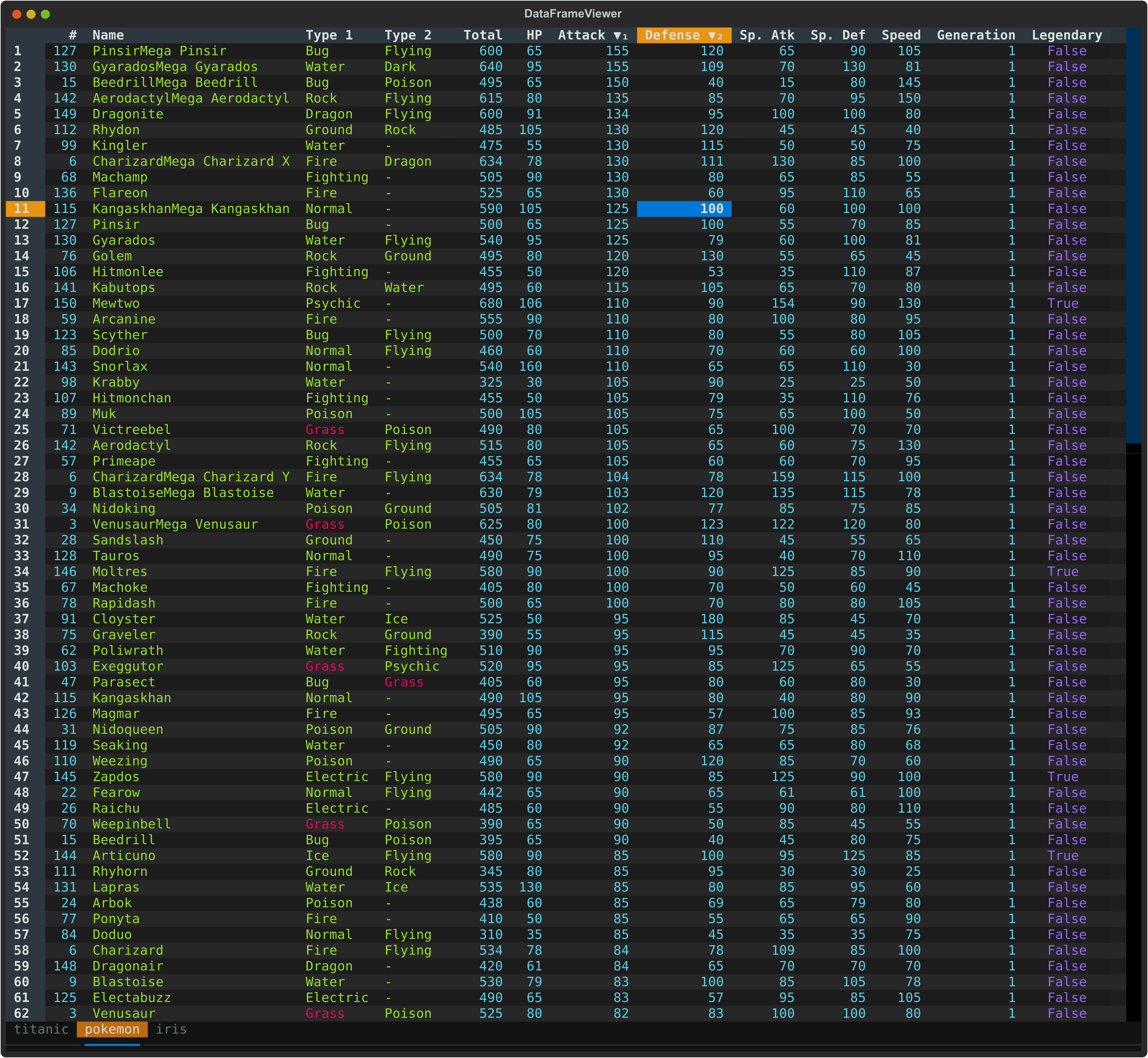
A powerful, interactive terminal-based viewer/editor for CSV/TSV/Excel/Parquet/JSON/NDJSON built with Python, [Polars](https://pola.rs/), and [Textual](https://textual.textualize.io/). Inspired by [VisiData](https://www.visidata.org/), this tool provides smooth keyboard navigation, data manipulation, and a clean interface for exploring tabular data directly in terminal with multi-tab support for multiple files!
|
|
43
|
+
|
|
44
|
+
|
|
45
|
+
|
|
46
|
+
## Features
|
|
47
|
+
|
|
48
|
+
### Data Viewing
|
|
49
|
+
- 🚀 **Fast Loading** - Powered by Polars for efficient data handling
|
|
50
|
+
- 🎨 **Rich Terminal UI** - Beautiful, color-coded columns with various data types (e.g., integer, float, string)
|
|
51
|
+
- ⌨️ **Comprehensive Keyboard Navigation** - Intuitive controls
|
|
52
|
+
- 📊 **Flexible Input** - Read from files and/or stdin (pipes/redirects)
|
|
53
|
+
- 🔄 **Smart Pagination** - Lazy load rows on demand for handling large datasets
|
|
54
|
+
|
|
55
|
+
### Data Manipulation
|
|
56
|
+
- 📝 **Data Editing** - Edit cells, delete rows, and remove columns
|
|
57
|
+
- 🔍 **Search & Filter** - Find values, highlight matches, and filter selected rows
|
|
58
|
+
- ↔️ **Column/Row Reordering** - Move columns and rows with simple keyboard shortcuts
|
|
59
|
+
- 📈 **Sorting & Statistics** - Multi-column sorting and frequency distribution analysis
|
|
60
|
+
- 💾 **Save & Undo** - Save edits back to file with full undo/redo support
|
|
61
|
+
|
|
62
|
+
### Advanced Features
|
|
63
|
+
- 📂 **Multi-File Support** - Open multiple files in separate tabs
|
|
64
|
+
- 🔄 **Tab Management** - Seamlessly switch between open files with keyboard shortcuts
|
|
65
|
+
- 📑 **Duplicate Tab** - Create a copy of the current tab with the same data
|
|
66
|
+
- 📌 **Freeze Rows/Columns** - Keep important rows and columns visible while scrolling
|
|
67
|
+
- 🎯 **Cursor Type Cycling** - Switch between cell, row, and column selection modes
|
|
68
|
+
- 📸 **Take Screenshot** - Capture terminal view as a SVG image
|
|
69
|
+
|
|
70
|
+
## Installation
|
|
71
|
+
|
|
72
|
+
### Using pip
|
|
73
|
+
|
|
74
|
+
```bash
|
|
75
|
+
# Install from PyPI
|
|
76
|
+
pip install dataframe-textual
|
|
77
|
+
|
|
78
|
+
# With Excel support (fastexcel, xlsxwriter)
|
|
79
|
+
pip install dataframe-textual[excel]
|
|
80
|
+
```
|
|
81
|
+
|
|
82
|
+
This installs an executable `dv`.
|
|
83
|
+
|
|
84
|
+
Then run:
|
|
85
|
+
```bash
|
|
86
|
+
dv <file>
|
|
87
|
+
```
|
|
88
|
+
|
|
89
|
+
### Using [uv](https://docs.astral.sh/uv/)
|
|
90
|
+
|
|
91
|
+
```bash
|
|
92
|
+
# Quick run using uvx without installation
|
|
93
|
+
uvx https://github.com/need47/dataframe-textual.git <csvfile>
|
|
94
|
+
|
|
95
|
+
# Clone or download the project
|
|
96
|
+
cd dataframe-textual
|
|
97
|
+
uv sync --extra excel # with Excel support
|
|
98
|
+
|
|
99
|
+
# Run directly with uv
|
|
100
|
+
uv run dv <file>
|
|
101
|
+
```
|
|
102
|
+
|
|
103
|
+
### Development installation
|
|
104
|
+
|
|
105
|
+
```bash
|
|
106
|
+
# Clone the repository
|
|
107
|
+
git clone https://github.com/need47/dataframe-textual.git
|
|
108
|
+
cd dataframe-textual
|
|
109
|
+
|
|
110
|
+
# Install from local source
|
|
111
|
+
pip install -e .
|
|
112
|
+
|
|
113
|
+
# With Excel support
|
|
114
|
+
pip install -e ".[excel]"
|
|
115
|
+
|
|
116
|
+
# With development dependencies
|
|
117
|
+
pip install -e ".[excel,dev]"
|
|
118
|
+
```
|
|
119
|
+
|
|
120
|
+
## Usage
|
|
121
|
+
|
|
122
|
+
### Basic Usage - Single File
|
|
123
|
+
|
|
124
|
+
```bash
|
|
125
|
+
# After pip install dataframe-textual
|
|
126
|
+
dv pokemon.csv
|
|
127
|
+
|
|
128
|
+
# Or run from module
|
|
129
|
+
python -m dataframe-textual pokemon.csv
|
|
130
|
+
|
|
131
|
+
# Or with uv
|
|
132
|
+
uv run python main.py pokemon.csv
|
|
133
|
+
|
|
134
|
+
# Read from stdin (defaults to TSV)
|
|
135
|
+
cat data.tsv | dv
|
|
136
|
+
dv < data.tsv
|
|
137
|
+
|
|
138
|
+
# Specify format for gzipped stdin
|
|
139
|
+
zcat data.csv.gz | dv -f csv
|
|
140
|
+
|
|
141
|
+
# Gzipped files are supported
|
|
142
|
+
dv data.csv.gz
|
|
143
|
+
```
|
|
144
|
+
|
|
145
|
+
### Multi-File Usage - Multiple Tabs
|
|
146
|
+
|
|
147
|
+
```bash
|
|
148
|
+
# Open multiple files in tabs
|
|
149
|
+
dv file1.csv file2.csv file3.csv
|
|
150
|
+
|
|
151
|
+
# Open multiple sheets in tabs in an Excel file
|
|
152
|
+
dv file.xlsx
|
|
153
|
+
|
|
154
|
+
# Mix files and stdin
|
|
155
|
+
dv data1.tsv < data2.tsv
|
|
156
|
+
```
|
|
157
|
+
|
|
158
|
+
When multiple files are opened:
|
|
159
|
+
- Each file appears as a separate tab. An Excel file may contain multiple tabs.
|
|
160
|
+
- Switch between tabs using `>` (next) or `<` (previous), or use `b` for cycling through tabs
|
|
161
|
+
- Save current tab to file with `Ctrl+T`
|
|
162
|
+
- Save all tabs to file with `Ctrl+A`
|
|
163
|
+
- Duplicate the current tab with `Ctrl+D`
|
|
164
|
+
- Open additional files with `Ctrl+O`
|
|
165
|
+
- Each file maintains its own state (edits, sort order, selections, history, etc.) and allow undo/redo.
|
|
166
|
+
|
|
167
|
+
## Command Line Options
|
|
168
|
+
|
|
169
|
+
```
|
|
170
|
+
usage: dv [-h] [-f {csv,excel,tsv,parquet,json,ndjson}] [-H] [-I] [-E] [-c COMMENT_PREFIX] [-q QUOTE_CHAR] [-l SKIP_LINES] [-a SKIP_ROWS_AFTER_HEADER] [-n NULL [NULL ...]] [files ...]
|
|
171
|
+
|
|
172
|
+
Interactive terminal based viewer/editor for tabular data (e.g., CSV/TSV/Excel).
|
|
173
|
+
|
|
174
|
+
positional arguments:
|
|
175
|
+
files Input files (or read from stdin)
|
|
176
|
+
|
|
177
|
+
options:
|
|
178
|
+
-h, --help show this help message and exit
|
|
179
|
+
-f, --format {csv,excel,tsv,parquet,json,ndjson}
|
|
180
|
+
Specify the format of the input files
|
|
181
|
+
-H, --no-header Specify that input files have no header row
|
|
182
|
+
-I, --no-inference Do not infer data types when reading CSV/TSV
|
|
183
|
+
-E, --ignore-errors Ignore errors when reading CSV/TSV
|
|
184
|
+
-c, --comment-prefix COMMENT_PREFIX
|
|
185
|
+
Comment lines are skipped when reading CSV/TSV (default: skip none)
|
|
186
|
+
-q, --quote-char QUOTE_CHAR
|
|
187
|
+
Quote character for reading CSV/TSV (default: "; use -q without argument value to disable)
|
|
188
|
+
-l, --skip-lines SKIP_LINES
|
|
189
|
+
Skip lines when reading CSV/TSV (default: 0)
|
|
190
|
+
-a, --skip-rows-after-header SKIP_ROWS_AFTER_HEADER
|
|
191
|
+
Skip rows after header when reading CSV/TSV (default: 0)
|
|
192
|
+
-n, --null NULL [NULL ...]
|
|
193
|
+
Values to interpret as null values when reading CSV/TSV
|
|
194
|
+
```
|
|
195
|
+
|
|
196
|
+
### CLI Examples
|
|
197
|
+
|
|
198
|
+
```bash
|
|
199
|
+
# View headless CSV file
|
|
200
|
+
dv -H data_no_header.csv
|
|
201
|
+
|
|
202
|
+
# Disable type inference for faster loading
|
|
203
|
+
dv -I large_data.csv
|
|
204
|
+
|
|
205
|
+
# Ignore parsing errors in malformed CSV
|
|
206
|
+
dv -E data_with_errors.csv
|
|
207
|
+
|
|
208
|
+
# Skip first 3 lines of file (e.g., metadata)
|
|
209
|
+
dv -l 3 data_with_meta.csv
|
|
210
|
+
|
|
211
|
+
# Skip 1 row after header (e.g., units row)
|
|
212
|
+
dv -a 1 data_with_units.csv
|
|
213
|
+
|
|
214
|
+
# Skip comment lines (or just -c)
|
|
215
|
+
dv -c "#" commented_data.csv
|
|
216
|
+
|
|
217
|
+
# Treat specific values as null/missing (e.g., 'NA', 'N/A', '-')
|
|
218
|
+
dv -n NA N/A - data.csv
|
|
219
|
+
|
|
220
|
+
# Use different quote character (e.g., single quote for CSV)
|
|
221
|
+
dv -q "'" data.csv
|
|
222
|
+
|
|
223
|
+
# Disable quote character processing for TSV with embedded quotes
|
|
224
|
+
dv -q data.tsv
|
|
225
|
+
|
|
226
|
+
# Complex CSV with comments and units row
|
|
227
|
+
dv -l 3 -a 1 -I messy_scientific_data.csv
|
|
228
|
+
|
|
229
|
+
# Process compressed data
|
|
230
|
+
dv data.csv.gz
|
|
231
|
+
zcat compressed_data.csv.gz | dv -f csv
|
|
232
|
+
```
|
|
233
|
+
|
|
234
|
+
## Keyboard Shortcuts
|
|
235
|
+
|
|
236
|
+
### App-Level Controls
|
|
237
|
+
|
|
238
|
+
#### File & Tab Management
|
|
239
|
+
|
|
240
|
+
| Key | Action |
|
|
241
|
+
|-----|--------|
|
|
242
|
+
| `>` | Move to next tab |
|
|
243
|
+
| `<` | Move to previous tab |
|
|
244
|
+
| `b` | Cycle through tabs |
|
|
245
|
+
| `B` | Toggle tab bar visibility |
|
|
246
|
+
| `q` | Close current tab (prompts to save unsaved changes) |
|
|
247
|
+
| `Q` | Close all tabs and app (prompts to save unsaved changes) |
|
|
248
|
+
| `Ctrl+Q` | Force to quit app (regardless of unsaved changes) |
|
|
249
|
+
| `Ctrl+T` | Save current tab to file |
|
|
250
|
+
| `Ctrl+A` | Save all tabs to a Excel file |
|
|
251
|
+
| `w` | Save current tab to file (overwrite without prompt) |
|
|
252
|
+
| `W` | Save all tabs to file (overwrite without prompt) |
|
|
253
|
+
| `Ctrl+D` | Duplicate current tab |
|
|
254
|
+
| `Ctrl+O` | Open file in a new tab |
|
|
255
|
+
| `Double-click` | Rename tab |
|
|
256
|
+
|
|
257
|
+
#### View & Settings
|
|
258
|
+
|
|
259
|
+
| Key | Action |
|
|
260
|
+
|-----|--------|
|
|
261
|
+
| `F1` | Toggle help panel |
|
|
262
|
+
| `k` | Cycle through dark, light and other themes |
|
|
263
|
+
| `Ctrl+P` -> `Screenshot` | Capture terminal view as a SVG image |
|
|
264
|
+
|
|
265
|
+
---
|
|
266
|
+
|
|
267
|
+
### Table-Level Controls
|
|
268
|
+
|
|
269
|
+
#### Navigation
|
|
270
|
+
|
|
271
|
+
| Key | Action |
|
|
272
|
+
|-----|--------|
|
|
273
|
+
| `g` | Jump to first row |
|
|
274
|
+
| `G` | Jump to last row |
|
|
275
|
+
| `↑` / `↓` | Move up/down one row |
|
|
276
|
+
| `←` / `→` | Move left/right one column |
|
|
277
|
+
| `Home` / `End` | Jump to first/last column |
|
|
278
|
+
| `Ctrl + Home` / `Ctrl + End` | Jump to page top/bottom |
|
|
279
|
+
| `PageDown` / `PageUp` | Scroll down/up one page |
|
|
280
|
+
| `Ctrl+F` | Page forward |
|
|
281
|
+
| `Ctrl+B` | Page backforward |
|
|
282
|
+
|
|
283
|
+
#### Undo/Redo/Reset
|
|
284
|
+
| Key | Action |
|
|
285
|
+
|-----|--------|
|
|
286
|
+
| `u` | Undo last action |
|
|
287
|
+
| `U` | Redo last undone action |
|
|
288
|
+
| `Ctrl+U` | Reset to initial state |
|
|
289
|
+
|
|
290
|
+
#### Display
|
|
291
|
+
|
|
292
|
+
| Key | Action |
|
|
293
|
+
|-----|--------|
|
|
294
|
+
| `Enter` | Record view of current row transposed |
|
|
295
|
+
| `F` | Show frequency distribution for current column |
|
|
296
|
+
| `s` | Show statistics for current column |
|
|
297
|
+
| `S` | Show statistics for entire dataframe |
|
|
298
|
+
| `m` | Show metadata for row count and column count |
|
|
299
|
+
| `M` | Show metadata for current column |
|
|
300
|
+
| `K` | Cycle cursor types: cell → row → column → cell |
|
|
301
|
+
| `~` | Toggle row labels |
|
|
302
|
+
| `_` (underscore) | Toggle column full width |
|
|
303
|
+
| `z` | Freeze rows and columns |
|
|
304
|
+
| `,` | Toggle thousand separator for numeric display |
|
|
305
|
+
| `h` | Hide current column |
|
|
306
|
+
| `H` | Show all hidden rows/columns |
|
|
307
|
+
|
|
308
|
+
#### Data Editing
|
|
309
|
+
|
|
310
|
+
| Key | Action |
|
|
311
|
+
|-----|--------|
|
|
312
|
+
| `Double-click` | Edit cell or rename column header |
|
|
313
|
+
| `delete` | Clear current cell (set to NULL) |
|
|
314
|
+
| `e` | Edit current cell (respects data type) |
|
|
315
|
+
| `E` | Edit entire column with value/expression |
|
|
316
|
+
| `a` | Add empty column after current |
|
|
317
|
+
| `A` | Add column with name and value/expression |
|
|
318
|
+
| `@` | Add a link column from URL template |
|
|
319
|
+
| `-` (minus) | Delete current column |
|
|
320
|
+
| `x` | Delete current row |
|
|
321
|
+
| `X` | Delete current row and all those below |
|
|
322
|
+
| `Ctrl+X` | Delete current row and all those above |
|
|
323
|
+
| `d` | Duplicate current column |
|
|
324
|
+
| `D` | Duplicate current row |
|
|
325
|
+
|
|
326
|
+
#### Row Selection
|
|
327
|
+
|
|
328
|
+
| Key | Action |
|
|
329
|
+
|-----|--------|
|
|
330
|
+
| `\` | Select rows wth cell matches or those matching cursor value in current column |
|
|
331
|
+
| `\|` (pipe) | Select rows by expression |
|
|
332
|
+
| `{` | Go to previous selected row |
|
|
333
|
+
| `}` | Go to next selected row |
|
|
334
|
+
| `'` | Select/deselect current row |
|
|
335
|
+
| `t` | Toggle row selections (invert) |
|
|
336
|
+
| `T` | Clear all row selections and/or cell matches |
|
|
337
|
+
|
|
338
|
+
#### Find & Replace
|
|
339
|
+
|
|
340
|
+
| Key | Action |
|
|
341
|
+
|-----|--------|
|
|
342
|
+
| `/` | Find in current column with cursor value and highlight matching cells |
|
|
343
|
+
| `?` | Find in current column with expression and highlight matching cells |
|
|
344
|
+
| `n` | Go to next matching cell |
|
|
345
|
+
| `N` | Go to previous matching cell |
|
|
346
|
+
| `;` | Find across all columns with cursor value |
|
|
347
|
+
| `:` | Find across all columns with expression |
|
|
348
|
+
| `r` | Find and replace in current column (interactive or replace all) |
|
|
349
|
+
| `R` | Find and replace across all columns (interactive or replace all) |
|
|
350
|
+
|
|
351
|
+
#### View & Filter
|
|
352
|
+
| Key | Action |
|
|
353
|
+
|-----|--------|
|
|
354
|
+
| `"` (quote) | Filter selected rows (others removed) |
|
|
355
|
+
| `v` | View selected rows (others hidden) |
|
|
356
|
+
| `V` | View selected by expression (others hidden) |
|
|
357
|
+
|
|
358
|
+
#### SQL Interface
|
|
359
|
+
|
|
360
|
+
| Key | Action |
|
|
361
|
+
|-----|--------|
|
|
362
|
+
| `l` | Simple SQL interface (select columns & where clause) |
|
|
363
|
+
| `L` | Advanced SQL interface (full SQL query with syntax highlight) |
|
|
364
|
+
|
|
365
|
+
#### Sorting (supporting multiple columns)
|
|
366
|
+
|
|
367
|
+
| Key | Action |
|
|
368
|
+
|-----|--------|
|
|
369
|
+
| `[` | Sort current column ascending |
|
|
370
|
+
| `]` | Sort current column descending |
|
|
371
|
+
|
|
372
|
+
#### Reordering
|
|
373
|
+
|
|
374
|
+
| Key | Action |
|
|
375
|
+
|-----|--------|
|
|
376
|
+
| `Shift+↑` | Move current row up |
|
|
377
|
+
| `Shift+↓` | Move current row down |
|
|
378
|
+
| `Shift+←` | Move current column left |
|
|
379
|
+
| `Shift+→` | Move current column right |
|
|
380
|
+
|
|
381
|
+
#### Type Casting
|
|
382
|
+
|
|
383
|
+
| Key | Action |
|
|
384
|
+
|-----|--------|
|
|
385
|
+
| `#` | Cast current column to integer (Int64) |
|
|
386
|
+
| `%` | Cast current column to float (Float64) |
|
|
387
|
+
| `!` | Cast current column to boolean |
|
|
388
|
+
| `$` | Cast current column to string |
|
|
389
|
+
|
|
390
|
+
#### Copy & Save
|
|
391
|
+
|
|
392
|
+
| Key | Action |
|
|
393
|
+
|-----|--------|
|
|
394
|
+
| `c` | Copy current cell to clipboard |
|
|
395
|
+
| `Ctrl+C` | Copy column to clipboard |
|
|
396
|
+
| `Ctrl+R` | Copy row to clipboard (tab-separated) |
|
|
397
|
+
| `Ctrl+S` | Save to file |
|
|
398
|
+
|
|
399
|
+
## Features in Detail
|
|
400
|
+
|
|
401
|
+
### 1. Color-Coded Data Types
|
|
402
|
+
|
|
403
|
+
Columns are automatically styled based on their data type:
|
|
404
|
+
- **integer**: Cyan text, right-aligned
|
|
405
|
+
- **float**: Yellow text, right-aligned
|
|
406
|
+
- **string**: Green text, left-aligned
|
|
407
|
+
- **boolean**: Blue text, centered
|
|
408
|
+
- **temporal**: Magenta text, centered
|
|
409
|
+
|
|
410
|
+
### 2. Row Detail View
|
|
411
|
+
|
|
412
|
+
Press `Enter` on any row to open a modal showing all column values for that row.
|
|
413
|
+
Useful for examining wide datasets where columns don't fit well on screen.
|
|
414
|
+
|
|
415
|
+
**In the Row Detail Modal**:
|
|
416
|
+
- Press `v` to **view** all rows containing the selected column value (others hidden but preserved)
|
|
417
|
+
- Press `"` to **filter** all rows containing the selected column value (others removed)
|
|
418
|
+
- Press `{` to move to the previous row
|
|
419
|
+
- Press `}` to move to the next row
|
|
420
|
+
- Press `q` or `Escape` to close the modal
|
|
421
|
+
|
|
422
|
+
### 3. Row Selection
|
|
423
|
+
|
|
424
|
+
The application provides multiple modes for selecting rows (marks it for filtering or viewing):
|
|
425
|
+
|
|
426
|
+
- `\` - Select rows with cell matches or those matching cursor value in current column (respects data type)
|
|
427
|
+
- `|` - Opens dialog to select rows with custom expression
|
|
428
|
+
- `'` - Select/deselect current row
|
|
429
|
+
- `t` - Flip selections of all rows
|
|
430
|
+
- `T` - Clear all row selections and cell matches
|
|
431
|
+
- `{` - Go to previous selected row
|
|
432
|
+
- `}` - Go to next selected row
|
|
433
|
+
|
|
434
|
+
**Advanced Options**:
|
|
435
|
+
|
|
436
|
+
When searching or finding, you can use checkboxes in the dialog to enable:
|
|
437
|
+
- **Match Nocase**: Ignore case differences
|
|
438
|
+
- **Match Whole**: Match complete value, not partial substrings or words
|
|
439
|
+
|
|
440
|
+
These options work with plain text searches. Use Polars regex patterns in expressions for more control. For example, use `(?i)` prefix in regex (e.g., `(?i)john`) for case-insensitive matching.
|
|
441
|
+
|
|
442
|
+
**Quick Tips:**
|
|
443
|
+
- Search results highlight matching rows in **red**
|
|
444
|
+
- Use expression for advanced selection (e.g., $attack > $defense)
|
|
445
|
+
- Multiple searches **accumulate** - each new search adds to the selections or matches
|
|
446
|
+
- Type-aware matching automatically converts values. Resort to string comparison if conversion fails
|
|
447
|
+
- Use `u` to undo any search or filter
|
|
448
|
+
|
|
449
|
+
### 4. Find & Replace
|
|
450
|
+
Find by value/expression and highlight matching cells:
|
|
451
|
+
- `/` - Find cursor value within current column (respects data type)
|
|
452
|
+
- `?` - Open dialog to search current column with expression
|
|
453
|
+
- `;` - Find cursor value across all columns
|
|
454
|
+
- `:` - Open dialog to search all columns with expression
|
|
455
|
+
- `n` - Go to next matching cell
|
|
456
|
+
- `N` - Go to previous matching cell
|
|
457
|
+
|
|
458
|
+
Replace values in current column (`r`) or across all columns (`R`).
|
|
459
|
+
|
|
460
|
+
**How It Works:**
|
|
461
|
+
|
|
462
|
+
When you press `r` or `R`, enter:
|
|
463
|
+
1. **Find term**: Value or expression to search for (done by string value)
|
|
464
|
+
2. **Replace term**: Replacement value
|
|
465
|
+
3. **Matching options**: Match Nocase (ignore case), Match Whole (complete match only)
|
|
466
|
+
4. **Replace mode**: All at once or interactive review
|
|
467
|
+
|
|
468
|
+
**Replace All**:
|
|
469
|
+
- Replaces all matches with one operation
|
|
470
|
+
- Shows confirmation with match count
|
|
471
|
+
|
|
472
|
+
**Replace Interactive**:
|
|
473
|
+
- Review each match one at a time (confirm, skip, or cancel)
|
|
474
|
+
- Shows progress
|
|
475
|
+
|
|
476
|
+
**Tips:**
|
|
477
|
+
- Search are done by string value (i.e., ignoring data type)
|
|
478
|
+
- Type `NULL` to replace null/missing values
|
|
479
|
+
- Use `Match Nocase` for case-insensitive matching
|
|
480
|
+
- Use `Match Whole` to avoid partial replacements
|
|
481
|
+
- Support undo (`u`)
|
|
482
|
+
|
|
483
|
+
### 5. Filter vs. View
|
|
484
|
+
|
|
485
|
+
Both operations show selected rows but with fundamentally different effects:
|
|
486
|
+
|
|
487
|
+
| Operation | Keyboard | Effect | Data Preserved |
|
|
488
|
+
|-----------|----------|--------|-----------------|
|
|
489
|
+
| **View** | `v`, `V` | Hides non-matching rows | Yes (hidden, can be restored by `H`) |
|
|
490
|
+
| **Filter** | `"` | Removes non-matching rows | No (permanently deleted) |
|
|
491
|
+
|
|
492
|
+
**When to use View** (`v` or `V`):
|
|
493
|
+
- Exploring or analyzing data safely
|
|
494
|
+
- Switching between different perspectives
|
|
495
|
+
- Press `H` to restore hidden rows (and hidden columns)
|
|
496
|
+
|
|
497
|
+
**When to use Filter** (`"`):
|
|
498
|
+
- Cleaning data (removing unwanted rows)
|
|
499
|
+
- Creating a trimmed dataset for export
|
|
500
|
+
- Permanent row removal from your dataframe
|
|
501
|
+
|
|
502
|
+
**Note**:
|
|
503
|
+
- If currently there are no selected rows and no matching cells, the `"` (Filter) and `v` (View) will use cursor value for search.
|
|
504
|
+
- Both support full undo with `u`.
|
|
505
|
+
|
|
506
|
+
### 6. [Polars Expressions](https://docs.pola.rs/api/python/stable/reference/expressions/index.html)
|
|
507
|
+
|
|
508
|
+
Complex values or filters can be specified via Polars expressions, with the following adaptions for convenience:
|
|
509
|
+
|
|
510
|
+
**Column References:**
|
|
511
|
+
- `$_` - Current column (based on cursor position)
|
|
512
|
+
- `$1`, `$2`, etc. - Column by 1-based index
|
|
513
|
+
- `$age`, `$salary` - Column by name (use actual column names)
|
|
514
|
+
- `` $`col name` `` - Column by name with spaces (backtick quoted)
|
|
515
|
+
|
|
516
|
+
**Row References:**
|
|
517
|
+
- `$#` - Current row index (1-based)
|
|
518
|
+
|
|
519
|
+
**Basic Comparisons:**
|
|
520
|
+
- `$_ > 50` - Current column greater than 50
|
|
521
|
+
- `$salary >= 100000` - Salary at least 100,000
|
|
522
|
+
- `$age < 30` - Age less than 30
|
|
523
|
+
- `$status == 'active'` - Status exactly matches 'active'
|
|
524
|
+
- `$name != 'Unknown'` - Name is not 'Unknown'
|
|
525
|
+
- `$# <= 10` - Top 10 rows
|
|
526
|
+
|
|
527
|
+
**Logical Operators:**
|
|
528
|
+
- `&` - AND
|
|
529
|
+
- `|` - OR
|
|
530
|
+
- `~` - NOT
|
|
531
|
+
|
|
532
|
+
**Practical Examples:**
|
|
533
|
+
- `($age < 30) & ($status == 'active')` - Age less than 30 AND status is active
|
|
534
|
+
- `($name == 'Alice') | ($name == 'Bob')` - Name is Alice or Bob
|
|
535
|
+
- `$salary / 1000 >= 50` - Salary divided by 1,000 is at least 50
|
|
536
|
+
- `($department == 'Sales') & ($bonus > 5000)` - Sales department with bonus over 5,000
|
|
537
|
+
- `($score >= 80) & ($score <= 90)` - Score between 80 and 90
|
|
538
|
+
- `~($status == 'inactive')` - Status is not inactive
|
|
539
|
+
- `$revenue > $expenses` - Revenue exceeds expenses
|
|
540
|
+
- ``$`product id` > 100`` - Product ID with spaces in column name greater than 100
|
|
541
|
+
|
|
542
|
+
**String Matching:** ([Polars string API reference](https://docs.pola.rs/api/python/stable/reference/series/string.html))
|
|
543
|
+
- `$name.str.contains("John")` - Name contains "John" (case-sensitive)
|
|
544
|
+
- `$name.str.contains("(?i)john")` - Name contains "john" (case-insensitive)
|
|
545
|
+
- `$email.str.ends_with("@company.com")` - Email ends with domain
|
|
546
|
+
- `$code.str.starts_with("ABC")` - Code starts with "ABC"
|
|
547
|
+
- `$age.cast(pl.String).str.starts_with("7")` - Age (cast to string first) starts with "7"
|
|
548
|
+
|
|
549
|
+
**Number Operations:**
|
|
550
|
+
- `$age * 2 > 100` - Double age greater than 100
|
|
551
|
+
- `($salary + $bonus) > 150000` - Total compensation over 150,000
|
|
552
|
+
- `$percentage >= 50` - Percentage at least 50%
|
|
553
|
+
|
|
554
|
+
**Null Handling:**
|
|
555
|
+
- `$column.is_null()` - Find null/missing values
|
|
556
|
+
- `$column.is_not_null()` - Find non-null values
|
|
557
|
+
- `NULL` - a value to represent null for convenience
|
|
558
|
+
|
|
559
|
+
**Tips:**
|
|
560
|
+
- Use column names that match exactly (case-sensitive)
|
|
561
|
+
- Use parentheses to clarify complex expressions: `($a & $b) | ($c & $d)`
|
|
562
|
+
|
|
563
|
+
### 7. Sorting
|
|
564
|
+
|
|
565
|
+
- Press `[` to sort current column ascending
|
|
566
|
+
- Press `]` to sort current column descending
|
|
567
|
+
- Multi-column sorting supported (press multiple times on different columns)
|
|
568
|
+
- Press same key twice to remove the column from sorting
|
|
569
|
+
|
|
570
|
+
### 8. Dataframe & Column Metadata
|
|
571
|
+
|
|
572
|
+
View quick metadata about your dataframe and columns to understand their structure and content.
|
|
573
|
+
|
|
574
|
+
**Dataframe Metadata** (`m`):
|
|
575
|
+
- Press `m` to open a modal displaying:
|
|
576
|
+
- **Row** - Total number of rows in the dataframe
|
|
577
|
+
- **Column** - Total number of columns in the dataframe
|
|
578
|
+
|
|
579
|
+
**Column Metadata** (`M`):
|
|
580
|
+
- Press `M` to open a modal displaying details for all columns:
|
|
581
|
+
- **ID** - 1-based column index
|
|
582
|
+
- **Name** - Column name
|
|
583
|
+
- **Type** - Data type (e.g., Int64, String, Float64, Boolean)
|
|
584
|
+
|
|
585
|
+
**In Metadata Modals**:
|
|
586
|
+
- Press `q` or `Escape` to close
|
|
587
|
+
|
|
588
|
+
### 9. Frequency Distribution
|
|
589
|
+
|
|
590
|
+
Press `F` to see value distributions of the current column. The modal shows:
|
|
591
|
+
- Value, Count, Percentage, Histogram
|
|
592
|
+
- **Total row** at the bottom
|
|
593
|
+
|
|
594
|
+
**In the Frequency Table**:
|
|
595
|
+
- Press `[` and `]` to sort by any column (value, count, or percentage)
|
|
596
|
+
- Press `v` to **view** all rows containing the selected value (others hidden but preserved)
|
|
597
|
+
- Press `"` to **filter** all rows containing the selected value (others removed)
|
|
598
|
+
- Press `q` or `Escape` to close the frequency table
|
|
599
|
+
|
|
600
|
+
This is useful for:
|
|
601
|
+
- Understanding value distributions
|
|
602
|
+
- Quickly filtering to specific values
|
|
603
|
+
- Identifying rare or common values
|
|
604
|
+
- Finding the most/least frequent entries
|
|
605
|
+
|
|
606
|
+
### 10. Column & Dataframe Statistics
|
|
607
|
+
|
|
608
|
+
Show summary statistics (count, null count, mean, median, std, min, max, etc.) using Polars' `describe()` method.
|
|
609
|
+
- `s` for the current column
|
|
610
|
+
- `S` for all columns across the entire dataframe
|
|
611
|
+
|
|
612
|
+
**In the Statistics Modal**:
|
|
613
|
+
- Press `q` or `Escape` to close the statistics table
|
|
614
|
+
- Use arrow keys to navigate
|
|
615
|
+
- Useful for quick data validation and summary reviews
|
|
616
|
+
|
|
617
|
+
This is useful for:
|
|
618
|
+
- Understanding data distributions and characteristics
|
|
619
|
+
- Identifying outliers and anomalies
|
|
620
|
+
- Data quality assessment
|
|
621
|
+
- Quick statistical summaries without external tools
|
|
622
|
+
- Comparing statistics across columns
|
|
623
|
+
|
|
624
|
+
### 11. Data Editing
|
|
625
|
+
|
|
626
|
+
**Edit Cell** (`e` or **Double-click**):
|
|
627
|
+
- Opens modal for editing current cell
|
|
628
|
+
- Validates input based on column data type
|
|
629
|
+
|
|
630
|
+
**Rename Column Header** (**Double-click** column header):
|
|
631
|
+
- Quick rename by double-clicking the column header
|
|
632
|
+
|
|
633
|
+
**Delete Row** (`x`):
|
|
634
|
+
- Delete all selected rows (if any) at once
|
|
635
|
+
- Or delete single row at cursor
|
|
636
|
+
|
|
637
|
+
**Delete Row and Below** (`X`):
|
|
638
|
+
- Deletes the current row and all rows below it
|
|
639
|
+
- Useful for removing trailing data or the end of a dataset
|
|
640
|
+
|
|
641
|
+
**Delete Row and Above** (`Ctrl+X`):
|
|
642
|
+
- Deletes the current row and all rows above it
|
|
643
|
+
- Useful for removing leading rows or the beginning of a dataset
|
|
644
|
+
|
|
645
|
+
**Delete Column** (`-`):
|
|
646
|
+
- Removes the entire column from display and dataframe
|
|
647
|
+
|
|
648
|
+
**Add Empty Column** (`a`):
|
|
649
|
+
- Adds a new empty column after the current column
|
|
650
|
+
- Column is initialized with NULL values for all rows
|
|
651
|
+
|
|
652
|
+
**Add Column with Value/Expression** (`A`):
|
|
653
|
+
- Opens dialog to specify column name and initial value/expression
|
|
654
|
+
- Value can be a constant (e.g., `0`, `"text"`) or a Polars expression (e.g., `$age * 2`)
|
|
655
|
+
- Expression can reference other columns and perform calculations
|
|
656
|
+
- Useful for creating derived columns or adding data with formulas
|
|
657
|
+
|
|
658
|
+
**Duplicate Column** (`d`):
|
|
659
|
+
- Creates a new column immediately after the current column
|
|
660
|
+
- New column has '_copy' suffix (e.g., 'price' → 'price_copy')
|
|
661
|
+
- Useful for creating backups before transformation
|
|
662
|
+
|
|
663
|
+
**Duplicate Row** (`D`):
|
|
664
|
+
- Creates a new row immediately after the current row
|
|
665
|
+
- Duplicate preserves all data from original row
|
|
666
|
+
- Useful for batch adding similar records
|
|
667
|
+
|
|
668
|
+
**Hide/Show Columns** (`h` / `H`):
|
|
669
|
+
- `h` - Temporarily hide current column (data preserved)
|
|
670
|
+
- `H` - Restore all hidden columns and rows
|
|
671
|
+
|
|
672
|
+
### 12. Column & Row Reordering
|
|
673
|
+
|
|
674
|
+
**Move Columns**: `Shift+←` and `Shift+→`
|
|
675
|
+
- Swaps adjacent columns
|
|
676
|
+
- Reorder is preserved when saving
|
|
677
|
+
|
|
678
|
+
**Move Rows**: `Shift+↑` and `Shift+↓`
|
|
679
|
+
- Swaps adjacent rows
|
|
680
|
+
- Reorder is preserved when saving
|
|
681
|
+
|
|
682
|
+
### 13. Freeze Rows and Columns
|
|
683
|
+
|
|
684
|
+
Press `z` to open the dialog:
|
|
685
|
+
- Enter number of fixed rows and/or columns to keep top rows/columns visible while scrolling
|
|
686
|
+
|
|
687
|
+
### 14. Thousand Separator Toggle
|
|
688
|
+
|
|
689
|
+
Press `,` to toggle thousand separator formatting for numeric data:
|
|
690
|
+
- Applies to **integer** and **float** columns
|
|
691
|
+
- Formats large numbers with commas for readability (e.g., `1000000` → `1,000,000`)
|
|
692
|
+
- Works across all numeric columns in the table
|
|
693
|
+
- Toggle on/off as needed for different viewing preferences
|
|
694
|
+
- Display-only: does not modify underlying data in the dataframe
|
|
695
|
+
- State persists during the session
|
|
696
|
+
|
|
697
|
+
### 15. Save File
|
|
698
|
+
|
|
699
|
+
Press `Ctrl+S` to save filtered, edited, or sorted data back to file
|
|
700
|
+
|
|
701
|
+
### 16. Undo/Redo/Reset
|
|
702
|
+
|
|
703
|
+
**Undo** (`u`):
|
|
704
|
+
- Reverts last action with full state restoration
|
|
705
|
+
- Works for edits, deletions, sorts, searches, etc.
|
|
706
|
+
- Shows description of reverted action
|
|
707
|
+
|
|
708
|
+
**Redo** (`U`):
|
|
709
|
+
- Reapplies the last undone action
|
|
710
|
+
- Restores the state before the undo was performed
|
|
711
|
+
- Useful for redoing actions you've undone by mistake
|
|
712
|
+
- Useful for alternating between two different states
|
|
713
|
+
|
|
714
|
+
**Reset** (`Ctrl+U`):
|
|
715
|
+
- Reverts all changes and returns to original data state when file was first loaded
|
|
716
|
+
- Clears all edits, deletions, selections, filters, and sorts
|
|
717
|
+
- Useful for starting fresh without reloading the file
|
|
718
|
+
|
|
719
|
+
### 17. Column Type Conversion
|
|
720
|
+
|
|
721
|
+
Press the type conversion keys to instantly cast the current column to a different data type:
|
|
722
|
+
|
|
723
|
+
**Type Conversion Shortcuts**:
|
|
724
|
+
- `#` - Cast to **integer**
|
|
725
|
+
- `%` - Cast to **float**
|
|
726
|
+
- `!` - Cast to **boolean**
|
|
727
|
+
- `$` - Cast to **string**
|
|
728
|
+
|
|
729
|
+
**Features**:
|
|
730
|
+
- Instant conversion with visual feedback
|
|
731
|
+
- Full undo support - press `u` to revert
|
|
732
|
+
- Leverage Polars' robust type casting
|
|
733
|
+
|
|
734
|
+
**Note**: Type conversion attempts to preserve data where possible. Conversions may lose data (e.g., float to int rounding).
|
|
735
|
+
|
|
736
|
+
### 18. Cursor Type Cycling
|
|
737
|
+
|
|
738
|
+
Press `K` to cycle through selection modes:
|
|
739
|
+
1. **Cell mode**: Highlight individual cell (and its row/column headers)
|
|
740
|
+
2. **Row mode**: Highlight entire row
|
|
741
|
+
3. **Column mode**: Highlight entire column
|
|
742
|
+
|
|
743
|
+
### 19. SQL Interface
|
|
744
|
+
|
|
745
|
+
The SQL interface provides two modes for querying your dataframe:
|
|
746
|
+
|
|
747
|
+
#### Simple SQL Interface (`l`)
|
|
748
|
+
SELECT specific columns and apply WHERE conditions without writing full SQL:
|
|
749
|
+
- Choose which columns to include in results
|
|
750
|
+
- Specify WHERE clause for filtering
|
|
751
|
+
- Ideal for quick filtering and column selection
|
|
752
|
+
|
|
753
|
+
#### Advanced SQL Interface (`L`)
|
|
754
|
+
Execute complete SQL queries for advanced data manipulation:
|
|
755
|
+
- Write full SQL queries with standard [SQL syntax](https://docs.pola.rs/api/python/stable/reference/sql/index.html)
|
|
756
|
+
- Access to all SQL capabilities for complex transformations
|
|
757
|
+
- Always use `self` as the table name
|
|
758
|
+
- Syntax highlighted
|
|
759
|
+
|
|
760
|
+
**Examples:**
|
|
761
|
+
```sql
|
|
762
|
+
-- Filter and select specific rows and/or columns
|
|
763
|
+
SELECT name, age
|
|
764
|
+
FROM self
|
|
765
|
+
WHERE age > 30
|
|
766
|
+
|
|
767
|
+
-- Use backticks (`) for column names with spaces
|
|
768
|
+
SELECT *
|
|
769
|
+
FROM self
|
|
770
|
+
WHERE `product id` = 7
|
|
771
|
+
```
|
|
772
|
+
|
|
773
|
+
### 20. Clipboard Operations
|
|
774
|
+
|
|
775
|
+
Copies value to system clipboard with `pbcopy` on macOS and `xclip` on Linux.
|
|
776
|
+
|
|
777
|
+
**Note**: may require a X server to work.
|
|
778
|
+
|
|
779
|
+
- Press `c` to copy cursor value
|
|
780
|
+
- Press `Ctrl+C` to copy column values
|
|
781
|
+
- Press `Ctrl+R` to copy row values (delimited by tab)
|
|
782
|
+
- Hold `Shift` to select with mouse
|
|
783
|
+
|
|
784
|
+
### 21. Link Column Creation
|
|
785
|
+
|
|
786
|
+
Press `@` to create a new column containing dynamically generated URLs using template.
|
|
787
|
+
|
|
788
|
+
**Template Placeholders:**
|
|
789
|
+
|
|
790
|
+
The link template supports multiple placeholder types for maximum flexibility:
|
|
791
|
+
|
|
792
|
+
- **`$_`** - Current column (the column where cursor was when `@` was pressed), e.g., `https://example.com/search/$_` - Uses values from the current column
|
|
793
|
+
|
|
794
|
+
- **`$1`, `$2`, `$3`, etc.** - Column by 1-based position index, e.g., `https://example.com/product/$1/details/$2` - Uses 1st and 2nd columns
|
|
795
|
+
|
|
796
|
+
- **`$name`** - Column by name (use actual column names), e.g., `https://example.com/$region/$city/data` - Uses `region` and `city` columns
|
|
797
|
+
|
|
798
|
+
**Features:**
|
|
799
|
+
- **Multiple Placeholders**: Mix and match placeholders in a single template
|
|
800
|
+
- **URL Prefix**: Automatically prepends `https://` if URL doesn't start with `http://` or `https://`
|
|
801
|
+
|
|
802
|
+
**Tips:**
|
|
803
|
+
- Use full undo (`u`) if template produces unexpected URLs
|
|
804
|
+
- For complex multi-column URLs, use column names (`$name`) for clarity over positions (`$1`)
|
|
805
|
+
|
|
806
|
+
### 22. Tab Management
|
|
807
|
+
|
|
808
|
+
Manage multiple files and dataframes simultaneously with tabs.
|
|
809
|
+
|
|
810
|
+
**Tab Operations:**
|
|
811
|
+
- **`Ctrl+O`** - Open file in a new tab
|
|
812
|
+
- **`>`** - Move to next tab
|
|
813
|
+
- **`<`** - Move to previous tab
|
|
814
|
+
- **`b`** - Cycle through tabs
|
|
815
|
+
- **`B`** - Toggle tab bar visibility
|
|
816
|
+
- **`Double-click`** - Rename the tab
|
|
817
|
+
- **`Ctrl+D`** - Duplicate current tab (creates a copy with same data and state)
|
|
818
|
+
- **`Ctrl+T`** - Save current tab to file
|
|
819
|
+
- **`Ctrl+A`** - Save all tabs in a single Excel file
|
|
820
|
+
- **`w`** - Save current tab to file (overwrite without prompt)
|
|
821
|
+
- **`W`** - Save all tabs to file (overwrite without prompt)
|
|
822
|
+
- **`q`** - Close current tab (closes tab, prompts to save if unsaved changes)
|
|
823
|
+
- **`Q`** - Close all tabs and exit app (prompts to save tabs with unsaved changes)
|
|
824
|
+
- **`Ctrl+Q`** - Force to quit app regardless of unsaved changes
|
|
825
|
+
|
|
826
|
+
**Tips:**
|
|
827
|
+
- Tabs with unsaved changes are indicated with a bright background
|
|
828
|
+
- Closing or quitting a tab with unsaved changes triggers a save prompt
|
|
829
|
+
|
|
830
|
+
## Dependencies
|
|
831
|
+
|
|
832
|
+
- **polars**: Fast DataFrame library for data loading/processing
|
|
833
|
+
- **textual**: Terminal UI framework
|
|
834
|
+
- **fastexcel**: Read Excel files
|
|
835
|
+
- **xlsxwriter**: Write Excel files
|
|
836
|
+
|
|
837
|
+
## Requirements
|
|
838
|
+
|
|
839
|
+
- Python 3.11+
|
|
840
|
+
- POSIX-compatible terminal (macOS, Linux, WSL)
|
|
841
|
+
- Terminal supporting ANSI escape sequences and mouse events
|
|
842
|
+
|
|
843
|
+
## Acknowledgments
|
|
844
|
+
|
|
845
|
+
- Inspired by [VisiData](https://visidata.org/)
|
|
846
|
+
- Built with [Textual](https://textual.textualize.io/) and [Polars](https://www.pola.rs/)
|