zapier-platform-cli 12.2.0 → 13.0.0
This diff represents the content of publicly available package versions that have been released to one of the supported registries. The information contained in this diff is provided for informational purposes only and reflects changes between package versions as they appear in their respective public registries.
- package/README-source.md +87 -66
- package/README.md +109 -92
- package/oclif.manifest.json +1 -1
- package/package.json +25 -25
- package/scaffold/create.template.js +2 -2
- package/scaffold/resource.template.js +2 -2
- package/scaffold/search.template.js +2 -2
- package/scaffold/trigger.template.js +2 -2
- package/src/constants.js +1 -1
- package/src/generators/templates/README.template.md +1 -1
- package/src/generators/templates/callback/README.md +1 -1
- package/src/generators/templates/files/README.md +1 -1
- package/src/oclif/commands/convert.js +27 -64
- package/src/oclif/commands/promote.js +1 -1
- package/src/utils/build.js +1 -0
- package/src/version-store.js +1 -1
package/README.md
CHANGED
|
@@ -1,11 +1,7 @@
|
|
|
1
1
|
<!-- GENERATED! ONLY EDIT `README-source.md` -->
|
|
2
2
|
|
|
3
3
|
<h1 align="center">
|
|
4
|
-
<
|
|
5
|
-
<source media="(prefers-color-scheme: dark)" srcset="https://cdn.zappy.app/11069978ee4a9b1eeeeb62b11f541b7c.png">
|
|
6
|
-
<source media="(prefers-color-scheme: light)" srcset="https://cdn.zappy.app/2602734341239f1b82ef0ff4ca160430.png">
|
|
7
|
-
<img alt="Zapier Logo" src="https://cdn.zappy.app/2602734341239f1b82ef0ff4ca160430.png" width="300px">
|
|
8
|
-
</picture>
|
|
4
|
+
<img alt="Zapier Logo" src="https://cdn.zappy.app/1cd66b15407db2d9a01fbe8d600772fe.svg" width="300px">
|
|
9
5
|
<br>
|
|
10
6
|
Platform CLI
|
|
11
7
|
<br>
|
|
@@ -20,17 +16,17 @@ Zapier is a platform for creating integrations and workflows. This CLI is your g
|
|
|
20
16
|
|
|
21
17
|
You may find docs duplicate or outdated across the Zapier site. The most up-to-date contents are always available on GitHub:
|
|
22
18
|
|
|
23
|
-
- [Latest CLI Docs](https://github.com/zapier/zapier-platform/blob/
|
|
24
|
-
- [Latest CLI Reference](https://github.com/zapier/zapier-platform/blob/
|
|
25
|
-
- [Latest Schema Docs](https://github.com/zapier/zapier-platform/blob/
|
|
19
|
+
- [Latest CLI Docs](https://github.com/zapier/zapier-platform/blob/main/packages/cli/README.md)
|
|
20
|
+
- [Latest CLI Reference](https://github.com/zapier/zapier-platform/blob/main/packages/cli/docs/cli.md)
|
|
21
|
+
- [Latest Schema Docs](https://github.com/zapier/zapier-platform/blob/main/packages/schema/docs/build/schema.md)
|
|
26
22
|
|
|
27
|
-
Our code is updated frequently. To see a full list of changes, look no further than [the CHANGELOG](https://github.com/zapier/zapier-platform/blob/
|
|
23
|
+
Our code is updated frequently. To see a full list of changes, look no further than [the CHANGELOG](https://github.com/zapier/zapier-platform/blob/main/CHANGELOG.md).
|
|
28
24
|
|
|
29
|
-
This doc describes the latest CLI version (**
|
|
25
|
+
This doc describes the latest CLI version (**13.0.0**), as of this writing. If you're using an older version of the CLI, you may want to check out these historical releases:
|
|
30
26
|
|
|
31
|
-
- CLI Docs: [
|
|
32
|
-
- CLI Reference: [
|
|
33
|
-
- Schema Docs: [
|
|
27
|
+
- CLI Docs: [11.3.3](https://github.com/zapier/zapier-platform/blob/zapier-platform-cli@11.3.3/packages/cli/README.md), [10.2.0](https://github.com/zapier/zapier-platform/blob/zapier-platform-cli@10.2.0/packages/cli/README.md), [9.7.3](https://github.com/zapier/zapier-platform/blob/zapier-platform-cli@9.7.3/packages/cli/README.md)
|
|
28
|
+
- CLI Reference: [11.3.3](https://github.com/zapier/zapier-platform/blob/zapier-platform-cli@11.3.3/packages/cli/docs/cli.md), [10.2.0](https://github.com/zapier/zapier-platform/blob/zapier-platform-cli@10.2.0/packages/cli/docs/cli.md), [9.7.3](https://github.com/zapier/zapier-platform/blob/zapier-platform-cli@9.7.3/packages/cli/docs/cli.md)
|
|
29
|
+
- Schema Docs: [11.3.3](https://github.com/zapier/zapier-platform/blob/zapier-platform-schema@11.3.3/packages/schema/docs/build/schema.md), [10.2.0](https://github.com/zapier/zapier-platform/blob/zapier-platform-schema@10.2.0/packages/schema/docs/build/schema.md), [9.7.3](https://github.com/zapier/zapier-platform/blob/zapier-platform-schema@9.7.3/packages/schema/docs/build/schema.md)
|
|
34
30
|
|
|
35
31
|
## Table of Contents
|
|
36
32
|
|
|
@@ -161,7 +157,7 @@ This doc describes the latest CLI version (**12.2.0**), as of this writing. If y
|
|
|
161
157
|
> Note: this document uses "app" while modern Zapier nomenclature refers instead to "integrations". In both cases, the phrase refers to your code that connects your API with Zapier.
|
|
162
158
|
|
|
163
159
|
A CLI App is an implementation of your app's API. You build a Node.js application
|
|
164
|
-
that exports a single object ([JSON Schema](https://github.com/zapier/zapier-platform/blob/
|
|
160
|
+
that exports a single object ([JSON Schema](https://github.com/zapier/zapier-platform/blob/main/packages/schema/docs/build/schema.md#appschema)) and upload it to Zapier.
|
|
165
161
|
Zapier introspects that definition to find out what your app is capable of and
|
|
166
162
|
what options to present end users in the Zap Editor.
|
|
167
163
|
|
|
@@ -190,15 +186,15 @@ Zapier Platform CLI is designed to be used by development teams who collaborate
|
|
|
190
186
|
|
|
191
187
|
### Requirements
|
|
192
188
|
|
|
193
|
-
All Zapier CLI apps are run using Node.js `
|
|
189
|
+
All Zapier CLI apps are run using Node.js `v16`.
|
|
194
190
|
|
|
195
|
-
You can develop using any version of Node you'd like, but your eventual code must be compatible with `
|
|
191
|
+
You can develop using any version of Node you'd like, but your eventual code must be compatible with `v16`. If you're using features not yet available in `v16`, you can transpile your code to a compatible format with [Babel](https://babeljs.io/) (or similar).
|
|
196
192
|
|
|
197
|
-
To ensure stability for our users, we strongly encourage you run tests on `
|
|
193
|
+
To ensure stability for our users, we strongly encourage you run tests on `v16` sometime before your code reaches users. This can be done multiple ways.
|
|
198
194
|
|
|
199
|
-
Firstly, by using a CI tool (like [Travis CI](https://travis-ci.org/) or [Circle CI](https://circleci.com/), which are free for open source projects). We provide a sample [.travis.yml](https://github.com/zapier/zapier-platform/blob/
|
|
195
|
+
Firstly, by using a CI tool (like [Travis CI](https://travis-ci.org/) or [Circle CI](https://circleci.com/), which are free for open source projects). We provide a sample [.travis.yml](https://github.com/zapier/zapier-platform/blob/main/example-apps/trigger/.travis.yml) file in our template apps to get you started.
|
|
200
196
|
|
|
201
|
-
Alternatively, you can change your local node version with tools such as [nvm](https://github.com/nvm-sh/nvm#installation-and-update). Then you can either swap to that version with `nvm use
|
|
197
|
+
Alternatively, you can change your local node version with tools such as [nvm](https://github.com/nvm-sh/nvm#installation-and-update). Then you can either swap to that version with `nvm use v16`, or do `nvm exec v16 zapier test` so you can run tests without having to switch versions while developing.
|
|
202
198
|
|
|
203
199
|
|
|
204
200
|
### Quick Setup Guide
|
|
@@ -212,7 +208,7 @@ npm install -g zapier-platform-cli
|
|
|
212
208
|
# setup auth to Zapier's platform with a deploy key
|
|
213
209
|
zapier login
|
|
214
210
|
```
|
|
215
|
-
> Note: If you log into Zapier via the single sign-on (Google, Facebook, or Microsoft), you may not have a Zapier password. If that's the case, you'll need to generate a deploy key, go to [your Zapier developer
|
|
211
|
+
> Note: If you log into Zapier via the single sign-on (Google, Facebook, or Microsoft), you may not have a Zapier password. If that's the case, you'll need to generate a deploy key, go to [your Zapier developer account here](https://zapier.com/developer/partner-settings/deploy-keys/) and create/copy a key, then run ```zapier login``` command with the --sso flag.
|
|
216
212
|
|
|
217
213
|
Your Zapier CLI should be installed and ready to go at this point. Next up, we'll create our first app!
|
|
218
214
|
|
|
@@ -227,7 +223,7 @@ cd example-app
|
|
|
227
223
|
npm install
|
|
228
224
|
```
|
|
229
225
|
|
|
230
|
-
> Note: When you run `zapier init`, you'll be presented with a list of templates to start with. Pick the one that matches a feature you'll need (such as "dynamic-dropdown" for an integration with [dynamic dropdown fields](#dynamic-dropdowns)), or select "minimal" for an integration with only the essentials. [View more example apps here](https://github.com/zapier/zapier-platform/tree/
|
|
226
|
+
> Note: When you run `zapier init`, you'll be presented with a list of templates to start with. Pick the one that matches a feature you'll need (such as "dynamic-dropdown" for an integration with [dynamic dropdown fields](#dynamic-dropdowns)), or select "minimal" for an integration with only the essentials. [View more example apps here](https://github.com/zapier/zapier-platform/tree/main/example-apps).
|
|
231
227
|
|
|
232
228
|
You should now have a working local app. You can run several local commands to try it out.
|
|
233
229
|
|
|
@@ -456,7 +452,7 @@ When a user authenticates to your application through Zapier, a "connection" is
|
|
|
456
452
|
|
|
457
453
|
Useful if your app requires two pieces of information to authenticate: `username` and `password`, which only the end user can provide. By default, Zapier will do the standard Basic authentication base64 header encoding for you (via an automatically registered middleware).
|
|
458
454
|
|
|
459
|
-
> To create a new integration with basic authentication, run `zapier init [your app name] --template basic-auth`. You can also review an example of that code [here](https://github.com/zapier/zapier-platform/tree/
|
|
455
|
+
> To create a new integration with basic authentication, run `zapier init [your app name] --template basic-auth`. You can also review an example of that code [here](https://github.com/zapier/zapier-platform/tree/main/example-apps/basic-auth).
|
|
460
456
|
|
|
461
457
|
If your app uses Basic auth with an encoded API key rather than a username and password, like `Authorization: Basic APIKEYHERE:x`, consider the [Custom](#custom) authentication method instead.
|
|
462
458
|
|
|
@@ -473,7 +469,7 @@ const authentication = {
|
|
|
473
469
|
|
|
474
470
|
const App = {
|
|
475
471
|
// ...
|
|
476
|
-
authentication
|
|
472
|
+
authentication,
|
|
477
473
|
// ...
|
|
478
474
|
};
|
|
479
475
|
|
|
@@ -481,11 +477,11 @@ const App = {
|
|
|
481
477
|
|
|
482
478
|
### Digest
|
|
483
479
|
|
|
484
|
-
*
|
|
480
|
+
*Added in v7.4.0.*
|
|
485
481
|
|
|
486
482
|
The setup and user experience of Digest Auth is identical to Basic Auth. Users provide Zapier their username and password, and Zapier handles all the nonce and quality of protection details automatically.
|
|
487
483
|
|
|
488
|
-
> To create a new integration with digest authentication, run `zapier init [your app name] --template digest-auth`. You can also review an example of that code [here](https://github.com/zapier/zapier-platform/tree/
|
|
484
|
+
> To create a new integration with digest authentication, run `zapier init [your app name] --template digest-auth`. You can also review an example of that code [here](https://github.com/zapier/zapier-platform/tree/main/example-apps/digest-auth).
|
|
489
485
|
|
|
490
486
|
> Limitation: Currently, MD5-sess and SHA are not implemented. Only the MD5 algorithm is supported. In addition, server nonces are not reused. That means for every `z.request` call, Zapier will send an additional request beforehand to get the server nonce.
|
|
491
487
|
|
|
@@ -508,7 +504,7 @@ const authentication = {
|
|
|
508
504
|
|
|
509
505
|
const App = {
|
|
510
506
|
// ...
|
|
511
|
-
authentication
|
|
507
|
+
authentication,
|
|
512
508
|
// ...
|
|
513
509
|
};
|
|
514
510
|
|
|
@@ -518,15 +514,14 @@ const App = {
|
|
|
518
514
|
|
|
519
515
|
Custom auth is most commonly used for apps that authenticate with API keys, although it also provides flexibility for any unusual authentication setup. You'll likely provide some custom `beforeRequest` middleware or a `requestTemplate` (see [Making HTTP Requests](#making-http-requests)) to pass in data returned from the authentication process, most commonly by adding/computing needed headers.
|
|
520
516
|
|
|
521
|
-
> To create a new integration with custom authentication, run `zapier init [your app name] --custom-auth`. You can also review an example of that code [here](https://github.com/zapier/zapier-platform/tree/
|
|
517
|
+
> To create a new integration with custom authentication, run `zapier init [your app name] --template custom-auth`. You can also review an example of that code [here](https://github.com/zapier/zapier-platform/tree/main/example-apps/custom-auth).
|
|
522
518
|
|
|
523
519
|
```js
|
|
524
520
|
const authentication = {
|
|
525
521
|
type: 'custom',
|
|
526
522
|
// "test" could also be a function
|
|
527
523
|
test: {
|
|
528
|
-
url:
|
|
529
|
-
'https://{{bundle.authData.subdomain}}.example.com/api/accounts/me.json',
|
|
524
|
+
url: 'https://{{bundle.authData.subdomain}}.example.com/api/accounts/me.json',
|
|
530
525
|
},
|
|
531
526
|
fields: [
|
|
532
527
|
{
|
|
@@ -555,7 +550,7 @@ const addApiKeyToHeader = (request, z, bundle) => {
|
|
|
555
550
|
|
|
556
551
|
const App = {
|
|
557
552
|
// ...
|
|
558
|
-
authentication
|
|
553
|
+
authentication,
|
|
559
554
|
beforeRequest: [addApiKeyToHeader],
|
|
560
555
|
// ...
|
|
561
556
|
};
|
|
@@ -566,7 +561,7 @@ const App = {
|
|
|
566
561
|
|
|
567
562
|
Session auth gives you the ability to exchange some user-provided data for some authentication data; for example, username and password for a session key. It can be used to implement almost any authentication method that uses that pattern - for example, alternative OAuth flows.
|
|
568
563
|
|
|
569
|
-
> To create a new integration with session authentication, run `zapier init [your app name] --template session-auth`. You can also review an example of that code [here](https://github.com/zapier/zapier-platform/tree/
|
|
564
|
+
> To create a new integration with session authentication, run `zapier init [your app name] --template session-auth`. You can also review an example of that code [here](https://github.com/zapier/zapier-platform/tree/main/example-apps/session-auth).
|
|
570
565
|
|
|
571
566
|
```js
|
|
572
567
|
const getSessionKey = async (z, bundle) => {
|
|
@@ -627,7 +622,7 @@ const includeSessionKeyHeader = (request, z, bundle) => {
|
|
|
627
622
|
|
|
628
623
|
const App = {
|
|
629
624
|
// ...
|
|
630
|
-
authentication
|
|
625
|
+
authentication,
|
|
631
626
|
beforeRequest: [includeSessionKeyHeader],
|
|
632
627
|
// ...
|
|
633
628
|
};
|
|
@@ -638,11 +633,11 @@ For Session auth, the function that fetches the additional authentication data n
|
|
|
638
633
|
|
|
639
634
|
### OAuth1
|
|
640
635
|
|
|
641
|
-
*
|
|
636
|
+
*Added in `v7.5.0`.*
|
|
642
637
|
|
|
643
638
|
Zapier's OAuth1 implementation matches [Twitter](https://developer.twitter.com/en/docs/tutorials/authenticating-with-twitter-api-for-enterprise/authentication-method-overview#oauth1.0a) and [Trello](https://developer.atlassian.com/cloud/trello/guides/rest-api/authorization/#using-basic-oauth) implementations of the 3-legged OAuth flow.
|
|
644
639
|
|
|
645
|
-
> To create a new integration with OAuth1, run `zapier init [your app name] --template oauth1-trello`. You can also check out [oauth1-trello](https://github.com/zapier/zapier-platform/tree/
|
|
640
|
+
> To create a new integration with OAuth1, run `zapier init [your app name] --template oauth1-trello`. You can also check out [oauth1-trello](https://github.com/zapier/zapier-platform/tree/main/example-apps/oauth1-trello), [oauth1-tumblr](https://github.com/zapier/zapier-platform/tree/main/example-apps/oauth1-tumblr), and [oauth1-twitter](https://github.com/zapier/zapier-platform/tree/main/example-apps/oauth1-twitter) for working example apps with OAuth1.
|
|
646
641
|
|
|
647
642
|
The flow works like this:
|
|
648
643
|
|
|
@@ -745,7 +740,7 @@ const includeAccessToken = (req, z, bundle) => {
|
|
|
745
740
|
|
|
746
741
|
const App = {
|
|
747
742
|
// ...
|
|
748
|
-
authentication
|
|
743
|
+
authentication,
|
|
749
744
|
beforeRequest: [includeAccessToken],
|
|
750
745
|
// ...
|
|
751
746
|
};
|
|
@@ -762,7 +757,7 @@ Also, `authentication.oauth1Config.getAccessToken` has access to the additional
|
|
|
762
757
|
|
|
763
758
|
Zapier's OAuth2 implementation is based on the `authorization_code` flow, similar to [GitHub](https://developer.github.com/v3/oauth/) and [Facebook](https://developers.facebook.com/docs/authentication/server-side/).
|
|
764
759
|
|
|
765
|
-
> To create a new integration with OAuth2, run `zapier init [your app name] --template oauth2`. You can also check out [our working example app](https://github.com/zapier/zapier-platform/tree/
|
|
760
|
+
> To create a new integration with OAuth2, run `zapier init [your app name] --template oauth2`. You can also check out [our working example app](https://github.com/zapier/zapier-platform/tree/main/example-apps/oauth2).
|
|
766
761
|
|
|
767
762
|
If your app's OAuth2 flow uses a different grant type, such as `client_credentials`, try using [Session auth](#session) instead.
|
|
768
763
|
|
|
@@ -798,16 +793,14 @@ Your auth definition would look something like this:
|
|
|
798
793
|
const authentication = {
|
|
799
794
|
type: 'oauth2',
|
|
800
795
|
test: {
|
|
801
|
-
url:
|
|
802
|
-
'https://{{bundle.authData.subdomain}}.example.com/api/accounts/me.json',
|
|
796
|
+
url: 'https://{{bundle.authData.subdomain}}.example.com/api/accounts/me.json',
|
|
803
797
|
},
|
|
804
798
|
// you can provide additional fields for inclusion in authData
|
|
805
799
|
oauth2Config: {
|
|
806
800
|
// "authorizeUrl" could also be a function returning a string url
|
|
807
801
|
authorizeUrl: {
|
|
808
802
|
method: 'GET',
|
|
809
|
-
url:
|
|
810
|
-
'https://{{bundle.inputData.subdomain}}.example.com/api/oauth2/authorize',
|
|
803
|
+
url: 'https://{{bundle.inputData.subdomain}}.example.com/api/oauth2/authorize',
|
|
811
804
|
params: {
|
|
812
805
|
client_id: '{{process.env.CLIENT_ID}}',
|
|
813
806
|
state: '{{bundle.inputData.state}}',
|
|
@@ -819,8 +812,7 @@ const authentication = {
|
|
|
819
812
|
// "getAccessToken" could also be a function returning an object
|
|
820
813
|
getAccessToken: {
|
|
821
814
|
method: 'POST',
|
|
822
|
-
url:
|
|
823
|
-
'https://{{bundle.inputData.subdomain}}.example.com/api/v2/oauth2/token',
|
|
815
|
+
url: 'https://{{bundle.inputData.subdomain}}.example.com/api/v2/oauth2/token',
|
|
824
816
|
body: {
|
|
825
817
|
code: '{{bundle.inputData.code}}',
|
|
826
818
|
client_id: '{{process.env.CLIENT_ID}}',
|
|
@@ -854,7 +846,7 @@ const addBearerHeader = (request, z, bundle) => {
|
|
|
854
846
|
|
|
855
847
|
const App = {
|
|
856
848
|
// ...
|
|
857
|
-
authentication
|
|
849
|
+
authentication,
|
|
858
850
|
beforeRequest: [addBearerHeader],
|
|
859
851
|
// ...
|
|
860
852
|
};
|
|
@@ -867,6 +859,8 @@ For OAuth2, `authentication.oauth2Config.authorizeUrl`, `authentication.oauth2Co
|
|
|
867
859
|
|
|
868
860
|
Also, `authentication.oauth2Config.getAccessToken` has access to the additional return values in `rawRequest` and `cleanedRequest` should you need to extract other values (for example, from the query string).
|
|
869
861
|
|
|
862
|
+
If you define `fields` to collect additional details from the user, please note that `client_id` and `client_secret` are reserved keys and cannot be used as keys for input form fields.
|
|
863
|
+
|
|
870
864
|
### Connection Label
|
|
871
865
|
|
|
872
866
|
When a user connects to your app via Zapier and a connection is created to hold the related data in `bundle.authData`, the connection is automatically labeled with the app name. You also have the option of setting a connection label (`connectionLabel`), which can be extremely helpful to identify information like which user is connected or what instance of your app they are connected to. That way, users don't get confused if they have multiple connections to your app.
|
|
@@ -917,10 +911,10 @@ This will generate the resource file and add the necessary statements to the `in
|
|
|
917
911
|
A resource has a few basic properties. The first is the `key`, which allows Zapier to identify the resource on our backend.
|
|
918
912
|
The second is the `noun`, the user-friendly name of the resource that is presented to users throughout the Zapier UI.
|
|
919
913
|
|
|
920
|
-
> Check out [this working example app](https://github.com/zapier/zapier-platform/tree/
|
|
914
|
+
> Check out [this working example app](https://github.com/zapier/zapier-platform/tree/main/example-apps/resource) to see resources in action.
|
|
921
915
|
|
|
922
916
|
After those, there is a set of optional properties that tell Zapier what methods can be performed on the resource.
|
|
923
|
-
The complete list of available methods can be found in the [Resource Schema Docs](https://github.com/zapier/zapier-platform/blob/
|
|
917
|
+
The complete list of available methods can be found in the [Resource Schema Docs](https://github.com/zapier/zapier-platform/blob/main/packages/schema/docs/build/schema.md#resourceschema).
|
|
924
918
|
For now, let's focus on two:
|
|
925
919
|
|
|
926
920
|
* `list` - Tells Zapier how to fetch a set of this resource. This becomes a Trigger in the Zapier Editor.
|
|
@@ -947,7 +941,7 @@ const Recipe = {
|
|
|
947
941
|
|
|
948
942
|
```
|
|
949
943
|
|
|
950
|
-
The method is made up of two properties, a `display` and an `operation`. The `display` property ([schema](https://github.com/zapier/zapier-platform/blob/
|
|
944
|
+
The method is made up of two properties, a `display` and an `operation`. The `display` property ([schema](https://github.com/zapier/zapier-platform/blob/main/packages/schema/docs/build/schema.md#basicdisplayschema)) holds the info needed to present the method as an available Trigger in the Zapier Editor. The `operation` ([schema](https://github.com/zapier/zapier-platform/blob/main/packages/schema/docs/build/schema.md#resourceschema)) provides the implementation to make the API call.
|
|
951
945
|
|
|
952
946
|
Adding a create method looks very similar.
|
|
953
947
|
|
|
@@ -1019,10 +1013,10 @@ const App = {
|
|
|
1019
1013
|
|
|
1020
1014
|
```
|
|
1021
1015
|
|
|
1022
|
-
You can find more details on the definition for each by looking at the [Trigger Schema](https://github.com/zapier/zapier-platform/blob/
|
|
1023
|
-
[Search Schema](https://github.com/zapier/zapier-platform/blob/
|
|
1016
|
+
You can find more details on the definition for each by looking at the [Trigger Schema](https://github.com/zapier/zapier-platform/blob/main/packages/schema/docs/build/schema.md#triggerschema),
|
|
1017
|
+
[Search Schema](https://github.com/zapier/zapier-platform/blob/main/packages/schema/docs/build/schema.md#searchschema), and [Create Schema](https://github.com/zapier/zapier-platform/blob/main/packages/schema/docs/build/schema.md#createschema).
|
|
1024
1018
|
|
|
1025
|
-
> To create a new integration with a premade trigger, search, or create, run `zapier init [your app name]` and select from the list that appears. You can also check out our working example apps [here](https://github.com/zapier/zapier-platform/tree/
|
|
1019
|
+
> To create a new integration with a premade trigger, search, or create, run `zapier init [your app name]` and select from the list that appears. You can also check out our working example apps [here](https://github.com/zapier/zapier-platform/tree/main/example-apps).
|
|
1026
1020
|
|
|
1027
1021
|
> To add a trigger, search, or create to an existing integration, run `zapier scaffold [trigger|search|create] [noun]` to create the necessary files to your project. For example, `zapier scaffold trigger post` will create a new trigger called "New Post".
|
|
1028
1022
|
### Return Types
|
|
@@ -1049,13 +1043,13 @@ In cases where Zapier needs to show an example record to the user, but we are un
|
|
|
1049
1043
|
|
|
1050
1044
|
## Input Fields
|
|
1051
1045
|
|
|
1052
|
-
On each trigger, search, or create in the `operation` directive
|
|
1046
|
+
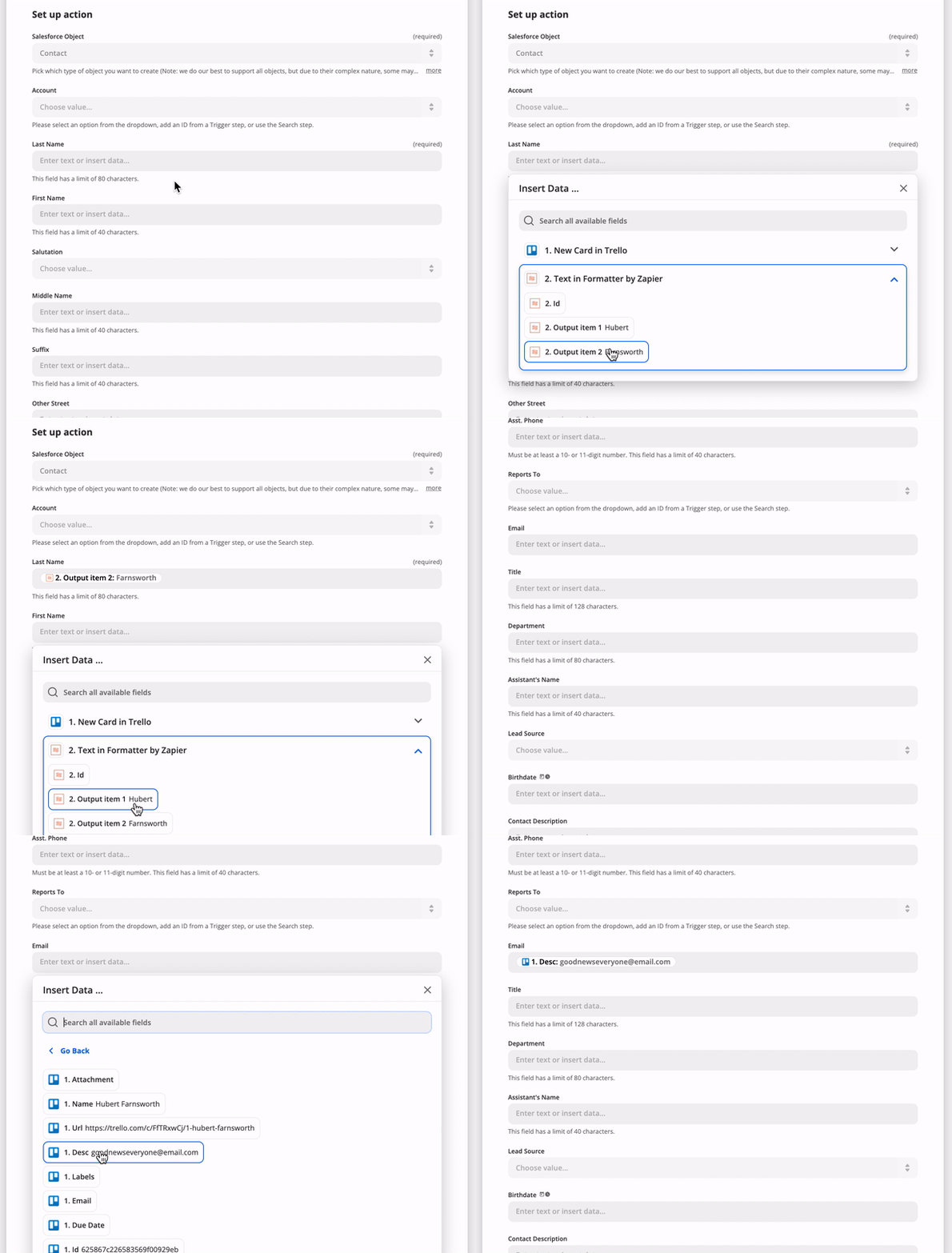
On each trigger, search, or create in the `operation` directive, you can provide fields as an array of objects under `inputFields`. Input Fields are what your users see in Zapier when setting up your app's triggers and actions. For example, you might have a "Create Contact" action with fields like "First name", "Last name", "Email", etc. These fields will be able to accept input from the user, or from previous steps in a Zap. For example:
|
|
1053
1047
|
|
|
1054
1048
|
|
|
1055
1049
|
|
|
1056
|
-
You can find more details about setting action fields from a user perspective in [our help documentation](https://zapier.com/help/creating-zap
|
|
1050
|
+
You can find more details about setting action fields from a user perspective in [our help documentation](https://zapier.com/help/creating-zap/).
|
|
1057
1051
|
|
|
1058
|
-
Those fields have various options you can provide
|
|
1052
|
+
Those fields have various options you can provide. Here is a brief example:
|
|
1059
1053
|
|
|
1060
1054
|
```js
|
|
1061
1055
|
const App = {
|
|
@@ -1086,7 +1080,22 @@ const App = {
|
|
|
1086
1080
|
|
|
1087
1081
|
```
|
|
1088
1082
|
|
|
1089
|
-
|
|
1083
|
+
Notably, fields come in different types, which may look and act differently in the Zap editor. The default field display is a single-line input field.
|
|
1084
|
+
|
|
1085
|
+
| Type | Behavior |
|
|
1086
|
+
|------|----------|
|
|
1087
|
+
| `string` | Accepts text input. |
|
|
1088
|
+
| `text` | Displays large, `<textarea>`-style entry box, accepts text input. |
|
|
1089
|
+
| `code` | Displays large, `<textarea>`-style box with a fixed-width font, accepts text input. |
|
|
1090
|
+
| `integer` | Accepts integer number values. |
|
|
1091
|
+
| `number` | Accepts any numeric value, including decimal numbers. |
|
|
1092
|
+
| `boolean` | Displays dropdown menu offering true and false options. Passes along `true` or `false`. |
|
|
1093
|
+
| `datetime` | Accepts both [precise and human-readable date-time values](https://help.zapier.com/hc/en-us/articles/8496259603341-Different-field-types-in-Zaps#date-time-fields-0-0). Passes along an ISO-formatted time string. |
|
|
1094
|
+
| `file` | Accepts a file object or a string. If a URL is provided in the string, Zapier will automatically make a GET for that file. Otherwise, a text file will be generated. |
|
|
1095
|
+
| `password` | Displays entered characters as hidden, accepts text input. Does not accept input from previous steps. |
|
|
1096
|
+
| `copy` | Does not allow users enter data. Shows the value of the Markdown-formatted Help Text for the field as a rich text note in the Zap editor. Good for important notices to users. |
|
|
1097
|
+
|
|
1098
|
+
You can find more details on the different field schema options at [our Field Schema](https://github.com/zapier/zapier-platform/blob/main/packages/schema/docs/build/schema.md#fieldschema).
|
|
1090
1099
|
|
|
1091
1100
|
### Custom/Dynamic Fields
|
|
1092
1101
|
|
|
@@ -1481,7 +1490,7 @@ You can see examples of computed fields in the [OAuth2](#oauth2) or [Session Aut
|
|
|
1481
1490
|
|
|
1482
1491
|
### Nested & Children (Line Item) Fields
|
|
1483
1492
|
|
|
1484
|
-
When your action needs to accept an array of items, you can include an input field with the `children` attribute. The `children` attribute accepts a list of [fields](https://github.com/zapier/zapier-platform/blob/
|
|
1493
|
+
When your action needs to accept an array of items, you can include an input field with the `children` attribute. The `children` attribute accepts a list of [fields](https://github.com/zapier/zapier-platform/blob/main/packages/schema/docs/build/schema.md#fieldschema) that can be input for each item in this array.
|
|
1485
1494
|
|
|
1486
1495
|
```js
|
|
1487
1496
|
const App = {
|
|
@@ -1527,7 +1536,7 @@ Output Fields are optional, but can be used to:
|
|
|
1527
1536
|
- Define friendly labels for the returned fields. By default, we will *humanize* for example `my_key` as *My Key*.
|
|
1528
1537
|
- Make sure that custom fields that may not be found in every live sample and - since they're custom to the connected account - cannot be defined in the static sample, can still be mapped.
|
|
1529
1538
|
|
|
1530
|
-
The [schema](https://github.com/zapier/zapier-platform/blob/
|
|
1539
|
+
The [schema](https://github.com/zapier/zapier-platform/blob/main/packages/schema/docs/build/schema.md#fieldschema) for `outputFields` is shared with `inputFields` but only the `key` and `required` properties are relevant.
|
|
1531
1540
|
|
|
1532
1541
|
Custom/Dynamic Output Fields are defined in the same way as [Custom/Dynamic Input Fields](#customdynamic-fields).
|
|
1533
1542
|
|
|
@@ -1662,7 +1671,7 @@ We provide several methods off of the `z` object, which is provided as the first
|
|
|
1662
1671
|
|
|
1663
1672
|
The available errors are:
|
|
1664
1673
|
|
|
1665
|
-
* `Error` (
|
|
1674
|
+
* `Error` (_added in v9.3.0_) - Stops the current operation, allowing for (auto) replay. Read more on [General Errors](#general-errors)
|
|
1666
1675
|
* `HaltedError` - Stops current operation, but will never turn off Zap. Read more on [Halting Execution](#halting-execution)
|
|
1667
1676
|
* `ExpiredAuthError` - Turns off Zap and emails user to manually reconnect. Read more on [Stale Authentication Credentials](#stale-authentication-credentials)
|
|
1668
1677
|
* `RefreshAuthError` - (OAuth2 or Session Auth) Tells Zapier to refresh credentials and retry operation. Read more on [Stale Authentication Credentials](#stale-authentication-credentials)
|
|
@@ -1883,7 +1892,7 @@ module.exports = {
|
|
|
1883
1892
|
};
|
|
1884
1893
|
```
|
|
1885
1894
|
|
|
1886
|
-
Read more in the [REST hook example](https://github.com/zapier/zapier-platform/blob/
|
|
1895
|
+
Read more in the [REST hook example](https://github.com/zapier/zapier-platform/blob/main/example-apps/rest-hooks/triggers/recipe.js).
|
|
1887
1896
|
|
|
1888
1897
|
### `bundle.subscribeData`
|
|
1889
1898
|
|
|
@@ -1891,7 +1900,7 @@ Read more in the [REST hook example](https://github.com/zapier/zapier-platform/b
|
|
|
1891
1900
|
|
|
1892
1901
|
This is an object that contains the data you returned from the `performSubscribe` function. It should contain whatever information you need send a `DELETE` request to your server to stop sending webhooks to Zapier.
|
|
1893
1902
|
|
|
1894
|
-
Read more in the [REST hook example](https://github.com/zapier/zapier-platform/blob/
|
|
1903
|
+
Read more in the [REST hook example](https://github.com/zapier/zapier-platform/blob/main/example-apps/rest-hooks/triggers/recipe.js).
|
|
1895
1904
|
|
|
1896
1905
|
## Environment
|
|
1897
1906
|
|
|
@@ -2199,7 +2208,7 @@ Here is the full request lifecycle when you call `z.request({...})`:
|
|
|
2199
2208
|
|
|
2200
2209
|
The resulting response object is returned from `z.request()`.
|
|
2201
2210
|
|
|
2202
|
-
> Example App: check out https://github.com/zapier/zapier-platform/tree/
|
|
2211
|
+
> Example App: check out https://github.com/zapier/zapier-platform/tree/main/example-apps/middleware for a working example app using HTTP middleware.
|
|
2203
2212
|
|
|
2204
2213
|
#### Error Response Handling
|
|
2205
2214
|
|
|
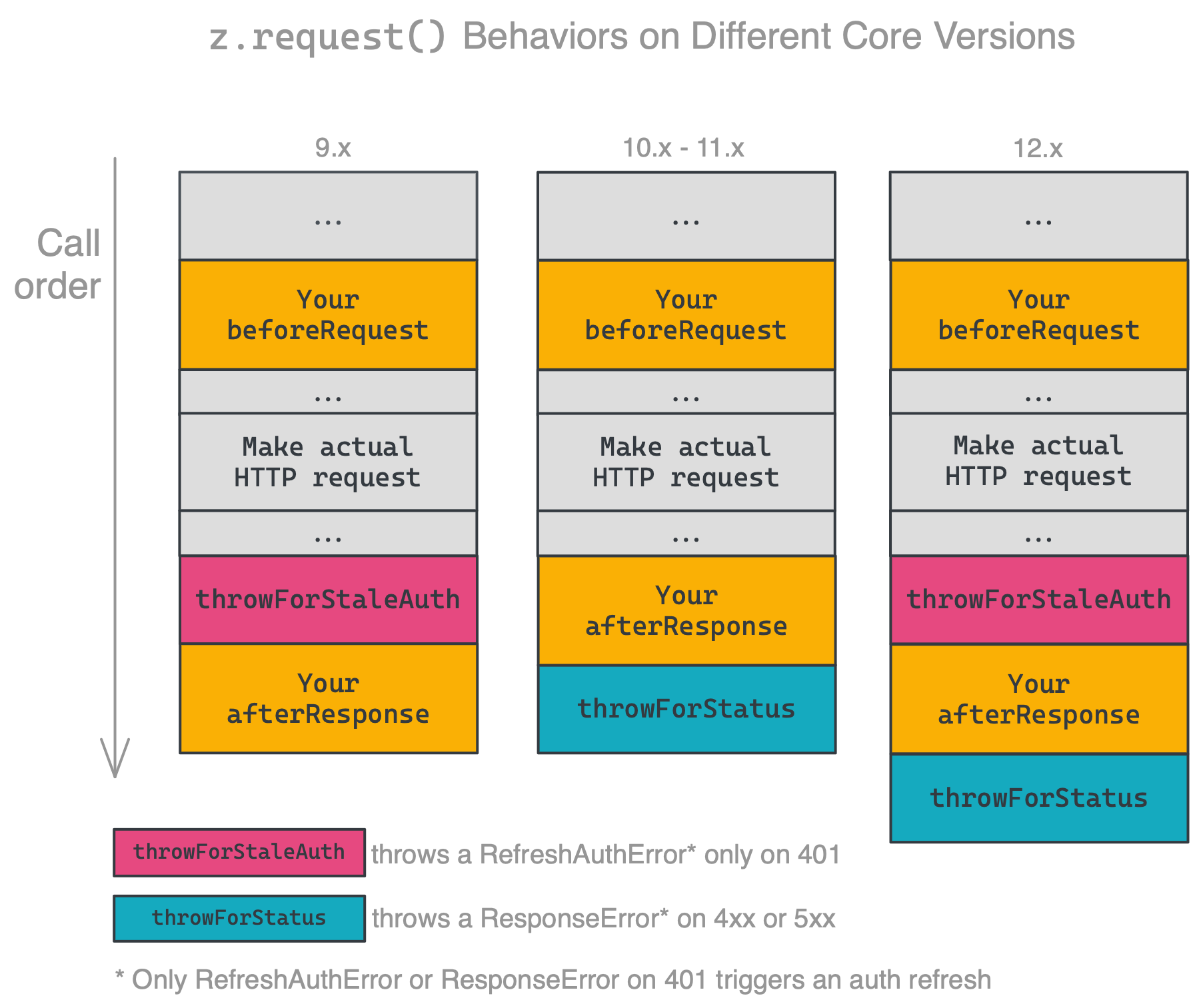
@@ -2246,7 +2255,7 @@ This behavior has changed periodically across major versions, which changes how/
|
|
|
2246
2255
|
|
|
2247
2256
|
|
|
2248
2257
|
|
|
2249
|
-
Ensure you're handling errors correctly for your platform version. The latest released version is **
|
|
2258
|
+
Ensure you're handling errors correctly for your platform version. The latest released version is **13.0.0**.
|
|
2250
2259
|
|
|
2251
2260
|
### HTTP Request Options
|
|
2252
2261
|
|
|
@@ -2266,7 +2275,7 @@ Ensure you're handling errors correctly for your platform version. The latest re
|
|
|
2266
2275
|
* `agent`: Node.js `http.Agent` instance, allows custom proxy, certificate etc. Default is `null`.
|
|
2267
2276
|
* `timeout`: request / response timeout in ms. Set to `0` to disable (OS limit still applies), timeout reset on `redirect`. Default is `0` (disabled).
|
|
2268
2277
|
* `size`: maximum response body size in bytes. Set to `0` to disable. Default is `0` (disabled).
|
|
2269
|
-
* `skipThrowForStatus` (
|
|
2278
|
+
* `skipThrowForStatus` (_added in v10.0.0_): don't call `response.throwForStatus()` before resolving the request with `response`. See [HTTP Response Object](#http-response-object).
|
|
2270
2279
|
|
|
2271
2280
|
```js
|
|
2272
2281
|
const response = await z.request({
|
|
@@ -2296,10 +2305,10 @@ The response object returned by `z.request([url], options)` supports the followi
|
|
|
2296
2305
|
|
|
2297
2306
|
* `status`: The response status code, i.e. `200`, `404`, etc.
|
|
2298
2307
|
* `content`: The response content as a String. For Buffer, try `options.raw = true`.
|
|
2299
|
-
* `data` (
|
|
2308
|
+
* `data` (_added in v10.0.0_): The response content as an object if the content is JSON or `application/x-www-form-urlencoded` (`undefined` otherwise).
|
|
2300
2309
|
* `headers`: Response headers object. The header keys are all lower case.
|
|
2301
2310
|
* `getHeader(key)`: Retrieve response header, case insensitive: `response.getHeader('My-Header')`
|
|
2302
|
-
* `skipThrowForStatus` (
|
|
2311
|
+
* `skipThrowForStatus` (_added in v10.0.0_): don't call `throwForStatus()` before resolving the request with this response.
|
|
2303
2312
|
* `throwForStatus()`: Throws an error if `400 <= statusCode < 600`.
|
|
2304
2313
|
* `request`: The original request options object (see above).
|
|
2305
2314
|
|
|
@@ -2389,7 +2398,7 @@ const App = {
|
|
|
2389
2398
|
// don't forget to register hydrators here!
|
|
2390
2399
|
// it can be imported from any module
|
|
2391
2400
|
hydrators: {
|
|
2392
|
-
getMovieDetails
|
|
2401
|
+
getMovieDetails,
|
|
2393
2402
|
},
|
|
2394
2403
|
|
|
2395
2404
|
triggers: {
|
|
@@ -2439,21 +2448,23 @@ movie.details = {
|
|
|
2439
2448
|
|
|
2440
2449
|
### File Dehydration
|
|
2441
2450
|
|
|
2442
|
-
*
|
|
2451
|
+
*Added in v7.3.0.*
|
|
2443
2452
|
|
|
2444
|
-
The method `z.dehydrateFile(func, inputData)` allows you to download a file lazily. It takes the
|
|
2453
|
+
The method `z.dehydrateFile(func, inputData)` allows you to download a file lazily. It takes the same arguments as `z.dehydrate(func, inputData)` does, but is recommended when the data is a file.
|
|
2445
2454
|
|
|
2446
2455
|
An example can be found in the [Stashing Files](#stashing-files) section.
|
|
2447
2456
|
|
|
2448
|
-
What makes `z.dehydrateFile` different from `z.dehydrate` has to do with efficiency and when Zapier chooses to hydrate data. Knowing which pointers give us back files helps us delay downloading files until
|
|
2457
|
+
What makes `z.dehydrateFile` different from `z.dehydrate` has to do with efficiency and when Zapier chooses to hydrate data. Knowing which pointers give us back files helps us delay downloading files until it's absolutely necessary. Not only will it help avoid unnecessary file downloads, it can also prevent errors if the file has a limited availability. (Stashing files, described below, can also help with that situation.)
|
|
2449
2458
|
|
|
2450
|
-
|
|
2459
|
+
A good example is when users are creating Zaps in the Zap Editor. If a pointer is made by `z.dehydrate`, the Zap Editor will hydrate the data immediately after pulling in samples. This allows users to map fields from the hydrated data into the subsequent steps of the Zap. If, however, the pointer is made by `z.dehydrateFile`, the Zap Editor will wait to hydrate the file, and will display a placeholder instead. There's nothing inside binary file data for users to map in the subsequent steps.
|
|
2460
|
+
|
|
2461
|
+
> `z.dehydrateFile(func, inputData)` was added in v7.3.0. We used to recommend using `z.dehydrate(func, inputData)` for files, but we now recommend changing it to `z.dehydrateFile(func, inputData)` for a better user experience.
|
|
2451
2462
|
|
|
2452
2463
|
## Stashing Files
|
|
2453
2464
|
|
|
2454
2465
|
It can be expensive to download and stream files or they can require complex handshakes to authorize downloads - so we provide a helpful stash routine that will take any `String`, `Buffer` or `Stream` and return a URL file pointer suitable for returning from triggers, searches, creates, etc.
|
|
2455
2466
|
|
|
2456
|
-
The interface `z.stashFile(bufferStringStream, [knownLength], [filename], [contentType])` takes a single required argument - the extra three arguments will be automatically populated in most cases.
|
|
2467
|
+
The interface `z.stashFile(bufferStringStream, [knownLength], [filename], [contentType])` takes a single required argument - the extra three arguments will be automatically populated in most cases. Here's a full example:
|
|
2457
2468
|
|
|
2458
2469
|
```js
|
|
2459
2470
|
const content = 'Hello world!';
|
|
@@ -2529,16 +2540,20 @@ module.exports = App;
|
|
|
2529
2540
|
|
|
2530
2541
|
```
|
|
2531
2542
|
|
|
2532
|
-
> To create a new integration for handling files, run `zapier init [your app name] --template files`. You can also check out our working example app [here](https://github.com/zapier/zapier-platform/tree/
|
|
2543
|
+
> To create a new integration for handling files, run `zapier init [your app name] --template files`. You can also check out our working example app [here](https://github.com/zapier/zapier-platform/tree/main/example-apps/files).
|
|
2533
2544
|
|
|
2534
2545
|
|
|
2535
2546
|
## Logging
|
|
2536
2547
|
|
|
2537
|
-
|
|
2548
|
+
To view the logs for your application, use the `zapier logs` command.
|
|
2549
|
+
|
|
2550
|
+
There are three types of logs for a Zapier app:
|
|
2538
2551
|
|
|
2539
|
-
|
|
2552
|
+
* `http`: logged automatically by Zapier on HTTP requests
|
|
2553
|
+
* `bundle`: logged automatically on every method execution
|
|
2554
|
+
* `console`: manual logs via `z.console.log()` statements ([see below for details](#console-logging))
|
|
2540
2555
|
|
|
2541
|
-
For advanced logging options including only displaying the logs for a certain user or app version, look at the help for the logs command:
|
|
2556
|
+
For advanced logging options, including only displaying the logs for a certain user or app version, look at the help for the logs command:
|
|
2542
2557
|
|
|
2543
2558
|
```bash
|
|
2544
2559
|
zapier help logs
|
|
@@ -2552,7 +2567,7 @@ To manually print a log statement in your code, use `z.console.log`:
|
|
|
2552
2567
|
z.console.log('Here are the input fields', bundle.inputData);
|
|
2553
2568
|
```
|
|
2554
2569
|
|
|
2555
|
-
The `z.console` object has all the same methods and works just like the Node.js [`Console`](https://nodejs.org/docs/latest-
|
|
2570
|
+
The `z.console` object has all the same methods and works just like the Node.js [`Console`](https://nodejs.org/docs/latest-v14.x/api/console.html) class - the only difference is we'll log to our distributed datastore and you can view the logs via `zapier logs` (more below).
|
|
2556
2571
|
|
|
2557
2572
|
### Viewing Console Logs
|
|
2558
2573
|
|
|
@@ -2572,7 +2587,7 @@ zapier logs --type=bundle
|
|
|
2572
2587
|
|
|
2573
2588
|
### HTTP Logging
|
|
2574
2589
|
|
|
2575
|
-
If you are using the `z.request()`
|
|
2590
|
+
If you are using [shorthand HTTP requests](#shorthand-http-requests) or the `z.request()` method that we provide, HTTP logging is handled automatically for you. For example:
|
|
2576
2591
|
|
|
2577
2592
|
```js
|
|
2578
2593
|
z.request('https://57b20fb546b57d1100a3c405.mockapi.io/api/recipes')
|
|
@@ -2582,6 +2597,8 @@ z.request('https://57b20fb546b57d1100a3c405.mockapi.io/api/recipes')
|
|
|
2582
2597
|
})
|
|
2583
2598
|
```
|
|
2584
2599
|
|
|
2600
|
+
HTTP logging will often work with other methods of making requests as well, but if you're using another method and having trouble seeing logs, try using `z.request()`.
|
|
2601
|
+
|
|
2585
2602
|
### Viewing HTTP Logs
|
|
2586
2603
|
|
|
2587
2604
|
To see the HTTP logs, do:
|
|
@@ -2589,7 +2606,7 @@ To see the HTTP logs, do:
|
|
|
2589
2606
|
```bash
|
|
2590
2607
|
zapier logs --type=http
|
|
2591
2608
|
```
|
|
2592
|
-
To see detailed
|
|
2609
|
+
To see detailed HTTP logs, including data such as headers and request and response bodies, do:
|
|
2593
2610
|
|
|
2594
2611
|
```bash
|
|
2595
2612
|
zapier logs --type=http --detailed
|
|
@@ -2621,7 +2638,7 @@ errors as 200s with a payload that describes the error.
|
|
|
2621
2638
|
|
|
2622
2639
|
Example: `throw new z.errors.Error('Contact name is too long.', 'InvalidData', 400);`
|
|
2623
2640
|
|
|
2624
|
-
> `z.errors.Error`
|
|
2641
|
+
> `z.errors.Error` was added in v9.3.0. If you're on an older version of `zapier-platform-core`, throw a standard JavaScript `Error` instead, such as `throw new Error('A user-friendly message')`.
|
|
2625
2642
|
|
|
2626
2643
|
A couple best practices to keep in mind:
|
|
2627
2644
|
|
|
@@ -2893,7 +2910,7 @@ This makes it straightforward to integrate into your testing interface. For exam
|
|
|
2893
2910
|
```yaml
|
|
2894
2911
|
language: node_js
|
|
2895
2912
|
node_js:
|
|
2896
|
-
- "
|
|
2913
|
+
- "v16"
|
|
2897
2914
|
before_script: npm install -g zapier-platform-cli
|
|
2898
2915
|
script: CLIENT_ID=1234 CLIENT_SECRET=abcd zapier test
|
|
2899
2916
|
```
|
|
@@ -3076,17 +3093,17 @@ zapier push
|
|
|
3076
3093
|
|
|
3077
3094
|
There are a lot of details left out - check out the full example app for a working setup.
|
|
3078
3095
|
|
|
3079
|
-
> To create a new integration with Babel, run `zapier init [your app name] --template babel`. You can also check out our working example app [here](https://github.com/zapier/zapier-platform/tree/
|
|
3096
|
+
> To create a new integration with Babel, run `zapier init [your app name] --template babel`. You can also check out our working example app [here](https://github.com/zapier/zapier-platform/tree/main/example-apps/babel).
|
|
3080
3097
|
|
|
3081
3098
|
## FAQs
|
|
3082
3099
|
|
|
3083
3100
|
### Why doesn't Zapier support newer versions of Node.js?
|
|
3084
3101
|
|
|
3085
|
-
We run your code on AWS Lambda, which only supports a few [versions](https://docs.aws.amazon.com/lambda/latest/dg/programming-model.html) of Node
|
|
3102
|
+
We run your code on AWS Lambda, which only supports a few [versions](https://docs.aws.amazon.com/lambda/latest/dg/programming-model.html) of Node. Sometimes that doesn't include the latest version. Additionally, with thousands of apps running on the Zapier platform, we have to be sure upgrading to the latest Node version will not have a negative impact.
|
|
3086
3103
|
|
|
3087
3104
|
### How do I manually set the Node.js version to run my app with?
|
|
3088
3105
|
|
|
3089
|
-
Update your `zapier-platform-core` dependency in `package.json`. Each major version ties to a specific version of Node.js. You can find the mapping [here](https://github.com/zapier/zapier-platform/blob/
|
|
3106
|
+
Update your `zapier-platform-core` dependency in `package.json`. Each major version ties to a specific version of Node.js. You can find the mapping [here](https://github.com/zapier/zapier-platform/blob/main/packages/cli/src/version-store.js). We only support the version(s) supported by [AWS Lambda](https://docs.aws.amazon.com/lambda/latest/dg/programming-model.html).
|
|
3090
3107
|
|
|
3091
3108
|
**IMPORTANT CAVEAT**: AWS periodically deprecates Node versions as they reach EOL. They announce this[on their blog](https://aws.amazon.com/blogs/developer/node-js-6-is-approaching-end-of-life-upgrade-your-aws-lambda-functions-to-the-node-js-10-lts/). Similar info and dates are available on [github](https://github.com/nodejs/Release). Well before this date, we'll have a version of `core` that targets the newer Node version.
|
|
3092
3109
|
|
|
@@ -3289,7 +3306,7 @@ const performWithoutAsync = (z, bundle) => {
|
|
|
3289
3306
|
return z.request(
|
|
3290
3307
|
'https://5ae7ad3547436a00143e104d.mockapi.io/api/recipes',
|
|
3291
3308
|
{
|
|
3292
|
-
params: { cursor
|
|
3309
|
+
params: { cursor }, // if cursor is null, it's ignored here
|
|
3293
3310
|
}
|
|
3294
3311
|
);
|
|
3295
3312
|
})
|
|
@@ -3315,7 +3332,7 @@ const performWithAsync = async (z, bundle) => {
|
|
|
3315
3332
|
{
|
|
3316
3333
|
// if cursor is null, it's sent as an empty query
|
|
3317
3334
|
// param and should be ignored by the server
|
|
3318
|
-
params: { cursor
|
|
3335
|
+
params: { cursor },
|
|
3319
3336
|
}
|
|
3320
3337
|
);
|
|
3321
3338
|
|
|
@@ -3329,7 +3346,7 @@ const performWithAsync = async (z, bundle) => {
|
|
|
3329
3346
|
|
|
3330
3347
|
Cursors are stored per-zap and last about an hour. Per the above, make sure to only include the cursor if `bundle.meta.page !== 0`, so you don't accidentally reuse a cursor from a previous poll.
|
|
3331
3348
|
|
|
3332
|
-
Lastly, you need to set `canPaginate` to `true` in your polling definition (per the [schema](https://github.com/zapier/zapier-platform/blob/
|
|
3349
|
+
Lastly, you need to set `canPaginate` to `true` in your polling definition (per the [schema](https://github.com/zapier/zapier-platform/blob/main/packages/schema/docs/build/schema.md#basicpollingoperationschema)) for the `z.cursor` methods to work as expected.
|
|
3333
3350
|
|
|
3334
3351
|
<a id="dedup"></a>
|
|
3335
3352
|
### How does deduplication work?
|
|
@@ -3363,9 +3380,9 @@ InvalidParameterValueException An error occurred (InvalidParameterValueException
|
|
|
3363
3380
|
|
|
3364
3381
|
... then you need to update your `zapier-platform-core` dependency to a non-deprecated version that uses a newer version of Node.js. Complete the following instructions as soon as possible:
|
|
3365
3382
|
|
|
3366
|
-
1. Edit `package.json` to depend on a later major version of `zapier-platform-core`. There's a list of all breaking changes (marked with a :exclamation:) in the [changelog](https://github.com/zapier/zapier-platform/blob/
|
|
3383
|
+
1. Edit `package.json` to depend on a later major version of `zapier-platform-core`. There's a list of all breaking changes (marked with a :exclamation:) in the [changelog](https://github.com/zapier/zapier-platform/blob/main/CHANGELOG.md).
|
|
3367
3384
|
2. Increment the `version` property in `package.json`
|
|
3368
|
-
3. Ensure you're using version `
|
|
3385
|
+
3. Ensure you're using version `v16` (or greater) of node locally (`node -v`). Use [nvm](https://github.com/nvm-sh/nvm) to use a different one if need be.
|
|
3369
3386
|
4. Run `rm -rf node_modules && npm i` to get a fresh copy of everything
|
|
3370
3387
|
5. Run `zapier test` to ensure your tests still pass
|
|
3371
3388
|
6. Run `zapier push`
|
|
@@ -3416,9 +3433,9 @@ Follow those instructions to enable completion for `zapier` commands and flags!
|
|
|
3416
3433
|
|
|
3417
3434
|
The Zapier Platform consists of 3 npm packages that are released simultaneously.
|
|
3418
3435
|
|
|
3419
|
-
- [`zapier-platform-cli`](https://github.com/zapier/zapier-platform/tree/
|
|
3420
|
-
- [`zapier-platform-core`](https://github.com/zapier/zapier-platform/tree/
|
|
3421
|
-
- [`zapier-platform-schema`](https://github.com/zapier/zapier-platform/tree/
|
|
3436
|
+
- [`zapier-platform-cli`](https://github.com/zapier/zapier-platform/tree/main/packages/cli) is the code that powers the `zapier` command. You use it most commonly with the `test`, `scaffold`, and `push` commands. It's installed with `npm install -g zapier-platform-cli` and does not correspond to a particular app.
|
|
3437
|
+
- [`zapier-platform-core`](https://github.com/zapier/zapier-platform/tree/main/packages/core) is what allows your app to interact with Zapier. It holds the `z` object and app tester code. Your app depends on a specific version of `zapier-platform-core` in the `package.json` file. It's installed via `npm install` along with the rest of your app's dependencies.
|
|
3438
|
+
- [`zapier-platform-schema`](https://github.com/zapier/zapier-platform/tree/main/packages/schema) enforces app structure behind the scenes. It's a dependency of `core`, so it will be installed automatically.
|
|
3422
3439
|
|
|
3423
3440
|
To learn more about the structure of the code (especially if you're interested in contributing), check out the `ARCHITECTURE.md` file(s).
|
|
3424
3441
|
|
|
@@ -3426,12 +3443,12 @@ To learn more about the structure of the code (especially if you're interested i
|
|
|
3426
3443
|
|
|
3427
3444
|
The Zapier platform and its tools are under active development. While you don't need to install every release, we release new versions because they are better than the last. We do our best to adhere to [Semantic Versioning](https://semver.org/) wherein we won't break your code unless there's a `major` release. Otherwise, we're just fixing bugs (`patch`) and adding features (`minor`).
|
|
3428
3445
|
|
|
3429
|
-
Broadly speaking, all releases will continue to work indefinitely. While you never *have* to upgrade your app's `zapier-platform-core` dependency, we recommend keeping an eye on the [changelog](https://github.com/zapier/zapier-platform/blob/
|
|
3446
|
+
Broadly speaking, all releases will continue to work indefinitely. While you never *have* to upgrade your app's `zapier-platform-core` dependency, we recommend keeping an eye on the [changelog](https://github.com/zapier/zapier-platform/blob/main/CHANGELOG.md) to see what new features and bug fixes are available.
|
|
3430
3447
|
|
|
3431
3448
|
For more info about which Node versions are supported, see [the faq](#how-do-i-manually-set-the-nodejs-version-to-run-my-app-with).
|
|
3432
3449
|
|
|
3433
3450
|
<!-- TODO: if we decouple releases, change this -->
|
|
3434
|
-
The most recently released version of `cli` and `core` is **
|
|
3451
|
+
The most recently released version of `cli` and `core` is **13.0.0**. You can see the versions you're working with by running `zapier -v`.
|
|
3435
3452
|
|
|
3436
3453
|
To update `cli`, run `npm install -g zapier-platform-cli`.
|
|
3437
3454
|
|
|
@@ -3447,4 +3464,4 @@ You can get help by either emailing `partners@zapier.com` or by [joining our dev
|
|
|
3447
3464
|
|
|
3448
3465
|
## Developing on the CLI
|
|
3449
3466
|
|
|
3450
|
-
See [CONTRIBUTING.md](https://github.com/zapier/zapier-platform/blob/
|
|
3467
|
+
See [CONTRIBUTING.md](https://github.com/zapier/zapier-platform/blob/main/CONTRIBUTING.md).
|