zapier-platform-cli 12.2.0 → 13.0.0
This diff represents the content of publicly available package versions that have been released to one of the supported registries. The information contained in this diff is provided for informational purposes only and reflects changes between package versions as they appear in their respective public registries.
- package/README-source.md +87 -66
- package/README.md +109 -92
- package/oclif.manifest.json +1 -1
- package/package.json +25 -25
- package/scaffold/create.template.js +2 -2
- package/scaffold/resource.template.js +2 -2
- package/scaffold/search.template.js +2 -2
- package/scaffold/trigger.template.js +2 -2
- package/src/constants.js +1 -1
- package/src/generators/templates/README.template.md +1 -1
- package/src/generators/templates/callback/README.md +1 -1
- package/src/generators/templates/files/README.md +1 -1
- package/src/oclif/commands/convert.js +27 -64
- package/src/oclif/commands/promote.js +1 -1
- package/src/utils/build.js +1 -0
- package/src/version-store.js +1 -1
package/README-source.md
CHANGED
|
@@ -1,9 +1,5 @@
|
|
|
1
1
|
<h1 align="center">
|
|
2
|
-
<
|
|
3
|
-
<source media="(prefers-color-scheme: dark)" srcset="https://cdn.zappy.app/11069978ee4a9b1eeeeb62b11f541b7c.png">
|
|
4
|
-
<source media="(prefers-color-scheme: light)" srcset="https://cdn.zappy.app/2602734341239f1b82ef0ff4ca160430.png">
|
|
5
|
-
<img alt="Zapier Logo" src="https://cdn.zappy.app/2602734341239f1b82ef0ff4ca160430.png" width="300px">
|
|
6
|
-
</picture>
|
|
2
|
+
<img alt="Zapier Logo" src="https://cdn.zappy.app/1cd66b15407db2d9a01fbe8d600772fe.svg" width="300px">
|
|
7
3
|
<br>
|
|
8
4
|
Platform CLI
|
|
9
5
|
<br>
|
|
@@ -18,17 +14,17 @@ Zapier is a platform for creating integrations and workflows. This CLI is your g
|
|
|
18
14
|
|
|
19
15
|
You may find docs duplicate or outdated across the Zapier site. The most up-to-date contents are always available on GitHub:
|
|
20
16
|
|
|
21
|
-
- [Latest CLI Docs](https://github.com/zapier/zapier-platform/blob/
|
|
22
|
-
- [Latest CLI Reference](https://github.com/zapier/zapier-platform/blob/
|
|
23
|
-
- [Latest Schema Docs](https://github.com/zapier/zapier-platform/blob/
|
|
17
|
+
- [Latest CLI Docs](https://github.com/zapier/zapier-platform/blob/main/packages/cli/README.md)
|
|
18
|
+
- [Latest CLI Reference](https://github.com/zapier/zapier-platform/blob/main/packages/cli/docs/cli.md)
|
|
19
|
+
- [Latest Schema Docs](https://github.com/zapier/zapier-platform/blob/main/packages/schema/docs/build/schema.md)
|
|
24
20
|
|
|
25
|
-
Our code is updated frequently. To see a full list of changes, look no further than [the CHANGELOG](https://github.com/zapier/zapier-platform/blob/
|
|
21
|
+
Our code is updated frequently. To see a full list of changes, look no further than [the CHANGELOG](https://github.com/zapier/zapier-platform/blob/main/CHANGELOG.md).
|
|
26
22
|
|
|
27
23
|
This doc describes the latest CLI version (**PACKAGE_VERSION**), as of this writing. If you're using an older version of the CLI, you may want to check out these historical releases:
|
|
28
24
|
|
|
29
|
-
- CLI Docs: [
|
|
30
|
-
- CLI Reference: [
|
|
31
|
-
- Schema Docs: [
|
|
25
|
+
- CLI Docs: [11.3.3](https://github.com/zapier/zapier-platform/blob/zapier-platform-cli@11.3.3/packages/cli/README.md), [10.2.0](https://github.com/zapier/zapier-platform/blob/zapier-platform-cli@10.2.0/packages/cli/README.md), [9.7.3](https://github.com/zapier/zapier-platform/blob/zapier-platform-cli@9.7.3/packages/cli/README.md)
|
|
26
|
+
- CLI Reference: [11.3.3](https://github.com/zapier/zapier-platform/blob/zapier-platform-cli@11.3.3/packages/cli/docs/cli.md), [10.2.0](https://github.com/zapier/zapier-platform/blob/zapier-platform-cli@10.2.0/packages/cli/docs/cli.md), [9.7.3](https://github.com/zapier/zapier-platform/blob/zapier-platform-cli@9.7.3/packages/cli/docs/cli.md)
|
|
27
|
+
- Schema Docs: [11.3.3](https://github.com/zapier/zapier-platform/blob/zapier-platform-schema@11.3.3/packages/schema/docs/build/schema.md), [10.2.0](https://github.com/zapier/zapier-platform/blob/zapier-platform-schema@10.2.0/packages/schema/docs/build/schema.md), [9.7.3](https://github.com/zapier/zapier-platform/blob/zapier-platform-schema@9.7.3/packages/schema/docs/build/schema.md)
|
|
32
28
|
|
|
33
29
|
## Table of Contents
|
|
34
30
|
|
|
@@ -45,7 +41,7 @@ This doc describes the latest CLI version (**PACKAGE_VERSION**), as of this writ
|
|
|
45
41
|
> Note: this document uses "app" while modern Zapier nomenclature refers instead to "integrations". In both cases, the phrase refers to your code that connects your API with Zapier.
|
|
46
42
|
|
|
47
43
|
A CLI App is an implementation of your app's API. You build a Node.js application
|
|
48
|
-
that exports a single object ([JSON Schema](https://github.com/zapier/zapier-platform/blob/
|
|
44
|
+
that exports a single object ([JSON Schema](https://github.com/zapier/zapier-platform/blob/main/packages/schema/docs/build/schema.md#appschema)) and upload it to Zapier.
|
|
49
45
|
Zapier introspects that definition to find out what your app is capable of and
|
|
50
46
|
what options to present end users in the Zap Editor.
|
|
51
47
|
|
|
@@ -80,7 +76,7 @@ You can develop using any version of Node you'd like, but your eventual code mus
|
|
|
80
76
|
|
|
81
77
|
To ensure stability for our users, we strongly encourage you run tests on `LAMBDA_VERSION` sometime before your code reaches users. This can be done multiple ways.
|
|
82
78
|
|
|
83
|
-
Firstly, by using a CI tool (like [Travis CI](https://travis-ci.org/) or [Circle CI](https://circleci.com/), which are free for open source projects). We provide a sample [.travis.yml](https://github.com/zapier/zapier-platform/blob/
|
|
79
|
+
Firstly, by using a CI tool (like [Travis CI](https://travis-ci.org/) or [Circle CI](https://circleci.com/), which are free for open source projects). We provide a sample [.travis.yml](https://github.com/zapier/zapier-platform/blob/main/example-apps/trigger/.travis.yml) file in our template apps to get you started.
|
|
84
80
|
|
|
85
81
|
Alternatively, you can change your local node version with tools such as [nvm](https://github.com/nvm-sh/nvm#installation-and-update). Then you can either swap to that version with `nvm use LAMBDA_VERSION`, or do `nvm exec LAMBDA_VERSION zapier test` so you can run tests without having to switch versions while developing.
|
|
86
82
|
|
|
@@ -96,7 +92,7 @@ npm install -g zapier-platform-cli
|
|
|
96
92
|
# setup auth to Zapier's platform with a deploy key
|
|
97
93
|
zapier login
|
|
98
94
|
```
|
|
99
|
-
> Note: If you log into Zapier via the single sign-on (Google, Facebook, or Microsoft), you may not have a Zapier password. If that's the case, you'll need to generate a deploy key, go to [your Zapier developer
|
|
95
|
+
> Note: If you log into Zapier via the single sign-on (Google, Facebook, or Microsoft), you may not have a Zapier password. If that's the case, you'll need to generate a deploy key, go to [your Zapier developer account here](https://zapier.com/developer/partner-settings/deploy-keys/) and create/copy a key, then run ```zapier login``` command with the --sso flag.
|
|
100
96
|
|
|
101
97
|
Your Zapier CLI should be installed and ready to go at this point. Next up, we'll create our first app!
|
|
102
98
|
|
|
@@ -111,7 +107,7 @@ cd example-app
|
|
|
111
107
|
npm install
|
|
112
108
|
```
|
|
113
109
|
|
|
114
|
-
> Note: When you run `zapier init`, you'll be presented with a list of templates to start with. Pick the one that matches a feature you'll need (such as "dynamic-dropdown" for an integration with [dynamic dropdown fields](#dynamic-dropdowns)), or select "minimal" for an integration with only the essentials. [View more example apps here](https://github.com/zapier/zapier-platform/tree/
|
|
110
|
+
> Note: When you run `zapier init`, you'll be presented with a list of templates to start with. Pick the one that matches a feature you'll need (such as "dynamic-dropdown" for an integration with [dynamic dropdown fields](#dynamic-dropdowns)), or select "minimal" for an integration with only the essentials. [View more example apps here](https://github.com/zapier/zapier-platform/tree/main/example-apps).
|
|
115
111
|
|
|
116
112
|
You should now have a working local app. You can run several local commands to try it out.
|
|
117
113
|
|
|
@@ -314,7 +310,7 @@ When a user authenticates to your application through Zapier, a "connection" is
|
|
|
314
310
|
|
|
315
311
|
Useful if your app requires two pieces of information to authenticate: `username` and `password`, which only the end user can provide. By default, Zapier will do the standard Basic authentication base64 header encoding for you (via an automatically registered middleware).
|
|
316
312
|
|
|
317
|
-
> To create a new integration with basic authentication, run `zapier init [your app name] --template basic-auth`. You can also review an example of that code [here](https://github.com/zapier/zapier-platform/tree/
|
|
313
|
+
> To create a new integration with basic authentication, run `zapier init [your app name] --template basic-auth`. You can also review an example of that code [here](https://github.com/zapier/zapier-platform/tree/main/example-apps/basic-auth).
|
|
318
314
|
|
|
319
315
|
If your app uses Basic auth with an encoded API key rather than a username and password, like `Authorization: Basic APIKEYHERE:x`, consider the [Custom](#custom) authentication method instead.
|
|
320
316
|
|
|
@@ -324,11 +320,11 @@ If your app uses Basic auth with an encoded API key rather than a username and p
|
|
|
324
320
|
|
|
325
321
|
### Digest
|
|
326
322
|
|
|
327
|
-
*
|
|
323
|
+
*Added in v7.4.0.*
|
|
328
324
|
|
|
329
325
|
The setup and user experience of Digest Auth is identical to Basic Auth. Users provide Zapier their username and password, and Zapier handles all the nonce and quality of protection details automatically.
|
|
330
326
|
|
|
331
|
-
> To create a new integration with digest authentication, run `zapier init [your app name] --template digest-auth`. You can also review an example of that code [here](https://github.com/zapier/zapier-platform/tree/
|
|
327
|
+
> To create a new integration with digest authentication, run `zapier init [your app name] --template digest-auth`. You can also review an example of that code [here](https://github.com/zapier/zapier-platform/tree/main/example-apps/digest-auth).
|
|
332
328
|
|
|
333
329
|
> Limitation: Currently, MD5-sess and SHA are not implemented. Only the MD5 algorithm is supported. In addition, server nonces are not reused. That means for every `z.request` call, Zapier will send an additional request beforehand to get the server nonce.
|
|
334
330
|
|
|
@@ -340,7 +336,7 @@ The setup and user experience of Digest Auth is identical to Basic Auth. Users p
|
|
|
340
336
|
|
|
341
337
|
Custom auth is most commonly used for apps that authenticate with API keys, although it also provides flexibility for any unusual authentication setup. You'll likely provide some custom `beforeRequest` middleware or a `requestTemplate` (see [Making HTTP Requests](#making-http-requests)) to pass in data returned from the authentication process, most commonly by adding/computing needed headers.
|
|
342
338
|
|
|
343
|
-
> To create a new integration with custom authentication, run `zapier init [your app name] --custom-auth`. You can also review an example of that code [here](https://github.com/zapier/zapier-platform/tree/
|
|
339
|
+
> To create a new integration with custom authentication, run `zapier init [your app name] --template custom-auth`. You can also review an example of that code [here](https://github.com/zapier/zapier-platform/tree/main/example-apps/custom-auth).
|
|
344
340
|
|
|
345
341
|
```js
|
|
346
342
|
[insert-file:./snippets/custom-auth.js]
|
|
@@ -350,7 +346,7 @@ Custom auth is most commonly used for apps that authenticate with API keys, alth
|
|
|
350
346
|
|
|
351
347
|
Session auth gives you the ability to exchange some user-provided data for some authentication data; for example, username and password for a session key. It can be used to implement almost any authentication method that uses that pattern - for example, alternative OAuth flows.
|
|
352
348
|
|
|
353
|
-
> To create a new integration with session authentication, run `zapier init [your app name] --template session-auth`. You can also review an example of that code [here](https://github.com/zapier/zapier-platform/tree/
|
|
349
|
+
> To create a new integration with session authentication, run `zapier init [your app name] --template session-auth`. You can also review an example of that code [here](https://github.com/zapier/zapier-platform/tree/main/example-apps/session-auth).
|
|
354
350
|
|
|
355
351
|
```js
|
|
356
352
|
[insert-file:./snippets/session-auth.js]
|
|
@@ -360,11 +356,11 @@ For Session auth, the function that fetches the additional authentication data n
|
|
|
360
356
|
|
|
361
357
|
### OAuth1
|
|
362
358
|
|
|
363
|
-
*
|
|
359
|
+
*Added in `v7.5.0`.*
|
|
364
360
|
|
|
365
361
|
Zapier's OAuth1 implementation matches [Twitter](https://developer.twitter.com/en/docs/tutorials/authenticating-with-twitter-api-for-enterprise/authentication-method-overview#oauth1.0a) and [Trello](https://developer.atlassian.com/cloud/trello/guides/rest-api/authorization/#using-basic-oauth) implementations of the 3-legged OAuth flow.
|
|
366
362
|
|
|
367
|
-
> To create a new integration with OAuth1, run `zapier init [your app name] --template oauth1-trello`. You can also check out [oauth1-trello](https://github.com/zapier/zapier-platform/tree/
|
|
363
|
+
> To create a new integration with OAuth1, run `zapier init [your app name] --template oauth1-trello`. You can also check out [oauth1-trello](https://github.com/zapier/zapier-platform/tree/main/example-apps/oauth1-trello), [oauth1-tumblr](https://github.com/zapier/zapier-platform/tree/main/example-apps/oauth1-tumblr), and [oauth1-twitter](https://github.com/zapier/zapier-platform/tree/main/example-apps/oauth1-twitter) for working example apps with OAuth1.
|
|
368
364
|
|
|
369
365
|
The flow works like this:
|
|
370
366
|
|
|
@@ -405,7 +401,7 @@ Also, `authentication.oauth1Config.getAccessToken` has access to the additional
|
|
|
405
401
|
|
|
406
402
|
Zapier's OAuth2 implementation is based on the `authorization_code` flow, similar to [GitHub](https://developer.github.com/v3/oauth/) and [Facebook](https://developers.facebook.com/docs/authentication/server-side/).
|
|
407
403
|
|
|
408
|
-
> To create a new integration with OAuth2, run `zapier init [your app name] --template oauth2`. You can also check out [our working example app](https://github.com/zapier/zapier-platform/tree/
|
|
404
|
+
> To create a new integration with OAuth2, run `zapier init [your app name] --template oauth2`. You can also check out [our working example app](https://github.com/zapier/zapier-platform/tree/main/example-apps/oauth2).
|
|
409
405
|
|
|
410
406
|
If your app's OAuth2 flow uses a different grant type, such as `client_credentials`, try using [Session auth](#session) instead.
|
|
411
407
|
|
|
@@ -445,6 +441,8 @@ For OAuth2, `authentication.oauth2Config.authorizeUrl`, `authentication.oauth2Co
|
|
|
445
441
|
|
|
446
442
|
Also, `authentication.oauth2Config.getAccessToken` has access to the additional return values in `rawRequest` and `cleanedRequest` should you need to extract other values (for example, from the query string).
|
|
447
443
|
|
|
444
|
+
If you define `fields` to collect additional details from the user, please note that `client_id` and `client_secret` are reserved keys and cannot be used as keys for input form fields.
|
|
445
|
+
|
|
448
446
|
### Connection Label
|
|
449
447
|
|
|
450
448
|
When a user connects to your app via Zapier and a connection is created to hold the related data in `bundle.authData`, the connection is automatically labeled with the app name. You also have the option of setting a connection label (`connectionLabel`), which can be extremely helpful to identify information like which user is connected or what instance of your app they are connected to. That way, users don't get confused if they have multiple connections to your app.
|
|
@@ -482,10 +480,10 @@ This will generate the resource file and add the necessary statements to the `in
|
|
|
482
480
|
A resource has a few basic properties. The first is the `key`, which allows Zapier to identify the resource on our backend.
|
|
483
481
|
The second is the `noun`, the user-friendly name of the resource that is presented to users throughout the Zapier UI.
|
|
484
482
|
|
|
485
|
-
> Check out [this working example app](https://github.com/zapier/zapier-platform/tree/
|
|
483
|
+
> Check out [this working example app](https://github.com/zapier/zapier-platform/tree/main/example-apps/resource) to see resources in action.
|
|
486
484
|
|
|
487
485
|
After those, there is a set of optional properties that tell Zapier what methods can be performed on the resource.
|
|
488
|
-
The complete list of available methods can be found in the [Resource Schema Docs](https://github.com/zapier/zapier-platform/blob/
|
|
486
|
+
The complete list of available methods can be found in the [Resource Schema Docs](https://github.com/zapier/zapier-platform/blob/main/packages/schema/docs/build/schema.md#resourceschema).
|
|
489
487
|
For now, let's focus on two:
|
|
490
488
|
|
|
491
489
|
* `list` - Tells Zapier how to fetch a set of this resource. This becomes a Trigger in the Zapier Editor.
|
|
@@ -497,7 +495,7 @@ Here is a complete example of what the list method might look like
|
|
|
497
495
|
[insert-file:./snippets/recipe-list.js]
|
|
498
496
|
```
|
|
499
497
|
|
|
500
|
-
The method is made up of two properties, a `display` and an `operation`. The `display` property ([schema](https://github.com/zapier/zapier-platform/blob/
|
|
498
|
+
The method is made up of two properties, a `display` and an `operation`. The `display` property ([schema](https://github.com/zapier/zapier-platform/blob/main/packages/schema/docs/build/schema.md#basicdisplayschema)) holds the info needed to present the method as an available Trigger in the Zapier Editor. The `operation` ([schema](https://github.com/zapier/zapier-platform/blob/main/packages/schema/docs/build/schema.md#resourceschema)) provides the implementation to make the API call.
|
|
501
499
|
|
|
502
500
|
Adding a create method looks very similar.
|
|
503
501
|
|
|
@@ -523,10 +521,10 @@ The definition for each of these follows the same structure. Here is an example
|
|
|
523
521
|
[insert-file:./snippets/trigger.js]
|
|
524
522
|
```
|
|
525
523
|
|
|
526
|
-
You can find more details on the definition for each by looking at the [Trigger Schema](https://github.com/zapier/zapier-platform/blob/
|
|
527
|
-
[Search Schema](https://github.com/zapier/zapier-platform/blob/
|
|
524
|
+
You can find more details on the definition for each by looking at the [Trigger Schema](https://github.com/zapier/zapier-platform/blob/main/packages/schema/docs/build/schema.md#triggerschema),
|
|
525
|
+
[Search Schema](https://github.com/zapier/zapier-platform/blob/main/packages/schema/docs/build/schema.md#searchschema), and [Create Schema](https://github.com/zapier/zapier-platform/blob/main/packages/schema/docs/build/schema.md#createschema).
|
|
528
526
|
|
|
529
|
-
> To create a new integration with a premade trigger, search, or create, run `zapier init [your app name]` and select from the list that appears. You can also check out our working example apps [here](https://github.com/zapier/zapier-platform/tree/
|
|
527
|
+
> To create a new integration with a premade trigger, search, or create, run `zapier init [your app name]` and select from the list that appears. You can also check out our working example apps [here](https://github.com/zapier/zapier-platform/tree/main/example-apps).
|
|
530
528
|
|
|
531
529
|
> To add a trigger, search, or create to an existing integration, run `zapier scaffold [trigger|search|create] [noun]` to create the necessary files to your project. For example, `zapier scaffold trigger post` will create a new trigger called "New Post".
|
|
532
530
|
### Return Types
|
|
@@ -553,19 +551,34 @@ In cases where Zapier needs to show an example record to the user, but we are un
|
|
|
553
551
|
|
|
554
552
|
## Input Fields
|
|
555
553
|
|
|
556
|
-
On each trigger, search, or create in the `operation` directive
|
|
554
|
+
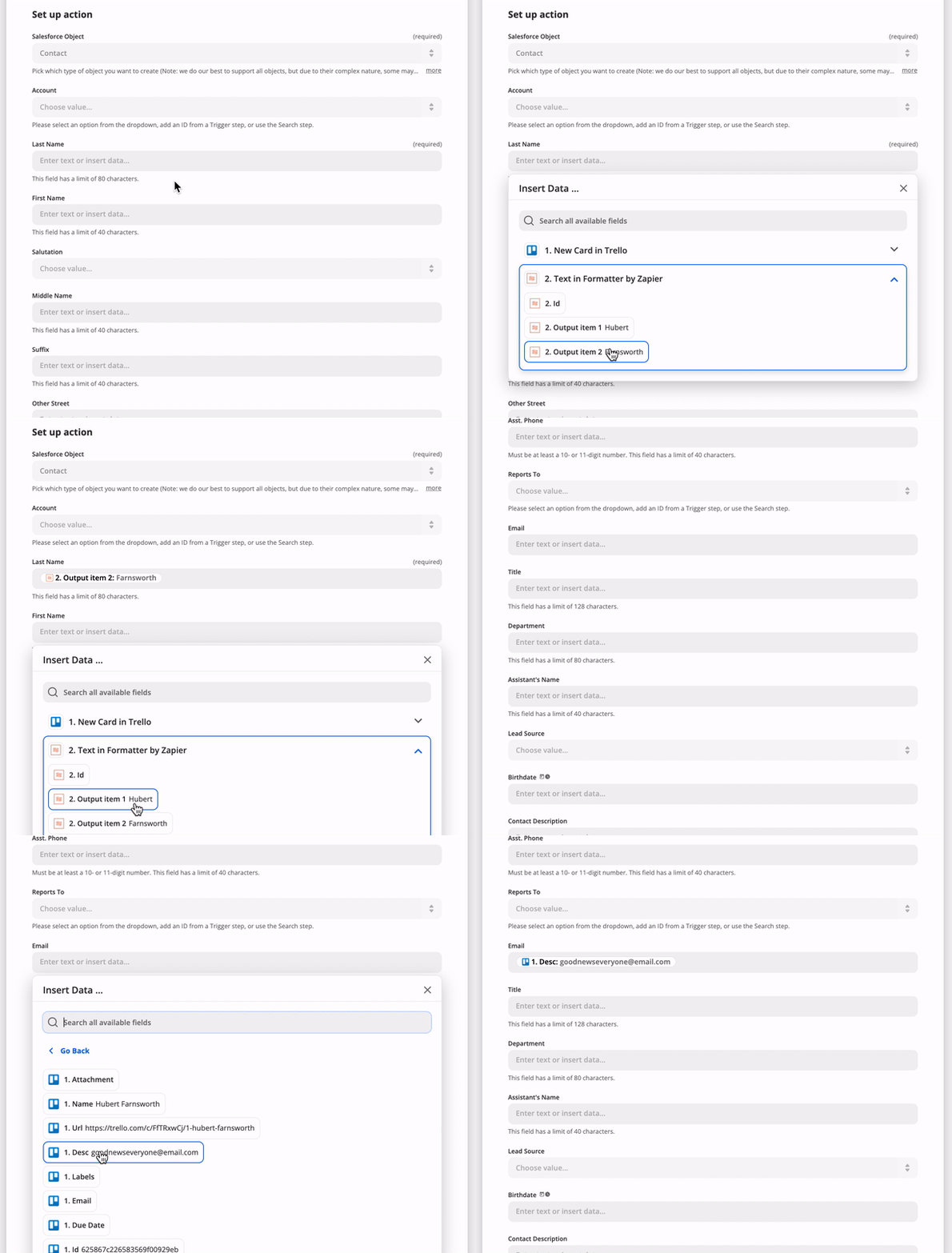
On each trigger, search, or create in the `operation` directive, you can provide fields as an array of objects under `inputFields`. Input Fields are what your users see in Zapier when setting up your app's triggers and actions. For example, you might have a "Create Contact" action with fields like "First name", "Last name", "Email", etc. These fields will be able to accept input from the user, or from previous steps in a Zap. For example:
|
|
557
555
|
|
|
558
556
|
|
|
559
557
|
|
|
560
|
-
You can find more details about setting action fields from a user perspective in [our help documentation](https://zapier.com/help/creating-zap
|
|
558
|
+
You can find more details about setting action fields from a user perspective in [our help documentation](https://zapier.com/help/creating-zap/).
|
|
561
559
|
|
|
562
|
-
Those fields have various options you can provide
|
|
560
|
+
Those fields have various options you can provide. Here is a brief example:
|
|
563
561
|
|
|
564
562
|
```js
|
|
565
563
|
[insert-file:./snippets/fields.js]
|
|
566
564
|
```
|
|
567
565
|
|
|
568
|
-
|
|
566
|
+
Notably, fields come in different types, which may look and act differently in the Zap editor. The default field display is a single-line input field.
|
|
567
|
+
|
|
568
|
+
| Type | Behavior |
|
|
569
|
+
|------|----------|
|
|
570
|
+
| `string` | Accepts text input. |
|
|
571
|
+
| `text` | Displays large, `<textarea>`-style entry box, accepts text input. |
|
|
572
|
+
| `code` | Displays large, `<textarea>`-style box with a fixed-width font, accepts text input. |
|
|
573
|
+
| `integer` | Accepts integer number values. |
|
|
574
|
+
| `number` | Accepts any numeric value, including decimal numbers. |
|
|
575
|
+
| `boolean` | Displays dropdown menu offering true and false options. Passes along `true` or `false`. |
|
|
576
|
+
| `datetime` | Accepts both [precise and human-readable date-time values](https://help.zapier.com/hc/en-us/articles/8496259603341-Different-field-types-in-Zaps#date-time-fields-0-0). Passes along an ISO-formatted time string. |
|
|
577
|
+
| `file` | Accepts a file object or a string. If a URL is provided in the string, Zapier will automatically make a GET for that file. Otherwise, a text file will be generated. |
|
|
578
|
+
| `password` | Displays entered characters as hidden, accepts text input. Does not accept input from previous steps. |
|
|
579
|
+
| `copy` | Does not allow users enter data. Shows the value of the Markdown-formatted Help Text for the field as a rich text note in the Zap editor. Good for important notices to users. |
|
|
580
|
+
|
|
581
|
+
You can find more details on the different field schema options at [our Field Schema](https://github.com/zapier/zapier-platform/blob/main/packages/schema/docs/build/schema.md#fieldschema).
|
|
569
582
|
|
|
570
583
|
### Custom/Dynamic Fields
|
|
571
584
|
|
|
@@ -684,7 +697,7 @@ You can see examples of computed fields in the [OAuth2](#oauth2) or [Session Aut
|
|
|
684
697
|
|
|
685
698
|
### Nested & Children (Line Item) Fields
|
|
686
699
|
|
|
687
|
-
When your action needs to accept an array of items, you can include an input field with the `children` attribute. The `children` attribute accepts a list of [fields](https://github.com/zapier/zapier-platform/blob/
|
|
700
|
+
When your action needs to accept an array of items, you can include an input field with the `children` attribute. The `children` attribute accepts a list of [fields](https://github.com/zapier/zapier-platform/blob/main/packages/schema/docs/build/schema.md#fieldschema) that can be input for each item in this array.
|
|
688
701
|
|
|
689
702
|
```js
|
|
690
703
|
[insert-file:./snippets/input-fields-children.js]
|
|
@@ -699,7 +712,7 @@ Output Fields are optional, but can be used to:
|
|
|
699
712
|
- Define friendly labels for the returned fields. By default, we will *humanize* for example `my_key` as *My Key*.
|
|
700
713
|
- Make sure that custom fields that may not be found in every live sample and - since they're custom to the connected account - cannot be defined in the static sample, can still be mapped.
|
|
701
714
|
|
|
702
|
-
The [schema](https://github.com/zapier/zapier-platform/blob/
|
|
715
|
+
The [schema](https://github.com/zapier/zapier-platform/blob/main/packages/schema/docs/build/schema.md#fieldschema) for `outputFields` is shared with `inputFields` but only the `key` and `required` properties are relevant.
|
|
703
716
|
|
|
704
717
|
Custom/Dynamic Output Fields are defined in the same way as [Custom/Dynamic Input Fields](#customdynamic-fields).
|
|
705
718
|
|
|
@@ -751,7 +764,7 @@ We provide several methods off of the `z` object, which is provided as the first
|
|
|
751
764
|
|
|
752
765
|
The available errors are:
|
|
753
766
|
|
|
754
|
-
* `Error` (
|
|
767
|
+
* `Error` (_added in v9.3.0_) - Stops the current operation, allowing for (auto) replay. Read more on [General Errors](#general-errors)
|
|
755
768
|
* `HaltedError` - Stops current operation, but will never turn off Zap. Read more on [Halting Execution](#halting-execution)
|
|
756
769
|
* `ExpiredAuthError` - Turns off Zap and emails user to manually reconnect. Read more on [Stale Authentication Credentials](#stale-authentication-credentials)
|
|
757
770
|
* `RefreshAuthError` - (OAuth2 or Session Auth) Tells Zapier to refresh credentials and retry operation. Read more on [Stale Authentication Credentials](#stale-authentication-credentials)
|
|
@@ -972,7 +985,7 @@ module.exports = {
|
|
|
972
985
|
};
|
|
973
986
|
```
|
|
974
987
|
|
|
975
|
-
Read more in the [REST hook example](https://github.com/zapier/zapier-platform/blob/
|
|
988
|
+
Read more in the [REST hook example](https://github.com/zapier/zapier-platform/blob/main/example-apps/rest-hooks/triggers/recipe.js).
|
|
976
989
|
|
|
977
990
|
### `bundle.subscribeData`
|
|
978
991
|
|
|
@@ -980,7 +993,7 @@ Read more in the [REST hook example](https://github.com/zapier/zapier-platform/b
|
|
|
980
993
|
|
|
981
994
|
This is an object that contains the data you returned from the `performSubscribe` function. It should contain whatever information you need send a `DELETE` request to your server to stop sending webhooks to Zapier.
|
|
982
995
|
|
|
983
|
-
Read more in the [REST hook example](https://github.com/zapier/zapier-platform/blob/
|
|
996
|
+
Read more in the [REST hook example](https://github.com/zapier/zapier-platform/blob/main/example-apps/rest-hooks/triggers/recipe.js).
|
|
984
997
|
|
|
985
998
|
## Environment
|
|
986
999
|
|
|
@@ -1143,7 +1156,7 @@ Here is the full request lifecycle when you call `z.request({...})`:
|
|
|
1143
1156
|
|
|
1144
1157
|
The resulting response object is returned from `z.request()`.
|
|
1145
1158
|
|
|
1146
|
-
> Example App: check out https://github.com/zapier/zapier-platform/tree/
|
|
1159
|
+
> Example App: check out https://github.com/zapier/zapier-platform/tree/main/example-apps/middleware for a working example app using HTTP middleware.
|
|
1147
1160
|
|
|
1148
1161
|
#### Error Response Handling
|
|
1149
1162
|
|
|
@@ -1210,7 +1223,7 @@ Ensure you're handling errors correctly for your platform version. The latest re
|
|
|
1210
1223
|
* `agent`: Node.js `http.Agent` instance, allows custom proxy, certificate etc. Default is `null`.
|
|
1211
1224
|
* `timeout`: request / response timeout in ms. Set to `0` to disable (OS limit still applies), timeout reset on `redirect`. Default is `0` (disabled).
|
|
1212
1225
|
* `size`: maximum response body size in bytes. Set to `0` to disable. Default is `0` (disabled).
|
|
1213
|
-
* `skipThrowForStatus` (
|
|
1226
|
+
* `skipThrowForStatus` (_added in v10.0.0_): don't call `response.throwForStatus()` before resolving the request with `response`. See [HTTP Response Object](#http-response-object).
|
|
1214
1227
|
|
|
1215
1228
|
```js
|
|
1216
1229
|
const response = await z.request({
|
|
@@ -1240,10 +1253,10 @@ The response object returned by `z.request([url], options)` supports the followi
|
|
|
1240
1253
|
|
|
1241
1254
|
* `status`: The response status code, i.e. `200`, `404`, etc.
|
|
1242
1255
|
* `content`: The response content as a String. For Buffer, try `options.raw = true`.
|
|
1243
|
-
* `data` (
|
|
1256
|
+
* `data` (_added in v10.0.0_): The response content as an object if the content is JSON or `application/x-www-form-urlencoded` (`undefined` otherwise).
|
|
1244
1257
|
* `headers`: Response headers object. The header keys are all lower case.
|
|
1245
1258
|
* `getHeader(key)`: Retrieve response header, case insensitive: `response.getHeader('My-Header')`
|
|
1246
|
-
* `skipThrowForStatus` (
|
|
1259
|
+
* `skipThrowForStatus` (_added in v10.0.0_): don't call `throwForStatus()` before resolving the request with this response.
|
|
1247
1260
|
* `throwForStatus()`: Throws an error if `400 <= statusCode < 600`.
|
|
1248
1261
|
* `request`: The original request options object (see above).
|
|
1249
1262
|
|
|
@@ -1336,21 +1349,23 @@ movie.details = {
|
|
|
1336
1349
|
|
|
1337
1350
|
### File Dehydration
|
|
1338
1351
|
|
|
1339
|
-
*
|
|
1352
|
+
*Added in v7.3.0.*
|
|
1340
1353
|
|
|
1341
|
-
The method `z.dehydrateFile(func, inputData)` allows you to download a file lazily. It takes the
|
|
1354
|
+
The method `z.dehydrateFile(func, inputData)` allows you to download a file lazily. It takes the same arguments as `z.dehydrate(func, inputData)` does, but is recommended when the data is a file.
|
|
1342
1355
|
|
|
1343
1356
|
An example can be found in the [Stashing Files](#stashing-files) section.
|
|
1344
1357
|
|
|
1345
|
-
What makes `z.dehydrateFile` different from `z.dehydrate` has to do with efficiency and when Zapier chooses to hydrate data. Knowing which pointers give us back files helps us delay downloading files until
|
|
1358
|
+
What makes `z.dehydrateFile` different from `z.dehydrate` has to do with efficiency and when Zapier chooses to hydrate data. Knowing which pointers give us back files helps us delay downloading files until it's absolutely necessary. Not only will it help avoid unnecessary file downloads, it can also prevent errors if the file has a limited availability. (Stashing files, described below, can also help with that situation.)
|
|
1346
1359
|
|
|
1347
|
-
|
|
1360
|
+
A good example is when users are creating Zaps in the Zap Editor. If a pointer is made by `z.dehydrate`, the Zap Editor will hydrate the data immediately after pulling in samples. This allows users to map fields from the hydrated data into the subsequent steps of the Zap. If, however, the pointer is made by `z.dehydrateFile`, the Zap Editor will wait to hydrate the file, and will display a placeholder instead. There's nothing inside binary file data for users to map in the subsequent steps.
|
|
1361
|
+
|
|
1362
|
+
> `z.dehydrateFile(func, inputData)` was added in v7.3.0. We used to recommend using `z.dehydrate(func, inputData)` for files, but we now recommend changing it to `z.dehydrateFile(func, inputData)` for a better user experience.
|
|
1348
1363
|
|
|
1349
1364
|
## Stashing Files
|
|
1350
1365
|
|
|
1351
1366
|
It can be expensive to download and stream files or they can require complex handshakes to authorize downloads - so we provide a helpful stash routine that will take any `String`, `Buffer` or `Stream` and return a URL file pointer suitable for returning from triggers, searches, creates, etc.
|
|
1352
1367
|
|
|
1353
|
-
The interface `z.stashFile(bufferStringStream, [knownLength], [filename], [contentType])` takes a single required argument - the extra three arguments will be automatically populated in most cases.
|
|
1368
|
+
The interface `z.stashFile(bufferStringStream, [knownLength], [filename], [contentType])` takes a single required argument - the extra three arguments will be automatically populated in most cases. Here's a full example:
|
|
1354
1369
|
|
|
1355
1370
|
```js
|
|
1356
1371
|
const content = 'Hello world!';
|
|
@@ -1376,16 +1391,20 @@ See a full example with dehydration/hydration wired in correctly:
|
|
|
1376
1391
|
[insert-file:./snippets/stash-file.js]
|
|
1377
1392
|
```
|
|
1378
1393
|
|
|
1379
|
-
> To create a new integration for handling files, run `zapier init [your app name] --template files`. You can also check out our working example app [here](https://github.com/zapier/zapier-platform/tree/
|
|
1394
|
+
> To create a new integration for handling files, run `zapier init [your app name] --template files`. You can also check out our working example app [here](https://github.com/zapier/zapier-platform/tree/main/example-apps/files).
|
|
1380
1395
|
|
|
1381
1396
|
|
|
1382
1397
|
## Logging
|
|
1383
1398
|
|
|
1384
|
-
|
|
1399
|
+
To view the logs for your application, use the `zapier logs` command.
|
|
1400
|
+
|
|
1401
|
+
There are three types of logs for a Zapier app:
|
|
1385
1402
|
|
|
1386
|
-
|
|
1403
|
+
* `http`: logged automatically by Zapier on HTTP requests
|
|
1404
|
+
* `bundle`: logged automatically on every method execution
|
|
1405
|
+
* `console`: manual logs via `z.console.log()` statements ([see below for details](#console-logging))
|
|
1387
1406
|
|
|
1388
|
-
For advanced logging options including only displaying the logs for a certain user or app version, look at the help for the logs command:
|
|
1407
|
+
For advanced logging options, including only displaying the logs for a certain user or app version, look at the help for the logs command:
|
|
1389
1408
|
|
|
1390
1409
|
```bash
|
|
1391
1410
|
zapier help logs
|
|
@@ -1399,7 +1418,7 @@ To manually print a log statement in your code, use `z.console.log`:
|
|
|
1399
1418
|
z.console.log('Here are the input fields', bundle.inputData);
|
|
1400
1419
|
```
|
|
1401
1420
|
|
|
1402
|
-
The `z.console` object has all the same methods and works just like the Node.js [`Console`](https://nodejs.org/docs/latest-
|
|
1421
|
+
The `z.console` object has all the same methods and works just like the Node.js [`Console`](https://nodejs.org/docs/latest-v14.x/api/console.html) class - the only difference is we'll log to our distributed datastore and you can view the logs via `zapier logs` (more below).
|
|
1403
1422
|
|
|
1404
1423
|
### Viewing Console Logs
|
|
1405
1424
|
|
|
@@ -1419,7 +1438,7 @@ zapier logs --type=bundle
|
|
|
1419
1438
|
|
|
1420
1439
|
### HTTP Logging
|
|
1421
1440
|
|
|
1422
|
-
If you are using the `z.request()`
|
|
1441
|
+
If you are using [shorthand HTTP requests](#shorthand-http-requests) or the `z.request()` method that we provide, HTTP logging is handled automatically for you. For example:
|
|
1423
1442
|
|
|
1424
1443
|
```js
|
|
1425
1444
|
z.request('https://57b20fb546b57d1100a3c405.mockapi.io/api/recipes')
|
|
@@ -1429,6 +1448,8 @@ z.request('https://57b20fb546b57d1100a3c405.mockapi.io/api/recipes')
|
|
|
1429
1448
|
})
|
|
1430
1449
|
```
|
|
1431
1450
|
|
|
1451
|
+
HTTP logging will often work with other methods of making requests as well, but if you're using another method and having trouble seeing logs, try using `z.request()`.
|
|
1452
|
+
|
|
1432
1453
|
### Viewing HTTP Logs
|
|
1433
1454
|
|
|
1434
1455
|
To see the HTTP logs, do:
|
|
@@ -1436,7 +1457,7 @@ To see the HTTP logs, do:
|
|
|
1436
1457
|
```bash
|
|
1437
1458
|
zapier logs --type=http
|
|
1438
1459
|
```
|
|
1439
|
-
To see detailed
|
|
1460
|
+
To see detailed HTTP logs, including data such as headers and request and response bodies, do:
|
|
1440
1461
|
|
|
1441
1462
|
```bash
|
|
1442
1463
|
zapier logs --type=http --detailed
|
|
@@ -1468,7 +1489,7 @@ errors as 200s with a payload that describes the error.
|
|
|
1468
1489
|
|
|
1469
1490
|
Example: `throw new z.errors.Error('Contact name is too long.', 'InvalidData', 400);`
|
|
1470
1491
|
|
|
1471
|
-
> `z.errors.Error`
|
|
1492
|
+
> `z.errors.Error` was added in v9.3.0. If you're on an older version of `zapier-platform-core`, throw a standard JavaScript `Error` instead, such as `throw new Error('A user-friendly message')`.
|
|
1472
1493
|
|
|
1473
1494
|
A couple best practices to keep in mind:
|
|
1474
1495
|
|
|
@@ -1807,17 +1828,17 @@ zapier push
|
|
|
1807
1828
|
|
|
1808
1829
|
There are a lot of details left out - check out the full example app for a working setup.
|
|
1809
1830
|
|
|
1810
|
-
> To create a new integration with Babel, run `zapier init [your app name] --template babel`. You can also check out our working example app [here](https://github.com/zapier/zapier-platform/tree/
|
|
1831
|
+
> To create a new integration with Babel, run `zapier init [your app name] --template babel`. You can also check out our working example app [here](https://github.com/zapier/zapier-platform/tree/main/example-apps/babel).
|
|
1811
1832
|
|
|
1812
1833
|
## FAQs
|
|
1813
1834
|
|
|
1814
1835
|
### Why doesn't Zapier support newer versions of Node.js?
|
|
1815
1836
|
|
|
1816
|
-
We run your code on AWS Lambda, which only supports a few [versions](https://docs.aws.amazon.com/lambda/latest/dg/programming-model.html) of Node
|
|
1837
|
+
We run your code on AWS Lambda, which only supports a few [versions](https://docs.aws.amazon.com/lambda/latest/dg/programming-model.html) of Node. Sometimes that doesn't include the latest version. Additionally, with thousands of apps running on the Zapier platform, we have to be sure upgrading to the latest Node version will not have a negative impact.
|
|
1817
1838
|
|
|
1818
1839
|
### How do I manually set the Node.js version to run my app with?
|
|
1819
1840
|
|
|
1820
|
-
Update your `zapier-platform-core` dependency in `package.json`. Each major version ties to a specific version of Node.js. You can find the mapping [here](https://github.com/zapier/zapier-platform/blob/
|
|
1841
|
+
Update your `zapier-platform-core` dependency in `package.json`. Each major version ties to a specific version of Node.js. You can find the mapping [here](https://github.com/zapier/zapier-platform/blob/main/packages/cli/src/version-store.js). We only support the version(s) supported by [AWS Lambda](https://docs.aws.amazon.com/lambda/latest/dg/programming-model.html).
|
|
1821
1842
|
|
|
1822
1843
|
**IMPORTANT CAVEAT**: AWS periodically deprecates Node versions as they reach EOL. They announce this[on their blog](https://aws.amazon.com/blogs/developer/node-js-6-is-approaching-end-of-life-upgrade-your-aws-lambda-functions-to-the-node-js-10-lts/). Similar info and dates are available on [github](https://github.com/nodejs/Release). Well before this date, we'll have a version of `core` that targets the newer Node version.
|
|
1823
1844
|
|
|
@@ -1912,7 +1933,7 @@ If your API uses cursor-based paging instead of an offset, you can use `z.cursor
|
|
|
1912
1933
|
|
|
1913
1934
|
Cursors are stored per-zap and last about an hour. Per the above, make sure to only include the cursor if `bundle.meta.page !== 0`, so you don't accidentally reuse a cursor from a previous poll.
|
|
1914
1935
|
|
|
1915
|
-
Lastly, you need to set `canPaginate` to `true` in your polling definition (per the [schema](https://github.com/zapier/zapier-platform/blob/
|
|
1936
|
+
Lastly, you need to set `canPaginate` to `true` in your polling definition (per the [schema](https://github.com/zapier/zapier-platform/blob/main/packages/schema/docs/build/schema.md#basicpollingoperationschema)) for the `z.cursor` methods to work as expected.
|
|
1916
1937
|
|
|
1917
1938
|
<a id="dedup"></a>
|
|
1918
1939
|
### How does deduplication work?
|
|
@@ -1946,7 +1967,7 @@ InvalidParameterValueException An error occurred (InvalidParameterValueException
|
|
|
1946
1967
|
|
|
1947
1968
|
... then you need to update your `zapier-platform-core` dependency to a non-deprecated version that uses a newer version of Node.js. Complete the following instructions as soon as possible:
|
|
1948
1969
|
|
|
1949
|
-
1. Edit `package.json` to depend on a later major version of `zapier-platform-core`. There's a list of all breaking changes (marked with a :exclamation:) in the [changelog](https://github.com/zapier/zapier-platform/blob/
|
|
1970
|
+
1. Edit `package.json` to depend on a later major version of `zapier-platform-core`. There's a list of all breaking changes (marked with a :exclamation:) in the [changelog](https://github.com/zapier/zapier-platform/blob/main/CHANGELOG.md).
|
|
1950
1971
|
2. Increment the `version` property in `package.json`
|
|
1951
1972
|
3. Ensure you're using version `LAMBDA_VERSION` (or greater) of node locally (`node -v`). Use [nvm](https://github.com/nvm-sh/nvm) to use a different one if need be.
|
|
1952
1973
|
4. Run `rm -rf node_modules && npm i` to get a fresh copy of everything
|
|
@@ -1999,9 +2020,9 @@ Follow those instructions to enable completion for `zapier` commands and flags!
|
|
|
1999
2020
|
|
|
2000
2021
|
The Zapier Platform consists of 3 npm packages that are released simultaneously.
|
|
2001
2022
|
|
|
2002
|
-
- [`zapier-platform-cli`](https://github.com/zapier/zapier-platform/tree/
|
|
2003
|
-
- [`zapier-platform-core`](https://github.com/zapier/zapier-platform/tree/
|
|
2004
|
-
- [`zapier-platform-schema`](https://github.com/zapier/zapier-platform/tree/
|
|
2023
|
+
- [`zapier-platform-cli`](https://github.com/zapier/zapier-platform/tree/main/packages/cli) is the code that powers the `zapier` command. You use it most commonly with the `test`, `scaffold`, and `push` commands. It's installed with `npm install -g zapier-platform-cli` and does not correspond to a particular app.
|
|
2024
|
+
- [`zapier-platform-core`](https://github.com/zapier/zapier-platform/tree/main/packages/core) is what allows your app to interact with Zapier. It holds the `z` object and app tester code. Your app depends on a specific version of `zapier-platform-core` in the `package.json` file. It's installed via `npm install` along with the rest of your app's dependencies.
|
|
2025
|
+
- [`zapier-platform-schema`](https://github.com/zapier/zapier-platform/tree/main/packages/schema) enforces app structure behind the scenes. It's a dependency of `core`, so it will be installed automatically.
|
|
2005
2026
|
|
|
2006
2027
|
To learn more about the structure of the code (especially if you're interested in contributing), check out the `ARCHITECTURE.md` file(s).
|
|
2007
2028
|
|
|
@@ -2009,7 +2030,7 @@ To learn more about the structure of the code (especially if you're interested i
|
|
|
2009
2030
|
|
|
2010
2031
|
The Zapier platform and its tools are under active development. While you don't need to install every release, we release new versions because they are better than the last. We do our best to adhere to [Semantic Versioning](https://semver.org/) wherein we won't break your code unless there's a `major` release. Otherwise, we're just fixing bugs (`patch`) and adding features (`minor`).
|
|
2011
2032
|
|
|
2012
|
-
Broadly speaking, all releases will continue to work indefinitely. While you never *have* to upgrade your app's `zapier-platform-core` dependency, we recommend keeping an eye on the [changelog](https://github.com/zapier/zapier-platform/blob/
|
|
2033
|
+
Broadly speaking, all releases will continue to work indefinitely. While you never *have* to upgrade your app's `zapier-platform-core` dependency, we recommend keeping an eye on the [changelog](https://github.com/zapier/zapier-platform/blob/main/CHANGELOG.md) to see what new features and bug fixes are available.
|
|
2013
2034
|
|
|
2014
2035
|
For more info about which Node versions are supported, see [the faq](#how-do-i-manually-set-the-nodejs-version-to-run-my-app-with).
|
|
2015
2036
|
|
|
@@ -2030,4 +2051,4 @@ You can get help by either emailing `partners@zapier.com` or by [joining our dev
|
|
|
2030
2051
|
|
|
2031
2052
|
## Developing on the CLI
|
|
2032
2053
|
|
|
2033
|
-
See [CONTRIBUTING.md](https://github.com/zapier/zapier-platform/blob/
|
|
2054
|
+
See [CONTRIBUTING.md](https://github.com/zapier/zapier-platform/blob/main/CONTRIBUTING.md).
|