vtkviewer-vue 0.1.0
This diff represents the content of publicly available package versions that have been released to one of the supported registries. The information contained in this diff is provided for informational purposes only and reflects changes between package versions as they appear in their respective public registries.
- package/LICENSE +21 -0
- package/README.en.md +753 -0
- package/README.md +1760 -0
- package/lib/types/components/PluginToolbar.vue.d.ts +7 -0
- package/lib/types/components/ToolbarExtension.vue.d.ts +9 -0
- package/lib/types/components/ToolbarInfoPanel.vue.d.ts +10 -0
- package/lib/types/components/VtkViewer.vue.d.ts +32 -0
- package/lib/types/components/index.d.ts +4 -0
- package/lib/types/composables/index.d.ts +7 -0
- package/lib/types/composables/useFormatLoader.d.ts +33 -0
- package/lib/types/composables/useResponsiveLayout.d.ts +46 -0
- package/lib/types/composables/useUIPlugins.d.ts +57 -0
- package/lib/types/composables/useViewer.d.ts +47 -0
- package/lib/types/configs/index.d.ts +76 -0
- package/lib/types/core/CommandRegistrar.d.ts +12 -0
- package/lib/types/core/CommandRegistry.d.ts +34 -0
- package/lib/types/core/ConfigAccessor.d.ts +33 -0
- package/lib/types/core/DisposalRegistry.d.ts +32 -0
- package/lib/types/core/EventBus.d.ts +79 -0
- package/lib/types/core/FormatDetector.d.ts +59 -0
- package/lib/types/core/I18nManager.d.ts +135 -0
- package/lib/types/core/InteractionSubContext.d.ts +73 -0
- package/lib/types/core/RenderSubContext.d.ts +74 -0
- package/lib/types/core/ResetManager.d.ts +122 -0
- package/lib/types/core/ResetRegistry.d.ts +170 -0
- package/lib/types/core/SceneSubContext.d.ts +25 -0
- package/lib/types/core/StateManager.d.ts +104 -0
- package/lib/types/core/ThemeContext.d.ts +37 -0
- package/lib/types/core/ToolbarExtensionRegistry.d.ts +105 -0
- package/lib/types/core/ToolbarInfoRegistry.d.ts +77 -0
- package/lib/types/core/UISubContext.d.ts +32 -0
- package/lib/types/core/ViewerContext.d.ts +101 -0
- package/lib/types/core/ViewerContextBuilder.d.ts +57 -0
- package/lib/types/core/createViewerContext.d.ts +26 -0
- package/lib/types/core/index.d.ts +23 -0
- package/lib/types/icons/index.d.ts +47 -0
- package/lib/types/index.d.ts +7 -0
- package/lib/types/plugins/PluginBase.d.ts +131 -0
- package/lib/types/plugins/PluginRegistry.d.ts +67 -0
- package/lib/types/plugins/defaults.d.ts +3 -0
- package/lib/types/plugins/format/DrcPlugin.d.ts +30 -0
- package/lib/types/plugins/format/GlbPlugin.d.ts +23 -0
- package/lib/types/plugins/format/ObjPlugin.d.ts +23 -0
- package/lib/types/plugins/format/PdbPlugin.d.ts +33 -0
- package/lib/types/plugins/format/PlyPlugin.d.ts +24 -0
- package/lib/types/plugins/format/StlPlugin.d.ts +25 -0
- package/lib/types/plugins/format/VtiPlugin.d.ts +60 -0
- package/lib/types/plugins/format/VtpPlugin.d.ts +24 -0
- package/lib/types/plugins/format/VtuPlugin.d.ts +25 -0
- package/lib/types/plugins/format/ZipPlugin.d.ts +38 -0
- package/lib/types/plugins/format/index.d.ts +13 -0
- package/lib/types/plugins/index.d.ts +13 -0
- package/lib/types/plugins/injectionKeys.d.ts +22 -0
- package/lib/types/plugins/pluginUtils.d.ts +61 -0
- package/lib/types/plugins/service/DragDropPlugin.d.ts +94 -0
- package/lib/types/plugins/service/KeyBindingPlugin.d.ts +83 -0
- package/lib/types/plugins/service/MemoryPressurePlugin.d.ts +68 -0
- package/lib/types/plugins/service/index.d.ts +6 -0
- package/lib/types/plugins/toolbar/animation/AnimationPlugin.d.ts +34 -0
- package/lib/types/plugins/toolbar/animation/index.d.ts +1 -0
- package/lib/types/plugins/toolbar/index.d.ts +9 -0
- package/lib/types/plugins/toolbar/interaction/CenterModelPlugin.d.ts +21 -0
- package/lib/types/plugins/toolbar/interaction/FullscreenPlugin.d.ts +27 -0
- package/lib/types/plugins/toolbar/interaction/PanPlugin.d.ts +24 -0
- package/lib/types/plugins/toolbar/interaction/ResetAllPlugin.d.ts +25 -0
- package/lib/types/plugins/toolbar/interaction/RotatePlugin.d.ts +24 -0
- package/lib/types/plugins/toolbar/interaction/ViewSelectPlugin.d.ts +26 -0
- package/lib/types/plugins/toolbar/interaction/ZoomPlugin.d.ts +24 -0
- package/lib/types/plugins/toolbar/interaction/index.d.ts +7 -0
- package/lib/types/plugins/toolbar/model/ClippingPlugin.d.ts +87 -0
- package/lib/types/plugins/toolbar/model/ColorByPlugin.d.ts +113 -0
- package/lib/types/plugins/toolbar/model/LoadModelPlugin.d.ts +93 -0
- package/lib/types/plugins/toolbar/model/RenderPrecisionPlugin.d.ts +68 -0
- package/lib/types/plugins/toolbar/model/RenderStylePlugin.d.ts +88 -0
- package/lib/types/plugins/toolbar/model/UnloadModelPlugin.d.ts +25 -0
- package/lib/types/plugins/toolbar/model/index.d.ts +6 -0
- package/lib/types/plugins/toolbar/scene/AxesPlugin.d.ts +96 -0
- package/lib/types/plugins/toolbar/scene/BackgroundColorPlugin.d.ts +25 -0
- package/lib/types/plugins/toolbar/scene/LanguageSwitchPlugin.d.ts +45 -0
- package/lib/types/plugins/toolbar/scene/LightIntensityPlugin.d.ts +42 -0
- package/lib/types/plugins/toolbar/scene/RenderGridPlugin.d.ts +98 -0
- package/lib/types/plugins/toolbar/scene/ThemeSwitchPlugin.d.ts +49 -0
- package/lib/types/plugins/toolbar/scene/index.d.ts +6 -0
- package/lib/types/plugins/toolbar/tools/BookmarkPlugin.d.ts +70 -0
- package/lib/types/plugins/toolbar/tools/MeasurementPlugin.d.ts +112 -0
- package/lib/types/plugins/toolbar/tools/PerformancePlugin.d.ts +55 -0
- package/lib/types/plugins/toolbar/tools/ScreenshotPlugin.d.ts +58 -0
- package/lib/types/plugins/toolbar/tools/index.d.ts +4 -0
- package/lib/types/plugins/toolbar/utils.d.ts +67 -0
- package/lib/types/plugins/types/index.d.ts +250 -0
- package/lib/types/plugins/ui/ErrorPlugin.d.ts +30 -0
- package/lib/types/plugins/ui/FilenameInfoPlugin.d.ts +40 -0
- package/lib/types/plugins/ui/LoadingPlugin.d.ts +28 -0
- package/lib/types/plugins/ui/SceneTreePlugin.d.ts +60 -0
- package/lib/types/plugins/ui/WebGLContextLostPlugin.d.ts +33 -0
- package/lib/types/plugins/ui/index.d.ts +8 -0
- package/lib/types/polyfills.d.ts +1 -0
- package/lib/types/types/index.d.ts +187 -0
- package/lib/types/types/vtk-modules.d.ts +80 -0
- package/lib/types/utils/asyncUtils.d.ts +8 -0
- package/lib/types/utils/colorByUtils.d.ts +55 -0
- package/lib/types/utils/debugLog.d.ts +13 -0
- package/lib/types/utils/errorHandler.d.ts +28 -0
- package/lib/types/utils/index.d.ts +10 -0
- package/lib/types/utils/sceneUtils.d.ts +11 -0
- package/lib/types/utils/themeManager.d.ts +78 -0
- package/lib/types/utils/volumeUtils.d.ts +14 -0
- package/lib/types/utils/vtkHelpers.d.ts +46 -0
- package/lib/types/utils/vtuLoader.d.ts +26 -0
- package/lib/types/utils/zipReader.d.ts +71 -0
- package/lib/vtkviewer.css +2 -0
- package/lib/vtkviewer.js +54714 -0
- package/lib/vtkviewer.umd.cjs +4560 -0
- package/package.json +89 -0
package/README.md
ADDED
|
@@ -0,0 +1,1760 @@
|
|
|
1
|
+
# VtkViewer - VTK.js 3D可视化Vue组件
|
|
2
|
+
|
|
3
|
+
[English](README.en.md) | [中文](README.md)
|
|
4
|
+
|
|
5
|
+

|
|
6
|
+

|
|
7
|
+

|
|
8
|
+
|
|
9
|
+
|
|
10
|
+
基于VTK.js的Vue 3组件,提供强大的3D模型可视化能力,支持多种3D模型格式、完整的工具栏插件系统、主题定制和国际化支持(主要是AI辅助编程实现)。
|
|
11
|
+
|
|
12
|
+
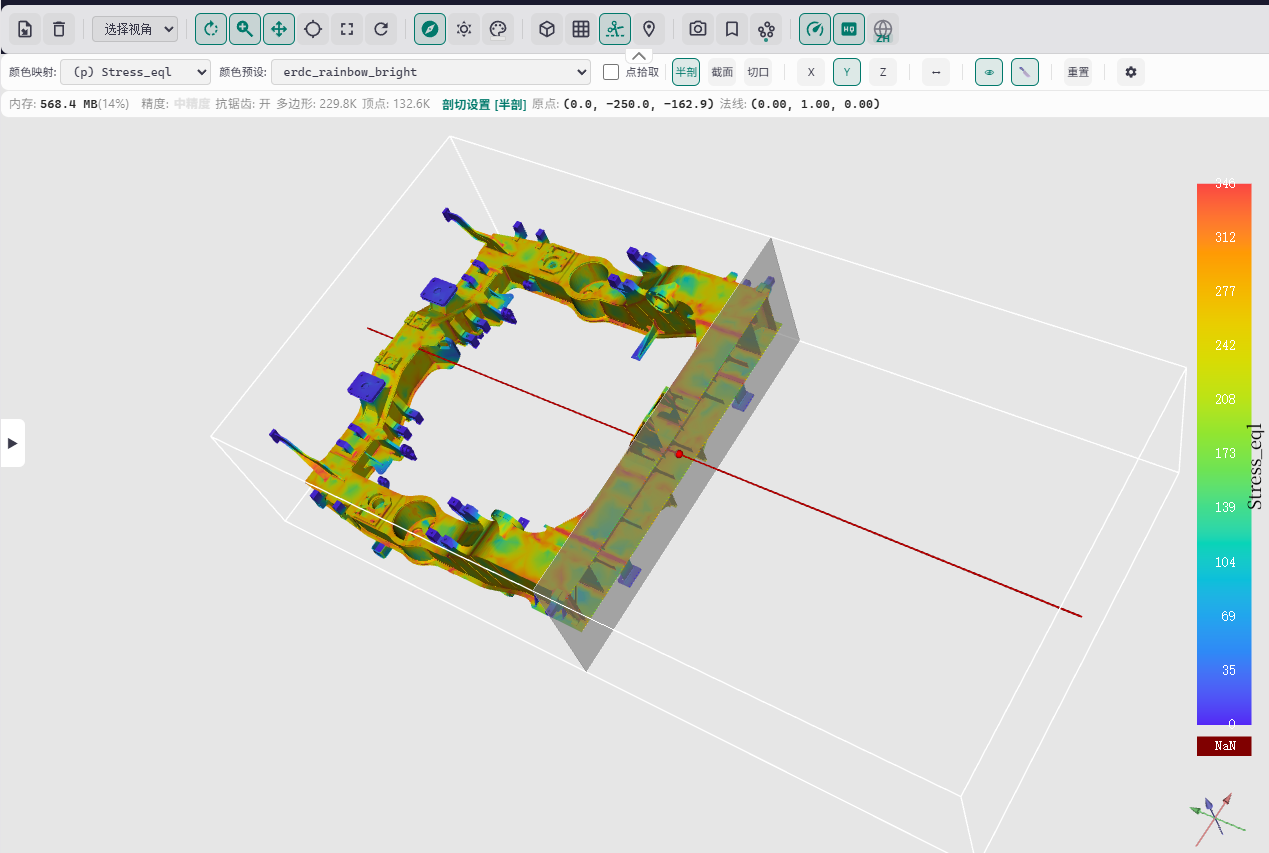
|
|
13
|
+
|
|
14
|
+
---
|
|
15
|
+
|
|
16
|
+
## 1. 主要功能特性
|
|
17
|
+
|
|
18
|
+
### 1.1 核心功能
|
|
19
|
+
|
|
20
|
+
- **强大的3D渲染引擎**:基于VTK.js的WebGL 2.0渲染引擎,支持面、线框、点等多种渲染样式
|
|
21
|
+
- **多格式支持**:支持STL、OBJ、PLY、VTP、VTU、VTI、GLB、DRC、PDB、ZIP等10+种3D模型格式
|
|
22
|
+
- **插件化架构**:所有功能通过插件实现,支持格式插件、工具栏插件、UI插件、服务插件四大类插件
|
|
23
|
+
- **v-model 支持**:通过 `v-model:ctx` 获取内部 ViewerContext,事件监听和编程式控制触手可及
|
|
24
|
+
- **完整的主题系统**:内置5套主题(light/dark/ocean/forest/sunset),支持自定义主题和CSS变量覆盖
|
|
25
|
+
- **国际化支持**:内置中英文语言包,支持自定义翻译函数和动态语言切换
|
|
26
|
+
- **TypeScript支持**:完整的TypeScript类型定义,提供优秀的开发体验和类型安全
|
|
27
|
+
|
|
28
|
+
### 1.2 交互功能
|
|
29
|
+
|
|
30
|
+
- **鼠标交互**:旋转(左键拖拽)、缩放(右键/滚轮)、平移(中键/Shift+左键)
|
|
31
|
+
- **触摸交互**:捏合缩放、单指旋转、双指平移,完美支持移动端
|
|
32
|
+
- **键盘快捷键**:可自定义的快捷键系统(如F全屏、R重置视图等)
|
|
33
|
+
- **拖拽加载**:支持直接拖拽模型文件到视口加载
|
|
34
|
+
- **工具栏操作**:提供加载/卸载模型、视图控制、渲染样式切换、剖切、测量、截图等20+种工具
|
|
35
|
+
|
|
36
|
+
### 1.3 UI与体验
|
|
37
|
+
|
|
38
|
+
- **响应式布局**:自动适配不同屏幕尺寸(xs/sm/md/lg/xl),支持移动端和桌面端
|
|
39
|
+
- **信息面板**:实时显示FPS、渲染时间、三角形数量、内存使用量等信息
|
|
40
|
+
- **场景树面板**:可视化场景结构,支持显隐控制、颜色修改等
|
|
41
|
+
- **加载进度提示**:优雅的加载动画和进度显示
|
|
42
|
+
- **错误提示**:友好的错误信息展示和恢复建议
|
|
43
|
+
|
|
44
|
+
### 1.4 高级特性
|
|
45
|
+
|
|
46
|
+
- **事件系统**:基于Event Bus的插件通信机制,支持内置事件和自定义事件
|
|
47
|
+
- **命令系统**:统一的命令注册和执行机制,支持快捷键绑定
|
|
48
|
+
- **剖切功能**:支持Clip/Cut/Section三种剖切模式,带3D Widget交互
|
|
49
|
+
- **测量工具**:支持点坐标、距离、角度三种测量模式
|
|
50
|
+
- **颜色映射**:支持按标量数组进行颜色映射,自动检测最佳映射数组
|
|
51
|
+
- **动画支持**:支持带动画的模型格式(如GLB),提供播放/暂停/帧跳转控制
|
|
52
|
+
- **书签系统**:保存和恢复相机视角,快速定位到感兴趣视角
|
|
53
|
+
- **性能监控**:实时显示FPS、渲染时间等性能指标
|
|
54
|
+
- **截图导出**:支持自定义倍率、格式(PNG/JPEG)、透明背景的截图功能
|
|
55
|
+
|
|
56
|
+
### 1.5 开发者友好
|
|
57
|
+
|
|
58
|
+
- **v-model 响应式**:通过 `v-model:ctx` 获取内部上下文,`isReady` 内置于 ctx
|
|
59
|
+
- **插件开发**:完善的插件开发接口和基类,支持快速扩展
|
|
60
|
+
- **自动资源清理**:组件卸载时自动释放VTK.js资源,防止内存泄漏
|
|
61
|
+
- **格式自动检测**:支持基于文件扩展名、魔术数字、内容分析的格式自动检测
|
|
62
|
+
- **调试支持**:内置调试日志系统,方便开发和排查问题
|
|
63
|
+
|
|
64
|
+
---
|
|
65
|
+
|
|
66
|
+
## 2. 快速开始
|
|
67
|
+
|
|
68
|
+
### 2.1 安装
|
|
69
|
+
|
|
70
|
+
```bash
|
|
71
|
+
# npm
|
|
72
|
+
npm install vtkviewer-vue
|
|
73
|
+
|
|
74
|
+
# pnpm
|
|
75
|
+
pnpm add vtkviewer-vue
|
|
76
|
+
|
|
77
|
+
# yarn
|
|
78
|
+
yarn add vtkviewer-vue
|
|
79
|
+
```
|
|
80
|
+
|
|
81
|
+
### 2.2 依赖说明
|
|
82
|
+
|
|
83
|
+
**Peer Dependencies(对等依赖)**:
|
|
84
|
+
- `vue` (^3.0.0) - 必须安装
|
|
85
|
+
|
|
86
|
+
**核心依赖(自动安装)**:
|
|
87
|
+
- `@kitware/vtk.js` (^36.2.0) - VTK.js核心库
|
|
88
|
+
- `events` (^3.3.0) - 事件处理
|
|
89
|
+
- `fflate` (^0.8.3) - 文件压缩/解压
|
|
90
|
+
|
|
91
|
+
**可选依赖(按需安装)**:
|
|
92
|
+
- `draco3d` (^1.5.7) - DRC格式支持(Draco压缩)
|
|
93
|
+
|
|
94
|
+
### 2.3 基本使用
|
|
95
|
+
|
|
96
|
+
```vue
|
|
97
|
+
<template>
|
|
98
|
+
<div style="width: 800px; height: 600px;">
|
|
99
|
+
<VtkViewer
|
|
100
|
+
:source="modelSource"
|
|
101
|
+
source-format="stl"
|
|
102
|
+
theme="dark"
|
|
103
|
+
/>
|
|
104
|
+
</div>
|
|
105
|
+
</template>
|
|
106
|
+
|
|
107
|
+
<script setup lang="ts">
|
|
108
|
+
import { ref } from 'vue'
|
|
109
|
+
/** 引入VtkViewer组件,必须 */
|
|
110
|
+
import { VtkViewer } from 'vtkviewer-vue'
|
|
111
|
+
/** 引入内置样式(必须),通过 exports 映射的 styles 子路径 */
|
|
112
|
+
import 'vtkviewer-vue/styles'
|
|
113
|
+
|
|
114
|
+
const modelSource = ref('/models/example.stl')
|
|
115
|
+
</script>
|
|
116
|
+
```
|
|
117
|
+
|
|
118
|
+
> **注意**:VtkViewer 组件内部自动管理生命周期的初始化和清理,无需手动调用任何初始化方法。
|
|
119
|
+
|
|
120
|
+
**参数说明**:
|
|
121
|
+
- 所有参数都是可选的
|
|
122
|
+
- `source`:虽然可选,但通常需要提供才能显示模型
|
|
123
|
+
- `sourceFormat`:可选,非文件输入时建议提供,有助于快速且正确地解析模型格式
|
|
124
|
+
- `theme`:可选,默认值为`'light'`
|
|
125
|
+
|
|
126
|
+
**事件监听**:
|
|
127
|
+
|
|
128
|
+
VtkViewer通过事件总线(Event Bus)发出事件,而非Vue自定义事件。
|
|
129
|
+
|
|
130
|
+
**使用 `VtkViewer` 组件(推荐)**:
|
|
131
|
+
大多数场景下,你可以直接使用 `VtkViewer` 组件,不需要手动调用 `initialize()`。如果需要监听事件,可以使用 `v-model:ctx` 获取上下文:
|
|
132
|
+
|
|
133
|
+
```vue
|
|
134
|
+
<script setup lang="ts">
|
|
135
|
+
import { ref, watch } from 'vue'
|
|
136
|
+
import { VtkViewer, BuiltinEvents } from 'vtkviewer-vue'
|
|
137
|
+
|
|
138
|
+
const modelSource = ref('/models/example.stl')
|
|
139
|
+
const ctx = ref(null)
|
|
140
|
+
|
|
141
|
+
// 监听ctx变化,注册事件
|
|
142
|
+
watch(ctx, (newCtx) => {
|
|
143
|
+
if (newCtx) {
|
|
144
|
+
newCtx.events.on(BuiltinEvents.SCENE_LOADED, (data) => {
|
|
145
|
+
console.log('模型加载成功', data)
|
|
146
|
+
})
|
|
147
|
+
}
|
|
148
|
+
})
|
|
149
|
+
</script>
|
|
150
|
+
|
|
151
|
+
<template>
|
|
152
|
+
<VtkViewer v-model:ctx="ctx" :source="modelSource" />
|
|
153
|
+
</template>
|
|
154
|
+
```
|
|
155
|
+
|
|
156
|
+
|
|
157
|
+
|
|
158
|
+
### 2.4 模型输入
|
|
159
|
+
|
|
160
|
+
VtkViewer支持多种方式的模型输入,适应不同场景需求。
|
|
161
|
+
|
|
162
|
+
#### 2.4.1 通过props传递(推荐)
|
|
163
|
+
|
|
164
|
+
这是最简单直接的方式,适合大多数场景。
|
|
165
|
+
|
|
166
|
+
**支持的数据类型**:
|
|
167
|
+
- **URL字符串**:本地路径或网络URL
|
|
168
|
+
- **File对象**:从文件输入框、拖放等操作获取的文件对象
|
|
169
|
+
- **ArrayBuffer**:已加载的二进制数据
|
|
170
|
+
- **ReadableStream**:流式数据
|
|
171
|
+
|
|
172
|
+
**基本示例**:
|
|
173
|
+
|
|
174
|
+
```vue
|
|
175
|
+
<template>
|
|
176
|
+
<div style="width: 800px; height: 600px;">
|
|
177
|
+
<!-- 方式1:URL字符串 -->
|
|
178
|
+
<VtkViewer
|
|
179
|
+
:source="'/models/example.stl'"
|
|
180
|
+
source-format="stl"
|
|
181
|
+
/>
|
|
182
|
+
|
|
183
|
+
<!-- 方式2:响应式URL -->
|
|
184
|
+
<VtkViewer
|
|
185
|
+
:source="modelUrl"
|
|
186
|
+
:source-format="format"
|
|
187
|
+
/>
|
|
188
|
+
|
|
189
|
+
<!-- 方式3:File对象(从文件输入) -->
|
|
190
|
+
<input type="file" @change="handleFileSelect" />
|
|
191
|
+
<VtkViewer
|
|
192
|
+
:source="selectedFile"
|
|
193
|
+
:source-format="format"
|
|
194
|
+
/>
|
|
195
|
+
</div>
|
|
196
|
+
</template>
|
|
197
|
+
|
|
198
|
+
<script setup lang="ts">
|
|
199
|
+
import { ref } from 'vue'
|
|
200
|
+
import { VtkViewer } from 'vtkviewer-vue'
|
|
201
|
+
import 'vtkviewer-vue/styles'
|
|
202
|
+
|
|
203
|
+
const modelUrl = ref('/models/example.stl')
|
|
204
|
+
const format = ref('stl')
|
|
205
|
+
const selectedFile = ref<File | null>(null)
|
|
206
|
+
|
|
207
|
+
function handleFileSelect(event: Event) {
|
|
208
|
+
const target = event.target as HTMLInputElement
|
|
209
|
+
if (target.files && target.files[0]) {
|
|
210
|
+
selectedFile.value = target.files[0]
|
|
211
|
+
// 可选:从文件名自动检测格式
|
|
212
|
+
const fileName = target.files[0].name
|
|
213
|
+
const ext = fileName.split('.').pop()?.toLowerCase()
|
|
214
|
+
format.value = ext || 'stl'
|
|
215
|
+
}
|
|
216
|
+
}
|
|
217
|
+
</script>
|
|
218
|
+
```
|
|
219
|
+
|
|
220
|
+
#### 2.4.2 通过工具栏加载(使用内置toolbar插件LoadModelPlugin)
|
|
221
|
+
|
|
222
|
+
VtkViewer内置了`LoadModelPlugin`工具栏插件,用户可以通过点击工具栏上的"加载模型"按钮手动选择并加载模型文件。
|
|
223
|
+
|
|
224
|
+
**特点**:
|
|
225
|
+
- 无需编写代码,用户可自由选择文件
|
|
226
|
+
- 支持所有已注册格式插件的文件类型
|
|
227
|
+
- 自动检测文件格式
|
|
228
|
+
|
|
229
|
+
#### 2.4.3 通过拖拽加载(使用内置service插件DragDropPlugin)
|
|
230
|
+
|
|
231
|
+
VtkViewer内置了`DragDropPlugin`服务插件,用户可以直接将模型文件拖拽到查看器视口中来加载模型。
|
|
232
|
+
|
|
233
|
+
**特点**:
|
|
234
|
+
- 直观易用,符合用户习惯
|
|
235
|
+
- 支持拖拽多个文件(如果插件支持)
|
|
236
|
+
- 自动检测文件格式
|
|
237
|
+
|
|
238
|
+
**启用拖拽功能**:
|
|
239
|
+
|
|
240
|
+
拖拽功能默认启用,无需额外配置。如果需要禁用,可以在插件配置中排除`DragDropPlugin`:
|
|
241
|
+
|
|
242
|
+
```vue
|
|
243
|
+
<script setup lang="ts">
|
|
244
|
+
import { VtkViewer, type PluginsConfig } from 'vtkviewer-vue'
|
|
245
|
+
|
|
246
|
+
const plugins: PluginsConfig = {
|
|
247
|
+
service: [
|
|
248
|
+
// 不注册DragDropPlugin即可禁用拖拽功能
|
|
249
|
+
]
|
|
250
|
+
}
|
|
251
|
+
</script>
|
|
252
|
+
|
|
253
|
+
<template>
|
|
254
|
+
<VtkViewer :plugins="plugins" />
|
|
255
|
+
</template>
|
|
256
|
+
```
|
|
257
|
+
|
|
258
|
+
#### 2.4.4 格式自动检测
|
|
259
|
+
|
|
260
|
+
当`source`为File对象或URL时,组件会自动从文件扩展名检测格式。对于ArrayBuffer或ReadableStream,建议显式指定`sourceFormat`。
|
|
261
|
+
|
|
262
|
+
```vue
|
|
263
|
+
<template>
|
|
264
|
+
<VtkViewer
|
|
265
|
+
:source="modelData"
|
|
266
|
+
:source-format="format" <!-- 对于非File/URL源,建议指定格式,不指定会通过文件名或魔数尝试获取 -->
|
|
267
|
+
:source-filename="'model.stl'" <!-- 可选:帮助格式检测 -->
|
|
268
|
+
/>
|
|
269
|
+
</template>
|
|
270
|
+
```
|
|
271
|
+
|
|
272
|
+
### 2.5 支持的格式
|
|
273
|
+
|
|
274
|
+
VtkViewer支持多种3D模型格式,通过相应的插件处理。
|
|
275
|
+
|
|
276
|
+
| 格式 | 扩展名 | 插件类 | 数据类型 | 说明 |
|
|
277
|
+
|------|---------|---------|----------|------|
|
|
278
|
+
| STL | `stl`, `stla`, `stlb` | `StlPlugin` | PolyData | 3D打印标准格式,支持ASCII和二进制 |
|
|
279
|
+
| OBJ | `obj` | `ObjPlugin` | PolyData | Wavefront OBJ格式,支持MTL材质 |
|
|
280
|
+
| PLY | `ply` | `PlyPlugin` | PolyData | Stanford PLY格式,支持颜色和纹理 |
|
|
281
|
+
| VTP | `vtp` | `VtpPlugin` | PolyData | VTK PolyData XML格式 |
|
|
282
|
+
| VTI | `vti` | `VtiPlugin` | ImageData | VTK ImageData XML格式(体渲染) |
|
|
283
|
+
| VTU | `vtu` | `VtuPlugin` | UnstructuredGrid | VTK UnstructuredGrid XML格式 |
|
|
284
|
+
| GLB | `glb` | `GlbPlugin` | PolyData | GL传输格式二进制版本(不支持gltf) |
|
|
285
|
+
| DRC | `drc` | `DrcPlugin` | PolyData | Draco压缩格式 **(需要Draco解码器)** |
|
|
286
|
+
| PDB | `pdb` | `PdbPlugin` | Molecule | 蛋白质数据银行格式 |
|
|
287
|
+
| ZIP | `zip`, `vtkjs`, `obz` | `ZipPlugin` | 聚合格式 | 自动识别内部格式(VTK.js ZIP、OBJ+MTL等) |
|
|
288
|
+
|
|
289
|
+
**DRC格式支持说明**:
|
|
290
|
+
|
|
291
|
+
DRC格式使用Draco压缩算法,需要Draco解码器才能解析。VtkViewer支持两种方式加载解码器:
|
|
292
|
+
|
|
293
|
+
**方式一:通过props配置decoder地址(推荐)**
|
|
294
|
+
|
|
295
|
+
```vue
|
|
296
|
+
<template>
|
|
297
|
+
<VtkViewer
|
|
298
|
+
:source="drcSource"
|
|
299
|
+
:decoders="{
|
|
300
|
+
draco: '/path/to/draco_decoder.js'
|
|
301
|
+
}"
|
|
302
|
+
/>
|
|
303
|
+
</template>
|
|
304
|
+
```
|
|
305
|
+
|
|
306
|
+
将Draco解码器文件(`draco_decoder.js` 和 `draco_decoder.wasm`)放置到public目录下,然后通过decoders prop配置路径。
|
|
307
|
+
|
|
308
|
+
**方式二:安装draco3d包**
|
|
309
|
+
|
|
310
|
+
```bash
|
|
311
|
+
pnpm add draco3d
|
|
312
|
+
```
|
|
313
|
+
|
|
314
|
+
安装后,插件会尝试自动加载Draco解码器。
|
|
315
|
+
|
|
316
|
+
---
|
|
317
|
+
|
|
318
|
+
## 3. 核心概念
|
|
319
|
+
|
|
320
|
+
### 3.1 设计架构
|
|
321
|
+
|
|
322
|
+
VtkViewer采用模块化、插件化的架构设计,核心分为以下几层:
|
|
323
|
+
|
|
324
|
+
#### 3.1.1 架构分层
|
|
325
|
+
|
|
326
|
+
```
|
|
327
|
+
┌─────────────────────────────────────────────────┐
|
|
328
|
+
│ 组件层 (Components) │
|
|
329
|
+
│ ├── VtkViewer.vue (主组件) │
|
|
330
|
+
│ ├── Toolbar (工具栏) │
|
|
331
|
+
│ └── UI组件 (信息面板、加载提示等) │
|
|
332
|
+
└─────────────────────────────────────────────────┘
|
|
333
|
+
↓
|
|
334
|
+
┌─────────────────────────────────────────────────┐
|
|
335
|
+
│ 插件层 (Plugins) │
|
|
336
|
+
│ ├── 格式插件 (Format Plugins) │
|
|
337
|
+
│ ├── 工具栏插件 (Toolbar Plugins) │
|
|
338
|
+
│ ├── UI插件 (UI Plugins) │
|
|
339
|
+
│ └── 服务插件 (Service Plugins) │
|
|
340
|
+
└─────────────────────────────────────────────────┘
|
|
341
|
+
↓
|
|
342
|
+
┌─────────────────────────────────────────────────┐
|
|
343
|
+
│ 核心层 (Core) │
|
|
344
|
+
│ ├── ViewerContext (统一上下文) │
|
|
345
|
+
│ ├── RenderSubContext (渲染子上下文) │
|
|
346
|
+
│ ├── SceneSubContext (场景子上下文) │
|
|
347
|
+
│ ├── InteractionSubContext (交互子上下文) │
|
|
348
|
+
│ ├── ThemeContext (主题上下文) │
|
|
349
|
+
│ └── 其他子上下文... │
|
|
350
|
+
└─────────────────────────────────────────────────┘
|
|
351
|
+
↓
|
|
352
|
+
┌─────────────────────────────────────────────────┐
|
|
353
|
+
│ VTK.js 渲染引擎层 │
|
|
354
|
+
│ ├── GenericRenderWindow (WebGL 2.0) │
|
|
355
|
+
│ ├── vtkRenderer/vtkRenderWindow │
|
|
356
|
+
│ └── vtkActor/vtkMapper/vtkVolume │
|
|
357
|
+
└─────────────────────────────────────────────────┘
|
|
358
|
+
```
|
|
359
|
+
|
|
360
|
+
#### 3.1.2 核心设计理念
|
|
361
|
+
|
|
362
|
+
1. **插件化架构**:所有功能通过插件实现,易于扩展和定制
|
|
363
|
+
2. **v-model 响应式**:通过 `v-model:ctx` 获取内部上下文,`isReady` 状态内置于 ctx 中
|
|
364
|
+
3. **类型安全**:完整的TypeScript类型定义,提供优秀的开发体验
|
|
365
|
+
4. **主题系统**:内置多套主题,支持自定义主题
|
|
366
|
+
5. **国际化**:内置中英文语言包,支持自定义翻译函数
|
|
367
|
+
|
|
368
|
+
### 3.2 ctx 与事件监听
|
|
369
|
+
|
|
370
|
+
VtkViewer 组件**始终由内部创建 `ViewerContext`**,生命周期由组件自动管理。外部通过 `v-model:ctx` 获取内部上下文,`isReady` 状态内置于 `ctx.isReady` 中。
|
|
371
|
+
|
|
372
|
+
#### 3.2.1 基本用法
|
|
373
|
+
|
|
374
|
+
组件挂载自动创建 ctx,卸载自动清理,无需手动管理:
|
|
375
|
+
|
|
376
|
+
```vue
|
|
377
|
+
<template>
|
|
378
|
+
<VtkViewer
|
|
379
|
+
:source="modelSource"
|
|
380
|
+
background="#1a1a1a"
|
|
381
|
+
theme="dark"
|
|
382
|
+
/>
|
|
383
|
+
</template>
|
|
384
|
+
```
|
|
385
|
+
|
|
386
|
+
#### 3.2.2 通过 v-model:ctx 获取上下文
|
|
387
|
+
|
|
388
|
+
需要监听事件或编程式控制时,使用 `v-model:ctx`:
|
|
389
|
+
|
|
390
|
+
```vue
|
|
391
|
+
<template>
|
|
392
|
+
<VtkViewer v-model:ctx="ctx" :source="modelSource" />
|
|
393
|
+
</template>
|
|
394
|
+
|
|
395
|
+
<script setup>
|
|
396
|
+
import { ref, watch } from 'vue'
|
|
397
|
+
import { VtkViewer, BuiltinEvents } from 'vtkviewer-vue'
|
|
398
|
+
|
|
399
|
+
const ctx = ref(null)
|
|
400
|
+
|
|
401
|
+
watch(ctx, (newCtx) => {
|
|
402
|
+
if (newCtx) {
|
|
403
|
+
// 监听事件
|
|
404
|
+
newCtx.events.on(BuiltinEvents.SCENE_LOADED, (data) => {
|
|
405
|
+
console.log('模型加载成功', data)
|
|
406
|
+
})
|
|
407
|
+
}
|
|
408
|
+
})
|
|
409
|
+
</script>
|
|
410
|
+
```
|
|
411
|
+
|
|
412
|
+
---
|
|
413
|
+
|
|
414
|
+
## 4. API参考
|
|
415
|
+
|
|
416
|
+
### 4.1 VtkViewer Props详解
|
|
417
|
+
|
|
418
|
+
```typescript
|
|
419
|
+
interface VtkViewerProps {
|
|
420
|
+
// ========== 核心配置 ==========
|
|
421
|
+
|
|
422
|
+
/** 默认背景色(响应式,支持外部动态修改) */
|
|
423
|
+
background?: string
|
|
424
|
+
|
|
425
|
+
// ========== 数据源配置 ==========
|
|
426
|
+
|
|
427
|
+
/** 数据源(File/URL/ArrayBuffer/ReadableStream)
|
|
428
|
+
* 设置后组件内部自动加载
|
|
429
|
+
*/
|
|
430
|
+
source?: VtkViewerSource | null
|
|
431
|
+
|
|
432
|
+
/**
|
|
433
|
+
* 数据源格式(可选,但建议提供)
|
|
434
|
+
* 当source为File或URL时,可以从文件扩展名自动检测
|
|
435
|
+
* 当source为ArrayBuffer或ReadableStream时,建议提供此参数
|
|
436
|
+
* 如果不提供,内部会尝试使用魔数(magic number)进行格式探测
|
|
437
|
+
*/
|
|
438
|
+
sourceFormat?: string
|
|
439
|
+
|
|
440
|
+
/** 数据源文件名(当source为ArrayBuffer或ReadableStream时可选,用于格式检测) */
|
|
441
|
+
sourceFilename?: string
|
|
442
|
+
|
|
443
|
+
// ========== UI配置 ==========
|
|
444
|
+
|
|
445
|
+
/** 工具栏配置,false则隐藏工具栏 */
|
|
446
|
+
toolbar?: ToolbarConfig | boolean
|
|
447
|
+
|
|
448
|
+
/** 信息面板配置,false则隐藏信息面板 */
|
|
449
|
+
infoPanel?: InfoPanelConfig | boolean
|
|
450
|
+
|
|
451
|
+
/** UI插件配置 */
|
|
452
|
+
ui?: UIConfig
|
|
453
|
+
|
|
454
|
+
// ========== 插件配置 ==========
|
|
455
|
+
|
|
456
|
+
/**
|
|
457
|
+
* 插件配置(高优先级)
|
|
458
|
+
* 采用分类配置格式,按插件类型分组:
|
|
459
|
+
* - format: 格式插件
|
|
460
|
+
* - toolbar: 工具栏插件
|
|
461
|
+
* - ui: UI插件
|
|
462
|
+
* - service: 服务插件
|
|
463
|
+
*
|
|
464
|
+
* 传入后覆盖默认插件配置。
|
|
465
|
+
*/
|
|
466
|
+
plugins?: PluginsConfig
|
|
467
|
+
|
|
468
|
+
// ========== 主题与国际化 ==========
|
|
469
|
+
|
|
470
|
+
/** 主题ID(如 'dark', 'light', 'ocean', 'forest', 'sunset'),默认 'light' */
|
|
471
|
+
theme?: string
|
|
472
|
+
|
|
473
|
+
/** 自定义主题配置(格式与内置主题一致,同名覆盖内置主题) */
|
|
474
|
+
customThemes?: Record<string, ThemeConfig>
|
|
475
|
+
|
|
476
|
+
/**
|
|
477
|
+
* 国际化翻译函数(外部注入)。
|
|
478
|
+
* 不传时所有字符串原样使用key作为fallback。
|
|
479
|
+
* key格式:`vtkviewer.模块.子键`(如 `vtkviewer.toolbar.rotate.title`)
|
|
480
|
+
*/
|
|
481
|
+
t?: I18nTranslateFunction | null
|
|
482
|
+
|
|
483
|
+
/**
|
|
484
|
+
* 当前语言标识(如 'zh', 'en')。
|
|
485
|
+
* 变更时触发renderCache清理和组件重渲染。
|
|
486
|
+
*/
|
|
487
|
+
locale?: string
|
|
488
|
+
|
|
489
|
+
/**
|
|
490
|
+
* 可用语言列表。
|
|
491
|
+
* 传递给LanguageSwitchPlugin,未传时默认 [{ id:'zh', label:'中文' }, { id:'en', label:'English' }]。
|
|
492
|
+
*/
|
|
493
|
+
languages?: LanguageOption[]
|
|
494
|
+
|
|
495
|
+
// ========== 解码器配置 ==========
|
|
496
|
+
|
|
497
|
+
/**
|
|
498
|
+
* 外部解码器路径配置。
|
|
499
|
+
* 键为解码器标识,值为JS文件路径(本地public/路径或CDN URL)。
|
|
500
|
+
* 支持的标识:
|
|
501
|
+
* - draco: Draco解码器,对应draco_decoder.js
|
|
502
|
+
* - ifc: IFC解码器(预留),对应web-ifc.js
|
|
503
|
+
* 未配置时插件会尝试动态import对应的npm包。
|
|
504
|
+
*/
|
|
505
|
+
decoders?: Record<string, string>
|
|
506
|
+
|
|
507
|
+
// ========== 调试选项 ==========
|
|
508
|
+
|
|
509
|
+
/**
|
|
510
|
+
* 是否启用调试日志输出。
|
|
511
|
+
* 开启后会在控制台输出插件初始化、过程追踪等调试信息。
|
|
512
|
+
* 默认false,生产环境建议保持关闭。
|
|
513
|
+
*/
|
|
514
|
+
debug?: boolean
|
|
515
|
+
}
|
|
516
|
+
```
|
|
517
|
+
|
|
518
|
+
### 4.2 插件配置:PluginsConfig
|
|
519
|
+
|
|
520
|
+
```typescript
|
|
521
|
+
interface PluginsConfig {
|
|
522
|
+
/** 格式插件:负责解析不同3D模型格式 */
|
|
523
|
+
format?: (typeof PluginBase | [typeof PluginBase, any])[]
|
|
524
|
+
|
|
525
|
+
/** 工具栏插件:在工具栏中显示的各种工具按钮 */
|
|
526
|
+
toolbar?: (typeof PluginBase | [typeof PluginBase, any])[]
|
|
527
|
+
|
|
528
|
+
/** UI插件:覆盖层、信息面板等UI组件 */
|
|
529
|
+
ui?: (typeof PluginBase | [typeof PluginBase, any])[]
|
|
530
|
+
|
|
531
|
+
/** 服务插件:提供后台服务能力(如拖拽加载、快捷键绑定) */
|
|
532
|
+
service?: (typeof PluginBase | [typeof PluginBase, any])[]
|
|
533
|
+
}
|
|
534
|
+
```
|
|
535
|
+
|
|
536
|
+
插件配置支持两种格式:
|
|
537
|
+
- **简化格式**:直接传入插件类(使用默认配置)
|
|
538
|
+
- **完整格式**:传入`[插件类, 配置对象]`元组(自定义配置)
|
|
539
|
+
|
|
540
|
+
---
|
|
541
|
+
|
|
542
|
+
## 5. 插件系统
|
|
543
|
+
|
|
544
|
+
### 5.1 插件机制与配置方法
|
|
545
|
+
|
|
546
|
+
#### 5.1.1 插件系统架构
|
|
547
|
+
|
|
548
|
+
VtkViewer的插件系统基于以下核心概念:
|
|
549
|
+
|
|
550
|
+
1. **PluginBase**:所有插件的基类,提供统一的生命周期和工具方法
|
|
551
|
+
2. **ViewerContext**:插件通过`init(ctx)`方法接收的上下文对象,用于访问查看器能力
|
|
552
|
+
3. **插件元数据**:每个插件必须定义`metadata`属性(id、name、description等)
|
|
553
|
+
4. **插件配置**:支持通过`defaultConfig`定义默认配置,通过`init(ctx, config)`接收外部配置
|
|
554
|
+
|
|
555
|
+
#### 5.1.2 默认插件配置
|
|
556
|
+
|
|
557
|
+
VtkViewer内置了丰富的默认插件,无需配置即可使用:
|
|
558
|
+
|
|
559
|
+
```typescript
|
|
560
|
+
// 格式插件(format)
|
|
561
|
+
const DEFAULT_FORMAT_PLUGINS = [
|
|
562
|
+
StlPlugin, // STL格式
|
|
563
|
+
ObjPlugin, // OBJ格式
|
|
564
|
+
PlyPlugin, // PLY格式
|
|
565
|
+
VtpPlugin, // VTP格式
|
|
566
|
+
VtuPlugin, // VTU格式
|
|
567
|
+
VtiPlugin, // VTI格式
|
|
568
|
+
PdbPlugin, // PDB格式
|
|
569
|
+
ZipPlugin, // ZIP聚合格式
|
|
570
|
+
DrcPlugin // DRC格式(需要Draco解码器)
|
|
571
|
+
]
|
|
572
|
+
|
|
573
|
+
// 工具栏插件(toolbar)- 部分示例
|
|
574
|
+
const DEFAULT_TOOLBAR_PLUGINS = [
|
|
575
|
+
LoadModelPlugin, // 加载模型
|
|
576
|
+
UnloadModelPlugin, // 卸载模型
|
|
577
|
+
[ViewSelectPlugin, { group: 'viewSelect' } satisfies ViewSelectPluginConfig], // 视图选择(正视图/侧视图等)
|
|
578
|
+
[RotatePlugin, { group: 'control' } satisfies RotatePluginConfig], // 旋转控制
|
|
579
|
+
[ZoomPlugin, { group: 'control' } satisfies ZoomPluginConfig], // 缩放控制
|
|
580
|
+
[PanPlugin, { group: 'control' } satisfies PanPluginConfig], // 平移控制
|
|
581
|
+
[CenterModelPlugin, { group: 'control' } satisfies CenterModelPluginConfig], // 居中模型
|
|
582
|
+
[FullscreenPlugin, { group: 'control' } satisfies FullscreenPluginConfig], // 全屏切换
|
|
583
|
+
[ResetAllPlugin, { group: 'control' } satisfies ResetAllPluginConfig], // 重置所有
|
|
584
|
+
[AxesPlugin, { group: 'scene' } satisfies AxesPluginConfig], // 坐标轴显示
|
|
585
|
+
[LightIntensityPlugin, { group: 'scene' } satisfies LightIntensityPluginConfig], // 光照强度调节
|
|
586
|
+
[BackgroundColorPlugin, { group: 'scene' } satisfies BackgroundColorPluginConfig],// 背景颜色设置
|
|
587
|
+
[RenderStylePlugin, { group: 'model' } satisfies RenderStylePluginConfig], // 渲染样式(面/线/点)
|
|
588
|
+
[RenderGridPlugin, { group: 'model' } satisfies RenderGridPluginConfig], // 渲染网格
|
|
589
|
+
[ClippingPlugin, { group: 'model' } satisfies ClippingPluginConfig], // 裁剪平面
|
|
590
|
+
[MeasurementPlugin, { group: 'model' } satisfies MeasurementPluginConfig], // 测量工具
|
|
591
|
+
[ColorByPlugin, { group: 'model' } satisfies ColorByPluginConfig], // 按属性着色
|
|
592
|
+
[ScreenshotPlugin, { group: 'tools1' } satisfies ScreenshotPluginConfig], // 截图保存
|
|
593
|
+
[BookmarkPlugin, { group: 'tools1' } satisfies BookmarkPluginConfig], // 书签管理
|
|
594
|
+
[ThemeSwitchPlugin, { group: 'tools1' } satisfies ThemeSwitchPluginConfig], // 主题切换
|
|
595
|
+
[PerformancePlugin, { group: 'tools2' } satisfies PerformancePluginConfig], // 性能监控
|
|
596
|
+
[RenderPrecisionPlugin, { group: 'tools2' } satisfies RenderPrecisionPluginConfig], // 渲染精度设置
|
|
597
|
+
[LanguageSwitchPlugin, { group: 'tools2' } satisfies LanguageSwitchPluginConfig] // 语言切换
|
|
598
|
+
]
|
|
599
|
+
|
|
600
|
+
// UI插件(ui)
|
|
601
|
+
const DEFAULT_UI_PLUGINS = [
|
|
602
|
+
LoadingPlugin, // 加载进度
|
|
603
|
+
ErrorPlugin, // 错误提示
|
|
604
|
+
FilenameInfoPlugin, // 文件名信息
|
|
605
|
+
SceneTreePlugin // 场景树
|
|
606
|
+
]
|
|
607
|
+
|
|
608
|
+
// 服务插件(service)
|
|
609
|
+
const DEFAULT_SERVICE_PLUGINS = [
|
|
610
|
+
DragDropPlugin, // 拖拽加载
|
|
611
|
+
KeyBindingPlugin // 快捷键绑定
|
|
612
|
+
]
|
|
613
|
+
```
|
|
614
|
+
|
|
615
|
+
#### 5.1.3 自定义插件配置
|
|
616
|
+
|
|
617
|
+
可以通过`plugins`prop覆盖默认插件配置:
|
|
618
|
+
|
|
619
|
+
```vue
|
|
620
|
+
<template>
|
|
621
|
+
<VtkViewer
|
|
622
|
+
:plugins="customPlugins"
|
|
623
|
+
:toolbar="false" <!-- 隐藏工具栏 -->
|
|
624
|
+
:info-panel="false" <!-- 隐藏信息面板 -->
|
|
625
|
+
/>
|
|
626
|
+
</template>
|
|
627
|
+
|
|
628
|
+
<script setup lang="ts">
|
|
629
|
+
import { PluginsConfig } from 'vtkviewer-vue'
|
|
630
|
+
|
|
631
|
+
// 自定义插件配置:只保留加载、旋转、缩放、平移
|
|
632
|
+
const customPlugins: PluginsConfig = {
|
|
633
|
+
format: ['stl', 'obj', 'ply'], // 只支持这三种格式
|
|
634
|
+
toolbar: [
|
|
635
|
+
LoadModelPlugin,
|
|
636
|
+
RotatePlugin,
|
|
637
|
+
ZoomPlugin,
|
|
638
|
+
PanPlugin,
|
|
639
|
+
// 其他工具栏插件...
|
|
640
|
+
],
|
|
641
|
+
ui: [LoadingPlugin, ErrorPlugin], // 只保留加载和错误提示
|
|
642
|
+
service: [DragDropPlugin] // 只保留拖拽加载
|
|
643
|
+
}
|
|
644
|
+
</script>
|
|
645
|
+
```
|
|
646
|
+
|
|
647
|
+
### 5.2 插件开发指南
|
|
648
|
+
|
|
649
|
+
#### 5.2.1 插件基类能力
|
|
650
|
+
|
|
651
|
+
插件基类`PluginBase`提供了以下核心能力:
|
|
652
|
+
|
|
653
|
+
```typescript
|
|
654
|
+
abstract class PluginBase<TConfig extends PluginConfig = PluginConfig> {
|
|
655
|
+
// ========== 生命周期 ==========
|
|
656
|
+
|
|
657
|
+
/** 初始化插件(由插件系统调用) */
|
|
658
|
+
init(ctx: ViewerContext, config?: TConfig): void
|
|
659
|
+
|
|
660
|
+
/** 子类重写此方法进行初始化(在config合并完成后调用) */
|
|
661
|
+
protected onInit(): void
|
|
662
|
+
|
|
663
|
+
/** 释放插件资源(由插件系统调用) */
|
|
664
|
+
dispose(): void
|
|
665
|
+
|
|
666
|
+
/** 子类扩展清理钩子(用于释放VTK对象、注销命令等) */
|
|
667
|
+
protected onDispose(): void
|
|
668
|
+
|
|
669
|
+
// ========== 可见性控制 ==========
|
|
670
|
+
|
|
671
|
+
/** 插件是否可见(子类可重写) */
|
|
672
|
+
isVisible(): boolean
|
|
673
|
+
|
|
674
|
+
// ========== 事件管理 ==========
|
|
675
|
+
|
|
676
|
+
/** 注册事件并自动追踪(推荐替代直接调用ctx.events.on) */
|
|
677
|
+
protected onEvent(event: string, callback: (...args: any[]) => void): void
|
|
678
|
+
|
|
679
|
+
// ========== InfoPanel注册 ==========
|
|
680
|
+
|
|
681
|
+
/** 注册信息面板项(dispose时自动注销) */
|
|
682
|
+
protected registerInfoPanelItem(item: Omit<ToolbarInfoItem, 'id'> & { id?: string }): void
|
|
683
|
+
|
|
684
|
+
// ========== 扩展区注册 ==========
|
|
685
|
+
|
|
686
|
+
/** 注册扩展区项(dispose时自动注销) */
|
|
687
|
+
protected registerExtensionItem(item: Omit<ToolbarExtensionItem, 'id'> & { id?: string }): void
|
|
688
|
+
|
|
689
|
+
// ========== 命令注册 ==========
|
|
690
|
+
|
|
691
|
+
/** 注册命令并自动追踪(dispose时自动注销) */
|
|
692
|
+
protected registerCommand<T = void>(id: string, handler: CommandHandler<T>): void
|
|
693
|
+
|
|
694
|
+
// ========== 配置访问 ==========
|
|
695
|
+
|
|
696
|
+
/** 获取配置值 */
|
|
697
|
+
protected getConfig<K extends keyof TConfig>(key: K): TConfig[K]
|
|
698
|
+
|
|
699
|
+
/** 获取完整配置(浅拷贝) */
|
|
700
|
+
protected getConfigAll(): TConfig
|
|
701
|
+
|
|
702
|
+
// ========== 调试日志 ==========
|
|
703
|
+
|
|
704
|
+
/** 调试日志:仅当debug=true时输出console.log */
|
|
705
|
+
protected debugLog(...args: any[]): void
|
|
706
|
+
}
|
|
707
|
+
```
|
|
708
|
+
|
|
709
|
+
#### 5.2.2 扩展新格式插件
|
|
710
|
+
|
|
711
|
+
创建自定义格式插件示例:
|
|
712
|
+
|
|
713
|
+
```typescript
|
|
714
|
+
// MyFormatPlugin.ts
|
|
715
|
+
import {
|
|
716
|
+
PluginBase, PluginType,
|
|
717
|
+
type IFormatPlugin, type FormatParseResult, type PluginConfig
|
|
718
|
+
} from 'vtkviewer-vue'
|
|
719
|
+
|
|
720
|
+
export interface MyFormatPluginConfig extends PluginConfig {
|
|
721
|
+
// 自定义配置项(可选)
|
|
722
|
+
enabled?: boolean
|
|
723
|
+
}
|
|
724
|
+
|
|
725
|
+
export class MyFormatPlugin extends PluginBase<MyFormatPluginConfig> implements IFormatPlugin {
|
|
726
|
+
// 插件元数据
|
|
727
|
+
readonly metadata = {
|
|
728
|
+
id: 'my-format',
|
|
729
|
+
name: 'MyFormatPlugin',
|
|
730
|
+
type: PluginType.FORMAT,
|
|
731
|
+
description: '我的自定义格式插件'
|
|
732
|
+
}
|
|
733
|
+
|
|
734
|
+
// 支持的文件扩展名
|
|
735
|
+
readonly formats = ['myfmt', 'myf']
|
|
736
|
+
|
|
737
|
+
// 优先级(数字越小优先级越高)
|
|
738
|
+
readonly priority = 10
|
|
739
|
+
|
|
740
|
+
// 默认配置
|
|
741
|
+
readonly defaultConfig: MyFormatPluginConfig = { enabled: true }
|
|
742
|
+
|
|
743
|
+
// ========== IFormatPlugin接口实现 ==========
|
|
744
|
+
|
|
745
|
+
/** 检查是否支持该格式 */
|
|
746
|
+
canHandle(format: string): boolean {
|
|
747
|
+
return this.formats.includes(format.toLowerCase())
|
|
748
|
+
}
|
|
749
|
+
|
|
750
|
+
/** 解析文件数据 */
|
|
751
|
+
async parse(
|
|
752
|
+
arrayBuffer: ArrayBuffer,
|
|
753
|
+
format: string,
|
|
754
|
+
options?: Record<string, any>
|
|
755
|
+
): Promise<FormatParseResult> {
|
|
756
|
+
// 检测文件格式(可选)
|
|
757
|
+
if (!this.detect(arrayBuffer)) {
|
|
758
|
+
throw new Error(`不支持的文件格式: ${format}`)
|
|
759
|
+
}
|
|
760
|
+
|
|
761
|
+
// 解析格式数据,返回VTK.js数据对象
|
|
762
|
+
const data = // ... 解析逻辑
|
|
763
|
+
|
|
764
|
+
return {
|
|
765
|
+
actors: [actor], // vtkActor实例数组
|
|
766
|
+
data: polyData, // VTK数据对象
|
|
767
|
+
metadata: { // 可选的元数据
|
|
768
|
+
format: format,
|
|
769
|
+
vertices: polyData.getNumberOfPoints()
|
|
770
|
+
}
|
|
771
|
+
}
|
|
772
|
+
}
|
|
773
|
+
|
|
774
|
+
/** 释放资源 */
|
|
775
|
+
dispose(): void {
|
|
776
|
+
// 清理资源
|
|
777
|
+
}
|
|
778
|
+
|
|
779
|
+
// ========== 自定义方法 ==========
|
|
780
|
+
|
|
781
|
+
/** 检测文件头部信息(可选) */
|
|
782
|
+
private detect(buffer: ArrayBuffer): boolean {
|
|
783
|
+
const header = new Uint8Array(buffer, 0, 4)
|
|
784
|
+
return header[0] === 0x4D && header[1] === 0x46 // 'MF'
|
|
785
|
+
}
|
|
786
|
+
}
|
|
787
|
+
```
|
|
788
|
+
|
|
789
|
+
然后在VtkViewer配置中使用:
|
|
790
|
+
|
|
791
|
+
```vue
|
|
792
|
+
<script setup lang="ts">
|
|
793
|
+
import { MyFormatPlugin } from './MyFormatPlugin'
|
|
794
|
+
</script>
|
|
795
|
+
|
|
796
|
+
<template>
|
|
797
|
+
<VtkViewer :plugins="{
|
|
798
|
+
format: [
|
|
799
|
+
// ...其他格式插件
|
|
800
|
+
MyFormatPlugin // 添加自定义格式插件
|
|
801
|
+
]
|
|
802
|
+
}" />
|
|
803
|
+
</template>
|
|
804
|
+
```
|
|
805
|
+
|
|
806
|
+
#### 5.2.3 自定义工具栏插件
|
|
807
|
+
|
|
808
|
+
创建自定义工具栏插件示例:
|
|
809
|
+
|
|
810
|
+
```typescript
|
|
811
|
+
// MyCustomPlugin.ts
|
|
812
|
+
import { PluginBase, IToolbarPlugin, PluginMetadata } from 'vtkviewer-vue'
|
|
813
|
+
|
|
814
|
+
export interface MyCustomPluginConfig extends PluginConfig {
|
|
815
|
+
/** 自定义配置项 */
|
|
816
|
+
customOption?: string
|
|
817
|
+
hideWhenNoModel?: boolean
|
|
818
|
+
}
|
|
819
|
+
|
|
820
|
+
export class MyCustomPlugin extends PluginBase<MyCustomPluginConfig> implements IToolbarPlugin {
|
|
821
|
+
// 插件元数据
|
|
822
|
+
readonly metadata: PluginMetadata = {
|
|
823
|
+
id: 'my-custom-plugin',
|
|
824
|
+
name: 'My Custom Plugin',
|
|
825
|
+
description: '我的自定义插件',
|
|
826
|
+
order: 100 // 在工具栏中的排序优先级
|
|
827
|
+
}
|
|
828
|
+
|
|
829
|
+
// 默认配置
|
|
830
|
+
readonly defaultConfig: MyCustomPluginConfig = {
|
|
831
|
+
customOption: 'default',
|
|
832
|
+
hideWhenNoModel: false
|
|
833
|
+
}
|
|
834
|
+
|
|
835
|
+
// ========== IToolbarPlugin接口实现 ==========
|
|
836
|
+
|
|
837
|
+
/** 渲染工具栏按钮 */
|
|
838
|
+
renderButton(): VNode {
|
|
839
|
+
return h('button', {
|
|
840
|
+
onClick: () => this.onButtonClick(),
|
|
841
|
+
class: 'iimm-vtk-toolbar-item'
|
|
842
|
+
}, 'My Plugin')
|
|
843
|
+
}
|
|
844
|
+
|
|
845
|
+
/** 插件是否可见 */
|
|
846
|
+
isVisible(): boolean {
|
|
847
|
+
// 如果配置了hideWhenNoModel且无模型,则隐藏
|
|
848
|
+
if (this.config.hideWhenNoModel && this.ctx.scene.modelCount.value === 0) {
|
|
849
|
+
return false
|
|
850
|
+
}
|
|
851
|
+
return true
|
|
852
|
+
}
|
|
853
|
+
|
|
854
|
+
// ========== 自定义方法 ==========
|
|
855
|
+
|
|
856
|
+
private onButtonClick() {
|
|
857
|
+
// 使用ctx访问查看器能力
|
|
858
|
+
const renderer = this.ctx.render.getRenderer()
|
|
859
|
+
// ... 执行自定义逻辑
|
|
860
|
+
|
|
861
|
+
// 使用调试日志
|
|
862
|
+
this.debugLog('MyCustomPlugin: button clicked')
|
|
863
|
+
}
|
|
864
|
+
|
|
865
|
+
// ========== 生命周期 ==========
|
|
866
|
+
|
|
867
|
+
protected onInit(): void {
|
|
868
|
+
// 插件初始化逻辑
|
|
869
|
+
this.debugLog('MyCustomPlugin: initialized with config', this.config)
|
|
870
|
+
|
|
871
|
+
// 注册事件监听
|
|
872
|
+
this.onEvent('scene:loaded', () => {
|
|
873
|
+
this.debugLog('MyCustomPlugin: scene loaded')
|
|
874
|
+
})
|
|
875
|
+
|
|
876
|
+
// 注册信息面板项
|
|
877
|
+
this.registerInfoPanelItem({
|
|
878
|
+
render: () => h('div', 'Custom info')
|
|
879
|
+
})
|
|
880
|
+
}
|
|
881
|
+
|
|
882
|
+
protected onDispose(): void {
|
|
883
|
+
// 自定义清理逻辑
|
|
884
|
+
this.debugLog('MyCustomPlugin: disposed')
|
|
885
|
+
}
|
|
886
|
+
}
|
|
887
|
+
```
|
|
888
|
+
|
|
889
|
+
使用自定义插件:
|
|
890
|
+
|
|
891
|
+
```vue
|
|
892
|
+
<template>
|
|
893
|
+
<VtkViewer
|
|
894
|
+
:plugins="{
|
|
895
|
+
toolbar: [
|
|
896
|
+
// ...其他插件
|
|
897
|
+
[MyCustomPlugin, { customOption: 'my value' }]
|
|
898
|
+
]
|
|
899
|
+
}"
|
|
900
|
+
/>
|
|
901
|
+
</template>
|
|
902
|
+
|
|
903
|
+
<script setup lang="ts">
|
|
904
|
+
import { MyCustomPlugin } from './MyCustomPlugin'
|
|
905
|
+
</script>
|
|
906
|
+
```
|
|
907
|
+
|
|
908
|
+
---
|
|
909
|
+
|
|
910
|
+
## 6. 国际化与语言切换
|
|
911
|
+
|
|
912
|
+
VtkViewer 内置了完整的国际化(i18n)支持,支持中英文切换,并允许注入自定义翻译函数或使用自定义语言包。
|
|
913
|
+
|
|
914
|
+
### 6.1 内置语言
|
|
915
|
+
|
|
916
|
+
VtkViewer 默认内置两套语言包:
|
|
917
|
+
|
|
918
|
+
| 语言ID | 语言名称 | 说明 |
|
|
919
|
+
|---------|----------|------|
|
|
920
|
+
| `zh` | 中文 | 默认语言 |
|
|
921
|
+
| `en` | English | 英文 |
|
|
922
|
+
|
|
923
|
+
### 6.2 基本用法
|
|
924
|
+
|
|
925
|
+
#### 6.2.1 通过 props 配置语言
|
|
926
|
+
|
|
927
|
+
```vue
|
|
928
|
+
<template>
|
|
929
|
+
<!-- 设置当前语言 -->
|
|
930
|
+
<VtkViewer locale="en" />
|
|
931
|
+
|
|
932
|
+
<!-- 自定义可用语言列表 -->
|
|
933
|
+
<VtkViewer
|
|
934
|
+
locale="zh"
|
|
935
|
+
:languages="[
|
|
936
|
+
{ id: 'zh', label: '简体中文' },
|
|
937
|
+
{ id: 'en', label: 'English' },
|
|
938
|
+
{ id: 'ja', label: '日本語' }
|
|
939
|
+
]"
|
|
940
|
+
/>
|
|
941
|
+
</template>
|
|
942
|
+
```
|
|
943
|
+
|
|
944
|
+
#### 6.2.2 通过工具栏切换语言
|
|
945
|
+
|
|
946
|
+
默认工具栏中包含 `LanguageSwitchPlugin`,点击工具栏中的语言切换按钮可以在下拉菜单中选择语言。
|
|
947
|
+
|
|
948
|
+
如果要禁用语言切换插件:
|
|
949
|
+
|
|
950
|
+
```vue
|
|
951
|
+
<template>
|
|
952
|
+
<VtkViewer
|
|
953
|
+
:plugins="{
|
|
954
|
+
toolbar: [
|
|
955
|
+
// 排除语言切换插件
|
|
956
|
+
...defaultPlugins.filter(p => p[0].metadata.id !== 'languageSwitch')
|
|
957
|
+
]
|
|
958
|
+
}"
|
|
959
|
+
/>
|
|
960
|
+
</template>
|
|
961
|
+
```
|
|
962
|
+
|
|
963
|
+
### 6.3 注入自定义翻译函数
|
|
964
|
+
|
|
965
|
+
如果你使用 Vue I18n 或其他国际化库,可以通过 `t` prop 注入翻译函数:
|
|
966
|
+
|
|
967
|
+
```vue
|
|
968
|
+
<template>
|
|
969
|
+
<VtkViewer :t="myTranslateFunction" />
|
|
970
|
+
</template>
|
|
971
|
+
|
|
972
|
+
<script setup lang="ts">
|
|
973
|
+
import { useI18n } from 'vue-i18n'
|
|
974
|
+
|
|
975
|
+
const { t } = useI18n()
|
|
976
|
+
|
|
977
|
+
// 包装 vue-i18n 的 t 函数以兼容 VtkViewer 的签名
|
|
978
|
+
function myTranslateFunction(key: string): string {
|
|
979
|
+
return t(key) || key
|
|
980
|
+
}
|
|
981
|
+
</script>
|
|
982
|
+
```
|
|
983
|
+
|
|
984
|
+
**翻译函数签名**:
|
|
985
|
+
|
|
986
|
+
```typescript
|
|
987
|
+
type I18nTranslateFunction = (key: string) => string
|
|
988
|
+
```
|
|
989
|
+
|
|
990
|
+
**翻译优先级链**:
|
|
991
|
+
|
|
992
|
+
1. 外部注入的 `t(key)` — 如果函数返回的结果不等于 `key`,则使用
|
|
993
|
+
2. 当前 locale 的内置语言包 — key 存在时返回
|
|
994
|
+
3. 默认 locale(`zh`)的内置语言包 — key 存在时返回
|
|
995
|
+
4. key 自身 — 作为最终 fallback
|
|
996
|
+
|
|
997
|
+
### 6.4 注册自定义语言包
|
|
998
|
+
|
|
999
|
+
如果你需要添加自定义语言包(如日语、法语等),可以通过 `I18nManager` 注册:
|
|
1000
|
+
|
|
1001
|
+
```typescript
|
|
1002
|
+
// 从包中导入 i18n 单例
|
|
1003
|
+
import { i18n } from 'vtkviewer-vue/core'
|
|
1004
|
+
|
|
1005
|
+
// 注册日语语言包
|
|
1006
|
+
i18n.registerLocale('ja', {
|
|
1007
|
+
'vtkviewer.toolbar.rotate.title': '回転',
|
|
1008
|
+
'vtkviewer.toolbar.zoom.title': 'ズーム',
|
|
1009
|
+
// ... 其他翻译 key
|
|
1010
|
+
})
|
|
1011
|
+
|
|
1012
|
+
// 设置可用语言列表(包含日语)
|
|
1013
|
+
i18n.setLanguageOptions([
|
|
1014
|
+
{ id: 'zh', label: '中文' },
|
|
1015
|
+
{ id: 'en', label: 'English' },
|
|
1016
|
+
{ id: 'ja', label: '日本語' }
|
|
1017
|
+
])
|
|
1018
|
+
```
|
|
1019
|
+
|
|
1020
|
+
### 6.5 翻译 Key 命名规范
|
|
1021
|
+
|
|
1022
|
+
VtkViewer 的翻译 key 遵循以下命名规范:
|
|
1023
|
+
|
|
1024
|
+
```
|
|
1025
|
+
vtkviewer.模块.子键
|
|
1026
|
+
```
|
|
1027
|
+
|
|
1028
|
+
**常用 key 示例**:
|
|
1029
|
+
|
|
1030
|
+
| Key | 中文 | English |
|
|
1031
|
+
|-----|------|---------|
|
|
1032
|
+
| `vtkviewer.toolbar.rotate.title` | 旋转 | Rotate |
|
|
1033
|
+
| `vtkviewer.toolbar.zoom.title` | 缩放 | Zoom |
|
|
1034
|
+
| `vtkviewer.toolbar.loadModel.title` | 加载模型 | Load Model |
|
|
1035
|
+
| `vtkviewer.toolbar.screenshot.title` | 截图 | Screenshot |
|
|
1036
|
+
| `vtkviewer.source.formatNotDetected` | 无法识别文件格式,请提供 sourceFormat | Unable to detect file format, please provide sourceFormat |
|
|
1037
|
+
| `vtkviewer.plugin.stl.description` | STL格式处理器(支持ASCII和二进制) | STL format processor (supports ASCII and binary) |
|
|
1038
|
+
|
|
1039
|
+
你可以在 `src/configs/locales/` 目录中查看完整的内置语言包。
|
|
1040
|
+
|
|
1041
|
+
### 6.6 在自定义插件中使用国际化
|
|
1042
|
+
|
|
1043
|
+
在自定义工具栏插件中,可以通过 `i18n` 单例或 `ctx.i18n` 进行翻译:
|
|
1044
|
+
|
|
1045
|
+
**方式一:命令式翻译(适用于工具函数、日志等)**
|
|
1046
|
+
|
|
1047
|
+
```typescript
|
|
1048
|
+
// 从包中导入 i18n 单例
|
|
1049
|
+
import { i18n } from 'vtkviewer-vue/core'
|
|
1050
|
+
|
|
1051
|
+
// 简单翻译
|
|
1052
|
+
const text = i18n.translate('vtkviewer.toolbar.myPlugin.title')
|
|
1053
|
+
|
|
1054
|
+
// 在 render 函数中使用
|
|
1055
|
+
render(): Component {
|
|
1056
|
+
return defineComponent({
|
|
1057
|
+
setup() {
|
|
1058
|
+
const title = i18n.translate('vtkviewer.toolbar.myPlugin.title')
|
|
1059
|
+
return () => h('div', title)
|
|
1060
|
+
}
|
|
1061
|
+
})
|
|
1062
|
+
}
|
|
1063
|
+
```
|
|
1064
|
+
|
|
1065
|
+
**方式二:响应式翻译(适用于 Vue render 函数)**
|
|
1066
|
+
|
|
1067
|
+
```typescript
|
|
1068
|
+
// 从包中导入 i18n 单例
|
|
1069
|
+
import { i18n } from 'vtkviewer-vue/core'
|
|
1070
|
+
|
|
1071
|
+
render(): Component {
|
|
1072
|
+
return defineComponent({
|
|
1073
|
+
setup() {
|
|
1074
|
+
// 使用 i18n.t() 返回 ComputedRef,locale 变化时自动更新
|
|
1075
|
+
const title = i18n.t('vtkviewer.toolbar.myPlugin.title')
|
|
1076
|
+
|
|
1077
|
+
return () => h('button', title.value)
|
|
1078
|
+
}
|
|
1079
|
+
})
|
|
1080
|
+
}
|
|
1081
|
+
```
|
|
1082
|
+
|
|
1083
|
+
### 6.7 命令式切换语言
|
|
1084
|
+
|
|
1085
|
+
除了通过 UI 下拉菜单切换语言,还可以在代码中命令式切换:
|
|
1086
|
+
|
|
1087
|
+
```typescript
|
|
1088
|
+
// 从包中导入 i18n 单例
|
|
1089
|
+
import { i18n } from 'vtkviewer-vue/core'
|
|
1090
|
+
|
|
1091
|
+
// 切换到英文
|
|
1092
|
+
i18n.setLocale('en')
|
|
1093
|
+
|
|
1094
|
+
// 获取当前语言
|
|
1095
|
+
const current = i18n.currentLocale.value
|
|
1096
|
+
|
|
1097
|
+
// 重置到默认语言
|
|
1098
|
+
i18n.resetLocale()
|
|
1099
|
+
|
|
1100
|
+
// 监听语言变化
|
|
1101
|
+
const unregister = i18n.onLocaleChanged((locale) => {
|
|
1102
|
+
console.log('语言已切换到:', locale)
|
|
1103
|
+
})
|
|
1104
|
+
```
|
|
1105
|
+
|
|
1106
|
+
---
|
|
1107
|
+
|
|
1108
|
+
## 7. 主题与样式
|
|
1109
|
+
|
|
1110
|
+
### 7.1 主题系统
|
|
1111
|
+
|
|
1112
|
+
#### 6.1.1 内置主题
|
|
1113
|
+
|
|
1114
|
+
VtkViewer内置了5套主题,可以通过props或工具栏动态切换:
|
|
1115
|
+
|
|
1116
|
+
| 主题ID | 主题名称 | 类型 | 说明 |
|
|
1117
|
+
|---------|----------|------|------|
|
|
1118
|
+
| `light` | 浅色主题 | 亮色 | 默认主题,适合大多数场景 |
|
|
1119
|
+
| `dark` | 深色主题 | 暗色 | 适合暗光环境 |
|
|
1120
|
+
| `ocean` | 海洋主题 | 暗色 | 蓝色调,适合海洋数据可视化 |
|
|
1121
|
+
| `forest` | 森林主题 | 暗色 | 绿色调,适合地形数据可视化 |
|
|
1122
|
+
| `sunset` | 日落主题 | 暗色 | 橙色调,适合暖色场景 |
|
|
1123
|
+
|
|
1124
|
+
#### 6.1.2 主题配置结构
|
|
1125
|
+
|
|
1126
|
+
```typescript
|
|
1127
|
+
interface ThemeConfig {
|
|
1128
|
+
/** 主题唯一标识 */
|
|
1129
|
+
id: string
|
|
1130
|
+
|
|
1131
|
+
/** 主题显示名称 */
|
|
1132
|
+
name: string
|
|
1133
|
+
|
|
1134
|
+
/** 是否为暗色主题 */
|
|
1135
|
+
isDark: boolean
|
|
1136
|
+
|
|
1137
|
+
/** 主题颜色配置 */
|
|
1138
|
+
colors: {
|
|
1139
|
+
toolbarBg: string // 工具栏背景色
|
|
1140
|
+
toolbarBorder: string // 工具栏边框色
|
|
1141
|
+
btnBg: string // 按钮背景色
|
|
1142
|
+
btnBgHover: string // 按钮悬停背景色
|
|
1143
|
+
btnBgActive: string // 按钮激活背景色
|
|
1144
|
+
btnColor: string // 按钮文字颜色
|
|
1145
|
+
btnColorHover: string // 按钮悬停文字颜色
|
|
1146
|
+
btnColorActive: string // 按钮激活文字颜色
|
|
1147
|
+
separatorColor: string // 分隔线颜色
|
|
1148
|
+
popupBg: string // 弹出层背景色
|
|
1149
|
+
popupBorder: string // 弹出层边框色
|
|
1150
|
+
popupColor: string // 弹出层文字颜色
|
|
1151
|
+
popupLabelColor: string // 弹出层标签颜色
|
|
1152
|
+
inputBg: string // 输入框背景色
|
|
1153
|
+
inputBorder: string // 输入框边框色
|
|
1154
|
+
inputColor: string // 输入框文字颜色
|
|
1155
|
+
loadingBg: string // 加载背景色
|
|
1156
|
+
loadingCardBg: string // 加载卡片背景色
|
|
1157
|
+
loadingText: string // 加载文字颜色
|
|
1158
|
+
loadingTextSecondary: string // 加载次要文字颜色
|
|
1159
|
+
infoPanelBg: string // 信息面板背景色
|
|
1160
|
+
infoPanelLabel: string // 信息面板标签颜色
|
|
1161
|
+
infoPanelValue: string // 信息面板值颜色
|
|
1162
|
+
errorBg: string // 错误背景色
|
|
1163
|
+
errorBorder: string // 错误边框色
|
|
1164
|
+
errorColor: string // 错误文字颜色
|
|
1165
|
+
extensionBg: string // 扩展区背景色
|
|
1166
|
+
extensionSeparatorColor: string // 扩展区分隔线颜色
|
|
1167
|
+
}
|
|
1168
|
+
}
|
|
1169
|
+
```
|
|
1170
|
+
|
|
1171
|
+
#### 6.1.3 自定义主题
|
|
1172
|
+
|
|
1173
|
+
**方式一:通过`customThemes`prop注入**
|
|
1174
|
+
|
|
1175
|
+
```vue
|
|
1176
|
+
<template>
|
|
1177
|
+
<VtkViewer
|
|
1178
|
+
theme="my-custom-theme"
|
|
1179
|
+
:custom-themes="{
|
|
1180
|
+
'my-custom-theme': {
|
|
1181
|
+
id: 'my-custom-theme',
|
|
1182
|
+
name: '我的自定义主题',
|
|
1183
|
+
isDark: true,
|
|
1184
|
+
colors: {
|
|
1185
|
+
toolbarBg: 'rgba(30, 30, 50, 0.9)',
|
|
1186
|
+
// ... 其他颜色配置
|
|
1187
|
+
}
|
|
1188
|
+
}
|
|
1189
|
+
}"
|
|
1190
|
+
/>
|
|
1191
|
+
</template>
|
|
1192
|
+
```
|
|
1193
|
+
|
|
1194
|
+
**方式二:通过`ctx.theme`动态注册**
|
|
1195
|
+
|
|
1196
|
+
```typescript
|
|
1197
|
+
// 获取ViewerContext后
|
|
1198
|
+
ctx.theme.registerTheme('my-theme', {
|
|
1199
|
+
id: 'my-theme',
|
|
1200
|
+
name: 'My Theme',
|
|
1201
|
+
isDark: true,
|
|
1202
|
+
colors: {
|
|
1203
|
+
// ... 颜色配置
|
|
1204
|
+
}
|
|
1205
|
+
})
|
|
1206
|
+
|
|
1207
|
+
// 切换主题
|
|
1208
|
+
ctx.theme.setTheme('my-theme')
|
|
1209
|
+
```
|
|
1210
|
+
|
|
1211
|
+
#### 6.1.4 动态切换主题
|
|
1212
|
+
|
|
1213
|
+
```vue
|
|
1214
|
+
<template>
|
|
1215
|
+
<div>
|
|
1216
|
+
<VtkViewer :theme="currentTheme" />
|
|
1217
|
+
<select v-model="currentTheme">
|
|
1218
|
+
<option value="dark">深色主题</option>
|
|
1219
|
+
<option value="light">浅色主题</option>
|
|
1220
|
+
<option value="ocean">海洋主题</option>
|
|
1221
|
+
<option value="forest">森林主题</option>
|
|
1222
|
+
<option value="sunset">日落主题</option>
|
|
1223
|
+
<option value="custom">自定义主题</option>
|
|
1224
|
+
</select>
|
|
1225
|
+
</div>
|
|
1226
|
+
</template>
|
|
1227
|
+
|
|
1228
|
+
<script setup lang="ts">
|
|
1229
|
+
import { ref } from 'vue'
|
|
1230
|
+
const currentTheme = ref('dark')
|
|
1231
|
+
</script>
|
|
1232
|
+
```
|
|
1233
|
+
|
|
1234
|
+
### 7.2 样式系统设计与CSS变量覆盖
|
|
1235
|
+
|
|
1236
|
+
VtkViewer使用CSS变量(自定义属性)实现主题系统,所有样式都基于这些变量。你可以通过覆盖这些CSS变量来自定义组件外观。
|
|
1237
|
+
|
|
1238
|
+
#### 7.2.1 CSS变量命名规范
|
|
1239
|
+
|
|
1240
|
+
所有CSS变量都使用 `--iimm-vtk-` 前缀,遵循以下命名规范:
|
|
1241
|
+
|
|
1242
|
+
```
|
|
1243
|
+
--iimm-vtk-{组件}-{属性}
|
|
1244
|
+
```
|
|
1245
|
+
|
|
1246
|
+
例如:
|
|
1247
|
+
- `--iimm-vtk-toolbar-bg` - 工具栏背景色
|
|
1248
|
+
- `--iimm-vtk-btn-color` - 按钮文字颜色
|
|
1249
|
+
- `--iimm-vtk-popup-bg` - 弹出框背景色
|
|
1250
|
+
|
|
1251
|
+
#### 7.2.2 完整的CSS变量列表
|
|
1252
|
+
|
|
1253
|
+
VtkViewer使用了一套完整的语义化CSS变量系统,包含**语义化设计令牌**和**组件样式变量**两大类。
|
|
1254
|
+
|
|
1255
|
+
> **提示**:你可以在 `src/styles/_variables.scss` 文件中查看所有CSS变量的默认值。
|
|
1256
|
+
|
|
1257
|
+
**语义化设计令牌**
|
|
1258
|
+
|
|
1259
|
+
这些变量定义了设计系统的基础规则,被各个组件变量引用。
|
|
1260
|
+
|
|
1261
|
+
<details>
|
|
1262
|
+
<summary>点击展开:语义化排版变量(12个)</summary>
|
|
1263
|
+
|
|
1264
|
+
```css
|
|
1265
|
+
/* 字体大小 */
|
|
1266
|
+
--iimm-vtk-text-xs: 9px; /* 徽章、极小标签 */
|
|
1267
|
+
--iimm-vtk-text-sm: 11px; /* 辅助文本、label、次要信息 */
|
|
1268
|
+
--iimm-vtk-text-base: 12px; /* 正文、选项文字、按钮文字 */
|
|
1269
|
+
--iimm-vtk-text-lg: 13px; /* 标题、面板标题 */
|
|
1270
|
+
--iimm-vtk-text-xl: 16px; /* 弹窗主标题 */
|
|
1271
|
+
--iimm-vtk-text-xxs: 10px; /* 微型文字(色条值等) */
|
|
1272
|
+
|
|
1273
|
+
/* 字体粗细 */
|
|
1274
|
+
--iimm-vtk-font-normal: 400;
|
|
1275
|
+
--iimm-vtk-font-medium: 500;
|
|
1276
|
+
--iimm-vtk-font-semibold: 600;
|
|
1277
|
+
--iimm-vtk-font-bold: 700;
|
|
1278
|
+
|
|
1279
|
+
/* 行高 */
|
|
1280
|
+
--iimm-vtk-leading-tight: 1.2;
|
|
1281
|
+
--iimm-vtk-leading-normal: 1.4;
|
|
1282
|
+
--iimm-vtk-leading-relaxed: 1.6;
|
|
1283
|
+
|
|
1284
|
+
/* 字间距 */
|
|
1285
|
+
--iimm-vtk-tracking-normal: 0;
|
|
1286
|
+
--iimm-vtk-tracking-tight: 0.3px;
|
|
1287
|
+
--iimm-vtk-tracking-wide: 0.5px;
|
|
1288
|
+
|
|
1289
|
+
/* 字体族 */
|
|
1290
|
+
--iimm-vtk-font-family: -apple-system, BlinkMacSystemFont, 'Segoe UI', Roboto, sans-serif;
|
|
1291
|
+
--iimm-vtk-font-mono: 'Fira Code', 'SF Mono', 'Cascadia Code', monospace;
|
|
1292
|
+
```
|
|
1293
|
+
</details>
|
|
1294
|
+
|
|
1295
|
+
<details>
|
|
1296
|
+
<summary>点击展开:语义化间距与圆角变量(9个)</summary>
|
|
1297
|
+
|
|
1298
|
+
```css
|
|
1299
|
+
/* 间距 */
|
|
1300
|
+
--iimm-vtk-spacing-xs: 4px;
|
|
1301
|
+
--iimm-vtk-spacing-sm: 6px;
|
|
1302
|
+
--iimm-vtk-spacing-base: 8px;
|
|
1303
|
+
--iimm-vtk-spacing-lg: 12px;
|
|
1304
|
+
--iimm-vtk-spacing-xl: 16px;
|
|
1305
|
+
|
|
1306
|
+
/* 圆角 */
|
|
1307
|
+
--iimm-vtk-radius-sm: 4px;
|
|
1308
|
+
--iimm-vtk-radius-base: 6px;
|
|
1309
|
+
--iimm-vtk-radius-lg: 8px;
|
|
1310
|
+
--iimm-vtk-radius-xl: 10px;
|
|
1311
|
+
--iimm-vtk-radius-full: 50%;
|
|
1312
|
+
```
|
|
1313
|
+
</details>
|
|
1314
|
+
|
|
1315
|
+
<details>
|
|
1316
|
+
<summary>点击展开:语义化颜色变量(22个)</summary>
|
|
1317
|
+
|
|
1318
|
+
```css
|
|
1319
|
+
/* 文字颜色 */
|
|
1320
|
+
--iimm-vtk-color-text-primary: #e0e0e0;
|
|
1321
|
+
--iimm-vtk-color-text-secondary: rgba(255, 255, 255, 0.6);
|
|
1322
|
+
--iimm-vtk-color-text-disabled: rgba(255, 255, 255, 0.35);
|
|
1323
|
+
--iimm-vtk-color-text-inverse: #1a1a2e;
|
|
1324
|
+
--iimm-vtk-color-text-accent: #64ffda;
|
|
1325
|
+
|
|
1326
|
+
/* 背景颜色 */
|
|
1327
|
+
--iimm-vtk-color-surface: #2a2a3e;
|
|
1328
|
+
--iimm-vtk-color-surface-raised: #1e1e30;
|
|
1329
|
+
--iimm-vtk-color-overlay: rgba(0, 0, 0, 0.55);
|
|
1330
|
+
|
|
1331
|
+
/* 边框颜色 */
|
|
1332
|
+
--iimm-vtk-color-border: rgba(255, 255, 255, 0.12);
|
|
1333
|
+
--iimm-vtk-color-border-light: rgba(255, 255, 255, 0.08);
|
|
1334
|
+
|
|
1335
|
+
/* 交互颜色 */
|
|
1336
|
+
--iimm-vtk-color-interactive-hover: rgba(255, 255, 255, 0.12);
|
|
1337
|
+
--iimm-vtk-color-interactive-active: rgba(100, 255, 218, 0.18);
|
|
1338
|
+
|
|
1339
|
+
/* 强调色 */
|
|
1340
|
+
--iimm-vtk-color-accent: #64ffda;
|
|
1341
|
+
--iimm-vtk-color-accent-muted: rgba(100, 255, 218, 0.25);
|
|
1342
|
+
|
|
1343
|
+
/* 输入框颜色 */
|
|
1344
|
+
--iimm-vtk-color-input-bg: rgba(0, 0, 0, 0.25);
|
|
1345
|
+
--iimm-vtk-color-input-border: rgba(255, 255, 255, 0.12);
|
|
1346
|
+
--iimm-vtk-color-input-focus: #64ffda;
|
|
1347
|
+
|
|
1348
|
+
/* 滑块颜色 */
|
|
1349
|
+
--iimm-vtk-color-slider-track: rgba(255, 255, 255, 0.1);
|
|
1350
|
+
--iimm-vtk-color-slider-thumb: #64ffda;
|
|
1351
|
+
|
|
1352
|
+
/* 状态颜色 */
|
|
1353
|
+
--iimm-vtk-color-info: #60a5fa;
|
|
1354
|
+
--iimm-vtk-color-success: #4ade80;
|
|
1355
|
+
--iimm-vtk-color-error: #ef4444;
|
|
1356
|
+
--iimm-vtk-color-error-text: #fca5a5;
|
|
1357
|
+
--iimm-vtk-color-warning: #f59e0b;
|
|
1358
|
+
|
|
1359
|
+
/* 切换开关颜色 */
|
|
1360
|
+
--iimm-vtk-color-toggle-off: rgba(255, 255, 255, 0.15);
|
|
1361
|
+
--iimm-vtk-color-toggle-on: #64ffda;
|
|
1362
|
+
--iimm-vtk-color-toggle-knob: #ffffff;
|
|
1363
|
+
|
|
1364
|
+
/* 分隔线颜色 */
|
|
1365
|
+
--iimm-vtk-color-divider: rgba(255, 255, 255, 0.12);
|
|
1366
|
+
```
|
|
1367
|
+
</details>
|
|
1368
|
+
|
|
1369
|
+
**组件样式变量**
|
|
1370
|
+
|
|
1371
|
+
这些变量直接控制各个组件的样式。
|
|
1372
|
+
|
|
1373
|
+
<details>
|
|
1374
|
+
<summary>点击展开:查看器尺寸变量(3个)</summary>
|
|
1375
|
+
|
|
1376
|
+
```css
|
|
1377
|
+
--iimm-vtk-width: 100%;
|
|
1378
|
+
--iimm-vtk-height: 100%;
|
|
1379
|
+
--iimm-vtk-min-width: 0;
|
|
1380
|
+
```
|
|
1381
|
+
</details>
|
|
1382
|
+
|
|
1383
|
+
<details>
|
|
1384
|
+
<summary>点击展开:工具栏变量(6个)</summary>
|
|
1385
|
+
|
|
1386
|
+
```css
|
|
1387
|
+
--iimm-vtk-toolbar-bg: var(--iimm-vtk-color-surface);
|
|
1388
|
+
--iimm-vtk-toolbar-radius: var(--iimm-vtk-radius-lg);
|
|
1389
|
+
--iimm-vtk-toolbar-padding: var(--iimm-vtk-spacing-base);
|
|
1390
|
+
--iimm-vtk-toolbar-gap: var(--iimm-vtk-spacing-xs);
|
|
1391
|
+
--iimm-vtk-toolbar-border-color: var(--iimm-vtk-color-border);
|
|
1392
|
+
--iimm-vtk-toolbar-backdrop-blur: 8px;
|
|
1393
|
+
```
|
|
1394
|
+
</details>
|
|
1395
|
+
|
|
1396
|
+
<details>
|
|
1397
|
+
<summary>点击展开:工具栏按钮变量(11个)</summary>
|
|
1398
|
+
|
|
1399
|
+
```css
|
|
1400
|
+
--iimm-vtk-btn-size: 32px;
|
|
1401
|
+
--iimm-vtk-btn-bg: rgba(255, 255, 255, 0.06);
|
|
1402
|
+
--iimm-vtk-btn-bg-hover: var(--iimm-vtk-color-interactive-hover);
|
|
1403
|
+
--iimm-vtk-btn-bg-active: var(--iimm-vtk-color-interactive-active);
|
|
1404
|
+
--iimm-vtk-btn-radius: var(--iimm-vtk-radius-base);
|
|
1405
|
+
--iimm-vtk-btn-border-color: transparent;
|
|
1406
|
+
--iimm-vtk-btn-border-color-hover: rgba(255, 255, 255, 0.2);
|
|
1407
|
+
--iimm-vtk-btn-color: var(--iimm-vtk-color-text-primary);
|
|
1408
|
+
--iimm-vtk-btn-color-hover: #ffffff;
|
|
1409
|
+
--iimm-vtk-btn-color-active: var(--iimm-vtk-color-accent);
|
|
1410
|
+
--iimm-vtk-btn-transition: all 0.2s ease;
|
|
1411
|
+
```
|
|
1412
|
+
</details>
|
|
1413
|
+
|
|
1414
|
+
<details>
|
|
1415
|
+
<summary>点击展开:工具栏图标变量(1个)</summary>
|
|
1416
|
+
|
|
1417
|
+
```css
|
|
1418
|
+
--iimm-vtk-icon-size: 20px;
|
|
1419
|
+
```
|
|
1420
|
+
</details>
|
|
1421
|
+
|
|
1422
|
+
<details>
|
|
1423
|
+
<summary>点击展开:工具栏分隔线变量(4个)</summary>
|
|
1424
|
+
|
|
1425
|
+
```css
|
|
1426
|
+
--iimm-vtk-toolbar-separator-color: rgba(255, 255, 255, 0.2);
|
|
1427
|
+
--iimm-vtk-toolbar-separator-size: 1px;
|
|
1428
|
+
--iimm-vtk-toolbar-separator-height: 20px;
|
|
1429
|
+
--iimm-vtk-toolbar-separator-margin: 0 4px;
|
|
1430
|
+
```
|
|
1431
|
+
</details>
|
|
1432
|
+
|
|
1433
|
+
<details>
|
|
1434
|
+
<summary>点击展开:扩展区变量(8个)</summary>
|
|
1435
|
+
|
|
1436
|
+
```css
|
|
1437
|
+
--iimm-vtk-extension-bg: var(--iimm-vtk-color-surface);
|
|
1438
|
+
--iimm-vtk-extension-radius: var(--iimm-vtk-radius-lg);
|
|
1439
|
+
--iimm-vtk-extension-padding: var(--iimm-vtk-spacing-xs) var(--iimm-vtk-spacing-base);
|
|
1440
|
+
--iimm-vtk-extension-gap: 2px;
|
|
1441
|
+
--iimm-vtk-extension-min-height: 28px;
|
|
1442
|
+
--iimm-vtk-extension-separator-color: rgba(255, 255, 255, 0.2);
|
|
1443
|
+
--iimm-vtk-extension-separator-height: 16px;
|
|
1444
|
+
--iimm-vtk-extension-separator-margin: 0 4px;
|
|
1445
|
+
--iimm-vtk-extension-font-size: var(--iimm-vtk-text-sm);
|
|
1446
|
+
--iimm-vtk-extension-btn-size: 28px;
|
|
1447
|
+
--iimm-vtk-extension-icon-size: 16px;
|
|
1448
|
+
```
|
|
1449
|
+
</details>
|
|
1450
|
+
|
|
1451
|
+
<details>
|
|
1452
|
+
<summary>点击展开:信息面板变量(7个)</summary>
|
|
1453
|
+
|
|
1454
|
+
```css
|
|
1455
|
+
--iimm-vtk-info-panel-bg: var(--iimm-vtk-color-surface);
|
|
1456
|
+
--iimm-vtk-info-panel-radius: var(--iimm-vtk-radius-lg);
|
|
1457
|
+
--iimm-vtk-info-panel-padding: var(--iimm-vtk-spacing-xs) var(--iimm-vtk-spacing-base);
|
|
1458
|
+
--iimm-vtk-info-panel-font-size: var(--iimm-vtk-text-base);
|
|
1459
|
+
--iimm-vtk-info-panel-max-height: 120px;
|
|
1460
|
+
--iimm-vtk-info-panel-gap-x: var(--iimm-vtk-spacing-lg);
|
|
1461
|
+
--iimm-vtk-info-panel-gap-y: var(--iimm-vtk-spacing-xs);
|
|
1462
|
+
--iimm-vtk-info-panel-label-color: var(--iimm-vtk-color-text-secondary);
|
|
1463
|
+
--iimm-vtk-info-panel-value-color: rgba(255, 255, 255, 0.9);
|
|
1464
|
+
```
|
|
1465
|
+
</details>
|
|
1466
|
+
|
|
1467
|
+
<details>
|
|
1468
|
+
<summary>点击展开:弹出框变量(9个)</summary>
|
|
1469
|
+
|
|
1470
|
+
```css
|
|
1471
|
+
--iimm-vtk-popup-bg: var(--iimm-vtk-color-surface);
|
|
1472
|
+
--iimm-vtk-popup-bg-secondary: var(--iimm-vtk-color-surface-raised);
|
|
1473
|
+
--iimm-vtk-popup-border-color: var(--iimm-vtk-color-border);
|
|
1474
|
+
--iimm-vtk-popup-radius: var(--iimm-vtk-radius-lg);
|
|
1475
|
+
--iimm-vtk-popup-padding: var(--iimm-vtk-spacing-xl);
|
|
1476
|
+
--iimm-vtk-popup-shadow: 0 4px 16px rgba(0, 0, 0, 0.35);
|
|
1477
|
+
--iimm-vtk-popup-font-size: var(--iimm-vtk-text-base);
|
|
1478
|
+
--iimm-vtk-popup-color: var(--iimm-vtk-color-text-primary);
|
|
1479
|
+
--iimm-vtk-popup-label-color: var(--iimm-vtk-color-text-secondary);
|
|
1480
|
+
```
|
|
1481
|
+
</details>
|
|
1482
|
+
|
|
1483
|
+
<details>
|
|
1484
|
+
<summary>点击展开:输入框变量(7个)</summary>
|
|
1485
|
+
|
|
1486
|
+
```css
|
|
1487
|
+
--iimm-vtk-input-bg: var(--iimm-vtk-color-input-bg);
|
|
1488
|
+
--iimm-vtk-input-border-color: var(--iimm-vtk-color-input-border);
|
|
1489
|
+
--iimm-vtk-input-border-color-focus: var(--iimm-vtk-color-input-focus);
|
|
1490
|
+
--iimm-vtk-input-radius: var(--iimm-vtk-radius-sm);
|
|
1491
|
+
--iimm-vtk-input-padding: var(--iimm-vtk-spacing-xs) var(--iimm-vtk-spacing-base);
|
|
1492
|
+
--iimm-vtk-input-font-size: var(--iimm-vtk-text-base);
|
|
1493
|
+
--iimm-vtk-input-color: var(--iimm-vtk-color-text-primary);
|
|
1494
|
+
```
|
|
1495
|
+
</details>
|
|
1496
|
+
|
|
1497
|
+
<details>
|
|
1498
|
+
<summary>点击展开:滑块变量(3个)</summary>
|
|
1499
|
+
|
|
1500
|
+
```css
|
|
1501
|
+
--iimm-vtk-slider-track-bg: var(--iimm-vtk-color-slider-track);
|
|
1502
|
+
--iimm-vtk-slider-thumb-bg: var(--iimm-vtk-color-slider-thumb);
|
|
1503
|
+
--iimm-vtk-slider-thumb-size: 12px;
|
|
1504
|
+
```
|
|
1505
|
+
</details>
|
|
1506
|
+
|
|
1507
|
+
<details>
|
|
1508
|
+
<summary>点击展开:过渡动画变量(3个)</summary>
|
|
1509
|
+
|
|
1510
|
+
```css
|
|
1511
|
+
--iimm-vtk-transition-fast: 0.15s ease;
|
|
1512
|
+
--iimm-vtk-transition-normal: 0.25s ease;
|
|
1513
|
+
--iimm-vtk-transition-slow: 0.35s cubic-bezier(0.4, 0, 0.2, 1);
|
|
1514
|
+
```
|
|
1515
|
+
</details>
|
|
1516
|
+
|
|
1517
|
+
<details>
|
|
1518
|
+
<summary>点击展开:Z-index层级变量(7个)</summary>
|
|
1519
|
+
|
|
1520
|
+
```css
|
|
1521
|
+
--iimm-vtk-z-panel: 50;
|
|
1522
|
+
--iimm-vtk-z-toolbar: 100;
|
|
1523
|
+
--iimm-vtk-z-toolbar-extra: 110;
|
|
1524
|
+
--iimm-vtk-z-overlay: 500;
|
|
1525
|
+
--iimm-vtk-z-popup: 1000;
|
|
1526
|
+
--iimm-vtk-z-notification: 5000;
|
|
1527
|
+
--iimm-vtk-z-max: 9999;
|
|
1528
|
+
```
|
|
1529
|
+
</details>
|
|
1530
|
+
|
|
1531
|
+
<details>
|
|
1532
|
+
<summary>点击展开:加载提示变量(15个)</summary>
|
|
1533
|
+
|
|
1534
|
+
```css
|
|
1535
|
+
--iimm-vtk-loading-bg: var(--iimm-vtk-color-overlay);
|
|
1536
|
+
--iimm-vtk-loading-card-bg: rgba(255, 255, 255, 0.07);
|
|
1537
|
+
--iimm-vtk-loading-card-border-color: rgba(255, 255, 255, 0.1);
|
|
1538
|
+
--iimm-vtk-loading-card-radius: 20px;
|
|
1539
|
+
--iimm-vtk-loading-card-shadow: 0 8px 32px rgba(0, 0, 0, 0.35);
|
|
1540
|
+
--iimm-vtk-loading-card-padding: 32px 40px 28px;
|
|
1541
|
+
--iimm-vtk-loading-card-gap: var(--iimm-vtk-spacing-xl);
|
|
1542
|
+
--iimm-vtk-loading-ring-size: 88px;
|
|
1543
|
+
--iimm-vtk-loading-spinner-size: 18px;
|
|
1544
|
+
--iimm-vtk-loading-bar-width: 160px;
|
|
1545
|
+
--iimm-vtk-loading-bar-height: 3px;
|
|
1546
|
+
--iimm-vtk-loading-info-font-size: var(--iimm-vtk-text-sm);
|
|
1547
|
+
--iimm-vtk-loading-stage-font-size: var(--iimm-vtk-text-lg);
|
|
1548
|
+
--iimm-vtk-loading-text-color: rgba(255, 255, 255, 0.92);
|
|
1549
|
+
--iimm-vtk-loading-text-secondary: rgba(255, 255, 255, 0.75);
|
|
1550
|
+
--iimm-vtk-loading-progress-gradient: linear-gradient(90deg, #60a5fa, #34d399);
|
|
1551
|
+
```
|
|
1552
|
+
</details>
|
|
1553
|
+
|
|
1554
|
+
<details>
|
|
1555
|
+
<summary>点击展开:错误提示变量(11个)</summary>
|
|
1556
|
+
|
|
1557
|
+
```css
|
|
1558
|
+
--iimm-vtk-error-bg: rgba(220, 38, 38, 0.15);
|
|
1559
|
+
--iimm-vtk-error-border-color: rgba(220, 38, 38, 0.3);
|
|
1560
|
+
--iimm-vtk-error-overlay-bg: rgba(0, 0, 0, 0.45);
|
|
1561
|
+
--iimm-vtk-error-color: var(--iimm-vtk-color-error-text);
|
|
1562
|
+
--iimm-vtk-error-card-padding: 24px 32px;
|
|
1563
|
+
--iimm-vtk-error-card-gap: var(--iimm-vtk-spacing-lg);
|
|
1564
|
+
--iimm-vtk-error-card-radius: 12px;
|
|
1565
|
+
--iimm-vtk-error-card-max-width: 400px;
|
|
1566
|
+
--iimm-vtk-error-icon-size: 32px;
|
|
1567
|
+
--iimm-vtk-error-message-font-size: var(--iimm-vtk-text-lg);
|
|
1568
|
+
```
|
|
1569
|
+
</details>
|
|
1570
|
+
|
|
1571
|
+
<details>
|
|
1572
|
+
<summary>点击展开:额外切换按钮变量(8个)</summary>
|
|
1573
|
+
|
|
1574
|
+
```css
|
|
1575
|
+
--iimm-vtk-extra-toggle-bg: rgba(255, 255, 255, 0.9);
|
|
1576
|
+
--iimm-vtk-extra-toggle-bg-hover: rgba(255, 255, 255, 1);
|
|
1577
|
+
--iimm-vtk-extra-toggle-border-color: rgba(0, 0, 0, 0.1);
|
|
1578
|
+
--iimm-vtk-extra-toggle-color: rgba(0, 0, 0, 0.5);
|
|
1579
|
+
--iimm-vtk-extra-toggle-color-hover: rgba(0, 0, 0, 0.8);
|
|
1580
|
+
--iimm-vtk-extra-toggle-width: 28px;
|
|
1581
|
+
--iimm-vtk-extra-toggle-height: 16px;
|
|
1582
|
+
--iimm-vtk-extra-toggle-radius: 0 0 6px 6px;
|
|
1583
|
+
```
|
|
1584
|
+
</details>
|
|
1585
|
+
|
|
1586
|
+
<details>
|
|
1587
|
+
<summary>点击展开:门户面板变量(10个)</summary>
|
|
1588
|
+
|
|
1589
|
+
```css
|
|
1590
|
+
--iimm-vtk-portal-panel-bg: var(--iimm-vtk-color-surface);
|
|
1591
|
+
--iimm-vtk-portal-panel-border-color: rgba(255, 255, 255, 0.1);
|
|
1592
|
+
--iimm-vtk-portal-panel-radius: var(--iimm-vtk-radius-lg);
|
|
1593
|
+
--iimm-vtk-portal-panel-shadow: 0 4px 12px rgba(0, 0, 0, 0.3);
|
|
1594
|
+
--iimm-vtk-portal-panel-padding: var(--iimm-vtk-spacing-lg);
|
|
1595
|
+
--iimm-vtk-portal-panel-min-width: 200px;
|
|
1596
|
+
--iimm-vtk-portal-notification-bg: var(--iimm-vtk-color-surface);
|
|
1597
|
+
--iimm-vtk-portal-notification-radius: var(--iimm-vtk-radius-lg);
|
|
1598
|
+
--iimm-vtk-portal-notification-top: 16px;
|
|
1599
|
+
--iimm-vtk-portal-notification-right: 16px;
|
|
1600
|
+
--iimm-vtk-portal-notification-padding: var(--iimm-vtk-spacing-lg) var(--iimm-vtk-spacing-xl);
|
|
1601
|
+
--iimm-vtk-portal-notification-max-width: 360px;
|
|
1602
|
+
--iimm-vtk-portal-notification-font-size: var(--iimm-vtk-text-lg);
|
|
1603
|
+
```
|
|
1604
|
+
</details>
|
|
1605
|
+
|
|
1606
|
+
<details>
|
|
1607
|
+
<summary>点击展开:场景树面板变量(18个)</summary>
|
|
1608
|
+
|
|
1609
|
+
```css
|
|
1610
|
+
--iimm-vtk-scene-tree-z: 100;
|
|
1611
|
+
--iimm-vtk-scene-tree-toggle-top: 50%;
|
|
1612
|
+
--iimm-vtk-scene-tree-toggle-z: 101;
|
|
1613
|
+
--iimm-vtk-scene-tree-toggle-width: 24px;
|
|
1614
|
+
--iimm-vtk-scene-tree-toggle-height: 48px;
|
|
1615
|
+
--iimm-vtk-scene-tree-toggle-radius: var(--iimm-vtk-radius-base);
|
|
1616
|
+
--iimm-vtk-scene-tree-toggle-font-size: var(--iimm-vtk-text-base);
|
|
1617
|
+
--iimm-vtk-scene-tree-panel-blur: 8px;
|
|
1618
|
+
--iimm-vtk-scene-tree-color-picker-z: 200;
|
|
1619
|
+
--iimm-vtk-scene-tree-color-picker-width: 160px;
|
|
1620
|
+
--iimm-vtk-scene-tree-header-padding: var(--iimm-vtk-spacing-base) var(--iimm-vtk-spacing-lg);
|
|
1621
|
+
--iimm-vtk-scene-tree-title-font-size: var(--iimm-vtk-text-lg);
|
|
1622
|
+
--iimm-vtk-scene-tree-title-font-weight: var(--iimm-vtk-font-semibold);
|
|
1623
|
+
--iimm-vtk-scene-tree-close-size: 22px;
|
|
1624
|
+
--iimm-vtk-scene-tree-list-padding: var(--iimm-vtk-spacing-xs) 0;
|
|
1625
|
+
--iimm-vtk-scene-tree-empty-height: 60px;
|
|
1626
|
+
--iimm-vtk-scene-tree-item-padding: var(--iimm-vtk-spacing-xs) var(--iimm-vtk-spacing-base);
|
|
1627
|
+
--iimm-vtk-scene-tree-item-margin: 1px var(--iimm-vtk-spacing-xs);
|
|
1628
|
+
--iimm-vtk-scene-tree-item-row-gap: var(--iimm-vtk-spacing-sm);
|
|
1629
|
+
--iimm-vtk-scene-tree-item-checkbox-size: 14px;
|
|
1630
|
+
--iimm-vtk-scene-tree-item-type-font-size: var(--iimm-vtk-text-xxs);
|
|
1631
|
+
--iimm-vtk-scene-tree-item-type-width: 16px;
|
|
1632
|
+
--iimm-vtk-scene-tree-item-name-font-size: var(--iimm-vtk-text-base);
|
|
1633
|
+
--iimm-vtk-scene-tree-color-picker-padding: var(--iimm-vtk-spacing-base);
|
|
1634
|
+
--iimm-vtk-scene-tree-color-preview-height: 20px;
|
|
1635
|
+
--iimm-vtk-scene-tree-color-close-height: 24px;
|
|
1636
|
+
```
|
|
1637
|
+
</details>
|
|
1638
|
+
|
|
1639
|
+
#### 7.2.3 覆盖CSS变量的方法
|
|
1640
|
+
|
|
1641
|
+
**方法一:全局覆盖(影响所有VtkViewer实例)**
|
|
1642
|
+
|
|
1643
|
+
在全局CSS文件中覆盖变量:
|
|
1644
|
+
|
|
1645
|
+
```css
|
|
1646
|
+
/* 全局覆盖深色主题 */
|
|
1647
|
+
.iimm-vtk-theme-dark {
|
|
1648
|
+
--iimm-vtk-toolbar-bg: rgba(0, 0, 0, 0.9) !important;
|
|
1649
|
+
--iimm-vtk-btn-color: #ff0000 !important;
|
|
1650
|
+
}
|
|
1651
|
+
|
|
1652
|
+
/* 全局覆盖浅色主题 */
|
|
1653
|
+
.iimm-vtk-theme-light {
|
|
1654
|
+
--iimm-vtk-toolbar-bg: #ffffff !important;
|
|
1655
|
+
--iimm-vtk-btn-color: #333333 !important;
|
|
1656
|
+
}
|
|
1657
|
+
```
|
|
1658
|
+
|
|
1659
|
+
**方法二:局部覆盖(仅影响特定实例)**
|
|
1660
|
+
|
|
1661
|
+
在组件样式中覆盖变量:
|
|
1662
|
+
|
|
1663
|
+
```vue
|
|
1664
|
+
<template>
|
|
1665
|
+
<div class="my-viewer-container">
|
|
1666
|
+
<VtkViewer theme="dark" />
|
|
1667
|
+
</div>
|
|
1668
|
+
</template>
|
|
1669
|
+
|
|
1670
|
+
<style scoped>
|
|
1671
|
+
.my-viewer-container {
|
|
1672
|
+
/* 仅影响此容器内的VtkViewer */
|
|
1673
|
+
--iimm-vtk-toolbar-bg: rgba(0, 0, 0, 0.95);
|
|
1674
|
+
--iimm-vtk-btn-color: #00ff00;
|
|
1675
|
+
}
|
|
1676
|
+
</style>
|
|
1677
|
+
```
|
|
1678
|
+
|
|
1679
|
+
**方法三:通过JavaScript动态修改**
|
|
1680
|
+
|
|
1681
|
+
```typescript
|
|
1682
|
+
// 获取VtkViewer容器的DOM元素
|
|
1683
|
+
const viewerContainer = document.querySelector('.iimm-vtk-viewer')
|
|
1684
|
+
|
|
1685
|
+
// 动态修改CSS变量
|
|
1686
|
+
viewerContainer.style.setProperty('--iimm-vtk-toolbar-bg', 'rgba(255, 0, 0, 0.8)')
|
|
1687
|
+
viewerContainer.style.setProperty('--iimm-vtk-btn-color', '#ffffff')
|
|
1688
|
+
```
|
|
1689
|
+
|
|
1690
|
+
#### 7.2.4 主题类名
|
|
1691
|
+
|
|
1692
|
+
VtkViewer根据当前主题自动添加对应的主题类名到根元素:
|
|
1693
|
+
|
|
1694
|
+
| 主题ID | 主题类名 |
|
|
1695
|
+
|---------|-----------|
|
|
1696
|
+
| `light` | `.iimm-vtk-theme-light` |
|
|
1697
|
+
| `dark` | `.iimm-vtk-theme-dark` |
|
|
1698
|
+
| `ocean` | `.iimm-vtk-theme-ocean` |
|
|
1699
|
+
| `forest` | `.iimm-vtk-theme-forest` |
|
|
1700
|
+
| `sunset` | `.iimm-vtk-theme-sunset` |
|
|
1701
|
+
| 自定义主题 | `.iimm-vtk-theme-{themeId}` |
|
|
1702
|
+
|
|
1703
|
+
#### 7.2.5 示例:创建自定义主题样式
|
|
1704
|
+
|
|
1705
|
+
```css
|
|
1706
|
+
/* 创建紫色主题 */
|
|
1707
|
+
.iimm-vtk-theme-purple {
|
|
1708
|
+
/* 工具栏 */
|
|
1709
|
+
--iimm-vtk-toolbar-bg: rgba(60, 20, 80, 0.9);
|
|
1710
|
+
--iimm-vtk-toolbar-border-color: rgba(200, 100, 255, 0.2);
|
|
1711
|
+
|
|
1712
|
+
/* 按钮 */
|
|
1713
|
+
--iimm-vtk-btn-bg: rgba(200, 100, 255, 0.1);
|
|
1714
|
+
--iimm-vtk-btn-bg-hover: rgba(200, 100, 255, 0.2);
|
|
1715
|
+
--iimm-vtk-btn-bg-active: rgba(200, 100, 255, 0.3);
|
|
1716
|
+
--iimm-vtk-btn-color: #d8a8ff;
|
|
1717
|
+
--iimm-vtk-btn-color-hover: #eca8ff;
|
|
1718
|
+
--iimm-vtk-btn-color-active: #c070ff;
|
|
1719
|
+
|
|
1720
|
+
/* 信息面板 */
|
|
1721
|
+
--iimm-vtk-info-panel-bg: rgba(60, 20, 80, 0.9);
|
|
1722
|
+
--iimm-vtk-info-panel-label-color: rgba(200, 100, 255, 0.6);
|
|
1723
|
+
--iimm-vtk-info-panel-value-color: rgba(200, 100, 255, 0.95);
|
|
1724
|
+
|
|
1725
|
+
/* 其他变量... */
|
|
1726
|
+
}
|
|
1727
|
+
```
|
|
1728
|
+
|
|
1729
|
+
然后在Vue组件中使用:
|
|
1730
|
+
|
|
1731
|
+
```vue
|
|
1732
|
+
<template>
|
|
1733
|
+
<VtkViewer
|
|
1734
|
+
theme="purple"
|
|
1735
|
+
:custom-themes="{
|
|
1736
|
+
purple: {
|
|
1737
|
+
id: 'purple',
|
|
1738
|
+
name: '紫色主题',
|
|
1739
|
+
isDark: true,
|
|
1740
|
+
colors: { /* 颜色配置 */ }
|
|
1741
|
+
}
|
|
1742
|
+
}"
|
|
1743
|
+
/>
|
|
1744
|
+
</template>
|
|
1745
|
+
```
|
|
1746
|
+
|
|
1747
|
+
---
|
|
1748
|
+
|
|
1749
|
+
## 8. 更多资源
|
|
1750
|
+
|
|
1751
|
+
- [VTK.js官方文档](https://vtk.org/vtk-js/)
|
|
1752
|
+
- [GitHub仓库](https://github.com/liudichen/vtkviewer-vue)
|
|
1753
|
+
|
|
1754
|
+
## 9. 贡献
|
|
1755
|
+
|
|
1756
|
+
欢迎提交Issue和Pull Request!
|
|
1757
|
+
|
|
1758
|
+
## 10. 许可证
|
|
1759
|
+
|
|
1760
|
+
MIT License - 详见[LICENSE](LICENSE)文件
|