vtkviewer-vue 0.1.0
This diff represents the content of publicly available package versions that have been released to one of the supported registries. The information contained in this diff is provided for informational purposes only and reflects changes between package versions as they appear in their respective public registries.
- package/LICENSE +21 -0
- package/README.en.md +753 -0
- package/README.md +1760 -0
- package/lib/types/components/PluginToolbar.vue.d.ts +7 -0
- package/lib/types/components/ToolbarExtension.vue.d.ts +9 -0
- package/lib/types/components/ToolbarInfoPanel.vue.d.ts +10 -0
- package/lib/types/components/VtkViewer.vue.d.ts +32 -0
- package/lib/types/components/index.d.ts +4 -0
- package/lib/types/composables/index.d.ts +7 -0
- package/lib/types/composables/useFormatLoader.d.ts +33 -0
- package/lib/types/composables/useResponsiveLayout.d.ts +46 -0
- package/lib/types/composables/useUIPlugins.d.ts +57 -0
- package/lib/types/composables/useViewer.d.ts +47 -0
- package/lib/types/configs/index.d.ts +76 -0
- package/lib/types/core/CommandRegistrar.d.ts +12 -0
- package/lib/types/core/CommandRegistry.d.ts +34 -0
- package/lib/types/core/ConfigAccessor.d.ts +33 -0
- package/lib/types/core/DisposalRegistry.d.ts +32 -0
- package/lib/types/core/EventBus.d.ts +79 -0
- package/lib/types/core/FormatDetector.d.ts +59 -0
- package/lib/types/core/I18nManager.d.ts +135 -0
- package/lib/types/core/InteractionSubContext.d.ts +73 -0
- package/lib/types/core/RenderSubContext.d.ts +74 -0
- package/lib/types/core/ResetManager.d.ts +122 -0
- package/lib/types/core/ResetRegistry.d.ts +170 -0
- package/lib/types/core/SceneSubContext.d.ts +25 -0
- package/lib/types/core/StateManager.d.ts +104 -0
- package/lib/types/core/ThemeContext.d.ts +37 -0
- package/lib/types/core/ToolbarExtensionRegistry.d.ts +105 -0
- package/lib/types/core/ToolbarInfoRegistry.d.ts +77 -0
- package/lib/types/core/UISubContext.d.ts +32 -0
- package/lib/types/core/ViewerContext.d.ts +101 -0
- package/lib/types/core/ViewerContextBuilder.d.ts +57 -0
- package/lib/types/core/createViewerContext.d.ts +26 -0
- package/lib/types/core/index.d.ts +23 -0
- package/lib/types/icons/index.d.ts +47 -0
- package/lib/types/index.d.ts +7 -0
- package/lib/types/plugins/PluginBase.d.ts +131 -0
- package/lib/types/plugins/PluginRegistry.d.ts +67 -0
- package/lib/types/plugins/defaults.d.ts +3 -0
- package/lib/types/plugins/format/DrcPlugin.d.ts +30 -0
- package/lib/types/plugins/format/GlbPlugin.d.ts +23 -0
- package/lib/types/plugins/format/ObjPlugin.d.ts +23 -0
- package/lib/types/plugins/format/PdbPlugin.d.ts +33 -0
- package/lib/types/plugins/format/PlyPlugin.d.ts +24 -0
- package/lib/types/plugins/format/StlPlugin.d.ts +25 -0
- package/lib/types/plugins/format/VtiPlugin.d.ts +60 -0
- package/lib/types/plugins/format/VtpPlugin.d.ts +24 -0
- package/lib/types/plugins/format/VtuPlugin.d.ts +25 -0
- package/lib/types/plugins/format/ZipPlugin.d.ts +38 -0
- package/lib/types/plugins/format/index.d.ts +13 -0
- package/lib/types/plugins/index.d.ts +13 -0
- package/lib/types/plugins/injectionKeys.d.ts +22 -0
- package/lib/types/plugins/pluginUtils.d.ts +61 -0
- package/lib/types/plugins/service/DragDropPlugin.d.ts +94 -0
- package/lib/types/plugins/service/KeyBindingPlugin.d.ts +83 -0
- package/lib/types/plugins/service/MemoryPressurePlugin.d.ts +68 -0
- package/lib/types/plugins/service/index.d.ts +6 -0
- package/lib/types/plugins/toolbar/animation/AnimationPlugin.d.ts +34 -0
- package/lib/types/plugins/toolbar/animation/index.d.ts +1 -0
- package/lib/types/plugins/toolbar/index.d.ts +9 -0
- package/lib/types/plugins/toolbar/interaction/CenterModelPlugin.d.ts +21 -0
- package/lib/types/plugins/toolbar/interaction/FullscreenPlugin.d.ts +27 -0
- package/lib/types/plugins/toolbar/interaction/PanPlugin.d.ts +24 -0
- package/lib/types/plugins/toolbar/interaction/ResetAllPlugin.d.ts +25 -0
- package/lib/types/plugins/toolbar/interaction/RotatePlugin.d.ts +24 -0
- package/lib/types/plugins/toolbar/interaction/ViewSelectPlugin.d.ts +26 -0
- package/lib/types/plugins/toolbar/interaction/ZoomPlugin.d.ts +24 -0
- package/lib/types/plugins/toolbar/interaction/index.d.ts +7 -0
- package/lib/types/plugins/toolbar/model/ClippingPlugin.d.ts +87 -0
- package/lib/types/plugins/toolbar/model/ColorByPlugin.d.ts +113 -0
- package/lib/types/plugins/toolbar/model/LoadModelPlugin.d.ts +93 -0
- package/lib/types/plugins/toolbar/model/RenderPrecisionPlugin.d.ts +68 -0
- package/lib/types/plugins/toolbar/model/RenderStylePlugin.d.ts +88 -0
- package/lib/types/plugins/toolbar/model/UnloadModelPlugin.d.ts +25 -0
- package/lib/types/plugins/toolbar/model/index.d.ts +6 -0
- package/lib/types/plugins/toolbar/scene/AxesPlugin.d.ts +96 -0
- package/lib/types/plugins/toolbar/scene/BackgroundColorPlugin.d.ts +25 -0
- package/lib/types/plugins/toolbar/scene/LanguageSwitchPlugin.d.ts +45 -0
- package/lib/types/plugins/toolbar/scene/LightIntensityPlugin.d.ts +42 -0
- package/lib/types/plugins/toolbar/scene/RenderGridPlugin.d.ts +98 -0
- package/lib/types/plugins/toolbar/scene/ThemeSwitchPlugin.d.ts +49 -0
- package/lib/types/plugins/toolbar/scene/index.d.ts +6 -0
- package/lib/types/plugins/toolbar/tools/BookmarkPlugin.d.ts +70 -0
- package/lib/types/plugins/toolbar/tools/MeasurementPlugin.d.ts +112 -0
- package/lib/types/plugins/toolbar/tools/PerformancePlugin.d.ts +55 -0
- package/lib/types/plugins/toolbar/tools/ScreenshotPlugin.d.ts +58 -0
- package/lib/types/plugins/toolbar/tools/index.d.ts +4 -0
- package/lib/types/plugins/toolbar/utils.d.ts +67 -0
- package/lib/types/plugins/types/index.d.ts +250 -0
- package/lib/types/plugins/ui/ErrorPlugin.d.ts +30 -0
- package/lib/types/plugins/ui/FilenameInfoPlugin.d.ts +40 -0
- package/lib/types/plugins/ui/LoadingPlugin.d.ts +28 -0
- package/lib/types/plugins/ui/SceneTreePlugin.d.ts +60 -0
- package/lib/types/plugins/ui/WebGLContextLostPlugin.d.ts +33 -0
- package/lib/types/plugins/ui/index.d.ts +8 -0
- package/lib/types/polyfills.d.ts +1 -0
- package/lib/types/types/index.d.ts +187 -0
- package/lib/types/types/vtk-modules.d.ts +80 -0
- package/lib/types/utils/asyncUtils.d.ts +8 -0
- package/lib/types/utils/colorByUtils.d.ts +55 -0
- package/lib/types/utils/debugLog.d.ts +13 -0
- package/lib/types/utils/errorHandler.d.ts +28 -0
- package/lib/types/utils/index.d.ts +10 -0
- package/lib/types/utils/sceneUtils.d.ts +11 -0
- package/lib/types/utils/themeManager.d.ts +78 -0
- package/lib/types/utils/volumeUtils.d.ts +14 -0
- package/lib/types/utils/vtkHelpers.d.ts +46 -0
- package/lib/types/utils/vtuLoader.d.ts +26 -0
- package/lib/types/utils/zipReader.d.ts +71 -0
- package/lib/vtkviewer.css +2 -0
- package/lib/vtkviewer.js +54714 -0
- package/lib/vtkviewer.umd.cjs +4560 -0
- package/package.json +89 -0
package/README.en.md
ADDED
|
@@ -0,0 +1,753 @@
|
|
|
1
|
+
# VtkViewer - VTK.js 3D Visualization Vue Component
|
|
2
|
+
|
|
3
|
+
[English](README.en.md) | [中文](README.md)
|
|
4
|
+
|
|
5
|
+

|
|
6
|
+

|
|
7
|
+

|
|
8
|
+
|
|
9
|
+
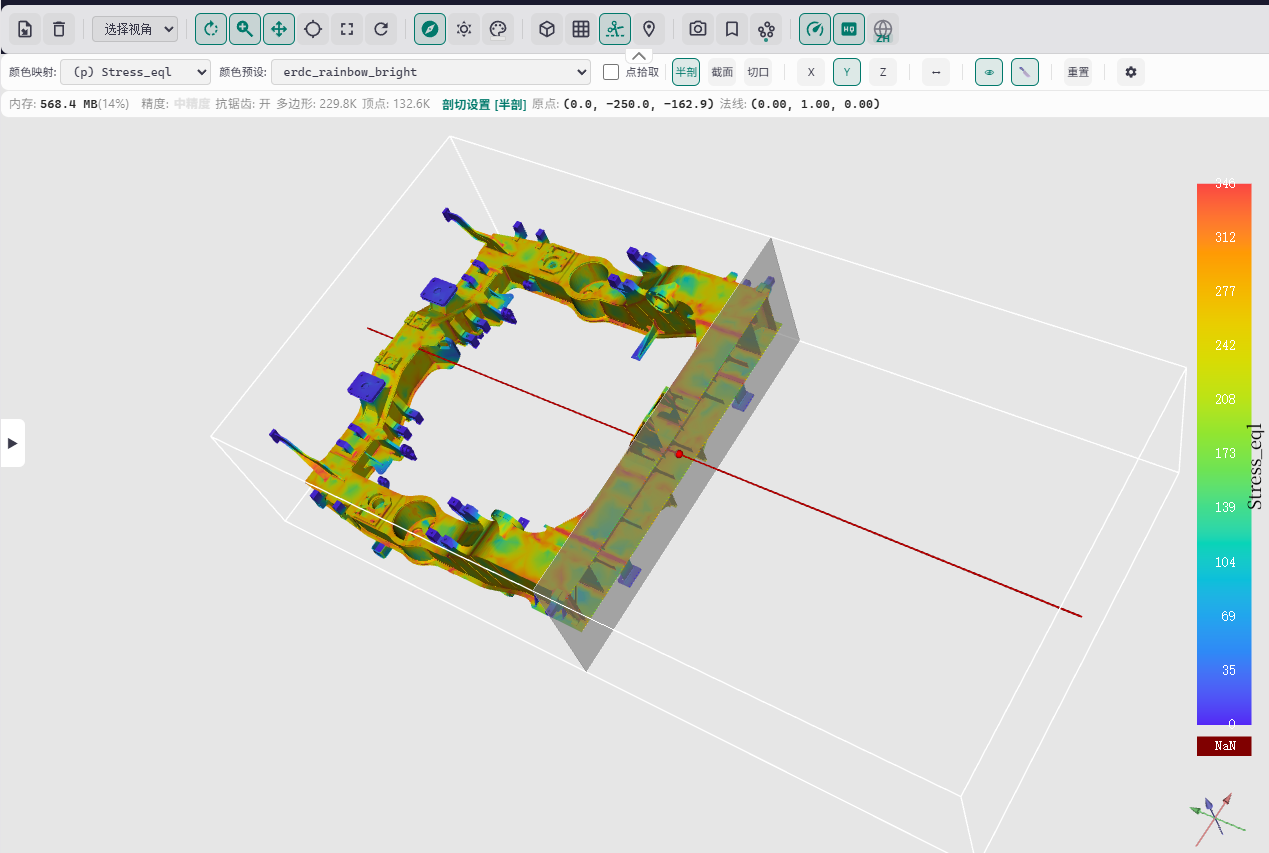
A powerful Vue 3 component based on VTK.js, providing advanced 3D model visualization capabilities, supporting multiple 3D model formats, a complete toolbar plugin system, theme customization, and internationalization support (mainly implemented with AI-assisted programming).
|
|
10
|
+
|
|
11
|
+
|
|
12
|
+
|
|
13
|
+
---
|
|
14
|
+
|
|
15
|
+
## 1. Key Features
|
|
16
|
+
|
|
17
|
+
### 1.1 Core Features
|
|
18
|
+
|
|
19
|
+
- **Powerful 3D Rendering Engine**: WebGL 2.0 rendering engine based on VTK.js, supporting multiple rendering styles including surface, wireframe, and points
|
|
20
|
+
- **Multi-Format Support**: Supports 10+ 3D model formats including STL, OBJ, PLY, VTP, VTU, VTI, GLB, DRC, PDB, ZIP
|
|
21
|
+
- **Plugin Architecture**: All features implemented through plugins, supporting four major plugin types: format plugins, toolbar plugins, UI plugins, and service plugins
|
|
22
|
+
- **v-model Support**: Get internal ViewerContext via `v-model:ctx` for event listening and programmatic control
|
|
23
|
+
- **Complete Theme System**: 5 built-in themes (light/dark/ocean/forest/sunset), supporting custom themes and CSS variable overrides
|
|
24
|
+
- **Internationalization Support**: Built-in Chinese and English language packs, supporting custom translation functions and dynamic language switching
|
|
25
|
+
- **TypeScript Support**: Complete TypeScript type definitions, providing excellent development experience and type safety
|
|
26
|
+
|
|
27
|
+
### 1.2 Interaction Features
|
|
28
|
+
|
|
29
|
+
- **Mouse Interaction**: Rotate (left-click drag), Zoom (right-click/scroll wheel), Pan (middle-click/Shift+left-click)
|
|
30
|
+
- **Touch Interaction**: Pinch zoom, single-finger rotate, two-finger pan, perfect mobile support
|
|
31
|
+
- **Keyboard Shortcuts**: Customizable shortcut system (e.g., F for fullscreen, R for reset view)
|
|
32
|
+
- **Drag & Drop Loading**: Support dragging model files directly to viewport for loading
|
|
33
|
+
- **Toolbar Operations**: 20+ tools including load/unload model, view control, render style switching, clipping, measurement, screenshot, etc.
|
|
34
|
+
|
|
35
|
+
### 1.3 UI & Experience
|
|
36
|
+
|
|
37
|
+
- **Responsive Layout**: Automatic adaptation to different screen sizes (xs/sm/md/lg/xl), supporting mobile and desktop
|
|
38
|
+
- **Info Panel**: Real-time display of FPS, render time, triangle count, memory usage, etc.
|
|
39
|
+
- **Scene Tree Panel**: Visual scene structure, supporting visibility control, color modification, etc.
|
|
40
|
+
- **Loading Progress**: Elegant loading animations and progress display
|
|
41
|
+
- **Error Prompts**: User-friendly error messages and recovery suggestions
|
|
42
|
+
|
|
43
|
+
### 1.4 Advanced Features
|
|
44
|
+
|
|
45
|
+
- **Event System**: Plugin communication mechanism based on Event Bus, supporting built-in and custom events
|
|
46
|
+
- **Command System**: Unified command registration and execution mechanism, supporting shortcut binding
|
|
47
|
+
- **Clipping Function**: Supports Clip/Cut/Section three clipping modes with 3D Widget interaction
|
|
48
|
+
- **Measurement Tools**: Supports point coordinates, distance, and angle measurement modes
|
|
49
|
+
- **Color Mapping**: Supports color mapping by scalar arrays, automatically detecting the best mapping array
|
|
50
|
+
- **Animation Support**: Supports animated model formats (e.g., GLB), providing play/pause/frame jump controls
|
|
51
|
+
- **Bookmark System**: Save and restore camera views, quickly locate to interested views
|
|
52
|
+
- **Performance Monitoring**: Real-time display of FPS, render time, and other performance metrics
|
|
53
|
+
- **Screenshot Export**: Supports custom resolution, format (PNG/JPEG), and transparent background
|
|
54
|
+
|
|
55
|
+
### 1.5 Developer Friendly
|
|
56
|
+
|
|
57
|
+
- **v-model Reactivity**: Get internal context via `v-model:ctx`, `isReady` built into ctx
|
|
58
|
+
- **Plugin Development**: Complete plugin development interface and base classes, supporting rapid extension
|
|
59
|
+
- **Automatic Resource Cleanup**: Automatically release VTK.js resources when component unmounts, preventing memory leaks
|
|
60
|
+
- **Automatic Format Detection**: Supports format auto-detection based on file extension, magic numbers, and content analysis
|
|
61
|
+
- **Debug Support**: Built-in debug logging system for development and troubleshooting
|
|
62
|
+
|
|
63
|
+
---
|
|
64
|
+
|
|
65
|
+
## 2. Quick Start
|
|
66
|
+
|
|
67
|
+
### 2.1 Installation
|
|
68
|
+
|
|
69
|
+
```bash
|
|
70
|
+
# npm
|
|
71
|
+
npm install vtkviewer-vue
|
|
72
|
+
|
|
73
|
+
# pnpm
|
|
74
|
+
pnpm add vtkviewer-vue
|
|
75
|
+
|
|
76
|
+
# yarn
|
|
77
|
+
yarn add vtkviewer-vue
|
|
78
|
+
```
|
|
79
|
+
|
|
80
|
+
### 2.2 Dependencies
|
|
81
|
+
|
|
82
|
+
**Peer Dependencies**:
|
|
83
|
+
- `vue` (^3.0.0) - Required
|
|
84
|
+
|
|
85
|
+
**Core Dependencies (automatically installed)**:
|
|
86
|
+
- `@kitware/vtk.js` (^36.2.0) - VTK.js core library
|
|
87
|
+
- `events` (^3.3.0) - Event handling
|
|
88
|
+
- `fflate` (^0.8.3) - File compression/decompression
|
|
89
|
+
|
|
90
|
+
**Optional Dependencies (install as needed)**:
|
|
91
|
+
- `draco3d` (^1.5.7) - DRC format support (Draco compression)
|
|
92
|
+
|
|
93
|
+
### 2.3 Basic Usage
|
|
94
|
+
|
|
95
|
+
```vue
|
|
96
|
+
<template>
|
|
97
|
+
<div style="width: 800px; height: 600px;">
|
|
98
|
+
<VtkViewer
|
|
99
|
+
:source="modelSource"
|
|
100
|
+
source-format="stl"
|
|
101
|
+
theme="dark"
|
|
102
|
+
/>
|
|
103
|
+
</div>
|
|
104
|
+
</template>
|
|
105
|
+
|
|
106
|
+
<script setup lang="ts">
|
|
107
|
+
import { ref } from 'vue'
|
|
108
|
+
/** Import VtkViewer component, required */
|
|
109
|
+
import { VtkViewer } from 'vtkviewer-vue'
|
|
110
|
+
/** Import built-in styles, required */
|
|
111
|
+
import 'vtkviewer-vue/styles'
|
|
112
|
+
|
|
113
|
+
const modelSource = ref('/models/example.stl')
|
|
114
|
+
</script>
|
|
115
|
+
```
|
|
116
|
+
|
|
117
|
+
> **Note**: The VtkViewer component automatically manages the lifecycle of initialization and cleanup internally, no need to manually call any initialization methods.
|
|
118
|
+
|
|
119
|
+
**Parameter Description**:
|
|
120
|
+
- All parameters are optional
|
|
121
|
+
- `source`: Although optional, usually needs to be provided to display models
|
|
122
|
+
- `sourceFormat`: Optional, recommended when not using file input, helps quickly and correctly parse model format
|
|
123
|
+
- `theme`: Optional, default value is `'light'`
|
|
124
|
+
|
|
125
|
+
**Event Listening**:
|
|
126
|
+
|
|
127
|
+
VtkViewer emits events through Event Bus, not Vue custom events.
|
|
128
|
+
|
|
129
|
+
**Using `VtkViewer` Component (Recommended)**:
|
|
130
|
+
In most scenarios, you can directly use the `VtkViewer` component without manually calling `initialize()`. If you need to listen to events, you can use `v-model:ctx` to get the context:
|
|
131
|
+
|
|
132
|
+
```vue
|
|
133
|
+
<script setup lang="ts">
|
|
134
|
+
import { ref, watch } from 'vue'
|
|
135
|
+
import { VtkViewer, BuiltinEvents } from 'vtkviewer-vue'
|
|
136
|
+
|
|
137
|
+
const modelSource = ref('/models/example.stl')
|
|
138
|
+
const ctx = ref(null)
|
|
139
|
+
|
|
140
|
+
// Watch ctx changes, register events
|
|
141
|
+
watch(ctx, (newCtx) => {
|
|
142
|
+
if (newCtx) {
|
|
143
|
+
newCtx.events.on(BuiltinEvents.SCENE_LOADED, (data) => {
|
|
144
|
+
console.log('Model loaded successfully', data)
|
|
145
|
+
})
|
|
146
|
+
}
|
|
147
|
+
})
|
|
148
|
+
</script>
|
|
149
|
+
|
|
150
|
+
<template>
|
|
151
|
+
<VtkViewer v-model:ctx="ctx" :source="modelSource" />
|
|
152
|
+
</template>
|
|
153
|
+
```
|
|
154
|
+
|
|
155
|
+
### 2.4 Model Input
|
|
156
|
+
|
|
157
|
+
VtkViewer supports multiple ways of model input to adapt to different scenario requirements.
|
|
158
|
+
|
|
159
|
+
#### 2.4.1 Passing via Props (Recommended)
|
|
160
|
+
|
|
161
|
+
This is the simplest and most direct way, suitable for most scenarios.
|
|
162
|
+
|
|
163
|
+
**Supported Data Types**:
|
|
164
|
+
- **URL String**: Local path or network URL
|
|
165
|
+
- **File Object**: File object obtained from file input, drag-and-drop, etc.
|
|
166
|
+
- **ArrayBuffer**: Loaded binary data
|
|
167
|
+
- **ReadableStream**: Streaming data
|
|
168
|
+
|
|
169
|
+
**Basic Examples**:
|
|
170
|
+
|
|
171
|
+
```vue
|
|
172
|
+
<template>
|
|
173
|
+
<div style="width: 800px; height: 600px;">
|
|
174
|
+
<!-- Method 1: URL String -->
|
|
175
|
+
<VtkViewer
|
|
176
|
+
:source="'/models/example.stl'"
|
|
177
|
+
source-format="stl"
|
|
178
|
+
/>
|
|
179
|
+
|
|
180
|
+
<!-- Method 2: Reactive URL -->
|
|
181
|
+
<VtkViewer
|
|
182
|
+
:source="modelUrl"
|
|
183
|
+
:source-format="format"
|
|
184
|
+
/>
|
|
185
|
+
|
|
186
|
+
<!-- Method 3: File Object (from file input) -->
|
|
187
|
+
<input type="file" @change="handleFileSelect" />
|
|
188
|
+
<VtkViewer
|
|
189
|
+
:source="selectedFile"
|
|
190
|
+
:source-format="format"
|
|
191
|
+
/>
|
|
192
|
+
</div>
|
|
193
|
+
</template>
|
|
194
|
+
|
|
195
|
+
<script setup lang="ts">
|
|
196
|
+
import { ref } from 'vue'
|
|
197
|
+
import { VtkViewer } from 'vtkviewer-vue'
|
|
198
|
+
import 'vtkviewer-vue/styles'
|
|
199
|
+
|
|
200
|
+
const modelUrl = ref('/models/example.stl')
|
|
201
|
+
const format = ref('stl')
|
|
202
|
+
const selectedFile = ref<File | null>(null)
|
|
203
|
+
|
|
204
|
+
function handleFileSelect(event: Event) {
|
|
205
|
+
const target = event.target as HTMLInputElement
|
|
206
|
+
if (target.files && target.files[0]) {
|
|
207
|
+
selectedFile.value = target.files[0]
|
|
208
|
+
// Optional: auto-detect format from filename
|
|
209
|
+
const fileName = target.files[0].name
|
|
210
|
+
const ext = fileName.split('.').pop()?.toLowerCase()
|
|
211
|
+
format.value = ext || 'stl'
|
|
212
|
+
}
|
|
213
|
+
}
|
|
214
|
+
</script>
|
|
215
|
+
```
|
|
216
|
+
|
|
217
|
+
#### 2.4.2 Loading via Toolbar (Using Built-in Toolbar Plugin LoadModelPlugin)
|
|
218
|
+
|
|
219
|
+
VtkViewer has a built-in `LoadModelPlugin` toolbar plugin. Users can manually select and load model files by clicking the "Load Model" button on the toolbar.
|
|
220
|
+
|
|
221
|
+
**Features**:
|
|
222
|
+
- No coding required, users can freely choose files
|
|
223
|
+
- Supports all registered format plugin file types
|
|
224
|
+
- Automatic file format detection
|
|
225
|
+
|
|
226
|
+
#### 2.4.3 Loading via Drag & Drop (Using Built-in Service Plugin DragDropPlugin)
|
|
227
|
+
|
|
228
|
+
VtkViewer has a built-in `DragDropPlugin` service plugin. Users can directly drag model files to the viewer viewport to load models.
|
|
229
|
+
|
|
230
|
+
**Features**:
|
|
231
|
+
- Intuitive and easy to use, conforms to user habits
|
|
232
|
+
- Supports dragging multiple files (if plugin supports)
|
|
233
|
+
- Automatic file format detection
|
|
234
|
+
|
|
235
|
+
**Enabling Drag & Drop**:
|
|
236
|
+
|
|
237
|
+
Drag & drop is enabled by default, no additional configuration needed. If you need to disable it, you can exclude `DragDropPlugin` from the plugin configuration:
|
|
238
|
+
|
|
239
|
+
```vue
|
|
240
|
+
<script setup lang="ts">
|
|
241
|
+
import { VtkViewer, type PluginsConfig } from 'vtkviewer-vue'
|
|
242
|
+
|
|
243
|
+
const plugins: PluginsConfig = {
|
|
244
|
+
service: [
|
|
245
|
+
// Not registering DragDropPlugin disables drag & drop
|
|
246
|
+
]
|
|
247
|
+
}
|
|
248
|
+
</script>
|
|
249
|
+
|
|
250
|
+
<template>
|
|
251
|
+
<VtkViewer :plugins="plugins" />
|
|
252
|
+
</template>
|
|
253
|
+
```
|
|
254
|
+
|
|
255
|
+
#### 2.4.4 Automatic Format Detection
|
|
256
|
+
|
|
257
|
+
When `source` is a File object or URL, the component automatically detects the format from the file extension. For ArrayBuffer or ReadableStream, it's recommended to explicitly specify `sourceFormat`.
|
|
258
|
+
|
|
259
|
+
```vue
|
|
260
|
+
<template>
|
|
261
|
+
<VtkViewer
|
|
262
|
+
:source="modelData"
|
|
263
|
+
:source-format="format" <!-- For non-File/URL sources, recommend specifying format -->
|
|
264
|
+
:source-filename="'model.stl'" <!-- Optional: helps format detection -->
|
|
265
|
+
/>
|
|
266
|
+
</template>
|
|
267
|
+
```
|
|
268
|
+
|
|
269
|
+
### 2.5 Supported Formats
|
|
270
|
+
|
|
271
|
+
VtkViewer supports multiple 3D model formats, handled by corresponding plugins.
|
|
272
|
+
|
|
273
|
+
| Format | Extensions | Plugin Class | Data Type | Description |
|
|
274
|
+
|--------|------------|--------------|-----------|-------------|
|
|
275
|
+
| STL | `stl`, `stla`, `stlb` | `StlPlugin` | PolyData | 3D printing standard format, supports ASCII and binary |
|
|
276
|
+
| OBJ | `obj` | `ObjPlugin` | PolyData | Wavefront OBJ format, supports MTL materials |
|
|
277
|
+
| PLY | `ply` | `PlyPlugin` | PolyData | Stanford PLY format, supports color and texture |
|
|
278
|
+
| VTP | `vtp` | `VtpPlugin` | PolyData | VTK PolyData XML format |
|
|
279
|
+
| VTI | `vti` | `VtiPlugin` | ImageData | VTK ImageData XML format (volume rendering) |
|
|
280
|
+
| VTU | `vtu` | `VtuPlugin` | UnstructuredGrid | VTK UnstructuredGrid XML format |
|
|
281
|
+
| GLB | `glb` | `GlbPlugin` | PolyData | GL Transmission Format Binary version (no GLTF support) |
|
|
282
|
+
| DRC | `drc` | `DrcPlugin` | PolyData | Draco compressed format **(requires Draco decoder)** |
|
|
283
|
+
| PDB | `pdb` | `PdbPlugin` | Molecule | Protein Data Bank format |
|
|
284
|
+
| ZIP | `zip`, `vtkjs`, `obz` | `ZipPlugin` | Composite | Auto-detect internal formats (VTK.js ZIP, OBJ+MTL, etc.) |
|
|
285
|
+
|
|
286
|
+
**DRC Format Support**:
|
|
287
|
+
|
|
288
|
+
DRC format uses Draco compression algorithm and requires a Draco decoder to parse. VtkViewer supports two ways to load the decoder:
|
|
289
|
+
|
|
290
|
+
**Method 1: Configure decoder path via props (Recommended)**
|
|
291
|
+
|
|
292
|
+
```vue
|
|
293
|
+
<template>
|
|
294
|
+
<VtkViewer
|
|
295
|
+
:source="drcSource"
|
|
296
|
+
:decoders="{
|
|
297
|
+
draco: '/path/to/draco_decoder.js'
|
|
298
|
+
}"
|
|
299
|
+
/>
|
|
300
|
+
</template>
|
|
301
|
+
```
|
|
302
|
+
|
|
303
|
+
**Method 2: Install draco3d package**
|
|
304
|
+
|
|
305
|
+
```bash
|
|
306
|
+
pnpm add draco3d
|
|
307
|
+
```
|
|
308
|
+
|
|
309
|
+
The component will automatically find and use the decoder from the installed package.
|
|
310
|
+
|
|
311
|
+
---
|
|
312
|
+
|
|
313
|
+
## 3. Core Concepts
|
|
314
|
+
|
|
315
|
+
### 3.1 Design Architecture
|
|
316
|
+
|
|
317
|
+
VtkViewer uses a plugin-based architecture where all features are implemented through plugins.
|
|
318
|
+
|
|
319
|
+
**Core Components**:
|
|
320
|
+
- `VtkViewer`: Main Vue component, provides props interface and lifecycle management
|
|
321
|
+
- `ViewerContext` (ctx): Core context object, provides access to VTK instances, events, plugins, etc.
|
|
322
|
+
- `PluginRegistry`: Plugin registry, manages plugin registration and initialization
|
|
323
|
+
- `EventBus`: Event bus, handles communication between plugins and external code
|
|
324
|
+
|
|
325
|
+
**Plugin Types**:
|
|
326
|
+
- **Format Plugins**: Handle specific 3D model format loading and parsing
|
|
327
|
+
- **Toolbar Plugins**: Add buttons and tools to the toolbar
|
|
328
|
+
- **UI Plugins**: Add UI panels and overlays (loading, error, scene tree, etc.)
|
|
329
|
+
- **Service Plugins**: Provide background services (drag-drop, keyboard shortcuts, etc.)
|
|
330
|
+
|
|
331
|
+
### 3.2 ctx and Event Listening
|
|
332
|
+
|
|
333
|
+
`ViewerContext` is the core context object that provides access to all internal states and functions.
|
|
334
|
+
|
|
335
|
+
**Getting ctx**:
|
|
336
|
+
|
|
337
|
+
```vue
|
|
338
|
+
<script setup lang="ts">
|
|
339
|
+
import { ref, watch } from 'vue'
|
|
340
|
+
import { VtkViewer } from 'vtkviewer-vue'
|
|
341
|
+
|
|
342
|
+
const ctx = ref(null)
|
|
343
|
+
|
|
344
|
+
watch(ctx, (newCtx) => {
|
|
345
|
+
if (newCtx) {
|
|
346
|
+
// ctx is ready, you can access internal states and register events
|
|
347
|
+
console.log('Viewer ready:', newCtx.isReady)
|
|
348
|
+
}
|
|
349
|
+
})
|
|
350
|
+
</script>
|
|
351
|
+
|
|
352
|
+
<template>
|
|
353
|
+
<VtkViewer v-model:ctx="ctx" />
|
|
354
|
+
</template>
|
|
355
|
+
```
|
|
356
|
+
|
|
357
|
+
**Main Properties and Methods of ctx**:
|
|
358
|
+
|
|
359
|
+
```typescript
|
|
360
|
+
interface ViewerContext {
|
|
361
|
+
// State
|
|
362
|
+
isReady: Ref<boolean> // Whether viewer is ready
|
|
363
|
+
enableGesture: Ref<boolean> // Touch gesture control switch
|
|
364
|
+
enableKeyboard: Ref<boolean> // Keyboard control switch
|
|
365
|
+
|
|
366
|
+
// VTK instances
|
|
367
|
+
getRenderWindow(): vtkRenderWindow | null
|
|
368
|
+
getRenderer(): vtkRenderer | null
|
|
369
|
+
getInteractor(): vtkRenderWindowInteractor | null
|
|
370
|
+
|
|
371
|
+
// Events
|
|
372
|
+
events: EventBus
|
|
373
|
+
|
|
374
|
+
// Plugin registry
|
|
375
|
+
pluginRegistry: PluginRegistry
|
|
376
|
+
|
|
377
|
+
// Decoders config
|
|
378
|
+
decoders: Record<string, string>
|
|
379
|
+
}
|
|
380
|
+
```
|
|
381
|
+
|
|
382
|
+
**Built-in Events**:
|
|
383
|
+
|
|
384
|
+
```typescript
|
|
385
|
+
import { BuiltinEvents } from 'vtkviewer-vue'
|
|
386
|
+
|
|
387
|
+
// Scene loaded
|
|
388
|
+
ctx.events.on(BuiltinEvents.SCENE_LOADED, (data) => {
|
|
389
|
+
console.log('Format:', data.format)
|
|
390
|
+
console.log('Filename:', data.filename)
|
|
391
|
+
})
|
|
392
|
+
|
|
393
|
+
// Error occurred
|
|
394
|
+
ctx.events.on(BuiltinEvents.ERROR_OCCURRED, (err) => {
|
|
395
|
+
console.error('Error:', err.message)
|
|
396
|
+
})
|
|
397
|
+
|
|
398
|
+
// Tool changed
|
|
399
|
+
ctx.events.on(BuiltinEvents.TOOL_CHANGED, (data) => {
|
|
400
|
+
console.log('Tool:', data.tool)
|
|
401
|
+
console.log('Enabled:', data.enabled)
|
|
402
|
+
})
|
|
403
|
+
```
|
|
404
|
+
|
|
405
|
+
---
|
|
406
|
+
|
|
407
|
+
## 4. API Reference
|
|
408
|
+
|
|
409
|
+
### 4.1 VtkViewer Props
|
|
410
|
+
|
|
411
|
+
| Prop | Type | Default | Description |
|
|
412
|
+
|------|------|---------|-------------|
|
|
413
|
+
| `source` | `VtkViewerSource` | `undefined` | Model source (URL, File, ArrayBuffer, ReadableStream) |
|
|
414
|
+
| `sourceFormat` | `string` | `undefined` | Explicitly specify model format |
|
|
415
|
+
| `sourceFilename` | `string` | `undefined` | Filename to help format detection |
|
|
416
|
+
| `theme` | `string` | `'light'` | Theme name |
|
|
417
|
+
| `customThemes` | `Record<string, ThemeConfig>` | `{}` | Custom theme configurations |
|
|
418
|
+
| `background` | `string` | `'#e6e6e6'` | Background color (CSS color value) |
|
|
419
|
+
| `toolbar` | `boolean` | `true` | Whether to show toolbar |
|
|
420
|
+
| `infoPanel` | `boolean` | `true` | Whether to show info panel |
|
|
421
|
+
| `plugins` | `PluginsConfig` | `undefined` | Plugin configuration |
|
|
422
|
+
| `decoders` | `Record<string, string>` | `{}` | Decoder paths configuration |
|
|
423
|
+
| `debug` | `boolean` | `false` | Enable debug logging |
|
|
424
|
+
| `enableGesture` | `boolean` | `true` | Enable touch gesture control |
|
|
425
|
+
| `enableKeyboard` | `boolean` | `true` | Enable keyboard control (shortcuts) |
|
|
426
|
+
| `v-model:ctx` | `ViewerContext` | `undefined` | Two-way binding for ctx |
|
|
427
|
+
|
|
428
|
+
### 4.2 Plugin Configuration: PluginsConfig
|
|
429
|
+
|
|
430
|
+
```typescript
|
|
431
|
+
interface PluginsConfig {
|
|
432
|
+
format?: (FormatPlugin | [FormatPlugin, FormatPluginConfig])[]
|
|
433
|
+
toolbar?: (IToolbarPlugin | [IToolbarPlugin, ToolbarPluginConfig])[]
|
|
434
|
+
ui?: (UIPlugin | [UIPlugin, UIPluginConfig])[]
|
|
435
|
+
service?: (ServicePlugin | [ServicePlugin, ServicePluginConfig])[]
|
|
436
|
+
}
|
|
437
|
+
```
|
|
438
|
+
|
|
439
|
+
**Usage Example**:
|
|
440
|
+
|
|
441
|
+
```vue
|
|
442
|
+
<script setup lang="ts">
|
|
443
|
+
import { VtkViewer, type PluginsConfig } from 'vtkviewer-vue'
|
|
444
|
+
import { StlPlugin, ObjPlugin } from 'vtkviewer-vue/plugins/format'
|
|
445
|
+
import { RotatePlugin, ZoomPlugin } from 'vtkviewer-vue/plugins/toolbar'
|
|
446
|
+
|
|
447
|
+
const plugins: PluginsConfig = {
|
|
448
|
+
format: [StlPlugin, ObjPlugin],
|
|
449
|
+
toolbar: [
|
|
450
|
+
RotatePlugin,
|
|
451
|
+
ZoomPlugin,
|
|
452
|
+
// With config
|
|
453
|
+
[RotatePlugin, { group: 'control' }]
|
|
454
|
+
]
|
|
455
|
+
}
|
|
456
|
+
</script>
|
|
457
|
+
|
|
458
|
+
<template>
|
|
459
|
+
<VtkViewer :plugins="plugins" />
|
|
460
|
+
</template>
|
|
461
|
+
```
|
|
462
|
+
|
|
463
|
+
---
|
|
464
|
+
|
|
465
|
+
## 5. Plugin System
|
|
466
|
+
|
|
467
|
+
### 5.1 Plugin Mechanism and Configuration
|
|
468
|
+
|
|
469
|
+
VtkViewer's plugin system is designed to be flexible and extensible.
|
|
470
|
+
|
|
471
|
+
**Plugin Registration Order**:
|
|
472
|
+
1. Default plugins (lowest priority)
|
|
473
|
+
2. `useViewer()` config plugins
|
|
474
|
+
3. `VtkViewer` props.plugins (highest priority)
|
|
475
|
+
|
|
476
|
+
Later registrations override earlier ones of the same type.
|
|
477
|
+
|
|
478
|
+
**Disabling Default Plugins**:
|
|
479
|
+
|
|
480
|
+
```vue
|
|
481
|
+
<script setup lang="ts">
|
|
482
|
+
import { VtkViewer, type PluginsConfig } from 'vtkviewer-vue'
|
|
483
|
+
|
|
484
|
+
// Only register specific plugins, disabling all defaults
|
|
485
|
+
const plugins: PluginsConfig = {
|
|
486
|
+
format: [/* your format plugins */],
|
|
487
|
+
toolbar: [/* your toolbar plugins */],
|
|
488
|
+
ui: [], // No UI plugins
|
|
489
|
+
service: [] // No service plugins
|
|
490
|
+
}
|
|
491
|
+
</script>
|
|
492
|
+
|
|
493
|
+
<template>
|
|
494
|
+
<VtkViewer :plugins="plugins" />
|
|
495
|
+
</template>
|
|
496
|
+
```
|
|
497
|
+
|
|
498
|
+
### 5.2 Plugin Development Guide
|
|
499
|
+
|
|
500
|
+
Creating a custom plugin involves implementing the corresponding plugin interface.
|
|
501
|
+
|
|
502
|
+
**Toolbar Plugin Example**:
|
|
503
|
+
|
|
504
|
+
```typescript
|
|
505
|
+
import { PluginBase } from '@/plugins/core/PluginBase'
|
|
506
|
+
import type { IToolbarPlugin, ToolbarPluginConfig } from '@/plugins/types'
|
|
507
|
+
import { h } from 'vue'
|
|
508
|
+
|
|
509
|
+
export interface MyPluginConfig extends ToolbarPluginConfig {
|
|
510
|
+
group?: string
|
|
511
|
+
}
|
|
512
|
+
|
|
513
|
+
export class MyPlugin extends PluginBase implements IToolbarPlugin {
|
|
514
|
+
static pluginName = 'MyPlugin'
|
|
515
|
+
static pluginType = PluginType.TOOLBAR
|
|
516
|
+
|
|
517
|
+
private group = 'tools'
|
|
518
|
+
|
|
519
|
+
configure(config: MyPluginConfig): void {
|
|
520
|
+
if (config.group) {
|
|
521
|
+
this.group = config.group
|
|
522
|
+
}
|
|
523
|
+
}
|
|
524
|
+
|
|
525
|
+
render(isActive: Ref<boolean>) {
|
|
526
|
+
return h('button', {
|
|
527
|
+
class: 'iimm-vtk-toolbar-item',
|
|
528
|
+
onClick: () => this.onClick()
|
|
529
|
+
}, 'My Tool')
|
|
530
|
+
}
|
|
531
|
+
|
|
532
|
+
private onClick() {
|
|
533
|
+
console.log('My plugin clicked!')
|
|
534
|
+
}
|
|
535
|
+
}
|
|
536
|
+
```
|
|
537
|
+
|
|
538
|
+
---
|
|
539
|
+
|
|
540
|
+
## 6. Internationalization & Language Switching
|
|
541
|
+
|
|
542
|
+
### 6.1 Built-in Languages
|
|
543
|
+
|
|
544
|
+
VtkViewer has built-in support for:
|
|
545
|
+
- Chinese (`zh`)
|
|
546
|
+
- English (`en`)
|
|
547
|
+
|
|
548
|
+
### 6.2 Basic Usage
|
|
549
|
+
|
|
550
|
+
```vue
|
|
551
|
+
<script setup lang="ts">
|
|
552
|
+
import { ref } from 'vue'
|
|
553
|
+
import { VtkViewer } from 'vtkviewer-vue'
|
|
554
|
+
</script>
|
|
555
|
+
|
|
556
|
+
<template>
|
|
557
|
+
<VtkViewer locale="en" />
|
|
558
|
+
</template>
|
|
559
|
+
```
|
|
560
|
+
|
|
561
|
+
### 6.3 Inject Custom Translation Function
|
|
562
|
+
|
|
563
|
+
```vue
|
|
564
|
+
<script setup lang="ts">
|
|
565
|
+
import { VtkViewer } from 'vtkviewer-vue'
|
|
566
|
+
|
|
567
|
+
const customTranslate = (key: string, params?: Record<string, string>) => {
|
|
568
|
+
// Your custom translation logic
|
|
569
|
+
return key
|
|
570
|
+
}
|
|
571
|
+
</script>
|
|
572
|
+
|
|
573
|
+
<template>
|
|
574
|
+
<VtkViewer :translate="customTranslate" />
|
|
575
|
+
</template>
|
|
576
|
+
```
|
|
577
|
+
|
|
578
|
+
### 6.4 Register Custom Language Pack
|
|
579
|
+
|
|
580
|
+
```typescript
|
|
581
|
+
import { i18n } from 'vtkviewer-vue'
|
|
582
|
+
|
|
583
|
+
i18n.registerLocale('ja', {
|
|
584
|
+
'vtkviewer.plugin.rotate.name': '回転',
|
|
585
|
+
'vtkviewer.plugin.zoom.name': 'ズーム',
|
|
586
|
+
// ... more translations
|
|
587
|
+
})
|
|
588
|
+
```
|
|
589
|
+
|
|
590
|
+
### 6.5 Translation Key Naming Convention
|
|
591
|
+
|
|
592
|
+
Translation keys follow the pattern:
|
|
593
|
+
```
|
|
594
|
+
vtkviewer.{category}.{name}.{property}
|
|
595
|
+
```
|
|
596
|
+
|
|
597
|
+
Examples:
|
|
598
|
+
- `vtkviewer.plugin.rotate.name` - Plugin name
|
|
599
|
+
- `vtkviewer.plugin.rotate.tooltip` - Plugin tooltip
|
|
600
|
+
- `vtkviewer.error.loadFailed` - Error message
|
|
601
|
+
|
|
602
|
+
### 6.6 Using i18n in Custom Plugins
|
|
603
|
+
|
|
604
|
+
```typescript
|
|
605
|
+
export class MyPlugin extends PluginBase {
|
|
606
|
+
init(ctx: ViewerContext): void {
|
|
607
|
+
super.init(ctx)
|
|
608
|
+
const i18n = ctx.i18n
|
|
609
|
+
|
|
610
|
+
const translatedText = i18n.translate('vtkviewer.plugin.myPlugin.name')
|
|
611
|
+
console.log(translatedText)
|
|
612
|
+
}
|
|
613
|
+
}
|
|
614
|
+
```
|
|
615
|
+
|
|
616
|
+
### 6.7 Programmatic Language Switching
|
|
617
|
+
|
|
618
|
+
```vue
|
|
619
|
+
<script setup lang="ts">
|
|
620
|
+
import { ref } from 'vue'
|
|
621
|
+
import { VtkViewer, i18n } from 'vtkviewer-vue'
|
|
622
|
+
|
|
623
|
+
const locale = ref<'zh' | 'en'>('zh')
|
|
624
|
+
|
|
625
|
+
function toggleLocale() {
|
|
626
|
+
locale.value = locale.value === 'zh' ? 'en' : 'zh'
|
|
627
|
+
i18n.setLocale(locale.value)
|
|
628
|
+
}
|
|
629
|
+
</script>
|
|
630
|
+
|
|
631
|
+
<template>
|
|
632
|
+
<button @click="toggleLocale">Switch Language</button>
|
|
633
|
+
<VtkViewer :locale="locale" />
|
|
634
|
+
</template>
|
|
635
|
+
```
|
|
636
|
+
|
|
637
|
+
---
|
|
638
|
+
|
|
639
|
+
## 7. Themes & Styling
|
|
640
|
+
|
|
641
|
+
### 7.1 Theme System
|
|
642
|
+
|
|
643
|
+
VtkViewer has 5 built-in themes:
|
|
644
|
+
- `light` - Light theme (default)
|
|
645
|
+
- `dark` - Dark theme
|
|
646
|
+
- `ocean` - Ocean blue theme
|
|
647
|
+
- `forest` - Forest green theme
|
|
648
|
+
- `sunset` - Sunset orange theme
|
|
649
|
+
|
|
650
|
+
**Usage**:
|
|
651
|
+
|
|
652
|
+
```vue
|
|
653
|
+
<template>
|
|
654
|
+
<VtkViewer theme="dark" />
|
|
655
|
+
</template>
|
|
656
|
+
```
|
|
657
|
+
|
|
658
|
+
### 7.2 Style System Design & CSS Variable Overrides
|
|
659
|
+
|
|
660
|
+
VtkViewer uses CSS Modules for style isolation and CSS variables for theming.
|
|
661
|
+
|
|
662
|
+
**Custom Theme**:
|
|
663
|
+
|
|
664
|
+
```typescript
|
|
665
|
+
const customTheme = {
|
|
666
|
+
name: 'my-theme',
|
|
667
|
+
variables: {
|
|
668
|
+
'--vtk-primary': '#ff6b6b',
|
|
669
|
+
'--vtk-background': '#1a1a2e',
|
|
670
|
+
'--vtk-text': '#e0e0e0',
|
|
671
|
+
// ... more variables
|
|
672
|
+
}
|
|
673
|
+
}
|
|
674
|
+
```
|
|
675
|
+
|
|
676
|
+
```vue
|
|
677
|
+
<template>
|
|
678
|
+
<VtkViewer :custom-themes="{ 'my-theme': customTheme }" theme="my-theme" />
|
|
679
|
+
</template>
|
|
680
|
+
```
|
|
681
|
+
|
|
682
|
+
**CSS Variable List**:
|
|
683
|
+
|
|
684
|
+
```css
|
|
685
|
+
:root {
|
|
686
|
+
/* Primary colors */
|
|
687
|
+
--vtk-primary: #64ffda;
|
|
688
|
+
--vtk-primary-hover: #4cdbb5;
|
|
689
|
+
|
|
690
|
+
/* Background colors */
|
|
691
|
+
--vtk-bg-primary: #ffffff;
|
|
692
|
+
--vtk-bg-secondary: #f5f5f5;
|
|
693
|
+
--vtk-bg-tertiary: #e0e0e0;
|
|
694
|
+
|
|
695
|
+
/* Text colors */
|
|
696
|
+
--vtk-text-primary: #333333;
|
|
697
|
+
--vtk-text-secondary: #666666;
|
|
698
|
+
--vtk-text-disabled: #999999;
|
|
699
|
+
|
|
700
|
+
/* Toolbar */
|
|
701
|
+
--vtk-toolbar-bg: rgba(255, 255, 255, 0.95);
|
|
702
|
+
--vtk-toolbar-border: rgba(0, 0, 0, 0.1);
|
|
703
|
+
|
|
704
|
+
/* Info panel */
|
|
705
|
+
--vtk-info-bg: rgba(0, 0, 0, 0.7);
|
|
706
|
+
--vtk-info-text: #ffffff;
|
|
707
|
+
|
|
708
|
+
/* Shadows */
|
|
709
|
+
--vtk-shadow-sm: 0 1px 3px rgba(0, 0, 0, 0.1);
|
|
710
|
+
--vtk-shadow-md: 0 4px 6px rgba(0, 0, 0, 0.1);
|
|
711
|
+
--vtk-shadow-lg: 0 10px 20px rgba(0, 0, 0, 0.15);
|
|
712
|
+
}
|
|
713
|
+
```
|
|
714
|
+
|
|
715
|
+
---
|
|
716
|
+
|
|
717
|
+
## 8. More Resources
|
|
718
|
+
|
|
719
|
+
- **GitHub Repository**: https://github.com/liudichen/vtkviewer-vue
|
|
720
|
+
- **Online Demo**: https://vtkviewer-demo.vercel.app
|
|
721
|
+
- **VTK.js Documentation**: https://vtkjs.readthedocs.io
|
|
722
|
+
- **Issue Tracker**: https://github.com/liudichen/vtkviewer-vue/issues
|
|
723
|
+
|
|
724
|
+
---
|
|
725
|
+
|
|
726
|
+
## 9. Contributing
|
|
727
|
+
|
|
728
|
+
Contributions are welcome! Please feel free to submit a Pull Request.
|
|
729
|
+
|
|
730
|
+
**Development Setup**:
|
|
731
|
+
|
|
732
|
+
```bash
|
|
733
|
+
# Clone the repository
|
|
734
|
+
git clone https://github.com/liudichen/vtkviewer-vue.git
|
|
735
|
+
|
|
736
|
+
# Install dependencies
|
|
737
|
+
pnpm install
|
|
738
|
+
|
|
739
|
+
# Start development server
|
|
740
|
+
pnpm run dev
|
|
741
|
+
|
|
742
|
+
# Build library
|
|
743
|
+
pnpm run build:lib
|
|
744
|
+
|
|
745
|
+
# Run tests
|
|
746
|
+
pnpm run test
|
|
747
|
+
```
|
|
748
|
+
|
|
749
|
+
---
|
|
750
|
+
|
|
751
|
+
## 10. License
|
|
752
|
+
|
|
753
|
+
This project is licensed under the MIT License - see the [LICENSE](LICENSE) file for details.
|